EP2262191A1 - Mobiles Endgerät und Verwaltungsverfahren für E-Mail dafür - Google Patents
Mobiles Endgerät und Verwaltungsverfahren für E-Mail dafür Download PDFInfo
- Publication number
- EP2262191A1 EP2262191A1 EP10164911A EP10164911A EP2262191A1 EP 2262191 A1 EP2262191 A1 EP 2262191A1 EP 10164911 A EP10164911 A EP 10164911A EP 10164911 A EP10164911 A EP 10164911A EP 2262191 A1 EP2262191 A1 EP 2262191A1
- Authority
- EP
- European Patent Office
- Prior art keywords
- account
- mobile terminal
- controller
- list
- Prior art date
- Legal status (The legal status is an assumption and is not a legal conclusion. Google has not performed a legal analysis and makes no representation as to the accuracy of the status listed.)
- Ceased
Links
Images




Classifications
-
- H—ELECTRICITY
- H04—ELECTRIC COMMUNICATION TECHNIQUE
- H04M—TELEPHONIC COMMUNICATION
- H04M1/00—Substation equipment, e.g. for use by subscribers
- H04M1/72—Mobile telephones; Cordless telephones, i.e. devices for establishing wireless links to base stations without route selection
- H04M1/724—User interfaces specially adapted for cordless or mobile telephones
- H04M1/72403—User interfaces specially adapted for cordless or mobile telephones with means for local support of applications that increase the functionality
- H04M1/7243—User interfaces specially adapted for cordless or mobile telephones with means for local support of applications that increase the functionality with interactive means for internal management of messages
- H04M1/72436—User interfaces specially adapted for cordless or mobile telephones with means for local support of applications that increase the functionality with interactive means for internal management of messages for text messaging, e.g. short messaging services [SMS] or e-mails
-
- H—ELECTRICITY
- H04—ELECTRIC COMMUNICATION TECHNIQUE
- H04L—TRANSMISSION OF DIGITAL INFORMATION, e.g. TELEGRAPHIC COMMUNICATION
- H04L51/00—User-to-user messaging in packet-switching networks, transmitted according to store-and-forward or real-time protocols, e.g. e-mail
- H04L51/58—Message adaptation for wireless communication
-
- G—PHYSICS
- G06—COMPUTING OR CALCULATING; COUNTING
- G06Q—INFORMATION AND COMMUNICATION TECHNOLOGY [ICT] SPECIALLY ADAPTED FOR ADMINISTRATIVE, COMMERCIAL, FINANCIAL, MANAGERIAL OR SUPERVISORY PURPOSES; SYSTEMS OR METHODS SPECIALLY ADAPTED FOR ADMINISTRATIVE, COMMERCIAL, FINANCIAL, MANAGERIAL OR SUPERVISORY PURPOSES, NOT OTHERWISE PROVIDED FOR
- G06Q10/00—Administration; Management
- G06Q10/10—Office automation; Time management
- G06Q10/107—Computer-aided management of electronic mailing [e-mailing]
-
- G—PHYSICS
- G06—COMPUTING OR CALCULATING; COUNTING
- G06Q—INFORMATION AND COMMUNICATION TECHNOLOGY [ICT] SPECIALLY ADAPTED FOR ADMINISTRATIVE, COMMERCIAL, FINANCIAL, MANAGERIAL OR SUPERVISORY PURPOSES; SYSTEMS OR METHODS SPECIALLY ADAPTED FOR ADMINISTRATIVE, COMMERCIAL, FINANCIAL, MANAGERIAL OR SUPERVISORY PURPOSES, NOT OTHERWISE PROVIDED FOR
- G06Q50/00—Information and communication technology [ICT] specially adapted for implementation of business processes of specific business sectors, e.g. utilities or tourism
- G06Q50/60—Business processes related to postal services
-
- H—ELECTRICITY
- H04—ELECTRIC COMMUNICATION TECHNIQUE
- H04L—TRANSMISSION OF DIGITAL INFORMATION, e.g. TELEGRAPHIC COMMUNICATION
- H04L51/00—User-to-user messaging in packet-switching networks, transmitted according to store-and-forward or real-time protocols, e.g. e-mail
- H04L51/48—Message addressing, e.g. address format or anonymous messages, aliases
-
- H—ELECTRICITY
- H04—ELECTRIC COMMUNICATION TECHNIQUE
- H04L—TRANSMISSION OF DIGITAL INFORMATION, e.g. TELEGRAPHIC COMMUNICATION
- H04L51/00—User-to-user messaging in packet-switching networks, transmitted according to store-and-forward or real-time protocols, e.g. e-mail
- H04L51/56—Unified messaging, e.g. interactions between e-mail, instant messaging or converged IP messaging [CPM]
-
- H—ELECTRICITY
- H04—ELECTRIC COMMUNICATION TECHNIQUE
- H04W—WIRELESS COMMUNICATION NETWORKS
- H04W4/00—Services specially adapted for wireless communication networks; Facilities therefor
-
- H—ELECTRICITY
- H04—ELECTRIC COMMUNICATION TECHNIQUE
- H04M—TELEPHONIC COMMUNICATION
- H04M2250/00—Details of telephonic subscriber devices
- H04M2250/22—Details of telephonic subscriber devices including a touch pad, a touch sensor or a touch detector
Definitions
- Terminals such as personal computers, notebook computers, mobile phones, and the like may be configured to perform various functions. Examples of such functions of terminals may include a data and voice communication function, a function of capturing images or video through a camera, a voice storage function, a function of reproducing music files through a speaker system, a function of displaying images or video, and the like. Some terminals include an additional function of playing games, while other terminals are implemented as multimedia players. Recently, terminals receive a broadcast or multicast signal to allow users to view video or television programs.
- terminals may be divided into a mobile terminal and stationary terminal according to whether or not terminals are movable.
- mobile terminals may be divided into a handheld terminal and a vehicle mount terminal according to whether or not users can directly carry it around.
- one object is to provide a mobile terminal capable of managing a plurality of e-mail accounts, and a method for managing e-mails of the mobile terminal.
- Another object of the present invention is to provide a mobile terminal providing a user interface for changing between e-mail accounts, and a method for managing e-mails of the mobile terminal.
- the present invention provides in one aspect a method for managing e-mails of a mobile terminal, including: executing an e-mail function; when the e-mail function is executed, displaying a mail account list including two or more mail accounts; when a first account on the mail account list is selected, providing an e-mail service of the selected first account; receiving a request for changing to a second account that uses a mail service whose method for accessing a received mail is different from that of the first account; changing from the first account to the second account according to the account changing request; and providing an e-mail service of the changed second account.
- the present invention provides in another aspect a method for managing e-mails of a mobile terminal, including: checking a mail received by a first account; detecting an account changing request while a return mail of the received mail is being created; when the account changing request is detected, displaying a previously registered account list; selecting a second account that uses a mail service whose method for accessing a received mail is different from that of the first account from the display account list; changing to the selected second account; and when creating of the return mail is completed, transmitting the created return mail through the changed second account.
- the present invention provides in still another aspect a mobile terminal including: a wireless communication unit configured to transmit or receive an e-mail through one of a plurality of previously registered accounts; and a controller configured to provide an e-mail service of a second account that uses a mail service whose method for accessing a received mail is different from that of a first account, when changing to the second account is requested while an e-mail service of the first account, among the plurality of accounts is in use.
- a single mobile terminal can manage a plurality of e-mail accounts.
- a return mail with respect to an e-mail which has been received by a particular account can be transmitted through a different account through the account changing interface.
- the mobile terminal described in the present invention may include mobile phones, smart phones, notebook computers, digital broadcast receivers, PDAs (Personal Digital Assistants), PMPs (Portable Multimedia Player), navigation devices, and the like. It would be understood by a person in the art that the configuration according to the embodiments of the present invention can be also applicable to the fixed types of terminals such as digital TVs, desk top computers, or the like, except for any elements especially configured for a mobile purpose.
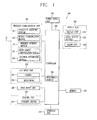
- FIG. 1 is a block diagram of a mobile terminal according to an embodiment of the present invention.
- the mobile terminal 100 may include a wireless communication unit 110, an A/V (Audio/Video) input unit 120, a user input unit 130, a sensing unit 140, an output unit 150, a memory 160, an interface unit 170, a controller 180, and a power supply unit 190, etc.
- FIG. 1 shows the mobile terminal as having various components, but it should be understood that implementing all of the illustrated components is not a requirement. Greater or fewer components may alternatively be implemented.
- the wireless communication unit 110 typically includes one or more components allowing radio communication between the mobile terminal 100 and a wireless communication system or a network in which the mobile terminal is located.
- the wireless communication unit may include at least one of a broadcast receiving module 111, a mobile communication module 112, a wireless Internet module 113, a short-range communication module 114, and a location information module 115.
- the broadcast receiving module 111 receives broadcast signals and/or broadcast associated information from an external broadcast management server (or other network entity) via a broadcast channel.
- the broadcast channel may include a satellite channel and/or a terrestrial channel.
- the broadcast management server may be a server that generates and transmits a broadcast signal and/or broadcast associated information or a server that receives a previously generated broadcast signal and/or broadcast associated information and transmits the same to a terminal.
- the broadcast signal may include a TV broadcast signal, a radio broadcast signal, a data broadcast signal, and the like. Also, the broadcast signal may further include a broadcast signal combined with a TV or radio broadcast signal.
- the broadcast associated information may refer to information associated with a broadcast channel, a broadcast program or a broadcast service provider.
- the broadcast associated information may also be provided via a mobile communication network and, in this case, the broadcast associated information may be received by the mobile communication module 112.
- the broadcast signal may exist in various forms. For example, it may exist in the form of an electronic program guide (EPG) of digital multimedia broadcasting (DMB), electronic service guide (ESG) of digital video broadcast-handheld (DVB-H), and the like.
- EPG electronic program guide
- DMB digital multimedia broadcasting
- ESG electronic service guide
- DVB-H digital video broadcast-handheld
- the broadcast receiving module 111 may be configured to receive signals broadcast by using various types of broadcast systems.
- the broadcast receiving module 111 may receive a digital broadcast by using a digital broadcast system such as multimedia broadcasting-terrestrial (DMB-T), digital multimedia broadcasting-satellite (DMB-S), digital video broadcast-handheld (DVB-H), the data broadcasting system known as media forward link only (MediaFLO ® ), integrated services digital broadcast-terrestrial (ISDB-T), etc.
- the broadcast receiving module 111 may be configured to be suitable for every broadcast system that provides a broadcast signal as well as the above-mentioned digital broadcast systems.
- Broadcast signals and/or broadcast-associated information received via the broadcast receiving module 111 may be stored in the memory 160 (or anther type of storage medium).
- the mobile communication module 112 transmits and/or receives radio signals to and/or from at least one of a base station (e.g., access point, Node B, etc.), an external terminal (e.g., other user devices) and a server (or other network entities).
- a base station e.g., access point, Node B, etc.
- an external terminal e.g., other user devices
- a server or other network entities.
- radio signals may include a voice call signal, a video call signal or various types of data according to text and/or multimedia message transmission and/or reception.
- the wireless Internet module 113 supports wireless Internet access for the mobile terminal. This module may be internally or externally coupled to the terminal.
- the wireless Internet access technique implemented may include a WLAN (Wireless LAN) (Wi-Fi), Wibro (Wireless broadband), Wimax (World Interoperability for Microwave Access), HSDPA (High Speed Downlink Packet Access), or the like.
- the short-range communication module 114 is a module for supporting short range communications.
- Some examples of short-range communication technology include Bluetooth TM , Radio Frequency IDentification (RFID), Infrared Data Association (IrDA), Ultra-WideBand (UWB), ZigBee TM , and the like.
- the location information module 115 is a module for checking or acquiring a location (or position) of the mobile terminal.
- a typical example of the location information module is a GPS (Global Positioning System).
- the A/V input unit 120 is configured to receive an audio or video signal.
- the A/V input unit 120 may include a camera 121 (or other image capture device) and a microphone 122 (or other sound pick-up device).
- the camera 121 processes image data of still pictures or video obtained by an image capture device in a video capturing mode or an image capturing mode.
- the processed image frames may be displayed on a display unit 151 (or other visual output device).
- the image frames processed by the camera 121 may be stored in the memory 160 (or other storage medium) or transmitted via the wireless communication unit 110. Two or more cameras 121 may be provided according to the configuration of the mobile terminal.
- the microphone 122 may receive sounds (audible data) via a microphone (or the like) in a phone call mode, a recording mode, a voice recognition mode, and the like, and can process such sounds into audio data.
- the processed audio (voice) data may be converted for output into a format transmittable to a mobile communication base station (or other network entity) via the mobile communication module 112 in case of the phone call mode.
- the microphone 122 may implement various types of noise canceling (or suppression) algorithms to cancel (or suppress) noise or interference generated in the course of receiving and transmitting audio signals.
- the sensing unit 140 detects a current status (or state) of the mobile terminal 100 such as an opened or closed state of the mobile terminal 100, a location of the mobile terminal 100, the presence or absence of user contact with the mobile terminal 100 (i.e., touch inputs), the orientation of the mobile terminal 100, an acceleration or deceleration movement and direction of the mobile terminal 100, etc., and generates commands or signals for controlling the operation of the mobile terminal 100.
- a current status or state
- the sensing unit 140 may sense whether the slide phone is opened or closed.
- the sensing unit 140 can detect whether or not the power supply unit 190 supplies power or whether or not the interface unit 170 is coupled with an external device.
- the sensing unit 140 may include a proximity sensor 141.
- the output unit 150 is configured to provide outputs in a visual, audible, and/or tactile manner (e.g., audio signal, video signal, alarm signal, vibration signal, etc.).
- the output unit 150 may include the display unit 151, an audio output module 152, an alarm unit 153, a haptic module, and the like.
- the display unit 151 may display (output) information processed in the mobile terminal 100.
- the display unit 151 may display a User Interface (UI) or a Graphic User Interface (GUI) associated with a call or other communication (such as text messaging, multimedia file downloading, etc.).
- UI User Interface
- GUI Graphic User Interface
- the display unit 151 may display a captured image and/or received image, a UI or GUI that shows videos or images and functions related thereto, and the like.
- the display unit 151 may include at least one of a Liquid Crystal Display (LCD), a Thin Film Transistor-LCD (TFT-LCD), an Organic Light Emitting Diode (OLED) display, a flexible display, a three-dimensional (3D) display, or the like.
- LCD Liquid Crystal Display
- TFT-LCD Thin Film Transistor-LCD
- OLED Organic Light Emitting Diode
- flexible display a three-dimensional (3D) display, or the like.
- a typical transparent display may be, for example, a TOLED (Transparent Organic Light Emitting Diode) display, or the like.
- the mobile terminal 100 may include two or more display units (or other display means) according to its particular desired embodiment.
- a plurality of display units may be separately or integrally disposed on one surface of the mobile terminal, or may be separately disposed on mutually different surfaces.
- the display unit 151 may function as both an input device and an output device.
- the touch sensor may have a form of a touch film, a touch sheet, a touch pad, and the like.
- the touch sensor may be configured to convert pressure applied to a particular portion of the display unit 151 or a change in the capacitance or the like generated at a particular portion of the display unit 151 into an electrical input signal.
- the touch sensor may be configured to detect the pressure when a touch is applied, as well as the touched position and area.
- a corresponding signal (signals) are transmitted to a touch controller.
- the touch controller processes the signals and transmits corresponding data to the controller 180. Accordingly, the controller 180 may recognize which portion of the display unit 151 has been touched.
- a proximity sensor 141 may be disposed within or near the touch screen.
- the proximity sensor 141 is a sensor for detecting the presence or absence of an object relative to a certain detection surface or an object that exists nearby by using the force of electromagnetism or infrared rays without a physical contact.
- the proximity sensor 141 has a considerably longer life span compared with a contact type sensor, and it can be utilized for various purposes.
- Examples of the proximity sensor 141 may include a transmission type photoelectric sensor, a direct reflection type photoelectric sensor, a mirror-reflection type photo sensor, an RF oscillation type proximity sensor, a capacitance type proximity sensor, a magnetic proximity sensor, an infrared proximity sensor, and the like.
- the touch screen is the capacitance type
- proximity of the pointer is detected by a change in electric field according to the proximity of the pointer.
- the touch screen may be classified as a proximity sensor.
- recognition of the pointer positioned to be close to the touch screen will be called a 'proximity touch', while recognition of actual contacting of the pointer on the touch screen will be called a 'contact touch'.
- the pointer when the pointer is in the state of the proximity touch, it means that the pointer is positioned to correspond vertically to the touch screen.
- a proximity touch and a proximity touch pattern e.g., a proximity touch distance, a proximity touch speed, a proximity touch time, a proximity touch position, a proximity touch movement state, or the like
- a proximity touch and a proximity touch pattern can be detected, and information corresponding to the detected proximity touch operation and the proximity touch pattern can be outputted to the touch screen.
- the audio output module 152 may convert and output as sound audio data received from the wireless communication unit 110 or stored in the memory 160 in a call signal reception mode, a call mode, a record mode, a voice recognition mode, a broadcast reception mode, and the like. Also, the audio output module 152 may provide audible outputs related to a particular function performed by the mobile terminal 100 (e.g., a call signal reception sound, a message reception sound, etc.). The audio output module 152 may include a speaker, a buzzer, or other sound generating device.
- the alarm unit 153 may provide outputs to inform about the occurrence of an event of the mobile terminal 100. Typical events may include call reception, message reception, key signal inputs, a touch input etc. In addition to audio or video outputs, the alarm unit 153 may provide outputs in a different manner to inform about the occurrence of an event. For example, the alarm unit 153 may provide an output in the form of vibrations (or other tactile or sensible outputs). When a call, a message, or some other incoming communication is received, the alarm unit 153 may provide tactile outputs (i.e., vibrations) to inform the user thereof. By providing such tactile outputs, the user can recognize the occurrence of various events even if his mobile phone is in the user's pocket. Outputs informing about the occurrence of an event may be also provided via the display unit 151 or the audio output module 152. The display unit 151 and the audio output module 152 may be classified as a part of the alarm unit 153.
- a haptic module 154 generates various tactile effects the user may feel.
- a typical example of the tactile effects generated by the haptic module 154 is vibration.
- the strength and pattern of the haptic module 154 can be controlled. For example, different vibrations may be combined to be outputted or sequentially outputted.
- the haptic module 154 may generate various other tactile effects such as an effect by stimulation such as a pin arrangement vertically moving with respect to a contact skin, a spray force or suction force of air through a jet orifice or a suction opening, a contact on the skin, a contact of an electrode, electrostatic force, etc., an effect by reproducing the sense of cold and warmth using an element that can absorb or generate heat.
- an effect by stimulation such as a pin arrangement vertically moving with respect to a contact skin, a spray force or suction force of air through a jet orifice or a suction opening, a contact on the skin, a contact of an electrode, electrostatic force, etc.
- the haptic module 154 may be implemented to allow the user to feel a tactile effect through a muscle sensation such as fingers or arm of the user, as well as transferring the tactile effect through a direct contact. Two or more haptic modules 154 may be provided according to the configuration of the mobile terminal 100.
- the memory 160 may store software programs used for the processing and controlling operations performed by the controller 180, or may temporarily store data (e.g., a phonebook, messages, still images, video, etc.) that are inputted or outputted. In addition, the memory 160 may store data regarding various patterns of vibrations and audio signals outputted when a touch is inputted to the touch screen.
- the memory 160 may include at least one type of storage medium including a Flash memory, a hard disk, a multimedia card micro type, a card-type memory (e.g., SD or DX memory, etc), a Random Access Memory (RAM), a Static Random Access Memory (SRAM), a Read-Only Memory (ROM), an Electrically Erasable Programmable Read-Only Memory (EEPROM), a Programmable Read-Only memory (PROM), a magnetic memory, a magnetic disk, and an optical disk.
- the mobile terminal 100 may be operated in relation to a web storage device that performs the storage function of the memory 160 over the Internet.
- the interface unit 170 serves as an interface with every external device connected with the mobile terminal 100.
- the external devices may transmit data to an external device, receives and transmits power to each element of the mobile terminal 100, or transmits internal data of the mobile terminal 100 to an external device.
- the interface unit 170 may include wired or wireless headset ports, external power supply ports, wired or wireless data ports, memory card ports, ports for connecting a device having an identification module, audio input/output (I/O) ports, video I/O ports, earphone ports, or the like.
- the identification module may be a chip that stores various information for authenticating the authority of using the mobile terminal 100 and may include a user identity module (UIM), a subscriber identity module (SIM) a universal subscriber identity module (USIM), and the like.
- the device having the identification module (referred to as 'identifying device', hereinafter) may take the form of a smart card. Accordingly, the identifying device may be connected with the terminal 100 via a port.
- the interface unit 170 may serve as a passage to allow power from the cradle to be supplied therethrough to the mobile terminal 100 or may serve as a passage to allow various command signals inputted by the user from the cradle to be transferred to the mobile terminal therethrough.
- Various command signals or power inputted from the cradle may operate as signals for recognizing that the mobile terminal is properly mounted on the cradle.
- the controller 180 typically controls the general operations of the mobile terminal. For example, the controller 180 performs controlling and processing associated with voice calls, data communications, video calls, and the like.
- the controller 180 may include a multimedia module 181 for reproducing multimedia data.
- the multimedia module 181 may be configured within the controller 180 or may be configured to be separated from the controller 180.
- the controller 180 may perform a pattern recognition processing to recognize a handwriting input or a picture drawing input performed on the touch screen as characters or images, respectively.
- the controller 180 acquires current location information of the mobile terminal 100 through the location information module 115, and transmits the acquired location information to a server providing a location-based service (LBS) (referred to as an 'LBS providing server', hereinafter).
- LBS includes GyPSii, Dodgeball, Brightkite, and the like.
- the LBS providing server stores the location information received from the mobile terminal in a database to keep it.
- the controller 180 acquires current location information through the location information module 115 at every certain period and transmits the acquired location information to the LBS providing server. Alternatively, whenever there is a request from the LBS providing server, the controller 180 may acquire location information through the location information module 115 and transmits it to the LBS server.
- the power supply unit 190 receives external power or internal power and supplies appropriate power required for operating respective elements and components under the control of the controller 180.
- the embodiments described herein may be implemented by using at least one of application specific integrated circuits (ASICs), digital signal processors (DSPs), digital signal processing devices (DSPDs), programmable logic devices (PLDs), field programmable gate arrays (FPGAs), processors, controllers, micro-controllers, microprocessors, electronic units designed to perform the functions described herein. In some cases, such embodiments may be implemented by the controller 180 itself.
- ASICs application specific integrated circuits
- DSPs digital signal processors
- DSPDs digital signal processing devices
- PLDs programmable logic devices
- FPGAs field programmable gate arrays
- processors controllers, micro-controllers, microprocessors, electronic units designed to perform the functions described herein.
- controller 180 itself.
- the embodiments such as procedures or functions described herein may be implemented by separate software modules. Each software module may perform one or more functions or operations described herein.
- Software codes can be implemented by a software application written in any suitable programming language. The software codes may be stored in the memory 160 and executed by the controller 180.
- the controller 180 of the mobile terminal 100 executes an e-mail function and displays sub-menu items as shown in FIG. 2(a) .
- the controller 180 Upon checking, if there is an account which has been previously registered, the controller 180 displays a list of previously registered accounts on the display screen as shown in FIG. 2(c) .
- the controller 180 When an account addition command is inputted through the user input unit 130 on the account management screen displaying the previously registered account list, the controller 180 displays an account registration screen image allowing for registration of a new account as shown in FIG. 2(d) .
- the controller 180 registers the inputted account information.
- the controller 180 stores the inputted account information in the memory 160.
- the account information includes an account name, an ID, a password, a main server (e.g., a mail server to which an e-mail is sent, a mail server from which an e-mail is received, etc.), and the like.
- the controller 180 transmits the inputted account information to the corresponding mail server for an approval procedure.
- the mail server checks whether or not there is an account of the received account information. Here, if an approval of the account desired to be registered is rejected, the mail server transmits the approval procedure performing results along with a rejection reason to the mobile terminal 100.
- the mail server may provide a polling e-mail service using a protocol such as a post office protocol (POP) or a push e-mail service using a protocol such as an Internet message access protocol (IMAP).
- the polling e-mail service is a service allowing the terminal to access the mail server at every certain period to check whether or not there is a newly received mail. If there is a newly received mail in the mail server, the terminal downloads the corresponding mail to a mail box of the terminal.
- the push e-mail service is a service by which when the mail server receives a new mail, the mail server automatically transmits the received mail to the terminal or informs the terminal that the new mail has been received, so that the terminal can download the new mail.
- the push e-mail service allows for real time mail checking.
- the push e-mail service allows for synchronization of the mail box (or a reception box) of the terminal and the mail box of the mail server.
- the push e-mail service when the newly received mail is checked by the user via his mobile terminal, such newly received mail may be processed also in the mail server in a state of being read (i.e. the mail server also processes the newly received e-mail in its "read" state).
- the controller 180 adds the registered account to the account list. Subsequently, the controller 180 may display the updated account list or display the registered account information to allow the user to confirm the registered account information.
- FIG. 3 is an overview of display screens illustrating a method for managing an account of the mobile terminal according to an exemplary embodiment of the present invention.
- the user selects the account management menu through menu manipulation.
- the controller 180 of the mobile terminal displays the registered account list on the display screen according to the user input as shown in FIG. 3(a) .
- the controller 180 displays the account list, it arranges the account list by an account registration date and/or an account name. Alternatively, the user may determine the arrangement order as desired.
- the controller 180 access information regarding the selected account and displays the same on the display screen as shown in FIG. 3(b) .
- the user may input an editing command through the user input unit 130. For example, when an editing request is inputted while the selected account information is being displayed on the display screen, the controller 180 changes the operation mode of the terminal into an editing mode in which the corresponding account information can be edited as shown in FIG. 3(c) .
- the controller 180 updates the corresponding account information with the corrected account information. For example, when the user wants to change an account name, the user may select a text box for inputting an account name in the account editing mode and inputs a new, desired account name (e.g., LGE) as shown in FIG. 3(c) . When the inputting of the new account name is completed, the user may press a storage button (e.g., the OK button) and the controller 180 stores the new account information which has been changed according to the user input in the memory 160.
- a storage button e.g., the OK button
- the controller 180 displays the new account information on the display screen for user confirmation or changes the editing screen image into an account management screen image displaying the account list as shown in FIG. 3(d) .
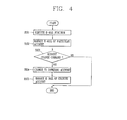
- FIG. 4 is a flow chart illustrating the process of a method for managing an e-mail of a mobile terminal according to an exemplary embodiment of the present invention.
- the sub-menu items may include a mail box list such as a sent e-mail storage (outbox), received e-mail storage (inbox), draft (temporary box), e-mail storage (saved box, folder), personal e-mail storage (personal box).
- the personal mail box may include one or more directories (folders) generated by the user.
- An e-mail of a particular account is managed by using the executed e-mail function (S102).
- the e-mail management refers to checking an e-mail received by the particular account, creating a return mail with respect to the checked e-mail, writing a new e-mail, deleting an e-mail, storing an e-mail, moving an e-mail to a different folder, delivering an e-mail, and the like.
- the controller 180 downloads mails which have been received by the mail box of the corresponding account from the mail server of the currently selected account and displays the mail list.
- the controller 180 When one of the displayed mails on the list is selected, the controller 180 displays the selected mail on the display unit 151 so that the user can read it.
- the controller 180 may download the corresponding mail text and display it.
- the controller 180 changes the account according to the inputted control command (S103 and S104). In other words, in a state that the e-mail function is executed, the controller 180 checks whether or not the account changing interface is inputted. When the account changing interface is inputted, the controller 180 recognizes the account changing request and displays a registered account list. When one of the registered accounts, using an e-mail service different from the e-mail service for the account in use, on the list is selected, the controller 180 changes to the selected account.
- the e-mail service is discriminated into the polling e-mail service and the push e-mail service according to how the received e-mails stored in the mail server are accessed.
- the user when the user wants to check a received e-mail in a B account while checking a received e-mail of an A account, the user may select a drop-down list, an account changing interface. Then, the controller 180 displays the account list registered to the drop-down list. And then, when the B account is selected from the displayed account list, the controller 180 releases the connection with a mail server of the A account and establishes a connection to a mail server of the B account.
- the mail server of the A account may support the polling mail service and the mail server of the B account may support the push mail service.
- the mail server of the A account may support the push mail service and the mail server of the B account may support the polling mail service.
- the controller 180 receives mail box information of the corresponding account from the mail server of the changed account and displays the same on the display screen (S104). Namely, the controller 180 transmits a message for requesting downloading mail box information along with the account information to the mail server of the changed account.
- the mail server performs an authentication procedure through the received account information. When the corresponding account is valid, the mail server transmits the mail box information to the mobile terminal 100 in response to the request.
- the controller 180 receives the changed mail box information from the mail server and updates the previous mail box information. In other words, the controller 180 downloads the mail received by the mail box of the mail server through the wireless communication unit 110.
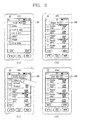
- FIG. 5 is an overview of display screens illustrating e-mail function executions of the mobile terminal according to an exemplary embodiment of the present invention.
- the controller 180 displays top menus (main menus).
- the controller 180 executes the e-mail function and displays the executed screen image on the display unit 151.
- the controller 180 executes the selected e-mail function and displays the list of previously registered accounts.
- the controller 180 drives the wireless Internet module 113 to access the mail servers of the previously registered accounts immediately when it executes the e-mail function.
- the controller 180 receives mail box information of the corresponding accounts from the mail servers through the wireless Internet module 113. And then, the controller 180 displays the mail box information together on the displayed account list. For example, as shown in FIG. 5(a) , the controller 180 displays the number of newly received mails of each account as icons 205a to 205d at one side of each name of the corresponding accounts based on the mail box information received from the mail servers of the respective accounts.
- the controller 180 of the mobile terminal 100 identifies an account set as a main account among the previously registered accounts.
- the main account may be set through menu manipulation by the user or may be set as an account which was first registered.
- the controller 180 accesses the mail server of the set account through the wireless communication unit 110. Subsequently, the controller 180 receives mail box information of the corresponding account from the mail server. When the transferring of the mail box information is completed, the controller 180 displays the total mail number 206a to 206f stored in each mail box based on the received mail box information.
- the controller 180 displays the total number of mails and/or the total number of newly received mails 206a at one side of the 'inbox' item.
- the controller 180 displays the account changing interface 200 at one side of the executed screen image displayed on the display unit 151.
- the name of the account currently displayed is displayed on the account changing interface 200.
- the controller 180 displays the executed screen image of the e-mail function which has been executed most recently. For example, when the e-mail function is terminated while the mail list stored in the reception mail box of a 'Google Mail' account, the controller 180 records information regarding the operation of the terminal executed at the point of time when the e-mail function is terminated. Thereafter, when the execution of the e-mail function is requested again, the controller 180 returns to the screen image and operational state at the point of time when the e-mail function was terminated based on the recorded information. Namely, the controller 180 displays the list of mails stored in the reception mail box of the 'Google Mail' account.
- the controller 180 accesses the mail server of the 'Google Mail' account to check whether or not there is a newly received e-mail. If there is a newly received e-mail, the controller 180 downloads it from the mail server and adds it to the reception mail list.
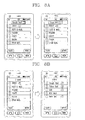
- FIG. 6 is an overview of display screens illustrating a method for checking a received e-mail of the mobile terminal according to an exemplary embodiment of the present invention.
- the controller 180 executes the e-mail function according to a user input, and displays the executed screen image on the display screen as shown in FIG. 6(a) .
- the controller 180 displays the list of e-mails received by the account selected by the user on the display screen as shown in FIG. 6(b) .
- the controller 180 accesses the mail server of the selected 'Google Mail' account through the wireless communication unit 110 and receives information regarding the mail box.
- the controller 180 displays the list of received e-mails stored in the 'Inbox' mail box based on the mail box information transferred from the mail server.
- the mail box information may include the number of e-mails, an e-mail list, e-mails(files), and the like, stored in the respective mail boxes.
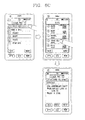
- the user may select the desired account by manipulating the account changing interface 200 as shown in FIG. 6(c) .
- the controller 180 displays the registered account list in the form of a drop-down list. Then, the user may select a desired account from among the list of the displayed accounts.
- the controller 180 changes to the selected account and displays the list of mails received by the corresponding account as shown in FIG. 6(d) .
- the controller 180 downloads the e-mails stored in the mail box from a mail server of the selected account through the wireless communication unit 110 and displays the list of the mails. Thereafter, when one of the mails on the list is selected, the controller 180 displays the selected mail on the display screen.
- FIG. 7 is an overview of display screens illustrating a method for transmitting a return e-mail of the mobile terminal according to an exemplary embodiment of the present invention.
- the user may select the reception mail box by sequentially manipulating the menus in order to check an e-mail received by a particular account.
- the controller 180 executes the e-mail function according to the user input and displays an executed screen image of the e-mail function on the display unit 151.
- the executed screen image may include the account changing interface 200, a mail creation interface 300, and a mail box list 400 as shown in FIG. 7(a) .
- the controller 180 displays the list of e-mails received by the particular account.
- the controller 180 may display every received e-mail list, and may display a folder list and an e-mail list stored in one of folders on the folder list.
- the folder may be generated through synchronization with the mail server or may be generated according to a user input via the mobile terminal 100.
- the controller 180 displays an e-mail list stored in the selected folder.
- the controller 180 accesses the selected e-mail and displays the same on the display screen.
- the controller 180 changes the operation mode to the mail creation mode in which a return mail may be created according to a user input as shown in FIG. 7(c) . Also, the controller 180 inserts data inputted from the user input unit 130 to a text input window of the mail creation screen image in the mail creation mode.
- the controller 180 sets an e-mail address of the selected account as a sender. For example, when the 'Google Mail' account is selected through the account changing interface 200 while the return mail is being created with respect to the e-mail received by an in-house mail account 'LGE', the controller 180 sets the selected account as an account to which the return mail is to be sent.
- the controller 180 transmits the created return mail through the mail server of the selected account.
- the controller 180 stores the transmitted return mail in the mail box of the selected account. Also, the controller 180 stores the transmitted return mail in the mail box of the mail server of the selected account.
- the account changing interface is separately provided to the message creation screen image.
- the present invention is not limited thereto. That is, when an area, on which sender information is displayed, which has been interrupted such that an HTML (HyperText Markup Language) editing is not possibly performed in the message creation screen image, is selected, the list of changeable accounts may be displayed on a pop-up window so that the user can select a certain account among the displayed account list.
- HTML HyperText Markup Language
- the mobile terminal 100 accesses a mail server of an account set as a representative account and downloads mails received by the mail box of the corresponding account.
- the mobile terminal 100 displays the number of newly received mails. For example, as illustrated, the mobile terminal 100 indicates the number of newly received mails at one side of the inbox item.
- the controller 180 downloads mails newly received by the mail box of the corresponding account from the mail server of the selected account and displays the number of newly received mails (not-yet-read mails).
- the controller 180 receives mail box information from the mail servers of the respective accounts registered to the mobile terminal 100 and collectively displays the received mail box information of each account. In other words, the controller 180 sequentially accesses the main servers of the accounts registered to the terminal and downloads mails received by the mail boxes of the mail servers of the accounts. And then, the controller 180 checks the number of mails received by each account, sums up the numbers of the received mails of each account to calculate the total number of the mails received by the accounts registered to the mobile terminal, and displays the same.
- One or more accounts may be registered to the mobile terminal 100, and one of the registered accounts may be set as a representative account.
- the controller 180 displays the list of previously registered accounts, checks the number of mails newly received by the respective accounts, and displays the checked number at one side of the names of the corresponding accounts.
- the controller 180 displays the list of mails received by all the accounts.
- the controller 180 may also display an icon, an indicator, or the like, indicating through which account the mails have been received, as well as the mail list.
- the controller 180 opens the selected mail and displays it on the display screen. While the mail is being displayed, if a different account is selected through the account changing interface, the controller 180 downloads mail box information of the selected account and displays it.
- the above-described method can be implemented as software codes that can be read by a computer in a program-recorded medium.
- the computer-readable medium includes various types of recording devices in which data read by a computer system is stored.
- the computer-readable medium may include a ROM, a RAM, a CD-ROM, a magnetic tape, a floppy disk, an optical data storage device, and the like.
- the computer-readable medium also includes implementations in the form of carrier waves or signals (e.g., transmission via the Internet).
- the computer may include the controller 180 of the terminal.
Landscapes
- Engineering & Computer Science (AREA)
- Business, Economics & Management (AREA)
- Signal Processing (AREA)
- Computer Networks & Wireless Communication (AREA)
- Human Resources & Organizations (AREA)
- Strategic Management (AREA)
- General Business, Economics & Management (AREA)
- Entrepreneurship & Innovation (AREA)
- General Physics & Mathematics (AREA)
- Economics (AREA)
- Marketing (AREA)
- Theoretical Computer Science (AREA)
- Tourism & Hospitality (AREA)
- Physics & Mathematics (AREA)
- Data Mining & Analysis (AREA)
- Human Computer Interaction (AREA)
- Computer Hardware Design (AREA)
- Operations Research (AREA)
- Quality & Reliability (AREA)
- Primary Health Care (AREA)
- General Health & Medical Sciences (AREA)
- Health & Medical Sciences (AREA)
- Information Transfer Between Computers (AREA)
- Telephone Function (AREA)
Applications Claiming Priority (1)
| Application Number | Priority Date | Filing Date | Title |
|---|---|---|---|
| KR1020090052053A KR101649623B1 (ko) | 2009-06-11 | 2009-06-11 | 이동단말기 및 그의 이메일 관리방법 |
Publications (1)
| Publication Number | Publication Date |
|---|---|
| EP2262191A1 true EP2262191A1 (de) | 2010-12-15 |
Family
ID=42321049
Family Applications (1)
| Application Number | Title | Priority Date | Filing Date |
|---|---|---|---|
| EP10164911A Ceased EP2262191A1 (de) | 2009-06-11 | 2010-06-04 | Mobiles Endgerät und Verwaltungsverfahren für E-Mail dafür |
Country Status (4)
| Country | Link |
|---|---|
| US (1) | US8375307B2 (de) |
| EP (1) | EP2262191A1 (de) |
| KR (1) | KR101649623B1 (de) |
| CN (2) | CN104468325A (de) |
Cited By (1)
| Publication number | Priority date | Publication date | Assignee | Title |
|---|---|---|---|---|
| CN104077679A (zh) * | 2013-03-28 | 2014-10-01 | 国际商业机器公司 | 用于管理相关帐户之间的电子邮件消息的方法和系统 |
Families Citing this family (27)
| Publication number | Priority date | Publication date | Assignee | Title |
|---|---|---|---|---|
| US9483755B2 (en) | 2008-03-04 | 2016-11-01 | Apple Inc. | Portable multifunction device, method, and graphical user interface for an email client |
| US10504066B2 (en) * | 2008-12-04 | 2019-12-10 | Microsoft Technology Licensing, Llc | Automatic discovery of alternate mailboxes |
| KR101649623B1 (ko) * | 2009-06-11 | 2016-08-19 | 엘지전자 주식회사 | 이동단말기 및 그의 이메일 관리방법 |
| JP5639511B2 (ja) * | 2011-03-18 | 2014-12-10 | 株式会社沖データ | 情報処理装置、複合装置、画像読取装置、及び情報処理方法 |
| US8572194B2 (en) | 2011-06-10 | 2013-10-29 | Microsoft Corporation | Selective linking of message accounts |
| US8930474B2 (en) * | 2012-02-20 | 2015-01-06 | Microsoft Corporation | Time-managed electronic mail messages |
| KR20140102901A (ko) * | 2013-02-15 | 2014-08-25 | 삼성전자주식회사 | 전자기기의 이메일 관리 장치 및 방법 |
| US10554608B2 (en) * | 2013-02-28 | 2020-02-04 | Oath Inc. | Method and system for displaying email messages |
| US9818122B1 (en) | 2013-03-15 | 2017-11-14 | Psi Systems, Inc. | System and method for secure sharing of postal services |
| KR102179870B1 (ko) * | 2013-11-01 | 2020-11-17 | 삼성전자주식회사 | 전자 장치 및 전자 장치에서 메시지 서비스 제공 방법 |
| US8949283B1 (en) | 2013-12-23 | 2015-02-03 | Google Inc. | Systems and methods for clustering electronic messages |
| US9015192B1 (en) | 2013-12-30 | 2015-04-21 | Google Inc. | Systems and methods for improved processing of personalized message queries |
| US9542668B2 (en) | 2013-12-30 | 2017-01-10 | Google Inc. | Systems and methods for clustering electronic messages |
| US9767189B2 (en) | 2013-12-30 | 2017-09-19 | Google Inc. | Custom electronic message presentation based on electronic message category |
| US9124546B2 (en) * | 2013-12-31 | 2015-09-01 | Google Inc. | Systems and methods for throttling display of electronic messages |
| US10033679B2 (en) | 2013-12-31 | 2018-07-24 | Google Llc | Systems and methods for displaying unseen labels in a clustering in-box environment |
| US9152307B2 (en) | 2013-12-31 | 2015-10-06 | Google Inc. | Systems and methods for simultaneously displaying clustered, in-line electronic messages in one display |
| US9306893B2 (en) | 2013-12-31 | 2016-04-05 | Google Inc. | Systems and methods for progressive message flow |
| TWI676127B (zh) | 2014-09-02 | 2019-11-01 | 美商蘋果公司 | 關於電子郵件使用者介面之方法、系統、電子器件及電腦可讀儲存媒體 |
| KR102225133B1 (ko) * | 2014-12-23 | 2021-03-09 | 엘지전자 주식회사 | 이동단말기 및 그 제어방법 |
| CN105430183B (zh) * | 2015-11-12 | 2019-02-19 | 广州华多网络科技有限公司 | 一种移动终端切换账号的方法及移动终端 |
| WO2017131248A1 (ko) * | 2016-01-27 | 2017-08-03 | 엘지전자 주식회사 | 이동단말기 및 그 제어방법 |
| CN105824498A (zh) * | 2016-01-29 | 2016-08-03 | 维沃移动通信有限公司 | 一种电子邮件应用程序的开启方法和移动终端 |
| KR102522424B1 (ko) * | 2016-08-19 | 2023-04-17 | 삼성전자주식회사 | 전자 장치에서의 표시를 위한 방법 및 장치 |
| US11675849B2 (en) | 2019-12-20 | 2023-06-13 | Rovi Guides, Inc. | Systems and methods for re-ordering feed items based on a user scroll |
| US11853308B2 (en) * | 2019-12-20 | 2023-12-26 | Rovi Guides, Inc. | Systems and methods for re-ordering social media feed items |
| DK181216B1 (en) * | 2020-06-09 | 2023-05-10 | Apple Inc | USER INTERFACES FOR MESSAGES |
Citations (3)
| Publication number | Priority date | Publication date | Assignee | Title |
|---|---|---|---|---|
| US20060009243A1 (en) * | 2004-07-07 | 2006-01-12 | At&T Wireless Services, Inc. | Always-on mobile instant messaging of a messaging centric wireless device |
| EP1775924A1 (de) * | 2005-10-14 | 2007-04-18 | Research In Motion Limited | Verwendung separater Symbole zum Aufruf eines Computerprogramms, zur Anzeige verschiedener Gruppen von in einer drahtlosen Kommunikationsvorrichtung gespeicherten dienstspezifischen E-Mail-Nachrichten |
| US20090093242A1 (en) * | 2007-05-03 | 2009-04-09 | Aniruddha Bhalekar | System and method for account setup for mobile devices, such as an e-mail account setup |
Family Cites Families (46)
| Publication number | Priority date | Publication date | Assignee | Title |
|---|---|---|---|---|
| US6778642B1 (en) * | 1999-03-23 | 2004-08-17 | Verizon Laboratories Inc. | Unified messaging system |
| US6965918B1 (en) * | 1999-04-30 | 2005-11-15 | International Business Machines Corporation | System and method for integrated management of electronic messages |
| US6360272B1 (en) * | 1999-05-28 | 2002-03-19 | Palm, Inc. | Method and apparatus for maintaining a unified view of multiple mailboxes |
| US6526413B2 (en) * | 1999-09-28 | 2003-02-25 | Microsoft Corporation | Architecture for a hierarchical folder structure in hand-held computers |
| US6871215B2 (en) * | 2000-04-11 | 2005-03-22 | Telecommunication Systems Inc. | Universal mail wireless e-mail reader |
| US6728782B1 (en) * | 2000-05-23 | 2004-04-27 | At&T Corp. | Method of verifying newly provisioned customer network route advertisements |
| US6725268B1 (en) * | 2000-08-11 | 2004-04-20 | At&T Corp. | System and method for providing status information from multiple information sources in a single display |
| US7590539B1 (en) * | 2000-06-28 | 2009-09-15 | At&T Intellectual Property I, L.P. | System and method for email notification |
| US6725228B1 (en) * | 2000-10-31 | 2004-04-20 | David Morley Clark | System for managing and organizing stored electronic messages |
| US20020091774A1 (en) * | 2001-01-08 | 2002-07-11 | Kokoro Imamura | Method and system for retrieving electronic mail for a plurality of users over a single device |
| US6981223B2 (en) * | 2001-03-19 | 2005-12-27 | Ecrio, Inc. | Method, apparatus and computer readable medium for multiple messaging session management with a graphical user interface |
| US7603379B2 (en) * | 2001-04-11 | 2009-10-13 | Lg Electronics Inc. | Unified management method of various types of messages of a personal information terminal |
| US7020687B2 (en) * | 2001-05-18 | 2006-03-28 | Nortel Networks Limited | Providing access to a plurality of e-mail and voice message accounts from a single web-based interface |
| US20030020749A1 (en) * | 2001-07-10 | 2003-01-30 | Suhayya Abu-Hakima | Concept-based message/document viewer for electronic communications and internet searching |
| US20030231207A1 (en) * | 2002-03-25 | 2003-12-18 | Baohua Huang | Personal e-mail system and method |
| US7522910B2 (en) * | 2002-05-31 | 2009-04-21 | Oracle International Corporation | Method and apparatus for controlling data provided to a mobile device |
| US7730136B2 (en) * | 2002-08-16 | 2010-06-01 | Research In Motion Limited | System and method for integrating electronic mail accounts |
| US7185059B2 (en) * | 2002-09-17 | 2007-02-27 | Bellsouth Intellectual Property Corp | Multi-system instant messaging (IM) |
| US7296241B2 (en) * | 2002-10-18 | 2007-11-13 | Microsoft Corporation | System and method for managing a message view |
| CA2666074A1 (en) * | 2002-10-31 | 2004-05-13 | Nokia Corporation | Method, server and computer readable medium for providing a computerized icon ordering service |
| US20040172456A1 (en) * | 2002-11-18 | 2004-09-02 | Green Mitchell Chapin | Enhanced buddy list interface |
| US7451218B2 (en) * | 2003-10-14 | 2008-11-11 | At&T Intellectual Property I, L.P. | Automated instant messaging state control based upon email persona utilization |
| US8108469B2 (en) * | 2003-10-14 | 2012-01-31 | At&T Intellectual Property I, L.P. | User interface for a communication suite |
| US20050080862A1 (en) * | 2003-10-14 | 2005-04-14 | Kent Larry G. | Communication suite engine |
| US8255835B2 (en) * | 2004-02-24 | 2012-08-28 | Research In Motion Limited | Method and system for managing unread electronic messages |
| US8463872B2 (en) * | 2004-07-02 | 2013-06-11 | Broadsoft Casabi, Llc | Method and apparatus for a family center |
| WO2006010156A2 (en) * | 2004-07-12 | 2006-01-26 | Cingular Wireless Ii, Llc | Dedicated wireless device business method |
| US20070088786A1 (en) * | 2005-10-14 | 2007-04-19 | Research In Motion Limited | Using separate icons for invoking a computer program for presenting distinct sets of service-specific electronic mail messages stored at a wireless communication device |
| KR101175659B1 (ko) * | 2005-12-30 | 2012-08-22 | 엘지전자 주식회사 | 이메일 서버에 따라 이동통신단말기의 프로토콜 설정 방법 |
| CN101087267B (zh) * | 2006-06-05 | 2012-10-10 | 微软公司 | 能够与移动终端通信的电子邮件处理系统及通信方法 |
| US7805489B2 (en) * | 2006-06-27 | 2010-09-28 | Research In Motion Limited | Electronic mail communications system with client email internet service provider (ISP) polling application and related methods |
| US7908647B1 (en) * | 2006-06-27 | 2011-03-15 | Confluence Commons, Inc. | Aggregation system |
| US8564544B2 (en) * | 2006-09-06 | 2013-10-22 | Apple Inc. | Touch screen device, method, and graphical user interface for customizing display of content category icons |
| US20080109552A1 (en) * | 2006-11-02 | 2008-05-08 | Hop Internet Ltd | Internet application for young children |
| ES2353225T3 (es) * | 2007-04-13 | 2011-02-28 | Research In Motion Limited | Sistema de distribuciã“n y sincronizaciã“n de correo electrã“nico (e-mail) de acceso directo con notificaciã“n de fuera de cobertura. |
| US8060634B1 (en) * | 2007-09-26 | 2011-11-15 | Google Inc. | Determining and displaying a count of unread items in content feeds |
| US20090138562A1 (en) * | 2007-11-28 | 2009-05-28 | Loyal Technology Solutions, L.L.C. | Method and system for aggregation of electronic messages |
| US9483755B2 (en) * | 2008-03-04 | 2016-11-01 | Apple Inc. | Portable multifunction device, method, and graphical user interface for an email client |
| US8201109B2 (en) * | 2008-03-04 | 2012-06-12 | Apple Inc. | Methods and graphical user interfaces for editing on a portable multifunction device |
| US8135392B2 (en) * | 2008-06-06 | 2012-03-13 | Apple Inc. | Managing notification service connections and displaying icon badges |
| US8701046B2 (en) * | 2008-06-27 | 2014-04-15 | Microsoft Corporation | Aggregate and hierarchical display of grouped items spanning multiple storage locations |
| US8504001B2 (en) * | 2008-08-12 | 2013-08-06 | Apple Inc. | Unified settings for multiple account types |
| CN101355532B (zh) * | 2008-09-19 | 2010-10-20 | 中国网通集团宽带业务应用国家工程实验室有限公司 | 电子邮件业务实现方法和邮件服务器 |
| US20100081423A1 (en) * | 2008-09-30 | 2010-04-01 | At&T Intellectual Property Ii, L.P. | Devices and Methods for Utilizing Multiple Accounts Through A Single Mobile Device |
| US8880619B2 (en) * | 2009-03-24 | 2014-11-04 | Blackberry Limited | Direct access electronic mail (email) distribution and synchronization system with trusted or verified IMAP-Idle implementation |
| KR101649623B1 (ko) * | 2009-06-11 | 2016-08-19 | 엘지전자 주식회사 | 이동단말기 및 그의 이메일 관리방법 |
-
2009
- 2009-06-11 KR KR1020090052053A patent/KR101649623B1/ko active Active
-
2010
- 2010-06-04 EP EP10164911A patent/EP2262191A1/de not_active Ceased
- 2010-06-09 CN CN201410677952.7A patent/CN104468325A/zh active Pending
- 2010-06-09 CN CN201010202501XA patent/CN101924822A/zh active Pending
- 2010-06-10 US US12/813,384 patent/US8375307B2/en active Active
Patent Citations (3)
| Publication number | Priority date | Publication date | Assignee | Title |
|---|---|---|---|---|
| US20060009243A1 (en) * | 2004-07-07 | 2006-01-12 | At&T Wireless Services, Inc. | Always-on mobile instant messaging of a messaging centric wireless device |
| EP1775924A1 (de) * | 2005-10-14 | 2007-04-18 | Research In Motion Limited | Verwendung separater Symbole zum Aufruf eines Computerprogramms, zur Anzeige verschiedener Gruppen von in einer drahtlosen Kommunikationsvorrichtung gespeicherten dienstspezifischen E-Mail-Nachrichten |
| US20090093242A1 (en) * | 2007-05-03 | 2009-04-09 | Aniruddha Bhalekar | System and method for account setup for mobile devices, such as an e-mail account setup |
Cited By (1)
| Publication number | Priority date | Publication date | Assignee | Title |
|---|---|---|---|---|
| CN104077679A (zh) * | 2013-03-28 | 2014-10-01 | 国际商业机器公司 | 用于管理相关帐户之间的电子邮件消息的方法和系统 |
Also Published As
| Publication number | Publication date |
|---|---|
| CN101924822A (zh) | 2010-12-22 |
| KR20100133258A (ko) | 2010-12-21 |
| CN104468325A (zh) | 2015-03-25 |
| KR101649623B1 (ko) | 2016-08-19 |
| US8375307B2 (en) | 2013-02-12 |
| US20100318923A1 (en) | 2010-12-16 |
Similar Documents
| Publication | Publication Date | Title |
|---|---|---|
| US8375307B2 (en) | Mobile terminal and method for managing e-mail thereof | |
| US9125017B2 (en) | Mobile terminal and schedule notifying method thereof | |
| US8874608B2 (en) | Mobile terminal and method of searching a contact in the mobile terminal | |
| EP2544431B1 (de) | Tragbare Vorrichtung, die eine Sofortnachricht anzeigt, und Steuerungsverfahren für die tragbare Vorrichtung | |
| US10949188B2 (en) | Mobile terminal and control method thereof | |
| US8332762B2 (en) | Mobile terminal and message inbox searching method thereof | |
| US9195882B2 (en) | Mobile terminal and group generating method therein | |
| US8515398B2 (en) | Mobile terminal and method for managing phone book data thereof | |
| US8456847B2 (en) | Mobile terminal | |
| US8724004B2 (en) | Mobile terminal and tag editing method thereof | |
| EP2549367A2 (de) | Mobiles Gerät und Steuerungsverfahren dafür | |
| EP2339440A2 (de) | Mobiles Endgerät und Ansteuerungsverfahren dafür | |
| US20130104032A1 (en) | Mobile terminal and method of controlling the same | |
| EP3389247A1 (de) | Mobiles endgerät und eingangsbildschirmanzeigeverfahren dafür | |
| US20110145245A1 (en) | Electronic device and method for providing information using the same | |
| US20140062926A1 (en) | Mobile terminal and control method thereof | |
| US9954998B2 (en) | Method of editing call history information in mobile device and mobile device controlling the same | |
| KR20140044618A (ko) | 이동 단말기 및 이동 단말기의 제어 방법 | |
| KR20120072953A (ko) | 이동 단말기 및 그 제어 방법 | |
| KR20100050830A (ko) | 유저 인터페이스 방법과 이를 이용한 이동 단말기 | |
| KR20110007436A (ko) | 이동 통신 단말기의 데이터 전송 방법 및 이를 적용한 이동 통신 단말기 | |
| KR20110020998A (ko) | 유저 인터페이스와 이를 이용한 이동 단말기 | |
| KR20110118025A (ko) | 이동 통신 단말기에서 사회적 네트워킹 서비스 제공방법 및 그 방법을 이용한 이동 통신 단말기 | |
| KR20130069185A (ko) | 단말기 및 그 동작 방법 | |
| KR20120009756A (ko) | 이동 단말기 및 이동 단말기의 정보 제공 방법 |
Legal Events
| Date | Code | Title | Description |
|---|---|---|---|
| PUAI | Public reference made under article 153(3) epc to a published international application that has entered the european phase |
Free format text: ORIGINAL CODE: 0009012 |
|
| 17P | Request for examination filed |
Effective date: 20100604 |
|
| AK | Designated contracting states |
Kind code of ref document: A1 Designated state(s): AL AT BE BG CH CY CZ DE DK EE ES FI FR GB GR HR HU IE IS IT LI LT LU LV MC MK MT NL NO PL PT RO SE SI SK SM TR |
|
| AX | Request for extension of the european patent |
Extension state: BA ME RS |
|
| 17Q | First examination report despatched |
Effective date: 20111028 |
|
| RAP1 | Party data changed (applicant data changed or rights of an application transferred) |
Owner name: LG ELECTRONICS INC. |
|
| STAA | Information on the status of an ep patent application or granted ep patent |
Free format text: STATUS: THE APPLICATION HAS BEEN REFUSED |
|
| 18R | Application refused |
Effective date: 20151126 |