EP2264586A2 - Verfahren und System zum Drucken von Dokumenten aus einem tragbaren Gerät - Google Patents
Verfahren und System zum Drucken von Dokumenten aus einem tragbaren Gerät Download PDFInfo
- Publication number
- EP2264586A2 EP2264586A2 EP10164684A EP10164684A EP2264586A2 EP 2264586 A2 EP2264586 A2 EP 2264586A2 EP 10164684 A EP10164684 A EP 10164684A EP 10164684 A EP10164684 A EP 10164684A EP 2264586 A2 EP2264586 A2 EP 2264586A2
- Authority
- EP
- European Patent Office
- Prior art keywords
- document
- optical code
- printer
- portable device
- code
- Prior art date
- Legal status (The legal status is an assumption and is not a legal conclusion. Google has not performed a legal analysis and makes no representation as to the accuracy of the status listed.)
- Ceased
Links
Images




Classifications
-
- G—PHYSICS
- G06—COMPUTING OR CALCULATING; COUNTING
- G06F—ELECTRIC DIGITAL DATA PROCESSING
- G06F21/00—Security arrangements for protecting computers, components thereof, programs or data against unauthorised activity
- G06F21/60—Protecting data
- G06F21/606—Protecting data by securing the transmission between two devices or processes
- G06F21/608—Secure printing
-
- G—PHYSICS
- G06—COMPUTING OR CALCULATING; COUNTING
- G06F—ELECTRIC DIGITAL DATA PROCESSING
- G06F3/00—Input arrangements for transferring data to be processed into a form capable of being handled by the computer; Output arrangements for transferring data from processing unit to output unit, e.g. interface arrangements
- G06F3/12—Digital output to print unit, e.g. line printer, chain printer
- G06F3/1201—Dedicated interfaces to print systems
- G06F3/1202—Dedicated interfaces to print systems specifically adapted to achieve a particular effect
- G06F3/1222—Increasing security of the print job
-
- G—PHYSICS
- G06—COMPUTING OR CALCULATING; COUNTING
- G06F—ELECTRIC DIGITAL DATA PROCESSING
- G06F3/00—Input arrangements for transferring data to be processed into a form capable of being handled by the computer; Output arrangements for transferring data from processing unit to output unit, e.g. interface arrangements
- G06F3/12—Digital output to print unit, e.g. line printer, chain printer
- G06F3/1201—Dedicated interfaces to print systems
- G06F3/1223—Dedicated interfaces to print systems specifically adapted to use a particular technique
- G06F3/1237—Print job management
- G06F3/1238—Secure printing, e.g. user identification, user rights for device usage, unallowed content, blanking portions or fields of a page, releasing held jobs
-
- G—PHYSICS
- G06—COMPUTING OR CALCULATING; COUNTING
- G06F—ELECTRIC DIGITAL DATA PROCESSING
- G06F3/00—Input arrangements for transferring data to be processed into a form capable of being handled by the computer; Output arrangements for transferring data from processing unit to output unit, e.g. interface arrangements
- G06F3/12—Digital output to print unit, e.g. line printer, chain printer
- G06F3/1201—Dedicated interfaces to print systems
- G06F3/1278—Dedicated interfaces to print systems specifically adapted to adopt a particular infrastructure
- G06F3/1285—Remote printer device, e.g. being remote from client or server
- G06F3/1288—Remote printer device, e.g. being remote from client or server in client-server-printer device configuration
-
- G—PHYSICS
- G06—COMPUTING OR CALCULATING; COUNTING
- G06F—ELECTRIC DIGITAL DATA PROCESSING
- G06F3/00—Input arrangements for transferring data to be processed into a form capable of being handled by the computer; Output arrangements for transferring data from processing unit to output unit, e.g. interface arrangements
- G06F3/12—Digital output to print unit, e.g. line printer, chain printer
- G06F3/1201—Dedicated interfaces to print systems
- G06F3/1278—Dedicated interfaces to print systems specifically adapted to adopt a particular infrastructure
- G06F3/1292—Mobile client, e.g. wireless printing
-
- G—PHYSICS
- G06—COMPUTING OR CALCULATING; COUNTING
- G06F—ELECTRIC DIGITAL DATA PROCESSING
- G06F9/00—Arrangements for program control, e.g. control units
- G06F9/06—Arrangements for program control, e.g. control units using stored programs, i.e. using an internal store of processing equipment to receive or retain programs
- G06F9/44—Arrangements for executing specific programs
- G06F9/448—Execution paradigms, e.g. implementations of programming paradigms
- G06F9/4494—Execution paradigms, e.g. implementations of programming paradigms data driven
Definitions
- the present disclosure relates generally to communication with peripheral devices. More specifically, the present disclosure relates to a method and system for printing documents from a portable device to any printer without discovering and loading a driver for a printer.
- the proliferation of portable devices is changing the way people work. For example, people receive emails with document attachments that can include large documents, presentation slides, and schedules. Typically, such attachments are difficult to read on the portable device because of limited screen sizes. At the same time, printing from the portable device is difficult for several reasons.
- the portable device might not have enough memory or computing power to support printer drivers. A printer driver designed for the operating system on the portable device might not be available.
- the portable device is often required to discover nearby printers in a new environment, which can be time-consuming and might not always be successful. Furthermore, the portable device might not have secure network access to the printer, thus introducing security concerns in the printing process.
- One embodiment provides a system for printing a document from a portable device. During operation, the system obtains the document to be printed. Next, the system obtains a document optical code that identifies the document. Subsequently, the system displays the document optical code on the portable device in such a way that the document optical code can be scanned and recognized by a scanner associated with the printer. Next, the system allows the printer to retrieve and print the document based at least on the document optical code.
- the document is stored in a repository
- the document optical code indicates a location in the repository corresponding to the document
- the printer or a computer associated with the printer retrieves the document using the location indicated in the document optical code
- the repository is hosted on the portable device or on a remote server.
- the document optical code includes a one-time-use optical code generated based at least on a user identifier and a document identifier.
- the document optical code indicates a decryption key
- the printer or a computer associated with the printer decrypts the document using the decryption key after retrieving the document
- printing a document from a portable device involves receiving a printer optical code which identifies a printer, and sending the printer optical code and the document optical code to a server, which stores a copy of the document, thereby allowing the server to send the document to the printer for printing.
- obtaining the document optical code involves receiving the document optical code as an attachment in an email message.
- obtaining the document optical code involves generating the document optical code at the portable device.
- the document optical code is a two-dimensional bar code.
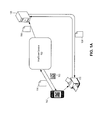
- FIG. 1A illustrates an exemplary system for printing documents from a portable device in accordance with an embodiment of the present invention.
- FIG. 1B illustrates an exemplary system for printing email attachments from a portable device in accordance with an embodiment of the present invention.
- FIG. 2 presents a flow chart illustrating the process of printing email attachments from a portable device in accordance with an embodiment of the present invention.
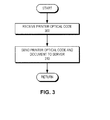
- FIG. 3 presents a flow chart illustrating the process of receiving a printer optical code which identifies a printer and sending the printer optical code and document in accordance with an embodiment of the present invention.
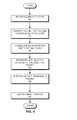
- FIG. 4 presents a flow chart illustrating the process of facilitating document printing from a portable device in accordance with an embodiment of the present invention.
- FIG. 5 illustrates the process of controlling access to the document in accordance with an embodiment of the present invention.
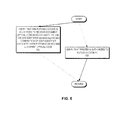
- FIG. 6 presents a flow chart illustrating the process of facilitating document printing from a portable device in accordance with an embodiment of the present invention.
- FIG. 7 presents a flow chart illustrating the process of receiving a request from the printer to retrieve a document corresponding to the document optical code and sending the document to the printer in response to the request, in accordance with an embodiment of the present invention.
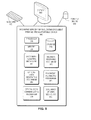
- FIG. 8 illustrates an exemplary portable device for printing a document from a portable device in accordance with an embodiment of the present invention.
- FIG. 9 illustrates an exemplary document server for facilitating document printing from a portable device in accordance with an embodiment of the present invention.
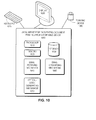
- FIG. 10 illustrates an exemplary email server for facilitating document printing from a portable device in accordance with an embodiment of the present invention.
- Embodiments of the present invention solve the problem of printing a document from a portable device by obtaining and displaying a document optical code (e.g., a PrintTicket) at the portable device.
- a document optical code e.g., a PrintTicket
- the user can display the optical code to a scanner associated with a printer, which in turn can scan and recognize the optical code.
- the printer or a computer associated with the printer
- the printer can then retrieve the document from a server on a network and print the document.
- FIG. 1A illustrates an exemplary system for printing documents from a portable device in accordance with an embodiment.
- a portable device 162 has a document 164 to print.
- portable device 162 first sends document 164 to a PrintTicket service 160.
- PrintTicket service 160 forwards document 164 to a document hosting server 168, which stores document 164 for subsequent retrieval.
- PrintTicket service 160 then generates an optical code 166, which indicates the location of document 164 on server 168.
- Optical code 166 is then transmitted to portable device 162.
- an optical code can be any optical representation of information that can be captured and recognized by any optical-sensing device, such as scanners or digital cameras.
- Typical optical codes include, but are not limited to: one-dimensional bar codes, two-dimensional bar codes (also called matrix codes, such as the "Quick Response" or "QR" codes), and data glyphs.
- the user of portable device 162 can then display optical code 166 to a scanner associated with a printer 170.
- printer 170 determines the location of document 164, retrieves document 164 from server 168, and prints it.
- the user of portable device 162 can visually locate a printer (which the user needs to do anyway for retrieving the printed documents) and displays optical code 166 to the associated scanner, the printing can be performed.
- this method is not limited to particular document formats or printer types, because it does not require any document transfer or hand-shaking process between the portable device and the printer.
- PrintTicket service 160 can be provided by a stand-alone server, by portable device 162, or by document hosting server 168.
- Document hosting server 168 can store document 164 at a publicly accessible location which can be identified by a universal resource locator (URL), and this URL can be encoded in optical code 166.
- the document hosting server 168 can also be part of portable device 162, which means that the document is saved on portable device 162 with an URL that can be accessed by printer 170.
- printer 170 can be a multi-function device (MFD) which includes a scanner.
- Printer 170 can also be a conventional printer coupled to a computer which is also coupled to a scanner. The computer and scanner jointly performs the scanning and recognition of optical code 166.
- MFD multi-function device
- document 164 can be encrypted, either by PrintTicket service 160 or document hosting server 168, before being stored on server 168.
- a decryption key can be included in optical code 166.
- Printer 170 can then use the decryption key to decrypt the retrieved document before printing it.
- optical code 166 can contain access-control information, such as a user's password or PIN, to access documents stored on server 168.
- FIG. 1B illustrates the exemplary system illustrated in FIG. 1B , which facilitates printing of email attachments from a portable device in accordance with an embodiment.
- an email 100 addressed to a user is sent with an attached document 110 to an email server 120.
- a user uses a portable device 140 to download emails from email server 120.
- the emails can be "pushed" to portable device 140 by email server 120.
- server 120 creates an optical code 130 for the attached document and adds optical code 130 as a supplemental attachment to email 105 before sending it to portable device 140.
- MFD 150 scans the portable device's screen, decodes optical code 130, and retrieves document 110 from email server 120. Subsequently, MFD 150 prints document 110.
- email server 120 is also the document hosting server which stores the document.
- the printing service described herein can be provided by a email service provider, or a wireless service provider that also offers document-hosting and/or optical-code generation.
- the systems illustrated in the examples in FIG. 1A and FIG. 1B offers several benefits.
- One benefit is that the system is easy to understand. For example, the system does not involve a printer discovery procedure and does not require stateful accounts or passwords.
- Another benefit is that the system is secure.
- the optical code can contain keys to decrypt an encrypted document. The scanning operation also proves physical proximity, and hence authenticate the portable device to a certain degree.
- Another benefit is that the system is universal. The system works with all printers and does not require additional hardware.
- the system also supports all document formats. For example, a network service can convert the document to a printable format recognized by the printer.
- the system supports all portable devices and can be modified to work on mobile devices with few features.
- the system can work with most network configurations, e.g., over a local area network (LAN), a wide-area network (WAN), a proprietary network, or the Internet.
- LAN local area network
- WAN wide-area network
- proprietary network e.g., a proprietary network
- the Internet e.g., a proprietary network, or the Internet.
- Another benefit is that the user does not need to know the printer's name/identifier, network address, or any other technical information about the printer. The user can also switch printers without requiring discovery when a particular printer is down.
- FIG. 2 presents a flow chart illustrating the process of printing email attachments from a portable device in accordance with an embodiment.
- the portable device obtains a document to be printed (operation 200).
- the portable device obtains a document optical code that identifies the document (operation 210).
- the portable device displays the document optical code on the portable device (operation 220).
- the portable device displays the optical code in such a way that the optical code can be scanned and recognized by a scanner associated with a printer.
- the portable device allows the printer to retrieve and print the document based at least on the document optical code (operation 230).
- the portable device can be a mobile (cellular) phone, a handheld computer, a "palmtop,” a pocket-sized computing device with a display screen with a touch input or a miniature keyboard, a personal digital assistant, a smartphone, an enterprise digital assistant, a device that can read optical codes, a notebook personal computer, an ultra-mobile personal computer, or other type of mobile device.
- the document can be stored in a repository located on a server.
- the optical code can indicate a location in the repository corresponding to the document.
- the repository can be hosted on the portable device or on a remote server (i.e., outside of the portable device and printer).
- the printer can retrieve the document using the location indicated in the optical code.
- Embodiments of the present invention can use various methods to identify the document.
- the system can use document fingerprinting to identify the document, where the contents of the document can be used to find a document with corresponding content.
- Document fingerprinting involves mapping one or more subsets of document features (e.g., strings, sentences, paragraphs, pages) to a fingerprint, which can be one or more numerical values.
- the system can use an optical code embedded with steganographic techniques to identify the document.
- One way to embed the optical code is to modify the graphics of the document text so that the graphics contain an identifier of the document. For example, the serifs of characters in the text font or the kerning (character space) or other visual attributes of the text font can be modulated to embed an identifier.
- the text can also be rendered with data glyphs or other optical digital encoding schemes.
- the system can use an optical code to identify the document.
- the optical code can contain the location of the document in a server for index-based retrieval, or an identifier associated with the content of the document for content-based retrieval.
- the system can use a Quick Response (QR) code, which is a two-dimensional bar code.
- QR Quick Response
- the system can also use data glyphs as an optical code. More generally, the system can use as an optical code any visual representation of symbols or codes to identify the document.
- the system can use a scan of the portable device's display to identify one or more electronic files (e.g., a folder) to print. This enables the user to print multiple files with one scan.
- one or more electronic files e.g., a folder
- the system can identify the user who is generating the print job in such a way that the printing transaction can be metered for business accounting.
- the system can use various methods for this identification, including logging into an account via the MFDs interface controls and an optical code.
- the optical code can contain information, such as user identification and a cost center, to meter the print transaction.
- the MFD can also require a customer to enter billing information.
- the portable device can embed billing information, such as a credit card number or an account number, into the optical code.
- Embodiments of the present invention can control who can access and print specific documents.
- the system can generate a one-time-use optical code based at least on a user identifier and a unique document identifier and include it in the document optical code.
- the user identifier can include a username and password, digital certificates, or other authentication information.
- any access control method can be used to control who can access and print specific documents.
- the system uses the physical proximity between the printer and the user who is presenting the optical code to restrict access to the document only to the printer that receives the optical code.
- the system could experience a denial-of service attack from a flood of printing requests.
- the system can accept only those optical codes that were generated by users from an acceptable network, such as within the WiFi network hosted by a corporation.
- the system can determine the identity of the user by inspecting the Media Access Control (MAC) address of the requesting machine.
- the system can then determine printing permission by white-listing or black-listing certain MAC addresses.
- MAC Media Access Control
- the system can also control who can access and print specific documents by only accepting optical codes that have been generated by a trusted optical code generator.
- a trusted optical code generator can be trusted to disclose the identity of the user who requested the optical code.
- the optical code generating process determines who can access and print specific documents and not the network gating the process.
- the system can enforce access control by determining that the document repository from which the document is obtained is within a local area network.
- the printing user can be local (the repository could be on the portable device), or the printing user could have a local representative who relays network traffic.
- the system can enforce access control by putting electronic files into a service from which the MFD can retrieve files.
- a content management service e.g., Docushare ®
- the file could have been originated on a network service (e.g., Google Docs ®, ThinkFree Office ®).
- a network service e.g., Google Docs ®, ThinkFree Office ®
- an email server can post attachments to the network content management service.
- the system can also be used to print document 110 as follows.
- a camera associated with portable device 140 can be used to take a picture of an optical code associated with the printer (denoted as a printer optical code or a "PrinterTicket").
- the portable device can then send the printer optical code associated with the printer to a server to request that the server sends a document to the printer for printing. Once the printer has printed one document, the printer can then be registered for future printing.
- FIG. 3 presents a flow chart illustrating the process of printing from a printer lacking scanning ability in accordance with an embodiment.
- a portable device receives a printer optical code (operation 300). This printer optical code can be attached to the printer and be scanned by the portable device.
- the portable device sends the printer optical code and the document to the server (operation 310).
- the server then sends the document to the printer which is identified by the printer optical code.
- the document server can receive and store the document, can generate an optical code corresponding to the document, and can respond to requests for the document based on the optical code.
- FIG. 4 presents a flow chart illustrating the process of facilitating document printing from a portable device in accordance with an embodiment.
- the document server receives the document at (operation 400).
- the document server optionally generates an optical code corresponding to the document (operation 410).
- the document server communicates the document optical code to the portable device (operation 420).
- the document server receives a request, which indicates the document optical code, from the printer (operation 430).
- the document server retrieves the document in response to the request (operation 440), and sends the document to the printer (operation 450).
- the document server can be encapsulated in the portable device.
- FIG. 5 illustrates the process of controlling access to the document in accordance with an embodiment.
- the system can control access to the document by verifying that the portable device is authorized to receive the document optical code based at least on a one-time-use identifier generated from a combination of a user identifier associated with the portable device and the document optical code (operation 510). The system can further verify that the printer is authorized to access the document (operation 520).
- the PrintTicket email server can receive an email with an attached document and generate a new attachment with an optical code corresponding to the attached document.
- FIG. 6 presents a flow chart illustrating the process of facilitating document printing from a portable device in accordance with an embodiment (i.e., which involves a PrintTicket email server).
- the email server receives an email which includes an attached document (operation 600).
- the email server generates an optical code associated with the document (operation 610).
- the optical code can be scanned and recognized by a scanning mechanism associated with a printer.
- the email server forwards the email and the optical code to the portable device (operation 620).
- This attached optical code allows the portable device to print the attached document by displaying the optical code to the scanning mechanism associated with the printer.
- FIG. 7 presents a flow chart illustrating the process of receiving a request from the printer to retrieve a document corresponding to the document optical code (operation 700) and sending the document to the printer in response to the request(operation 710), in accordance with an embodiment.
- the mobile device can be an electronic reader or any other device using e-ink (i.e., a passive reflective) display.
- the scanner can adjust its illumination level based on recognizing that what is being scanned is a display of a portable device.
- the system can support printing the document optical code directly to paper (e.g., when the user does not have a device to store the document optical code), thus enabling the user to use the printed optical code in the scanner instead of the mobile device.
- the user can also email a document to a service which sends back a document optical code, which the user can then use in the scanner of the MFD.
- the MFD generates and displays a one-time-use optical code that embeds a public key and an identifier of the printer.
- the user can take a picture of the optical code with his portable device and use that picture to send an electronic file to the identified printer via a network service.
- the mobile device can use the public key to encrypt the file so that the network service cannot see the content.
- the MFD can use the private half of the key to decrypt the file when received.
- FIG. 8 presents an exemplary portable device for printing a document from a portable device in accordance with an embodiment.
- Portable device 800 for printing a document from a portable device comprises a processor 810, a memory 820, a storage 830, a document-obtaining mechanism 840, an optical-code-obtaining mechanism 850, and an optical-code display mechanism 860, all of which can be in communication with each other through various means.
- Storage 830 stores programs to be executed by processor 810. Specifically, storage 830 stores a program that implements a system (application) for printing a document from a portable device. During operation, the application program can be loaded from storage 830 into memory 820 and executed by processor 810. As a result, portable device 800 for printing a document from a portable device can perform the functions described above.
- a system application
- portable device 800 for printing a document from a portable device can perform the functions described above.
- document-obtaining mechanism 840 receives a document.
- optical-code-obtaining mechanism 850 obtains an optical code corresponding to the document.
- optical-code-display mechanism 860 displays the optical code to a printer. As a result, the printer can retrieve and print the document based on the optical code.
- FIG. 9 presents an exemplary document server for facilitating document printing from a portable device in accordance with an embodiment.
- document server 900 for printing a document from a portable device comprises a processor 910, a memory 920, a storage 930, a document-receiving mechanism 940, an optical-code-generating mechanism 950, an optical-code-communicating mechanism 960, a request-receiving mechanism 970, a document-retrieving mechanism 971, and a document-sending mechanism 972.
- Storage 930 stores programs to be executed by processor 910. Specifically, storage 930 stores a program that implements a system (application) facilitating document printing from a portable device. During operation, the application program can be loaded from storage 930 into memory 920 and executed by processor 910. As a result, apparatus 900 for facilitating document printing from a portable device can perform the functions described above. Apparatus 900 for facilitating document printing from a portable device can be coupled to an optional display 985, keyboard 975, and pointing device 980.
- a system application
- processor 910 activates document-receiving mechanism 940 to receive documents from a portable device.
- processor 910 activates optical-code-generating mechanism 950 and supplies it with the document.
- optical-code-communicating mechanism 960 sends the generated optical code to the portable device.
- request-receiving mechanism 970 receives a request from a printer.
- document-retrieving mechanism 971 retrieves the document, and document-sending mechanism 972 sends the document to the printer.
- FIG. 10 presents an exemplary email server for facilitating document printing from a portable device in accordance with an embodiment.
- Email server 1000 for printing a document from a portable device includes a processor 1010, a memory 1020, a storage 1030, an email-receiving mechanism 1040, an optical-code-generating mechanism 1050, and an email-forwarding mechanism 1060.
- Storage 1030 stores programs to be executed by processor 1010. Specifically, storage 1030 stores a program that implements a system (application) facilitating document printing from a portable device. During operation, the application program can be loaded from storage 1030 into memory 1020 and executed by processor 1010. As a result, email server 1000 can perform the functions described above. Email server 1000 for facilitating document printing from a portable device can be coupled to an optional display 1085, keyboard 1075, and pointing device 1080.
- application system
- Email server 1000 for facilitating document printing from a portable device can be coupled to an optional display 1085, keyboard 1075, and pointing device 1080.
- email-receiving mechanism 1040 receives an email with an attached document.
- optical-code-generating mechanism 1050 generates an optical code corresponding to the document attached to the email and attaches the optical code to the email as an additional attachment.
- email-forwarding mechanism 1060 forwards the email with the additional attachment to the user's portable device.
- the data structures and code described in this detailed description are typically stored on a computer-readable storage medium, which may be any device or medium that can store code and/or data for use by a computer system.
- the computer-readable storage medium includes, but is not limited to, volatile memory, nonvolatile memory, magnetic and optical storage devices such as disk drives, magnetic tape, CDs (compact discs), DVDs (digital versatile discs or digital video discs), or other media capable of storing code and/or data now known or later developed.
- the methods and processes described in the detailed description section can be embodied as code and/or data, which can be stored in a computer-readable storage medium as described above.
- a computer system reads and executes the code and/or data stored on the computer-readable storage medium, the computer system performs the methods and processes embodied as data structures and code and stored within the computer-readable storage medium.
- modules or apparatus may include, but are not limited to, an application-specific integrated circuit (ASIC) chip, a field-programmable gate array (FPGA), a dedicated or shared processor that executes a particular software module or a piece of code at a particular time, and/or other programmable-logic devices now known or later developed.
- ASIC application-specific integrated circuit
- FPGA field-programmable gate array
- the hardware modules or apparatus When activated, they perform the methods and processes included within them.
Landscapes
- Engineering & Computer Science (AREA)
- Theoretical Computer Science (AREA)
- Physics & Mathematics (AREA)
- General Physics & Mathematics (AREA)
- General Engineering & Computer Science (AREA)
- Human Computer Interaction (AREA)
- Software Systems (AREA)
- Computer Security & Cryptography (AREA)
- Computer Hardware Design (AREA)
- General Health & Medical Sciences (AREA)
- Bioethics (AREA)
- Computer Networks & Wireless Communication (AREA)
- Health & Medical Sciences (AREA)
- Facsimiles In General (AREA)
- Accessory Devices And Overall Control Thereof (AREA)
- Information Transfer Between Computers (AREA)
- Record Information Processing For Printing (AREA)
- Information Retrieval, Db Structures And Fs Structures Therefor (AREA)
Applications Claiming Priority (1)
| Application Number | Priority Date | Filing Date | Title |
|---|---|---|---|
| US12/480,558 US8570546B2 (en) | 2009-06-08 | 2009-06-08 | Method and system for printing documents from a portable device to any printer based on information contained in optical code |
Publications (2)
| Publication Number | Publication Date |
|---|---|
| EP2264586A2 true EP2264586A2 (de) | 2010-12-22 |
| EP2264586A3 EP2264586A3 (de) | 2012-01-04 |
Family
ID=42340526
Family Applications (1)
| Application Number | Title | Priority Date | Filing Date |
|---|---|---|---|
| EP10164684A Ceased EP2264586A3 (de) | 2009-06-08 | 2010-06-02 | Verfahren und System zum Drucken von Dokumenten aus einem tragbaren Gerät |
Country Status (4)
| Country | Link |
|---|---|
| US (1) | US8570546B2 (de) |
| EP (1) | EP2264586A3 (de) |
| JP (1) | JP2010282624A (de) |
| KR (1) | KR20100131940A (de) |
Cited By (2)
| Publication number | Priority date | Publication date | Assignee | Title |
|---|---|---|---|---|
| CN103226451A (zh) * | 2012-01-31 | 2013-07-31 | 柯尼卡美能达美国研究所有限公司 | 使用打印机和移动设备来打印电子文档的方法和系统 |
| CN104683399A (zh) * | 2013-11-29 | 2015-06-03 | 株式会社日立制作所 | 设备控制系统和设备控制方法 |
Families Citing this family (17)
| Publication number | Priority date | Publication date | Assignee | Title |
|---|---|---|---|---|
| US8547563B2 (en) * | 2010-11-04 | 2013-10-01 | Xerox Corporation | Mobile device scan for printing devices |
| TWI499253B (zh) * | 2011-06-01 | 2015-09-01 | Hon Hai Prec Ind Co Ltd | 列印設備及其安全列印方法 |
| JP5870661B2 (ja) * | 2011-12-06 | 2016-03-01 | 株式会社リコー | 携帯端末、出力制御システム、出力制御プログラム、出力制御方法 |
| US8902461B2 (en) * | 2012-02-02 | 2014-12-02 | Kabushiki Kaisha Toshiba | Communication control apparatus and communication control system for transmitting a scanned image via a NGN |
| JP6012203B2 (ja) * | 2012-03-05 | 2016-10-25 | キヤノン株式会社 | 画像処理装置、及び制御方法 |
| US9025180B2 (en) | 2012-04-30 | 2015-05-05 | Xerox Corporation | Mobile scan method and system |
| US10744793B2 (en) * | 2013-09-06 | 2020-08-18 | Avery Dennison Corporation | Method, system, and apparatus for providing product data |
| KR102295570B1 (ko) * | 2014-11-07 | 2021-08-30 | 주식회사 엘지유플러스 | 클라우드 프린팅 환경에서의 워터마크를 이용한 출력물 관리 방법 |
| JP6558637B2 (ja) | 2015-10-30 | 2019-08-14 | ブラザー工業株式会社 | 管理システム、画像処理装置、及びコンピュータプログラム |
| JP6852396B2 (ja) | 2016-12-28 | 2021-03-31 | ブラザー工業株式会社 | 管理サーバ、および画像処理装置 |
| TWI621064B (zh) * | 2017-02-10 | 2018-04-11 | 虹光精密工業股份有限公司 | 輸出方法與輸出裝置 |
| JP6885209B2 (ja) | 2017-06-15 | 2021-06-09 | ブラザー工業株式会社 | サーバ |
| IT201700074602A1 (it) * | 2017-07-04 | 2019-01-04 | Dedem S P A | Processo per la stampa fotografica da dispositivi mobili e/o da webtramite una cabina per fototessera |
| WO2020144099A1 (en) * | 2019-01-09 | 2020-07-16 | Koninklijke Philips N.V. | A signature generation system |
| US11635926B2 (en) * | 2019-07-30 | 2023-04-25 | Hewlett-Packard Development Company, L.P. | Printer identifying characteristics |
| CN111145447A (zh) * | 2019-12-26 | 2020-05-12 | 汇丰软件开发(广东)有限公司 | 一种银行自助智能打印系统及方法 |
| KR102267275B1 (ko) * | 2020-06-05 | 2021-06-21 | 정해진 | 원격 출력 관리-제어 시스템 |
Citations (1)
| Publication number | Priority date | Publication date | Assignee | Title |
|---|---|---|---|---|
| US20050259289A1 (en) * | 2004-05-10 | 2005-11-24 | Sharp Laboratories Of America, Inc. | Print driver job fingerprinting |
Family Cites Families (27)
| Publication number | Priority date | Publication date | Assignee | Title |
|---|---|---|---|---|
| US5862321A (en) * | 1994-06-27 | 1999-01-19 | Xerox Corporation | System and method for accessing and distributing electronic documents |
| GB9715256D0 (en) * | 1997-07-21 | 1997-09-24 | Rank Xerox Ltd | Token-based docement transactions |
| US7069453B1 (en) * | 1997-11-24 | 2006-06-27 | Xerox Corporation | Paper document satchels |
| GB2342195A (en) * | 1998-09-30 | 2000-04-05 | Xerox Corp | Secure token-based document server |
| GB2342197A (en) * | 1998-09-30 | 2000-04-05 | Xerox Corp | Alerting users of mobile computing devices to document changes |
| GB9821103D0 (en) * | 1998-09-30 | 1998-11-18 | Xerox Corp | Mobile Email document transaction service |
| GB2342196A (en) * | 1998-09-30 | 2000-04-05 | Xerox Corp | System for generating context-sensitive hierarchically-ordered document service menus |
| US20050160271A9 (en) * | 1998-11-19 | 2005-07-21 | Brundage Trent J. | Identification document and related methods |
| US6493760B1 (en) * | 1999-06-28 | 2002-12-10 | Xerox Corporation | Standalone device for identifying available document services in a token-enabled operating environment |
| US6972863B2 (en) * | 2001-03-19 | 2005-12-06 | Hewlett-Packard Development Company, L.P. | Direct barcode printing from internet database |
| US20030030840A1 (en) * | 2001-08-10 | 2003-02-13 | Parry Travis J. | Direct printing from internet database |
| US6922725B2 (en) * | 2001-09-07 | 2005-07-26 | Xerox Corporation | Method and apparatus for processing document service requests originating from a mobile computing device |
| US20030076526A1 (en) * | 2001-10-18 | 2003-04-24 | International Business Machines Corporation | Method and apparatus for printing documents using a document repository in a distributed data processing system |
| WO2003088144A2 (en) * | 2002-04-09 | 2003-10-23 | Digimarc Id Systems, Llc | Image processing techniques for printing identification cards and documents |
| JP3959011B2 (ja) * | 2002-10-15 | 2007-08-15 | 株式会社リコー | 印刷管理システム |
| US7319535B2 (en) * | 2002-12-17 | 2008-01-15 | Hewlett-Packard Development Company, | Authentication system and method for imaging system |
| US7409452B2 (en) * | 2003-02-28 | 2008-08-05 | Xerox Corporation | Method and apparatus for controlling document service requests from a mobile device |
| GB2403108A (en) * | 2003-06-20 | 2004-12-22 | Sharp Kk | Remote access via a holding area |
| JP2005144742A (ja) * | 2003-11-12 | 2005-06-09 | Fuji Photo Film Co Ltd | プリント端末装置 |
| GB2408614A (en) * | 2003-11-27 | 2005-06-01 | Sharp Kk | Remote access system |
| US8335789B2 (en) * | 2004-10-01 | 2012-12-18 | Ricoh Co., Ltd. | Method and system for document fingerprint matching in a mixed media environment |
| US20090103124A1 (en) * | 2005-08-31 | 2009-04-23 | Canon Kabushiki Kaisha | Image forming apparatus, mobile device, and control method therefor |
| JP2007108947A (ja) * | 2005-10-12 | 2007-04-26 | Konica Minolta Business Technologies Inc | データ入出力処理プログラム、データ入出力処理システム、およびデータ入出力処理装置 |
| JP2007196386A (ja) * | 2006-01-23 | 2007-08-09 | Oki Data Corp | 画像形成装置 |
| US7576883B2 (en) * | 2006-02-06 | 2009-08-18 | Xerox Corporation | Secure printing via a wireless internet service |
| US7667865B2 (en) * | 2006-02-06 | 2010-02-23 | Xerox Corporation | Mobile device-enabled secure release of print jobs |
| US7561294B2 (en) * | 2006-02-06 | 2009-07-14 | Xerox Corporation | Mobile device-enabled secure release of print jobs using parallel decryption |
-
2009
- 2009-06-08 US US12/480,558 patent/US8570546B2/en active Active
-
2010
- 2010-06-02 EP EP10164684A patent/EP2264586A3/de not_active Ceased
- 2010-06-07 KR KR1020100053405A patent/KR20100131940A/ko not_active Ceased
- 2010-06-07 JP JP2010129636A patent/JP2010282624A/ja active Pending
Patent Citations (1)
| Publication number | Priority date | Publication date | Assignee | Title |
|---|---|---|---|---|
| US20050259289A1 (en) * | 2004-05-10 | 2005-11-24 | Sharp Laboratories Of America, Inc. | Print driver job fingerprinting |
Cited By (2)
| Publication number | Priority date | Publication date | Assignee | Title |
|---|---|---|---|---|
| CN103226451A (zh) * | 2012-01-31 | 2013-07-31 | 柯尼卡美能达美国研究所有限公司 | 使用打印机和移动设备来打印电子文档的方法和系统 |
| CN104683399A (zh) * | 2013-11-29 | 2015-06-03 | 株式会社日立制作所 | 设备控制系统和设备控制方法 |
Also Published As
| Publication number | Publication date |
|---|---|
| JP2010282624A (ja) | 2010-12-16 |
| KR20100131940A (ko) | 2010-12-16 |
| US20100309503A1 (en) | 2010-12-09 |
| US8570546B2 (en) | 2013-10-29 |
| EP2264586A3 (de) | 2012-01-04 |
Similar Documents
| Publication | Publication Date | Title |
|---|---|---|
| US8576425B2 (en) | Method and system for printing documents from a portable device | |
| US8848215B2 (en) | Method and system for printing documents from a portable device | |
| US8570546B2 (en) | Method and system for printing documents from a portable device to any printer based on information contained in optical code | |
| US10148849B2 (en) | Systems and methods for printing a document using a graphical code image | |
| US10070002B2 (en) | Systems and methods for printing a document using a graphical code image | |
| US8711407B2 (en) | Method for generating optical codes for a print-context | |
| US8472041B2 (en) | Information processing apparatus, information processing system and computer-readable storage medium performing first authentication when storing print data and performing second authentication when printing stored print data | |
| US8625136B2 (en) | Method for direct transfer from a portable device to a scanning device using optical codes | |
| JP2007042112A (ja) | 電子ドキュメント共有システム、方法およびプログラム | |
| CN103226451A (zh) | 使用打印机和移动设备来打印电子文档的方法和系统 | |
| US9851930B2 (en) | Release codes with print job identifiers and directives | |
| US20160224680A1 (en) | Imaging Device for Scan-To-Mobile Computing Device | |
| KR20170006202A (ko) | 클라우드 프린트 서비스를 지원하는 디바이스 및 클라우드 프린트 서비스를 제공하는 방법 | |
| JP2015180995A (ja) | 情報処理システム、管理装置、情報出力方法およびプログラム | |
| US10649703B2 (en) | Print control apparatus, control method of a print control apparatus, and recording medium | |
| EP3048522B1 (de) | Verfahren zur ausgabe von inhalt über ein netzwerk sowie vorrichtung und system zur durchführung des verfahrens | |
| US20120248182A1 (en) | Method for associating a printable optical code with an email message | |
| JP2008146507A (ja) | 多機能入出力装置 | |
| US12455710B2 (en) | Transfer of print jobs between print queues | |
| JP2010044754A (ja) | 携帯電話機ベースのユーザ認証システムおよび方法 | |
| US10187551B2 (en) | Multifunction peripheral system and control method of multifunction peripheral system for providing printing information based on printing verification information | |
| JP2008226240A (ja) | 日にちに関連するドキュメント出力を生成するシステムおよび方法 | |
| JP2007081828A (ja) | 画像形成システム、画像形成装置、画像読取装置、画像形成システムの制御方法 | |
| JP2018074478A (ja) | データ処理システム、データ処理装置、データ処理方法およびプログラム |
Legal Events
| Date | Code | Title | Description |
|---|---|---|---|
| PUAI | Public reference made under article 153(3) epc to a published international application that has entered the european phase |
Free format text: ORIGINAL CODE: 0009012 |
|
| AK | Designated contracting states |
Kind code of ref document: A2 Designated state(s): AL AT BE BG CH CY CZ DE DK EE ES FI FR GB GR HR HU IE IS IT LI LT LU LV MC MK MT NL NO PL PT RO SE SI SK SM TR |
|
| AX | Request for extension of the european patent |
Extension state: BA ME RS |
|
| PUAL | Search report despatched |
Free format text: ORIGINAL CODE: 0009013 |
|
| AK | Designated contracting states |
Kind code of ref document: A3 Designated state(s): AL AT BE BG CH CY CZ DE DK EE ES FI FR GB GR HR HU IE IS IT LI LT LU LV MC MK MT NL NO PL PT RO SE SI SK SM TR |
|
| AX | Request for extension of the european patent |
Extension state: BA ME RS |
|
| RIC1 | Information provided on ipc code assigned before grant |
Ipc: G06F 21/00 20060101ALI20111201BHEP Ipc: G06F 3/12 20060101AFI20111201BHEP |
|
| 17P | Request for examination filed |
Effective date: 20120704 |
|
| 17Q | First examination report despatched |
Effective date: 20160628 |
|
| STAA | Information on the status of an ep patent application or granted ep patent |
Free format text: STATUS: THE APPLICATION HAS BEEN REFUSED |
|
| 18R | Application refused |
Effective date: 20180906 |