EP2284678A2 - Verfahren zur Menüausführung in einem mobilen Endgerät und mobiles Endgerät damit - Google Patents
Verfahren zur Menüausführung in einem mobilen Endgerät und mobiles Endgerät damit Download PDFInfo
- Publication number
- EP2284678A2 EP2284678A2 EP10006879A EP10006879A EP2284678A2 EP 2284678 A2 EP2284678 A2 EP 2284678A2 EP 10006879 A EP10006879 A EP 10006879A EP 10006879 A EP10006879 A EP 10006879A EP 2284678 A2 EP2284678 A2 EP 2284678A2
- Authority
- EP
- European Patent Office
- Prior art keywords
- data
- category
- mobile terminal
- controller
- display
- Prior art date
- Legal status (The legal status is an assumption and is not a legal conclusion. Google has not performed a legal analysis and makes no representation as to the accuracy of the status listed.)
- Ceased
Links
Images











Classifications
-
- H—ELECTRICITY
- H04—ELECTRIC COMMUNICATION TECHNIQUE
- H04M—TELEPHONIC COMMUNICATION
- H04M1/00—Substation equipment, e.g. for use by subscribers
- H04M1/72—Mobile telephones; Cordless telephones, i.e. devices for establishing wireless links to base stations without route selection
- H04M1/725—Cordless telephones
-
- G—PHYSICS
- G06—COMPUTING OR CALCULATING; COUNTING
- G06F—ELECTRIC DIGITAL DATA PROCESSING
- G06F3/00—Input arrangements for transferring data to be processed into a form capable of being handled by the computer; Output arrangements for transferring data from processing unit to output unit, e.g. interface arrangements
- G06F3/01—Input arrangements or combined input and output arrangements for interaction between user and computer
- G06F3/048—Interaction techniques based on graphical user interfaces [GUI]
- G06F3/0481—Interaction techniques based on graphical user interfaces [GUI] based on specific properties of the displayed interaction object or a metaphor-based environment, e.g. interaction with desktop elements like windows or icons, or assisted by a cursor's changing behaviour or appearance
- G06F3/0482—Interaction with lists of selectable items, e.g. menus
-
- G—PHYSICS
- G06—COMPUTING OR CALCULATING; COUNTING
- G06F—ELECTRIC DIGITAL DATA PROCESSING
- G06F3/00—Input arrangements for transferring data to be processed into a form capable of being handled by the computer; Output arrangements for transferring data from processing unit to output unit, e.g. interface arrangements
- G06F3/01—Input arrangements or combined input and output arrangements for interaction between user and computer
- G06F3/048—Interaction techniques based on graphical user interfaces [GUI]
- G06F3/0481—Interaction techniques based on graphical user interfaces [GUI] based on specific properties of the displayed interaction object or a metaphor-based environment, e.g. interaction with desktop elements like windows or icons, or assisted by a cursor's changing behaviour or appearance
-
- G—PHYSICS
- G06—COMPUTING OR CALCULATING; COUNTING
- G06F—ELECTRIC DIGITAL DATA PROCESSING
- G06F3/00—Input arrangements for transferring data to be processed into a form capable of being handled by the computer; Output arrangements for transferring data from processing unit to output unit, e.g. interface arrangements
- G06F3/01—Input arrangements or combined input and output arrangements for interaction between user and computer
- G06F3/048—Interaction techniques based on graphical user interfaces [GUI]
- G06F3/0484—Interaction techniques based on graphical user interfaces [GUI] for the control of specific functions or operations, e.g. selecting or manipulating an object, an image or a displayed text element, setting a parameter value or selecting a range
- G06F3/04842—Selection of displayed objects or displayed text elements
-
- G—PHYSICS
- G06—COMPUTING OR CALCULATING; COUNTING
- G06F—ELECTRIC DIGITAL DATA PROCESSING
- G06F3/00—Input arrangements for transferring data to be processed into a form capable of being handled by the computer; Output arrangements for transferring data from processing unit to output unit, e.g. interface arrangements
- G06F3/01—Input arrangements or combined input and output arrangements for interaction between user and computer
- G06F3/048—Interaction techniques based on graphical user interfaces [GUI]
- G06F3/0484—Interaction techniques based on graphical user interfaces [GUI] for the control of specific functions or operations, e.g. selecting or manipulating an object, an image or a displayed text element, setting a parameter value or selecting a range
- G06F3/0486—Drag-and-drop
-
- G—PHYSICS
- G06—COMPUTING OR CALCULATING; COUNTING
- G06F—ELECTRIC DIGITAL DATA PROCESSING
- G06F3/00—Input arrangements for transferring data to be processed into a form capable of being handled by the computer; Output arrangements for transferring data from processing unit to output unit, e.g. interface arrangements
- G06F3/01—Input arrangements or combined input and output arrangements for interaction between user and computer
- G06F3/048—Interaction techniques based on graphical user interfaces [GUI]
- G06F3/0487—Interaction techniques based on graphical user interfaces [GUI] using specific features provided by the input device, e.g. functions controlled by the rotation of a mouse with dual sensing arrangements, or of the nature of the input device, e.g. tap gestures based on pressure sensed by a digitiser
- G06F3/0488—Interaction techniques based on graphical user interfaces [GUI] using specific features provided by the input device, e.g. functions controlled by the rotation of a mouse with dual sensing arrangements, or of the nature of the input device, e.g. tap gestures based on pressure sensed by a digitiser using a touch-screen or digitiser, e.g. input of commands through traced gestures
-
- H—ELECTRICITY
- H04—ELECTRIC COMMUNICATION TECHNIQUE
- H04B—TRANSMISSION
- H04B1/00—Details of transmission systems, not covered by a single one of groups H04B3/00 - H04B13/00; Details of transmission systems not characterised by the medium used for transmission
- H04B1/38—Transceivers, i.e. devices in which transmitter and receiver form a structural unit and in which at least one part is used for functions of transmitting and receiving
- H04B1/40—Circuits
-
- H—ELECTRICITY
- H04—ELECTRIC COMMUNICATION TECHNIQUE
- H04M—TELEPHONIC COMMUNICATION
- H04M1/00—Substation equipment, e.g. for use by subscribers
- H04M1/72—Mobile telephones; Cordless telephones, i.e. devices for establishing wireless links to base stations without route selection
- H04M1/724—User interfaces specially adapted for cordless or mobile telephones
- H04M1/72403—User interfaces specially adapted for cordless or mobile telephones with means for local support of applications that increase the functionality
-
- H—ELECTRICITY
- H04—ELECTRIC COMMUNICATION TECHNIQUE
- H04M—TELEPHONIC COMMUNICATION
- H04M1/00—Substation equipment, e.g. for use by subscribers
- H04M1/72—Mobile telephones; Cordless telephones, i.e. devices for establishing wireless links to base stations without route selection
- H04M1/724—User interfaces specially adapted for cordless or mobile telephones
- H04M1/72403—User interfaces specially adapted for cordless or mobile telephones with means for local support of applications that increase the functionality
- H04M1/72445—User interfaces specially adapted for cordless or mobile telephones with means for local support of applications that increase the functionality for supporting Internet browser applications
-
- H—ELECTRICITY
- H04—ELECTRIC COMMUNICATION TECHNIQUE
- H04M—TELEPHONIC COMMUNICATION
- H04M1/00—Substation equipment, e.g. for use by subscribers
- H04M1/72—Mobile telephones; Cordless telephones, i.e. devices for establishing wireless links to base stations without route selection
- H04M1/724—User interfaces specially adapted for cordless or mobile telephones
- H04M1/72448—User interfaces specially adapted for cordless or mobile telephones with means for adapting the functionality of the device according to specific conditions
- H04M1/72454—User interfaces specially adapted for cordless or mobile telephones with means for adapting the functionality of the device according to specific conditions according to context-related or environment-related conditions
-
- H—ELECTRICITY
- H04—ELECTRIC COMMUNICATION TECHNIQUE
- H04M—TELEPHONIC COMMUNICATION
- H04M1/00—Substation equipment, e.g. for use by subscribers
- H04M1/72—Mobile telephones; Cordless telephones, i.e. devices for establishing wireless links to base stations without route selection
- H04M1/724—User interfaces specially adapted for cordless or mobile telephones
- H04M1/72469—User interfaces specially adapted for cordless or mobile telephones for operating the device by selecting functions from two or more displayed items, e.g. menus or icons
-
- H—ELECTRICITY
- H04—ELECTRIC COMMUNICATION TECHNIQUE
- H04W—WIRELESS COMMUNICATION NETWORKS
- H04W88/00—Devices specially adapted for wireless communication networks, e.g. terminals, base stations or access point devices
- H04W88/02—Terminal devices
Definitions
- the present disclosure relates to a method for executing a menu in a mobile terminal for providing a convenient input manner and a mobile terminal using the same.
- terminals can be classified into mobile/portable terminals and stationary terminals.
- the mobile terminals can be further classified into handheld terminals and vehicle mount terminals according to possibility of user's direct portability.
- the terminal As functions of the terminal are diversified, the terminal is implemented as a multimedia player provided with composite functions such as photographing of photos or moving pictures, playback of music or moving picture files, game play, broadcast reception and the like, for example.
- an object of the present disclosure is to provide a method for executing a menu in a mobile terminal, the method comprising: displaying a data in a display unit of the mobile terminal; selecting at least a portion of the data which is displayed on the display unit through a user input unit; and searching whether a data included in a first category data exists in the selected portion of the data; and setting up a first category execution item which is related to the first category data, if the first category data is searched in the selected portion of the data.
- the first category data is a data having a predetermined character string.
- the method for executing a menu further comprises placing a cursor block on the first category data.
- the method for executing a menu further comprises automatically selecting the first category data in response to a first category data selection signal of the user.
- the step of placing a cursor on the first category data comprises displaying by changing the color of the cursor block.
- the method for executing a menu further comprises automatically using the first category data in executing a first executing item if the first category executing item is selected.
- the specific data is any one of a web data, an e-book data, an image data, and a text data.
- another object of the present disclosure is to provide a method for executing a menu in a mobile terminal, the method comprising: displaying a data in a display unit of the mobile terminal; selecting at least a portion of the data which is displayed on the display unit; searching whether a first category data included in a first category exists in the selected portion of the data and whether a second category data included in a second category exists in the selected portion of the data ; and setting up a second category execution item which is related to the first category data and the second category data, if the first category data and the second category are searched in the selected portion of the data.
- the first category data is a phone number data
- the second category data is an image data
- the second category executing item is a multimedia text message menu.
- the first category data and the second category data are distinguishably displayed, respectively.
- the user drawing includes a folder drawing and the controller controllably generates the drawn folder if the folder drawing is inputted through the touch screen.
- another object of the present disclosure is to provide a mobile terminal comprising: a display unit configured to display a data; a user input unit configured to select a portion of the data displayed on the display unit; and a controller configured to search whether a first category data included in a first category exists in a selected portion of the data if the selected portion of the data is selected through the user input unit, and to set up a first category execution item which is related to the first category data, if the first category data is searched in the selected portion of the data.
- the first category data is a data having a predetermined character string.
- the controller controls a cursor block to be placed on the first category data.
- the controller controls the first category data to be automatically selected in response to a first category data selection signal of the user.
- the controller controls the cursor block to be placed in changed color.
- the controller controls the first category data to be automatically used in executing a first executing item if the first category executing item is selected.
- the specific data is any one of a web data, an e-book data, an image data, and a text data.
- the controller controls the display unit such that the first category data and the second category data can be distinguishably displayed, respectively.
- the controller controls the display unit such that the first category data and the second category data can be distinguishably displayed by the color, respectively.
- the controller controls a function to be executed in response to selection of the first category item.
- FIG. 1 is a block diagram of a mobile terminal in accordance with an example embodiment of the present disclosure.
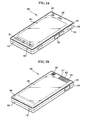
- FIG. 2A is a front-view of a mobile terminal according to an example embodiment.
- FIG. 2B is a perspective diagram of a backside of the mobile terminal shown in FIG. 2A .
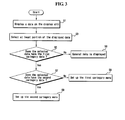
- FIG. 3 is a flow chart for explaining the method for executing a menu in a mobile terminal, according to the one embodiment of the present disclosure.
- FIG. 4 is a flow chart of an implementation where the method for executing a menu in a mobile terminal is applied on a web page.
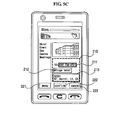
- FIG. 5 is an image diagram of the first implementation where the method for executing a menu in a mobile terminal according to the one embodiment of the present disclosure is applied.
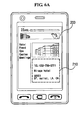
- FIG. 6 is an image diagram of the second implementation where the method for executing a menu in a mobile terminal according to the one embodiment of the present disclosure is applied.
- FIG. 7 is an image diagram of the third implementation where the method for executing a menu in a mobile terminal according to the one embodiment of the present disclosure is applied.
- FIG. 8 is an image diagram of the fourth implementation where the method for executing a menu in a mobile terminal according to the one embodiment of the present disclosure is applied.
- the suffixes 'module', 'unit' and 'part' may be used for elements in order to facilitate the disclosure. Significant meanings or roles may not be given to the suffixes themselves and it is understood that the 'module', 'unit' and 'part' may be used together or interchangeably.
- Embodiments of the present disclosure may be applicable to various types of terminals.
- Examples of such terminals may include mobile terminals as well as stationary terminals, such as mobile phones, user equipment, smart phones, DTV, computers, digital broadcast terminals, personal digital assistants, portable multimedia players (PMP) and/or navigators.
- mobile terminals as well as stationary terminals, such as mobile phones, user equipment, smart phones, DTV, computers, digital broadcast terminals, personal digital assistants, portable multimedia players (PMP) and/or navigators.
- PMP portable multimedia players
- FIG. 1 is a block diagram of a mobile terminal in accordance with an example embodiment. Other embodiments and arrangements may also be provided. FIG. 1 shows a mobile terminal 100 having various components, although other components may also be used. More or less components may alternatively be implemented.
- FIG. 1 shows that the mobile terminal 100 includes a wireless communication unit 110, an audio/video (A/V) input unit 120, a user input unit 130, a sensing unit 140, an output unit 150, a memory 160, an interface unit 170, a controller 180 and a power supply 190.
- A/V audio/video
- the wireless communication unit 110 may be configured with several components and/or modules.
- the wireless communication unit 110 may include a broadcast receiving module 111, a mobile communication module 112, a wireless Internet module 113, a short-range communication module 114 and a position-location module 115.
- the wireless communication unit 110 may include one or more components that permit wireless communication between the mobile terminal 100 and a wireless communication system or a network within which the mobile terminal 100 is located. In case of non-mobile terminals, the wireless communication unit 110 may be replaced by a wire communication unit.
- the wireless communication unit 110 and the wire communication unit may be commonly referred to as a communication unit.
- the broadcast receiving module 111 may receive a broadcast signal and/or broadcast associated information from an external broadcast managing entity via a broadcast channel.
- the broadcast channel may include a satellite channel and a terrestrial channel.
- the broadcast managing entity may refer to a system that transmits a broadcast signal and/or broadcast associated information.
- At least two broadcast receiving modules 111 may be provided in the mobile terminal 100 to pursue simultaneous reception of at least two broadcast channels or facilitation of broadcast channel switching.
- broadcast associated information may include information associated with a broadcast channel, a broadcast program, a broadcast service provider, etc.
- broadcast associated information may include an electronic program guide (EPG) of digital multimedia broadcasting (DMB) and an electronic service guide (ESG) of digital video broadcast-handheld (DVB-H).
- EPG electronic program guide
- ESG electronic service guide
- the broadcast signal may be a TV broadcast signal, a radio broadcast signal, and/or a data broadcast signal.
- the broadcast signal may further include a broadcast signal combined with a TV or radio broadcast signal.
- the broadcast receiving module 111 may receive broadcast signals transmitted from various types of broadcast systems.
- the broadcasting systems may include digital multimedia broadcasting-terrestrial (DMB-T), digital multimedia broadcasting-satellite (DMB-S), digital video broadcast-handheld (DVB-H), a data broadcasting system known as media forward link only (MediaFLO®) and integrated services digital broadcast-terrestrial (ISDB-T).
- DMB-T digital multimedia broadcasting-terrestrial
- DMB-S digital multimedia broadcasting-satellite
- DVD-H digital video broadcast-handheld
- MediaFLO® media forward link only
- ISDB-T integrated services digital broadcast-terrestrial
- Data received by the broadcast receiving module 111 may be stored in the memory 160, for example.
- the mobile communication module 112 may communicate wireless signals with one or more network entities (e.g. a base station or Node-B).
- the signals may represent audio, video, multimedia, control signaling, and data, etc.
- the wireless Internet module 113 may support Internet access for the mobile terminal 100.
- This wireless Internet module 113 may be internally or externally coupled to the mobile terminal 100. Suitable technologies for wireless Internet may include, but are not limited to, WLAN (Wireless LAN)(Wi-Fi), Wibro (Wireless broadband), Wimax (World Interoperability for Microwave Access), and/or HSDPA (High Speed Downlink Packet Access).
- the wireless Internet module 113 may be replaced with a wire Internet module in non-mobile terminals.
- the wireless Internet module 113 and the wire Internet module may be referred to as an Internet module.
- the short-range communication module 114 may facilitate short-range communications. Suitable technologies for short-range communication may include, but are not limited to, radio frequency identification (RFID), infrared data association (IrDA), ultra-wideband (UWB), as well as networking technologies such as Bluetooth and ZigBee.
- RFID radio frequency identification
- IrDA infrared data association
- UWB ultra-wideband
- networking technologies such as Bluetooth and ZigBee.
- the position-location module 115 may identify or otherwise obtain a location of the mobile terminal 100.
- the position-location module 115 may be provided using global positioning system (GPS) components that cooperate with associated satellites, network components, and/or combinations thereof.
- GPS global positioning system
- the position-location module 115 may precisely calculate current 3-dimensional position information based on longitude, latitude and altitude by calculating distance information and precise time information from at least three satellites and then by applying triangulation to the calculated information. Location and time information may be calculated using three satellites, and errors of the calculated location position and time informations may then be amended or changed using another satellite. The position-location module 115 may calculate speed information by continuously calculating a real-time current location.
- the audio/video (A/V) input unit 120 may provide audio or video signal input to the mobile terminal 100.
- the A/V input unit 120 may include a camera 121 and a microphone 122.
- the camera 121 may receive and process image frames of still pictures and/or video.
- the microphone 122 may receive an external audio signal while the mobile terminal is in a particular mode, such as a phone call mode, a recording mode and/or a voice recognition mode.
- the received audio signal may then be processed and converted into digital data.
- the mobile terminal 100 and in particular the A/V input unit 120, may include a noise removing algorithm (or noise canceling algorithm) to remove noise generated in the course of receiving the external audio signal.
- Data generated by the A/V input unit 120 may be stored in the memory 160, utilized by the output unit 150, and/or transmitted via one or more modules of the wireless communication unit 110. Two or more microphones and/or cameras may also be provided.
- the user input unit 130 may generate input data responsive to user manipulation of an associated input device or devices. Examples of such devices may include a keypad, a dome switch, a touchpad (e.g., static pressure/capacitance), a jog wheel and/or a jog switch. A specific example is one in which the user input unit 130 is configured as a touchpad in cooperation with a display, as will be described below.
- the sensing unit 140 may provide status measurements of various aspects of the mobile terminal 100.
- the sensing unit 140 may detect an open/close status (or state) of the mobile terminal 100, a relative positioning of components (e.g., a display and a keypad) of the mobile terminal 100, a change of position of the mobile terminal 100 or a component of the mobile terminal 100, a presence or absence of user contact with the mobile terminal 100, and/or an orientation or acceleration/deceleration of the mobile terminal 100.
- the mobile terminal 100 may be configured as a slide-type mobile terminal.
- the sensing unit 140 may sense whether a sliding portion of the mobile terminal 100 is open or closed.
- the sensing unit 140 may also sense presence or absence of power provided by the power supply 190, presence or absence of a coupling or other connection between the interface unit 170 and an external device, etc.
- the sensing unit 140 may include a proximity sensor 141.
- the output unit 150 may generate an output relevant to a sight sense, an auditory sense, a tactile sense and/or the like.
- the output unit 150 may include a display 151, an audio output module 152, an alarm 153, a haptic module 154 and/or the like.
- the display 151 may display (output) information processed by the terminal 100. For example, in case that the terminal is in a call mode, the display 151 may display a user interface (UI) or a graphic user interface (GUI) associated with the call. If the mobile terminal 100 is in a video communication mode or a photograph mode, the display 151 may display a photographed and/or received picture, a UI or a GUI.
- UI user interface
- GUI graphic user interface
- the display 151 may include at least one of a liquid crystal display (LCD), a thin film transistor liquid crystal display (TFT LCD), an organic light-emitting diode (OLED), a flexible display, and a 3-dimensional display.
- LCD liquid crystal display
- TFT LCD thin film transistor liquid crystal display
- OLED organic light-emitting diode
- flexible display and a 3-dimensional display.
- the display 151 may have a transparent or light-transmittive type configuration to enable an external environment to be seen through. This may be called a transparent display.
- a transparent OLED (TOLED) may be an example of a transparent display.
- a backside structure of the display 151 may also have the light-transmittive type configuration. In this configuration, a user may see an object located behind the terminal body through the area occupied by the display 151 of the terminal body.
- At least two displays 151 may also be provided.
- a plurality of displays may be provided on a single face of the terminal 100 by being built in one body or spaced apart from the single face.
- each of a plurality of displays may be provided on different faces of the terminal 100.
- the display 151 and a sensor for detecting a touch action are constructed in a mutual-layered structure (hereafter a touchscreen)
- the display 151 may be used as an input device as well as an output device.
- the touch sensor may include a touch film, a touch sheet, a touchpad and/or the like.
- the touch sensor may convert a pressure applied to a specific portion of the display 151 or a variation of electrostatic capacity generated from a specific portion of the display 151 to an electric input signal.
- the touch sensor may detect a pressure of a touch as well as a position and size of the touch.
- signal(s) corresponding to the touch input may be transferred to a touch controller.
- the touch controller may process the signal(s) and then transfer corresponding data to the controller 180.
- the controller 180 may therefore know which portion of the display 151 is touched.
- FIG. 1 shows that the proximity sensor 141 can be provided within the mobile terminal 100 enclosed by the touchscreen or around the touchscreen.
- the proximity sensor 141 may detect a presence or non-presence of an object approaching a prescribed detecting surface or an object existing around the proximity sensor 141 using an electromagnetic field strength or infrared ray without mechanical contact.
- the proximity sensor 141 may have a longer durability than that of the contact type sensor and may also have a greater usage than that of the contact type sensor.
- the proximity sensor 141 may include one of a transmittive photoelectric sensor, a direct reflective photoelectric sensor, a mirror reflective photoelectric sensor, a radio frequency oscillation proximity sensor, an electrostatic capacity proximity sensor, a magnetic proximity sensor, an infrared proximity sensor and/or the like. If the touchscreen is an electrostatic type, the proximity sensor 141 may detect proximity of a pointer using a variation of an electric field according to the proximity of the pointer. In this case, the touchscreen (touch sensor) may be classified as the proximity sensor.
- a proximity touch An action in which a pointer approaches the touchscreen without contacting the touchscreen may be called a proximity touch.
- An action in which a pointer actually touches the touchscreen may be called a contact touch.
- the location of the touchscreen proximity-touched by the pointer may be the position of the pointer that vertically opposes the touchscreen when the pointer performs the proximity touch.
- the proximity sensor 141 may detect a proximity touch and/or a proximity touch pattern (e.g., a proximity touch distance, a proximity touch duration, a proximity touch position, a proximity touch shift state, etc.). Information corresponding to the detected proximity touch action and/or the detected proximity touch pattern may be outputted to the touchscreen.
- a proximity touch and/or a proximity touch pattern e.g., a proximity touch distance, a proximity touch duration, a proximity touch position, a proximity touch shift state, etc.
- the audio output module 152 may output audio data that is received from the wireless communication unit 110 in a call signal reception mode, a call mode, a recording mode, a voice recognition mode, a broadcast receiving mode and/or the like.
- the audio output module 152 may output audio data stored in the memory 160.
- the audio output module 152 may output an audio signal relevant to a function (e.g., a call signal receiving sound, a message receiving sound, etc.) performed by the mobile terminal 100.
- the audio output module 152 may include a receiver, a speaker, a buzzer and/or the like.
- the alarm 153 may output a signal for announcing an event occurrence of the mobile terminal 100.
- An event occurring in the mobile terminal 100 may include one of a call signal reception, a message reception, a key signal input, a touch input and/or the like.
- the alarm 153 may output a signal for announcing an event occurrence by way of vibration or the like as well as a video signal or an audio signal.
- the video signal may be outputted via the display 151.
- the audio signal may be outputted via the audio output module 152.
- the display 151 or the audio output module 152 may be classified as part of the alarm 153.
- the haptic module 154 may bring about various haptic effects that can be sensed by a user. Vibration is a representative example for the haptic effect brought about by the haptic module 154. Strength and pattern of the vibration generated from the haptic module 154 may be controllable. For example, vibrations differing from each other may be outputted in a manner of being synthesized together or may be sequentially outputted.
- the haptic module 154 may generate various haptic effects including a vibration, an effect caused by such a stimulus as a pin array vertically moving against a contact skin surface, a jet power of air via outlet, a suction power of air via inlet, a skim on a skin surface, a contact of an electrode, an electrostatic power and the like, and/or an effect by hot/cold sense reproduction using an endothermic or exothermic device as well as the vibration.
- the haptic module 154 may provide the haptic effect via direct contact.
- the haptic module 154 may enable a user to experience the haptic effect via muscular sense of a finger, an arm and/or the like.
- Two or more haptic modules 154 may be provided according to a configuration of the mobile terminal 100.
- the memory 160 may store a program for operations of the controller 180.
- the memory 160 may temporarily store input/output data (e.g., phonebook, message, still picture, moving picture, etc.).
- the memory 160 may store data of vibration and sound in various patterns outputted in case of a touch input to the touchscreen.
- the memory 160 may include at least one of a flash memory, a hard disk, a multimedia card micro type memory, a card type memory, (e.g., SD memory, XD memory, etc.), a random access memory (RAM), a static random access memory (SRAM), a read-only memory (ROM), an electrically erasable programmable read-only memory, a programmable read-only memory, a magnetic memory, a magnetic disk, an optical disk, and/or the like.
- the mobile terminal 100 may operate in association with a web storage that performs a storage function of the memory 160 in the Internet.
- the interface unit 170 may play a role as a passage to external devices connected to the mobile terminal 100.
- the interface unit 170 may receive data from an external device.
- the interface unit 170 may be supplied with a power and then the power may be delivered to elements within the mobile terminal 100.
- the interface unit 170 may enable data to be transferred to an external device from an inside of the mobile terminal 100.
- the interface unit 170 may include a wire/wireless headset port, an external charger port, a wire/wireless data port, a memory card port, a port for coupling to a device having an identity module, an audio input/output (I/O) port, a video input/output (I/O) port, an earphone port and/or the like.
- the identity module may be a chip or card that stores various kinds of information for authenticating use of the mobile terminal 100.
- the identify module may include a user identity module (UIM), a subscriber identity module (SIM), a universal subscriber identity module (USIM) and/or the like.
- a device provided with the above identity module (hereafter an identity device) may be manufactured in the form of a smart card.
- the identity device may be connected to the mobile terminal 100 via the port.
- the interface unit 170 may play a role as a passage for supplying a power to the mobile terminal 100 from a cradle that is connected to the mobile terminal 100.
- the interface unit 170 may play a role as a passage for delivering various command signals, which are inputted from the cradle by a user, to the mobile terminal 100.
- Various command signals inputted from the cradle or the power may work as a signal for recognizing that the mobile terminal 100 is correctly loaded in the cradle.
- the controller 180 may control overall operations of the mobile terminal 100. For example, the controller 180 may perform control and processing relevant to a voice call, a data communication, a video conference and/or the like.
- the controller 180 may have a multimedia module 181 for multimedia playback.
- the multimedia module 181 may be implemented within the controller 180 or may be configured separate from the controller 180.
- the controller 180 may perform pattern recognizing processing for recognizing a handwriting input performed on the touchscreen as a character an/or recognizing a picture drawing input performed on the touchscreen as an image.
- the power supply 190 may receive an external or internal power and then supply the power required for operations of the respective elements under control of the controller 180.
- Embodiments of the present disclosure explained in the following description may be implemented within a recording medium that can be read by a computer or a computer-like device using software, hardware or combination thereof.
- arrangements and embodiments may be implemented using at least one of application specific integrated circuits (ASICs), digital signal processors (DSPs), digital signal processing devices DSPDs), programmable logic devices (PLDs), field programmable gate arrays (FPGAs), processors, controllers, microcontrollers, microprocessors and electrical units for performing other functions.
- ASICs application specific integrated circuits
- DSPs digital signal processors
- DSPDs digital signal processing devices
- PLDs programmable logic devices
- FPGAs field programmable gate arrays
- processors controllers, microcontrollers, microprocessors and electrical units for performing other functions.
- controller 180 may be implemented by the controller 180.
- FIG. 2A is a front-view of a mobile terminal according to an example embodiment. Other embodiments, configurations and arrangements may also be provided.
- the mobile terminal 100 may include a bar type terminal body.
- Embodiments of the mobile terminal may be implemented in a variety of different configurations. Examples of such configurations may include a folder-type, a slide-type, a bar-type, a rotational-type, a swing-type and/or combinations thereof.
- the body may include a case (casing, housing, cover, etc.) that forms an exterior of the terminal.
- the case may be divided into a front case 101 and a rear case 102.
- Various electric/electronic parts may be provided in a space between the front case 101 and the rear case 102.
- a middle case may be further provided between the front case 101 and the rear case 102.
- the cases may be formed by injection molding of synthetic resin or may be formed of metal substance such as stainless steel (STS), titanium (Ti) or the like, for example.
- STS stainless steel
- Ti titanium
- the display 151, the audio output unit 152, the camera 121, user input units 130/131/132, the microphone 122, the interface unit 170 and the like may be provided on the terminal body, and more particularly on the front case 101.
- the display 151 may occupy most of a main face of the front case 101.
- the audio output module 152 and the camera 121 may be provided at an area adjacent to one end portion of the display 151, while the user input unit 131 and the microphone 122 may be provided at another area adjacent to the other end portion of the display 151.
- the user input unit 132 and the interface unit 170 may be provided on lateral sides of the front and rear cases 101 and 102.
- the user input unit 130 may receive a command for controlling an operation of the mobile terminal 100.
- the user input unit 130 may include a plurality of manipulating units 131 and 132.
- the manipulating units 131 and 132 may be called a manipulating portion and may adopt any mechanism of a tactile manner that enables a user to perform a manipulation action by experiencing a tactile feeling.
- Content inputted by the first manipulating unit 131 or the second manipulating unit 132 may be diversely set. For example, a command such as start, end, scroll and/or the like may be inputted to the first manipulating unit 131. A command for a volume adjustment of sound outputted from the audio output unit 152, a command for a switching to a touch recognizing mode of the display 151 or the like may be inputted to the second manipulating unit 132.
- FIG. 2B is a perspective diagram of a backside of the mobile terminal shown in FIG. 2A .
- Other embodiments, configurations and arrangements may also be provided.
- a camera 121' may be additionally provided on a backside of the terminal body, and more particularly on the rear case 102.
- the camera 121' may have a photographing direction that is substantially opposite to a photographing direction of the camera 121 (shown in FIG. 2A ) and may have pixels differing from pixels of the camera 121.
- the camera 121 may have a lower number of pixels to capture and transmit a picture of user's face for a video call, while the camera 121' may have a greater number of pixels for capturing a general subject for photography without transmitting the captured subject.
- Each of the cameras 121 and 121' may be installed on the terminal body to be rotated and/or popped up.
- a flash 123 and a mirror 124 may be additionally provided adjacent to the camera 121'.
- the flash 123 may project light toward a subject in case of photographing the subject using the camera 121'. If a user attempts to take a picture of the user (self-photography) using the camera 121', the mirror 124 may enable the user to view a user's face reflected by the mirror 124.
- An additional audio output unit 152' may be provided on the backside of the terminal body.
- the additional audio output unit 152' may implement a stereo function together with the audio output unit 152 shown in FIG. 2A and may be used for implementation of a speakerphone mode in talking over the terminal.
- a broadcast signal receiving antenna 116 may be additionally provided at the lateral side of the terminal body as well as an antenna for communication or the like.
- the antenna 116 may be considered a portion of the broadcast receiving module 111 shown in FIG. 1 and may be retractably provided on the terminal body.
- the power supply 190 for supplying a power to the mobile terminal 100 may be provided to the terminal body.
- the power supply 190 may be built within the terminal body. Alternatively, the power supply 190 may be detachably connected to the terminal body.
- FIG. 2B also shows a touchpad 135 for detecting a touch that is additionally provided on the rear case 102.
- the touchpad 135 may be configured in a light transmittive type like the display 151. If the display 151 outputs visual information from both faces, the display 151 may recognize visual information via the touchpad 135 as well. The information outputted from both of the faces may be controlled by the touchpad 135. Alternatively, a display may be further provided to the touchpad 135 so that a touchscreen may also be provided to the rear case 102.
- the touchpad 135 may be activated by interconnecting with the display 151 of the front case 101.
- the touchpad 135 may be provided in rear of the display 151 in parallel to one another.
- the touchpad 135 may have a size equal to or less than a size of the display 151.
- FIG. 3 is a flow chart for explaining the method for executing a menu in a mobile terminal, according to the one embodiment of the present disclosure and
- FIG. 4 is a flow chart of an implementation where the method for executing a menu in a mobile terminal is applied on a web page.
- a data is displayed on the display unit 151 of the mobile terminal 100 (S1).
- the data may be a e-book data, an image data, and a file data stored in the memory 160.
- the data may be a web page data stored in an external server.
- the user selects at least portion of the displayed data through the user input unit 130 (S3).
- the display unit 151 is a touch screen, the user chooses two points on the touch screen within a predetermined time so as to select an area whose corners come to be the two points.
- a drag and drop gesture may be used in selecting the portion of the data. If the portion of the data is selected, the controller searches whether the selected data have a first category data.
- the first category data may be a phone number data, or an address data. If at least 3 continuous number string and a dash (-) between the number string are searched, the data may be determined as the phone number.
- the postal code data base and the search word data base may be used in determining whether it is the address data or not. Namely, in case of USA, the serial 5 numbers is used in the postal code. Therefore, the controller determines that the 5 serial number is the address data. Or, a frequently used phrase in address such as country, province, city, state, ave., Dr., St. is used in determination for the address data.
- the controller 180 searches whether the selected data has a second category data (S7). If the selected data does not have the second category data, the first category menu including a first category execution item is set up (S8). Moreover, the cursor may be positioned on the first category data. Furthermore, the first category data is automatically selected to be displayed distinguishable from other data. If the second category data is included in the selected data, the second category menu including a second category execution item is set up. Then, when the input signal on the menu key is generated, the second category menu is displayed on the display unit 151 (S9).
- the selected data is analyzed to differently constitute the menu based on the characteristic of the selected data. So, the user may more easily use the menu that he wants.
- the controller automatically selects the predetermined category menu so that the user may reduce the number of input.
- FIG. 4 is a flow chart of an implementation where the method for executing a menu in a mobile terminal is applied on a web page.
- the controller executes an internet web browser by the user input signal (S21). Then, a web page is displayed on the display unit 151 (S22). In this state, at least a portion of the web page is selected by the user selection signal (S23). Then, the controller searches the selected web page (S24). If the phone number data is found (S25), a phone related menu is set up. So, if the user selects the menu key in this state, the phone related menu is displayed on the display unit 151 (S26). At this point, a cursor may be automatically positioned on the phone number data, and the phone number data will be changed to have a specific color. Furthermore, the phone number related menu may have the specific color.
- an address related menu is set up. So, if the user selects the menu key in this state, the address related menu is displayed on the display unit 151 (S28). On the other hand, if both the phone number data and the address data exist in the selected web page data (S29), the controller sets up the phone number and address related menu. Accordingly, if the user selects the menu key in this state, the phone number and address related menu is displayed on the display unit (S30).
- FIG. 5 is an image diagram of the first implementation where the method for executing a menu in a mobile terminal according to the one embodiment of the present disclosure is applied
- FIG. 6 is an image diagram of the second implementation where the method for executing a menu in a mobile terminal according to the one embodiment of the present disclosure is applied
- FIG. 7 is an image diagram of the third implementation where the method for executing a menu in a mobile terminal according to the one embodiment of the present disclosure is applied
- FIG. 8 is an image diagram of the fourth implementation where the method for executing a menu in a mobile terminal according to the one embodiment of the present disclosure is applied.
- FIG. 5 is an image diagram of the first implementation where the method for executing a menu in a mobile terminal according to the one embodiment of the present disclosure is applied.
- FIG. 5a illustrates a web page screen 200.
- the controller 180 operates the wireless communication module 110 to access an external server so as to receive a web data. Then, the controller displays the web page screen 200 on the display unit 151.
- the controller analyzes the selected area to search whether a phone number data, a search word data, or an address data exist in the selected area. If the predetermined number of the serial number exists and the dash (-) is between the serial numbers, the controller determines that it is a phone number data. The controller compares the search word data base with the selected area to confirm whether the selected area has a search word.
- the controller compares the address data base with the selected area to confirm whether the selected area has a postal code, or an address name which are stored in the address data base.
- the specific area 210 has a phone number data 211, a search word 212, and a address data 213.
- the menu icon 221, the confirm icon 222 and the cancel icon 223 may be additionally displayed on the display unit 151.
- the searched data may be displayed to have a different color so as to inform that the data is searched.
- a cursor may be positioned on any one of the search data.
- a cursor block may be positioned on any one of the search data.
- the phone number data is selected and the controller 180 controls the display unit 151 so that the selected phone number data 211 can be distinctly displayed from other data, referring to FIG. 5C . Namely, the color of the phone number data may be changed or the color of the other data may be changed.
- the menu icon 221 is selected, as shown in FIG. 5D , a phone number related menu 230 is displayed.
- This phone number related menu is a menu which uses the phone number in executing the menu.
- the phone number related menu may include a call icon 231, a text message icon 232, a contact list icon 233, and a store icon 234.
- the controller 180 transmits a call signal to the selected phone number. Moreover, if the contact list icon 223 is selected, the contact list storing screen is displayed on the display unit 151 and, the selected phone number is automatically inputted to the phone number input block of the contact list storing screen (not shown in figure). On the other hand, if the text message icon 222 is selected, as shown in FIG. 5E , the phone number is automatically inputted to the receiver( ⁇ ) block of the text message draft screen.
- the phone number related menu may have the same color so that the user may easily recognize what the selected menu is.
- the user may use the phone number data in the web page to easily execute the application that he wants.
- FIG. 6 is an image diagram of the second implementation where the method for executing a menu in a mobile terminal according to the one embodiment of the present disclosure is applied.
- FIG. 6a illustrates a web page screen 200.
- the controller 180 operates the wireless communication module 110 to access an external server so as to receive a web data. Then, the controller displays the web page screen 200 on the display unit 151.
- the controller analyzes the selected area to search whether a phone number data, a search word data, or an address data exist in the selected area.
- the specific area 210 has a phone number data 211, a search word 212, and an address data 213.
- the menu icon 221, the confirm icon 222 and the cancel icon 223 may be additionally displayed on the display unit 151.
- the searched data may be displayed to have a different color so as to inform that the data is searched.
- a cursor may be positioned on any one of the searched data.
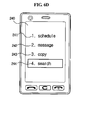
- the selected search word 212 can be distinctly displayed from other data, referring to FIG. 6C .
- a search word related menu 230 is displayed.
- This search word related menu is a menu which uses the search word in executing the menu.
- the search word related menu may include a schedule icon 241, a message icon 242, a copy icon 243, and a search icon 244.
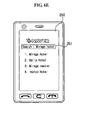
- the controller 180 stores the selected search word in the schedule menu. Moreover, if the message icon 242 is selected, the controller 180 displays the message draft screen on the display unit 151. At this time, the selected search word is automatically inputted on the contents block of the message draft screen (not shown in figure). If the copy icon 243 is selected, the selected search word is temporally stored. Then, if the 'paste' function is executed, the copied search word is inputted. On the other hand, if the search icon 244 is selected, as shown in FIG. 6E , the controller operates the wireless communication module 110 to display the predetermined web page 250 on the display unit 151. At this time, the search word data 212 is automatically displayed on the search word block 251.
- the search word related menu may have the same color so that the user may easily recognize what the selected menu is.
- the user may use the search word data in the web page to easily execute the related application that he wants.
- FIG. 7 is an image diagram of the third implementation where the method for executing a menu in a mobile terminal according to the one embodiment of the present disclosure is applied.
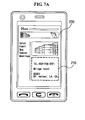
- FIG. 7a illustrates a web page screen 200.
- the controller 180 operates the wireless communication module 110 to access an external server so as to receive a web data. Then, the controller displays the web page screen 200 on the display unit 151.
- the controller analyzes the selected area to search whether a phone number data, a search word data, or an address data exist in the selected area.
- the specific area 210 has a phone number data 211, a search word 212, and an address data 213.
- the menu icon 221, the confirm icon 222 and the cancel icon 223 may be additionally displayed on the display unit 151.
- the searched data may be displayed to have a different color so as to inform that the data is searched.
- a cursor may be positioned on any one of the searched data.
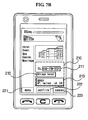
- the selected address data 213 can be distinctly displayed from other data, referring to FIG. 6C .
- an address data related menu 260 is displayed.
- This address data related menu is a menu which uses the address data in executing the menu.
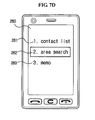
- the address data related menu may include a contact list icon 261, an area search icon 262, and a memo icon 263.
- the controller 180 displays the contact list draft screen on the display unit 151. At this time, the address data is automatically inputted on the address block. Moreover, if an area search icon 262 is selected, the controller 180 operates the GPS module 115 to display the map data on the display unit 151, referring to FIG. 7E . Moreover, the position of the address may be displayed with a specific icon 271 on the display unit 151. On the other hand, if the memo icon 263 is selected, the controller
- the address related menu may have the same color so that the user may easily recognize what the selected menu is.
- the user may use the address data in the web page to easily execute the related application that he wants.
- FIG. 8 is an image diagram of the fourth implementation where the method for executing a menu in a mobile terminal according to the one embodiment of the present disclosure is applied.
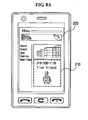
- FIG. 8a illustrates a web page screen 200.
- the controller 180 operates the wireless communication module 110 to access an external server so as to receive a web data. Then, the controller displays the web page screen 200 on the display unit 151. In this state, as shown in FIG. 8B , if the specific area 210 is selected, the controller analyzes the selected area to place the cursor on the phone number data 311, at first.
- the specific area may include a phone number data 311, a contents data 312, and an image data 313, as shown in FIG. 8B .
- the each data may have its own color.
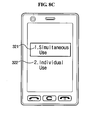
- a simultaneous use icon 321 and an individual use icon 322 may be displayed on the display unit 151, referring to FIG. 8C .
- the simultaneous use icon may be used in executing an application with using the all selected area data. If the individual use icon is selected, as shown in FIG. 5 to FIG. 7 , the characteristic of the automatically selected data may be used to set up the menu. Then, the selected data may be used in executing the application.
- the multimedia message draft screen 330 is automatically selected to be displayed on the display unit 151.
- the multimedia message draft screen 330 includes a receiver block 331, an attach file block 332, and a contents block 333.
- the phone number data 311 is automatically inputted on the receiver block 331.
- the image data 313 is automatically inputted on the attach file block 332.
- the contents data 312 is automatically inputted on the contents block 333.
- the text message draft screen may be displayed on the display unit 151.
- the phone number data is automatically inputted on the receiver block and the contents data is automatically inputted on the contents block. If the contents data is used in SMS message and the quantity of the contents data is more that the quantity which the SMS can send one time, the plurality of the SMS message may be sent by dividing the contents data. At this time, the number of SMS may be previously displayed on the display unit.
- the user may use the web page to easily draft the multimedia message or the SMS message.
- the web page is used in selecting the data.
- the present disclosure may apply the e-book data, the image data, or text data and so on.
- the above-described methods can be implemented in a program recorded medium as computer-readable codes.
- the computer-readable media may include all kinds of recording devices in which data readable by a computer system are stored.
- the computer-readable media include ROM, RAM, CD-ROM, magnetic tapes, floppy discs, optical data storage devices, and the like for example and also include carrier-wave type implementations (e.g., transmission via Internet).
Landscapes
- Engineering & Computer Science (AREA)
- Human Computer Interaction (AREA)
- General Engineering & Computer Science (AREA)
- Theoretical Computer Science (AREA)
- Computer Networks & Wireless Communication (AREA)
- Signal Processing (AREA)
- Physics & Mathematics (AREA)
- General Physics & Mathematics (AREA)
- Environmental & Geological Engineering (AREA)
- Telephone Function (AREA)
- User Interface Of Digital Computer (AREA)
Applications Claiming Priority (1)
| Application Number | Priority Date | Filing Date | Title |
|---|---|---|---|
| KR1020090071147A KR20110013606A (ko) | 2009-08-03 | 2009-08-03 | 이동 통신 단말기에서의 메뉴 실행 방법 및 이를 적용한 이동 통신 단말기 |
Publications (2)
| Publication Number | Publication Date |
|---|---|
| EP2284678A2 true EP2284678A2 (de) | 2011-02-16 |
| EP2284678A3 EP2284678A3 (de) | 2014-07-02 |
Family
ID=42663874
Family Applications (1)
| Application Number | Title | Priority Date | Filing Date |
|---|---|---|---|
| EP10006879.0A Ceased EP2284678A3 (de) | 2009-08-03 | 2010-07-02 | Verfahren zur Menüausführung in einem mobilen Endgerät und mobiles Endgerät damit |
Country Status (4)
| Country | Link |
|---|---|
| US (2) | US20110029547A1 (de) |
| EP (1) | EP2284678A3 (de) |
| KR (1) | KR20110013606A (de) |
| CN (2) | CN101996034B (de) |
Families Citing this family (13)
| Publication number | Priority date | Publication date | Assignee | Title |
|---|---|---|---|---|
| US8041024B2 (en) * | 2006-10-17 | 2011-10-18 | International Business Machines Corporation | Method and system for telephone number change notification and tracking |
| USD676857S1 (en) * | 2010-04-07 | 2013-02-26 | Powerwave Technologies, Inc. | Mobile device with graphical user interface |
| DE102011017261A1 (de) * | 2011-04-15 | 2012-10-18 | Volkswagen Aktiengesellschaft | Verfahren und Vorrichtung zum Bereitstellen einer Nutzerschnittstelle, insbesondere in einem Fahrzeug |
| US9552138B2 (en) * | 2013-05-10 | 2017-01-24 | Lg Electronics Inc. | Mobile terminal and method for controlling the same |
| KR102209427B1 (ko) * | 2013-07-25 | 2021-01-29 | 엘지전자 주식회사 | 이동 단말기 및 이동 단말기의 제어 방법 |
| US10152495B2 (en) | 2013-08-19 | 2018-12-11 | Qualcomm Incorporated | Visual search in real world using optical see-through head mounted display with augmented reality and user interaction tracking |
| KR101572331B1 (ko) * | 2013-12-26 | 2015-11-30 | (주)멜파스 | 터치스크린패널을 이용하여 근접 센싱 기능을 제공하는 터치 센싱 시스템 및 방법 |
| US9886430B2 (en) * | 2014-11-25 | 2018-02-06 | Microsoft Technology Licensing, Llc | Entity based content selection |
| US10409465B2 (en) * | 2015-12-08 | 2019-09-10 | International Business Machines Corporation | Selecting areas of content on a touch screen |
| CN107301191A (zh) * | 2016-04-15 | 2017-10-27 | 平安科技(深圳)有限公司 | 菜单智能搜索方法及系统 |
| KR20180003884A (ko) * | 2016-07-01 | 2018-01-10 | 삼성전자주식회사 | 전자 장치 및 그의 정보 제공 방법 |
| US10630622B2 (en) | 2017-12-28 | 2020-04-21 | Ebay Inc. | Adding images via MMS to a draft document |
| CN110582027B (zh) * | 2019-08-22 | 2022-04-12 | 聚好看科技股份有限公司 | 智能电视上显示消息的方法及相关装置 |
Family Cites Families (42)
| Publication number | Priority date | Publication date | Assignee | Title |
|---|---|---|---|---|
| FI109733B (fi) * | 1997-11-05 | 2002-09-30 | Nokia Corp | Viestin sisällön hyödyntäminen |
| US6430405B1 (en) * | 1998-12-07 | 2002-08-06 | Motorola, Inc. | Method for retrieval of stored telephone numbers in a radio communication device |
| US7006077B1 (en) * | 1999-11-30 | 2006-02-28 | Nokia Mobile Phones, Ltd. | Electronic device having touch sensitive slide |
| US6831568B1 (en) * | 2000-06-30 | 2004-12-14 | Palmone, Inc. | Method and apparatus for visual silent alarm indicator |
| AU2001238310A1 (en) * | 2000-09-18 | 2002-04-02 | Qualcomm Incorporated | Automatic find and dial |
| US9208496B2 (en) * | 2003-10-06 | 2015-12-08 | Yellowpages.Com Llc | Systems and methods to provide a communication reference in a representation of a geographical region |
| KR100617827B1 (ko) * | 2003-11-14 | 2006-08-28 | 삼성전자주식회사 | 이동통신 단말기에서 계층 구조의 메뉴를 표시하는 장치및 방법 |
| KR100663456B1 (ko) * | 2004-06-14 | 2007-01-02 | 삼성전자주식회사 | 이동통신 단말기에서의 메뉴 효과를 제공하는 메뉴 효과계층 제공 방법 및 그에 따른 메뉴 효과 제공 방법 |
| KR100677545B1 (ko) * | 2004-12-29 | 2007-02-02 | 삼성전자주식회사 | 복수개의 데이터 처리 장치를 이용한 데이터 처리 장치 및그 방법과, 이를 구현하기 위한 프로그램이 기록된 기록매체 |
| US7444597B2 (en) * | 2005-03-18 | 2008-10-28 | Microsoft Corporation | Organizing elements on a web page via drag and drop operations |
| US7586481B1 (en) * | 2005-05-10 | 2009-09-08 | Apple Inc. | Display-pointer visibility |
| KR20060133389A (ko) * | 2005-06-20 | 2006-12-26 | 엘지전자 주식회사 | 이동 단말기의 데이터 처리 장치 및 그 방법 |
| KR100714703B1 (ko) * | 2005-07-21 | 2007-05-07 | 삼성전자주식회사 | 통합 디지털 장치 |
| US20070101366A1 (en) * | 2005-10-27 | 2007-05-03 | Samsung Electronics Co., Ltd. | Method for analyzing information and executing function corresponding to analyzed information in portable terminal |
| KR100774933B1 (ko) * | 2005-10-28 | 2007-11-09 | 엘지전자 주식회사 | 이동통신 단말기, 이를 이용한 송신측 링크 관리방법 및수신측 링크 관리방법 |
| WO2007100228A1 (en) * | 2006-03-02 | 2007-09-07 | Mtome Co., Ltd | A system and method for contents upload using a mobile terminal |
| EP1860534A1 (de) * | 2006-05-22 | 2007-11-28 | LG Electronics Inc. | Mobiles Endgerät und Menüanzeigeverfahren damit |
| KR100745040B1 (ko) * | 2006-07-06 | 2007-08-01 | 삼성전자주식회사 | 휴대단말의 콘텐츠파일 통합검색 방법 |
| KR100783551B1 (ko) * | 2006-07-06 | 2007-12-07 | 삼성전자주식회사 | 휴대용 단말기의 히스토리 기능 이용 방법 |
| KR20070045900A (ko) | 2006-07-18 | 2007-05-02 | 삼성전자주식회사 | 휴대단말기에서 정보 분석 및 그에 따른 실행 방법 |
| KR100800889B1 (ko) * | 2006-08-08 | 2008-02-04 | 삼성전자주식회사 | 이동 통신 단말기의 기능 항목이 표시되는 화면의 구성을변경하기 위한 방법 및 이를 위한 단말기 |
| KR100797788B1 (ko) * | 2006-09-04 | 2008-01-24 | 엘지전자 주식회사 | 이동통신 단말기 및 패턴인식을 통한 단축기능의 실행방법 |
| US20080055263A1 (en) * | 2006-09-06 | 2008-03-06 | Lemay Stephen O | Incoming Telephone Call Management for a Portable Multifunction Device |
| KR100774927B1 (ko) * | 2006-09-27 | 2007-11-09 | 엘지전자 주식회사 | 이동통신 단말기, 메뉴 및 아이템 선택방법 |
| KR101125960B1 (ko) * | 2006-09-29 | 2012-03-22 | 엘지전자 주식회사 | 이동 단말기의 이벤트 표시장치 및 그 방법 |
| US20080133599A1 (en) * | 2006-12-05 | 2008-06-05 | Palm, Inc. | System and method for providing address-related location-based data |
| US20080134030A1 (en) * | 2006-12-05 | 2008-06-05 | Palm, Inc. | Device for providing location-based data |
| US9886505B2 (en) * | 2007-05-11 | 2018-02-06 | International Business Machines Corporation | Interacting with phone numbers and other contact information contained in browser content |
| KR100968864B1 (ko) * | 2007-06-01 | 2010-07-09 | 엔에이치엔(주) | 전자메일에 대한 부가 정보 서비스 제공방법 및 그 시스템 |
| US8171432B2 (en) * | 2008-01-06 | 2012-05-01 | Apple Inc. | Touch screen device, method, and graphical user interface for displaying and selecting application options |
| US8302033B2 (en) * | 2007-06-22 | 2012-10-30 | Apple Inc. | Touch screen device, method, and graphical user interface for providing maps, directions, and location-based information |
| US9619143B2 (en) * | 2008-01-06 | 2017-04-11 | Apple Inc. | Device, method, and graphical user interface for viewing application launch icons |
| KR100929236B1 (ko) * | 2007-09-18 | 2009-12-01 | 엘지전자 주식회사 | 터치스크린을 구비하는 휴대 단말기 및 그 동작 제어방법 |
| US20090152349A1 (en) * | 2007-12-17 | 2009-06-18 | Bonev Robert | Family organizer communications network system |
| KR101467513B1 (ko) * | 2008-02-11 | 2014-12-01 | 삼성전자 주식회사 | 모바일 단말 제어장치 및 그 방법 |
| US8275394B2 (en) * | 2008-03-20 | 2012-09-25 | Nokia Corporation | Nokia places floating profile |
| US8525802B2 (en) * | 2008-03-31 | 2013-09-03 | Lg Electronics Inc. | Portable terminal capable of sensing proximity touch and method for providing graphic user interface using the same |
| CN101276255A (zh) * | 2008-05-05 | 2008-10-01 | 中兴通讯股份有限公司 | 一种移动终端菜单的显示装置及显示方法 |
| KR101436608B1 (ko) * | 2008-07-28 | 2014-09-01 | 삼성전자 주식회사 | 터치 스크린을 구비한 휴대 단말기 및 그 휴대 단말기에서커서 표시 방법 |
| KR100980683B1 (ko) * | 2008-09-01 | 2010-09-08 | 삼성전자주식회사 | 휴대단말기의 메뉴 리스트 생성을 위한 사용자 인터페이스 제공 방법 및 장치 |
| CN101394436A (zh) * | 2008-11-24 | 2009-03-25 | 中国电信股份有限公司 | 基于固网的点击拨号方法、系统以及客户端 |
| US8370762B2 (en) * | 2009-04-10 | 2013-02-05 | Cellco Partnership | Mobile functional icon use in operational area in touch panel devices |
-
2009
- 2009-08-03 KR KR1020090071147A patent/KR20110013606A/ko not_active Ceased
-
2010
- 2010-06-18 US US12/819,132 patent/US20110029547A1/en not_active Abandoned
- 2010-07-02 EP EP10006879.0A patent/EP2284678A3/de not_active Ceased
- 2010-07-21 CN CN201010237057.5A patent/CN101996034B/zh not_active Expired - Fee Related
- 2010-07-21 CN CN201510333656.XA patent/CN105022556A/zh active Pending
-
2015
- 2015-11-24 US US14/951,233 patent/US10001905B2/en not_active Expired - Fee Related
Non-Patent Citations (2)
| Title |
|---|
| CNET TV: "gwabbit for Blackberry -- First Look on CNET TV", 5 June 2009 (2009-06-05), XP055237371, Retrieved from the Internet <URL:https://www.youtube.com/watch?v=S2fcuatxtN0> [retrieved on 20151218] * |
| EGRABBERVIDEO: "AddressGrabber Web CRM", 24 July 2008 (2008-07-24), XP055237368, Retrieved from the Internet <URL:https://www.youtube.com/watch?v=7Sz_Z13aARk> [retrieved on 20151218] * |
Also Published As
| Publication number | Publication date |
|---|---|
| CN101996034A (zh) | 2011-03-30 |
| EP2284678A3 (de) | 2014-07-02 |
| CN101996034B (zh) | 2015-07-22 |
| US20160147389A1 (en) | 2016-05-26 |
| CN105022556A (zh) | 2015-11-04 |
| US20110029547A1 (en) | 2011-02-03 |
| US10001905B2 (en) | 2018-06-19 |
| KR20110013606A (ko) | 2011-02-10 |
Similar Documents
| Publication | Publication Date | Title |
|---|---|---|
| US10001905B2 (en) | Method for executing menu in mobile terminal and mobile terminal using the same | |
| EP2323358B1 (de) | Verfahren zur Ausgabe von Sprache-zu-Text-Sprachdaten in einem mobilen Endgerät | |
| US8478349B2 (en) | Method for executing menu in mobile terminal and mobile terminal using the same | |
| EP2254035B1 (de) | Verfahren zur Menüausführung in einem mobilen Endgerät und mobiles Endgerät damit | |
| US9285986B2 (en) | Method for controlling icon display in mobile terminal and mobile terminal thereof | |
| US8593415B2 (en) | Method for processing touch signal in mobile terminal and mobile terminal using the same | |
| US8766934B2 (en) | Method for displaying a menu in mobile terminal and mobile terminal thereof | |
| US9182905B2 (en) | Method for inputting command in mobile terminal using drawing pattern and mobile terminal using the same | |
| US8713463B2 (en) | Mobile terminal and controlling method thereof | |
| EP2254062A1 (de) | Verfahren zur Steuerung des Menüs in einem mobilen Endgerät und mobiles Endgerät damit | |
| EP2472378B1 (de) | Mobiles Endgerät und Steuerungsverfahren dafür | |
| US9197730B2 (en) | Mobile terminal and controlling method thereof | |
| EP2770415A1 (de) | Mobiles Endgerät und Steuerungsverfahren dafür | |
| US20140164928A1 (en) | Mobile terminal and controlling method thereof | |
| EP2189887A2 (de) | Endgerät und Verfahren zur Internetverwendung | |
| US20100125801A1 (en) | Terminal and controlling method thereof | |
| US20120166975A1 (en) | Mobile terminal and controlling method thereof | |
| US8494511B2 (en) | Method for controlling a mobile terminal based on status response information received from an external terminal | |
| US20160246484A1 (en) | Electronic device and method for controlling of the same | |
| US20140184486A1 (en) | Mobile terminal and controlling method thereof | |
| US9467551B2 (en) | Mobile terminal and method of controlling therefor | |
| US20110111769A1 (en) | Mobile terminal and controlling method thereof | |
| US8739039B2 (en) | Terminal and controlling method thereof | |
| EP2312814A2 (de) | Verfahren zum Anhängen von Daten und mobiles Endgerät damit | |
| US20100311446A1 (en) | Method for transmitting data related to broadcasting contents, and mobile terminal using the same |
Legal Events
| Date | Code | Title | Description |
|---|---|---|---|
| PUAI | Public reference made under article 153(3) epc to a published international application that has entered the european phase |
Free format text: ORIGINAL CODE: 0009012 |
|
| 17P | Request for examination filed |
Effective date: 20100702 |
|
| AK | Designated contracting states |
Kind code of ref document: A2 Designated state(s): AL AT BE BG CH CY CZ DE DK EE ES FI FR GB GR HR HU IE IS IT LI LT LU LV MC MK MT NL NO PL PT RO SE SI SK SM TR |
|
| AX | Request for extension of the european patent |
Extension state: BA ME RS |
|
| PUAL | Search report despatched |
Free format text: ORIGINAL CODE: 0009013 |
|
| AK | Designated contracting states |
Kind code of ref document: A3 Designated state(s): AL AT BE BG CH CY CZ DE DK EE ES FI FR GB GR HR HU IE IS IT LI LT LU LV MC MK MT NL NO PL PT RO SE SI SK SM TR |
|
| AX | Request for extension of the european patent |
Extension state: BA ME RS |
|
| RIC1 | Information provided on ipc code assigned before grant |
Ipc: H04M 1/725 20060101ALI20140527BHEP Ipc: G06F 3/048 20130101AFI20140527BHEP |
|
| RBV | Designated contracting states (corrected) |
Designated state(s): AL AT BE BG CH CY CZ DE DK EE ES FI FR GB GR HR HU IE IS IT LI LT LU LV MC MK MT NL NO PL PT RO SE SI SK SM TR |
|
| 17Q | First examination report despatched |
Effective date: 20150604 |
|
| STAA | Information on the status of an ep patent application or granted ep patent |
Free format text: STATUS: THE APPLICATION HAS BEEN REFUSED |
|
| 18R | Application refused |
Effective date: 20161112 |