EP2290931A2 - Apparatus and method for executing hot key function of mobile terminal - Google Patents
Apparatus and method for executing hot key function of mobile terminal Download PDFInfo
- Publication number
- EP2290931A2 EP2290931A2 EP20100170234 EP10170234A EP2290931A2 EP 2290931 A2 EP2290931 A2 EP 2290931A2 EP 20100170234 EP20100170234 EP 20100170234 EP 10170234 A EP10170234 A EP 10170234A EP 2290931 A2 EP2290931 A2 EP 2290931A2
- Authority
- EP
- European Patent Office
- Prior art keywords
- mobile terminal
- hot key
- touch
- motion
- user
- Prior art date
- Legal status (The legal status is an assumption and is not a legal conclusion. Google has not performed a legal analysis and makes no representation as to the accuracy of the status listed.)
- Granted
Links
Images




Classifications
-
- G—PHYSICS
- G06—COMPUTING OR CALCULATING; COUNTING
- G06F—ELECTRIC DIGITAL DATA PROCESSING
- G06F1/00—Details not covered by groups G06F3/00 - G06F13/00 and G06F21/00
- G06F1/16—Constructional details or arrangements
- G06F1/1613—Constructional details or arrangements for portable computers
- G06F1/1633—Constructional details or arrangements of portable computers not specific to the type of enclosures covered by groups G06F1/1615 - G06F1/1626
- G06F1/1637—Details related to the display arrangement, including those related to the mounting of the display in the housing
- G06F1/1643—Details related to the display arrangement, including those related to the mounting of the display in the housing the display being associated to a digitizer, e.g. laptops that can be used as penpads
-
- H—ELECTRICITY
- H04—ELECTRIC COMMUNICATION TECHNIQUE
- H04B—TRANSMISSION
- H04B1/00—Details of transmission systems, not covered by a single one of groups H04B3/00 - H04B13/00; Details of transmission systems not characterised by the medium used for transmission
- H04B1/38—Transceivers, i.e. devices in which transmitter and receiver form a structural unit and in which at least one part is used for functions of transmitting and receiving
- H04B1/40—Circuits
-
- G—PHYSICS
- G06—COMPUTING OR CALCULATING; COUNTING
- G06F—ELECTRIC DIGITAL DATA PROCESSING
- G06F1/00—Details not covered by groups G06F3/00 - G06F13/00 and G06F21/00
- G06F1/16—Constructional details or arrangements
- G06F1/1613—Constructional details or arrangements for portable computers
- G06F1/1633—Constructional details or arrangements of portable computers not specific to the type of enclosures covered by groups G06F1/1615 - G06F1/1626
- G06F1/1684—Constructional details or arrangements related to integrated I/O peripherals not covered by groups G06F1/1635 - G06F1/1675
- G06F1/1694—Constructional details or arrangements related to integrated I/O peripherals not covered by groups G06F1/1635 - G06F1/1675 the I/O peripheral being a single or a set of motion sensors for pointer control or gesture input obtained by sensing movements of the portable computer
-
- G—PHYSICS
- G06—COMPUTING OR CALCULATING; COUNTING
- G06F—ELECTRIC DIGITAL DATA PROCESSING
- G06F3/00—Input arrangements for transferring data to be processed into a form capable of being handled by the computer; Output arrangements for transferring data from processing unit to output unit, e.g. interface arrangements
- G06F3/01—Input arrangements or combined input and output arrangements for interaction between user and computer
- G06F3/017—Gesture based interaction, e.g. based on a set of recognized hand gestures
-
- G—PHYSICS
- G06—COMPUTING OR CALCULATING; COUNTING
- G06F—ELECTRIC DIGITAL DATA PROCESSING
- G06F3/00—Input arrangements for transferring data to be processed into a form capable of being handled by the computer; Output arrangements for transferring data from processing unit to output unit, e.g. interface arrangements
- G06F3/01—Input arrangements or combined input and output arrangements for interaction between user and computer
- G06F3/03—Arrangements for converting the position or the displacement of a member into a coded form
- G06F3/033—Pointing devices displaced or positioned by the user, e.g. mice, trackballs, pens or joysticks; Accessories therefor
- G06F3/0346—Pointing devices displaced or positioned by the user, e.g. mice, trackballs, pens or joysticks; Accessories therefor with detection of the device orientation or free movement in a three-dimensional [3D] space, e.g. 3D mice, 6-DOF [six degrees of freedom] pointers using gyroscopes, accelerometers or tilt-sensors
-
- G—PHYSICS
- G06—COMPUTING OR CALCULATING; COUNTING
- G06F—ELECTRIC DIGITAL DATA PROCESSING
- G06F3/00—Input arrangements for transferring data to be processed into a form capable of being handled by the computer; Output arrangements for transferring data from processing unit to output unit, e.g. interface arrangements
- G06F3/01—Input arrangements or combined input and output arrangements for interaction between user and computer
- G06F3/03—Arrangements for converting the position or the displacement of a member into a coded form
- G06F3/033—Pointing devices displaced or positioned by the user, e.g. mice, trackballs, pens or joysticks; Accessories therefor
- G06F3/038—Control and interface arrangements therefor, e.g. drivers or device-embedded control circuitry
-
- G—PHYSICS
- G06—COMPUTING OR CALCULATING; COUNTING
- G06F—ELECTRIC DIGITAL DATA PROCESSING
- G06F3/00—Input arrangements for transferring data to be processed into a form capable of being handled by the computer; Output arrangements for transferring data from processing unit to output unit, e.g. interface arrangements
- G06F3/01—Input arrangements or combined input and output arrangements for interaction between user and computer
- G06F3/048—Interaction techniques based on graphical user interfaces [GUI]
- G06F3/0487—Interaction techniques based on graphical user interfaces [GUI] using specific features provided by the input device, e.g. functions controlled by the rotation of a mouse with dual sensing arrangements, or of the nature of the input device, e.g. tap gestures based on pressure sensed by a digitiser
- G06F3/0488—Interaction techniques based on graphical user interfaces [GUI] using specific features provided by the input device, e.g. functions controlled by the rotation of a mouse with dual sensing arrangements, or of the nature of the input device, e.g. tap gestures based on pressure sensed by a digitiser using a touch-screen or digitiser, e.g. input of commands through traced gestures
- G06F3/04886—Interaction techniques based on graphical user interfaces [GUI] using specific features provided by the input device, e.g. functions controlled by the rotation of a mouse with dual sensing arrangements, or of the nature of the input device, e.g. tap gestures based on pressure sensed by a digitiser using a touch-screen or digitiser, e.g. input of commands through traced gestures by partitioning the display area of the touch-screen or the surface of the digitising tablet into independently controllable areas, e.g. virtual keyboards or menus
-
- H—ELECTRICITY
- H04—ELECTRIC COMMUNICATION TECHNIQUE
- H04M—TELEPHONIC COMMUNICATION
- H04M1/00—Substation equipment, e.g. for use by subscribers
- H04M1/72—Mobile telephones; Cordless telephones, i.e. devices for establishing wireless links to base stations without route selection
- H04M1/724—User interfaces specially adapted for cordless or mobile telephones
- H04M1/72466—User interfaces specially adapted for cordless or mobile telephones with selection means, e.g. keys, having functions defined by the mode or the status of the device
-
- H—ELECTRICITY
- H04—ELECTRIC COMMUNICATION TECHNIQUE
- H04M—TELEPHONIC COMMUNICATION
- H04M1/00—Substation equipment, e.g. for use by subscribers
- H04M1/72—Mobile telephones; Cordless telephones, i.e. devices for establishing wireless links to base stations without route selection
- H04M1/724—User interfaces specially adapted for cordless or mobile telephones
- H04M1/72469—User interfaces specially adapted for cordless or mobile telephones for operating the device by selecting functions from two or more displayed items, e.g. menus or icons
-
- G—PHYSICS
- G06—COMPUTING OR CALCULATING; COUNTING
- G06F—ELECTRIC DIGITAL DATA PROCESSING
- G06F2203/00—Indexing scheme relating to G06F3/00 - G06F3/048
- G06F2203/038—Indexing scheme relating to G06F3/038
- G06F2203/0381—Multimodal input, i.e. interface arrangements enabling the user to issue commands by simultaneous use of input devices of different nature, e.g. voice plus gesture on digitizer
-
- H—ELECTRICITY
- H04—ELECTRIC COMMUNICATION TECHNIQUE
- H04M—TELEPHONIC COMMUNICATION
- H04M2250/00—Details of telephonic subscriber devices
- H04M2250/12—Details of telephonic subscriber devices including a sensor for measuring a physical value, e.g. temperature or motion
-
- H—ELECTRICITY
- H04—ELECTRIC COMMUNICATION TECHNIQUE
- H04M—TELEPHONIC COMMUNICATION
- H04M2250/00—Details of telephonic subscriber devices
- H04M2250/22—Details of telephonic subscriber devices including a touch pad, a touch sensor or a touch detector
Definitions
- the following description relates to control technology of a mobile terminal.
- Exemplary embodiments provide an apparatus and a method for executing a hot key function of a mobile terminal, capable of performing various hot key functions upon the input of a user's command based on the user's touch and a motion of the mobile terminal.
- Exemplary embodiments provide that a specific hot key function is executed if the user touch and the motion of the mobile terminal are detected.
- An exemplary embodiment discloses an apparatus to execute a hot key function of a mobile terminal, the apparatus including a touch detection unit to detect a touch, a motion detection unit to detect a motion of the mobile terminal, and a controller to execute a first hot key function if the touch detection unit detects the touch and the motion detection unit detects the motion of the mobile terminal.
- An exemplary embodiment discloses a method for executing a hot key function of a mobile terminal, the method including detecting a touch, detecting a motion of the mobile terminal, executing a first hot key function if the touch of the user is detected and the motion of the mobile terminal is detected to be movement of the mobile terminal.
- FIG. 1 is a block view showing an apparatus to execute a hot key function of a mobile terminal according to an exemplary embodiment
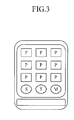
- FIG. 2 and FIG. 3 are views showing examples of touch screens before and after an apparatus to execute a hot key function of a mobile terminal performs a hot key function for data sorting;
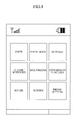
- FIG. 4 is a view showing various menus displayed on a touch screen of a mobile terminal
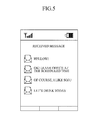
- FIG. 5 is a view showing content of a received message box in a message menu.
- FIG. 6 and FIG. 7 are views showing examples of touch screens before and after a message has been edited, respectively;
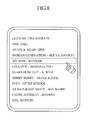
- FIG. 8 and FIG. 9 are views showing examples of touch screens before and after a search function has been performed, respectively;
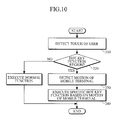
- FIG. 10 is a flowchart showing a method for executing a hot key function of a mobile terminal.
- FIG. 11 is a flowchart showing a method for executing a hot key function of a mobile terminal.
- FIG. 1 is a block view of an apparatus 100 suitable to execute a hot key function of a mobile terminal according to an exemplary embodiment.
- the apparatus 100 may include hardware, software, or a combination of hardware and software, and is installed in the mobile terminal to provide the hot key function of the mobile terminal.
- the apparatus 100 executes the hot key function according to the motion of the mobile terminal and includes a touch detection unit 110, a motion detection unit 120, and a controller 130.
- the touch detection unit 110 detects the touch of the user.
- the touch detection unit 110 can be realized by densely aligning pressure sensors in the form of a matrix on a touch screen of the mobile terminal. If the user touches a specific part on the touch screen, the pressure sensor aligned on the specific part detects the touch of the user.
- the motion detection unit 120 detects the motion of the mobile terminal.
- the motion detection unit 120 can be realized by using a gyroscopic sensor to detect the direction and the angle of the mobile terminal in which the apparatus 100 is disposed and an acceleration sensor to detect the speed and the direction of the mobile terminal in which the apparatus 100 is disposed.
- the motion detection unit 120 detects the motion of the mobile terminal based on signals detected by the gyroscopic sensor and/or the acceleration sensor. Further, the motion detection unit 120 detects if the motion of the mobile terminal is not movement of the mobile terminal, i.e., the mobile terminal is not moved.
- the controller 130 performs the hot key function according to the motion of the mobile terminal detected by the motion detection unit 120.
- the hot key functions performed by the controller may include functions related to data sorting, menu selection, folder management, file management, message management, message editing, mode conversion, and communication. These hot key functions will be described later in more detail.
- the controller 130 performs a specific hot key function.
- the user can input commands according to the touch of the user and the motion of the mobile terminal, and the apparatus 100 performs the various hot key functions according to the motion of the mobile terminal and the touch of the user.
- the motion detection unit 120 detects a motion direction of the mobile terminal, and the controller 130 performs various hot key functions according to the motion direction detected by the motion detection unit 120.
- the motion detection unit 120 may detect the motion of the mobile terminal in at least one of upward, downward, leftward, and rightward motion directions.
- the controller 130 performs various hot key functions according to the motion direction of the mobile terminal detected by the motion detection unit 120.
- the user can input commands according to the touch of the user and the motion of the mobile terminal, and the apparatus 100 can perform the various hot key functions according to the motion direction of the mobile terminal and the touch of the user.
- the controller of the apparatus 100 determines whether a region touched by the user is assigned as a hot key function region.
- the mobile terminal may include default settings such that some objects aligned on a specific region of the touch screen may be set to perform a normal function assigned thereto, and other objects may be set to perform the hot key functions assigned thereto upon the touch of the user and the motion of the mobile terminal.
- the controller determines whether the touch region is assigned to perform the normal function or the hot key function, i.e., the controller determines whether the region is a normal function region or a hot key function region.
- the controller 130 determines whether the motion of the mobile terminal is detected by the motion detection unit 120. If the motion of the mobile terminal is detected, the controller 130 performs the specific hot key function.
- hot key functions of the apparatus 100 to execute the hot key functions of the mobile terminal such as data sorting, menu selection, folder management, file management, message management, message editing, mode conversion, and communication.
- FIG. 2 and FIG. 3 are views showing examples before and after the apparatus 100 to execute the hot key function of the mobile terminal performs the hot key function related to data sorting.
- S represents content related to music
- P represents content related to still images
- M represents content related to moving pictures
- T represents content related to texts.
- FIG. 2 and FIG. 3 show the content related to music S, the content related to still images P, the content related to moving pictures M, and the content related to texts T, it is understood that aspects are not limited thereto such that more, fewer, and/or other content may be included.
- the content related to the music S is displayed on the upper part of the touch screen of the mobile terminal, and buttons for selecting the content related to the moving pictures M, the content related to the texts T, and the content related to the still images P are provided on the lower part of the touch screen of the mobile terminal.
- the touch detection unit 110 of the apparatus 100 detects the touch of the user.
- the controller 130 aligns the content related to the still images P to display the content related to the still images P on the touch screen of the mobile terminal.
- the user can input the command, and the apparatus 100 performs the hot key function related to the data sorting according to the touch of the user and the motion direction of the mobile terminal related to the touch of the user, i.e., the user can touch the button associated with the content related to the still images P and move the mobile terminal in a direction to perform the hot key function related to the data sorting.
- the hot key function related to the data sorting can be performed according to the motion direction of the mobile terminal and the touch of the user. For instance, if the motion detection unit 120 detects that the mobile terminal has moved to the left, the controller 130 displays the content related to the still images P on the touch screen of the mobile terminal in an ascending order according to file names of the content related to the still images P.
- the controller 130 displays the content related to the still images P on the touch screen of the mobile terminal in a descending order according to the file names of the content related to the still images P.
- the controller 130 displays the content related to the still images P on the touch screen of the mobile terminal in an order of time of image capture of the content related to the still images P.
- the controller 130 displays the content related to the still images P on the touch screen of the mobile terminal in a reverse order of the time of image capture of the content related to the still images P.
- the user can input commands by moving the mobile terminal, and the apparatus 100 performs the hot key function related to the data sorting according to the touch of the user and the motion of the mobile terminal.
- FIG. 4 is a view showing various menus displayed on a touch screen of a mobile terminal.
- FIG. 4 shows various menus including “show”, “phone book”, “message”, “alarm/schedule”, “multimedia”, “convenient function”, “sound”, “screen”, and “phone setting”, but it is understood that aspects are not limited thereto such that more, fewer, and/or other menus may be included.
- the touch detection unit 110 of the apparatus 100 detects the touch of the user.
- the touch may be determined to be in a normal function region or a hot key function region.
- the motion detection unit 120 detects the motion of the mobile terminal, so that the controller 130 displays the specific menu on the touch screen.
- the user can input commands by moving the mobile terminal, and the apparatus 100 performs the hot key function related to the menu selection according to the touch of the user and the motion of the mobile terminal.
- the hot key function related to the menu selection can be performed according to the motion direction of the mobile terminal and the touch of the user. For instance, if the motion detection unit 120 detects that the mobile terminal has moved to the left, the controller 130 displays a lower menu of the specific menu touched by the user.
- the controller 130 displays an upper menu of the specific menu touched by the user.
- the controller 130 displays an uppermost menu of the specific menu touched by the user.
- the controller 130 displays a lowest menu of the specific menu touched by the user.
- the user can input commands by moving the mobile terminal, and the apparatus 100 performs the hot key function related to the menu selection according to the touch of the user and the motion of the mobile terminal.
- the touch detection unit 110 of the apparatus 100 detects the touch of the user.
- the motion detection unit 120 detects the motion of the mobile terminal, so that the controller 130 manages the specific folder.
- the user can input the command by moving the mobile terminal and the apparatus 100 performs the hot key function related to the folder management according to the touch of the user and the motion of the mobile terminal.
- the hot key function related to the folder management can be performed according to the motion direction of the mobile terminal and the touch of the user. For instance, if the motion detection unit 120 detects that the mobile terminal has moved to the left, the controller 130 deletes the specific folder touched by the user.
- the controller 130 creates a subfolder of the specific folder.
- the controller 130 copies the specific folder to another folder.
- the controller 130 moves the specific folder to another folder.
- the user can input commands by moving the mobile terminal, and the apparatus 100 performs the hot key function related to the folder management according to the touch of the user and the motion of the mobile terminal.
- the file management function of the apparatus to execute the hot key functions of the mobile terminal will be described.
- the touch detection unit 110 of the apparatus 100 detects the touch of the user.
- the motion detection unit 120 detects the motion of the mobile terminal, so that the controller 130 manages the specific file.
- the user can input commands by moving the mobile terminal, and the apparatus 100 performs the hot key function related to the file management according to the touch of the user and the motion of the mobile terminal.
- the hot key function related to the file management can be performed according to the motion direction of the mobile terminal and the touch of the user. For instance, if the motion detection unit 120 detects that the mobile terminal has moved to the left, the controller 130 deletes the specific file touched by the user.
- the controller 130 changes a file name of the specific file.
- the controller 130 copies the specific file to another file.
- the controller 130 moves the specific file to another file.
- the user can input commands by moving the mobile terminal, and the apparatus 100 performs the hot key function related to the file management according to the touch of the user and the motion of the mobile terminal.
- the message management function of the apparatus to execute the hot key functions of the mobile terminal will be described. If the user touches the message menu among the various menus displayed on the touch screen of the mobile terminal as shown in FIG. 4 , the touch detection unit 110 of the apparatus 100 detects the touch of the user.
- FIG. 5 is a view showing the content of the received message box in the message menu.
- the user can input commands by moving the mobile terminal, and the apparatus 100 performs the hot key function related to the message management according to the touch of the user and the motion of the mobile terminal.
- the hot key function related to the message management can be performed according to the motion direction of the mobile terminal and the touch of the user. For instance, if the motion detection unit 120 detects that the mobile terminal has moved to the left, the controller 130 displays the content of the received message box in the message menu.
- the controller 130 displays the content of the transmitted message box in the message menu.
- the controller 130 executes a message writing function in the message menu such that the user can edit and transmit a message.
- the controller 130 executes an emoticon transmission function in the message menu such that the user can edit and transmit an emoticon.
- the user can input commands by moving the mobile terminal, and the apparatus 100 performs the hot key function related to the message management according to the touch of the user and the motion of the mobile terminal.
- FIG. 6 and FIG. 7 are views showing examples of touch screens before and after the message has been edited, respectively.
- the touch detection unit 110 of the apparatus 100 detects the touch of the user.
- the motion detection unit 120 detects the motion of the mobile terminal, so that the controller 130 performs the message editing function, i.e., the controller 130 deletes the message from the specific part of the message touched by the user.
- the user can input the command by moving the mobile terminal, and the apparatus 100 performs the hot key function related to the message editing according to the touch of the user and the motion of the mobile terminal.
- the hot key function related to the message editing can be performed according to the motion direction of the mobile terminal and the touch of the user. For instance, if the motion detection unit 120 detects that the mobile terminal has moved to the left, the controller 130 deletes the message from the specific part of the message touched by the user.
- the controller 130 deletes the specific part of the message touched by the user. For example, as shown in FIG. 6 and FIG. 7 , the specific part of the message "TOH...H" is deleted.
- the controller 130 inserts a blank to the specific part of the message touched by the user.
- the controller 130 backspaces from a current writing position to a previous writing position.
- the user can input commands by moving the mobile terminal, and the apparatus 100 performs the hot key function related to the message editing according to the touch of the user and the motion of the mobile terminal.
- the touch detection unit 110 of the apparatus 100 detects the touch of the user.
- the motion detection unit 120 detects the motion of the mobile terminal, so that the controller 130 performs the mode conversion function, such as a Korean/English conversion, a number key input mode, a special character input mode, and a capital/small letter conversion.
- the mode conversion function such as a Korean/English conversion, a number key input mode, a special character input mode, and a capital/small letter conversion.
- the user can input commands by moving the mobile terminal, and the apparatus 100 performs the hot key function related to the mode conversion according to the touch of the user and the motion of the mobile terminal.
- the hot key function related to the mode conversion can be performed according to the motion direction of the mobile terminal and the touch of the user. For instance, if the motion detection unit 120 detects that the mobile terminal has moved to the left, the controller 130 converts from a Korean mode into an English mode or vice versa.
- the controller 130 enters the number key input mode.
- the controller 130 enters the special character input mode.
- the controller 130 converts from a capital letter input mode into a small letter input mode or vice versa.
- the user can input commands by moving the mobile terminal, and the apparatus 100 performs the hot key function related to the mode conversion according to the touch of the user and the motion of the mobile terminal.
- FIG. 8 and FIG. 9 are views showing examples of touch screens before and after the search function has been performed, respectively.
- the touch detection unit 110 of the apparatus 100 detects the touch of the user.
- the motion detection unit 120 detects the motion of the mobile terminal, and if a touch of the specific music content is detected by the touch detection unit 110 of the apparatus 100, the controller 130 performs the search function. That is, as shown in FIG. 9 , the controller 130 searches the music content related to a singer of the specific music content touched by the user in FIG. 8 .
- the user can input commands by moving the mobile terminal, and the apparatus 100 performs the hot key function related to the search according to the touch of the user and the motion of the mobile terminal.
- the hot key function related to the search can be performed according to the motion direction of the mobile terminal and the touch of the user. For instance, if the motion detection unit 120 detects that the mobile terminal has moved to the left, the controller 130 searches for and displays music content related to the singer of the specific music content touched by the user.
- the controller 130 searches for and displays music content having a same genre as that of the specific music content touched by the user.
- the controller 130 searches for and displays music content of an album with which the specific music content touched by the user is associated.
- the controller 130 searches for and displays music content similar to the specific music content touched by the user.
- the user can input commands by moving the mobile terminal, and the apparatus 100 performs the hot key function related to the search according to the touch of the user and the motion of the mobile terminal.
- the touch detection unit 110 of the apparatus 100 detects the touch of the user.
- the motion detection unit 120 detects the motion of the mobile terminal, so that the controller 130 performs the communication function.
- the user can input commands by moving the mobile terminal, and the apparatus 100 performs the hot key function related to the communication according to the touch of the user and the motion of the mobile terminal.
- the hot key function related to a call connecting can be performed according to the motion direction of the mobile terminal of the user. For instance, if the motion detection unit 120 detects that the mobile terminal has moved to the left, the controller 130 attempts to make a voice communication with the specific phone number touched by the user.
- the controller 130 attempts to make a video communication with the specific phone number touched by the user.
- the controller 130 sends a short message to the specific phone number touched by the user.
- the controller 130 sends a multimedia message to the specific phone number touched by the user.
- the user can input commands by moving the mobile terminal, and the apparatus 100 performs the hot key function related to the call connecting according to the touch of the user and the motion of the mobile terminal.
- the hot key function can be performed in relation to an incoming call. If the incoming call is received in the mobile terminal, the phone number of the transmitter is displayed on the touch screen of the mobile terminal. If the user touches the phone number of the transmitter displayed on the touch screen, the touch detection unit 110 of the apparatus 100 detects the touch of the user.
- the motion detection unit 120 detects the motion of the mobile terminal, so that the controller 130 performs the hot key function related to the communication.
- the user can input commands by moving the mobile terminal, and the apparatus 100 performs the hot key function related to the incoming call according to the touch of the user and the motion of the mobile terminal.
- the hot key function related to the incoming call can be performed according to the motion direction of the mobile terminal and the touch of the user. For instance, if the motion detection unit 120 detects that the mobile terminal has moved to the left, the controller 130 receives the incoming call.
- the controller 130 rejects the incoming call.
- the user can input commands by moving the mobile terminal, and the apparatus 100 performs the hot key function related to the incoming call according to the touch of the user and the motion of the mobile terminal.
- FIG. 10 is a flowchart showing a method for executing the hot key function of the mobile terminal according to an embodiment of the present invention.
- the apparatus detects the touch of the user in operation 210. If the touch of the user is detected in operation 210, it is determined whether the region touched by the user is assigned as a hot key function region in operation 220.
- a normal function is executed in operation 235.
- the motion of the mobile terminal is detected in operation 230.
- the hot key function of the mobile terminal is executed in operation 240.
- the hot key function of the mobile terminal executed in operation 240 may include data sorting, menu selection, folder management, file management, message management, message editing, mode conversion, and communication. If motion of the mobile terminal is determined to be no motion in operation 230, i.e., the mobile terminal is not moved, the normal function may be executed in operation 235.
- the specific hot key function is executed.
- the user can input commands by moving the mobile terminal, and the apparatus 100 executes various hot key functions according to the motion of the mobile terminal and the touch of the user.
- FIG. 11 is a flowchart showing a method for executing the hot key function of the mobile terminal according to another embodiment of the present invention.
- the apparatus detects the touch of the user in operation 310. If the touch of the user is detected in operation 310, it is determined whether the region touched by the user is assigned as the hot key function region in operation 320.
- the normal function is executed in operation 335.
- the motion and the motion direction of the mobile terminal are detected in operation 330.
- the apparatus may detect the motion of the mobile terminal in at least one of the left, right, upward, and downward directions. If the motion of the mobile terminal is detected in operation 330, the hot key function of the mobile terminal is executed according to the motion direction of the mobile terminal in operation 340. For instance, the hot key function of the mobile terminal executed in operation 340 may include data sorting, menu selection, folder management, file management, message management, message editing, mode conversion, and communication. If motion of the mobile terminal is determined to be no motion in operation 330, i.e., the mobile terminal is not moved, the normal function may be executed in operation 335.
- the hot key function is executed according to the motion direction of the mobile terminal.
- the user can input commands by moving the mobile terminal, and the apparatus 100 executes various hot key functions according to the motion direction of the mobile terminal and the touch of the user.
- a touch of the user may be detected before, during, or after a motion of the mobile terminal and/or a motion direction of the mobile terminal are detected.
- An apparatus and a method for executing a hot key function of a mobile terminal provide that, if a motion of the mobile terminal is detected and a touch of a user is detected, a specific hot key function is executed, so that the user may input commands according to the touch of the user and the motion of the mobile terminal.
Landscapes
- Engineering & Computer Science (AREA)
- Theoretical Computer Science (AREA)
- General Engineering & Computer Science (AREA)
- Human Computer Interaction (AREA)
- Physics & Mathematics (AREA)
- General Physics & Mathematics (AREA)
- Computer Hardware Design (AREA)
- Computer Networks & Wireless Communication (AREA)
- Signal Processing (AREA)
- Telephone Function (AREA)
- User Interface Of Digital Computer (AREA)
- Position Input By Displaying (AREA)
Abstract
Description
- This application claims priority from and the benefit under 35 U.S.C. § 119(a) of Korean Patent Application No.
10-2009-0078193, filed on August 24, 2009 - 1. FIELD
- The following description relates to control technology of a mobile terminal.
- 2. DISCUSSION OF THE BACKGROUND
- Recently, mobile terminals using touch screens as user interfaces have become widespread. However, if the touch screen of the mobile terminal has a limited screen size, the user may be required to perform complicated manipulations to execute various functions of the mobile terminal.
- In this regard, intuitive user interfaces capable of executing various functions through simple manipulations to allow the user to input commands through a touch screen of a mobile terminal having a limited screen size are needed.
- Exemplary embodiments provide an apparatus and a method for executing a hot key function of a mobile terminal, capable of performing various hot key functions upon the input of a user's command based on the user's touch and a motion of the mobile terminal.
- Exemplary embodiments provide that a specific hot key function is executed if the user touch and the motion of the mobile terminal are detected.
- Additional features of the invention will be set forth in the description which follows, and in part will be apparent from the description, or may be learned by practice of the invention.
- An exemplary embodiment discloses an apparatus to execute a hot key function of a mobile terminal, the apparatus including a touch detection unit to detect a touch, a motion detection unit to detect a motion of the mobile terminal, and a controller to execute a first hot key function if the touch detection unit detects the touch and the motion detection unit detects the motion of the mobile terminal.
- An exemplary embodiment discloses a method for executing a hot key function of a mobile terminal, the method including detecting a touch, detecting a motion of the mobile terminal, executing a first hot key function if the touch of the user is detected and the motion of the mobile terminal is detected to be movement of the mobile terminal.
- It is to be understood that both the foregoing general description and the following detailed description are exemplary and explanatory and are intended to provide further explanation of the invention as claimed. Other features and aspects will be apparent from the following detailed description, the drawings, and the claims.
- The accompanying drawings, which are included to provide a further understanding of the invention and are incorporated in and constitute a part of this specification, illustrate embodiments of the invention, and together with the description serve to explain the principles of the invention.
-
FIG. 1 is a block view showing an apparatus to execute a hot key function of a mobile terminal according to an exemplary embodiment; -
FIG. 2 andFIG. 3 are views showing examples of touch screens before and after an apparatus to execute a hot key function of a mobile terminal performs a hot key function for data sorting; -
FIG. 4 is a view showing various menus displayed on a touch screen of a mobile terminal; -
FIG. 5 is a view showing content of a received message box in a message menu. -
FIG. 6 and FIG. 7 are views showing examples of touch screens before and after a message has been edited, respectively; -
FIG. 8 andFIG. 9 are views showing examples of touch screens before and after a search function has been performed, respectively; -
FIG. 10 is a flowchart showing a method for executing a hot key function of a mobile terminal; and -
FIG. 11 is a flowchart showing a method for executing a hot key function of a mobile terminal. - Elements, features, and structures are denoted by the same reference numerals throughout the drawings and the detailed description, and the size and proportions of some elements may be exaggerated in the drawings for clarity and convenience.
- The invention is described more fully hereinafter with reference to the accompanying drawings, in which exemplary embodiments of the invention are shown. This invention may, however, be embodied in many different forms and should not be construed as limited to the embodiments set forth herein. Rather, these exemplary embodiments are provided so that this disclosure is thorough, and will fully convey the scope of the invention to those skilled in the art. In the drawings, the size and relative sizes of layers and regions may be exaggerated for clarity. Like reference numerals in the drawings denote like elements.
-
FIG. 1 is a block view of anapparatus 100 suitable to execute a hot key function of a mobile terminal according to an exemplary embodiment. Theapparatus 100 may include hardware, software, or a combination of hardware and software, and is installed in the mobile terminal to provide the hot key function of the mobile terminal. Theapparatus 100 executes the hot key function according to the motion of the mobile terminal and includes atouch detection unit 110, amotion detection unit 120, and acontroller 130. - The
touch detection unit 110 detects the touch of the user. For instance, thetouch detection unit 110 can be realized by densely aligning pressure sensors in the form of a matrix on a touch screen of the mobile terminal. If the user touches a specific part on the touch screen, the pressure sensor aligned on the specific part detects the touch of the user. - The
motion detection unit 120 detects the motion of the mobile terminal. For instance, themotion detection unit 120 can be realized by using a gyroscopic sensor to detect the direction and the angle of the mobile terminal in which theapparatus 100 is disposed and an acceleration sensor to detect the speed and the direction of the mobile terminal in which theapparatus 100 is disposed. Themotion detection unit 120 detects the motion of the mobile terminal based on signals detected by the gyroscopic sensor and/or the acceleration sensor. Further, themotion detection unit 120 detects if the motion of the mobile terminal is not movement of the mobile terminal, i.e., the mobile terminal is not moved. - If the touch of the user is detected by the
touch detection unit 110 and the motion of the mobile terminal is detected by themotion detection unit 120, thecontroller 130 performs the hot key function according to the motion of the mobile terminal detected by themotion detection unit 120. - The hot key functions performed by the controller may include functions related to data sorting, menu selection, folder management, file management, message management, message editing, mode conversion, and communication. These hot key functions will be described later in more detail.
- According to the
apparatus 100 to execute the hot key function of the mobile terminal, if the motion of the mobile terminal is detected by themotion detection unit 120 and the touch of the user is detected by thetouch detection unit 110, thecontroller 130 performs a specific hot key function. - Therefore, the user can input commands according to the touch of the user and the motion of the mobile terminal, and the
apparatus 100 performs the various hot key functions according to the motion of the mobile terminal and the touch of the user. - According to an exemplary embodiment, the
motion detection unit 120 detects a motion direction of the mobile terminal, and thecontroller 130 performs various hot key functions according to the motion direction detected by themotion detection unit 120. Themotion detection unit 120 may detect the motion of the mobile terminal in at least one of upward, downward, leftward, and rightward motion directions. - According to the
apparatus 100 to execute the hot key function of the mobile terminal, if the motion of the mobile terminal is detected by themotion detection unit 120 and the touch of the user is detected by thetouch detection unit 110, thecontroller 130 performs various hot key functions according to the motion direction of the mobile terminal detected by themotion detection unit 120. - Therefore, the user can input commands according to the touch of the user and the motion of the mobile terminal, and the
apparatus 100 can perform the various hot key functions according to the motion direction of the mobile terminal and the touch of the user. - In addition, according to an exemplary embodiment, if the touch of the user is detected, the controller of the
apparatus 100 determines whether a region touched by the user is assigned as a hot key function region. - For instance, the mobile terminal may include default settings such that some objects aligned on a specific region of the touch screen may be set to perform a normal function assigned thereto, and other objects may be set to perform the hot key functions assigned thereto upon the touch of the user and the motion of the mobile terminal.
- If the
touch detection unit 110 detects the user's touch for the object aligned on a specific region of the touch screen of the mobile terminal, the controller determines whether the touch region is assigned to perform the normal function or the hot key function, i.e., the controller determines whether the region is a normal function region or a hot key function region. - If the touch region is a normal function region, i.e., assigned to perform the normal function, the normal function assigned to the object is performed. In addition, if the touch region is a hot key function region, i.e., assigned to perform the hot key function, the
controller 130 determines whether the motion of the mobile terminal is detected by themotion detection unit 120. If the motion of the mobile terminal is detected, thecontroller 130 performs the specific hot key function. - Hereinafter, description will be made in more detail with regard to the hot key functions of the
apparatus 100 to execute the hot key functions of the mobile terminal, such as data sorting, menu selection, folder management, file management, message management, message editing, mode conversion, and communication. - First, a data sorting function of the apparatus to execute the hot key functions of the mobile terminal will be described.
FIG. 2 andFIG. 3 are views showing examples before and after theapparatus 100 to execute the hot key function of the mobile terminal performs the hot key function related to data sorting. InFIG. 2 andFIG. 3 , "S" represents content related to music, "P" represents content related to still images, "M" represents content related to moving pictures, and "T" represents content related to texts. AlthoughFIG. 2 andFIG. 3 show the content related to music S, the content related to still images P, the content related to moving pictures M, and the content related to texts T, it is understood that aspects are not limited thereto such that more, fewer, and/or other content may be included. - As shown in
FIG. 2 , the content related to the music S is displayed on the upper part of the touch screen of the mobile terminal, and buttons for selecting the content related to the moving pictures M, the content related to the texts T, and the content related to the still images P are provided on the lower part of the touch screen of the mobile terminal. - If the user touches the button for selecting the content related to the still images P, the
touch detection unit 110 of theapparatus 100 detects the touch of the user. - Thus, as shown in
FIG. 3 , thecontroller 130 aligns the content related to the still images P to display the content related to the still images P on the touch screen of the mobile terminal. - Therefore, the user can input the command, and the
apparatus 100 performs the hot key function related to the data sorting according to the touch of the user and the motion direction of the mobile terminal related to the touch of the user, i.e., the user can touch the button associated with the content related to the still images P and move the mobile terminal in a direction to perform the hot key function related to the data sorting. - In addition, the hot key function related to the data sorting can be performed according to the motion direction of the mobile terminal and the touch of the user. For instance, if the
motion detection unit 120 detects that the mobile terminal has moved to the left, thecontroller 130 displays the content related to the still images P on the touch screen of the mobile terminal in an ascending order according to file names of the content related to the still images P. - Further, if the
motion detection unit 120 detects that the mobile terminal has moved to the right, thecontroller 130 displays the content related to the still images P on the touch screen of the mobile terminal in a descending order according to the file names of the content related to the still images P. - In addition, if the
motion detection unit 120 detects that the mobile terminal has moved upward, thecontroller 130 displays the content related to the still images P on the touch screen of the mobile terminal in an order of time of image capture of the content related to the still images P. - Further, if the
motion detection unit 120 detects that the mobile terminal has moved downward, thecontroller 130 displays the content related to the still images P on the touch screen of the mobile terminal in a reverse order of the time of image capture of the content related to the still images P. - In this manner, the user can input commands by moving the mobile terminal, and the
apparatus 100 performs the hot key function related to the data sorting according to the touch of the user and the motion of the mobile terminal. - Hereinafter, the menu selection function of the apparatus to execute the hot key functions of the mobile terminal according to an exemplary embodiment will be described.
FIG. 4 is a view showing various menus displayed on a touch screen of a mobile terminal.FIG. 4 shows various menus including "show", "phone book", "message", "alarm/schedule", "multimedia", "convenient function", "sound", "screen", and "phone setting", but it is understood that aspects are not limited thereto such that more, fewer, and/or other menus may be included. - As shown in
FIG. 4 , if the user touches a specific menu among the menus displayed on the touch screen of the mobile terminal, thetouch detection unit 110 of theapparatus 100 detects the touch of the user. The touch may be determined to be in a normal function region or a hot key function region. - If the user moves the mobile terminal and the touch of the user is detected by the
touch detection unit 110 of theapparatus 100, themotion detection unit 120 detects the motion of the mobile terminal, so that thecontroller 130 displays the specific menu on the touch screen. - In this manner, the user can input commands by moving the mobile terminal, and the
apparatus 100 performs the hot key function related to the menu selection according to the touch of the user and the motion of the mobile terminal. - In addition, the hot key function related to the menu selection can be performed according to the motion direction of the mobile terminal and the touch of the user. For instance, if the
motion detection unit 120 detects that the mobile terminal has moved to the left, thecontroller 130 displays a lower menu of the specific menu touched by the user. - Further, if the
motion detection unit 120 detects that the mobile terminal has moved to the right, thecontroller 130 displays an upper menu of the specific menu touched by the user. - In addition, if the
motion detection unit 120 detects that the mobile terminal has moved upward, thecontroller 130 displays an uppermost menu of the specific menu touched by the user. - Further, if the
motion detection unit 120 detects that the mobile terminal has moved downward, thecontroller 130 displays a lowest menu of the specific menu touched by the user. - In this manner, the user can input commands by moving the mobile terminal, and the
apparatus 100 performs the hot key function related to the menu selection according to the touch of the user and the motion of the mobile terminal. - Hereinafter, a folder management function of the apparatus to execute the hot key functions of the mobile terminal according to an exemplary embodiment will be described. Although not shown in the drawings, if the user touches a specific folder among various folders displayed on the touch screen of the mobile terminal, the
touch detection unit 110 of theapparatus 100 detects the touch of the user. - If the user moves the mobile terminal and the touch of the user is detected by the
touch detection unit 110 of theapparatus 100, themotion detection unit 120 detects the motion of the mobile terminal, so that thecontroller 130 manages the specific folder. - In this manner, the user can input the command by moving the mobile terminal and the
apparatus 100 performs the hot key function related to the folder management according to the touch of the user and the motion of the mobile terminal. - In addition, the hot key function related to the folder management can be performed according to the motion direction of the mobile terminal and the touch of the user. For instance, if the
motion detection unit 120 detects that the mobile terminal has moved to the left, thecontroller 130 deletes the specific folder touched by the user. - Further, if the
motion detection unit 120 detects that the mobile terminal has moved to the right, thecontroller 130 creates a subfolder of the specific folder. - In addition, if the
motion detection unit 120 detects that the mobile terminal has moved upward, thecontroller 130 copies the specific folder to another folder. - Further, if the
motion detection unit 120 detects that the mobile terminal has moved downward, thecontroller 130 moves the specific folder to another folder. - In this manner, the user can input commands by moving the mobile terminal, and the
apparatus 100 performs the hot key function related to the folder management according to the touch of the user and the motion of the mobile terminal. - Hereinafter, the file management function of the apparatus to execute the hot key functions of the mobile terminal according to an exemplary embodiment will be described. Although not shown in the drawings, if the user touches a specific file from among various files displayed on the touch screen of the mobile terminal, the
touch detection unit 110 of theapparatus 100 detects the touch of the user. - If the user moves the mobile terminal, the
motion detection unit 120 detects the motion of the mobile terminal, so that thecontroller 130 manages the specific file. - In this manner, the user can input commands by moving the mobile terminal, and the
apparatus 100 performs the hot key function related to the file management according to the touch of the user and the motion of the mobile terminal. - In addition, the hot key function related to the file management can be performed according to the motion direction of the mobile terminal and the touch of the user. For instance, if the
motion detection unit 120 detects that the mobile terminal has moved to the left, thecontroller 130 deletes the specific file touched by the user. - Further, if the
motion detection unit 120 detects that the mobile terminal has moved to the right, thecontroller 130 changes a file name of the specific file. - In addition, if the
motion detection unit 120 detects that the mobile terminal has moved upward, thecontroller 130 copies the specific file to another file. - Further, if the
motion detection unit 120 detects that the mobile terminal has moved downward, thecontroller 130 moves the specific file to another file. - In this manner, the user can input commands by moving the mobile terminal, and the
apparatus 100 performs the hot key function related to the file management according to the touch of the user and the motion of the mobile terminal. - Hereinafter, the message management function of the apparatus to execute the hot key functions of the mobile terminal will be described. If the user touches the message menu among the various menus displayed on the touch screen of the mobile terminal as shown in
FIG. 4 , thetouch detection unit 110 of theapparatus 100 detects the touch of the user. - If the user moves the mobile terminal and the touch of the message menu as shown in
FIG. 4 is detected by thetouch detection unit 110 of theapparatus 100, themotion detection unit 120 detects the motion of the mobile terminal, so that thecontroller 130 performs the message management function, i.e., thecontroller 130 displays the content of a received message box as shown inFIG. 5. FIG. 5 is a view showing the content of the received message box in the message menu. - In this manner, the user can input commands by moving the mobile terminal, and the
apparatus 100 performs the hot key function related to the message management according to the touch of the user and the motion of the mobile terminal. - In addition, the hot key function related to the message management can be performed according to the motion direction of the mobile terminal and the touch of the user. For instance, if the
motion detection unit 120 detects that the mobile terminal has moved to the left, thecontroller 130 displays the content of the received message box in the message menu. - Further, if the
motion detection unit 120 detects that the mobile terminal has moved to the right, thecontroller 130 displays the content of the transmitted message box in the message menu. - In addition, if the
motion detection unit 120 detects that the mobile terminal has moved upward, thecontroller 130 executes a message writing function in the message menu such that the user can edit and transmit a message. - Further, if the
motion detection unit 120 detects that the mobile terminal has moved downward, thecontroller 130 executes an emoticon transmission function in the message menu such that the user can edit and transmit an emoticon. - In this manner, the user can input commands by moving the mobile terminal, and the
apparatus 100 performs the hot key function related to the message management according to the touch of the user and the motion of the mobile terminal. - Hereinafter, a message editing function of the apparatus to execute the hot key functions of the mobile terminal will be described.
FIG. 6 and FIG. 7 are views showing examples of touch screens before and after the message has been edited, respectively. - If the user touches a specific part of the touch screen where a message is written while writing the message on the touch screen of the mobile terminal, the
touch detection unit 110 of theapparatus 100 detects the touch of the user. - If the user moves the mobile terminal and the touch of the specific part of the touch screen is detected by the
touch detection unit 110 of theapparatus 100, themotion detection unit 120 detects the motion of the mobile terminal, so that thecontroller 130 performs the message editing function, i.e., thecontroller 130 deletes the message from the specific part of the message touched by the user. - In this manner, the user can input the command by moving the mobile terminal, and the
apparatus 100 performs the hot key function related to the message editing according to the touch of the user and the motion of the mobile terminal. - In addition, the hot key function related to the message editing can be performed according to the motion direction of the mobile terminal and the touch of the user. For instance, if the
motion detection unit 120 detects that the mobile terminal has moved to the left, thecontroller 130 deletes the message from the specific part of the message touched by the user. - Further, if the
motion detection unit 120 detects that the mobile terminal has moved to the right, thecontroller 130 deletes the specific part of the message touched by the user. For example, as shown inFIG. 6 and FIG. 7 , the specific part of the message "TOH...H" is deleted. - In addition, if the
motion detection unit 120 detects that the mobile terminal has moved upward, thecontroller 130 inserts a blank to the specific part of the message touched by the user. - Further, if the
motion detection unit 120 detects that the mobile terminal has moved downward, thecontroller 130 backspaces from a current writing position to a previous writing position. - In this manner, the user can input commands by moving the mobile terminal, and the
apparatus 100 performs the hot key function related to the message editing according to the touch of the user and the motion of the mobile terminal. - Hereinafter, a mode conversion function of the apparatus to execute the hot key functions of the mobile terminal will be described. Although not shown in the drawings, if the user touches a specific part of the touch screen where a message is written while writing the message on the touch screen of the mobile terminal, the
touch detection unit 110 of theapparatus 100 detects the touch of the user. - If the user moves the mobile terminal and the touch of the specific part is detected by the
touch detection unit 110 of theapparatus 100, themotion detection unit 120 detects the motion of the mobile terminal, so that thecontroller 130 performs the mode conversion function, such as a Korean/English conversion, a number key input mode, a special character input mode, and a capital/small letter conversion. - In this manner, the user can input commands by moving the mobile terminal, and the
apparatus 100 performs the hot key function related to the mode conversion according to the touch of the user and the motion of the mobile terminal. - In addition, the hot key function related to the mode conversion can be performed according to the motion direction of the mobile terminal and the touch of the user. For instance, if the
motion detection unit 120 detects that the mobile terminal has moved to the left, thecontroller 130 converts from a Korean mode into an English mode or vice versa. - Further, if the
motion detection unit 120 detects that the mobile terminal has moved to the right, thecontroller 130 enters the number key input mode. - In addition, if the
motion detection unit 120 detects that the mobile terminal has moved upward, thecontroller 130 enters the special character input mode. - Further, if the
motion detection unit 120 detects that the mobile terminal has moved downward, thecontroller 130 converts from a capital letter input mode into a small letter input mode or vice versa. - In this manner, the user can input commands by moving the mobile terminal, and the
apparatus 100 performs the hot key function related to the mode conversion according to the touch of the user and the motion of the mobile terminal. - Hereinafter, a search function of the apparatus to execute the hot key functions of the mobile terminal will be described.
FIG. 8 andFIG. 9 are views showing examples of touch screens before and after the search function has been performed, respectively. - For instance, if the user touches an item related to specific music content among various items displayed on the touch screen of the mobile terminal, the
touch detection unit 110 of theapparatus 100 detects the touch of the user. - If the user moves the mobile terminal, the
motion detection unit 120 detects the motion of the mobile terminal, and if a touch of the specific music content is detected by thetouch detection unit 110 of theapparatus 100, thecontroller 130 performs the search function. That is, as shown inFIG. 9 , thecontroller 130 searches the music content related to a singer of the specific music content touched by the user inFIG. 8 . - In this manner, the user can input commands by moving the mobile terminal, and the
apparatus 100 performs the hot key function related to the search according to the touch of the user and the motion of the mobile terminal. - In addition, the hot key function related to the search can be performed according to the motion direction of the mobile terminal and the touch of the user. For instance, if the
motion detection unit 120 detects that the mobile terminal has moved to the left, thecontroller 130 searches for and displays music content related to the singer of the specific music content touched by the user. - Further, if the
motion detection unit 120 detects that the mobile terminal has moved to the right, thecontroller 130 searches for and displays music content having a same genre as that of the specific music content touched by the user. - In addition, if the
motion detection unit 120 detects that the mobile terminal has moved upward, thecontroller 130 searches for and displays music content of an album with which the specific music content touched by the user is associated. - Further, if the
motion detection unit 120 detects that the mobile terminal has moved downward, thecontroller 130 searches for and displays music content similar to the specific music content touched by the user. - In this manner, the user can input commands by moving the mobile terminal, and the
apparatus 100 performs the hot key function related to the search according to the touch of the user and the motion of the mobile terminal. - Hereinafter, a communication function of the apparatus to execute the hot key functions of the mobile terminal will be described. Although not shown in the drawings, if the user touches a specific phone number from a phone number list registered in a phone book provided on the touch screen of the mobile terminal, the
touch detection unit 110 of theapparatus 100 detects the touch of the user. - If the user moves the mobile terminal and the touch of the specific phone number is detected, the
motion detection unit 120 detects the motion of the mobile terminal, so that thecontroller 130 performs the communication function. - In this manner, the user can input commands by moving the mobile terminal, and the
apparatus 100 performs the hot key function related to the communication according to the touch of the user and the motion of the mobile terminal. - In addition, the hot key function related to a call connecting can be performed according to the motion direction of the mobile terminal of the user. For instance, if the
motion detection unit 120 detects that the mobile terminal has moved to the left, thecontroller 130 attempts to make a voice communication with the specific phone number touched by the user. - Further, if the
motion detection unit 120 detects that the mobile terminal has moved to the right, thecontroller 130 attempts to make a video communication with the specific phone number touched by the user. - In addition, if the
motion detection unit 120 detects that the mobile terminal has moved upward, thecontroller 130 sends a short message to the specific phone number touched by the user. - Further, if the
motion detection unit 120 detects that the mobile terminal has moved downward, thecontroller 130 sends a multimedia message to the specific phone number touched by the user. - In this manner, the user can input commands by moving the mobile terminal, and the
apparatus 100 performs the hot key function related to the call connecting according to the touch of the user and the motion of the mobile terminal. - In addition to the above call connecting scheme, the hot key function can be performed in relation to an incoming call. If the incoming call is received in the mobile terminal, the phone number of the transmitter is displayed on the touch screen of the mobile terminal. If the user touches the phone number of the transmitter displayed on the touch screen, the
touch detection unit 110 of theapparatus 100 detects the touch of the user. - If the user moves the mobile terminal and the touch of the phone number of the transmitter displayed on the touch screen is detected by the
touch detection unit 110 of theapparatus 100, themotion detection unit 120 detects the motion of the mobile terminal, so that thecontroller 130 performs the hot key function related to the communication. - In this manner, the user can input commands by moving the mobile terminal, and the
apparatus 100 performs the hot key function related to the incoming call according to the touch of the user and the motion of the mobile terminal. - Meanwhile, the hot key function related to the incoming call can be performed according to the motion direction of the mobile terminal and the touch of the user. For instance, if the
motion detection unit 120 detects that the mobile terminal has moved to the left, thecontroller 130 receives the incoming call. - Further, if the
motion detection unit 120 detects that the mobile terminal has moved to the right, thecontroller 130 rejects the incoming call. - In this manner, the user can input commands by moving the mobile terminal, and the
apparatus 100 performs the hot key function related to the incoming call according to the touch of the user and the motion of the mobile terminal. - Hereinafter, the method for executing the hot key function of the mobile terminal according to an exemplary embodiment will be described with reference to
FIG. 10 andFIG. 11 .FIG. 10 is a flowchart showing a method for executing the hot key function of the mobile terminal according to an embodiment of the present invention. - As shown in
FIG. 10 , the apparatus detects the touch of the user inoperation 210. If the touch of the user is detected inoperation 210, it is determined whether the region touched by the user is assigned as a hot key function region inoperation 220. - If the region touched by the user is assigned as a normal function region, i.e., not a hot key function region, a normal function is executed in operation 235. In contrast, if the region touched by the user is assigned as the hot key function region, the motion of the mobile terminal is detected in
operation 230. - If motion of the mobile terminal is detected in
operation 230, the hot key function of the mobile terminal is executed inoperation 240. For instance, the hot key function of the mobile terminal executed inoperation 240 may include data sorting, menu selection, folder management, file management, message management, message editing, mode conversion, and communication. If motion of the mobile terminal is determined to be no motion inoperation 230, i.e., the mobile terminal is not moved, the normal function may be executed in operation 235. - Therefore, if the motion of the mobile terminal is detected and the touch of the user is detected, the specific hot key function is executed. Thus, the user can input commands by moving the mobile terminal, and the
apparatus 100 executes various hot key functions according to the motion of the mobile terminal and the touch of the user. -
FIG. 11 is a flowchart showing a method for executing the hot key function of the mobile terminal according to another embodiment of the present invention. As shown inFIG. 11 , the apparatus detects the touch of the user inoperation 310. If the touch of the user is detected inoperation 310, it is determined whether the region touched by the user is assigned as the hot key function region inoperation 320. - If the region touched by the user is assigned as a normal function region, the normal function is executed in operation 335. In contrast, if the region touched by the user is assigned as a hot key function region, the motion and the motion direction of the mobile terminal are detected in
operation 330. - In
operation 330, the apparatus may detect the motion of the mobile terminal in at least one of the left, right, upward, and downward directions. If the motion of the mobile terminal is detected inoperation 330, the hot key function of the mobile terminal is executed according to the motion direction of the mobile terminal inoperation 340. For instance, the hot key function of the mobile terminal executed inoperation 340 may include data sorting, menu selection, folder management, file management, message management, message editing, mode conversion, and communication. If motion of the mobile terminal is determined to be no motion inoperation 330, i.e., the mobile terminal is not moved, the normal function may be executed in operation 335. - Therefore, if the motion of the mobile terminal is detected and the touch of the user is detected, the hot key function is executed according to the motion direction of the mobile terminal. Thus, the user can input commands by moving the mobile terminal, and the
apparatus 100 executes various hot key functions according to the motion direction of the mobile terminal and the touch of the user. - Although specific functions are described above as being associated with specific directions or as being associated with no direction, aspects are not limited thereto such that the specific functions or other functions may be associated with other, different, multiple, or sequential directions. Further, a touch of the user may be detected before, during, or after a motion of the mobile terminal and/or a motion direction of the mobile terminal are detected.
- It will be apparent to those skilled in the art that various modifications and variation can be made in the present invention without departing from the spirit or scope of the invention. Thus, it is intended that the present invention cover the modifications and variations of this invention provided they come within the scope of the appended claims and their equivalents.
An apparatus and a method for executing a hot key function of a mobile terminal provide that, if a motion of the mobile terminal is detected and a touch of a user is detected, a specific hot key function is executed, so that the user may input commands according to the touch of the user and the motion of the mobile terminal.
Claims (12)
- An apparatus to execute a hot key function of a mobile terminal, the apparatus comprising:a touch detection unit to detect a touch;a motion detection unit to detect a motion of the mobile terminal; anda controller to execute a first hot key function if the touch detection unit detects the touch and the motion detection unit detects the motion of the mobile terminal.
- The apparatus of claim 1, wherein the motion detection unit further detects a motion direction of the mobile terminal and the controller executes the first hot key function according to the motion direction of the mobile terminal detected by the motion detection unit.
- The apparatus of claim 2, wherein the motion direction is one of upward, downward, leftward, and rightward, and the controller respectively executes the first hot key function, a second hot key function, a third hot key function, or a hot key function according to the detected upward, downward, leftward, and rightward motion directions of the mobile terminal, respectively.
- The apparatus of claim 2 or 3, wherein, if the motion direction is a first direction, the controller executes the first hot key function, and, if the motion direction is a second direction, the controller executes a second hot key function.
- The apparatus of any of claims 1 to 4, wherein the controller determines whether a region receiving the touch is assigned as a hot key function region.
- The apparatus of claim 5, wherein the controller executes a normal function if the region receiving the touch is not a hot key function region.
- The apparatus of claim 1, wherein the hot key function is at least one function selected from the group consisting of- a data sorting function,- a menu selection function,- a folder management function- a file management function,- a message management function,- a message editing function,- a mode conversion function,- a searching function, and- a communication function.
- A method for executing a hot key function of a mobile terminal, the method comprising:detecting a touch;detecting a motion of the mobile terminal;executing a first hot key function if the touch is detected and the motion of the mobile terminal is detected.
- The method of claim 8, further comprising:detecting a motion direction of the mobile terminal; andexecuting the first hot key functions according to the motion direction of the mobile terminal.
- The method of claim 8 or 9, further comprising:determining whether a region receiving the touch is assigned as a hot key function region.
- The method of any of claims 8 to 10, further comprising:executing a normal function according to the detected touch if the region receiving the touch is not a hot key function region.
- The method of any of claims 8 to 11, further comprising:executing one of a first hot key function, a second hot key function, a third hot key function, or a fourth hot key function if the motion direction is detected as one of an upward, a downward, a leftward, and a rightward motion direction, respectively.
Applications Claiming Priority (1)
| Application Number | Priority Date | Filing Date | Title |
|---|---|---|---|
| KR1020090078193A KR101099135B1 (en) | 2009-08-24 | 2009-08-24 | Apparatus and method for executing shortened function on a mobile phone |
Publications (3)
| Publication Number | Publication Date |
|---|---|
| EP2290931A2 true EP2290931A2 (en) | 2011-03-02 |
| EP2290931A3 EP2290931A3 (en) | 2013-05-22 |
| EP2290931B1 EP2290931B1 (en) | 2015-12-23 |
Family
ID=43127022
Family Applications (1)
| Application Number | Title | Priority Date | Filing Date |
|---|---|---|---|
| EP10170234.8A Active EP2290931B1 (en) | 2009-08-24 | 2010-07-21 | Apparatus and method for executing hot key function of mobile terminal |
Country Status (4)
| Country | Link |
|---|---|
| US (1) | US8599153B2 (en) |
| EP (1) | EP2290931B1 (en) |
| KR (1) | KR101099135B1 (en) |
| CN (1) | CN101996043B (en) |
Families Citing this family (10)
| Publication number | Priority date | Publication date | Assignee | Title |
|---|---|---|---|---|
| US9244530B1 (en) * | 2011-01-31 | 2016-01-26 | Google Inc. | Virtual artifacts using mobile devices |
| US9841822B2 (en) | 2011-06-28 | 2017-12-12 | Guangzhou Ucweb Computer Technology Co., Ltd. | Method for operating mobile device using vibration sensor |
| CN102495706A (en) * | 2011-12-02 | 2012-06-13 | 优视科技有限公司 | Method and device for switching interfaces by using mobile terminal |
| EP4411586A3 (en) * | 2013-08-26 | 2024-11-20 | Samsung Electronics Co., Ltd. | User device and method for creating handwriting content |
| US9887949B2 (en) * | 2014-05-31 | 2018-02-06 | Apple Inc. | Displaying interactive notifications on touch sensitive devices |
| CN104615275B (en) * | 2015-03-02 | 2018-06-01 | 三星电子(中国)研发中心 | Character input method and device |
| US20160366481A1 (en) * | 2015-06-12 | 2016-12-15 | Samsung Electronics Co., Ltd. | Method and apparatus for service oriented input and output |
| CN106155534A (en) * | 2016-06-30 | 2016-11-23 | 维沃移动通信有限公司 | A kind of mobile terminal operational approach and mobile terminal |
| CN107368249B (en) * | 2017-06-21 | 2021-04-27 | 维沃移动通信有限公司 | A touch operation recognition method, device and mobile terminal |
| KR102003024B1 (en) | 2019-03-18 | 2019-10-17 | 주식회사 조일기업 | Adjustment ejector system |
Family Cites Families (24)
| Publication number | Priority date | Publication date | Assignee | Title |
|---|---|---|---|---|
| JP3717231B2 (en) | 1996-03-19 | 2005-11-16 | 株式会社ウィルコム | Mobile terminal device for mobile communication |
| KR20010110487A (en) | 2000-01-31 | 2001-12-13 | 다니엘 태그리아페리, 라이조 캐르키, 모링 헬레나 | Accelerometer and selection key(s) used as input devices for mobile radiotelephone |
| US7133859B1 (en) * | 2001-01-05 | 2006-11-07 | Palm, Inc. | Category specific sort and display instructions for an electronic device |
| JP3776808B2 (en) | 2001-02-27 | 2006-05-17 | 埼玉日本電気株式会社 | Mobile device |
| TW530223B (en) * | 2001-12-07 | 2003-05-01 | Inventec Corp | Chinese phonetic input system having functions of incomplete spelling and fuzzy phonetic comparing, and the method thereof |
| KR20030073139A (en) | 2002-03-08 | 2003-09-19 | 주식회사 엘지이아이 | Command input interface and method for personal digital assistant |
| KR100920665B1 (en) | 2002-10-31 | 2009-10-09 | 엘지전자 주식회사 | Acceleration Detection Device and Method in Personal Information Terminal |
| KR20050059661A (en) | 2003-12-15 | 2005-06-21 | 에스케이텔레텍주식회사 | Mobile phone for shortening key operation using gyrosensor and method for the same |
| US20050225533A1 (en) * | 2004-04-13 | 2005-10-13 | Annie Cheng | Mouse |
| NO20044073D0 (en) * | 2004-09-27 | 2004-09-27 | Isak Engquist | Information Processing System and Procedures |
| KR20060079403A (en) | 2004-12-31 | 2006-07-06 | 주식회사 모모웹 | Data input method and apparatus of mobile communication terminal using motion sensor |
| US20070018964A1 (en) * | 2005-07-19 | 2007-01-25 | Cisco Technology, Inc. | Portable device and method for interacting therewith |
| KR100767686B1 (en) * | 2006-03-30 | 2007-10-17 | 엘지전자 주식회사 | Terminal with touch wheel and command input method therefor |
| CN100517206C (en) * | 2006-04-21 | 2009-07-22 | 宏达国际电子股份有限公司 | Item selection method |
| KR100748469B1 (en) * | 2006-06-26 | 2007-08-10 | 삼성전자주식회사 | User Interface Method by Touching Keypad and Its Mobile Terminal |
| US8139026B2 (en) * | 2006-08-02 | 2012-03-20 | Research In Motion Limited | System and method for adjusting presentation of text and images on an electronic device according to an orientation of the device |
| KR20080059743A (en) | 2006-12-26 | 2008-07-01 | 허성 | Device for switching operation mode of portable communication device by detecting user's touch and weight |
| US20080168087A1 (en) * | 2007-01-05 | 2008-07-10 | Fifth Generation Systems, Inc. | System and Method for Managing Location-Independent Objects |
| KR20080085983A (en) | 2007-03-21 | 2008-09-25 | 엘지전자 주식회사 | How to provide user interface of mobile terminal |
| KR101390103B1 (en) | 2007-04-03 | 2014-04-28 | 엘지전자 주식회사 | Controlling image and mobile terminal |
| KR101396709B1 (en) | 2007-07-13 | 2014-05-19 | 삼성전자주식회사 | Mobile communication terminal and method for switching character input modes |
| CN101488161A (en) * | 2008-01-16 | 2009-07-22 | 宏达国际电子股份有限公司 | Data result determining method and system using motion sensor |
| CN201226184Y (en) * | 2008-05-12 | 2009-04-22 | 许丰 | Multi-inclined switch remote controller |
| KR101505198B1 (en) * | 2008-08-18 | 2015-03-23 | 엘지전자 주식회사 | PORTABLE TERMINAL and DRIVING METHOD OF THE SAME |
-
2009
- 2009-08-24 KR KR1020090078193A patent/KR101099135B1/en not_active Expired - Fee Related
-
2010
- 2010-07-21 EP EP10170234.8A patent/EP2290931B1/en active Active
- 2010-08-05 US US12/850,869 patent/US8599153B2/en not_active Expired - Fee Related
- 2010-08-24 CN CN201010262676.XA patent/CN101996043B/en active Active
Non-Patent Citations (1)
| Title |
|---|
| None |
Also Published As
| Publication number | Publication date |
|---|---|
| KR20110020530A (en) | 2011-03-03 |
| EP2290931A3 (en) | 2013-05-22 |
| EP2290931B1 (en) | 2015-12-23 |
| CN101996043B (en) | 2016-03-02 |
| CN101996043A (en) | 2011-03-30 |
| KR101099135B1 (en) | 2011-12-27 |
| US8599153B2 (en) | 2013-12-03 |
| US20110043469A1 (en) | 2011-02-24 |
Similar Documents
| Publication | Publication Date | Title |
|---|---|---|
| EP2290931B1 (en) | Apparatus and method for executing hot key function of mobile terminal | |
| KR101449358B1 (en) | Methods and graphical user interfaces for editing on a multifunction device with a touch screen display | |
| US9898111B2 (en) | Touch sensitive device and method of touch-based manipulation for contents | |
| US10684757B2 (en) | Information processing apparatus and information processing method for independently moving and regrouping selected objects | |
| US9817436B2 (en) | Portable multifunction device, method, and graphical user interface for displaying user interface objects adaptively | |
| WO2010038985A2 (en) | Function execution method and mobile terminal operating with the same | |
| US9116544B2 (en) | Method and system for interfacing with an electronic device via respiratory and/or tactual input | |
| EP2372516B1 (en) | Methods, systems and computer program products for arranging a plurality of icons on a touch sensitive display | |
| CN1941982B (en) | Mobile communication terminal with multiple displays and data processing method thereof | |
| KR102191965B1 (en) | Mobile terminal and operating method thereof | |
| US20120062494A1 (en) | Mobile electronic device, controlling method thereof and non-transitory recording medium thereof | |
| US20100174987A1 (en) | Method and apparatus for navigation between objects in an electronic apparatus | |
| TW201346619A (en) | Apparatus, method and graphical user interface for accessing an application in a locking device | |
| EP2399186B1 (en) | Method and apparatus for displaying additional information items | |
| KR20100115547A (en) | Method for zooming contents, touch screen terminal and computer-readable recording medium with program therefor | |
| CN107450768B (en) | Electronic device, control method thereof, and storage medium | |
| WO2017168850A1 (en) | Display control device | |
| KR102255087B1 (en) | Electronic device and method for displaying object | |
| JP2011252970A (en) | Image display apparatus, image display method, and image display program | |
| CN103186328B (en) | Method and apparatus based on external force inductive operation |
Legal Events
| Date | Code | Title | Description |
|---|---|---|---|
| PUAI | Public reference made under article 153(3) epc to a published international application that has entered the european phase |
Free format text: ORIGINAL CODE: 0009012 |
|
| 17P | Request for examination filed |
Effective date: 20100721 |
|
| AK | Designated contracting states |
Kind code of ref document: A2 Designated state(s): AL AT BE BG CH CY CZ DE DK EE ES FI FR GB GR HR HU IE IS IT LI LT LU LV MC MK MT NL NO PL PT RO SE SI SK SM TR |
|
| AX | Request for extension of the european patent |
Extension state: BA ME RS |
|
| PUAL | Search report despatched |
Free format text: ORIGINAL CODE: 0009013 |
|
| AK | Designated contracting states |
Kind code of ref document: A3 Designated state(s): AL AT BE BG CH CY CZ DE DK EE ES FI FR GB GR HR HU IE IS IT LI LT LU LV MC MK MT NL NO PL PT RO SE SI SK SM TR |
|
| AX | Request for extension of the european patent |
Extension state: BA ME RS |
|
| RIC1 | Information provided on ipc code assigned before grant |
Ipc: H04M 1/725 20060101AFI20130416BHEP Ipc: G06F 3/01 20060101ALI20130416BHEP Ipc: G06F 3/0488 20130101ALI20130416BHEP Ipc: G06F 1/16 20060101ALI20130416BHEP |
|
| 17Q | First examination report despatched |
Effective date: 20140715 |
|
| REG | Reference to a national code |
Ref country code: DE Ref legal event code: R079 Ref document number: 602010029650 Country of ref document: DE Free format text: PREVIOUS MAIN CLASS: H04M0001725000 Ipc: G06F0003038000 |
|
| RIC1 | Information provided on ipc code assigned before grant |
Ipc: G06F 3/0346 20130101ALI20150505BHEP Ipc: G06F 3/01 20060101ALI20150505BHEP Ipc: G06F 3/038 20130101AFI20150505BHEP Ipc: H04M 1/725 20060101ALI20150505BHEP Ipc: G06F 3/0488 20130101ALI20150505BHEP Ipc: G06F 1/16 20060101ALI20150505BHEP |
|
| GRAP | Despatch of communication of intention to grant a patent |
Free format text: ORIGINAL CODE: EPIDOSNIGR1 |
|
| INTG | Intention to grant announced |
Effective date: 20150817 |
|
| GRAS | Grant fee paid |
Free format text: ORIGINAL CODE: EPIDOSNIGR3 |
|
| GRAA | (expected) grant |
Free format text: ORIGINAL CODE: 0009210 |
|
| AK | Designated contracting states |
Kind code of ref document: B1 Designated state(s): AL AT BE BG CH CY CZ DE DK EE ES FI FR GB GR HR HU IE IS IT LI LT LU LV MC MK MT NL NO PL PT RO SE SI SK SM TR |
|
| REG | Reference to a national code |
Ref country code: GB Ref legal event code: FG4D |
|
| REG | Reference to a national code |
Ref country code: CH Ref legal event code: EP |
|
| REG | Reference to a national code |
Ref country code: IE Ref legal event code: FG4D |
|
| REG | Reference to a national code |
Ref country code: AT Ref legal event code: REF Ref document number: 766808 Country of ref document: AT Kind code of ref document: T Effective date: 20160115 |
|
| REG | Reference to a national code |
Ref country code: DE Ref legal event code: R096 Ref document number: 602010029650 Country of ref document: DE |
|
| REG | Reference to a national code |
Ref country code: LT Ref legal event code: MG4D |
|
| REG | Reference to a national code |
Ref country code: NL Ref legal event code: MP Effective date: 20151223 |
|
| PG25 | Lapsed in a contracting state [announced via postgrant information from national office to epo] |
Ref country code: LT Free format text: LAPSE BECAUSE OF FAILURE TO SUBMIT A TRANSLATION OF THE DESCRIPTION OR TO PAY THE FEE WITHIN THE PRESCRIBED TIME-LIMIT Effective date: 20151223 Ref country code: NO Free format text: LAPSE BECAUSE OF FAILURE TO SUBMIT A TRANSLATION OF THE DESCRIPTION OR TO PAY THE FEE WITHIN THE PRESCRIBED TIME-LIMIT Effective date: 20160323 Ref country code: HR Free format text: LAPSE BECAUSE OF FAILURE TO SUBMIT A TRANSLATION OF THE DESCRIPTION OR TO PAY THE FEE WITHIN THE PRESCRIBED TIME-LIMIT Effective date: 20151223 |
|
| REG | Reference to a national code |
Ref country code: AT Ref legal event code: MK05 Ref document number: 766808 Country of ref document: AT Kind code of ref document: T Effective date: 20151223 |
|
| PG25 | Lapsed in a contracting state [announced via postgrant information from national office to epo] |
Ref country code: SE Free format text: LAPSE BECAUSE OF FAILURE TO SUBMIT A TRANSLATION OF THE DESCRIPTION OR TO PAY THE FEE WITHIN THE PRESCRIBED TIME-LIMIT Effective date: 20151223 Ref country code: FI Free format text: LAPSE BECAUSE OF FAILURE TO SUBMIT A TRANSLATION OF THE DESCRIPTION OR TO PAY THE FEE WITHIN THE PRESCRIBED TIME-LIMIT Effective date: 20151223 Ref country code: LV Free format text: LAPSE BECAUSE OF FAILURE TO SUBMIT A TRANSLATION OF THE DESCRIPTION OR TO PAY THE FEE WITHIN THE PRESCRIBED TIME-LIMIT Effective date: 20151223 Ref country code: NL Free format text: LAPSE BECAUSE OF FAILURE TO SUBMIT A TRANSLATION OF THE DESCRIPTION OR TO PAY THE FEE WITHIN THE PRESCRIBED TIME-LIMIT Effective date: 20151223 Ref country code: GR Free format text: LAPSE BECAUSE OF FAILURE TO SUBMIT A TRANSLATION OF THE DESCRIPTION OR TO PAY THE FEE WITHIN THE PRESCRIBED TIME-LIMIT Effective date: 20160324 |
|
| REG | Reference to a national code |
Ref country code: FR Ref legal event code: PLFP Year of fee payment: 7 |
|
| PG25 | Lapsed in a contracting state [announced via postgrant information from national office to epo] |
Ref country code: CZ Free format text: LAPSE BECAUSE OF FAILURE TO SUBMIT A TRANSLATION OF THE DESCRIPTION OR TO PAY THE FEE WITHIN THE PRESCRIBED TIME-LIMIT Effective date: 20151223 Ref country code: ES Free format text: LAPSE BECAUSE OF FAILURE TO SUBMIT A TRANSLATION OF THE DESCRIPTION OR TO PAY THE FEE WITHIN THE PRESCRIBED TIME-LIMIT Effective date: 20151223 Ref country code: IT Free format text: LAPSE BECAUSE OF FAILURE TO SUBMIT A TRANSLATION OF THE DESCRIPTION OR TO PAY THE FEE WITHIN THE PRESCRIBED TIME-LIMIT Effective date: 20151223 |
|
| PG25 | Lapsed in a contracting state [announced via postgrant information from national office to epo] |
Ref country code: SM Free format text: LAPSE BECAUSE OF FAILURE TO SUBMIT A TRANSLATION OF THE DESCRIPTION OR TO PAY THE FEE WITHIN THE PRESCRIBED TIME-LIMIT Effective date: 20151223 Ref country code: PT Free format text: LAPSE BECAUSE OF FAILURE TO SUBMIT A TRANSLATION OF THE DESCRIPTION OR TO PAY THE FEE WITHIN THE PRESCRIBED TIME-LIMIT Effective date: 20160426 Ref country code: SK Free format text: LAPSE BECAUSE OF FAILURE TO SUBMIT A TRANSLATION OF THE DESCRIPTION OR TO PAY THE FEE WITHIN THE PRESCRIBED TIME-LIMIT Effective date: 20151223 Ref country code: IS Free format text: LAPSE BECAUSE OF FAILURE TO SUBMIT A TRANSLATION OF THE DESCRIPTION OR TO PAY THE FEE WITHIN THE PRESCRIBED TIME-LIMIT Effective date: 20160423 Ref country code: AT Free format text: LAPSE BECAUSE OF FAILURE TO SUBMIT A TRANSLATION OF THE DESCRIPTION OR TO PAY THE FEE WITHIN THE PRESCRIBED TIME-LIMIT Effective date: 20151223 Ref country code: EE Free format text: LAPSE BECAUSE OF FAILURE TO SUBMIT A TRANSLATION OF THE DESCRIPTION OR TO PAY THE FEE WITHIN THE PRESCRIBED TIME-LIMIT Effective date: 20151223 Ref country code: PL Free format text: LAPSE BECAUSE OF FAILURE TO SUBMIT A TRANSLATION OF THE DESCRIPTION OR TO PAY THE FEE WITHIN THE PRESCRIBED TIME-LIMIT Effective date: 20151223 Ref country code: RO Free format text: LAPSE BECAUSE OF FAILURE TO SUBMIT A TRANSLATION OF THE DESCRIPTION OR TO PAY THE FEE WITHIN THE PRESCRIBED TIME-LIMIT Effective date: 20151223 |
|
| REG | Reference to a national code |
Ref country code: DE Ref legal event code: R081 Ref document number: 602010029650 Country of ref document: DE Owner name: PANTECH CORPORATION, KR Free format text: FORMER OWNER: PANTECH CO., LTD., SEOUL, KR Ref country code: DE Ref legal event code: R082 Ref document number: 602010029650 Country of ref document: DE Representative=s name: BETTEN & RESCH PATENT- UND RECHTSANWAELTE PART, DE Ref country code: DE Ref legal event code: R082 Ref document number: 602010029650 Country of ref document: DE Representative=s name: WEICKMANN & WEICKMANN PATENTANWAELTE - RECHTSA, DE Ref country code: DE Ref legal event code: R081 Ref document number: 602010029650 Country of ref document: DE Owner name: PANTECH INC., KR Free format text: FORMER OWNER: PANTECH CO., LTD., SEOUL, KR Ref country code: DE Ref legal event code: R097 Ref document number: 602010029650 Country of ref document: DE Ref country code: DE Ref legal event code: R082 Ref document number: 602010029650 Country of ref document: DE Representative=s name: WEICKMANN & WEICKMANN PATENT- UND RECHTSANWAEL, DE |
|
| PLBE | No opposition filed within time limit |
Free format text: ORIGINAL CODE: 0009261 |
|
| STAA | Information on the status of an ep patent application or granted ep patent |
Free format text: STATUS: NO OPPOSITION FILED WITHIN TIME LIMIT |
|
| PG25 | Lapsed in a contracting state [announced via postgrant information from national office to epo] |
Ref country code: DK Free format text: LAPSE BECAUSE OF FAILURE TO SUBMIT A TRANSLATION OF THE DESCRIPTION OR TO PAY THE FEE WITHIN THE PRESCRIBED TIME-LIMIT Effective date: 20151223 |
|
| 26N | No opposition filed |
Effective date: 20160926 |
|
| PG25 | Lapsed in a contracting state [announced via postgrant information from national office to epo] |
Ref country code: BE Free format text: LAPSE BECAUSE OF FAILURE TO SUBMIT A TRANSLATION OF THE DESCRIPTION OR TO PAY THE FEE WITHIN THE PRESCRIBED TIME-LIMIT Effective date: 20151223 |
|
| PG25 | Lapsed in a contracting state [announced via postgrant information from national office to epo] |
Ref country code: SI Free format text: LAPSE BECAUSE OF FAILURE TO SUBMIT A TRANSLATION OF THE DESCRIPTION OR TO PAY THE FEE WITHIN THE PRESCRIBED TIME-LIMIT Effective date: 20151223 |
|
| REG | Reference to a national code |
Ref country code: CH Ref legal event code: PL |
|
| PG25 | Lapsed in a contracting state [announced via postgrant information from national office to epo] |
Ref country code: MC Free format text: LAPSE BECAUSE OF FAILURE TO SUBMIT A TRANSLATION OF THE DESCRIPTION OR TO PAY THE FEE WITHIN THE PRESCRIBED TIME-LIMIT Effective date: 20151223 |
|
| PG25 | Lapsed in a contracting state [announced via postgrant information from national office to epo] |
Ref country code: CH Free format text: LAPSE BECAUSE OF NON-PAYMENT OF DUE FEES Effective date: 20160731 Ref country code: LI Free format text: LAPSE BECAUSE OF NON-PAYMENT OF DUE FEES Effective date: 20160731 |
|
| REG | Reference to a national code |
Ref country code: IE Ref legal event code: MM4A |
|
| PG25 | Lapsed in a contracting state [announced via postgrant information from national office to epo] |
Ref country code: IE Free format text: LAPSE BECAUSE OF NON-PAYMENT OF DUE FEES Effective date: 20160721 |
|
| PG25 | Lapsed in a contracting state [announced via postgrant information from national office to epo] |
Ref country code: LU Free format text: LAPSE BECAUSE OF NON-PAYMENT OF DUE FEES Effective date: 20160721 |
|
| REG | Reference to a national code |
Ref country code: FR Ref legal event code: CA Effective date: 20170824 Ref country code: FR Ref legal event code: TP Owner name: PANTECH INC., KR Effective date: 20170824 |
|
| REG | Reference to a national code |
Ref country code: FR Ref legal event code: PLFP Year of fee payment: 8 |
|
| PG25 | Lapsed in a contracting state [announced via postgrant information from national office to epo] |
Ref country code: CY Free format text: LAPSE BECAUSE OF FAILURE TO SUBMIT A TRANSLATION OF THE DESCRIPTION OR TO PAY THE FEE WITHIN THE PRESCRIBED TIME-LIMIT Effective date: 20151223 Ref country code: HU Free format text: LAPSE BECAUSE OF FAILURE TO SUBMIT A TRANSLATION OF THE DESCRIPTION OR TO PAY THE FEE WITHIN THE PRESCRIBED TIME-LIMIT; INVALID AB INITIO Effective date: 20100721 |
|
| PG25 | Lapsed in a contracting state [announced via postgrant information from national office to epo] |
Ref country code: TR Free format text: LAPSE BECAUSE OF FAILURE TO SUBMIT A TRANSLATION OF THE DESCRIPTION OR TO PAY THE FEE WITHIN THE PRESCRIBED TIME-LIMIT Effective date: 20151223 Ref country code: MK Free format text: LAPSE BECAUSE OF FAILURE TO SUBMIT A TRANSLATION OF THE DESCRIPTION OR TO PAY THE FEE WITHIN THE PRESCRIBED TIME-LIMIT Effective date: 20151223 Ref country code: MT Free format text: LAPSE BECAUSE OF NON-PAYMENT OF DUE FEES Effective date: 20160731 |
|
| PG25 | Lapsed in a contracting state [announced via postgrant information from national office to epo] |
Ref country code: BG Free format text: LAPSE BECAUSE OF FAILURE TO SUBMIT A TRANSLATION OF THE DESCRIPTION OR TO PAY THE FEE WITHIN THE PRESCRIBED TIME-LIMIT Effective date: 20151223 |
|
| PG25 | Lapsed in a contracting state [announced via postgrant information from national office to epo] |
Ref country code: AL Free format text: LAPSE BECAUSE OF FAILURE TO SUBMIT A TRANSLATION OF THE DESCRIPTION OR TO PAY THE FEE WITHIN THE PRESCRIBED TIME-LIMIT Effective date: 20151223 |
|
| REG | Reference to a national code |
Ref country code: DE Ref legal event code: R081 Ref document number: 602010029650 Country of ref document: DE Owner name: PANTECH CORPORATION, KR Free format text: FORMER OWNER: PANTECH INC., SEOUL, KR Ref country code: DE Ref legal event code: R082 Ref document number: 602010029650 Country of ref document: DE Representative=s name: BETTEN & RESCH PATENT- UND RECHTSANWAELTE PART, DE |
|
| REG | Reference to a national code |
Ref country code: GB Ref legal event code: 732E Free format text: REGISTERED BETWEEN 20201022 AND 20201028 |
|
| P01 | Opt-out of the competence of the unified patent court (upc) registered |
Effective date: 20230518 |
|
| PGFP | Annual fee paid to national office [announced via postgrant information from national office to epo] |
Ref country code: GB Payment date: 20250610 Year of fee payment: 16 |
|
| PGFP | Annual fee paid to national office [announced via postgrant information from national office to epo] |
Ref country code: FR Payment date: 20250611 Year of fee payment: 16 |
|
| PGFP | Annual fee paid to national office [announced via postgrant information from national office to epo] |
Ref country code: DE Payment date: 20250609 Year of fee payment: 16 |