EP2293530A1 - Terminal mobile et son procédé de commande - Google Patents
Terminal mobile et son procédé de commande Download PDFInfo
- Publication number
- EP2293530A1 EP2293530A1 EP10009006A EP10009006A EP2293530A1 EP 2293530 A1 EP2293530 A1 EP 2293530A1 EP 10009006 A EP10009006 A EP 10009006A EP 10009006 A EP10009006 A EP 10009006A EP 2293530 A1 EP2293530 A1 EP 2293530A1
- Authority
- EP
- European Patent Office
- Prior art keywords
- screen
- mobile terminal
- list
- reconfiguration
- predefined
- Prior art date
- Legal status (The legal status is an assumption and is not a legal conclusion. Google has not performed a legal analysis and makes no representation as to the accuracy of the status listed.)
- Ceased
Links
Images







Classifications
-
- H—ELECTRICITY
- H04—ELECTRIC COMMUNICATION TECHNIQUE
- H04B—TRANSMISSION
- H04B1/00—Details of transmission systems, not covered by a single one of groups H04B3/00 - H04B13/00; Details of transmission systems not characterised by the medium used for transmission
- H04B1/38—Transceivers, i.e. devices in which transmitter and receiver form a structural unit and in which at least one part is used for functions of transmitting and receiving
- H04B1/40—Circuits
-
- G—PHYSICS
- G06—COMPUTING OR CALCULATING; COUNTING
- G06F—ELECTRIC DIGITAL DATA PROCESSING
- G06F1/00—Details not covered by groups G06F3/00 - G06F13/00 and G06F21/00
- G06F1/16—Constructional details or arrangements
- G06F1/1613—Constructional details or arrangements for portable computers
- G06F1/1615—Constructional details or arrangements for portable computers with several enclosures having relative motions, each enclosure supporting at least one I/O or computing function
- G06F1/1624—Constructional details or arrangements for portable computers with several enclosures having relative motions, each enclosure supporting at least one I/O or computing function with sliding enclosures, e.g. sliding keyboard or display
-
- G—PHYSICS
- G06—COMPUTING OR CALCULATING; COUNTING
- G06F—ELECTRIC DIGITAL DATA PROCESSING
- G06F1/00—Details not covered by groups G06F3/00 - G06F13/00 and G06F21/00
- G06F1/16—Constructional details or arrangements
- G06F1/1613—Constructional details or arrangements for portable computers
- G06F1/1626—Constructional details or arrangements for portable computers with a single-body enclosure integrating a flat display, e.g. Personal Digital Assistants [PDAs]
-
- G—PHYSICS
- G06—COMPUTING OR CALCULATING; COUNTING
- G06F—ELECTRIC DIGITAL DATA PROCESSING
- G06F3/00—Input arrangements for transferring data to be processed into a form capable of being handled by the computer; Output arrangements for transferring data from processing unit to output unit, e.g. interface arrangements
- G06F3/01—Input arrangements or combined input and output arrangements for interaction between user and computer
- G06F3/011—Arrangements for interaction with the human body, e.g. for user immersion in virtual reality
-
- G—PHYSICS
- G06—COMPUTING OR CALCULATING; COUNTING
- G06F—ELECTRIC DIGITAL DATA PROCESSING
- G06F3/00—Input arrangements for transferring data to be processed into a form capable of being handled by the computer; Output arrangements for transferring data from processing unit to output unit, e.g. interface arrangements
- G06F3/01—Input arrangements or combined input and output arrangements for interaction between user and computer
- G06F3/017—Gesture based interaction, e.g. based on a set of recognized hand gestures
-
- G—PHYSICS
- G06—COMPUTING OR CALCULATING; COUNTING
- G06F—ELECTRIC DIGITAL DATA PROCESSING
- G06F3/00—Input arrangements for transferring data to be processed into a form capable of being handled by the computer; Output arrangements for transferring data from processing unit to output unit, e.g. interface arrangements
- G06F3/01—Input arrangements or combined input and output arrangements for interaction between user and computer
- G06F3/048—Interaction techniques based on graphical user interfaces [GUI]
- G06F3/0481—Interaction techniques based on graphical user interfaces [GUI] based on specific properties of the displayed interaction object or a metaphor-based environment, e.g. interaction with desktop elements like windows or icons, or assisted by a cursor's changing behaviour or appearance
- G06F3/0482—Interaction with lists of selectable items, e.g. menus
-
- G—PHYSICS
- G06—COMPUTING OR CALCULATING; COUNTING
- G06F—ELECTRIC DIGITAL DATA PROCESSING
- G06F3/00—Input arrangements for transferring data to be processed into a form capable of being handled by the computer; Output arrangements for transferring data from processing unit to output unit, e.g. interface arrangements
- G06F3/01—Input arrangements or combined input and output arrangements for interaction between user and computer
- G06F3/048—Interaction techniques based on graphical user interfaces [GUI]
- G06F3/0487—Interaction techniques based on graphical user interfaces [GUI] using specific features provided by the input device, e.g. functions controlled by the rotation of a mouse with dual sensing arrangements, or of the nature of the input device, e.g. tap gestures based on pressure sensed by a digitiser
-
- H—ELECTRICITY
- H04—ELECTRIC COMMUNICATION TECHNIQUE
- H04M—TELEPHONIC COMMUNICATION
- H04M1/00—Substation equipment, e.g. for use by subscribers
- H04M1/72—Mobile telephones; Cordless telephones, i.e. devices for establishing wireless links to base stations without route selection
- H04M1/724—User interfaces specially adapted for cordless or mobile telephones
- H04M1/72448—User interfaces specially adapted for cordless or mobile telephones with means for adapting the functionality of the device according to specific conditions
-
- H—ELECTRICITY
- H04—ELECTRIC COMMUNICATION TECHNIQUE
- H04M—TELEPHONIC COMMUNICATION
- H04M1/00—Substation equipment, e.g. for use by subscribers
- H04M1/72—Mobile telephones; Cordless telephones, i.e. devices for establishing wireless links to base stations without route selection
- H04M1/724—User interfaces specially adapted for cordless or mobile telephones
- H04M1/72469—User interfaces specially adapted for cordless or mobile telephones for operating the device by selecting functions from two or more displayed items, e.g. menus or icons
Definitions
- the present invention relates to a mobile terminal and corresponding method for reconfiguring information displayed on the mobile terminal based on a screen reconfiguration event.
- Mobile terminals are portable devices capable of performing voice/video calls, inputting and outputting information, and/or storing data.
- Mobile terminals have also been equipped with various complicated functions such as capturing photos and moving images, playing music files and moving image files, providing games, receiving broadcast programs, and providing wireless Internet services, and thus function as multifunctional multimedia players.
- the mobile terminals include a user interface (UI) environment allowing users to easily search for and choose desired functions.
- Some mobile terminals include a double-sided liquid crystal display (LCD) or a full touch screen, for example.
- LCD liquid crystal display
- the terminal is small in size, the amount of display space for displaying the UI environment is also limited. Thus, the mobile terminal is not always easy to operate.
- one object of the present invention is to address the above-noted and other problems.
- Another object of the present invention is to provide a mobile terminal and corresponding method for reconfiguring a screen displayed on a display module of the mobile terminal based on a screen reconfiguration event by removing objects from the display module that do not meet a predefined screen reconfiguration condition.
- the present invention provides in one aspect a method of controlling a mobile terminal, and which includes displaying, on a display module of the mobile terminal, a first screen corresponding to a current operating mode and including a plurality of objects relevant to the current operating; receiving an input signal indicating a screen reconfiguration event has occurred on the mobile terminal, the screen reconfiguration event including at least one of a predefined movement of a main body of the mobile terminal and a blow signal being obtained by blowing onto the mobile terminal; and reconfiguring, via a controller on the mobile terminal, the first screen by removing at least one of the plurality of objects that do not meet a predefined screen reconfiguration condition from the first screen, and displaying a second screen obtained by the reconfiguration of the first screen on the display module based on the received input signal.
- the present invention provides a mobile terminal including a display module configured to display a first screen corresponding to a current operating mode and including a plurality of objects relevant to the current operating; an input unit configured to receive an input signal indicating a screen reconfiguration event has occurred on the mobile terminal, said screen reconfiguration event including at least one of a predefined movement of a main body of the mobile terminal and a blow signal being obtained by blowing onto the mobile terminal; and a controller configured to reconfigure the first screen by removing at least one of the plurality of objects that do not meet a predefined screen reconfiguration condition from the first screen, and to control the display module to display a second screen obtained by the reconfiguration of the first screen on the display module based on the received input signal.
- the term 'mobile terminal' as used herein may indicate a mobile phone, a smart phone, a laptop computer, a digital broadcast receiver, a personal digital assistant (PDA), a portable multimedia player (PMP), a navigation device and the like.
- PDA personal digital assistant
- PMP portable multimedia player
- 'module' and 'unit' can be used interchangeably.
- FIG. 1 is a block diagram illustrating a mobile terminal 100 according to an embodiment of the present invention.
- the mobile terminal 100 includes a wireless communication unit 110, an audio/video (A/V) input unit 120, a user input unit 130, a sensing unit 140, an output unit 150, a memory 160, an interface unit 170, a controller 180, and a power supply unit 190.
- A/V audio/video
- the elements may be combined into one element, or one element may be divided into two or more elements, if appropriate.
- the wireless communication unit 110 includes a broadcast reception module 111, a mobile communication module 113, a wireless Internet module 115, a short-range communication module 117, and a global positioning system (GPS) module 119.
- the broadcast reception module 111 receives broadcast signals and/or broadcast-related information from an external broadcast management server through a broadcast channel.
- the broadcast channel may be a satellite channel or a terrestrial channel.
- the broadcast management server may be a server which generates broadcast signals and/or broadcast-related information and transmits the generated broadcast signals and/or the generated broadcast-related information, or may be a server which receives and then transmits previously-generated broadcast signals and/or previously-generated broadcast-related information.
- the broadcast-related information may include broadcast channel information, broadcast program information and/or broadcast service provider information.
- the broadcast signals may include a TV broadcast signal, a radio broadcast signal, a data broadcast signal, the combination of a data broadcast signal and a TV broadcast signal or the combination of a data broadcast signal and a radio broadcast signal.
- the broadcast-related information may be provided to the mobile terminal 100 through a mobile communication network. In this instance, the broadcast-related information may be received by the mobile communication module 113, rather than by the broadcast reception module 111.
- the broadcast-related information may also come in various forms.
- the broadcast reception module 111 can receive broadcast signals using various broadcasting systems such as the digital multimedia broadcasting-terrestrial (DMB-T) system, the digital multimedia broadcasting-satellite (DMB-S) system, the media forward link only (MediaFLO) system, the DVB-H system, and the integrated services digital broadcast-terrestrial (ISDB-T) system.
- DMB-T digital multimedia broadcasting-terrestrial
- DMB-S digital multimedia broadcasting-satellite
- MediaFLO media forward link only
- DVB-H the integrated services digital broadcast-terrestrial
- ISDB-T integrated services digital broadcast-terrestrial
- the broadcast reception module 111 may be suitable not only for the above-mentioned digital broadcasting systems but also for nearly all types of broadcasting systems other than those set forth herein.
- the broadcast signal and/or the broadcast-related information received by the broadcast reception module 111 can also be stored in the memory 160.
- the mobile communication module 113 can transmit wireless signals to or receives wireless signals from at least one of a base station, an external terminal, and a server through a mobile communication network.
- the wireless signals may include various types of data according to whether the mobile terminal 100 transmits/receives voice call signals, video call signals, or text/multimedia messages.
- the wireless Internet module 115 corresponds to a module for wirelessly accessing the Internet.
- the wireless Internet module 115 may also be embedded in the mobile terminal 100 or may be installed in an external device.
- the wireless Internet module 115 may also use various wireless Internet technologies such as the wireless local area network (WLAN), Wireless Broadband (WiBro), World Interoperability for Microwave Access (Wimax), and High Speed Downlink Packet Access (HSDPA).
- WLAN wireless local area network
- WiBro Wireless Broadband
- Wimax World Interoperability for Microwave Access
- HSDPA High Speed Downlink Packet Access
- the short-range communication module 117 corresponds to a module for short-range communication and may use various short-range communication techniques such as Bluetooth, radio frequency identification (RFID), infrared data association (IrDA), ultra wideband (UWB), and ZigBee.
- the GPS module 119 can receive position information from a plurality of GPS satellites.
- the A/V input unit 120 can be used to receive audio signals or video signals, and in FIG. 1 includes a camera 121 and a microphone 123.
- the camera 121 processes various image frames such as still images or moving images captured by an image sensor during a video call mode or an image capturing mode.
- the image frames processed by the camera 121 can also be displayed by a display module 151 included in the output unit 150. Further, the image frames processed by the camera 121 may be stored in the memory 160 or may be transmitted to an external device through the wireless communication unit 110.
- the mobile terminal 100 may also include two or more cameras 121.
- the microphone 123 can receive external (e.g., voice) sound signals during a call mode, a recording mode, or a voice recognition mode with the use of a microphone and can convert the sound signals into electrical sound data.
- the mobile communication module 113 converts the electrical sound data into data that can be readily transmitted to a mobile communication base station and then outputs the data obtained by the conversion.
- the microphone 123 may also use various noise removal algorithms to remove noise that may be generated during the reception of external sound signals.
- the user input unit 130 can generate key input data based on user input for controlling the operation of the mobile terminal 100.
- the user input unit 130 may be implemented as a keypad, a dome switch, a touch pad (static pressure/static voltage), a jog wheel, a jog switch, etc.
- the user input unit 130 is implemented as a touch pad and forms a mutual layer structure with the display module 151, the user input unit 130 and the display module 151 may be collectively referred to as a touch screen.
- the sensing unit 140 determines a current state of the mobile terminal 100 such as whether the mobile terminal 100 is opened or closed, the position of the mobile terminal 100 and whether the mobile terminal 100 is placed in contact with a user, and generates a sensing signal for controlling the operation of the mobile terminal 100. For example, when the mobile terminal 100 is a slider-type mobile phone, the sensing unit 140 can determine whether the mobile terminal 100 is opened or closed. In addition, the sensing unit 140 can determine whether the mobile terminal 100 is powered by the power supply unit 190 and whether the interface unit 170 is connected to an external device.
- the sensing unit 140 includes a proximity sensor 141, a pressure sensor 143 and a motion sensor 145.
- the proximity sensor 141 can detect an approaching object or whether there is an object nearby the mobile terminal 100 without mechanical contact. More specifically, the proximity sensor 141 can detect an approaching object based on a change in an alternating current (AC) magnetic field or a static magnetic field, or the rate of change of capacitance.
- the sensing unit 140 may also include two or more proximity sensors 141.
- the pressure sensor 143 can determine whether pressure is being applied to the mobile terminal 100 and/or measure the level of pressure, if any, applied to the mobile terminal 100.
- the pressure sensor 143 may also be installed in a certain part of the mobile terminal 100 where the detection of pressure is needed.
- the pressure sensor 143 may be installed in the display module 151. In this instance, it is possible to differentiate a typical touch input from a pressure touch input, which is generated using a higher pressure level than that used to generate a typical touch input, based on data provided by the pressure sensor 143.
- a pressure touch input is received through the display module 151, it is possible to determine the level of pressure applied to the display module 151 upon the detection of a pressure touch input based on data provided by the pressure sensor 143.
- the motion sensor 145 can determine the location and motion of the mobile terminal 100 using an acceleration sensor or a gyro sensor.
- acceleration sensors are a type of device for converting a vibration in acceleration into an electric signal.
- MEMS micro-electromechanical system
- acceleration sensors have been widely used in various products for various purposes ranging from detecting large motions such as car collisions as performed in airbag systems for automobiles to detecting minute motions such as the motion of the hand as performed in gaming input devices.
- one or more acceleration sensors representing two or three axial directions are incorporated into a single package. There are some instances when the detection of only one axial direction, for example, a Z-axis direction, is necessary.
- the X- or Y-axis acceleration sensor may be mounted on an additional substrate, and the additional substrate may be mounted on a main substrate.
- gyro sensors are sensors for measuring angular velocity, and can determine the relative direction of the rotation of the mobile terminal 100 to a reference direction.
- the output unit 150 can output audio signals, video signals and alarm signals.
- the output unit 150 includes the display module 151, an audio output module 153, an alarm module 155 and a haptic module 157.
- the display module 151 can display various information processed by the mobile terminal 100. For example, if the mobile terminal 100 is in a call mode, the display module 151 can display a user interface (UI) or a graphic user interface (GUI) for making or receiving a call. If the mobile terminal 100 is in a video call mode or an image capturing mode, the display module 151 can display a UI or a GUI for capturing or receiving images.
- UI user interface
- GUI graphic user interface
- the display module 151 and the user input unit 130 form a mutual layer structure and are thus implemented as a touch screen
- the display module 151 can be used as both an output device and an input device.
- the display module 151 can also include a touch screen panel and a touch screen panel controller.
- the touch screen panel is a transparent panel attached onto the exterior of the mobile terminal 100 and may be connected to an internal bus of the mobile terminal 100.
- the touch screen panel keeps monitoring whether the touch screen panel is being touched by the user, and once a touch input to the touch screen panel is received, the touch screen panel transmits a number of signals corresponding to the touch input to the touch screen panel controller.
- the touch screen panel controller then processes the signals transmitted by the touch screen panel, and transmits the processed signals to the controller 180. Then, the controller 180 determines whether a touch input has been generated and which part of the touch screen panel has been touched based on the processed signals transmitted by the touch screen panel controller.
- the display module 151 may include electronic paper (e-paper), which is a type of reflective display technology and can provide as high resolution as ordinary ink on paper, wide viewing angles, and excellent visual properties.
- E-paper can be implemented on various types of substrates such as a plastic, metallic or paper substrate and can display and maintain an image thereon even after power is cut off.
- e-paper can reduce the power consumption of the mobile terminal 100 because it does not require a backlight assembly.
- the display module 151 may be implemented as e-paper by using electrostatic-charged hemispherical twist balls, using electrophoretic deposition, or using microcapsules, for example.
- the display module 151 may include at least one of a liquid crystal display (LCD), a thin film transistor (TFT)-LCD, an organic light-emitting diode (OLED), a flexible display, and a three-dimensional (3D) display.
- the mobile terminal 100 may also include two or more display modules 151.
- the mobile terminal 100 may include an external display module and an internal display module.
- the audio output module 153 can output audio data received by the wireless communication unit 110 during a call reception mode, a call mode, a recording mode, a voice recognition mode, or a broadcast reception mode and/or output audio data present in the memory 160.
- the audio output module 153 can output various sound signals associated with the functions of the mobile terminal 100 such as receiving a call or a message.
- the audio output module 153 may also include a speaker and a buzzer.
- the alarm module 155 can output an alarm signal indicating the occurrence of an event in the mobile terminal 100. Examples of the event include receiving a call signal, receiving a message, and receiving a key signal. Examples of the alarm signal output by the alarm module 155 also include an audio signal, a video signal and a vibration signal. More specifically, the alarm module 155 can output an alarm signal upon receiving a call signal or a message. In addition, the alarm module 155 can receive a key signal and output an alarm signal as feedback to the key signal. Therefore, the user can easily recognize the occurrence of an event based on an alarm signal output by the alarm module 155. Further, an alarm signal for notifying the user of the occurrence of an event may be output not only by the alarm module 155, but also by the display module 151 or the audio output module 153.
- the haptic module 157 can provide various haptic effects (such as vibration) that can be perceived by the user. If the haptic module 157 generates vibration as a haptic effect, the intensity and the pattern of vibration generated by the haptic module 157 may be altered in various manners. The haptic module 157 can also synthesize different vibration effects and output the result of the synthesization. Alternatively, the haptic module 157 can sequentially output different vibration effects.
- various haptic effects such as vibration
- the haptic module 157 may provide various haptic effects other than vibration such as a haptic effect obtained using a pin array that moves perpendicularly to a contact skin surface, a haptic effect obtained by injecting or sucking in air through an injection hole or a suction hole, a haptic effect obtained by giving a stimulus to the surface of the skin, a haptic effect obtained through contact with an electrode, a haptic effect obtained using an electrostatic force, and a haptic effect obtained by realizing the sense of heat or cold using a device capable of absorbing heat or generating heat.
- the haptic module 157 may also be configured to enable the user to recognize a haptic effect using the kinesthetic sense of the fingers or the arms.
- the mobile terminal 100 may include two or more haptic modules 157.
- the memory 160 can store various programs used for the operation of the controller 180, and temporarily store various data such as a list of contacts, messages, still images, or moving images.
- the memory 160 may include at least one of a flash memory type storage medium, a hard disk type storage medium, a multimedia card micro type storage medium, a card type memory (e.g., a secure digital (SD) or extreme digital (XD) memory), a random access memory (RAM), and a read-only memory (ROM).
- the mobile terminal 100 can also operate a web storage on the Internet, which performs the functions of the memory 160.
- the interface unit 170 interfaces with an external device that can be connected to the mobile terminal 100.
- the interface unit 170 may be a wired/wireless headset, an external battery charger, a wired/wireless data port, a card socket for, for example, a memory card, a subscriber identification module (SIM) card or a user identity module (UIM) card, an audio input/output (I/O) terminal, a video I/O terminal, or an earphone.
- SIM subscriber identification module
- UIM user identity module
- the interface unit 170 can also receive data from an external device or be powered by an external device, and transmit data provided by an external device to other components in the mobile terminal 100 or transmit data provided by other components in the mobile terminal 100 to an external device.
- the interface unit 170 provides a path for supplying power from the external cradle to the mobile terminal 100 or for transmitting various signals from the external cradle to the mobile terminal 100.
- the controller 180 controls the general operations of the mobile terminal 100.
- the controller 180 can perform various control operations regarding making/receiving a voice call, transmitting/receiving data, or making/receiving a video call.
- the controller 180 also includes a multimedia player module 181, which plays multimedia data.
- the multimedia player module 181 may be implemented as a hardware device and may be installed in the controller 180. Alternatively, the multimedia player module 181 may be implemented as a software program.
- the power supply unit 190 may be supplied with power by an external power source or an internal power source and supply power to the other components in the mobile terminal 100.
- the mobile terminal 100 may include a wired/wireless communication system or a satellite communication system and thus can operate in a communication system capable of transmitting data in units of frames or packets.
- the mobile terminal 100 is assumed to be a slider-type mobile terminal equipped with a touch screen.
- the present invention is not restricted to a slider-type mobile terminal. Rather, the present invention can be applied to various mobile phones other than a slider-type mobile terminal.
- FIG. 2 is a front perspective view illustrating the mobile terminal 100 shown in FIG. 1 .
- the mobile terminal 100 includes a first body 100A and a second body 100B, which can slide up or down against the first body 100A. Also, when the first body 100A and the second body 100B completely overlap each other, the mobile terminal 100 is referred to as being closed. On the other hand, when the first body 100A is slid up against the second body 100B and thus the front of the second body 100B is partially exposed, as shown in FIG. 2 , the mobile terminal 100 is referred to as being opened.
- the mobile terminal 100 When the mobile terminal 100 is closed, the mobile terminal generally operates in a standby mode and can be released from the standby mode in response to user manipulation. On the other hand, when the mobile terminal 100 is opened, the mobile terminal 100 generally operates in a call mode and can be switched to the standby mode either manually in response to user manipulation or automatically after the lapse of a predefined amount of time.
- the exterior of the first body 100A is defined by a first front case 100A-1 and a first rear case 100A-2.
- Various electronic devices may be installed in the space formed by the first front case 100A-1 and the first rear case 100A-2.
- At least one intermediate case may be additionally provided between the first front case 100A-1 and the first rear case 100A-2.
- the first front case 100A-1 and the first rear case 100A-2 may be formed of a synthetic resin through injection molding.
- the first front case 100A-1 and the first rear case 100A-2 may be formed of a metal such as stainless steel (STS) or titanium (Ti).
- the display module 151 a first audio output module 153a, a first camera 121a and a first user input module 130a are disposed in the front case 100A-1.
- the display module 151 include an LCD and an OLED which can visualize information. Since a touch pad is configured to overlap the display module 151 and thus to form a mutual layer structure, the display module 151 serves as a touch screen. Thus, it is possible for the user to input various information to the mobile terminal 100 simply by touching the display module 151.
- the exterior of the second body 100B may also be defined by a second front case 100B-1 and a second rear case 100B-2.
- a second user input module 130b is also disposed in the second body 100B, and particularly, at the front of the second front case 100B-1.
- Third and fourth user input modules 130c and 130d, the microphone 123 and the interface unit 170 are also provided in the second front case 100B-1 or the second rear case 100B-2.
- the first through fourth user input modules 130a through 130d may be collectively referred to as the user input unit 130.
- the user input unit 130 may also adopt various manipulation methods including offering tactile feedback to the user.
- the first user input module 130a allows the user to input various commands such as 'start', 'end', and 'scroll' to the mobile terminal 100
- the second user input module 130b can be used to input various numerals, characters or symbols
- the third and fourth user input modules 130c and 130d can be used as hot keys for activating certain functions of the mobile terminal 100.
- the microphone 123 is also configured to properly receive the user's voice or other sounds, and the interface unit 170 serves as a pathway for allowing the mobile terminal 100 to exchange data with an external device.
- the interface unit 170 may include at least one of a connector for connecting earphones to the mobile terminal wiredly or wirelessly, a port for performing short-range communication, and a power supply port for supplying power to the mobile terminal 100.
- the interface unit 170 may include a card socket for receiving a SIM card, a UIM card or an exterior card such as a memory card.
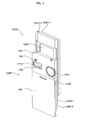
- FIG. 3 is a rear perspective view illustrating the mobile terminal 100 shown in FIG. 2 .
- a fifth user input module 130e which is of a wheel type
- a second camera 121b are disposed at the rear of the second rear case 100B-2 of the second body 100B
- a sixth user input module 130f is disposed on one side of the second body 100B.
- the second camera 121b may have a different photographing direction from that of the first camera 121a shown in FIG. 2 .
- the first and second cameras 121a and 121b may also have different resolutions.
- the first camera 121a may be used to capture and then transmit an image of the face of the user during a video call.
- a low-resolution camera may be used as the first camera 121a.
- the second camera 121b may be used to capture an image of an ordinary subject. In this instance, the image captured by the second camera 121b may not need to be transmitted.
- a high-resolution camera may be used as the second camera 121b.
- a cameral flash 125 and a mirror 126 are also disposed near the second camera 121b.
- the cameral flash 125 may be used to illuminate a subject when the user attempts to capture an image of the subject with the second camera 121b, and the user can use the mirror 126 when taking a self portrait.
- a second audio output module may also be provided in the second rear case 100B-2.
- the second audio output module can realize a stereo function along with the first audio output module 153a.
- the second audio output module may also be used in a speaker-phone mode.
- an antenna for receiving a broadcast signal may be disposed on one side of the second rear case 100B-2, and be installed so as to be able to be pulled out of the second rear case 100B-2.
- the slide module 100C is partially exposed on the first rear case 100A-2 of the first body 100A.
- the slide module 100C also couples the first body 100A and the second body 100B such that the first body 100A and the second body 100B can slide up and down against each other.
- a portion of the slide module 100C is hidden from view by the second front case 100B-1 of the second body 100B, and thus may not be exposed.
- the second camera 121b and the other elements that have been described as being provided on the rear case 100A-2 can also be provided on the front case 100A-1.
- the first camera 121a can be configured to be rotatable and thus to cover the photographing direction of the second camera 121b.
- the second camera 121b may be optional.
- the power supply unit 190 is disposed in the rear case 100A-2, and may be a rechargeable battery and be coupled to the rear case 100A-2 so as to be attachable to or detachable from the rear case 100A-2.
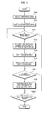
- FIG. 4 is a flowchart illustrating a method of controlling a mobile terminal according to an embodiment of the present invention.
- the controller 180 can detect a predefined movement of the main body of the mobile terminal 100 and reconfigure a screen based on the predefined movement. Referring to FIG. 4 , if an operating mode such as mode for searching a contacts list, searching a call list, playing a multimedia file, and viewing a broadcast program is selected (S200), the controller 180 displays an operation screen corresponding to the selected operating mode on the display module 151 (S205).
- an operating mode such as mode for searching a contacts list, searching a call list, playing a multimedia file, and viewing a broadcast program
- the controller 180 determines whether a predefined movement of the main body of the mobile terminal 100, which is classified as a screen reconfiguration event, has been detected (S210). Examples of the predefined movement of the main body of the mobile terminal 100 include tilting the main body of the mobile terminal 100, reversing the main body of the mobile terminal 100 and shaking the main body of the mobile terminal 100. Further, the controller 180 can determine whether the screen reconfiguration event has occurred based on the degree and direction of tilting of the main body of the mobile terminal 100, the pattern of the movement of the main body of the mobile terminal 100 and the intensity of the movement of the main body of the mobile terminal 100.
- the controller 180 can determine that the screen reconfiguration event has occurred.
- a movement of the main body of the mobile terminal 100 may also be detected based on a variation in a sensing signal output by the motion sensor 145.
- the controller 180 determines that the predefined movement of the main body of the mobile terminal 100 has been detected (Yes in S210), the controller 180 determines that the screen reconfiguration event has occurred, and reconfigures the operation screen by removing objects that do not meet a predefined screen reconfiguration condition set in advance from the operation screen (S215).
- objects that can be displayed on the operation screen may be icons, images, contents and/or items of a list.
- Objects that meet the predefined screen reconfiguration condition may also be objects registered as Favorites, objects that meet a certain frequency-of-use, date, or time requirement, objects of a certain type, objects that meet a certain quantity or size requirement, objects associated with shortcut numbers, objects belonging to a certain group and/or objects that meet a certain shape or color requirement.
- the reconfiguration of the operation screen may also include not only omitting objects that do not meet the predefined screen reconfiguration condition, but also adding objects that meet the predefined screen reconfiguration condition. For example, if the operation screen is a contacts list screen, a number of contacts that meet the predefined screen reconfiguration condition may be withdrawn from the memory 160 and then added to a contacts list currently being displayed on the contacts list screen.
- the controller 180 can apply a predefined screen effect to the operation screen (S220).
- the controller 180 can apply a sound effect or a haptic effect to the operation screen.
- the screen effect or the haptic effect may also vary in accordance with the degree of the movement of the main body of the mobile terminal 100.
- the reconfiguration of the operation screen may accompany the execution of a predefined function.
- the controller 180 displays the reconfigured operation screen on the display module 151 (S225).
- the reconfigured operation screen may only include objects that meet the predefined screen reconfiguration condition.
- a user input such as a touch or key input is received (Yes in S230)
- the controller 180 executes an operation corresponding to the received user input (S235). Otherwise (No in S230), the method proceeds to operation S240.
- operations S210 through S235 may be performed repeatedly until the user wishes to switch the mobile terminal 100 to another operating mode (S240).
- the controller 180 can reconfigure the operation screen upon the detection of the predefined movement of the main body of the mobile terminal 100 by removing objects that do not meet the predefined screen reconfiguration condition from the operation screen so that only the objects that meet the predefined screen reconfiguration condition can remain on the operation screen.
- FIG. 5 is a flowchart illustrating a method of controlling a mobile terminal according to another embodiment of the present invention.
- Operations S300, S305, and S320 through S340 of FIG. 5 are the same as their respective counterparts of FIG. 4 , and thus, detailed descriptions thereof will be omitted.
- the controller 180 can determine whether a screen reconfiguration event has occurred based on whether a 'blow' signal, which is generated by blowing into the microphone 123 or a speaker of the mobile terminal 100, has been detected (S310).
- a 'blow' signal can be detected by filtering an audio signal, if any, input to the microphone 123 or the speaker of the mobile terminal 100 and analyzing the waveform of the filtered audio signal. Different objects may then disappear from an operation screen or the speed of displaying a reconfigured operation screen may vary according to the pattern of a 'blow' signal such as intensity or length. That is, the controller 180 reconfigures the screen based on the blow signal (S315).
- the controller 180 can reconfigured an operation screen by leaving only objects that meet a predefined screen reconfiguration condition on the operation screen in response to the input of a 'blow' signal.
- a 'blow' signal may be applied not only to the reconfiguration of an operation screen, but also to the adjustment of a background screen, the change of the theme of the background screen, the taking of photos, the measurement of breathing capacity, and mobile games.
- FIGS. 6-16 are diagrams of display screens for explaining the embodiments of FIGS. 4 and 5 .
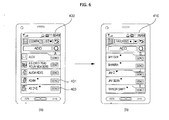
- the controller 180 if the controller 180 detects a predefined movement of the main body of the mobile terminal 100, the controller 180 reconfigures a contacts list screen 400 by removing the contacts that are not set as Favorites ⁇ from the contacts list screen 400. That is, as shown in FIG. 6(b) , the controller 180 displays a contacts list screen 410 only including the contacts set as Favorites (*).
- embodiments of the present invention can also be applied to a call list screen or a multimedia playlist screen in addition to the contacts screen. That is, if the user shakes the mobile terminal 100 or blows onto the mobile terminal 100 in a predefined manner when a call list screen or a multimedia playlist screen is displayed on the display module 151, the controller 180 can reconfigure the call list screen or the multimedia playlist screen such that only the items set as Favorites remain thereon.
- the reconfiguration of a screen may also be performed in various manners according to how many times the mobile terminal 100 is moved in a predefined manner. For example, if the mobile terminal 100 is shaken less than three times, the controller 180 can display a list of calls made or received five times or more a week on the display module 151. On the other hand, if the mobile terminal 100 is shaken three times or more, the controller 180 can display a list of calls made or received ten times or more a week on the display module 151. Thus, if the mobile terminal 100 is shaken a number of times, the controller 180 can display a list of frequent calls on the display module 151. A similar concept applies to the blow signal.
- the controller 180 can display list of calls made or received ten times or more a week when the mobile terminal 100 is shaken less than three times, and display the list of calls made or received five times or more a week on the display module 151 when the mobile terminal 100 is shaken three times or more. In this manner, the user can readily access a list of more frequent calls with less movement of the mobile terminal 100.
- the controller 180 can display a list of multimedia files with a user preference level of 3 or higher.
- the controller 180 can display a list of multimedia files with a user preference level of lower than 3.
- the reconfiguration of a screen may be performed in various manners according to the speed or amount of the movement of the mobile terminal 100.
- the controller 180 can return the mobile terminal 100 to its original screen state before the occurrence of the screen reconfiguration event.
- the reconfiguration of a screen may also be performed during the execution or display of a predetermined application. As a result, the controller 180 can display a new list associated with the predetermined application on the predetermined application or make disappear an existing list displayed on the predetermined application.
- the reconfiguration of a screen may be performed when an application and/or lists associated with the application are displayed. Then, the lists associated with the application may disappear from or appear back on the application as long as the execution or display of the application continues. If a screen reconfiguration event occurs when an idle screen is displayed, the controller 180 can display new menu lists on the idle screen or make existing menu lists displayed on the idle screen disappear. If objects are removed from an operation screen, the controller 180 can also display an additional option menu in an empty area on the operation screen.
- the controller 180 can display a playlist including items with a user preference level of 3 or higher in response to a "blow' signal with a first reference level or lower, and display a playlist including items with a user preference level of lower than 3 together with an existing playlist or replace the existing playlist in response to a 'blow' signal with the first reference level or higher.
- the controller 180 can display a playlist including the items with the user preference level of lower than 3 in response to a 'blow' signal with the first reference level or lower, and display the playlist including the items with the user preference level of 3 or higher in response to a 'blow' signal with the first reference level or higher.
- the controller 180 can display the playlist including the items with the user preference level of 3 or higher.
- the controller 180 can display the playlist including the items with the user preference level of lower than 3 together with an existing playlist or may be displayed replacing the existing playlist.
- the controller 180 can display the playlist including the items with the user preference level of lower than 3.
- the controller 180 can display the playlist including the items with the user preference level of 3 or higher.
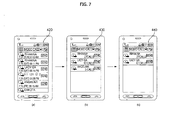
- the controller 180 can reconfigure the video call list screen 420 into a video call screen 430 showing a list of frequent calls that have been made or received a predefined number of times or more.
- the predefined number can also increase in accordance with the number of screen reconfiguration events occurred, as shown in FIG. 7(c) .
- the controller 180 can also reconfigure a contacts list screen, a call list screen or a message list screen upon the occurrence of a screen reconfiguration event so that a list of frequent callers, frequent calls or frequent messages can be displayed in order of frequency. Also, as the number of screen reconfiguration events occurred increases, a screen reconfiguration condition may be modified accordingly. Thus, the user can easily access a list of objects or items with a higher priority with fewer screen reconfiguration events.
- the controller 180 can reconfigure the contacts list screen 450 into a contacts list screen 460, which shows a list of most recently-added contacts. For example, as a result of the screen reconfiguration event, the controller 180 can display a list of contacts that were added a week or so ago or a month or so ago together with a list displayed on the contacts list screen 450 or replace the list displayed on the contacts list screen 450 according to the progress of the screen reconfiguration event.
- the controller 180 can reconfigure the 'Received Messages' screen 500 into a 'Received Messages' screen 510 showing a list of received messages each received from a contact having a shortcut number allocated thereto.
- the controller 180 can also display a list of received messages corresponding to shortcut numbers of 10 to 20 or 20 to 100 together with a list of received messages displayed on the 'Received Messages' screen 500 or replace the list of received messages displayed on the 'Received Messages' screen 500 according to the progress of the screen reconfiguration event.
- the controller 180 can reconfigure the contacts list screen 520 into a contacts list screen 530 showing a list of contacts classified into a predetermined group. That is, if a screen reconfiguration event occurs when a contacts list screen, a call list screen or a message list screen is displayed, the controller 180 can display a list of items each having a shortcut number attached thereto or a list of items classified into a predetermined group.
- the list displayed as the result of the screen reconfiguration event may also be displayed together with a list displayed on the contacts list screen, the call list screen or the message list screen or may be displayed by replacing the list displayed on the contacts list screen, the call list screen or the message list screen according to the progress of the screen reconfiguration event.
- the controller 180 can sequentially delete the contacts that do not meet a predefined screen reconfiguration condition from the contacts list, accompanying a predetermined screen effect, and display the resulting contacts list or a contacts list obtained by rearranging the resulting contacts list in order of priority (such as frequency of occurrence). More specifically, the contacts that do not meet the predefined screen reconfiguration condition disappear from the contacts list, fading in or out of the contacts list.
- the controller 180 can display objects or items that do not meet a predefined screen reconfiguration condition using a visual effect such as being rolled up like a piece of paper upon the occurrence of a screen reconfiguration event.
- a visual effect such as being rolled up like a piece of paper upon the occurrence of a screen reconfiguration event.
- certain information regarding the objects or items such as the priority levels of the objects or items or the frequency of occurrence of the objects or items may be displayed, instead of the objects or items.
- the controller 180 can reconfigure the thumbnail screen 540 into a thumbnail screen 550 showing only the thumbnails of the photos. In this manner, it is possible to effectively reconfigure a screen on a content-type or content-size basis.
- the controller 180 can reconfigure the icon screen 580 into a screen 590 including only some of the plurality of icons that meet a predefined screen reconfiguration condition such as a certain size, shape and color requirement.
- a predefined screen reconfiguration condition such as a certain size, shape and color requirement.
- the controller 180 can reconfigure a screen 600 including a plurality of icons into a screen 610 upon the occurrence of a screen reconfiguration event.
- the remaining icons may be rearranged, or the size, shape and/or color of the remaining icons may be changed.
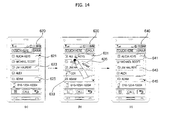
- the controller 180 can apply a screen effect to alert the user to the occurrence of a screen reconfiguration event. More specifically, referring to FIGS. 14(a) and 14(b) , if a screen reconfiguration event occurs when a screen 620 is displayed, the controller 180 can remove or make disappear objects 621, 623 and 625 that do not meet a predefined screen reconfiguration condition. The controller 180 can also make the object appear to fall like leaves on a tree, as indicated by reference numerals 631, 633 and 635. Alternatively, the controller 180 can make the objects 621, 623 and 625 disappear after being displayed as being stripped off from the screen 620, as indicated by reference numerals 641, 643 and 645. Still alternatively, the controller 180 can make the objects 621, 623 and 625 disappear after being displayed as being folded into or unfolded from a certain shape.
- objects that do not meet a predefined screen reconfiguration condition are thus filtered out from a screen upon the occurrence of a screen reconfiguration event and can be displayed in a popup window or as on-screen display (OSD) data or icons. Then, if the screen reconfiguration event does not continue for more than a predefined amount of time, the mobile terminal 100 may return to its original screen state before the occurrence of the screen reconfiguration event.
- OSD on-screen display
- a screen reconfiguration event may also be performed along with other functions such as dialing a phone number or sending a message.
- the controller 180 can display a number of application candidates such as making a conference call or sending a message to a group that can be performed in connection with the list of contacts.
- a screen reconfiguration event is performed on a photo album screen, a number of application candidates such as sending a multimedia messaging service (MMS) message or email or editing photos that can be performed in connection with the photo album screen may be displayed.
- MMS multimedia messaging service
- the controller 180 can display an indicator icon 653 at the top of an operation screen 650 in order to indicate that a screen reconfiguration event can be performed on the operation screen 650.
- the controller 180 can provide an icon 663 for setting screen reconfiguration on a menu selection screen 660.
- the controller 180 displays a 'Screen Reconfiguration Settings' screen 670.
- the 'Screen Reconfiguration Settings' screen 670 may include a plurality of items such as 'Set Event Type,' 'Set Operation Menu,' 'Set Effect,' and 'Set Operation Relevant to Screen Reconfiguration Event.'
- the 'Set Event Type' item may be used to select the type of screen reconfiguration event between, for example, a 'blow' signal or a predefined movement of the mobile terminal 100.
- the 'Set Operation Menu' item may be used to select an operation menu to be reconfigured upon the occurrence of a screen reconfiguration event, and the 'Set Operation Menu' item may also be used to select one or more operations to be performed according to the intensity of a screen reconfiguration event and the number of screen reconfiguration events occurred.
- the 'Set Effect' item may be used to set a vibration effect, a sound effect and/or a screen effect to be applied during the reconfiguration of a screen upon the occurrence of a screen reconfiguration event.
- the 'Set Effect' item may also be used to set a screen effect to be applied to each object to be removed or to be replaced by another object upon the occurrence of a screen reconfiguration event.
- the 'Set Operation Relevant to Screen Reconfiguration Event' item may be used to set an operation to be performed in connection with a screen reconfiguration event, and the 'Screen Reconfiguration Settings' screen 670 can provide various settings options regarding a screen reconfiguration event, other than those set forth herein.
- the present invention can be realized as code that can be read by a processor (such as a mobile station modem (MSM)) included in a mobile terminal and that can be written on a computer-readable recording medium.
- MSM mobile station modem
- the computer-readable recording medium may be any type of recording device in which data is stored in a computer-readable manner. Examples of the computer-readable recording medium include a ROM, a RAM, a CD-ROM, a magnetic tape, a floppy disc, an optical data storage, and data transmission through the Internet.
- the computer-readable recording medium can be distributed over a plurality of computer systems connected to a network so that computer-readable code is written thereto and executed therefrom in a decentralized manner.
- Functional programs, code, and code segments needed for realizing the present invention can be easily construed by one of ordinary skill in the art.
Landscapes
- Engineering & Computer Science (AREA)
- Theoretical Computer Science (AREA)
- General Engineering & Computer Science (AREA)
- Human Computer Interaction (AREA)
- Physics & Mathematics (AREA)
- General Physics & Mathematics (AREA)
- Computer Networks & Wireless Communication (AREA)
- Signal Processing (AREA)
- Computer Hardware Design (AREA)
- Mathematical Physics (AREA)
- Telephone Function (AREA)
- User Interface Of Digital Computer (AREA)
Applications Claiming Priority (1)
| Application Number | Priority Date | Filing Date | Title |
|---|---|---|---|
| KR1020090084606A KR20110026809A (ko) | 2009-09-08 | 2009-09-08 | 휴대 단말기 및 그 제어방법 |
Publications (1)
| Publication Number | Publication Date |
|---|---|
| EP2293530A1 true EP2293530A1 (fr) | 2011-03-09 |
Family
ID=43277131
Family Applications (1)
| Application Number | Title | Priority Date | Filing Date |
|---|---|---|---|
| EP10009006A Ceased EP2293530A1 (fr) | 2009-09-08 | 2010-08-30 | Terminal mobile et son procédé de commande |
Country Status (3)
| Country | Link |
|---|---|
| US (1) | US8959458B2 (fr) |
| EP (1) | EP2293530A1 (fr) |
| KR (1) | KR20110026809A (fr) |
Cited By (2)
| Publication number | Priority date | Publication date | Assignee | Title |
|---|---|---|---|---|
| CN103309566A (zh) * | 2012-03-16 | 2013-09-18 | 富士通株式会社 | 显示控制装置和显示控制方法 |
| EP2680553A1 (fr) * | 2012-06-27 | 2014-01-01 | LG Electronics, Inc. | Terminal mobile et son procédé de contrôle |
Families Citing this family (32)
| Publication number | Priority date | Publication date | Assignee | Title |
|---|---|---|---|---|
| US7509588B2 (en) | 2005-12-30 | 2009-03-24 | Apple Inc. | Portable electronic device with interface reconfiguration mode |
| US10313505B2 (en) * | 2006-09-06 | 2019-06-04 | Apple Inc. | Portable multifunction device, method, and graphical user interface for configuring and displaying widgets |
| US8519964B2 (en) | 2007-01-07 | 2013-08-27 | Apple Inc. | Portable multifunction device, method, and graphical user interface supporting user navigations of graphical objects on a touch screen display |
| US8619038B2 (en) | 2007-09-04 | 2013-12-31 | Apple Inc. | Editing interface |
| WO2009151248A2 (fr) * | 2008-06-09 | 2009-12-17 | 에스케이텔레콤 주식회사 | Procédé permettant d'afficher un groupe de miniatures sur un écran de veille et terminal de communication mobile |
| JP4600548B2 (ja) * | 2008-08-27 | 2010-12-15 | ソニー株式会社 | 再生装置、再生方法、およびプログラム |
| US10788976B2 (en) | 2010-04-07 | 2020-09-29 | Apple Inc. | Device, method, and graphical user interface for managing folders with multiple pages |
| US20110252349A1 (en) | 2010-04-07 | 2011-10-13 | Imran Chaudhri | Device, Method, and Graphical User Interface for Managing Folders |
| US8620296B2 (en) * | 2010-09-10 | 2013-12-31 | Cox Communications, Inc. | Integration of contact information across multiple communication devices |
| US20120001723A1 (en) * | 2010-09-13 | 2012-01-05 | Motorola Mobility, Inc. | Display of Devices on an Interface based on a Contextual Event |
| KR20130017241A (ko) * | 2011-08-10 | 2013-02-20 | 삼성전자주식회사 | 터치 스크린 단말기에서 입출력 방법 및 장치 |
| USD720766S1 (en) * | 2012-09-10 | 2015-01-06 | Lookout, Inc. | Mobile communication device display with graphical user interface comprising security and privacy advisor screens |
| USD720765S1 (en) * | 2012-09-10 | 2015-01-06 | Lookout, Inc. | Mobile communication device display with graphical user interface comprising a dashboard |
| USD745050S1 (en) * | 2013-01-09 | 2015-12-08 | Samsung Electronics Co., Ltd. | Display screen or portion thereof with icon |
| CN104142791A (zh) * | 2013-05-09 | 2014-11-12 | 腾讯科技(深圳)有限公司 | 资源更换方法、装置及终端 |
| KR102405189B1 (ko) | 2013-10-30 | 2022-06-07 | 애플 인크. | 관련 사용자 인터페이스 객체를 표시 |
| CN104853025B (zh) * | 2014-02-18 | 2017-11-14 | 联发科技(新加坡)私人有限公司 | 一种移动终端的控制方法及装置 |
| USD770488S1 (en) * | 2014-04-30 | 2016-11-01 | Tencent Technology (Shenzhen) Company Limited | Portion of a display screen with graphical user interface |
| USD770487S1 (en) * | 2014-04-30 | 2016-11-01 | Tencent Technology (Shenzhen) Company Limited | Display screen or portion thereof with graphical user interface |
| KR102124321B1 (ko) * | 2014-04-30 | 2020-06-18 | 삼성전자 주식회사 | 전자 장치 및 전자 장치의 연락처와 통신하는 방법 |
| US12022021B2 (en) | 2015-03-06 | 2024-06-25 | Apple Inc. | Band adjustment for electronic devices |
| US9885627B2 (en) | 2015-04-24 | 2018-02-06 | Apple Inc. | Drift compensation for force sensing devices |
| US12175065B2 (en) | 2016-06-10 | 2024-12-24 | Apple Inc. | Context-specific user interfaces for relocating one or more complications in a watch or clock interface |
| DK201670595A1 (en) | 2016-06-11 | 2018-01-22 | Apple Inc | Configuring context-specific user interfaces |
| US11816325B2 (en) | 2016-06-12 | 2023-11-14 | Apple Inc. | Application shortcuts for carplay |
| US10904211B2 (en) | 2017-01-21 | 2021-01-26 | Verisign, Inc. | Systems, devices, and methods for generating a domain name using a user interface |
| USD882602S1 (en) | 2017-07-28 | 2020-04-28 | Verisign, Inc. | Display screen or portion thereof with a sequential graphical user interface of a mobile device |
| USD844649S1 (en) | 2017-07-28 | 2019-04-02 | Verisign, Inc. | Display screen or portion thereof with a sequential graphical user interface |
| WO2019051811A1 (fr) | 2017-09-15 | 2019-03-21 | Oppo广东移动通信有限公司 | Procédé de configuration de priorité de fréquence, dispositif terminal, station de base et dispositif de réseau central |
| USD865785S1 (en) * | 2017-12-28 | 2019-11-05 | Facebook, Inc. | Display panel of a programmed computer system with a graphical user interface |
| US11675476B2 (en) | 2019-05-05 | 2023-06-13 | Apple Inc. | User interfaces for widgets |
| US11099635B2 (en) * | 2019-09-27 | 2021-08-24 | Apple Inc. | Blow event detection and mode switching with an electronic device |
Citations (2)
| Publication number | Priority date | Publication date | Assignee | Title |
|---|---|---|---|---|
| US20080183313A1 (en) * | 2007-01-29 | 2008-07-31 | Johan Lundquist | System, device and method for steering a mobile terminal |
| EP1983730A1 (fr) * | 2007-04-18 | 2008-10-22 | Samsung Electronics Co., Ltd. | Dispositif électronique portable adapté pour changer de mode de fonctionnement |
Family Cites Families (11)
| Publication number | Priority date | Publication date | Assignee | Title |
|---|---|---|---|---|
| JP2006113859A (ja) * | 2004-10-15 | 2006-04-27 | Nec Corp | 携帯情報端末及びその表示制御方法 |
| KR100640420B1 (ko) * | 2005-04-06 | 2006-10-30 | 삼성전자주식회사 | 이동통신 단말기에서 콜 정보 디스플레이 장치 및 방법 |
| US8145717B2 (en) * | 2005-09-21 | 2012-03-27 | Siemens Enterprise Communications, Inc. | System and method for providing presence age information in a unified communication system |
| US8769408B2 (en) * | 2005-10-07 | 2014-07-01 | Apple Inc. | Intelligent media navigation |
| US8139026B2 (en) * | 2006-08-02 | 2012-03-20 | Research In Motion Limited | System and method for adjusting presentation of text and images on an electronic device according to an orientation of the device |
| KR100879517B1 (ko) * | 2006-08-16 | 2009-01-22 | 삼성전자주식회사 | 휴대 단말기 및 그의 모드 전환 방법 |
| US20080207271A1 (en) * | 2007-02-27 | 2008-08-28 | Motorola, Inc. | Methods and devices for abridged contact list creation based on communication history |
| JP4928333B2 (ja) * | 2007-04-12 | 2012-05-09 | キヤノン株式会社 | コンテンツ表示装置及びコンテンツ表示方法 |
| KR20090039206A (ko) * | 2007-10-17 | 2009-04-22 | 삼성전자주식회사 | 터치스크린을 구비한 휴대 단말기의 문자 입력 방법 및장치 |
| US10095375B2 (en) * | 2008-07-09 | 2018-10-09 | Apple Inc. | Adding a contact to a home screen |
| US20110053577A1 (en) * | 2009-08-31 | 2011-03-03 | Lee Changkee | Methods and apparatus for communicating by vibrating or moving mobile devices |
-
2009
- 2009-09-08 KR KR1020090084606A patent/KR20110026809A/ko not_active Ceased
-
2010
- 2010-08-30 EP EP10009006A patent/EP2293530A1/fr not_active Ceased
- 2010-09-07 US US12/876,998 patent/US8959458B2/en not_active Expired - Fee Related
Patent Citations (2)
| Publication number | Priority date | Publication date | Assignee | Title |
|---|---|---|---|---|
| US20080183313A1 (en) * | 2007-01-29 | 2008-07-31 | Johan Lundquist | System, device and method for steering a mobile terminal |
| EP1983730A1 (fr) * | 2007-04-18 | 2008-10-22 | Samsung Electronics Co., Ltd. | Dispositif électronique portable adapté pour changer de mode de fonctionnement |
Cited By (3)
| Publication number | Priority date | Publication date | Assignee | Title |
|---|---|---|---|---|
| CN103309566A (zh) * | 2012-03-16 | 2013-09-18 | 富士通株式会社 | 显示控制装置和显示控制方法 |
| EP2680553A1 (fr) * | 2012-06-27 | 2014-01-01 | LG Electronics, Inc. | Terminal mobile et son procédé de contrôle |
| US9288840B2 (en) | 2012-06-27 | 2016-03-15 | Lg Electronics Inc. | Mobile terminal and controlling method thereof using a blowing action |
Also Published As
| Publication number | Publication date |
|---|---|
| US20110059733A1 (en) | 2011-03-10 |
| KR20110026809A (ko) | 2011-03-16 |
| US8959458B2 (en) | 2015-02-17 |
Similar Documents
| Publication | Publication Date | Title |
|---|---|---|
| US8959458B2 (en) | Mobile terminal and method of controlling the mobile terminal | |
| USRE49819E1 (en) | Mobile terminal and method of controlling the operation of the mobile terminal | |
| US8849355B2 (en) | Mobile terminal capable of providing multiplayer game and method of controlling operation of the mobile terminal | |
| US9535568B2 (en) | Mobile terminal and method of controlling the same | |
| US8787892B2 (en) | Mobile terminal and method of controlling the mobile terminal | |
| US8723812B2 (en) | Mobile terminal and method of controlling the mobile terminal | |
| US8606330B2 (en) | Method of displaying geo-tagged images on a mobile terminal | |
| EP2244169B1 (fr) | Terminal mobile capable de fournir un effet multi-haptique et procédé pour contrôler le terminal mobile | |
| US8532712B2 (en) | Mobile terminal providing web page-merge function and operating method of the mobile terminal | |
| US8271047B2 (en) | Mobile terminal using flexible display and method of controlling the mobile terminal | |
| US9213449B2 (en) | Mobile terminal using proximity sensor and method of controlling the mobile terminal | |
| US9588609B2 (en) | Mobile terminal and method of controlling the operation of the mobile terminal | |
| EP2144139B1 (fr) | Terminal de communication et procédé pour contrôler son fonctionnement | |
| EP2226741B1 (fr) | Terminal mobile et son procédé de commande | |
| EP2141569B1 (fr) | Terminal mobile utilisant effets haptiques et procédé de contrôle du terminal mobile | |
| EP2469388A2 (fr) | Terminal mobile et son procédé de commande dýopération | |
| EP2144425A2 (fr) | Terminal mobile et son procédé de commande d'opération avec utilisation d'une détection de mouvement | |
| EP2228750A2 (fr) | Terminal mobile et procédé de contrôle du terminal mobile | |
| US20120162358A1 (en) | Mobile terminal capable of providing multiplayer game and operation control method thereof | |
| US8738713B2 (en) | Mobile terminal and method of controlling operation of the mobile terminal |
Legal Events
| Date | Code | Title | Description |
|---|---|---|---|
| PUAI | Public reference made under article 153(3) epc to a published international application that has entered the european phase |
Free format text: ORIGINAL CODE: 0009012 |
|
| 17P | Request for examination filed |
Effective date: 20100830 |
|
| AK | Designated contracting states |
Kind code of ref document: A1 Designated state(s): AL AT BE BG CH CY CZ DE DK EE ES FI FR GB GR HR HU IE IS IT LI LT LU LV MC MK MT NL NO PL PT RO SE SI SK SM TR |
|
| AX | Request for extension of the european patent |
Extension state: BA ME RS |
|
| 17Q | First examination report despatched |
Effective date: 20130920 |
|
| STAA | Information on the status of an ep patent application or granted ep patent |
Free format text: STATUS: THE APPLICATION HAS BEEN REFUSED |
|
| 18R | Application refused |
Effective date: 20161215 |