EP2299699A2 - Bildverarbeitungsvorrichtung und Verfahren zur Steuerung derselben - Google Patents
Bildverarbeitungsvorrichtung und Verfahren zur Steuerung derselben Download PDFInfo
- Publication number
- EP2299699A2 EP2299699A2 EP10172368A EP10172368A EP2299699A2 EP 2299699 A2 EP2299699 A2 EP 2299699A2 EP 10172368 A EP10172368 A EP 10172368A EP 10172368 A EP10172368 A EP 10172368A EP 2299699 A2 EP2299699 A2 EP 2299699A2
- Authority
- EP
- European Patent Office
- Prior art keywords
- screen
- cursor
- pointing
- pointing cursor
- application
- Prior art date
- Legal status (The legal status is an assumption and is not a legal conclusion. Google has not performed a legal analysis and makes no representation as to the accuracy of the status listed.)
- Ceased
Links
Images








Classifications
-
- G—PHYSICS
- G06—COMPUTING OR CALCULATING; COUNTING
- G06F—ELECTRIC DIGITAL DATA PROCESSING
- G06F3/00—Input arrangements for transferring data to be processed into a form capable of being handled by the computer; Output arrangements for transferring data from processing unit to output unit, e.g. interface arrangements
- G06F3/01—Input arrangements or combined input and output arrangements for interaction between user and computer
- G06F3/048—Interaction techniques based on graphical user interfaces [GUI]
- G06F3/0484—Interaction techniques based on graphical user interfaces [GUI] for the control of specific functions or operations, e.g. selecting or manipulating an object, an image or a displayed text element, setting a parameter value or selecting a range
- G06F3/04842—Selection of displayed objects or displayed text elements
-
- H—ELECTRICITY
- H04—ELECTRIC COMMUNICATION TECHNIQUE
- H04N—PICTORIAL COMMUNICATION, e.g. TELEVISION
- H04N5/00—Details of television systems
- H04N5/44—Receiver circuitry for the reception of television signals according to analogue transmission standards
- H04N5/445—Receiver circuitry for the reception of television signals according to analogue transmission standards for displaying additional information
- H04N5/45—Picture in picture, e.g. displaying simultaneously another television channel in a region of the screen
-
- G—PHYSICS
- G06—COMPUTING OR CALCULATING; COUNTING
- G06F—ELECTRIC DIGITAL DATA PROCESSING
- G06F3/00—Input arrangements for transferring data to be processed into a form capable of being handled by the computer; Output arrangements for transferring data from processing unit to output unit, e.g. interface arrangements
- G06F3/01—Input arrangements or combined input and output arrangements for interaction between user and computer
- G06F3/048—Interaction techniques based on graphical user interfaces [GUI]
- G06F3/0484—Interaction techniques based on graphical user interfaces [GUI] for the control of specific functions or operations, e.g. selecting or manipulating an object, an image or a displayed text element, setting a parameter value or selecting a range
- G06F3/04845—Interaction techniques based on graphical user interfaces [GUI] for the control of specific functions or operations, e.g. selecting or manipulating an object, an image or a displayed text element, setting a parameter value or selecting a range for image manipulation, e.g. dragging, rotation, expansion or change of colour
-
- H—ELECTRICITY
- H04—ELECTRIC COMMUNICATION TECHNIQUE
- H04N—PICTORIAL COMMUNICATION, e.g. TELEVISION
- H04N21/00—Selective content distribution, e.g. interactive television or video on demand [VOD]
- H04N21/40—Client devices specifically adapted for the reception of or interaction with content, e.g. set-top-box [STB]; Operations thereof
- H04N21/41—Structure of client; Structure of client peripherals
- H04N21/422—Input-only peripherals, i.e. input devices connected to specially adapted client devices, e.g. global positioning system [GPS]
- H04N21/42204—User interfaces specially adapted for controlling a client device through a remote control device; Remote control devices therefor
-
- H—ELECTRICITY
- H04—ELECTRIC COMMUNICATION TECHNIQUE
- H04N—PICTORIAL COMMUNICATION, e.g. TELEVISION
- H04N21/00—Selective content distribution, e.g. interactive television or video on demand [VOD]
- H04N21/40—Client devices specifically adapted for the reception of or interaction with content, e.g. set-top-box [STB]; Operations thereof
- H04N21/43—Processing of content or additional data, e.g. demultiplexing additional data from a digital video stream; Elementary client operations, e.g. monitoring of home network or synchronising decoder's clock; Client middleware
- H04N21/431—Generation of visual interfaces for content selection or interaction; Content or additional data rendering
- H04N21/4312—Generation of visual interfaces for content selection or interaction; Content or additional data rendering involving specific graphical features, e.g. screen layout, special fonts or colors, blinking icons, highlights or animations
-
- H—ELECTRICITY
- H04—ELECTRIC COMMUNICATION TECHNIQUE
- H04N—PICTORIAL COMMUNICATION, e.g. TELEVISION
- H04N21/00—Selective content distribution, e.g. interactive television or video on demand [VOD]
- H04N21/40—Client devices specifically adapted for the reception of or interaction with content, e.g. set-top-box [STB]; Operations thereof
- H04N21/43—Processing of content or additional data, e.g. demultiplexing additional data from a digital video stream; Elementary client operations, e.g. monitoring of home network or synchronising decoder's clock; Client middleware
- H04N21/431—Generation of visual interfaces for content selection or interaction; Content or additional data rendering
- H04N21/4312—Generation of visual interfaces for content selection or interaction; Content or additional data rendering involving specific graphical features, e.g. screen layout, special fonts or colors, blinking icons, highlights or animations
- H04N21/4316—Generation of visual interfaces for content selection or interaction; Content or additional data rendering involving specific graphical features, e.g. screen layout, special fonts or colors, blinking icons, highlights or animations for displaying supplemental content in a region of the screen, e.g. an advertisement in a separate window
-
- H—ELECTRICITY
- H04—ELECTRIC COMMUNICATION TECHNIQUE
- H04N—PICTORIAL COMMUNICATION, e.g. TELEVISION
- H04N21/00—Selective content distribution, e.g. interactive television or video on demand [VOD]
- H04N21/40—Client devices specifically adapted for the reception of or interaction with content, e.g. set-top-box [STB]; Operations thereof
- H04N21/43—Processing of content or additional data, e.g. demultiplexing additional data from a digital video stream; Elementary client operations, e.g. monitoring of home network or synchronising decoder's clock; Client middleware
- H04N21/443—OS processes, e.g. booting an STB, implementing a Java virtual machine in an STB or power management in an STB
- H04N21/4438—Window management, e.g. event handling following interaction with the user interface
-
- H—ELECTRICITY
- H04—ELECTRIC COMMUNICATION TECHNIQUE
- H04N—PICTORIAL COMMUNICATION, e.g. TELEVISION
- H04N21/00—Selective content distribution, e.g. interactive television or video on demand [VOD]
- H04N21/40—Client devices specifically adapted for the reception of or interaction with content, e.g. set-top-box [STB]; Operations thereof
- H04N21/47—End-user applications
Definitions
- the present invention relates to an image processing apparatus and a controlling method of the same, and more particularly, to an image processing apparatus and a controlling method of the same, in which when a plurality of applications controllable on a digital television (DTV) or a personal computer (PC) are executed at a time, the respective applications are simultaneously controlled through a single or a plurality of input devices, and cursors for simultaneously controlling the plurality of applications are displayed.
- DTV digital television
- PC personal computer
- a digital-type TV that has appeared in recent years can display two or more broadcasting images and content images at the same time. Further, as a processing performance of the TV is enhanced and contents are diversified, a recent trend changes from a unilateral TV, in which a user can only passively view a broadcast, to an interactive TV in which the screen is controllable by a user through an input device such as a remote controller, a mouse, or etc. Particularly, there has recently been proposed a method of providing interactive contents such as a game, a digital contents management (DMC) or the like through the TV. However, a related art remote controller with only buttons is not sufficient to control such interactive contents in the TV. Accordingly, there has also been proposed a method of controlling the TV through an advanced input device having a higher degree of freedom like a cursor, a pointer, etc.
- DMC digital contents management
- an aspect of the exemplary embodiments is to provide an image processing apparatus and a controlling method of the same, in which a plurality of applications can be controlled at the same time through one or a plurality of input devices in a DTV or a PC, and a single or plural cursors for simultaneously controlling the plurality of programs output to a screen can be displayed and moved.
- a method of controlling an image processing apparatus including: displaying a first screen corresponding to a first application; displaying a second screen corresponding to a second application above the first screen as overlapping each other; and displaying a part of the second screen, overlapped with the first screen, while controlling the first application.
- At least one pointing cursor for controlling an application may be displayed on at least one of the first screen and the second screen.
- the pointing cursor may control an application corresponding to the most adjacent screen between the underlying first and second screens displayed overlapping each other.
- the pointing cursor may be movable to at least one location of below the first screen, above the first screen, between the first and second screens, and above the second screen.
- the pointing cursor may be changed in at least one of transparency, shape, brightness and color when transferred.
- the at least one pointing cursor may respectively correspond to at least one pointing device.
- the pointing cursor may include a first pointing cursor and a second pointing cursor, and the first pointing cursor and the second pointing cursor may control the first application and the second application, respectively.
- the first pointing cursor and the second pointing cursor may control an application corresponding to the most adjacent screen between the underlying first and second screens displayed overlapping each other when no screen is displayed corresponding to an application to be controlled.
- the first pointing cursor and the second pointing cursor may be changed in at least one of transparency, shape, brightness and color when controlling another application other than an application subject to control.
- the first pointing cursor and the second pointing cursor may be movable within a region of a screen corresponding to an application subject to control.
- the first pointing cursor and the second pointing cursor may be changed in at least one of transparency, shape, brightness and color when transferred beyond a movable region.
- the first pointing cursor and the second pointing cursor may correspond to a first pointing device and a second pointing device, respectively.
- Another aspect may be achieved by providing a method of controlling an image processing apparatus, the method including: displaying a first screen corresponding to a first application and a second screen corresponding to a second application not to overlap each other; controlling at least one of the first application and the second application; and displaying an application to be recognizable by a user when the application subject to control is switched.
- Still another aspect may be achieved by providing an image processing apparatus including an image processor which processes and displays an image; and a controller which controls the image processor to display a second screen corresponding to a second application above a first screen corresponding to a first application as overlapping each other and to display a part of the second screen, overlapped with the first screen, when controlling the first application.
- an image processing apparatus including: an image processor which processes and displays an image; and a controller which controls the image processor to display a first screen corresponding to a first application and a second screen corresponding to a second application not to overlap each other and to display an application to be recognizable by a user when the application subject to control is switched while controls at least one of the first application and the second application.
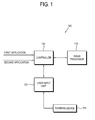
- FIG. 1 is a block diagram of an image processing apparatus according to an exemplary embodiment.
- An image processing apparatus 100 in this embodiment includes a DTV, a large format display (LFD), a desktop computer, a laptop computer, a mobile terminal, a set-top box, etc. Further, any electronic apparatus can be employed as the image processing apparatus 100 as long as it can execute a plurality of applications and be controlled by a pointing device 150.
- a pointing device 150 any electronic apparatus can be employed as the image processing apparatus 100 as long as it can execute a plurality of applications and be controlled by a pointing device 150.
- the image processing apparatus 100 in this exemplary embodiment includes an image processor 110, a user input unit 120 and a controller 130.
- the image processor 110 can process and display an image. Specifically, the image processor 110 displays a screen corresponding to an application, a pointing cursor for controlling the application, and a control object for performing a predetermined function.
- the control object may include a virtual slider, a virtual button, and other various graphic user interfaces.
- the image processor 110 may include a display panel (not shown) achieved in the form of a liquid crystal display (LCD), an organic light emitting diode (OLED), a plasma display panel (PDP), etc., and a panel driver (not shown).
- a display panel achieved in the form of a liquid crystal display (LCD), an organic light emitting diode (OLED), a plasma display panel (PDP), etc.
- a panel driver not shown.
- the user input unit 120 may receive a control command from the pointing device 150. To this end, the user input unit 120 may perform wired/wireless communication such as infrared communication, Bluetooth communication, ZigBee communication, local area network communication, etc. Meanwhile, the control command may include at least one of a pointing operation and a certain key input.
- wired/wireless communication such as infrared communication, Bluetooth communication, ZigBee communication, local area network communication, etc.
- the control command may include at least one of a pointing operation and a certain key input.
- a first screen and a second screen may be displayed overlapping each other.
- the controller 130 may control the image processor 110 so that the second screen corresponding to a second application can be displayed overlapping on the first screen corresponding to a first application, and a part of the second screen, overlapped with the first screen, can be displayed when the first application is controlled.
- the controller 130 may control the image processor 110 to display at least one of the pointing cursors for controlling the application, on at least one of the first screen and the second screen.
- the pointing cursor may control the application corresponding to the most adjacent screen between the underlying first screen and second screen displayed overlapping each other. At this time, the pointing cursor is movable to at least one location of below the first screen, above the first screen, between the first and second screens, and above the second screen.
- the pointing cursor includes a first pointing cursor and a second pointing cursor, and the first pointing cursor and the second pointing cursor may control the first application and the second application, respectively.
- the first pointing cursor and the second pointing cursor may control the application corresponding to the most adjacent screen between the underlying first and second screens displayed overlapping each other when no screen is displayed corresponding to an application to be controlled.
- the first pointing cursor and the second pointing cursor may be changed in at least one of the transparency, the shape, the brightness and the color thereof. Also, the first pointing cursor and the second pointing cursor are movable within a screen region corresponding to the application subject to the control. In this case, the first pointing cursor and the second pointing cursor may be changed in at least one of the transparency, the shape, the brightness and the color if transferred beyond a movable region, which will be described with reference to FIGs. 2D to 2F .
- the first screen and the second screen may be displayed without overlapping each other.
- the controller 130 controls the image processor 110 to display the first screen corresponding to the first application and the second screen corresponding to the second application without overlapping each other.
- the controller 130 also controls at least one of the first application and the second application, in which the image processor 110 is controlled to make a user recognize that the application subject to the control is switched.
- the controller 130 controls the image processor 110 to display at least one of the pointing cursors for controlling the applications, on at least one of the first screen and the second screen.
- the pointing cursor may control the application corresponding to the underlying-displayed first screen or the second screen.
- the pointing cursor is movable to at least one location of above the first screen, below the first screen, above the second screen, and below the second screen. If the pointing cursor is transferred to a different location, at least one of the transparency, the shape, the brightness and the color of the pointing cursor may be changed, which will be described later with reference to FIGs. 8A to 8B .
- At least one pointing cursor includes the first pointing cursor and the second pointing cursor, and the first pointing cursor and the second pointing cursor may control the first application and the second application, respectively.
- the first pointing cursor and the second pointing cursor are movable within the screen region corresponding to the application subject to be controlled.
- the first pointing cursor and the second pointing cursor may be changed in at least one of the transparency, the shape, the brightness and the color if transferred beyond the movable region, which will be described with reference to FIGs. 8C to 8D .
- the pointing device 150 may include a mouse or a similar input unit based on a cursor.
- the pointing device 150 can transmit a control command input by a user to the image processing apparatus 100. To this end, the pointing device 150 can perform wired and wireless communication with the image processing apparatus 100.
- a plurality of pointing devices 150 may be assigned to the applications, respectively.
- a pointing device A may be assigned to a broadcasting screen
- a pointing device B may be assigned to a game screen.
- a user employs the pointing device A to control a broadcasting view and the pointing device B to execute the game.
- the plurality of pointing devices 150 may be assigned according not to the respective applications, but to the applications where the pointing cursors of the pointing devices 150 are located.
- the pointing device 150 can be assigned to the application corresponding to the certain screen.
- the pointing device A may be assigned to the broadcasting screen or the game screen in accordance with the location of the pointing cursor A. If the pointing cursor A is located in a place where the broadcasting screen and the game screen are overlapped with each other, it is possible to control the application corresponding to the most adjacent screen among the underlying screens.
- screens corresponding to the respective applications may be displayed at a time.
- the first screen and the second screen may be displayed overlapping each other.
- a broadcasting screen 220 corresponding to the broadcasting application may be displayed overlapping on a game screen 210 corresponding to the game application.
- at least one pointing cursor for controlling the application may be displayed on at least one of the first and second screens.
- At least one pointing cursor may each correspond to at least one pointing device.
- FIG. 2A illustrates that one pointing cursor is displayed.
- a pointing cursor 231 corresponds to a pointing device A 230.
- the pointing cursor 231 can control the application corresponding to the most adjacent screen between the underlying game screen 210 and broadcasting screen 220 displayed overlapping each other.
- a background then the game screen 210, then the broadcasting screen 220, then the pointing cursor 231 are arranged in sequence from a bottom layer to a top layer.
- the broadcasting screen 220 is a screen most adjacent to the pointing cursor 231 among the screens displayed under the pointing cursor 231 and overlapping one another. Therefore, the pointing cursor 231 can control the broadcasting screen 220.
- FIG. 2B illustrates that the form of the pointing cursor is changed when the pointing cursor is moved between the applications.
- the pointing cursors 232, 233, 234, 235 and 236 may move between the game screen 210 and the broadcasting screen 220. Specifically, the pointing cursors 232, 233, 234, 235 and 236 may be moved to at least one location of below the game screen 210, above the game screen 210, between the game screen 210 and the broadcasting screen 220, and above the broadcasting screen 220. Further, the pointing cursor 232, 233, 234, 235 and 236 may be changed in at least one of the transparency, the shape, the brightness and the color as being moved from one location to another.
- the brightness of the pointing cursor 232, 233, 234, 235, 236 becomes lower as it is being moved onto the lower layer.
- the pointing cursor 232 moves from the broadcasting screen 220 to the game screen 210, it is changed into the pointing cursor 234 of which the brightness is lowered by a predetermined level.
- the pointing cursor 234 located on the game screen 210 is transferred below the game screen 210, it is changed into the pointing cursor 236 of which the brightness is lowered by a predetermined level.
- the pointing cursor 232 located on the broadcasting screen 220 may be moved between the game screen 210 and the broadcasting screen 220.
- the background, then the game screen 210, then the pointing cursors 233 and 234, then the broadcasting screen 220 are arranged in sequence from the bottom layer to the top layer.
- the pointing cursor 234 located on the game screen 210 and the pointing cursor 233 located between the game screen 210 and the broadcasting screen 220 are provided on the same layer.
- the latter pointing cursor 233 exists in a region where the game screen 210 and the broadcasting screen 220 overlap each other, the latter pointing cursor 233 is covered with the broadcasting screen 220.
- the outline of the pointing cursor 233 may be displayed in the form of a dotted line when being located between the game screen 210 and the broadcasting screen 220.
- the former pointing cursor 234 and the latter pointing cursor 233 are provided on one layer, they have the same brightness.
- the pointing cursor 236 located under the game screen 210 and the pointing cursor 235 located between the background and the game screen 210 can be displayed having the same brightness, and the outline of the latter 235 can be displayed in the form of the dotted line.
- the pointing cursor 232, 233, 234, 235, 236 controls the application corresponding to the most adjacent screen between the game screen 210 and the broadcasting screen 220 that underlies the pointing cursor 232, 233, 234, 235, 236.
- the pointing cursor 232 located on the broadcasting screen 220 can control the broadcasting screen 220.
- the pointing cursor 234 located on the game screen 210 and the pointing cursor 233 located between the game screen 210 and the broadcasting screen 220 can control the game screen 210.
- the pointing cursor 236 located below the game screen 210 and the pointing cursor 235 located between the background and the game screen 210 do not have any target to control.
- the game screen 210 and the broadcasting screen 220 are continuously displayed and do not disappear. Also, in the case of controlling the game screen 210, the broadcasting screen 220 displayed on a relatively upper layer is displayed as it is and does not disappear.
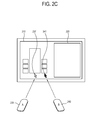
- FIG. 2C illustrates that two pointing cursors are displayed.
- the pointing cursor A 237 corresponds to the pointing device A 230
- the pointing cursor B 241 corresponds to the pointing device B 240.
- FIG. 2C the pointing cursor A 237 and the pointing cursor B 241 are displayed on the game screen 210.
- the pointing cursor A 237 and the pointing cursor B 241 can control the application corresponding to the most adjacent screen between the game screen 210 and the broadcasting screen 220 that underlies the pointing cursor A 237 and the pointing cursor B 241.
- the background, then the game screen 210, then the pointing cursor A 237, the pointing cursor B 241 -> the broadcasting screen 220 are arranged in sequence from the bottom layer to the top layer.
- the game screen 210 is the most adjacent screen to the pointing cursor A 237 among the screens underlying the pointing cursor A 237 and overlapping each other.
- the game screen 210 is the most adjacent screen to the pointing cursor B 241 among the screens underlying the pointing cursor B 241.
- both the pointing cursor A 237 and the pointing cursor B 241 can control the game screen 210.
- a plurality of users can play a game together.
- FIG. 2D illustrates that a plurality of applications are controlled by a plurality of pointing devices, respectively.
- the pointing cursor A 238 can control the game screen 210 and the pointing cursor B 242 can control the broadcasting screen 220.
- the background, then the game screen 210, then the pointing cursor A 238, then the broadcasting screen 220, then the pointing cursor B 242 are arranged in sequence from the bottom layer to the top layer.
- the pointing cursor B 242 is located in a region where the game screen 210 and the broadcasting screen 220 overlap each other.
- the pointing cursor B 242 can control only the broadcasting screen 220, the game screen 210 is not controlled by a user manipulating the pointing cursor B 242. In this case, only the broadcasting screen 220 is controllable.
- the pointing cursor B 242 can control the game screen 210 and the pointing cursor A 238 can control the broadcasting screen 220.
- the pointing cursor B 242 is located in the region where the game screen 210 and the broadcasting screen 220 overlap each other.
- the broadcasting screen 220 is not controlled even though a user manipulates the pointing cursor B 242.
- the pointing cursor A 238 is located beyond the broadcasting screen 220. Because the pointing cursor A 238 can control only the broadcasting screen 220, the game screen 210 is not controlled even though a user manipulates the pointing cursor A 238.
- FIG. 2E shows a display in which a screen corresponding to an application subject to control is not yet displayed.
- the broadcasting screen 220 subject to the control of the pointing device B 240 is not yet displayed.
- the pointing cursor B 243 has no target to be controlled.
- the pointing cursor B 243 may control an application corresponding to the most adjacent screen among the screens underlying the pointing cursor B 243 and overlapping each other besides the broadcasting screen 220.
- the background, then the game screen 210, then the pointing cursor A 238, then the broadcasting screen 220, then the pointing cursor B 243 are arranged in sequence.
- the pointing cursor B 243 can control the game screen 210 since the game screen 210 is the most adjacent screen among the screens underlying the pointing cursor B 243 and overlapping each other.
- the outline of the pointing cursor B 243 may be displayed in the form of a dotted line.
- FIG. 2F illustrates a region where the pointing cursor is movable.
- the pointing cursor A 238 is movable within the region of the game screen 210 subject to the control thereof.
- the pointing cursor B 242 is movable within the region of the broadcasting screen 220 subject to the control thereof. That is, as shown in FIG. 2F , the pointing cursor A 238 is movable within the region A, and the pointing cursor B 242 is movable within the region B.
- the outlines thereof may be changed into the dotted line.
- the outlines of the pointing cursor A 238' located beyond the region A and the pointing cursor B 242' located beyond the region B are displayed in the form of the dotted line.
- FIG. 3 shows a configuration of layers according to an exemplary embodiment.
- a layer or a graphic layer is a plane where an image is located. On the layer are located a screen corresponding to an application, a pointing cursor corresponding to a pointing device, a control object for performing a predetermined function, etc.
- a content layer is a layer where a screen corresponding to an application is located.
- a cursor layer is a layer where a pointing cursor corresponding to a pointing device is located.
- a control object layer is a layer where a control object for performing a predetermined function is located.
- the screen, the pointing cursor and the control object undergo different image processes, respectively.
- the image processing apparatus 100 individually processes the screen, the pointing cursor and the control object and displays them on the corresponding layers, respectively, in which the plurality of layers are arranged overlapping each other. In this case, it looks to a user that the pointing cursor and the control object overlap each other on the screen.
- the cursor layer is set on a topmost graphic layer. In this case, it is determined whether to perform execution by calculating coordinates that the cursor indicates on activated content among the programs executed in the lower layers.
- the activated content is a program located directly beneath the cursor layer. That is, it is generally possible to control only the program located directly beneath the cursor because only one cursor layer is set.
- the cursor layers are set corresponding to content layers. Therefore, it is possible to simultaneously control a plurality of applications.
- the cursor layers are set corresponding to the content layers, but the cursor may be set corresponding to the contents or may not be set corresponding to the contents.
- the cursor may be set in accordance with the application where the cursor is located.
- the cursor may be set in accordance with the application.
- the cursor layer is located on top of the corresponding content layer. Specifically, as shown in FIG. 3 , a cursor A layer 320 is located on top of a content A layer 310, and a cursor B layer 340 is located on top of a content B layer 330.
- a user controls the contents displayed on the content A layer 310 through the cursor displayed on the cursor A layer 320, and controls the contents displayed on the content B layer 330 through the cursor displayed on the cursor B layer 340.
- the content displayed on each content layer does not always use the full layer, but may use only a portion of the layer.
- the screen or the cursor may be displayed in only a part of a display unit.
- a region in which the cursor displayed on each cursor layer is movable may be limited to a content region displayed on the corresponding content layer.
- the cursor displayed on the cursor A layer 320 is movable within only the content region displayed on the content A layer 310
- the cursor displayed on the cursor B layer 340 is movable within only the content region displayed on the content B layer 330.
- the cursor displayed on a cursor layer other than the topmost cursor layer may be covered with the contents, the cursor or the like displayed on an upper layer.
- the position of the cursor located on the lower layer may be displayed in the form of a translucent, opaque, transparent or other symbol, or may not be displayed.
- the cursor displayed on the cursor A layer 320 may be displayed transparently or not displayed as being covered with the contents displayed on the content B layer 330.
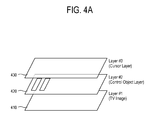
- FIG. 4A illustrates a configuration of a layer according to another exemplary embodiment.
- a control object layer is located between a relevant content layer and a relevant cursor layer.
- a control object layer (Layer #2) 420 where a control object is displayed is located between a content layer (Layer #1) 410 where a corresponding TV image is displayed and a cursor layer (Layer #3) 430 where a corresponding cursor is displayed.
- the cursor layer 430 is located on the top
- the control object layer 420 is located in the middle
- the content layer 410 is located on the bottom.
- the higher the number the higher the layer.
- a user can control a predetermined function related to a content displayed on the content layer 410 through the control object displayed on the control object layer 420.
- the control object is controlled through the cursor displayed on the cursor layer 430, thereby controlling a predetermined function of the content.
- the control object may be included in the content layer without any separate control object layer.
- a user may use the cursor and directly execute the control object displayed on the content layer corresponding to the cursor.
- a user may use the cursor and directly control the control object displayed on the content layer.
- FIG. 4B shows a screen displayed in the case of FIG. 4A .
- the cursor A 440 corresponding to the pointing device A, a control object (VOL) 450 for performing volume control, and a control object (CH) 460 for performing channel change are displayed on a TV screen 415.
- the controller 130 recognizes two-dimensional coordinates (x, y) on the cursor layer 430 where the cursor A 440 is located. At this time, the controller 130 executes the control object corresponding to the two-dimensional coordinates (x, y) of the recognized cursor A 440 among the control objects (e.g., VOL 450 and CH 460) provided on the control object layer 420.
- the control objects e.g., VOL 450 and CH 460
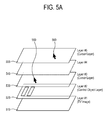
- FIG. 5A illustrates a configuration of a layer according to still another exemplary embodiment.
- the pointing device A and the pointing device B are connected to the image processing apparatus 100.
- the cursor A 580 corresponding to the pointing device A may be displayed on the layer #3 530
- the cursor B 590 corresponding to the pointing device B may be displayed on the layer #5 550.
- a user B can execute a game through the pointing device B.
- the cursor B 590 corresponding to the pointing device B is displayed on the layer #5 550 provided above the layer #3 530 where the existing cursor A 580 is located.
- the game contents will be loaded and displayed onto the layer #4 540, but nothing is currently displayed on the layer #4 540.
- the cursor B 590 may search the lower layers and control the control object provided in the layer #2 520 or the broadcasting image displayed on the layer #1 510.
- the image processing apparatus 100 executes the control object on the layer #2 520 corresponding to the coordinates (x, y) of the cursor B displayed on the layer #5 550. If a user selects and executes a game 564 through the cursor B 590 as shown in FIG. 5B , game contents are loaded and a game screen is displayed. In this case, the game screen is displayed on the content layer or control object layer corresponding to the layer #5 550 so that it can be controlled by the cursor B 590 displayed on the layer #5 550. In FIG. 5A , the game screen will be displayed below the layer #5 550, i.e., on the layer #4 540.
- the cursor A 580 is movable on a full two-dimensional space of the layer #3 530, but the cursor B 590 may be movable within a limited range of the two-dimensional space of the layer #5 550, i.e., within a space corresponding to coordinates where the contents are located actually.
- This is convenient in light of controlling the cursor. That is, if a two-dimensional size of contents located on an upper content layer is smaller than that of contents located on the lower content layer, it is more convenient from the point of view of control that a space where an upper cursor is movable is limited to the size of the corresponding contents.
- the cursor A 580 displayed on the layer #3 530 may be located within a content region displayed on the layer #4 540.
- the cursor A 580 may be located in a region where the broadcasting screen displayed on the layer #1 510 and the game screen displayed on the layer #4 540 overlap each other.
- the cursor A 580 cannot control the game screen displayed on the layer #4 540 because it is located on the cursor layer 530 corresponding to the layer #1 510.
- the cursor A 580 may be displayed translucently together with the game screen of the upper content layer, or a virtual cursor may be displayed in the form of a specific symbol or shape instead of the cursor A 580. Thus, a user can easily determine in which layer the cursor A 580 is located.
- the virtual cursor is not the real cursor but a cursor of the lower layer, which is displayed as an image on the upper layer. Accordingly, the selection or execution is not performed even if the content or control object displayed on the upper layer is controlled through the virtual cursor.
- FIG. 5B shows a screen displayed in the case of FIG. 5A .
- the control objects i.e., TV 562, GAME 564, DVD 566, VOL 572, CH 574
- the control objects i.e., TV 562, GAME 564, DVD 566, VOL 572, CH 574
- the cursor A 580 and the cursor B 590 are displayed on the broadcasting screen 515.
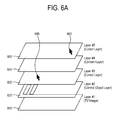
- FIG. 6A shows a configuration of layers according to still another exemplary embodiment
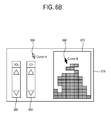
- FIG. 6B shows a screen displayed in the case of FIG. 6A .
- a game screen may be displayed on the content layer (layer #4) 640 as shown in FIG. 6A .
- the game screen is displayed on the layer #4 640 corresponding to the layer #5 650 where the cursor B 690 is displayed.
- a user can control the game screen 670 through the cursor B 690 as shown in FIG. 6B .
- a broadcasting screen 615 or the control objects (VOL) 662 and (CH) 664 can be controlled through the cursor A 680.
- FIG. 7A shows a configuration of layers according to still another exemplary embodiment
- FIG. 7B shows a screen displayed in the case of FIG. 7A .
- a user may control a game screen 760 through a cursor A 770 located on the layer #3 740.
- a user may not control broadcasting screen 715 by using cursor A 770.
- the game screen 670 is controlled through the cursor B 690.
- the game screen 670 is displayed on the layer #4 640 corresponding to the layer #5 650 where the cursor B 690 is displayed.
- the game screen 760 is controlled through the cursor A 770, so that the game screen 760 may be loaded into the layer #2.5 730 between the layer #3 740 and the layer #2 720 as shown in FIG.7A . Accordingly, to control a new content layer through a cursor on a certain cursor layer, the newly created content layer may be located below the certain cursor layer. Further, if the new content layer overlaps with the control object located below the certain cursor layer, a control object of an upper content layer may be executed.
- a user may control the game screen 760 through the cursor A 770 as shown in FIG. 7B .
- a method of controlling the image processing apparatus 100 according to a second exemplary embodiment will be described with reference to FIGs. 8A to 8D .
- a first screen and a second screen may be displayed not to overlap each other.
- a game screen 810 and a broadcasting screen 820 may be displayed independently of each other.
- at least one pointing cursor for controlling an application may be displayed on at least one of the game screen 810 and the broadcasting screen 820.
- At least one pointing cursor may correspond to at least one pointing device, respectively.
- FIG. 8A shows that one pointing cursor is displayed.
- a pointing cursor 831 corresponds to a pointing device A 830.
- the pointing cursor 831 can control the game screen 810 or broadcasting screen 820 displayed underlying the pointing cursor 831.
- the screen displayed underlying the pointing cursor 831 is the broadcasting screen 820. Therefore, the pointing cursor 831 can control the broadcasting screen 820.
- FIG. 8B illustrates that the form of the pointing cursor may be changed as it is moved between applications.
- the pointing cursors 832, 832' may be moved between the game screen 810 and the broadcasting screen 820. Specifically, the pointing cursors 832, 832' is movable to at least one location of above the game screen 810, below the game screen 810, above the broadcasting screen 820, and below the broadcasting screen 820. If the pointing cursor 832, 832' is moved from one of these locations to another, at least one of the transparency, the shape, the brightness and the color of the pointing cursor 832, 832' may be changed.
- the pointing cursor 832 can control the broadcasting screen 820.
- FIG. 8C illustrates a display in which a plurality of applications are controlled by a plurality of pointing devices, respectively.
- the pointing cursor A 833 corresponds to the pointing device A 830
- the pointing cursor B 841 corresponds to the pointing device B 840.
- the pointing cursor A 833 can control the game screen 810 and the pointing cursor B 841 can control the broadcasting screen 820.
- the pointing cursor A 833 and the pointing cursor B 841 are located within the regions of the game screen 810 and the broadcasting screen 820 to be controlled, respectively.
- the pointing cursor A 833 and the pointing cursor B 841 can control the game screen 810 and the broadcasting screen 820, respectively.
- the pointing cursor B 841 can control the game screen 810 and the pointing cursor A 833 can control the broadcasting screen 820.
- the pointing cursor A 833 is located on the game screen 810. That is, since the pointing cursor A 833 is located beyond the region of the broadcasting screen 820 to be controlled, it cannot control the broadcasting screen 820.
- the pointing cursor B 841 is located on the broadcasting screen 820. That is, since the pointing cursor B 841 is located beyond the region of the game screen 810 to be controlled, it cannot control the game screen 810.
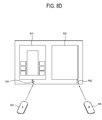
- FIG. 8D shows that the form of the pointing cursor may be changed when moved beyond a target to be controlled.
- the pointing cursor A 834 can move within the region of the game screen 810 to be controlled. Further, the pointing cursor B 842 can move within the region of the broadcasting screen 820 to be controlled. In this case, the outline of the pointing cursor A 834 and the pointing cursor B 842 may be changed in the form of a dotted line if pointing cursor A 834 and pointing cursor B 842 are moved beyond their respective movable region. Referring to FIG.
- the outline of the pointing cursor A 834, which has been moved beyond the region of the game screen 810, and the outline of the pointing cursor B 842, which has been moved beyond the region of the broadcasting screen 820, are displayed in the form of a dotted line.
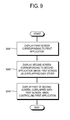
- FIG. 9 is a control flowchart of an image processing apparatus according to a first exemplary embodiment.
- the image processing apparatus 100 displays a first screen corresponding to a first application.
- the image processing apparatus 100 displays a second screen corresponding to a second application above the first screen, in which the second screen and the first screen overlap each other.
- the image processing apparatus 100 displays a part of the second screen, overlapped with the first screen, while controlling the first application.
- FIG. 10 is a control flowchart of an image processing apparatus according to a second exemplary embodiment.
- the image processing apparatus 100 displays a first screen corresponding to a first application and a second screen corresponding to a second application so that the first screen and second screen do not overlap each other.
- the image processing apparatus 100 controls at least one of the first application and the second application.
- the image processing apparatus 100 displays the application to be recognized by a user when the application subject to the control is switched.
- the respective applications can be controlled at the same time through a single or plurality of input devices, and the cursors for simultaneously controlling the plurality of applications can be displayed.
- a user interface intuitively controllable by a user.
- a system simultaneously controllable by several users can be achieved in one computer device having a display unit.
Landscapes
- Engineering & Computer Science (AREA)
- Multimedia (AREA)
- Signal Processing (AREA)
- Human Computer Interaction (AREA)
- Theoretical Computer Science (AREA)
- General Engineering & Computer Science (AREA)
- Physics & Mathematics (AREA)
- General Physics & Mathematics (AREA)
- Business, Economics & Management (AREA)
- Software Systems (AREA)
- Marketing (AREA)
- User Interface Of Digital Computer (AREA)
- Controls And Circuits For Display Device (AREA)
- Apparatus For Radiation Diagnosis (AREA)
Applications Claiming Priority (2)
| Application Number | Priority Date | Filing Date | Title |
|---|---|---|---|
| KR20090083338 | 2009-09-04 | ||
| KR1020100013520A KR101661142B1 (ko) | 2009-09-04 | 2010-02-12 | 영상처리장치 및 영상처리장치의 제어 방법 |
Publications (2)
| Publication Number | Publication Date |
|---|---|
| EP2299699A2 true EP2299699A2 (de) | 2011-03-23 |
| EP2299699A3 EP2299699A3 (de) | 2012-10-31 |
Family
ID=43402053
Family Applications (1)
| Application Number | Title | Priority Date | Filing Date |
|---|---|---|---|
| EP10172368A Ceased EP2299699A3 (de) | 2009-09-04 | 2010-08-10 | Bildverarbeitungsvorrichtung und Verfahren zur Steuerung derselben |
Country Status (2)
| Country | Link |
|---|---|
| US (2) | US8661365B2 (de) |
| EP (1) | EP2299699A3 (de) |
Cited By (4)
| Publication number | Priority date | Publication date | Assignee | Title |
|---|---|---|---|---|
| EP2811753A1 (de) * | 2013-06-03 | 2014-12-10 | LG Electronics, Inc. | Betriebsverfahren für Bildanzeigevorrichtung mit mehreren Fernbedienungen |
| EP2777248A4 (de) * | 2011-11-08 | 2015-07-01 | Sony Corp | Übertragungsvorrichtung, anzeigesteuerungsvorrichtung, inhaltübertragungsverfahren, aufzeichnungsmedium und programm |
| EP2966873A1 (de) * | 2014-07-09 | 2016-01-13 | Humax Co., Ltd. | System und verfahren zur unabhängigen steuerung geteilter schirme durch zuordnung mit eingabevorrichtungen |
| CN111345037A (zh) * | 2017-09-29 | 2020-06-26 | 科理特株式会社 | 虚拟现实影像提供方法及利用其的程序 |
Families Citing this family (7)
| Publication number | Priority date | Publication date | Assignee | Title |
|---|---|---|---|---|
| CN103339956B (zh) * | 2011-01-30 | 2016-10-12 | Lg电子株式会社 | 图像显示设备和操作图像显示设备的方法 |
| KR101873056B1 (ko) | 2011-09-20 | 2018-07-02 | 삼성전자주식회사 | 휴대단말기의 어플리케이션 수행 장치 및 방법 |
| CN104603732B (zh) * | 2012-08-28 | 2018-12-04 | Eizo株式会社 | 显示控制方法、计算机程序、显示控制装置及图像显示系统 |
| US20140085197A1 (en) * | 2012-09-21 | 2014-03-27 | Ati Technologies, Ulc | Control and visualization for multi touch connected devices |
| CN103561220A (zh) * | 2013-10-28 | 2014-02-05 | 三星电子(中国)研发中心 | 一种电视终端及其多屏显示和控制的方法 |
| US20160034058A1 (en) * | 2014-07-31 | 2016-02-04 | Microsoft Corporation | Mobile Device Input Controller For Secondary Display |
| US9658736B2 (en) * | 2015-06-04 | 2017-05-23 | Microsoft Technology Licensing, Llc | Contrast-oriented cursor presentation |
Family Cites Families (19)
| Publication number | Priority date | Publication date | Assignee | Title |
|---|---|---|---|---|
| JP2557359B2 (ja) * | 1986-12-26 | 1996-11-27 | 株式会社東芝 | 情報処理装置 |
| FR2693810B1 (fr) * | 1991-06-03 | 1997-01-10 | Apple Computer | Systemes d'interfaces d'utilisateurs a acces direct a une zone secondaire d'affichage. |
| US5623588A (en) * | 1992-12-14 | 1997-04-22 | New York University | Computer user interface with non-salience deemphasis |
| JPH07284166A (ja) * | 1993-03-12 | 1995-10-27 | Mitsubishi Electric Corp | 遠隔操作装置 |
| US5694150A (en) * | 1995-09-21 | 1997-12-02 | Elo Touchsystems, Inc. | Multiuser/multi pointing device graphical user interface system |
| JPH10207682A (ja) | 1997-01-17 | 1998-08-07 | Fujitsu Ltd | 画像表示システム |
| JP3504464B2 (ja) * | 1997-07-30 | 2004-03-08 | インターナショナル・ビジネス・マシーンズ・コーポレーション | データ入力装置およびその方法 |
| JPH1165811A (ja) * | 1997-08-11 | 1999-03-09 | Internatl Business Mach Corp <Ibm> | マウス・カーソルを表示する情報処理装置、マウス・カーソル、及びマウス・カーソルを表示する情報処理装置の制御方法 |
| US6469717B1 (en) * | 1999-10-27 | 2002-10-22 | Dejarnette Research Systems, Inc. | Computerized apparatus and method for displaying X-rays and the like for radiological analysis including image shift |
| US7434177B1 (en) * | 1999-12-20 | 2008-10-07 | Apple Inc. | User interface for providing consolidation and access |
| US6816176B2 (en) * | 2001-07-05 | 2004-11-09 | International Business Machines Corporation | Temporarily moving adjacent or overlapping icons away from specific icons being approached by an on-screen pointer on user interactive display interfaces |
| US7908570B2 (en) * | 2003-12-05 | 2011-03-15 | Trading Technologies International, Inc. | Method and system for displaying a cursor on a trading screen |
| JP4254573B2 (ja) * | 2004-02-27 | 2009-04-15 | 株式会社日立製作所 | 表示方法および表示装置 |
| US7239301B2 (en) * | 2004-04-30 | 2007-07-03 | Hillcrest Laboratories, Inc. | 3D pointing devices and methods |
| TW200601063A (en) * | 2004-06-17 | 2006-01-01 | Mitac Technology Corp | Interactive access right control system of computer device and its method |
| JP4508077B2 (ja) * | 2005-10-24 | 2010-07-21 | 株式会社デンソー | 車載マルチカーソルシステム |
| KR101836403B1 (ko) * | 2011-04-12 | 2018-04-19 | 엘지전자 주식회사 | 디스플레이 장치의 리모콘 기능을 수행하는 이동 단말기 |
| US20140143671A1 (en) * | 2012-11-19 | 2014-05-22 | Avid Technology, Inc. | Dual format and dual screen editing environment |
| JP2015036930A (ja) * | 2013-08-15 | 2015-02-23 | インターナショナル・ビジネス・マシーンズ・コーポレーションInternational Business Machines Corporation | 表示装置、表示方法、及び、プログラム |
-
2010
- 2010-08-10 EP EP10172368A patent/EP2299699A3/de not_active Ceased
- 2010-08-13 US US12/855,726 patent/US8661365B2/en not_active Expired - Fee Related
-
2013
- 2013-12-09 US US14/100,816 patent/US9612729B2/en active Active
Non-Patent Citations (1)
| Title |
|---|
| VADIM GOROKHOVSKY, LOU AMADIO: "Layered Windows", 1 January 2000 (2000-01-01), Retrieved from the Internet <URL:http://msdn.microsoft.com/en-us/library/ms997507.aspx#layerwin_topic2> [retrieved on 20130906] * |
Cited By (8)
| Publication number | Priority date | Publication date | Assignee | Title |
|---|---|---|---|---|
| EP2777248A4 (de) * | 2011-11-08 | 2015-07-01 | Sony Corp | Übertragungsvorrichtung, anzeigesteuerungsvorrichtung, inhaltübertragungsverfahren, aufzeichnungsmedium und programm |
| US9436289B2 (en) | 2011-11-08 | 2016-09-06 | Sony Corporation | Transmitting device, display control device, content transmitting method, recording medium, and program |
| EP2811753A1 (de) * | 2013-06-03 | 2014-12-10 | LG Electronics, Inc. | Betriebsverfahren für Bildanzeigevorrichtung mit mehreren Fernbedienungen |
| CN104219552A (zh) * | 2013-06-03 | 2014-12-17 | Lg电子株式会社 | 图像显示装置的操作方法 |
| CN104219552B (zh) * | 2013-06-03 | 2017-10-20 | Lg电子株式会社 | 图像显示装置的操作方法 |
| US9811240B2 (en) | 2013-06-03 | 2017-11-07 | Lg Electronics Inc. | Operating method of image display apparatus |
| EP2966873A1 (de) * | 2014-07-09 | 2016-01-13 | Humax Co., Ltd. | System und verfahren zur unabhängigen steuerung geteilter schirme durch zuordnung mit eingabevorrichtungen |
| CN111345037A (zh) * | 2017-09-29 | 2020-06-26 | 科理特株式会社 | 虚拟现实影像提供方法及利用其的程序 |
Also Published As
| Publication number | Publication date |
|---|---|
| US20110061020A1 (en) | 2011-03-10 |
| US20140101585A1 (en) | 2014-04-10 |
| EP2299699A3 (de) | 2012-10-31 |
| US9612729B2 (en) | 2017-04-04 |
| US8661365B2 (en) | 2014-02-25 |
Similar Documents
| Publication | Publication Date | Title |
|---|---|---|
| US8661365B2 (en) | Image processing apparatus and controlling method of the same | |
| US8253761B2 (en) | Apparatus and method of controlling three-dimensional motion of graphic object | |
| US8259077B2 (en) | Electronic device for inputting user command 3-dimensionally and method for employing the same | |
| US11269486B2 (en) | Method for displaying item in terminal and terminal using the same | |
| US10942620B2 (en) | Information processing apparatus, information processing method, program, and information processing system | |
| KR101087479B1 (ko) | 멀티 디스플레이 장치 및 그 제어 방법 | |
| JP6271858B2 (ja) | 表示装置及びその制御方法 | |
| US20230236852A1 (en) | Operation method and apparatus | |
| KR100980741B1 (ko) | 디스플레이 장치를 제어하기 위한 원격 제어 장치 및 원격 제어 방법 | |
| US20130339851A1 (en) | User-Friendly Process for Interacting with Informational Content on Touchscreen Devices | |
| US20140223490A1 (en) | Apparatus and method for intuitive user interaction between multiple devices | |
| US20110314428A1 (en) | Display apparatus and control method thereof | |
| CN103957441A (zh) | 移动终端控制显示终端的方法及移动终端 | |
| US20150089421A1 (en) | Information processing device, information processing device control method, and recording medium | |
| EP2605527B1 (de) | Verfahren und System zur Zuordnung von visuellen Anzeigen zu Berührungsbildschirmen | |
| CN104216644A (zh) | 一种映射被遮挡区的系统和方法 | |
| EP2249231A1 (de) | Eingabevorrichtung | |
| KR20110134810A (ko) | 디스플레이 장치를 제어하기 위한 원격 제어 장치 및 원격 제어 방법 | |
| EP3016400A2 (de) | Anzeigevorrichtung, system und steuerungsverfahren dafür | |
| KR101661142B1 (ko) | 영상처리장치 및 영상처리장치의 제어 방법 | |
| US20200356226A1 (en) | Electronic apparatus and display method for touch proximity detection | |
| US20130021367A1 (en) | Methods of controlling window display on an electronic device using combinations of event generators | |
| US9066042B2 (en) | Terminal device and control method thereof | |
| WO2014014278A1 (ko) | 터치 유저 인터페이스 방법 및 영상 장치 | |
| EP3252585A1 (de) | Anzeigevorrichtung und steuerungsverfahren dafür |
Legal Events
| Date | Code | Title | Description |
|---|---|---|---|
| PUAI | Public reference made under article 153(3) epc to a published international application that has entered the european phase |
Free format text: ORIGINAL CODE: 0009012 |
|
| AK | Designated contracting states |
Kind code of ref document: A2 Designated state(s): AL AT BE BG CH CY CZ DE DK EE ES FI FR GB GR HR HU IE IS IT LI LT LU LV MC MK MT NL NO PL PT RO SE SI SK SM TR |
|
| AX | Request for extension of the european patent |
Extension state: BA ME RS |
|
| RAP1 | Party data changed (applicant data changed or rights of an application transferred) |
Owner name: SAMSUNG ELECTRONICS CO., LTD. |
|
| PUAL | Search report despatched |
Free format text: ORIGINAL CODE: 0009013 |
|
| AK | Designated contracting states |
Kind code of ref document: A3 Designated state(s): AL AT BE BG CH CY CZ DE DK EE ES FI FR GB GR HR HU IE IS IT LI LT LU LV MC MK MT NL NO PL PT RO SE SI SK SM TR |
|
| AX | Request for extension of the european patent |
Extension state: BA ME RS |
|
| RIC1 | Information provided on ipc code assigned before grant |
Ipc: H04N 21/431 20110101ALI20120924BHEP Ipc: H04N 21/422 20110101ALI20120924BHEP Ipc: H04N 5/445 20110101AFI20120924BHEP Ipc: G06F 3/048 20060101ALI20120924BHEP Ipc: H04N 21/478 20110101ALI20120924BHEP Ipc: H04N 5/45 20110101ALI20120924BHEP Ipc: G06F 9/00 20060101ALI20120924BHEP Ipc: H04N 21/443 20110101ALI20120924BHEP |
|
| 17P | Request for examination filed |
Effective date: 20130430 |
|
| 17Q | First examination report despatched |
Effective date: 20130917 |
|
| STAA | Information on the status of an ep patent application or granted ep patent |
Free format text: STATUS: THE APPLICATION HAS BEEN REFUSED |
|
| 18R | Application refused |
Effective date: 20171212 |