EP2300898B1 - Erweiterter berührungsempfindlicher steuerbereich für ein elektronisches gerät - Google Patents
Erweiterter berührungsempfindlicher steuerbereich für ein elektronisches gerät Download PDFInfo
- Publication number
- EP2300898B1 EP2300898B1 EP09743405.4A EP09743405A EP2300898B1 EP 2300898 B1 EP2300898 B1 EP 2300898B1 EP 09743405 A EP09743405 A EP 09743405A EP 2300898 B1 EP2300898 B1 EP 2300898B1
- Authority
- EP
- European Patent Office
- Prior art keywords
- touch
- gesture
- sensitive
- display screen
- screen
- Prior art date
- Legal status (The legal status is an assumption and is not a legal conclusion. Google has not performed a legal analysis and makes no representation as to the accuracy of the status listed.)
- Active
Links
Images









Classifications
-
- G—PHYSICS
- G06—COMPUTING OR CALCULATING; COUNTING
- G06F—ELECTRIC DIGITAL DATA PROCESSING
- G06F3/00—Input arrangements for transferring data to be processed into a form capable of being handled by the computer; Output arrangements for transferring data from processing unit to output unit, e.g. interface arrangements
- G06F3/01—Input arrangements or combined input and output arrangements for interaction between user and computer
- G06F3/03—Arrangements for converting the position or the displacement of a member into a coded form
- G06F3/041—Digitisers, e.g. for touch screens or touch pads, characterised by the transducing means
- G06F3/0416—Control or interface arrangements specially adapted for digitisers
-
- G—PHYSICS
- G06—COMPUTING OR CALCULATING; COUNTING
- G06F—ELECTRIC DIGITAL DATA PROCESSING
- G06F3/00—Input arrangements for transferring data to be processed into a form capable of being handled by the computer; Output arrangements for transferring data from processing unit to output unit, e.g. interface arrangements
- G06F3/01—Input arrangements or combined input and output arrangements for interaction between user and computer
- G06F3/03—Arrangements for converting the position or the displacement of a member into a coded form
- G06F3/033—Pointing devices displaced or positioned by the user, e.g. mice, trackballs, pens or joysticks; Accessories therefor
- G06F3/0354—Pointing devices displaced or positioned by the user, e.g. mice, trackballs, pens or joysticks; Accessories therefor with detection of two-dimensional [2D] relative movements between the device, or an operating part thereof, and a plane or surface, e.g. 2D mice, trackballs, pens or pucks
- G06F3/03547—Touch pads, in which fingers can move on a surface
-
- G—PHYSICS
- G06—COMPUTING OR CALCULATING; COUNTING
- G06F—ELECTRIC DIGITAL DATA PROCESSING
- G06F3/00—Input arrangements for transferring data to be processed into a form capable of being handled by the computer; Output arrangements for transferring data from processing unit to output unit, e.g. interface arrangements
- G06F3/01—Input arrangements or combined input and output arrangements for interaction between user and computer
- G06F3/048—Interaction techniques based on graphical user interfaces [GUI]
- G06F3/0487—Interaction techniques based on graphical user interfaces [GUI] using specific features provided by the input device, e.g. functions controlled by the rotation of a mouse with dual sensing arrangements, or of the nature of the input device, e.g. tap gestures based on pressure sensed by a digitiser
- G06F3/0488—Interaction techniques based on graphical user interfaces [GUI] using specific features provided by the input device, e.g. functions controlled by the rotation of a mouse with dual sensing arrangements, or of the nature of the input device, e.g. tap gestures based on pressure sensed by a digitiser using a touch-screen or digitiser, e.g. input of commands through traced gestures
- G06F3/04883—Interaction techniques based on graphical user interfaces [GUI] using specific features provided by the input device, e.g. functions controlled by the rotation of a mouse with dual sensing arrangements, or of the nature of the input device, e.g. tap gestures based on pressure sensed by a digitiser using a touch-screen or digitiser, e.g. input of commands through traced gestures for inputting data by handwriting, e.g. gesture or text
-
- G—PHYSICS
- G06—COMPUTING OR CALCULATING; COUNTING
- G06F—ELECTRIC DIGITAL DATA PROCESSING
- G06F3/00—Input arrangements for transferring data to be processed into a form capable of being handled by the computer; Output arrangements for transferring data from processing unit to output unit, e.g. interface arrangements
- G06F3/01—Input arrangements or combined input and output arrangements for interaction between user and computer
- G06F3/048—Interaction techniques based on graphical user interfaces [GUI]
- G06F3/0487—Interaction techniques based on graphical user interfaces [GUI] using specific features provided by the input device, e.g. functions controlled by the rotation of a mouse with dual sensing arrangements, or of the nature of the input device, e.g. tap gestures based on pressure sensed by a digitiser
- G06F3/0488—Interaction techniques based on graphical user interfaces [GUI] using specific features provided by the input device, e.g. functions controlled by the rotation of a mouse with dual sensing arrangements, or of the nature of the input device, e.g. tap gestures based on pressure sensed by a digitiser using a touch-screen or digitiser, e.g. input of commands through traced gestures
- G06F3/04886—Interaction techniques based on graphical user interfaces [GUI] using specific features provided by the input device, e.g. functions controlled by the rotation of a mouse with dual sensing arrangements, or of the nature of the input device, e.g. tap gestures based on pressure sensed by a digitiser using a touch-screen or digitiser, e.g. input of commands through traced gestures by partitioning the display area of the touch-screen or the surface of the digitising tablet into independently controllable areas, e.g. virtual keyboards or menus
-
- G—PHYSICS
- G06—COMPUTING OR CALCULATING; COUNTING
- G06F—ELECTRIC DIGITAL DATA PROCESSING
- G06F2203/00—Indexing scheme relating to G06F3/00 - G06F3/048
- G06F2203/048—Indexing scheme relating to G06F3/048
- G06F2203/04803—Split screen, i.e. subdividing the display area or the window area into separate subareas
-
- G—PHYSICS
- G06—COMPUTING OR CALCULATING; COUNTING
- G06F—ELECTRIC DIGITAL DATA PROCESSING
- G06F2203/00—Indexing scheme relating to G06F3/00 - G06F3/048
- G06F2203/048—Indexing scheme relating to G06F3/048
- G06F2203/04808—Several contacts: gestures triggering a specific function, e.g. scrolling, zooming, right-click, when the user establishes several contacts with the surface simultaneously; e.g. using several fingers or a combination of fingers and pen
Definitions
- the present invention relates to input mechanisms for controlling electronic devices, and more particularly to a touch-sensitive control area that extends beyond the edges of a display screen on such a device.
- Touch-sensitive screens allow an electronic display to function as an input device, thus providing great flexibility in the type of interactions that can be supported.
- touch-sensitive screens are used to replace pointing devices such as trackballs, mice, five-way switches, and the like.
- touch-sensitive screens can supplement, or be supplemented by, other input mechanisms.
- Touch-sensitive screens provide several advantages over other input mechanisms. Touch-sensitive screens can replace physical buttons by providing on-screen buttons that can be touched by the user.
- the on-screen buttons can be arranged so that they resemble an alphabetic or numeric key-board, or they can have specialized functions. This often simplifies input operations by providing only those options that are relevant at a given time.
- Touch-sensitive screens can also help to provide customizability and globalization of input mechanisms.
- An on-screen keyboard can be easily adapted to any desired language, and extra keys can be provided as appropriate to the specific application. Certain buttons can be highlighted, moved, or otherwise modified in a dynamic way to suit the application.
- touch-sensitive screens can be more reliable than physical keyboards, because they reduce the reliance on moving parts and physical switches.
- touch-sensitive screens allow direct manipulation of on-screen objects, for example by facilitating control and/or activation of such objects by touching, tapping, and/or dragging.
- touch-sensitivity allows a user to perform such operations on specific items in a direct and intuitive way.
- buttons can be provided to allow access to such operations, but such buttons occupy screen space that can be extremely valuable, especially in compact, mobile devices.
- providing on-screen buttons for such functions allows only a limited set of operations to be available at any given time, since there is often insufficient screen space to provide buttons for all such functions.
- buttons or objects are relatively small, causing some users to have difficulty activating the correct command or object, or even causing them to inadvertently cause the wrong command or object to be activated or manipulated.
- This problem which is particularly prevalent in devices having small screens, can cause touch-screens to be relatively unforgiving in their interpretation of user input.
- touch-screens often causes users to obscure part of the screen in order to interact with it. Screens layouts may be designed so that important elements tend not to be obscured; however, such design may not take into account right- or left-handedness.
- touch-sensitive screens Another disadvantage of touch-sensitive screens is that their dynamic nature makes it difficult for users to provide input without looking at the screen. A user cannot normally discern the current state of the device without looking at it, and therefore cannot be sure as to the current location or state of various on-screen buttons and controls at any given time. This makes it difficult to control the device while it is one's pocket, or while one is engaged in a task that inhibits one's ability to look at the device.
- What is needed is a system and method that provides the advantages of touch-sensitive screens while avoiding their limitations. What is further needed is a system and method that facilitates direct manipulation of on-screen objects while also providing mechanisms for performing commands for which direct manipulation is not well-suited. What is further needed is a system and method that provides access to a wide variety of commands and allows input of such commands in a simple, intuitive way, without cluttering areas of a display screen with an excess of buttons and controls.
- US Patent No. 6 958 749 B1 discloses a device with a touch screen which facilitates combined gestures.
- a touch-sensitive display screen is enhanced by a touch-sensitive control area that extends beyond the edges of the display screen.
- the touch-sensitive area outside the display screen referred to as a "gesture area”
- commands entered in the gesture area can be independent of the current contents of the display screen. Certain commands can therefore be made available at all times without taking up valuable screen space, an advantage that is of particular benefit for small mobile devices.
- the present invention allows some commands to be activated by inputting a gesture within the gesture area.
- Other commands can be activated by directly manipulating on-screen objects, as in a conventional touch-sensitive screen.
- Yet other commands can be activated via a combination of these two input mechanisms.
- the user can begin a gesture within the gesture area, and finish it on the screen (or vice versa), or can perform input that involves contemporaneous contact with both the gesture area and the screen. Since both the gesture area and the screen are touch-sensitive, the device is able to interpret input that includes one or both of these areas, and can perform whatever action is appropriate to such input.
- this highly flexible approach allows, for example, a command to be specified in terms of an action and an target: a particular gesture as performed in the gesture area can specify the action to be performed, while the particular on-screen location where the user finishes (or starts) the input can specify a target (such as an on-screen object) on which the command is to be performed.
- the gesture area can also be used to provide input that modifies a command entered by direct manipulation on the screen.
- gestures allow a large vocabulary to be developed, so that a large number of commands can be made available without obscuring parts of the screen with buttons, menus, and other controls.
- the combination of such a gesture vocabulary with direct manipulation provides unique advantages not found in prior art systems.
- the present invention also provides a way to design a user interface that is simple and easy for beginners, while allowing sophisticated users to access more complex features and to perform shortcuts.
- beginnerers can rely on the direct manipulation of on-screen objects, while the more advanced users can learn more and more gestures as they become more familiar with the device.
- the present invention provides a mechanism for providing certain commands in a consistent manner at all times where appropriate. The user can be assured that a particular gesture, performed in the gesture area, will cause a certain action to be performed, regardless of what is on the screen at a given time.
- the present invention also provides an input interface that is more forgiving than existing touch-sensitive screens. Users need not be as precise with their input operations, since a larger area is available. Some gestures may be performed at any location within the gesture area, so that the user need not be particularly accurate with his or her fingers when inputting a command. Users can also perform such gestures without obscuring a portion of the screen. Users can also more easily use the input mechanism when not looking at the screen, since gestures can be performed in the gesture area without reference to what is currently displayed on the screen.
- the present invention in one embodiment provides a mechanism for facilitating access to a large number of commands in a limited space and without the need for a large number of on-screen buttons or physical buttons, and for providing the advantages of direct manipulation while avoiding its limitations.
- the present invention can be implemented on any electronic device, such as a handheld computer, personal digital assistant (PDA), personal computer, kiosk, cellular telephone, and the like.
- PDA personal digital assistant
- the invention can be implemented as a command input paradigm for a software application or operating system running on such a device.
- the present invention can be implemented as part of a graphical user interface for controlling software on such a device.
- the invention is particularly well-suited to devices such as smartphones, handheld computers, and PDAs, which have limited screen space and in which a large number of commands may be available at any given time.
- devices such as smartphones, handheld computers, and PDAs
- the invention can be practiced in many other contexts, including any environment in which it is useful to provide access to commands via a gesture-based input paradigm, while also allowing direct manipulation of on-screen objects where appropriate. Accordingly, the following description is intended to illustrate the invention by way of example, rather than to limit the scope of the claimed invention.
- FIG. 2 there is shown an example of an example of a device 100 having a touch-sensitive screen 101 and a gesture area 102, according to one embodiment.
- device 100 as shown in Fig. 2 is a personal digital assistant or smartphone.
- Such devices commonly have telephone, email, and text messaging capability, and may perform other functions including, for example, playing music and/or video, surfing the web, running productivity applications, and the like.
- the present invention can be implemented in any type of device having a touch-sensitive screen, and is not limited to devices having the listed functionality.
- the particular layout shown in Fig. 2 is merely exemplary and is not intended to be restrictive of the scope of the claimed invention.
- touch--sensitive screen 101 and gesture area 102 can be implemented using any technology that is capable of detecting a location of contact.
- any technology that is capable of detecting a location of contact One skilled in the art will recognize that many types of touch-sensitive screens and surfaces exist and are well-known in the art, including for example:
- Any of the above techniques, or any other known touch detection technique, can be used in connection with the device of the present invention, to detect user contact with screen 101, gesture area 102, or both.
- the present invention can be implemented using a screen 101 and/or gesture area 102 capable of detecting two or more simultaneous touch points, according to techniques that are well known in the art.
- the touch points can all be located on screen 101 or on gesture area 102, or some can be located on each.
- the present invention can be implemented using other gesture recognition technologies that do not necessarily require contact with the device.
- a gesture may be performed over the surface of a device (either over screen 101 or gesture area 102), or it may begin over the surface of a device and terminate with a touch on the device (either on screen 101 or gesture area 102). It will be recognized by one with skill in the art that the techniques described herein can be applied to such non-touch-based gesture recognition techniques.
- device 100 as shown in Fig. 2 also has a physical button 103.
- physical button 103 can be used to perform some common function, such as to return to a home screen or to activate a selected on-screen item.
- Physical button 103 is not needed for the present invention, and is shown for illustrative purposes only.
- physical button 103 is touch sensitive, so that the user's gestures as entered in gesture area 102 and/or on screen 101 can be initiated on button 103 and/or can pass over button 103 as well.
- gesture area 102 will be considered to include button 103 for embodiments where button 103 is touch-sensitive. In one embodiment, such functionality is implemented using techniques described in the above-cited related patent application.
- gesture area 102 is located immediately below touch-sensitive screen 101, with no gap between screen 101 and gesture area 102. This allows the user to enter touch commands such as gestures in gesture area 102 and/or touch-sensitive screen 101, as well as to enter touch commands that cross over from gesture area 102 to touch-sensitive screen 101, and vice versa. Specific examples of such touch commands will be described in more detail below.
- gesture area 102 can be provided in any location with respect to screen 101 and need not be placed immediately below screen 101 as shown in Fig. 2 .
- gesture area 102 can be visibly delineated on the surface of device 100, if desired, for example by an outline around gesture area 102, or by providing a different surface texture, color, and/or finish for gesture area 102 as compared with other surfaces of device 100. Such delineation is not necessary for operation of the present invention.
- gesture area 102 surrounds touch-sensitive screen 101.
- Such an arrangement allows the user to enter a touch command above, below, or to either side of screen 101, as long as the command is entered within gesture area 102.
- the touch command can cross over from gesture area 102 to touch-sensitive screen 101, and vice versa; since gesture area 102 surrounds touch-sensitive screen 101, the cross-over can take place at any edge of screen 101, and is not limited to the bottom edge only.
- Fig. 1B depicts an embodiment where device 100 is a desktop computer including separate keyboard 111, and gesture area 102 surrounds screen 101.
- Fig. 1C depicts an embodiment where device 100 is a laptop computer, and gesture area 102 surrounds screen 101.
- Fig. 1D depicts an embodiment where device 100 is a desktop computer, and gesture area 102 is disjoint, including a portion that surrounds screen 101 and a portion above keyboard 111.
- gesture area 102 is disjoint, including a portion that surrounds screen 101 and a portion above keyboard 111.
- Fig. 3 there is shown another example of an embodiment of device 100, wherein gesture area 102 surrounds touch-sensitive screen 101 and extends across the entire front surface of device 100.
- the user to enter a touch command at any location on the front surface of device 100, whether within or outside screen 101.
- the touch command can cross over from gesture area 102 to touch-sensitive screen 101, and vice versa; since gesture area 102 surrounds touch-sensitive screen 101, the cross-over can take place at any edge of screen 101, and is not limited to the bottom edge only
- Fig. 3 depicts device 100 having three physical buttons 103 according to one embodiment.
- buttons 103 or no buttons 103, can be included, and that the number of physical buttons 103, if any, is not important to the operation of the present invention.
- the user can input a touch command on device 100 by any of several methods, such as:
- the present invention provides a way to implement a vocabulary of touch commands including gestures that are performed within gesture area 102, within screen 101, or on some combination of the two.
- gestures can also be performed over the surface of gesture area 102 and/or screen 101, without necessarily contacting these surfaces. The invention thus expands the available space and the vocabulary of gestures over prior art systems.
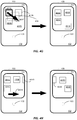
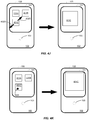
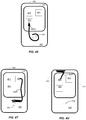
- Figs. 4A through 4W there are shown several examples of touch commands entered on device 100 by the above-listed mechanisms. These examples are provided for illustrative purposes, and are not intended to limit the scope of the invention as claimed.
- device 100 is shown having a screen 101 including several on-screen objects 401 such as icons.
- gesture area 102 is assumed to extend to the edges of device 100.
- a single physical button 103 is shown.
- device 100 allows for some variation in the angles of gestures, so that the gestures need not be precisely horizontal or vertical to be recognized.
- Device 100 is able to identify the user's intent as a horizontal or vertical gesture, or other recognizable gesture, even if the user deviates from the definitive, ideal formulation of the gesture.
- gestures can be recognized regardless of the current orientation of device 100. Thus, a particular gesture would generally have the same meaning whether device 100 is in its normal orientation or rotated by 180 degrees, 90 degrees, or some other amount.
- device 100 includes orientation sensors to detect the current orientation according to well known techniques.
- a half-swipe left gesture 402A entirely within gesture area 102.
- This gesture 102A is indicated by an arrow in Fig. 4A , showing that the user has swiped across a portion of gesture area 102 without crossing over physical button 103.
- such a gesture 402A returns the user to a previous view within an application.
- the user can perform the half-swipe left gesture 402A anywhere within gesture area 102; the associated function does not require identification of any particular target on screen 101.
- a gesture 402A causes a Quick Launch bar to appear, allowing the user to launch an application by tapping on an icon within the bar.
- the user can start the upward swipe gesture 402B anywhere within gesture area 102; the associated function does not require identification of any particular target on screen 101.
- the user performs a full-swipe left gesture 402C entirely within gesture area 102, passing directly over button 103.
- a gesture 402C returns the user to a previously viewed application.
- the user can perform the long swipe left gesture 402C anywhere within gesture area 102; the associated function does not require identification of any particular target on screen 101.
- the user can pass directly over button 103 or can swerve around it; either way, device 100 recognizes the intent of the user.
- Another command such as "next application” can be performed in response to a full-swipe right gesture (not shown).
- the user performs a clockwise orbit gesture 402D entirely within gesture area 102.
- a gesture 402D performs a zoom function.
- This gesture could also be used to scroll long lists, or control playback of media such as in a physical 'scrub' controller for a video editing deck.
- the user can perform the orbit gesture 402D anywhere within gesture area 102; in another embodiment, the gesture may have different meaning depending on whether it circles button 103 or is performed in some other part of gesture area 102.
- an orbit gesture may have a different meaning if performed in a counterclockwise direction.
- the orbit gesture 402D has an associated function that does not require identification of any particular target on screen 101.
- the user can also initiate some commands by direct manipulation of objects 401 on screen 101.
- Direct manipulation is particularly well-suited to commands whose target is represented by an on-screen object 401. Examples are discussed below.
- Focus / Act the user can tap on an object 401 or on some other area of screen 101 to focus the object 401 or screen area, or to perform an action identified by the object 401 or screen area, such as opening a document or activating an application.
- FIG. 6 there is shown an example of a tap gesture 402AA to select an item 602 in a list 601 currently displayed on screen 101.
- the user can perform a "press and hold" action on an object 401C, by maintaining contact at a location 402E within object 401C for at least some predetermined period of time, such as 500 milliseconds. In one embodiment, this selects or highlights object 401C, and de-selects any other objects 401B that may have previously been selected. A selected or highlighted object 401C is thereby identified as a target for a subsequent command. In the example, a highlighted object 401 is denoted by a heavy outline.
- a modifier key such as a shift key
- Modifier key may be physical button 103, or some other button (not shown). Certain commands performed in touch-sensitive screen 101 can be modified by performing the command while holding down the modifier key, or by pressing the modifier key prior to performing the command.
- the user can perform a shift-tap on an object 401 by tapping on an object 401 or on some other area of screen 101 while holding the modifier key. In one embodiment, this selects or highlights an object 401, without de-selecting any other objects 401 that may have previously been selected.
- the modifier key can also be used to perform a shift-drag command. While holding the modifier key, the user drags across a range of objects 401 to select a contiguous group, as shown in Fig. 4F .
- the user performs a shift-drag gesture 402F over objects 401A, 401B, and 401C causing those three objects to be selected or highlighted.
- a rectangle 433 or other indicator can optionally be shown around the objects 401 being selected. Any previously selected objects 401 remain selected.
- the drag gesture 402F de-selects the objects 401 as the user shift-drags across them, and any already unselected objects 401 remain unselected.
- Figs. 8A and 8B there is shown an example of a tap, hold, and release gesture 402CC to perform an edit operation on item 602 according to one embodiment.
- a text field 801 is displayed. This allows the user to edit item 602 in place.
- the user can commit the edit by tapping outside text field 801, navigating away from the page, or pressing an Enter button (not shown).
- a button can be shown, to provide access to a screen for performing more detailed editing operations.
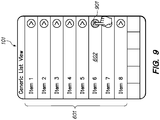
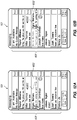
- Fig. 9 there is shown an example of a user's interaction with edit button 901.
- Edit button 901 is shown adjacent to item 602. The user can tap on edit button 901 to go to an edit page (not shown) for item 602.
- the user can perform a drag-scroll operation by performing a drag gesture 402H (also referred to as a flick gesture) across screen 101 in a direction that supports scrolling for the current state of the display.
- a drag gesture 402H also referred to as a flick gesture
- the drag must start moving immediately upon contact with screen 101, in order to be recognized as a scroll.
- the current display scrolls by an amount proportional to the distance moved by the user's finger, as shown in the right side of Fig. 4H .
- the scroll amount can be adjusted or dampened as appropriate.
- the user can also flick across screen 101 in a direction that supports scrolling for the current state of the display.
- the flick must start immediately upon contact with screen 101, and the user's finger must leave the surface of screen 101 before stopping movement, in order to be recognized as a flick.
- the current display scrolls by an amount proportional to the speed and distance which the user flicked.
- a drag-scroll may be converted into a flick by lifting the finger before coming to a rest.
- a tap or drag immediately interrupts the current scroll. If the user tapped, the current scroll stops. If the user dragged, a new drag-scroll is initiated.
- FIG. 7 there is shown an example of a flick gesture 402BB to cause list 601 currently displayed on screen 101 to scroll upwards according to one embodiment.
- the user can drag across screen 101 horizontally to show the next or previous item in a sequence of items. This can be distinguished from a drag scroll by being executed perpendicular to the axis of scrolling.
- the user can cause an onscreen object 401C, or the entire display area shown in screen 101, to zoom in or out by placing two fingers on screen 101 and bringing them apart or drawing them together.
- the display is scaled as though the fingers were affixed to reference points on the display.
- the user can also double-tap (tap twice within some period of time) on a desired center point of a zoom operation. This causes the display to zoom in by a predetermined amount. In one embodiment, if the user taps on gesture area 102, the display zooms out by a predetermined amount.
- Fig. 4K in one embodiment, if the user double-taps (tap twice within some period of time) at a location 402K on an object 401C displayed on screen 101, the display zooms in so that the object 401C fills screen 101. As shown in Fig. 4L , if the object 401C is already zoomed to fit, then the double-tap command at a location 402L within the object 401C returns the object 401C to its previous size.
- Text Navigation when text is displayed on screen 101, such as in text edit field 407, the user can tap at a position 402L in field 407. A text cursor 408 moves to the tapped location.
- a user can navigate within text, or move an onscreen object, using relative motion. The movement of the object being moved (text cursor or selected object) is relative to the motion of the user's finger (onscreen or off).
- the object does not jump to the location of the user's finger, but rather it moves in the same direction as the motion of the user's finger, and the magnitude of the movement is proportional (either linearly or by some scaled factor) to the magnitude of the motion of the user's finger.
- the object movement can be scaled by a factor or factors (such as for example speed, distance, fixed ratio, or the like) or even inverted.
- Fig. 4P there is shown an example of a technique for moving an object 401 according to one embodiment.
- the user holds on a position in object 401A for a short period of time (such as 500 ms or more), and then performs a gesture 402P to move to another location on screen 101.
- Object 401A moves, following the position of the user's finger. Lifting the finger leaves object 401A at its last position, as shown in the right side of Fig. 4P .
- the user drags the object 401A over a valid target object 401 that can act on or receive the dragged object 401A
- visual feedback is provided to indicate that the potential target object 401 is a valid target.
- the potential target object 401 may be momentarily highlighted while the dragged object 401A is positioned over it. If the user ends gesture 402P while the dragged object 401A is over a valid target object 401, an appropriate action is performed: for example, the dragged object 401A may be inserted in the target object 401, or the target object 401 may launch as an application and open the dragged object 401.
- a move operation can cause items in the list to be reordered.
- Figs. 10A and 10B there is shown an example of a tap, hold, and drag gesture to reorder items in a list.
- a user performs a tap, hold and drag gesture 402DD on item 602, as shown in Fig. 10A .
- item 602 is shown at its new position, as shown in Fig. 10B .
- Delete In one embodiment, the user can delete an item by performing a swipe gesture to drag the item off screen 101.
- a swipe gesture 402EE to delete an item 602 from a list 601.
- the user begins swipe gesture 402EE in Fig. 11A and continues it in Fig. 11B .
- the user is prompted to confirm the delete operation.
- this prompt can take the form of a Delete button 1101; a Cancel button 1102 is also provided, in case the user wishes to cancel the delete operation. If the user confirms the operation by tapping Delete button 1101, item 602 is deleted and no longer appears on list 601.
- a message 1104 appears informing the user that item 602 has been deleted, and an Undo button 1103 is provided to give the user an opportunity to undo the deletion.
- message 1104 and button 1103 only appear for a fixed period of time (for example, three seconds), after which message 1104 and button 1103 disappear, and the bottom portion of the list moves up to fill the space, as shown in Fig. 11E .
- no confirmation is displayed; rather, when the user swipes an item off list 601, the display of Fig. 11E is shown.
- swipe gesture 402EE is shown in Figs. 12A through 12D , in the context of an email application where items 602 are email messages.
- the user begins swipe gesture 402EE in Fig. 12A and continues it in Fig. 12B .
- Fig. 12C depicts Delete button 1101 and Undo button 1102 (which performs the same function as Cancel button 1102 in Fig. 11C ), giving the user an opportunity to confirm or cancel the delete operation.
- Fig. 12D depicts message 1104 informing the user that item 602 has been deleted, as well as Undo button 1103 to give the user an opportunity to undo the deletion.
- gestures 402 may be performed on screen 101, according to well-known techniques of direct manipulation in connection with touch-sensitive screens and objects displayed thereon.
- the device of the present invention recognizes commands that are activated by combining gestures 402 in gesture area 102 within input on touch-sensitive screen 101.
- commands may be activated by, for example:
- gesture 402 is to perform any of the previously-described gestures on screen 101 while also touching gesture area 102.
- the contact with gesture area 102 serves as a modifier for the gesture 402 being performed on screen 101.
- Another example is to perform one of the previously-described gestures in gesture area 102, while also touching an object 401 on screen 101.
- the contact with the object 401 serves as a modifier for the gesture 402 being performed in gesture area 102.
- the display changes while a user is in the process of performing a gesture in gesture area 102, to reflect current valid targets for the gesture. In this manner, when a user begins a gesture in gesture area 102, he or she is presented with positive feedback that the gesture is recognized along with an indication of valid targets for the gesture.
- Fig. 4Q there is shown an example according to one embodiment.
- the user holds one finger at location 402QA in gesture area 102 while dragging another finger on screen 101, performing gesture 402QB.
- This causes object 401A, (or a cursor or other on-screen item) to be dragged along with the second finger.
- object 401A or the other on-screen item is dropped, as shown in the right side of Fig. 4Q .
- the finger in gesture area 102 acts as a modifier, obviating the need for the user to hold the second finger on the on-screen item in order to initiate a drag operation.
- holding a finger in gesture area 102 while performing a gesture on screen 101 causes the screen gesture to be modified from its normal function in some other way.
- the use can perform a two-part gesture sequence: a tap gesture 402 in gesture area 102, followed by a tap, drag, or other gesture 402 on an on-screen object 401 or other area of screen 101 so as to identify the intended target of the gesture sequence.
- the user can perform the tap gesture 402G anywhere within gesture area 102; in another embodiment, the gesture may have different meaning depending on where it is performed.
- the sequence can be reversed, so that the target object 401 can be identified first by a tap on screen 101, and the action to be performed can be indicated subsequently by a gesture 402 in gesture area 102.
- Fig. 4R there is shown another example of a gesture sequence having gesture components that can be performed sequentially or simultaneously according to one embodiment.
- the user performs a horizontal scratch gesture 402RB within gesture area 102, and a tap gesture 402RA on an on-screen object 401.
- gesture 402RB indicates a delete command and gesture 402RA identifies the target 401 of the command.
- the user can perform the horizontal scratch gesture 402RB anywhere within gesture area 102; in another embodiment, the gesture may have different meaning depending on where it is performed.
- the sequence can be performed in either order, so that the target 401 can be specified by gesture 402RA either before or after the scratch gesture 402RB is performed.
- the gestures 402RA and 402RB can be performed contemporaneously (for example, the user might hold a finger at location 402RA while performing scratch gesture 402RB).
- a gesture 402 that begins in gesture area 102 and is completed on touch-sensitive screen 101 according to one embodiment.
- the user performs a clockwise orbit gesture 402S starting within gesture area 102 and ending on an on-screen object 401.
- on-screen object 401 is identified as the target of the command.
- such a gesture 402S can perform a scale or zoom object function.
- the user can begin the orbit gesture 402S anywhere within gesture area 102; in another embodiment, the gesture may have different meaning depending on whether it circles button 103 or is performed in some other part of gesture area 102.
- an orbit gesture may have a different meaning if performed in a counterclockwise direction.
- the user performs a horizontal scratch gesture 402T starting within gesture area 102 and ending on an on-screen object 401 according to one embodiment.
- on-screen object 401 is identified as the target of the command.
- such a gesture 402T can perform a delete function.
- the user can begin the horizontal scratch gesture 402T anywhere within gesture area 102, as long as the resultant gesture 402T is recognizable as a horizontal scratch, and as long as the gesture 402T ends at the desired location to identify the correct on-screen object 401 as a target.
- Fig. 4U is similar to Fig. 4T , but illustrates the horizontal scratch gesture 402T being initiated in an area of gesture area 102 above screen 101 and ending on an on-screen object 401.
- Figs. 4V and 4W Additional examples are shown in Figs. 4V and 4W .
- the user performs a swipe up gesture 402V starting within gesture area 102 and ending on an on-screen object 401, according to one embodiment.
- on-screen object 401 is identified as the target of the command.
- such a gesture 402V can perform an "open this target" function.
- the user can begin the swipe up gesture 402V anywhere within gesture area 102, as long as the resultant gesture 402Vis recognizable as an upward swipe, and as long as the gesture 402V ends at the desired location to identify the correct on-screen object 401 as a target.
- Fig. 4W the user performs a half-swipe left gesture 402W starting within a portion of gesture area 102 adjacent to screen 101, and ending within screen 101, according to one embodiment.
- This example illustrates a situation where the gesture 402W extends onto screen 101, but no object is currently located at the ending point of the gesture 402W.
- no on-screen object is identified as the target of the command. Accordingly, such a gesture 402W might return the user to a previous view within an application, as described above for gesture 402A in Fig. 4A .
- a gesture performs the same function whether entered entirely within gesture area 102 (as in Fig. 4A ) or entered partially in gesture area 102 and partially on screen 101.
- the user can perform the half-swipe left gesture 402W beginning anywhere within gesture area 102.
- the same gesture 402W can be performed within screen 101, or beginning within screen 101 and ending in gesture area 102, as long as the area of screen 101 in which gesture 402W is initiated does not contain an activatable object 401 (or as long as there is no ambiguity as to the function the user intends to activate).
- FIG. 5 there is shown a flowchart depicting a method of operation for the present invention, according to one embodiment.
- the user provides input in the form of contact with gesture area 102 and/or contact with touch-sensitive screen 101.
- the contact with gesture area 102 can precede or follow the contact with touch-sensitive screen 101, or the two touches can take place substantially simultaneously or contemporaneously.
- device 100 if device 100 detects 501 contact with gesture area 102, it identifies 502 a command associated with the gesture the user performed in touching gesture area 102. Then, if device 100 detects 503A contact with touch-sensitive screen 101, it executes 504 a command identified by the contact with gesture area 102 and with touch-sensitive screen 101. For example, the gesture area 102 gesture may identify the command and the screen 101 gesture may specify a target for the command, as described in more detail above. If, in 503A, device 100 does not detect contact with touch-sensitive screen 101, it executes 505 a command identified by the contact with gesture area 102.
- device 100 if, in 501, device 100 does not detect contact with gesture area 102, but it detects 503B contact with touch-sensitive screen 101, it executes 506 a command identified by the contact with touch-sensitive screen 101.
- screen 101 gesture may specify an action and a target by direct manipulation such as by tapping, as described in more detail above.
- the present invention provides several advantages over prior art devices employing touch-sensitive surfaces and screens.
- the present invention simplifies operation of the device, and provides the potential to offer a user a large vocabulary of possible actions in a compact space. For example, beginners can use direct manipulation as the primary input mechanism, while expert users can use gestures.
- Certain aspects of the present invention include process steps and instructions described herein in the form of an algorithm. It should be noted that the process steps and instructions of the present invention can be embodied in software, firmware or hardware, and when embodied in software, can be downloaded to reside on and be operated from different platforms used by a variety of operating systems.
- the present invention also relates to an apparatus for performing the operations herein.
- This apparatus may be specially constructed for the required purposes, or it may comprise a general-purpose computer selectively activated or reconfigured by a computer program stored in the computer.
- a computer program may be stored in a computer readable storage medium, such as, but is not limited to, any type of disk including floppy disks, optical disks, CD-ROMs, magnetic-optical disks, read-only memories (ROMs), random access memories (RAMs), EPROMs, EEPROMs, magnetic or optical cards, application specific integrated circuits (ASICs), or any type of media suitable for storing electronic instructions, and each coupled to a computer system bus.
- the computers referred to herein may include a single processor or may be architectures employing multiple processor designs for increased computing capability.
Landscapes
- Engineering & Computer Science (AREA)
- General Engineering & Computer Science (AREA)
- Theoretical Computer Science (AREA)
- Human Computer Interaction (AREA)
- Physics & Mathematics (AREA)
- General Physics & Mathematics (AREA)
- Position Input By Displaying (AREA)
- User Interface Of Digital Computer (AREA)
- Input From Keyboards Or The Like (AREA)
Claims (15)
- Vorrichtung (100) zum Akzeptieren von Gestenbefehlen von einem Benutzer, die Folgendes umfasst:einen berührungsempfindlichen Anzeigeschirm (101), der einen ersten Abschnitt einer Frontfläche der Vorrichtung einnimmt, ausgelegt zum Erkennen von daran oder in der Nähe davon ausgeführten Benutzergesten und zum Anzeigen von wenigstens einem direkt manipulierbaren Objekt;einen berührungsempfindlichen Gestenbereich (102), der einen zweiten Abschnitt der Frontfläche der Vorrichtung einnimmt, ausgelegt zum Erkennen von darauf oder in der Nähe davon ausgeführten Benutzergesten, wobei der zweite Abschnitt außerhalb des ersten Abschnitts verläuft; undeinen Prozessor, gekoppelt mit dem berührungsempfindlichen Anzeigeschirm und mit dem berührungsempfindlichen Gestenbereich, ausgelegt zum Interpretieren einer Mehrzahl von Gestenbefehlen, wobei die Mehrzahl von Gestenbefehlen wenigstens einen Befehl umfasst, der von einer Benutzerinteraktion sowohl mit dem berührungsempfindlichen Gestenbereich als auch mit dem berührungsempfindlichen Anzeigeschirm vorgegeben wird.
- Vorrichtung nach Anspruch 1, wobei:der berührungsempfindliche Anzeigeschirm zum Erkennen von in der Nähe der Oberfläche des berührungsempfindlichen Anzeigeschirms ausgeführten Benutzergesten ausgelegt ist; undder berührungsempfindliche Gestenbereich zum Erkennen von in der Nähe der Oberfläche des berührungsempfindlichen Gestenbereichs ausgeführten Benutzergesten ausgelegt ist.
- Vorrichtung nach Anspruch 1, wobei wenigstens ein Befehl durch eine Kombination einer in der Nähe des berührungsempfindlichen Gestenbereichs ausgeführten Geste und einer direkten Manipulation von wenigstens einem auf dem berührungsempfindlichen Anzeigeschirm angezeigten Objekt vorgegeben wird.
- Vorrichtung nach Anspruch 3, wobei:eine in der Nähe des berührungsempfindlichen Gestenbereichs ausgeführte Geste eine durchzuführende Aktion vorgibt; undeine in der Nähe des berührungsempfindlichen Anzeigeschirms ausgeführte Geste ein Objekt vorgibt, an dem die Aktion ausgeführt werden soll; und/oderwobei:eine in der Nähe des berührungsempfindlichen Anzeigeschirms ausgeführte Geste einen Befehl vorgibt; undeine in der Nähe des berührungsempfindlichen Gestenbereichs ausgeführte Geste den Befehl modifiziert.
- Vorrichtung nach Anspruch 1, wobei die Mehrzahl von Gestenbefehlen den Betrieb einer auf der Vorrichtung laufenden Software-Anwendung steuert.
- Vorrichtung nach Anspruch 1, wobei sich der berührungsempfindliche Gestenbereich neben dem berührungsempfindlichen Anzeigeschirm befindet.
- Vorrichtung nach Anspruch 1, wobei der berührungsempfindliche Gestenbereich an den berührungsempfindlichen Anzeigeschirm angrenzt.
- Vorrichtung nach Anspruch 1, wobei der berührungsempfindliche Gestenbereich den berührungsempfindlichen Anzeigeschirm umgibt.
- Vorrichtung nach Anspruch 1, wobei der berührungsempfindliche Gestenbereich im Wesentlichen den gesamten Abschnitt der Frontfläche der Vorrichtung einnimmt, der nicht von dem berührungsempfindlichen Anzeigeschirm eingenommen wird.
- Vorrichtung nach Anspruch 1, die ferner Folgendes umfasst:wenigstens eine physische Taste, die innerhalb der Frontfläche der Vorrichtung positioniert ist;wobei der berührungsempfindliche Gestenbereich die physische Taste umgibt.
- Vorrichtung nach Anspruch 10, wobei die wenigstens eine physische Taste berührungsempfindlich ist; und/oder
der berührungsempfindliche Anzeigeschirm und der berührungsempfindliche Gestenbereich Benutzerkontakt durch Erkennen von Änderungen in einem Kapazitätsfeld erkennen. - Verfahren zum Akzeptieren von Gestenbefehlen von einem Benutzer, das Folgendes beinhaltet:Anzeigen von wenigstens einem direkt manipulierbaren Objekt auf einem berührungsempfindlichen Anzeigeschirm (101), der einen ersten Abschnitt einer Frontfläche einer Vorrichtung (100) einnimmt, wobei der berührungsempfindliche Anzeigeschirm zum Erkennen von Benutzergesten ausgelegt ist;Erkennen von Benutzergesten in der Nähe von oder auf dem berührungsempfindlichen Anzeigeschirm und einem berührungsempfindlichen Gestenbereich (102), der einen zweiten Abschnitt der Frontfläche der Vorrichtung einnimmt, wobei der berührungsempfindliche Gestenbereich zum Erkennen von Benutzergesten ausgelegt ist, wobei der zweite Abschnitt außerhalb des ersten Abschnitts verläuft;Interpretieren der erkannten Benutzergesten als eine Mehrzahl von Gestenbefehlen; undAusführen von Aktionen als Reaktion auf die interpretierten Gestenbefehle, wobei die Mehrzahl von Gestenbefehlen wenigstens einen Befehl umfasst, der durch eine Benutzerinteraktion sowohl mit dem berührungsempfindlichen Gestenbereich als auch mit dem berührungsempfindlichen Anzeigeschirm vorgegeben wird.
- Verfahren nach Anspruch 12, wobei wenigstens eine Geste wenigstens eine innerhalb des berührungsempfindlichen Gestenbereichs ausgeführte Aktion und eine direkte Manipulation von wenigstens einem auf dem berührungsempfindlichen Anzeigeschirm angezeigten Objekt umfasst.
- Computerprogrammprodukt zum Akzeptieren von Gestenbefehlen von einem Benutzer, das Folgendes umfasst:ein computerlesbares Speichermedium; undComputerprogrammcode, codiert auf dem Medium, programmatisch konfiguriert zum Ausführen der folgenden Schritte:Anzeigen von wenigstens einem direkt manipulierbaren Objekt auf einem berührungsempfindlichen Anzeigeschirm (101), der einen ersten Abschnitt einer Frontfläche einer Vorrichtung (100) einnimmt, wobei der berührungsempfindliche Anzeigeschirm zum Erkennen von Benutzergesten ausgelegt ist;Erkennen von Benutzergesten in der Nähe von oder auf dem berührungsempfindlichen Anzeigeschirm und einem berührungsempfindlichen Gestenbereich (102), der einen zweiten Abschnitt der Frontfläche der Vorrichtung einnimt, wobei der berührungsempfindliche Gestenbereich zum Erkennen von Benutzergesten ausgelegt ist, wobei der zweite Abschnitt außerhalb des ersten Abschnitts verläuft;Interpretieren der erkannten Benutzergesten als eine Mehrzahl von Gestenbefehlen; undAusführen von Aktionen als Reaktion auf die interpretierten Gestenbefehle, wobei die Mehrzahl von Gestenbefehlen wenigstens einen Befehl umfasst, der durch eine Benutzeraktion sowohl mit dem berührungsempfindlichen Gestenbereich als auch mit dem berührungsempfindlichen Anzeigeschirm vorgegeben wird.
- Computerprogramm nach Anspruch 14, wobei wenigstens eine Geste wenigstens eine in dem berührungsempfindlichen Gestenbereich ausgeführte Aktion und eine direkte Manipulation von wenigstens einem auf dem berührungsempfindlichen Anzeigeschirm angezeigten Objekt umfasst.
Applications Claiming Priority (2)
| Application Number | Priority Date | Filing Date | Title |
|---|---|---|---|
| US12/115,992 US20090278806A1 (en) | 2008-05-06 | 2008-05-06 | Extended touch-sensitive control area for electronic device |
| PCT/US2009/042735 WO2009137419A2 (en) | 2008-05-06 | 2009-05-04 | Extended touch-sensitive control area for electronic device |
Publications (3)
| Publication Number | Publication Date |
|---|---|
| EP2300898A2 EP2300898A2 (de) | 2011-03-30 |
| EP2300898A4 EP2300898A4 (de) | 2014-03-19 |
| EP2300898B1 true EP2300898B1 (de) | 2018-06-13 |
Family
ID=41265332
Family Applications (1)
| Application Number | Title | Priority Date | Filing Date |
|---|---|---|---|
| EP09743405.4A Active EP2300898B1 (de) | 2008-05-06 | 2009-05-04 | Erweiterter berührungsempfindlicher steuerbereich für ein elektronisches gerät |
Country Status (6)
| Country | Link |
|---|---|
| US (1) | US20090278806A1 (de) |
| EP (1) | EP2300898B1 (de) |
| CN (1) | CN102084325B (de) |
| DE (1) | DE202009018404U1 (de) |
| GB (1) | GB2472366B (de) |
| WO (1) | WO2009137419A2 (de) |
Families Citing this family (327)
| Publication number | Priority date | Publication date | Assignee | Title |
|---|---|---|---|---|
| US9268518B2 (en) | 2011-09-27 | 2016-02-23 | Z124 | Unified desktop docking rules |
| US8726294B2 (en) | 2010-10-01 | 2014-05-13 | Z124 | Cross-environment communication using application space API |
| US9098437B2 (en) | 2010-10-01 | 2015-08-04 | Z124 | Cross-environment communication framework |
| US8933949B2 (en) | 2010-10-01 | 2015-01-13 | Z124 | User interaction across cross-environment applications through an extended graphics context |
| US9529494B2 (en) | 2011-09-27 | 2016-12-27 | Z124 | Unified desktop triad control user interface for a browser |
| US9047102B2 (en) | 2010-10-01 | 2015-06-02 | Z124 | Instant remote rendering |
| US9678624B2 (en) | 2011-09-27 | 2017-06-13 | Z124 | Unified desktop triad control user interface for a phone manager |
| US20130024812A1 (en) | 2011-07-13 | 2013-01-24 | Z124 | Foreground/background assortment of hidden windows |
| US20130024778A1 (en) | 2011-07-13 | 2013-01-24 | Z124 | Dynamic cross-environment application configuration/orientation |
| US8819705B2 (en) | 2010-10-01 | 2014-08-26 | Z124 | User interaction support across cross-environment applications |
| US9715252B2 (en) | 2011-08-24 | 2017-07-25 | Z124 | Unified desktop docking behavior for window stickiness |
| US8990712B2 (en) | 2011-08-24 | 2015-03-24 | Z124 | Unified desktop triad control user interface for file manager |
| US8966379B2 (en) | 2010-10-01 | 2015-02-24 | Z124 | Dynamic cross-environment application configuration/orientation in an active user environment |
| US9405459B2 (en) | 2011-08-24 | 2016-08-02 | Z124 | Unified desktop laptop dock software operation |
| US20130104062A1 (en) | 2011-09-27 | 2013-04-25 | Z124 | Unified desktop input segregation in an application manager |
| US8990713B2 (en) | 2011-09-27 | 2015-03-24 | Z124 | Unified desktop triad control user interface for an application manager |
| US20130076592A1 (en) | 2011-09-27 | 2013-03-28 | Paul E. Reeves | Unified desktop docking behavior for visible-to-visible extension |
| US20130198867A1 (en) | 2011-12-09 | 2013-08-01 | Z124 | A Docking Station for Portable Devices Providing Authorized Power Transfer and Facility Access |
| US9003426B2 (en) | 2011-12-09 | 2015-04-07 | Z124 | Physical key secure peripheral interconnection |
| US9507930B2 (en) | 2003-04-25 | 2016-11-29 | Z124 | Physical key secure peripheral interconnection |
| US9207717B2 (en) | 2010-10-01 | 2015-12-08 | Z124 | Dragging an application to a screen using the application manager |
| US9213365B2 (en) | 2010-10-01 | 2015-12-15 | Z124 | Method and system for viewing stacked screen displays using gestures |
| US8018440B2 (en) | 2005-12-30 | 2011-09-13 | Microsoft Corporation | Unintentional touch rejection |
| US8296684B2 (en) | 2008-05-23 | 2012-10-23 | Hewlett-Packard Development Company, L.P. | Navigating among activities in a computing device |
| US8683362B2 (en) | 2008-05-23 | 2014-03-25 | Qualcomm Incorporated | Card metaphor for activities in a computing device |
| US9274807B2 (en) | 2006-04-20 | 2016-03-01 | Qualcomm Incorporated | Selective hibernation of activities in an electronic device |
| US8106856B2 (en) | 2006-09-06 | 2012-01-31 | Apple Inc. | Portable electronic device for photo management |
| US20090122018A1 (en) * | 2007-11-12 | 2009-05-14 | Leonid Vymenets | User Interface for Touchscreen Device |
| US9171454B2 (en) | 2007-11-14 | 2015-10-27 | Microsoft Technology Licensing, Llc | Magic wand |
| USD606551S1 (en) * | 2008-04-01 | 2009-12-22 | Xerox Corporation | Word free icon for a document finishing device of a printer |
| KR101461954B1 (ko) * | 2008-05-08 | 2014-11-14 | 엘지전자 주식회사 | 단말기 및 그 제어 방법 |
| US8952894B2 (en) * | 2008-05-12 | 2015-02-10 | Microsoft Technology Licensing, Llc | Computer vision-based multi-touch sensing using infrared lasers |
| US8296670B2 (en) * | 2008-05-19 | 2012-10-23 | Microsoft Corporation | Accessing a menu utilizing a drag-operation |
| US20090327974A1 (en) * | 2008-06-26 | 2009-12-31 | Microsoft Corporation | User interface for gestural control |
| JP5243115B2 (ja) * | 2008-06-27 | 2013-07-24 | 京セラ株式会社 | 携帯端末および携帯端末制御プログラム |
| US20100031202A1 (en) * | 2008-08-04 | 2010-02-04 | Microsoft Corporation | User-defined gesture set for surface computing |
| US8847739B2 (en) | 2008-08-04 | 2014-09-30 | Microsoft Corporation | Fusing RFID and vision for surface object tracking |
| KR20100020818A (ko) * | 2008-08-13 | 2010-02-23 | 엘지전자 주식회사 | 휴대 단말기 및 그 동작 제어방법 |
| US8924892B2 (en) * | 2008-08-22 | 2014-12-30 | Fuji Xerox Co., Ltd. | Multiple selection on devices with many gestures |
| KR101517509B1 (ko) * | 2008-09-08 | 2015-05-04 | 엘지전자 주식회사 | 휴대 단말기 및 그 제어 방법 |
| JP5596914B2 (ja) * | 2008-09-16 | 2014-09-24 | 富士通株式会社 | 端末装置、表示制御方法、及び表示機能を備えたプログラム |
| US20100107067A1 (en) * | 2008-10-27 | 2010-04-29 | Nokia Corporation | Input on touch based user interfaces |
| KR101544475B1 (ko) * | 2008-11-28 | 2015-08-13 | 엘지전자 주식회사 | 터치를 통한 입출력 제어 |
| US8610673B2 (en) * | 2008-12-03 | 2013-12-17 | Microsoft Corporation | Manipulation of list on a multi-touch display |
| KR101050642B1 (ko) * | 2008-12-04 | 2011-07-19 | 삼성전자주식회사 | 와치 폰 및 상기 와치 폰에서 통화수행 방법 |
| US8443303B2 (en) * | 2008-12-22 | 2013-05-14 | Verizon Patent And Licensing Inc. | Gesture-based navigation |
| US8451236B2 (en) | 2008-12-22 | 2013-05-28 | Hewlett-Packard Development Company L.P. | Touch-sensitive display screen with absolute and relative input modes |
| KR20100078295A (ko) * | 2008-12-30 | 2010-07-08 | 삼성전자주식회사 | 이종의 터치영역을 이용한 휴대단말의 동작 제어 방법 및 장치 |
| KR20100081577A (ko) * | 2009-01-06 | 2010-07-15 | 삼성전자주식회사 | 휴대단말에서 오브젝트의 내비게이션 방법 및 장치 |
| KR20100086678A (ko) * | 2009-01-23 | 2010-08-02 | 삼성전자주식회사 | 멀티미디어 아이템 재생 장치 및 방법 |
| US7870496B1 (en) * | 2009-01-29 | 2011-01-11 | Jahanzeb Ahmed Sherwani | System using touchscreen user interface of a mobile device to remotely control a host computer |
| US8219937B2 (en) * | 2009-02-09 | 2012-07-10 | Microsoft Corporation | Manipulation of graphical elements on graphical user interface via multi-touch gestures |
| WO2010092993A1 (ja) * | 2009-02-13 | 2010-08-19 | 株式会社 東芝 | 情報処理装置 |
| KR20100097376A (ko) * | 2009-02-26 | 2010-09-03 | 삼성전자주식회사 | 이종의 터치영역을 이용한 휴대단말의 동작 제어 방법 및 장치 |
| US9852761B2 (en) * | 2009-03-16 | 2017-12-26 | Apple Inc. | Device, method, and graphical user interface for editing an audio or video attachment in an electronic message |
| KR101593598B1 (ko) * | 2009-04-03 | 2016-02-12 | 삼성전자주식회사 | 휴대단말에서 제스처를 이용한 기능 실행 방법 |
| US9485339B2 (en) * | 2009-05-19 | 2016-11-01 | At&T Mobility Ii Llc | Systems, methods, and mobile devices for providing a user interface to facilitate access to prepaid wireless account information |
| KR101640463B1 (ko) * | 2009-05-19 | 2016-07-18 | 삼성전자 주식회사 | 휴대 단말기의 운용 방법 및 이를 지원하는 휴대 단말기 |
| KR101646922B1 (ko) * | 2009-05-19 | 2016-08-23 | 삼성전자 주식회사 | 휴대 단말기의 통신 관련 기능 운용 방법 및 이를 지원하는 휴대 단말기 |
| US8434003B2 (en) * | 2009-05-21 | 2013-04-30 | Sony Computer Entertainment Inc. | Touch control with dynamically determined buffer region and active perimeter |
| KR101597553B1 (ko) * | 2009-05-25 | 2016-02-25 | 엘지전자 주식회사 | 기능 실행 방법 및 그 장치 |
| US9035887B1 (en) * | 2009-07-10 | 2015-05-19 | Lexcycle, Inc | Interactive user interface |
| US20110014983A1 (en) * | 2009-07-14 | 2011-01-20 | Sony Computer Entertainment America Inc. | Method and apparatus for multi-touch game commands |
| KR101629645B1 (ko) * | 2009-09-18 | 2016-06-21 | 엘지전자 주식회사 | 휴대 단말기 및 그 동작방법 |
| US8432367B2 (en) * | 2009-11-19 | 2013-04-30 | Google Inc. | Translating user interaction with a touch screen into input commands |
| US8988356B2 (en) * | 2009-12-31 | 2015-03-24 | Google Inc. | Touch sensor and touchscreen user input combination |
| US8698762B2 (en) | 2010-01-06 | 2014-04-15 | Apple Inc. | Device, method, and graphical user interface for navigating and displaying content in context |
| US8261213B2 (en) | 2010-01-28 | 2012-09-04 | Microsoft Corporation | Brush, carbon-copy, and fill gestures |
| US9411504B2 (en) | 2010-01-28 | 2016-08-09 | Microsoft Technology Licensing, Llc | Copy and staple gestures |
| US9519356B2 (en) | 2010-02-04 | 2016-12-13 | Microsoft Technology Licensing, Llc | Link gestures |
| KR101684704B1 (ko) * | 2010-02-12 | 2016-12-20 | 삼성전자주식회사 | 휴대용 단말기에서 메뉴 실행 방법 및 이를 제공하는 장치 |
| US9274682B2 (en) | 2010-02-19 | 2016-03-01 | Microsoft Technology Licensing, Llc | Off-screen gestures to create on-screen input |
| US9965165B2 (en) | 2010-02-19 | 2018-05-08 | Microsoft Technology Licensing, Llc | Multi-finger gestures |
| US9367205B2 (en) | 2010-02-19 | 2016-06-14 | Microsoft Technolgoy Licensing, Llc | Radial menus with bezel gestures |
| US9310994B2 (en) | 2010-02-19 | 2016-04-12 | Microsoft Technology Licensing, Llc | Use of bezel as an input mechanism |
| US9454304B2 (en) | 2010-02-25 | 2016-09-27 | Microsoft Technology Licensing, Llc | Multi-screen dual tap gesture |
| US9075522B2 (en) | 2010-02-25 | 2015-07-07 | Microsoft Technology Licensing, Llc | Multi-screen bookmark hold gesture |
| KR20110107143A (ko) * | 2010-03-24 | 2011-09-30 | 삼성전자주식회사 | 멀티 입력을 이용한 휴대단말의 기능 제어 방법 및 장치 |
| US10191609B1 (en) | 2010-03-26 | 2019-01-29 | Open Invention Network Llc | Method and apparatus of providing a customized user interface |
| US9798518B1 (en) * | 2010-03-26 | 2017-10-24 | Open Invention Network Llc | Method and apparatus for processing data based on touch events on a touch sensitive device |
| TW201133329A (en) * | 2010-03-26 | 2011-10-01 | Acer Inc | Touch control electric apparatus and window operation method thereof |
| US8559036B1 (en) | 2010-03-26 | 2013-10-15 | Open Invention Networks, Llc | Systems and methods for managing the execution of print jobs |
| US9170708B2 (en) | 2010-04-07 | 2015-10-27 | Apple Inc. | Device, method, and graphical user interface for managing folders |
| US10788976B2 (en) | 2010-04-07 | 2020-09-29 | Apple Inc. | Device, method, and graphical user interface for managing folders with multiple pages |
| EP2557488B1 (de) * | 2010-04-09 | 2018-07-25 | Sony Interactive Entertainment Inc. | Informationsverarbeitungsvorrichtung |
| CN102934067B (zh) * | 2010-04-09 | 2016-07-13 | 索尼电脑娱乐公司 | 信息处理系统、操作输入装置、信息处理装置、信息处理方法 |
| JP4976520B2 (ja) | 2010-04-09 | 2012-07-18 | 株式会社ソニー・コンピュータエンタテインメント | 情報処理装置 |
| JP5179537B2 (ja) * | 2010-04-09 | 2013-04-10 | 株式会社ソニー・コンピュータエンタテインメント | 情報処理装置 |
| US8892594B1 (en) | 2010-06-28 | 2014-11-18 | Open Invention Network, Llc | System and method for search with the aid of images associated with product categories |
| US20130167075A1 (en) * | 2010-06-30 | 2013-06-27 | Adobe Systems Incorporated | Managing Display Areas |
| JP5241038B2 (ja) * | 2010-07-01 | 2013-07-17 | パナソニック株式会社 | 電子機器、表示制御方法、及びプログラム |
| CN102314299B (zh) * | 2010-07-05 | 2013-12-04 | 联想(北京)有限公司 | 电子设备及其显示切换方法 |
| US8972903B2 (en) * | 2010-07-08 | 2015-03-03 | Apple Inc. | Using gesture to navigate hierarchically ordered user interface screens |
| US8799815B2 (en) | 2010-07-30 | 2014-08-05 | Apple Inc. | Device, method, and graphical user interface for activating an item in a folder |
| US8826164B2 (en) | 2010-08-03 | 2014-09-02 | Apple Inc. | Device, method, and graphical user interface for creating a new folder |
| CN103052928B (zh) | 2010-08-04 | 2015-12-16 | 惠普发展公司,有限责任合伙企业 | 能使多显示输入实现的系统和方法 |
| CN102385058A (zh) * | 2010-09-06 | 2012-03-21 | 华硕电脑股份有限公司 | 目标物信息提取方法及其应用的便携式电子装置 |
| EP2434389B1 (de) | 2010-09-24 | 2019-01-23 | BlackBerry Limited | Tragbare elektronische Vorrichtung und Kontrollverfahren dafür |
| CA2811253C (en) | 2010-09-24 | 2018-09-04 | Research In Motion Limited | Transitional view on a portable electronic device |
| US9141256B2 (en) | 2010-09-24 | 2015-09-22 | 2236008 Ontario Inc. | Portable electronic device and method therefor |
| US20120218202A1 (en) | 2010-10-01 | 2012-08-30 | Sanjiv Sirpal | Windows position control for phone applications |
| US20120225693A1 (en) | 2010-10-01 | 2012-09-06 | Sanjiv Sirpal | Windows position control for phone applications |
| WO2012044546A2 (en) | 2010-10-01 | 2012-04-05 | Imerj, Llc | Auto-waking of a suspended os in a dockable system |
| US20120225694A1 (en) | 2010-10-01 | 2012-09-06 | Sanjiv Sirpal | Windows position control for phone applications |
| US8842080B2 (en) * | 2010-10-01 | 2014-09-23 | Z124 | User interface with screen spanning icon morphing |
| US8930605B2 (en) | 2010-10-01 | 2015-01-06 | Z124 | Systems and methods for docking portable electronic devices |
| US9092191B2 (en) | 2010-10-01 | 2015-07-28 | Z124 | Smart pad operation with differing aspect ratios |
| US9430122B2 (en) | 2010-10-01 | 2016-08-30 | Z124 | Secondary single screen mode activation through off-screen gesture area activation |
| US9001103B2 (en) | 2010-10-01 | 2015-04-07 | Z124 | Smart pad operation of display elements with differing display parameters |
| CN108681424B (zh) | 2010-10-01 | 2021-08-31 | Z124 | 用户界面上的拖移手势 |
| US9001149B2 (en) | 2010-10-01 | 2015-04-07 | Z124 | Max mode |
| US9733665B2 (en) | 2010-10-01 | 2017-08-15 | Z124 | Windows position control for phone applications |
| US9588545B2 (en) | 2010-10-01 | 2017-03-07 | Z124 | Windows position control for phone applications |
| US20130145401A1 (en) | 2011-11-16 | 2013-06-06 | Flextronics Ap, Llc | Music streaming |
| US8994713B2 (en) | 2010-10-01 | 2015-03-31 | Z124 | Smart pad operation with differing display parameters applied to different display elements |
| US9436217B2 (en) | 2010-10-01 | 2016-09-06 | Z124 | Windows position control for phone applications |
| US9189018B2 (en) | 2010-10-01 | 2015-11-17 | Z124 | Windows position control for phone applications |
| US20130050265A1 (en) | 2011-08-31 | 2013-02-28 | Z124 | Gravity drop |
| US8667425B1 (en) * | 2010-10-05 | 2014-03-04 | Google Inc. | Touch-sensitive device scratch card user interface |
| US9319542B2 (en) * | 2010-10-13 | 2016-04-19 | Toshiba Tec Kabushiki Kaisha | Image forming apparatus, image forming processing setting method, and recording medium having recorded thereon computer program for the image forming processing setting method |
| WO2012050251A1 (ko) * | 2010-10-14 | 2012-04-19 | 엘지전자 주식회사 | 이동 단말기 및 그 제어방법 |
| US8761831B2 (en) | 2010-10-15 | 2014-06-24 | Z124 | Mirrored remote peripheral interface |
| US20120102400A1 (en) * | 2010-10-22 | 2012-04-26 | Microsoft Corporation | Touch Gesture Notification Dismissal Techniques |
| EP2641226A4 (de) | 2010-11-17 | 2014-04-30 | Z124 | E-mail-client mit mehreren bildschirmen |
| JP5679782B2 (ja) * | 2010-11-26 | 2015-03-04 | 京セラ株式会社 | 携帯電子機器、画面制御方法および画面制御プログラム |
| KR101496602B1 (ko) * | 2010-12-22 | 2015-02-26 | 인텔 코오퍼레이션 | 가상 터치 스크린 키보드를 디스플레이하기 위한 방법, 및 그 방법을 이용한 모바일 디바이스 |
| US9465440B2 (en) * | 2011-01-06 | 2016-10-11 | Blackberry Limited | Electronic device and method of displaying information in response to a gesture |
| US9471145B2 (en) | 2011-01-06 | 2016-10-18 | Blackberry Limited | Electronic device and method of displaying information in response to a gesture |
| US9477311B2 (en) | 2011-01-06 | 2016-10-25 | Blackberry Limited | Electronic device and method of displaying information in response to a gesture |
| US9015641B2 (en) | 2011-01-06 | 2015-04-21 | Blackberry Limited | Electronic device and method of providing visual notification of a received communication |
| EP2492789A1 (de) | 2011-02-28 | 2012-08-29 | Research In Motion Limited | Elektronische Vorrichtung und Verfahren zur Anzeige von Informationen als Antwort auf eine Eingabe |
| KR101579662B1 (ko) * | 2011-01-06 | 2015-12-22 | 블랙베리 리미티드 | 제스처에 응답하여 정보를 디스플레이하는 전자 장치 및 디스플레이 방법 |
| US9430128B2 (en) | 2011-01-06 | 2016-08-30 | Tivo, Inc. | Method and apparatus for controls based on concurrent gestures |
| US9766718B2 (en) * | 2011-02-28 | 2017-09-19 | Blackberry Limited | Electronic device and method of displaying information in response to input |
| US9423878B2 (en) * | 2011-01-06 | 2016-08-23 | Blackberry Limited | Electronic device and method of displaying information in response to a gesture |
| EP2474894A1 (de) * | 2011-01-06 | 2012-07-11 | Research In Motion Limited | Elektronische Vorrichtung und Steuerungsverfahren dafür |
| US20120179967A1 (en) * | 2011-01-06 | 2012-07-12 | Tivo Inc. | Method and Apparatus for Gesture-Based Controls |
| GB2487425A (en) | 2011-01-21 | 2012-07-25 | Inq Entpr Ltd | Gesture input on a device a first and second touch sensitive area and a boundary region |
| US10444979B2 (en) | 2011-01-31 | 2019-10-15 | Microsoft Technology Licensing, Llc | Gesture-based search |
| US10409851B2 (en) | 2011-01-31 | 2019-09-10 | Microsoft Technology Licensing, Llc | Gesture-based search |
| US9213421B2 (en) | 2011-02-28 | 2015-12-15 | Blackberry Limited | Electronic device and method of displaying information in response to detecting a gesture |
| US8949628B2 (en) | 2011-02-28 | 2015-02-03 | Z124 | Power-allocation interface |
| US8572481B2 (en) * | 2011-03-14 | 2013-10-29 | Apple Inc. | Device, method, and graphical user interface for displaying additional snippet content |
| JP5652297B2 (ja) * | 2011-03-30 | 2015-01-14 | 富士通株式会社 | 情報端末、情報漏洩防止方法および情報漏洩防止プログラム |
| EP2508972B1 (de) * | 2011-04-05 | 2017-10-18 | 2236008 Ontario Inc. | Tragbare elektronische Vorrichtung und Kontrollverfahren dafür |
| GB201107273D0 (en) * | 2011-04-28 | 2011-06-15 | Inq Entpr Ltd | Application control in electronic devices |
| US20120274664A1 (en) * | 2011-04-29 | 2012-11-01 | Marc Fagnou | Mobile Device Application for Oilfield Data Visualization |
| US9430140B2 (en) | 2011-05-23 | 2016-08-30 | Haworth, Inc. | Digital whiteboard collaboration apparatuses, methods and systems |
| US9465434B2 (en) | 2011-05-23 | 2016-10-11 | Haworth, Inc. | Toolbar dynamics for digital whiteboard |
| US20140055400A1 (en) | 2011-05-23 | 2014-02-27 | Haworth, Inc. | Digital workspace ergonomics apparatuses, methods and systems |
| US9471192B2 (en) | 2011-05-23 | 2016-10-18 | Haworth, Inc. | Region dynamics for digital whiteboard |
| EP4344163A3 (de) | 2011-06-05 | 2024-04-24 | Apple Inc. | Systeme und verfahren zur anzeige von aus mehreren anwendungen empfangenen benachrichtigungen |
| US20140123080A1 (en) * | 2011-06-07 | 2014-05-01 | Beijing Lenovo Software Ltd. | Electrical Device, Touch Input Method And Control Method |
| US9552376B2 (en) | 2011-06-09 | 2017-01-24 | MemoryWeb, LLC | Method and apparatus for managing digital files |
| US20130007606A1 (en) * | 2011-06-30 | 2013-01-03 | Nokia Corporation | Text deletion |
| US9152404B2 (en) | 2011-07-13 | 2015-10-06 | Z124 | Remote device filter |
| US20130268559A1 (en) | 2011-07-13 | 2013-10-10 | Z124 | Virtual file system remote search |
| US8810533B2 (en) | 2011-07-20 | 2014-08-19 | Z124 | Systems and methods for receiving gesture inputs spanning multiple input devices |
| KR101838031B1 (ko) * | 2011-07-21 | 2018-03-13 | 삼성전자주식회사 | 휴대용 단말기에서 아이콘 관리 방법 및 장치 |
| US20130104051A1 (en) | 2011-09-27 | 2013-04-25 | Z124 | Unified desktop big brother application pools |
| US20160124698A1 (en) | 2011-08-24 | 2016-05-05 | Z124 | Unified desktop triad control user interface for an application launcher |
| KR101351162B1 (ko) * | 2011-08-30 | 2014-01-14 | 주식회사 팬택 | 플리킹을 이용한 리스트 선택 지원 단말 장치 및 방법 |
| US20130268703A1 (en) | 2011-09-27 | 2013-10-10 | Z124 | Rules based hierarchical data virtualization |
| US9246353B2 (en) | 2011-08-31 | 2016-01-26 | Z124 | Smart dock charging |
| US9383770B2 (en) | 2011-08-31 | 2016-07-05 | Z124 | Mobile device that docks with multiple types of docks |
| US9244491B2 (en) | 2011-08-31 | 2016-01-26 | Z124 | Smart dock for auxiliary devices |
| US20140266012A1 (en) | 2013-03-15 | 2014-09-18 | Z124 | Mobile Handset Recharge |
| CN103116460B (zh) * | 2011-09-01 | 2018-05-04 | Flex Electronics ID Co.,Ltd. | 多屏幕装置之间移动窗口的方法和双显示器通信装置 |
| US20130080932A1 (en) | 2011-09-27 | 2013-03-28 | Sanjiv Sirpal | Secondary single screen mode activation through user interface toggle |
| US20130080899A1 (en) | 2011-09-27 | 2013-03-28 | Paul E. Reeves | Unified desktop big brother applications |
| US20160054757A1 (en) | 2012-02-29 | 2016-02-25 | Z124 | Unified desktop docking flow |
| US9703468B2 (en) | 2011-09-27 | 2017-07-11 | Z124 | Unified desktop independent focus in an application manager |
| US11416131B2 (en) | 2011-09-27 | 2022-08-16 | Z124 | Unified desktop input segregation in an application manager |
| KR101339420B1 (ko) * | 2011-10-05 | 2013-12-10 | 한국과학기술원 | 베젤 영역을 이용한 전자책 컨텐츠 제어방법 및 장치 |
| CN102490667B (zh) * | 2011-10-11 | 2015-07-29 | 科世达(上海)管理有限公司 | 一种汽车中控系统 |
| US9594504B2 (en) | 2011-11-08 | 2017-03-14 | Microsoft Technology Licensing, Llc | User interface indirect interaction |
| EP2776906A4 (de) | 2011-11-09 | 2015-07-22 | Blackberry Ltd | Berührungsempfindliche anzeige mit dualem trackpad |
| US9081653B2 (en) | 2011-11-16 | 2015-07-14 | Flextronics Ap, Llc | Duplicated processing in vehicles |
| US9173100B2 (en) | 2011-11-16 | 2015-10-27 | Autoconnect Holdings Llc | On board vehicle network security |
| US9088572B2 (en) | 2011-11-16 | 2015-07-21 | Flextronics Ap, Llc | On board vehicle media controller |
| US8949823B2 (en) | 2011-11-16 | 2015-02-03 | Flextronics Ap, Llc | On board vehicle installation supervisor |
| US9043073B2 (en) | 2011-11-16 | 2015-05-26 | Flextronics Ap, Llc | On board vehicle diagnostic module |
| US9116786B2 (en) | 2011-11-16 | 2015-08-25 | Flextronics Ap, Llc | On board vehicle networking module |
| US9055022B2 (en) | 2011-11-16 | 2015-06-09 | Flextronics Ap, Llc | On board vehicle networking module |
| US9008906B2 (en) | 2011-11-16 | 2015-04-14 | Flextronics Ap, Llc | Occupant sharing of displayed content in vehicles |
| US9383858B2 (en) | 2011-11-23 | 2016-07-05 | Guangzhou Ucweb Computer Technology Co., Ltd | Method and device for executing an operation on a mobile device |
| CN102520845B (zh) * | 2011-11-23 | 2017-06-16 | 优视科技有限公司 | 一种移动终端调出缩略图界面的方法及装置 |
| CN108694012B (zh) * | 2011-11-28 | 2022-04-22 | 联想(北京)有限公司 | 在屏幕上显示对象的方法和系统 |
| US8572515B2 (en) * | 2011-11-30 | 2013-10-29 | Google Inc. | Turning on and off full screen mode on a touchscreen |
| US9164544B2 (en) | 2011-12-09 | 2015-10-20 | Z124 | Unified desktop: laptop dock, hardware configuration |
| US9086840B2 (en) | 2011-12-09 | 2015-07-21 | Z124 | RSID proximity peripheral interconnection |
| US9137548B2 (en) | 2011-12-15 | 2015-09-15 | Flextronics Ap, Llc | Networked image/video processing system and network site therefor |
| US8948253B2 (en) | 2011-12-15 | 2015-02-03 | Flextronics Ap, Llc | Networked image/video processing system |
| US9197904B2 (en) | 2011-12-15 | 2015-11-24 | Flextronics Ap, Llc | Networked image/video processing system for enhancing photos and videos |
| USD681670S1 (en) * | 2012-01-05 | 2013-05-07 | Flextronics Ap, Llc | Display panel with graphical user interface for analyzing and presenting supply, fabrication and logistics data |
| KR101951480B1 (ko) * | 2012-01-09 | 2019-02-22 | 엘지전자 주식회사 | 전자 기기 및 전자 기기의 제어 방법 |
| US9619038B2 (en) | 2012-01-23 | 2017-04-11 | Blackberry Limited | Electronic device and method of displaying a cover image and an application image from a low power condition |
| US9058168B2 (en) | 2012-01-23 | 2015-06-16 | Blackberry Limited | Electronic device and method of controlling a display |
| US9052819B2 (en) | 2012-01-25 | 2015-06-09 | Honeywell International Inc. | Intelligent gesture-based user's instantaneous interaction and task requirements recognition system and method |
| EP2812778A4 (de) * | 2012-02-08 | 2015-12-02 | Blackberry Ltd | Tragbare elektronische vorrichtung und verfahren zur steuerung davon |
| US8890825B2 (en) * | 2012-02-20 | 2014-11-18 | Nokia Corporation | Apparatus and method for determining the position of user input |
| EP2631737A1 (de) * | 2012-02-24 | 2013-08-28 | Research In Motion Limited | Verfahren und Vorrichtung zur Bereitstellung einer kontextabhängigen Benutzerschnittstelle auf einer Vorrichtung |
| EP2631747B1 (de) | 2012-02-24 | 2016-03-30 | BlackBerry Limited | Verfahren und Vorrichtung zur Bereitstellung einer Benutzerschnittstelle auf einer Vorrichtung zur Angabe von Inhaltsbetreibern |
| US9977876B2 (en) | 2012-02-24 | 2018-05-22 | Perkinelmer Informatics, Inc. | Systems, methods, and apparatus for drawing chemical structures using touch and gestures |
| EP2631760A1 (de) | 2012-02-24 | 2013-08-28 | Research In Motion Limited | Verfahren und Vorrichtung zur Bereitstellung einer Benutzerschnittstelle auf einer Vorrichtung zur Ermöglichung der Auswahl von durchzuführenden Vorgängen im Zusammenhang mit Inhalt |
| EP2817750B1 (de) * | 2012-02-24 | 2020-10-21 | PerkinElmer Informatics, Inc. | Systeme, verfahren und vorrichtung zum zeichnen chemischer strukturen mit berührungen und gesten |
| US8589825B2 (en) * | 2012-02-28 | 2013-11-19 | Huawei Technologies Co., Ltd. | Communication application triggering method and electronic device |
| US9134807B2 (en) * | 2012-03-02 | 2015-09-15 | Microsoft Technology Licensing, Llc | Pressure sensitive key normalization |
| US9098367B2 (en) | 2012-03-14 | 2015-08-04 | Flextronics Ap, Llc | Self-configuring vehicle console application store |
| KR101873759B1 (ko) * | 2012-04-10 | 2018-08-02 | 엘지전자 주식회사 | 영상 표시 장치 및 그 제어방법 |
| JP6022807B2 (ja) * | 2012-04-26 | 2016-11-09 | 任天堂株式会社 | 情報処理プログラム、情報処理装置、情報処理システムおよび情報処理制御方法 |
| US20130285927A1 (en) * | 2012-04-30 | 2013-10-31 | Research In Motion Limited | Touchscreen keyboard with correction of previously input text |
| EP2660699A1 (de) * | 2012-04-30 | 2013-11-06 | BlackBerry Limited | Berührungsbildschirmtastatur mit Korrektur von vorher eingegebenem Text |
| CN104395860B (zh) | 2012-05-09 | 2018-06-22 | 苹果公司 | 用于确定计算设备中的反馈的阈值 |
| WO2013170099A1 (en) | 2012-05-09 | 2013-11-14 | Yknots Industries Llc | Calibration of haptic feedback systems for input devices |
| US8451246B1 (en) * | 2012-05-11 | 2013-05-28 | Google Inc. | Swipe gesture classification |
| US9479548B2 (en) | 2012-05-23 | 2016-10-25 | Haworth, Inc. | Collaboration system with whiteboard access to global collaboration data |
| US9479549B2 (en) | 2012-05-23 | 2016-10-25 | Haworth, Inc. | Collaboration system with whiteboard with federated display |
| WO2013188307A2 (en) | 2012-06-12 | 2013-12-19 | Yknots Industries Llc | Haptic electromagnetic actuator |
| US9886116B2 (en) * | 2012-07-26 | 2018-02-06 | Apple Inc. | Gesture and touch input detection through force sensing |
| WO2014039670A1 (en) * | 2012-09-05 | 2014-03-13 | Haworth, Inc. | Digital workspace ergonomics apparatuses, methods and systems |
| US10976922B2 (en) | 2013-02-17 | 2021-04-13 | Benjamin Firooz Ghassabian | Data entry systems |
| TWI578192B (zh) * | 2012-11-09 | 2017-04-11 | 技嘉科技股份有限公司 | 防誤觸的觸控控制方法及運用此觸控控制方法之電子裝置 |
| US9582122B2 (en) | 2012-11-12 | 2017-02-28 | Microsoft Technology Licensing, Llc | Touch-sensitive bezel techniques |
| US9729695B2 (en) | 2012-11-20 | 2017-08-08 | Dropbox Inc. | Messaging client application interface |
| US9755995B2 (en) | 2012-11-20 | 2017-09-05 | Dropbox, Inc. | System and method for applying gesture input to digital content |
| US9935907B2 (en) | 2012-11-20 | 2018-04-03 | Dropbox, Inc. | System and method for serving a message client |
| US20140149916A1 (en) | 2012-11-28 | 2014-05-29 | SoMo Audience Corp. | Content manipulation using swipe gesture recognition technology |
| EP3617843B1 (de) * | 2012-12-10 | 2025-03-19 | Samsung Electronics Co., Ltd. | Mobile vorrichtung, steuerverfahren dafür und benutzeroberflächenanzeigeverfahren |
| EP2743817A1 (de) * | 2012-12-12 | 2014-06-18 | British Telecommunications public limited company | Berührungsempfindliches Display |
| US9658742B2 (en) * | 2012-12-28 | 2017-05-23 | Intel Corporation | Generating and displaying supplemental information and user interactions on interface tiles of a user interface |
| DE102013001015A1 (de) * | 2013-01-22 | 2014-08-07 | GM Global Technology Operations LLC (n. d. Gesetzen des Staates Delaware) | Eingabeinstrument |
| US20140223382A1 (en) * | 2013-02-01 | 2014-08-07 | Barnesandnoble.Com Llc | Z-shaped gesture for touch sensitive ui undo, delete, and clear functions |
| US11861561B2 (en) | 2013-02-04 | 2024-01-02 | Haworth, Inc. | Collaboration system including a spatial event map |
| US10304037B2 (en) | 2013-02-04 | 2019-05-28 | Haworth, Inc. | Collaboration system including a spatial event map |
| US9690476B2 (en) | 2013-03-14 | 2017-06-27 | Blackberry Limited | Electronic device and method of displaying information in response to a gesture |
| US9792014B2 (en) | 2013-03-15 | 2017-10-17 | Microsoft Technology Licensing, Llc | In-place contextual menu for handling actions for a listing of items |
| WO2014143776A2 (en) | 2013-03-15 | 2014-09-18 | Bodhi Technology Ventures Llc | Providing remote interactions with host device using a wireless device |
| US9715282B2 (en) | 2013-03-29 | 2017-07-25 | Microsoft Technology Licensing, Llc | Closing, starting, and restarting applications |
| US9507495B2 (en) | 2013-04-03 | 2016-11-29 | Blackberry Limited | Electronic device and method of displaying information in response to a gesture |
| US9612740B2 (en) | 2013-05-06 | 2017-04-04 | Barnes & Noble College Booksellers, Inc. | Swipe-based delete confirmation for touch sensitive devices |
| US10540089B2 (en) | 2013-05-13 | 2020-01-21 | Tencent Technology (Shenzhen) Company Limited | Method and mobile device for activating voice intercom function of instant messaging application software |
| CN104144102B (zh) * | 2013-05-13 | 2017-07-14 | 腾讯科技(深圳)有限公司 | 激活即时通讯应用软件语音对讲功能的方法和移动终端 |
| US20140344765A1 (en) * | 2013-05-17 | 2014-11-20 | Barnesandnoble.Com Llc | Touch Sensitive UI Pinch and Flick Techniques for Managing Active Applications |
| US9804746B2 (en) * | 2013-07-19 | 2017-10-31 | Blackberry Limited | Actionable user input on displayed items |
| CN103336582A (zh) * | 2013-07-30 | 2013-10-02 | 黄通兵 | 一种运动信息控制人机交互方法 |
| KR20150019165A (ko) * | 2013-08-12 | 2015-02-25 | 엘지전자 주식회사 | 이동 단말기 및 이의 제어방법 |
| US10108310B2 (en) * | 2013-08-16 | 2018-10-23 | Marvell World Trade Ltd | Method and apparatus for icon based application control |
| US9823824B2 (en) * | 2013-08-19 | 2017-11-21 | Kodak Alaris Inc. | Context sensitive adaptable user interface |
| US9836184B2 (en) * | 2013-10-02 | 2017-12-05 | Samsung Electronics Co., Ltd. | Adaptive determination of information display |
| JP6062351B2 (ja) * | 2013-11-28 | 2017-01-18 | 京セラ株式会社 | 電子機器 |
| US9727235B2 (en) * | 2013-12-12 | 2017-08-08 | Lenovo (Singapore) Pte. Ltd. | Switching an interface mode using an input gesture |
| US20150242037A1 (en) | 2014-01-13 | 2015-08-27 | Apple Inc. | Transparent force sensor with strain relief |
| KR101899916B1 (ko) * | 2014-03-06 | 2018-09-18 | 유니파이 게엠베하 운트 코. 카게 | 디스플레이될 정보 엘리먼트의 에지에서 디스플레이 디바이스를 제어하기 위한 방법 |
| US9477337B2 (en) | 2014-03-14 | 2016-10-25 | Microsoft Technology Licensing, Llc | Conductive trace routing for display and bezel sensors |
| US10025461B2 (en) * | 2014-04-08 | 2018-07-17 | Oath Inc. | Gesture input for item selection |
| US20150350146A1 (en) | 2014-05-29 | 2015-12-03 | Apple Inc. | Coordination of message alert presentations across devices based on device modes |
| US10255267B2 (en) | 2014-05-30 | 2019-04-09 | Apple Inc. | Device, method, and graphical user interface for a predictive keyboard |
| EP3195098B1 (de) | 2014-07-21 | 2024-10-23 | Apple Inc. | Remote-benutzerschnittstelle |
| US10528234B2 (en) * | 2014-07-24 | 2020-01-07 | Blackberry Limited | System, method and device-readable medium for last-viewed communication event interaction within a unified event view |
| US11157148B2 (en) * | 2014-07-24 | 2021-10-26 | Blackberry Limited | System, method and device-readable medium for message composition within a unified event view |
| WO2016027779A1 (ja) * | 2014-08-22 | 2016-02-25 | シャープ株式会社 | タッチパネル装置 |
| US10297119B1 (en) | 2014-09-02 | 2019-05-21 | Apple Inc. | Feedback device in an electronic device |
| US9547419B2 (en) | 2014-09-02 | 2017-01-17 | Apple Inc. | Reduced size configuration interface |
| US9939901B2 (en) | 2014-09-30 | 2018-04-10 | Apple Inc. | Haptic feedback assembly |
| KR20160046633A (ko) * | 2014-10-21 | 2016-04-29 | 삼성전자주식회사 | 입력 지원 방법 및 이를 지원하는 전자 장치 |
| KR101652007B1 (ko) * | 2014-10-27 | 2016-08-30 | (주)에이엔티 | 엘리베이터 조작반 및 이의 구동 방법 |
| CN104360738A (zh) * | 2014-11-06 | 2015-02-18 | 苏州触达信息技术有限公司 | 图形用户界面的空间手势控制方法 |
| US10949075B2 (en) | 2014-11-06 | 2021-03-16 | Microsoft Technology Licensing, Llc | Application command control for small screen display |
| US20160132301A1 (en) | 2014-11-06 | 2016-05-12 | Microsoft Technology Licensing, Llc | Programmatic user interface generation based on display size |
| EP3026523B1 (de) | 2014-11-28 | 2019-08-28 | Nokia Technologies OY | Verfahren und Vorrichtung zur Hautkontaktierung mit Sensoreinrichtung |
| CN105759950B (zh) * | 2014-12-18 | 2019-08-02 | 宇龙计算机通信科技(深圳)有限公司 | 移动终端信息输入方法及移动终端 |
| JP2015130184A (ja) * | 2015-02-03 | 2015-07-16 | 株式会社ソニー・コンピュータエンタテインメント | 情報処理装置、情報処理方法、及びプログラム |
| US10140013B2 (en) | 2015-02-13 | 2018-11-27 | Here Global B.V. | Method, apparatus and computer program product for calculating a virtual touch position |
| US9798409B1 (en) | 2015-03-04 | 2017-10-24 | Apple Inc. | Multi-force input device |
| US10216351B2 (en) * | 2015-03-08 | 2019-02-26 | Apple Inc. | Device configuration user interface |
| JP2018524661A (ja) | 2015-05-06 | 2018-08-30 | ハワース, インコーポレイテッドHaworth, Inc. | 共同システムにおける仮想作業空間ビューポート・フォロー・モード |
| US20160358133A1 (en) | 2015-06-05 | 2016-12-08 | Apple Inc. | User interface for loyalty accounts and private label accounts for a wearable device |
| JP5910904B1 (ja) * | 2015-07-31 | 2016-04-27 | パナソニックIpマネジメント株式会社 | 運転支援装置、運転支援システム、運転支援方法、運転支援プログラム及び自動運転車両 |
| CN105030204B (zh) * | 2015-08-03 | 2018-12-18 | 京东方科技集团股份有限公司 | 可穿戴设备执行模块的控制方法及可穿戴设备 |
| US10459992B2 (en) * | 2015-10-15 | 2019-10-29 | Oath Inc. | User interface generation |
| KR102423447B1 (ko) | 2015-10-22 | 2022-07-21 | 삼성전자 주식회사 | 벤디드 디스플레이를 구비한 전자 장치 및 그 제어 방법 |
| CN105468326B (zh) * | 2016-01-08 | 2020-03-31 | 京东方科技集团股份有限公司 | 一种显示装置及其信息通道的调整方法和装置 |
| US10255023B2 (en) | 2016-02-12 | 2019-04-09 | Haworth, Inc. | Collaborative electronic whiteboard publication process |
| DK201670595A1 (en) | 2016-06-11 | 2018-01-22 | Apple Inc | Configuring context-specific user interfaces |
| US20170357644A1 (en) | 2016-06-12 | 2017-12-14 | Apple Inc. | Notable moments in a collection of digital assets |
| AU2017100670C4 (en) | 2016-06-12 | 2019-11-21 | Apple Inc. | User interfaces for retrieving contextually relevant media content |
| DK201670609A1 (en) | 2016-06-12 | 2018-01-02 | Apple Inc | User interfaces for retrieving contextually relevant media content |
| CN106095244B (zh) * | 2016-06-17 | 2019-03-15 | 谢清秀 | 通过触摸输入信息的方法 |
| CN106227449B (zh) * | 2016-07-25 | 2024-05-14 | 北京拉酷网络科技有限公司 | 基于触觉-视觉技术的输入控制方法及系统 |
| KR20180046609A (ko) * | 2016-10-28 | 2018-05-09 | 삼성전자주식회사 | 홀 영역을 가지는 전자 장치 및 전자 장치의 홀 영역 제어방법 |
| US20180160165A1 (en) * | 2016-12-06 | 2018-06-07 | Google Inc. | Long-Hold Video Surfing |
| US10572545B2 (en) | 2017-03-03 | 2020-02-25 | Perkinelmer Informatics, Inc | Systems and methods for searching and indexing documents comprising chemical information |
| US10771558B2 (en) * | 2017-04-10 | 2020-09-08 | Honeywell International Inc. | System and method for modifying multiple request datalink messages in avionics system |
| US12019850B2 (en) | 2017-10-23 | 2024-06-25 | Haworth, Inc. | Collaboration system including markers identifying multiple canvases in multiple shared virtual workspaces |
| US11126325B2 (en) | 2017-10-23 | 2021-09-21 | Haworth, Inc. | Virtual workspace including shared viewport markers in a collaboration system |
| US11934637B2 (en) | 2017-10-23 | 2024-03-19 | Haworth, Inc. | Collaboration system including markers identifying multiple canvases in multiple shared virtual workspaces |
| US11086935B2 (en) | 2018-05-07 | 2021-08-10 | Apple Inc. | Smart updates from historical database changes |
| US11243996B2 (en) | 2018-05-07 | 2022-02-08 | Apple Inc. | Digital asset search user interface |
| DK180171B1 (en) | 2018-05-07 | 2020-07-14 | Apple Inc | USER INTERFACES FOR SHARING CONTEXTUALLY RELEVANT MEDIA CONTENT |
| US12602142B2 (en) | 2018-05-07 | 2026-04-14 | Apple Inc. | User interfaces for sharing contextually relevant media content |
| US10803135B2 (en) | 2018-09-11 | 2020-10-13 | Apple Inc. | Techniques for disambiguating clustered occurrence identifiers |
| US10846343B2 (en) | 2018-09-11 | 2020-11-24 | Apple Inc. | Techniques for disambiguating clustered location identifiers |
| US10936178B2 (en) | 2019-01-07 | 2021-03-02 | MemoryWeb, LLC | Systems and methods for analyzing and organizing digital photos and videos |
| WO2020176517A1 (en) | 2019-02-25 | 2020-09-03 | Haworth, Inc. | Gesture based workflows in a collaboration system |
| KR102393717B1 (ko) | 2019-05-06 | 2022-05-03 | 애플 인크. | 전자 디바이스의 제한된 동작 |
| DK201970535A1 (en) | 2019-05-06 | 2020-12-21 | Apple Inc | Media browsing user interface with intelligently selected representative media items |
| DK201970533A1 (en) | 2019-05-31 | 2021-02-15 | Apple Inc | Methods and user interfaces for sharing audio |
| US11477609B2 (en) | 2019-06-01 | 2022-10-18 | Apple Inc. | User interfaces for location-related communications |
| US11481094B2 (en) | 2019-06-01 | 2022-10-25 | Apple Inc. | User interfaces for location-related communications |
| JP7377088B2 (ja) * | 2019-12-10 | 2023-11-09 | キヤノン株式会社 | 電子機器およびその制御方法、プログラム、並びに記憶媒体 |
| US11455078B1 (en) | 2020-03-31 | 2022-09-27 | Snap Inc. | Spatial navigation and creation interface |
| US11212127B2 (en) | 2020-05-07 | 2021-12-28 | Haworth, Inc. | Digital workspace sharing over one or more display clients and authorization protocols for collaboration systems |
| US11750672B2 (en) | 2020-05-07 | 2023-09-05 | Haworth, Inc. | Digital workspace sharing over one or more display clients in proximity of a main client |
| US11416136B2 (en) | 2020-09-14 | 2022-08-16 | Apple Inc. | User interfaces for assigning and responding to user inputs |
| US12511021B2 (en) | 2020-09-14 | 2025-12-30 | Apple Inc. | Device management user interface |
| US12405717B2 (en) | 2020-10-26 | 2025-09-02 | Apple Inc. | Methods and user interfaces for handling user requests |
| US12105283B2 (en) | 2020-12-22 | 2024-10-01 | Snap Inc. | Conversation interface on an eyewear device |
| US11797162B2 (en) | 2020-12-22 | 2023-10-24 | Snap Inc. | 3D painting on an eyewear device |
| US11782577B2 (en) | 2020-12-22 | 2023-10-10 | Snap Inc. | Media content player on an eyewear device |
| US12229342B2 (en) | 2020-12-22 | 2025-02-18 | Snap Inc. | Gesture control on an eyewear device |
| EP4268066A1 (de) | 2020-12-22 | 2023-11-01 | Snap Inc. | Medieninhaltsplayer auf einer brillenvorrichtung |
| US12506953B2 (en) * | 2021-12-03 | 2025-12-23 | Apple Inc. | Device, methods, and graphical user interfaces for capturing and displaying media |
| US12579758B2 (en) | 2022-02-08 | 2026-03-17 | Apple Inc. | Devices, methods, and graphical user interfaces for interacting with virtual objects using hand gestures |
| US12259897B2 (en) | 2022-05-02 | 2025-03-25 | Honeywell International Inc. | Communication system with consolidated user interface for datalink messages |
| US12386428B2 (en) | 2022-05-17 | 2025-08-12 | Apple Inc. | User interfaces for device controls |
| US12236512B2 (en) | 2022-08-23 | 2025-02-25 | Snap Inc. | Avatar call on an eyewear device |
Family Cites Families (38)
| Publication number | Priority date | Publication date | Assignee | Title |
|---|---|---|---|---|
| US7663607B2 (en) * | 2004-05-06 | 2010-02-16 | Apple Inc. | Multipoint touchscreen |
| US7844914B2 (en) * | 2004-07-30 | 2010-11-30 | Apple Inc. | Activating virtual keys of a touch-screen virtual keyboard |
| KR100595926B1 (ko) * | 1998-01-26 | 2006-07-05 | 웨인 웨스터만 | 수동 입력 통합 방법 및 장치 |
| US7800592B2 (en) * | 2005-03-04 | 2010-09-21 | Apple Inc. | Hand held electronic device with multiple touch sensing devices |
| US7614008B2 (en) * | 2004-07-30 | 2009-11-03 | Apple Inc. | Operation of a computer with touch screen interface |
| DK1028570T3 (da) * | 1999-02-11 | 2005-02-14 | Sony Int Europe Gmbh | Terminal til trådlös telekommunikation og fremgangsmåde til at vise ikoner på et display på en sådan terminal |
| JP2001134382A (ja) * | 1999-11-04 | 2001-05-18 | Sony Corp | 図形処理装置 |
| JP4325075B2 (ja) * | 2000-04-21 | 2009-09-02 | ソニー株式会社 | データオブジェクト管理装置 |
| US6677932B1 (en) * | 2001-01-28 | 2004-01-13 | Finger Works, Inc. | System and method for recognizing touch typing under limited tactile feedback conditions |
| US7030861B1 (en) * | 2001-02-10 | 2006-04-18 | Wayne Carl Westerman | System and method for packing multi-touch gestures onto a hand |
| US6570557B1 (en) * | 2001-02-10 | 2003-05-27 | Finger Works, Inc. | Multi-touch system and method for emulating modifier keys via fingertip chords |
| GB0204652D0 (en) * | 2002-02-28 | 2002-04-10 | Koninkl Philips Electronics Nv | A method of providing a display gor a gui |
| TWI238348B (en) * | 2002-05-13 | 2005-08-21 | Kyocera Corp | Portable information terminal, display control device, display control method, and recording media |
| US7656393B2 (en) * | 2005-03-04 | 2010-02-02 | Apple Inc. | Electronic device having display and surrounding touch sensitive bezel for user interface and control |
| US11275405B2 (en) * | 2005-03-04 | 2022-03-15 | Apple Inc. | Multi-functional hand-held device |
| US20050003851A1 (en) * | 2003-06-05 | 2005-01-06 | Visteon Global Technologies, Inc. | Radio system with touch pad interface |
| US7164410B2 (en) * | 2003-07-28 | 2007-01-16 | Sig G. Kupka | Manipulating an on-screen object using zones surrounding the object |
| US7411575B2 (en) * | 2003-09-16 | 2008-08-12 | Smart Technologies Ulc | Gesture recognition method and touch system incorporating the same |
| US7647266B1 (en) * | 2004-03-24 | 2010-01-12 | Trading Technologies International, Inc. | System and method for holding and sending an order to a matching engine |
| US7932895B2 (en) * | 2005-05-24 | 2011-04-26 | Nokia Corporation | Control of an electronic device using a gesture as an input |
| US9069877B2 (en) * | 2005-12-07 | 2015-06-30 | Ziilabs Inc., Ltd. | User interface with variable sized icons |
| AU2006332488A1 (en) * | 2005-12-30 | 2007-07-12 | Apple Inc. | Portable electronic device with multi-touch input |
| KR20070113025A (ko) * | 2006-05-24 | 2007-11-28 | 엘지전자 주식회사 | 터치스크린 장치 및 이의 작동방법 |
| US8683362B2 (en) * | 2008-05-23 | 2014-03-25 | Qualcomm Incorporated | Card metaphor for activities in a computing device |
| TW200805131A (en) * | 2006-05-24 | 2008-01-16 | Lg Electronics Inc | Touch screen device and method of selecting files thereon |
| US8243027B2 (en) * | 2006-06-09 | 2012-08-14 | Apple Inc. | Touch screen liquid crystal display |
| KR101128543B1 (ko) * | 2006-06-09 | 2012-03-23 | 애플 인크. | 터치 스크린 액정 디스플레이 |
| US10313505B2 (en) * | 2006-09-06 | 2019-06-04 | Apple Inc. | Portable multifunction device, method, and graphical user interface for configuring and displaying widgets |
| US7934156B2 (en) * | 2006-09-06 | 2011-04-26 | Apple Inc. | Deletion gestures on a portable multifunction device |
| US8564544B2 (en) * | 2006-09-06 | 2013-10-22 | Apple Inc. | Touch screen device, method, and graphical user interface for customizing display of content category icons |
| US20080084400A1 (en) * | 2006-10-10 | 2008-04-10 | Outland Research, Llc | Touch-gesture control of video media play on handheld media players |
| US20100295801A1 (en) * | 2007-04-10 | 2010-11-25 | Nokia Corporation | Electronic devices |
| KR20080104858A (ko) * | 2007-05-29 | 2008-12-03 | 삼성전자주식회사 | 터치 스크린 기반의 제스쳐 정보 제공 방법 및 장치, 그장치를 포함하는 정보 단말 기기 |
| US8269728B2 (en) * | 2007-06-07 | 2012-09-18 | Smart Technologies Ulc | System and method for managing media data in a presentation system |
| US8059101B2 (en) * | 2007-06-22 | 2011-11-15 | Apple Inc. | Swipe gestures for touch screen keyboards |
| US8547244B2 (en) * | 2008-12-22 | 2013-10-01 | Palm, Inc. | Enhanced visual feedback for touch-sensitive input device |
| US8451236B2 (en) * | 2008-12-22 | 2013-05-28 | Hewlett-Packard Development Company L.P. | Touch-sensitive display screen with absolute and relative input modes |
| US8291348B2 (en) * | 2008-12-31 | 2012-10-16 | Hewlett-Packard Development Company, L.P. | Computing device and method for selecting display regions responsive to non-discrete directional input actions and intelligent content analysis |
-
2008
- 2008-05-06 US US12/115,992 patent/US20090278806A1/en not_active Abandoned
-
2009
- 2009-05-04 GB GB1020524.3A patent/GB2472366B/en active Active
- 2009-05-04 EP EP09743405.4A patent/EP2300898B1/de active Active
- 2009-05-04 DE DE202009018404U patent/DE202009018404U1/de not_active Expired - Lifetime
- 2009-05-04 WO PCT/US2009/042735 patent/WO2009137419A2/en not_active Ceased
- 2009-05-04 CN CN200980126335.5A patent/CN102084325B/zh active Active
Non-Patent Citations (1)
| Title |
|---|
| None * |
Also Published As
| Publication number | Publication date |
|---|---|
| EP2300898A4 (de) | 2014-03-19 |
| GB2472366A (en) | 2011-02-02 |
| CN102084325A (zh) | 2011-06-01 |
| CN102084325B (zh) | 2014-01-15 |
| EP2300898A2 (de) | 2011-03-30 |
| GB201020524D0 (en) | 2011-01-19 |
| GB2472366B (en) | 2012-08-29 |
| WO2009137419A3 (en) | 2010-02-18 |
| DE202009018404U1 (de) | 2011-10-25 |
| WO2009137419A2 (en) | 2009-11-12 |
| US20090278806A1 (en) | 2009-11-12 |
Similar Documents
| Publication | Publication Date | Title |
|---|---|---|
| EP2300898B1 (de) | Erweiterter berührungsempfindlicher steuerbereich für ein elektronisches gerät | |
| US11320931B2 (en) | Swipe-based confirmation for touch sensitive devices | |
| US11204687B2 (en) | Visual thumbnail, scrubber for digital content | |
| US8451236B2 (en) | Touch-sensitive display screen with absolute and relative input modes | |
| US8850360B2 (en) | Skipping through electronic content on an electronic device | |
| EP2507698B1 (de) | Berührungseingabesystem mit drei modi | |
| EP2474896B1 (de) | Informationsverarbeitungsvorrichtung, Informationsverarbeitungsverfahren und Computerprogramm | |
| US9489107B2 (en) | Navigating among activities in a computing device | |
| EP2494697B1 (de) | Mobile vorrichtung und verfahren zur bereitstellung einer benutzerschnittstelle dafür | |
| US20140306897A1 (en) | Virtual keyboard swipe gestures for cursor movement | |
| CN113168285A (zh) | 对多屏幕计算设备上的虚拟触控板的无模式增强 | |
| US20100162181A1 (en) | Interpreting Gesture Input Including Introduction Or Removal Of A Point Of Contact While A Gesture Is In Progress | |
| US8963865B2 (en) | Touch sensitive device with concentration mode | |
| JP2007280019A (ja) | 入力装置およびこの入力装置を使用したコンピュータシステム | |
| US9052767B2 (en) | Information terminal device and touch panel display method | |
| CN106104450A (zh) | 选择图形用户界面某一部分的方法 | |
| US20150106764A1 (en) | Enhanced Input Selection | |
| KR101436586B1 (ko) | 원 포인트 터치를 이용한 사용자 인터페이스 제공 방법 및 이를 위한 장치 |
Legal Events
| Date | Code | Title | Description |
|---|---|---|---|
| PUAI | Public reference made under article 153(3) epc to a published international application that has entered the european phase |
Free format text: ORIGINAL CODE: 0009012 |
|
| 17P | Request for examination filed |
Effective date: 20101206 |
|
| AK | Designated contracting states |
Kind code of ref document: A2 Designated state(s): AT BE BG CH CY CZ DE DK EE ES FI FR GB GR HR HU IE IS IT LI LT LU LV MC MK MT NL NO PL PT RO SE SI SK TR |
|
| AX | Request for extension of the european patent |
Extension state: AL BA RS |
|
| DAX | Request for extension of the european patent (deleted) | ||
| A4 | Supplementary search report drawn up and despatched |
Effective date: 20140219 |
|
| RIC1 | Information provided on ipc code assigned before grant |
Ipc: G06F 3/14 20060101ALI20140213BHEP Ipc: G06F 3/041 20060101AFI20140213BHEP Ipc: G06F 3/0354 20130101ALI20140213BHEP Ipc: H04B 1/40 20060101ALI20140213BHEP Ipc: G06F 3/0488 20130101ALI20140213BHEP Ipc: G06F 3/048 20130101ALI20140213BHEP |
|
| RAP1 | Party data changed (applicant data changed or rights of an application transferred) |
Owner name: QUALCOMM INCORPORATED |
|
| GRAP | Despatch of communication of intention to grant a patent |
Free format text: ORIGINAL CODE: EPIDOSNIGR1 |
|
| STAA | Information on the status of an ep patent application or granted ep patent |
Free format text: STATUS: GRANT OF PATENT IS INTENDED |
|
| INTG | Intention to grant announced |
Effective date: 20170706 |
|
| GRAS | Grant fee paid |
Free format text: ORIGINAL CODE: EPIDOSNIGR3 |
|
| GRAJ | Information related to disapproval of communication of intention to grant by the applicant or resumption of examination proceedings by the epo deleted |
Free format text: ORIGINAL CODE: EPIDOSDIGR1 |
|
| GRAL | Information related to payment of fee for publishing/printing deleted |
Free format text: ORIGINAL CODE: EPIDOSDIGR3 |
|
| STAA | Information on the status of an ep patent application or granted ep patent |
Free format text: STATUS: REQUEST FOR EXAMINATION WAS MADE |
|
| GRAR | Information related to intention to grant a patent recorded |
Free format text: ORIGINAL CODE: EPIDOSNIGR71 |
|
| STAA | Information on the status of an ep patent application or granted ep patent |
Free format text: STATUS: GRANT OF PATENT IS INTENDED |
|
| GRAJ | Information related to disapproval of communication of intention to grant by the applicant or resumption of examination proceedings by the epo deleted |
Free format text: ORIGINAL CODE: EPIDOSDIGR1 |
|
| GRAP | Despatch of communication of intention to grant a patent |
Free format text: ORIGINAL CODE: EPIDOSNIGR1 |
|
| INTC | Intention to grant announced (deleted) | ||
| INTG | Intention to grant announced |
Effective date: 20171128 |
|
| GRAA | (expected) grant |
Free format text: ORIGINAL CODE: 0009210 |
|
| STAA | Information on the status of an ep patent application or granted ep patent |
Free format text: STATUS: THE PATENT HAS BEEN GRANTED |
|
| AK | Designated contracting states |
Kind code of ref document: B1 Designated state(s): AT BE BG CH CY CZ DE DK EE ES FI FR GB GR HR HU IE IS IT LI LT LU LV MC MK MT NL NO PL PT RO SE SI SK TR |
|
| REG | Reference to a national code |
Ref country code: GB Ref legal event code: FG4D |
|
| REG | Reference to a national code |
Ref country code: CH Ref legal event code: EP Ref country code: AT Ref legal event code: REF Ref document number: 1009133 Country of ref document: AT Kind code of ref document: T Effective date: 20180615 |
|
| REG | Reference to a national code |
Ref country code: IE Ref legal event code: FG4D |
|
| REG | Reference to a national code |
Ref country code: DE Ref legal event code: R096 Ref document number: 602009052762 Country of ref document: DE |
|
| REG | Reference to a national code |
Ref country code: NL Ref legal event code: MP Effective date: 20180613 |
|
| REG | Reference to a national code |
Ref country code: LT Ref legal event code: MG4D |
|
| PG25 | Lapsed in a contracting state [announced via postgrant information from national office to epo] |
Ref country code: FI Free format text: LAPSE BECAUSE OF FAILURE TO SUBMIT A TRANSLATION OF THE DESCRIPTION OR TO PAY THE FEE WITHIN THE PRESCRIBED TIME-LIMIT Effective date: 20180613 Ref country code: NO Free format text: LAPSE BECAUSE OF FAILURE TO SUBMIT A TRANSLATION OF THE DESCRIPTION OR TO PAY THE FEE WITHIN THE PRESCRIBED TIME-LIMIT Effective date: 20180913 Ref country code: BG Free format text: LAPSE BECAUSE OF FAILURE TO SUBMIT A TRANSLATION OF THE DESCRIPTION OR TO PAY THE FEE WITHIN THE PRESCRIBED TIME-LIMIT Effective date: 20180913 Ref country code: CY Free format text: LAPSE BECAUSE OF FAILURE TO SUBMIT A TRANSLATION OF THE DESCRIPTION OR TO PAY THE FEE WITHIN THE PRESCRIBED TIME-LIMIT Effective date: 20180613 Ref country code: LT Free format text: LAPSE BECAUSE OF FAILURE TO SUBMIT A TRANSLATION OF THE DESCRIPTION OR TO PAY THE FEE WITHIN THE PRESCRIBED TIME-LIMIT Effective date: 20180613 Ref country code: ES Free format text: LAPSE BECAUSE OF FAILURE TO SUBMIT A TRANSLATION OF THE DESCRIPTION OR TO PAY THE FEE WITHIN THE PRESCRIBED TIME-LIMIT Effective date: 20180613 Ref country code: SE Free format text: LAPSE BECAUSE OF FAILURE TO SUBMIT A TRANSLATION OF THE DESCRIPTION OR TO PAY THE FEE WITHIN THE PRESCRIBED TIME-LIMIT Effective date: 20180613 |
|
| PG25 | Lapsed in a contracting state [announced via postgrant information from national office to epo] |
Ref country code: LV Free format text: LAPSE BECAUSE OF FAILURE TO SUBMIT A TRANSLATION OF THE DESCRIPTION OR TO PAY THE FEE WITHIN THE PRESCRIBED TIME-LIMIT Effective date: 20180613 Ref country code: GR Free format text: LAPSE BECAUSE OF FAILURE TO SUBMIT A TRANSLATION OF THE DESCRIPTION OR TO PAY THE FEE WITHIN THE PRESCRIBED TIME-LIMIT Effective date: 20180914 Ref country code: HR Free format text: LAPSE BECAUSE OF FAILURE TO SUBMIT A TRANSLATION OF THE DESCRIPTION OR TO PAY THE FEE WITHIN THE PRESCRIBED TIME-LIMIT Effective date: 20180613 |
|
| REG | Reference to a national code |
Ref country code: CH Ref legal event code: PK Free format text: BERICHTIGUNGEN |
|
| REG | Reference to a national code |
Ref country code: AT Ref legal event code: MK05 Ref document number: 1009133 Country of ref document: AT Kind code of ref document: T Effective date: 20180613 |
|
| PG25 | Lapsed in a contracting state [announced via postgrant information from national office to epo] |
Ref country code: NL Free format text: LAPSE BECAUSE OF FAILURE TO SUBMIT A TRANSLATION OF THE DESCRIPTION OR TO PAY THE FEE WITHIN THE PRESCRIBED TIME-LIMIT Effective date: 20180613 |
|
| RIC2 | Information provided on ipc code assigned after grant |
Ipc: H04B 1/40 20150101ALI20140213BHEP Ipc: G06F 3/0354 20130101ALI20140213BHEP Ipc: G06F 3/041 20060101AFI20140213BHEP Ipc: G06F 3/14 20060101ALI20140213BHEP Ipc: G06F 3/0488 20130101ALI20140213BHEP Ipc: G06F 3/048 20130101ALI20140213BHEP |
|
| PG25 | Lapsed in a contracting state [announced via postgrant information from national office to epo] |
Ref country code: IS Free format text: LAPSE BECAUSE OF FAILURE TO SUBMIT A TRANSLATION OF THE DESCRIPTION OR TO PAY THE FEE WITHIN THE PRESCRIBED TIME-LIMIT Effective date: 20181013 Ref country code: PL Free format text: LAPSE BECAUSE OF FAILURE TO SUBMIT A TRANSLATION OF THE DESCRIPTION OR TO PAY THE FEE WITHIN THE PRESCRIBED TIME-LIMIT Effective date: 20180613 Ref country code: AT Free format text: LAPSE BECAUSE OF FAILURE TO SUBMIT A TRANSLATION OF THE DESCRIPTION OR TO PAY THE FEE WITHIN THE PRESCRIBED TIME-LIMIT Effective date: 20180613 Ref country code: EE Free format text: LAPSE BECAUSE OF FAILURE TO SUBMIT A TRANSLATION OF THE DESCRIPTION OR TO PAY THE FEE WITHIN THE PRESCRIBED TIME-LIMIT Effective date: 20180613 Ref country code: SK Free format text: LAPSE BECAUSE OF FAILURE TO SUBMIT A TRANSLATION OF THE DESCRIPTION OR TO PAY THE FEE WITHIN THE PRESCRIBED TIME-LIMIT Effective date: 20180613 Ref country code: CZ Free format text: LAPSE BECAUSE OF FAILURE TO SUBMIT A TRANSLATION OF THE DESCRIPTION OR TO PAY THE FEE WITHIN THE PRESCRIBED TIME-LIMIT Effective date: 20180613 Ref country code: RO Free format text: LAPSE BECAUSE OF FAILURE TO SUBMIT A TRANSLATION OF THE DESCRIPTION OR TO PAY THE FEE WITHIN THE PRESCRIBED TIME-LIMIT Effective date: 20180613 |
|
| REG | Reference to a national code |
Ref country code: CH Ref legal event code: PK Free format text: BERICHTIGUNGEN |
|
| RIC2 | Information provided on ipc code assigned after grant |
Ipc: G06F 3/048 20130101ALI20140213BHEP Ipc: G06F 3/041 20060101AFI20140213BHEP Ipc: G06F 3/14 20060101ALI20140213BHEP Ipc: G06F 3/0354 20130101ALI20140213BHEP Ipc: H04B 1/40 20150101ALI20140213BHEP Ipc: G06F 3/0488 20130101ALI20140213BHEP |
|
| PG25 | Lapsed in a contracting state [announced via postgrant information from national office to epo] |
Ref country code: IT Free format text: LAPSE BECAUSE OF FAILURE TO SUBMIT A TRANSLATION OF THE DESCRIPTION OR TO PAY THE FEE WITHIN THE PRESCRIBED TIME-LIMIT Effective date: 20180613 |
|
| REG | Reference to a national code |
Ref country code: DE Ref legal event code: R097 Ref document number: 602009052762 Country of ref document: DE |
|
| PLBE | No opposition filed within time limit |
Free format text: ORIGINAL CODE: 0009261 |
|
| STAA | Information on the status of an ep patent application or granted ep patent |
Free format text: STATUS: NO OPPOSITION FILED WITHIN TIME LIMIT |
|
| 26N | No opposition filed |
Effective date: 20190314 |
|
| PG25 | Lapsed in a contracting state [announced via postgrant information from national office to epo] |
Ref country code: SI Free format text: LAPSE BECAUSE OF FAILURE TO SUBMIT A TRANSLATION OF THE DESCRIPTION OR TO PAY THE FEE WITHIN THE PRESCRIBED TIME-LIMIT Effective date: 20180613 Ref country code: DK Free format text: LAPSE BECAUSE OF FAILURE TO SUBMIT A TRANSLATION OF THE DESCRIPTION OR TO PAY THE FEE WITHIN THE PRESCRIBED TIME-LIMIT Effective date: 20180613 |
|
| REG | Reference to a national code |
Ref country code: CH Ref legal event code: PL |
|
| PG25 | Lapsed in a contracting state [announced via postgrant information from national office to epo] |
Ref country code: LI Free format text: LAPSE BECAUSE OF NON-PAYMENT OF DUE FEES Effective date: 20190531 Ref country code: CH Free format text: LAPSE BECAUSE OF NON-PAYMENT OF DUE FEES Effective date: 20190531 Ref country code: MC Free format text: LAPSE BECAUSE OF FAILURE TO SUBMIT A TRANSLATION OF THE DESCRIPTION OR TO PAY THE FEE WITHIN THE PRESCRIBED TIME-LIMIT Effective date: 20180613 |
|
| REG | Reference to a national code |
Ref country code: BE Ref legal event code: MM Effective date: 20190531 |
|
| PG25 | Lapsed in a contracting state [announced via postgrant information from national office to epo] |
Ref country code: LU Free format text: LAPSE BECAUSE OF NON-PAYMENT OF DUE FEES Effective date: 20190504 |
|
| PG25 | Lapsed in a contracting state [announced via postgrant information from national office to epo] |
Ref country code: TR Free format text: LAPSE BECAUSE OF FAILURE TO SUBMIT A TRANSLATION OF THE DESCRIPTION OR TO PAY THE FEE WITHIN THE PRESCRIBED TIME-LIMIT Effective date: 20180613 |
|
| PG25 | Lapsed in a contracting state [announced via postgrant information from national office to epo] |
Ref country code: IE Free format text: LAPSE BECAUSE OF NON-PAYMENT OF DUE FEES Effective date: 20190504 |
|
| PG25 | Lapsed in a contracting state [announced via postgrant information from national office to epo] |
Ref country code: BE Free format text: LAPSE BECAUSE OF NON-PAYMENT OF DUE FEES Effective date: 20190531 |
|
| PG25 | Lapsed in a contracting state [announced via postgrant information from national office to epo] |
Ref country code: PT Free format text: LAPSE BECAUSE OF FAILURE TO SUBMIT A TRANSLATION OF THE DESCRIPTION OR TO PAY THE FEE WITHIN THE PRESCRIBED TIME-LIMIT Effective date: 20181015 |
|
| REG | Reference to a national code |
Ref country code: DE Ref legal event code: R082 Ref document number: 602009052762 Country of ref document: DE Representative=s name: STOLMAR & PARTNER PATENTANWAELTE PARTG MBB, DE |
|
| PG25 | Lapsed in a contracting state [announced via postgrant information from national office to epo] |
Ref country code: MT Free format text: LAPSE BECAUSE OF FAILURE TO SUBMIT A TRANSLATION OF THE DESCRIPTION OR TO PAY THE FEE WITHIN THE PRESCRIBED TIME-LIMIT Effective date: 20180613 Ref country code: HU Free format text: LAPSE BECAUSE OF FAILURE TO SUBMIT A TRANSLATION OF THE DESCRIPTION OR TO PAY THE FEE WITHIN THE PRESCRIBED TIME-LIMIT; INVALID AB INITIO Effective date: 20090504 |
|
| PG25 | Lapsed in a contracting state [announced via postgrant information from national office to epo] |
Ref country code: MK Free format text: LAPSE BECAUSE OF FAILURE TO SUBMIT A TRANSLATION OF THE DESCRIPTION OR TO PAY THE FEE WITHIN THE PRESCRIBED TIME-LIMIT Effective date: 20180613 |
|
| REG | Reference to a national code |
Ref country code: FR Ref legal event code: PLFP Year of fee payment: 15 |
|
| PGFP | Annual fee paid to national office [announced via postgrant information from national office to epo] |
Ref country code: DE Payment date: 20250409 Year of fee payment: 17 |
|
| PGFP | Annual fee paid to national office [announced via postgrant information from national office to epo] |
Ref country code: FR Payment date: 20250409 Year of fee payment: 17 |
|
| PGFP | Annual fee paid to national office [announced via postgrant information from national office to epo] |
Ref country code: GB Payment date: 20260320 Year of fee payment: 18 |