EP2325724A2 - Interface de navigateur de port local - Google Patents
Interface de navigateur de port local Download PDFInfo
- Publication number
- EP2325724A2 EP2325724A2 EP11001683A EP11001683A EP2325724A2 EP 2325724 A2 EP2325724 A2 EP 2325724A2 EP 11001683 A EP11001683 A EP 11001683A EP 11001683 A EP11001683 A EP 11001683A EP 2325724 A2 EP2325724 A2 EP 2325724A2
- Authority
- EP
- European Patent Office
- Prior art keywords
- video
- local
- switch
- local port
- kvm
- Prior art date
- Legal status (The legal status is an assumption and is not a legal conclusion. Google has not performed a legal analysis and makes no representation as to the accuracy of the status listed.)
- Withdrawn
Links
Images




Classifications
-
- G—PHYSICS
- G06—COMPUTING OR CALCULATING; COUNTING
- G06F—ELECTRIC DIGITAL DATA PROCESSING
- G06F3/00—Input arrangements for transferring data to be processed into a form capable of being handled by the computer; Output arrangements for transferring data from processing unit to output unit, e.g. interface arrangements
- G06F3/01—Input arrangements or combined input and output arrangements for interaction between user and computer
- G06F3/02—Input arrangements using manually operated switches, e.g. using keyboards or dials
- G06F3/023—Arrangements for converting discrete items of information into a coded form, e.g. arrangements for interpreting keyboard generated codes as alphanumeric codes, operand codes or instruction codes
-
- G—PHYSICS
- G06—COMPUTING OR CALCULATING; COUNTING
- G06F—ELECTRIC DIGITAL DATA PROCESSING
- G06F3/00—Input arrangements for transferring data to be processed into a form capable of being handled by the computer; Output arrangements for transferring data from processing unit to output unit, e.g. interface arrangements
- G06F3/01—Input arrangements or combined input and output arrangements for interaction between user and computer
- G06F3/03—Arrangements for converting the position or the displacement of a member into a coded form
- G06F3/033—Pointing devices displaced or positioned by the user, e.g. mice, trackballs, pens or joysticks; Accessories therefor
- G06F3/038—Control and interface arrangements therefor, e.g. drivers or device-embedded control circuitry
-
- G—PHYSICS
- G06—COMPUTING OR CALCULATING; COUNTING
- G06F—ELECTRIC DIGITAL DATA PROCESSING
- G06F3/00—Input arrangements for transferring data to be processed into a form capable of being handled by the computer; Output arrangements for transferring data from processing unit to output unit, e.g. interface arrangements
- G06F3/14—Digital output to display device ; Cooperation and interconnection of the display device with other functional units
- G06F3/1454—Digital output to display device ; Cooperation and interconnection of the display device with other functional units involving copying of the display data of a local workstation or window to a remote workstation or window so that an actual copy of the data is displayed simultaneously on two or more displays, e.g. teledisplay
-
- H—ELECTRICITY
- H04—ELECTRIC COMMUNICATION TECHNIQUE
- H04L—TRANSMISSION OF DIGITAL INFORMATION, e.g. TELEGRAPHIC COMMUNICATION
- H04L41/00—Arrangements for maintenance, administration or management of data switching networks, e.g. of packet switching networks
- H04L41/02—Standardisation; Integration
- H04L41/0246—Exchanging or transporting network management information using the Internet; Embedding network management web servers in network elements; Web-services-based protocols
- H04L41/0253—Exchanging or transporting network management information using the Internet; Embedding network management web servers in network elements; Web-services-based protocols using browsers or web-pages for accessing management information
-
- H—ELECTRICITY
- H04—ELECTRIC COMMUNICATION TECHNIQUE
- H04L—TRANSMISSION OF DIGITAL INFORMATION, e.g. TELEGRAPHIC COMMUNICATION
- H04L41/00—Arrangements for maintenance, administration or management of data switching networks, e.g. of packet switching networks
- H04L41/22—Arrangements for maintenance, administration or management of data switching networks, e.g. of packet switching networks comprising specially adapted graphical user interfaces [GUI]
-
- H—ELECTRICITY
- H04—ELECTRIC COMMUNICATION TECHNIQUE
- H04L—TRANSMISSION OF DIGITAL INFORMATION, e.g. TELEGRAPHIC COMMUNICATION
- H04L67/00—Network arrangements or protocols for supporting network services or applications
- H04L67/01—Protocols
- H04L67/02—Protocols based on web technology, e.g. hypertext transfer protocol [HTTP]
-
- G—PHYSICS
- G09—EDUCATION; CRYPTOGRAPHY; DISPLAY; ADVERTISING; SEALS
- G09G—ARRANGEMENTS OR CIRCUITS FOR CONTROL OF INDICATING DEVICES USING STATIC MEANS TO PRESENT VARIABLE INFORMATION
- G09G2370/00—Aspects of data communication
- G09G2370/24—Keyboard-Video-Mouse [KVM] switch
Definitions
- the invention relates generally to management of remote devices such as servers and in particular to the management of keyboard, video and mouse (KVM) switches that provide a web browser interface capability at a local port of the KVM switch.
- KVM keyboard, video and mouse
- KVM switches consist of two types of ports.
- CPU ports interfaces to the servers to be controlled
- the local port allows communication links for keyboard, mouse and video data to be aggregated and controlled by local terminal devices having keyboard and mouse control devices and a video display.
- Local terminal devices are typically connected directly to the KVM switch and are intended to be used by administrative personnel to control the KVM switch, such as to switch to different CPU ports or to setup certain parameters such as security information. This is referred to as a "local user mode.”
- the CPU ports provide access to the KVM switch and allow users to access networked workstations running WEB browsers with BIOS-level, and up, remote access, and control of up to 64 servers located anywhere in the world. This mode of operation is referred to as the "IP mode” or "remote user mode.”
- OSD technology is highly proprietary. Every piece of data or information has to be encoded using proprietary techniques. This doubles the effort for every change and every localization that needs to be done during the product life cycle because changes have to be adopted for the OSD view and for the web-based view. Further, the different user experiences and interface also leads to doubling the training and support efforts.
- KVM switch that utilizes the same display interface for both local and remote users. It is further desirable to provide KVM users with a KVM interface that utilizes similar instruction and control sets in both the remote and local modes.
- a KVM switch implements an embedded web browser to ensure that a local port user has access to a web-based view similar to that experienced by remote users.
- This innovation can be applied to KVM switches that are controlled by a user at a local console. It provides a better local user experience because of the "web like" interface. It further provides a single source for product localization. For example, product changes result in reduced development effort and faster time to market. A user who utilizes both the local console and the remote access (KVM over IP) will get the same or at least similar resultant view. This further reduces field support and training efforts.
- Fig. 1 is an exemplary system using an exemplary switch in accordance with the invention
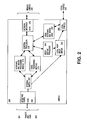
- Fig. 2 is an exemplary top level block diagram of a switch in accordance with the invention.
- Fig. 3 is another exemplary top level block diagram of a switch in accordance with the invention.
- Fig. 4 is an exemplary view of multiple target data at an exemplary local user in accordance with the invention.
- Fig. 5 is an exemplary view of the local port WEB browser interface in accordance with one aspect of the present invention.
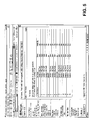
- Fig. 6 is an exemplary view of the Remote console main page browser interface in accordance with one aspect of the present invention.
- An exemplary embodiment of a KVM switch uses a HTML based local interface by placing an embedded web browser at the same control processor as the hardware that controls the KVM switch.
- the KVM switch may function and act as a server for remote KVM over IP type access to the targets from a user.
- the innovative technique combines three functions on in one switch.
- the first level of access is KVM over IP interface and has full access to all features.
- Full KVM over IP access includes the control interface as well as the redirection of the keyboard, mouse and video interface over a suitable network.
- the second level of access is to the administrative features of the switch itself, including for e.g., setup functions such as color depth, user data, IP network setup and other such functions.
- An exemplary switch which can be an analog KVM switch or a KVM over IP enabled KVM switch, has a control processor. If the switch is a KVM over IP enabled switch, the control processor will have sufficient computer power to compute network protocols such as TCP/IP and encode and encrypt the KVM data over the network channel using standard techniques.
- network protocols such as TCP/IP
- the system 100 comprises a plurality of remote devices or targets 115 that can be accessed by a plurality of users, including remote users 120 and local users 125.
- Remote users 120 connect through network 110 while local user 125 connects directly to switch 105.
- the remote devices or targets 115 can be any of a number of devices including servers, computers, power strips and other constructs and are connected to switch 105 through computer interface modules ("CIMs") 130.
- CCMs computer interface modules
- the connections can be made using any of a number of standard techniques including but not limited to wired, wireless, Ethernet, cable, and communications media.
- FIG. 2 there is shown a block diagram of switch 200 in accordance with one embodiment according to the principles of the present invention.
- the switch 200 is comprised of interface ports 205 that are connected to targets 201 via CIM 203.
- Interface ports 205 can be a RJ45 connector or any other suitable connector.
- the interface ports 205 are coupled to a keyboard and mouse processing module 210, a video processing module 215 and a local port video switch 220.
- an optional switch 207 is situated between interface port 205 and video processing module 215.
- Optional switch 207 may also provide an input to local port video switch 220.
- Optional switch 207 can be, for example, an analog KVM switch that couples a larger number of inputs into a set number of video and keyboard and mouse processing instances. For example, this arrangement allows for a greater number of targets and associated CIMs to be serviced by switch 200 and increases cost efficiencies.
- Modules 210 and 215 are further coupled to a control processor 230, which in turn is coupled to a network interface module 235.
- Control processor 230 can be, for example, an IBM ® Power PC 405 or a XGI ® Z7 chip.
- Network interface module 235 is further connected to remote users 240.
- Control processor 230 is further coupled to a video display processor 245 and local keyboard and mouse logic 250, which in turn are coupled to local port 260.
- Video display processor 245 can be any standard video graphics card or VGA chip. The interconnection can be implemented using any suitable hardware interface such as for example, PCI or PCI express interfaces.
- Video display processor 245 is an input to local port video switch 220, which in turn is coupled to local port 260.
- Local port 260 outputs data to local users 265.
- Switch 300 is comprised of interface ports 305 that are connected to targets 301 via CIMs 303. Interface ports 305 are coupled to a switch 307 that can be, for example, an analog KVM switch that couples a larger number of inputs into a set number of video and keyboard and mouse processing instances. Switch 307 is in turn coupled to a keyboard and mouse processing module 310, a video processing module 315, a video display processor 345 and a local port 360.
- switch 307 can be, for example, an analog KVM switch that couples a larger number of inputs into a set number of video and keyboard and mouse processing instances.
- Switch 307 is in turn coupled to a keyboard and mouse processing module 310, a video processing module 315, a video display processor 345 and a local port 360.
- Modules 310 and 315 are further coupled to a control processor 330, which in turn is coupled to a network interface module 335.
- Network interface module 335 is further connected to remote users 340.
- Control processor 330 is further coupled to a video display processor 345 and to a local keyboard and mouse logic 350, the later of which is coupled to local port 360.
- the interconnections can be implemented using any suitable hardware interface such as for example, PCI or PCI express interfaces, or any other standard interconnect techniques.
- video display processor 345 is an input to switch 307, which in turn is coupled to local port 360.
- Local port 360 outputs data to local users 365.
- a remote user 120 in a remote management system 100 requests keyboard, video and mouse data from target 115.
- the keyboard and mouse data are sent from the targets 115 and CIMs 130 via interface port 305 to modules 310 and 315.
- Modules 310 and 315 process the data for transmission to remote user 340 via control processor 330 and network interface 335.
- the video signals in the remote user mode the video signals are digitized prior to transmission.
- interface port 305 is connected to CIM 303 which is further connected to target server 301.
- Network interface 335 is connected to network 110 consisting of any number of routable objects that networks devices together.
- Network 110 is also connected to a remote user computer 120 or 340, which is running a web browser application (not shown).
- Remote user computer 340 directs the web browser to connect to switch 300.
- the web browser communicates with switch 300 over network 110, and its request is routed through network interface 335 to control processor 330, where it is handled by a web server application running on control processor 330.
- the web server application running on control processor 330 delivers a web page back to the web browser running on remote user's computer 340 asking for login credentials.
- the user at remote user computer 340 enters the login and password into the web page, and the information is sent back to control processor 330, which validates the credentials, and if they are acceptable, creates a web page that lists the target systems 301 that the user has the right to access. This web page is sent back to the web browser application running on remote user computer 340 and displayed to the user. The user selects a particular target system 301 to interact with. This request is sent back to the web server application running on control processor 330.
- the web browser application running on remote user computer 340 launches a client viewer application (not shown) on remote user computer 340.
- this viewer application must take over the interaction.
- the web server application running on control processor 330 passes the request to the main control program in 330.
- the main control program instructs switch 307 to connect the appropriate port 305 into the appropriate video processing module 315 and keyboard and mouse module 310.
- Video data coming from target server 301 is passed into CIM 303 and is reformatted into a proprietary video format (still analog).
- the video passes from target server 301 through CIM 303, and then through switch 307 and into video processing module 315.
- Video processing module 315 captures the analog video and converts it to a digital format. As high speed, high resolution video requires a very large amount of data to capture, video processing module 315 performs some compression on the incoming data before relaying it to control processor 330.
- control processor 330 further compression may be applied to the video (depending on how much bandwidth is available to send the image to the client).
- encryption is also applied to ensure the video cannot be viewed by a listening device on network 110.
- the data is then sent out over interface 335 into network 110.
- the data is received at remote user computer 340. This is streamed into the viewer application running on remote computer user 340 which decrypts and decompresses the video, and displays it on the screen.
- the viewer application running on remote computer user 340 captures this activity and sends it out over network 110 to switch 300.
- the mouse and keystroke signals are received by interface 335 and passed to control processor 330.
- Control processor 330 will perform any necessary reformatting and send the signals/events to keyboard and mouse module 310, which will convert it into hardware level signals to be sent out to CIM 303 via switch 307 and interface port 305.
- CIM 303 these signals are converted into the format needed to be sent to target server 301 keyboard and mouse interface, and passed into target server 100.
- a local user can access keyboard, video and mouse data having the same touch and feel as a remote user as described above.
- control processor 230 and video display processor 245 work together to run a web browser and generate a web page at the local port 260.
- a local user is sent the requested data via local port 260, which in turn receives keyboard and mouse data from local keyboard and mouse logic 250 and video from local port video switch 220.
- Local port video switch 220 receives video from video display processor 245 or optional switch 207.
- Video data received from video display processor 245 is in a digital format and video received via optional switch 207 is in an analog format
- Local user can also send keyboard and mouse data to target server 201 using the reverse path.
- the data is sent from local port 260 to local keyboard and mouse logic 250 which in turn feeds it to control processor 230.
- Control processor 230 sends the data to interface port 205 via module 210 and switch 207.
- Port 205 sends the data to CIM 203, which in turn sends it to target server 201.
- one aspect of the present invention is able to create a user interface that would be familiar to a user regardless of how a user accesses the system, e.g., over a network or via the local port.
- a user accessing the KVM switch through the local port will experience WEB page 600, which is similar in look and feel to the display 500 encountered by a user accessing the system over a network.
- WEB page 600 is similar in look and feel to the display 500 encountered by a user accessing the system over a network.
- the exemplary embodiment of the present invention overcomes these problems and allows users to seamlessly transition between remote access over an IP network and local access.
- a video display processor is interfaced with a control processor.
- a web browser software module executes on the control processor 230 or other hardware to provide a web based display at a local port 260.
- control processor 230 executes a web browser application so that the video display processor 245 can generate a web page that allows administrative, management and switching functions in response to a local user request.
- the web browser is the only graphical application running on the control processor 230 that uses the video output channel, It runs as a separate process in the operating system running on the control processor 230. By default it will always connect back to its own machine e.g., ( http://localhost ) to show the web page that resides in the memory of the control processor 230.
- the web browser is customized to that connection so that the URL itself is not shown.
- Both a web browser and a web server run on control processor 230.
- the web server provides the standard KVM over IP functions, and such implementation is well known in the art. Implementation of embedded web browsers are not well known in the art, and embedded web browsers are not widely used in this type of application. Prior implementations of KVM over IP have failed to take full advantage of embedded browsers because they typically are not fully functioning web browsers supporting the latest Web standards. Typically existing embedded browsers are used in mobile applications such as mobile phones and PDAs.
- the mobile web browser has a reduced function set, because the screen size of the mobile device does not allow a typical web usage pattern.
- a full size screen e.g., the local console
- a full size keyboard and a standard mouse are also available. Standard web based usage patterns of the user are therefore also available.
- reduced graphics tools and memory management techniques to take advantage of the available embedded browsers, such as "osbbrowser" from Apple computer.
- one aspect of the present invention is to recreate the environment that a modern PC provides, including a full-functional web browser on the KVM platform.
- a typical KVM switch however, has more limited processing power than a PC.
- the processing power of a typical KVM switch is approximately one-tenth that of a modern system, with one-sixteenth the amount of RAM and one-fortieth the storage capacity, and limited graphics capabilities.
- the limited resources in the KVM system in addition to providing the browser interface, also needs to perform all the functions of the typical digital KVM switch. Accordingly, the resources available to run the embedded web browser are much more limited than what is commonly available in today's designed WEB browsers.
- the limited embedded browsers typically used in smaller mobile devices generally have significant limitations such as limited support for more complex web behaviors like scripting and applets, and are often designed for smaller screen sizes.
- the existing embedded technology needs is adapted and modified to achieve acceptable performance within the limited resource environment of a KVM switch.
- the web server is customized to maximize the content of the web pages and to maximize the ability to display them in this environment, while still performing at minimum performance requirements as well as looking clean and modern on a standard (remote) web browser.
- the "osbbrowser" from .Apple Computers may be utilized.
- the osbbrowser is a browser originally adapted for Apple WebKit. Because the osbbrowser is designed for a mobile phone/PDA environment it suffered from the shortfalls identified above. Accordingly, in order to allow it to perform satisfactorily on control processor 230 and to provide sufficient graphics capabilities for the local port, modifications need to be made in both memory capabilities and graphics capabilities.
- the osbbrower does not contain sufficient graphics capabilities to provide sufficient graphics at the local port.
- the osbbrowser requires a Graphical Tool Kit, "GTK”, typically utilized in a more resource rich environment such as a desktop computer environment.
- GTK Graphical Tool Kit
- the smaller memory available to the osbbrower cannot adequately handle the memory footprint of a full blown GTK.
- unnecessary modules are removed from the GTK, leaving only the essential elements to run the local port graphics.
- the underlying Xwindows environment needs to have libraries, such as composite (3D graphics) of Xwindows, Nesting of X windows, etc. removed.
- Such unnecessary modules include for example, modules related to Dynamic GTK plugins, TIFF libraries, Shadow frame buffer libraries, etc.
- the unmodified osbbrowser may contain "memory leaks" i.e., where the browser never frees up memory once it is no longer being utilized, depending on the state of the embedded browser utilized, thereby consuming memory until the system crashes.
- the memory resources of the osbbrowser may be analyzed using known techniques, to determine which portions of memory contained necessary memory threads that can not be disturbed, and which memory resources are not being utilized and can be reutilized by the system.
- modifications to the embedded browser running on control processor 230 also include for example, modifications addressing display screen resolution and "xwindow" type applications.
- the osbbrowser should be able to process the commands to change and dynamically update the screen size and resolution to match the preferences set by the user.
- a reset/restart of the osbbrowser running on control processor 230 is sufficient for the osbbrowser to implement the previously selected screen resolution. Such a restart of the osbbrowser appears seamless to the user at the local port and does not interfere with operation of the local port.
- the embedded osbbrowser of control processor 230 incorporates xterm functionality.
- Xterm as is known in the art, is the standard terminal emulator for the XWindow System. Xterm allows a user to have many different invocations of xterm running at once on the same display, each of which provides independent input/output for the process running in it.
- the xterm libraries needed to be minimized by reducing and stripping out modules such as VT termcap configuration files that contain limited terminal emulator configurations used by XTerm as well as popup menu modules that provide a lot more functionality in a full blown Xterm interface.
- modifications to the local port control display of the KVM switch allows the user to experience similar web page views when accessing the remote access console of the same KVM switch.
- the local port and its associated display has access to "n" KVM channels or control interfaces and also the n+1 channel for accessing the graphical control interface of the switch as provided by the web browser.
- access to the KVM control interface is accomplished by switching the internal switch to the corresponding control processor port.
- a local port video switch 220 is used so that the video output to local port 260 can be switched via a separate device and not as a part of the main switching matrix 207 since a remote user does not need to see or access this channel.
- the control processor 230 executes a web browser to permit administrative and switching functions. If the local user selects a digital channel such as in the case when a user utilizes a digital local port where the input video is digitized and passed to the video display processor, as disclosed herein, local port video switch 220 routes the video from video display processor 245 to local port 260. If an analog channel is selected, switch 220 switches to route analog video from targets 201 via switch 207 to local port 260.
- a user access a remote channel, such as a channel on a different switch, the video must be streamed digitally over the network to the control processor and the video display processor to show the video, then the video must be created digitally by 245, and accordingly, 220 will not switch.
- the video output of video display processor 345 e.g., red, blue, green, horizontal and vertical synchronization signals, as well as a mouse/keyboard interface of the control CPU (usually PS/2 based but not limited to) is connected to the keyboard video mouse switching matrix 307 in the same way as any other KVM channel coming from the outside.
- This interface creates a n+1 channel of a n channel KVM switch. For example, both analog and digital video are routed through switch 307 to local port 360.
- the local port video output can be accessed by simply switching to the n+1 channel using the same switching usage as for the other channels (usually hotkeys).
- one special hotkey may be assigned to implement access to the local port. This can be done in the controller chip which controls the incoming signals from the local console keyboard and mouse. Access can be achieved using a keyboard combination to switch to the n+1 channel, special mouse movements such as for example, call gestures, or other input device features.
- a local user can receive a digital version of the target video using the very same KVM viewer technology from the remote side to view the local port.
- the digital local access port embodiment instead of providing target access via analog video, as is described in the HTML local access port embodiment above, access is created by digitizing the incoming target video and then displaying it using the standard graphics processor. This implementation will use one of the KVM over IP converters in the switch.
- the signals from the targets are routed to the digitizing circuitry 245, or 345 similar to how remote access is handled.
- the digitizing circuitry feeds it directly in the local video processor memory for immediate display on the screen. This may be done by some direct link between the digitizer and the video memory, through a memory access technology such as direct memory access (“DMA”), or even handled by the main processor as a software action.
- DMA direct memory access
- target keyboard and mouse data from targets 201 and 203 is routed to module 210 to packetize the keyboard and mouse data and the video received from target 201 via CIM 203 is routed to module 215 to digitize the video data.
- the processed data is then sent to control processor 230, which in turn sends it to video display processor 245 and local keyboard and mouse logic 250.
- Local user 265 receives the processed target data via local port 260.
- the local user can access ports on the instant switch or device as well as any other switch or device that has network connectivity.
- access is implemented using the Digital Local Access Port embodiment discussed above. Access also can be accomplished multiple ways, including a model similar to traditional remote access and a specialized hardware model that supports hardware decoding in addition to the encoding.
- the Digital Local Access Port embodiment can be used to display other "local consoles" of KVM switches so long as they are connected to the same network, similar to the way a traditional remote access works.
- This implementation allows users of KVM switches to access different local consoles from one single physical user console. To do this simply requires the system to redirect the web browser to the appropriate URL of the KVM switch that has the targets desired. To implement this feature, certain security functions (authentication against a different KVM switch) must be implemented to ensure seamless user experience.
- multiple simultaneous implementations of the multiple device local access embodiment are supported. This can be accomplished by utilizing redundant hardware support, or using the "traditional" remote access model and some client software running at the local port, that is similar to the remote client or highly optimized for the local environment.
- the local port behaves similar to a remote client. As described above with respect to the HTML local port, the local port is already behaving similar to a remote client "inside the box" although it is running on the device hardware. With enough processing power, the local client used for management can run an access client similar to the one on the remote. This could be a ported remote client or a completely separate application that is optimized for this embedded environment. Keyboard, mouse, and other connected devices can be handled utilizing the same methods currently performed in the remote client.
- Multiple port local access is the ability to see more than one port at a time on the local access port. To accomplish this requires the use of a Digital Local Access Port as discussed above.
- Multiple port local access is performed by digitizing data from different ports on the same device simultaneously. Once the video is in digital format, it can be manipulated prior to display. One exemplary manipulation is the modification of the size of the output to combine it with other output streams so that a user can monitor multiple systems at the same time on a single local monitor as illustrated in Fig. 4 . Alternately, additional monitors can be supported at the local port and combined with this feature to provide larger views of multiple systems or views of more systems.
- the main processor updates the previous frame for that stream while keeping all the other frames the same. In such a manner, there will be a continuous updating of all video streams, but images will not be displayed in real time.
- a scanning functionality may also be built into this implementation to allow for automatic switching of the multiple display windows to different input streams in some logical order. The user can set up a list of systems to monitor, and the system will show either a live feed or a snapshot of some of those systems using the methods above. Periodically, the system will automatically cycle to show different input streams. This output would be similar to a security camera system.
- Keyboard, mouse, and other types of connected devices such as USB devices could be switched to the appropriate input streams as needed, or they could be emulated by the system as is already commonly done.
- Different, well-known, approaches can be taken to control how keyboard, mouse, and other devices are assigned to target systems.
Landscapes
- Engineering & Computer Science (AREA)
- Theoretical Computer Science (AREA)
- General Engineering & Computer Science (AREA)
- Human Computer Interaction (AREA)
- Computer Networks & Wireless Communication (AREA)
- General Physics & Mathematics (AREA)
- Physics & Mathematics (AREA)
- Signal Processing (AREA)
- Digital Computer Display Output (AREA)
- User Interface Of Digital Computer (AREA)
- Information Transfer Between Computers (AREA)
- Small-Scale Networks (AREA)
- Data Exchanges In Wide-Area Networks (AREA)
Applications Claiming Priority (2)
| Application Number | Priority Date | Filing Date | Title |
|---|---|---|---|
| US91734907P | 2007-05-11 | 2007-05-11 | |
| EP08755222A EP2153342A4 (fr) | 2007-05-11 | 2008-05-09 | Interface de navigateur de port local |
Related Parent Applications (1)
| Application Number | Title | Priority Date | Filing Date |
|---|---|---|---|
| EP08755222.0 Division | 2008-05-09 |
Publications (2)
| Publication Number | Publication Date |
|---|---|
| EP2325724A2 true EP2325724A2 (fr) | 2011-05-25 |
| EP2325724A3 EP2325724A3 (fr) | 2011-11-09 |
Family
ID=39970564
Family Applications (2)
| Application Number | Title | Priority Date | Filing Date |
|---|---|---|---|
| EP08755222A Ceased EP2153342A4 (fr) | 2007-05-11 | 2008-05-09 | Interface de navigateur de port local |
| EP11001683A Withdrawn EP2325724A3 (fr) | 2007-05-11 | 2008-05-09 | Interface de navigateur de port local |
Family Applications Before (1)
| Application Number | Title | Priority Date | Filing Date |
|---|---|---|---|
| EP08755222A Ceased EP2153342A4 (fr) | 2007-05-11 | 2008-05-09 | Interface de navigateur de port local |
Country Status (3)
| Country | Link |
|---|---|
| US (2) | US8136042B2 (fr) |
| EP (2) | EP2153342A4 (fr) |
| WO (1) | WO2008141159A1 (fr) |
Families Citing this family (25)
| Publication number | Priority date | Publication date | Assignee | Title |
|---|---|---|---|---|
| US7774518B2 (en) * | 2007-09-19 | 2010-08-10 | Aten International Co., Ltd. | Method for switching of KVM switch ports and related device |
| US20090164675A1 (en) * | 2007-12-24 | 2009-06-25 | Aten International Co., Ltd. | Kvm switch with a remote control incorporating a memory card adapter |
| US8519960B2 (en) * | 2009-09-17 | 2013-08-27 | Aten International Co., Ltd. | Method and apparatus for switching of KVM switch ports using gestures on a touch panel |
| TWI480731B (zh) * | 2010-06-30 | 2015-04-11 | Insyde Software Corp | 轉接裝置及經由該轉接裝置之除錯方法 |
| CN103947221A (zh) * | 2011-11-24 | 2014-07-23 | Lg电子株式会社 | 用户界面显示方法以及使用该方法的装置 |
| AU2013213683B2 (en) * | 2012-03-10 | 2013-11-07 | Evado Holdings Pty Ltd | A method and system of application development for multiple device client platforms |
| CN102693198B (zh) * | 2012-05-12 | 2015-03-25 | 北京忆恒创源科技有限公司 | Dma传输方法及系统 |
| WO2014005053A1 (fr) * | 2012-06-29 | 2014-01-03 | Avocent Huntsville Corp. | Système et procédé destinés à un client kvm unique prenant en charge plusieurs technologies de compression vidéo différentes |
| CN104685488B (zh) * | 2012-10-04 | 2018-08-31 | 阿沃森特亨茨维尔有限责任公司 | 用于创建供远程计算机使用的虚拟磁盘镜像的系统和方法 |
| EP2912563B1 (fr) * | 2012-10-23 | 2019-12-11 | Vertiv IT Systems, Inc. | Système et procédé d'accès à des fichiers image de disque à l'aide d'un client html5 kvm/vmedia s'exécutant dans un navigateur internet |
| CN103019368B (zh) * | 2012-12-07 | 2016-06-29 | 浪潮电子信息产业股份有限公司 | 一种本地io节点与kvm模块智能切换的方法 |
| CN105051713B (zh) * | 2013-03-15 | 2017-08-04 | 安迈科技股份有限公司 | 基于网络的键盘、视频和鼠标(kvm)重定向的方法及系统 |
| WO2014143034A1 (fr) * | 2013-03-15 | 2014-09-18 | American Megatrends, Inc. | Système et procédé de redirection de clavier-écran-souris (kvm) basée sur le web et leur application |
| JP6203370B2 (ja) | 2013-03-15 | 2017-09-27 | アメリカン メガトレンズ インコーポレイテッド | ウェブベースの仮想媒体リダイレクトのシステムおよび方法 |
| US8943373B1 (en) | 2013-09-25 | 2015-01-27 | Lenovo Enterprise Solutions (Singapore) Pte. Ltd. | Keyboard, video and mouse switch identifying and displaying nodes experiencing a problem |
| US10250447B2 (en) * | 2014-03-06 | 2019-04-02 | Dell Products, Lp | System and method for providing a U-space aligned KVM/Ethernet management switch/serial aggregator controller |
| CN107018368A (zh) * | 2017-04-11 | 2017-08-04 | 惠科股份有限公司 | 切换器远程控制方法及系统 |
| US10572220B2 (en) * | 2017-04-12 | 2020-02-25 | American Megatrends International, Llc | Method for controlling controller and host computer with voice |
| CN110336802A (zh) * | 2019-06-20 | 2019-10-15 | 苏州浪潮智能科技有限公司 | 一种服务器的远程操作方法及装置 |
| CN110401824B (zh) * | 2019-07-24 | 2020-12-15 | 北京小鸟科技股份有限公司 | 多路复用的kvm光传输系统、级联式光端机、光接口卡 |
| CN111190492B (zh) * | 2019-12-25 | 2023-07-18 | 曙光信息产业(北京)有限公司 | 开启kvm的方法及装置 |
| TWI751529B (zh) * | 2020-04-14 | 2022-01-01 | 聰泰科技開發股份有限公司 | 遠端控制方法 |
| TWI754984B (zh) * | 2020-07-03 | 2022-02-11 | 宏正自動科技股份有限公司 | 切換器及其操作方法 |
| US11822734B1 (en) | 2022-04-28 | 2023-11-21 | Dell Products L.P. | Keyboard video mouse automated setup with plural information handling systems |
| CN115225621B (zh) * | 2022-07-20 | 2024-09-10 | 思波茨盖(北京)体育科技有限公司 | 一种体育场馆音视频管理系统、方法和设备 |
Citations (2)
| Publication number | Priority date | Publication date | Assignee | Title |
|---|---|---|---|---|
| US917349A (en) | 1908-04-11 | 1909-04-06 | Andrew Opsal | Swivel. |
| US5721842A (en) | 1995-08-25 | 1998-02-24 | Apex Pc Solutions, Inc. | Interconnection system for viewing and controlling remotely connected computers with on-screen video overlay for controlling of the interconnection switch |
Family Cites Families (28)
| Publication number | Priority date | Publication date | Assignee | Title |
|---|---|---|---|---|
| US5732212A (en) | 1992-10-23 | 1998-03-24 | Fox Network Systems, Inc. | System and method for remote monitoring and operation of personal computers |
| US20010044843A1 (en) * | 1997-10-28 | 2001-11-22 | Philip Bates | Multi-user computer system |
| US6378009B1 (en) | 1998-08-25 | 2002-04-23 | Avocent Corporation | KVM (keyboard, video, and mouse) switch having a network interface circuit coupled to an external network and communicating in accordance with a standard network protocol |
| CA2366464A1 (fr) * | 1999-04-09 | 2000-10-19 | Henry B. Steen, Iii | Acces a distance et systeme de controle |
| US6172640B1 (en) | 1999-06-18 | 2001-01-09 | Jennifer Durst | Pet locator |
| EP1329088A2 (fr) * | 2000-10-27 | 2003-07-23 | Koninklijke Philips Electronics N.V. | Commande de commutateur telephonique par l'utilisateur par l'intermediaire d'une application client http |
| US20040015980A1 (en) * | 2002-07-17 | 2004-01-22 | Sarah Rowen | Systems and methods for monitoring and controlling multiple computers |
| US7818480B2 (en) * | 2002-08-29 | 2010-10-19 | Raritan Americas, Inc. | Wireless management of remote devices |
| US7684483B2 (en) * | 2002-08-29 | 2010-03-23 | Raritan Americas, Inc. | Method and apparatus for digitizing and compressing remote video signals |
| US8558795B2 (en) * | 2004-03-12 | 2013-10-15 | Riip, Inc. | Switchless KVM network with wireless technology |
| US20040141595A1 (en) * | 2003-01-16 | 2004-07-22 | Sbc Properties, L.P. | Voice extensible markup language-based web interface with intelligent network services |
| US20050275641A1 (en) * | 2003-04-07 | 2005-12-15 | Matthias Franz | Computer monitor |
| US7454495B2 (en) * | 2003-09-18 | 2008-11-18 | Raritan America, Inc. | Intelligent modular server management system for selectively operating and locating a plurality of computers |
| US7853740B2 (en) * | 2003-09-18 | 2010-12-14 | Riip, Inc. | Keyboard video mouse (KVM) switch for transmission of high quality audio with 64-bit data packets wherein transmissions of data packets are wherein a defined time limit |
| US7496846B2 (en) * | 2004-02-09 | 2009-02-24 | Portalis, Lc | Computer presentation and command integration apparatus |
| US20050198245A1 (en) * | 2004-03-06 | 2005-09-08 | John Burgess | Intelligent modular remote server management system |
| US7853663B2 (en) * | 2004-03-12 | 2010-12-14 | Riip, Inc. | Wireless management system for control of remote devices |
| US20060202964A1 (en) * | 2004-05-03 | 2006-09-14 | Yee Liaw | Intelligent modular server management system with enhanced graphical user interface |
| US7478152B2 (en) * | 2004-06-29 | 2009-01-13 | Avocent Fremont Corp. | System and method for consolidating, securing and automating out-of-band access to nodes in a data network |
| US7613927B2 (en) * | 2004-11-12 | 2009-11-03 | Raritan Americas, Inc. | System for providing secure access to KVM switch and other server management systems |
| US7240111B2 (en) * | 2005-04-12 | 2007-07-03 | Belkin Corporation | Apparatus and system for managing multiple computers |
| EP1768383B1 (fr) * | 2005-07-15 | 2016-02-24 | Barco N.V. | Dispositifs d'affichage de réseau et procédé d'opération du même |
| US8112513B2 (en) * | 2005-11-30 | 2012-02-07 | Microsoft Corporation | Multi-user display proxy server |
| US7478182B2 (en) * | 2006-01-31 | 2009-01-13 | Schweig Marc E | Keyboard, mouse, and video (KVM) session capture system that stores and can playback portions of live KVM session via forensic capture module |
| US7428606B2 (en) * | 2006-05-05 | 2008-09-23 | Dell Prodcuts L.P. | Method, system and apparatus to allow users to remotely mount USB devices and access KVM through a server interface pod (SIP) |
| US7970859B2 (en) * | 2006-11-09 | 2011-06-28 | Raritan Americas, Inc. | Architecture and method for remote platform control management |
| US20080155124A1 (en) * | 2006-12-20 | 2008-06-26 | Matthew Charles Compton | Apparatus, system, and method for remote multi-user kvm switching |
| US7587534B2 (en) * | 2007-03-05 | 2009-09-08 | Aten International Co., Ltd. | KVM switch system capable of wirelessly transmitting keyboard-mouse data and receiving video/audio driving command |
-
2008
- 2008-05-09 EP EP08755222A patent/EP2153342A4/fr not_active Ceased
- 2008-05-09 WO PCT/US2008/063219 patent/WO2008141159A1/fr not_active Ceased
- 2008-05-09 US US12/118,046 patent/US8136042B2/en active Active
- 2008-05-09 EP EP11001683A patent/EP2325724A3/fr not_active Withdrawn
-
2012
- 2012-03-09 US US13/416,106 patent/US9026919B2/en active Active
Patent Citations (2)
| Publication number | Priority date | Publication date | Assignee | Title |
|---|---|---|---|---|
| US917349A (en) | 1908-04-11 | 1909-04-06 | Andrew Opsal | Swivel. |
| US5721842A (en) | 1995-08-25 | 1998-02-24 | Apex Pc Solutions, Inc. | Interconnection system for viewing and controlling remotely connected computers with on-screen video overlay for controlling of the interconnection switch |
Also Published As
| Publication number | Publication date |
|---|---|
| US20120173779A1 (en) | 2012-07-05 |
| EP2325724A3 (fr) | 2011-11-09 |
| WO2008141159A1 (fr) | 2008-11-20 |
| EP2153342A4 (fr) | 2010-08-18 |
| EP2153342A1 (fr) | 2010-02-17 |
| US8136042B2 (en) | 2012-03-13 |
| US9026919B2 (en) | 2015-05-05 |
| US20080282003A1 (en) | 2008-11-13 |
Similar Documents
| Publication | Publication Date | Title |
|---|---|---|
| US9026919B2 (en) | Local port browser interface | |
| JP5451397B2 (ja) | リモートインターラクションに応答してビデオコンテンツを配信するためのアーキテクチャー | |
| CA2703704C (fr) | Appareil et systeme pour gerer de multiples ordinateurs | |
| US9524140B2 (en) | Apparatus and system for managing multiple computers | |
| CN102833338B (zh) | 基于Web的远程桌面展示方法 | |
| US8120581B2 (en) | Integrated control system with keyboard video mouse (KVM) | |
| US20130159565A1 (en) | Method and apparatus for data transfer of touch screen events between devices | |
| IL152604A (en) | Network based kvm switching system | |
| CN104618793A (zh) | 一种信息处理方法及电子设备 | |
| CN102664924A (zh) | 远程协助过程中的信息处理方法及装置 | |
| US20090063732A1 (en) | KVM switch and method for controlling the same | |
| Jadhav et al. | Vnc architecture based remote desktop access through android mobile phones | |
| CN107368219A (zh) | 触摸响应方法、芯片及智能设备 | |
| US8736622B2 (en) | System and method of leveraging GPU resources to enhance performance of an interact-able content browsing service | |
| US20110060849A1 (en) | Monitoring method and keyboard video mouse switch | |
| CN103186250A (zh) | 远程管理系统及远程管理方法 | |
| CN112328101A (zh) | 一种基于osd的kvm多系统联合控制的方法和装置 | |
| CN101272295B (zh) | 支持多投影源的虚拟网络投影系统及方法 | |
| CN102541268A (zh) | 远端管理系统及其方法 | |
| CA2659480A1 (fr) | Methode et systeme de fourniture a distance de contenu video a un ecran electronique | |
| CN103186248A (zh) | 远程管理系统及其远程管理方法 | |
| CN102122207A (zh) | 远程管理系统 | |
| CN1282103C (zh) | 模拟通信设备驱动装置的输出方法及输入方法 | |
| CN1169067C (zh) | 支持用户终端设备的服务器结构 | |
| CN105278901A (zh) | 远程管理方法 |
Legal Events
| Date | Code | Title | Description |
|---|---|---|---|
| PUAI | Public reference made under article 153(3) epc to a published international application that has entered the european phase |
Free format text: ORIGINAL CODE: 0009012 |
|
| AC | Divisional application: reference to earlier application |
Ref document number: 2153342 Country of ref document: EP Kind code of ref document: P |
|
| AK | Designated contracting states |
Kind code of ref document: A2 Designated state(s): AT BE BG CH CY CZ DE DK EE ES FI FR GB GR HR HU IE IS IT LI LT LU LV MC MT NL NO PL PT RO SE SI SK TR |
|
| PUAL | Search report despatched |
Free format text: ORIGINAL CODE: 0009013 |
|
| AK | Designated contracting states |
Kind code of ref document: A3 Designated state(s): AT BE BG CH CY CZ DE DK EE ES FI FR GB GR HR HU IE IS IT LI LT LU LV MC MT NL NO PL PT RO SE SI SK TR |
|
| RIC1 | Information provided on ipc code assigned before grant |
Ipc: G06F 3/14 20060101ALI20111006BHEP Ipc: G09G 5/14 20060101AFI20111006BHEP Ipc: H04L 12/24 20060101ALN20111006BHEP Ipc: G06F 3/038 20060101ALI20111006BHEP Ipc: G06F 3/023 20060101ALI20111006BHEP Ipc: H04N 7/18 20060101ALN20111006BHEP Ipc: H04L 29/08 20060101ALN20111006BHEP |
|
| STAA | Information on the status of an ep patent application or granted ep patent |
Free format text: STATUS: THE APPLICATION HAS BEEN WITHDRAWN |
|
| 18W | Application withdrawn |
Effective date: 20120516 |