EP2328061A2 - Eingabegerät - Google Patents
Eingabegerät Download PDFInfo
- Publication number
- EP2328061A2 EP2328061A2 EP10012898A EP10012898A EP2328061A2 EP 2328061 A2 EP2328061 A2 EP 2328061A2 EP 10012898 A EP10012898 A EP 10012898A EP 10012898 A EP10012898 A EP 10012898A EP 2328061 A2 EP2328061 A2 EP 2328061A2
- Authority
- EP
- European Patent Office
- Prior art keywords
- pointer
- manipulation
- user
- input apparatus
- hand
- Prior art date
- Legal status (The legal status is an assumption and is not a legal conclusion. Google has not performed a legal analysis and makes no representation as to the accuracy of the status listed.)
- Withdrawn
Links
Images





Classifications
-
- G—PHYSICS
- G06—COMPUTING OR CALCULATING; COUNTING
- G06F—ELECTRIC DIGITAL DATA PROCESSING
- G06F3/00—Input arrangements for transferring data to be processed into a form capable of being handled by the computer; Output arrangements for transferring data from processing unit to output unit, e.g. interface arrangements
- G06F3/01—Input arrangements or combined input and output arrangements for interaction between user and computer
- G06F3/017—Gesture based interaction, e.g. based on a set of recognized hand gestures
-
- G—PHYSICS
- G06—COMPUTING OR CALCULATING; COUNTING
- G06F—ELECTRIC DIGITAL DATA PROCESSING
- G06F3/00—Input arrangements for transferring data to be processed into a form capable of being handled by the computer; Output arrangements for transferring data from processing unit to output unit, e.g. interface arrangements
- G06F3/01—Input arrangements or combined input and output arrangements for interaction between user and computer
- G06F3/011—Arrangements for interaction with the human body, e.g. for user immersion in virtual reality
Definitions
- the present invention relates to an input apparatus.
- GUI graphical user interface
- Patent Document 1 a portable terminal which exhibits manipulation guidance information to support a user's manipulation is disclosed.
- the user can execute a desired function by moving fingers vertically or horizontally in accordance with the guidance.
- Patent Document 2 an interface apparatus which conducts gesture image display to visually represent a recognition object of a gesture which becomes a user's manipulation is disclosed. The user can operate the apparatus while confirming the gesture image.
- Patent Document 3 a vehicle mounted device which displays an icon to display a gesture which becomes a user's manipulation and displays a manipulation which can be conducted is disclosed. The user can easily know a gesture to be made.
- Patent Document 4 a vehicle manipulation input apparatus which displays selection guide information to indicate a hand state on a steering wheel and a manipulation object device is disclosed. The user can select a desired manipulation device by moving a hand while referring to the guide.
- Patent Document 1 JP-A-2007-213245
- Patent Document 2 JP-A-2008-52590
- Patent Document 3 JP-A-2001-216069
- Patent Document 4 JP-A-2005-250785
- the present invention has been made in view of these circumstances, and an object thereof is to provide an input apparatus capable of being used conveniently which causes the user to know what a motion made by the user at the time of a manipulation is recognized as and which prevents an unintended manipulation from being executed.
- an input apparatus includes an input unit to which a motion of an operator is input as an image signal, an action detection unit for detecting a hand motion from the image signal which is input to the input unit, a display unit for displaying a graphical user interface, and a control unit for changing the graphical user interface displayed on the display unit in accordance with the hand motion detected by the action detection unit.
- the control unit moves a pointer so as to be in synchronism with the hand motion detected by the action detection unit and changes the graphical user interface so as to indicate an action quantity which corresponds to a quantity of the pointer movement.
- the present invention makes it possible for the user to know what a gesture which is being made by the user is recognized as and make a gesture to bring about only an intended manipulation.
- An input apparatus in the present embodiment is an apparatus capable of detecting a motion of a user's hand from a moving picture obtained by picking up an image of the user and changing a display of a GUI according to the motion.
- Fig. 1 shows a general view of an operation environment at the time when a user uses the input apparatus 100 with a display unit 101, an image pickup unit 102, a user 103 and a manipulation guide 104.
- the display unit 101 is a display device of the input apparatus 100.
- the display unit 101 is formed of a display device such as, for example, a liquid crystal display or a plasma display.
- the display unit 101 includes a display panel, a panel control circuit, and a panel control driver.
- the display unit 101 displays video data, which is supplied from a video signal processing unit 202 described later, on the display panel.
- the image pickup unit 102 is a device for inputting a moving picture to the input apparatus 100, and it is, for example, a camera.
- the user 103 is a user who conducts a manipulation for the input apparatus 100.
- the pointer 104 is a GUI displayed on the display unit 101, and it is graphics for indicating a manipulation position and a manipulation state of the input apparatus 100 to the user 103.
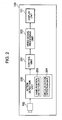
- the input apparatus includes, for example, the display unit 101, the image pickup unit 102, an action detection (motion detection) unit 200, a control unit 201, a video signal processing unit 202, a hand position detection unit 203, and a circular action detection unit 204.
- the action detection (motion detection) unit 200 receives a moving picture signal from the image pickup unit 102, detects a person's hand position in the hand position detection unit 203, and detects a person's hand revolving motion in the circular action detection unit 204. In addition, according to the detected action, the action detection (motion detection) unit 200 outputs a predetermined command corresponding to the action.
- the control unit 201 includes, for example, a microprocessor, and controls operation of the video signal processing unit 202 in accordance with the command received from the action detection (motion detection) unit 200.
- the video signal processing unit 202 includes a processing device such as, for example, an ASIC, FPGA or MPU. The video signal processing unit 202 converts video data of the GUI to a form which can be processed by the display unit 101 and outputs resultant data under control of the control unit 201.
- Fig. 3 shows a display change of the pointer 104 caused when the user 103 manipulates the input apparatus 100 according to the present invention.
- An icon 300 is graphics which indicate a state of a manipulation process obtained until a specified manipulation is definitely fixed when the user 103 manipulates the input apparatus 100.
- a picture of "manipulation start state" in Fig. 3 exhibits a state at the time when the user 103 starts manipulation of the input apparatus 100.
- the input apparatus 100 in the present embodiment is configured to recognize a hand revolving action of the user 103 and rotate the display of the pointer 104 in correspondence with the hand revolving action. Furthermore, the size of the icon 300 changes according to the rotation of the display of the pointer 104.
- the state of the manipulation process obtained until a specific manipulation is definitely fixed is indicated to the user 103 by the change of the size of the icon 300.
- the picture of the "manipulation start state" in Fig. 3 is exhibited. If the user 103 conducts a manipulation of revolving a hand clockwise in front of the input apparatus 100, then the icon 300 becomes greater while the pointer 104 is rotating as indicated by a change from the "manipulation start state" to a "definitely fixed manipulation state A" in FIG 3 .
- the input apparatus 100 is an apparatus capable of detecting a hand action of the user 103 from a moving picture signal obtained by picking an image of the user 103 and changing the GUI display according to the action.
- a flow of processing conducted until the input apparatus 100 detects the hand motion of the user 103 and displays the GUI according to the action will be described with reference to Fig. 2 .
- the control unit 201 gives a command for displaying a predetermined video to the video signal processing unit 202 in response to the start of the operation.
- the video signal processing unit 202 outputs a video signal suitable for the input of the display unit 101 in response to the command. As a result, a video is displayed on the display unit 101.
- control unit 201 orders the image pickup unit 102 to start image pickup of a moving picture in response to the start of the operation.
- the image pickup unit 102 starts image pickup of the moving picture and outputs data of the moving picture picked up to the action detection (motion detection) unit 200.
- the action detection (motion detection) unit 200 detects the hand position of the user in the hand position detection unit 203 and detects the user's hand revolving motion in the circular action detection unit 204 from the received data of the moving picture by using a method such as a feature point extraction.
- the action detection (motion detection) unit 200 outputs a command which depends upon a detected result of the hand position and the hand revolving motion to the control unit 201.
- the control unit 201 orders the video signal processing unit 202 to display the GUI or change the display in response to the command.
- the video signal processing unit 202 changes an output video signal in response to the order. As a result, the GUI display on the display unit 101 is changed.
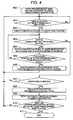
- the user 103 starts operation of the input apparatus 100 in accordance with a predetermined procedure, and the action detection unit 200 in the input apparatus 100 starts recognition of a person's hand motion (gesture) in accordance with the procedure described earlier (step 400).
- the input apparatus 100 recognizes a position of the hand of the user 103, and displays the pointer 104 on the display unit 101 according to the hand position (step 402). If the user 103 drops the hand at this time, the input apparatus 100 puts out the display of the pointer 104 (No at the step 401).
- the input apparatus 100 recognizes the hand revolving action, and rotates the pointer 104 and changes the size of the icon 300 according to the rotation of the pointer 104 as shown in Fig. 3 (step 404). In addition, the user 103 continues the hand revolving action. As a result, the pointer 104 rotates up to a predetermined angle (Yes at step 405). If the state indicated by the "definitely fixed manipulation state A" or the “definitely fixed manipulation state B" shown in Fig. 3 is reached, then the input apparatus 100 causes manipulation depending upon the position and rotation direction of the pointer 104 to be executed (step 406).
- the steps 403 to 405 are repeated. At this time, the pointer 104 rotates so as to be in synchronism with the hand revolving motion of the user 103. In addition, the size of the icon 300 changes according to the rotation of the pointer 104. As a result, the user 103 can intuitively grasp what state the manipulation is in at that moment, how far a manipulation should be continued to execute the manipulation, and to what extent the hand should be moved.
- the input apparatus 100 recognizes a hand motion of the user 103 in a state in which the hand is not revolved. For example, if the user's hand is moving in a direction having no relation to the revolving direction such as the vertical direction or the horizontal direction (Yes at the step 407), then the input apparatus 100 restores the display of the pointer 104 and the icon 300 to the "manipulation start state" shown in Fig. 3 (step 408). In addition, the input apparatus 100 moves the positions of the pointer 104 and the icon 300 in a display region of the display unit 101 according to the hand position of the user 103 (step 409).
- step 407 If the hand of the user 103 is not moving at the step 407, then the processing returns to the step 401 and subsequent processing is continued (No at the step 407). If the user orders recognition stopping of the hand motion by using a predetermined manipulation subsequent to the step 409 (step 410), then the input apparatus 100 finishes the recognition of the hand motion.
- the input apparatus 100 recognizes the hand moving action of the user 103, changes the display of the pointer 104 and the icon 300 according to the action, and exhibits a manipulation state to the user 103.
- the user 103 manipulates a map displayed on the display unit 101
- the user 103 can move the pointer 104 and the icon 300 and change the position of the displayed map by moving the hand.
- the user 103 can conduct a manipulation by making a hand revolving motion.
- the user 103 can expand the map by revolving the hand clockwise and contract the map by revolving the hand counterclockwise.
- the user can confirm what state the manipulation is in at that moment, to what extent the hand should be moved, and how far a manipulation should be continued to execute a desired manipulation, in correspondence with each of user's motions. Therefore, the user can modify a motion to prevent an unintended manipulation from being conducted, and conduct GUI manipulations smoothly.
- a second embodiment will now be described.
- the input apparatus 100 it is made possible in the input apparatus 100 to manipulate a GUI configured to select an item out of a plurality of selection items unlike the input apparatus 100 in the first embodiment.
- a manipulation method and a GUI display method in this case will be described.
- the present embodiment is the same as the first embodiment in the configuration and manipulation method of the input apparatus 100, and is different from the first embodiment in the GUI configuration and the display method of the pointer 104 in the GUI.
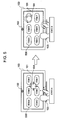
- Fig. 5 shows correspondence between the hand motion of the user 103 and the motion of the GUI displayed on the display unit 101 at the time when the user 103 manipulates the input apparatus 100 in the present embodiment.
- Selection items 500 are the GUI displayed on the display unit 101.
- An arbitrary item is adapted to be selected out of a plurality of selection items arranged in the GUI.
- "State A" in Fig. 5 shows a state in which the position of the pointer 104 in the GUI changes according to movement of the hand of the user 103 and the user 103 can freely indicate an arbitrary position in the GUI by using the pointer 104.
- the user 103 conducts the hand revolving action in a position where the user 103 has moved the pointer 104 beforehand.
- “State B” in Fig. 5 shows a state in which the pointer 104 rotates in synchronism with the hand revolving motion.
- the display method of the pointer 104 in the input apparatus according to the present embodiment will now be described with reference to Figs. 6 to 8 .
- the input apparatus according to the present embodiment can recognize the hand motion of the user 103 by using a method similar to that in the first embodiment.
- Fig. 6 shows an example of a motion of an exterior view of a pointer 104 and an icon 600 at the time when the pointer 104 is displayed by using a method similar to that in the first embodiment.
- the icon 600 takes the shape of an arrow to allow the user 103 to indicate an arbitrary place in the GUI. If the user 103 stretches out a hand toward the input apparatus 100, then the pointer 104 and the icon 600 are displayed as shown in a picture of a "manipulation start state" in Fig. 6 . Furthermore, also when the user 103 moves the pointer 104 as indicated by the "state A" in Fig. 5 , the pointer 104 and the icon 600 assume the "manipulation start state" in Fig. 6 .
- a change from the "manipulation start state" to the "definitely fixed manipulation state A" in Fig. 6 shows how the size of the icon 600 becomes smaller according to the rotation of the pointer 104 when the user revolves a hand clockwise. For example, when the user 103 revolves the hand clockwise and the "definitely fixed manipulation state A" in Fig. 6 is attained, a manipulation of selecting an item which is in the same position as that of the pointer 104 and the icon 600 from among the selection items 500 is executed.
- a change from the "manipulation start state" to the "definitely fixed manipulation state B" in Fig. 6 shows how the size of the icon 600 becomes greater according to the rotation of the pointer 104 when the user revolves the hand counterclockwise.
- a manipulation of so-called “returning” or “canceling” such as returning to a display state of the last time which is not illustrated is executed on the GUI.
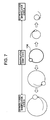
- Fig. 7 shows an example of a motion of an exterior view of a pointer 104 which is different from that in Fig. 6 at the time when the pointer 104 is displayed by using a method similar to that in the first embodiment. If the user 103 stretches out a hand toward the input apparatus 100, then the pointer 104 is displayed as shown in a picture of a "manipulation start state" in Fig. 7 . Furthermore, also when the user 103 moves the pointer 104 as indicated by the "state A" in Fig. 5 , the pointer 104 assumes the "manipulation start state" in Fig. 7 .
- the pointer 104 rotates in the same way as the first embodiment.
- the size of the pointer 104 changes according to the rotation.
- a change from the "manipulation start state" to the "definitely fixed manipulation state A" in Fig. 7 shows how the size of the icon 600 becomes smaller according to the rotation of the pointer 104 when the user revolves a hand clockwise. For example, when the user 103 revolves the hand clockwise and the "definitely fixed manipulation state A" in Fig. 6 is attained, a manipulation of selecting an item which is in the same position as that of the pointer 104 and the icon 600 from among the selection items 500 is executed.
- a change from the "manipulation start state" to the "definitely fixed manipulation state B" in Fig. 7 shows how the size of the icon 600 becomes greater according to the rotation of the pointer 104 when the user revolves the hand counterclockwise.
- a manipulation of so-called “returning” or “canceling” such as returning to a display state of the last time which is not illustrated is executed on the GUI.
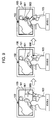
- Fig. 8 shows an example of a motion of an exterior view of a pointer 104 and a line 800 which is different from that in Fig. 6 at the time when the pointer 104 is displayed by using a method similar to that in the first embodiment.
- the line 800 is graphics drawn on the GUI in synchronism with the motion of the pointer 104 in order for the user 103 to indicate an arbitrary place in the GUI. If the user 103 stretches out a hand toward the input apparatus 100, then the pointer 104 is displayed as shown in a picture of a "manipulation start state" in Fig. 8 . Furthermore, also when the user 103 moves the pointer 104 as indicated by the "state A" in Fig. 5 , the pointer 104 assumes the "manipulation start state" in Fig. 8 .
- a change from the "manipulation start state" to the "definitely fixed manipulation state” in Fig. 8 shows how the line 800 is drawn according to the rotation of the pointer 104 when the user revolves a hand clockwise. For example, when the user 103 revolves the hand clockwise and the "definitely fixed manipulation state" in Fig. 8 is attained, a manipulation of selecting an item which is in the same position as that of the pointer 104 and a circle drawn with the line 800 is executed.
- the input apparatus 100 recognizes the hand moving action of the user 103, changes the display of the pointer 104 and the icon or line according to the action, and exhibits a manipulation state to the user 103.
- the user can confirm what state the manipulation is in at that moment, to what extent the hand should be moved, and how far a manipulation should be continued to execute a desired manipulation, in correspondence with each of user's motions. Therefore, the user can modify a motion to prevent an unintended manipulation from being conducted, and conduct GUI manipulations smoothly.
- a range of a GUI displayed on the display unit 101 in which a specific manipulation can be conducted is predetermined unlike the input apparatus 100 in the first embodiment and the input apparatus 100 in the second embodiment. And it is made possible in the input apparatus 100 to manipulate a GUI having a configuration in which the manipulation method or the pointer display method is changed over according to whether the location is inside the range in which the specific manipulation can be conducted.
- a manipulation method and a GUI display method in this case will be described.
- the present embodiment is the same as the first embodiment in the configuration of the input apparatus 100, and is different from the first embodiment in the GUI configuration and the display method of the pointer 104 in the GUI.
- FIG. 9 shows correspondence between the hand motion of the user 103 and the motion of the GUI displayed on the display unit 101 at the time when the user 103 manipulates the input apparatus 100 in the present embodiment.
- a pointer 900 is a pointer capable of indicating a position in the GUI according to a hand motion of the user 103 by using a method similar to that in the first embodiment.
- a manipulation region 901 indicates a region on the GUI where a specific manipulation becomes effective if the pointer 900 is moved and located inside the manipulation region 901. For example, a GUI which makes it possible to display a map on the display unit 101 and conduct a manipulation for expanding the map in the specific region on the map is shown in Fig. 9 .
- a circular manipulation pointer 902 is a pointer which is displayed in the GUI instead of the pointer 900 when the pointer 900 has entered inside the manipulation region 901.
- a “state A” in Fig. 9 exhibits a state in which the position of the pointer 900 in the GUI changes according to the movement of a hand of the user 103 and the user 103 can freely indicate an arbitrary position in the GUI by using the pointer 900.
- a “state B” in Fig. 9 exhibits a state in which the user 103 moves the pointer 900 to a direction in the manipulation region 901.
- a “state C” in Fig. 9 exhibits a state in which the user 103 moves the pointer 900 to the inside of the manipulation region 901, the circular manipulation pointer 902 is displayed instead of the pointer 900, and the user 103 manipulates the circular manipulation pointer 902 by revolving the hand.
- the user 103 starts operation of the input apparatus 100 in accordance with a predetermined procedure, and the action detection unit 200 in the input apparatus 100 starts recognition of a person's hand motion (gesture) in accordance with the procedure described earlier (step 1000).
- the input apparatus 100 recognizes a position of the hand of the user 103, and displays the pointer 900 on the display unit 101 according to the hand position (step 1002). If the user 103 drops the hand at this time, the input apparatus 100 puts out the display of the pointer 900 (No at the step 1001).
- the input apparatus 100 displays the circular manipulation pointer 902 instead of the pointer 900. Furthermore, the input apparatus 100 rotates the circular manipulation pointer 902 in the same way as the first and second embodiments (step 1004). By the way, when displaying an icon relating to the motion of the circular manipulation pointer, the input apparatus 100 changes the size of the icon with the rotation of the circular manipulation pointer in the same way as the first and second embodiments.
- the input apparatus 100 causes manipulation depending upon the manipulation region 900 where the circular manipulation pointer 902 is located and the rotation direction of the circular manipulation pointer 902 to be executed (step 1006). If the circular manipulation pointer 902 does not rotate from the manipulation start state up to the predetermined angle (No at the step 1005), then the steps 1003 to 1005 are repeated. At this time, the circular manipulation pointer 902 rotates so as to be in synchronism with the hand revolving motion of the user 103.
- the pointer 900 is located outside the manipulation region 901 (No at the step 1003). If the circular manipulation pointer 902 is displayed in some manipulation region 901, then the input apparatus 100 displays the pointer 900 instead of the circular manipulation pointer 902 (step 1007). And if the user 103 moves the hand (Yes at step 1008), then the input apparatus 100 moves the position of the pointer 900 according to the hand position of the user 103 (step 1009). If the hand of the user 103 is not moving at the step 1008, then the processing returns to the step 1001 and subsequent processing is continued (No at the step 1008). If the user orders recognition stopping of the hand motion by using a predetermined manipulation subsequent to the step 1009 (step 1010), then the input apparatus 100 finishes the recognition of the hand motion.
- the input apparatus 100 recognizes the hand moving action of the user 103, moves the pointer 900 according to the action, and displays the circular manipulation pointer 902 instead of the pointer 900 according to the position of the pointer 900 in the display unit 101.
- the input apparatus 100 exhibits a manipulation which is effective in a position indicated to the user 103.
- the user 103 manipulates a map displayer on the display unit 101
- the user 103 moves the pointer 900 by moving the hand, confirms a place which can be expanded on the map on the basis of change from the pointer 900 to the circular manipulation pointer 902, and expands the map by making a hand revolving motion in a place where the circular manipulation pointer 902 is displayed.
- the user 103 can conduct the manipulations.
- the user can confirm what state the manipulation is in at that moment, how far a manipulation should be continued to execute a desired manipulation, and to what extent the hand should be moved, in correspondence with each of user's motions via the display of the pointer 900 and the circular manipulation pointer 902. Therefore, the user can modify a motion to prevent an unintended manipulation from being conducted, and conduct GUI manipulations smoothly.
Landscapes
- Engineering & Computer Science (AREA)
- General Engineering & Computer Science (AREA)
- Theoretical Computer Science (AREA)
- Human Computer Interaction (AREA)
- Physics & Mathematics (AREA)
- General Physics & Mathematics (AREA)
- User Interface Of Digital Computer (AREA)
- Position Input By Displaying (AREA)
Applications Claiming Priority (1)
| Application Number | Priority Date | Filing Date | Title |
|---|---|---|---|
| JP2009231110A JP2011081469A (ja) | 2009-10-05 | 2009-10-05 | 入力装置 |
Publications (1)
| Publication Number | Publication Date |
|---|---|
| EP2328061A2 true EP2328061A2 (de) | 2011-06-01 |
Family
ID=43778239
Family Applications (1)
| Application Number | Title | Priority Date | Filing Date |
|---|---|---|---|
| EP10012898A Withdrawn EP2328061A2 (de) | 2009-10-05 | 2010-10-01 | Eingabegerät |
Country Status (4)
| Country | Link |
|---|---|
| US (1) | US20110083112A1 (de) |
| EP (1) | EP2328061A2 (de) |
| JP (1) | JP2011081469A (de) |
| CN (1) | CN102033703A (de) |
Cited By (1)
| Publication number | Priority date | Publication date | Assignee | Title |
|---|---|---|---|---|
| CN103529926A (zh) * | 2012-07-06 | 2014-01-22 | 原相科技股份有限公司 | 输入系统 |
Families Citing this family (25)
| Publication number | Priority date | Publication date | Assignee | Title |
|---|---|---|---|---|
| JP4569613B2 (ja) * | 2007-09-19 | 2010-10-27 | ソニー株式会社 | 画像処理装置および画像処理方法、並びにプログラム |
| JP2009265709A (ja) * | 2008-04-22 | 2009-11-12 | Hitachi Ltd | 入力装置 |
| WO2011056657A2 (en) * | 2009-10-27 | 2011-05-12 | Harmonix Music Systems, Inc. | Gesture-based user interface |
| US9981193B2 (en) | 2009-10-27 | 2018-05-29 | Harmonix Music Systems, Inc. | Movement based recognition and evaluation |
| US9358456B1 (en) | 2010-06-11 | 2016-06-07 | Harmonix Music Systems, Inc. | Dance competition game |
| US20110306397A1 (en) | 2010-06-11 | 2011-12-15 | Harmonix Music Systems, Inc. | Audio and animation blending |
| TW201222429A (en) * | 2010-11-23 | 2012-06-01 | Inventec Corp | Web camera device and operating method thereof |
| US9361009B2 (en) * | 2010-12-01 | 2016-06-07 | Adobe Systems Incorporated | Methods and systems for setting parameter values via radial input gestures |
| WO2012123033A1 (de) * | 2011-03-17 | 2012-09-20 | Ssi Schaefer Noell Gmbh Lager Und Systemtechnik | Steuerung und überwachung einer lager- und kommissionieranlage durch bewegung und sprache |
| JP2012215963A (ja) | 2011-03-31 | 2012-11-08 | Hitachi Consumer Electronics Co Ltd | 映像表示装置 |
| JP5715977B2 (ja) * | 2012-03-05 | 2015-05-13 | 東芝テック株式会社 | 操作支援表示装置およびプログラム |
| CN103809846B (zh) * | 2012-11-13 | 2019-07-26 | 联想(北京)有限公司 | 一种功能调用方法及电子设备 |
| KR102116406B1 (ko) * | 2012-11-20 | 2020-05-28 | 한국전자통신연구원 | 디스플레이 유닛의 문자 입력 시스템 |
| US9285972B2 (en) * | 2012-12-18 | 2016-03-15 | Sap Se | Size adjustment control for user interface elements |
| JP6159323B2 (ja) * | 2013-01-31 | 2017-07-05 | パナソニック インテレクチュアル プロパティ コーポレーション オブ アメリカPanasonic Intellectual Property Corporation of America | 情報処理方法及び情報処理装置 |
| US9766709B2 (en) * | 2013-03-15 | 2017-09-19 | Leap Motion, Inc. | Dynamic user interactions for display control |
| US10220303B1 (en) * | 2013-03-15 | 2019-03-05 | Harmonix Music Systems, Inc. | Gesture-based music game |
| CN103294197B (zh) * | 2013-05-22 | 2017-06-16 | 深圳Tcl新技术有限公司 | 基于手势操作实现终端遥控的方法、终端 |
| WO2014203459A1 (ja) * | 2013-06-18 | 2014-12-24 | パナソニック インテレクチュアル プロパティ コーポレーション オブ アメリカ | 入力装置及び動作要求を入力する方法 |
| US10318007B2 (en) | 2014-01-27 | 2019-06-11 | Lg Electronics Inc. | Head mounted display device for multi-tasking and method for controlling same |
| CN104898931B (zh) * | 2015-06-19 | 2018-06-19 | 胡月鹏 | 一种基于连续渐变操作的控件显示方法及装置 |
| US10409443B2 (en) * | 2015-06-24 | 2019-09-10 | Microsoft Technology Licensing, Llc | Contextual cursor display based on hand tracking |
| US10678327B2 (en) * | 2016-08-01 | 2020-06-09 | Microsoft Technology Licensing, Llc | Split control focus during a sustained user interaction |
| CN107015637B (zh) * | 2016-10-27 | 2020-05-05 | 阿里巴巴集团控股有限公司 | 虚拟现实场景下的输入方法和装置 |
| JP2020134895A (ja) * | 2019-02-26 | 2020-08-31 | セイコーエプソン株式会社 | 表示方法及び表示システム |
Citations (4)
| Publication number | Priority date | Publication date | Assignee | Title |
|---|---|---|---|---|
| JP2001216069A (ja) | 2000-02-01 | 2001-08-10 | Toshiba Corp | 操作入力装置および方向検出方法 |
| JP2005250785A (ja) | 2004-03-03 | 2005-09-15 | Nissan Motor Co Ltd | 車両用操作入力装置および方法 |
| JP2007213245A (ja) | 2006-02-08 | 2007-08-23 | Nec Corp | 携帯端末及びプログラム |
| JP2008052590A (ja) | 2006-08-25 | 2008-03-06 | Toshiba Corp | インターフェース装置及びその方法 |
Family Cites Families (31)
| Publication number | Priority date | Publication date | Assignee | Title |
|---|---|---|---|---|
| US6256061B1 (en) * | 1991-05-13 | 2001-07-03 | Interactive Pictures Corporation | Method and apparatus for providing perceived video viewing experiences using still images |
| US5706448A (en) * | 1992-12-18 | 1998-01-06 | International Business Machines Corporation | Method and system for manipulating data through a graphic user interface within a data processing system |
| JPH0863326A (ja) * | 1994-08-22 | 1996-03-08 | Hitachi Ltd | 画像処理装置及び方法 |
| US5760773A (en) * | 1995-01-06 | 1998-06-02 | Microsoft Corporation | Methods and apparatus for interacting with data objects using action handles |
| US5594469A (en) * | 1995-02-21 | 1997-01-14 | Mitsubishi Electric Information Technology Center America Inc. | Hand gesture machine control system |
| DE69634913T2 (de) * | 1995-04-28 | 2006-01-05 | Matsushita Electric Industrial Co., Ltd., Kadoma | Schnittstellenvorrichtung |
| US6057844A (en) * | 1997-04-28 | 2000-05-02 | Adobe Systems Incorporated | Drag operation gesture controller |
| JP5048890B2 (ja) * | 1998-10-13 | 2012-10-17 | ソニー エレクトロニクス インク | 動作検知インターフェース |
| US6233560B1 (en) * | 1998-12-16 | 2001-05-15 | International Business Machines Corporation | Method and apparatus for presenting proximal feedback in voice command systems |
| JP2001169244A (ja) * | 1999-12-07 | 2001-06-22 | Nec Shizuoka Ltd | ビデオ画像キャプチャ装置とそのキャプチャ画像表示方法およびコンピュータ |
| JP2001273087A (ja) * | 2000-03-23 | 2001-10-05 | Olympus Optical Co Ltd | 映像表示装置 |
| US6642947B2 (en) * | 2001-03-15 | 2003-11-04 | Apple Computer, Inc. | Method and apparatus for dynamic cursor configuration |
| US7210107B2 (en) * | 2003-06-27 | 2007-04-24 | Microsoft Corporation | Menus whose geometry is bounded by two radii and an arc |
| JP2004078977A (ja) * | 2003-09-19 | 2004-03-11 | Matsushita Electric Ind Co Ltd | インターフェイス装置 |
| US7984382B2 (en) * | 2004-05-26 | 2011-07-19 | Qualcomm Incorporated | User interface action processing using a freshness status |
| JP4695384B2 (ja) * | 2004-11-30 | 2011-06-08 | 株式会社日立製作所 | カーソルの機能切り換え方法及びこれを使用する情報処理装置 |
| KR101307716B1 (ko) * | 2005-05-04 | 2013-09-11 | 힐크레스트 래보래토리스, 인크. | 사용자 인터페이스에서의 스크롤링 및 포인팅을 위한 방법및 시스템 |
| WO2006125133A2 (en) * | 2005-05-19 | 2006-11-23 | Hillcrest Laboratories, Inc. | Global navigation objects in user interfaces |
| JP2006350838A (ja) * | 2005-06-17 | 2006-12-28 | Fujitsu Ltd | 情報処理装置およびプログラム |
| DE102006037156A1 (de) * | 2006-03-22 | 2007-09-27 | Volkswagen Ag | Interaktive Bedienvorrichtung und Verfahren zum Betreiben der interaktiven Bedienvorrichtung |
| GB2438449C (en) * | 2006-05-24 | 2018-05-30 | Sony Computer Entertainment Europe Ltd | Control of data processing |
| JP4489825B2 (ja) * | 2006-09-07 | 2010-06-23 | 学校法人 大阪電気通信大学 | ジェスチャ入力システム、方法及びプログラム |
| US9317124B2 (en) * | 2006-09-28 | 2016-04-19 | Nokia Technologies Oy | Command input by hand gestures captured from camera |
| JP2008146243A (ja) * | 2006-12-07 | 2008-06-26 | Toshiba Corp | 情報処理装置、情報処理方法、及びプログラム |
| US7877707B2 (en) * | 2007-01-06 | 2011-01-25 | Apple Inc. | Detecting and interpreting real-world and security gestures on touch and hover sensitive devices |
| JP2009080608A (ja) * | 2007-09-26 | 2009-04-16 | Panasonic Corp | 入力装置 |
| JP4318056B1 (ja) * | 2008-06-03 | 2009-08-19 | 島根県 | 画像認識装置および操作判定方法 |
| US8146020B2 (en) * | 2008-07-24 | 2012-03-27 | Qualcomm Incorporated | Enhanced detection of circular engagement gesture |
| US20100192100A1 (en) * | 2009-01-23 | 2010-07-29 | Compal Electronics, Inc. | Method for operating a space menu and electronic device with operating space menu |
| US9652030B2 (en) * | 2009-01-30 | 2017-05-16 | Microsoft Technology Licensing, Llc | Navigation of a virtual plane using a zone of restriction for canceling noise |
| US9141284B2 (en) * | 2009-05-28 | 2015-09-22 | Microsoft Technology Licensing, Llc | Virtual input devices created by touch input |
-
2009
- 2009-10-05 JP JP2009231110A patent/JP2011081469A/ja active Pending
-
2010
- 2010-09-29 CN CN2010105022831A patent/CN102033703A/zh active Pending
- 2010-09-29 US US12/893,090 patent/US20110083112A1/en not_active Abandoned
- 2010-10-01 EP EP10012898A patent/EP2328061A2/de not_active Withdrawn
Patent Citations (4)
| Publication number | Priority date | Publication date | Assignee | Title |
|---|---|---|---|---|
| JP2001216069A (ja) | 2000-02-01 | 2001-08-10 | Toshiba Corp | 操作入力装置および方向検出方法 |
| JP2005250785A (ja) | 2004-03-03 | 2005-09-15 | Nissan Motor Co Ltd | 車両用操作入力装置および方法 |
| JP2007213245A (ja) | 2006-02-08 | 2007-08-23 | Nec Corp | 携帯端末及びプログラム |
| JP2008052590A (ja) | 2006-08-25 | 2008-03-06 | Toshiba Corp | インターフェース装置及びその方法 |
Cited By (1)
| Publication number | Priority date | Publication date | Assignee | Title |
|---|---|---|---|---|
| CN103529926A (zh) * | 2012-07-06 | 2014-01-22 | 原相科技股份有限公司 | 输入系统 |
Also Published As
| Publication number | Publication date |
|---|---|
| CN102033703A (zh) | 2011-04-27 |
| US20110083112A1 (en) | 2011-04-07 |
| JP2011081469A (ja) | 2011-04-21 |
Similar Documents
| Publication | Publication Date | Title |
|---|---|---|
| EP2328061A2 (de) | Eingabegerät | |
| EP2244166B1 (de) | Eingabevorrichtung mittels kamerabasierter Handgestenerkennung | |
| JP5912014B2 (ja) | 3dリモートコントローラ用のguiアプリケーション | |
| EP2141577B1 (de) | Informationsanzeigevorrichtung, Informationsanzeigeverfahren und Programm | |
| US8952993B2 (en) | Information processing apparatus, method, and program | |
| EP2637089A2 (de) | Tragbare Vorrichtungen und Steuerverfahren damit | |
| KR20100101389A (ko) | 사용자 메뉴를 제공하는 디스플레이 장치 및 이에 적용되는ui제공 방법 | |
| EP2597555A1 (de) | Informationsverarbeitungsendgerät und steuerungsverfahren dafür | |
| CN102955568A (zh) | 输入装置 | |
| US20180004314A1 (en) | Information processing apparatus, information processing terminal, information processing method and computer program | |
| US20170329489A1 (en) | Operation input apparatus, mobile terminal, and operation input method | |
| JP5386645B2 (ja) | 入力方法 | |
| JP4364861B2 (ja) | 情報表示装置 | |
| KR20080113465A (ko) | 햅틱 장치를 이용한 차량용 전자 기기의 동작 제어 장치 및이를 포함하는 차량용 전자 시스템 | |
| US20140104239A1 (en) | Methods and products for influencing the representation of pictorial information by a display device of an information technology apparatus | |
| JP2016021141A (ja) | 情報処理装置 | |
| JP2018041354A (ja) | ポインタ制御システムおよびポインタ制御プログラム |
Legal Events
| Date | Code | Title | Description |
|---|---|---|---|
| PUAI | Public reference made under article 153(3) epc to a published international application that has entered the european phase |
Free format text: ORIGINAL CODE: 0009012 |
|
| 17P | Request for examination filed |
Effective date: 20110201 |
|
| AK | Designated contracting states |
Kind code of ref document: A2 Designated state(s): AL AT BE BG CH CY CZ DE DK EE ES FI FR GB GR HR HU IE IS IT LI LT LU LV MC MK MT NL NO PL PT RO RS SE SI SK SM TR |
|
| AX | Request for extension of the european patent |
Extension state: BA ME |
|
| STAA | Information on the status of an ep patent application or granted ep patent |
Free format text: STATUS: THE APPLICATION HAS BEEN WITHDRAWN |
|
| 18W | Application withdrawn |
Effective date: 20131010 |