EP2339431A2 - Navigation du chercheur web pour dispositifs avec un système d'entrée limité - Google Patents
Navigation du chercheur web pour dispositifs avec un système d'entrée limité Download PDFInfo
- Publication number
- EP2339431A2 EP2339431A2 EP11002110A EP11002110A EP2339431A2 EP 2339431 A2 EP2339431 A2 EP 2339431A2 EP 11002110 A EP11002110 A EP 11002110A EP 11002110 A EP11002110 A EP 11002110A EP 2339431 A2 EP2339431 A2 EP 2339431A2
- Authority
- EP
- European Patent Office
- Prior art keywords
- interactive element
- content
- interactive
- direction input
- input
- Prior art date
- Legal status (The legal status is an assumption and is not a legal conclusion. Google has not performed a legal analysis and makes no representation as to the accuracy of the status listed.)
- Withdrawn
Links
Images




Classifications
-
- G—PHYSICS
- G06—COMPUTING OR CALCULATING; COUNTING
- G06F—ELECTRIC DIGITAL DATA PROCESSING
- G06F3/00—Input arrangements for transferring data to be processed into a form capable of being handled by the computer; Output arrangements for transferring data from processing unit to output unit, e.g. interface arrangements
- G06F3/01—Input arrangements or combined input and output arrangements for interaction between user and computer
- G06F3/048—Interaction techniques based on graphical user interfaces [GUI]
- G06F3/0484—Interaction techniques based on graphical user interfaces [GUI] for the control of specific functions or operations, e.g. selecting or manipulating an object, an image or a displayed text element, setting a parameter value or selecting a range
- G06F3/04842—Selection of displayed objects or displayed text elements
-
- G—PHYSICS
- G06—COMPUTING OR CALCULATING; COUNTING
- G06F—ELECTRIC DIGITAL DATA PROCESSING
- G06F3/00—Input arrangements for transferring data to be processed into a form capable of being handled by the computer; Output arrangements for transferring data from processing unit to output unit, e.g. interface arrangements
- G06F3/01—Input arrangements or combined input and output arrangements for interaction between user and computer
- G06F3/048—Interaction techniques based on graphical user interfaces [GUI]
- G06F3/0481—Interaction techniques based on graphical user interfaces [GUI] based on specific properties of the displayed interaction object or a metaphor-based environment, e.g. interaction with desktop elements like windows or icons, or assisted by a cursor's changing behaviour or appearance
-
- G—PHYSICS
- G06—COMPUTING OR CALCULATING; COUNTING
- G06F—ELECTRIC DIGITAL DATA PROCESSING
- G06F3/00—Input arrangements for transferring data to be processed into a form capable of being handled by the computer; Output arrangements for transferring data from processing unit to output unit, e.g. interface arrangements
- G06F3/01—Input arrangements or combined input and output arrangements for interaction between user and computer
- G06F3/048—Interaction techniques based on graphical user interfaces [GUI]
- G06F3/0484—Interaction techniques based on graphical user interfaces [GUI] for the control of specific functions or operations, e.g. selecting or manipulating an object, an image or a displayed text element, setting a parameter value or selecting a range
- G06F3/0485—Scrolling or panning
-
- G—PHYSICS
- G06—COMPUTING OR CALCULATING; COUNTING
- G06F—ELECTRIC DIGITAL DATA PROCESSING
- G06F3/00—Input arrangements for transferring data to be processed into a form capable of being handled by the computer; Output arrangements for transferring data from processing unit to output unit, e.g. interface arrangements
- G06F3/01—Input arrangements or combined input and output arrangements for interaction between user and computer
- G06F3/048—Interaction techniques based on graphical user interfaces [GUI]
- G06F3/0487—Interaction techniques based on graphical user interfaces [GUI] using specific features provided by the input device, e.g. functions controlled by the rotation of a mouse with dual sensing arrangements, or of the nature of the input device, e.g. tap gestures based on pressure sensed by a digitiser
- G06F3/0489—Interaction techniques based on graphical user interfaces [GUI] using specific features provided by the input device, e.g. functions controlled by the rotation of a mouse with dual sensing arrangements, or of the nature of the input device, e.g. tap gestures based on pressure sensed by a digitiser using dedicated keyboard keys or combinations thereof
-
- H—ELECTRICITY
- H04—ELECTRIC COMMUNICATION TECHNIQUE
- H04M—TELEPHONIC COMMUNICATION
- H04M1/00—Substation equipment, e.g. for use by subscribers
- H04M1/72—Mobile telephones; Cordless telephones, i.e. devices for establishing wireless links to base stations without route selection
- H04M1/724—User interfaces specially adapted for cordless or mobile telephones
- H04M1/72403—User interfaces specially adapted for cordless or mobile telephones with means for local support of applications that increase the functionality
- H04M1/72445—User interfaces specially adapted for cordless or mobile telephones with means for local support of applications that increase the functionality for supporting Internet browser applications
Definitions
- the present invention relates to browsing electronic content. More specifically, the present invention relates to methods, systems, and computer program products for browsing content that includes interactive elements using a computerized system with a display area and input system that may be somewhat limited in comparison to the pointing devices and displays typically found in more traditional browsing systems.
- Content typically includes interactive elements, such as links and form controls. Activating or following a link causes the content that is associated with the link to be requested and displayed. Selecting a form control allows for interaction with the form control.
- Traditional browsing systems generally include a keyboard and a pointing device such as a mouse, for activating links and interacting with form controls. Tab order navigation is possible, but may not follow an order expected by the user, especially if scrolling is required to view all of the content.
- a user activates a link or selects a form control by simply placing a mouse pointer over the interactive element and pressing a mouse button. With each mouse press, a user may follow a link, select a text field so that text may be entered from a keyboard, toggle a radio button or checkbox, choose one or more items from a list, or cause the action associated with a button to be executed.
- the mouse also is used in scrolling the display area, as necessary. Nevertheless, content often is authored to minimize scrolling the display of traditional browsing systems, particularly in the horizontal direction.
- Browsing systems with limited input systems and display areas may make it difficult to select and interact with content designed for more traditional browsing systems that make use of pointing devices and have larger display areas. For example, without a pointing device, how are links activated and how are form controls selected? The direction control is a natural choice for scrolling because this operation is similar to many traditional browsing systems. (When no interactive element is selected, arrow keys usually are used for scrolling.) But, without a mouse, selecting individual interactive elements presents a significant challenge.
- Tab order navigation does not provide an adequate solution because tab order generally follows the order of interactive elements in the content as authored or written, rather than the order of interactive elements in the content as displayed. Thus, in some situations, tab order moves horizontally, and in other situations, tab order moves vertically. For example, content that includes a table often will have a vertical tab order within individual table cells, but a horizontal tab order from cell to cell. Content outside of a table usually has a horizontal tab order. Because users generally are unaware of whether content includes a table or not, tab order may appear completely arbitrary, moving horizontally one time and vertically the next.
- the present invention provides a navigation mode and an edit mode for browsing content with a computerized system that may include a somewhat limited display area and/or input system.
- Navigation mode generally includes movement between and selection of interactive elements
- the edit mode generally includes interaction with a single interactive element.
- pressing a direction key selects the next interactive element in the direction indicated by the direction key (e.g., up, down, left, right).
- the direction indicated by the direction key e.g., up, down, left, right
- an interactive element is in the direction indicated by the direction control if the interactive element is at substantially the same vertical level. For example, if a later element overlaps a previous element on a given vertical level by any amount, the two elements are considered to be at substantially the same vertical level.
- Vertical movement is to an interactive element at the next vertical level in the direction indicated by the direction control. If multiple interactive elements lie at the next vertical level, the one closest in the horizontal direction to the beginning of the current interactive element is selected.
- an interactive element is highlighted, such as by placing a selection box around the element.
- the interactive element remains selected until it is no longer visible (i.e., it has scrolled off the display area) or the next interactive element becomes at least partially visible and is selected. If no interactive element is at least partially visible in the direction indicated or if a selected interactive element is only partially visible, the display scrolls in the direction indicated by the direction control.
- Switching from navigation mode to edit mode may be accomplished in several ways. For example, once an interactive element allowing character entry is selected, typing a character on the keypad automatically switches from navigation mode to edit mode. Similar to a mouse click, pressing the action button after an interactive element has been selected also switches to edit mode. Where interactive elements only require a mouse click to function in traditional browsing systems, such as links, checkboxes, radio buttons, other buttons, and the like, pressing action uses the selected control (i.e., follows the link, checks or unchecks a checkbox, chooses a radio button, performs the action associated with the button, etc.) rather than switching to edit mode. In edit mode, pressing the action button switches back to navigation mode. If a particular direction key is not allowed in edit mode, pressing the direction key also will exit edit mode. For forms that do not include a submit button on the form, pressing the action key will submit the form, rather than switching to navigation mode.
- Certain interactive elements may be limited to the width of the display area that is available for displaying content so that the entire element can be visible at one time. Therefore, the width of an interactive element that exceeds the width of available display area may be adjusted to be less than or equal to the width of available display area. If a selected interactive element is only partially visible, switching into edit mode scrolls the control into full view.
- the present invention extends to methods, systems, and computer program products for browsing content that includes interactive elements using a browsing system with a display area and input system that may be limited in comparison to the pointing devices and displays typically found in more traditional browsing systems.
- browsing system should be interpreted broadly to encompass any computerized system for locating and presenting content, including text, images, audio, video, computer instructions, and the like.
- HTML hypertext markup language
- Javascript Both HTML and Javascript allow for the creation of interactive elements within content.
- HTML extensible markup language
- Javascript any reference to HTML and/or Javascript, either explicit or implied, should be interpreted as exemplary of aspects or embodiments of the present invention and not as limiting its scope.
- the invention may be practiced in network computing environments with many types of computer system configurations, including personal computers, mobile/hand-held devices, such as personal digital assistants ("PDAs") and wireless telephones, multi-processor systems, microprocessor-based or programmable consumer electronics, network PCs, minicomputers, mainframe computers, and the like.
- PDAs personal digital assistants
- the invention may also be practiced in distributed computing environments where tasks are performed by local and remote processing devices that are linked (either by hardwired links, wireless links, or by a combination of hardwired or wireless links) through a communications network.
- program modules may be located in both local and remote memory storage devices.
- the embodiments of the present invention may comprise a special purpose or general purpose computer including various computer hardware, as discussed in greater detail below.
- Embodiments within the scope of the present invention also include computer-readable media for carrying or having computer-executable instructions or data structures stored thereon.
- Such computer-readable media can be any available media that may be accessed by a general purpose or special purpose computer.
- Such computer-readable media may comprise RAM, ROM, EEPROM, flash memory, CD-ROM or other optical disk storage, magnetic disk storage or other magnetic storage devices, or any other medium which can be used to carry or store desired program code means in the form of computer-executable instructions or data structures and which can be accessed by a general purpose or special purpose computer.
- Computer-executable instructions comprise, for example, instructions and data which cause a general purpose computer, special purpose computer, or special purpose processing device to perform a certain function or group of functions.
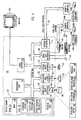
- FIG. 1 and the following discussion are intended to provide a brief, general description of a suitable computing environment in which the invention may be implemented.
- the invention may be described in the general context of computer-executable instructions, such as program modules, being executed by computers in network environments.
- program modules include routines, programs, objects, components, data structures, etc. that perform particular tasks or implement particular abstract data types.
- Computer-executable instructions, associated data structures, and program modules represent examples of the program code means for executing steps of the methods disclosed herein.
- the particular sequence of such executable instructions or associated data structures represent examples of corresponding acts for implementing the functions described in such steps.
- an exemplary system for implementing the invention comprises a general purpose computing device in the form of a generic computer 20, including a processing unit 21, a system memory 22, and a system bus 23 that couples various system components including the system memory 22 to the processing unit 21.
- a generic computer 20 including a processing unit 21, a system memory 22, and a system bus 23 that couples various system components including the system memory 22 to the processing unit 21.
- monitor 47, keyboard 40, and mouse 42 may seem specific to a conventional computer, those of skill in the art will recognize that analogous components may be found in other computing devices.
- wireless telephones often include an LCD or plasma display area, a numeric keypad, and one or more navigation buttons. Therefore, any component described with reference to generic computer 20 should be interpreted broadly to encompass analogous components that are appropriate for and consistent with a particular implementation or embodiment of the present invention. In some implementations, a component may be connected only intermittently or may be missing entirely.
- the system bus 23 may be any of several types of bus structures including a memory bus or memory controller, a peripheral bus, and a local bus using any of a variety of bus architectures.
- the system memory includes read only memory (ROM) 24 and random access memory (RAM) 25.
- ROM read only memory
- RAM random access memory
- the computer 20 may also include a magnetic hard disk drive 27 for reading from and writing to a magnetic hard disk 39, a magnetic disk drive 28 for reading from or writing to a removable magnetic disk 29, and an optical disk drive 30 for reading from or writing to removable optical disk 31 such as a CD-ROM or other optical media.
- the magnetic hard disk drive 27, magnetic disk drive 28, and optical disk drive 30 are connected to the system bus 23 by a hard disk drive interface 32, a magnetic disk drive-interface 33, and an optical drive interface 34, respectively.
- the drives and their associated computer-readable media provide nonvolatile storage of computer-executable instructions, data structures, program modules and other data for the computer 20.
- Program code means comprising one or more program modules may be stored on the hard disk 39, magnetic disk 29, optical disk 31, ROM 24 or RAM 25, including an operating system 35, one or more application programs 36, other program modules 37, and program data 38.
- a user may enter commands and information into the computer 20 through keyboard 40, pointing device 42, or other input devices (not shown), such as a numeric keypad, directional buttons, pressure-sensitive software keyboard, microphone, joy stick, game pad, satellite dish, scanner, or the like.
- These and other input devices are often connected to the processing unit 21 through a serial port interface 46 coupled to system bus 23.
- the input devices may be connected by other interfaces, such as a parallel port, a game port or a universal serial bus (USB).
- a monitor 47 or another display device, such as an LCD or gas plasma display, is also connected to system bus 23 via an interface, such as video adapter 48.
- personal computers typically include other peripheral output devices (not shown), such as speakers and printers.
- the computer 20 may operate in a networked environment using logical connections to one or more remote computers, such as remote computers 49a and 49b.
- Remote computers 49a and 49b may each be another personal computer, a server, a router, a network PC, a peer device or other common network node, and typically include many or all of the elements described above relative to the computer 20, although only memory storage devices 50a and 50b and their associated application programs 36a and 36b have been illustrated in Figure 1 .
- the logical connections depicted in Figure 1 include a local area network (LAN) 51 and a wide area network (WAN) 52 that are presented here by way of example and not limitation.
- LAN local area network
- WAN wide area network
- the computer 20 When used in a LAN networking environment, the computer 20 is connected to the local network 51 through a network interface or adapter 53. When used in a WAN networking environment, the computer 20 may include a modem 54, a wireless link, or other means for establishing communications over the wide area network 52, such as the Internet.
- the modem 54 which may be internal or external, is connected to the system bus 23 via the serial port interface 46.
- program modules depicted relative to the computer 20, or portions thereof may be stored in the remote memory storage device. It will be appreciated that the network connections shown are exemplary and other means of establishing communications over wide area network 52 may be used.
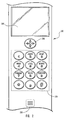
- Figure 2 shows a portion of a wireless telephone.
- a wireless telephone is merely one example of a browsing system with limited display and input capabilities.
- PDAs and other handheld devices also have limited displays and input systems.
- the present invention is not necessarily limited to any particular hardware or device, handheld or otherwise. Nevertheless, some benefits provided by the present invention may be more pronounced where displays and/or input systems are less robust than corresponding displays and/or input systems found in traditional browsing systems.
- Four-direction and action key 210 is an example of both a navigation key generating direction input and an action key providing action input. Depressing key 210 at any one of the four arrows generates a direction input corresponding to the direction of the arrow. An action input is generated by depressing the center of key 210.
- the center of key 210 may be a separate button (not shown) or may be integral with the navigation arrows such that depressing the center generates simultaneous, but conflicting direction input. In other words, simultaneous up and down arrows or simultaneous left and right arrows are interpreted as an action input.
- an action input corresponds to pressing an enter key on a keyboard, but other actions are not precluded, as circumstances may warrant.
- Display area 240 displays content received while browsing. Note however, that all of display area 240 may not be available for displaying content. For example, portions of display area 240 may be used for titles, menus, switching between tasks, etc. Therefore, available display area generally refers to the portion of display area 240 that is devoted to displaying content, and may represent all or less than all of display area 240.
- Edit mode generally is characterized by interaction with a single interactive element and is described more fully in connection with Figure 6 and the interactive elements shown in Figures 5A-5H .
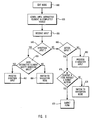
- navigation mode generally is characterized by movement between and selection of interactive elements (i.e., changing focus from one interactive element to another) and is described more fully in connection with Figures 3 and 4 . Transitions from navigation mode to edit mode and interactive elements that operate in an intuitive manner without using a dedicated edit mode are covered in the description of Figures 7 and 8 .
- a direction input 320 is received.
- Decision block 330 determines if an interactive element is at least partially visible in the direction of direction input 320, either relative to the beginning of the content if no interactive element has been selected or relative to an interactive element that is selected currently. If no interactive element is visible in the direction of the direction input, decision block 340 determines if more content is available in the direction of the direction input. If more content is available in the direction of the direction input, the display scrolls 342 in the direction of the direction input; otherwise, the direction input is ignored 344.
- decision block 360 determines if the visible interactive element lies at substantially the same vertical level as the interactive element that is selected currently. (The meaning of substantially the same vertical level will be described in more detail below, with respect to Figure 4 .) If substantially at the same level, the interactive element in the direction of the direction input is selected 362. If the visible interactive element does not lie at the substantially the same vertical level, operation continues with decision block 340, as described above. For vertical direction input, the interactive element at the next vertical level in the direction of direction input 320 that is closest in the horizontal direction to the beginning of the previously selected interactive element is selected 352.
- Figure 4 shows several interactive elements and their positions relative to each other for use in describing the selection of interactive elements during navigation.
- the display 400 of content includes vertical levels 410, 420, 430, and 440. Note that at vertical level 410, Element 1, Element 2, and Element 3 do not display at exactly the same vertical coordinates. Nevertheless, Element 1, Element 2, and Element 3 lie at substantially the same vertical level. By allowing for some variation in the vertical display coordinates for interactive element, navigation is more intuitive.
- the height of Element 1 is h1 and the height of Element 3 is h3.
- the distance y1 is the amount that Element 3 overlaps with Element 1.
- y1 may represent the amount of vertical separation between interactive elements rather than the amount of overlap. Note that the present invention does not necessarily limit y1 to any particular dimension or calculation. Because y1 reflects the expectations of users, it is possible for y1 to take on a wide range of values, as may be suitable for a particular embodiment or implementation. However, in at least some circumstances, y1 is a portion of h3, the height of Element 3, indicating that Element 3 partially overlaps Element 1. (Although not shown, note also that it may be possible for a single element to span and be reachable from multiple vertical levels.
- Element 2 When navigating horizontally from an element spanning multiple vertical levels, the next element is selected from the top most spanned vertical level where an interactive element is visible.) The height of Element 2 is not shown because it overlaps completely with Element 1 and therefore is clearly at the same vertical level as Element 1.
- Moving from vertical level 430 to vertical level 420 may include some ambiguity because vertical level 420 includes multiple interactive elements. Selecting between Element 4 and Element 5 depends on the horizontal distances labeled x1 and x2.
- the distance x1 represents the horizontal distance from the beginning of Element 6 (the currently selected interactive element when moving from vertical level 430 to vertical level 420) to the nearest portion of Element 4.
- the distance x2 represents the horizontal distance from the beginning of Element 6 to the nearest portion of Element 5.
- Element 4 is selected if x1 is less than or equal to x2, and Element 5 is selected if x2 is less than x1. Note that the same processing occurs for moving between Element 1 and Element 4, but the result is obvious. In contrast, there is no ambiguity in moving from Element 4 to Element 6 and then to Element 7.
- Figures 5A-5H illustrate various interactive elements, the operation of which will be described in greater detail with respect to Figures 6-8 .
- the interactive elements shown in Figures 5A-5H are merely exemplary of interactive elements that are useful in describing embodiments of the present invention in the context of HTML content.
- the present invention is not necessarily limited to any particular types of interactive elements or any particular type of content.
- JAVA and Javascript allow for the creation of interactive elements and show that the types of interactive elements within the scope of the present invention are governed only by the creativity of those who author content.
- Figure 5A illustrates single line textbox 510 for entry of characters. Although display is limited to a single line, characters within the textbox may allow for scrolling if character entry exceeds the width of textbox 510.
- Figure 5B illustrates multiple line textbox 520. Multiple line textbox 520 is also for character entry. Due to display area constraints, multiple line textbox 520 may display as a single line in navigation mode, and then to facilitate editing, expand to a multiple line display in edit mode. A close button may be included with multiple line textbox 520 to assist in returning to navigation mode. Like single line textbox 510, multiple line textbox 520 may allow for scrolling if character entry exceeds the width of textbox 520.
- Radio button 530 with button 532 and text 534, is illustrated in Figure 5C .
- Radio buttons allow for choosing one item and only one item from a group or list of items.
- Figure 5D illustrates checkbox 540, with button 542 and text 544.
- check box 540 allows for selecting zero or more items from a group or list of items.
- Figure 5E illustrates spinner 550, with text 552, left arrow 556, and right arrow 554. Similar to radio buttons, spinner 550 groups related items and allows one and only one to be chosen. Activating left arrow 556 chooses the previous item in the list and activating right arrow 554 chooses the next item in the list.
- the list may be circular, such that moving through all choices with either arrow returns to the initial choice.
- the list may be linear, having a starting point that may be reached with left arrow 556 and having an ending point that may be reached with right arrow 554.
- Picker 560, with text 562 and right arrow 564, as illustrated in Figure 5F is similar to checkbox 540.
- Activating right arrow 564 displays a list of checkbox options.
- a close button may be included with picker 560 to facilitate returning to navigation mode.
- Activating button 570 of Figure 5G causes an action associated with the button to be executed.
- Figure 5H illustrates link 580, a hypertext markup language link that browses content associated with the link when the link is activated or followed.
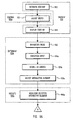
- Figure 6 is a flow diagram that corresponds to receiving input while editing a selected interactive element, such as one of those described above in connection with Figures 5A-5H .
- input received while in edit mode may be used by the interactive element (e.g., entering characters into a textbox) or may cause a return to navigation mode (e.g., so that another interactive element may be selected).
- the description of Figures 7 and 8 explains how transitions to edit mode are made from the navigation mode identified above, with respect to Figures 3 and 4 .
- an input 630 is received. If the selected interactive element is only partially visible, entering edit mode will scroll 620 the display until the selected element is completely visible. Decision block 640 determines if input 630 is a direction input. If so, decision block 650 determines if the selected interactive element accepts direction input so that the direction input may be processed 652. For example, direction input may be accepted in single line textbox 510 and multiple line textbox 520 for moving the cursor position, although up and down direction input would not be accepted by single line textbox 510.
- Spinner 550 also may accept direction input, with a left direction input choosing a previous item in the spinner list and a right direction input choosing the next item in the spinner list. If decision block 650 determines that the selected interactive element does not accept direction input, operation transitions or switches to navigation mode 654.
- decision block 660 determines if input 630 is an action input. If not, input 630 is processed as character input 662.
- Figure 6 suggests three basic types of input: direction input, action input, and character input.
- the present invention does not necessarily require dividing all input into any particular number of categories. It is expected, therefore, that alternate embodiments may use additional, fewer, or other categories, depending on the needs or preferences of a particular application. Furthermore, alternate embodiments also may include additional, fewer, or other modes of operation, again depending on the needs or preferences of the particular application.
- character input depends on the selected interactive element. Ordinarily, character input has greatest application in entering information into single line textbox 510 and multiple line textbox 520. However, character input also may be used in finding a particular entry in spinner 550 and picker 560. For example, if spinner 550 or picker 560 are used to chose a state based on state codes, entering a "W" may immediately move to the end of the list, as opposed to moving through a list item by item or page by page as would likely occur using a direction input.
- decision block 670 considers whether the content being browsed is form content without a submit button. Some form content may fail to provide an explicit submit button, in which case an action input is interpreted as a request to submit the form 672. In the usual case, however, an action input switches from edit mode back to navigation mode 674. For spinner 550, switching from edit mode to navigation mode 674 is somewhat different behavior than occurs in an operating system shell context. More specifically, in an operating system shell context, once a spinner has been selected, an action input ordinarily displays a list of radio button options.
- Figure 7 is a flow diagram that corresponds to receiving an action input while navigating between interactive elements.
- an action input 720 is received. If decision block 730 determines that the selected interactive element is a link, receiving an action input activates or follows the link 732. If the selected interactive element is a radio button or checkbox, as determined in decision block 740, the state of the radio button or checkbox is switched. Radio buttons and checkboxes are both examples of interactive elements capable of representing two states.
- switching the state of a checkbox means either (i) an unchecked checkbox is checked, or (ii) a checked checkbox is unchecked.
- Radio buttons are slightly more complex to explain since only one item may be chosen at any given time. Therefore, switching the state of a radio button means that (i) if the radio button was not chosen previously, the radio button will be chosen and any other radio button that may have been chosen previously will no longer be chosen, or (ii) a radio button that was previously chosen remains chosen.
- buttons are examples of interactive elements that operate in an intuitive manner without using a dedicated edit mode.
- an action input switches to edit mode 754.
- Figure 8 is a flow diagram that corresponds to receiving a character input while navigating between interactive elements.
- a character input 820 is received. Character input may include numbers, letters, punctuation, white space, etc. If decision block 830 determines that the interactive element does not accept character input, character input 820 is ignored 836. Otherwise, character input 820 causes a switch from navigation mode to edit mode 832 and character input 820 is processed 834. For example, if the selected interactive element is a single line textbox 510 or a multiple line textbox 520, entering a letter while in navigation mode switches to edit mode and places the letter in the textbox. As indicated earlier, spinner 550 and picker 560 also may use character input to find an item in a long list by advancing to and/or choosing an item that matches the character entered.
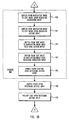
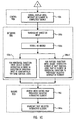
- Figures 9A-9C show an exemplary method for browsing content according to the present invention.
- a step for presenting (910) at least a portion of content on the display area of a browsing system may include the acts of retrieving (912) the content and displaying (914) the retrieved content.
- the content may be retrieved from a local or remote source.
- a step for controlling the width (920a) of an interactive element may include the act of adjusting the width of the interactive element to the width of available display area on the browsing system if the width of the interactive element exceeds the width of available display area.
- a step for determining (930a) an interactive element for selection based on a direction input may include the following acts: an act of starting (932) in navigation mode by default when content displays; an act of receiving (934a) a direction input from a direction key, such as four-direction and action key 210 of Figure 2 ; an act of scrolling (936a) the display of the content in the direction of the received direction input if less than all of the content is displayed and no interactive element is at least partially visible; and an act of selecting (938a) an interactive element based on the received direction input relative to a previously selected interactive element or, if no interactive element has been previously selected, based on the direction input relative to the beginning of the displayed content. Note that for English content, an up arrow or left arrow relative to the beginning of the display content does not make sense and therefore is ignored.
- a step for indicating (940a) that an interactive element is selected may include the act of highlighting (944a) the interactive element.
- a selection box may be placed around the interactive element or the visual appearance of the interactive element may be otherwise altered such that a selected interactive element is distinguishable from an interactive element that has not been selected.
- the present invention does not necessarily require any particular type of highlighting.
- a step for changing (950) the mode of a browsing system may include an act of switching (951) from navigation mode to edit mode upon receiving a character input. For example, when an interactive element such as single line textbox 510, multiple line textbox 520, spinner 550, or picker 560 is selected, receiving a character input switches to edit mode.
- An act of switching (953) from navigation mode to edit mode upon receiving an action input also may be included as part of a step from changing (950) the mode of a browsing system.
- An action input is an explicit indication to switch modes, whereas a character input is an implied indication to switch modes.
- a step for changing (950) the mode of a browsing system may include the act of switching (955) from edit mode to navigation mode upon receiving an action input.
- an action input may be used both for entering and exiting edit mode.
- an act of switching (957) from edit mode to navigation mode upon receiving a direction input also may be included within a step form changing (950) the mode of a browsing system. For interactive elements that do not accept a particular direction input, such as an up or down arrow in a single line textbox, receiving the particular direction input switches from edit mode to navigation mode.
- a step for changing (950) the mode of a browsing system may include the act of submitting (959) form content upon receiving an action input. For content that does not include a submit button, an action input is associated with submitting the form.
- the browsing system switches from edit mode to navigation mode because submitting a form usually causes new content to be displayed by a browsing device and, as described above, the browsing system may default to navigation mode as content initially displays.
- the present invention may include the act of switching (960) the state of a selected interactive element such as a radio button or checkbox. Similarly, the act of following (970) a selected link upon receiving an action input or executing the action (not shown) associated with a button also are within the scope of the present invention.
- a step for controlling the width (920c) of an interactive element also may include the act of scrolling (924) the display area until the interactive element is completely visible.
- Automatically scrolling the display of content ordinarily occurs when switching from navigation mode to edit mode. Upon switching from navigation mode to edit mode, it becomes clear that a particular interactive element is of interest and should be completely visible, whereas in navigation mode, it may be unclear whether interest is in (i) an interactive element selected as a natural consequence of scrolling displayed content, or (ii) other content that becomes visible as content scrolls.
- a step for determining (930c) an interactive element for selection based on a direction input may include other acts, such as an act of receiving (934c) a subsequent direction input. If less than all of the content is display and no interactive element is at least partially visible, determining (930c) an interactive element for selection also may include an act of scrolling (936c) the display of the content in the direction of the subsequent direction input. For a horizontal direction input, determining (930c) an interactive element for selection may include an act of selecting (938c-1) the closest interactive element in the direction of the direction input that is at substantially the same vertical level.
- determining (930c) an interactive element for selection may include an act of selecting (938c-2) the interactive element at the next vertical level in the direction of the direction input that is closest in the horizontal direction to a previously selected interactive element.
- a step for indicating (940c) that an interactive element is selected may further include the acts of removing (942) the highlighting from a previously selected interactive element and highlighting (944c) the next selected interactive element (see also 940a of Figure 9A ).
Landscapes
- Engineering & Computer Science (AREA)
- General Engineering & Computer Science (AREA)
- Theoretical Computer Science (AREA)
- Human Computer Interaction (AREA)
- Physics & Mathematics (AREA)
- General Physics & Mathematics (AREA)
- Computer Networks & Wireless Communication (AREA)
- Signal Processing (AREA)
- User Interface Of Digital Computer (AREA)
Applications Claiming Priority (3)
| Application Number | Priority Date | Filing Date | Title |
|---|---|---|---|
| US23960000P | 2000-10-11 | 2000-10-11 | |
| US09/861,327 US6822664B2 (en) | 2000-10-11 | 2001-05-18 | Browser navigation for devices with a limited input system |
| EP01124138.7A EP1197834B1 (fr) | 2000-10-11 | 2001-10-10 | Navigateur pour dispositifs avec un systéme d'entrée limité |
Related Parent Applications (2)
| Application Number | Title | Priority Date | Filing Date |
|---|---|---|---|
| EP01124138.7A Division-Into EP1197834B1 (fr) | 2000-10-11 | 2001-10-10 | Navigateur pour dispositifs avec un systéme d'entrée limité |
| EP01124138.7 Division | 2001-10-10 |
Publications (2)
| Publication Number | Publication Date |
|---|---|
| EP2339431A2 true EP2339431A2 (fr) | 2011-06-29 |
| EP2339431A3 EP2339431A3 (fr) | 2013-01-16 |
Family
ID=26932707
Family Applications (2)
| Application Number | Title | Priority Date | Filing Date |
|---|---|---|---|
| EP01124138.7A Expired - Lifetime EP1197834B1 (fr) | 2000-10-11 | 2001-10-10 | Navigateur pour dispositifs avec un systéme d'entrée limité |
| EP11002110A Withdrawn EP2339431A3 (fr) | 2000-10-11 | 2001-10-10 | Navigation du chercheur web pour dispositifs avec un système d'entrée limité |
Family Applications Before (1)
| Application Number | Title | Priority Date | Filing Date |
|---|---|---|---|
| EP01124138.7A Expired - Lifetime EP1197834B1 (fr) | 2000-10-11 | 2001-10-10 | Navigateur pour dispositifs avec un systéme d'entrée limité |
Country Status (2)
| Country | Link |
|---|---|
| US (5) | US6822664B2 (fr) |
| EP (2) | EP1197834B1 (fr) |
Families Citing this family (49)
| Publication number | Priority date | Publication date | Assignee | Title |
|---|---|---|---|---|
| US6822664B2 (en) | 2000-10-11 | 2004-11-23 | Microsoft Corporation | Browser navigation for devices with a limited input system |
| US7421666B2 (en) * | 2000-10-11 | 2008-09-02 | Microsoft Corporation | Browser navigation for devices with a limited input system |
| JP2002140194A (ja) * | 2000-10-31 | 2002-05-17 | Toshiba Corp | 情報処理方法および情報処理装置およびエージェントシステム |
| JP4147016B2 (ja) * | 2001-10-16 | 2008-09-10 | 富士通株式会社 | 携帯端末 |
| JP3705215B2 (ja) * | 2002-01-28 | 2005-10-12 | 日産自動車株式会社 | 移動体用情報提示装置 |
| US7509494B2 (en) | 2002-03-01 | 2009-03-24 | Masimo Corporation | Interface cable |
| US7190351B1 (en) * | 2002-05-10 | 2007-03-13 | Michael Goren | System and method for data input |
| US7958455B2 (en) * | 2002-08-01 | 2011-06-07 | Apple Inc. | Mode activated scrolling |
| AU2003277358A1 (en) * | 2002-10-10 | 2004-05-04 | Action Engine Corporation | A method for dynamically assigning and displaying character shortcuts on a computing device display |
| US7134089B2 (en) * | 2002-11-13 | 2006-11-07 | Microsoft Corporation | Directional focus navigation |
| US7721192B2 (en) * | 2002-11-27 | 2010-05-18 | Microsoft Corporation | User interface for a resource search tool |
| US20040100509A1 (en) * | 2002-11-27 | 2004-05-27 | Microsoft Corporation | Web page partitioning, reformatting and navigation |
| US20040250220A1 (en) * | 2003-06-09 | 2004-12-09 | Mika Kalenius | System, apparatus, and method for navigation in a hypertext document |
| US7164410B2 (en) * | 2003-07-28 | 2007-01-16 | Sig G. Kupka | Manipulating an on-screen object using zones surrounding the object |
| US7055110B2 (en) * | 2003-07-28 | 2006-05-30 | Sig G Kupka | Common on-screen zone for menu activation and stroke input |
| US20050049886A1 (en) * | 2003-08-28 | 2005-03-03 | Sbc Knowledge Ventures, L.P. | System and method for managing digital rights and content assets |
| US7669146B2 (en) * | 2003-10-14 | 2010-02-23 | Sap Aktiengesellschaft | Information organization navigation |
| US20050166161A1 (en) * | 2004-01-28 | 2005-07-28 | Nokia Corporation | User input system and method for selecting a file |
| US7321360B1 (en) * | 2004-05-24 | 2008-01-22 | Michael Goren | Systems, methods and devices for efficient communication utilizing a reduced number of selectable inputs |
| GB0420056D0 (en) * | 2004-09-10 | 2004-10-13 | Radioscape Ltd | A method of editing screen elements on a display with limited input devices |
| US20060212824A1 (en) * | 2005-03-15 | 2006-09-21 | Anders Edenbrandt | Methods for navigating through an assembled object and software for implementing the same |
| US20070022367A1 (en) * | 2005-06-30 | 2007-01-25 | Nokia Corporation | Multidimensional tabbing for electronic devices |
| KR101195501B1 (ko) | 2005-09-22 | 2012-10-29 | 삼성전자주식회사 | 복수개의 어플리케이션이 표시되는 화면에서 버튼간에포커싱을 이동시키는 방법, 그 장치 및 그 정보 저장 매체 |
| US20070097025A1 (en) * | 2005-10-27 | 2007-05-03 | Tomoko Itoh | LCD display |
| US7782302B2 (en) * | 2006-07-10 | 2010-08-24 | Microsoft Corporation | Trackball for a mobile device |
| US7626573B2 (en) * | 2006-07-10 | 2009-12-01 | Microsoft Corporation | Trackball for a mobile device |
| CA2871409C (fr) * | 2006-07-10 | 2015-05-19 | Microsoft Corporation | Systeme de boule de pointage et procede pour un dispositif de traitement de donnees mobile |
| US8635559B2 (en) * | 2006-12-29 | 2014-01-21 | Blackberry Limited | On-screen cursor navigation delimiting on a handheld communication device |
| US20080158159A1 (en) * | 2006-12-29 | 2008-07-03 | Research In Motion Limited | On-screen cursor navigation on a handheld communication device displaying a modifed webpage |
| WO2009008161A1 (fr) * | 2007-07-11 | 2009-01-15 | Access Co., Ltd. | Terminal d'informations portable |
| KR20090052673A (ko) * | 2007-11-21 | 2009-05-26 | 엘지전자 주식회사 | 단말기, 그 제어 방법 및 이를 위한 기록 매체 |
| US8418083B1 (en) * | 2007-11-26 | 2013-04-09 | Sprint Communications Company L.P. | Applying a navigational mode to a device |
| US8381132B2 (en) * | 2008-04-10 | 2013-02-19 | Philips & Lite-On Digital Solutions Corporation | DVD menu navigation with reduced input button count |
| US8484582B2 (en) * | 2008-05-12 | 2013-07-09 | Nuance Communications, Inc. | Entry selection from long entry lists |
| KR20090131423A (ko) * | 2008-06-18 | 2009-12-29 | 삼성전자주식회사 | 문자 입력 장치 및 그 입력 방법 |
| US8717283B1 (en) | 2008-11-25 | 2014-05-06 | Sprint Communications Company L.P. | Utilizing motion of a device to manipulate a display screen feature |
| US9208754B2 (en) * | 2009-01-26 | 2015-12-08 | Blackberry Limited | Method and apparatus for controlling a display of a portable electronic device |
| US20100237991A1 (en) * | 2009-03-17 | 2010-09-23 | Prabhu Krishnanand | Biometric scanning arrangement and methods thereof |
| TW201101117A (en) * | 2009-06-26 | 2011-01-01 | Ibm | Handheld device, method and computer program product for user selecting control unit of application program |
| CA2795913A1 (fr) * | 2010-04-12 | 2011-10-20 | Google Inc. | Systeme de traitement de texte par navigateur riche |
| EP2588197B1 (fr) * | 2010-07-02 | 2014-11-05 | Gilead Sciences, Inc. | Composés hétérocycliques condensés en tant que modulateurs des canaux ioniques |
| KR101988313B1 (ko) * | 2013-01-04 | 2019-06-12 | 엘지전자 주식회사 | 이동 단말기 및 이의 제어 방법, 및 이의 기록 매체 |
| WO2014192092A1 (fr) * | 2013-05-29 | 2014-12-04 | 楽天株式会社 | Dispositif, procédé et programme de traitement d'informations |
| USD742893S1 (en) | 2013-06-09 | 2015-11-10 | Apple Inc. | Display screen or portion thereof with graphical user interface |
| USD745049S1 (en) * | 2013-06-09 | 2015-12-08 | Apple Inc. | Display screen or portion thereof with graphical user interface |
| CN104679783B (zh) * | 2013-11-29 | 2019-08-02 | 北京搜狗信息服务有限公司 | 一种网络搜索方法和装置 |
| CN103760991B (zh) * | 2014-01-13 | 2017-02-15 | 北京搜狗科技发展有限公司 | 一种实体输入方法和装置 |
| CN110321497B (zh) * | 2019-07-09 | 2022-03-22 | 网易(杭州)网络有限公司 | 界面导航的方法及装置、电子设备、存储介质 |
| CN110572705B (zh) * | 2019-09-17 | 2022-06-07 | 北京字节跳动网络技术有限公司 | 弹窗的控制方法、装置、介质及电子设备 |
Family Cites Families (39)
| Publication number | Priority date | Publication date | Assignee | Title |
|---|---|---|---|---|
| US5371851A (en) * | 1989-04-26 | 1994-12-06 | Credence Systems Corporation | Graphical data base editor |
| US5317306A (en) * | 1991-08-02 | 1994-05-31 | International Business Machines Corporation | System and method for dynamic control of horizontal scrolling |
| US6400996B1 (en) * | 1999-02-01 | 2002-06-04 | Steven M. Hoffberg | Adaptive pattern recognition based control system and method |
| JP3291311B2 (ja) | 1992-03-16 | 2002-06-10 | 富士通株式会社 | スクロール制御装置およびスクロール表示方法 |
| US5510811A (en) * | 1992-11-25 | 1996-04-23 | Microsoft Corporation | Apparatus and method for controlling cursor movement |
| US5414809A (en) * | 1993-04-30 | 1995-05-09 | Texas Instruments Incorporated | Graphical display of data |
| US5544299A (en) * | 1994-05-02 | 1996-08-06 | Wenstrand; John S. | Method for focus group control in a graphical user interface |
| US5603021A (en) * | 1994-09-02 | 1997-02-11 | Borland International, Inc. | Methods for composing formulas in an electronic spreadsheet system |
| WO1996009579A1 (fr) * | 1994-09-22 | 1996-03-28 | Izak Van Cruyningen | Menus surgissant a indications directionnelles |
| US5677708A (en) * | 1995-05-05 | 1997-10-14 | Microsoft Corporation | System for displaying a list on a display screen |
| US5673401A (en) * | 1995-07-31 | 1997-09-30 | Microsoft Corporation | Systems and methods for a customizable sprite-based graphical user interface |
| US5990862A (en) | 1995-09-18 | 1999-11-23 | Lewis; Stephen H | Method for efficient input device selection of onscreen objects |
| US6128012A (en) * | 1996-09-19 | 2000-10-03 | Microsoft Corporation | User interface for a portable data management device with limited size and processing capability |
| US5874936A (en) * | 1996-12-20 | 1999-02-23 | International Business Machines Corporation | Method and apparatus for automatic scrolling by remote control |
| US5801691A (en) | 1996-12-31 | 1998-09-01 | International Business Machines Corporation | Method and apparatus for mobile device screen reformatting utilizing hypertext |
| US5739821A (en) | 1997-01-30 | 1998-04-14 | Primax Electronics Ltd. | Method for pointing a window frame or an icon of a window interface |
| US5850218A (en) * | 1997-02-19 | 1998-12-15 | Time Warner Entertainment Company L.P. | Inter-active program guide with default selection control |
| US5905497A (en) | 1997-03-31 | 1999-05-18 | Compaq Computer Corp. | Automatic and seamless cursor and pointer integration |
| US6005573A (en) * | 1997-06-12 | 1999-12-21 | Siemens Information And Communication Networks, Inc. | Method and system for establishing area boundaries in computer applications |
| US6141011A (en) * | 1997-08-04 | 2000-10-31 | Starfish Software, Inc. | User interface methodology supporting light data entry for microprocessor device having limited user input |
| SE511516C2 (sv) | 1997-12-23 | 1999-10-11 | Ericsson Telefon Ab L M | Handburen displayenhet och metod att visa skärmbilder |
| US6222541B1 (en) * | 1998-01-20 | 2001-04-24 | International Business Machines Corporation | Method and apparatus for fast-path location and selection of links |
| US6209009B1 (en) | 1998-04-07 | 2001-03-27 | Phone.Com, Inc. | Method for displaying selectable and non-selectable elements on a small screen |
| US6173316B1 (en) * | 1998-04-08 | 2001-01-09 | Geoworks Corporation | Wireless communication device with markup language based man-machine interface |
| US6061063A (en) * | 1998-06-30 | 2000-05-09 | Sun Microsystems, Inc. | Method and apparatus for providing feedback while scrolling |
| US6366302B1 (en) * | 1998-12-22 | 2002-04-02 | Motorola, Inc. | Enhanced graphic user interface for mobile radiotelephones |
| US6664984B2 (en) * | 1999-06-11 | 2003-12-16 | Scientific-Atlantic, Inc. | Method and system for identification of pay-per-view programming |
| JP2001245351A (ja) * | 2000-02-29 | 2001-09-07 | Matsushita Electric Ind Co Ltd | 携帯電話機におけるスクロールモード変更方法及び該スクロール変更方法を用いた携帯電話機 |
| US20020112237A1 (en) * | 2000-04-10 | 2002-08-15 | Kelts Brett R. | System and method for providing an interactive display interface for information objects |
| US7249325B1 (en) * | 2000-05-11 | 2007-07-24 | Palmsource, Inc. | Automatically centered scrolling in a tab-based user interface |
| US6690391B1 (en) * | 2000-07-13 | 2004-02-10 | Sony Corporation | Modal display, smooth scroll graphic user interface and remote command device suitable for efficient navigation and selection of dynamic data/options presented within an audio/visual system |
| US6683626B1 (en) * | 2000-10-04 | 2004-01-27 | Sun Microsystems, Inc. | Focus-based scrolling |
| US7421666B2 (en) | 2000-10-11 | 2008-09-02 | Microsoft Corporation | Browser navigation for devices with a limited input system |
| US6822664B2 (en) | 2000-10-11 | 2004-11-23 | Microsoft Corporation | Browser navigation for devices with a limited input system |
| US6934913B2 (en) * | 2000-12-07 | 2005-08-23 | International Business Machines Corp. | Graphical data entry screen |
| US7308653B2 (en) * | 2001-01-20 | 2007-12-11 | Catherine Lin-Hendel | Automated scrolling of browser content and automated activation of browser links |
| US6778192B2 (en) * | 2001-04-05 | 2004-08-17 | International Business Machines Corporation | System and method for creating markers on scroll bars of a graphical user interface |
| US20040041847A1 (en) * | 2002-08-29 | 2004-03-04 | Inventec Appliances Corp. | On-screen scrolling position method |
| US20070022839A1 (en) * | 2005-07-29 | 2007-02-01 | Changzai Chi | Syntheses and applications of nano-sized iron particles |
-
2001
- 2001-05-18 US US09/861,327 patent/US6822664B2/en not_active Expired - Lifetime
- 2001-10-10 EP EP01124138.7A patent/EP1197834B1/fr not_active Expired - Lifetime
- 2001-10-10 EP EP11002110A patent/EP2339431A3/fr not_active Withdrawn
-
2004
- 2004-08-20 US US10/923,438 patent/US7454718B2/en not_active Expired - Fee Related
-
2008
- 2008-06-23 US US12/144,001 patent/US8479114B2/en not_active Expired - Fee Related
-
2013
- 2013-05-23 US US13/901,080 patent/US9575638B2/en not_active Expired - Fee Related
-
2017
- 2017-02-17 US US15/435,628 patent/US20170255364A1/en not_active Abandoned
Also Published As
| Publication number | Publication date |
|---|---|
| EP1197834A2 (fr) | 2002-04-17 |
| US6822664B2 (en) | 2004-11-23 |
| EP2339431A3 (fr) | 2013-01-16 |
| US20080256481A1 (en) | 2008-10-16 |
| EP1197834B1 (fr) | 2018-07-11 |
| US7454718B2 (en) | 2008-11-18 |
| US9575638B2 (en) | 2017-02-21 |
| US8479114B2 (en) | 2013-07-02 |
| US20170255364A1 (en) | 2017-09-07 |
| US20130263041A1 (en) | 2013-10-03 |
| US20050022140A1 (en) | 2005-01-27 |
| EP1197834A3 (fr) | 2007-12-05 |
| US20020041291A1 (en) | 2002-04-11 |
Similar Documents
| Publication | Publication Date | Title |
|---|---|---|
| US6822664B2 (en) | Browser navigation for devices with a limited input system | |
| US9785329B2 (en) | Pocket computer and associated methods | |
| US7415696B2 (en) | Extensible help facility for a computer software application | |
| US9274670B2 (en) | Methods and apparatuses for inputting information | |
| US7890862B2 (en) | Haptic key controlled data input | |
| US8689138B2 (en) | Method and arrangment for a primary actions menu for applications with sequentially linked pages on a handheld electronic device | |
| US6791529B2 (en) | UI with graphics-assisted voice control system | |
| RU2421777C2 (ru) | Улучшенный карманный компьютер и связанные с ним способы | |
| US20070024646A1 (en) | Portable electronic apparatus and associated method | |
| JP5607182B2 (ja) | ソフトボタンを条件付きで使用可能または使用不可にするための装置および方法 | |
| US20040142720A1 (en) | Graphical user interface features of a browser in a hand-held wireless communication device | |
| JP2006164261A (ja) | 改良型ユーザインターフェイスを有するデータ処理装置及びシステム | |
| US7421666B2 (en) | Browser navigation for devices with a limited input system | |
| US20080163121A1 (en) | Method and arrangement for designating a menu item on a handheld electronic device | |
| US20080163112A1 (en) | Designation of menu actions for applications on a handheld electronic device | |
| GB2365150A (en) | Automatic completion of data in a data entry field using prepended text |
Legal Events
| Date | Code | Title | Description |
|---|---|---|---|
| PUAI | Public reference made under article 153(3) epc to a published international application that has entered the european phase |
Free format text: ORIGINAL CODE: 0009012 |
|
| 17P | Request for examination filed |
Effective date: 20110314 |
|
| AC | Divisional application: reference to earlier application |
Ref document number: 1197834 Country of ref document: EP Kind code of ref document: P |
|
| AK | Designated contracting states |
Kind code of ref document: A2 Designated state(s): AT BE CH CY DE DK ES FI FR GB GR IE IT LI LU MC NL PT SE TR |
|
| PUAL | Search report despatched |
Free format text: ORIGINAL CODE: 0009013 |
|
| AK | Designated contracting states |
Kind code of ref document: A3 Designated state(s): AT BE CH CY DE DK ES FI FR GB GR IE IT LI LU MC NL PT SE TR |
|
| RIC1 | Information provided on ipc code assigned before grant |
Ipc: G06F 3/033 20130101ALI20121213BHEP Ipc: G06F 3/023 20060101AFI20121213BHEP |
|
| 17Q | First examination report despatched |
Effective date: 20130827 |
|
| RAP1 | Party data changed (applicant data changed or rights of an application transferred) |
Owner name: MICROSOFT TECHNOLOGY LICENSING, LLC |
|
| GRAP | Despatch of communication of intention to grant a patent |
Free format text: ORIGINAL CODE: EPIDOSNIGR1 |
|
| RIC1 | Information provided on ipc code assigned before grant |
Ipc: G06F 3/0489 20130101ALI20190115BHEP Ipc: G06F 3/0485 20130101ALI20190115BHEP Ipc: G06F 3/0484 20130101AFI20190115BHEP Ipc: G06F 3/0481 20130101ALI20190115BHEP Ipc: H04M 1/725 20060101ALI20190115BHEP |
|
| INTG | Intention to grant announced |
Effective date: 20190220 |
|
| STAA | Information on the status of an ep patent application or granted ep patent |
Free format text: STATUS: THE APPLICATION IS DEEMED TO BE WITHDRAWN |
|
| 18D | Application deemed to be withdrawn |
Effective date: 20190703 |