EP2357573A1 - Procédé et appareil pour présenter des ressources associées à une page internet - Google Patents
Procédé et appareil pour présenter des ressources associées à une page internet Download PDFInfo
- Publication number
- EP2357573A1 EP2357573A1 EP09825773A EP09825773A EP2357573A1 EP 2357573 A1 EP2357573 A1 EP 2357573A1 EP 09825773 A EP09825773 A EP 09825773A EP 09825773 A EP09825773 A EP 09825773A EP 2357573 A1 EP2357573 A1 EP 2357573A1
- Authority
- EP
- European Patent Office
- Prior art keywords
- window
- resource
- specific resource
- web page
- independent
- Prior art date
- Legal status (The legal status is an assumption and is not a legal conclusion. Google has not performed a legal analysis and makes no representation as to the accuracy of the status listed.)
- Ceased
Links
Images


Classifications
-
- G—PHYSICS
- G06—COMPUTING OR CALCULATING; COUNTING
- G06F—ELECTRIC DIGITAL DATA PROCESSING
- G06F16/00—Information retrieval; Database structures therefor; File system structures therefor
- G06F16/90—Details of database functions independent of the retrieved data types
- G06F16/95—Retrieval from the web
- G06F16/957—Browsing optimisation, e.g. caching or content distillation
- G06F16/9577—Optimising the visualization of content, e.g. distillation of HTML documents
Definitions
- the present invention relates to the field of browser technology and, more particularly, relates to a web page resource presenting method and apparatus.
- resources related to web pages can now include texts, pictures, audios, animations, and videos, etc. By appropriately combining and presenting these resources, various web pages containing a variety of types of information may be displayed to users.
- the resource when presenting a resource related to a web page, the resource is often directly displayed at a fixed location in the web page with the resource. For example, when a user needs to watch a video from a web page, the video usually is directly played to the user from the web page at a location where the video is embedded.
- Such display format displays the resource to be displayed as a resource embedded in the web page, and may only allow the user to carry out very limited operations, such as pause, play, and maximize. The user may be unable to perform other personal operations according to the user's own interests.
- certain audio resources may be used as web page background music, and usually there is no audio player in the web page. Thus, the user cannot see the background music, and certainly cannot perform independent operations on the background music.
- Embodiments of the present invention provide a web page resource presenting method and apparatus to provide a good technical foundation for users to perform more operations independently on presenting resources related to web pages.
- the present invention provides the following aspects:
- a method for presenting web page resources comprising:
- presenting the identified specific resource further includes:
- presenting the identified specific resource in the created independent window further includes:
- modifying the parent window of the web page containing the identified specific resource into the independent window and presenting the identified specific resource in the independent window further include:
- creating the temporary browser navigation page with the independent window as the parent window, reloading the web page containing the identified specific resource, and presenting the identified web page resource in the independent window further include:
- the independent window is a desktop window and modifying the parent window of the web page containing the identified specific resource into the independent window and presenting the identified specific resource in the independent window further include:
- presenting the identified specific resource in the independent window further includes:
- identifying the specific resource related to the web page further includes:
- the specific resource related to the web page is identified by an application program running on client side.
- the application program running on client side is a browser or a module used by the browser.
- the independent window includes: a desktop window, or, a window with the desktop window as a parent window, or, a dialog-box type window.
- the prompt includes a resource presenting entry, and presenting the specific resource in the independent window further includes:
- presetting an active display rule wherein presenting the specific resource in the independent window further includes:
- adjusting a position and/or size of the independent window Preferably, adjusting a position and/or size of the independent window.
- setting-top the independent window presenting the specific resource at a user display level.
- the specific resource includes a single-media resource and/or a multi-media resource.
- the specific resource includes any one or more of a video resource, an audio resource, an image resource, an animation resource, and a text resource.
- the presenting is playing; when the specific resource is an image resource, an animation resource, or a text resource, the presenting is displaying.
- content presented in the independent window is limited to the specific resource itself.
- the specific resource presented in the independent window includes audio, and the method further includes:
- the specific resource is an image resource
- presenting the identified specific resource in the independent window further includes:
- identifying the specific resource related to the web page further includes:
- identifying the specific resource related to the web page further includes:
- a web page resource presenting apparatus comprising:
- the independent presenting unit includes:
- the presentation processing unit further includes:
- the first parent window change unit is further used to: modify the parent window of the web page containing the identified specific resource into the independent window; adjust relative positions and/or sizes of the web page and the independent window; and present the identified specific resource in the independent window.
- the reload unit is further used to: create the temporary browser navigation page with the independent window as the parent window, reload the web page containing the identified specific resource according to a URL of the web page, adjust relative positions and/or sizes of the temporary browser navigation page and the independent window, and present the identified specific resource in the independent window.
- the independent window is a desktop window and the first parent window change unit is further used to: re-organize the web page by hiding contents other than the specific resource in the web page, modify a parent window of the reorganized web page into the desktop window, and present the identified specific resource in the independent window.
- the independent presenting unit is further used to: start a known player, download the identified specific resource using the known player, and present the identified specific resource.
- a page restore unit which is used to receive a user request for restoring the web page and, when receiving the user restore request, to trigger the independent presenting unit to restore the presentation of the identified specific resource in the independent window back to an original presentation in the web page.
- the identification unit further includes:
- the identification unit is an application program running on client side.
- the application program running on client side is a browser or a module used by the browser.
- the independent window includes: a desktop window, or, a window with the desktop window as a parent window, or, a dialog-box type window.
- a prompt unit which is used to display a prompt in a window of the web page containing the specific resource to indicate the specific resource contained in the web page.
- the prompt :
- an independent presenting entry unit which is used to receive a user request for presenting the specific resource and, after receiving the user request, to trigger the independent presenting unit to present the identified and user-requested specific resource in the independent window.
- a display rule decision unit which is used to determine whether a preset active display rule is satisfied and, when the preset active display rule is satisfied, to trigger the independent presenting unit to present the identified specific resource in the independent window.
- an adjusting unit which is used to adjust a position and/or size of the independent window.
- a set-top unit which is used to set-top the independent window presenting the specific resource at a user display level.
- the specific resource includes a single-media resource and/or a multi-media resource.
- the specific resource includes any one or more of a video resource, an audio resource, an image resource, an animation resource, and a text resource.
- the independent presenting unit further includes:
- the independent presenting unit presents content limited to the specific resource itself.
- a first control unit which is used to control a progress of the independent window presenting the specific resource to be synchronized with a progress of the web page.
- a second control unit which is used to, when the specific resource presented in the independent window includes audio, control the specific resource in the web page so as to mute or pause the specific resource.
- the specific resource is an image resource
- the independent presenting unit is used to present all image resources in other web pages having a same theme as the web page in the independent window.
- the identification unit further includes:
- the identification unit is used to identify a type of the specific resource related to the web page, and/or, to identify uniform resource location information of the specific resource related to the web page.
- the apparatus is a browser.
- a computer-readable medium including computer program instructions, when the computer program instructions being executed by a computer unit, instructing the computer unit to:
- a web page resource presenting method comprising:
- presenting the identified specific resource further includes:
- the specific resource includes any one or more of a video resource, an audio resource, an image resource, an animation resource, and a text resource.
- a web page resource presenting apparatus comprising:
- the presenting unit further includes: a creation sub-unit, which is used to create the child window with the browser as the parent window; a download sub-unit, which is used to obtain uniform resource location information of the specific resource related to the web page and to download the specific resource based on the uniform resource location information; a realization sub-unit, which is used to present the downloaded specific resource in the child window.
- a creation sub-unit which is used to create the child window with the browser as the parent window
- a download sub-unit which is used to obtain uniform resource location information of the specific resource related to the web page and to download the specific resource based on the uniform resource location information
- a realization sub-unit which is used to present the downloaded specific resource in the child window.
- the specific resource includes any one or more of a video resource, an audio resource, an image resource, an animation resource, and a text resource.
- a computer-readable medium including computer program instructions, when the computer program instructions being executed by a computer unit, instructing the computer unit to:
- the present invention discloses the following technical effects:
- the present invention after identifying the specific resource related to the web page, breaks the traditional thought process in the industry - directly displaying the specific resource at a location on the web page where the specific resource is embedded. Instead, it flexibly presents the identified specific resource in an independent window, i.e., presenting the specific resource related to the web page without the need to rely on the original web page containing the specific resource.
- the user is not limited by the original web page when operating on the specific resource, which provides beneficial technical foundation and premise for the user to perform more operations independently on the specific resource. In other words, it creates an all new way to present resources related to web pages.
- different resources can be presented in different ways. For example, when presenting a video resource in an independent window, a user can set-top the independent window at a user level and set or adjust the position and size of the independent window. Thus, the user can browse other web pages while viewing the video resource. Further, when web pages having a same theme contain multiple images, all images from each web page can be presented in the independent window together. Thus, the user can conveniently view all the images without flipping pages. Therefore, the utilization rate of the Internet resources is increased.
- the present invention identifies the web resource by obtaining the attribute information of the resource. Further, by using the method of intercepting a response returned from the server to the browser to obtain the attribute information of the resource, the resource in the web page can be identified more accurately.
- the present invention also provides another web page resource presenting method.
- This method can present a specific resource in a child window with the browser as the parent window. Even when the original web page containing the resource closes (the browser does not close), the child window can continue presenting the related resource.
- the user is not limited by the original web page when operating on the specific resource, which provides beneficial premise for the user to perform more operations independently on the specific resource and to improve user experience when using these specific resources. In other words, it creates an all new way to present resources related to web pages.
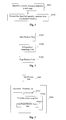
- the embodiments of the present invention provide a web page resource presenting method including the following steps:
- Specific resources include single-media resources and/or multi-media resources.
- the multi-media resources can be interactive multi-media resources. More specifically, such specific resources may include, but not limited to, any one of video resources, audio resources, image resources, animation (including animated GIF or flash animation, etc.), text resources, and any combinations thereof.
- the specific resources can also be certain resources created in the future that are related to a web page.
- the video resources may be different from the animation resources in that the video resources mainly refer to streaming media files played in players embedded in the web pages, while the animation resources are similar to image resources, such as certain flash ads, etc., in the web page.
- Embodiments of the present invention can identify the existence of a variety of specific resources. For example, identifiable audio resources can include web page background music, music played through a player embedded in a web page, and music hyperlinks in a web page, etc.
- attribute information of the resource may be first obtained, and such attribute information may include a type of the resource, etc.
- the type information of the resource may be used for identification. More specifically, various ways may be used to obtain the type information of the resource. For example, when a browser loads a web page, the browser may first send a request to a server for loading a particular web page resource. The request may include uniform resource location information of the resource. The uniform resource location information may be used by the server to find the corresponding resource. In practical applications, the uniform resource location information may include a uniform resource identifier (URI), which may be a uniform resource locator (URL) or a uniform resource name (URN).
- URI uniform resource identifier
- URL uniform resource locator
- UPN uniform resource name
- the URL is used as an example in the description of embodiments of the present invention.
- the suffix of the URL can usually indicate the type of the resource.
- the suffix of the URL in the request can be analyzed to determine the type of the resource. For example, when the suffix of the URL in a request is 'jpg,' then the type of the resource is identified as an image.
- the video resource, audio resource, image resource, animation resource, image resource and text resource can be determined by using this method.
- the request for downloading such resources usually is sent by the embedded player (when making the web page, URLs for the audio or video resources to be played by a player are included, and the player will use the URLs to send request to the server). Further, for image resources, animation resources, and text resources, etc., the browser may directly send the request to the server for downloading these resources.
- the above-mentioned method may not guarantee that a real resource type is correctly identified by intercepting and analyzing the request information.
- the URL of the resource may be arbitrary. But that normally does not impact operations on the client side.
- an image resource normally has a suffix of ⁇ jug.'
- the suffix of the URL of the image resource is '123' in the request sent out, the client side can still load the resource successfully.
- the attribute information of the web page resource can also be obtained by intercepting a response from the server to the browser. After the server receives the request from the browser, the server will send back a response to the browser.
- the response may include a response header closely followed by data contents (i.e., a binary data stream of the resource file requested by the browser).
- data contents i.e., a binary data stream of the resource file requested by the browser.
- the type of resource file sent by the server can be determined. For instance, a 'gif' image is characterized by: the first six bytes of the data contents are 'GIF89a,' and an 'Flv' format file is characterized by: the first three bytes of the data contents are 'FLV,' etc.
- the data portion of response returned by the server may be used to accurately identify the type of the resource requested by the browser.
- the request information sent by the browser may be used first to identify the type of resource and, if the identification failed, the data portion of the response information may be used to identify the type of the resource.
- identifying the specific resource related to a web page includes identifying the type of resource and/or the URL of the resource. Identifying the type of the resource can be performed according to the methods mentioned above. For identifying the URL of a particular type, it may also be realized by intercepting the request for downloading the resource sent to the server from the browser. For better understanding, a few explanations are provided: First, the browser may get a resource package before loading the web page. The resource package may contain the URL of the resource to be downloaded. Thus, for a resource such as an image, a text, and a background music, etc., a request can be sent to the server according to the corresponding URL contained in the resource package.
- the URL for such resource can be determined by directly intercepting the request. But for an audio or video resource to be played by the player embedded in the web page, the request for downloading the audio or video resource is sent by the embedded player instead. However, the request is also sent based on the URL of the audio or video resource, and the URL of the audio or video resource is also contained in the request, so that the URL of the audio or video resource may also be determined by intercepting the request sent by the embedded player.
- Playing the audio or video resource using the embedded player usually includes two steps: first, the browser downloads the player from the server using the URL of the player; second, the player downloads the audio or video resource according to the URL of the audio or video from the corresponding server. Explanation on how the URL for the player and the URL for the video or audio resource are obtained is given below.
- the resource package obtained by the browser before loading the web page includes the URL of the player, and parameters of the audio or video, such as the ID and source, etc., (it should be noted that the resource package does include the URL of the player, but not the URL of the audio or video).
- the browser downloads the player from the server based on the URL of the player, and provides the player with the required parameters such as ID and source, etc., of the audio or video. The player may then use these parameters to compose the URL of the audio or video. Then, the player can use the composed URL of the audio or video to send the request to a corresponding server to download the audio or video.
- S102 Presenting the identified specific resource in an independent window.
- an independent window refers to a window with the desktop as the parent window, or a dialog-box form floating window (e.g., a floating toolbar window of some applications can be dragged anywhere on the desktop in a unlocked mode), or a desktop window, etc.
- closing other windows does not affect the independent window.
- Such technical effects can be achieved according to the embodiments of the present invention.
- certain means is required to affect the closing of the independent window, it can also be done. For example, when the main program exits, the main program may notify all windows associated with the main program (including any independent window) to close.
- contents presented in the independent window are not limited as the specific resource itself (for example, certain contents may be presented in areas surrounding the specific resource, etc.). But the contents may also be limited to the specific resource itself and do not include any other additional contents.
- the user can only see the video in the independent window (i.e., limited to the contents of the piece of video), unlike when playing using the player embedded in the web page, images surrounding the player and other contents may also be seen.
- Presenting the identified specific resource in the independent window can be realized using various methods, as separately described in detail as follows:
- an independent window may be created first (for example, a window with desktop window as the parent window or a dialog-box type window), then the identified web page resource may be presented in the created independent window.
- the independent window may be created after identifying the specific resources related to the web page. After the independent window is created, the specific resource may be presented in the independent window. There are also several ways on how to present the identified specific resource in the independent window, as described below.
- the parent window of the original web page window containing the specific resource when the parent window of the original web page window containing the specific resource is initially a browser window, the parent window of the original web page window may be changed to the independent window by using certain functions from the operating system (such as a 'set parent' function).
- the contents of the original web page containing the specific resource can be shown in the independent window.
- the size of the independent window may be relatively small. It may be desired to move the original web page window according to the location of the identified resource such that the identified specific resource is presented in the independent window.
- the size of the independent window may not match the display size of the specific resource. In such a case, the size of the independent window may be adjusted to match the display size of the identified resource.
- front-end page elements may be analyzed in advance in order to determine the coordinates of a starting point and an end point of the specific resource in the original web page.
- the original web page window is now a child window of the created independent window, moving the original web page window does not change the position of the independent window. Therefore, the relative positions between the independent window and the original web page window may be changed such that the specific resource can be moved to the independent window to be presented.
- the created independent window is the parent window of the original web page window, moving the independent window may cause the original web page window to move together with the independent window, and the relative positions between the independent window and the original web page window do not change. Therefore, in general, the independent window is not moved to move the specific resource to the independent window to be presented.
- method (1) when method (1) is used, at the user display level, it is equivalent to that the original web page containing the specific resource disappeared. For example, when a video resource is presented, the user may see only the video resource in the independent window, and cannot see any other contents surrounding the video resource in the original web page window. Further, for a multiple-tag browser, the browser will no longer have the tab for the original web page. Thus, when the independent window is closed, the original web page window is also closed along with the independent window.
- the parent window of the specific resource window is the window of the original web page containing the specific resource (the specific resource window has the original web page window as the parent window). Because the identified resource itself is presented in a window form, the parent window of the specific resource window may be directly modified to the independent window, and the specific resource can be presented in the independent window.
- such audio and/or video resource is a window-type resource
- the specific resource window is the player window.
- the parent window of the player window is the window of the original web page containing the player.
- the parent window of the player window can be changed from the original web page window to the created independent window, so that the audio and/or video resource can be played in the independent window.
- method (2) it is equivalent to that the specific resource in the original web page is moved to the independent window to be played. Further, at the user display level, it is equivalent to that the resource presented in the independent window disappeared from the original web page.
- the original web page window is not closed and, for a multiple-tag browser, the browser may still have the tab of the original web page and the other contents of the original web page window may also remain displayed in the original web page. Further, when the independent window is closed, although the original web page window is not closed, the user cannot see the specific resource presented in the independent window.
- the specific resource can be presented in the independent window without reloading and, effectively, only the presentation format in the original web page is changed.
- they can be presented in synchronization with the original web page. For example, when a video is being played in the original web page, the parent window of the player window playing the video can be changed into the independent window, and the video can then continue to be presented in the independent window.
- the specific resource can be presented in the independent window after reloading the identified resources, as described below.
- the temporary browser navigation (e.g.., an IE page) is created with the independent window as the parent window.
- the temporary browser navigation window may then reload the original web page containing the specific resource.
- the effects of the display is equivalent to that the browser window is manually reduced first, and a web page is then loaded in the reduced-size browser. Only upper-left corner of the web page may be visible, and scroll bars may appear on right and bottom sides of the web page.
- the navigation page window may be moved according to the coordinates of the specific resource until the specific resource is presented in the independent window.
- presenting the specific resource in the independent window can be achieved.
- the size of the independent window may also be adjusted to match the size of the player window such that the user can only view the video and other resources played in the player in the independent window, and other contents of the original web page may appear automatically hidden.
- the video needs to be presented in an independent window.
- the independent window can be created and a temporary browser navigation page is also created with the independent window as the patent window.
- the web page is then reloaded into the independent window, and the temporary browser navigation page is moved based on the coordinates of the video in the original web page.
- the size of the independent window is also adjusted to match the size of the player.
- the URL of the original web page and the coordinates of the specific resource in the original web page need to be obtained in advance.
- the URL of the original web page can be obtained when determining the corresponding relationship between the specific resource and the web page, the details of which is omitted here, and the coordinates of the specific resource in the original web page may be obtained through analyzing the front-end page elements.
- moving the created browser navigation page window is similar to that in method (1) and details is also omitted.
- the size of the created independent window may be different from the display size of the specific resource.
- the size of the created independent window may be adjusted to match the display size of the specific resource.
- the temporary browser navigation page needs to load the source code of the player.
- source code of the player in the original web page may include the URL of the player together with information about the video resource to be played in the player.
- the player may compose the URL for the video resource and download and play the video resource.
- presenting the resources in the independent window may not be synchronized with presenting the resources in the original web page. For example, if a video is being played in the original web page window, and when the video is extracted to the independent window to be played, the player needs to be reloaded, and the video is played from the beginning.
- audio, video, or image resources played in a player embedded in the web page can be presented in such created independent window.
- Particular methods to create the independent window have been realized using existing technologies and are omitted herein.
- Method two a desktop window is created in advance (the desktop window is now an independent window), and the parent window of the original web page window containing the identified specific resource is directly changed from the browser window to the desktop window.
- the specific resource does not need to be reloaded from the server, which is equivalent to changing the format of the presentation in the original web page.
- the original web page window may be re-organized (e.g., hiding other contents except the identified resources in the web page, etc.).
- the parent window of the re-organized web page window can be changed to the pre-generated desktop window (there is no limit on when to create the desktop window, which can be created upon power-on or later in time, as long as the desktop window is created prior to changing the parent window into the desktop window).
- the re-organized web page may be presented in the created independent window (i.e., the desktop window).
- the IE control has three layers of windows, and the names of the three windows are, from the outside to inside: the container window Shell Embedding (can be viewed as the outermost-layer window); document object window Shell DocObject View (can be viewed as the middle-layer window); and the browser service window Internet Explorer_Server (the innermost-layer window).
- the three windows have a relative inner/outer relationship (also known as the parent-child relationship)
- the original web page window containing the specific resources normally belongs to Shell Embedding.
- Shell DocObject View and Internet Explorer_Server are inner windows with respect to Shell Embedding and, certainly, the Internet Explorer_Server is the inner window of Shell DocObject View.
- the parent window of the original web page window is directly changed to the desktop window (the desktop of a computer is also a window, usually called a desktop window), and presenting only the specific resource in the original web page window containing the specific resource (at this time the parent of the window is already the desktop window) can be achieved through adjusting the size of the original web page window on one hand, and on the other hand adjusting the Shell DocObject View or Internet Explorer_Server relative to the position of the original web page window (i.e., Shell Embedding).
- the position of Internet Explorer_Server is described for illustrative purposes. Adjusting the Shell DocObject View is done similarly and its description is omitted. First, the size of the outermost-layer window (i.e., the original web page window containing the identified resource) is adjusted to the size of the specific resource. Further, the size of the innermost-layer window (i.e., Internet Explorer_Server) is adjusted such that the window can display the entire area of the specific resource. Then, the position of the innermost-layer window (i.e., Internet Explorer_Server) is moved such that the area of the specific resource and the display area of outermost-layer window (i.e., the original web page window containing the specific resource) have consistent position and size. At that moment, because the innermost-layer window (i.e., Internet Explorer_Server) is a child window, areas outside the specific resource area are blocked. The user may thus only see the contents of the specific resource.
- the innermost-layer window i.e., Internet Explorer_Server
- the parent window of the specific resource window may be directly changed from the original web page window to the desktop window, so that presenting the specific resource in the independent window can be directly achieved.
- the specific resource window different from changing the parent window of the specific resource window to a newly created independent window according to above-mentioned method two, under the current method, when presenting the specific resource in the independent window, the specific resource window usually lacks an outside frame.
- the independent window may also be a known player.
- the known player may be started to present the identified specific resource in the independent window.
- the known player can include any locally installed player by the user.
- the application program on the client side e.g., the browser
- a built-in player e.g., a flash player, etc.
- the built-in player may then download the identified specific resource, so as to present the identified specific resource in the independent window.
- Such approach may be desired for a specific resource without a corresponding embedded player in the web page, such as web page background music and other similar audio or video resources.
- these players are independent windows and such presentations are also called presenting the identified specific resource in an independent window.
- the created independent window and the known player are all called independent windows in sections below. Unless stated specifically, the independent window refers to a created independent window or a known player.
- the known player when the known player (including a locally installed player or a browser's built-in player) obtains the URL of the resource, the known player can automatically send a request to the server for downloading the resource based on the URL of the resource, and further plays the corresponding resource.
- identifying the specific resource related to the web page more specifically includes identifying the URL of the specific resource, and providing the identified URL of the specific resource to the know player.
- the player can send the request to the server for downloading the specific resource based on the URL, and can also present the specific resource in the independent window of the known player after receiving the specific resource.
- starting the known player includes opening the known player and providing the URL of the identified resource to the player two steps.
- the original web page containing the specific resource may disappear, or the specific resource may disappear from the original web page.
- the independent window presenting the specific resource can be restored to the original web page state through a configured page restore entry.
- the specific resource is returned to the fixed location within the original web page, the same as what exists prior to being presented in the independent window.
- the specific resource related to the web page may include any specific resource contained in the web page (such as a picture, a text resource, a background music, etc., in the web page); and/or, any specific resource in a sub-page of the current web page (for example, some pages on the Mop main web page are sub-pages of the Mop main web page); any specific resources in web pages related to the current web page, and any specific resource backend-transferred in the web page (for example, the audio, video and other resources played by a player embedded in the web page are backend transferred in the web page), and so on.
- any specific resource contained in the web page such as a picture, a text resource, a background music, etc., in the web page
- any specific resource in a sub-page of the current web page for example, some pages on the Mop main web page are sub-pages of the Mop main web page
- any specific resources in web pages related to the current web page for example, the audio, video and other resources played by a player embedded in the web
- the web page related to the current web page may include a web page pointed to by a hyperlink in the current web page, or have a same theme as the current web page (for example, in the BBS system, due to a large number of posts, several web pages may have the same theme).
- the embodiments of the present invention not only can present the resource contained in the web page in the independent window, but also can present the resources of the sub-pages and related web pages of the current web page in the independent window. This enables the user to present the resources of those related web pages without opening them and, thus, brings all new experience to the user.
- the specific resource related to the web page can be identified by an application program running on the client side, for example, an application program from the operating system running on the client side.
- application program can be the browser or a module used by the browser.
- the web browser can directly identify the specific resource related to the web page, and present the identified specific resource in an independent window, without the need to install other plug-ins or to rely on other means.
- a prompt indicating such specific resource contained in the current web page can be displayed in the window where the web page containing the specific resource is located, so as to prompt the user which web page contains which specific resource. If needed, more information, such as resource name, size, and even downloading address, can be displayed.
- the prompt may be displayed as a prompt icon, and can be displayed at various browsing locations, such as the browser's address bar, tab bar or close to the resource, tool bar, and side bar. If the currently-opened web page is presenting or contains the specific resource, the prompt can be shown in any one or more of the above-mentioned locations.
- the user can only see the tab bar corresponding to the web page containing the specific resource, and the prompt indicating the specific resource in the web page can still be given on the tab bar.
- the prompt may be displayed using a list or a drop-down list.
- the front-end page elements can be analyzed to obtain the coordinates of the specific resource in the web page, and the prompt can then be displayed near the location of the resource based on the coordinates.
- information on the specific resources of several web pages may be combined. For example, if there are five currently-opened web pages, each having a video resource (i.e., the specific resource), these video resources may be prompted at locations such as the tool bar, etc., using a drop-down list. Or, if a web page has multiple specific resources, they can also be combined to be prompted. For example, in the web page currently opened by the user, if five video resources are identified, the prompt indicating the five videos in the web page can be displayed at a certain location of the web page or at locations such as the tool bar of the browser using a drop-down list.
- the prompt for the specific resources is mainly for the user to quickly find relevant specific resources.
- presenting the identified specific resource in an independent window can be in an active display mode or a passive display mode.
- active display rules may be pre-configured. When one or more preset active display rules are satisfied, the identified specific resource is automatically presented to the user in the independent window. Active display rules may be set based on specific requirements. For example, an active display rule may be set to "actively presenting any resources identified,” “actively presenting if only one window is currently opened,” or “actively presenting if the identified resource meets a preconfigured condition,” etc. Such active display mode may be desired for playing advertising pages.
- an entry interface for presenting the resources may be provided in advance.
- the entry interface may be provided to the user, and the user can then request which resource to present through the entry interface.
- the identified resources are not immediately presented in the independent window, but are usually notified to the user by the prompt or the resource presentation entry interface, etc., with the option of presenting them in the independent window for the user to choose. Only after receiving through the resource presentation entry interface the presentation request from the user, the resource requested by the user is presented in the independent window.
- the resource presentation entry interface may be provided separately on the web page. Using a video resource as an example, the resource presentation entry interface may be displayed in the video display area of the web page. Also, the prompt icon may be directly used as the resource presentation entry interface. That is, the user can click on a particular prompt icon on the web page to activate the presentation of certain specific resource(s) in the independent window.
- the specific resource presented in the independent window can be zoomed in or out, or its position may be changed.
- the initial size and location of the independent window may be the same as those of the original web page. If the size of the independent window is overly large or the independent window appears in the middle of the display screen, it may be difficult for the user to see other web pages. Thus, the size of the independent window may be reduced by changing the size and coordinates of the independent window, and the independent window may also be moved to the upper-left corner of the display screen.
- the specific resource being presented in the independent window can be set-top at the user display level.
- the independent window when certain video resource or image is presented in the independent window, and after the independent window is set-top at the user display level, the independent window can always be displayed at the highest user display level and will not disappear due to switching to other windows by the user. Thus, the user may be able to browse other web pages while watching the video or image in the independent window.
- the user may also perform the above operations independently. For example, when needed, the user can adjust the position of the independent window, and perform operations such as zooming and setting-top, etc., on the independent window, which may provide the user with a substantial amount of convenience.
- certain functions e.g., Set Window Pos
- Set Window Pos from the operating system can be used to set the independent window to the top.
- the original web page containing the specific resource may co-exist with the independent window presenting the specific resource.
- a Youku main page has a video, and after identifying the video resource, the video is presented in the independent window. However, at the same time, the original Youku main page still exists.
- the original web page containing the specific resource may also be hidden.
- This may be mainly used when video resources are presented in the independent window, where the video resource is presented directly using the player of the original web page, and the other parts of the original web page are hidden (i.e., configured to not display).
- the position of the player in the original web page needs to be determined.
- the front-end page elements may be analyzed in advance to determine coordinates of the starting point and the end point of the player in the original web page, and other parts outside the player are hidden based on the coordinates.
- a web page restore entry interface may be provided to restore the original web page display mode.
- the specific resource presented in the independent window is restored back to the original web page display mode.
- a "restore web page mode" button or the like may be provided in the independent window such that the user can at any time click the button to view the resources in the original web page display mode.
- a web page may contain multiple specific resources of the same type (for example, the Todou main page contains multiple video resources, a music web site includes multiple audio resources, and a BBS may include multiple images, etc.).
- the user may open multiple web pages at the same time to have multiple specific resources of the same type.
- the same type identified specific resources can be sent to the independent window one at a time or in batch to be presented.
- the specific resources sent to the independent window in batch can be arranged as a list in the independent window. At this moment, the created independent window may provide some buttons for the user to operate independently.
- buttons such as 'previous,' 'next' 'pause,' 'delete,' and 'add,' to play the resource in the independent window.
- image resources the user may click the buttons, such as 'previous' and 'next' to check the image resources.
- the multiple specific resources may be presented in multiple independent windows. The multiple independent windows may be displayed in layers or one of them may be set-top based on the user's needs.
- the present invention uses different presentation methods with respect to the characteristics of different types of the specific resources.
- the speed or progress of the presentation in the independent window can be controlled to be synchronized with the speed or progress of the original web page window.
- Such synchronization may be desired for video resources.
- the user may initially watch a video in the original web page window and become interested in the video, and may further wish to present the video in the independent window. If there is no synchronization control, the video will be played in the independent window from the beginning, which is not the user usually hoped for. However, after the synchronization control, the video will be played from the point the user is currently viewing, as to improve the user experience.
- some web pages automatically play videos, therefore it is possible that, when the user watches a video, the video has been played for a while. If the user is interested in the video, when selecting to play the video in the independent window, the user may wish to play the video from start. Under such circumstance, playing the video in the independent window does not need to be synchronized with playing the video in the original web page window. Instead, the video is played from the beginning. Thus, the practical applications do not exclude situations where no synchronization is needed. Such un-synchronized situations may also appear in playing audio resources. Because the audio resources do not affect visual experience, playing the audio from the beginning does not impact the user experience. Of course, both ways may be provided to the user and the user can choose flexibly based on the user's own needs.
- synchronized presentation can usually be achieved only through creating the independent window, while un-synchronized presentation can be achieved through either starting the known player or creating the independent window.
- un-synchronized presentation can be achieved through either starting the known player or creating the independent window.
- Both the video resource and the audio resource can cause hearing experience for the user.
- it may cause hearing interference for the user.
- the video or audio resource is played in the independent window
- the original web page containing such video or audio resource may also play the video or audio, which may also cause hearing interference for the user.
- the specific resource being presented in the independent window is a video or audio resource
- the video or audio resource in the original web page may be controlled so as to mute, pause, or remove the video or audio resource.
- some audio resources may be included in a web page without a corresponding player, such as web page background music, etc., and the user may be unable to see information about the audio resources. But the user may want to know information about the background music, such as the title and the lyrics, etc. Embodiments of the present invention can obtain such information and provide such information to the user. Thus, when the user is listening the music from the independent window, the user can see the title and lyrics, etc., of the music. There may be many particular ways to obtain such information. For example, the title of the background music may be obtained from the request sent to the server from the browser, and the lyrics of the background music can be searched on the Internet based on the title.
- buttons such as 'previous' or 'next' may be placed on image attachment in the form of floating bar.
- image positioning techniques may be used to directly locate the image resource and to present the image resource, so as to facilitate the user to quickly locate the image resource, without having to scroll or flip through the web page to check the contents.
- the post publisher may publish images in several floors and the images may include other images published by followers of the post.
- a 'next' button may be displayed near the first image, and a click on the button can automatically locate the next image or the web page containing the next image (if multiple web pages showing images with the same theme).
- both the 'previous' button and the 'next' button can be displayed nearby, so as to directly locate the previous image as well.
- the various presentation formats in the independent window and the various operations on the original web page window can be realized using the functions provided by the operating system.
- independent windows to present specific resources related to web pages allows the user to perform more operations independently, such as changing the position of the independent window, zooming in or out the independent window, and controlling which audio or video to be played.
- certain resources such as a video resource
- the independent window can be set-top at the user level, the user can browse other web pages while watching the video.
- web pages with the same theme contain multiple images, all the images from each web page can be presented together in the independent window, so that the user can conveniently view all the images without clicking the scroll bar or flipping pages.
- the computer programs can be stored on a computer readable storage medium.
- the computer programs when being executed, include the following steps: identifying a specific resource related to a web page, and presenting the identified specific resource in an independent window.
- the described storage medium can be, for example, a ROM/RAM, disk, and CD-ROM, etc.
- a web page resource presenting apparatus is also provided by embodiments of the present invention.
- the apparatus includes following units:
- independent presenting unit U202 can present the identified specific resource in the independent window.
- the independent window may include: a desktop window, or a window with the desktop window as the parent window, or a dialog-box form window, etc.
- the apparatus can also include a page restore unit U203, which is used to receive a user request to restore the original web page. After receiving the request, it triggers the independent presenting unit to restore the original web page display mode from presenting the specific resource in the independent window.
- independent presenting unit U202 may include:
- presentation processing unit U3022 includes:
- first parent window change unit U30221 is specifically used to: modify the parent window of the original web page window containing the specific resource into the independent window, adjust the relative position and/or window size between the original web page window and the independent window, and present the identified specific resource in the created independent window.
- the first parent window change unit is specifically used to: re-organize the original web page by hiding contents of the original web page other than the specific resources, and modify the parent window of the re-organized web page into the desktop window so as to present the identified specific resource in the created independent window.
- presentation processing unit U3022 may also include:
- presentation processing unit U3022 can reload the specific resource without hiding the original web page containing the specific resource (the original web page containing the specific resource co-exists with the created independent window), and perform the presentation un-synchronized with the original web page.
- presentation processing unit U3022 may also include:
- Reload sub-unit U40223 which is used to create a temporary browser navigation window with the independent window as the parent window, to reload the original web page containing the specific resource, and to present the specific resource in the created independent window.
- reload sub-unit U40223 is specifically used to: create the temporary browser navigation page with the independent window as the parent window, reload the original web page in the independent window based on the uniform resource location information of the original web page, adjust the sizes and relative positions between the navigation page window and the independent window, and present the identified specific resource in the created independent window.
- independent window can also be a known player.
- independent presenting unit U202 can present the identified specific resource in the independent window by starting the known player. Further, independent presenting unit U202 is specifically used to start the known player, and the known player downloads the identified specific resource and presents the identified specific resource. Further, the known player can be a locally-installed player by the user, or the browser's built-in player.
- identification unit U201 may include:
- identification unit U201 can identify specific resources in web pages related to the current web page, and thus may further include:
- identification unit U201 can be an application program running on the client side.
- the application program can be the browser (e.g., a web browser, a local resource browser, or a browser with both web browsing and local resource browsing functionalities), or a module used by the browser.
- the apparatus may also include prompt unit U504, which is used to display a prompt indicating such specific resource contained in the current web page in the window where the web page containing the specific resource is located (e.g., a prompt icon, etc.).
- the prompt may be displayed at various browsing locations, such as the browser's address bar, tab bar or close to the resource, tool bar, and side bar.
- independent presenting unit U202 can use an active display mode or a passive display mode.
- the presentation in the independent window can be done after receiving the user request, and the prompt icon displayed by prompt unit U504 can be used as an entry interface for presenting the resources.
- the user can then send the request for presenting the resource by clicking on the prompt icon.
- the prompt icon is used to receive the user request for presenting the specific resource and, after receiving the user request, may trigger independent presenting unit U202 to present the identified and user-requested specific resource in the independent window.
- an independent presenting entry unit U505 may be separately provided in the apparatus, and may be used to similarly receive the user request for presenting the specific resources and, after receiving the user request, may trigger independent presenting unit U202 to present the identified and user-requested specific resource in the independent window.
- the apparatus may also include a display rule decision unit U506, which is used to decide whether a preset resource active display rule is satisfied. If satisfied, display rule decision unit U506 triggers independent presenting unit U202 to present to the user with the identified specific resource in the independent window.
- the apparatus can also include an adjusting unit U607, which is used to adjust the position and size of the independent window, and a set-top unit U608, which is used to set-top the specific resource being presented in the independent window at the user display level.
- adjusting unit U607 and set-top unit U608 can automatically perform the corresponding operations, or the user can manually perform such operations. Thus, the user can watch video in the independent window while browsing other web pages.
- independent presenting unit U202 can send the identified specific resources of the same type to the independent window in batch to be presented, and can also provide some buttons in the independent window for the user to operate, such as "previous song,” “next song,” “previous picture,” and “next picture,” etc., so as to increase the user operability.
- the specific resource include at least one of a video resource, an audio resource, an image resource, and a text resource.
- video and audio resources to present means to play; for image resources and text resources, to present means to display.
- image resources and text resources to present means to display.
- independent presenting unit U202 includes the following sub-units:
- the apparatus can also include: a first control sub-unit U703, which is used to, when the specific resource being presented in the independent window is a video or audio resource, control the speed or progress of the presentation of the video or audio resource in the independent window to be synchronized with the speed or progress of the playing of the video or audio resource in the original web page.
- the apparatus can also include a second control sub-unit U704, which is used to, when the specific resource being presented in the independent window is a video or audio resource, control the video resource or the audio resource in the original web page so as to mute, pause, or remove the video or audio resource.
- independent presenting unit U202 is specifically used to display all identified images related to each web page having the same theme in respective independent windows.
- identification unit U201 can include the following sub-units:
- identification unit U201 is specifically used to identify the type of an identified specific resource and/or the URL of the specific resource.
- the web page resource presenting apparatus provided by the embodiments of the present invention can perform steps shown in the web page resource presenting method in above described embodiments, and the details of the operation processes are omitted and may refer to corresponding features in the above described method embodiments.
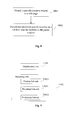
- the method includes the following steps:
- the identified specific resource is presented in a child window with the browser as the parent window.
- the specific resources can be first downloaded based on the URL of the identified specific resource, and then be presented in the child window with the browser as the parent window.
- the child window with the browser as the parent window may be viewed as a cutout window from the original web page window, and is able to send request to the server to download and present the specific resource.
- the child window with the browser as the parent window may similarly first request the server to download the player of the original web page. The downloaded player may then download the video resource from the server containing the video resource.
- the video resource can be presented in the child window with the browser as the parent window.
- the URL of the identified specific resource can be obtained at the same time as the identification is performed. For example, when identifying the specific resource from the request information sent to the server for downloading the specific resource, the URL of the specific resource can be obtained from the request information.
- this method is different from presenting the resource directly in the web page.
- a video resource is played in a player embedded in the web page
- the child window has the original web page containing the specific resource as the parent window.
- the child window i.e., the embedded player
- the child window described in the embodiments of the present invention has the browser as the parent window.
- the child window is created with the browser as the parent window, and the child window is in parallel with windows of other web pages (in fact, a web page displayed in the browser is a child window of the browser), i.e., the windows at the same level without any child-parent relationship between one another.
- a web page displayed in the browser is a child window of the browser
- the newly created child window is not affected, and the specific resource can continue to be presented in the child window. Only when the browser is closed, the child window will be closed as well.
- the web page resources presented in the child window with the browser as the parent window can include, but not limited to, any one of video resources, audio resources, image resources, animations (including animated GIF or flash animation, etc.), text resources, and any combinations thereof.
- a prompt can also be similarly displayed at locations such as near the resource, tool bar, and tab bar. The user can click on the prompt or drag the prompt to realize the presentation of the related resource in the newly created child window with the browser as the parent window.
- the specific resources related to a web page usually refer to related resources in the web page, and/or related resources in a sub-page of the current web page, and/or related resources in a web page pointed to by a hyperlink in the current web page, and/or related resources in web pages having the same theme as the current web page, and/or related resources in a back-end window of the current web page.
- this method When presenting resources in the child window with the browser as the parent window, after the related resource is identified, the resource needs to be first reloaded from the server based on the URL of the resource, and then the resource is presented in the child window with the browser as the parent window. Thus, without special processing, this method usually cannot achieve synchronized presentation. However, the advantages of this method includes that, when the original web page containing the resource closes (the browser does not close), the child window can continue presenting the related resource.
- the computer programs can be stored on a computer readable storage medium.
- the computer programs when being executed, include the following steps: identifying a specific resource related to a web page, and presenting the identified specific resource in a child window with the browser as the parent window.
- the described storage medium can be, for example, a ROM/RAM, disk, and CD-ROM, etc.
- a web page resource presenting apparatus is also provided by embodiments of the present invention.
- the apparatus includes:
- presenting unit U902 may include the following sub-units:
- the related resource includes any one or any combination of a video resource, an audio resource, an image resource, an animation resource, and a text resource.
- the systems, apparatus, and methods described in the present invention can be applicable to a variety of network or client terminal environment, such as computer equipment including personal computer equipment and the like, or mobile phones, mobile communications equipment, personal digital assistant (PDA) and other electronic equipment
- network or client terminal environment such as computer equipment including personal computer equipment and the like, or mobile phones, mobile communications equipment, personal digital assistant (PDA) and other electronic equipment
- PDA personal digital assistant
Landscapes
- Engineering & Computer Science (AREA)
- Databases & Information Systems (AREA)
- Theoretical Computer Science (AREA)
- Data Mining & Analysis (AREA)
- Physics & Mathematics (AREA)
- General Engineering & Computer Science (AREA)
- General Physics & Mathematics (AREA)
- Information Transfer Between Computers (AREA)
- User Interface Of Digital Computer (AREA)
Applications Claiming Priority (2)
| Application Number | Priority Date | Filing Date | Title |
|---|---|---|---|
| CNA2008102263788A CN101504648A (zh) | 2008-11-14 | 2008-11-14 | 展现网页资源的方法及装置 |
| PCT/CN2009/074932 WO2010054598A1 (fr) | 2008-11-14 | 2009-11-13 | Procédé et appareil pour présenter des ressources associées à une page internet |
Publications (2)
| Publication Number | Publication Date |
|---|---|
| EP2357573A1 true EP2357573A1 (fr) | 2011-08-17 |
| EP2357573A4 EP2357573A4 (fr) | 2015-04-22 |
Family
ID=40976896
Family Applications (1)
| Application Number | Title | Priority Date | Filing Date |
|---|---|---|---|
| EP09825773.6A Ceased EP2357573A4 (fr) | 2008-11-14 | 2009-11-13 | Procédé et appareil pour présenter des ressources associées à une page internet |
Country Status (6)
| Country | Link |
|---|---|
| US (1) | US9003277B2 (fr) |
| EP (1) | EP2357573A4 (fr) |
| JP (1) | JP5530451B2 (fr) |
| CN (2) | CN101504648A (fr) |
| RU (1) | RU2500026C2 (fr) |
| WO (1) | WO2010054598A1 (fr) |
Families Citing this family (91)
| Publication number | Priority date | Publication date | Assignee | Title |
|---|---|---|---|---|
| CN101504648A (zh) * | 2008-11-14 | 2009-08-12 | 北京搜狗科技发展有限公司 | 展现网页资源的方法及装置 |
| CN102117291B (zh) * | 2009-12-30 | 2013-03-06 | 北京搜狗科技发展有限公司 | 一种展现网络资源的方法及系统 |
| US20120066628A1 (en) * | 2010-09-09 | 2012-03-15 | Microsoft Corporation | Drag-able tabs |
| CN102436455B (zh) * | 2010-09-29 | 2016-12-07 | 腾讯科技(深圳)有限公司 | 实现文字浏览的方法、系统和客户端浏览器 |
| CN102130916B (zh) * | 2011-03-18 | 2013-10-30 | 深圳市深信服电子科技有限公司 | 页面内容级别的权限控制方法和装置 |
| CN104731624B (zh) * | 2011-04-01 | 2018-09-25 | 北京奇虎科技有限公司 | 一种程序加载方法及系统 |
| CN103092834A (zh) * | 2011-10-27 | 2013-05-08 | 腾讯科技(深圳)有限公司 | 浏览网页图片的方法及客户端装置 |
| US9633016B2 (en) * | 2011-11-01 | 2017-04-25 | Google Inc. | Integrated social network and stream playback |
| CN102591950B (zh) * | 2011-12-28 | 2015-04-01 | 优视科技有限公司 | 基于移动终端的网页图片浏览方法及装置 |
| CN104462528B (zh) * | 2011-12-28 | 2018-02-09 | 优视科技有限公司 | 基于移动终端的网页图片浏览方法及装置 |
| CN103294454B (zh) * | 2012-02-24 | 2016-08-17 | 腾讯科技(深圳)有限公司 | 一种基于开放平台的内容播放方法及系统 |
| CN102737116B (zh) * | 2012-05-29 | 2016-04-13 | 深圳市同洲电子股份有限公司 | 一种网页资源保存方法和装置 |
| CN102752664B (zh) * | 2012-06-29 | 2015-05-20 | 北京奇虎科技有限公司 | 一种网页中文本字幕信息的显示方法和装置 |
| CN104735549B (zh) * | 2012-06-29 | 2018-07-24 | 北京奇虎科技有限公司 | 一种网页中文本字幕信息的显示方法和装置 |
| CN102929953A (zh) * | 2012-10-08 | 2013-02-13 | 北京奇虎科技有限公司 | 网页图片显示装置和方法 |
| CN103716703A (zh) * | 2012-10-09 | 2014-04-09 | 腾讯科技(深圳)有限公司 | 一种视频播放方法和装置 |
| CN102929971B (zh) * | 2012-10-15 | 2015-07-01 | 长春指南针科技有限公司 | 一种多媒体信息播放方法和系统 |
| CN103023870B (zh) * | 2012-11-14 | 2016-08-31 | 小米科技有限责任公司 | 一种消息中数据的输出方法、装置和设备 |
| CN102915378B (zh) * | 2012-11-16 | 2016-05-04 | 北京奇虎科技有限公司 | 网页中内容显示状态改变方法和装置 |
| CN103024608B (zh) * | 2012-11-19 | 2016-08-03 | Tcl集团股份有限公司 | 一种网络媒体播放的方法及装置 |
| CN102999342B (zh) * | 2012-11-28 | 2016-08-24 | 北京奇虎科技有限公司 | 一种网页中图片的全屏浏览方法及其装置 |
| CN102999341B (zh) * | 2012-11-28 | 2016-05-18 | 北京奇虎科技有限公司 | 用于网页的图片全屏浏览方法和装置 |
| CN103019710B (zh) * | 2012-12-03 | 2016-08-03 | 北京奇虎科技有限公司 | 用于浏览器的声音控制方法及装置 |
| CN103034517B (zh) * | 2012-12-14 | 2016-09-28 | 北京奇虎科技有限公司 | 浏览器控制工具加载方法和装置 |
| CN103077047B (zh) * | 2012-12-25 | 2016-08-03 | 北京奇虎科技有限公司 | 一种插件播放方法及装置 |
| CN103064680B (zh) * | 2012-12-25 | 2016-08-03 | 北京奇虎科技有限公司 | 浏览器中插件的播放方法及装置 |
| US8878997B2 (en) | 2013-03-11 | 2014-11-04 | Sony Corporation | Electronic displays having paired canvases |
| US20140259083A1 (en) * | 2013-03-11 | 2014-09-11 | Brant Candelore | System and method for use in enhancing the display of multimedia content |
| KR102077505B1 (ko) * | 2013-03-15 | 2020-04-07 | 삼성전자주식회사 | 전자장치의 웹 페이지 처리 방법 및 장치 |
| CN103294767A (zh) * | 2013-04-22 | 2013-09-11 | 腾讯科技(深圳)有限公司 | 浏览器的多媒体信息显示方法及装置 |
| CN103281457B (zh) * | 2013-06-03 | 2016-08-10 | 贝壳网际(北京)安全技术有限公司 | 一种移动终端浏览器中视频播放方法及装置 |
| CN104284250A (zh) * | 2013-07-12 | 2015-01-14 | 贝壳网际(北京)安全技术有限公司 | 一种视频处理方法、装置、服务器和客户端设备 |
| CN104331224B (zh) | 2013-07-22 | 2018-02-23 | 腾讯科技(深圳)有限公司 | 一种网页内容浏览方法及装置、终端设备 |
| CN104346176B (zh) * | 2013-07-24 | 2019-04-12 | 腾讯科技(深圳)有限公司 | 一种浏览器启动的方法及装置 |
| CN103401935A (zh) * | 2013-08-06 | 2013-11-20 | 上海鼎为通讯电子有限公司 | 移动终端及其通过网络浏览器共享数据的方法 |
| CN104995619B (zh) * | 2013-08-23 | 2020-06-26 | 华为终端有限公司 | 一种网页页面处理方法及设备 |
| CN104519084B (zh) * | 2013-09-27 | 2017-12-05 | 华为终端有限公司 | 一种显示信息的方法及装置 |
| CN103544008B (zh) * | 2013-10-12 | 2017-02-01 | 北京奇虎科技有限公司 | 浏览器中播放音频的方法和装置 |
| CN103618699B (zh) * | 2013-11-12 | 2016-09-21 | 吴晓军 | 一种调用组件的方法及装置 |
| CN104809113B (zh) * | 2014-01-23 | 2019-08-09 | 腾讯科技(深圳)有限公司 | 网页信息的显示方法及装置 |
| CN103914515B (zh) * | 2014-02-21 | 2017-12-26 | 百度在线网络技术(北京)有限公司 | 一种用于在目标页面中发布目标资源的方法与设备 |
| CN103914327A (zh) * | 2014-04-25 | 2014-07-09 | 广东威创视讯科技股份有限公司 | 插件加载方法和插件加载模块 |
| RU2580423C2 (ru) | 2014-04-30 | 2016-04-10 | Общество С Ограниченной Ответственностью "Яндекс" | Способ отображения веб-ресурса, электронное устройство и машиночитаемый носитель информации |
| US9442640B2 (en) | 2014-06-11 | 2016-09-13 | Google Inc. | Display mode based media player switching |
| CN104036011B (zh) * | 2014-06-24 | 2020-06-12 | 北京奇虎科技有限公司 | 网页元素的显示方法以及浏览器装置 |
| CN106462561B (zh) | 2014-06-26 | 2020-06-09 | 谷歌有限责任公司 | 优化浏览器渲染过程 |
| WO2015196414A1 (fr) | 2014-06-26 | 2015-12-30 | Google Inc. | Architecture de rendu et d'extraction optimisée par lots |
| WO2015196405A1 (fr) | 2014-06-26 | 2015-12-30 | Google Inc. | Procédé de rendu de navigateur optimisé |
| CN105407407A (zh) * | 2014-06-26 | 2016-03-16 | 广州市动景计算机科技有限公司 | 视频的播放方法和装置 |
| CN104133898A (zh) * | 2014-07-31 | 2014-11-05 | 上海二三四五网络科技股份有限公司 | 一种浏览器内视频小窗播放的方法和装置 |
| CN104093062A (zh) * | 2014-07-31 | 2014-10-08 | 上海斐讯数据通信技术有限公司 | 一种用于移动终端的网页视频加载系统及其加载方法 |
| CN104202674B (zh) * | 2014-08-29 | 2018-12-14 | 深圳市云来网络科技有限公司 | 网页中音频与视频共存时的音频视频交互方法及系统 |
| CN104268250A (zh) * | 2014-09-30 | 2015-01-07 | 北京奇虎科技有限公司 | 一种网页中视频元素的播放方法和装置 |
| CN104506450A (zh) * | 2014-11-06 | 2015-04-08 | 小米科技有限责任公司 | 媒体资源反馈方法及装置 |
| CN104391741B (zh) * | 2014-11-06 | 2017-11-07 | 中国石油天然气集团公司 | 一种基于链式的多窗口控制和数据处理方法、装置及系统 |
| CN105701124A (zh) * | 2014-11-28 | 2016-06-22 | 阿里巴巴集团控股有限公司 | 一种提供提示信息的方法及装置 |
| CN104462359B (zh) * | 2014-12-05 | 2018-03-06 | 广东威创视讯科技股份有限公司 | 降低浏览器负载的方法和装置 |
| CN104469516B (zh) * | 2014-12-11 | 2017-12-19 | 福州瑞芯微电子股份有限公司 | 一种安卓系统的网页视频处理方法和装置 |
| CN104462455B (zh) * | 2014-12-16 | 2016-09-21 | 北京京东尚科信息技术有限公司 | 网络数据的展示处理方法和装置 |
| CN104572912B (zh) * | 2014-12-26 | 2017-03-29 | 北京京东尚科信息技术有限公司 | 一种网页页面加载方法及系统 |
| WO2016122343A1 (fr) * | 2015-01-29 | 2016-08-04 | Роман Павлович ЧЕСКИДОВ | Procédé en ligne pour créer des pages de publicité sur un site et pour gérer leur contenu |
| CN104703035A (zh) * | 2015-02-12 | 2015-06-10 | 卓易畅想(北京)科技有限公司 | 一种在用户设备中在线播放多媒体的方法和装置 |
| RU2637882C2 (ru) * | 2015-03-31 | 2017-12-07 | Общество С Ограниченной Ответственностью "Яндекс" | Способ управления отображением веб-ресурсов в браузерном окне, способ помещения вкладок в стек в браузерном окне, электронное устройство и сервер |
| CN104834676B (zh) * | 2015-04-03 | 2018-07-10 | 北京金山安全软件有限公司 | 一种网页扩展信息展示方法及装置 |
| CN105183453B (zh) * | 2015-08-07 | 2019-04-02 | 安一恒通(北京)科技有限公司 | 基于网页的信息获取方法及装置 |
| CN105488145B (zh) * | 2015-11-26 | 2019-07-09 | 小米科技有限责任公司 | 网页内容的显示方法、装置及终端 |
| CN105740900A (zh) * | 2016-01-29 | 2016-07-06 | 百度在线网络技术(北京)有限公司 | 信息识别的方法和装置 |
| CN105592166A (zh) * | 2016-03-07 | 2016-05-18 | 福建宏天信息产业有限公司 | 移动平台的html5视频文件持久化处理方法及系统 |
| CN105975844B (zh) * | 2016-06-30 | 2018-12-28 | 北京奇虎科技有限公司 | 一种登录方法和装置 |
| CN106897346A (zh) * | 2016-08-04 | 2017-06-27 | 阿里巴巴集团控股有限公司 | 数据处理的方法及装置 |
| CN107786906B (zh) * | 2016-08-26 | 2021-05-25 | 腾讯科技(深圳)有限公司 | 一种浏览器在独立窗口中播放视频的方法和装置 |
| CN106649525A (zh) * | 2016-10-19 | 2017-05-10 | 北京小米移动软件有限公司 | 显示网页信息的方法及装置 |
| CN107241657A (zh) * | 2017-07-06 | 2017-10-10 | 广州优视网络科技有限公司 | 视频播放方法、装置、计算设备以及存储介质 |
| CN108228040A (zh) * | 2017-12-28 | 2018-06-29 | 北京安云世纪科技有限公司 | 移动终端及浮屏操作控制方法、装置 |
| CN108156508B (zh) * | 2017-12-28 | 2020-10-20 | 北京安云世纪科技有限公司 | 弹幕信息处理的方法、装置、移动终端、服务器及系统 |
| CN108399089A (zh) * | 2018-01-25 | 2018-08-14 | 阿里巴巴集团控股有限公司 | 视图界面的显示方法及装置 |
| CN108520013B (zh) * | 2018-03-21 | 2021-10-22 | Oppo广东移动通信有限公司 | 图集显示方法、装置、移动终端及存储介质 |
| CN108449641B (zh) * | 2018-03-28 | 2021-04-27 | 聚好看科技股份有限公司 | 播放媒体流的方法、装置、计算机设备和存储介质 |
| US11356532B1 (en) * | 2018-08-10 | 2022-06-07 | Meta Platforms, Inc. | Systems and methods for packaging web resources |
| US10623508B2 (en) * | 2018-09-12 | 2020-04-14 | Citrix Systems, Inc. | Systems and methods for integrated service discovery for network applications |
| CN110018766B (zh) * | 2019-01-04 | 2022-04-22 | 创新先进技术有限公司 | 网页表单填写方法及装置 |
| CN110262844B (zh) * | 2019-04-17 | 2022-10-14 | 创新先进技术有限公司 | 对话框组件调用方法、装置、服务器及存储介质 |
| CN110277110B (zh) * | 2019-06-27 | 2023-10-10 | 深圳前海微众银行股份有限公司 | 一种网络页面的录音、播放方法、装置及终端 |
| CN112714365B (zh) * | 2019-10-25 | 2024-02-09 | 上海哔哩哔哩科技有限公司 | 视频播放方法和系统 |
| CN113766278B (zh) * | 2020-08-11 | 2024-04-12 | 北京沃东天骏信息技术有限公司 | 音频播放方法、音频播放装置和音频播放系统 |
| US11790152B2 (en) * | 2020-11-05 | 2023-10-17 | OpenFin Inc. | Presenting web content based on rules |
| EP4487198A4 (fr) | 2022-07-30 | 2025-06-25 | Samsung Electronics Co., Ltd | Procédé et système pour améliorer l´expérience d´utilisateur pour accéder à du contenu sur une interface utilisateur |
| CN115396736A (zh) * | 2022-08-30 | 2022-11-25 | 中国银行股份有限公司 | 一种视频悬浮播放方法及装置 |
| WO2025079830A1 (fr) * | 2023-10-11 | 2025-04-17 | 삼성전자주식회사 | Procédé et appareil de génération et de lecture de son |
| CN118551128B (zh) * | 2024-07-30 | 2024-11-19 | 苏州元脑智能科技有限公司 | 页面资源的加载方法和装置、存储介质及电子设备 |
| CN119148890B (zh) * | 2024-11-11 | 2025-02-25 | 北京和利时控制技术有限公司 | 一种基于dcs系统的核电站规程的管理方法和装置 |
Family Cites Families (19)
| Publication number | Priority date | Publication date | Assignee | Title |
|---|---|---|---|---|
| JPH07129355A (ja) * | 1993-11-05 | 1995-05-19 | Canon Inc | 画面表示装置および方法 |
| JP2000285006A (ja) * | 1999-03-31 | 2000-10-13 | Toshiba Corp | 情報取得制御装置及び情報取得制御方法 |
| AU2001236568A1 (en) * | 2000-01-28 | 2001-08-07 | Ibeam Broadcasting Corporation | A system and method for rewriting a media resource request and/or response between origin server and client |
| US8707185B2 (en) * | 2000-10-10 | 2014-04-22 | Addnclick, Inc. | Dynamic information management system and method for content delivery and sharing in content-, metadata- and viewer-based, live social networking among users concurrently engaged in the same and/or similar content |
| US7225225B2 (en) * | 2001-03-30 | 2007-05-29 | Sharp Laboratories Of America, Inc. | Selective synchronization of web browsers |
| US7216290B2 (en) * | 2001-04-25 | 2007-05-08 | Amplify, Llc | System, method and apparatus for selecting, displaying, managing, tracking and transferring access to content of web pages and other sources |
| WO2003040955A1 (fr) * | 2001-11-06 | 2003-05-15 | Farooq Khan | Procede et dispositif servant a saisir et a afficher une information de page web |
| JP2003345788A (ja) * | 2002-05-29 | 2003-12-05 | Sharp Corp | 電子文書表示方法、電子文書表示装置、電子文書表示プログラムおよび電子文書表示プログラムを記録した機械読取り可能な記録媒体 |
| US7143365B2 (en) * | 2002-06-18 | 2006-11-28 | Webtrends, Inc. | Method and apparatus for using a browser to configure a software program |
| AU2003218807A1 (en) * | 2002-07-27 | 2004-02-16 | Samsung Electronics Co., Ltd. | Data managing apparatus and method for reproducing interactive digital content, and information storage medium therefor |
| US7962843B2 (en) * | 2003-12-15 | 2011-06-14 | Microsoft Corporation | Browser session overview |
| GB2409391A (en) * | 2003-12-19 | 2005-06-22 | Yes Television Plc | Language support for set-top boxes using web pages |
| WO2007018102A1 (fr) * | 2005-08-11 | 2007-02-15 | Matsushita Electric Industrial Co., Ltd. | Dispositif d’informations portable et procédé d’affichage correspondant |
| US8756510B2 (en) * | 2006-10-17 | 2014-06-17 | Cooliris, Inc. | Method and system for displaying photos, videos, RSS and other media content in full-screen immersive view and grid-view using a browser feature |
| CN101192230A (zh) * | 2006-11-30 | 2008-06-04 | 重庆优腾信息技术有限公司 | 一种打开和关闭图片浏览窗口的方法及装置 |
| CN101072263A (zh) * | 2007-03-30 | 2007-11-14 | 腾讯科技(深圳)有限公司 | 一种在网络上发起voip呼叫的方法及系统 |
| CN101470729B (zh) * | 2007-12-25 | 2012-10-10 | 百度在线网络技术(北京)有限公司 | 网页图片的显示方法及装置 |
| CN101504648A (zh) * | 2008-11-14 | 2009-08-12 | 北京搜狗科技发展有限公司 | 展现网页资源的方法及装置 |
| CN101419618B (zh) * | 2008-12-05 | 2011-07-13 | 深圳市迅雷网络技术有限公司 | 一种内文信息的显示方法、系统及装置 |
-
2008
- 2008-11-14 CN CNA2008102263788A patent/CN101504648A/zh active Pending
-
2009
- 2009-11-13 EP EP09825773.6A patent/EP2357573A4/fr not_active Ceased
- 2009-11-13 JP JP2011535862A patent/JP5530451B2/ja active Active
- 2009-11-13 RU RU2011123552/08A patent/RU2500026C2/ru active
- 2009-11-13 CN CN200910206471.7A patent/CN101706796B/zh active Active
- 2009-11-13 WO PCT/CN2009/074932 patent/WO2010054598A1/fr not_active Ceased
-
2011
- 2011-04-30 US US13/098,455 patent/US9003277B2/en active Active
Also Published As
| Publication number | Publication date |
|---|---|
| RU2011123552A (ru) | 2012-12-20 |
| CN101504648A (zh) | 2009-08-12 |
| RU2500026C2 (ru) | 2013-11-27 |
| JP2012508915A (ja) | 2012-04-12 |
| CN101706796A (zh) | 2010-05-12 |
| CN101706796B (zh) | 2017-02-22 |
| JP5530451B2 (ja) | 2014-06-25 |
| EP2357573A4 (fr) | 2015-04-22 |
| WO2010054598A1 (fr) | 2010-05-20 |
| US20110202828A1 (en) | 2011-08-18 |
| US9003277B2 (en) | 2015-04-07 |
Similar Documents
| Publication | Publication Date | Title |
|---|---|---|
| JP5530451B2 (ja) | ウェブページ関連のリソースを提示する方法および装置 | |
| US8533754B2 (en) | Embedded video player with modular ad processing | |
| US9179086B2 (en) | System and method for providing dynamically updating applications in a television display environment | |
| US7735101B2 (en) | System allowing users to embed comments at specific points in time into media presentation | |
| EP1350166B1 (fr) | Procede pour diffuser des annonces publicitaires en utilisant une page a diffuseur de medias integre | |
| US20180315098A1 (en) | Information processing method, server, and computer storage medium | |
| US20080281689A1 (en) | Embedded video player advertisement display | |
| US8510333B2 (en) | Methods, systems, and apparatus for developing widgets | |
| KR101145062B1 (ko) | 비디오에서의 북마크 | |
| JP2013176103A (ja) | ビデオ内への遅延広告挿入 | |
| WO2012109568A1 (fr) | Système et procédé d'utilisation d'une application sur un dispositif mobile afin de transférer un contenu média internet | |
| KR20040002399A (ko) | 자동적으로 갱신된 일부분을 갖는 전자 문서 | |
| CN101383937A (zh) | 播放视频广告和文字信息的方法、系统、服务器和终端 | |
| WO2008070050A2 (fr) | Configuration automatique de lecteur multimédia intégré | |
| WO2015051716A1 (fr) | Procédé et appareil de lecture de données | |
| WO2015103636A2 (fr) | Injection d'instructions dans des expériences audiovisuelles complexes | |
| CN101505409B (zh) | 通过浏览器播放移动多媒体广播节目的方法及其终端 | |
| CN108810580B (zh) | 媒体内容推送方法及装置 | |
| KR101770094B1 (ko) | 이미지 기반 동영상 콘텐츠 제공 방법 및 그 시스템 | |
| KR100989182B1 (ko) | 동영상에 대응되는 투명 레이어를 이용한 부가 서비스 제공방법 및 시스템 | |
| CN101491089A (zh) | 媒体演示中的嵌入式元数据 | |
| US10673771B2 (en) | Platform-agnostic thick-client system for combined delivery of disparate streaming content and dynamic content by combining dynamic data with output from a continuous queue transmitter | |
| US10055508B1 (en) | Platform-agnostic thick-client system for combined delivery of disparate streaming content and dynamic content by combining dynamic data with output from a continuous queue transmitter | |
| WO2012166154A1 (fr) | Lecteur vidéo incorporé à traitement de publicité modulaire | |
| KR20040063745A (ko) | 홈 미디어 센터의 메인 화면 표시 방법 |
Legal Events
| Date | Code | Title | Description |
|---|---|---|---|
| PUAI | Public reference made under article 153(3) epc to a published international application that has entered the european phase |
Free format text: ORIGINAL CODE: 0009012 |
|
| 17P | Request for examination filed |
Effective date: 20110520 |
|
| AK | Designated contracting states |
Kind code of ref document: A1 Designated state(s): AT BE BG CH CY CZ DE DK EE ES FI FR GB GR HR HU IE IS IT LI LT LU LV MC MK MT NL NO PL PT RO SE SI SK SM TR |
|
| RIN1 | Information on inventor provided before grant (corrected) |
Inventor name: WAN, YONG |
|
| DAX | Request for extension of the european patent (deleted) | ||
| RA4 | Supplementary search report drawn up and despatched (corrected) |
Effective date: 20150325 |
|
| RIC1 | Information provided on ipc code assigned before grant |
Ipc: G06F 17/30 20060101AFI20150319BHEP |
|
| STAA | Information on the status of an ep patent application or granted ep patent |
Free format text: STATUS: EXAMINATION IS IN PROGRESS |
|
| 17Q | First examination report despatched |
Effective date: 20170220 |
|
| STAA | Information on the status of an ep patent application or granted ep patent |
Free format text: STATUS: THE APPLICATION HAS BEEN REFUSED |
|
| REG | Reference to a national code |
Ref country code: DE Ref legal event code: R003 |
|
| 18R | Application refused |
Effective date: 20180927 |