EP2367098A2 - Tragbare Vorrichtung und Steuerverfahren dafür - Google Patents
Tragbare Vorrichtung und Steuerverfahren dafür Download PDFInfo
- Publication number
- EP2367098A2 EP2367098A2 EP10171590A EP10171590A EP2367098A2 EP 2367098 A2 EP2367098 A2 EP 2367098A2 EP 10171590 A EP10171590 A EP 10171590A EP 10171590 A EP10171590 A EP 10171590A EP 2367098 A2 EP2367098 A2 EP 2367098A2
- Authority
- EP
- European Patent Office
- Prior art keywords
- touch
- user
- dynamic
- control signal
- external device
- Prior art date
- Legal status (The legal status is an assumption and is not a legal conclusion. Google has not performed a legal analysis and makes no representation as to the accuracy of the status listed.)
- Ceased
Links
Images



Classifications
-
- G—PHYSICS
- G06—COMPUTING OR CALCULATING; COUNTING
- G06F—ELECTRIC DIGITAL DATA PROCESSING
- G06F3/00—Input arrangements for transferring data to be processed into a form capable of being handled by the computer; Output arrangements for transferring data from processing unit to output unit, e.g. interface arrangements
- G06F3/01—Input arrangements or combined input and output arrangements for interaction between user and computer
- G06F3/048—Interaction techniques based on graphical user interfaces [GUI]
- G06F3/0487—Interaction techniques based on graphical user interfaces [GUI] using specific features provided by the input device, e.g. functions controlled by the rotation of a mouse with dual sensing arrangements, or of the nature of the input device, e.g. tap gestures based on pressure sensed by a digitiser
- G06F3/0488—Interaction techniques based on graphical user interfaces [GUI] using specific features provided by the input device, e.g. functions controlled by the rotation of a mouse with dual sensing arrangements, or of the nature of the input device, e.g. tap gestures based on pressure sensed by a digitiser using a touch-screen or digitiser, e.g. input of commands through traced gestures
- G06F3/04883—Interaction techniques based on graphical user interfaces [GUI] using specific features provided by the input device, e.g. functions controlled by the rotation of a mouse with dual sensing arrangements, or of the nature of the input device, e.g. tap gestures based on pressure sensed by a digitiser using a touch-screen or digitiser, e.g. input of commands through traced gestures for inputting data by handwriting, e.g. gesture or text
-
- G—PHYSICS
- G06—COMPUTING OR CALCULATING; COUNTING
- G06F—ELECTRIC DIGITAL DATA PROCESSING
- G06F3/00—Input arrangements for transferring data to be processed into a form capable of being handled by the computer; Output arrangements for transferring data from processing unit to output unit, e.g. interface arrangements
- G06F3/01—Input arrangements or combined input and output arrangements for interaction between user and computer
- G06F3/048—Interaction techniques based on graphical user interfaces [GUI]
- G06F3/0481—Interaction techniques based on graphical user interfaces [GUI] based on specific properties of the displayed interaction object or a metaphor-based environment, e.g. interaction with desktop elements like windows or icons, or assisted by a cursor's changing behaviour or appearance
- G06F3/0482—Interaction with lists of selectable items, e.g. menus
-
- G—PHYSICS
- G08—SIGNALLING
- G08C—TRANSMISSION SYSTEMS FOR MEASURED VALUES, CONTROL OR SIMILAR SIGNALS
- G08C17/00—Arrangements for transmitting signals characterised by the use of a wireless electrical link
- G08C17/02—Arrangements for transmitting signals characterised by the use of a wireless electrical link using a radio link
-
- H—ELECTRICITY
- H04—ELECTRIC COMMUNICATION TECHNIQUE
- H04M—TELEPHONIC COMMUNICATION
- H04M1/00—Substation equipment, e.g. for use by subscribers
- H04M1/72—Mobile telephones; Cordless telephones, i.e. devices for establishing wireless links to base stations without route selection
- H04M1/724—User interfaces specially adapted for cordless or mobile telephones
- H04M1/72403—User interfaces specially adapted for cordless or mobile telephones with means for local support of applications that increase the functionality
- H04M1/72409—User interfaces specially adapted for cordless or mobile telephones with means for local support of applications that increase the functionality by interfacing with external accessories
- H04M1/72415—User interfaces specially adapted for cordless or mobile telephones with means for local support of applications that increase the functionality by interfacing with external accessories for remote control of appliances
-
- H—ELECTRICITY
- H04—ELECTRIC COMMUNICATION TECHNIQUE
- H04N—PICTORIAL COMMUNICATION, e.g. TELEVISION
- H04N21/00—Selective content distribution, e.g. interactive television or video on demand [VOD]
- H04N21/40—Client devices specifically adapted for the reception of or interaction with content, e.g. set-top-box [STB]; Operations thereof
- H04N21/41—Structure of client; Structure of client peripherals
- H04N21/422—Input-only peripherals, i.e. input devices connected to specially adapted client devices, e.g. global positioning system [GPS]
- H04N21/42204—User interfaces specially adapted for controlling a client device through a remote control device; Remote control devices therefor
-
- H—ELECTRICITY
- H04—ELECTRIC COMMUNICATION TECHNIQUE
- H04N—PICTORIAL COMMUNICATION, e.g. TELEVISION
- H04N21/00—Selective content distribution, e.g. interactive television or video on demand [VOD]
- H04N21/40—Client devices specifically adapted for the reception of or interaction with content, e.g. set-top-box [STB]; Operations thereof
- H04N21/41—Structure of client; Structure of client peripherals
- H04N21/422—Input-only peripherals, i.e. input devices connected to specially adapted client devices, e.g. global positioning system [GPS]
- H04N21/42204—User interfaces specially adapted for controlling a client device through a remote control device; Remote control devices therefor
- H04N21/42206—User interfaces specially adapted for controlling a client device through a remote control device; Remote control devices therefor characterized by hardware details
- H04N21/42224—Touch pad or touch panel provided on the remote control
-
- G—PHYSICS
- G08—SIGNALLING
- G08C—TRANSMISSION SYSTEMS FOR MEASURED VALUES, CONTROL OR SIMILAR SIGNALS
- G08C2201/00—Transmission systems of control signals via wireless link
- G08C2201/30—User interface
-
- G—PHYSICS
- G08—SIGNALLING
- G08C—TRANSMISSION SYSTEMS FOR MEASURED VALUES, CONTROL OR SIMILAR SIGNALS
- G08C2201/00—Transmission systems of control signals via wireless link
- G08C2201/90—Additional features
- G08C2201/93—Remote control using other portable devices, e.g. mobile phone, PDA, laptop
-
- H—ELECTRICITY
- H04—ELECTRIC COMMUNICATION TECHNIQUE
- H04M—TELEPHONIC COMMUNICATION
- H04M2250/00—Details of telephonic subscriber devices
- H04M2250/22—Details of telephonic subscriber devices including a touch pad, a touch sensor or a touch detector
Definitions
- Apparatuses and methods consistent with the exemplary embodiments relate to a portable device and a control method thereof, and more particularly, to a portable device with a touch screen and a control method thereof, which can control an external device.
- a user interface (UI) capable of controlling an electronic device trends has a tendency to use a touch screen.
- a remote controller capable of controlling an external device such as a television (TV), a set-top box (STB), etc. has also included the touch screen.
- TV television
- STB set-top box
- GUI graphic user interface
- one or more exemplary embodiments provide a portable device with a touch screen and a control method thereof, which is convenient to control an external device.
- An aspect of an exemplary embodiment is to provide a portable device with a touch screen and a control method thereof, which can execute at least one UI menu included in the touch screen or control an external device by determining a user's touch input.
- An aspect of another exemplary embodiment is to provide a portable device and a control method thereof, which can determine a direction of a user's touch input and transmit a control signal corresponding to the touch input to an external device, so that he/she can control the external device without necessarily viewing a touch screen provided in the portable device.
- a portable device including: a communication unit which communicates with an external device; a touch screen which includes at least one user interface (UI) menu and detects a plurality of touch inputs of a user; and a controller which determines whether the plurality of touch inputs of the user successively detected by the touch screen correspond to a static touch or a dynamic touch according to whether a first position of a touch start and a second position of a touch termination are the same, performs an operation corresponding to the first and second positions on the at least one UI menu if the plurality of successively detected touch inputs correspond to the static touch wherein the first and second positions are the same, and controls the communication unit to send the external device a control signal corresponding to the dynamic touch if the successive touch inputs correspond to the dynamic touch wherein the first and second positions are different.
- UI user interface
- the controller may determine whether the successive touch inputs correspond to the static touch or the dynamic touch based on at least one of a distance between the first position and the second position and a time between the touch start of the first position to the touch termination of the second position.
- the portable device may further include a sensor to detect a direction of a touching operation with respect to a user, wherein the controller controls the communication unit to send the external device a control signal corresponding to the direction of the touching operation detected by the sensor if the plurality of touch inputs by the user correspond to the dynamic touch.
- the direction of the touching operation may include one of up, down, left and right directions.
- the external device may include a broadcasting receiver.
- the control signal corresponding to the direction of the touching operation may include a control signal corresponding to one among channel change, volume control and menu selection of the broadcasting receiver.
- the controller may control the communication unit to send the broadcasting receiver a control signal for maintaining operation corresponding to a dynamic touch if a touch input determined as the dynamic touch is maintained for a predetermined time.
- Another aspect can be achieved by providing a method of controlling a portable device, comprising: detecting a plurality of touch inputs of a user through a touch screen which includes at least one user interface (UI) menu and detects the plurality of touch inputs of the user; determining whether the plurality of touch inputs of the user successively detected by the touch screen correspond to a static touch or a dynamic touch according to whether a first position of a touch start and a second position of a touch termination are the same; performing an operation corresponding to the first and second positions on the at least one UI menu if the plurality of successively detected touch inputs correspond to the static touch wherein the first and second positions are the same; and sending a control signal to an external device corresponding to the dynamic touch if the successive touch inputs correspond to the dynamic touch wherein the first and second positions are different.
- UI user interface
- the determining the plurality of touch inputs of the user successively detected by the touch screen correspond to a static touch or a dynamic touch may include determining whether the plurality of touch inputs correspond to the static touch or the dynamic touch based on at least one of a distance between the first position and the second position and a time between the touch start of the first position to the touch termination of the second position.
- the method may further include detecting a direction of a touching operation with respect to a user, wherein the sending the external device the control signal includes sending the external device a control signal corresponding to the direction of the detected touching operation if the plurality of touch inputs by the user correspond to the dynamic touch.
- the direction of the touching operation may include one of up, down, left and right directions.
- the external device may include a broadcasting receiver.
- the control signal corresponding to the direction of the touching operation may include a control signal corresponding to one among channel change, volume control and menu selection of the broadcasting receiver.
- the sending the external device the control signal may include sending the broadcasting receiver a control signal for maintaining operation corresponding to a dynamic touch if a touch input determined as the dynamic touch is maintained for a predetermined time.
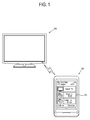
- FIG. 1 is a schematic view of a portable device system according to an exemplary embodiment
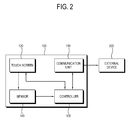
- FIG. 2 is a control block diagram of a portable device according to an exemplary embodiment
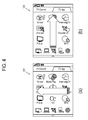
- FIGS. 3 and 4 show dynamic touches according to an exemplary embodiment
- FIG. 5 shows successive key inputs after the dynamic touch according to an exemplary embodiment
- FIG. 6 is a flowchart showing control operation of a portable device according to an exemplary embodiment.
- FIG. 1 is a schematic view of a portable device system according to an exemplary embodiment. As shown therein, the portable device system includes a portable device 100 and an external device 200.
- the portable device 100 and the external device 200 are connected through a predetermined communication unit, and various control signals are transmitted and received through the communication unit.
- the portable device 100 in this exemplary embodiment transmits a control signal corresponding to a user's predetermined touch input to the external device 200, and the external device 200 performs an operation corresponding to the control signal.
- the portable device 100 may include any portable electronic device which has a touch screen.
- the portable device 100 may include a remote controller, a smart phone, a personal digital assistant (PDA), a portable multimedia player (PMP), etc. each of which includes the touch screen.
- PDA personal digital assistant
- PMP portable multimedia player
- the portable device 100 determines a user's touch input, and executes at least one user interface (UI) menu included in the touch screen or transmits a control signal to the external device 200 according to determined results.
- UI user interface
- the external device 200 may be achieved by a television that processes a broadcasting signal and displays it on a display screen.
- the external device 200 may include an Internet protocol television (IPTV) connected to the portable device 100 through an Internet protocol (IP).
- IPTV Internet protocol television
- the external device 200 may be achieved by a set-top box (STB) having no display screen.
- the external device 200 may perform an operation corresponding to a control signal transmitted from the portable device 100.
- the portable device 100 includes a communication unit 110, a touch screen 120, a controller 130 and a sensor 140.
- the communication unit 110 communicates with the external device 200 and transmits a control signal corresponding to a user's touch input to the external device 200.
- the communication unit 110 communicates with the external device 200 through a radio frequency (RF) signal, a wired/wireless local area network (LAN) (particularly, Wi-Fi), Bluetooth, ZigBee, etc., instead of through an infrared (IR) signal.
- RF radio frequency
- LAN local area network
- IR infrared
- the touch screen 120 includes at least one UI menu, and senses a user's touch input.
- At least one UI menu included in the touch screen may be achieved as follows.
- the at least one UI menu may include a UI menu for controlling the external device 200.
- the external device is a broadcasting receiver
- the at least one UI menu on the touch screen may include a UI for selecting a menu of the broadcasting receiver; a UI for connecting a bluray disc (BD) and/or digital versatile disc (DVD) player with the broadcasting receiver; a UI for reproducing contents such as a moving picture, an MP3, a picture, etc.; a UI for setting up picture quality, sound, channel lists, etc.; a UI for changing a channel or controlling a volume; and a UI corresponding to items such as up, down, numerals, etc. included in a general remote controller.
- BD bluray disc
- DVD digital versatile disc
- the at least one UI menu on the touch screen may include a UI for a telephone call; a UI for short message service (SMS) /multimedia messaging service; a UI for connecting to Internet; a UI for reproducing an MP3/a moving picture; a UI for setting up the smart phone; a UI for executing other various applications; etc. as a smart phone's own UI menu.
- SMS short message service
- multimedia messaging service a UI for connecting to Internet
- a UI for reproducing an MP3/a moving picture
- a UI for setting up the smart phone a UI for executing other various applications; etc. as a smart phone's own UI menu.
- the touch screen 120 senses, i.e., detects, a touch input of a user.
- the touch screen 120 includes any touch screen which can sense the touch input of a user.
- the touch screen 120 may include a resistive touch screen, a surface resistive touch screen or a capacitive touch screen.
- the touch screen senses a position and/or time in the successive touch inputs of a user's touch start and termination and transmits it to the controller 130.
- the controller 130 determines whether a user's successive touch inputs sensed by the touch screen 120 are a static touch or a dynamic touch according to whether a first position corresponding to the touch start and a second position corresponding to the touch termination are the same. As a result of determination, if the user's successive touch inputs are the static touch, wherein the two positions are the same, the controller 130 performs operation of the at least one UI menu corresponding to the touch position. On the other hand, if the user's successive touch inputs are the dynamic touch, wherein the two positions are different, the controller 130 controls the communication unit 110 to transmit a control signal corresponding to the dynamic touch to the external device.
- the controller 130 receives information about coordinate distance and/or time between the first position of the touch start and the second position of the touch termination sensed on the touch screen 120. On the basis of the received information, the controller 130 determines whether the first position and the second position are the same or not.
- the static touch wherein the first position and the second position are the same includes the two positions having the same coordinates on the touch screen, or the two positions being within an area occupied with the UI menu on the touch screen. Also, if it is determined that the coordinate distance between the first position and the second position is within a predetermined distance range, the two positions are regarded as the same.
- the two positions are regarded as the same.
- the controller 130 determines the user's successive input as the static touch if the first and second positions are the same, and as the dynamic touch if the first and second positions are not the same.
- the controller 130 implements an operation corresponding to at least one menu provided on the touch screen.
- the controller 130 transmits a control signal for connection with the DVD player to the TV when a user's successive touch inputs are determined as the static touch and the UI menu corresponding to the touching position is determined to be the UI for the connection with the DVD player.
- the controller 130 performs an SMS operation corresponding to the UI for SMS when a user's successive touch inputs are determined as the static touch and the UI menu corresponding to the touching position is determined to be the UI for the SMS.
- the controller 130 regards the successive touch inputs as a signal for controlling the external device 200 and controls the communication unit 110 to transmit a control signal corresponding to the dynamic touch to the external device 200.
- the controller 130 determines the touch to be the dynamic touch.
- the portable device 100 may further include the sensor 140 for sensing a direction of a touching operation with respect to a user.
- the sensor 140 for sensing the direction of the touching operation with respect to a user may be achieved by a gyroscope or the like.
- the controller 130 receives information about a direction of a touching operation sensed by the sensor 140 and controls the communication unit 110 to transmit a control signal corresponding to the direction of the touching operation to the external device 200.
- the direction of the touching operation may be one of up, down, left and right directions. Below, the direction of the touching operation will be described in more detail with reference to FIGS. 3 to 5 .
- FIG. 4 clearly shows that the direction of the touching operation is not a direction with respect to the touch screen but a direction with respect to a user.
- FIG. 4 shows that the touch screen is in a landscape orientation (e.g., a longer side of the touch screen being aligned horizontally).
- the touch screen is in the landscape orientation, if a user's successive touch inputs are determined as the dynamic touch with the first position of the touch start being close to a user and the second position of the touch termination being farther away from the user than the first position, it is determined that the touching operation is performed in the down-to-up direction.
- the controller 130 determines that the direction of the touching operation is the same as that shown in (a) of FIG. 3 .
- (B) of FIG. 4 shows that the touch screen is in the landscape orientation. Nevertheless, if a user's successive touch inputs are determined as the dynamic touch with the first position of the touch start being to the left with respect to a user and the second position of the touch termination being farther to the right than the first position, it is determined that the touching operation is performed in the left-to-right direction. Thus, the controller 130 determines that the direction of the touching operation is the same as that shown in (B) of FIG. 3 .
- the portable device with the touch screen is convenient for a user to transmit a control signal corresponding to a touching operation to the external device by only the touching operations of the up, down, left and right directions without viewing the touch screen, if the dynamic touch is performed to transmit the control signal to the external device.
- FIG. 5 shows an example of successive key inputs.
- the controller 110 controls the communication unit 110 to send the external device a control signal for maintaining an operation corresponding to the dynamic touch.
- the controller 130 controls the communication unit 110 to send the external device a control signal for maintaining an operation corresponding to the dynamic touch of the upward direction.
- the external device is a broadcasting receiver and the portable device is a remote controller or smart phone with a touch screen by way of example.
- a control signal corresponding to a direction of a user's touching operation is a control signal corresponding to one of channel change, volume control and menu selection of the broadcasting receiver.
- the controller 130 receives information about a touching direction sensed by the sensor for sensing a direction with respect to a user, and controls the communication unit 110 to transmit a control signal for changing a channel to the broadcasting receiver if the touching operation is performed in up and down directions with respect to a user.
- the controller 130 controls the communication unit 110 to send the broadcasting receiver a control signal for changing to a channel higher by a channel number of '+1' than the certain channel.
- the controller 130 controls the communication unit 110 to send the broadcasting receiver a control signal for continuously changing from the certain channel to a higher channel.
- the controller 130 controls the communication unit 110 to send the broadcasting receiver a control signal for controlling volume. For example, as shown in (b) of FIG. 3 or (b) of FIG. 4 , if the touching operation is performed in a right direction, the controller 130 controls the communication unit 110 to send the broadcasting receiver a control signal for increasing the volume by '+1'.
- the controller 130 controls the communication unit 110 to send the broadcasting receiver a control signal for continuously increasing the volume.
- the controller 130 controls the communication unit 110 to send the broadcasting receiver a control signal corresponding to up, down, left and right keys for navigating the menu setting image/EPG image in accordance with a user's touching operation of up, down, left and right directions. That is, the controller 130 controls the communication unit 110 to send the broadcasting receiver a control signal corresponding to the up/down keys in response to the touching operation of the upward or downward direction as shown in (a) of FIG. 3 and (a) of FIG. 4 , or a control signal corresponding to the left/right keys in response to the touching operation of the upward or downward direction as shown in (b) of FIG. 3 and (b) of FIG. 4 .
- EPG electronic program guide
- FIG. 6 is a flowchart showing control operation of a portable device according to an exemplary embodiment.
- a user's successive touch inputs are sensed through the touch screen at operation S11, it is determined that the successive touch inputs are the static touch or the dynamic touch according to whether or not the first position of the touch start and the second position of the touch termination are the same at operation S12.
- operation is performed corresponding to the at least one UI menu corresponding to the touch position at operation S13.
- the user's successive touch inputs are the dynamic touch that the first and second positions are different, the user's successive touch inputs are determined as a signal for controlling the external device and the communication unit is controlled to send the external device a control signal corresponding to the dynamic touch at operation S14.
- a portable device with a touch screen determines the kind of a user's touch input, and executes at least one UI menu included in the touch screen or transmits a signal for controlling an external device that communicates with the portable device.
- a direction of a user's touch input is determined with respect to a user regardless of whether the touch screen is in a portrait orientation or a landscape orientation, so that the control signal can be transmitted corresponding to the direction of the touch input.
Landscapes
- Engineering & Computer Science (AREA)
- Human Computer Interaction (AREA)
- General Engineering & Computer Science (AREA)
- Theoretical Computer Science (AREA)
- Physics & Mathematics (AREA)
- General Physics & Mathematics (AREA)
- Signal Processing (AREA)
- Computer Networks & Wireless Communication (AREA)
- Multimedia (AREA)
- Selective Calling Equipment (AREA)
- Position Input By Displaying (AREA)
- Details Of Television Systems (AREA)
Priority Applications (1)
| Application Number | Priority Date | Filing Date | Title |
|---|---|---|---|
| EP17185494.6A EP3270276A1 (de) | 2010-03-15 | 2010-08-02 | Tragbare vorrichtung und steuerungsverfahren dafür |
Applications Claiming Priority (1)
| Application Number | Priority Date | Filing Date | Title |
|---|---|---|---|
| KR1020100022920A KR20110103718A (ko) | 2010-03-15 | 2010-03-15 | 포터블 디바이스 및 그 제어방법 |
Related Child Applications (1)
| Application Number | Title | Priority Date | Filing Date |
|---|---|---|---|
| EP17185494.6A Division EP3270276A1 (de) | 2010-03-15 | 2010-08-02 | Tragbare vorrichtung und steuerungsverfahren dafür |
Publications (2)
| Publication Number | Publication Date |
|---|---|
| EP2367098A2 true EP2367098A2 (de) | 2011-09-21 |
| EP2367098A3 EP2367098A3 (de) | 2014-07-30 |
Family
ID=42672360
Family Applications (2)
| Application Number | Title | Priority Date | Filing Date |
|---|---|---|---|
| EP17185494.6A Withdrawn EP3270276A1 (de) | 2010-03-15 | 2010-08-02 | Tragbare vorrichtung und steuerungsverfahren dafür |
| EP10171590.2A Ceased EP2367098A3 (de) | 2010-03-15 | 2010-08-02 | Tragbare Vorrichtung und Steuerverfahren dafür |
Family Applications Before (1)
| Application Number | Title | Priority Date | Filing Date |
|---|---|---|---|
| EP17185494.6A Withdrawn EP3270276A1 (de) | 2010-03-15 | 2010-08-02 | Tragbare vorrichtung und steuerungsverfahren dafür |
Country Status (3)
| Country | Link |
|---|---|
| US (1) | US20110221686A1 (de) |
| EP (2) | EP3270276A1 (de) |
| KR (1) | KR20110103718A (de) |
Cited By (19)
| Publication number | Priority date | Publication date | Assignee | Title |
|---|---|---|---|---|
| CN103505240A (zh) * | 2012-06-29 | 2014-01-15 | 通用电气公司 | 超声成像设备和用于自动调整用户界面布局的装置及方法 |
| WO2016014601A3 (en) * | 2014-07-21 | 2016-05-12 | Apple Inc. | Remote user interface |
| US9973674B2 (en) | 2014-09-02 | 2018-05-15 | Apple Inc. | Remote camera user interface |
| US10272294B2 (en) | 2016-06-11 | 2019-04-30 | Apple Inc. | Activity and workout updates |
| US10409483B2 (en) | 2015-03-07 | 2019-09-10 | Apple Inc. | Activity based thresholds for providing haptic feedback |
| US10496259B2 (en) | 2014-08-02 | 2019-12-03 | Apple Inc. | Context-specific user interfaces |
| US10579225B2 (en) | 2014-09-02 | 2020-03-03 | Apple Inc. | Reduced size configuration interface |
| US10771606B2 (en) | 2014-09-02 | 2020-09-08 | Apple Inc. | Phone user interface |
| US10872318B2 (en) | 2014-06-27 | 2020-12-22 | Apple Inc. | Reduced size user interface |
| US10887193B2 (en) | 2018-06-03 | 2021-01-05 | Apple Inc. | User interfaces for updating network connection settings of external devices |
| US11080004B2 (en) | 2019-05-31 | 2021-08-03 | Apple Inc. | Methods and user interfaces for sharing audio |
| US11079894B2 (en) | 2015-03-08 | 2021-08-03 | Apple Inc. | Device configuration user interface |
| US11301130B2 (en) | 2019-05-06 | 2022-04-12 | Apple Inc. | Restricted operation of an electronic device |
| US11539831B2 (en) | 2013-03-15 | 2022-12-27 | Apple Inc. | Providing remote interactions with host device using a wireless device |
| US12386428B2 (en) | 2022-05-17 | 2025-08-12 | Apple Inc. | User interfaces for device controls |
| US12511021B2 (en) | 2020-09-14 | 2025-12-30 | Apple Inc. | Device management user interface |
| US12579758B2 (en) | 2022-02-08 | 2026-03-17 | Apple Inc. | Devices, methods, and graphical user interfaces for interacting with virtual objects using hand gestures |
| US12602154B2 (en) | 2024-01-18 | 2026-04-14 | Apple Inc. | User interfaces integrating hardware buttons |
| US12619303B2 (en) | 2024-02-14 | 2026-05-05 | Apple Inc. | Gaze based interactions with three-dimensional environments |
Families Citing this family (15)
| Publication number | Priority date | Publication date | Assignee | Title |
|---|---|---|---|---|
| US20120062471A1 (en) * | 2010-09-13 | 2012-03-15 | Philip Poulidis | Handheld device with gesture-based video interaction and methods for use therewith |
| US20120081615A1 (en) * | 2010-09-30 | 2012-04-05 | Starr Ephraim D | Remote control |
| KR20120100045A (ko) * | 2011-03-02 | 2012-09-12 | 삼성전자주식회사 | 사용자 단말 장치, 디스플레이 장치, 그 ui 제공 방법 및 제어 방법 |
| CN103135920A (zh) * | 2011-11-22 | 2013-06-05 | 华硕电脑股份有限公司 | 电子装置作动位置的设定方法及系统 |
| US9210339B2 (en) * | 2011-12-09 | 2015-12-08 | Hewlett-Packard Development Company, L.P. | Generation of images based on orientation |
| JP6011937B2 (ja) * | 2012-01-05 | 2016-10-25 | パナソニックIpマネジメント株式会社 | タッチパッドを介する入力装置 |
| US9507512B1 (en) * | 2012-04-25 | 2016-11-29 | Amazon Technologies, Inc. | Using gestures to deliver content to predefined destinations |
| US9785217B2 (en) | 2012-09-28 | 2017-10-10 | Synaptics Incorporated | System and method for low power input object detection and interaction |
| US9128575B2 (en) * | 2012-11-14 | 2015-09-08 | Apacer Technology Inc. | Intelligent input method |
| US10216402B2 (en) * | 2012-12-21 | 2019-02-26 | Nokia Technologies Oy | Method and apparatus for related user inputs |
| KR102034584B1 (ko) * | 2013-06-20 | 2019-10-21 | 엘지전자 주식회사 | 포터블 디바이스 및 그 제어 방법 |
| CN103500065B (zh) * | 2013-09-27 | 2016-06-08 | 天津三星通信技术研究有限公司 | 用于移动终端的坐标变换方法和装置以及移动终端 |
| KR20160015843A (ko) * | 2014-07-31 | 2016-02-15 | 삼성전자주식회사 | 디스플레이 장치 및 그 디스플레이 장치를 제어하는 방법 |
| CN106504776A (zh) * | 2016-10-31 | 2017-03-15 | 珠海市魅族科技有限公司 | 一种录音功能的启动的方法及装置 |
| WO2023195552A1 (ko) * | 2022-04-05 | 2023-10-12 | 엘지전자 주식회사 | 디스플레이 장치 |
Citations (3)
| Publication number | Priority date | Publication date | Assignee | Title |
|---|---|---|---|---|
| US20060007176A1 (en) * | 2004-07-06 | 2006-01-12 | Chung-Yi Shen | Input method and control module defined with an initial position and moving directions and electronic product thereof |
| US20080309632A1 (en) * | 2007-06-13 | 2008-12-18 | Apple Inc. | Pinch-throw and translation gestures |
| US20090002218A1 (en) * | 2007-06-28 | 2009-01-01 | Matsushita Electric Industrial Co., Ltd. | Direction and holding-style invariant, symmetric design, touch and button based remote user interaction device |
Family Cites Families (13)
| Publication number | Priority date | Publication date | Assignee | Title |
|---|---|---|---|---|
| JP4346892B2 (ja) * | 2002-10-31 | 2009-10-21 | 富士通テン株式会社 | 電子番組ガイド表示制御装置、電子番組ガイド表示制御方法および電子番組ガイド表示制御プログラム |
| JP4192635B2 (ja) * | 2003-03-04 | 2008-12-10 | ソニー株式会社 | リチウムイオン二次電池用電解質およびそれを用いたリチウムイオン二次電池 |
| US7814419B2 (en) * | 2003-11-26 | 2010-10-12 | Nokia Corporation | Changing an orientation of a user interface via a course of motion |
| US20050140696A1 (en) * | 2003-12-31 | 2005-06-30 | Buxton William A.S. | Split user interface |
| US7481910B2 (en) * | 2004-06-30 | 2009-01-27 | Taiwan Semiconductor Manufacturing Co., Ltd. | Method and apparatus for stabilizing plating film impurities |
| US7266777B2 (en) * | 2004-09-08 | 2007-09-04 | Universal Electronics Inc. | Configurable controlling device having an associated editing program |
| KR20070113025A (ko) * | 2006-05-24 | 2007-11-28 | 엘지전자 주식회사 | 터치스크린 장치 및 이의 작동방법 |
| US20090262074A1 (en) * | 2007-01-05 | 2009-10-22 | Invensense Inc. | Controlling and accessing content using motion processing on mobile devices |
| KR101397152B1 (ko) * | 2007-06-12 | 2014-05-20 | 삼성전자주식회사 | 디지털 멀티미디어 재생 장치 및 그 제어방법 |
| JP5239328B2 (ja) * | 2007-12-21 | 2013-07-17 | ソニー株式会社 | 情報処理装置及びタッチ動作認識方法 |
| KR100900295B1 (ko) * | 2008-04-17 | 2009-05-29 | 엘지전자 주식회사 | 이동 디바이스와 이동 통신 시스템의 사용자 인터페이스방법 |
| US9454256B2 (en) * | 2008-03-14 | 2016-09-27 | Apple Inc. | Sensor configurations of an input device that are switchable based on mode |
| US9503562B2 (en) * | 2008-03-19 | 2016-11-22 | Universal Electronics Inc. | System and method for appliance control via a personal communication or entertainment device |
-
2010
- 2010-03-15 KR KR1020100022920A patent/KR20110103718A/ko not_active Ceased
- 2010-07-30 US US12/847,867 patent/US20110221686A1/en not_active Abandoned
- 2010-08-02 EP EP17185494.6A patent/EP3270276A1/de not_active Withdrawn
- 2010-08-02 EP EP10171590.2A patent/EP2367098A3/de not_active Ceased
Patent Citations (3)
| Publication number | Priority date | Publication date | Assignee | Title |
|---|---|---|---|---|
| US20060007176A1 (en) * | 2004-07-06 | 2006-01-12 | Chung-Yi Shen | Input method and control module defined with an initial position and moving directions and electronic product thereof |
| US20080309632A1 (en) * | 2007-06-13 | 2008-12-18 | Apple Inc. | Pinch-throw and translation gestures |
| US20090002218A1 (en) * | 2007-06-28 | 2009-01-01 | Matsushita Electric Industrial Co., Ltd. | Direction and holding-style invariant, symmetric design, touch and button based remote user interaction device |
Cited By (44)
| Publication number | Priority date | Publication date | Assignee | Title |
|---|---|---|---|---|
| CN103505240A (zh) * | 2012-06-29 | 2014-01-15 | 通用电气公司 | 超声成像设备和用于自动调整用户界面布局的装置及方法 |
| US11539831B2 (en) | 2013-03-15 | 2022-12-27 | Apple Inc. | Providing remote interactions with host device using a wireless device |
| US10872318B2 (en) | 2014-06-27 | 2020-12-22 | Apple Inc. | Reduced size user interface |
| US11720861B2 (en) | 2014-06-27 | 2023-08-08 | Apple Inc. | Reduced size user interface |
| US12299642B2 (en) | 2014-06-27 | 2025-05-13 | Apple Inc. | Reduced size user interface |
| US12361388B2 (en) | 2014-06-27 | 2025-07-15 | Apple Inc. | Reduced size user interface |
| US11250385B2 (en) | 2014-06-27 | 2022-02-15 | Apple Inc. | Reduced size user interface |
| US10135905B2 (en) | 2014-07-21 | 2018-11-20 | Apple Inc. | Remote user interface |
| US12093515B2 (en) | 2014-07-21 | 2024-09-17 | Apple Inc. | Remote user interface |
| US12554382B2 (en) | 2014-07-21 | 2026-02-17 | Apple Inc. | Remote user interface |
| US11604571B2 (en) | 2014-07-21 | 2023-03-14 | Apple Inc. | Remote user interface |
| WO2016014601A3 (en) * | 2014-07-21 | 2016-05-12 | Apple Inc. | Remote user interface |
| US11740776B2 (en) | 2014-08-02 | 2023-08-29 | Apple Inc. | Context-specific user interfaces |
| US10496259B2 (en) | 2014-08-02 | 2019-12-03 | Apple Inc. | Context-specific user interfaces |
| US12430013B2 (en) | 2014-08-02 | 2025-09-30 | Apple Inc. | Context-specific user interfaces |
| US10936164B2 (en) | 2014-09-02 | 2021-03-02 | Apple Inc. | Reduced size configuration interface |
| US12164747B2 (en) | 2014-09-02 | 2024-12-10 | Apple Inc. | Reduced size configuration interface |
| US11700326B2 (en) | 2014-09-02 | 2023-07-11 | Apple Inc. | Phone user interface |
| US10771606B2 (en) | 2014-09-02 | 2020-09-08 | Apple Inc. | Phone user interface |
| US10579225B2 (en) | 2014-09-02 | 2020-03-03 | Apple Inc. | Reduced size configuration interface |
| US10200587B2 (en) | 2014-09-02 | 2019-02-05 | Apple Inc. | Remote camera user interface |
| US11609681B2 (en) | 2014-09-02 | 2023-03-21 | Apple Inc. | Reduced size configuration interface |
| US9973674B2 (en) | 2014-09-02 | 2018-05-15 | Apple Inc. | Remote camera user interface |
| US10409483B2 (en) | 2015-03-07 | 2019-09-10 | Apple Inc. | Activity based thresholds for providing haptic feedback |
| US11079894B2 (en) | 2015-03-08 | 2021-08-03 | Apple Inc. | Device configuration user interface |
| US12274918B2 (en) | 2016-06-11 | 2025-04-15 | Apple Inc. | Activity and workout updates |
| US11148007B2 (en) | 2016-06-11 | 2021-10-19 | Apple Inc. | Activity and workout updates |
| US11660503B2 (en) | 2016-06-11 | 2023-05-30 | Apple Inc. | Activity and workout updates |
| US10272294B2 (en) | 2016-06-11 | 2019-04-30 | Apple Inc. | Activity and workout updates |
| US11918857B2 (en) | 2016-06-11 | 2024-03-05 | Apple Inc. | Activity and workout updates |
| US11161010B2 (en) | 2016-06-11 | 2021-11-02 | Apple Inc. | Activity and workout updates |
| US10887193B2 (en) | 2018-06-03 | 2021-01-05 | Apple Inc. | User interfaces for updating network connection settings of external devices |
| US11301130B2 (en) | 2019-05-06 | 2022-04-12 | Apple Inc. | Restricted operation of an electronic device |
| US12265703B2 (en) | 2019-05-06 | 2025-04-01 | Apple Inc. | Restricted operation of an electronic device |
| US11340778B2 (en) | 2019-05-06 | 2022-05-24 | Apple Inc. | Restricted operation of an electronic device |
| US11157234B2 (en) | 2019-05-31 | 2021-10-26 | Apple Inc. | Methods and user interfaces for sharing audio |
| US11080004B2 (en) | 2019-05-31 | 2021-08-03 | Apple Inc. | Methods and user interfaces for sharing audio |
| US11714597B2 (en) | 2019-05-31 | 2023-08-01 | Apple Inc. | Methods and user interfaces for sharing audio |
| US12504944B2 (en) | 2019-05-31 | 2025-12-23 | Apple Inc. | Methods and user interfaces for sharing audio |
| US12511021B2 (en) | 2020-09-14 | 2025-12-30 | Apple Inc. | Device management user interface |
| US12579758B2 (en) | 2022-02-08 | 2026-03-17 | Apple Inc. | Devices, methods, and graphical user interfaces for interacting with virtual objects using hand gestures |
| US12386428B2 (en) | 2022-05-17 | 2025-08-12 | Apple Inc. | User interfaces for device controls |
| US12602154B2 (en) | 2024-01-18 | 2026-04-14 | Apple Inc. | User interfaces integrating hardware buttons |
| US12619303B2 (en) | 2024-02-14 | 2026-05-05 | Apple Inc. | Gaze based interactions with three-dimensional environments |
Also Published As
| Publication number | Publication date |
|---|---|
| US20110221686A1 (en) | 2011-09-15 |
| EP2367098A3 (de) | 2014-07-30 |
| KR20110103718A (ko) | 2011-09-21 |
| EP3270276A1 (de) | 2018-01-17 |
Similar Documents
| Publication | Publication Date | Title |
|---|---|---|
| EP2367098A2 (de) | Tragbare Vorrichtung und Steuerverfahren dafür | |
| US8933881B2 (en) | Remote controller and image display apparatus controllable by remote controller | |
| US8965314B2 (en) | Image display device and method for operating the same performing near field communication with a mobile terminal | |
| EP3171309B1 (de) | Mobiles endgerät und verfahren zur steuerung davon | |
| US9256345B2 (en) | Image display apparatus and method for operating the same | |
| AU2013360531B2 (en) | Display apparatus, remote control apparatus, and method for providing user interface using the same | |
| KR102354328B1 (ko) | 영상 표시 장치 및 그 동작 방법 | |
| US9271027B2 (en) | Image display apparatus and method for operating the same | |
| US20130050274A1 (en) | Display apparatus, display system, and display method | |
| US8819588B2 (en) | Display apparatus and method of displaying user interface thereof | |
| JP2014186736A (ja) | 機器の画面制御装置及び方法 | |
| KR102337216B1 (ko) | 영상 표시 장치 및 영상 표시 방법 | |
| KR20160060846A (ko) | 디스플레이 장치 및 디스플레이 방법 | |
| KR20120132537A (ko) | 원격 디스플레이 모드에서의 멀티미디어 디바이스 제어 | |
| US20130057465A1 (en) | Image display apparatus, remote controller, and method for operating the same | |
| CN108307215A (zh) | 图像显示设备及其操作方法 | |
| KR20150031986A (ko) | 디스플레이장치 및 그 제어방법 | |
| US20140240263A1 (en) | Display apparatus, input apparatus, and control method thereof | |
| JP2013143139A (ja) | 入力装置、ディスプレイ装置、その制御方法及びディスプレイシステム | |
| KR20150104711A (ko) | 디스플레이 장치 및 그의 동작 방법 | |
| KR102077672B1 (ko) | 영상표시장치 및 영상표시장치 동작방법 | |
| KR101759935B1 (ko) | 영상통화 단말기의 전환 방법 및 그에 따른 영상통화 단말기 | |
| CN105302244A (zh) | 显示装置、系统及其控制方法 | |
| EP2899986B1 (de) | Anzeigevorrichtung, mobile Vorrichtung, System und Einstellungssteuerverfahren zur Verbindung davon | |
| WO2014168528A1 (en) | Electronic program guide for an electronic device comprising a touch-sensitive|display unit |
Legal Events
| Date | Code | Title | Description |
|---|---|---|---|
| PUAI | Public reference made under article 153(3) epc to a published international application that has entered the european phase |
Free format text: ORIGINAL CODE: 0009012 |
|
| AK | Designated contracting states |
Kind code of ref document: A2 Designated state(s): AL AT BE BG CH CY CZ DE DK EE ES FI FR GB GR HR HU IE IS IT LI LT LU LV MC MK MT NL NO PL PT RO SE SI SK SM TR |
|
| AX | Request for extension of the european patent |
Extension state: BA ME RS |
|
| RAP1 | Party data changed (applicant data changed or rights of an application transferred) |
Owner name: SAMSUNG ELECTRONICS CO., LTD. |
|
| PUAL | Search report despatched |
Free format text: ORIGINAL CODE: 0009013 |
|
| AK | Designated contracting states |
Kind code of ref document: A3 Designated state(s): AL AT BE BG CH CY CZ DE DK EE ES FI FR GB GR HR HU IE IS IT LI LT LU LV MC MK MT NL NO PL PT RO SE SI SK SM TR |
|
| AX | Request for extension of the european patent |
Extension state: BA ME RS |
|
| RIC1 | Information provided on ipc code assigned before grant |
Ipc: G06F 3/048 20130101AFI20140625BHEP Ipc: H04M 1/725 20060101ALI20140625BHEP |
|
| 17P | Request for examination filed |
Effective date: 20150129 |
|
| RBV | Designated contracting states (corrected) |
Designated state(s): AL AT BE BG CH CY CZ DE DK EE ES FI FR GB GR HR HU IE IS IT LI LT LU LV MC MK MT NL NO PL PT RO SE SI SK SM TR |
|
| 17Q | First examination report despatched |
Effective date: 20150904 |
|
| STAA | Information on the status of an ep patent application or granted ep patent |
Free format text: STATUS: THE APPLICATION HAS BEEN REFUSED |
|
| 18R | Application refused |
Effective date: 20170309 |