EP2372990A2 - Terminal mobile doté de fonctions d'imagerie ergonomiques - Google Patents
Terminal mobile doté de fonctions d'imagerie ergonomiques Download PDFInfo
- Publication number
- EP2372990A2 EP2372990A2 EP11168673A EP11168673A EP2372990A2 EP 2372990 A2 EP2372990 A2 EP 2372990A2 EP 11168673 A EP11168673 A EP 11168673A EP 11168673 A EP11168673 A EP 11168673A EP 2372990 A2 EP2372990 A2 EP 2372990A2
- Authority
- EP
- European Patent Office
- Prior art keywords
- image
- function
- terminal
- display
- user
- Prior art date
- Legal status (The legal status is an assumption and is not a legal conclusion. Google has not performed a legal analysis and makes no representation as to the accuracy of the status listed.)
- Granted
Links
Images



Classifications
-
- G—PHYSICS
- G06—COMPUTING OR CALCULATING; COUNTING
- G06F—ELECTRIC DIGITAL DATA PROCESSING
- G06F1/00—Details not covered by groups G06F3/00 - G06F13/00 and G06F21/00
- G06F1/16—Constructional details or arrangements
- G06F1/1613—Constructional details or arrangements for portable computers
- G06F1/1626—Constructional details or arrangements for portable computers with a single-body enclosure integrating a flat display, e.g. Personal Digital Assistants [PDAs]
-
- G—PHYSICS
- G06—COMPUTING OR CALCULATING; COUNTING
- G06F—ELECTRIC DIGITAL DATA PROCESSING
- G06F1/00—Details not covered by groups G06F3/00 - G06F13/00 and G06F21/00
- G06F1/16—Constructional details or arrangements
- G06F1/1613—Constructional details or arrangements for portable computers
- G06F1/1633—Constructional details or arrangements of portable computers not specific to the type of enclosures covered by groups G06F1/1615 - G06F1/1626
- G06F1/1684—Constructional details or arrangements related to integrated I/O peripherals not covered by groups G06F1/1635 - G06F1/1675
- G06F1/1686—Constructional details or arrangements related to integrated I/O peripherals not covered by groups G06F1/1635 - G06F1/1675 the I/O peripheral being an integrated camera
-
- H—ELECTRICITY
- H04—ELECTRIC COMMUNICATION TECHNIQUE
- H04B—TRANSMISSION
- H04B1/00—Details of transmission systems, not covered by a single one of groups H04B3/00 - H04B13/00; Details of transmission systems not characterised by the medium used for transmission
- H04B1/38—Transceivers, i.e. devices in which transmitter and receiver form a structural unit and in which at least one part is used for functions of transmitting and receiving
-
- H—ELECTRICITY
- H04—ELECTRIC COMMUNICATION TECHNIQUE
- H04M—TELEPHONIC COMMUNICATION
- H04M1/00—Substation equipment, e.g. for use by subscribers
- H04M1/26—Devices for calling a subscriber
- H04M1/27—Devices whereby a plurality of signals may be stored simultaneously
- H04M1/274—Devices whereby a plurality of signals may be stored simultaneously with provision for storing more than one subscriber number at a time, e.g. using toothed disc
- H04M1/2745—Devices whereby a plurality of signals may be stored simultaneously with provision for storing more than one subscriber number at a time, e.g. using toothed disc using static electronic memories, e.g. chips
- H04M1/27467—Methods of retrieving data
- H04M1/27475—Methods of retrieving data using interactive graphical means or pictorial representations
-
- H—ELECTRICITY
- H04—ELECTRIC COMMUNICATION TECHNIQUE
- H04M—TELEPHONIC COMMUNICATION
- H04M1/00—Substation equipment, e.g. for use by subscribers
- H04M1/57—Arrangements for indicating or recording the number of the calling subscriber at the called subscriber's set
- H04M1/575—Means for retrieving and displaying personal data about calling party
- H04M1/576—Means for retrieving and displaying personal data about calling party associated with a pictorial or graphical representation
-
- H—ELECTRICITY
- H04—ELECTRIC COMMUNICATION TECHNIQUE
- H04M—TELEPHONIC COMMUNICATION
- H04M1/00—Substation equipment, e.g. for use by subscribers
- H04M1/72—Mobile telephones; Cordless telephones, i.e. devices for establishing wireless links to base stations without route selection
- H04M1/724—User interfaces specially adapted for cordless or mobile telephones
- H04M1/72403—User interfaces specially adapted for cordless or mobile telephones with means for local support of applications that increase the functionality
-
- H—ELECTRICITY
- H04—ELECTRIC COMMUNICATION TECHNIQUE
- H04N—PICTORIAL COMMUNICATION, e.g. TELEVISION
- H04N21/00—Selective content distribution, e.g. interactive television or video on demand [VOD]
- H04N21/40—Client devices specifically adapted for the reception of or interaction with content, e.g. set-top-box [STB]; Operations thereof
- H04N21/41—Structure of client; Structure of client peripherals
- H04N21/414—Specialised client platforms, e.g. receiver in car or embedded in a mobile appliance
- H04N21/41407—Specialised client platforms, e.g. receiver in car or embedded in a mobile appliance embedded in a portable device, e.g. video client on a mobile phone, PDA, laptop
-
- H—ELECTRICITY
- H04—ELECTRIC COMMUNICATION TECHNIQUE
- H04N—PICTORIAL COMMUNICATION, e.g. TELEVISION
- H04N21/00—Selective content distribution, e.g. interactive television or video on demand [VOD]
- H04N21/40—Client devices specifically adapted for the reception of or interaction with content, e.g. set-top-box [STB]; Operations thereof
- H04N21/43—Processing of content or additional data, e.g. demultiplexing additional data from a digital video stream; Elementary client operations, e.g. monitoring of home network or synchronising decoder's clock; Client middleware
- H04N21/44—Processing of video elementary streams, e.g. splicing a video clip retrieved from local storage with an incoming video stream or rendering scenes according to encoded video stream scene graphs
- H04N21/4402—Processing of video elementary streams, e.g. splicing a video clip retrieved from local storage with an incoming video stream or rendering scenes according to encoded video stream scene graphs involving reformatting operations of video signals for household redistribution, storage or real-time display
-
- H—ELECTRICITY
- H04—ELECTRIC COMMUNICATION TECHNIQUE
- H04N—PICTORIAL COMMUNICATION, e.g. TELEVISION
- H04N21/00—Selective content distribution, e.g. interactive television or video on demand [VOD]
- H04N21/40—Client devices specifically adapted for the reception of or interaction with content, e.g. set-top-box [STB]; Operations thereof
- H04N21/43—Processing of content or additional data, e.g. demultiplexing additional data from a digital video stream; Elementary client operations, e.g. monitoring of home network or synchronising decoder's clock; Client middleware
- H04N21/442—Monitoring of processes or resources, e.g. detecting the failure of a recording device, monitoring the downstream bandwidth, the number of times a movie has been viewed, the storage space available from the internal hard disk
-
- H—ELECTRICITY
- H04—ELECTRIC COMMUNICATION TECHNIQUE
- H04N—PICTORIAL COMMUNICATION, e.g. TELEVISION
- H04N23/00—Cameras or camera modules comprising electronic image sensors; Control thereof
- H04N23/60—Control of cameras or camera modules
- H04N23/63—Control of cameras or camera modules by using electronic viewfinders
-
- H—ELECTRICITY
- H04—ELECTRIC COMMUNICATION TECHNIQUE
- H04N—PICTORIAL COMMUNICATION, e.g. TELEVISION
- H04N7/00—Television systems
- H04N7/14—Systems for two-way working
- H04N7/141—Systems for two-way working between two video terminals, e.g. videophone
- H04N7/142—Constructional details of the terminal equipment, e.g. arrangements of the camera and the display
-
- H—ELECTRICITY
- H04—ELECTRIC COMMUNICATION TECHNIQUE
- H04N—PICTORIAL COMMUNICATION, e.g. TELEVISION
- H04N7/00—Television systems
- H04N7/14—Systems for two-way working
- H04N7/141—Systems for two-way working between two video terminals, e.g. videophone
- H04N7/147—Communication arrangements, e.g. identifying the communication as a video-communication, intermediate storage of the signals
-
- G—PHYSICS
- G06—COMPUTING OR CALCULATING; COUNTING
- G06F—ELECTRIC DIGITAL DATA PROCESSING
- G06F2200/00—Indexing scheme relating to G06F1/04 - G06F1/32
- G06F2200/16—Indexing scheme relating to G06F1/16 - G06F1/18
- G06F2200/161—Indexing scheme relating to constructional details of the monitor
- G06F2200/1614—Image rotation following screen orientation, e.g. switching from landscape to portrait mode
-
- H—ELECTRICITY
- H04—ELECTRIC COMMUNICATION TECHNIQUE
- H04M—TELEPHONIC COMMUNICATION
- H04M1/00—Substation equipment, e.g. for use by subscribers
- H04M1/72—Mobile telephones; Cordless telephones, i.e. devices for establishing wireless links to base stations without route selection
- H04M1/724—User interfaces specially adapted for cordless or mobile telephones
- H04M1/72403—User interfaces specially adapted for cordless or mobile telephones with means for local support of applications that increase the functionality
- H04M1/72427—User interfaces specially adapted for cordless or mobile telephones with means for local support of applications that increase the functionality for supporting games or graphical animations
-
- H—ELECTRICITY
- H04—ELECTRIC COMMUNICATION TECHNIQUE
- H04M—TELEPHONIC COMMUNICATION
- H04M1/00—Substation equipment, e.g. for use by subscribers
- H04M1/72—Mobile telephones; Cordless telephones, i.e. devices for establishing wireless links to base stations without route selection
- H04M1/724—User interfaces specially adapted for cordless or mobile telephones
- H04M1/72403—User interfaces specially adapted for cordless or mobile telephones with means for local support of applications that increase the functionality
- H04M1/7243—User interfaces specially adapted for cordless or mobile telephones with means for local support of applications that increase the functionality with interactive means for internal management of messages
- H04M1/72439—User interfaces specially adapted for cordless or mobile telephones with means for local support of applications that increase the functionality with interactive means for internal management of messages for image or video messaging
-
- H—ELECTRICITY
- H04—ELECTRIC COMMUNICATION TECHNIQUE
- H04M—TELEPHONIC COMMUNICATION
- H04M2250/00—Details of telephonic subscriber devices
- H04M2250/12—Details of telephonic subscriber devices including a sensor for measuring a physical value, e.g. temperature or motion
-
- H—ELECTRICITY
- H04—ELECTRIC COMMUNICATION TECHNIQUE
- H04M—TELEPHONIC COMMUNICATION
- H04M2250/00—Details of telephonic subscriber devices
- H04M2250/52—Details of telephonic subscriber devices including functional features of a camera
-
- H—ELECTRICITY
- H04—ELECTRIC COMMUNICATION TECHNIQUE
- H04N—PICTORIAL COMMUNICATION, e.g. TELEVISION
- H04N7/00—Television systems
- H04N7/14—Systems for two-way working
- H04N7/141—Systems for two-way working between two video terminals, e.g. videophone
- H04N7/142—Constructional details of the terminal equipment, e.g. arrangements of the camera and the display
- H04N2007/145—Handheld terminals
Definitions
- Wireless, mobile devices such as phones
- mobile phones are continually evolving towards higher data rates and greater processing power. With these capabilities, an endless variety of functions and features can be realized.
- mobile phones have begun to proliferate which include basic, digital camera functions.
- the ergonomic characteristics of such mobile phones are generally optimized with respect to performing their primary function as a communication device.
- Soft keys, displays, and menus are oriented to optimize scrolling in the vertical direction.
- Mobile phone displays are normally used in the "portrait" orientation to facilitate scrolling through lists of items such as phone book entries.
- Film and television cameras have traditionally been designed to capture images in a "landscape" orientation.
- landscape orientation the display's largest dimension is along the horizontal axis, in contrast to "portrait” orientation, where the display's longest dimension is along the vertical axis.
- Film and television cameras have typically been designed to capture images in a 4:3 aspect ratio.
- other aspect ratios proliferate in imaging, for example, those used in so-called “anamorphic” films, and those used in so-called “panoramic” photographic prints. Due to a long history of consumer experience with cameras, including more modern digital cameras, there is a strong expectation among consumers that at least some images are to be captured and shown in a "landscape” orientation. This expectation conflicts with the design of mobile devices such as telephones and some other mobile communication devices.
- the present invention provides for a mobile terminal with ergonomic imaging or camera functions.
- a mobile terminal can provide a user with a more traditional camera experience while allowing a single display to be used in portrait mode while terminal functions are being used and in landscape mode while imaging functions are being used.
- the user interface can accommodate both phone operations and imaging functions in a convenient and seemless way.
- a mobile device is operable in at least both a terminal mode and an imaging mode.
- a user interface display is presented to a user, for example, via a visual display device such as a liquid crystal display (LCD).
- the user interface display may include soft keys.
- An operating mode for the mobile device is determined.
- a display orientation for the user interface display is set in accordance with the operating mode. The display orientation can be selected from at least a first orientation normally associated with the terminal mode of the device and a second orientation normally associated with the imaging mode of the device.
- the display orientation can be automatically reset to the other of the two orientations when the operating mode of the device changes.
- provision can be made for the user to override the default display orientation by providing an indication, such as by pressing a soft key.
- one orientation can be a portrait orientation and another orientation can be landscape orientation.
- the entire user interface display can be rotated and otherwise adjusted, or individual display elements can be manipulated.
- the operating mode of the mobile device can be determined by user input, by the position of a lens cover associated with an integrated or attached imaging device, by an orientation sensor, or in any other fashion, including the detection of the attachment and/or connection of a separate imaging device.
- the mobile device is a mobile terminal of the type that is commonly used as a mobile phone, or wireless data device.
- a device typically includes a radio block operable to provide an interface to a wireless communication network.
- a device also typically includes a processor which controls the functions of the device, according to program code stored within the mobile terminal or device.
- a mobile device operable to perform both imaging functions and terminal functions provides the capability of processing an image for assignment to a terminal function, where the image has at least one display attribute that makes it at least partly unsuitable for use with the terminal function.
- the display attribute or attributes can be altered to make the image more suitable for use with the terminal function. This alteration can be accomplished with relatively little user interaction, in example embodiments, a user can simply indicate a specific area of the image on a display screen so that the device can ascertain, for example, where the top of the image is.
- An image can then be assigned to the terminal function, for example, a communication function such as a phone book function, a caller ID function, or a screen filler function.
- the changing of the display attribute or attributes may include resizing, cropping, and/or rotating the image.
- This processing can be accomplished so that a landscape image can be viewed in a portrait orientation.
- This processing may make the image more suitable for use, for example, as a photograph associated with an individual in a phone book.
- program code stored in the mobile device can use an internal processor to control the device to accomplish the necessary processing of the image.
- a user does not have to be overly concerned with using images that may have been captured with the mobile terminal in a different orientation than that typically used when performing terminal functions.
- a mobile device or terminal When a mobile device or terminal is referred to as having an "operating mode" what is meant is that the device is in a mode to be used as a camera, or a terminal, as the case may be.
- the terminal mode and terminal functions of devices according to embodiments of the invention are not, however, limited to a communication mode and communication functions.
- Mobile devices may have additional terminal functions including those related to acting as a voice recorder, music player, game console, and other devices, basically, any functions historically associated with computing terminals, mobile phones, or any other similar type of device having a processor.
- a “display orientation” refers to how visual information displayed on a device or terminal relates to the physical dimensions of the display device.
- a display device is a device such as a liquid crystal display or plasma display which may be present in a terminal or device which implements the invention. Display orientation is independent of the physical orientation of a mobile terminal or device as might be sensed by an accelerometer or other type of orientation sensor.
- a “user interface display” or “user interface” is meant to refer to an arrangement of display elements and possibly input elements on a screen of a display device. It is important to keep this term distinct from the terms referring to the display device itself.
- a “user indication” or “user input” refers to any way in which a user triggers device behavior.
- Such a user input or user indication might be direct, as in the case where a user indicates he or she wishes to send a message by hitting a "send" key.
- such an input or indication may also be indirect, in the sense that a user's wish is assumed from some other action the user takes, for example, turning a mobile terminal to a different physical orientation.
- Embodiments of the invention will be disclosed herein in the context of a specific type of mobile device, a mobile terminal of the cellular telephone type, which includes imaging functions and communication functions.
- the communication functions and a communication mode of operation are but examples of terminal functions associated with a terminal mode of operation.
- the concepts of the invention are not limited to the specific embodiments described. In particular, the concepts can be applied regardless of the display technology, keypad technology, or type of housing used.
- the particular mobile device or terminal involved may be a personal communication system (PCS) terminal which can include data processing, facsimile, and data communication capabilities.
- PCS personal communication system
- the mobile device in which the invention is implemented can encompass personal digital assistants, Internet access devices, organizers, and computers.
- Fig. 1 is an external view of a mobile terminal which can implement certain embodiments of the invention. More specifically, Fig. 1 illustrates mobile device 100.
- Mobile device 100 includes housing 102, which contains electronic components that are operable to transmit and receive radio telephone communications as is understood in the art. Housing 102 also contains components for operating an included display device, 104.
- the mobile terminal of Fig. 1 also includes a numeric keypad, 106. Opening 108 provides an aperture through which sound is projected. Above keypad 106, is a so-called "joystick" pad, 110. Such a pad is known in the art, and provides a way to navigate up, down, left, and right, through menus and various screen elements.
- This particular example mobile device also includes an imaging system camera with a lens on the back of the phone (not shown).
- the mobile terminal has two elements contained within the user interface display.
- Element 112 is a question for the user which includes a menu of responses, which can be navigated through the use of joypad key 110.
- Element 114 is a battery indicator which indicates the state of an internal battery contained within the mobile device.
- a typical mobile terminal type device will include many screen elements. Only two are shown for clarity in illustrating the concepts about to be discussed.
- Fig. 1A presents a traditional "portrait" user interface implementation. Menu items may be "soft keys" or may consist of a menu which is navigated via a cursor, as is illustrated in the figure.
- the display orientation for the user interface display is altered in accordance with an operating mode change.
- This operating mode change in this example, can be to an operating mode in which a "landscape" orientation of the display is desired.
- the display orientation changes from a portrait orientation in Fig. 1A , which is normally associated with a communication mode, to a landscape orientation in Fig.
- FIG. 1B which is normally associated with an imaging or camera mode.
- display element 112 has been re-rendered by the mobile device to be legible in a landscape orientation.
- like reference numbers refer to the same elements as shown in Fig. 1A .
- the resetting of the display orientation involves orienting the individual display element, 112, in a normal visual orientation for a physical orientation of device 100 which results in a landscape display.
- Display element 114, the battery indicator remains unchanged. Sine the battery indicator makes as much sense in one orientation as another, it can be rendered the same way in either orientation, and does not need to be changed.
- the menu structure itself, the soft keys, and the indicators in the display might also change along with the change in orientation of the user interface display.
- the primary task associated with a landscape camera application can be different than those typically used in the phone application, or in other communication functions. In such a case, a new menu may be required.
- Fig. 2 illustrates one example method for setting and resetting the user interface display orientation based on the operating mode of a mobile device or mobile terminal.
- Fig. 2 shows the method in flow chart form, in which each step or process is illustrated by a process block.
- Method 200 begins at block 202 when the mobile device is powered on.
- the device operating mode is determined. This operating mode may be one of a camera mode and a phone mode in this example.
- a display orientation is set in accordance with the current device mode. In this example, the possible display orientations are portrait and landscape.
- the mobile device monitors its operations to determine if a mode change occurs. If a mode change occurs at block 208, the display orientation is changed at block 210.
- a default display orientation can be selected.
- the default orientation can be set by a user in configuring the mobile device. Alternatively, the default orientation can be built into the device. Optionally, provision can be made for the user to override the default orientation on the fly, as shown at block 212. If the user does not override the default orientation, processing returns to block 208, and the device monitors for an operating mode change. If the user does decide to override the default orientation at block 212, the display orientation can be changed at block 214 in accordance with the user's indication.
- the display orientation selected can be those which are normally or ordinarily associated with the operating mode, for example, portrait display orientation for a communication mode and landscape display orientation for an imaging mode of the device. However, these orientations may be different for still other terminal modes, for example, a game mode, music player mode, etc.
- a determination as to the initial device mode at block 204, or a change in the device mode, at block 208, can be made in many ways with any of various types of inputs and apparatus. For example, a user can either directly or indirectly indicate the display orientation. In the case of a camera phone, the opening of a lens cover can activate a built-in switch which automatically notifies a processor in the device that the camera mode has been initiated.
- an orientation sensor can be used to determine when a user positions the mobile device in such a way as it is probable that the user wishes to take photographs.
- an orientation sensor notifies a processor within the mobile device or terminal that the user interface display needs to be rewritten for a landscape mode orientation.
- Small solid state orientation sensors are available from various sources, including ST Microelectronics Group of Geneva, Switzerland. At least some such sensors use accelerometers and have digital outputs.
- some mobile phones use a camera attachment, which is available as an accessory item. The connection of such an attachment can also be an indication of a mode change.
- Fig. 3 is a functional block diagram of the hardware components of a mobile terminal which can implement some embodiments of the invention.
- Fig. 3 includes the components which implement the means to carry out at least some of the processes specifically described herein, as well as other functions typically associated with a mobile device of the mobile radio telephone device.
- Mobile terminal 300 can include display 302 and input block 304. These two blocks in conjunction may be used to implement soft keys, otherwise, input block 304 can include traditional buttons using any technology.
- Input block 3 or 4 may include buttons, soft keys, or touch screen menus.
- the main processor platform 306 controls the overall operation of the terminal. This platform includes a processor which controls many of the functions of the phone. This platform can also include computer code in the form of firmware, microcode, software, etc.
- Mobile terminal 300 of Fig. 3 also includes radio block 308 which provides an air interface to a wireless communication network in this example.
- the terminal's antenna system, 310 is connected to radio block 308.
- Baseband logic block 312 provides basic signal processing, for example, synchronization, channel coding, decoding, and burst formatting, as is understood in the art.
- Audio interface block 314 handles voice as well as analog to digital processing. It also receives input through a microphone and produces output through a speaker in the case of a mobile terminal device as is illustrated in this example.
- Baseband block 312 also performs some of the processing images received through an imaging device, in this example, camera 316.
- Camera 316 may also include lens cover 318.
- This lens cover has a built-in switch, 320, which reports the status of the lens cover to the main processing platform, 306.
- a lens cover of this type typically slides open on molded or metallic tracks, as is known in the art.
- the processor at 306 can be informed of the status of the lens cover via switch 320, and act accordingly. Thus, it can be assumed that when the lens cover is open, the mobile device is in camera mode. As previously discussed, provision can be made for a user to override this default provision via input through block 304.
- orientation sensor 322 can be connected to provide input to a processor in the mobile terminal.
- the type of sensor used has been previously discussed. It is important to recognize that these various techniques for making a determination as to an operating mode or position of the phone are not mutually exclusive. Rather, these and others can be combined within a single mobile device.
- the main processor in the mobile terminal may assume a camera mode is selected when the lens cover is open, but only in the case where the orientation sensor indicates a landscape orientation for the mobile device.
- camera 316 can be a separate attachment.
- terminal functions can include, but are not limited to, a screen filler function, and communication functions such as a phonebook function, a caller ID function, and a send function.
- a screen filler function is any function in which an image is used to substantially fill the screen.
- a screen filler function can be considered a terminal function, even if the screen filler is used or visible during the imaging function itself.
- Screen filler functions can include "wallpaper" functions, and screen saver functions.
- a send function refers to the communication function of forwarding the image to another user via the network.
- the phonebook function and the caller id function are often tied together.
- the phonebook function refers to a function which allows an image to be assigned to an entry in the phonebook.
- the caller ID function refers to assigning an image to a specific caller id, so that an image of the caller is displayed when the call is received.
- these functions are often tied together in that the caller ID function within a mobile phone relies on a phonebook to display caller lD information.
- a user interface is designed to provide a method for the user to direct the handling of the captured image so that display attributes are adjusted to make the image more suitable for use with a terminal function to which the image is to be assigned.
- a user may be freed from step-by-step, repetitive, and frustrating tasks involving manipulating multiple display attributes such as size, aspect ratio, orientation, and how the image is cropped.
- soft keys which are overlaid on a displayed image can assist the user.
- Fig. 4 is an external view of mobile device 400, a mobile terminal of the wireless telephone type. As before, this mobile terminal includes an imaging device, and visual display 404. The mobile terminal also includes joystick button 410. The other various external elements of mobile terminal 400 are well known and essentially the same as that previously described with respect to Fig. 1 , and so will not be described again in detail.
- Mobile terminal 400 is currently displaying on visual display 404 an image of two individuals, which is shown schematically. This image was captured with the mobile terminal in the orientation shown in Fig. 4A , so that the display is in a landscape orientation.
- Fig. 4B a user has rotated the phone into the position where the display is in a portrait orientation. In this example, a user wishes to assign the image to a terminal function.
- Fig. 4B the image presented on visual display 404 appears incorrect; because it is displayed the way it was originally captured, the image appears sideways.
- Fig. 4C the image has been rotated, and in this case cropped, to be displayed in a more suitable fashion for use when visual display 404 is in a portrait orientation.
- joystick button 410 can be used by a user to provide an indication of the location of a specific area of the image, wherein said indication on visual display screen 404 is used to process the image to be more suitable for use with the terminal function.
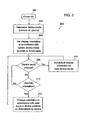
- Fig. 5 provides an illustration, in flow chart form of a process for interacting with a user to process an image for assignment to a terminal function.
- process 500 includes a plurality of process blocks which describe steps or subprocesses according to this example embodiment.
- a first user indication requesting that an image be assigned to a terminal function is received by the mobile device.
- an image may have one or more display attributes which make it at least in part unsuitable for use with the terminal function.
- the current image is displayed with a request for user confirmation. If the user accepts the image as is at block 506, the image is assigned to the appropriate communication terminal function at block 508. In this case, the process ends at block 510.
- a process of altering at least one, and possibly more display attributes can be initiated by the mobile device at block 512.
- this process involves altering the display attribute or display attributes of the image using a second user input which indicates the location of a specific area of the image on a display screen or visual display device.
- this indication may be provided via a soft key overlay. However, this indication can also be provided by use of the joystick pad, or other buttons on a mobile terminal.
- the newly processed image is displayed and a user is asked for confirmation. If the user accepts the newly processed image at block 516, it is assigned to the appropriate function at block 518. The process then ends at block 520.
- the user can cancel the operation at that point and end the process, as shown by the dotted arrow between block 516 and block 520.
- the option to cancel processing could be available continuously on the display screen. Menu structures of this type are well-known and so this option has not been described in great detail. It is omitted from Fig. 5 for clarity.
- a first indication can be received by the mobile device which indicates that the user requests the image to be assigned to a terminal function.
- a second indication is then received which relates to identifying a specific portion of the image so that the mobile device, through use of its processor and program code, can process the image appropriately.
- This processing can handle one or many display attributes. For example, a handset display may display pictures in landscape orientation in a resolution of 160 x 120 pixels. However, the image may have been captured in a resolution of 640 x 480 pixels, or some other resolution, thus, resizing may be necessary. Resizing of electronic images is typically accomplished by a sampling process, as is known in the art, and will not be discussed in great detail.
- the image when a landscape picture is to be displayed in portrait mode, the image must be resized in order to fit the portrait display. If distortion is to be avoided, and in some cases if the hardware or software image scaling capability is linearly limited, the landscape image presented in portrait mode can be cropped by, for example, 16 pixels on each side and displayed with bands at the top and bottom of the image. These bands can be displayed in the default background color of a current theme or profile stored in a mobile telephone or similar mobile device. It is also possible to program the phone so that the image is re-scaled so that the bands at the top and bottom of the image do not appear, and more pixels are cropped off the sides. Various options for this process can be programmed into the phone by the manufacturer, or can be set by the user in an image processing settings menu.
- a description of an example process by which display attributes are altered for assignment to a terminal function will now be provided. It is important to recognize that camera hardware contained within a mobile device may store captured images in a number of different ways. If images are stored in a landscape orientation, as previously discussed, it may not be practical to assume on which side the device will be turned to capture an image. Thus, images stored in a portrait orientation can be stored in either of two orientations, one being 180° rotated from the other. A camera application may also be designed to store the image in a portrait orientation. This may be so even though the image is actually captured in a landscape orientation.
- the second user input discussed above which indicates the location of a specific area of the image being displayed, can be used to correct the image for assignment to a terminal function regardless of how the image is stored.
- Fig. 6 illustrates how a user input indicating the location of a specific area of the image is received by the mobile device.
- a user can indicate where the top of the image is on the display screen.
- a mobile device can be designed that allows a user to indicate the bottom, left, right, or even a corner of the image or that allows a user to set in a settings menu which part of the image will be indicated when an image is processed.
- Fig. 6A illustrates mobile device 600. It can be assumed that an image is being displayed on display screen 604. This image is not rendered in the actual drawing for clarity.
- a menu overlay is shown over the image in Fig. 6A . This menu overlay appears correct to the user with mobile terminal 600 in a "landscape" orientation.
- the overlay includes the instruction "indicate top” which is presented to the user.
- Arrows 651, 652, 653, and 654 are also graphically presented on the screen. Each corresponds to a side of the image.
- the user provides input to indicate which side of the image is visually, the top of the image. This user input can be received by the user pointing to one of the arrows in an implementation where the arrows are actual soft keys.
- a user can use the joystick button, 610, to indicate which of the arrows is pointing to the top of the image.
- the joystick button is labeled with numbers and circles, to correspond to flow directional indicators which are used in the following flow charts. Number 1 corresponds to arrow 651. Number 2 corresponds to arrow 652. Number 3 corresponds to arrow 653.
- Fig. 6B illustrates mobile terminal 600 after it has been rotated.
- the overlay which includes the instructions to the user "indicate top” and the directional arrows has been rewritten to be readable in the new orientation.
- This process can be accomplished using the orientation sensor as previously described, or with user input to indicate that a user desires to have the overlay redrawn in portrait orientation.
- the flow numbers on the joystick button are in the same relative positions to the arrows as before. Thus, a detailed description of the flow numbers and the directional arrows will not be repeated for Fig. 6B .
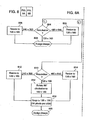
- Figs. 7 and 8 are flowcharts indicating how an image is processed in order to change or adjust display attributes for assignment to a terminal function in a mobile device.
- Fig. 7 assumes that the image is stored in landscape, and that user desires to keep the image in landscape orientation for assignment to the terminal function. This may be the case, for examples, where the mobile device in question operates with its terminal functions in landscape mode, as might be the case with a text terminal or e-mail device.
- the desired image size for assignment to a terminal function is one where the short sides of the display correspond to 120 pixels.
- Figs. 7 and 8 are illustrated in flowchart form, with various process blocks indicating steps or subprocesses.
- Fig. 7 is presented in parts shown as Fig. 7A and Fig. 7B .
- the indication as to the top of the image is received at block 702.
- processing branches to either branch 1, 2, 3, 4. These numbers are shown in circles to distinguish them from reference numbers. They correspond to the circled numbers, which reference the joystick button, 610, of Fig. 6 .
- branch 1 a check is made at 704 as to the resolution of the image. If the stored resolution is 320 x 240 pixels, it is resized to 160 x 120 pixels at block 706. Likewise, if the stored resolution is 640 x 480 pixels, it is resized to 160. 120 pixels at block 708. If the stored resolution is already 160 x 120 pixels it is not resized.
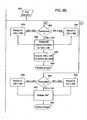
- Fig. 8 illustrates a process in a similar manner to Fig. 7 .
- Fig. 8 is presented in parts shown as Fig. 8A and Fig. 8B .
- images are stored in portrait and the device will display images in a portrait orientation when assigned to a terminal function. Such will be the case of "mobile phone" type mobile devices.
- a user indication of the top of an image being displayed is received.
- resolution is determined at block 804.
- a 240 x 320 pixel image is resized to 120 x 160 pixels at block 806.
- a 480 x 640 pixel image is resized to 120 x 160 pixels at block 808. Otherwise the image is not resized.
- the image is assigned to the terminal function at block 808.
- the resolution is again determined, this time at block 810. It is resized to 120 x 160 pixels from 240 x 320 pixels at block 812 and from 480 x 640 pixels at block 814. Regardless of the resize, the image is rotated 90° clockwise to 160 x 120 pixels at block 816. In the case of program branch 2, the image is cropped to 128 x 120 pixels at block 818. Again, this cropping results in bands on the top and bottom of the image.
- the image is assigned to the terminal function at block 820.
- a resolution check is made at block 822. Resizing occurs at block 824 block 826, in a similar fashion as previously described.
- the image is rotated 90° counter-clockwise to 160 x 120 pixels at block 828.
- the image is again cropped to 128 x 120 pixels (16 pixels per side) at block 830.
- the image is assigned to the appropriate terminal function at block 832.
- the image is primarily upside down. (It may also need to be resized.)
- the resolution is determined at block 834. If the stored image is 240 x 320 pixels, the image is resized to 120 x 160 pixels at block 836. If the stored image is 480 x 640 pixels, it is resized to 120 x 160 pixels at block 838. in either case, or if it is already stored at 120 x 160 pixels, as in previous examples, it is rotated 180° at block 840. The image is then assigned to the appropriate terminal function at block 842.
- Mobile devices such as mobile phones with built-in imaging systems or cameras often allow a user to assign images to various communication functions, and to send images to other uses via the phone application.
- the present invention allows a device with both communication and imaging functions to be used more like a traditional camera in acquiring images.
- the changing of menu orientations can be integrated into the function of the phone as previously described.
- the assignment of images or the sending of pictures as it might be termed to various telephone applications can be easily integrated into the menu structure of a mobile phone type device.
- the types of menu structures available in mobile terminals are almost infinite, and can be modified and adjusted to meet engineering considerations in any particular device.
- the cropping, resizing, and rotating of images to account for different orientations, resolutions, and other display attributes can easily be accomplished with controls that are readily integrated into the menu structure of a mobile terminal.
- a user can be presented with a menu item to initiate sending an image to a particular phone application. Selecting this menu item can result in the display of a "send to" menu, with options such as "new phone book contact,” “contact iisfi,” “local album,” or “online album.” These options can be selected to produce further sub-menus.
- the processing of the image as disclosed herein can be accomplished as part of the process of navigating the appropriate menu structure. Pictures sent to a local album can then be assigned to functions such as screen savers and wall paper functions. Additionally, messages can be sent over the network either to a new contact by entering a number, or a contact from a local phonebook or contact list, and images can be attached, possibly with sound, voice memos, and the like.
- the opportunity to rotate, resize, or scale, and crop images can be added to the send function, to allow users to format an image appropriately for the recipient.
Landscapes
- Engineering & Computer Science (AREA)
- Signal Processing (AREA)
- Multimedia (AREA)
- Theoretical Computer Science (AREA)
- Computer Networks & Wireless Communication (AREA)
- General Engineering & Computer Science (AREA)
- Human Computer Interaction (AREA)
- Computer Hardware Design (AREA)
- General Physics & Mathematics (AREA)
- Physics & Mathematics (AREA)
- Databases & Information Systems (AREA)
- Telephone Function (AREA)
- Studio Devices (AREA)
Applications Claiming Priority (3)
| Application Number | Priority Date | Filing Date | Title |
|---|---|---|---|
| US53355003P | 2003-12-31 | 2003-12-31 | |
| US10/708,410 US7085590B2 (en) | 2003-12-31 | 2004-03-01 | Mobile terminal with ergonomic imaging functions |
| EP04756956A EP1716696B1 (fr) | 2003-12-31 | 2004-07-14 | Terminal mobile a fonctions d'imagerie ergonomiques |
Related Parent Applications (3)
| Application Number | Title | Priority Date | Filing Date |
|---|---|---|---|
| EP04756956.1 Division | 2004-07-14 | ||
| EP04756956A Division EP1716696B1 (fr) | 2003-12-31 | 2004-07-14 | Terminal mobile a fonctions d'imagerie ergonomiques |
| EP04756956A Division-Into EP1716696B1 (fr) | 2003-12-31 | 2004-07-14 | Terminal mobile a fonctions d'imagerie ergonomiques |
Publications (4)
| Publication Number | Publication Date |
|---|---|
| EP2372990A2 true EP2372990A2 (fr) | 2011-10-05 |
| EP2372990A3 EP2372990A3 (fr) | 2011-10-19 |
| EP2372990B1 EP2372990B1 (fr) | 2016-11-09 |
| EP2372990B8 EP2372990B8 (fr) | 2017-04-12 |
Family
ID=34704369
Family Applications (2)
| Application Number | Title | Priority Date | Filing Date |
|---|---|---|---|
| EP11168673.9A Expired - Lifetime EP2372990B8 (fr) | 2003-12-31 | 2004-07-14 | Terminal mobile doté de fonctions d'imagerie ergonomiques |
| EP04756956A Expired - Lifetime EP1716696B1 (fr) | 2003-12-31 | 2004-07-14 | Terminal mobile a fonctions d'imagerie ergonomiques |
Family Applications After (1)
| Application Number | Title | Priority Date | Filing Date |
|---|---|---|---|
| EP04756956A Expired - Lifetime EP1716696B1 (fr) | 2003-12-31 | 2004-07-14 | Terminal mobile a fonctions d'imagerie ergonomiques |
Country Status (5)
| Country | Link |
|---|---|
| US (1) | US7085590B2 (fr) |
| EP (2) | EP2372990B8 (fr) |
| JP (1) | JP2007517462A (fr) |
| CN (2) | CN1951093B (fr) |
| WO (1) | WO2005069593A1 (fr) |
Families Citing this family (227)
| Publication number | Priority date | Publication date | Assignee | Title |
|---|---|---|---|---|
| US7312785B2 (en) | 2001-10-22 | 2007-12-25 | Apple Inc. | Method and apparatus for accelerated scrolling |
| US7333092B2 (en) | 2002-02-25 | 2008-02-19 | Apple Computer, Inc. | Touch pad for handheld device |
| WO2005010740A1 (fr) * | 2003-07-28 | 2005-02-03 | Nec Corporation | Terminal d'informations mobile |
| US7499040B2 (en) | 2003-08-18 | 2009-03-03 | Apple Inc. | Movable touch pad with added functionality |
| US20070152977A1 (en) | 2005-12-30 | 2007-07-05 | Apple Computer, Inc. | Illuminated touchpad |
| US7495659B2 (en) | 2003-11-25 | 2009-02-24 | Apple Inc. | Touch pad for handheld device |
| US8059099B2 (en) | 2006-06-02 | 2011-11-15 | Apple Inc. | Techniques for interactive input to portable electronic devices |
| KR100617702B1 (ko) * | 2004-01-13 | 2006-08-28 | 삼성전자주식회사 | 이미지 편집이 가능한 휴대용 단말기 및 이를 이용한이미지 편집 방법 |
| US7441204B2 (en) * | 2004-02-06 | 2008-10-21 | Microsoft Corporation | Method and system for automatically displaying content of a window on a display that has changed orientation |
| KR100611182B1 (ko) * | 2004-02-27 | 2006-08-10 | 삼성전자주식회사 | 회전상태에 따라 메뉴표시상태를 변경하는 휴대형전자기기 및 그 방법 |
| JP2005260858A (ja) * | 2004-03-15 | 2005-09-22 | Sanyo Electric Co Ltd | 携帯電話機 |
| JP2005311851A (ja) * | 2004-04-23 | 2005-11-04 | Nec Corp | カメラ付き携帯電話機および画像保存方法 |
| US7339600B2 (en) * | 2004-04-26 | 2008-03-04 | Samsung Electronics Co., Ltd. | Apparatus and method for displaying a picture in a wireless terminal |
| GB2413735A (en) * | 2004-04-30 | 2005-11-02 | Canon Europa Nv | Mobile phone image display system |
| KR100927064B1 (ko) | 2004-08-16 | 2009-11-13 | 애플 인크. | 터치 감지 장치의 공간 해상도를 증가시키는 방법 |
| JPWO2006025340A1 (ja) * | 2004-08-30 | 2008-05-08 | シャープ株式会社 | 表示制御デバイス、表示装置、表示デバイスの制御方法、表示制御プログラム、および該プログラムを記録した記録媒体 |
| US8094103B2 (en) * | 2004-08-31 | 2012-01-10 | Sharp Kabushiki Kaisha | Viewing-angle control device, display apparatus, method for controlling viewing-angle control device, viewing-angle control program, and storage medium storing the program |
| US7834834B2 (en) * | 2004-09-07 | 2010-11-16 | Sharp Kabushiki Kaisha | Display device, viewing angle control device, and electronic apparatus |
| US7817106B2 (en) * | 2004-09-15 | 2010-10-19 | Sharp Kabushiki Kaisha | Display device, viewing angle control device, and electronic apparatus |
| US8031273B2 (en) * | 2004-09-17 | 2011-10-04 | Sharp Kabushiki Kaisha | Display device, viewing angle control device, and electronic device |
| KR100633753B1 (ko) * | 2004-09-23 | 2006-10-16 | 삼성전자주식회사 | 휴대용 무선단말기에서 멀티미디어 메시지의 이미지를폰북에 추가하기 위한 장치 및 방법 |
| US8184145B2 (en) * | 2004-10-04 | 2012-05-22 | Sharp Kabushiki Kaisha | Display device and electronic apparatus |
| US20060101162A1 (en) * | 2004-11-08 | 2006-05-11 | Opera Software Asa | Method and device for adapting a computer program to a device on which it is installed |
| JP2006313313A (ja) * | 2005-04-06 | 2006-11-16 | Sony Corp | 再生装置、設定切替方法および設定切替装置 |
| KR100566184B1 (ko) * | 2005-04-22 | 2006-03-29 | 삼성전자주식회사 | 이동통신단말기에서 이미지를 표시하는 방법 및 그이동통신단말기 |
| KR100689480B1 (ko) * | 2005-05-09 | 2007-03-02 | 삼성전자주식회사 | 휴대단말기의 영상크기 변환방법 |
| KR100630150B1 (ko) * | 2005-06-07 | 2006-10-02 | 삼성전자주식회사 | 휴대단말기의 화면표시방법 |
| USD542762S1 (en) * | 2005-06-24 | 2007-05-15 | Samsung Electronics Co., Ltd. | Mobile phone |
| KR100668341B1 (ko) * | 2005-06-29 | 2007-01-12 | 삼성전자주식회사 | 사용자의 파지 형태를 이용한 휴대용 단말기의 기능 입력방법 및 장치. |
| US8351869B2 (en) * | 2005-09-22 | 2013-01-08 | Ideal Industries, Inc. | Electric circuit tracer |
| JP4592099B2 (ja) * | 2005-09-29 | 2010-12-01 | キヤノン株式会社 | 画像表示装置及び画像表示方法 |
| US20070082661A1 (en) * | 2005-10-11 | 2007-04-12 | Black Greg R | Method and apparatus for configuration of modular devices |
| KR100726215B1 (ko) * | 2005-10-14 | 2007-06-11 | 삼성전자주식회사 | 정립상을 촬영하는 휴대용 단말기 및 방법 |
| US7844301B2 (en) * | 2005-10-14 | 2010-11-30 | Lg Electronics Inc. | Method for displaying multimedia contents and mobile communications terminal capable of implementing the same |
| US7697827B2 (en) | 2005-10-17 | 2010-04-13 | Konicek Jeffrey C | User-friendlier interfaces for a camera |
| US7431216B2 (en) * | 2005-11-16 | 2008-10-07 | Sony Ericsson Mobile Communications Ab | Methods for presenting parameter status information and related portable electronic devices and parameters |
| KR100724956B1 (ko) * | 2005-12-13 | 2007-06-04 | 삼성전자주식회사 | 이동 통신 단말의 배경화면 표시 방법 |
| US7509588B2 (en) | 2005-12-30 | 2009-03-24 | Apple Inc. | Portable electronic device with interface reconfiguration mode |
| US20070152983A1 (en) | 2005-12-30 | 2007-07-05 | Apple Computer, Inc. | Touch pad with symbols based on mode |
| US7612786B2 (en) * | 2006-02-10 | 2009-11-03 | Microsoft Corporation | Variable orientation input mode |
| KR100663467B1 (ko) * | 2006-02-17 | 2007-01-02 | 삼성전자주식회사 | 휴대단말기의 이미지 표시 방법 |
| US8930834B2 (en) * | 2006-03-20 | 2015-01-06 | Microsoft Corporation | Variable orientation user interface |
| US8139059B2 (en) * | 2006-03-31 | 2012-03-20 | Microsoft Corporation | Object illumination in a virtual environment |
| TWM299419U (en) * | 2006-04-14 | 2006-10-11 | Jang Shiue Ling | Mobile communication apparatus |
| JP5048271B2 (ja) * | 2006-05-02 | 2012-10-17 | 任天堂株式会社 | ゲームプログラムおよびゲーム装置 |
| US20070284429A1 (en) * | 2006-06-13 | 2007-12-13 | Microsoft Corporation | Computer component recognition and setup |
| US8081252B2 (en) * | 2006-06-13 | 2011-12-20 | Panasonic Corporation | Image displaying apparatus |
| US7552402B2 (en) * | 2006-06-22 | 2009-06-23 | Microsoft Corporation | Interface orientation using shadows |
| US8001613B2 (en) * | 2006-06-23 | 2011-08-16 | Microsoft Corporation | Security using physical objects |
| US9360967B2 (en) | 2006-07-06 | 2016-06-07 | Apple Inc. | Mutual capacitance touch sensing device |
| US8743060B2 (en) | 2006-07-06 | 2014-06-03 | Apple Inc. | Mutual capacitance touch sensing device |
| US8022935B2 (en) | 2006-07-06 | 2011-09-20 | Apple Inc. | Capacitance sensing electrode with integrated I/O mechanism |
| EP1920407A4 (fr) * | 2006-07-14 | 2009-05-13 | Research In Motion Ltd | Procédé et système de sélection et d'association d'image de contact pour dispositif mobile |
| JP2008040019A (ja) * | 2006-08-03 | 2008-02-21 | Toshiba Corp | 携帯端末 |
| US7791594B2 (en) * | 2006-08-30 | 2010-09-07 | Sony Ericsson Mobile Communications Ab | Orientation based multiple mode mechanically vibrated touch screen display |
| ATE450980T1 (de) * | 2006-09-01 | 2009-12-15 | Research In Motion Ltd | Abschaltung des betriebs einer kamera von einem tragbares mobiltelefon auf der basis von an/ab- schaltenden vorrichtungen |
| US7706837B2 (en) * | 2006-09-01 | 2010-04-27 | Research In Motion Limited | Disabling operation of a camera on a handheld mobile communication device based upon enabling or disabling devices |
| US7864163B2 (en) | 2006-09-06 | 2011-01-04 | Apple Inc. | Portable electronic device, method, and graphical user interface for displaying structured electronic documents |
| US7956849B2 (en) * | 2006-09-06 | 2011-06-07 | Apple Inc. | Video manager for portable multifunction device |
| US8842074B2 (en) | 2006-09-06 | 2014-09-23 | Apple Inc. | Portable electronic device performing similar operations for different gestures |
| US10313505B2 (en) | 2006-09-06 | 2019-06-04 | Apple Inc. | Portable multifunction device, method, and graphical user interface for configuring and displaying widgets |
| US8736557B2 (en) * | 2006-09-11 | 2014-05-27 | Apple Inc. | Electronic device with image based browsers |
| US7581186B2 (en) * | 2006-09-11 | 2009-08-25 | Apple Inc. | Media manager with integrated browsers |
| US7795553B2 (en) * | 2006-09-11 | 2010-09-14 | Apple Inc. | Hybrid button |
| US8564543B2 (en) | 2006-09-11 | 2013-10-22 | Apple Inc. | Media player with imaged based browsing |
| US8797267B2 (en) * | 2006-09-12 | 2014-08-05 | Virgin Mobile Usa, L.P. | Virtual hard keys on a wireless device |
| US20080076972A1 (en) * | 2006-09-21 | 2008-03-27 | Apple Inc. | Integrated sensors for tracking performance metrics |
| US8429223B2 (en) * | 2006-09-21 | 2013-04-23 | Apple Inc. | Systems and methods for facilitating group activities |
| US20080077489A1 (en) * | 2006-09-21 | 2008-03-27 | Apple Inc. | Rewards systems |
| US8956290B2 (en) * | 2006-09-21 | 2015-02-17 | Apple Inc. | Lifestyle companion system |
| US8745496B2 (en) | 2006-09-21 | 2014-06-03 | Apple Inc. | Variable I/O interface for portable media device |
| US8235724B2 (en) * | 2006-09-21 | 2012-08-07 | Apple Inc. | Dynamically adaptive scheduling system |
| US8001472B2 (en) | 2006-09-21 | 2011-08-16 | Apple Inc. | Systems and methods for providing audio and visual cues via a portable electronic device |
| JP5176300B2 (ja) * | 2006-09-22 | 2013-04-03 | 富士通株式会社 | 電子機器、その制御方法及びその制御プログラム |
| US8274479B2 (en) | 2006-10-11 | 2012-09-25 | Apple Inc. | Gimballed scroll wheel |
| JP4278675B2 (ja) * | 2006-10-30 | 2009-06-17 | シャープ株式会社 | 携帯情報端末 |
| US8482530B2 (en) | 2006-11-13 | 2013-07-09 | Apple Inc. | Method of capacitively sensing finger position |
| US9344548B2 (en) | 2006-12-28 | 2016-05-17 | Blackberry Limited | Method for saving an image from a camera application of a portable electronic device |
| US7385150B1 (en) | 2006-12-28 | 2008-06-10 | Microsoft Corporation | Sliding mechanism for device with two keyboards |
| TW200826879A (en) * | 2006-12-29 | 2008-07-01 | Innolux Display Corp | Digital photo display |
| US8214768B2 (en) * | 2007-01-05 | 2012-07-03 | Apple Inc. | Method, system, and graphical user interface for viewing multiple application windows |
| US9001047B2 (en) | 2007-01-07 | 2015-04-07 | Apple Inc. | Modal change based on orientation of a portable multifunction device |
| US8519964B2 (en) | 2007-01-07 | 2013-08-27 | Apple Inc. | Portable multifunction device, method, and graphical user interface supporting user navigations of graphical objects on a touch screen display |
| US20080165148A1 (en) * | 2007-01-07 | 2008-07-10 | Richard Williamson | Portable Electronic Device, Method, and Graphical User Interface for Displaying Inline Multimedia Content |
| US7978176B2 (en) * | 2007-01-07 | 2011-07-12 | Apple Inc. | Portrait-landscape rotation heuristics for a portable multifunction device |
| US8607144B2 (en) * | 2007-01-08 | 2013-12-10 | Apple Inc. | Monitor configuration for media device |
| US8612857B2 (en) | 2007-01-08 | 2013-12-17 | Apple Inc. | Monitor configuration for media device |
| GB2446468A (en) * | 2007-02-12 | 2008-08-13 | Me2B Holdings Ltd | Touchpad With A Plurality Of Display Elements Located In The Touchpad Area |
| WO2008107732A1 (fr) * | 2007-03-07 | 2008-09-12 | Wnd Telecom, Inc. | Dispositif de communication sans fil et procédé pour communiquer avec deux canaux de communication différents |
| JP2008242212A (ja) * | 2007-03-28 | 2008-10-09 | Sony Corp | 電子機器 |
| US7973763B2 (en) * | 2007-04-13 | 2011-07-05 | Htc Corporation | Electronic devices with sensible orientation structures, and associated methods |
| US7742783B2 (en) * | 2007-05-10 | 2010-06-22 | Virgin Mobile Usa, L.P. | Symmetric softkeys on a mobile electronic device |
| TWI425806B (zh) * | 2007-06-08 | 2014-02-01 | 啟碁科技股份有限公司 | 用來記事於一行動通訊裝置的方法及相關裝置 |
| US8004493B2 (en) | 2007-06-08 | 2011-08-23 | Apple Inc. | Methods and systems for providing sensory information to devices and peripherals |
| US8201096B2 (en) | 2007-06-09 | 2012-06-12 | Apple Inc. | Browsing or searching user interfaces and other aspects |
| US8185839B2 (en) | 2007-06-09 | 2012-05-22 | Apple Inc. | Browsing or searching user interfaces and other aspects |
| US9933937B2 (en) * | 2007-06-20 | 2018-04-03 | Apple Inc. | Portable multifunction device, method, and graphical user interface for playing online videos |
| US9772751B2 (en) | 2007-06-29 | 2017-09-26 | Apple Inc. | Using gestures to slide between user interfaces |
| US11126321B2 (en) | 2007-09-04 | 2021-09-21 | Apple Inc. | Application menu user interface |
| US8619038B2 (en) | 2007-09-04 | 2013-12-31 | Apple Inc. | Editing interface |
| US8683378B2 (en) | 2007-09-04 | 2014-03-25 | Apple Inc. | Scrolling techniques for user interfaces |
| US9619143B2 (en) | 2008-01-06 | 2017-04-11 | Apple Inc. | Device, method, and graphical user interface for viewing application launch icons |
| WO2009032898A2 (fr) | 2007-09-04 | 2009-03-12 | Apple Inc. | Dispositif d'entrée compact |
| CN101803351B (zh) * | 2007-09-19 | 2015-03-25 | 汤姆森特许公司 | 用于提供画面呼叫者识别特性的方法和装置 |
| US20090085870A1 (en) * | 2007-09-27 | 2009-04-02 | First International Computer, Inc. | Multimedia device |
| US8498451B1 (en) | 2007-11-12 | 2013-07-30 | Google Inc. | Contact cropping from images |
| US8416198B2 (en) | 2007-12-03 | 2013-04-09 | Apple Inc. | Multi-dimensional scroll wheel |
| US20090160762A1 (en) * | 2007-12-20 | 2009-06-25 | Apple Inc. | User input device with expanded functionality |
| US8230360B2 (en) * | 2008-01-04 | 2012-07-24 | Apple Inc. | User interface for selection from media collection |
| US8327272B2 (en) | 2008-01-06 | 2012-12-04 | Apple Inc. | Portable multifunction device, method, and graphical user interface for viewing and managing electronic calendars |
| US8125461B2 (en) * | 2008-01-11 | 2012-02-28 | Apple Inc. | Dynamic input graphic display |
| US8820133B2 (en) | 2008-02-01 | 2014-09-02 | Apple Inc. | Co-extruded materials and methods |
| US9454256B2 (en) * | 2008-03-14 | 2016-09-27 | Apple Inc. | Sensor configurations of an input device that are switchable based on mode |
| US20090237379A1 (en) * | 2008-03-22 | 2009-09-24 | Lawrenz Steven D | Automatically conforming the orientation of a display signal to the rotational position of a display device receiving the display signal |
| US20090237420A1 (en) * | 2008-03-22 | 2009-09-24 | Lawrenz Steven D | Automatically conforming the orientation of a display signal to the rotational position of a display device receiving the display signal |
| KR101111566B1 (ko) * | 2008-05-23 | 2012-02-24 | 삼성전자주식회사 | 휴대 단말기의 인터페이스 전환 장치 및 방법 |
| US8454436B2 (en) * | 2008-06-26 | 2013-06-04 | Wms Gaming Inc. | Gaming machine with movable display screen |
| EP2159665A1 (fr) * | 2008-08-27 | 2010-03-03 | Research In Motion Limited | Dispositif électronique portable doté d'un écran tactile et son procédé de commande |
| US20100060568A1 (en) * | 2008-09-05 | 2010-03-11 | Apple Inc. | Curved surface input device with normalized capacitive sensing |
| US8816967B2 (en) * | 2008-09-25 | 2014-08-26 | Apple Inc. | Capacitive sensor having electrodes arranged on the substrate and the flex circuit |
| US20100085279A1 (en) * | 2008-10-02 | 2010-04-08 | Repko Sean R | Interactive display bracelet |
| US8395590B2 (en) | 2008-12-17 | 2013-03-12 | Apple Inc. | Integrated contact switch and touch sensor elements |
| EP2199885A1 (fr) * | 2008-12-22 | 2010-06-23 | Research In Motion Limited | Dispositif électronique portable et son procédé de contrôle |
| US20100156939A1 (en) * | 2008-12-22 | 2010-06-24 | Research In Motion Limited | Portable electronic device and method of controlling same |
| US8443278B2 (en) * | 2009-01-02 | 2013-05-14 | Apple Inc. | Identification of tables in an unstructured document |
| KR101580148B1 (ko) * | 2009-02-20 | 2015-12-24 | 삼성전자주식회사 | 동작 인식을 통한 단말기 제어 장치 및 방법 |
| USD605616S1 (en) | 2009-03-13 | 2009-12-08 | Harris Corporation | Portable communication device |
| US8355031B2 (en) * | 2009-03-17 | 2013-01-15 | Harris Corporation | Portable electronic devices with adjustable display orientation |
| WO2010119611A1 (fr) * | 2009-04-13 | 2010-10-21 | 日本電気株式会社 | Dispositif de traitement de données et programme d'ordinateur et procédé de traitement de données |
| JP2010272111A (ja) * | 2009-04-24 | 2010-12-02 | Kddi Corp | 使用時に目視されない面に入力部を配置した情報機器、入力方法及びプログラム |
| JP5359536B2 (ja) * | 2009-05-07 | 2013-12-04 | 富士通モバイルコミュニケーションズ株式会社 | 携帯電話機、及び携帯電話機の表示方向制御プログラム |
| US9354751B2 (en) | 2009-05-15 | 2016-05-31 | Apple Inc. | Input device with optimized capacitive sensing |
| US8718715B2 (en) * | 2009-06-30 | 2014-05-06 | Core Wireless Licensing S.A.R.L | Sharing functionality |
| US8872771B2 (en) | 2009-07-07 | 2014-10-28 | Apple Inc. | Touch sensing device having conductive nodes |
| US9176962B2 (en) * | 2009-09-07 | 2015-11-03 | Apple Inc. | Digital media asset browsing with audio cues |
| US20110078626A1 (en) * | 2009-09-28 | 2011-03-31 | William Bachman | Contextual Presentation of Digital Media Asset Collections |
| US8766926B2 (en) | 2009-10-14 | 2014-07-01 | Blackberry Limited | Touch-sensitive display and method of controlling same |
| US9003290B2 (en) * | 2009-12-02 | 2015-04-07 | T-Mobile Usa, Inc. | Image-derived user interface enhancements |
| US8736561B2 (en) * | 2010-01-06 | 2014-05-27 | Apple Inc. | Device, method, and graphical user interface with content display modes and display rotation heuristics |
| US8692851B2 (en) * | 2010-01-06 | 2014-04-08 | Apple Inc. | Device, method, and graphical user interface with grid transformations during device rotation |
| US8438504B2 (en) | 2010-01-06 | 2013-05-07 | Apple Inc. | Device, method, and graphical user interface for navigating through multiple viewing areas |
| US8698845B2 (en) * | 2010-01-06 | 2014-04-15 | Apple Inc. | Device, method, and graphical user interface with interactive popup views |
| US8502856B2 (en) | 2010-04-07 | 2013-08-06 | Apple Inc. | In conference display adjustments |
| US9513801B2 (en) | 2010-04-07 | 2016-12-06 | Apple Inc. | Accessing electronic notifications and settings icons with gestures |
| US20110252357A1 (en) | 2010-04-07 | 2011-10-13 | Imran Chaudhri | Device, Method, and Graphical User Interface for Managing Concurrently Open Software Applications |
| US9823831B2 (en) | 2010-04-07 | 2017-11-21 | Apple Inc. | Device, method, and graphical user interface for managing concurrently open software applications |
| JP2012038067A (ja) * | 2010-08-06 | 2012-02-23 | Brother Ind Ltd | 可搬型の端末装置に搭載される制御装置 |
| CN103155425B (zh) * | 2010-08-13 | 2015-07-29 | Lg电子株式会社 | 移动终端、显示装置及其控制方法 |
| US8605613B2 (en) * | 2010-12-15 | 2013-12-10 | Apple Inc. | Mobile hardware and network environment simulation |
| US9244606B2 (en) | 2010-12-20 | 2016-01-26 | Apple Inc. | Device, method, and graphical user interface for navigation of concurrently open software applications |
| US9043714B1 (en) | 2011-01-07 | 2015-05-26 | Google Inc. | Adaptive user interface for widescreen devices |
| US8552881B2 (en) | 2011-02-09 | 2013-10-08 | Harris Corporation | Electronic device with a situational awareness function |
| US8937735B2 (en) | 2011-03-31 | 2015-01-20 | Brother Kogyo Kabushiki Kaisha | Non-transitory storage medium storing image-forming-data transmitting program, mobile terminal, and control method therefor transmitting movement and orientation information of mobile terminal |
| US20120262489A1 (en) * | 2011-04-12 | 2012-10-18 | Caliendo Jr Neal Robert | Relative and Absolute Screen Rotation Draft Agent |
| EP2717141A4 (fr) * | 2011-05-24 | 2015-02-25 | Nec Casio Mobile Comm Ltd | Dispositif de traitement d'informations et procédé de commande associé |
| US8594611B2 (en) | 2011-06-22 | 2013-11-26 | Harris Corporation | Intrinsically safe portable radio architecture |
| US9311426B2 (en) * | 2011-08-04 | 2016-04-12 | Blackberry Limited | Orientation-dependent processing of input files by an electronic device |
| US8806369B2 (en) | 2011-08-26 | 2014-08-12 | Apple Inc. | Device, method, and graphical user interface for managing and interacting with concurrently open software applications |
| KR101860342B1 (ko) | 2011-09-15 | 2018-05-23 | 엘지전자 주식회사 | 이동 단말기 및 그 제어방법 |
| US20130080932A1 (en) * | 2011-09-27 | 2013-03-28 | Sanjiv Sirpal | Secondary single screen mode activation through user interface toggle |
| US9269323B2 (en) * | 2011-10-28 | 2016-02-23 | Microsoft Technology Licensing, Llc | Image layout for a display |
| US9210339B2 (en) | 2011-12-09 | 2015-12-08 | Hewlett-Packard Development Company, L.P. | Generation of images based on orientation |
| KR101852433B1 (ko) * | 2012-02-07 | 2018-04-26 | 엘지전자 주식회사 | 이동 단말기 및 그것의 제어방법 |
| US9310888B2 (en) * | 2012-03-16 | 2016-04-12 | Microsoft Technology Licensing, Llc | Multimodal layout and rendering |
| CN104520785B (zh) * | 2012-04-26 | 2017-08-08 | 高通股份有限公司 | 基于检测到的输入来更改在显示区域的一部分中提供的内容的属性 |
| CN104487930A (zh) | 2012-05-09 | 2015-04-01 | 苹果公司 | 用于移动和放置用户界面对象的设备、方法和图形用户界面 |
| EP2847662B1 (fr) | 2012-05-09 | 2020-02-19 | Apple Inc. | Dispositif, procédé et interface d'utilisateur graphique pour obtenir une rétroaction destinée à modifier des états d'activation d'un objet d'interface d'utilisateur |
| EP2847659B1 (fr) | 2012-05-09 | 2019-09-04 | Apple Inc. | Dispositif, procédé et interface graphique utilisateur permettant une transition entre des états d'affichage en réponse à un geste |
| WO2013169843A1 (fr) | 2012-05-09 | 2013-11-14 | Yknots Industries Llc | Dispositif, procédé et interface graphique utilisateur pour manipuler des objets graphiques encadrés |
| CN104508618B (zh) | 2012-05-09 | 2018-01-05 | 苹果公司 | 用于针对在用户界面中执行的操作提供触觉反馈的设备、方法和图形用户界面 |
| JP6031186B2 (ja) | 2012-05-09 | 2016-11-24 | アップル インコーポレイテッド | ユーザインタフェースオブジェクトを選択するためのデバイス、方法及びグラフィカルユーザインタフェース |
| WO2013169865A2 (fr) | 2012-05-09 | 2013-11-14 | Yknots Industries Llc | Dispositif, procédé et interface d'utilisateur graphique pour déplacer un objet d'interface d'utilisateur en fonction d'une intensité d'une entrée d'appui |
| WO2013169849A2 (fr) | 2012-05-09 | 2013-11-14 | Industries Llc Yknots | Dispositif, procédé et interface utilisateur graphique permettant d'afficher des objets d'interface utilisateur correspondant à une application |
| WO2013169846A1 (fr) | 2012-05-09 | 2013-11-14 | Yknots Industries Llc | Dispositif, procédé et interface graphique utilisateur pour afficher des informations supplémentaires en réponse à un contact d'utilisateur |
| WO2013169842A2 (fr) | 2012-05-09 | 2013-11-14 | Yknots Industries Llc | Dispositif, procédé, et interface utilisateur graphique permettant de sélectionner un objet parmi un groupe d'objets |
| WO2013169851A2 (fr) | 2012-05-09 | 2013-11-14 | Yknots Industries Llc | Dispositif, procédé et interface d'utilisateur graphique pour faciliter l'interaction de l'utilisateur avec des commandes dans une interface d'utilisateur |
| WO2013169845A1 (fr) | 2012-05-09 | 2013-11-14 | Yknots Industries Llc | Dispositif, procédé et interface graphique utilisateur pour faire défiler des régions imbriquées |
| WO2013169875A2 (fr) | 2012-05-09 | 2013-11-14 | Yknots Industries Llc | Dispositif, méthode et interface utilisateur graphique d'affichage de contenu associé à une affordance correspondante |
| CN102710835B (zh) * | 2012-05-18 | 2014-11-05 | 张群 | 一种手机握持情况的检测方法及系统 |
| US9313304B1 (en) | 2012-05-29 | 2016-04-12 | Oliver Markus Haynold | Single-control image-taking apparatus |
| US10171727B1 (en) | 2012-05-29 | 2019-01-01 | Promanthan Brains Llc, Series Click Only | Resetting single-control apparatus |
| CN104704552A (zh) * | 2012-09-27 | 2015-06-10 | 夏普株式会社 | 程序、显示装置、电视接收机、显示方法及显示系统 |
| KR102015204B1 (ko) | 2012-10-26 | 2019-08-27 | 인텔 코포레이션 | 비디오 방향에 기초한 멀티미디어 적응 |
| EP3139698B1 (fr) | 2012-10-26 | 2020-05-06 | Intel Corporation | Diffusion avec coordination de l'orientation vidéo (cvo) |
| JP6071543B2 (ja) * | 2012-12-27 | 2017-02-01 | キヤノン株式会社 | 電子機器及び電子機器の制御方法 |
| JP6161290B2 (ja) * | 2012-12-28 | 2017-07-12 | キヤノン株式会社 | 表示制御装置、表示制御方法及びそのプログラム |
| AU2013368443B2 (en) | 2012-12-29 | 2016-03-24 | Apple Inc. | Device, method, and graphical user interface for transitioning between touch input to display output relationships |
| AU2013368441B2 (en) | 2012-12-29 | 2016-04-14 | Apple Inc. | Device, method, and graphical user interface for forgoing generation of tactile output for a multi-contact gesture |
| CN107831991B (zh) | 2012-12-29 | 2020-11-27 | 苹果公司 | 用于确定是滚动还是选择内容的设备、方法和图形用户界面 |
| HK1215094A1 (zh) | 2012-12-29 | 2016-08-12 | Apple Inc. | 用於根據具有模擬三維特徵的控制圖標的外觀變化來移動光標的設備、方法和圖形用戶界面 |
| WO2014105274A1 (fr) | 2012-12-29 | 2014-07-03 | Yknots Industries Llc | Dispositif, procédé et interface utilisateur graphique pour naviguer dans des hiérarchies d'interface utilisateur |
| US9933846B2 (en) | 2013-01-28 | 2018-04-03 | Samsung Electronics Co., Ltd. | Electronic system with display mode mechanism and method of operation thereof |
| US9741150B2 (en) | 2013-07-25 | 2017-08-22 | Duelight Llc | Systems and methods for displaying representative images |
| EP2960627B1 (fr) * | 2013-02-22 | 2020-01-01 | Asahi Kasei Kabushiki Kaisha | Dispositif de détection de changement d'état de transport, procédé de détection de changement d'état de transport, et programme associé |
| WO2014130977A1 (fr) * | 2013-02-25 | 2014-08-28 | Herold Williams | Mise à l'échelle non linéaire dans une conférence vidéo |
| US9658740B2 (en) | 2013-03-15 | 2017-05-23 | Apple Inc. | Device, method, and graphical user interface for managing concurrently open software applications |
| US9477404B2 (en) | 2013-03-15 | 2016-10-25 | Apple Inc. | Device, method, and graphical user interface for managing concurrently open software applications |
| CN103294358B (zh) * | 2013-05-17 | 2016-12-28 | 小米科技有限责任公司 | 一种控制屏幕旋转的方法、装置和设备 |
| JP6120699B2 (ja) * | 2013-06-28 | 2017-04-26 | キヤノン株式会社 | 電子機器、その制御方法及びプログラム並びに記憶媒体 |
| US11068128B2 (en) | 2013-09-03 | 2021-07-20 | Apple Inc. | User interface object manipulations in a user interface |
| CN104104870B (zh) | 2014-06-27 | 2018-05-18 | 北京智谷睿拓技术服务有限公司 | 拍摄控制方法、拍摄控制装置及拍摄设备 |
| US10776739B2 (en) | 2014-09-30 | 2020-09-15 | Apple Inc. | Fitness challenge E-awards |
| US12401911B2 (en) | 2014-11-07 | 2025-08-26 | Duelight Llc | Systems and methods for generating a high-dynamic range (HDR) pixel stream |
| US12401912B2 (en) | 2014-11-17 | 2025-08-26 | Duelight Llc | System and method for generating a digital image |
| WO2016104822A1 (fr) * | 2014-12-23 | 2016-06-30 | 엘지전자 주식회사 | Dispositif d'affichage et procédé de commande |
| US10048757B2 (en) | 2015-03-08 | 2018-08-14 | Apple Inc. | Devices and methods for controlling media presentation |
| US9645732B2 (en) | 2015-03-08 | 2017-05-09 | Apple Inc. | Devices, methods, and graphical user interfaces for displaying and using menus |
| US10095396B2 (en) | 2015-03-08 | 2018-10-09 | Apple Inc. | Devices, methods, and graphical user interfaces for interacting with a control object while dragging another object |
| US9785305B2 (en) | 2015-03-19 | 2017-10-10 | Apple Inc. | Touch input cursor manipulation |
| US20170045981A1 (en) | 2015-08-10 | 2017-02-16 | Apple Inc. | Devices and Methods for Processing Touch Inputs Based on Their Intensities |
| US12445736B2 (en) | 2015-05-01 | 2025-10-14 | Duelight Llc | Systems and methods for generating a digital image |
| US9860451B2 (en) | 2015-06-07 | 2018-01-02 | Apple Inc. | Devices and methods for capturing and interacting with enhanced digital images |
| US9674426B2 (en) | 2015-06-07 | 2017-06-06 | Apple Inc. | Devices and methods for capturing and interacting with enhanced digital images |
| WO2017055082A1 (fr) * | 2015-09-30 | 2017-04-06 | Koninklijke Philips N.V. | Sous-système de surveillance d'enfant et procédé de traitement vidéo d'un flux vidéo d'une caméra d'un système de surveillance d'enfant |
| US12008034B2 (en) | 2016-02-15 | 2024-06-11 | Ebay Inc. | Digital image presentation |
| US9864925B2 (en) * | 2016-02-15 | 2018-01-09 | Ebay Inc. | Digital image presentation |
| CN106909224B (zh) * | 2017-02-28 | 2018-10-19 | 维沃移动通信有限公司 | 一种显示图像预览界面的方法及移动终端 |
| CN111213363A (zh) * | 2017-10-13 | 2020-05-29 | 深圳传音通讯有限公司 | 终端拍照控制方法、移动终端及可读储存介质 |
| CN110557552A (zh) * | 2018-05-31 | 2019-12-10 | 联想企业解决方案(新加坡)有限公司 | 便携式图像采集设备 |
| US11308923B2 (en) * | 2019-10-09 | 2022-04-19 | Motorola Mobility Llc | Electronic device with face orienting user interface |
| US11907605B2 (en) | 2021-05-15 | 2024-02-20 | Apple Inc. | Shared-content session user interfaces |
| US11822761B2 (en) | 2021-05-15 | 2023-11-21 | Apple Inc. | Shared-content session user interfaces |
| US12449961B2 (en) | 2021-05-18 | 2025-10-21 | Apple Inc. | Adaptive video conference user interfaces |
| US11980807B2 (en) | 2021-09-16 | 2024-05-14 | Sony Interactive Entertainment Inc. | Adaptive rendering of game to capabilities of device |
| US12267622B2 (en) | 2021-09-24 | 2025-04-01 | Apple Inc. | Wide angle video conference |
| US12368946B2 (en) | 2021-09-24 | 2025-07-22 | Apple Inc. | Wide angle video conference |
| US11770600B2 (en) | 2021-09-24 | 2023-09-26 | Apple Inc. | Wide angle video conference |
Family Cites Families (24)
| Publication number | Priority date | Publication date | Assignee | Title |
|---|---|---|---|---|
| JPH11196397A (ja) * | 1997-12-26 | 1999-07-21 | Canon Inc | 表示装置及び通信システム |
| JPH11275262A (ja) * | 1998-03-26 | 1999-10-08 | Kyocera Corp | 電話帳機能を有するテレビ電話端末装置 |
| JP2000276606A (ja) * | 1999-03-24 | 2000-10-06 | Dainippon Printing Co Ltd | 画像作成装置 |
| DE69924533D1 (de) * | 1999-06-30 | 2005-05-04 | Nokia Corp | Verfahren und system zur bereitstellung eines bildes des anrufers |
| JP3546784B2 (ja) * | 1999-12-14 | 2004-07-28 | 日本電気株式会社 | 携帯端末 |
| JP4385490B2 (ja) * | 2000-05-12 | 2009-12-16 | ソニー株式会社 | 携帯端末装置 |
| US6731952B2 (en) * | 2000-07-27 | 2004-05-04 | Eastman Kodak Company | Mobile telephone system having a detachable camera / battery module |
| JP2002291045A (ja) * | 2001-03-27 | 2002-10-04 | Seiko Epson Corp | 携帯端末装置のためのデータ管理装置、データ管理システム、データ管理方法、そのためのプログラム及び記録媒体 |
| JP2003008695A (ja) | 2001-06-25 | 2003-01-10 | Pioneer Electronic Corp | 携帯情報端末機 |
| JP3787760B2 (ja) | 2001-07-31 | 2006-06-21 | 松下電器産業株式会社 | カメラ付き携帯電話装置 |
| JP2003060765A (ja) * | 2001-08-16 | 2003-02-28 | Nec Corp | カメラ付き携帯通信端末 |
| US6850226B2 (en) | 2001-11-09 | 2005-02-01 | Nokia Corporation | Multifunction mobile communications device with slidable display screen |
| JP2003189168A (ja) * | 2001-12-21 | 2003-07-04 | Nec Corp | 携帯電話用カメラ |
| JP3979090B2 (ja) * | 2001-12-28 | 2007-09-19 | 日本電気株式会社 | カメラ付き携帯型電子機器 |
| JP3911527B2 (ja) | 2002-01-17 | 2007-05-09 | 富士通株式会社 | 携帯端末、携帯端末処理用プログラム及び携帯端末システム |
| JP2003244286A (ja) * | 2002-02-21 | 2003-08-29 | Fujitsu Ltd | 情報処理装置 |
| JP2003288072A (ja) * | 2002-03-28 | 2003-10-10 | Sony Ericsson Mobilecommunications Japan Inc | 画像処理装置及び画像処理プログラム |
| JP4061473B2 (ja) * | 2002-04-26 | 2008-03-19 | 日本電気株式会社 | 折り畳み型携帯電話機 |
| JP2004219791A (ja) * | 2003-01-16 | 2004-08-05 | Matsushita Electric Ind Co Ltd | 携帯型表示装置 |
| US20040233173A1 (en) * | 2003-05-20 | 2004-11-25 | Bettina Bryant | Keypad for portable electronic devices |
| US7406331B2 (en) * | 2003-06-17 | 2008-07-29 | Sony Ericsson Mobile Communications Ab | Use of multi-function switches for camera zoom functionality on a mobile phone |
| US7265790B2 (en) * | 2003-07-07 | 2007-09-04 | Hewlett-Packard Development Company, L.P. | System and method for setting an image capture device to an operational mode |
| US20050020325A1 (en) * | 2003-07-24 | 2005-01-27 | Motorola, Inc. | Multi-configuration portable electronic device and method for operating the same |
| US7058433B2 (en) * | 2003-11-06 | 2006-06-06 | Sony Ericsson Mobile Communications Ab | Mechanism for ergonomic integration of a digital camera into a mobile phone |
-
2004
- 2004-03-01 US US10/708,410 patent/US7085590B2/en not_active Expired - Lifetime
- 2004-07-14 EP EP11168673.9A patent/EP2372990B8/fr not_active Expired - Lifetime
- 2004-07-14 WO PCT/US2004/022492 patent/WO2005069593A1/fr not_active Ceased
- 2004-07-14 EP EP04756956A patent/EP1716696B1/fr not_active Expired - Lifetime
- 2004-07-14 CN CN200480042119XA patent/CN1951093B/zh not_active Expired - Lifetime
- 2004-07-14 JP JP2006546955A patent/JP2007517462A/ja active Pending
- 2004-07-14 CN CN201110230186.6A patent/CN102361492B/zh not_active Expired - Lifetime
Non-Patent Citations (1)
| Title |
|---|
| None |
Also Published As
| Publication number | Publication date |
|---|---|
| EP1716696A1 (fr) | 2006-11-02 |
| EP2372990A3 (fr) | 2011-10-19 |
| WO2005069593A1 (fr) | 2005-07-28 |
| US7085590B2 (en) | 2006-08-01 |
| EP2372990B8 (fr) | 2017-04-12 |
| US20050143124A1 (en) | 2005-06-30 |
| CN102361492A (zh) | 2012-02-22 |
| CN1951093A (zh) | 2007-04-18 |
| EP1716696B1 (fr) | 2012-09-19 |
| CN1951093B (zh) | 2012-09-05 |
| EP2372990B1 (fr) | 2016-11-09 |
| JP2007517462A (ja) | 2007-06-28 |
| CN102361492B (zh) | 2016-08-03 |
Similar Documents
| Publication | Publication Date | Title |
|---|---|---|
| US7085590B2 (en) | Mobile terminal with ergonomic imaging functions | |
| EP1753239B1 (fr) | Terminal de communication mobile avec double écran ayant une fonction d'édition de l'image capturée et la méthode correspondante | |
| JP4144555B2 (ja) | 電子機器、表示制御方法及びプログラム | |
| JP4740971B2 (ja) | 表示機能付き端末装置 | |
| KR101433157B1 (ko) | 휴대 단말기 및 그 이미지 전송 방법 | |
| JPH1169214A (ja) | 情報通信端末装置 | |
| EP1857910A2 (fr) | Dispositif doté de boutons d'affichage et procédé d'affichage et support pour le dispositif | |
| JP2005191834A (ja) | 端末装置 | |
| JP2002094629A (ja) | 情報通信端末装置 | |
| JP2004191642A (ja) | 画像表示装置 | |
| JP2008077655A (ja) | 電子機器、表示制御方法及びプログラム | |
| JP2008065837A (ja) | 電子機器、表示制御方法及びプログラム | |
| JP5885152B2 (ja) | 携帯端末装置、プログラムおよび表示制御方法 | |
| EP1396981A1 (fr) | Appareil éléctronique portable de communication pourvu d'un projecteur | |
| JP2011164625A (ja) | 電子機器、表示制御方法及びプログラム | |
| US20070077970A1 (en) | Method of displaying information bar in a mobile communication terminal | |
| EP2194696B1 (fr) | Procédé et dispositif pour associer des éléments d'informations avec des emplacements géographiques | |
| WO2005041563A1 (fr) | Telephone mobile | |
| WO2004023766A1 (fr) | Dispositif de communication electronique portable equipe d'un projecteur | |
| JP2005267446A (ja) | 携帯情報機器、その制御方法、および、その制御プログラム | |
| CA2572429C (fr) | Systeme et methode pour contenu de panoramique | |
| JP4436288B2 (ja) | 携帯端末装置 | |
| JP2005086613A (ja) | 携帯情報機器及び操作機能制御プログラム | |
| JP2007189425A (ja) | 携帯型電子機器及び選択処理プログラム |
Legal Events
| Date | Code | Title | Description |
|---|---|---|---|
| PUAI | Public reference made under article 153(3) epc to a published international application that has entered the european phase |
Free format text: ORIGINAL CODE: 0009012 |
|
| PUAL | Search report despatched |
Free format text: ORIGINAL CODE: 0009013 |
|
| AC | Divisional application: reference to earlier application |
Ref document number: 1716696 Country of ref document: EP Kind code of ref document: P |
|
| AK | Designated contracting states |
Kind code of ref document: A2 Designated state(s): DE FR GB |
|
| AK | Designated contracting states |
Kind code of ref document: A3 Designated state(s): DE FR GB |
|
| RIC1 | Information provided on ipc code assigned before grant |
Ipc: G06F 1/16 20060101ALI20110913BHEP Ipc: H04M 1/57 20060101ALI20110913BHEP Ipc: H04M 1/2745 20060101ALI20110913BHEP Ipc: H04N 1/00 20060101ALI20110913BHEP Ipc: H04M 1/725 20060101AFI20110913BHEP Ipc: H04N 5/232 20060101ALI20110913BHEP Ipc: H04N 7/14 20060101ALI20110913BHEP |
|
| RIN1 | Information on inventor provided before grant (corrected) |
Inventor name: SWANSON, AMY Inventor name: HUNT, CHARLES Inventor name: KENNEDY, PETER, J. Inventor name: SMITH, STACEY Inventor name: MIDDLETON, DAVID, DESMOND Inventor name: BATES, DAVID, C. Inventor name: CUNNINGHAM, JAMES Inventor name: GIBBONS, ELISABETH Inventor name: GRAY, LAURIE, A. |
|
| 17P | Request for examination filed |
Effective date: 20120419 |
|
| RAP1 | Party data changed (applicant data changed or rights of an application transferred) |
Owner name: SONY MOBILE COMMUNICATIONS AB |
|
| RAP1 | Party data changed (applicant data changed or rights of an application transferred) |
Owner name: SNAPTRACK, INC. |
|
| GRAP | Despatch of communication of intention to grant a patent |
Free format text: ORIGINAL CODE: EPIDOSNIGR1 |
|
| GRAJ | Information related to disapproval of communication of intention to grant by the applicant or resumption of examination proceedings by the epo deleted |
Free format text: ORIGINAL CODE: EPIDOSDIGR1 |
|
| GRAP | Despatch of communication of intention to grant a patent |
Free format text: ORIGINAL CODE: EPIDOSNIGR1 |
|
| INTG | Intention to grant announced |
Effective date: 20160623 |
|
| INTG | Intention to grant announced |
Effective date: 20160715 |
|
| GRAS | Grant fee paid |
Free format text: ORIGINAL CODE: EPIDOSNIGR3 |
|
| GRAA | (expected) grant |
Free format text: ORIGINAL CODE: 0009210 |
|
| AC | Divisional application: reference to earlier application |
Ref document number: 1716696 Country of ref document: EP Kind code of ref document: P |
|
| AK | Designated contracting states |
Kind code of ref document: B1 Designated state(s): DE FR GB |
|
| REG | Reference to a national code |
Ref country code: GB Ref legal event code: FG4D |
|
| RAP2 | Party data changed (patent owner data changed or rights of a patent transferred) |
Owner name: QUALCOMM INCORPORATED |
|
| REG | Reference to a national code |
Ref country code: DE Ref legal event code: R096 Ref document number: 602004050278 Country of ref document: DE |
|
| REG | Reference to a national code |
Ref country code: FR Ref legal event code: PLFP Year of fee payment: 14 |
|
| REG | Reference to a national code |
Ref country code: DE Ref legal event code: R097 Ref document number: 602004050278 Country of ref document: DE |
|
| PLBE | No opposition filed within time limit |
Free format text: ORIGINAL CODE: 0009261 |
|
| STAA | Information on the status of an ep patent application or granted ep patent |
Free format text: STATUS: NO OPPOSITION FILED WITHIN TIME LIMIT |
|
| 26N | No opposition filed |
Effective date: 20170810 |
|
| REG | Reference to a national code |
Ref country code: FR Ref legal event code: PLFP Year of fee payment: 15 |
|
| PGFP | Annual fee paid to national office [announced via postgrant information from national office to epo] |
Ref country code: FR Payment date: 20230616 Year of fee payment: 20 |
|
| PGFP | Annual fee paid to national office [announced via postgrant information from national office to epo] |
Ref country code: GB Payment date: 20230614 Year of fee payment: 20 |
|
| PGFP | Annual fee paid to national office [announced via postgrant information from national office to epo] |
Ref country code: DE Payment date: 20230614 Year of fee payment: 20 |
|
| REG | Reference to a national code |
Ref country code: DE Ref legal event code: R071 Ref document number: 602004050278 Country of ref document: DE |
|
| REG | Reference to a national code |
Ref country code: GB Ref legal event code: PE20 Expiry date: 20240713 |
|
| PG25 | Lapsed in a contracting state [announced via postgrant information from national office to epo] |
Ref country code: GB Free format text: LAPSE BECAUSE OF EXPIRATION OF PROTECTION Effective date: 20240713 |
|
| PG25 | Lapsed in a contracting state [announced via postgrant information from national office to epo] |
Ref country code: GB Free format text: LAPSE BECAUSE OF EXPIRATION OF PROTECTION Effective date: 20240713 |