EP2375307A1 - Dispositif électronique portable avec seuils locaux pour retour tactile - Google Patents
Dispositif électronique portable avec seuils locaux pour retour tactile Download PDFInfo
- Publication number
- EP2375307A1 EP2375307A1 EP10159419A EP10159419A EP2375307A1 EP 2375307 A1 EP2375307 A1 EP 2375307A1 EP 10159419 A EP10159419 A EP 10159419A EP 10159419 A EP10159419 A EP 10159419A EP 2375307 A1 EP2375307 A1 EP 2375307A1
- Authority
- EP
- European Patent Office
- Prior art keywords
- touch
- force
- threshold value
- sensitive display
- electronic device
- Prior art date
- Legal status (The legal status is an assumption and is not a legal conclusion. Google has not performed a legal analysis and makes no representation as to the accuracy of the status listed.)
- Ceased
Links
Images


Classifications
-
- G—PHYSICS
- G06—COMPUTING OR CALCULATING; COUNTING
- G06F—ELECTRIC DIGITAL DATA PROCESSING
- G06F3/00—Input arrangements for transferring data to be processed into a form capable of being handled by the computer; Output arrangements for transferring data from processing unit to output unit, e.g. interface arrangements
- G06F3/01—Input arrangements or combined input and output arrangements for interaction between user and computer
- G06F3/016—Input arrangements with force or tactile feedback as computer generated output to the user
-
- G—PHYSICS
- G06—COMPUTING OR CALCULATING; COUNTING
- G06F—ELECTRIC DIGITAL DATA PROCESSING
- G06F3/00—Input arrangements for transferring data to be processed into a form capable of being handled by the computer; Output arrangements for transferring data from processing unit to output unit, e.g. interface arrangements
- G06F3/01—Input arrangements or combined input and output arrangements for interaction between user and computer
- G06F3/03—Arrangements for converting the position or the displacement of a member into a coded form
- G06F3/041—Digitisers, e.g. for touch screens or touch pads, characterised by the transducing means
- G06F3/0414—Digitisers, e.g. for touch screens or touch pads, characterised by the transducing means using force sensing means to determine a position
- G06F3/04142—Digitisers, e.g. for touch screens or touch pads, characterised by the transducing means using force sensing means to determine a position the force sensing means being located peripherally, e.g. disposed at the corners or at the side of a touch sensing plate
-
- G—PHYSICS
- G06—COMPUTING OR CALCULATING; COUNTING
- G06F—ELECTRIC DIGITAL DATA PROCESSING
- G06F3/00—Input arrangements for transferring data to be processed into a form capable of being handled by the computer; Output arrangements for transferring data from processing unit to output unit, e.g. interface arrangements
- G06F3/01—Input arrangements or combined input and output arrangements for interaction between user and computer
- G06F3/048—Interaction techniques based on graphical user interfaces [GUI]
- G06F3/0487—Interaction techniques based on graphical user interfaces [GUI] using specific features provided by the input device, e.g. functions controlled by the rotation of a mouse with dual sensing arrangements, or of the nature of the input device, e.g. tap gestures based on pressure sensed by a digitiser
- G06F3/0488—Interaction techniques based on graphical user interfaces [GUI] using specific features provided by the input device, e.g. functions controlled by the rotation of a mouse with dual sensing arrangements, or of the nature of the input device, e.g. tap gestures based on pressure sensed by a digitiser using a touch-screen or digitiser, e.g. input of commands through traced gestures
- G06F3/04886—Interaction techniques based on graphical user interfaces [GUI] using specific features provided by the input device, e.g. functions controlled by the rotation of a mouse with dual sensing arrangements, or of the nature of the input device, e.g. tap gestures based on pressure sensed by a digitiser using a touch-screen or digitiser, e.g. input of commands through traced gestures by partitioning the display area of the touch-screen or the surface of the digitising tablet into independently controllable areas, e.g. virtual keyboards or menus
-
- H—ELECTRICITY
- H10—SEMICONDUCTOR DEVICES; ELECTRIC SOLID-STATE DEVICES NOT OTHERWISE PROVIDED FOR
- H10N—ELECTRIC SOLID-STATE DEVICES NOT OTHERWISE PROVIDED FOR
- H10N30/00—Piezoelectric or electrostrictive devices
- H10N30/20—Piezoelectric or electrostrictive devices with electrical input and mechanical output, e.g. functioning as actuators or vibrators
-
- G—PHYSICS
- G06—COMPUTING OR CALCULATING; COUNTING
- G06F—ELECTRIC DIGITAL DATA PROCESSING
- G06F2203/00—Indexing scheme relating to G06F3/00 - G06F3/048
- G06F2203/01—Indexing scheme relating to G06F3/01
- G06F2203/014—Force feedback applied to GUI
Definitions
- the present disclosure relates to portable electronic devices, including but not limited to portable electronic devices having touch-sensitive displays and their control.
- Portable electronic devices include, for example, several types of mobile stations such as simple cellular telephones, smart telephones, wireless personal digital assistants (PDAs), and laptop computers with wireless 802.11 or Bluetooth capabilities.
- PIM personal information manager
- Portable electronic devices such as PDAs or smart telephones are generally intended for handheld use and ease of portability. Smaller devices are generally desirable for portability.
- a touch-sensitive display also known as a touchscreen display, is particularly useful on handheld devices, which are small and have limited space for user input and output.
- the information displayed on the touch-sensitive displays may be modified depending on the functions and operations being performed. With continued demand for decreased size of portable electronic devices, touch-sensitive displays continue to decrease in size.
- a method includes detecting a touch at a touch location on a touch-sensitive display of an electronic, identifying a first threshold value associated with the touch location, comparing the first threshold value to a force value related to the touch, and providing a first tactile feedback in response to determining that the force value meets the first threshold value.
- a computer-readable medium having computer-readable code executable by at least one processor of a portable electronic device to perform the above method.
- An electronic device includes a touch-sensitive display configured to detect a touch at a touch location, an actuator arranged and constructed to provide a first tactile feedback utilizing the touch-sensitive display, a force sensor configured to determine a force value related to the touch, and at least one processor operably connected to the touch-sensitive display, the actuator and the force sensor and configured to identify a first threshold value associated with the touch location, compare the first threshold value to the force value of the touch, and actuate the actuator to provide a first tactile feedback in response to determining that the force value meets the first threshold value.
- FIG. 1 is a block diagram of a portable electronic device in accordance with the present disclosure.
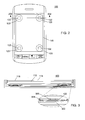
- FIG. 2 illustrates a front view of a portable electronic device in accordance with the present disclosure.
- FIG. 3 illustrates a cross-sectional view through the line 202 of FIG. 2 in accordance with the present disclosure.
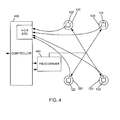
- FIG. 4 is a block diagram showing components of the portable electronic device in accordance with the present disclosure.
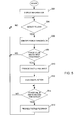
- FIG. 5 is a flowchart illustrating a method of providing tactile feedback at a portable electronic device in accordance with the present disclosure.
- FIG. 6 and FIG. 7 illustrate examples of a touch on a touch-sensitive display of a portable electronic device in accordance with the present disclosure.
- the following describes an electronic device and a method including detecting a touch at a touch location on a touch-sensitive display of the electronic device, identifying a first threshold value associated with the touch location, comparing the first threshold value to a force value related to the touch, and providing a first tactile feedback in response to determining that the force value meets the first threshold value.
- the disclosure generally relates to an electronic device, which in the embodiments described herein is a portable electronic device.
- portable electronic devices include mobile, or handheld, wireless communication devices such as pagers, cellular phones, cellular smart-phones, wireless organizers, personal digital assistants, wirelessly enabled notebook computers, and the like.
- the portable electronic device may also be a portable electronic device without wireless communication capabilities such as a handheld electronic game device, digital photograph album, digital camera, or other device.
- FIG. 1 A block diagram of an example of a portable electronic device 100 is shown in FIG. 1 .
- the portable electronic device 100 includes multiple components, such as a processor 102 that controls the overall operation of the portable electronic device 100. Communication functions, including data and voice communications, are performed through a communication subsystem 104. Data received by the portable electronic device 100 is decompressed and decrypted by a decoder 106. The communication subsystem 104 receives messages from and sends messages to a wireless network 150.
- the wireless network 150 may be any type of wireless network, including, but not limited to, data wireless networks, voice wireless networks, and dual-mode networks that support both voice and data communications.
- a power source 142 such as one or more rechargeable batteries or a port to another power supply, powers the portable electronic device 100.
- the processor 102 interacts with other devices, such as a Random Access Memory (RAM) 108, memory 110, a display 112 with a touch-sensitive overlay 114 operably connected to an electronic controller 116 that together comprise a touch-sensitive display 118, one or more actuators 120, one or more force sensors 122, an auxiliary input/output (I/O) subsystem 124, a data port 126, a speaker 128, a microphone 130, short-range communications 132 and other device subsystems 134.
- RAM Random Access Memory
- memory 110 a display 112 with a touch-sensitive overlay 114 operably connected to an electronic controller 116 that together comprise a touch-sensitive display 118, one or more actuators 120, one or more force sensors 122, an auxiliary input/output (I/O) subsystem 124, a data port 126, a speaker 128, a microphone 130, short-range communications 132 and other device subsystems 134.
- I/O auxiliary input/output
- Information such as text, characters, symbols, images, icons, links, and other items that may be displayed or rendered on a portable electronic device, is displayed on the touch-sensitive display 118 via the processor 102.
- the processor 102 may also interact with an accelerometer 136 that may be utilized to detect direction of gravitational forces or gravity-induced reaction forces.
- the portable electronic device 100 uses a Subscriber Identity Module or a Removable User Identity Module (SIM/RUIM) card 138 for communication with a network, such as the wireless network 150.
- SIM/RUIM Removable User Identity Module
- user identification information may be programmed into the memory 110.
- the portable electronic device 100 also includes an operating system 146 and software programs or components 148 that are executed by the processor 102 and are typically stored in a persistent, updatable store such as the memory 110. Additional applications or programs may be loaded onto the portable electronic device 100 through the wireless network 150, the auxiliary I/O subsystem 124, the data port 126, the short-range communications subsystem 132, or any other suitable subsystem 134.
- a received signal such as a text message, an e-mail message, or web page download is processed by the communication subsystem 104 and input to the processor 102.
- the processor 102 processes the received signal for output to the display 112 and/or to the auxiliary I/O subsystem 124.
- a subscriber may generate data items, for example e-mail messages, which may be transmitted over the wireless network 150 through the communication subsystem 104.
- the speaker 128 outputs audible information converted from electrical signals
- the microphone 130 converts audible information into electrical signals for processing.
- the touch-sensitive display 118 may be any suitable touch-sensitive display, such as a capacitive, resistive, infrared, or surface acoustic wave (SAW) touch-sensitive display, as known in the art.
- a capacitive touch-sensitive display includes the display 112 and a capacitive touch-sensitive overlay 114.
- the overlay 114 may be an assembly of multiple layers in a stack including, for example, a substrate, LCD display 112, a ground shield layer, a barrier layer, one or more capacitive touch sensor layers separated by a substrate or other barrier, and a cover.
- the capacitive touch sensor layers may be any suitable material, such as patterned indium tin oxide (ITO).
- One or more touches may be detected by the touch-sensitive display 118.
- the processor 102 may determine attributes of the touch, including a location of a touch.
- Touch location data may include an area of contact or a single point of contact, such as a point at or near a center of the area of contact.
- the location of a detected touch may include x and y components, e.g., horizontal and vertical components, respectively, with respect to one's view of the touch-sensitive display 118.
- the x location component may be determined by a signal generated from one touch sensor
- the y location component may be determined by a signal generated from another touch sensor.
- a signal is provided to the controller 116 in response to detection of a touch.
- a touch may be detected from any suitable object, such as a finger, thumb, appendage, or other items, for example, a stylus, pen, or other pointer, depending on the nature of the touch-sensitive display 118. Multiple simultaneous touches may be detected.
- the actuator 120 may be depressed by applying sufficient force to the touch-sensitive display 118 to overcome the actuation force of the actuator 120.
- the actuator 120 may be actuated by pressing anywhere on the touch-sensitive display 118.
- the actuator 120 may provide input to the processor 102 when actuated. Actuation of the actuator 120 provides the user with tactile feedback.
- the actuator 120 may comprise one or more piezoelectric (piezo) actuators that provide tactile feedback.
- FIG. 2 is front view of an example of a portable electronic device 100.
- the actuator 120 comprises four piezo actuators 120, each located near a respective corner of the touch-sensitive display 118.
- FIG. 3 is a sectional side view of the portable electronic device 100 through the line 202 of FIG 2 .
- Each piezo actuator 120 is supported within the portable electronic device 100 such that contraction of the piezo actuators 120 applies a force against the touch-sensitive display 118, for example, opposing a force externally applied to the display 118.
- Each piezo actuator 120 includes a piezoelectric device 302, such as a piezoelectric disk that may be adhered to a substrate 304 such as a metal substrate.
- An element 306 that is advantageously at least partially flexible and comprises, for example, hard rubber may be located between the piezoelectric device 302 and the touch-sensitive display 118. The element 306 does not substantially dampen the force applied to or on the touch-sensitive display 118.
- the force sensor 122 comprises four force-sensors 122 located between the element 306 and the substrate 304. The force sensors 122 are utilized to determine a value related to the force at each of the force sensors 122 when an external force is applied to the touch-sensitive display 118.
- the substrate 304 bends when the piezoelectric device 302 contracts diametrically due to build up of charge/voltage at the piezoelectric device 302 or in response to an external force applied to the touch-sensitive display 118.
- the charge/voltage may be adjusted by varying the applied current/voltage, thereby controlling the force applied by the piezo actuators 120 on the touch-sensitive display 118.
- the charge/voltage on the piezo actuators 120 may be removed by a controlled discharge current/voltage that causes the piezoelectric devices 302 to expand diametrically, decreasing the force applied by the piezo actuators 120 on the touch-sensitive display 118. Absent an external force applied to the touch-sensitive display 118 and absent a charge/voltage on the piezoelectric device 302, the piezo actuator 120 may be slightly bent due to a mechanical preload.
- each force sensor 122 is connected to a controller 402, which includes an amplifier and analog-to-digital converter (ADC).
- the force sensors 122 may be, for example, force sensing resistors in an electrical circuit such that the resistance changes with force imparted on the force sensors 122. As applied force to the touch-sensitive display 118 increases, the resistance decreases. This change is determined via the controller 116 for each of the force sensors 122, and a value representative of force at each of the force sensors 122 is determined. A force value related to the applied force of the touch may be determined utilizing the values representative of force from the force sensors 122.
- the piezo actuators 120 are connected to a piezo driver 404 that communicates with the controller 402.
- the controller 402 is also in communication with the main processor 102 of the portable electronic device 100 and may receive and provide signals to and from the main processor 102.
- the piezo actuators 120 and the force sensors 122 are operatively connected to the main processor 102 via the controller 402.
- the controller 402 controls the piezo driver 404 that controls the current/voltage to the piezoelectric devices 302 and thus controls the charge/voltage and the force applied by the piezo actuators 120 on the touch-sensitive display 118.
- Each of the piezoelectric devices 302 may be controlled substantially equally and concurrently.
- the piezoelectric devices 302 may be controlled separately.
- collapse and release of a dome switch is simulated.
- Other switches, actuators, keys, and so forth may be simulated, or a non-simulated tactile feedback may be provided.
- the force value related to the applied force on the touch-sensitive display 118 meets a depression threshold
- the charge/voltage at the piezo actuators 120 is varied to impart a force on the touch-sensitive display 118 to simulate collapse of a dome switch.
- the force value meets a release threshold after actuation of the piezo actuators 120, the charge/voltage at the piezo actuators 120 is varied to impart a force, by the piezo actuators 120, to simulate release of a dome switch.
- a value meets a threshold when the value is at or beyond the threshold.
- FIG. 5 A flowchart illustrating a method of providing tactile feedback at the electronic device 100 is shown in FIG. 5 .
- the method may be carried out by software executed by, for example, the processor 102. Coding of software for carrying out such a method is within the scope of a person of ordinary skill in the art given the present description.
- the method may contain additional or fewer processes than shown and/or described, and may be performed in a different order.
- Computer-readable code executable by at least one processor of the portable electronic device to perform the method may be stored in a computer-readable medium.
- Information is displayed 502 on the display 112.
- the information may be from an application, such as a web browser, contacts, email, calendar, music player, spreadsheet, word processing, operating system interface, and so forth.
- a depression force threshold and a release force threshold associated with the touch location are identified 506.
- the depression force threshold and the release force threshold are based on the touch location. These thresholds may be identified utilizing, for example, a look-up table or any other suitable method of associating the thresholds with locations on the touch-sensitive display 118.
- a force value related to the touch on the touch-sensitive display 118, determined based on signals from the force sensors 122, is compared 508 to the depression force threshold. When the force value does not meet the depression force threshold, the process continues at 504. When the force value meets the depression force threshold, the process continues at 510.
- the force value may be repeatedly determined, e.g., at a predetermined sample rate.
- Tactile feedback is provided 510 by actuation of the piezoelectric actuators 120 to impart a force on the touch-sensitive display 118, for example, to simulate collapse of a dome switch.
- a function may also be performed 512 such as selection of a feature that is associated with the touch location on the touch-sensitive display 118.
- the force value is compared 514 to the release force threshold. When the force value meets the release force threshold, tactile feedback is provided 516, for example, by actuation of the piezoelectric actuators 120 to impart a force on the touch-sensitive display 118 to simulate release of a dome switch.
- an additional function may be performed when the value force value meets the release threshold.
- a function may be performed when the force value meets the release threshold rather than at 512.
- the feature may be selected after the force value meets the release threshold.
- the depression and release force thresholds are based on the location of the touch on the touch-sensitive display.
- the thresholds may be higher for a touch at an area associated with one feature than the thresholds at an area associated with another feature.
- Examples of touches on a touch-sensitive display 118 of a portable electronic device 100 are shown in FIG. 6 and FIG. 7 .
- the portable electronic device 118 is locked, for example, to inhibit inadvertent selections.
- the menu 602 shown in FIG. 6 and FIG. 7 may be displayed in response to, for example, detecting a touch on the touch-sensitive display 118.
- Three menu options are displayed on the touch-sensitive display 118, including an "Unlock" option 604 to unlock the portable electronic device 118 for use, an "Emergency call” option 606 to make, for example, a 911 call, and a "Cancel” option 608 to exit the menu.
- an "Unlock” option 604 to unlock the portable electronic device 118 for use
- an "Emergency call” option 606 to make, for example, a 911 call
- a "Cancel” option 608 to exit the menu.
- a touch 610 is detected at a touch location that is associated with the "Unlock” option 604.
- the force thresholds associated with the touch location are identified.
- a touch 702 is detected at a touch location that is associated with the "Emergency Call” option 606.
- the force thresholds associated with the touch location are identified.
- the depression threshold associated with the "Emergency Call” touch location 702 may be greater than the depression threshold associated with the "Unlock” touch location 610.
- the applied force to actuate the piezo actuators 120 to provide tactile feedback and to perform the associated function which in this example is to dial 911, is greater than the applied force to actuate the piezo actuators 120 to provide tactile feedback and perform the function to unlock the portable electronic device 100.
- the release threshold associated with the touch location 702 may be greater than the release threshold associated with the touch location 610.
- the thresholds are the same for different touch locations that fall within the area associated with the "Unlock” option 604.
- the thresholds are the same for different touch locations that fall within the area associated with the "Emergency Call” option 606.
- the thresholds are the same for different touch locations that fall within the area associated with the "Cancel” option 608.
- the thresholds differ for touch locations that fall within the area associated with the "Unlock” option 604 compared to the thresholds for touch locations that fall within the area associated with the "Emergency Call” option 606.
- Force thresholds for selection of features on the touch-sensitive display may vary. Different force thresholds may be utilized to inhibit inadvertent selection of a feature or features on the portable electronic device 100 and inhibit performance or execution of associated functions. For example, different force thresholds may be utilized to inhibit 911, or emergency calls, or other speed dial calls. A decrease in inadvertent or unwanted execution or performance of functions may decrease device use time and power requirements and increase time between charging of the battery.
Landscapes
- Engineering & Computer Science (AREA)
- General Engineering & Computer Science (AREA)
- Theoretical Computer Science (AREA)
- Human Computer Interaction (AREA)
- Physics & Mathematics (AREA)
- General Physics & Mathematics (AREA)
- User Interface Of Digital Computer (AREA)
- Telephone Function (AREA)
Priority Applications (3)
| Application Number | Priority Date | Filing Date | Title |
|---|---|---|---|
| EP10159419A EP2375307A1 (fr) | 2010-04-08 | 2010-04-08 | Dispositif électronique portable avec seuils locaux pour retour tactile |
| CA2734059A CA2734059A1 (fr) | 2010-04-08 | 2011-03-15 | Dispositif electronique portatif et methode de commande dudit dispositif |
| KR1020110031903A KR101250638B1 (ko) | 2010-04-08 | 2011-04-06 | 휴대용 전자 디바이스 및 이의 제어 방법 |
Applications Claiming Priority (1)
| Application Number | Priority Date | Filing Date | Title |
|---|---|---|---|
| EP10159419A EP2375307A1 (fr) | 2010-04-08 | 2010-04-08 | Dispositif électronique portable avec seuils locaux pour retour tactile |
Publications (1)
| Publication Number | Publication Date |
|---|---|
| EP2375307A1 true EP2375307A1 (fr) | 2011-10-12 |
Family
ID=42710743
Family Applications (1)
| Application Number | Title | Priority Date | Filing Date |
|---|---|---|---|
| EP10159419A Ceased EP2375307A1 (fr) | 2010-04-08 | 2010-04-08 | Dispositif électronique portable avec seuils locaux pour retour tactile |
Country Status (3)
| Country | Link |
|---|---|
| EP (1) | EP2375307A1 (fr) |
| KR (1) | KR101250638B1 (fr) |
| CA (1) | CA2734059A1 (fr) |
Cited By (9)
| Publication number | Priority date | Publication date | Assignee | Title |
|---|---|---|---|---|
| EP2687964A1 (fr) * | 2012-07-20 | 2014-01-22 | Research In Motion TAT AB | Procédé et dispositif électronique pour faciliter le contrôle d'un menu par un utilisateur |
| WO2015092169A1 (fr) * | 2013-12-19 | 2015-06-25 | Dav | Dispositif de commande permettant de commander au moins deux fonctions d'un véhicule automobile |
| WO2015092167A1 (fr) * | 2013-12-19 | 2015-06-25 | Dav | Interface homme machine permettant de commander au moins deux fonctions d'un véhicule automobile |
| US9256351B2 (en) | 2012-07-20 | 2016-02-09 | Blackberry Limited | Method and electronic device for facilitating user control of a menu |
| US9507459B2 (en) | 2015-03-08 | 2016-11-29 | Apple Inc. | Device, method, and user interface for processing intensity of touch contacts |
| US9910524B1 (en) | 2016-09-06 | 2018-03-06 | Apple Inc. | Devices and methods for processing and disambiguating touch inputs using intensity thresholds based on prior input intensity |
| WO2018048504A1 (fr) * | 2016-09-06 | 2018-03-15 | Apple Inc. | Dispositifs et procédés de traitement et de désambiguïsation d'entrées tactiles à l'aide de seuils d'intensité sur la base d'une intensité d'entrée antérieure |
| US10048757B2 (en) | 2015-03-08 | 2018-08-14 | Apple Inc. | Devices and methods for controlling media presentation |
| CN110058757A (zh) * | 2016-09-06 | 2019-07-26 | 苹果公司 | 用于对触摸输入进行处理和消除歧义的设备和方法 |
Families Citing this family (1)
| Publication number | Priority date | Publication date | Assignee | Title |
|---|---|---|---|---|
| TWI830348B (zh) * | 2022-08-26 | 2024-01-21 | 致伸科技股份有限公司 | 觸控裝置 |
Citations (5)
| Publication number | Priority date | Publication date | Assignee | Title |
|---|---|---|---|---|
| EP1310860A1 (fr) * | 2000-08-08 | 2003-05-14 | NTT DoCoMo, Inc. | Appareil electronique, vibreur, procede d'informations vibratoire et procede de commande des informations |
| US20060119586A1 (en) * | 2004-10-08 | 2006-06-08 | Immersion Corporation, A Delaware Corporation | Haptic feedback for button and scrolling action simulation in touch input devices |
| WO2007037809A1 (fr) | 2005-09-16 | 2007-04-05 | Apple, Inc. | Utilisation d'un ordinateur a ecran tactile |
| EP2028583A2 (fr) * | 2007-08-22 | 2009-02-25 | Samsung Electronics Co., Ltd | Procédé et appareil pour fournir une rétroaction d'entrée dans un terminal portable |
| US20100020036A1 (en) * | 2008-07-23 | 2010-01-28 | Edward Hui | Portable electronic device and method of controlling same |
Family Cites Families (1)
| Publication number | Priority date | Publication date | Assignee | Title |
|---|---|---|---|---|
| US9001045B2 (en) * | 2005-11-08 | 2015-04-07 | Nokia Corporation | Cost efficient element for combined piezo sensor and actuator in robust and small touch screen realization and method for operation thereof |
-
2010
- 2010-04-08 EP EP10159419A patent/EP2375307A1/fr not_active Ceased
-
2011
- 2011-03-15 CA CA2734059A patent/CA2734059A1/fr not_active Abandoned
- 2011-04-06 KR KR1020110031903A patent/KR101250638B1/ko active Active
Patent Citations (5)
| Publication number | Priority date | Publication date | Assignee | Title |
|---|---|---|---|---|
| EP1310860A1 (fr) * | 2000-08-08 | 2003-05-14 | NTT DoCoMo, Inc. | Appareil electronique, vibreur, procede d'informations vibratoire et procede de commande des informations |
| US20060119586A1 (en) * | 2004-10-08 | 2006-06-08 | Immersion Corporation, A Delaware Corporation | Haptic feedback for button and scrolling action simulation in touch input devices |
| WO2007037809A1 (fr) | 2005-09-16 | 2007-04-05 | Apple, Inc. | Utilisation d'un ordinateur a ecran tactile |
| EP2028583A2 (fr) * | 2007-08-22 | 2009-02-25 | Samsung Electronics Co., Ltd | Procédé et appareil pour fournir une rétroaction d'entrée dans un terminal portable |
| US20100020036A1 (en) * | 2008-07-23 | 2010-01-28 | Edward Hui | Portable electronic device and method of controlling same |
Cited By (25)
| Publication number | Priority date | Publication date | Assignee | Title |
|---|---|---|---|---|
| EP2687964A1 (fr) * | 2012-07-20 | 2014-01-22 | Research In Motion TAT AB | Procédé et dispositif électronique pour faciliter le contrôle d'un menu par un utilisateur |
| US9256351B2 (en) | 2012-07-20 | 2016-02-09 | Blackberry Limited | Method and electronic device for facilitating user control of a menu |
| WO2015092169A1 (fr) * | 2013-12-19 | 2015-06-25 | Dav | Dispositif de commande permettant de commander au moins deux fonctions d'un véhicule automobile |
| WO2015092167A1 (fr) * | 2013-12-19 | 2015-06-25 | Dav | Interface homme machine permettant de commander au moins deux fonctions d'un véhicule automobile |
| FR3015714A1 (fr) * | 2013-12-19 | 2015-06-26 | Dav | Interface homme machine permettant de commander au moins deux fonctions d'un vehicule automobile |
| FR3015713A1 (fr) * | 2013-12-19 | 2015-06-26 | Dav | Interface homme machine permettant de commander au moins deux fonctions d'un vehicule automobile |
| US10664089B2 (en) | 2013-12-19 | 2020-05-26 | Dav | Control device for controlling at least two functions of a motor vehicle |
| JP2017500658A (ja) * | 2013-12-19 | 2017-01-05 | ダヴ | 自動車両の少なくとも2つの機能を制御するための制御装置 |
| US10558268B2 (en) | 2015-03-08 | 2020-02-11 | Apple Inc. | Device, method, and user interface for processing intensity of touch contact |
| DK201500578A1 (en) * | 2015-03-08 | 2017-01-16 | Apple Inc | Device, Method, and User Interface for Processing Intensity of Touch Contacts |
| US9645669B2 (en) | 2015-03-08 | 2017-05-09 | Apple Inc. | Device, method, and user interface for processing intensity of touch contacts |
| US11556201B2 (en) | 2015-03-08 | 2023-01-17 | Apple Inc. | Device, method, and user interface for processing intensity of touch contacts |
| US11099679B2 (en) | 2015-03-08 | 2021-08-24 | Apple Inc. | Device, method, and user interface for processing intensity of touch contacts |
| US9507459B2 (en) | 2015-03-08 | 2016-11-29 | Apple Inc. | Device, method, and user interface for processing intensity of touch contacts |
| US10019065B2 (en) | 2015-03-08 | 2018-07-10 | Apple Inc. | Device, method, and user interface for processing intensity of touch contacts |
| US10048757B2 (en) | 2015-03-08 | 2018-08-14 | Apple Inc. | Devices and methods for controlling media presentation |
| US9542037B2 (en) | 2015-03-08 | 2017-01-10 | Apple Inc. | Device, method, and user interface for processing intensity of touch contacts |
| CN110058757A (zh) * | 2016-09-06 | 2019-07-26 | 苹果公司 | 用于对触摸输入进行处理和消除歧义的设备和方法 |
| CN108174612B (zh) * | 2016-09-06 | 2019-05-14 | 苹果公司 | 用于利用基于先前输入强度的强度阈值对触摸输入进行处理和消除歧义的设备和方法 |
| CN108174612A (zh) * | 2016-09-06 | 2018-06-15 | 苹果公司 | 用于利用基于先前输入强度的强度阈值对触摸输入进行处理和消除歧义的设备和方法 |
| US10775915B2 (en) | 2016-09-06 | 2020-09-15 | Apple Inc. | Devices and methods for processing and disambiguating touch inputs using intensity thresholds based on prior input intensity |
| US11086368B2 (en) | 2016-09-06 | 2021-08-10 | Apple Inc. | Devices and methods for processing and disambiguating touch inputs using intensity thresholds based on prior input intensity |
| WO2018048504A1 (fr) * | 2016-09-06 | 2018-03-15 | Apple Inc. | Dispositifs et procédés de traitement et de désambiguïsation d'entrées tactiles à l'aide de seuils d'intensité sur la base d'une intensité d'entrée antérieure |
| CN110058757B (zh) * | 2016-09-06 | 2022-08-12 | 苹果公司 | 用于对触摸输入进行处理和消除歧义的设备和方法 |
| US9910524B1 (en) | 2016-09-06 | 2018-03-06 | Apple Inc. | Devices and methods for processing and disambiguating touch inputs using intensity thresholds based on prior input intensity |
Also Published As
| Publication number | Publication date |
|---|---|
| KR20110113143A (ko) | 2011-10-14 |
| CA2734059A1 (fr) | 2011-10-08 |
| KR101250638B1 (ko) | 2013-04-03 |
Similar Documents
| Publication | Publication Date | Title |
|---|---|---|
| US20110248839A1 (en) | Portable electronic device and method of controlling same | |
| US8466889B2 (en) | Method of providing tactile feedback and electronic device | |
| EP2375309A1 (fr) | Dispositif électronique portable avec délais locaux pour le déclenchement du retour tactile | |
| US8451255B2 (en) | Method of providing tactile feedback and electronic device | |
| CA2739225C (fr) | Methode de fourniture d'une retroaction tactile et dispositif electronique | |
| US8669946B2 (en) | Electronic device including touch-sensitive display and method of controlling same | |
| US20110248930A1 (en) | Portable electronic device and method of controlling same to provide tactile feedback | |
| US20110084910A1 (en) | Portable electronic device including touch-sensitive display and method of controlling same | |
| CA2737702C (fr) | Dispositif electronique a affichage tactile et sa methode de commande | |
| US20110248929A1 (en) | Electronic device and method of controlling same | |
| EP2375308A1 (fr) | Dispositif électronique portable avec effets tactiles localisés | |
| US8736559B2 (en) | Portable electronic device and method of controlling same | |
| EP2375307A1 (fr) | Dispositif électronique portable avec seuils locaux pour retour tactile | |
| EP2202621A1 (fr) | Dispositif électronique portable intégrant un écran tactile et son procédé de commande pour fournir un retour d'informations tactiles | |
| US20110248931A1 (en) | Tactile feedback for touch-sensitive display | |
| US10114495B2 (en) | Portable electronic device including touch-sensitive display and method of controlling same | |
| CA2712737C (fr) | Dispositif electronique portatif comprenant un ecran tactile, et methode de commande | |
| CA2739126C (fr) | Methode de fourniture d'une retroaction tactile et dispositif electronique | |
| CA2736852C (fr) | Dispositif electronique portatif et sa methode de commande | |
| EP2320307A1 (fr) | Dispositif électronique portable incluant un écran tactile et son procédé de commande | |
| EP2375310A1 (fr) | Retour d'informations tactile pour écran tactile |
Legal Events
| Date | Code | Title | Description |
|---|---|---|---|
| PUAI | Public reference made under article 153(3) epc to a published international application that has entered the european phase |
Free format text: ORIGINAL CODE: 0009012 |
|
| 17P | Request for examination filed |
Effective date: 20100413 |
|
| AK | Designated contracting states |
Kind code of ref document: A1 Designated state(s): AT BE BG CH CY CZ DE DK EE ES FI FR GB GR HR HU IE IS IT LI LT LU LV MC MK MT NL NO PL PT RO SE SI SK SM TR |
|
| AX | Request for extension of the european patent |
Extension state: AL BA ME RS |
|
| 17Q | First examination report despatched |
Effective date: 20120510 |
|
| RAP1 | Party data changed (applicant data changed or rights of an application transferred) |
Owner name: BLACKBERRY LIMITED |
|
| STAA | Information on the status of an ep patent application or granted ep patent |
Free format text: STATUS: THE APPLICATION HAS BEEN REFUSED |
|
| 18R | Application refused |
Effective date: 20130615 |