EP2375342A2 - Procédé fournissant une fonction d'écriture de texte et fonction de coupure et appareil électronique l'appliquant - Google Patents
Procédé fournissant une fonction d'écriture de texte et fonction de coupure et appareil électronique l'appliquant Download PDFInfo
- Publication number
- EP2375342A2 EP2375342A2 EP10190039A EP10190039A EP2375342A2 EP 2375342 A2 EP2375342 A2 EP 2375342A2 EP 10190039 A EP10190039 A EP 10190039A EP 10190039 A EP10190039 A EP 10190039A EP 2375342 A2 EP2375342 A2 EP 2375342A2
- Authority
- EP
- European Patent Office
- Prior art keywords
- content
- book
- screen
- command
- text
- Prior art date
- Legal status (The legal status is an assumption and is not a legal conclusion. Google has not performed a legal analysis and makes no representation as to the accuracy of the status listed.)
- Withdrawn
Links
Images






Classifications
-
- G—PHYSICS
- G06—COMPUTING OR CALCULATING; COUNTING
- G06F—ELECTRIC DIGITAL DATA PROCESSING
- G06F3/00—Input arrangements for transferring data to be processed into a form capable of being handled by the computer; Output arrangements for transferring data from processing unit to output unit, e.g. interface arrangements
- G06F3/01—Input arrangements or combined input and output arrangements for interaction between user and computer
- G06F3/048—Interaction techniques based on graphical user interfaces [GUI]
-
- G—PHYSICS
- G06—COMPUTING OR CALCULATING; COUNTING
- G06F—ELECTRIC DIGITAL DATA PROCESSING
- G06F40/00—Handling natural language data
- G06F40/10—Text processing
- G06F40/166—Editing, e.g. inserting or deleting
-
- G—PHYSICS
- G06—COMPUTING OR CALCULATING; COUNTING
- G06F—ELECTRIC DIGITAL DATA PROCESSING
- G06F40/00—Handling natural language data
- G06F40/10—Text processing
- G06F40/166—Editing, e.g. inserting or deleting
- G06F40/174—Form filling; Merging
-
- G—PHYSICS
- G06—COMPUTING OR CALCULATING; COUNTING
- G06F—ELECTRIC DIGITAL DATA PROCESSING
- G06F40/00—Handling natural language data
- G06F40/10—Text processing
- G06F40/166—Editing, e.g. inserting or deleting
- G06F40/186—Templates
Definitions
- the present invention relates to a method for providing a function of writing text and a function of clipping and an electronic apparatus applying the same, and more particularly, to a method for providing a function of writing text relating to currently displayed content and a function of clipping, and an electronic apparatus applying the same.
- the electronic book content also known as an e-book or a digital book, records information such as text or image on an electronic multimedia device and can be used as a printed book.
- the electronic book content is convenient to readers in that it is cheaper compared to a printed book and enables the readers to more easily access and purchase books.
- the electronic book content is also attractive to publishing companies due to the low cost for publishing and distributing books and easy updatability.
- the electronic book apparatus generally means an apparatus which displays electronic book contents on a screen. Readers can easily download the electronic book contents using the electronic book apparatus and can use a number of different functions of the electronic book.
- An aspect of an exemplary embodiment provides a method for providing a function of writing text and an electronic apparatus applying the same. According to the exemplary embodiment of the method for providing a function of writing text, if a command is input while content is being displayed, a text writing screen including information relating to the content is displayed.
- An aspect of another exemplary embodiment provides a method for providing a clipping function and an electronic apparatus applying the same.
- the method for providing a clipping function if a command to select an area from content is input while the content is being displayed, the area is extracted; information related to the content is appended to the selected area of the content and the area is displayed.
- a method for providing a text writing function includes: displaying content, and if a command is input while the content is being displayed, displaying a text writing screen to write text relating to the content, and the text writing screen includes information relating to the content.
- the method may further include: extracting the information related to the content from a file associated with the content, and appending the information related to the content to the text writing screen.
- the extracting may extract the information related to the content from metadata of the file associated with the content.
- the information related to the content may include at least one of a title, an author, a publishing company, and a publishing date of the book content.
- the text writing screen may include a screen to write a report relating to the content.
- the method may further include: extracting category information of the content, and selecting a text writing form corresponding to the category information of the content, and the displaying the text writing screen may display a text writing screen of the selected text writing form.
- an electronic apparatus includes: a display unit which displays content, a manipulation unit which receives a command from a user, and a controller which displays a text writing screen to write text if a command is input through the manipulation unit while the content is being displayed, and the text writing screen includes information relating to the content.
- the controller may extract the information related to the content from a file associated with the content and may append the information related to the content to the text writing screen.
- the controller may extract the information related to the content from metadata of the file associated with the content.
- the content-related information may include at least one of a title, an author, a publishing company, and a publishing date of the book content.
- the text writing screen may include a screen to write a report relating to the content.
- the controller may extract category information of the content, select a text writing form corresponding to the category information of the content, and display the text writing screen based on the selected form.
- a method for providing a clipping function includes: displaying content, if a command to select a area from the content is input while the content is being displayed, extracting the selected area from the content, appending information relating to the content to the extracted area of the content, and displaying the extracted area of the content and the information related to the content on a screen.
- the method may further include extracting the information related to the content from a file associated with the content, and the appending may append the extracted information related to the content to the extracted area of the content.
- the extracting the content-related information may extract the information related to the content from metadata of the file associated with the content.
- the content-related information may include at least one of a title, an author, a publishing company, and a publishing date of the book content.
- an electronic apparatus includes: a display unit which displays content, a manipulation unit which receives a command from a user, and a controller which, if a command to select an area from the content is input through the manipulation unit while the content is being displayed, extracts the selected area from the content, appends information relating to the content to the extracted area of the content, and displays the extracted area of the content and the information related to the content on a screen of the display unit.
- the controller may extract the information related to the content from a file associated with the content and append the extracted information related to the content to the extracted area of the content.
- the controller may extract the information related to the content from metadata of the file associated with the content.
- the information related to the content may include at least one of a title, an author, a publishing company, and a publishing date of the book content.
- a method of providing a text processing function including: displaying content; determining whether a command is input; simultaneously displaying an area to write text and information relating to the content if the command is a text writing command and if the command is input while the content is being displayed; and extracting an area from the content and simultaneously displaying the extracted area and the information related to the content if the command is to select the area and if the command is input while the content is being displayed.
- the method may also include appending the information relating to the content to the extracted area of the content.
- the content may include a text of a book, and the content-related information may include at least one of a title, an author, a publishing company, and a publishing date of the book.
- FIG. 1 is a view illustrating a screen 101 of an electronic book apparatus 100 according to an exemplary embodiment.
- the electronic book apparatus 100 displays contents on the screen 101.
- the electronic book apparatus 100 may display an icon to receive a command from a user on the screen 101.
- the electronic book apparatus 100 may display a clipping command icon 110 and a book report writing command icon 120 on the screen.
- the electronic book apparatus 100 supports a touch screen function as a user manipulation interface. Therefore, a user can input a command by touching a desired command icon.
- the clipping command icon 110 is an icon to receive a clipping command. If a clipping command is input, the electronic book apparatus 100 executes a clipping function.
- the clipping function allows a user to select a specific area from content which is being currently displayed on the screen 101 and clip it. If the user selects a specific area from content using the clipping function, the electronic book apparatus 100 displays the clipped specific area of the content on the screen 101 and displays content-related information along with the specific area.
- the book report writing command icon 120 is an icon to receive a command to write a book report. If a command to write a book report is input, the electronic book apparatus 100 executes a function of writing a book report relating to content which is being currently displayed on the screen. The function of writing a book report allows a user to write a book report relating to content currently displayed on the screen. If the user inputs a command to write a book report, the electronic book apparatus 100 displays a book report writing screen. The electronic book apparatus 100 displays content-related information on the book report writing screen even without receiving a command to do so from the user.
- the content-related information is information relating to the content which is being currently displayed on the electronic book apparatus 100.
- the content-related information may include at least one of a title, an author, a publishing company, and a publishing date.
- the user can write a book report relating to the book he/she is reading or clip some content from the book using the electronic book apparatus 100.
- the content-related information is displayed when the book report writing screen or the clipped specific area is displayed, the user is not required to input the content-related information separately.
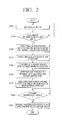
- FIG. 2 is a flowchart illustrating a method for providing a function of writing text according to an exemplary embodiment.
- the electronic book apparatus 100 display content on the screen 101 (S210).
- the content is electronic book content.
- Any content that can be displayed on the screen of the electronic book apparatus 100 such as a picture and a moving picture, i.e., a video, can be applied.
- the electronic book apparatus 100 determines whether or not a command to write a book report is input by a user's manipulation, for example, by determining whether the book report writing command icon 120 is touched or not.
- the electronic book apparatus 100 extracts content-related information from metadata of a file associated with, or which stores, the currently displayed content (S230).
- the metadata is data for explaining content and is structured according a specific standard.
- the metadata is also called attribute information.
- the metadata is given to the content according to an industry standard so that it is easy to find desired content from massive contents and use it.
- the metadata records the location and other details of the content, information regarding a writer, an authority condition, a condition of use, and a use history, for example.
- the metadata of electronic book content includes at least one of a title, an author, a publishing company, a publishing date, and category information, for example.
- the metadata of the content is recorded on a content file along with content data.
- the electronic book apparatus 100 extracts category information from the metadata (S240).
- the electronic book apparatus 100 selects a book report writing form corresponding to the category information of the content (S250).
- the book report writing form refers to a format or a template which is provided on a book report writing screen in order for a user to write a book report.
- the book report writing form differs depending on which category the content belongs to.
- the electronic book apparatus 100 displays a different book report writing form depending on which category, for example among health, novel, science and cooking, the current content belongs to.
- the electronic book apparatus 100 stores book report writing forms for respective categories of contents so that the user can select a book report writing form corresponding to the category information of the current content.
- the book report writing forms for the respective categories may be pre-stored in the electronic book apparatus 100 or may be created by the user.
- the electronic book apparatus 100 displays a book report writing screen of a suitable form according to the category of the content, the user can write a book report relating to the content more easily.
- the electronic book apparatus 100 appends, i.e., attaches or joins, the content-related information to the book report writing screen of the selected form (S260). Then, the electronic book apparatus 100 displays the book report writing screen to which the content-related information is appended (S270). At this time, the electronic book apparatus 100 displays the book report writing screen with the selected book report writing form.
- the electronic book apparatus 100 determines whether a command to finish writing a book report is input or not (S280).
- the electronic book apparatus 100 stores the written book report along with the content-related information (S290). Accordingly, the electronic book apparatus 100 displays the content-related information when loading the written book report again and displaying it on the screen.
- the electronic book apparatus 100 displays the book report writing screen such that the user writes a book report relating to the currently displayed content. Since the content-related information is also displayed on the book report writing screen, the user can easily know what content corresponds to the book report he/she is writing. Also, since a suitable book report writing form is selected according to the category of the content, the user can write a book report using a suitable form for the category of the content.
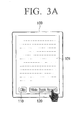
- FIGS. 3A to 3C are views illustrating a process of executing a book report writing function according to an exemplary embodiment.
- FIG. 3A illustrates a screen 10 of the electronic book apparatus 100 on which content is displayed.
- the screen 101 of the electronic book apparatus 100 includes a clipping command icon 110 and a book report writing command icon 120.
- the electronic book apparatus 100 receives a command to write a book report. Then, the electronic book apparatus 100 displays a book report writing screen as shown in FIG. 3B .
- FIG. 3B is a view illustrating an example of the book report writing screen if the category of the content is 'science'.
- the book report writing screen includes a content-related information display area 300 and a book report writing area 310.
- the content-related information display area 300 displays the title, author, publishing company, and publishing date of the content as shown in FIG. 3B .
- FIG. 3B a book titled " Introduction to Quantum Mechanics", written by “David J. Griffiths”, and published by “Prentice Hall” on “April 1, 2004 " is displayed.
- the book report writing area 310 displays the category of the content and a suitable book report writing form for this category as shown in FIG. 3B .
- the category of the current content is "science” and a book report writing form suitable for the category "science” is displayed.
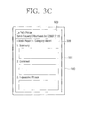
- FIG. 3C is a view illustrating a book report writing screen if the category of the content is 'novel'. As shown in FIG. 3C , the book report writing screen includes a content-related information display area 320 and a book report writing area 330.
- the content-related information display area 320 displays the title, author, publishing company, and publishing date of the content.
- the content-related information display area 320 displays a book titled “ Le Petit Prince”, written by “Saint-Exupery”, and published by “Distribook Inc.” on “July 16, 2007 ".
- the book report writing area 330 displays the category of the content and a book report writing form suitable for this category.
- the category of the current content is 'novel' and a book report writing form suitable for the category 'novel' is displayed.
- the electronic book apparatus 100 stores various book report writing forms corresponding to the respective categories.
- FIG. 4 is a view illustrating forms of book reports for respective categories of contents according to an exemplary embodiment.
- the electronic book apparatus 100 stores a form 'A' corresponding to a category 'health', a form 'B' corresponding to a category 'novel', a form 'C' corresponding to a category 'science', and a form 'D' corresponding to a category 'cooking'.
- the electronic book apparatus 100 displays the book report writing screen which enables a user to write a book report relating to the currently displayed content. Since the content-related information is also displayed on the book report writing screen, the user can easily know what content corresponds to the book report he/she is writing. Also, since a book report writing form suitable for each category is selected, the user can write a book report using a form suitable for the category of the content.
- the electronic book apparatus 100 displays the book report writing screen.
- the exemplary embodiments can be applied to a situation where text is written relating to the content. In this case, if a specific command is input while the content is being displayed, the electronic book apparatus 100 displays a text writing screen to write text relating to the content.
- FIG. 5 is a flowchart illustrating a method for providing a clipping function according to an exemplary embodiment.
- the electronic book apparatus 100 displays content on the screen (S510).
- the content is electronic book content.
- the electronic book apparatus 100 determines whether a clipping command is input or not by a user's manipulation (S520), for example, by determining whether the clipping command icon 110 is touched or not.
- the electronic book apparatus 100 determines whether a command to select a specific area from the currently displayed content is input or not (S530).
- the specific area recited herein refers to an area that is selected from the currently displayed content by a user and also an area that the user wishes to clip.
- the specific area is selected by inputting a command to select a specific area.
- the command to select a specific area may be input by dragging on a touch screen or dragging using a mouse.
- dragging on a touch screen may include sliding a user's finger across the touchscreen, and dragging using a mouse may include holding down a button on the mouse while simultaneously moving the mouse.
- the electronic book apparatus 100 may receive a command to select a specific area from a user using a number of different types of manipulation.
- the electronic book apparatus 100 extracts the specific area from the content (S540).
- Content-related information is extracted from metadata of a file for the currently displayed content (S550).
- the electronic book apparatus 100 appends the content-related information to the selected specific area of the content (S560).
- the electronic book apparatus 100 displays the specific area of the content to which the content-related information is appended (S570).
- the electronic book apparatus 100 clips a specific area which is selected by a user.
- the electronic book apparatus 100 stores the selected specific area as a clipping file along with the content-related information (S580). Accordingly, the electronic book apparatus 100 displays the content-related information when loading the stored clipping file again and displaying it.
- the electronic book apparatus 100 displays the specific area which is clipped from the currently displayed content. Since the content-related information is also displayed on a clipping display screen, the user can easily know what content corresponds to the clipped specific area.
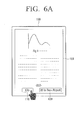
- FIGS. 6A to 6C are views illustrating a process of executing a clipping function according to an exemplary embodiment.
- FIG. 6A is a view illustrating a screen 101 of the electronic book apparatus 100 on which content is displayed. Also, the screen 101 of the electronic book apparatus 100 includes a clipping command icon 110 and a book report writing command icon 120.
- the electronic book apparatus 100 receives a command to clip. Then, the electronic book apparatus 100 receives a command to select a specific area 600 from a user as shown in FIG. 6B .
- FIG. 6B illustrates that the user inputs a command to select the specific area 600 from the currently displayed content by dragging along a touch screen of the electronic book apparatus 100. If the user inputs a command to select a specific area as described above, the electronic book apparatus 100 display a clipping display screen to display the selected specific area 600 as shown in FIG. 6C .
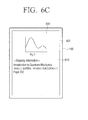
- FIG. 6C illustrates a clipping display screen on which a specific area clipped from content is displayed.
- the clipping display screen includes a clipping display area 600 and a clipping information display area 610.
- the clipping display area 600 displays the specific area clipped from the content. As shown in FIG. 6C , the clipping display area 600 displays ' Fig. 1 ' which is clipped by the user.
- the clipping information display area 610 displays information relating to the clipped content, for example, a title, an author, a publishing company, a publishing date, and a page number of the content.
- the clipping information display area 610 displays information of a book titled " Introduction to Quantum Mechanics", written by “David J. Griffiths”, and published by “Prentice Hall” on “April 1, 2004”, and displays "Page 252 " indicating the number of page of the clipped specific area.
- the electronic book apparatus 100 display a specific area which is clipped from currently displayed content. Since the content-related information is also displayed on the clipping display screen, the user can easily know what content corresponds to the clipped specific area.
- FIG. 7 is a block diagram illustrating an electronic book apparatus according to an exemplary embodiment.
- the electronic book apparatus 100 includes a function block 710, a communication unit 720, a manipulation unit 730, a storage unit 740, a display unit 750, and a controller 760.
- the function block 710 performs a function particular to the electronic book apparatus 100.
- the function block 710 performs replaying content, in particular, electronic book content.
- the communication unit 720 is communicably connected to an external device through a mobile communication network or Internet.
- the communication unit 720 can download electronic book content from an external device.
- the manipulation unit 730 receives manipulation from a user to receive a user command.
- the manipulation unit 730 receives manipulation corresponding to a command to clip, a command to select a specific area, and a command to write a book report from a user.
- the manipulation unit 730 may be realized as a touch screen, a button, a mouse, or a touch pad.
- the storage unit 740 stores a program and an application which are necessary for performing the function of the electronic book apparatus 100. Also, the storage unit 740 stores contents including electronic book content and also stores a clipping file and a book report file created by the user. The clipping file and the book report file may be recorded along with the content-related information relating to corresponding content.
- the display unit 750 displays a number of different screens to provide the function of the electronic book apparatus 100.
- the display unit 750 displays electronic book content on a screen.
- the display unit 750 may display the clipping display screen to display a specific area clipped by a user.
- the display unit 750 may display the book report writing screen to allow a user to write a book report.
- the display unit 750 also displays content-related information relating to the corresponding content on the clipping display screen and the book report writing screen.
- the controller 760 controls the overall function of the electronic book apparatus 100 according to user's manipulation input through the manipulation unit 730.
- the controller 760 determines whether a command to write a book report is input or not by user's manipulation, for example, by determining whether the book report writing command icon 120 is touched or not.
- the controller 760 extracts content-related information from metadata of a file for the currently displayed content.
- the controller 760 extracts category information from the metadata.
- the controller 760 selects a book report writing form corresponding to the category information.
- the book report writing forms for respective categories may be pre-stored in the storage unit 740 or may be created by the user.
- the controller 760 appends the content-related information to the book report writing screen of the selected form. Also, the controller 760 controls the display unit 750 to display the book report writing screen to which the content-related information is appended. The controller 760 controls the book report writing screen to displayed the selected book report writing form.
- the controller 760 controls the storage unit 740 to store the written book report along with the content-related information. Accordingly, the content-related information is displayed when the stored book report is loaded again and displayed on the screen.
- the controller 760 controls the display unit 750 to display the book report writing screen in order to allow the user to write a book report relating to the currently displayed content. Since the content-related information is also displayed on the book report writing screen, the user can easily know what content corresponds to the book report he/she is writing. Also, since a book report writing form suitable for each category is selected, the user can write a book report using a form suitable for the category of the content.
- controller 760 determines whether a command to clip is input or not by user's manipulation, for example, by determining whether the clipping command icon 110 is touched or not.
- the controller 760 determines whether a command to select a specific area from currently displayed content is input or not.
- the specific area refers to an area that is selected from the currently display content by a user and also refers an area of the content that the user wishes to clip.
- the specific area is selected by inputting a command to select a specific area.
- the command to select a specific area may be input by dragging on a touch screen or dragging using a mouse.
- the controller 760 may receive a command to select a specific area from a user using a number of different types of manipulation.
- the controller 760 extracts the selected specific area from the content.
- the controller 760 extracts content-related information from metadata of a file for the currently displayed content.
- the controller 760 appends the content-related information to the selected specific area of the content.
- the controller 760 controls the display unit 750 to display the specific area of the content to which the content-related information is appended.
- the controller 760 clips the specific area selected by the user.
- controller 760 controls the storage unit 740 to store the selected specific area as a clipping file along with the content-related information. Accordingly, the content-related information is displayed when the clipping file is loaded again and displayed on the screen.
- the controller 760 controls the display unit 750 to display the specific area clipped from the currently displayed content. Since the content-related information is also displayed on the clipping display screen, the user can easily know what content corresponds to the clipped specific area.
- the electronic book apparatus 100 was described. However, this is merely an example for convenience of explanation. The technical idea can be applied to any other electronic apparatus that can display contents on a screen and provide a function of writing text relating to the content or clipping it.
- the electronic apparatus may be a portable multimedia player (PMP), an MP3 player, a mobile phone, a laptop computer, or a personal digital assistant (PDA).
- PMP portable multimedia player
- MP3 player MP3 player
- mobile phone a laptop computer
- PDA personal digital assistant
- a text writing screen including content-related information is displayed. Accordingly, since the content-related information is automatically displayed when the user writes text relating to the content, the user is not required to input the content-related information separately.
- the content-related information is appended to the selected specific area and displayed. Accordingly, since the content-related information is automatically displayed when the content is clipped, the user is not required to input the content-related information separately.
Landscapes
- Engineering & Computer Science (AREA)
- Theoretical Computer Science (AREA)
- General Engineering & Computer Science (AREA)
- Physics & Mathematics (AREA)
- General Physics & Mathematics (AREA)
- Computational Linguistics (AREA)
- General Health & Medical Sciences (AREA)
- Health & Medical Sciences (AREA)
- Audiology, Speech & Language Pathology (AREA)
- Artificial Intelligence (AREA)
- Human Computer Interaction (AREA)
- Document Processing Apparatus (AREA)
- User Interface Of Digital Computer (AREA)
- Information Retrieval, Db Structures And Fs Structures Therefor (AREA)
Applications Claiming Priority (1)
| Application Number | Priority Date | Filing Date | Title |
|---|---|---|---|
| KR1020090120518A KR20110064082A (ko) | 2009-12-07 | 2009-12-07 | 문서작성기능 제공방법, 스크랩 기능 제공방법, 및 이를 적용한 전자기기 |
Publications (2)
| Publication Number | Publication Date |
|---|---|
| EP2375342A2 true EP2375342A2 (fr) | 2011-10-12 |
| EP2375342A3 EP2375342A3 (fr) | 2012-05-02 |
Family
ID=44083248
Family Applications (1)
| Application Number | Title | Priority Date | Filing Date |
|---|---|---|---|
| EP10190039A Withdrawn EP2375342A3 (fr) | 2009-12-07 | 2010-11-04 | Procédé fournissant une fonction d'écriture de texte et fonction de coupure et appareil électronique l'appliquant |
Country Status (3)
| Country | Link |
|---|---|
| US (1) | US20110138316A1 (fr) |
| EP (1) | EP2375342A3 (fr) |
| KR (1) | KR20110064082A (fr) |
Cited By (7)
| Publication number | Priority date | Publication date | Assignee | Title |
|---|---|---|---|---|
| WO2013059508A1 (fr) * | 2011-10-19 | 2013-04-25 | Microsoft Corporation | Procédés pour des communications asynchrones |
| US9039659B2 (en) | 2009-12-30 | 2015-05-26 | Medtronic Minimed, Inc. | Connection and alignment systems and methods |
| US9393363B2 (en) | 2009-09-02 | 2016-07-19 | Medtronic Minimed, Inc. | Insertion device systems and methods |
| US9421321B2 (en) | 2009-12-30 | 2016-08-23 | Medtronic Minimed, Inc. | Connection and alignment systems and methods |
| US9518813B2 (en) | 2009-12-30 | 2016-12-13 | Medtronic Minimed, Inc. | Sensing systems and methods |
| US9610405B2 (en) | 2009-12-30 | 2017-04-04 | Medtronic Minimed, Inc. | Connection and alignment detection systems and methods |
| US9943332B2 (en) | 2009-09-02 | 2018-04-17 | Medtronic Minimed, Inc. | Insertion device systems and methods |
Families Citing this family (5)
| Publication number | Priority date | Publication date | Assignee | Title |
|---|---|---|---|---|
| KR101862700B1 (ko) * | 2011-10-11 | 2018-05-31 | 삼성전자주식회사 | 휴대용 단말기의 메타데이터 데이터베이스 복사를 이용한 멀티미디어 공유장치 및 방법 |
| WO2015050408A1 (fr) * | 2013-10-04 | 2015-04-09 | Samsung Electronics Co., Ltd. | Procédé et appareil permettant de partager et d'afficher des informations d'écriture |
| WO2015068872A1 (fr) * | 2013-11-08 | 2015-05-14 | Lg Electronics Inc. | Dispositif électronique et procédé de commande |
| KR101631999B1 (ko) * | 2014-08-29 | 2016-06-21 | 엘지전자 주식회사 | 이동 단말기 및 그 제어 방법 |
| KR20240083371A (ko) * | 2022-12-05 | 2024-06-12 | 김주명 | 문서 자동변환 및 편집 프로그램 |
Family Cites Families (16)
| Publication number | Priority date | Publication date | Assignee | Title |
|---|---|---|---|---|
| US6192360B1 (en) * | 1998-06-23 | 2001-02-20 | Microsoft Corporation | Methods and apparatus for classifying text and for building a text classifier |
| US6275223B1 (en) * | 1998-07-08 | 2001-08-14 | Nortel Networks Limited | Interactive on line code inspection process and tool |
| US6551357B1 (en) * | 1999-02-12 | 2003-04-22 | International Business Machines Corporation | Method, system, and program for storing and retrieving markings for display to an electronic media file |
| US6519603B1 (en) * | 1999-10-28 | 2003-02-11 | International Business Machine Corporation | Method and system for organizing an annotation structure and for querying data and annotations |
| AU2001265029A1 (en) * | 2000-05-24 | 2001-12-03 | Goreader, Inc. | Method, apparatus, and system for manipulation of electronic content |
| US9460414B2 (en) * | 2001-08-28 | 2016-10-04 | Eugene M. Lee | Computer assisted and/or implemented process and system for annotating and/or linking documents and data, optionally in an intellectual property management system |
| US7243301B2 (en) * | 2002-04-10 | 2007-07-10 | Microsoft Corporation | Common annotation framework |
| WO2003094040A1 (fr) * | 2002-05-03 | 2003-11-13 | Thomson Licensing S.A. | Editeur d'hyperlien de livres electroniques |
| US20040261016A1 (en) * | 2003-06-20 | 2004-12-23 | Miavia, Inc. | System and method for associating structured and manually selected annotations with electronic document contents |
| US20040267798A1 (en) * | 2003-06-20 | 2004-12-30 | International Business Machines Corporation | Federated annotation browser |
| US7900133B2 (en) * | 2003-12-09 | 2011-03-01 | International Business Machines Corporation | Annotation structure type determination |
| US20080077870A1 (en) * | 2004-01-09 | 2008-03-27 | Suzanne Napoleon | Method and apparatus for producing structured sgml/xml student compositions |
| KR101222294B1 (ko) * | 2004-03-15 | 2013-01-15 | 야후! 인크. | 사용자 주석이 통합된 검색 시스템 및 방법 |
| US7685209B1 (en) * | 2004-09-28 | 2010-03-23 | Yahoo! Inc. | Apparatus and method for normalizing user-selected keywords in a folksonomy |
| US20090254802A1 (en) * | 2008-04-04 | 2009-10-08 | Print Asset Management, Inc. | Publishing system and method that enables users to collaboratively create, professional appearing digital publications for "On-Demand" distribution in a variety of media that includes digital printing |
| US8930490B2 (en) * | 2009-01-27 | 2015-01-06 | Apple Inc. | Lifestream annotation method and system |
-
2009
- 2009-12-07 KR KR1020090120518A patent/KR20110064082A/ko not_active Ceased
-
2010
- 2010-06-02 US US12/792,157 patent/US20110138316A1/en not_active Abandoned
- 2010-11-04 EP EP10190039A patent/EP2375342A3/fr not_active Withdrawn
Non-Patent Citations (3)
| Title |
|---|
| "Introduction to Quantum Mechanics", 1 April 2004, PRENTICE HALL |
| "Introduction to Quantum Mechanics", 1 April 2004, PRENTICE HALL, pages: 252 |
| "Le Petit Prince", 16 July 2007, DISTRIBOOK INC. |
Cited By (8)
| Publication number | Priority date | Publication date | Assignee | Title |
|---|---|---|---|---|
| US9393363B2 (en) | 2009-09-02 | 2016-07-19 | Medtronic Minimed, Inc. | Insertion device systems and methods |
| US9943332B2 (en) | 2009-09-02 | 2018-04-17 | Medtronic Minimed, Inc. | Insertion device systems and methods |
| US9039659B2 (en) | 2009-12-30 | 2015-05-26 | Medtronic Minimed, Inc. | Connection and alignment systems and methods |
| US9421321B2 (en) | 2009-12-30 | 2016-08-23 | Medtronic Minimed, Inc. | Connection and alignment systems and methods |
| US9518813B2 (en) | 2009-12-30 | 2016-12-13 | Medtronic Minimed, Inc. | Sensing systems and methods |
| US9610405B2 (en) | 2009-12-30 | 2017-04-04 | Medtronic Minimed, Inc. | Connection and alignment detection systems and methods |
| WO2013059508A1 (fr) * | 2011-10-19 | 2013-04-25 | Microsoft Corporation | Procédés pour des communications asynchrones |
| US9465507B2 (en) | 2011-10-19 | 2016-10-11 | Microsoft Technology Licensing, Llc | Techniques to facilitate asynchronous communication |
Also Published As
| Publication number | Publication date |
|---|---|
| US20110138316A1 (en) | 2011-06-09 |
| KR20110064082A (ko) | 2011-06-15 |
| EP2375342A3 (fr) | 2012-05-02 |
Similar Documents
| Publication | Publication Date | Title |
|---|---|---|
| EP2375342A2 (fr) | Procédé fournissant une fonction d'écriture de texte et fonction de coupure et appareil électronique l'appliquant | |
| Tashman et al. | LiquidText: a flexible, multitouch environment to support active reading | |
| US20210181911A1 (en) | Electronic text manipulation and display | |
| US8698765B1 (en) | Associating concepts within content items | |
| CN103339588B (zh) | 终端装置和图标管理方法 | |
| JP6271125B2 (ja) | 電子機器、表示方法、およびプログラム | |
| EP3144794B1 (fr) | Terminal mobile et son procédé de commande | |
| US9195373B2 (en) | System and method for navigation in an electronic document | |
| US20100289757A1 (en) | Scanner with gesture-based text selection capability | |
| US20100293460A1 (en) | Text selection method and system based on gestures | |
| US20130139078A1 (en) | Electronic reader and page processing method thereof | |
| US20120229397A1 (en) | Method and apparatus for selecting desired contents on read text in portable terminal | |
| CN104854545A (zh) | 电子设备以及输入方法 | |
| CN103135898A (zh) | 在移动装置中用于管理书相关项的系统和方法 | |
| EP2708997A1 (fr) | Dispositif d'affichage, procédé pour interface utilisateur et programme | |
| US20110191701A1 (en) | E-book device and method for providing information on multi-tasking history | |
| US20120030558A1 (en) | Electronic Book and Method for Displaying Annotation Thereof | |
| US20140240101A1 (en) | Device and method for processing write information of electronic tag | |
| US9405442B1 (en) | List control with zoom operation | |
| JP7496699B2 (ja) | 表示装置 | |
| KR101355846B1 (ko) | 전자책의 데이터 처리방법 | |
| KR20180137369A (ko) | 이북 및 워드 문서의 요약노트 작성 방법과 이를 이용한 암기학습 시스템 및 방법 | |
| KR101368610B1 (ko) | 전자책 환경에서 문단을 선택하기 위한 방법 및 시스템 | |
| JP2021135912A (ja) | 表示装置 | |
| KR20100041150A (ko) | 멀티터치를 이용한 사용자 인터페이스 제어방법 |
Legal Events
| Date | Code | Title | Description |
|---|---|---|---|
| PUAI | Public reference made under article 153(3) epc to a published international application that has entered the european phase |
Free format text: ORIGINAL CODE: 0009012 |
|
| AK | Designated contracting states |
Kind code of ref document: A2 Designated state(s): AL AT BE BG CH CY CZ DE DK EE ES FI FR GB GR HR HU IE IS IT LI LT LU LV MC MK MT NL NO PL PT RO RS SE SI SK SM TR |
|
| AX | Request for extension of the european patent |
Extension state: BA ME |
|
| PUAL | Search report despatched |
Free format text: ORIGINAL CODE: 0009013 |
|
| RIC1 | Information provided on ipc code assigned before grant |
Ipc: G06F 3/048 20060101ALI20120321BHEP Ipc: G06F 17/24 20060101AFI20120321BHEP |
|
| AK | Designated contracting states |
Kind code of ref document: A3 Designated state(s): AL AT BE BG CH CY CZ DE DK EE ES FI FR GB GR HR HU IE IS IT LI LT LU LV MC MK MT NL NO PL PT RO RS SE SI SK SM TR |
|
| AX | Request for extension of the european patent |
Extension state: BA ME |
|
| RAP1 | Party data changed (applicant data changed or rights of an application transferred) |
Owner name: SAMSUNG ELECTRONICS CO., LTD. |
|
| 17P | Request for examination filed |
Effective date: 20121102 |
|
| STAA | Information on the status of an ep patent application or granted ep patent |
Free format text: STATUS: THE APPLICATION HAS BEEN WITHDRAWN |
|
| 18W | Application withdrawn |
Effective date: 20160224 |