EP2385452A1 - Computernavigationsverfahren - Google Patents
Computernavigationsverfahren Download PDFInfo
- Publication number
- EP2385452A1 EP2385452A1 EP10305477A EP10305477A EP2385452A1 EP 2385452 A1 EP2385452 A1 EP 2385452A1 EP 10305477 A EP10305477 A EP 10305477A EP 10305477 A EP10305477 A EP 10305477A EP 2385452 A1 EP2385452 A1 EP 2385452A1
- Authority
- EP
- European Patent Office
- Prior art keywords
- widget
- focus
- key
- navigation method
- screen
- Prior art date
- Legal status (The legal status is an assumption and is not a legal conclusion. Google has not performed a legal analysis and makes no representation as to the accuracy of the status listed.)
- Withdrawn
Links
Images
Classifications
-
- G—PHYSICS
- G06—COMPUTING OR CALCULATING; COUNTING
- G06F—ELECTRIC DIGITAL DATA PROCESSING
- G06F3/00—Input arrangements for transferring data to be processed into a form capable of being handled by the computer; Output arrangements for transferring data from processing unit to output unit, e.g. interface arrangements
- G06F3/01—Input arrangements or combined input and output arrangements for interaction between user and computer
- G06F3/048—Interaction techniques based on graphical user interfaces [GUI]
- G06F3/0487—Interaction techniques based on graphical user interfaces [GUI] using specific features provided by the input device, e.g. functions controlled by the rotation of a mouse with dual sensing arrangements, or of the nature of the input device, e.g. tap gestures based on pressure sensed by a digitiser
- G06F3/0489—Interaction techniques based on graphical user interfaces [GUI] using specific features provided by the input device, e.g. functions controlled by the rotation of a mouse with dual sensing arrangements, or of the nature of the input device, e.g. tap gestures based on pressure sensed by a digitiser using dedicated keyboard keys or combinations thereof
- G06F3/04892—Arrangements for controlling cursor position based on codes indicative of cursor displacements from one discrete location to another, e.g. using cursor control keys associated to different directions or using the tab key
Definitions
- the present invention relates in general to the domain of computers. More specifically the present invention relates to a navigation method for web sites.
- the document US6654038 discloses a keyboard based software that defines a key event to trigger a navigation command whenever entered.
- the navigation command is ordering focus to a non focused element on the web page.
- the user After the command is entered, the user needs to enter an exit character. This is an awkwardly long process just to change focus from one element to another.
- the user must trigger the software by entering a specific character, entering the command that switches the focus from one element to another and finally enter an exit character to return to normal text entry mode.
- Tab key is the favorite option for a lot of professionals having to fill in data and enter text in web pages, since they will have to switch focus from one widget to another all day.
- the Tab-key makes it possible for a user browsing a web page, to jump from one control or widget to another in a certain order. Starting from the top left corner on a web page, the order is similar to a normal reading pattern: from left to right and from top to bottom within the same frame or window. For example if a widget is in focus, pressing the Tab key changes the focus to the next widget to the right on the same line. If there is no widget on the right side of the widget in focus, the utmost left widget on the next line underneath the line comprising the active widget is then selected and so on.
- the Tab key however also presents a huge inconvenience since it always selects the next widget according to this above-described pattern even though this is not the interesting widget to focus on for the user.
- the user can only select a specific widget of interest by tabbing through a number of widgets without interest. This is an annoying process, which requires the user's full attention to avoid tabbing over the interesting widget. If that happens, a whole tabbing cycle should be repeated.
- Reversed tabbing which is reverse order of normal tabbing, is also possible but requires holding down one more key while tabbing. It is usually the Shift key, which is present on most keyboards.
- the present invention aims to provide a method that makes it easier to navigate from one widget to another in web pages without relying on a mouse or other external input device than the actual keyboard.
- the invention is proposing a solution that is less complex than what is disclosed in the prior art and more intuitive for the user than the Tab key.
- the present invention relates to a computer navigation method comprising the steps of:
- widget we mean all type of controls as text fields, scroll down lists, radio buttons and so on. Roughly, every element you use the tab key for when switching from one active element to another in a web page is a control or a widget.
- the at least one widget out of focus is at least partially visible to the user on screen.
- the user should be able to see the widget entirely or at least some of it on screen to change the focus to it.
- the first widget in focus is comprised within a first window and at least one widget out of focus is comprised within a second window. Changing focus from one widget to another is in fact independent of the web page windows. As stated earlier, the widget should however be visible on the screen for a user to change focus to it.
- first window comprising the first widget can partially overlap the second window comprising the at least one widget out of focus.
- multiple windows can be overlapping each other.
- a widget comprised in one of these partially hidden windows is at least partially visible, then the widget can be focused on according to the invention.
- the at least one key is configured to function as a directional key.
- the at least one widget out of focus is associated with one of the four directional keys on the keyboard according to a predefined algorithm.
- the four directional keys could in principle be any four keys functioning as directional keys, including the directional keys on the numerical keypad (keys: “4", “8”,” 2", “6") or the keys: “a”, “s”, “d”, “w”, which are well-known for replacing directional keys as well.
- one widget is associated with more than one key.
- Several keys on a keyboard may have the same function. As the example from above, the keys “4", “8”,” 2", “6” can have the same function as the directional arrow keys. Therefore a widget can be associated to e.g. both the left arrow key and the key "4" since their function is identical.
- the algorithm comprises the steps of:
- the reference point of a widget is defined as the top left corner of the widget. Any other clearly defined point of a widget can be used as a reference point.
- a neighboring key is considered stroke, when a section does not contain any widgets and the key assigned to that section is stroke.
- the neighboring key is selected as being the closest key according to an anticlockwise path.
- the invention further comprises a computer program comprising the above-mentioned algorithm.
- the invention further comprises a computer terminal comprising the just mentioned computer program.
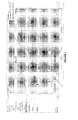
- FIG 1 we see two web pages: a first active web page 1 overlapping a second passive web page 2.
- the focus is on the text field widget adapted to receive an email address.
- the mentioned widget is represented in figure 2 with the reference number 3. All the other shown widget in form of text input fields, drop down lists radio buttons and so on, are passive widgets or widgets out of focus.
- an onscreen widget can become in focus relatively easily independent on which frame or window it is comprised in.
- an algorithm is provided.
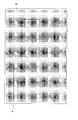
- the algorithm starts by defining the position of the widget already focused on. In the present example it's the widget 3.
- the position of the widget should be defined by a single reference point 4.
- the reference point 4 has been chosen to be the top left corner. Any other point comprised within the widget or at a specific distance from the widget can equally be used as reference point.
- the screen is split into four substantially equally sized sections.
- the four sections are referred to as: west, north, east and south.
- the sections are defined by two virtual perpendicular lines, crossing each other in the reference point 4 of the widget 3 being focused on.
- the sections are defines by angles.
- the four sections are associated to four directional keys on the keyboard.
- the section west is associated with a left directional key on the keyboard
- the section north is associated with an up directional key
- the section east is associated with a right directional key on the keyboard
- the section south is associated with a down directional key.
- one section is associated to several directional keys with an identical function. For example having the east section associated with both the left arrow key and the "A" key.
- every widget with a position within the east section in a preferred embodiment of figure 1 will be associated with the right directional key on the keyboard, all the widgets in the north section will be associated with the up directional key, all the widgets in the south section will be associated with the down directional key and all the widgets in the west section will be associated with the left directional key.
- the west section comprises widgets from two windows: The active window and the passive window partially hidden behind the active one.
- the revealed widgets of the partially hidden window are also attributed a key like the widgets from the active window. So the left key in this example is associated to widgets from two different windows.
- the position of the widget is defined by the position of its top left corner. Hence if the top left corner of a widget is in a specific section, then the widget is in the same section.
- partially revealed widgets will be associated to a section and thereby a key, if the top left corner is not hidden. If the reference point, which is the top left corner in the present example, is hidden, then the widget is not taken into account and is therefore not associated to a section and thereby not associated to a key.
- a user wants to change focus from the widget in focus 3, to another widget out of focus the user pushes a directional key.
- the invention is very intuitive to the user since it uses the widget in focus 3 as a starting point. If the user the wants to focus on a widget left from the widget in focus , then the left directional key should be pressed and so on.
- Pressing the left directional key on the keyboard, will initiate a calculation of the shortest distance between every widget in the west sector and the widget in focus 3.
- this calculation is done beforehand for every directional key, each time the focus changes from one widget to another.
- the widget located at the shortest distance from the widget in focus 3 and located in the west sector, is selected as the new widget in focus.
- that widget is the text field named "city" with the reference number 5.
- the neighboring section is chosen.
- the neighboring section is chosen according to an anti-clockwise path. Other paths could be chosen as well.
Landscapes
- Engineering & Computer Science (AREA)
- General Engineering & Computer Science (AREA)
- Theoretical Computer Science (AREA)
- Human Computer Interaction (AREA)
- Physics & Mathematics (AREA)
- General Physics & Mathematics (AREA)
- Input From Keyboards Or The Like (AREA)
- User Interface Of Digital Computer (AREA)
Priority Applications (2)
| Application Number | Priority Date | Filing Date | Title |
|---|---|---|---|
| EP10305477A EP2385452A1 (de) | 2010-05-06 | 2010-05-06 | Computernavigationsverfahren |
| US12/781,169 US20110276910A1 (en) | 2010-05-06 | 2010-05-17 | Computer navigation method |
Applications Claiming Priority (1)
| Application Number | Priority Date | Filing Date | Title |
|---|---|---|---|
| EP10305477A EP2385452A1 (de) | 2010-05-06 | 2010-05-06 | Computernavigationsverfahren |
Publications (1)
| Publication Number | Publication Date |
|---|---|
| EP2385452A1 true EP2385452A1 (de) | 2011-11-09 |
Family
ID=42745001
Family Applications (1)
| Application Number | Title | Priority Date | Filing Date |
|---|---|---|---|
| EP10305477A Withdrawn EP2385452A1 (de) | 2010-05-06 | 2010-05-06 | Computernavigationsverfahren |
Country Status (2)
| Country | Link |
|---|---|
| US (1) | US20110276910A1 (de) |
| EP (1) | EP2385452A1 (de) |
Families Citing this family (1)
| Publication number | Priority date | Publication date | Assignee | Title |
|---|---|---|---|---|
| US9383922B2 (en) * | 2012-09-11 | 2016-07-05 | Sap Se | Keyboard-based navigation of a user interface |
Citations (6)
| Publication number | Priority date | Publication date | Assignee | Title |
|---|---|---|---|---|
| EP0982656A1 (de) * | 1998-08-05 | 2000-03-01 | Sun Microsystems, Inc. | Mechanismus für Fokusverschiebung in einer graphischen Benutzerschnittstelle |
| WO2002052395A2 (en) * | 2000-12-27 | 2002-07-04 | Nokia Corporation | Display generating device |
| US6654038B1 (en) | 2000-06-02 | 2003-11-25 | Sun Microsystems, Inc. | Keyboard navigation of non-focusable components |
| US20040090463A1 (en) * | 2002-11-13 | 2004-05-13 | Tantek Celik | Directional focus navigation |
| US20040210851A1 (en) * | 2003-04-15 | 2004-10-21 | Microsoft Corporation | Method for navigation between elements on a page of content in a handheld device |
| WO2007003681A1 (en) * | 2005-06-30 | 2007-01-11 | Nokia Corporation | Electronic device and enhancing document viewing in electronic device |
Family Cites Families (12)
| Publication number | Priority date | Publication date | Assignee | Title |
|---|---|---|---|---|
| US5862379A (en) * | 1995-03-07 | 1999-01-19 | International Business Machines Corporation | Visual programming tool for developing software applications |
| US5625763A (en) * | 1995-05-05 | 1997-04-29 | Apple Computer, Inc. | Method and apparatus for automatically generating focus ordering in a dialog on a computer system |
| US7434177B1 (en) * | 1999-12-20 | 2008-10-07 | Apple Inc. | User interface for providing consolidation and access |
| US7536650B1 (en) * | 2003-02-25 | 2009-05-19 | Robertson George G | System and method that facilitates computer desktop use via scaling of displayed objects with shifts to the periphery |
| US20050015730A1 (en) * | 2003-07-14 | 2005-01-20 | Srimanth Gunturi | Systems, methods and computer program products for identifying tab order sequence of graphically represented elements |
| US7516414B2 (en) * | 2004-02-02 | 2009-04-07 | International Business Machines Corporation | System and method for tab order mapping of user interfaces |
| US7543244B2 (en) * | 2005-03-22 | 2009-06-02 | Microsoft Corporation | Determining and displaying a list of most commonly used items |
| US7673255B2 (en) * | 2005-04-22 | 2010-03-02 | Microsoft Corporation | Interface and system for manipulating thumbnails of live windows in a window manager |
| US20060248471A1 (en) * | 2005-04-29 | 2006-11-02 | Microsoft Corporation | System and method for providing a window management mode |
| US7661074B2 (en) * | 2005-07-01 | 2010-02-09 | Microsoft Corporation | Keyboard accelerator |
| US7631272B2 (en) * | 2005-11-14 | 2009-12-08 | Microsoft Corporation | Focus scope |
| US8245154B2 (en) * | 2006-11-03 | 2012-08-14 | International Business Machines Corporation | Most-recently-used task switching among parent and child windows |
-
2010
- 2010-05-06 EP EP10305477A patent/EP2385452A1/de not_active Withdrawn
- 2010-05-17 US US12/781,169 patent/US20110276910A1/en not_active Abandoned
Patent Citations (6)
| Publication number | Priority date | Publication date | Assignee | Title |
|---|---|---|---|---|
| EP0982656A1 (de) * | 1998-08-05 | 2000-03-01 | Sun Microsystems, Inc. | Mechanismus für Fokusverschiebung in einer graphischen Benutzerschnittstelle |
| US6654038B1 (en) | 2000-06-02 | 2003-11-25 | Sun Microsystems, Inc. | Keyboard navigation of non-focusable components |
| WO2002052395A2 (en) * | 2000-12-27 | 2002-07-04 | Nokia Corporation | Display generating device |
| US20040090463A1 (en) * | 2002-11-13 | 2004-05-13 | Tantek Celik | Directional focus navigation |
| US20040210851A1 (en) * | 2003-04-15 | 2004-10-21 | Microsoft Corporation | Method for navigation between elements on a page of content in a handheld device |
| WO2007003681A1 (en) * | 2005-06-30 | 2007-01-11 | Nokia Corporation | Electronic device and enhancing document viewing in electronic device |
Also Published As
| Publication number | Publication date |
|---|---|
| US20110276910A1 (en) | 2011-11-10 |
Similar Documents
| Publication | Publication Date | Title |
|---|---|---|
| EP2699998B1 (de) | Kompaktes steuerungsmenü für berührungsaktivierte befehlsausführung | |
| JP3630153B2 (ja) | 情報表示入力装置及び情報表示入力方法、並びに情報処理装置 | |
| US20070220449A1 (en) | Method and device for fast access to application in mobile communication terminal | |
| EP1873621A1 (de) | Ansteuerungs- und Eingabeverfahren für einen Berührungsbildschirm | |
| US20090163250A1 (en) | Scrolling method and mobile communication terminal using the same | |
| US20050223342A1 (en) | Method of navigating in application views, electronic device, graphical user interface and computer program product | |
| KR101025259B1 (ko) | 향상된 포켓 컴퓨터 및 연관된 방법들 | |
| JP4769552B2 (ja) | 端末及び端末の制御プログラム | |
| US20100013852A1 (en) | Touch-type mobile computing device and displaying method applied thereto | |
| WO2011024521A1 (ja) | 情報処理装置、情報処理方法およびプログラム | |
| EP2677405A1 (de) | Elektronische vorrichtung, steuereinstellungsverfahren und programm | |
| US10649654B2 (en) | Device and method for operating a device | |
| CN101493747A (zh) | 软件键盘的操作方法 | |
| JP5587875B2 (ja) | 電子メディアのブラウジング方法 | |
| CN107454951B (zh) | 电子设备和用于电子设备的方法 | |
| EP2620855B1 (de) | Informationsendgerät und anzeigeverfahren für eine berührungstafel | |
| CN102830908B (zh) | 电子装置与其桌面浏览方法 | |
| JP2011134272A (ja) | 情報処理装置、情報処理方法およびプログラム | |
| JP5025450B2 (ja) | 文字入力装置 | |
| JP2011252970A (ja) | 画像表示装置、画像表示方法、及び画像表示プログラム | |
| EP2385452A1 (de) | Computernavigationsverfahren | |
| KR100795590B1 (ko) | 네비게이팅하는 방법, 전자 디바이스, 사용자 인터페이스,그리고 컴퓨터 프로그램 산물 | |
| KR101678213B1 (ko) | 터치 영역 증감 검출에 의한 사용자 인터페이스 장치 및 그 제어 방법 | |
| EP2743812B1 (de) | Verfahren zum Auswählen mehrerer Eingaben auf einer Benutzerschnittstelle | |
| JP2008107865A (ja) | タブブラウザ操作装置、タブブラウザ操作方法、プログラムおよび記録媒体 |
Legal Events
| Date | Code | Title | Description |
|---|---|---|---|
| AK | Designated contracting states |
Kind code of ref document: A1 Designated state(s): AL AT BE BG CH CY CZ DE DK EE ES FI FR GB GR HR HU IE IS IT LI LT LU LV MC MK MT NL NO PL PT RO SE SI SK SM TR |
|
| AX | Request for extension of the european patent |
Extension state: BA ME RS |
|
| PUAI | Public reference made under article 153(3) epc to a published international application that has entered the european phase |
Free format text: ORIGINAL CODE: 0009012 |
|
| STAA | Information on the status of an ep patent application or granted ep patent |
Free format text: STATUS: THE APPLICATION IS DEEMED TO BE WITHDRAWN |
|
| 18D | Application deemed to be withdrawn |
Effective date: 20120510 |