EP2395422A1 - Service d'impression ou de numérisation pour téléphone mobile - Google Patents
Service d'impression ou de numérisation pour téléphone mobile Download PDFInfo
- Publication number
- EP2395422A1 EP2395422A1 EP11167199A EP11167199A EP2395422A1 EP 2395422 A1 EP2395422 A1 EP 2395422A1 EP 11167199 A EP11167199 A EP 11167199A EP 11167199 A EP11167199 A EP 11167199A EP 2395422 A1 EP2395422 A1 EP 2395422A1
- Authority
- EP
- European Patent Office
- Prior art keywords
- server
- identifier
- document
- mobile terminal
- print server
- Prior art date
- Legal status (The legal status is an assumption and is not a legal conclusion. Google has not performed a legal analysis and makes no representation as to the accuracy of the status listed.)
- Ceased
Links
Images
Classifications
-
- G—PHYSICS
- G06—COMPUTING OR CALCULATING; COUNTING
- G06F—ELECTRIC DIGITAL DATA PROCESSING
- G06F3/00—Input arrangements for transferring data to be processed into a form capable of being handled by the computer; Output arrangements for transferring data from processing unit to output unit, e.g. interface arrangements
- G06F3/12—Digital output to print unit, e.g. line printer, chain printer
- G06F3/1201—Dedicated interfaces to print systems
- G06F3/1278—Dedicated interfaces to print systems specifically adapted to adopt a particular infrastructure
- G06F3/1285—Remote printer device, e.g. being remote from client or server
- G06F3/1288—Remote printer device, e.g. being remote from client or server in client-server-printer device configuration
-
- G—PHYSICS
- G06—COMPUTING OR CALCULATING; COUNTING
- G06F—ELECTRIC DIGITAL DATA PROCESSING
- G06F3/00—Input arrangements for transferring data to be processed into a form capable of being handled by the computer; Output arrangements for transferring data from processing unit to output unit, e.g. interface arrangements
- G06F3/12—Digital output to print unit, e.g. line printer, chain printer
- G06F3/1201—Dedicated interfaces to print systems
- G06F3/1202—Dedicated interfaces to print systems specifically adapted to achieve a particular effect
- G06F3/1222—Increasing security of the print job
-
- G—PHYSICS
- G06—COMPUTING OR CALCULATING; COUNTING
- G06F—ELECTRIC DIGITAL DATA PROCESSING
- G06F3/00—Input arrangements for transferring data to be processed into a form capable of being handled by the computer; Output arrangements for transferring data from processing unit to output unit, e.g. interface arrangements
- G06F3/12—Digital output to print unit, e.g. line printer, chain printer
- G06F3/1201—Dedicated interfaces to print systems
- G06F3/1223—Dedicated interfaces to print systems specifically adapted to use a particular technique
- G06F3/1237—Print job management
- G06F3/1238—Secure printing, e.g. user identification, user rights for device usage, unallowed content, blanking portions or fields of a page, releasing held jobs
-
- G—PHYSICS
- G06—COMPUTING OR CALCULATING; COUNTING
- G06F—ELECTRIC DIGITAL DATA PROCESSING
- G06F3/00—Input arrangements for transferring data to be processed into a form capable of being handled by the computer; Output arrangements for transferring data from processing unit to output unit, e.g. interface arrangements
- G06F3/12—Digital output to print unit, e.g. line printer, chain printer
- G06F3/1201—Dedicated interfaces to print systems
- G06F3/1278—Dedicated interfaces to print systems specifically adapted to adopt a particular infrastructure
- G06F3/1292—Mobile client, e.g. wireless printing
-
- H—ELECTRICITY
- H04—ELECTRIC COMMUNICATION TECHNIQUE
- H04L—TRANSMISSION OF DIGITAL INFORMATION, e.g. TELEGRAPHIC COMMUNICATION
- H04L63/00—Network architectures or network communication protocols for network security
- H04L63/02—Network architectures or network communication protocols for network security for separating internal from external traffic, e.g. firewalls
- H04L63/029—Firewall traversal, e.g. tunnelling or, creating pinholes
-
- H—ELECTRICITY
- H04—ELECTRIC COMMUNICATION TECHNIQUE
- H04N—PICTORIAL COMMUNICATION, e.g. TELEVISION
- H04N1/00—Scanning, transmission or reproduction of documents or the like, e.g. facsimile transmission; Details thereof
- H04N1/00127—Connection or combination of a still picture apparatus with another apparatus, e.g. for storage, processing or transmission of still picture signals or of information associated with a still picture
- H04N1/00204—Connection or combination of a still picture apparatus with another apparatus, e.g. for storage, processing or transmission of still picture signals or of information associated with a still picture with a digital computer or a digital computer system, e.g. an internet server
- H04N1/00209—Transmitting or receiving image data, e.g. facsimile data, via a computer, e.g. using e-mail, a computer network, the internet, I-fax
- H04N1/00222—Transmitting or receiving image data, e.g. facsimile data, via a computer, e.g. using e-mail, a computer network, the internet, I-fax details of image data generation or reproduction, e.g. scan-to-email or network printing
- H04N1/00225—Transmitting or receiving image data, e.g. facsimile data, via a computer, e.g. using e-mail, a computer network, the internet, I-fax details of image data generation or reproduction, e.g. scan-to-email or network printing details of image data generation, e.g. scan-to-email or network scanners
-
- H—ELECTRICITY
- H04—ELECTRIC COMMUNICATION TECHNIQUE
- H04N—PICTORIAL COMMUNICATION, e.g. TELEVISION
- H04N1/00—Scanning, transmission or reproduction of documents or the like, e.g. facsimile transmission; Details thereof
- H04N1/00127—Connection or combination of a still picture apparatus with another apparatus, e.g. for storage, processing or transmission of still picture signals or of information associated with a still picture
- H04N1/00204—Connection or combination of a still picture apparatus with another apparatus, e.g. for storage, processing or transmission of still picture signals or of information associated with a still picture with a digital computer or a digital computer system, e.g. an internet server
- H04N1/00209—Transmitting or receiving image data, e.g. facsimile data, via a computer, e.g. using e-mail, a computer network, the internet, I-fax
- H04N1/00222—Transmitting or receiving image data, e.g. facsimile data, via a computer, e.g. using e-mail, a computer network, the internet, I-fax details of image data generation or reproduction, e.g. scan-to-email or network printing
- H04N1/0023—Image pull arrangements, e.g. to a multifunctional peripheral from a networked computer
-
- H—ELECTRICITY
- H04—ELECTRIC COMMUNICATION TECHNIQUE
- H04N—PICTORIAL COMMUNICATION, e.g. TELEVISION
- H04N1/00—Scanning, transmission or reproduction of documents or the like, e.g. facsimile transmission; Details thereof
- H04N1/00127—Connection or combination of a still picture apparatus with another apparatus, e.g. for storage, processing or transmission of still picture signals or of information associated with a still picture
- H04N1/00204—Connection or combination of a still picture apparatus with another apparatus, e.g. for storage, processing or transmission of still picture signals or of information associated with a still picture with a digital computer or a digital computer system, e.g. an internet server
- H04N1/00244—Connection or combination of a still picture apparatus with another apparatus, e.g. for storage, processing or transmission of still picture signals or of information associated with a still picture with a digital computer or a digital computer system, e.g. an internet server with a server, e.g. an internet server
-
- H—ELECTRICITY
- H04—ELECTRIC COMMUNICATION TECHNIQUE
- H04N—PICTORIAL COMMUNICATION, e.g. TELEVISION
- H04N1/00—Scanning, transmission or reproduction of documents or the like, e.g. facsimile transmission; Details thereof
- H04N1/00127—Connection or combination of a still picture apparatus with another apparatus, e.g. for storage, processing or transmission of still picture signals or of information associated with a still picture
- H04N1/00281—Connection or combination of a still picture apparatus with another apparatus, e.g. for storage, processing or transmission of still picture signals or of information associated with a still picture with a telecommunication apparatus, e.g. a switched network of teleprinters for the distribution of text-based information, a selective call terminal
- H04N1/00307—Connection or combination of a still picture apparatus with another apparatus, e.g. for storage, processing or transmission of still picture signals or of information associated with a still picture with a telecommunication apparatus, e.g. a switched network of teleprinters for the distribution of text-based information, a selective call terminal with a mobile telephone apparatus
-
- H—ELECTRICITY
- H04—ELECTRIC COMMUNICATION TECHNIQUE
- H04N—PICTORIAL COMMUNICATION, e.g. TELEVISION
- H04N1/00—Scanning, transmission or reproduction of documents or the like, e.g. facsimile transmission; Details thereof
- H04N1/32—Circuits or arrangements for control or supervision between transmitter and receiver or between image input and image output device, e.g. between a still-image camera and its memory or between a still-image camera and a printer device
- H04N1/32502—Circuits or arrangements for control or supervision between transmitter and receiver or between image input and image output device, e.g. between a still-image camera and its memory or between a still-image camera and a printer device in systems having a plurality of input or output devices
-
- H—ELECTRICITY
- H04—ELECTRIC COMMUNICATION TECHNIQUE
- H04N—PICTORIAL COMMUNICATION, e.g. TELEVISION
- H04N1/00—Scanning, transmission or reproduction of documents or the like, e.g. facsimile transmission; Details thereof
- H04N1/32—Circuits or arrangements for control or supervision between transmitter and receiver or between image input and image output device, e.g. between a still-image camera and its memory or between a still-image camera and a printer device
- H04N1/32502—Circuits or arrangements for control or supervision between transmitter and receiver or between image input and image output device, e.g. between a still-image camera and its memory or between a still-image camera and a printer device in systems having a plurality of input or output devices
- H04N1/32507—Circuits or arrangements for control or supervision between transmitter and receiver or between image input and image output device, e.g. between a still-image camera and its memory or between a still-image camera and a printer device in systems having a plurality of input or output devices a plurality of input devices
-
- G—PHYSICS
- G06—COMPUTING OR CALCULATING; COUNTING
- G06F—ELECTRIC DIGITAL DATA PROCESSING
- G06F3/00—Input arrangements for transferring data to be processed into a form capable of being handled by the computer; Output arrangements for transferring data from processing unit to output unit, e.g. interface arrangements
- G06F3/12—Digital output to print unit, e.g. line printer, chain printer
- G06F3/1201—Dedicated interfaces to print systems
- G06F3/1223—Dedicated interfaces to print systems specifically adapted to use a particular technique
- G06F3/1237—Print job management
- G06F3/1268—Job submission, e.g. submitting print job order or request not the print data itself
- G06F3/1272—Digital storefront, e.g. e-ordering, web2print, submitting a job from a remote submission screen
-
- H—ELECTRICITY
- H04—ELECTRIC COMMUNICATION TECHNIQUE
- H04L—TRANSMISSION OF DIGITAL INFORMATION, e.g. TELEGRAPHIC COMMUNICATION
- H04L67/00—Network arrangements or protocols for supporting network services or applications
- H04L67/01—Protocols
- H04L67/02—Protocols based on web technology, e.g. hypertext transfer protocol [HTTP]
-
- H—ELECTRICITY
- H04—ELECTRIC COMMUNICATION TECHNIQUE
- H04N—PICTORIAL COMMUNICATION, e.g. TELEVISION
- H04N2201/00—Indexing scheme relating to scanning, transmission or reproduction of documents or the like, and to details thereof
- H04N2201/0008—Connection or combination of a still picture apparatus with another apparatus
- H04N2201/0034—Details of the connection, e.g. connector, interface
- H04N2201/0037—Topological details of the connection
- H04N2201/0039—Connection via a network
-
- H—ELECTRICITY
- H04—ELECTRIC COMMUNICATION TECHNIQUE
- H04N—PICTORIAL COMMUNICATION, e.g. TELEVISION
- H04N2201/00—Indexing scheme relating to scanning, transmission or reproduction of documents or the like, and to details thereof
- H04N2201/0077—Types of the still picture apparatus
- H04N2201/0094—Multifunctional device, i.e. a device capable of all of reading, reproducing, copying, facsimile transception, file transception
-
- H—ELECTRICITY
- H04—ELECTRIC COMMUNICATION TECHNIQUE
- H04N—PICTORIAL COMMUNICATION, e.g. TELEVISION
- H04N2201/00—Indexing scheme relating to scanning, transmission or reproduction of documents or the like, and to details thereof
- H04N2201/32—Circuits or arrangements for control or supervision between transmitter and receiver or between image input and image output device, e.g. between a still-image camera and its memory or between a still-image camera and a printer device
- H04N2201/3201—Display, printing, storage or transmission of additional information, e.g. ID code, date and time or title
- H04N2201/3225—Display, printing, storage or transmission of additional information, e.g. ID code, date and time or title of data relating to an image, a page or a document
- H04N2201/3249—Display, printing, storage or transmission of additional information, e.g. ID code, date and time or title of data relating to an image, a page or a document data relating to a linked page or object, e.g. hyperlink
-
- H—ELECTRICITY
- H04—ELECTRIC COMMUNICATION TECHNIQUE
- H04N—PICTORIAL COMMUNICATION, e.g. TELEVISION
- H04N2201/00—Indexing scheme relating to scanning, transmission or reproduction of documents or the like, and to details thereof
- H04N2201/32—Circuits or arrangements for control or supervision between transmitter and receiver or between image input and image output device, e.g. between a still-image camera and its memory or between a still-image camera and a printer device
- H04N2201/3201—Display, printing, storage or transmission of additional information, e.g. ID code, date and time or title
- H04N2201/3269—Display, printing, storage or transmission of additional information, e.g. ID code, date and time or title of machine readable codes or marks, e.g. bar codes or glyphs
Definitions
- the present invention relates to the field of document printing systems from a mobile terminal, typically a mobile phone.
- a computer terminal in order to print a document, must be connected to a printer.
- This connection can be local in the case of a printer directly connected to the terminal or distant through a communication network to which the terminal and the printer are connected.
- a specific driver for the printer must be installed on the terminal. This is possible because the environment of said terminal is generally known and stable and the terminal is connected either directly to the printer locally or via a local communication network.
- the invention aims to solve the above problems by an online printing service.
- This service consists of a server consisting of two functional modules.
- a first print module manages a virtual private network of printers accessible via the service. These printers connect to this module using the virtual private network and communicate with the module advantageously using the UPnP protocol (Universal Plug and Play).
- a second functional module provides a printing WEB service to mobile terminals using standard WEB technologies such as HTTP (Hyper Text Transfer Protocol). The mobile terminal connects to the WEB module on which it posts the file it wants to print. The file is then printed by the print module on the chosen printer.
- the invention relates to a print server accessible through a communication network which comprises a secure tunnel server enabling printers to establish a secure communication tunnel with said print server; means for receiving from a mobile terminal connecting to said server, on the one hand a source file to be printed and on the other hand an identifier of the target printer chosen for printing; means for transforming the received source file into a corresponding printable file in a print format independent of the target printer and means for sending said printable file to a designated target printer through a secure tunnel.
- the means for receiving the source file and the identifier of the target printer consist of a WEB server.
- the means for transforming the source file consist of a plurality of applications able to open and print a plurality of types of source files.
- the means for receiving the source file and the identifier of the target printer and the means of transforming the received source file into a corresponding printable file in a print format independent of the target printer are separated by a firewall.
- the server further comprises means for receiving from a printer an image corresponding to a document read by the printer; means of encapsulating the data received for constituting an image file and means for transmitting this image file to a mobile terminal in response to a request.
- the printers conforming to the UPnP standard the identifier of the printer is the unique device identifier according to UPnP.
- the invention also relates to a printer that can be connected to a communication network, which comprises means for establishing a secure tunnel with a print server.
- the establishment of said secure tunnel is performed automatically at startup of the printer.
- the printer has a means of displaying a unique identifier.
- the unique identifier is displayed in the form of a bar code.
- the invention also relates to a printing system for a mobile terminal characterized in that it comprises at least one print server and at least one printer as described above.
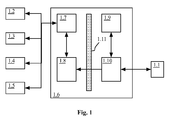
- the general architecture of the invention is illustrated Fig. 1 .
- This is to allow a mobile terminal 1.1 to perform the printing of a document on any of the printers 1.2 to 1.5.
- These printers can be on the same local area network for example or on different networks, their location is irrelevant to the invention.
- Each of these printers must be connected to a communication network allowing access to a global communication network, typically the Internet, on which the server 1.6 managing the printing service for a mobile terminal is located.
- This server 1.6 must also be accessible to the terminal 1.1.
- the server 1.6 is typically made available on the Internet.
- the terminal 1.1 must therefore have a data connection to the Internet. This connection is typically made by a mobile telephone network, for example in accordance with the standard of third-generation 3G communication.
- the terminals targeted by the invention are typically "smart" mobile phones (smartphone in English), but can also concern any type of terminal having a given connection (data connection in English).
- Each of the printers 1.2 to 1.5 establishes a secure connection with the server 1.6.
- the server 1.6 hosts a secure tunnel server 1.7 or VPN (Virtual Private Network in English).
- Each printer connects to this secure tunnel server 1.7 which assigns it a network address in the form of an IP address to communicate with the server 1.6.
- the secure tunnel uses any of the known VPN technologies, for example IETP (Internet Protocol Security in English) defined by the IETF, PPTP (Point to Point Tunneling Protocol), L2TP (Layer 2 Tunneling Protocol in English). , or others. All of these solutions provide point-to-point encryption of communications between the printer on the one hand and the tunnel server on the other hand isolating this communication from other communications using the same physical network. Everything happens as if a physical communication link was deployed between the printer and the server.
- All the printers participating in the printing service for the mobile terminal and the server therefore form a local network through the VPN links sharing a coherent addressing.
- the server 1.6 appears to mobile terminals as a service available on the Internet.
- this service is implemented in the form of a WEB service by a WEB 1.10 server typically using the HTTP (Hyper Text Transfer Protocol) communication protocol to communicate with the terminal 1.1.
- HTTP Hyper Text Transfer Protocol
- This protocol is supplemented by a server-side programming language, such as JAVA, PHP, Python or other, to manage the intelligence of the service on the server.
- the terminal therefore communicates with the print service through a standard HTTP client called browser, for example Internet Explorer, Netscape, Safari, Opera Mobile or others.
- HTTP client for example Internet Explorer, Netscape, Safari, Opera Mobile or others.
- the service management WEB server cooperates with a user database 1.9.
- the use of the service is subject to registration of the user with the service and authentication during use.
- the subscription management techniques and user authentication of a WEB service are widely known and will not be developed further.
- the WEB 1.10 service allows the user via his browser to choose a file stored locally on his terminal and download it (upload in English) on the server 1.6.
- an identification of the printer chosen for printing among the available printers, called the target printer is also entered by the user and downloaded from the terminal to the server 1.6.
- the means of identifying the printer are detailed below.
- the user logs on to the service and receives a form page.
- This form page gives him the means on the one hand to choose a file to print within his terminal.
- this form page gives him the opportunity to enter an identifier of the target printer on which he wishes to print the document.
- the validation of the form causes the transmission to the server of said file to be printed as well as the identifier of the target printer.
- This WEB service is therefore means for receiving from the terminal on the one hand a source file to be printed and on the other hand an identifier of the target printer chosen for printing.
- a firewall 1.11 (firewall in English) separates the server modules forming a local network with the printers, and the modules dedicated to the operation of the WEB service itself. These different modules are then not in the same address space.
- the file to be printed and the identification of the target printer are then supported by the print management module 1.8 on the server.
- this module transforms the source file into a print format and transmits it to the target printer designated for printing through the virtual local area network connecting the server and the printers. established VPN links.
- the printing service for mobile terminals described here refers to a server 1.6. It is obvious that depending on the size of the service, this server can be implemented on a set of different machines. In particular, each functional module can be implemented on one or more physical machines. The functionalities that can each be implemented on a machine farm managed by load balancing (load balancing in English) according to techniques well known to those skilled in the art.
- the printers compatible with the invention have means for establishing a secure tunnel with the server.
- these means are triggered automatically at startup of the printer.
- the secure tunnel uses a virtual network interface and does not prevent the printer from operating normally, outside the scope of the invention, on its physical local network.
- a printer used by the system can, on the one hand, continue to print for the local users of its network and independently offer the possibility of printing via the printing service for mobile terminal.
- the print service and more particularly the print management module, must be able to handle, on the one hand, a plurality of source file formats and, on the other hand, a plurality of types of target printers.
- the plurality of source files comes from the plurality of applications for managing different types of data.
- the type of a file is typically designated by a file name extension of a few characters. For example, files whose name has the form "xxxx.doc" are conventionally text files produced by the Microsoft Word application (Word and Microsoft being registered trademarks).
- the exemplary embodiment makes the choice to be limited to a given number of file formats supported by the system.
- an information system to be able to use a given printer must have a printer driver dedicated to that printer. Any application managing the printing of a document generates a printable file and transmits it to the specific driver of the target printer chosen for print management.
- the problem to be solved for the print management module 1.8 is therefore to transform the file formats received from the mobile terminal into a corresponding file in the generic format chosen, the PDL in the exemplary embodiment of the invention can be sent to the target printer selected for printing.
- the print management module 1.8 integrates a plurality applications that can handle selected file formats and have a PDL print driver to generate the PDL file.
- the file received from the WEB service is therefore opened by the appropriate application and printed by it on the PDL driver to generate the corresponding PDL generic print file. This file is then sent for printing to the chosen target printer.
- the user must be able to choose the target printer on which he wants to print a document present on his mobile terminal. Generally, the user is close to this printer because it must be able to retrieve the result of printing.
- the printers are compatible with the UPnP protocol (Universal Plug and Play).
- UPnP Universal Plug and Play
- printers integrate a printing service.
- This print service is declared on the VLAN, in particular with the server 1.6.
- This server can then maintain a list of available printers for the printing system.
- this list is in the form of a list of UPnP checkpoints of the printers in question.
- each device has a unique identifier called UUID (Universal Unique Identifier).
- UUID Universal Unique Identifier
- This identifier is then used to identify the target printer.
- the user is asked to enter the identifier of the target printer in an HTTP form when it also designates the file to be printed.
- the printer has means to display in said graphic interface said identifier to bring it to the attention of the user. Any other unique identifier can be used, for example the MAC address of the printer's network interface, or its IP address within the virtual network, etc.
- An improvement to this system is to allow the user to enter only the last 12 characters of the printer ID, which in practice is sufficient to determine the target printer.
- An alternative is to have on each printer, in paper form or can be displayed on the screen of the printer, a bar code representing the identifier of the printer. Due to the length of the identifier, a two-dimensional code, for example of the Datamatrix type, is used. An application can then be used on the mobile terminal to automatically photograph and recognize said code. Thus, any risk of transcription error is avoided.
- this two-dimensional barcode represents a WEB address or URL (Uniform Resource Locator) referring to the service or WEB server 1.10 and having an argument, for example called boxid, providing an identifier of the printer, such as its serial number.
- WEB address or URL Uniform Resource Locator
- the system makes it possible to check the identifier of the target printer. For example, a button on the HTTP print form will trigger the printing of a test page. Using this feature allows the user to verify that the designated printer is the one he or she thinks.
- the printer has a document reader function (scanner in English), this function can be made available to the mobile terminal in a similar manner.
- An HTTP form is made available to the user to designate the printer. No local file is here to designate.
- the designated target printer reads the document that is available on its glass.
- the read data is then sent to the print management module 1.8 which has an application dedicated to reading the documents. Typically, this application makes it possible to encapsulate the received data, to perform conventional operations such as straightening the pages, cleaning the image received, possibly performing a character recognition step.
- the image file thus constituted is then transmitted to the web server 1.10 which transmits it to the terminal in the form of a response to the received HTTP request.
- the file format used should be widely known, one typically chooses the PDF format, but any other file format can be used.
Landscapes
- Engineering & Computer Science (AREA)
- General Engineering & Computer Science (AREA)
- Theoretical Computer Science (AREA)
- Signal Processing (AREA)
- Multimedia (AREA)
- Human Computer Interaction (AREA)
- Physics & Mathematics (AREA)
- General Physics & Mathematics (AREA)
- Computing Systems (AREA)
- Computer Networks & Wireless Communication (AREA)
- Computer Security & Cryptography (AREA)
- Computer Hardware Design (AREA)
- Information Transfer Between Computers (AREA)
- Accessory Devices And Overall Control Thereof (AREA)
Abstract
Description
- La présente invention concerne le domaine des systèmes d'impression de documents depuis un terminal mobile, typiquement un téléphone mobile.
- De manière classique, un terminal informatique, pour pouvoir imprimer un document, doit être connecté à une imprimante. Cette connexion peut être locale dans le cas d'une imprimante directement connectée au terminal ou bien distante au travers d'un réseau de communication auquel sont connectés le terminal et l'imprimante. Dans les deux cas, un pilote spécifique de l'imprimante doit être installé sur le terminal. Ceci est possible, car l'environnement dudit terminal est généralement connu et stable et que le terminal est connecté soit directement à l'imprimante en local soit via un réseau de communication local.
- Dans le cas d'un terminal mobile, la connexion locale à une imprimante n'est généralement pas possible, les terminaux mobiles ne comportant pas les connecteurs appropriés. D'autre part, la connexion du terminal mobile au réseau local d'une entreprise est souvent interdite pour des raisons de sécurité. De plus, les systèmes d'exploitation utilisés sur ces terminaux ne permettent généralement pas l'installation de pilotes d'impression.
- L'invention vise à résoudre les problèmes précédents par un service d'impression en ligne. Ce service se compose d'un serveur constitué de deux modules fonctionnels. Un premier module d'impression gère un réseau privé virtuel d'imprimantes accessibles via le service. Ces imprimantes se connectent à ce module en utilisant le réseau privé virtuel et communiquent avec le module en utilisant avantageusement le protocole UPnP (Universal Plug and Play en anglais). Un second module fonctionnel offre un service WEB d'impression aux terminaux mobiles en utilisant les technologies WEB standard telles que HTTP (Hyper Text Transfer Protocol en anglais). Le terminal mobile se connecte au module WEB sur lequel il poste le fichier qu'il veut imprimer. Le fichier est alors imprimé par le module d'impression sur l'imprimante choisie.
- L'invention concerne un serveur d'impression accessible au travers d'un réseau de communication qui comporte un serveur de tunnel sécurisé permettant à des imprimantes d'établir un tunnel de communication sécurisé avec ledit serveur d'impression ; des moyens de recevoir de la part d'un terminal mobile se connectant audit serveur, d'une part un fichier source à imprimer et d'autre part un identifiant de l'imprimante cible choisie pour l'impression ; des moyens pour transformer le fichier source reçu en un fichier imprimable correspondant dans un format d'impression indépendant de l'imprimante cible et des moyens d'envoyer ledit fichier imprimable à une imprimante cible désignée au travers d'un tunnel sécurisé.
- Selon un mode de réalisation particulier de l'invention, les moyens de recevoir le fichier source et l'identifiant de l'imprimante cible sont constitués d'un serveur WEB.
- Selon un mode de réalisation particulier de l'invention, les moyens pour transformer le fichier source sont constitués d'une pluralité d'applications aptes à ouvrir et imprimer une pluralité de types de fichiers sources.
- Selon un mode de réalisation particulier de l'invention, les moyens de recevoir le fichier source et l'identifiant de l'imprimante cible et les moyens de transformer le fichier source reçu en un fichier imprimable correspondant dans un format d'impression indépendant de l'imprimante cible sont séparés par un pare-feu.
- Selon un mode de réalisation particulier de l'invention, le serveur comporte en outre des moyens de recevoir d'une imprimante une image correspondant à un document lu par l'imprimante ; des moyens d'encapsuler les données reçues pour constituer un fichier image et des moyens de transmettre ce fichier image à un terminal mobile en réponse à une requête.
- Selon un mode de réalisation particulier de l'invention, les imprimantes étant conformes à la norme UPnP, l'identifiant de l'imprimante est l'identifiant unique d'appareil selon UPnP.
- L'invention concerne également une imprimante pouvant être connectée à un réseau de communication, qui comporte des moyens d'établir un tunnel sécurisé avec un serveur d'impression.
- Selon un mode de réalisation particulier de l'invention, l'établissement dudit tunnel sécurisé est réalisé automatiquement au démarrage de l'imprimante.
- Selon un mode de réalisation particulier de l'invention, l'imprimante dispose d'un moyen d'affichage d'un identifiant unique.
- Selon un mode de réalisation particulier de l'invention, l'identifiant unique est affiché sous la forme d'un code à barre.
- L'invention concerne également un système d'impression pour terminal mobile caractérisé en ce qu'il comporte au moins un serveur d'impression et au moins une imprimante tel que décrit précédemment.
- Les caractéristiques de l'invention mentionnées ci-dessus, ainsi que d'autres, apparaîtront plus clairement à la lecture de la description suivante d'un exemple de réalisation, ladite description étant faite en relation avec les dessins joints, parmi lesquels :
- La
Fig. 1 illustre l'architecture du système d'impression selon un exemple de réalisation de l'invention. - L'architecture générale de l'invention est illustrée
Fig. 1 . Il s'agit de permettre à un terminal mobile 1.1 de réaliser l'impression d'un document sur l'une quelconque des imprimantes 1.2 à 1.5. Ces imprimantes peuvent être sur un même réseau local d'entreprise par exemple ou sur des réseaux différents, leur localisation est sans importance au regard de l'invention. Chacune de ces imprimantes doit être connectée à un réseau de communication permettant un accès à un réseau de communication global, typiquement Internet, sur lequel est situé le serveur 1.6 gérant le service d'impression pour terminal mobile. Ce serveur 1.6 doit également être accessible au terminal 1.1. Le serveur 1.6 est typiquement rendu disponible sur Internet. Le terminal 1.1 doit donc disposer d'une connexion de données à Internet. Cette connexion se fait typiquement par un réseau de téléphonie mobile, par exemple conforme à la norme de communication de troisième génération dite 3G. Les terminaux visés par l'invention sont typiquement des téléphones mobiles « intelligents » (smartphone en anglais), mais peuvent également concerner tout type de terminal disposant d'une connexion donnée (data connection en anglais). - Chacune des imprimantes 1.2 à 1.5 établit une connexion sécurisée avec le serveur 1.6. Selon l'exemple de réalisation, le serveur 1.6 héberge un serveur de tunnel sécurisé 1.7 ou VPN (Virtual Private Network en anglais). Chaque imprimante se connecte à ce serveur de tunnel sécurisé 1.7 qui lui attribue une adresse réseau sous la forme d'une adresse IP pour communiquer avec le serveur 1.6. Le tunnel sécurisé utilise l'une quelconque des technologies connues de VPN, par exemple IPSec (Internet Protocol Security en anglais) défini par l'IETF, PPTP (Point to Point Tunneling Protocol en anglais), L2TP (Layer 2 Tunneling Protocol en anglais), ou autres. Toutes ces solutions offrent un chiffrage point à point des communications entre l'imprimante d'une part et le serveur de tunnel d'autre part isolant cette communication des autres communications utilisant le même réseau physique. Tout se passe comme si un lien de communication physique était déployé entre l'imprimante et le serveur.
- L'ensemble des imprimantes participant au service d'impression pour terminal mobile et le serveur forment donc un réseau local au travers des liens VPN partageant un adressage cohérent.
- Le serveur 1.6 apparaît aux terminaux mobiles comme un service disponible sur Internet. Avantageusement, ce service est implémenté sous la forme d'un service WEB par un serveur WEB 1.10 utilisant typiquement le protocole de communication HTTP (Hyper Text Transfer Protocol en anglais) pour communiquer avec le terminal 1.1. Ce protocole est complété par un langage de programmation côté serveur, tel que par exemple JAVA, PHP, Python ou autre, pour gérer l'intelligence du service sur le serveur.
- Le terminal communique donc avec le service d'impression au travers d'un client HTTP standard appelé navigateur, par exemple Internet Explorer, Netscape, Safari, Opera mobile ou autres.
- Avantageusement, si l'on désire par exemple facturer le service ou le réserver à certains utilisateurs, le serveur WEB de gestion du service coopère avec une base de données des utilisateurs 1.9. Dans ce cas, l'utilisation du service est soumise à une inscription de l'utilisateur au service et à une authentification lors de l'utilisation. Les techniques de gestion des abonnements et de l'authentification des utilisateurs d'un service WEB sont largement connues et ne seront pas développées plus avant.
- Le service WEB 1.10 permet à l'utilisateur via son navigateur de choisir un fichier stocké localement sur son terminal et de le télécharger (upload en anglais) sur le serveur 1.6. Conjointement, une identification de l'imprimante choisie pour l'impression parmi les imprimantes disponibles, dite imprimante cible, est également entrée par l'utilisateur et téléchargée depuis le terminal vers le serveur 1.6. Les moyens d'identifier l'imprimante sont détaillés plus loin. Typiquement, l'utilisateur se connecte au service et reçoit une page de formulaire. Cette page de formulaire lui donne les moyens d'une part de choisir un fichier à imprimer au sein de son terminal. D'autre part, cette page de formulaire lui donne la possibilité d'entrer un identifiant de l'imprimante cible sur laquelle il souhaite imprimer le document. La validation du formulaire provoque la transmission au serveur dudit fichier à imprimer ainsi que de l'identifiant de l'imprimante cible. Ce service WEB constitue donc des moyens de recevoir de la part du terminal d'une part un fichier source à imprimer et d'autre part un identifiant de l'imprimante cible choisie pour l'impression.
- Avantageusement, pour des raisons de sécurité, on sépare par un pare-feu 1.11 (firewall en anglais) les modules du serveur formant un réseau local avec les imprimantes, et les modules dédiés au fonctionnement du service WEB proprement dit. Ces différents modules ne sont alors pas dans le même espace d'adressage.
- Le fichier à imprimer et l'identification de l'imprimante cible sont alors pris en charge par le module de gestion de l'impression 1.8 sur le serveur. En fonction du type de fichier à imprimer, ce module se charge de transformer le fichier source dans un format d'impression et de le transmettre à l'imprimante cible désignée pour impression au travers du réseau local virtuel reliant le serveur et les imprimantes grâce aux liens VPN établis.
- Le service d'impression pour terminaux mobiles décrit ici fait référence à un serveur 1.6. Il est évident qu'en fonction de la dimension du service, ce serveur peut être implémenté sur un ensemble de machines différentes. En particulier chaque module fonctionnel peut être implémenté sur une ou plusieurs machines physiques. Les fonctionnalités pouvant être chacune implémentées sur une ferme de machines gérées en partage dynamique de charge (load balancing en anglais) selon des techniques bien connues de l'homme du métier.
- Les imprimantes compatibles avec l'invention disposent de moyens d'établir un tunnel sécurisé avec le serveur. Avantageusement, ces moyens sont déclenchés automatiquement au démarrage de l'imprimante. Avantageusement, le tunnel sécurisé utilise une interface réseau virtuelle et n'empêche pas l'imprimante de fonctionner normalement, hors du cadre de l'invention, sur son réseau local physique. Ainsi, une imprimante utilisée par le système peut d'une part continuer à imprimer pour les utilisateurs locaux de son réseau et indépendamment offrir la possibilité d'imprimer via le service d'impression pour terminal mobile.
- Le service d'impression, et plus particulièrement le module de gestion de l'impression, doivent pouvoir gérer d'une part une pluralité de formats de fichiers sources et d'autre part une pluralité de type d'imprimantes cibles. La pluralité des fichiers sources vient de la pluralité des applications permettant de gérer différents types de données. Le type d'un fichier étant typiquement désigné par une extension du nom de fichier de quelques caractères. On peut citer par exemple les fichiers dont le nom possède la forme « xxxx.doc » qui sont conventionnellement des fichiers texte produits par l'application Word de Microsoft (Word et Microsoft étant des marques déposées). L'exemple de réalisation fait le choix de se limiter à un nombre donné de formats de fichiers supportés par le système.
- Typiquement dans un environnement classique, un système d'information pour pouvoir utiliser une imprimante donnée doit être doté d'un pilote d'impression dédié à cette imprimante. Toute application gérant l'impression d'un document génère un fichier imprimable et le transmet au pilote spécifique de l'imprimante cible choisie pour la gestion de l'impression.
- Selon l'invention, on souhaite pouvoir utiliser tout type d'imprimante. Le choix est fait d'utiliser un format de fichier d'impression générique. De tels formats existent, on peut citer par exemple un format PDL (Page Description Language en anglais), Postscript ou encore PDF (Portable Document Format en anglais). Ces formats sont dits génériques dans le sens qu'ils peuvent représenter un document prêt à imprimer indépendamment de l'imprimante cible choisie.
- Le problème à résoudre pour le module de gestion d'impression 1.8 est donc de transformer les formats de fichiers reçus du terminal mobile en un fichier correspondant dans le format générique retenu, le PDL dans l'exemple de réalisation de l'invention pouvant être envoyé à l'imprimante cible sélectionnée pour impression. Pour ce faire, le module de gestion d'impression 1.8 intègre une pluralité d'applications capables de gérer les formats de fichiers choisis et dotés d'un pilote d'impression PDL pour générer le fichier PDL. Typiquement, on utilise les applications de la suite bureautique Office de Microsoft (marque déposée), Acrobat Reader de Adobe (marque déposée) et toute autre application en fonction des types de fichiers que l'on veut pouvoir imprimer. Le fichier reçu du service WEB est donc ouvert par l'application idoine et imprimé par celle-ci sur le pilote PDL pour générer le fichier d'impression générique en PDL correspondant. C'est ce fichier qui est alors envoyé pour impression sur l'imprimante cible choisie.
- L'utilisateur doit être en mesure de choisir l'imprimante cible sur laquelle il désire imprimer un document présent sur son terminal portable. Généralement, l'utilisateur est à proximité de cette imprimante, car il doit pouvoir récupérer le résultat de l'impression.
- Selon un premier mode de réalisation de l'invention, les imprimantes sont compatibles avec le protocole UPnP (Universal Plug and Play en anglais). Selon ce protocole, les imprimantes intègrent un service d'impression. Ce service d'impression se déclare sur le réseau local virtuel notamment auprès du serveur 1.6. Ce serveur peut alors maintenir une liste des imprimantes disponibles pour le système d'impression. Avantageusement, cette liste se présente sous la forme d'une liste des points de contrôle UPnP des imprimantes en question. Selon UPnP, chaque appareil dispose d'un identificateur unique appelé UUID (Universal Unique Identifier en anglais). Cet identificateur est alors utilisé pour identifier l'imprimante cible. On demande à l'utilisateur d'entrer l'identificateur de l'imprimante cible dans un formulaire HTTP au moment où il désigne aussi le fichier à imprimer. Avantageusement, l'imprimante dispose de moyens d'afficher au sein de son interface graphique ledit identificateur pour le porter à la connaissance de l'utilisateur. Tout autre identificateur unique peut être utilisé, par exemple l'adresse MAC de l'interface réseau de l'imprimante, ou encore son adresse IP au sein du réseau virtuel etc.
- Une amélioration de ce système consiste à permettre à l'utilisateur de n'entrer que les 12 derniers caractères de l'identifiant de l'imprimante, ce qui en pratique est suffisant pour déterminer l'imprimante cible.
- Une alternative consiste à disposer sur chaque imprimante, sous la forme papier ou pouvant être affiché sur l'écran de l'imprimante, un code barre représentant l'identifiant de l'imprimante. Du fait de la longueur de l'identifiant, un code bidimensionnel, par exemple du type Datamatrix, est utilisé. Une application peut alors être utilisée sur le terminal mobile pour photographier et reconnaître automatiquement ledit code. Ainsi, tout risque d'erreur de transcription est évité.
- Dans une variante de réalisation, ce code barre bidimensionnel représente une adresse WEB ou URL (Uniform Resource Locator en anglais) renvoyant au service ou serveur WEB 1.10 et comportant un argument, par exemple appelé boxid, fournissant un identifiant de l'imprimante, tel que son numéro de série.
- Avantageusement le système permet de vérifier l'identifiant de l'imprimante cible. Par exemple, un bouton sur le formulaire HTTP d'impression permet de déclencher l'impression d'une page de test. L'utilisation de cette fonction permet à l'utilisateur de vérifier que l'imprimante désignée est bien celle qu'il pense.
- Avantageusement, si l'imprimante dispose d'une fonction de lecteur de document (scanner en anglais), cette fonction peut être mise à la disposition du terminal mobile de façon similaire. Par commodité de langage, nous parlerons toujours d'imprimante pour désigner un appareil disposant d'une fonctionnalité de lecture de document et ceci même dans le cas où la fonctionnalité d'impression serait absente. Un formulaire HTTP est mis à la disposition de l'utilisateur pour désigner l'imprimante. Aucun fichier local n'est ici à désigner. En réponse à la commande de lecture, l'imprimante cible désignée lit le document que l'on dispose sur sa vitre. Les données de la lecture sont alors envoyées vers le module de gestion d'impression 1.8 qui dispose d'une application dédiée à la lecture des documents. Typiquement, cette application permet d'encapsuler les données reçues, d'effectuer des opérations classiques telles que de redresser les pages, de nettoyer l'image reçue, éventuellement de réaliser une étape de reconnaissance de caractères. Le fichier image ainsi constitué est alors transmis au serveur WEB 1.10 qui le transmet au terminal sous la forme d'une réponse à la requête HTTP reçue. Le format de fichier utilisé doit être largement connu, on choisit typiquement le format PDF, mais tout autre format de fichier peut être utilisé.
Claims (9)
- Serveur d'impression (1.6) accessible au travers d'un réseau de communication et comportant un serveur de connexion sécurisée (1.7) permettant à des dispositifs (1.2;1.3;1.4;1.5) d'établir des communications sécurisées respectives avec ledit serveur d'impression,
caractérisé en ce que, chacun desdits dispositifs comportant une fonction de lecteur de document, ledit serveur d'impression comporte en outre :- des moyens de recevoir de la part d'un terminal mobile (1.1) se connectant audit serveur une requête comportant un identifiant de dispositif comportant une fonction de lecteur de document choisi pour lire un document à transmettre au terminal mobile ;- des moyens pour recevoir, en provenance du dispositif choisi au travers d'une dite connexion sécurisée, des données de lecture du document à transmettre au terminal mobile ;- des moyens pour constituer un fichier image à partir des données de lecture reçues ;- des moyens pour envoyer ledit fichier au terminal mobile en réponse à ladite requête. - Serveur d'impression selon la revendication 1, caractérisé en ce que les moyens pour recevoir l'identifiant de dispositif comportant une fonction de lecture de document sont constitués d'un serveur WEB.
- Serveur d'impression selon l'une des revendications 1 et 2, caractérisé en ce que les moyens pour recevoir l'identifiant de dispositif comportant une fonction de lecture de document et les moyens pour constituer un fichier image sont séparés par un pare-feu (1.11).
- Serveur d'impression selon l'une des revendications 1 à 3, caractérisé en ce que les dispositifs comportant une fonction de lecture de document étant conformes à la norme UPnP, l'identifiant de dispositif comportant une fonction de lecture de document est l'identifiant unique d'appareil selon UPnP.
- Système d'impression pour terminal mobile, caractérisé en ce qu'il comporte au moins un serveur d'impression selon l'une des revendications 1 à 4 et au moins un dispositif comportant une fonction de lecture de document et comportant des moyens pour établir une connexion sécurisée avec ledit serveur d'impression.
- Système d'impression selon la revendication 5, caractérisé en ce que chaque dispositif comportant une fonction de lecture de document dispose d'un moyen d'affichage d'un identifiant unique.
- Système d'impression selon la revendication 6, caractérisé en ce que l'identifiant unique est affiché sous la forme d'un code à barre.
- Système d'impression selon la revendication 5, caractérisé en ce que chaque dispositif comportant une fonction de lecture de document dispose d'un code à barre bidimensionnel qui représente une adresse WEB pointant sur un serveur WEB du serveur d'impression et qui comporte un argument correspondant à l'identifiant unique dudit dispositif.
- Dispositif (1.2;1.3;1.4;1.5) comportant des moyens pour établir une communication sécurisée avec un serveur de connexion sécurisée (1.7) d'un serveur d'impression (1.6) accessible au travers d'un réseau de communication et comportant en outre un serveur WEB (1.10),
caractérisé en ce que ledit dispositif comporte une fonction de lecteur de document et comporte en outre :- un code à barre bidimensionnel qui représente une adresse WEB pointant sur le serveur WEB du serveur d'impression et qui comporte un argument correspondant à un identifiant unique dudit dispositif, le code à barre étant destiné à permettre à un terminal mobile (1.1) de transmettre au serveur WEB une requête comportant l'identifiant unique dudit dispositif ;- des moyens pour transmettre au serveur d'impression au travers de la connexion sécurisée, des données de lecture d'un document destinées à être transmises audit terminal mobile.
Applications Claiming Priority (1)
| Application Number | Priority Date | Filing Date | Title |
|---|---|---|---|
| FR1054484A FR2960987B1 (fr) | 2010-06-08 | 2010-06-08 | Service d’impression pour telephone mobile |
Publications (1)
| Publication Number | Publication Date |
|---|---|
| EP2395422A1 true EP2395422A1 (fr) | 2011-12-14 |
Family
ID=43416857
Family Applications (1)
| Application Number | Title | Priority Date | Filing Date |
|---|---|---|---|
| EP11167199A Ceased EP2395422A1 (fr) | 2010-06-08 | 2011-05-24 | Service d'impression ou de numérisation pour téléphone mobile |
Country Status (2)
| Country | Link |
|---|---|
| EP (1) | EP2395422A1 (fr) |
| FR (1) | FR2960987B1 (fr) |
Cited By (4)
| Publication number | Priority date | Publication date | Assignee | Title |
|---|---|---|---|---|
| CN103226451A (zh) * | 2012-01-31 | 2013-07-31 | 柯尼卡美能达美国研究所有限公司 | 使用打印机和移动设备来打印电子文档的方法和系统 |
| WO2014010711A1 (fr) | 2012-07-10 | 2014-01-16 | Ricoh Company, Ltd. | Système comprenant un dispositif de commande et un appareil de stockage de données, et procédé exécuté par ledit système et ledit appareil de stockage de données |
| CN110908618A (zh) * | 2019-11-15 | 2020-03-24 | 北京小米移动软件有限公司 | 文件打印的方法及装置、存储介质 |
| CN114338939A (zh) * | 2021-12-21 | 2022-04-12 | 广东纬德信息科技股份有限公司 | 一种安全打印扫描系统 |
Citations (4)
| Publication number | Priority date | Publication date | Assignee | Title |
|---|---|---|---|---|
| US20030079030A1 (en) * | 2001-08-22 | 2003-04-24 | Cocotis Thomas A. | Output management system and method for enabling access to private network resources |
| US20070192872A1 (en) * | 1999-05-19 | 2007-08-16 | Rhoads Geoffrey B | Methods and Devices Employing Content Identifiers |
| US20080079985A1 (en) * | 2006-09-28 | 2008-04-03 | Sharp Laboratories Of America, Inc. | Systems and methods for facilitating direct scanning to network destinations by clients |
| US20100005136A1 (en) * | 2008-07-07 | 2010-01-07 | Andrew Rodney Ferlitsch | Method and system for follow-me scanning |
-
2010
- 2010-06-08 FR FR1054484A patent/FR2960987B1/fr active Active
-
2011
- 2011-05-24 EP EP11167199A patent/EP2395422A1/fr not_active Ceased
Patent Citations (4)
| Publication number | Priority date | Publication date | Assignee | Title |
|---|---|---|---|---|
| US20070192872A1 (en) * | 1999-05-19 | 2007-08-16 | Rhoads Geoffrey B | Methods and Devices Employing Content Identifiers |
| US20030079030A1 (en) * | 2001-08-22 | 2003-04-24 | Cocotis Thomas A. | Output management system and method for enabling access to private network resources |
| US20080079985A1 (en) * | 2006-09-28 | 2008-04-03 | Sharp Laboratories Of America, Inc. | Systems and methods for facilitating direct scanning to network destinations by clients |
| US20100005136A1 (en) * | 2008-07-07 | 2010-01-07 | Andrew Rodney Ferlitsch | Method and system for follow-me scanning |
Cited By (11)
| Publication number | Priority date | Publication date | Assignee | Title |
|---|---|---|---|---|
| CN103226451A (zh) * | 2012-01-31 | 2013-07-31 | 柯尼卡美能达美国研究所有限公司 | 使用打印机和移动设备来打印电子文档的方法和系统 |
| WO2014010711A1 (fr) | 2012-07-10 | 2014-01-16 | Ricoh Company, Ltd. | Système comprenant un dispositif de commande et un appareil de stockage de données, et procédé exécuté par ledit système et ledit appareil de stockage de données |
| EP2873224A4 (fr) * | 2012-07-10 | 2016-03-09 | Ricoh Co Ltd | Système comprenant un dispositif de commande et un appareil de stockage de données, et procédé exécuté par ledit système et ledit appareil de stockage de données |
| US9389819B2 (en) | 2012-07-10 | 2016-07-12 | Ricoh Company, Ltd. | System including operation device and information storing apparatus, method performed by the system, and the information storing apparatus |
| US9665325B2 (en) | 2012-07-10 | 2017-05-30 | Ricoh Company, Ltd. | System including operation device and information storing apparatus, method performed by the system, and the information storing apparatus |
| US9959081B2 (en) | 2012-07-10 | 2018-05-01 | Ricoh Company, Ltd. | System including operation device and information storing apparatus, method performed by the system, and the information storing apparatus |
| US10908857B2 (en) | 2012-07-10 | 2021-02-02 | Ricoh Company, Ltd. | System including operation device and information storing apparatus, method performed by the system, and the information storing apparatus |
| US11797243B2 (en) | 2012-07-10 | 2023-10-24 | Ricoh Company, Ltd. | System including operation device and information storing apparatus, method performed by the system, and the information storing apparatus |
| US11907597B2 (en) | 2012-07-10 | 2024-02-20 | Ricoh Company, Ltd. | System including operation device and information storing apparatus, method performed by the system, and the information storing apparatus |
| CN110908618A (zh) * | 2019-11-15 | 2020-03-24 | 北京小米移动软件有限公司 | 文件打印的方法及装置、存储介质 |
| CN114338939A (zh) * | 2021-12-21 | 2022-04-12 | 广东纬德信息科技股份有限公司 | 一种安全打印扫描系统 |
Also Published As
| Publication number | Publication date |
|---|---|
| FR2960987B1 (fr) | 2016-03-25 |
| FR2960987A1 (fr) | 2011-12-09 |
Similar Documents
| Publication | Publication Date | Title |
|---|---|---|
| US9443122B2 (en) | Upload apparatus, server apparatus, upload system, and upload method | |
| US7328245B1 (en) | Remote retrieval of documents | |
| US20100005136A1 (en) | Method and system for follow-me scanning | |
| FR2813409A1 (fr) | Procede et dispositif configuration d'un peripherique de traitement de documents electroniques dans un reseau de communication | |
| WO2013093313A1 (fr) | Procede de partage d'un contenu multimedia entre un deux utilisateurs | |
| EP2518972A1 (fr) | Système et procédé d'adressage de dispositif | |
| FR2886494A1 (fr) | Procede et dispositif d'echange de donnees entre des stations mobiles dans un reseau pair a pair | |
| EP2386977A1 (fr) | Système permettant l'affichage d'un fichier informatique privé sur un écran d'un terminal de télécommunications et procédé correspondant | |
| WO2016042253A1 (fr) | Procede d'archivage de donnees relatives a un utilisateur | |
| EP2395422A1 (fr) | Service d'impression ou de numérisation pour téléphone mobile | |
| FR3069350B1 (fr) | Service d'impression securisee via un reseau de communication sur un equipement d'impression quelconque appartenant a un groupement d'equipements d'impression independants | |
| EP1704700B1 (fr) | Procede et systeme pour l' exploitation d'un reseau informatique destine a la publication de contenu | |
| EP2159763B1 (fr) | Système et procédé pour délivrer un bien ou un service à un utilisateur | |
| FR2911751A1 (fr) | Procede et installation de telecommunication pour la fourniture d'un service a l'utilisateur d'un equipement personnel, support de donnees correspondant | |
| WO2013092695A2 (fr) | Procédé d'appairage entre un identifiant unique d'un dispositif de numérisation de documents et un identifiant de compte utilisateur | |
| EP2795947B1 (fr) | Méthode d'appairage d'équipements électroniques | |
| EP2845366A1 (fr) | Systeme et procedes d'acces a des contenus stockes sur un reseau local d'entreprise | |
| EP1737191B1 (fr) | Procédé de création d'un terminal éclaté entre un terminal de base et des équipements connectés en serie | |
| EP2797284A1 (fr) | Procédés et dispositifs pour l'accès contrôlé à des données stockées dans un réseau | |
| FR2814020A1 (fr) | Procede et dispositif de traitement d'un document electronique dans un reseau de communication | |
| US10349115B2 (en) | Multimedia content management system and method of displaying remotely hosted content | |
| FR3030820A1 (fr) | Procede pour l'acces a un contenu numerique dans un reseau de communication, au moyen d'un equipement terminal connecte audit reseau de communication | |
| EP2369465A1 (fr) | Système d'impression sur une imprimante disponible au travers d'un réseau de communication | |
| FR2957697A1 (fr) | Imprimante pour un systeme d'impression sur une imprimante disponible au travers d'un reseau de communication | |
| EP2369466A1 (fr) | Imprimante maître pour un système d'impression sur une imprimante disponible au travers d'un réseau de communication |
Legal Events
| Date | Code | Title | Description |
|---|---|---|---|
| AK | Designated contracting states |
Kind code of ref document: A1 Designated state(s): AL AT BE BG CH CY CZ DE DK EE ES FI FR GB GR HR HU IE IS IT LI LT LU LV MC MK MT NL NO PL PT RO RS SE SI SK SM TR |
|
| AX | Request for extension of the european patent |
Extension state: BA ME |
|
| PUAI | Public reference made under article 153(3) epc to a published international application that has entered the european phase |
Free format text: ORIGINAL CODE: 0009012 |
|
| 17P | Request for examination filed |
Effective date: 20120604 |
|
| RBV | Designated contracting states (corrected) |
Designated state(s): AL AT BE BG CH CY CZ DE DK EE ES FI GB GR HR HU IE IS IT LI LT LU LV MC MK MT NL NO PL PT RO RS SE SI SK SM TR |
|
| 17Q | First examination report despatched |
Effective date: 20170530 |
|
| STAA | Information on the status of an ep patent application or granted ep patent |
Free format text: STATUS: THE APPLICATION HAS BEEN REFUSED |
|
| 18R | Application refused |
Effective date: 20190125 |