EP2408197A2 - Verfahren zur Bereitstellung einer Inhaltsliste und Anzeigevorrichtung damit - Google Patents
Verfahren zur Bereitstellung einer Inhaltsliste und Anzeigevorrichtung damit Download PDFInfo
- Publication number
- EP2408197A2 EP2408197A2 EP11172598A EP11172598A EP2408197A2 EP 2408197 A2 EP2408197 A2 EP 2408197A2 EP 11172598 A EP11172598 A EP 11172598A EP 11172598 A EP11172598 A EP 11172598A EP 2408197 A2 EP2408197 A2 EP 2408197A2
- Authority
- EP
- European Patent Office
- Prior art keywords
- contents
- images
- category
- item
- items
- Prior art date
- Legal status (The legal status is an assumption and is not a legal conclusion. Google has not performed a legal analysis and makes no representation as to the accuracy of the status listed.)
- Ceased
Links
Images



Classifications
-
- H—ELECTRICITY
- H04—ELECTRIC COMMUNICATION TECHNIQUE
- H04N—PICTORIAL COMMUNICATION, e.g. TELEVISION
- H04N5/00—Details of television systems
- H04N5/44—Receiver circuitry for the reception of television signals according to analogue transmission standards
- H04N5/445—Receiver circuitry for the reception of television signals according to analogue transmission standards for displaying additional information
-
- H—ELECTRICITY
- H04—ELECTRIC COMMUNICATION TECHNIQUE
- H04N—PICTORIAL COMMUNICATION, e.g. TELEVISION
- H04N21/00—Selective content distribution, e.g. interactive television or video on demand [VOD]
- H04N21/40—Client devices specifically adapted for the reception of or interaction with content, e.g. set-top-box [STB]; Operations thereof
- H04N21/43—Processing of content or additional data, e.g. demultiplexing additional data from a digital video stream; Elementary client operations, e.g. monitoring of home network or synchronising decoder's clock; Client middleware
- H04N21/431—Generation of visual interfaces for content selection or interaction; Content or additional data rendering
- H04N21/4312—Generation of visual interfaces for content selection or interaction; Content or additional data rendering involving specific graphical features, e.g. screen layout, special fonts or colors, blinking icons, highlights or animations
-
- H—ELECTRICITY
- H04—ELECTRIC COMMUNICATION TECHNIQUE
- H04N—PICTORIAL COMMUNICATION, e.g. TELEVISION
- H04N21/00—Selective content distribution, e.g. interactive television or video on demand [VOD]
- H04N21/40—Client devices specifically adapted for the reception of or interaction with content, e.g. set-top-box [STB]; Operations thereof
- H04N21/43—Processing of content or additional data, e.g. demultiplexing additional data from a digital video stream; Elementary client operations, e.g. monitoring of home network or synchronising decoder's clock; Client middleware
- H04N21/443—OS processes, e.g. booting an STB, implementing a Java virtual machine in an STB or power management in an STB
- H04N21/4438—Window management, e.g. event handling following interaction with the user interface
-
- H—ELECTRICITY
- H04—ELECTRIC COMMUNICATION TECHNIQUE
- H04N—PICTORIAL COMMUNICATION, e.g. TELEVISION
- H04N21/00—Selective content distribution, e.g. interactive television or video on demand [VOD]
- H04N21/40—Client devices specifically adapted for the reception of or interaction with content, e.g. set-top-box [STB]; Operations thereof
- H04N21/45—Management operations performed by the client for facilitating the reception of or the interaction with the content or administrating data related to the end-user or to the client device itself, e.g. learning user preferences for recommending movies, resolving scheduling conflicts
- H04N21/4508—Management of client data or end-user data
- H04N21/4532—Management of client data or end-user data involving end-user characteristics, e.g. viewer profile, preferences
-
- H—ELECTRICITY
- H04—ELECTRIC COMMUNICATION TECHNIQUE
- H04N—PICTORIAL COMMUNICATION, e.g. TELEVISION
- H04N21/00—Selective content distribution, e.g. interactive television or video on demand [VOD]
- H04N21/40—Client devices specifically adapted for the reception of or interaction with content, e.g. set-top-box [STB]; Operations thereof
- H04N21/47—End-user applications
- H04N21/482—End-user interface for programme selection
-
- H—ELECTRICITY
- H04—ELECTRIC COMMUNICATION TECHNIQUE
- H04N—PICTORIAL COMMUNICATION, e.g. TELEVISION
- H04N21/00—Selective content distribution, e.g. interactive television or video on demand [VOD]
- H04N21/40—Client devices specifically adapted for the reception of or interaction with content, e.g. set-top-box [STB]; Operations thereof
- H04N21/47—End-user applications
- H04N21/478—Supplemental services, e.g. displaying phone caller identification, shopping application
Definitions
- Methods and apparatuses consistent with exemplary embodiments relate generally to providing a list of contents and a display apparatus applying the same, and more particularly to providing a list of contents, displaying a list of contents corresponding to an item of a specific category selected by a user, and a display apparatus applying the same.
- the contents can be provided from not only the storage space of the device, but also an external source connected to the device through the Internet or other communication network.
- the number of contents that can be used through a single multimedia device has also rapidly increased, and thus it is difficult for a user to find a desired content from the numerous contents.
- What is needed is a device that can easily search for the content that a user wishes to find among the numerous available contents.
- One or more exemplary embodiments may overcome the above disadvantages and other disadvantages not described above. However, it is understood that one or more exemplary embodiments are not required to overcome the disadvantages described above, and may not overcome any of the problems described above.
- One or more exemplary embodiments provide a method for providing a list of contents which displays images corresponding to a plurality of items included in a specific category of contents, and, which displays a list of contents included in an item corresponding to an image upon selection of one of the displayed images, and a display apparatus applying the same.
- a method for providing a list of contents including: displaying images corresponding to a plurality of items included in a specific category of contents, and displaying a list of contents included in an item corresponding to an image upon selection of one of the displayed images.
- Each of the images may be an image relating to one of the contents included in the corresponding item.
- Each of the images may be a thumbnail image relating to a scene of one of the contents included in the corresponding item.
- Each of the images may be an image relating to a content of a highest rank among the contents included in the corresponding item.
- the displaying the images may include displaying the images along with text, wherein the text includes titles of the items corresponding to the images.
- the category may include a mood of the contents, and the plurality of items within the category of mood may include at least one of "Exciting,” “Happy,” “Sad” and “Thrilled.”
- the displaying the images may include displaying images corresponding to items included in the category of "mood,", and the displaying the list of contents may include displaying a content recommendation list for recommending contents corresponding to the item of the category of "mood" from among a plurality of contents.
- the category and the items included in the category are configured using information in metadata of the contents.
- a display apparatus including: a display unit displaying a plurality of images, and a controller which controls the images to display on the display unit in order to display images corresponding to a plurality of items included in a specific category of contents, and displays a list of contents included in an item corresponding to an image upon selection of one of the displayed images.
- Each of the images may be an image relating to one of the contents included in the corresponding item.
- Each of the images may be a thumbnail image relating to a scene of one of the contents included in the corresponding item.
- Each of the images may be an image relating to a content of a highest rank among the contents included in the corresponding item.
- the controller may control text to display on the display unit, wherein the text includes titles of the items corresponding to the images.
- the category may include a mood of the contents, and the plurality of items within the category of mood may include at least one of "Exciting,” “Happy,” “Sad” and “Thrilled.”
- the controller may control the images to display on the display unit in order to display images corresponding to items included in the category of "mood," and displays a content recommendation list for recommending contents corresponding to the category of "mood” from among a plurality of contents.
- the category and the items included in the category may be configured using information in metadata of the contents.
- a method of classifying and displaying content on a display comprising classifying a plurality of content into a plurality of categories; classifying the plurality of content into a plurality of items, wherein the items are further classifications of the plurality of categories; displaying images for each of the plurality of categories on a display; and displaying images for the plurality of items on the display, wherein the images for the plurality of items correspond to images of the plurality of content classified within each respective item.
- the plurality of content may be a plurality of movies.
- the movies may be classified into categories according to information about the movie.
- the information about the movie may be obtained from metadata in the movie.
- the method for providing a list of contents displays images corresponding to a plurality of items included in a specific category of contents. If one of the displayed images is selected, a list of contents included in the items corresponding to the selected image is displayed. A display apparatus applying the same is also provided. Accordingly, the user can easily identify what the item represents by viewing the image corresponding to the item.
- FIG. 1 is a block diagram illustrating components of a television (TV) 100, according to an exemplary embodiment.
- the TV 100 includes a broadcast receiver 110, a signal divider 120, an A/V processor 130, an audio output unit 133, a display unit 136, an interface 140, a controller 150, a storage unit 160, a graphical user interface (GUI) generator 170, and a remote control receiver 180.
- GUI graphical user interface
- the broadcast receiver 110 receives a broadcast from a broadcasting station or a satellite by wire or wirelessly and tunes to the broadcast.
- the broadcast receiver 110 may include a plurality of tuners (not shown) to receive broadcast signals through a plurality of channels simultaneously.
- the signal divider 120 divides the broadcast signal into a video signal, an audio signal, and electronic program guide (EPG) information.
- the signal divider 120 transmits the video signal and the audio signal to the A/V processor 130 and transmits the EPG information to the GUI generator 170.
- the A/V processor 130 performs signal-processing such as video decoding, video scaling, and audio decoding with respect to the video signal and the audio signal input from the signal divider 120 and the interface 140. Also, the A/V processor 130 outputs the video signal to the display unit 136 and outputs the audio signal to the audio output unit 133.
- the A/V processor 130 may output the video signal and the audio signal in a compressed format to the storage unit 160 or the interface 140 in order to store the video signal and the audio signal in the storage unit 160 or transmit the video signal and the audio signal to an external apparatus through the interface 140.
- the audio output unit 133 outputs a sound output from the A/V processor 130 through a speaker or outputs the sound to an external apparatus such as an external speaker connected through an external output port (not shown).
- the display unit 136 displays an image output from the A/V processor 130 on a display (not shown) or outputs the image to an external apparatus such as an external display connected through an external output port. Also, the display unit 136 may display menus generated by the GUI generator 170. For example, the display unit 136 may display a category selection screen, an item selection screen for each category, and a content list screen, all of which will be described and illustrated in further detail below.
- the interface 140 connects the TV 100 to a communication network (not shown) such as the Internet or another video apparatus. Also, the interface 140 receives contents from the Internet or an external apparatus. When the interface 140 receives contents, such as a video file, the interface 140 transmits the received video file to the controller 150.
- a communication network not shown
- the interface 140 receives contents from the Internet or an external apparatus.
- the interface 140 transmits the received video file to the controller 150.
- the storage unit 160 stores a variety of contents.
- the storage unit 160 may store video contents such as movie contents and music video contents.
- the storage unit 160 records the broadcast received by the broadcast receiver 110 and stores the recorded broadcast as a recorded file of video content.
- the storage unit 160 may store a video content copied by the user in addition to a recorded broadcast. Also, the storage unit 160 may output the stored video contents to the A/V processor 130.
- the storage unit 160 may be realized as a hard disk or a non-volatile memory.
- the GUI generator 170 generates a GUI to be displayed on the display and adds the generated GUI to the image output from the A/V processor 130. Particularly, the GUI generator 170 may generate GUIs relating to a screen for selecting a category of contents, a screen for selecting a category item of contents, and a screen regarding a list of contents.
- a remote controller 190 receives a user's input and transmits the user's input to the TV 100 through the remote control receiver 180. For example, the user may select a program that he or she wants to record using the remote controller 190. In addition, the user may input a replaying time using the remote controller 190 to replay a recorded file.
- the controller 150 recognizes a user command based on the user's instruction transmitted from the remote controller 190, and the controller 150 then controls an overall operation of the TV 100 according to the user command.
- the controller 150 controls the display unit 136 to display images corresponding to a plurality of items included in the selected specific category.
- the category as described herein is a characteristic based on which contents are classified.
- Non-limiting examples of the category may be one of a genre, a mood, a subject, a director, an actor, and a releasing time.
- the plurality of items included in the category refer to more detailed classifications of the contents in a corresponding category.
- the items of the category of “mood” may include “Exciting,” “Happy,” “Sad” and “Thrilled.”
- the items of the category of “Genre” may include “Action,” “Drama,” “Romantic” and “Fantasy.” Besides these classifications, each category may include a plurality of items.
- the categories and the items included in each category may be configured, in one non-limiting example, by the controller 150 through the use of information about categories and items included in metadata of contents. However, the categories and the items thereof may be configured using any other method.
- the controller 150 displays images corresponding to the items of the selected category. An example of this operation is explained with reference to an item selection screen illustrated in FIGS. 4 and 7 .
- the controller 150 displays an image 410, 420, 430, 440 representative of each respective item 1, 2, 3, 4 on the item selection screen 400.
- the image corresponding to each item may be an image relating to one of contents included in the item.
- the controller 150 selects a content representing the item from among the contents included in the item and displays an image 410, 420, 430, 440 relating to the selected content on the item selection screen 400 as a representative image of the item.
- the image corresponding to each item may be a thumbnail image relating to a scene of one of the contents included in the item.
- the image corresponding to each item may be a poster image (i.e., a movie poster image) relating to one of the contents included in the item.
- the controller 150 displays a thumbnail image or a movie poster relating to the content B on the item selection screen 400 for the category of "Mood” as an image corresponding to the item of "Exciting.”
- the controller 150 may select a content of a highest rank as a representative content of the item from among the contents included in a specific item.
- rank refers to, in one non-limiting example, information on the ranking of contents provided from various Internet movie sites. For example, an Internet movie site ranks movies according to a genre or a mood using a ranking algorithm thereof. Thereafter, the controller 150 receives the ranking information from the Internet movie site and selects a representative content for a specific item using the received ranking information.
- the controller 150 then displays the images corresponding to the items included in the category of "mood.”
- the controller 150 may display text indicating the titles of the items along with the corresponding images. In other words, the controller 150 displays the images corresponding to the items and displays the titles corresponding to the items around the images. This is illustrated in FIGS. 5 and 8 by way of example.
- the controller 150 displays a list of contents included in the item corresponding to the selected image. For example, if one of the images corresponding to the items included in the category of "mood" is selected, the controller 150 may display a content recommendation list recommending contents of the item corresponding to the selected image.
- the TV 100 displays the images corresponding to the items on the item selection screen of the specific category, the user can easily identify what the item represents using the image corresponding to the item.
- the TV 100 may display items and images from any other category, such as a genre and a director.
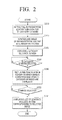
- FIG. 2 is a flowchart illustrating a method for providing a list of contents, according to an exemplary embodiment.
- the TV 100 extracts a representative content for each of the items included in the category of "mood" (S210).
- the TV 100 may select a content of a highest rank from contents included in each item as a representative content of the item.
- the rank recited herein refers to information on the ranking of contents provided from various Internet movie sites. For example, an Internet movie site may rank movies according to a genre or a mood using a rank selecting algorithm thereof.
- the TV 100 receives the rank information from the Internet movie site and extracts a representative content for a specific item using the received rank information.
- the TV 100 displays an image of the representative content to correspond to each item (S220). In other words, the TV 100 selects the representative content from the contents included in one item and displays an image relating to the selected content on the item selection screen as a representative image of the item.
- the image corresponding to each item may be a thumbnail image relating to a scene of one of the contents included in the item.
- the image corresponding to each item may also be a poster image (i.e., a movie poster image) relating to one of the contents included in the item.
- the item of "Exciting” of the category of “Mood” may include a content "A,” a content “B,” and a content “C.” If the TV 100 selects the content “B” as a representative content of the item of “Exciting,” the TV 100 displays a thumbnail image or a movie poster relating to the content "B” on the item selection screen as a representative image of the item of "Exciting.”
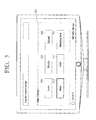
- the category selection screen refers to a GUI screen through which a plurality of categories classifying contents are displayed, and where one category may be selected from a plurality of categories. This will be explained in detail below with regard to FIG. 3 .
- FIG. 3 is an illustration of a screen for selecting a category of recommended content, according to an exemplary embodiment.
- a category selection screen 300 displays selectable categories. Specifically, the category selection screen 300 displays categories of "Genre” 304, "Director” 306, “Subject” 308, “Mood” 310, "Actor” 312 and “Releasing Time” 314.
- the TV 100 displays a screen for selecting items of the category of "Mood.” This will be explained in detail below with regard to FIGS. 4 and 5 .
- the TV 100 determines whether the category of "Mood” is selected on the category selection screen 300 (S230). If the category of "Mood” is selected (S230), the TV 100 displays an item selection screen on which images corresponding to the items of the category of "Mood” are displayed (S240). In other words, if a specific category is selected by the user, the TV 100 displays the images corresponding to a plurality of items included in the selected specific category on the item selection screen.
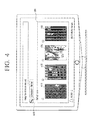
- the TV 100 displays a representative image 410, 420, 430 and 440 of each item on an item selection screen 400, as shown in FIG. 4 .
- the item selection screen will be explained in detail with reference to FIGS. 4 and 5 .
- FIG. 4 is an illustration of a screen on which images corresponding to the items of the category of "Mood" are displayed. Referring to a current category display 405 in FIG. 4 , the currently selected category is "Mood.”
- images 410, 420, 430 and 440 corresponding to four items are displayed on the item selection screen 400.
- the first image 410 corresponds to an item of "Exciting” of the category of "Mood;” the second image 420 corresponds to an item of the mood "Happy;” the third image 430 corresponds to an item of the mood “Sad;” and the fourth image 440 corresponds to an item of the mood "Thrilled.”
- the first image 410, the second image 420, the third image 430 and the fourth image 440 are movie poster images representing their respective items.
- the images 410, 420, 430 and 440 may be a thumbnail image relating to one scene of the movie to which the item refers.
- the user can easily identify what mood each item represents.
- the TV 100 may display text indicating the titles of the items along with the corresponding images.
- the TV 100 may display the images corresponding to the items as well as the titles of the items near the images. This will be explained below with regard to FIG. 5.
- FIG. 5 is an illustration of a screen on which the images 510, 520, 530 and 540 corresponding to the items of the category of "Mood" are displayed along with text indicating the titles 550, 560, 570 and 580 of each of the items.
- the currently selected category is "Mood.”
- images 510, 520, 530 and 540 corresponding to four items are displayed on an item selection screen 500 and the text indicating the titles 550, 560, 570 and 580 of the items are displayed along with the images.
- the first image 510 is displayed along with the title "Exciting” 550; the second image 520 is displayed along with the title “Happy” 560; the third image 520 is displayed along with the title “Sad” 570; and the fourth image 540 is displayed along with the title "Thrilled” 580.
- the first, the second, the third, and the fourth images 510, 520, 530 and 540 are movie poster images representing the items and displayed along with the titles 550, 560, 570 and 580 of the items. Therefore, the user can identify what mood each item represents more clearly.
- the TV 100 determines whether a specific image is selected by the user on the item selection screen (S250). If a specific image is selected (S250-Y), the TV 100 displays a list of contents that are included in the item corresponding to the selected image (S260). In other words, the TV 100 recommends the contents corresponding to the selected item of the category of "Mood" and displays a content recommendation list.
- a content list screen will be explained in detail below with reference to FIG. 6 .
- FIG. 6 is an illustration of a screen on which a list of contents related to the item of "Exciting” is displayed, according to an exemplary embodiment. If the first image 410 is selected in FIG. 4 , the TV 100 recognizes that the item of "Exciting” is selected and displays a content list screen 600, as shown in FIG. 6 .
- the TV 100 displays information regarding a representative content 610 of the selected item "Exciting” on the content list screen 600, and displays other contents of the item of "Exciting” such as “Exciting movie 1" 620, “Exciting movie 2" 630 and “Exciting movie 3” 640 on the right portion of the screen 600.
- the TV 100 displays a list of contents which recommends the contents 610, 620, 630 and 640 corresponding to the item of "Exciting" to the user.
- the TV 100 is able to display the images corresponding to the items on the item selection screen of a specific category. Therefore, the user can easily identify what the item represents using the corresponding image.
- any other category such as a genre or a director may be displayed and selected on the TV 100.
- FIG. 7 is an illustration of a screen on which images corresponding to items of the category of "Genre" are displayed, according to an exemplary embodiment.
- the currently selected category is "Genre.”
- images 710, 720, 730 and 740 corresponding to four items are displayed on an item selection screen 700.
- the first image 710 corresponds to an item of "Action” of the category of "Genre;” the second image 720 corresponds to an item of "Drama;” the third image 730 corresponds to an item of "Romantic;” and the fourth image 740 corresponds to an item of "Fantasy.”
- the first image 710, the second image 720, the third 730, and the fourth image 740 are movie poster images representing the items.
- the images may be thumbnails relating to one scene of the movie to which the item refers.
- the user can easily identify which genre each item represents.
- the TV 100 may also display text indicating the titles of the items along with the images corresponding to the items.
- the TV 100 may display the images corresponding to the items and may display the titles of the items near the images. This will be explained below with regard to FIG. 8 .
- FIG. 8 is an illustration of a screen on which the images corresponding to the items of the category of "Genre" are displayed along with the text indicating the titles 710, 720, 730 and 740 of each of the items.
- the currently displayed category is "Genre.”
- images 810, 820, 830 and 840 corresponding to four items are displayed and the titles 850, 860, 870 and 880 of the items are displayed along with the images 810, 820, 830 and 840.
- the first image 810 is displayed along with the title "Action” 850
- the second image 820 is displayed along with the title "Drama” 860
- the third image 830 is displayed along with the title "Romantic” 870
- the fourth image 840 is displayed along with the title "Fantasy” 880.
- the first image 810, the second image 820, the third image 830, and the fourth image 840 are movie poster images representing the items and are displayed along with the titles 850, 860, 870 and 880 of the items. Accordingly, the user can identify which genre each item represents more easily.
- the display apparatus described above is a TV.
- any display apparatus can be used that can reproduce contents and display category items of the contents.
- the display apparatus may be a mobile phone, a portable multimedia player (PMP) or an MP3 player.
Landscapes
- Engineering & Computer Science (AREA)
- Multimedia (AREA)
- Signal Processing (AREA)
- Human Computer Interaction (AREA)
- Software Systems (AREA)
- Databases & Information Systems (AREA)
- User Interface Of Digital Computer (AREA)
- Two-Way Televisions, Distribution Of Moving Picture Or The Like (AREA)
Applications Claiming Priority (1)
| Application Number | Priority Date | Filing Date | Title |
|---|---|---|---|
| KR1020100068566A KR20120007829A (ko) | 2010-07-15 | 2010-07-15 | 컨텐츠 리스트 제공방법 및 이를 적용한 디스플레이 장치 |
Publications (2)
| Publication Number | Publication Date |
|---|---|
| EP2408197A2 true EP2408197A2 (de) | 2012-01-18 |
| EP2408197A3 EP2408197A3 (de) | 2012-08-22 |
Family
ID=44533831
Family Applications (1)
| Application Number | Title | Priority Date | Filing Date |
|---|---|---|---|
| EP11172598A Ceased EP2408197A3 (de) | 2010-07-15 | 2011-07-04 | Verfahren zur Bereitstellung einer Inhaltsliste und Anzeigevorrichtung damit |
Country Status (3)
| Country | Link |
|---|---|
| US (1) | US9113106B2 (de) |
| EP (1) | EP2408197A3 (de) |
| KR (1) | KR20120007829A (de) |
Cited By (3)
| Publication number | Priority date | Publication date | Assignee | Title |
|---|---|---|---|---|
| WO2015034818A1 (en) * | 2013-09-03 | 2015-03-12 | Technicolor Usa, Inc. | Crowd sourced curated lists and labels |
| EP2881855A1 (de) * | 2013-12-06 | 2015-06-10 | Samsung Electronics Co., Ltd | Anzeigevorrichtung und Verfahren zur Steuerung davon |
| WO2016189072A1 (en) * | 2015-05-28 | 2016-12-01 | Thomson Licensing | Selection method for at least one item, terminal, computer program product and corresponding storage medium |
Families Citing this family (13)
| Publication number | Priority date | Publication date | Assignee | Title |
|---|---|---|---|---|
| US9225930B2 (en) | 2012-08-09 | 2015-12-29 | Universal Electronics Inc. | System and method for a self adaptive multi-user program guide |
| KR102072113B1 (ko) | 2012-10-17 | 2020-02-03 | 삼성전자주식회사 | 사용자 단말 장치 및 제어 방법 |
| KR102012501B1 (ko) | 2012-10-30 | 2019-08-20 | 에스케이플래닛 주식회사 | 컨텐츠 추천 서비스 제공 시스템 및 방법 |
| WO2014069755A1 (ko) | 2012-10-30 | 2014-05-08 | 에스케이플래닛 주식회사 | 컨텐츠 추천 서비스 제공 시스템 및 방법 |
| KR102012498B1 (ko) | 2012-11-05 | 2019-08-20 | 에스케이플래닛 주식회사 | 컨텐츠 추천 서비스 제공 시스템 및 방법 |
| US9832284B2 (en) | 2013-12-27 | 2017-11-28 | Facebook, Inc. | Maintaining cached data extracted from a linked resource |
| US9442903B2 (en) | 2014-02-06 | 2016-09-13 | Facebook, Inc. | Generating preview data for online content |
| US10133710B2 (en) * | 2014-02-06 | 2018-11-20 | Facebook, Inc. | Generating preview data for online content |
| US10567327B2 (en) | 2014-05-30 | 2020-02-18 | Facebook, Inc. | Automatic creator identification of content to be shared in a social networking system |
| KR20160084240A (ko) * | 2015-01-05 | 2016-07-13 | 삼성전자주식회사 | 디스플레이 장치 및 디스플레이 방법 |
| US10453261B2 (en) * | 2016-12-13 | 2019-10-22 | Brillio LLC | Method and electronic device for managing mood signature of a user |
| KR102078930B1 (ko) * | 2018-10-19 | 2020-02-19 | 주식회사 엘지유플러스 | Iptv 서비스를 위한 수신 장치 및 이의 동작 방법 |
| KR102170396B1 (ko) * | 2020-02-07 | 2020-10-27 | 주식회사 엘지유플러스 | Iptv 서비스를 위한 수신 장치 및 이의 동작 방법 |
Citations (2)
| Publication number | Priority date | Publication date | Assignee | Title |
|---|---|---|---|---|
| US20080104058A1 (en) * | 2006-11-01 | 2008-05-01 | United Video Properties, Inc. | Presenting media guidance search results based on relevancy |
| KR20100068566A (ko) | 2008-12-15 | 2010-06-24 | 삼성전자주식회사 | 오디오 데이터 서비스 수행 방법 및 시스템 |
Family Cites Families (20)
| Publication number | Priority date | Publication date | Assignee | Title |
|---|---|---|---|---|
| US7058635B1 (en) * | 1998-10-30 | 2006-06-06 | Intel Corporation | Method and apparatus for searching through an electronic programming guide |
| US6690391B1 (en) * | 2000-07-13 | 2004-02-10 | Sony Corporation | Modal display, smooth scroll graphic user interface and remote command device suitable for efficient navigation and selection of dynamic data/options presented within an audio/visual system |
| US20030164844A1 (en) * | 2000-09-25 | 2003-09-04 | Kravitz Dean Todd | System and method for processing multimedia content, stored in a computer-accessible storage medium, based on various user-specified parameters related to the content |
| US20020069418A1 (en) * | 2000-12-06 | 2002-06-06 | Ashwin Philips | Network-enabled audio/video player |
| US20040001081A1 (en) | 2002-06-19 | 2004-01-01 | Marsh David J. | Methods and systems for enhancing electronic program guides |
| US7363591B2 (en) * | 2003-01-21 | 2008-04-22 | Microsoft Corporation | Electronic programming guide system and method |
| US20050229227A1 (en) * | 2004-04-13 | 2005-10-13 | Evenhere, Inc. | Aggregation of retailers for televised media programming product placement |
| US20060020904A1 (en) * | 2004-07-09 | 2006-01-26 | Antti Aaltonen | Stripe user interface |
| US7783115B2 (en) * | 2004-12-14 | 2010-08-24 | Fujifilm Corporation | Apparatus and method for setting degrees of importance, apparatus and method for representative image selection, apparatus and method for printing-recommended image selection, and programs therefor |
| KR20080003788A (ko) | 2005-02-14 | 2008-01-08 | 힐크레스트 래보래토리스, 인크. | 3d 포인팅을 이용하여 텔레비젼 어플리케이션을향상시키는 방법 및 시스템 |
| JP4779481B2 (ja) | 2005-07-19 | 2011-09-28 | ソニー株式会社 | 情報処理装置および方法、並びにプログラム |
| US7707506B2 (en) * | 2005-12-28 | 2010-04-27 | Sap Ag | Breadcrumb with alternative restriction traversal |
| US20070204238A1 (en) * | 2006-02-27 | 2007-08-30 | Microsoft Corporation | Smart Video Presentation |
| US8316394B2 (en) | 2006-03-24 | 2012-11-20 | United Video Properties, Inc. | Interactive media guidance application with intelligent navigation and display features |
| US8850481B2 (en) * | 2006-09-29 | 2014-09-30 | United Video Properties, Inc. | Systems and methods for modifying an interactive media guidance application interface based on time of day |
| US20100031162A1 (en) * | 2007-04-13 | 2010-02-04 | Wiser Philip R | Viewer interface for a content delivery system |
| US20090083164A1 (en) * | 2007-09-26 | 2009-03-26 | Sitoa, Inc. | Lightweight searchable point-of-sale mechanism for leveraging interactive communities |
| US8812986B2 (en) * | 2008-05-23 | 2014-08-19 | At&T Intellectual Property I, Lp | Multimedia content information display methods and device |
| US8286080B2 (en) * | 2008-07-24 | 2012-10-09 | Cisco Technology, Inc. | User navigation via vectors dynamically mapped to distinct media attributes |
| US8607268B2 (en) * | 2009-01-15 | 2013-12-10 | Microsoft Corporation | Categorized electronic program guide |
-
2010
- 2010-07-15 KR KR1020100068566A patent/KR20120007829A/ko not_active Ceased
-
2011
- 2011-03-29 US US13/074,206 patent/US9113106B2/en active Active
- 2011-07-04 EP EP11172598A patent/EP2408197A3/de not_active Ceased
Patent Citations (2)
| Publication number | Priority date | Publication date | Assignee | Title |
|---|---|---|---|---|
| US20080104058A1 (en) * | 2006-11-01 | 2008-05-01 | United Video Properties, Inc. | Presenting media guidance search results based on relevancy |
| KR20100068566A (ko) | 2008-12-15 | 2010-06-24 | 삼성전자주식회사 | 오디오 데이터 서비스 수행 방법 및 시스템 |
Cited By (3)
| Publication number | Priority date | Publication date | Assignee | Title |
|---|---|---|---|---|
| WO2015034818A1 (en) * | 2013-09-03 | 2015-03-12 | Technicolor Usa, Inc. | Crowd sourced curated lists and labels |
| EP2881855A1 (de) * | 2013-12-06 | 2015-06-10 | Samsung Electronics Co., Ltd | Anzeigevorrichtung und Verfahren zur Steuerung davon |
| WO2016189072A1 (en) * | 2015-05-28 | 2016-12-01 | Thomson Licensing | Selection method for at least one item, terminal, computer program product and corresponding storage medium |
Also Published As
| Publication number | Publication date |
|---|---|
| US9113106B2 (en) | 2015-08-18 |
| KR20120007829A (ko) | 2012-01-25 |
| US20120017179A1 (en) | 2012-01-19 |
| EP2408197A3 (de) | 2012-08-22 |
Similar Documents
| Publication | Publication Date | Title |
|---|---|---|
| US9113106B2 (en) | Method for providing list of contents and display apparatus applying the same | |
| US20250203170A1 (en) | Systems and methods of displaying content | |
| US9542060B1 (en) | User interface for access of content | |
| US10755289B2 (en) | Electronic device and operating method thereof | |
| JP2012008789A (ja) | 動画推薦システム及び動画推薦方法 | |
| EP2518618A1 (de) | Digitaler Empfänger und Steuerungsverfahren dafür | |
| US9396213B2 (en) | Method for providing keywords, and video apparatus applying the same | |
| CN103221900A (zh) | 连接到互联网的电视的搜索查询列 | |
| CN104883601A (zh) | 处理多个应用的显示装置及其控制方法 | |
| AU2010276674A1 (en) | Methods and systems for associating and providing media content of different types which share attributes | |
| US20120278765A1 (en) | Image display apparatus and menu screen displaying method | |
| US20060195447A1 (en) | Method of browsing contents using metadata and electronic program guide system using the method | |
| EP2056595B1 (de) | Verfahren zur Bereitstellung der Liste und Unterliste mit Multimedia-Inhalt und Rundfunkempfangsvorrichtung damit | |
| KR20130132698A (ko) | 멀티도메인 검색으로부터 콘텐츠를 배제하기 위한 시스템 및 방법 | |
| US20080244654A1 (en) | System and Method for Providing a Directory of Advertisements | |
| US20110161814A1 (en) | Display apparatus and method of controlling contents thereof | |
| EP2180697A1 (de) | Anzeigevorrichtung und Verfahren zur Widget-Anzeige | |
| JP4919879B2 (ja) | 情報処理装置および方法、並びにプログラム | |
| KR20110027708A (ko) | 콘텐트 아이템의 요약을 프리젠테이션하는 방법 및 장치 | |
| KR20170003902A (ko) | 서비스 제공 장치 및 그 서비스 추천 방법 | |
| KR20090030658A (ko) | 부가정보 표시방법 및 그의 영상기기 | |
| US8782522B2 (en) | Video display device and menu screen display method | |
| US9204079B2 (en) | Method for providing appreciation object automatically according to user's interest and video apparatus using the same | |
| KR20040103372A (ko) | 식별자들과 관련된 다큐먼트 선택을 위한 항행 프로세스,및 상기 프로세스를 구현하는 장치 | |
| WO2013011645A1 (ja) | 映像コンテンツ選択装置及び映像コンテンツ選択方法 |
Legal Events
| Date | Code | Title | Description |
|---|---|---|---|
| AK | Designated contracting states |
Kind code of ref document: A2 Designated state(s): AL AT BE BG CH CY CZ DE DK EE ES FI FR GB GR HR HU IE IS IT LI LT LU LV MC MK MT NL NO PL PT RO RS SE SI SK SM TR |
|
| AX | Request for extension of the european patent |
Extension state: BA ME |
|
| PUAI | Public reference made under article 153(3) epc to a published international application that has entered the european phase |
Free format text: ORIGINAL CODE: 0009012 |
|
| PUAL | Search report despatched |
Free format text: ORIGINAL CODE: 0009013 |
|
| AK | Designated contracting states |
Kind code of ref document: A3 Designated state(s): AL AT BE BG CH CY CZ DE DK EE ES FI FR GB GR HR HU IE IS IT LI LT LU LV MC MK MT NL NO PL PT RO RS SE SI SK SM TR |
|
| AX | Request for extension of the european patent |
Extension state: BA ME |
|
| RIC1 | Information provided on ipc code assigned before grant |
Ipc: H04N 21/443 20110101ALI20120713BHEP Ipc: H04N 21/431 20110101ALI20120713BHEP Ipc: H04N 5/445 20110101AFI20120713BHEP Ipc: H04N 21/482 20110101ALI20120713BHEP |
|
| RAP1 | Party data changed (applicant data changed or rights of an application transferred) |
Owner name: SAMSUNG ELECTRONICS CO., LTD. |
|
| 17P | Request for examination filed |
Effective date: 20130222 |
|
| 17Q | First examination report despatched |
Effective date: 20130821 |
|
| STAA | Information on the status of an ep patent application or granted ep patent |
Free format text: STATUS: THE APPLICATION HAS BEEN REFUSED |
|
| 18R | Application refused |
Effective date: 20151016 |