EP2418564A2 - Elektronisches Gerät und Steuerverfahren dafür - Google Patents
Elektronisches Gerät und Steuerverfahren dafür Download PDFInfo
- Publication number
- EP2418564A2 EP2418564A2 EP11176912A EP11176912A EP2418564A2 EP 2418564 A2 EP2418564 A2 EP 2418564A2 EP 11176912 A EP11176912 A EP 11176912A EP 11176912 A EP11176912 A EP 11176912A EP 2418564 A2 EP2418564 A2 EP 2418564A2
- Authority
- EP
- European Patent Office
- Prior art keywords
- language
- switching
- screen
- system language
- display
- Prior art date
- Legal status (The legal status is an assumption and is not a legal conclusion. Google has not performed a legal analysis and makes no representation as to the accuracy of the status listed.)
- Withdrawn
Links
Images



Classifications
-
- G—PHYSICS
- G06—COMPUTING OR CALCULATING; COUNTING
- G06F—ELECTRIC DIGITAL DATA PROCESSING
- G06F3/00—Input arrangements for transferring data to be processed into a form capable of being handled by the computer; Output arrangements for transferring data from processing unit to output unit, e.g. interface arrangements
- G06F3/01—Input arrangements or combined input and output arrangements for interaction between user and computer
- G06F3/02—Input arrangements using manually operated switches, e.g. using keyboards or dials
- G06F3/0202—Constructional details or processes of manufacture of the input device
- G06F3/0219—Special purpose keyboards
-
- B—PERFORMING OPERATIONS; TRANSPORTING
- B41—PRINTING; LINING MACHINES; TYPEWRITERS; STAMPS
- B41J—TYPEWRITERS; SELECTIVE PRINTING MECHANISMS, i.e. MECHANISMS PRINTING OTHERWISE THAN FROM A FORME; CORRECTION OF TYPOGRAPHICAL ERRORS
- B41J3/00—Typewriters or selective printing or marking mechanisms characterised by the purpose for which they are constructed
- B41J3/44—Typewriters or selective printing mechanisms having dual functions or combined with, or coupled to, apparatus performing other functions
- B41J3/46—Printing mechanisms combined with apparatus providing a visual indication
-
- B—PERFORMING OPERATIONS; TRANSPORTING
- B41—PRINTING; LINING MACHINES; TYPEWRITERS; STAMPS
- B41J—TYPEWRITERS; SELECTIVE PRINTING MECHANISMS, i.e. MECHANISMS PRINTING OTHERWISE THAN FROM A FORME; CORRECTION OF TYPOGRAPHICAL ERRORS
- B41J3/00—Typewriters or selective printing or marking mechanisms characterised by the purpose for which they are constructed
- B41J3/407—Typewriters or selective printing or marking mechanisms characterised by the purpose for which they are constructed for marking on special material
- B41J3/4075—Tape printers; Label printers
Definitions
- the present invention relates to an electronic apparatus capable of switching a system language into a plurality of types of languages and a method of controlling the electronic apparatus.
- the language for the menu notation itself is also switched when the switching of the original system language is carried out.
- the notation of the option is represented using a system language corresponding to that option even if a user can find the switching manipulation screen of the system language by displaying an indication regarding the switching manipulation of the system language using a predetermined language. Therefore, a user may erroneously switch the setup language.
- An advantage of some aspects of the invention is to provide an electronic apparatus and a method of controlling the electronic apparatus capable of correctly carrying out the system language switching manipulation.
- An aspect of the invention is directed to an electronic apparatus including: a display unit that displays a system language switching screen for selecting and switching a system language from a plurality of options; a display control unit that carries out display control of the display unit; and a selection manipulation unit that selects an arbitrary option of a plurality of the options, wherein the display control unit performs control such that a switching message screen for notifying the fact that the system language is switched is displayed on the display unit after manipulation is made to select an arbitrary option using the selection manipulation unit, and the switching message screen displays a language name of the system language represented using a system language corresponding to the arbitrary option and a language name of the system language represented using a predetermined system language.
- an electronic apparatus comprising a display unit configured to display a system language switching screen for selecting a system language of the electronic apparatus from a plurality of options displayed on the system language switching screen and switching the system language; a display control unit configured to carry out display control of the display unit; and a selection manipulation unit configured for selecting an arbitrary option from a plurality of the options displayed by the display unit, wherein the display control unit performs control of the display unit such that a switching message screen for notifying a fact that the system language is switched is displayed on the display unit after manipulation is made to select an arbitrary option using the selection manipulation unit, and wherein the switching message screen displays a language name of the system language represented using a system language corresponding to the selected arbitrary option and a language name of the system language represented using a predetermined system language.
- Another aspect of the invention is directed to a method of controlling an electronic apparatus including a display unit that displays a system language switching screen for selecting a system language from a plurality of options and switching the system language and a selection manipulation unit that selects an arbitrary option from a plurality of the options.
- the method includes: allowing the electronic apparatus to display a language name of the system language represented using a system language corresponding to the arbitrary option and a language name of the system language represented using a predetermined language after manipulation is made to select an arbitrary option using the selection manipulation unit; and allowing the electronic apparatus to display on the display unit a switching message screen notifying the fact that the system language is switched.
- a method for controlling an electronic apparatus comprising a display unit configured to display a system language switching screen for selecting a system language of the electronic apparatus from a plurality of options displayed on the system language switching screen and switching the system language and a selection manipulation unit for selecting an arbitrary option from a plurality of the options displayed by the display unit, the method comprising: controlling the electronic apparatus so as to display a language name of the system language represented using a system language corresponding to the selected arbitrary option and a language name of the system language represented using a predetermined language after manipulation is made to select an arbitrary option using the selection manipulation unit; and controlling the electronic apparatus so as to display on the display unit a switching message screen notifying the fact that the system language is switched.
- the language name of the selected language is displayed using the selected language and a predetermined language. Therefore, a user can recognize what language is selected by himself/herself. That is, if a predetermined language is set to a language familiar to the user, the language name of the selected language can be represented using the predetermined language even when an unfamiliar language is selected erroneously. Accordingly, the user can understand what language is selected. Therefore, it is possible to reduce the possibility of re-selecting a language already selected once erroneously.
- the display control unit temporarily displays the switching message screen after manipulation is made to select an arbitrary option using the selection manipulation unit.
- the display control unit perform control such that each option is displayed using language names represented using the system languages corresponding to each option displayed on the system language switching screen and the language names represented using a predetermined language when the system language switching screen is displayed.
- the predetermined language is a language familiar to a user, it is possible to recognize what kind of language the corresponding language name is by the language name represented using a predetermined language even when an unfamiliar language name is selected by a user in the event that a user selects the desired option from a plurality of options.
- the electronic apparatus further include a predetermined language switching manipulation unit that switches the system language from a current setup language (currently set system language) to the predetermined language by pressing a manipulation key corresponding to a predetermined language, wherein the display control unit performs control such that a query message screen for querying whether or not the system language is switched to the predetermined language shall be displayed on the display unit after manipulation of the predetermined language switching manipulation unit, and the query message screen displays a query message represented using at least the setup language (currently set system language).
- a predetermined language switching manipulation unit that switches the system language from a current setup language (currently set system language) to the predetermined language by pressing a manipulation key corresponding to a predetermined language
- the display control unit performs control such that a query message screen for querying whether or not the system language is switched to the predetermined language shall be displayed on the display unit after manipulation of the predetermined language switching manipulation unit, and the query message screen displays a query message represented using at least the setup language (currently set system language).
- the query message screen preferably displays a query message represented using the current setup language (currently set system language) and a query message represented using a predetermined language.
- Fig. 1 is an exterior perspective view illustrating a tape print apparatus according to an embodiment of the invention with the cover opened.
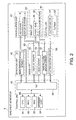
- Fig. 2 is a control block diagram illustrating a tape print apparatus.
- Fig. 3 is a transition diagram illustrating a display screen for switching the system language.
- Fig. 4 is a list of options corresponding to each language displayed on a system language switching screen.
- Fig. 6 is a flowchart illustrating a system language switching process.
- Fig. 7 is a flowchart illustrating a standard language returning process.
- a tape print apparatus is exemplarily described as an electronic apparatus, in which a label is created by printing a tape-form member.
- the tape print apparatus has a function of switching the system language displayed on a display screen to a desired language by a user's manipulation.
- the language set by a user as a system language is called the "setup language”
- the language set in advance before shipment is called the "standard language” (predetermined language). That is, the "setup language” can be variable, but the "standard language” is not variable.
- "English” is exemplarily set as the standard language, and the same language as the characters or the function menus printed on a mainframe of the tape print apparatus is set as the standard language. This is because at least the language printed on a mainframe of the tape print apparatus can be understood by a user, and thus, there would be no problem if it is set as the standard language.
- Fig. 1 is an exterior perspective view illustrating a state in which the openable cover 4 of the tape print apparatus 1 is opened according to the present embodiment.
- the tape print apparatus 1 includes an exterior formed by the device casing 2, a keyboard 3 arranged on the front top face of the device casing 2 with various entry keys, an openable cover 4 installed in the left side on the rear top face, and a display screen 5 (display unit) arranged to the right side on the rear top face.
- a cartridge receiving portion 6 e.g a cartridge receptacle
- the openable cover 4 is provided with an inspection hole 7 for recognizing an installation/removal state of the tape cartridge C while the openable cover 4 is closed.
- the character key group 3a has a full-key configuration based on a JIS arrangement and also has a shift key 16 for suppressing the increasing number of manipulated keys as in a general word-processor and the like.
- the functional key group 3b includes a [Print] key 11, a cursor key 12, a [Selection] key 13, a [Language] key 14, a [Configuration setup] key 15, a [Delete] key 17, and the like.
- the [Print] key 11 can be used for instructing to carry out printing.
- the cursor key 12 includes up, down, left, and right movement keys [ ⁇ ], [ ⁇ ],[ ⁇ ], and [ ⁇ ] and can be used to manipulate cursor movement and/or scrolling.
- the [Selection] key 13 can be used to select an option displayed on the display screen 5 and/or to confirm the selected option.
- the [Delete] key 17 can be used to delete and/or cancel input information. A user may select a corresponding option by manipulating the cursor key 12 to move the cursor to a desired option and pressing the [Selection] key 13 (selection manipulation), for example.
- the "selection manipulation unit" according to the above-described aspects includes the cursor key 12 and the [Selection] key 13.
- the [Language] key 14 can be used to switch a system language for various kinds of information (messages) displayed on the display screen 5 into other languages.
- the [Language] key 14 can be used to select a system language for various kinds of information (messages) displayed on the display screen 5 from a plurality of available languages and thereby set the system language.
- the [configuration setup] key 15 can be used to carry out various kinds of configuration setup of the tape print apparatus 1. In this manner, according to the present embodiment, since the [Language] key 14 is independently provided from the [configuration setup] key 15, it is advantageously possible to readily switch the system language.
- the user's setup language set as the system language can be switched to the standard language (e.g. English in the present embodiment) by simultaneously pressing the shift key 16 and the [Language] key 14.
- a "predetermined language switching manipulation unit" described in the above-described aspects refers to the shift key 16 and the [Language] key 14. The system language switching manipulation and process will be described in detail below.
- the display screen 5 is formed using a liquid crystal display.
- the display screen 5 can be used by a user to enter desired texts or images through the keyboard 3 and create and/or edit the print data such as text data or image data and/or recognize(confirm) the result thereof.
- each screen including various messages or options is displayed when the system language switching or various kinds of configuration setup is carried out (refer to Figs. 5A to 5E ).
- a tape discharge hole 21 communicating the cartridge receiving portion 6 to an external side is formed, and the tape discharge hole 21 is provided with a tape cutter 22 for cutting out the discharged print tape T.
- a reed-shaped label is created by releasing the print-completed print tape T from the tape discharge hole 21 in a predetermined length and cutting out the print-completed print tape T using the tape cutter 22 while the releasing is halted.
- the cartridge receiving portion 6 is provided with a head unit 24 having a thermal-type print head 26 internally provided within the head cover 25, a platen drive axis 27 facing the print head 26, a rolling drive axis 28 for rolling the ink ribbon R described below, and a positioning projection 29 for the tape reel 32 described below.
- a tape release motor 30 (refer to Fig. 2 ) for rotating the platen drive axis 27 and the rolling drive axis 28 is internally provided under the cartridge receiving portion 6,
- the tape cartridge C is configured by receiving a tape reel 32 obtained by winding the print tape T having a constant width (approximately 4 to 48 mm) in the top center portion inside the cartridge casing 31 and the ribbon reel 33 obtained by winding the ink ribbon R in the lower right portion, and the print tape T and the ink ribbon R have the same width.
- a through hole 34 for inserting the head unit 24 is formed in the left lower portion of the tape reel 32.
- a platen roller 35 fitted into the platen drive axis 27 and rotatably driven is provided in a position opposite to the print head 26 internally provided in the head unit 24 by interposing a portion where the print tape T and the ink ribbon R are overlapped while the head unit 24 is inserted into the through hole 34.
- a ribbon winding reel 36 is disposed adjacent to the ribbon reel 33, and the ink ribbon R successively released from the ribbon reel 33 is arranged to travel around the head cover 25 and wound around the ribbon winding reel 36.
- the through hole 34, the center hole of the tape reel 32, and the center hole of the ribbon winding reel 36 are inserted into the head cover 25, the positioning projection 29, and the rolling drive axis 28, respectively, and the print head 26 abuts on the platen roller 35 by interposing the print tape T and the ink ribbon R so that printing is possible.
- the tape print apparatus 1 carries out the desired printing on the print tape T by successively releasing the print tape T from the tape cartridge C using the tape release motor 30 and selectively heating the heating element of the print head 26.
- the tape release motor 30 releases the print tap T up to the position of a tape length including a margin and stops the releasing (then, the process advances to the cut-out process).
- the print tape T includes a recording tape Ta having an adhesive layer on the rear surface and a peel-off tape Tb attached to the recording tape Ta using the adhesive layer.
- the print tape T is wound in a roll shape by disposing the recording tape Ta outside and the peel-off tape Tb inside and stored in the cartridge casing 31.
- a plurality of types of print tapes T is prepared (depending on the tape width, the tape background color, the pattern, the material (texture), and the like), and one type of the print tapes T and the ink ribbon R are stored in each cartridge casing 31.
- a plurality of holes (not shown) for specifying the type of the tape cartridge C is provided on the rear surface of the cartridge casing 31.
- a plurality of tape identification sensors (micro-switch or the like) 37 is provided in the cartridge receiving portion 6 to match with a plurality of holes to detect them (refer to Fig. 2 ).
- the type of tape can be determined by detecting the states of a plurality of holes using the tape identification sensors 37.
- the tape print apparatus 1 includes a manipulation unit 41, a detection unit 42, a print unit 43, a cutting unit 44, a drive unit 45, and a control unit 40 (display control unit) connected to each of the units to control the overall tape print apparatus 1.
- the manipulation unit 41 serves as a user interface for inputting, editing, and/or setting information from the character key group 3a or the functional key group 3b on the keyboard 3, displaying such various kinds of information on the display screen 5, and the like.
- the detection unit 42 has the tape identification sensor 37 described above and detects the type of print tape T (tape cartridge C).
- the print unit 43 has the print head 26 and the tape release motor 30 and carries out printing based on the created print data on the print tape T while transferring the print tape T and the ink ribbon R.
- the cutting unit 44 has a cutter 52 for cutting out the recording tape Ta and the peel-off tape Tb of the print tape T and a cutter motor 51 for driving them. In addition, using the cutter 52, the print tape T for which the print process is print-completed in the print unit 43 is cut out in a predetermined length to create a label.
- the drive unit 45 has a display driver 55, a head driver 56, a tape release motor driver 57, and a cutter motor driver 58 to drive each unit.
- the control unit 40 includes a CPU (Central Processing Unit) 61, a ROM (Read Only Memory) 62, a RAM (Random Access Memory) 63, a storage unit 64, and an input/output control device (hereinafter, referred to as an "IOC:Input Output Controller”) 65, and they are connected to each other through an internal bus 66.
- the RAM 63 can be used as a work area for executing various processes by the CPU 61.
- the ROM 62 is adapted to store a control program and control data for carrying out various controls by the CPU 61.
- the control program includes a program for carrying out a system language switching process for switching the setup language set as a current system language to other languages and a standard language returning process for switching the setup language set as a current system language into the standard language.
- the storage unit 64 can store various kinds of information corresponding to each language for display on the display screen 5. Specifically, the storage unit 64 stores various messages corresponding to each language for display on a normal edit screen 71, a switching message screen 73, a query message screen 74, and various configuration setup screens, options corresponding to each language for display on the system language switching screen 72, and the like (refer to Figs. 4 and 5 ).
- the language setting switching process is initiated by pressing the [Language] key 14
- the standard language returning process is initiated by pressing the shift key 16 and the [Language] key 14.
- the CPU 61 inputs various signals/data from each unit of the tape print apparatus 1 through the IOC 65 according to various control programs within the ROM 62.
- various process controls are carried out by processing various kinds of data within the RAM 63 based on various input signals and data, and outputting various signals and data to each unit of the tape print apparatus 1 through the IOC 65.
- a transition of the screen displayed on the display screen 5 during the system language switching will be described with reference to Fig. 3 .
- the system language switching screen 72 is displayed on the display screen 5.
- the system language switching screen 72 is a manipulation screen for selecting the system language by a user and displays the system language options (refer to Fig. 5A ).
- a switching message screen 73 for notifying the fact that the system language is switched is displayed.
- a normal edit screen 71 in which the system language is switched to the selected language is displayed automatically (without any user's manipulation).
- the [Delete] key 17 or the [Language] key 14 is pressed when the system language switching screen 72 is displayed on the display screen 5, the normal edit screen 71 is displayed again.
- a query message screen 74 for querying whether or not a user agrees to switch the system language to the standard language is displayed.
- the [Selection] key 13 is pressed, the switching message screen 73 is temporarily displayed (in the present embodiment, for 0.75 seconds), and the normal edit screen 71 in which the system language is switched to the standard language (English) is automatically displayed.
- the [Delete] key 17 or the [Language] key 14 is pressed while the query message screen 74 is displayed on the display screen 5, the normal edit screen 71 is displayed again.
- Fig. 4 illustrates a list of all options as well as an option structure.
- the display order of each language represents a display order of the options corresponding to each language displayed on the system language switching screen 72.
- the local notations represent language names of each language using the corresponding language.
- the option notation of each language is denoted by successively listing a "standard language notation of the corresponding language (5 characters from the leading end)", a "colon (:)", and a "local notation of the corresponding language (maximum 8 characters from the leading end)". For example, the option corresponding to "German” is "Germa/Deutsch.”
- FIG. 5A illustrates an example of the system language switching screen 72 in a case where the setup language set as the current system language is "English."
- the system language switching screen 72 has a title display area 81 representing the switching function of the system language and an option display area 82 for displaying a plurality of options of the system language.
- the word “Language” representing the system language switching function is displayed in bold using the current setup language.
- the word “Language” is displayed in the title display area 81 shown in Fig. 5A .
- the options corresponding to each language are displayed in one vertical line.
- the option corresponding to the current setup language is hatched so that options corresponding to other languages are displayed thereunder.
- the option display area 82 shown in Fig. 5A the option corresponding to "English” as the current setup language is hatched in the leading end, and the option corresponding to "Spanish” having the highest display priority except for "English” is displayed thereunder.
- the display screen 5 since the display screen 5 has a small size, a plurality of options is vertically scrollably displayed in the option display area 82.
- the cursor is moved downwardly, the options corresponding to languages other than “English” and “Spanish” (such as “French,” “German,” and “Italian") are displayed according to the display order.
- the cursor is positioned in the option corresponding to "Spanish.”
- the option corresponding to “Spanish” is hatched in the leading end of the option display area 82, and the option corresponding to "English” having a highest priority except for "Spanish” is displayed thereunder.
- the options corresponding to languages other than “Spanish” and “English” are displayed according to the display order.
- Fig. 5B illustrates an exemplary switching message screen 73 in a case where the option corresponding to "Spanish” is selected from the options on the system language switching screen 72 in Fig. 5A .
- the "Language Name Represented by Selected Language (maximum 8 characters)” is displayed in bold and a large size on the second row of the screen, and the "Language Name Represented by Standard Language (Maximum 13 characters)" is displayed with a normal font and an medium size on the first row of the screen.
- the "Language Name Represented by Selected Language,” that is, the word “Spanish” represented by Spanish is displayed at the second row of the screen
- the "Language Name Represented by Standard Language” that is, the word “Spanish” represented by English is displayed on the first row of the screen.
- the system language switching screen 72 is displayed for 0.75 seconds after selecting the option. As a result, manipulation for removing the switching message screen 73 becomes unnecessary.
- Fig. 5C illustrates an exemplary switching message screen 73 in a case where the option corresponding to "English” is selected again from the options displayed on the system language switching screen 72 of Fig. 5A or in a case where the "Selection" key 13 is pressed on the query message screen 74 described below. That is, Fig. 5C illustrates the switching message screen 73 when manipulation is made to switch the system language to "English.”
- the language name represented by the selected language that is, the word "English” represented by English is displayed in bold and a large size on the second row of the screen.
- the "Language Name Represented by Standard Language” to be displayed on the first row is omitted in order to avoid repetitive display with the second row.
- Fig. 5D illustrates an exemplary query message screen 74 in a case where the shift key 16 and the [Language] key 14 are pressed on the normal edit screen 71 in which the current setup language is "Spanish,” that is, in a case where manipulation is made to switch the system language from the currently set “Spanish” to the "standard language (English).”
- the message “Switch to English?” represented in the current setup language, that is, “Spanish,” is displayed on the first and second rows on the query message screen 74, and the message “Switch to English?” represented by the "Standard Language (English)” is displayed on the third and fourth rows.
- Fig. 5E illustrates an exemplary query message screen 74 in a case where the shift key 16 and the [Language] key 14 are pressed on the normal edit screen 71 in which the current setup language is "English,” that is, in a case where manipulation is made to switch the system language from the currently set “English” to the “Standard Language (English).”
- the message "Switch to English?” represented by the current setup language, that is, "English” is displayed on the first and second rows.
- the control unit 40 (display control unit) performs control such that the normal edit screen 71 is displayed on the display screen 5 using the current setup language (S01), and, if the pressing signal of the [Language] key 14 is obtained (S02), the system language switching screen 72 is displayed on the display screen 5 with reference to the option corresponding to each language stored in the storage unit 64 (S03).
- the control unit 40 (display control unit) performs control such that the normal edit screen 71 is displayed on the display screen 5 using the current setup language (S11), and, if the pressing signals of the shift key 16 and the [Language] key 14 are obtained (S12), the query message screen 74 is displayed on the display screen 5 with reference to the query message (setup language notation and standard language notation) stored in the storage unit 64 (S13).
- the switching message screen 73 is displayed for 0.75 seconds with reference to the language name (standard language notation) of the standard language among the language names stored in the storage unit 64 (S15). Then, the normal edit screen 71 is displayed on the display screen 5 using the standard language (S16).
- the switching message screen 73 in which the language name of the selected language is displayed using the standard language and the selected language is displayed after manipulation is made to select the system language when the system language switching screen 72 is displayed
- a user can recognize which language is selected by the user. Since the language name of the selected language is represented using the standard language even if an unfamiliar language is erroneously selected, a user can recognize what the selected language is.
- the options of each language displayed on the system language switching screen 72 are displayed using both the standard language notation and the language notation of the option, a user can recognize what the language is using the language name represented using the standard language even if the language name is unfamiliar when a user selects a desired option. That is, the electronic apparatus according to the invention can reliably let a user know what language the system language is switched to or what language the system language can be switched during the system language switching manipulation.
- the present embodiment has been described by exemplifying the tape print apparatus 1 as the electronic apparatus, the invention may be applicable to other electronic apparatuses having the display screen.
- the standard language may be set to languages other than "English," or a function of changing the standard language by user's manipulation may be provided.
Landscapes
- Engineering & Computer Science (AREA)
- General Engineering & Computer Science (AREA)
- Theoretical Computer Science (AREA)
- Human Computer Interaction (AREA)
- Physics & Mathematics (AREA)
- General Physics & Mathematics (AREA)
- User Interface Of Digital Computer (AREA)
- Controls And Circuits For Display Device (AREA)
- Accessory Devices And Overall Control Thereof (AREA)
Applications Claiming Priority (1)
| Application Number | Priority Date | Filing Date | Title |
|---|---|---|---|
| JP2010179388A JP2012038191A (ja) | 2010-08-10 | 2010-08-10 | 電子機器および電子機器の制御方法 |
Publications (1)
| Publication Number | Publication Date |
|---|---|
| EP2418564A2 true EP2418564A2 (de) | 2012-02-15 |
Family
ID=44584046
Family Applications (1)
| Application Number | Title | Priority Date | Filing Date |
|---|---|---|---|
| EP11176912A Withdrawn EP2418564A2 (de) | 2010-08-10 | 2011-08-09 | Elektronisches Gerät und Steuerverfahren dafür |
Country Status (4)
| Country | Link |
|---|---|
| US (1) | US20120041754A1 (de) |
| EP (1) | EP2418564A2 (de) |
| JP (1) | JP2012038191A (de) |
| CN (1) | CN102375679B (de) |
Cited By (1)
| Publication number | Priority date | Publication date | Assignee | Title |
|---|---|---|---|---|
| CN103702293A (zh) * | 2013-12-23 | 2014-04-02 | Tcl集团股份有限公司 | 自动更新用户界面通知消息语言的方法及电子设备 |
Families Citing this family (2)
| Publication number | Priority date | Publication date | Assignee | Title |
|---|---|---|---|---|
| CN103389854A (zh) * | 2012-05-11 | 2013-11-13 | 上海吉柴电子信息技术有限公司 | 基于Windows系统的多语言环境自动切换方法及系统 |
| CN117163103A (zh) * | 2023-09-28 | 2023-12-05 | 河南思维自动化设备股份有限公司 | 一种lkj2000型列车运行监控记录装置的控制方法 |
Citations (1)
| Publication number | Priority date | Publication date | Assignee | Title |
|---|---|---|---|---|
| JP2006293585A (ja) | 2005-04-08 | 2006-10-26 | Seiko Epson Corp | 電子機器、電子機器の表示方法および制御プログラム |
Family Cites Families (19)
| Publication number | Priority date | Publication date | Assignee | Title |
|---|---|---|---|---|
| US4701130A (en) * | 1985-01-11 | 1987-10-20 | Access Learning Technology Corporation | Software training system |
| JPH08108602A (ja) * | 1994-08-11 | 1996-04-30 | Seiko Epson Corp | テープ印刷装置 |
| US6205418B1 (en) * | 1997-06-25 | 2001-03-20 | Lucent Technologies Inc. | System and method for providing multiple language capability in computer-based applications |
| DE10012518A1 (de) * | 2000-03-15 | 2001-09-20 | Francotyp Postalia Gmbh | Frankiermaschine mit Sprachumschaltung |
| JP2002254775A (ja) * | 2001-03-05 | 2002-09-11 | Ricoh Co Ltd | 画像形成装置 |
| US7113904B2 (en) * | 2001-03-30 | 2006-09-26 | Park City Group | System and method for providing dynamic multiple language support for application programs |
| US20030020760A1 (en) * | 2001-07-06 | 2003-01-30 | Kazunori Takatsu | Method for setting a function and a setting item by selectively specifying a position in a tree-structured menu |
| US20040015343A1 (en) * | 2002-07-22 | 2004-01-22 | Toshiba Tec Kabushiki Kaisha | System and method for customizing the language displayed on the interface of an image processing deivce |
| JP2004199343A (ja) * | 2002-12-18 | 2004-07-15 | Fuji Xerox Co Ltd | 画面制御装置 |
| CN1474312A (zh) * | 2003-06-04 | 2004-02-11 | 无敌科技(西安)有限公司 | 可支持多国语言的装置及其显示方法 |
| US7814101B2 (en) * | 2003-10-30 | 2010-10-12 | Microsoft Corporation | Term database extension for label system |
| JP2005225172A (ja) * | 2004-02-16 | 2005-08-25 | Sato Corp | ラベルプリンタ |
| US8448083B1 (en) * | 2004-04-16 | 2013-05-21 | Apple Inc. | Gesture control of multimedia editing applications |
| JP4548116B2 (ja) * | 2004-12-28 | 2010-09-22 | ブラザー工業株式会社 | 文字入力装置及びテープ印字装置 |
| JP4459842B2 (ja) * | 2005-03-04 | 2010-04-28 | 株式会社ケイティーエス | 表示言語切換装置及びプログラム |
| JP4085120B2 (ja) * | 2006-02-10 | 2008-05-14 | 富士通株式会社 | 情報表示システム、情報表示方法及びプログラム |
| US8571580B2 (en) * | 2006-06-01 | 2013-10-29 | Loopt Llc. | Displaying the location of individuals on an interactive map display on a mobile communication device |
| US9235262B2 (en) * | 2009-05-08 | 2016-01-12 | Kopin Corporation | Remote control of host application using motion and voice commands |
| US8335682B2 (en) * | 2007-10-30 | 2012-12-18 | Sercomm Corporation | Multi-language interfaces switch system and method therefor |
-
2010
- 2010-08-10 JP JP2010179388A patent/JP2012038191A/ja active Pending
-
2011
- 2011-08-05 US US13/198,786 patent/US20120041754A1/en not_active Abandoned
- 2011-08-08 CN CN2011102259939A patent/CN102375679B/zh active Active
- 2011-08-09 EP EP11176912A patent/EP2418564A2/de not_active Withdrawn
Patent Citations (1)
| Publication number | Priority date | Publication date | Assignee | Title |
|---|---|---|---|---|
| JP2006293585A (ja) | 2005-04-08 | 2006-10-26 | Seiko Epson Corp | 電子機器、電子機器の表示方法および制御プログラム |
Non-Patent Citations (2)
| Title |
|---|
| "Brother P-touch7600 User's Guide", pages: 12 |
| SANFORD, L.P.: "Dymo RHIN06000 User Guide", 2007, pages: 8 |
Cited By (2)
| Publication number | Priority date | Publication date | Assignee | Title |
|---|---|---|---|---|
| CN103702293A (zh) * | 2013-12-23 | 2014-04-02 | Tcl集团股份有限公司 | 自动更新用户界面通知消息语言的方法及电子设备 |
| CN103702293B (zh) * | 2013-12-23 | 2017-11-10 | Tcl集团股份有限公司 | 自动更新用户界面通知消息语言的方法及电子设备 |
Also Published As
| Publication number | Publication date |
|---|---|
| CN102375679B (zh) | 2013-11-13 |
| CN102375679A (zh) | 2012-03-14 |
| JP2012038191A (ja) | 2012-02-23 |
| US20120041754A1 (en) | 2012-02-16 |
Similar Documents
| Publication | Publication Date | Title |
|---|---|---|
| AU2008235476B2 (en) | Tape printing apparatus and method with displaying features | |
| US9185249B2 (en) | Method of creating a label, a printing apparatus, and a computer-readable medium | |
| US8582133B2 (en) | Cable label forming apparatus, tape printing apparatus, method of forming cable label for cable label forming apparatus and program | |
| CN1552031B (zh) | 字符串编辑设备和字符串编辑方法 | |
| HK1216558A1 (zh) | 標簽文件 | |
| US6302603B1 (en) | Tape printing apparatus and method | |
| CN102744979A (zh) | 标签数据处理装置以及标签数据处理方法 | |
| US20120041754A1 (en) | Electronic apparatus, method of controlling the electronic apparatus and tape print apparatus | |
| US20130058696A1 (en) | Document creating device, tape printing apparatus, and document creating method | |
| US8339651B2 (en) | Printer and computer-readable recording medium storing printing program | |
| EP1645425A1 (de) | Banddruckvorrichtung und -programm | |
| CN102087587B (zh) | 信息处理装置及其控制方法 | |
| CN100377069C (zh) | 墨字信息及点字信息处理装置 | |
| US8589144B2 (en) | Character processing device, character distinction method and computer program | |
| US7625145B2 (en) | Data display method of data display apparatus, data display apparatus, data generation apparatus having the same, and sheet processing apparatus | |
| US11813849B2 (en) | Tape printing apparatus, information processing apparatus, method for controlling tape printing apparatus, and storage medium | |
| US8339652B2 (en) | Label creating apparatus, method for controlling label creating apparatus and computer program | |
| JP2011095970A (ja) | 情報処理装置およびその制御方法 | |
| JP4185886B2 (ja) | テープ印刷装置およびそのデータ入力処理方法 | |
| JP2560958B2 (ja) | テープ印字装置 | |
| JP3168744B2 (ja) | 印字装置 | |
| HK1139622A (en) | Tape printing apparatus anf method with displaying features | |
| JP2011093197A (ja) | 情報処理装置およびその制御方法 | |
| HK1139364A (en) | Tape printing apparatus |
Legal Events
| Date | Code | Title | Description |
|---|---|---|---|
| AK | Designated contracting states |
Kind code of ref document: A2 Designated state(s): AL AT BE BG CH CY CZ DE DK EE ES FI FR GB GR HR HU IE IS IT LI LT LU LV MC MK MT NL NO PL PT RO RS SE SI SK SM TR |
|
| AX | Request for extension of the european patent |
Extension state: BA ME |
|
| PUAI | Public reference made under article 153(3) epc to a published international application that has entered the european phase |
Free format text: ORIGINAL CODE: 0009012 |
|
| STAA | Information on the status of an ep patent application or granted ep patent |
Free format text: STATUS: THE APPLICATION IS DEEMED TO BE WITHDRAWN |
|
| 18D | Application deemed to be withdrawn |
Effective date: 20160301 |