EP2426581A2 - Dispositif de traitement d'informations, procédé de traitement d'informations et programme informatique - Google Patents
Dispositif de traitement d'informations, procédé de traitement d'informations et programme informatique Download PDFInfo
- Publication number
- EP2426581A2 EP2426581A2 EP20110179557 EP11179557A EP2426581A2 EP 2426581 A2 EP2426581 A2 EP 2426581A2 EP 20110179557 EP20110179557 EP 20110179557 EP 11179557 A EP11179557 A EP 11179557A EP 2426581 A2 EP2426581 A2 EP 2426581A2
- Authority
- EP
- European Patent Office
- Prior art keywords
- control member
- user control
- display
- distance
- touch panel
- Prior art date
- Legal status (The legal status is an assumption and is not a legal conclusion. Google has not performed a legal analysis and makes no representation as to the accuracy of the status listed.)
- Withdrawn
Links
Images






Classifications
-
- G—PHYSICS
- G06—COMPUTING OR CALCULATING; COUNTING
- G06F—ELECTRIC DIGITAL DATA PROCESSING
- G06F3/00—Input arrangements for transferring data to be processed into a form capable of being handled by the computer; Output arrangements for transferring data from processing unit to output unit, e.g. interface arrangements
- G06F3/01—Input arrangements or combined input and output arrangements for interaction between user and computer
- G06F3/048—Interaction techniques based on graphical user interfaces [GUI]
- G06F3/0487—Interaction techniques based on graphical user interfaces [GUI] using specific features provided by the input device, e.g. functions controlled by the rotation of a mouse with dual sensing arrangements, or of the nature of the input device, e.g. tap gestures based on pressure sensed by a digitiser
- G06F3/0488—Interaction techniques based on graphical user interfaces [GUI] using specific features provided by the input device, e.g. functions controlled by the rotation of a mouse with dual sensing arrangements, or of the nature of the input device, e.g. tap gestures based on pressure sensed by a digitiser using a touch-screen or digitiser, e.g. input of commands through traced gestures
- G06F3/04883—Interaction techniques based on graphical user interfaces [GUI] using specific features provided by the input device, e.g. functions controlled by the rotation of a mouse with dual sensing arrangements, or of the nature of the input device, e.g. tap gestures based on pressure sensed by a digitiser using a touch-screen or digitiser, e.g. input of commands through traced gestures for inputting data by handwriting, e.g. gesture or text
-
- G—PHYSICS
- G06—COMPUTING OR CALCULATING; COUNTING
- G06F—ELECTRIC DIGITAL DATA PROCESSING
- G06F2203/00—Indexing scheme relating to G06F3/00 - G06F3/048
- G06F2203/041—Indexing scheme relating to G06F3/041 - G06F3/045
- G06F2203/04108—Touchless 2D- digitiser, i.e. digitiser detecting the X/Y position of the input means, finger or stylus, also when it does not touch, but is proximate to the digitiser's interaction surface without distance measurement in the Z direction
-
- G—PHYSICS
- G06—COMPUTING OR CALCULATING; COUNTING
- G06F—ELECTRIC DIGITAL DATA PROCESSING
- G06F3/00—Input arrangements for transferring data to be processed into a form capable of being handled by the computer; Output arrangements for transferring data from processing unit to output unit, e.g. interface arrangements
- G06F3/01—Input arrangements or combined input and output arrangements for interaction between user and computer
- G06F3/03—Arrangements for converting the position or the displacement of a member into a coded form
- G06F3/041—Digitisers, e.g. for touch screens or touch pads, characterised by the transducing means
- G06F3/044—Digitisers, e.g. for touch screens or touch pads, characterised by the transducing means by capacitive means
Definitions
- the present disclosure relates to an information processing device, an information processing method, and a computer program.
- Touch panels make it possible to realize intuitive and easy-to-use user interfaces (hereinafter referred to also as "UIs"), and have therefore been used in the past in ticket dispensers of transportation systems, ATMs of banks, and the like.
- Recent touch panels can detect the movement of a user, and have made it possible to realize device operations unlike known button operations.
- touch panels have recently been used in portable devices such as portable telephones, game devices, and the like.
- JP-T-2010-506302 discloses a device that generates a haptic effect on a device by starting a haptic feedback before a user touches an input region or area of a touch panel or the like on the basis of the presence of an object in the vicinity of the input region of the device.
- a desired object is selected from a plurality of objects displayed on a display section in a mobile terminal, a touch screen device of about an A4 size, or the like by an operation on a touch screen.
- a touch screen device of about an A4 size, or the like by an operation on a touch screen.
- an object group formed by a plurality of objects is displayed on the display section
- the object group when the object group is operated, a part of the objects of the object group exit a display region of the display section.
- the user needs to perform an operation of selecting the desired object after once moving the object group displayed in the display section, so that an operation load on the user may be increased.
- the present disclosure has been made in view of the above problems, and it is desirable to provide an information processing device, an information processing method, and a computer program that are novel and improved, and which are capable of reducing an operation load on a user by changing the display position of an object to be operated according to the position of an operating object.
- the present disclosure is directed to an apparatus including a first detection unit configured to determine whether or not a user control member is within a first threshold distance of the touch panel and a second detection unit configured to determine a direction of movement of the user control member with respect to a touch panel when the user control member is not in contact with the touch panel.
- the apparatus further includes a display control unit configure to, when the user control member is determined to be moving within the threshold distance and in a predetermined direction, generate signals to alter a first displayed object such that the altered first displayed object appears to move closer to the user control member.
- the present disclosure is directed to a method including determining a direction of movement of a user control member with respect to a touch panel when the user control member is not in contact with the touch panel.
- the method further includes determining whether or not the user control member is within a threshold distance of the touch panel.
- the method further includes, when the user control member is determined to be moving in a predetermined direction and is within the threshold distance, altering a first displayed object such that the altered first displayed object appears to move closer to the user control member.
- the present disclosure is directed to a tangibly embodied non-transitory computer-readable medium storing instructions which, when executed by a processor, perform a method including determining a direction of movement of a user control member with respect to a touch panel when the user control member is not in contact with the touch panel. The method also includes determining whether or not the user control member is within a threshold distance of the touch panel and, when the user control member is determined to be moving in a predetermined direction and is within the threshold distance, altering a first displayed object such that the altered first displayed object appears to move closer to the user control member.
- an information processing device an information processing method, and a computer program capable of reducing an operation load on a user by changing the display position of an object to be operated according to the position of an operating object.
- FIG. 1 is a block diagram showing' an example of hardware configuration of the information processing device 100 according to the present embodiment.
- FIG. 2 is a diagram of assistance in explaining an example of hardware configuration of the information processing device 100 according to the present embodiment.
- the information processing device 100 is a device including a detecting unit capable of detecting the contact position (e.g., via a contact sensor) of an operating object (i.e., a user control member) on the display surface of a display device and capable of detecting a proximity distance between the display surface of the display device and the operating object located above the display surface.
- a detecting unit capable of detecting the contact position (e.g., via a contact sensor) of an operating object (i.e., a user control member) on the display surface of a display device and capable of detecting a proximity distance between the display surface of the display device and the operating object located above the display surface.
- an operating object i.e., a user control member
- Various devices including devices having a small display device such as portable information terminals and smart phones, for example, are assumed, irrespective of the functions of the devices, may be information processing device 100.
- the information processing device 100 includes a CPU 101, a RAM (Random Access Memory) 102, a nonvolatile memory 103, a display device 104, and a proximity touch sensor 105, which may include or in conjunction with work with a contact sensor.
- a CPU 101 a central processing unit (CPU) 102
- a RAM Random Access Memory
- nonvolatile memory 103 a nonvolatile memory
- display device 104 a proximity touch sensor 105, which may include or in conjunction with work with a contact sensor.
- a proximity touch sensor 105 which may include or in conjunction with work with a contact sensor.
- the CPU 101 functions as an arithmetic processing unit and a control device, and controls operation on the whole within the information processing device 100 according to various programs.
- the CPU 101 may also be a microprocessor.
- the RAM 102 temporarily stores a program used in execution of the CPU 101, parameters changing as appropriate in the execution of the CPU 101, and the like. These sections are interconnected by a host bus formed by a CPU bus or the like.
- the nonvolatile memory 103 stores programs used by the CPU 101, operation parameters, and the like.
- a ROM (Read Only Memory) or a flash memory, for example, can be used as the nonvolatile memory 103.
- the display device 104 is an example of an output device for outputting information.
- the proximity touch sensor 105 is an example of an input device for a user to input information.
- the proximity touch sensor 105 includes for example input means for inputting information and an input control circuit for generating an input signal on the basis of the input by the user and outputting the input signal to the CPU 101.
- the proximity touch sensor 105 is provided in an exemplary state of being laminated to the display surface of the display device 104. Thereby, when the user brings a user control member (e.g., a finger, stylus or other appendage) or the like close to the display surface, the proximity touch sensor 105 can detect a distance from the display surface to the member.
- a user control member e.g., a finger, stylus or other appendage
- the information processing device 100 When the user operates a GUI such as an object or the like displayed in a display region (or area), the information processing device 100 according to the present embodiment changes the display position of the GUI dynamically according to the movement of the finger so as to facilitate the operation of the user.
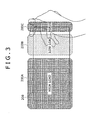
- the information processing device 100 when the information processing device 100 is held by one hand, and a GUI displayed in a display region 200 is operated by the thumb of the hand holding the information processing device 100, the operation is easily performed in a region (low-load region) 200B corresponding to a movable range of the thumb.
- the thumb is not easily moved and the operation is difficult in a region 200A separated from the thumb on an opposite side from the hand and an edge 200C on the side of the holding hand (high-load regions).
- the information processing device 100 displays the GUI such that the GUI comes near to the side of the holding hand and approaches the extended thumb.
- the display position of the GUI is controlled such that the GUI appears to come nearer to the opposite side from the holding hand and approaches the thumb.
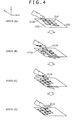
- an object group 210 composed of a plurality of objects 212 is displayed in the display region 200.
- the objects 212 are arranged and displayed in the form of a grid on an xy plane, for example.
- a state (A) when a finger is placed within a proximity sensing region separated by a predetermined distance from the display surface, an object 212a (e.g., a display object) situated at a position nearest to the position of the finger is displayed so as to be situated at a forward position (display surface side) in a direction of depth (z-direction), for example.
- the objects 212 other than the object 212a nearest to the finger may be displayed so as to sink in the direction of depth with increasing separation distance from the finger.
- the information processing device 100 determines that the user will operate an object situated on the x-axis positive direction side of the object 212a, and moves the object group 210 to an opposite side from the moving direction of the finger (in an x-axis negative direction by an object response distance).
- the object 212 that the user intends to operate approaches the finger, so that the user can operate the desired object without greatly moving the finger.
- the position of each object 212 forming the object group 210 in the direction of depth also changes due to the movement of the finger and the object group 210.
- the object 212b is displayed so as to be situated at a most forward position.
- the objects 212 other than the object 212b are displayed so as to sink in the direction of depth with increasing separation distance from the finger.
- the object group 210 is further moved in the x-axis negative direction, as shown in a state (C). Then, when the object 212 nearest to the finger is changed from the object 212b to the object 212c, the object 212c is displayed so as to be situated at a most forward position. The objects 212 other than the object 212c are displayed so as to sink in the direction of depth with increasing separation distance from the finger.
- the information processing device 100 can dynamically move the objects 212 according to the movement of the finger of the user to enhance operability, and also show an object on which focus is being placed in such a manner as to be easily recognized visually. In the following, controlling the positions of the objects 212 by such an information processing device 100 and will be described in detail.
- FIG. 5 is a block diagram showing a functional configuration of the information processing device 100 according to the present embodiment.
- the information processing device 100 includes an input display section 110, a positional information obtaining section 120, a display controlling section 130, an execution processing section 140, and a setting storage section 150.
- the input display section 110 is a functional part for displaying information and allowing information to be input.
- the input display section 110 includes a detecting unit 112 and a display unit 114.
- the detecting unit 112 corresponds to the proximity touch sensor 105 in FIG. 1 .
- a capacitive type touch panel for example, can be used for the detecting unit 112.
- any suitable technique may be used in conjunction with detection unit 212.
- detector unit 212 may use optical or other techniques to detect a proximity between operating object and a display surface of the display unit 114.
- the detecting unit 112 detects the value of a capacitance changing according to a proximity distance between an operating object and the display surface of the display unit 114.
- the capacitance detected by the detecting unit 112 increases. As the operating object further approaches the display surface, the capacitance further increases. Then, when the operating object comes into contact with the display surface, the capacitance detected by the detecting unit 112 becomes a maximum.
- the positional information obtaining section 120 to be described later can obtain the positional information of the operating object with respect to the display surface of the display unit 114.
- the detecting unit 112 outputs the value of the detected capacitance as a result of detection to the positional information obtaining section 120.
- the display unit 114 is an output device for displaying information, which device corresponds to the display device 104 in FIG. 1 .
- the display unit 114 displays, for example, GUI objects and contents or the like associated with the objects.
- the display unit 114 displays the objects after the change on the basis of object display change information notified from the display controlling section 130.
- the positional information obtaining section 120 obtains positional information indicating positional relation between the operating object and the display surface of the display unit 114 on the basis of the detection result input from the detecting unit 112.
- the positional information obtaining section may obtain positional information based on any suitable data type (e.g., capacitive or optical data).
- capacitive or optical data e.g., capacitive or optical data.
- a correspondence between the value of the capacitance and a proximity distance (or a proximity sensing region) is stored in advance in the setting storage section 150 to be described below.
- the positional information obtaining section 120 obtains the position of the finger in a vertical direction (e.g., a z-direction) with respect to the display surface on the basis of the value of the capacitance input from the detecting unit 112.
- the positional information obtaining section 120 identifies the position of the operating object on the display surface of the display unit 114 (e.g., on the xy plane) on the basis of the detection result input from the detecting unit 112.
- the detecting unit 112 is formed by a capacitive sensor substrate where a capacitance detecting grid for detecting an x-coordinate and a y-coordinate is formed.
- the detecting unit 112 can identify the position of the operating object on the substrate (e.g., on the display surface) from a change in capacitance of each grid cell in response to contact of the operating object.
- the coordinate position of a highest capacitance can be identified as coordinates of the position where the finger is closer to the display surface.
- the barycentric position of a region where capacitances of a predetermined value or higher are detected may be set as coordinates of the position where the finger is closer to the display surface.
- the positional information obtaining section 120 can thus obtain positional information with respect to the display surface of the display unit 114.
- the obtained operating object positional information is output to the display controlling section 130 and the execution processing section 140.
- the display controlling section 130 controls the display positions of the objects displayed on the display unit 114 on the basis of the positional information obtained by the positional information obtaining section 120. As described with reference to FIG. 3 and FIG. 4 , the display controlling section 130 controls the display positions of the objects 212 according to the movement of the finger of the user so that the user easily operates an object 212 displayed on the display unit 114. When the display controlling section 130 has determined a change in the display positions of the objects 212, the display controlling section 130 generates an image of the objects after the change, and outputs the image to the display unit 114. In addition, the display controlling section 130 performs display control in response to an instruction of the execution processing section 140 to be described below to change the object 212 displayed at the position of contact of the finger. Details of this object display position correcting process will be described below.
- the execution processing section 140 performs a function associated with the operating input. For example, when the detecting unit 112 senses that the user has brought a finger into contact with a certain object 212 displayed on the display unit 114, the execution processing section 140 recognizes that the finger has come into contact with the object 212 on the basis of positional information input from the positional information obtaining section 120. Then, the execution processing section 140 identifies the object 212 with which the finger has come into contact, and performs a function associated with the object 212. Incidentally, the selected object 212 can be changed according to the moving speed of the finger selecting the object 212. Details of the object display position correcting process will be described later.
- the setting storage section 150 stores, as setting information, information used at a time of calculation of a proximity distance between the operating object and the display surface, information used at a time of generation of positional information on the position of the operating object on the display surface, and other information used at a time of the object display position controlling process.
- the setting storage section 150 stores, for example, correspondences between the value of the capacitance and the proximity distance.
- the positional information obtaining section 120 can obtain a position corresponding to the value of the capacitance which value is input from the detecting unit 112 referring to such correspondences.
- the setting storage section 150 stores processing contents (functions) to be performed in correspondence with operating input performed to the objects 212 by the user.
- the setting storage section 150 further stores the moving speed (threshold value) of the finger for starting the object display position correcting process.
- the setting information stored in the setting storage section 150 may be stored in advance, or may be set by the user.
- the information processing device 100 may include for example a memory for temporarily storing information necessary in the object display position controlling process and the like.
- the information processing device 100 can detect the movement of a finger on the display surface by having the above-described functions. Then, using these pieces of information, the information processing device 100 controls the display positions of objects 212 displayed on the display unit 114 according to the movement of the finger, whereby operability can be improved.
- the object display position controlling process by the information processing device 100 according to the present embodiment will be described in the following with reference to FIGS. 6 to 13 .
- FIG. 6 is a flowchart of the object display position controlling process by the information processing device 100 according to the present embodiment.
- FIG. 7 is a diagram of assistance in explaining display position change made to an object group 210 and objects 212.
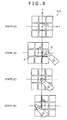
- FIG. 8 is a diagram of assistance in explaining an example of control of the display position of the object group by the information processing device 100 according to the present embodiment.
- FIG. 9 and FIG. 10 are graphs showing an exemplary relation between an amount of movement of a finger in two different areas of the touchpad and an amount of movement of the object group.
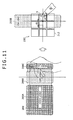
- FIG. 11 is a diagram of assistance in explaining a setting of a reference position in consideration of operation loads on the device.
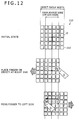
- FIG. 12 is a diagram of assistance in explaining a relation between the width of the object group 210 and a range of movement of a finger.
- FIG. 13 is a diagram of assistance in explaining a contact position correcting process.
- the information processing device 100 first determines whether a condition for starting a process of controlling the display positions of objects 212 is satisfied (S100).
- the condition for starting the process of controlling the display positions of the objects 212 can be set, as appropriate.
- a case where a finger is positioned within a proximity sensing region or a case where a predetermined time has passed since a finger was positioned within the proximity sensing region, for example, can be the condition for starting the process of controlling the display positions of the objects 212.
- the process of controlling the display positions of the objects 212 may be performed when a key input is performed.
- the information processing device 100 determines that the condition for starting the process of controlling the display positions of the objects 212 is satisfied, and starts a process of step S110. On the other hand, when an operation as the condition for starting the process is not detected in step S100, the process of step S100 is repeated until the operation is detected.
- the display positions of the objects 212 are changed and the objects 212 are moved according to the proximity position of the finger with respect to the display surface (S110) .
- the display positions of the objects 212 being controlled, a change in the position of the object group 210 and a change in position in the direction of depth of each object 212 occur, as shown in FIG. 7 , for example.
- the display controlling section 130 moves the object group 210 on the xy plane in an opposite direction from the moving direction of the finger.
- the object group 210 is moved so as to meet the moving finger and that the finger can be brought into contact with a desired object 212 with a small movement of the finger. This is effective particularly in a case where operating input is performed by one hand, and the number of objects 212 that can be touched by a finger of the holding hand can be increased as compared with a case of the past.
- a reference position O (0, 0) is set to the object group 210.
- a distance df from the reference position O to the finger and a distance dc from the reference position O to a center P of the object group are defined.
- the reference position O may be, for example, a position where the user first places a finger above the object group 210 or a position set in advance.
- the reference position O may be set from a relation to a region of a low operation load on the user.
- the object group 210 is moved in an x-axis negative direction.
- An amount df of movement of the finger and an amount dc of movement of the object group 210 at this time can be set, as shown in FIG. 9 , for example.
- the amount (df) of movement of the finger and the amount (dc) of movement of the object group 210 are in linear relation to each other.
- limits are set for the movement of the object group 210 so that the object group 210 can be prevented from having a part out of a frame. Thus, even when the finger moves from the reference position O by a predetermined distance or more, the object group 210 is not moved beyond the amount of object movement limit value.
- the amount (df) of movement of the finger and the amount (dc) of movement of the object group 210 may also be set as shown in FIG. 10 , for example.
- a dead zone is set with the reference position O as a center.
- the amount of movement of the object group 210 with respect to the amount of movement of the finger is smaller than in the case of FIG. 9 , that is, a weight for the amount of movement of the object group 210 is set small.
- the object group 210 reacts only slightly even when the finger is moved.
- amount of object movement limit values may be set so that the object group 210 can be prevented from having a part out of a frame.
- the relation between the amount (df) of movement of the finger and the amount (dc) of movement of the object group 210 does not need to be a linear relation, but may be set such that the amount (dc) of movement of the object group 210 increases exponentially with increase in the amount df of movement of the finger.
- the display controlling section 130 moves each object 212 in a z-direction according to a degree of proximity of each object 212 to the finger. Specifically, as shown in FIG. 7 , an object 212 at a position (e.g., virtual distance) closer to the finger is displayed on a more forward side to thereby increase response to the approach of the finger (i.e., decrease a virtual distance between the finger and the object 212), and an object 212 at a position more distant from the finger is displayed on a more rearward side to thereby decrease response to the approach of the finger.
- a moving distance Z(index) in the z-direction of an object 212 can be defined as in the following Equation 1, for example.
- Z index fz d focus_index , index
- Index denotes a unique number for identifying each object 212
- d(focus_index, index) denotes a distance between an object 212 on which focus is being placed now and another object 212.
- the depth function fz shown in Equation 1 can be set such that an object 212 closer to the object 212 on which focus is placed is displayed at a more forward position.
- the objects 212 may also be changed in size according to positional relation to the finger. For example, an object 212 at a position closer to the finger is increased in size, and an object 212 at a position more distant from the finger is decreased in size.
- By thus setting the sizes of the objects 212 it is possible to express response to the approach of the finger, and prevent an object 212 from lying off a display region, that is, prevent an object 212 from going out of a frame when the object group 210 is moved so as to approach an edge part of the display region 200.
- the size Size(index) of an object 212 can be defined as in the following Equation 2, for example.
- An area function fs shown in Equation 2 is basically set such that an object 212 closer to an object 212 on which focus is placed is displayed in a larger size.
- Size index fs d focus_index , index
- the reference position O for the movement of the object group 210 and the relations between the amount of movement of the finger and the amount of movement of the object group 210 as shown in FIG. 9 and FIG. 10 are desirably determined according to operation loads, as shown in FIG. 3 .
- the display region 200 of the information processing device 100 can be divided into high-load regions 200A and 200C and a low-load region 200B according to states in which the user performs operating input.
- the display controlling section 130 moves the object group 210 so that the object group 210 can be operated within the low-load region 200B in the display region 200, whereby operability can be improved.
- the reference position O is provided at the center of the low-load region 200B in the display region 200 of the information processing device 100. Then, the relation between the amount of movement of the finger and the amount of movement of the object group 210 is set such that all the objects 212 of the object group 210 can be touched by the movement of the finger within the low-load region 200B.
- a device with a low operating load can be realized by thus setting parameters such as the reference position O, the relation between the amount of movement of the finger and the amount of movement of the object group 210, and the like in consideration of a region of easy operation for the user on the basis of the shape of the device and the disposition of hands and fingers when the device is operated.
- a finger moving range can be made smaller than the width of the object group 210, and the finger moving range can be contained within a region of a low operating load.
- position control is performed such that the object group 210 is moved in a left direction so that the object 212 at the right edge can be touched within the low-load region.
- position control is performed such that the object group 210 is moved in the right direction so that the object 212 at the left edge can be touched within the low-load region.
- the execution processing section 140 determines whether the finger has been brought into contact with the display surface on the basis of positional information (S120). The execution processing section 140 performs a function associated with an object 212 touched by the finger. For this, the execution processing section 140 determines from the positional information whether the user has brought the finger into contact with the display surface to select an object 212 in the object group 210. The process of step S110 and step S120 is repeated until the finger is brought into contact with the display surface.
- the execution processing section 140 determines that the finger has been brought into contact with the display surface
- the execution processing section 140 obtains a moving speed when the finger came into contact with the display surface on the basis of the positional information, and determines whether the moving speed is higher than a predetermined speed (S130).
- the information processing device 100 improves operability by identifying an object 212 that the user intends to operate more accurately. In this case, when the moving speed of the finger is high, it is difficult for the user to bring the finger into contact with the object 212 to be operated accurately, and the possibility of occurrence of an erroneous operation is increased.
- step S130 the moving speed of the finger is obtained, whether the obtained moving speed of the finger is higher than a predetermined speed is determined, and whether it is necessary to correct the object 212 selected by bringing the finger into contact with the display surface is thereby determined.
- the information processing device 100 determines that there is a strong possibility of an erroneous operation, determines an object 212 to be operated by correcting the selected object 212, and changes the display positions of the objects 212.
- the moving speed of the finger can be obtained by time differentiation of the proximity distance.
- the execution processing section 14.0 can obtain the moving speed of the finger by measuring a time taken for the finger whose predetermined proximity state was detected to touch the display surface.
- the execution processing section 140 can obtain the moving speed of the finger by dividing a distance d from the display surface to a position where the proximity state was detected by the time taken for the finger to touch the display surface.
- the finger is obliquely moved from a position above the display surface to the display surface, comes into contact with the display surface, and comes into contact with a certain object 212.
- the moving speed of the finger is equal to or lower than the predetermined speed, it is considered that the user brought the finger into contact while confirming the position of the object 212 to be operated (for example, an object 212(b)).
- the execution processing section 140 performs a function associated with the object 212(b) touched by the finger (S140).
- the execution processing section 140 makes the setting storage section 150 correct the display position of the object group 210 so that the object 212 on which focus was placed before the finger was brought into contact with the display surface is selected (S150).
- a history of the objects 212 on which focus has been placed is stored in a memory (not shown).
- the execution processing section 140 determines the object 212 to be selected by referring to the history. For example, an object on which focus was placed immediately before the finger was moved at the predetermined speed or higher can be set as the object 212 to be selected by the correction.
- the execution processing section 140 makes the display controlling section 130 move the object group 210 so that the object 212 in question is situated at the position touched by the finger.
- an object 212(a) is determined as an object to be selected after the correction.
- the display controlling section 130 moves the object group 210, and makes correction such that the object 212(a) is situated at the position touched by the finger.
- the object 212 considered to be selected by the user is set in a selected state which can be detected visually, whereby the user can perform operating input without any sense of incongruity.
- the execution processing section 140 performs a function associated with the object 212(a) to be selected after the correction (S140).
- the object display position controlling process by the information processing device 100 according to the present embodiment has been described above.
- Such an object display position controlling process changes the display positions of the object group 210 and the objects 212 forming the object group 210 according to the movement of the finger in a proximity state, so that the user can easily predict a possible phenomenon before operating an object 212.
- the above process displays the objects 212 such that the objects 212 approach the finger in the proximity state. Thus, even when operation is performed by one hand, an object 212 to be operated can be selected easily.
- the object group 210 can be prevented from extending beyond the display region 200. It is thereby possible to prevent or at least reduce a degradation in bird's-eye view characteristics.
- the present disclosure is not limited to such an example.
- the display position of the object group 310 and the display positions in a direction of depth of the objects 312 are changed according to the position of a finger in a proximity state.
- the display positions of the objects 312 may be changed by revolving the objects 312 such that the objects 312 approach the finger along a direction of the arrangement, for example.
Landscapes
- Engineering & Computer Science (AREA)
- General Engineering & Computer Science (AREA)
- Theoretical Computer Science (AREA)
- Human Computer Interaction (AREA)
- Physics & Mathematics (AREA)
- General Physics & Mathematics (AREA)
- User Interface Of Digital Computer (AREA)
- Position Input By Displaying (AREA)
Applications Claiming Priority (1)
| Application Number | Priority Date | Filing Date | Title |
|---|---|---|---|
| JP2010199639A JP5732784B2 (ja) | 2010-09-07 | 2010-09-07 | 情報処理装置、情報処理方法およびコンピュータプログラム |
Publications (2)
| Publication Number | Publication Date |
|---|---|
| EP2426581A2 true EP2426581A2 (fr) | 2012-03-07 |
| EP2426581A3 EP2426581A3 (fr) | 2015-04-08 |
Family
ID=44677581
Family Applications (1)
| Application Number | Title | Priority Date | Filing Date |
|---|---|---|---|
| EP20110179557 Withdrawn EP2426581A3 (fr) | 2010-09-07 | 2011-08-31 | Dispositif de traitement d'informations, procédé de traitement d'informations et programme informatique |
Country Status (4)
| Country | Link |
|---|---|
| US (1) | US9916046B2 (fr) |
| EP (1) | EP2426581A3 (fr) |
| JP (1) | JP5732784B2 (fr) |
| CN (1) | CN202433855U (fr) |
Cited By (7)
| Publication number | Priority date | Publication date | Assignee | Title |
|---|---|---|---|---|
| FR3002052A1 (fr) * | 2013-02-14 | 2014-08-15 | Fogale Nanotech | Procede et dispositif pour naviguer dans un ecran d'affichage et appareil comprenant une telle navigation |
| EP2977862A4 (fr) * | 2013-03-19 | 2016-04-06 | Ntt Docomo Inc | Dispositif de traitement d'informations et procédé de traitement d'informations |
| WO2016083750A1 (fr) * | 2014-11-26 | 2016-06-02 | Sequeris | Dispositif et procédé de commande et appareil comportant un tel dispositif |
| EP2650771A3 (fr) * | 2012-04-12 | 2017-08-09 | Samsung Electronics Co., Ltd | Appareil et procédé de détection d'objet en 3D |
| US9875015B2 (en) | 2013-11-29 | 2018-01-23 | Semiconductor Energy Laboratory Co., Ltd. | Data processing device and driving method thereof |
| US10042418B2 (en) | 2004-07-30 | 2018-08-07 | Apple Inc. | Proximity detector in handheld device |
| US10303266B2 (en) | 2011-01-31 | 2019-05-28 | Quickstep Technologies Llc | Three-dimensional man/machine interface |
Families Citing this family (16)
| Publication number | Priority date | Publication date | Assignee | Title |
|---|---|---|---|---|
| JP2012215963A (ja) * | 2011-03-31 | 2012-11-08 | Hitachi Consumer Electronics Co Ltd | 映像表示装置 |
| WO2013046596A1 (fr) * | 2011-09-26 | 2013-04-04 | Necカシオモバイルコミュニケーションズ株式会社 | Terminal de traitement d'informations mobile |
| US20130176202A1 (en) * | 2012-01-11 | 2013-07-11 | Qualcomm Incorporated | Menu selection using tangible interaction with mobile devices |
| JP5798532B2 (ja) * | 2012-08-23 | 2015-10-21 | 株式会社Nttドコモ | ユーザインタフェース装置、ユーザインタフェース方法及びプログラム |
| CN103677496A (zh) | 2012-09-07 | 2014-03-26 | 腾讯科技(深圳)有限公司 | 界面控制方法及控制装置 |
| JP5944287B2 (ja) * | 2012-09-19 | 2016-07-05 | アルプス電気株式会社 | 動作予測装置及びそれを用いた入力装置 |
| JP5759660B2 (ja) * | 2013-06-21 | 2015-08-05 | レノボ・シンガポール・プライベート・リミテッド | タッチ・スクリーンを備える携帯式情報端末および入力方法 |
| US20150370441A1 (en) * | 2014-06-23 | 2015-12-24 | Infosys Limited | Methods, systems and computer-readable media for converting a surface to a touch surface |
| TWI647607B (zh) * | 2013-10-11 | 2019-01-11 | 半導體能源研究所股份有限公司 | 可攜式資料處理裝置及驅動該可攜式資料處理裝置的方法 |
| JP6183820B2 (ja) * | 2014-05-16 | 2017-08-23 | シャープ株式会社 | 端末、及び端末制御方法 |
| DE102014114742A1 (de) * | 2014-10-10 | 2016-04-14 | Infineon Technologies Ag | Eine Vorrichtung zum Erzeugen eines Anzeigensteuerungssignals und ein Verfahren derselben |
| US9891799B2 (en) | 2014-10-28 | 2018-02-13 | Gree, Inc. | Game program, computer control method, and information processing apparatus |
| US10564770B1 (en) * | 2015-06-09 | 2020-02-18 | Apple Inc. | Predictive touch detection |
| JP2017111462A (ja) * | 2015-11-27 | 2017-06-22 | 京セラ株式会社 | 触感呈示装置及び触感呈示方法 |
| JP2017157079A (ja) * | 2016-03-03 | 2017-09-07 | 富士通株式会社 | 情報処理装置、表示制御方法、及び表示制御プログラム |
| JP7490967B2 (ja) * | 2020-01-27 | 2024-05-28 | 富士通株式会社 | 表示制御プログラム、表示制御方法、及び表示制御装置 |
Citations (5)
| Publication number | Priority date | Publication date | Assignee | Title |
|---|---|---|---|---|
| GB2462171A (en) * | 2008-07-31 | 2010-02-03 | Northrop Grumman Space & Msn | Displaying enlarged content on a touch screen in response to detecting the approach of an input object |
| JP2010506302A (ja) | 2006-10-04 | 2010-02-25 | イマーション コーポレーション | 近接感知による触覚的効果 |
| US20100090964A1 (en) * | 2008-10-10 | 2010-04-15 | At&T Intellectual Property I, L.P. | Augmented i/o for limited form factor user-interfaces |
| US20100107099A1 (en) * | 2008-10-27 | 2010-04-29 | Verizon Data Services, Llc | Proximity interface apparatuses, systems, and methods |
| JP2010199639A (ja) | 2009-02-20 | 2010-09-09 | Kyocera Mita Corp | 画像読取装置及び画像形成装置 |
Family Cites Families (15)
| Publication number | Priority date | Publication date | Assignee | Title |
|---|---|---|---|---|
| JPH09134270A (ja) * | 1995-11-10 | 1997-05-20 | Matsushita Electric Ind Co Ltd | 表示制御装置 |
| JP3846432B2 (ja) * | 2003-02-26 | 2006-11-15 | ソニー株式会社 | 表示装置、表示方法及びそのプログラム |
| US6857542B1 (en) | 2003-03-07 | 2005-02-22 | Access Business Group International Llc | Orifice reducer for container neck |
| US20080098331A1 (en) * | 2005-09-16 | 2008-04-24 | Gregory Novick | Portable Multifunction Device with Soft Keyboards |
| JP4863211B2 (ja) * | 2006-12-15 | 2012-01-25 | 株式会社日立ソリューションズ | 文字データ入力装置 |
| US8665225B2 (en) * | 2007-01-07 | 2014-03-04 | Apple Inc. | Portable multifunction device, method, and graphical user interface for interpreting a finger gesture |
| JP2009116769A (ja) * | 2007-11-09 | 2009-05-28 | Sony Corp | 入力装置、入力装置の制御方法、及びプログラム |
| JPWO2009084368A1 (ja) * | 2007-12-28 | 2011-05-19 | クラリオン株式会社 | 携帯機器、アイコン表示方法及びコンピュータプログラム |
| TW200945165A (en) * | 2008-04-22 | 2009-11-01 | Htc Corp | Method and apparatus for operating graphic menu bar and recording medium using the same |
| JP5110588B2 (ja) * | 2008-06-12 | 2012-12-26 | シャープ株式会社 | 携帯情報端末、その制御方法、制御用プログラムおよび記録媒体 |
| KR20100027686A (ko) * | 2008-09-03 | 2010-03-11 | 엘지전자 주식회사 | 이동단말기 및 그 제어 방법 |
| JP5098994B2 (ja) * | 2008-12-19 | 2012-12-12 | 富士通モバイルコミュニケーションズ株式会社 | 入力装置 |
| TWI412963B (zh) * | 2009-07-01 | 2013-10-21 | Htc Corp | 資料顯示與移動方法及系統,及其電腦程式產品 |
| US8373669B2 (en) * | 2009-07-21 | 2013-02-12 | Cisco Technology, Inc. | Gradual proximity touch screen |
| US8261211B2 (en) * | 2009-10-01 | 2012-09-04 | Microsoft Corporation | Monitoring pointer trajectory and modifying display interface |
-
2010
- 2010-09-07 JP JP2010199639A patent/JP5732784B2/ja not_active Expired - Fee Related
-
2011
- 2011-08-29 US US13/219,956 patent/US9916046B2/en not_active Expired - Fee Related
- 2011-08-31 EP EP20110179557 patent/EP2426581A3/fr not_active Withdrawn
- 2011-08-31 CN CN2011203292215U patent/CN202433855U/zh not_active Expired - Fee Related
Patent Citations (5)
| Publication number | Priority date | Publication date | Assignee | Title |
|---|---|---|---|---|
| JP2010506302A (ja) | 2006-10-04 | 2010-02-25 | イマーション コーポレーション | 近接感知による触覚的効果 |
| GB2462171A (en) * | 2008-07-31 | 2010-02-03 | Northrop Grumman Space & Msn | Displaying enlarged content on a touch screen in response to detecting the approach of an input object |
| US20100090964A1 (en) * | 2008-10-10 | 2010-04-15 | At&T Intellectual Property I, L.P. | Augmented i/o for limited form factor user-interfaces |
| US20100107099A1 (en) * | 2008-10-27 | 2010-04-29 | Verizon Data Services, Llc | Proximity interface apparatuses, systems, and methods |
| JP2010199639A (ja) | 2009-02-20 | 2010-09-09 | Kyocera Mita Corp | 画像読取装置及び画像形成装置 |
Cited By (19)
| Publication number | Priority date | Publication date | Assignee | Title |
|---|---|---|---|---|
| US10042418B2 (en) | 2004-07-30 | 2018-08-07 | Apple Inc. | Proximity detector in handheld device |
| US11036282B2 (en) | 2004-07-30 | 2021-06-15 | Apple Inc. | Proximity detector in handheld device |
| US11175749B2 (en) | 2011-01-31 | 2021-11-16 | Quickstep Technologies Llc | Three-dimensional man/machine interface |
| US10303266B2 (en) | 2011-01-31 | 2019-05-28 | Quickstep Technologies Llc | Three-dimensional man/machine interface |
| EP2650771A3 (fr) * | 2012-04-12 | 2017-08-09 | Samsung Electronics Co., Ltd | Appareil et procédé de détection d'objet en 3D |
| US11836308B2 (en) | 2013-02-14 | 2023-12-05 | Quickstep Technologies Llc | Method and device for navigating in a user interface and apparatus comprising such navigation |
| FR3002052A1 (fr) * | 2013-02-14 | 2014-08-15 | Fogale Nanotech | Procede et dispositif pour naviguer dans un ecran d'affichage et appareil comprenant une telle navigation |
| US10156941B2 (en) | 2013-02-14 | 2018-12-18 | Quickstep Technologies Llc | Method and device for navigating in a display screen and apparatus comprising such navigation |
| US11550411B2 (en) | 2013-02-14 | 2023-01-10 | Quickstep Technologies Llc | Method and device for navigating in a display screen and apparatus comprising such navigation |
| WO2014124897A1 (fr) * | 2013-02-14 | 2014-08-21 | Fogale Nanotech | Procede et dispositif pour naviguer dans un ecran d'affichage et appareil comprenant une telle navigation |
| EP2977862A4 (fr) * | 2013-03-19 | 2016-04-06 | Ntt Docomo Inc | Dispositif de traitement d'informations et procédé de traitement d'informations |
| US9823823B2 (en) | 2013-03-19 | 2017-11-21 | Ntt Docomo, Inc. | Information processing device and information processing method |
| US11294561B2 (en) | 2013-11-29 | 2022-04-05 | Semiconductor Energy Laboratory Co., Ltd. | Data processing device having flexible position input portion and driving method thereof |
| US10592094B2 (en) | 2013-11-29 | 2020-03-17 | Semiconductor Energy Laboratory Co., Ltd. | Data processing device and driving method thereof |
| US11714542B2 (en) | 2013-11-29 | 2023-08-01 | Semiconductor Energy Laboratory Co., Ltd. | Data processing device and driving method thereof for a flexible touchscreen device accepting input on the front, rear and sides |
| US9875015B2 (en) | 2013-11-29 | 2018-01-23 | Semiconductor Energy Laboratory Co., Ltd. | Data processing device and driving method thereof |
| US12197717B2 (en) | 2013-11-29 | 2025-01-14 | Semiconductor Energy Laboratory Co., Ltd. | Data processing device and driving method for selectively stopping images to a region when it is held by a user right or left hand |
| EP3726353A1 (fr) * | 2014-11-26 | 2020-10-21 | Sequeris | Dispositif et procédé de commande et appareil comportant un tel dispositif |
| WO2016083750A1 (fr) * | 2014-11-26 | 2016-06-02 | Sequeris | Dispositif et procédé de commande et appareil comportant un tel dispositif |
Also Published As
| Publication number | Publication date |
|---|---|
| JP5732784B2 (ja) | 2015-06-10 |
| CN102402282A (zh) | 2012-04-04 |
| US9916046B2 (en) | 2018-03-13 |
| EP2426581A3 (fr) | 2015-04-08 |
| US20120056849A1 (en) | 2012-03-08 |
| JP2012058883A (ja) | 2012-03-22 |
| CN202433855U (zh) | 2012-09-12 |
Similar Documents
| Publication | Publication Date | Title |
|---|---|---|
| US9916046B2 (en) | Controlling movement of displayed objects based on user operation | |
| US10503316B1 (en) | Information processor, information processing method, and computer program | |
| US8878800B2 (en) | Information processing apparatus, information processing method, and computer-readable storage medium | |
| EP3037927B1 (fr) | Appareil de traitement d'informations et procédé de traitement d'informations | |
| EP2306281A2 (fr) | Appareil de traitement d'informations, procédé et programme de traitement d'informations | |
| US20110069021A1 (en) | Reducing false touchpad data by ignoring input when area gesture does not behave as predicted | |
| US20120256856A1 (en) | Information processing apparatus, information processing method, and computer-readable storage medium | |
| JP5640486B2 (ja) | 情報表示装置 | |
| CN107231814A (zh) | 用于错误边界触摸输入检测的动态触摸传感器扫描 | |
| KR101709228B1 (ko) | 정전용량식 및 전자기식 듀얼 모드 터치스크린의 터치제어방법 및 핸드헬드 전자장치 | |
| US8830196B2 (en) | Information processing apparatus, information processing method, and program | |
| JP2014052988A (ja) | タッチパネル入力装置、タッチ入力方法及びタッチ入力制御プログラム | |
| JP2011134273A (ja) | 情報処理装置、情報処理方法およびプログラム | |
| US20200356226A1 (en) | Electronic apparatus and display method for touch proximity detection | |
| JP6017995B2 (ja) | 携帯型情報処理装置、その入力方法、およびコンピュータが実行可能なプログラム | |
| US8878781B2 (en) | Input device and electronic apparatus | |
| JPWO2012111227A1 (ja) | タッチ式入力装置、電子機器および入力方法 | |
| US20180284941A1 (en) | Information processing apparatus, information processing method, and program | |
| JP2006085218A (ja) | タッチパネル操作装置 | |
| KR20130004636A (ko) | 터치스크린 장치 | |
| KR20150122021A (ko) | 디스플레이 대상의 이동 방향 조절 방법 및 단말기 | |
| KR101573287B1 (ko) | 전자기기에서 터치 위치 디스플레이 방법 및 장치 | |
| CN102402282B (zh) | 信息处理装置和信息处理方法 | |
| US20130300685A1 (en) | Operation method of touch panel | |
| US9317167B2 (en) | Touch control system and signal processing method thereof |
Legal Events
| Date | Code | Title | Description |
|---|---|---|---|
| 17P | Request for examination filed |
Effective date: 20110919 |
|
| AK | Designated contracting states |
Kind code of ref document: A2 Designated state(s): AL AT BE BG CH CY CZ DE DK EE ES FI FR GB GR HR HU IE IS IT LI LT LU LV MC MK MT NL NO PL PT RO RS SE SI SK SM TR |
|
| AX | Request for extension of the european patent |
Extension state: BA ME |
|
| PUAI | Public reference made under article 153(3) epc to a published international application that has entered the european phase |
Free format text: ORIGINAL CODE: 0009012 |
|
| PUAL | Search report despatched |
Free format text: ORIGINAL CODE: 0009013 |
|
| AK | Designated contracting states |
Kind code of ref document: A3 Designated state(s): AL AT BE BG CH CY CZ DE DK EE ES FI FR GB GR HR HU IE IS IT LI LT LU LV MC MK MT NL NO PL PT RO RS SE SI SK SM TR |
|
| AX | Request for extension of the european patent |
Extension state: BA ME |
|
| RIC1 | Information provided on ipc code assigned before grant |
Ipc: G06F 3/044 20060101AFI20150227BHEP Ipc: G06F 3/048 20130101ALI20150227BHEP |
|
| 17Q | First examination report despatched |
Effective date: 20180914 |
|
| STAA | Information on the status of an ep patent application or granted ep patent |
Free format text: STATUS: THE APPLICATION IS DEEMED TO BE WITHDRAWN |
|
| 18D | Application deemed to be withdrawn |
Effective date: 20200303 |