EP2466487A2 - Informationsverarbeitungsvorrichtung und -programm - Google Patents
Informationsverarbeitungsvorrichtung und -programm Download PDFInfo
- Publication number
- EP2466487A2 EP2466487A2 EP11193572A EP11193572A EP2466487A2 EP 2466487 A2 EP2466487 A2 EP 2466487A2 EP 11193572 A EP11193572 A EP 11193572A EP 11193572 A EP11193572 A EP 11193572A EP 2466487 A2 EP2466487 A2 EP 2466487A2
- Authority
- EP
- European Patent Office
- Prior art keywords
- document data
- images
- list screen
- image
- output
- Prior art date
- Legal status (The legal status is an assumption and is not a legal conclusion. Google has not performed a legal analysis and makes no representation as to the accuracy of the status listed.)
- Ceased
Links
Images




Classifications
-
- G—PHYSICS
- G06—COMPUTING OR CALCULATING; COUNTING
- G06F—ELECTRIC DIGITAL DATA PROCESSING
- G06F40/00—Handling natural language data
- G06F40/10—Text processing
- G06F40/12—Use of codes for handling textual entities
- G06F40/131—Fragmentation of text files, e.g. creating reusable text-blocks; Linking to fragments, e.g. using XInclude; Namespaces
-
- G—PHYSICS
- G06—COMPUTING OR CALCULATING; COUNTING
- G06F—ELECTRIC DIGITAL DATA PROCESSING
- G06F40/00—Handling natural language data
- G06F40/10—Text processing
- G06F40/12—Use of codes for handling textual entities
- G06F40/14—Tree-structured documents
- G06F40/143—Markup, e.g. Standard Generalized Markup Language [SGML] or Document Type Definition [DTD]
-
- G—PHYSICS
- G06—COMPUTING OR CALCULATING; COUNTING
- G06F—ELECTRIC DIGITAL DATA PROCESSING
- G06F40/00—Handling natural language data
- G06F40/10—Text processing
- G06F40/166—Editing, e.g. inserting or deleting
Definitions
- the present invention relates to a technique that outputs a document described in a markup language.
- Patent Document 1 discloses an image forming apparatus which cuts off and selects a region required for printing from a screen on which the content of a file is displayed and prints only the necessary region in the file.
- the invention has been made in order to solve the above-mentioned problems and an object of the invention is to provide a technique for easily outputting a document in which the image that the user does not want to output is not represented when the document is output.
- an information processing apparatus that generates second document data which is described in a markup language and represents at least a sentence when the second document data is output, from first document data which is described in the markup language and represents a sentence and a plurality of images when the first document data is output.
- the information processing apparatus includes: a list screen creating unit for creating a list screen that includes the plurality of images which can be represented when the first document data is output and allows a user to select each of the plurality of images and displaying the list screen on a display unit; and a document data creating unit for using the first document data to create the second document data in which at least one of the plurality of images included in the list screen is not represented when the second document data is output, in response to an instruction input from the user through the list screen.
- the list screen including a plurality of images is displayed.
- the user can easily select the image that is desired to be represented when the images are output or the image that is not desired to be represented when the images are output from a plurality of images and instruct the output of the images, while viewing the list screen. As a result, it is possible to easily output a document in which the image which is not required for printing is not represented.
- the document data creating unit may create the second document data in which all of the plurality of images in the list screen created by the list screen creating unit are not represented when the second document data is output, in response to the instruction from the user. According to this structure, it is possible to create document data such that all of the images in the list screen are not represented when the document data is output. Therefore, it is possible to reduce time and effort required for the user to separately select the images.
- an information processing apparatus including: a data creating unit for creating second document data which is described in a markup language and represents a sentence without representing a plurality of images when the second document data is output, from first document data which is described in the markup language and represents the sentence and the plurality of images when the first document data is output; and a selection allowing unit for allowing a user to select whether to create the second document data from the first document data before the second document data is created.
- the invention can be achieved through various aspects, such as an information processing apparatus, a method performed by the information processing apparatus, a computer program for implementing the function of the method and the apparatus, and a recording medium having the computer program recorded thereon.
- Fig. 1 is a block diagram illustrating the schematic structure of a printer 20 according to a first embodiment.
- the printer 20 includes a CPU 21, a RAM 22, an NVRAM 23, a printing unit 24, a display unit 25, and a memory insertion unit 26.
- the CPU 21 controls the operation of the printer 20.
- the NVRAM 23 stores an editing program for editing an HTML file.
- the CPU 21 reads the editing program stored in the NVRAM 23, stores the editing program in the RAM 22, and executes the editing program. In this way, the CPU 21 can control the editing of a print image by the printer 20.
- the display unit 25 is a user interface that includes a panel and displays various kinds of screens.
- the display unit 25 is a touch panel and functions as an operation unit. The user touches a portion of the screen displayed on the display unit 25 to select an item.
- the display unit 25 may not be a touch panel. In this case, the user presses an operation unit (button) for selecting an item of the display unit 25 to select the item.
- the memory insertion unit 26 is an insertion hole into which a portable memory, such as a USB memory, is inserted.
- the CPU 21 reads information stored in the portable memory through the memory insertion unit 26.
- the printer 20 can use an ePUB file based on an e-book format standard to perform printing.
- the ePUB file is compressed in a predetermined format (for example, a Zip format).
- a predetermined format for example, a Zip format.
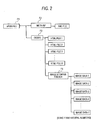
- an ePUB file F1 stores two folders, that is, a folder F2 that stores an xml file and a folder F3 that stores an HTML file and image data. Information related to chapters is described in the xml file stored in the folder F2.
- the folder F3 includes a plurality of (X) HTML files divided for each chapter and a folder F4 that stores a plurality of (Y) image data items used in the HTML file.
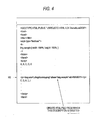
- the source code of the HTML file in the ePUB file includes descriptions M1 and M3 that represent the content of a document and a description M2 that designates a path indicating the storage position of the image data.
- the document and image are output in the desired arrangement of the creator of the HTML file in the order in which M1, M3, and M2 are described in the source code.
- the process shown in Fig. 4 is performed. Specifically, the CPU 21 analyzes the source code of the HTML file and specifies a description that represents the image. For example, in the source code shown in Fig. 4 , the CPU 21 searches for a character string starting from a character string [img src].
- the character string [img src] means a command to output image data.
- the CPU 21 deletes a specific character string including [img src]. Specifically, as shown in Fig. 4 , a description from a ⁇ p> tag to a ⁇ /p> tag is deleted. Then, an HTML file from which the description has been deleted is created. As a result, when an ePUB file is actually printed, the deleted image is not represented during printing.
- the CPU 21 creates a print image on the basis of the created HTML file.
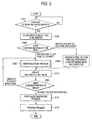
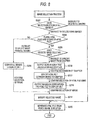
- Fig. 5 is a flowchart illustrating the entire image editing process.
- Steps S102 to S112 correspond to the process performed by the editing program according to this embodiment.
- the image editing process shown in Fig. 5 starts when the user inserts a portable memory, such as a USB memory, into the printer 20 (S102).
- a portable memory such as a USB memory
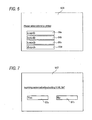
- the CPU 21 When a portable storage medium is inserted into the printer, the CPU 21 reads a plurality of ePUB files stored in the medium. At that time, a document data selection screen SC6 shown in Fig. 6 is displayed on the display unit 25 of the printer 20 (S104). As shown in Fig. 6 , the names of the ePUB files are displayed so as to correspond to a plurality of buttons B6a to B6d on the selection screen SC6. The user presses the buttons B6a to B6d to select a desired ePUB file to be printed.
- the CPU 21 When the user selects a desired ePUB file on the selection screen SC6, the CPU 21 outputs, to the display unit 25, a screen SC7 that allows the user to confirm whether to perform printing without editing the HTML file, as shown in Fig. 7 (S106).
- the CPU 21 When a "YES" button B7a is pressed on the screen SC7, that is, when the user inputs an instruction to perform printing without editing the HTML file (S106: YES), the CPU 21 generates a print image on the basis of the HTML file, without editing the HTML file included in the ePUB file (S116) and prints the print image (S 118). That is, the CPU 21 performs printing without changing the description of the source code of the HTML file.
- Fig. 8 is a flowchart illustrating the image selecting process performed in Step S200 of Fig. 5 .
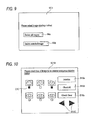
- the CPU 21 outputs a selection screen SC9 shown in Fig. 9 to the display unit 25 (S202).
- the user selects an item displayed on the screen SC9 to select whether to delete all images in the ePUB file. That is, the user selects whether to press a button B9a to delete all images in the ePUB file or press to a button B9b to selectively delete the images in the ePUB file.
- the CPU 21 When the user presses the button B9a, the CPU 21 generates an HTML file from which all images in the ePUB file have been deleted (S218). Specifically, the CPU 21 analyses all HTML files in the ePUB file and generates an HTML file from which a description representing the images, that is, the description M2 shown in Fig. 3 has been deleted.
- the CPU 21 determines whether a plurality of HTML files are included in the ePUB file (S204). This determination is performed by decompressing the ePUB file and counting the number of HTML files in the folder F3 shown in Fig. 2 .
- the CPU 21 When it is checked that only one HTML file is included in the ePUB file (S204: NO), the CPU 21 generates a list screen SC10 indicating all image groups included in the folder F4, as shown in Fig. 10 , and outputs the screen SC10 to the display unit 25 (S208). Specifically, the CPU 21 analyzes the HTML file and searches for descriptions, such as the description M2 shown in Fig. 3 . Then, the CPU 21 extracts all image data corresponding to all of the searched descriptions from the folder F4, generates the list screen SC10 indicating all images, and outputs the list screen SC10 to the display unit 25. Each of the images displayed on the list screen SC10 is a reduced image.
- the user selects at least one image that the user wants to delete from a plurality of images on the list screen SC10 and presses a deletion button. Specifically, the user selects the check boxes C10 of all of the images that the user wants to delete and presses a deletion button B 10a.
- the list screen SC10 includes a button B10b for selecting an image and a screen slide button B10c for changing the list screen when a plurality of images are displayed over a plurality of list screens.
- the list screen SC10 includes a button B10d for selecting the check boxes C10 of all images. The user can press the button B10d to reduce the time and effort to separately select the images.
- the CPU 21 specifies the image which is designated to be deleted by the user, that is, the image with the check box C10 which is selected by the user on the list screen SC10 (S218). Specifically, the CPU 21 specifies the data name of the image data indicating the selected image. The CPU 21 performs the above-mentioned process to delete the description for representing the image corresponding to the specified image data name from the HTML file and generates a new HTML file in which the specified image is not represented (S220).
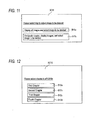
- Step S204 of Fig. 8 When it is checked in Step S204 of Fig. 8 that a plurality of HTML files are included in the ePUB file, the CPU 21 outputs a screen SC11 shown in Fig. 11 to the display unit 25 such that the user selects a way to select the image to be deleted from two items (S206).
- the screen SC11 includes two buttons.
- a first button B11a is for displaying the image groups included in all the chapters on the screen such that the user can select the image.
- the second button B11b is for displaying the image groups corresponding to one chapter such that the user can select the image.
- One HTML file is associated with one chapter.
- the CPU 21 displays a list of the image groups included in all of the HTML files in the ePUB file on the display unit 25, as shown in Fig. 10 (S208). Specifically, the CPU 21 analyzes each HTML file in the ePUB file and searches for the description M2 shown in Fig. 3 . Then, the CPU 21 extracts the images corresponding to all of the searched descriptions M2 shown in Fig. 3 from the storage area of the folder F4 and outputs the images as a list of reduced images to the display unit.
- the user selects the check box C10 of at least one image that the user wants to delete and presses the deletion button B10a on the selection screen SC10.
- the CPU 21 specifies the image which is designated to be deleted from the displayed list of the images by the user, that is, the image whose check box C10 is selected (S218). Then, the CPU 21 deletes the description representing the specified image from the HTML file and generates a new HTML file in which the selected image is not represented, as in the above-mentioned process (S220).
- the CPU 21 When the button B11b is pressed on the screen SC11, that is, when the user selects a method of displaying the images corresponding to the chapter and selecting the image, the CPU 21 outputs, to the display unit 25, the screen SC12 that allows the user to select the chapter, as shown in Fig. 12 (S210). Specifically, the CPU 21 analyzes the XML file included in the folder F2 shown in Fig. 2 and acquires information related to the chapter. The user presses the button corresponding to the chapter that the user wants to edit among the buttons B12a to B12d shown on the selection screen SC12. When the chapter is selected by the user, the CPU 21 analyzes the source code of the XML file to specify the HTML file corresponding to the chapter (S212).
- the CPU 21 displays a list of the image groups included in all HTML files in the ePUB file on the display unit 25 (S208). Specifically, the CPU 21 analyzes the HTML file and searches for the description M2 shown in Fig. 3 . Then, the CPU 21 extracts the images corresponding to all of the searched descriptions M2 from the storage area of the folder F4 and outputs the images as a list of reduced images to the display unit.
- the user selects the check box C10 of at least one image that the user wants to delete and presses the deletion button B10a on the selection screen SC10.
- the CPU 21 specifies the image which is designated to be deleted from the displayed list of the images by the user, that is, the image whose check box C10 is selected (S218). Then, the CPU 21 deletes the description representing the specified image from the HTML file and generates a new HTML file in which the selected image is not represented, as in the above-mentioned process (S220).
- Step S200 When the generation of the new HTML file is completed in Step S200, the new HTML file is temporarily stored in the folder F3 in Fig. 2 . Then, the following Steps S 110 to S 116 are performed on an HTML file when the HTML file is not edited or a new edited HTML file when the HTML file is edited.
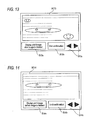
- the CPU 21 outputs a preview image represented by the HTML file generated in Fig. 8 to the display unit 25 in Step S110 of Fig. 5 , as shown in Figs. 13 and 14 .
- the CPU 21 displays only the print preview of the HTML files including the deleted image.
- Fig. 13 shows a print image based on the HTML file before editing is performed such that the image is not represented.
- Fig. 14 shows a print image based on the HTML file after the editing is performed.
- a button B13a in a screen SC13 shown in Fig. 13 is pressed, a screen SC14 shown in Fig. 14 is displayed.
- a button B14a in the screen SC14 shown in Fig. 14 is pressed, the screen SC13 shown in Fig. 13 is displayed.
- the user can press a button B14c to scroll a preview image in the screen SC14.
- Step S110 the print preview of only the HTML file from which the image has been deleted is displayed.
- a screen SC15 shown in Fig. 15 may be output to the display unit 25 such that the user selects a method of displaying the print preview of all HTML files or a method of displaying only the print preview of the HTML file from which the image has been deleted.
- the CPU 21 When the user presses the button B13b shown in Fig. 13 or the button B14b shown in Fig. 14 , that is, when the user inputs an instruction to end the confirmation of the preview image, the CPU 21 outputs a screen SC16 shown in Fig. 16 to the display unit 25 such that the user selects whether to print the image in the displayed print preview (S 114).
- the CPU 21 creates print data with an HTML file when the HTML file is not edited or a new edited HTML file when the HTML file is edited (S114). After the print image is created, the printing unit 24 prints the image (S116) and the process shown in Fig. 5 ends.
- Step S200 in Fig. 5 corresponds to the process performed by a list screen creating unit according to the invention.
- Step S108 in Fig. 5 corresponds to the process performed by a data creating unit.
- Steps S104 and S 106 in Fig. 5 correspond to the process performed by a selection allowing unit.
- Step S204 in Fig. 8 corresponds to the process performed by an information body acquiring unit.
- Step S210 in Fig. 8 corresponds to the process performed by a selecting unit.
- Step S110 in Fig. 5 corresponds to the process performed by a display generating unit.
- the ePUB file corresponds to an information body according to the invention. All of the HTML files stored in the ePUB file correspond to first document data according to the invention.
- the HTML file generated in Step S220 of Fig. 18 corresponds to second document data according to the invention.
- the user selects the image to be deleted from an output document, as described with reference to Fig. 10 .
- the user may select the image to remain in the output document.
- the CPU analyzes the source code of the HTML file and extracts the image corresponding to the character string described in the source code from the folder F4 shown in Fig. 2 .
- the CPU may output a list of all image groups in the folder F4 to the display unit 25, without analyzing the source code, such that the user selects an image from the image groups.
- the character string including the name of the image data selected by the user may be deleted from the source code so as not to be output.
- the information body is described considering ePUB.
- An information body which is not subjected to a predetermined compression process may be used, unlike the ePUB file. That is, an HTML file used in a Web page may be used.
- components of the information body shown in Fig. 2 include one or a plurality of HTML files and the image folder F4.
- a screen shown in Fig. 17 is output in Step S 104 of Fig. 5 . That is, the extension of the displayed information body is not “.ePUB”, but is “.html” or ".htm”.
- the item selected in Step S206 of Fig. 8 is B 18a or B 18c. That is, the user selects whether to delete the images in all HTML files or to selectively delete the image in a specific HTML file.
- the HTML file is analyzed and the description representing the image is deleted.
- this method is illustrative.
- the description may be changed to a description for inserting a different image, such as an image represented by a mark X.
- an image indicating the mark X is stored in the NVRAM 23 of the printer 20 in advance and the description representing the image that the user wants to delete in the HTML file is replaced with a description shown in Fig. 18 in the row M2. In this way, it is possible to delete the image.
- an image size may be changed such that the image is not represented during output. That is, in the row M4 of Fig. 3 , the values of a "width" and a "height” may be changed to 0% to remove the image.
- one HTML file is associated with one chapter.
- there is an ePUB file with a different structure For example, it is assumed that a plurality of HTML files are used to represent one chapter. In this case, when the user designates a chapter, a list of the images used in the corresponding plurality of HTML files is displayed on the display unit 25.
- the HTML file is not stored.
- other structures may be used. That is, the HTML file in which the deleted image is not represented may be stored instead of the HTML file before the description M2 is deleted, thereby creating a new ePUB file.
- the printer and a terminal apparatus may be connected to each other through the network and a display of the terminal apparatus may be used as the display unit.
Landscapes
- Engineering & Computer Science (AREA)
- Theoretical Computer Science (AREA)
- Audiology, Speech & Language Pathology (AREA)
- Health & Medical Sciences (AREA)
- Computational Linguistics (AREA)
- General Health & Medical Sciences (AREA)
- Physics & Mathematics (AREA)
- General Engineering & Computer Science (AREA)
- General Physics & Mathematics (AREA)
- Artificial Intelligence (AREA)
- Information Retrieval, Db Structures And Fs Structures Therefor (AREA)
- Document Processing Apparatus (AREA)
- Record Information Processing For Printing (AREA)
- Editing Of Facsimile Originals (AREA)
- User Interface Of Digital Computer (AREA)
Applications Claiming Priority (1)
| Application Number | Priority Date | Filing Date | Title |
|---|---|---|---|
| JP2010278932A JP2012128625A (ja) | 2010-12-15 | 2010-12-15 | 情報処理装置及びプログラム |
Publications (2)
| Publication Number | Publication Date |
|---|---|
| EP2466487A2 true EP2466487A2 (de) | 2012-06-20 |
| EP2466487A3 EP2466487A3 (de) | 2012-10-31 |
Family
ID=45418414
Family Applications (1)
| Application Number | Title | Priority Date | Filing Date |
|---|---|---|---|
| EP11193572A Ceased EP2466487A3 (de) | 2010-12-15 | 2011-12-14 | Informationsverarbeitungsvorrichtung und -programm |
Country Status (3)
| Country | Link |
|---|---|
| US (1) | US9104649B2 (de) |
| EP (1) | EP2466487A3 (de) |
| JP (1) | JP2012128625A (de) |
Cited By (1)
| Publication number | Priority date | Publication date | Assignee | Title |
|---|---|---|---|---|
| WO2014176296A3 (en) * | 2013-04-25 | 2015-03-26 | Microsoft Corporation | Collection, tracking and presentation of reading content |
Citations (1)
| Publication number | Priority date | Publication date | Assignee | Title |
|---|---|---|---|---|
| JP2006277056A (ja) | 2005-03-28 | 2006-10-12 | Brother Ind Ltd | 情報処理装置及びプログラム |
Family Cites Families (15)
| Publication number | Priority date | Publication date | Assignee | Title |
|---|---|---|---|---|
| US6857102B1 (en) | 1998-04-07 | 2005-02-15 | Fuji Xerox Co., Ltd. | Document re-authoring systems and methods for providing device-independent access to the world wide web |
| JP2000076155A (ja) * | 1998-09-01 | 2000-03-14 | Mitsubishi Materials Corp | Htmlドキュメント圧縮・展開・表示方式 |
| US6999207B2 (en) * | 2001-09-19 | 2006-02-14 | Kabushiki Kaisha Toshiba | Image processing apparatus, image forming apparatus, and method of them |
| JP2005182735A (ja) * | 2003-05-14 | 2005-07-07 | Sharp Corp | 文書データ表示装置、携帯電話装置、文書データ表示方法、文書データ表示プログラム、文書データ表示プログラムを記録したコンピュータ読取可能な記録媒体、文書データ印刷装置、文書データ出力装置、文書データ出力方法、文書データ出力プログラム、および文書データ出力プログラムを記録したコンピュータ読取可能な記録媒体 |
| US20070055931A1 (en) | 2003-05-14 | 2007-03-08 | Hiroaki Zaima | Document data output device capable of appropriately outputting document data containing a text and layout information |
| JP4778253B2 (ja) * | 2005-03-29 | 2011-09-21 | 株式会社日立製作所 | コンテンツ情報表示装置 |
| JP2006277196A (ja) * | 2005-03-29 | 2006-10-12 | Seiko Epson Corp | 画像データの関連情報提供技術 |
| US7590939B2 (en) * | 2005-06-24 | 2009-09-15 | Microsoft Corporation | Storage and utilization of slide presentation slides |
| JP4966533B2 (ja) | 2005-09-30 | 2012-07-04 | セイコーエプソン株式会社 | 印刷システム、印刷方法、印刷プログラムおよび記録媒体 |
| JP4706853B2 (ja) * | 2006-03-30 | 2011-06-22 | 富士ゼロックス株式会社 | 画像処理装置および画像データ一覧表示方法 |
| TW200807263A (en) * | 2006-07-19 | 2008-02-01 | Benq Corp | Document editing systems and methods |
| JP4838659B2 (ja) * | 2006-08-01 | 2011-12-14 | キヤノン株式会社 | 再生装置及び再生装置の制御方法 |
| JP2008154091A (ja) * | 2006-12-19 | 2008-07-03 | Canon Inc | 複写製本システム |
| JP5092469B2 (ja) * | 2007-03-15 | 2012-12-05 | ソニー株式会社 | 撮像装置、画像処理装置、および画像表示制御方法、並びにコンピュータ・プログラム |
| JP2009070169A (ja) * | 2007-09-13 | 2009-04-02 | Ricoh Co Ltd | 画像形成システム、情報処理装置、Webページ印刷支援方法、及びWebページ印刷支援プログラム |
-
2010
- 2010-12-15 JP JP2010278932A patent/JP2012128625A/ja active Pending
-
2011
- 2011-12-14 EP EP11193572A patent/EP2466487A3/de not_active Ceased
- 2011-12-15 US US13/327,457 patent/US9104649B2/en not_active Expired - Fee Related
Patent Citations (1)
| Publication number | Priority date | Publication date | Assignee | Title |
|---|---|---|---|---|
| JP2006277056A (ja) | 2005-03-28 | 2006-10-12 | Brother Ind Ltd | 情報処理装置及びプログラム |
Cited By (2)
| Publication number | Priority date | Publication date | Assignee | Title |
|---|---|---|---|---|
| WO2014176296A3 (en) * | 2013-04-25 | 2015-03-26 | Microsoft Corporation | Collection, tracking and presentation of reading content |
| CN105229631A (zh) * | 2013-04-25 | 2016-01-06 | 微软技术许可有限责任公司 | 阅读内容的收集、跟踪和呈现 |
Also Published As
| Publication number | Publication date |
|---|---|
| US20120159293A1 (en) | 2012-06-21 |
| EP2466487A3 (de) | 2012-10-31 |
| US9104649B2 (en) | 2015-08-11 |
| JP2012128625A (ja) | 2012-07-05 |
Similar Documents
| Publication | Publication Date | Title |
|---|---|---|
| US7394562B2 (en) | Information processing apparatus and method | |
| US7281209B2 (en) | Method and apparatus for managing numbering of print pages of sections within a document | |
| JP4916237B2 (ja) | 画像表示装置、画像表示方法、その方法をコンピュータに実行させるプログラム、および画像表示システム | |
| CN102572181B (zh) | 文档信息显示控制装置、文档信息显示方法及计算机程序 | |
| US20090204888A1 (en) | Document processing apparatus, document processing method, and storage medium | |
| US9377984B2 (en) | Preview screen for processing and manipulating document data for which print processing has already been performed and document data for which print processing is to be newly performed | |
| JP2003308200A (ja) | 情報処理装置およびファイル処理方法およびコンピュータが読み取り可能な記憶媒体およびプログラム | |
| WO1998008168A1 (fr) | Dispositif pour generer un texte original et son support de memoire programme | |
| US20090262392A1 (en) | Printer drive, printer driver program recording medium, print data importing device, print data importing program recording medium, and installer recording medium | |
| JP4165574B2 (ja) | 画像形成装置、その制御プログラム、および、その制御方法 | |
| JP4666996B2 (ja) | 電子ファイリングシステム、電子ファイリング方法 | |
| US9384173B2 (en) | Information processing apparatus having page preview function, method of controlling the same, and storage medium | |
| JP4101052B2 (ja) | 文書管理装置、文書管理装置の制御方法、及び、コンピュータプログラム | |
| EP2466487A2 (de) | Informationsverarbeitungsvorrichtung und -programm | |
| JP2006072824A (ja) | 電子アルバム編集装置及びその制御方法及びそのプログラム及びそのプログラムをコンピュータ装置読み出し可能に記憶した記憶媒体 | |
| US20020038322A1 (en) | Information processing apparatus, method therefor,and computer-readable memory | |
| KR101508075B1 (ko) | 정보 처리 장치, 웹브라우저 제어 방법 및 그 프로그램을 저장한 저장 매체 | |
| JP2012027737A (ja) | ジョブチケット変換装置及びその変換方法 | |
| JP2011123828A (ja) | 電子ファイルデータのデータ構造、電子ファイル処理装置、電子ファイル処理プログラム | |
| KR101202849B1 (ko) | 스마트 기기에 최적화된 가독성을 갖도록 하는 피디에프 문서의 변환 방법 | |
| JP2003196638A (ja) | ファイリングデータのサムネイルキャプチャリングシステム及びプログラム | |
| US20100188674A1 (en) | Added image processing system, image processing apparatus, and added image getting-in method | |
| JP7154982B2 (ja) | 情報処理装置、制御方法、及びプログラム | |
| US8458590B2 (en) | Computer readable medium for creating data, data creating apparatus, printing apparatus and printing system | |
| JP4747986B2 (ja) | 画像処理装置およびプログラム |
Legal Events
| Date | Code | Title | Description |
|---|---|---|---|
| PUAI | Public reference made under article 153(3) epc to a published international application that has entered the european phase |
Free format text: ORIGINAL CODE: 0009012 |
|
| AK | Designated contracting states |
Kind code of ref document: A2 Designated state(s): AL AT BE BG CH CY CZ DE DK EE ES FI FR GB GR HR HU IE IS IT LI LT LU LV MC MK MT NL NO PL PT RO RS SE SI SK SM TR |
|
| AX | Request for extension of the european patent |
Extension state: BA ME |
|
| PUAL | Search report despatched |
Free format text: ORIGINAL CODE: 0009013 |
|
| AK | Designated contracting states |
Kind code of ref document: A3 Designated state(s): AL AT BE BG CH CY CZ DE DK EE ES FI FR GB GR HR HU IE IS IT LI LT LU LV MC MK MT NL NO PL PT RO RS SE SI SK SM TR |
|
| AX | Request for extension of the european patent |
Extension state: BA ME |
|
| RIC1 | Information provided on ipc code assigned before grant |
Ipc: G06F 17/24 20060101ALI20120925BHEP Ipc: G06F 17/22 20060101AFI20120925BHEP |
|
| 17P | Request for examination filed |
Effective date: 20130429 |
|
| 17Q | First examination report despatched |
Effective date: 20130624 |
|
| STAA | Information on the status of an ep patent application or granted ep patent |
Free format text: STATUS: THE APPLICATION HAS BEEN REFUSED |
|
| 18R | Application refused |
Effective date: 20140506 |