EP2472374A2 - Verfahren zur bereitstellung einer benutzerschnittstelle sowie vorrichtung zur anwendung des verfahrens - Google Patents
Verfahren zur bereitstellung einer benutzerschnittstelle sowie vorrichtung zur anwendung des verfahrens Download PDFInfo
- Publication number
- EP2472374A2 EP2472374A2 EP10812252A EP10812252A EP2472374A2 EP 2472374 A2 EP2472374 A2 EP 2472374A2 EP 10812252 A EP10812252 A EP 10812252A EP 10812252 A EP10812252 A EP 10812252A EP 2472374 A2 EP2472374 A2 EP 2472374A2
- Authority
- EP
- European Patent Office
- Prior art keywords
- motion
- function
- response
- threshold
- effect
- Prior art date
- Legal status (The legal status is an assumption and is not a legal conclusion. Google has not performed a legal analysis and makes no representation as to the accuracy of the status listed.)
- Granted
Links
Images





Classifications
-
- G—PHYSICS
- G06—COMPUTING OR CALCULATING; COUNTING
- G06F—ELECTRIC DIGITAL DATA PROCESSING
- G06F3/00—Input arrangements for transferring data to be processed into a form capable of being handled by the computer; Output arrangements for transferring data from processing unit to output unit, e.g. interface arrangements
- G06F3/01—Input arrangements or combined input and output arrangements for interaction between user and computer
- G06F3/048—Interaction techniques based on graphical user interfaces [GUI]
- G06F3/0487—Interaction techniques based on graphical user interfaces [GUI] using specific features provided by the input device, e.g. functions controlled by the rotation of a mouse with dual sensing arrangements, or of the nature of the input device, e.g. tap gestures based on pressure sensed by a digitiser
- G06F3/0488—Interaction techniques based on graphical user interfaces [GUI] using specific features provided by the input device, e.g. functions controlled by the rotation of a mouse with dual sensing arrangements, or of the nature of the input device, e.g. tap gestures based on pressure sensed by a digitiser using a touch-screen or digitiser, e.g. input of commands through traced gestures
- G06F3/04883—Interaction techniques based on graphical user interfaces [GUI] using specific features provided by the input device, e.g. functions controlled by the rotation of a mouse with dual sensing arrangements, or of the nature of the input device, e.g. tap gestures based on pressure sensed by a digitiser using a touch-screen or digitiser, e.g. input of commands through traced gestures for inputting data by handwriting, e.g. gesture or text
-
- G—PHYSICS
- G06—COMPUTING OR CALCULATING; COUNTING
- G06F—ELECTRIC DIGITAL DATA PROCESSING
- G06F1/00—Details not covered by groups G06F3/00 - G06F13/00 and G06F21/00
- G06F1/16—Constructional details or arrangements
- G06F1/1613—Constructional details or arrangements for portable computers
- G06F1/1633—Constructional details or arrangements of portable computers not specific to the type of enclosures covered by groups G06F1/1615 - G06F1/1626
- G06F1/1684—Constructional details or arrangements related to integrated I/O peripherals not covered by groups G06F1/1635 - G06F1/1675
- G06F1/1694—Constructional details or arrangements related to integrated I/O peripherals not covered by groups G06F1/1635 - G06F1/1675 the I/O peripheral being a single or a set of motion sensors for pointer control or gesture input obtained by sensing movements of the portable computer
-
- G—PHYSICS
- G06—COMPUTING OR CALCULATING; COUNTING
- G06F—ELECTRIC DIGITAL DATA PROCESSING
- G06F3/00—Input arrangements for transferring data to be processed into a form capable of being handled by the computer; Output arrangements for transferring data from processing unit to output unit, e.g. interface arrangements
- G06F3/01—Input arrangements or combined input and output arrangements for interaction between user and computer
- G06F3/017—Gesture based interaction, e.g. based on a set of recognized hand gestures
-
- H—ELECTRICITY
- H04—ELECTRIC COMMUNICATION TECHNIQUE
- H04M—TELEPHONIC COMMUNICATION
- H04M1/00—Substation equipment, e.g. for use by subscribers
- H04M1/72—Mobile telephones; Cordless telephones, i.e. devices for establishing wireless links to base stations without route selection
- H04M1/724—User interfaces specially adapted for cordless or mobile telephones
- H04M1/72403—User interfaces specially adapted for cordless or mobile telephones with means for local support of applications that increase the functionality
-
- H—ELECTRICITY
- H04—ELECTRIC COMMUNICATION TECHNIQUE
- H04M—TELEPHONIC COMMUNICATION
- H04M1/00—Substation equipment, e.g. for use by subscribers
- H04M1/72—Mobile telephones; Cordless telephones, i.e. devices for establishing wireless links to base stations without route selection
- H04M1/724—User interfaces specially adapted for cordless or mobile telephones
- H04M1/72403—User interfaces specially adapted for cordless or mobile telephones with means for local support of applications that increase the functionality
- H04M1/72427—User interfaces specially adapted for cordless or mobile telephones with means for local support of applications that increase the functionality for supporting games or graphical animations
-
- G—PHYSICS
- G06—COMPUTING OR CALCULATING; COUNTING
- G06F—ELECTRIC DIGITAL DATA PROCESSING
- G06F2200/00—Indexing scheme relating to G06F1/04 - G06F1/32
- G06F2200/16—Indexing scheme relating to G06F1/16 - G06F1/18
- G06F2200/163—Indexing scheme relating to constructional details of the computer
- G06F2200/1637—Sensing arrangement for detection of housing movement or orientation, e.g. for controlling scrolling or cursor movement on the display of an handheld computer
Definitions
- the present invention relates to a method of providing a user interface (UI), and a device adopting the method, and more particularly, to a method of providing a UI for entering a command to execute a function desired by a user and a device adopting the method.
- UI user interface
- UIs User interfaces
- UIs not only allow users to enter commands but also additionally provide users with various entertainment features, and recent trends in the development of UIs increasingly tend to be directed toward the latter because of ever-increasing user preferences for products equipped with UIs focusing on the provision of additional entertainment features.
- a method is needed to provide a UI that not only can make it easier to enter various user commands but also can excite amusement for users while using devices and stimulate users' consumption.
- the present invention provides a method of providing a user interface (UI) that, in response to a user's motion matching any one of a plurality of motions, executes a function mapped to the plurality of motions, and a device adopting the method.
- UI user interface
- the present invention also provides a method of providing a UI that executes a function mapped to a motion or outputs an effect associated with the function based on the size of the motion, and a device adopting the method.
- a method of providing a user interface including: identifying a user's motion; and in response to the identified motion coinciding with any one of a plurality of motions, performing a function commonly mapped to the plurality of motions.
- the performing may include performing the function while varying a visual effect that is accompanied by the performing.
- Details of the visual effect may be determined based on at least one of a plurality of parameters of the identified motion.
- Elements of the visual effect may correspond to a value of the at least one parameter of the identified motion.
- Details of the visual effect may be determined based on a content item to which the visual effect is to be applied or the content of a background.
- the visual effect may include an animation effect.
- a state of mapping the function and the plurality of motions may vary from one application to another application.
- the performing may include varying at least one of an audio effect and a tactile effect that is accompanied by the performing depending on the type of the identified motion.
- the method may also include: in response to a size of the identified motion exceeding a first threshold, performing the function; and in response to the size of the identified motion not exceeding the first threshold, outputting an effect that is relevant to the function.
- the method may also include, in response to a value of at least one of a plurality of parameters of the identified motion exceeding a threshold, determining that the size of the identified motion exceeds the first threshold.
- the effect relevant to the function may include a visual effect that helps the user intuitively recognize the function.
- the outputting may include outputting different visual effects for motions of different sizes.
- the outputting may include outputting the effect in response to the size of the identified motion not exceeding the first threshold but exceeding the second threshold, which is less than the first threshold.
- the outputting may include outputting visual effects that are relevant to the multiple functions together in response to the size of the identified motion not exceeding the first threshold.
- the performing may include performing a function that is selected from among the multiple functions by the user while making the identified motion, in response to the size of the identified motion exceeding the first threshold.
- the selected function may correspond to a function relevant to an icon selected by the user.
- the effect may include at least one of an audio effect and a tactile effect.
- a device including: a sensing unit which senses a user's motion; and a control unit which, in response to the sensed motion coinciding with any one of a plurality of motions, controls a function commonly mapped to the plurality of motions to be performed.
- the controller may control the function to be performed while varying a visual effect that is accompanied by the performing of the function.
- Details of the visual effect may be determined based on at least one of a plurality of parameters of the sensed motion.
- Elements of the visual effect may correspond to a value of the at least one parameter of the sensed motion.
- Details of the visual effect may be determined based on a content item to which the visual effect is to be applied or the content of a background.
- the visual effect may include an animation effect.
- a state of mapping the function and the plurality of motions may vary from one application to another application.
- the control unit may control the function to be performed while varying at least one of an audio effect and a tactile effect that is accompanied by the performing of the function depending on the type of the sensed motion.
- the control unit may control the function to be performed in response to a size of the sensed motion exceeding a first threshold, and may output an effect that is relevant to the function in response to the size of the sensed motion not exceeding the first threshold.
- the effect relevant to the function may include a visual effect that helps the user intuitively recognize the function.
- the controller may control different visual effects to be output for motions of different sizes.
- the controller may control a visual effect including a movement that is proportional to the size of the sensed motion.
- control unit may control visual effects that are relevant to the multiple functions to be output together in response to the size of the sensed motion not exceeding the first threshold.
- control unit may control a function that is selected from among the multiple functions by the user while making the sensed motion to be performed in response to the size of the sensed motion exceeding the first threshold.
- the present invention in response to a user's motion coinciding with any one of a plurality of motions, it is possible to perform a predetermined function to which the plurality of motions are commonly mapped. Therefore, since there is more than one function that initiates the predetermined function, it is possible for the user to easily enter a command to perform the predetermined function with convenience.
- a device may be configured to perform a function mapped to the user's motion or to output an effect relevant to the function in consideration of the size of the user's motion, it is possible for the user to easily identify the function and thus to easily enter a command with convenience. Furthermore, due to the effect, it is possible to excite amusement for the user while using the device.
- FIGS. 1 to 6 An example of executing a function that is mapped to a plurality of motions in response to a user's motion matching any one of the plurality of motions is described with reference to FIGS. 1 to 6 , and a method of providing a UI that provides different functions for motions of different sizes is described with reference to FIGS. 7 to 16 .
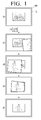
- FIG. 1(a) illustrates a mobile phone MP with a touch screen TS that displays a graphic user interface (GUI).
- GUI graphic user interface
- FIG. 1(b) illustrates a 'tip' motion (for example, tipping the right side of the mobile phone MP
- FIGS. 1(c) to 1(f) illustrate gradual variations in the GUI in response to the 'tip' motion.
- the GUI displays a visual effect of the next image appearing from the right side of the mobile phone MP and falling in a zigzag manner over the current image.
- the GUI may display a visual effect of the previous image appearing from the left side of the mobile phone MP and falling in a zigzag manner over the current image.
- FIG. 2(a) also illustrates a mobile phone MP with a touch screen TS that displays a GUI.
- FIG. 2(b) illustrates a 'snap' motion (for example, snapping the mobile phone MP to the left).
- FIGS. 2(c) to 2(f) illustrate gradual variations in the GUI in response to the 'snap' motion.
- the GUI displays a visual effect of the next image appearing from the direction from which the 'snap' motion is detected, i.e., the left side of the mobile phone MP, and falling in a circular motion over the current image.
- the GUI may display a visual effect of the previous image appearing from the right side of the mobile phone MP and falling in a circular motion over the current image.
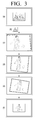
- FIG. 3(a) also illustrates a mobile phone MP with a touch screen TS that displays a GUI.
- FIG. 3(b) illustrates a 'bounce' motion (for example, bouncing up or down the mobile phone MP).
- FIGS. 3(c) to 3(f) illustrate gradual variations in the GUI in response to the 'bounce' motion.
- the GUI displays a visual effect of the next image appearing from above the current image and falling over the current image.
- the GUI may display a visual effect of the previous image appearing from behind the current image and rising above the current image.
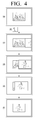
- FIG. 4(a) also illustrates a mobile phone MP with a touch screen TS that displays a GUI.
- FIG. 4(b) illustrates a 'rotate' motion (for example, rotating the mobile phone MP to the left).
- FIGS. 4(c) to 4(f) illustrate gradual variations in the GUI in response to the 'rotate' motion.
- the GUI displays a visual effect of the next image appearing from the direction in which the mobile terminal is rotated, i.e., the left side of the mobile terminal, and sliding over the current image.
- the GUI may display a visual effect of the previous image appearing from the direction in which the mobile terminal is rotated, i.e., the left side of the mobile terminal and sliding over the current image.
- an image currently being displayed on a touch screen may disappear, and a subsequent image may be displayed on the touch screen.
- a mobile terminal may perform the same function, i.e., an image turner function, for different motions performed by the user, i.e., the 'tip' motion, the 'snap' motion, the 'bounce' motion and the 'rotate' motion, because the 'tip' motion, the 'snap' motion, the 'bounce' motion and the 'rotate' motion are all mapped to the image turner function.
- an image turner function i.e., an image turner function
- a visual effect for turning images i.e., making a current image disappear and making a subsequent image appear, may vary from one motion to another motion performed by the user.
- a visual effect may vary depending on the trajectories of the motions.
- visual effects for motions of the same type may be basically similar except for in terms of certain visual elements thereof.
- a visual effect may be basically as illustrated in FIGS. 1(c) to 1(f) . More specifically, a direction in which a subsequent image to a current image appears may be determined based on the direction of a motion, which is determined by analyzing the trajectory of the motion, and the speed at which the subsequent image appears may be determined by the speed of the motion, which is also determined by analyzing the trajectory of the motion.
- the degree of the shaking or the rotating of the subsequent image may be determined by the degree of a shake or a rotation involved in the motion, which is also determined by analyzing the trajectory of the motion.
- the degree of a shake involved in the motion the greater the degree of the shaking of the subsequent image, and the less the degree of a shake involved in the motion, the less the degree of the shaking of the subsequent image. That is, the degree of the shaking or the rotating of the subsequent image may be proportional to the degree of a shake or a rotation involved in the motion.
- the width of the movement of the subsequent image may be determined based on the width of the motion, which is also determined by analyzing the trajectory of the motion.
- the width of the motion the greater the width of the movement of the subsequent image, and the less the width of the motion, the less the width of the movement of the subsequent image. Accordingly, the width of the movement of the subsequent image may be proportional to the width of the motion.
- the details of a visual effect may be determined based on one or more parameters of a motion, for example, the direction, speed, and width of the motion and the degree of a shake (or a rotation) involved in the motion. Obviously, the details of a visual effect may also be determined based on various parameters of a motion, other than those set forth herein.
- the details of a visual effect that varies even for motions of the same type may be determined based on various factors, other than the parameters of a motion.
- the details of a visual effect may be determined based on the content of an image. For example, for an image that is bright, small in size, light in texture, or has dynamic content, a visual effect for which the speed at which a subsequent image appears, the degree to which the subsequent image shakes or rotates when appearing, and the width of the movement of the subsequent image are all set to be high may be generated.
- the details of a visual effect may vary depending not only on the content of an image but also on the content of a GUI background screen.
- a visual effect for which the speed at which a subsequent image to a current image appears, the degree to which the subsequent image shakes or rotates when appearing, and the width of the movement of the subsequent image are all set to be high may be generated.
- an application currently being executed in a mobile phone is assumed to be an image viewer, and thus, the UI of an image viewer is displayed on the touch screen of the mobile terminal.
- the above four motions may be mapped to different functions, or some of the four motions may be mapped to the same function and the other motions may be mapped to different functions.
- a visual effect varies depending on the type of motion.
- an audio effect or a tactile effect that varies depending on the type of motion may be realized.
- a mobile phone taking a UI provided by a mobile phone as an example.
- the present invention may also be applied to various devices, other than a mobile phone, for example, an MP3 player, a digital camera, a digital camcorder, a portable multimedia player (PMP), or the like.
- MP3 player a digital camera
- PMP portable multimedia player
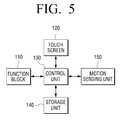
- FIG. 5 is a block diagram illustrating a device to which the present invention can be applied.
- the device includes a function block 110, a touch screen 120, a control unit 130, a storage unit 140, and a motion sensing unit 150.
- the function block 110 may perform the inherent functions of the devices. For example, in response to the device being a mobile phone, the function block 110 may perform making or receiving a call, sending or receiving an SMS message, and the like. For example, in response to the device being an MP3 player, the function block 110 may play an MP3 file.
- the touch screen 120 may serve as a display unit for displaying the results of an operation performed by the function block 110 and a GUI, or may also serve as a user manipulation unit for receiving a user command.
- the storage unit 140 may be a storage medium for storing various programs, content, and other data necessary for driving the function block 110 and providing a GUI.
- the motion sensing unit 150 may detect a user's motion while the device is being held in the user's hand, and may transmit the results of the detection to the control unit 130 as motion sensing result data.
- the control unit 130 may identify the type of the detected motion based on the motion sensing result data, and may analyze the parameters of the detected motion.
- the control unit 130 may control the function block 110 to perform a function corresponding to the detected motion along with a visual effect and may control the state of the display of a GUI on the touch screen 120. The operation of the device will hereinafter be described with reference to FIG. 6 .
- FIG. 6 is a flowchart illustrating a method of providing a UI according to an embodiment of the present invention.
- control unit 130 may identify the type of the detected motion (S220).
- control unit 130 may determine the basics of a visual effect based on the identified type of the detected motion (S240).
- the plurality of motions may include a 'tip' motion (for example, tipping the right side of a mobile phone), a 'snap' motion (for example, snapping the mobile phone to the right), a 'bounce' motion (for example, bouncing up and down the mobile phone), and a 'rotate' motion (for example, rotating the mobile phone to the left).
- a 'tip' motion for example, tipping the right side of a mobile phone
- a 'snap' motion for example, snapping the mobile phone to the right
- a 'bounce' motion for example, bouncing up and down the mobile phone
- a 'rotate' motion for example, rotating the mobile phone to the left.
- the basics of the visual effect may include the content of an animation involved in the visual effect.
- the control unit 130 may analyze the parameters of the detected motion (S250), and may determine the details of the visual effect based on the results of the analysis (S260).
- the parameters of the detected motion may include the direction, speed, and width of the detected motion and the degree of a shake or rotation involved in the motion.
- the details of the visual effect may include the direction, speed and width of a movement involved in the visual effect and the degree of a shake (or a rotation) involved in the visual effect.
- the control unit 130 may control the function block 110 to perform a function corresponding to the detected motion while controlling the touch screen 120 to display the visual effect based on the results of the determinations performed in S240 and S260 (S270).
- FIGS. 1 to 6 An example of executing a function to which a plurality of motions are commonly mapped in response to the detection of a user's motion that coincides with any one of the plurality of motions has been described with reference to FIGS. 1 to 6 .
- FIGS. 7 to 16 An example of providing a UI that provides different functions for motions of different sizes will hereinafter be described with reference to FIGS. 7 to 16 .
- FIG. 7 illustrates a method of providing a UI according to a first embodiment of the present invention.
- FIG. 7(a) illustrates a mobile phone MP with a touch screen TS that displays a GUI.
- a single icon I 1 is displayed in the GUI.
- FIG. 7 (b 1 ) illustrates a 'strong shake' motion, i.e., the motion of shaking the mobile phone MP heavily.
- FIG. 7 (c 1 ) illustrates a variation in the GUI in response to the 'strong shake' motion.
- FIG. 7 (c 1 ) not only the icon I 1 but also a plurality of sub-icons I 11 , I 12 , I 13 , and I 14 of the icon I 1 are displayed in the GUI.
- the sub-icons I 11 , I 12 , I 13 , and I 14 may be displayed as being taken out from below the icon I 1 .
- FIG. 7 (b 2 ) illustrates a 'gentle shake' motion, i.e., the motion of shaking the mobile phone MP gently.
- FIGS. 7 (c 2 ) and 7(c 3 ) illustrate variations in the GUI in response to the 'gentle shake' motion.
- a visual effect of the sub-icons I 11 , I 12 , I 13 , and I 14 appearing from below the icon I 1 shortly and then readily turning back into the bottom of the icon I 1 is displayed in the GUI. Accordingly, a user may intuitively recognize the sub-icons I 11 , I 12 , I 13 , and I 14 have failed to be taken out from below the icon I 1 .
- the user may naturally assume that a stronger shake of the mobile phone MP would successfully take out the sub-icons I 11 , I 12 , I 13 , and I 14 from the bottom of the icon I 1 so that the sub-icons I 11 , I 12 , I 13 , and I 14 may appear on the touch screen TS.
- Taking out the sub-icons I 11 , I 12 , I 13 , and I 14 from the bottom of the icon I 1 and making them appear on the touch screen may be a function corresponding to a 'shake' motion.
- the mobile phone MP may perform the function corresponding to the 'shake' motion.
- the mobile phone MP may provide a visual effect that helps the user to intuitively recognize what the function corresponding to the 'shake' motion is.
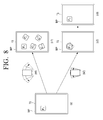
- FIG. 8 illustrates a method of providing a UI according to a second embodiment of the present invention.
- the example illustrated in FIG. 8 is the same as the example illustrated in FIG. 7 except that a folder F 1 is initially displayed in a GUI, instead of the icon I 1 , and that content items C 11 , C 12 , C 13 , C 14 are displayed, instead of the sub-icons I 11 , I 12 , I 13 , and I 14 , in response to a 'shake' motion, and thus, a detailed description of the example illustrated in FIG. 8 will be omitted.
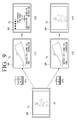
- FIG. 9 illustrates a method of providing a UI according to a third embodiment of the present invention.
- FIG. 9(a) illustrates a mobile phone MP with a touch screen that displays a GUI. Referring to FIG. 9(a) , a photo is displayed in the GUI.
- FIG. 9 (b 1 ) illustrates a 'high bounce' motion, i.e., the motion of bouncing up high and putting down the mobile phone MP.
- FIGS. 9 (c 1 ) and 9(c 2 ) illustrate variations in the GUI in response to the 'high bounce' motion.
- an image of the photo being turned over may be displayed, and detailed information on the photo and a plurality of menu items may be displayed.
- FIG. 9 (b 2 ) illustrates a 'low bounce' motion, i.e., the motion of bouncing up the mobile phone MP low and putting down the mobile phone MP.
- FIGS. 9 (c 3 ) and 9(c 4 ) illustrate variations in the GUI in response to the 'low bounce' motion.
- a visual effect of the photo trying, but failing, to be turned over may be displayed in the GUI. Accordingly, a user may intuitively recognize that the photo has failed to be turned over.
- the user may naturally assume that a higher bounce of the mobile phone MP would successfully turn over the photo so that the detailed information on the photo and the menu items may be displayed on the touch screen.
- Turning over an image and displaying detailed information on the image and one or more menu items may be a function corresponding to a 'bounce' motion.
- the mobile phone MP may perform the function corresponding to the 'bounce' motion.
- the mobile phone MP may provide a visual effect that helps the user to intuitively recognize what the function corresponding to the 'bounce' motion is.
- FIG. 10 illustrates a method of providing a UI according to a fourth embodiment of the present invention.
- FIG. 10(a) illustrates a mobile phone MP with a touch screen that displays a GUI. Referring to FIG. 10(a) , a photo is displayed in the GUI.
- FIG. 10 (b 1 ) illustrates a 'hard bump' motion, i.e., the motion of tapping the mobile phone MP hard against another mobile terminal.
- FIGS. 10 (c 1 ) and 10(c 2 ) illustrate variations in the GUI in response to the 'hard bump' motion.
- a visual effect of the photo being transferred from the mobile phone MP to the other mobile phone may be displayed in the GUI, and the photo may disappear from the screen of the mobile phone MP and may appear on the screen of the other mobile phone. That is, the photo may be transmitted from the mobile phone MP to the other mobile phone.
- FIG. 10 (b 2 ) illustrates a 'gentle bump' motion, i.e., the motion of tapping the mobile phone MP lightly against another mobile phone.
- FIGS. 10 (c 3 ) and 10(c 4 ) illustrate variations in the GUI in response to the 'gentle bump' motion.
- a visual effect of the photo trying, but failing to be transferred to the other mobile phone may be displayed in the GUI. Accordingly, a user may intuitively recognize that the photo has failed to be transmitted to the other mobile phone.
- the user may naturally assume that a harder tap of the mobile phone MP against the other mobile phone would successfully transmit the photo to the other mobile terminal.
- Transmitting an image from the mobile terminal MP to another mobile terminal with a visual effect of the image being transferred from the mobile terminal MP to another mobile terminal may be a function corresponding to a 'bump' motion.
- the mobile phone MP may perform the function corresponding to the 'bump' motion.
- the mobile phone MP may provide a visual effect that helps the user to intuitively recognize what the function corresponding to the 'bump' motion is.
- FIG. 11 illustrates a method of providing a UI according to a fifth embodiment of the present invention.
- FIG. 11(a) illustrates a mobile phone MP with a touch screen that displays a GUI. Referring to FIG. 11(a) , a hold icon is displayed in the GUI.
- FIG. 11 (b 1 ) illustrates a 'hard spin' motion, i.e., the motion of spinning the mobile phone MP hard.
- FIG. 11 (c 1 ) illustrates a variation in the GUI in response to the 'hard spin' motion.
- the GUI displays a rotated hold icon in response to the 'hard spin' motion, and the mobile phone MP may be switched to a hold mode so that a user input to the touch screen TS may be ignored.
- FIG. 11 (b 2 ) illustrates a 'gentle spin' motion, i.e., the motion of spinning the mobile phone MP gently.
- FIGS. 11 (c 2 ) and 11(c 3 ) illustrate variations in the GUI in response to the 'gentle spin' motion.
- a visual effect of the hold icon trying, but failing to be rotated may be displayed in the GUI. Accordingly, a user may intuitively recognize that the hold icon has failed to be rotated.
- the user may naturally assume that a harder spinning of the mobile phone MP would successfully rotate the hold icon.
- Switching the mobile phone MP to the hold mode while maintaining the hold icon to be rotated may be a function corresponding to a 'spin' motion.
- the mobile phone MP may perform the function corresponding to the 'spin' motion.
- the mobile phone MP may provide a visual effect that helps the user to intuitively recognize what the function corresponding to the 'spin' motion is.
- FIG. 12 illustrates a method of providing a UI according to a sixth embodiment of the present invention.
- FIG. 12(a) illustrates a mobile phone MP with a touch screen that displays a GUI. Referring to FIG. 12(a) , no controller is displayed in the GUI.
- FIG. 12 (b 1 ) illustrates a 'hard tap' motion, i.e., the motion of tapping the bottom of the mobile phone MP hard with a hand.
- FIG. 12 (c 1 ) illustrates a variation in the GUI in response to the 'hard tap' motion.
- the GUI displays a music player in response to the 'hard tap' motion.
- the music player may be configured to appear as if pulled down from the top of the touch screen TS.
- FIG. 12 (b 2 ) illustrates a 'soft tap' motion, i.e., the motion of tapping the bottom of the mobile phone MP gently with a hand.
- FIGS. 12 (c 2 ) and 12(c 3 ) illustrates variations in the GUI in response to the 'soft tap' motion.
- a visual effect of the music player appearing from the top of the touch screen TS shortly and then readily pulling back from the touch screen TS may be displayed in the GUI. Accordingly, a user may intuitively recognize that the music player has failed to be pulled down from the top of the touch screen TS.
- the user may naturally assume that a harder tap of the mobile phone MP would successfully pull down the music player from the top of the touch screen TS.
- Pulling down the music player from the top of the touch screen TS so as to be displayed on the touch screen TS may be a function corresponding to a 'tap' motion.
- the mobile phone MP may perform the function corresponding to the 'tap' motion.
- the mobile phone MP may provide a visual effect that helps the user to intuitively recognize what the function corresponding to the 'tap' motion is.
- FIG. 13 illustrates a method of providing a UI according to a seventh embodiment of the present invention.
- FIG. 13(a) illustrates a mobile phone MP with a touch screen TS that displays a GUI.
- four icons I 1 , I 2 ,I 3 , and I 4 are displayed in the GUI.
- FIG. 13 (b 1 ) illustrates a 'gentle shake' motion, i.e., the motion of shaking the mobile phone MP gently.
- FIGS. 13 (c 1 ) and 13(c 2 ) illustrate variations in the GUI in response to the 'gentle shake' motion.
- the user may naturally assume that a stronger shake of the mobile phone MP would successfully take out the sub-icons of the icon I 1 and the sub-icons of the icon I 4 from below the icon I 1 and the icon I 4 , respectively so that they may appear on the touch screen TS.
- the user may also recognize that the icon I 2 and the icon I 3 do not have any sub-icons thereof.
- FIG. 13 (b 2 ) illustrates a 'touch-and-shake-hard' motion, i.e., the motion of shaking the mobile phone MP while touching the icon I 1 .
- FIG. 13 (c 3 ) illustrates a variation in the GUI in response to the 'touch-and-shake-hard' motion.
- the sub-icons of the icon I 1 may be displayed in the GUI.
- the sub-icons I 11 , I 12 , I 13 , and I 14 may be displayed as being taken out from below the icon I 1 .
- FIG. 14 is a diagram for further explaining the first to seventh embodiments of FIGS. 7 to 13 , and particularly, a graph showing how a mobile phone responds to motions of different sizes.
- a function mapped to the motion may be performed in a case in which the size of a motion is greater than a first threshold TH 1 .
- the function mapped to the motion may not be performed in a case in which the size of the motion is greater than a second threshold TH 2 but is not greater than the first threshold TH 1 , the function mapped to the motion may not be performed, and a visual effect that implies the function mapped to the motion may be output.
- the function mapped to the motion may not be performed, and the visual effect may not be output. That is, the mobile phone may not respond to the motion.
- the term 'size of a motion' indicates at least one of the parameters of the motion, i.e., the direction of the motion the speed of the motion, the degree of a shake (or a rotation) involved in the motion, and the width of the motion.
- the comparison of the size of a motion with a threshold may be performed by comparing the size of the motion with a threshold for at least one of the parameters of the motion.
- a mobile phone may be configured to perform a function mapped to a motion in response to the speed of the motion exceeding a first threshold for speed or in response to the speed of the motion exceeding the first threshold for speed and the degree of a rotation involved in the motion exceeding a first threshold for rotation.
- a visual effect may be configured to vary depending on the size of a motion.
- the amount of the movement of an icon or an image involved in a visual effect may be configured to be proportional to the values of the parameters of a motion.
- a visual effect that implies a function mapped to a motion may be provided in a case in which the motion is not large in size, but this is merely exemplary.
- An audio effect or a tactile effect instead of a visual effect, may be provided for a motion that is not large in size.
- the present invention can also be applied to various devices, other than a mobile phone, such as, for example, an MP3 player, a digital camera, a digital camcorder, a PMP, or the like.
- FIG. 15 is a block diagram of a device to which the present invention can be applied.
- the device includes a function block 110, a touch screen 120, a control unit 130, a storage unit 140, and a motion sensing unit 150.
- the function block 110 may perform the inherent functions of the devices. For example, in response to the device being a mobile phone, the function block 110 may perform making or receiving a call, sending or receiving an SMS message, and the like. For example, in response to the device being an MP3 player, the function block 110 may play an MP3 file.
- the touch screen 120 may serve as a display unit for displaying the results of an operation performed by the function block 110 and a GUI, or may also serve as a user manipulation unit for receiving a user command.
- the storage unit 140 may be a storage medium for storing various programs, content, and other data necessary for driving the function block 110 and providing a GUI.
- the motion sensing unit 150 may detect a user's motion while the device is being held in the user's hand.
- the control unit 130 may identify the type of the detected motion based on the results of the detection performed by the motion sensing unit 150, and may control the function block 110 based on the results of the identification. Also, the control unit 130 may change a GUI currently being displayed on the touch screen 120 and may provide a visual effect on the touch screen 120 based on the results of the identification. The operation of the device will hereinafter be described with reference to FIG. 16 .
- FIG. 16 is a flowchart illustrating a method of providing a UI according to another embodiment of the present invention.
- the control unit 130 may identify the type and size of the detected motion (S1610).
- the control unit 130 may compare the size of the detected motion with a first threshold TH 1 and a second threshold TH 2 (S1620 and S1640).
- control unit 130 may control the function block 110 to perform a function mapped to the detected motion, and may change a GUI currently being displayed on the touch screen 120 (S1630).
- control unit 130 may output a visual effect that implies the function mapped to the detected motion via the touch screen 120 (S1650).
- control unit 130 may not respond to the detected motion.
Landscapes
- Engineering & Computer Science (AREA)
- Theoretical Computer Science (AREA)
- Human Computer Interaction (AREA)
- General Engineering & Computer Science (AREA)
- Computer Hardware Design (AREA)
- Physics & Mathematics (AREA)
- General Physics & Mathematics (AREA)
- Computer Networks & Wireless Communication (AREA)
- Signal Processing (AREA)
- User Interface Of Digital Computer (AREA)
- Telephone Function (AREA)
Applications Claiming Priority (3)
| Application Number | Priority Date | Filing Date | Title |
|---|---|---|---|
| KR1020090078369A KR101690521B1 (ko) | 2009-08-24 | 2009-08-24 | 모션의 크기에 기초한 ui 제공방법 및 이를 적용한 디바이스 |
| KR1020090078367A KR101624122B1 (ko) | 2009-08-24 | 2009-08-24 | 복수의 모션들에 공통 기능이 매핑된 ui 제공방법 및 이를 적용한 디바이스 |
| PCT/KR2010/005662 WO2011025239A2 (ko) | 2009-08-24 | 2010-08-24 | 모션을 이용한 ui 제공방법 및 이를 적용한 디바이스 |
Publications (3)
| Publication Number | Publication Date |
|---|---|
| EP2472374A2 true EP2472374A2 (de) | 2012-07-04 |
| EP2472374A4 EP2472374A4 (de) | 2016-08-03 |
| EP2472374B1 EP2472374B1 (de) | 2019-03-20 |
Family
ID=43628580
Family Applications (1)
| Application Number | Title | Priority Date | Filing Date |
|---|---|---|---|
| EP10812252.4A Not-in-force EP2472374B1 (de) | 2009-08-24 | 2010-08-24 | Verfahren zur bereitstellung einer benutzerschnittstelle |
Country Status (3)
| Country | Link |
|---|---|
| US (1) | US20120151415A1 (de) |
| EP (1) | EP2472374B1 (de) |
| WO (1) | WO2011025239A2 (de) |
Cited By (1)
| Publication number | Priority date | Publication date | Assignee | Title |
|---|---|---|---|---|
| EP2566142A1 (de) * | 2011-09-05 | 2013-03-06 | Samsung Electronics Co., Ltd. | Endgerät, das zum Kontrollieren des Anwendungsattributs basierend auf Bewegung in der Lage ist, und Verfahren davon |
Families Citing this family (110)
| Publication number | Priority date | Publication date | Assignee | Title |
|---|---|---|---|---|
| USD609715S1 (en) | 2007-06-28 | 2010-02-09 | Apple Inc. | Animated graphical user interface for a display screen or portion thereof |
| USD658195S1 (en) | 2010-01-27 | 2012-04-24 | Apple Inc. | Display screen or portion thereof with animated graphical user interface |
| US9600328B2 (en) * | 2011-05-23 | 2017-03-21 | Zte Corporation | Method and apparatus for processing background visual effect |
| USD728578S1 (en) * | 2011-11-17 | 2015-05-05 | Jtekt Corporation | Control board device with graphical user interface |
| USD681044S1 (en) | 2012-01-11 | 2013-04-30 | Sony Corporation | Display panel with graphical user interface |
| USD712916S1 (en) * | 2012-09-07 | 2014-09-09 | Lg Electronics Inc. | Display of mobile phone with transitional graphical user interface |
| USD713415S1 (en) * | 2012-09-07 | 2014-09-16 | Lg Electronics Inc. | Display of mobile phone with transitional graphical user interface |
| USD713414S1 (en) * | 2012-09-07 | 2014-09-16 | Lg Electronics Inc. | Display of mobile phone with transitional graphical user interface |
| USD716334S1 (en) * | 2012-09-07 | 2014-10-28 | Lg Electronics Inc. | Display of mobile phone with transitional graphical user interface |
| USD713416S1 (en) * | 2012-09-07 | 2014-09-16 | Lg Electronics Inc. | Display of mobile phone with transitional graphical user interface |
| USD712917S1 (en) * | 2012-09-07 | 2014-09-09 | Lg Electronics Inc. | Display of mobile phone with transitional graphical user interface |
| USD713413S1 (en) * | 2012-09-07 | 2014-09-16 | Lg Electronics Inc. | Display of mobile phone with transitional graphical user interface |
| USD712915S1 (en) * | 2012-09-07 | 2014-09-09 | Lg Electronics Inc. | Display of mobile phone with transitional graphical user interface |
| USD712914S1 (en) * | 2012-09-07 | 2014-09-09 | Lg Electronics Inc. | Display of mobile phone with transitional graphical user interface |
| USD746297S1 (en) * | 2012-11-30 | 2015-12-29 | Lg Electronics Inc. | Display screen of a multimedia terminal with a transitional graphical user interface |
| USD746840S1 (en) * | 2012-11-30 | 2016-01-05 | Lg Electronics Inc. | Display screen of a multimedia terminal with a transitional graphical user interface |
| USD752104S1 (en) * | 2012-11-30 | 2016-03-22 | Lg Electronics Inc. | Multimedia terminal having transitional graphic user interface |
| USD750635S1 (en) * | 2012-11-30 | 2016-03-01 | Lg Electronics Inc. | Display screen of a multimedia terminal with a transitional graphical user interface |
| USD747353S1 (en) * | 2012-11-30 | 2016-01-12 | Lg Electronics Inc. | Multimedia terminal having transitional graphical user interface |
| USD752105S1 (en) * | 2012-11-30 | 2016-03-22 | Lg Electronics Inc. | Multimedia terminal having transitional graphical user interface |
| USD741895S1 (en) * | 2012-12-18 | 2015-10-27 | 2236008 Ontario Inc. | Display screen or portion thereof with graphical user interface |
| CN103076976A (zh) * | 2013-01-07 | 2013-05-01 | 华为终端有限公司 | 添加应用图标的方法、移除应用图标的方法和装置 |
| CL2013001373S1 (es) * | 2013-02-22 | 2013-12-20 | Samsung Electronics Co Ltd | Dibujo industrial de configuracion de imagen ornamental aplicada a un visualizador de pantalla |
| USD745543S1 (en) * | 2013-02-22 | 2015-12-15 | Samsung Electronics Co., Ltd. | Display screen with animated user interface |
| USD745024S1 (en) * | 2013-02-22 | 2015-12-08 | Samsung Electronics Co., Ltd. | Display screen or a portion thereof with graphic user interface |
| AU349900S (en) * | 2013-02-23 | 2013-07-26 | Samsung Electronics Co Ltd | Display screen for an electronic device |
| USD737295S1 (en) * | 2013-02-23 | 2015-08-25 | Samsung Electronics Co., Ltd. | Display screen or portion thereof with graphical user interface |
| AU349902S (en) * | 2013-02-23 | 2013-07-26 | Samsung Electronics Co Ltd | Display screen for an electronic device |
| USD737296S1 (en) * | 2013-02-23 | 2015-08-25 | Samsung Electronics Co., Ltd. | Display screen or portion thereof with graphical user interface |
| USD736809S1 (en) * | 2013-02-23 | 2015-08-18 | Samsung Electronics Co., Ltd. | Display screen or portion thereof with graphical user interface |
| AU349939S (en) * | 2013-02-23 | 2013-07-29 | Samsung Electronics Co Ltd | Display screen for an electronic device |
| USD737835S1 (en) * | 2013-02-23 | 2015-09-01 | Samsung Electronics Co., Ltd. | Display screen or portion thereof with graphical user interface |
| USD737297S1 (en) * | 2013-02-23 | 2015-08-25 | Samsung Electronics Co., Ltd. | Display screen or portion thereof with graphical user interface |
| USD737298S1 (en) * | 2013-02-23 | 2015-08-25 | Samsung Electronics Co., Ltd. | Display screen or portion thereof with graphical user interface |
| AU349903S (en) * | 2013-02-23 | 2013-07-26 | Samsung Electronics Co Ltd | Display screen for an electronic device |
| USD740306S1 (en) * | 2013-03-14 | 2015-10-06 | Samsung Electronics Co., Ltd. | Display screen or portion thereof with graphical user interface |
| KR102141155B1 (ko) | 2013-04-22 | 2020-08-04 | 삼성전자주식회사 | 모바일 장치의 상태에 대응하는 변경된 숏컷 아이콘을 제공하는 모바일 장치 및 그 제어 방법 |
| USD755212S1 (en) * | 2013-04-24 | 2016-05-03 | Samsung Electronics Co., Ltd. | Display screen or portion thereof with graphical user interface |
| USD749608S1 (en) * | 2013-04-24 | 2016-02-16 | Samsung Electronics Co., Ltd. | Display screen or portion thereof with graphical user interface |
| USD751097S1 (en) * | 2013-05-14 | 2016-03-08 | Google Inc. | Display screen with graphical user interface |
| USD753158S1 (en) * | 2013-06-06 | 2016-04-05 | Caresource | Portion on a display screen with transitional user interface |
| USD738394S1 (en) | 2013-06-09 | 2015-09-08 | Apple Inc. | Display screen or portion thereof with animated graphical user interface |
| USD741350S1 (en) | 2013-06-10 | 2015-10-20 | Apple Inc. | Display screen or portion thereof with animated graphical user interface |
| KR102140811B1 (ko) * | 2013-07-23 | 2020-08-03 | 삼성전자주식회사 | 디바이스의 사용자 인터페이스 제공 방법 및 그 디바이스 |
| CN103399688B (zh) | 2013-07-26 | 2017-03-01 | 三星电子(中国)研发中心 | 一种动态壁纸和桌面图标的交互方法和装置 |
| USD762685S1 (en) * | 2013-08-29 | 2016-08-02 | Samsung Electronics Co., Ltd. | Display screen or portion thereof with animated graphical user interface |
| US9105026B1 (en) | 2013-09-30 | 2015-08-11 | Square, Inc. | Rolling interface transition for mobile display |
| US9195616B2 (en) * | 2013-10-29 | 2015-11-24 | Nokia Technologies Oy | Apparatus and method for copying rules between devices |
| USD763881S1 (en) * | 2013-11-22 | 2016-08-16 | Goldman, Sachs & Co. | Display screen or portion thereof with graphical user interface |
| USD772278S1 (en) | 2013-12-18 | 2016-11-22 | Apple Inc. | Display screen or portion thereof with animated graphical user interface |
| USD763900S1 (en) * | 2014-01-07 | 2016-08-16 | Samsung Electronics Co., Ltd. | Display screen or portion thereof with animated graphical user interface |
| USD757775S1 (en) * | 2014-01-15 | 2016-05-31 | Yahoo Japan Corporation | Portable electronic terminal with graphical user interface |
| USD757774S1 (en) * | 2014-01-15 | 2016-05-31 | Yahoo Japan Corporation | Portable electronic terminal with graphical user interface |
| USD759078S1 (en) * | 2014-01-15 | 2016-06-14 | Yahoo Japan Corporation | Portable electronic terminal with graphical user interface |
| USD757074S1 (en) * | 2014-01-15 | 2016-05-24 | Yahoo Japan Corporation | Portable electronic terminal with graphical user interface |
| CA156714S (en) | 2014-01-28 | 2019-08-02 | Jvl Ventures Llc | Handheld electronic device |
| USD771658S1 (en) * | 2014-04-14 | 2016-11-15 | Samsung Electronics Co., Ltd. | Display screen or portion thereof with animated graphical user interface |
| WO2015164820A1 (en) * | 2014-04-24 | 2015-10-29 | Idis Technology Ip Ltd | Private messaging application and associated methods |
| USD769892S1 (en) | 2014-05-30 | 2016-10-25 | Apple Inc. | Display screen or portion thereof with graphical user interface |
| AU2015274903B2 (en) * | 2014-06-11 | 2017-03-09 | Block, Inc. | Controlling access based on display orientation |
| US9324065B2 (en) | 2014-06-11 | 2016-04-26 | Square, Inc. | Determining languages for a multilingual interface |
| USD759666S1 (en) * | 2014-06-23 | 2016-06-21 | Google Inc. | Display screen or portion thereof with an animated graphical user interface |
| USD807898S1 (en) | 2014-07-15 | 2018-01-16 | Google Llc | Display screen or portion thereof with an animated graphical user interface |
| USD763273S1 (en) * | 2014-08-22 | 2016-08-09 | Samsung Electronics Co., Ltd. | Display screen or portion thereof with transitional graphical user interface |
| USD763873S1 (en) * | 2014-08-22 | 2016-08-16 | Samsung Electronics Co., Ltd. | Display screen or portion thereof with transitional graphical user interface |
| USD791143S1 (en) | 2014-09-03 | 2017-07-04 | Apple Inc. | Display screen or portion thereof with graphical user interface |
| USD761836S1 (en) * | 2015-01-08 | 2016-07-19 | Samsung Electronics Co., Ltd. | Display screen or portion thereof with transitional graphical user interface |
| USD771668S1 (en) * | 2015-01-20 | 2016-11-15 | Microsoft Corporation | Display screen with animated graphical user interface |
| USD765699S1 (en) | 2015-06-06 | 2016-09-06 | Apple Inc. | Display screen or portion thereof with graphical user interface |
| USD795277S1 (en) * | 2015-10-20 | 2017-08-22 | Kazutaka Kito | Display screen for a communications terminal with graphical user interface |
| US10496970B2 (en) | 2015-12-29 | 2019-12-03 | Square, Inc. | Animation management in applications |
| USD806745S1 (en) * | 2016-10-14 | 2018-01-02 | Zynga Inc. | Display screen or portion thereof with graphical user interface |
| USD807393S1 (en) * | 2016-10-14 | 2018-01-09 | Zynga Inc. | Display screen or portion thereof with graphical user interface |
| US10380579B1 (en) * | 2016-12-22 | 2019-08-13 | Square, Inc. | Integration of transaction status indications |
| USD846587S1 (en) | 2017-06-04 | 2019-04-23 | Apple Inc. | Display screen or portion thereof with animated graphical user interface |
| USD861704S1 (en) | 2017-09-11 | 2019-10-01 | Apple Inc. | Electronic device with graphical user interface |
| USD879132S1 (en) | 2018-06-03 | 2020-03-24 | Apple Inc. | Electronic device with graphical user interface |
| USD877175S1 (en) | 2018-06-04 | 2020-03-03 | Apple Inc. | Electronic device with graphical user interface |
| USD933079S1 (en) * | 2018-08-24 | 2021-10-12 | Microsoft Corporation | Display screen with animated graphical user interface |
| USD883319S1 (en) | 2018-10-29 | 2020-05-05 | Apple Inc. | Electronic device with graphical user interface |
| US11150782B1 (en) | 2019-03-19 | 2021-10-19 | Facebook, Inc. | Channel navigation overviews |
| US10868788B1 (en) | 2019-03-20 | 2020-12-15 | Facebook, Inc. | Systems and methods for generating digital channel content |
| US11308176B1 (en) | 2019-03-20 | 2022-04-19 | Meta Platforms, Inc. | Systems and methods for digital channel transitions |
| USD938482S1 (en) * | 2019-03-20 | 2021-12-14 | Facebook, Inc. | Display screen with an animated graphical user interface |
| USD943625S1 (en) | 2019-03-20 | 2022-02-15 | Facebook, Inc. | Display screen with an animated graphical user interface |
| USD949907S1 (en) | 2019-03-22 | 2022-04-26 | Meta Platforms, Inc. | Display screen with an animated graphical user interface |
| USD943616S1 (en) | 2019-03-22 | 2022-02-15 | Facebook, Inc. | Display screen with an animated graphical user interface |
| USD937889S1 (en) | 2019-03-22 | 2021-12-07 | Facebook, Inc. | Display screen with an animated graphical user interface |
| USD933696S1 (en) | 2019-03-22 | 2021-10-19 | Facebook, Inc. | Display screen with an animated graphical user interface |
| USD944828S1 (en) | 2019-03-26 | 2022-03-01 | Facebook, Inc. | Display device with graphical user interface |
| USD944827S1 (en) | 2019-03-26 | 2022-03-01 | Facebook, Inc. | Display device with graphical user interface |
| USD944848S1 (en) | 2019-03-26 | 2022-03-01 | Facebook, Inc. | Display device with graphical user interface |
| USD934287S1 (en) | 2019-03-26 | 2021-10-26 | Facebook, Inc. | Display device with graphical user interface |
| USD963688S1 (en) * | 2020-04-24 | 2022-09-13 | Gogoro Inc. | Display screen or portion thereof with animated graphical user interface |
| US11188215B1 (en) | 2020-08-31 | 2021-11-30 | Facebook, Inc. | Systems and methods for prioritizing digital user content within a graphical user interface |
| USD938448S1 (en) | 2020-08-31 | 2021-12-14 | Facebook, Inc. | Display screen with a graphical user interface |
| US11347388B1 (en) | 2020-08-31 | 2022-05-31 | Meta Platforms, Inc. | Systems and methods for digital content navigation based on directional input |
| USD938450S1 (en) | 2020-08-31 | 2021-12-14 | Facebook, Inc. | Display screen with a graphical user interface |
| USD938451S1 (en) | 2020-08-31 | 2021-12-14 | Facebook, Inc. | Display screen with a graphical user interface |
| USD938449S1 (en) | 2020-08-31 | 2021-12-14 | Facebook, Inc. | Display screen with a graphical user interface |
| USD938447S1 (en) | 2020-08-31 | 2021-12-14 | Facebook, Inc. | Display screen with a graphical user interface |
| USD955420S1 (en) * | 2020-12-21 | 2022-06-21 | Meta Platforms, Inc. | Display screen with a graphical user interface |
| USD955421S1 (en) | 2020-12-21 | 2022-06-21 | Meta Platforms, Inc. | Display screen with a graphical user interface |
| CN115344112B (zh) * | 2021-05-12 | 2026-03-10 | 荣耀终端股份有限公司 | 显示方法及电子设备 |
| USD984461S1 (en) | 2021-06-04 | 2023-04-25 | Apple Inc. | Display screen or portion thereof with graphical user interface |
| USD1051913S1 (en) * | 2021-06-07 | 2024-11-19 | Honor Device Co., Ltd. | Display screen or portion thereof with transitional graphical user interface |
| USD1023042S1 (en) * | 2021-06-14 | 2024-04-16 | Medos International Sarl | Display screen or portion thereof with graphical user interface |
| USD1026028S1 (en) * | 2021-08-30 | 2024-05-07 | Samsung Electronics Co., Ltd. | Display screen or portion thereof with transitional graphical user interface |
| USD996452S1 (en) * | 2021-11-08 | 2023-08-22 | Airbnb, Inc. | Display screen with graphical user interface |
| USD1086181S1 (en) * | 2023-07-21 | 2025-07-29 | Samsung Electronics Co., Ltd. | Display screen or portion thereof with transitional graphical user interface |
Family Cites Families (60)
| Publication number | Priority date | Publication date | Assignee | Title |
|---|---|---|---|---|
| US3760505A (en) * | 1971-11-17 | 1973-09-25 | Ohio Art Co | Tracing device |
| US6044698A (en) * | 1996-04-01 | 2000-04-04 | Cairo Systems, Inc. | Method and apparatus including accelerometer and tilt sensor for detecting railway anomalies |
| US6121981A (en) * | 1997-05-19 | 2000-09-19 | Microsoft Corporation | Method and system for generating arbitrary-shaped animation in the user interface of a computer |
| WO1999028811A1 (en) * | 1997-12-04 | 1999-06-10 | Northern Telecom Limited | Contextual gesture interface |
| US7840912B2 (en) * | 2006-01-30 | 2010-11-23 | Apple Inc. | Multi-touch gesture dictionary |
| US20070177804A1 (en) * | 2006-01-30 | 2007-08-02 | Apple Computer, Inc. | Multi-touch gesture dictionary |
| US9292111B2 (en) * | 1998-01-26 | 2016-03-22 | Apple Inc. | Gesturing with a multipoint sensing device |
| KR100595926B1 (ko) * | 1998-01-26 | 2006-07-05 | 웨인 웨스터만 | 수동 입력 통합 방법 및 장치 |
| US20010012025A1 (en) * | 1998-03-20 | 2001-08-09 | Toshiba America Information Systems, Inc. | Display scrolling system using pointing device |
| DE69936620T2 (de) * | 1998-09-28 | 2008-05-21 | Matsushita Electric Industrial Co., Ltd., Kadoma | Verfahren und Vorrichtung zum Segmentieren von Handgebärden |
| US7688306B2 (en) * | 2000-10-02 | 2010-03-30 | Apple Inc. | Methods and apparatuses for operating a portable device based on an accelerometer |
| US7030861B1 (en) * | 2001-02-10 | 2006-04-18 | Wayne Carl Westerman | System and method for packing multi-touch gestures onto a hand |
| WO2004066615A1 (en) * | 2003-01-22 | 2004-08-05 | Nokia Corporation | Image control |
| US7233316B2 (en) * | 2003-05-01 | 2007-06-19 | Thomson Licensing | Multimedia user interface |
| US7532196B2 (en) * | 2003-10-30 | 2009-05-12 | Microsoft Corporation | Distributed sensing techniques for mobile devices |
| US7180500B2 (en) * | 2004-03-23 | 2007-02-20 | Fujitsu Limited | User definable gestures for motion controlled handheld devices |
| US7365736B2 (en) * | 2004-03-23 | 2008-04-29 | Fujitsu Limited | Customizable gesture mappings for motion controlled handheld devices |
| US20050219211A1 (en) * | 2004-03-31 | 2005-10-06 | Kotzin Michael D | Method and apparatus for content management and control |
| US20050219223A1 (en) * | 2004-03-31 | 2005-10-06 | Kotzin Michael D | Method and apparatus for determining the context of a device |
| US8684839B2 (en) * | 2004-06-18 | 2014-04-01 | Igt | Control of wager-based game using gesture recognition |
| US20060028429A1 (en) * | 2004-08-09 | 2006-02-09 | International Business Machines Corporation | Controlling devices' behaviors via changes in their relative locations and positions |
| US7498951B2 (en) * | 2004-10-18 | 2009-03-03 | Ixi Mobile (R &D), Ltd. | Motion sensitive illumination system and method for a mobile computing device |
| US20090297062A1 (en) * | 2005-03-04 | 2009-12-03 | Molne Anders L | Mobile device with wide-angle optics and a radiation sensor |
| US8147248B2 (en) * | 2005-03-21 | 2012-04-03 | Microsoft Corporation | Gesture training |
| US7600243B2 (en) * | 2005-04-06 | 2009-10-06 | Open Box Technologies, Inc. | User interface methods and systems for device-independent media transactions |
| US7487461B2 (en) * | 2005-05-04 | 2009-02-03 | International Business Machines Corporation | System and method for issuing commands based on pen motions on a graphical keyboard |
| US8160400B2 (en) * | 2005-11-17 | 2012-04-17 | Microsoft Corporation | Navigating images using image based geometric alignment and object based controls |
| US20070145680A1 (en) * | 2005-12-15 | 2007-06-28 | Outland Research, Llc | Shake Responsive Portable Computing Device for Simulating a Randomization Object Used In a Game Of Chance |
| DE102006037156A1 (de) * | 2006-03-22 | 2007-09-27 | Volkswagen Ag | Interaktive Bedienvorrichtung und Verfahren zum Betreiben der interaktiven Bedienvorrichtung |
| KR100772909B1 (ko) * | 2006-05-30 | 2007-11-05 | 삼성전자주식회사 | 이미지 검색 방법 및 장치 |
| US8564543B2 (en) * | 2006-09-11 | 2013-10-22 | Apple Inc. | Media player with imaged based browsing |
| AU2006252191B2 (en) * | 2006-12-21 | 2009-03-26 | Canon Kabushiki Kaisha | Scrolling Interface |
| US8462109B2 (en) * | 2007-01-05 | 2013-06-11 | Invensense, Inc. | Controlling and accessing content using motion processing on mobile devices |
| US20090262074A1 (en) * | 2007-01-05 | 2009-10-22 | Invensense Inc. | Controlling and accessing content using motion processing on mobile devices |
| US7924271B2 (en) * | 2007-01-05 | 2011-04-12 | Apple Inc. | Detecting gestures on multi-event sensitive devices |
| US9001047B2 (en) * | 2007-01-07 | 2015-04-07 | Apple Inc. | Modal change based on orientation of a portable multifunction device |
| US7737979B2 (en) * | 2007-02-12 | 2010-06-15 | Microsoft Corporation | Animated transitions for data visualization |
| KR20080085983A (ko) * | 2007-03-21 | 2008-09-25 | 엘지전자 주식회사 | 이동단말기의 사용자 인터페이스 제공 방법 |
| US20080280642A1 (en) * | 2007-05-11 | 2008-11-13 | Sony Ericsson Mobile Communications Ab | Intelligent control of user interface according to movement |
| US9317110B2 (en) * | 2007-05-29 | 2016-04-19 | Cfph, Llc | Game with hand motion control |
| US20090021510A1 (en) * | 2007-07-22 | 2009-01-22 | Sony Ericsson Mobile Communications Ab | Display |
| US20090153475A1 (en) * | 2007-12-14 | 2009-06-18 | Apple Inc. | Use of a remote controller Z-direction input mechanism in a media system |
| US20090153466A1 (en) * | 2007-12-14 | 2009-06-18 | Patrick Tilley | Method and System for Optimizing Scrolling and Selection Activity |
| KR101404751B1 (ko) * | 2007-12-26 | 2014-06-12 | 엘지전자 주식회사 | 이동 단말기 및 그의 사용자 인터페이스 메뉴 제어 방법 |
| US8423076B2 (en) * | 2008-02-01 | 2013-04-16 | Lg Electronics Inc. | User interface for a mobile device |
| US9772689B2 (en) * | 2008-03-04 | 2017-09-26 | Qualcomm Incorporated | Enhanced gesture-based image manipulation |
| KR101482115B1 (ko) * | 2008-07-07 | 2015-01-13 | 엘지전자 주식회사 | 자이로센서를 구비한 휴대 단말기 및 그 제어방법 |
| US20100007603A1 (en) * | 2008-07-14 | 2010-01-14 | Sony Ericsson Mobile Communications Ab | Method and apparatus for controlling display orientation |
| US20100031202A1 (en) * | 2008-08-04 | 2010-02-04 | Microsoft Corporation | User-defined gesture set for surface computing |
| US8587515B2 (en) * | 2008-08-05 | 2013-11-19 | Apple Inc. | Systems and methods for processing motion sensor generated data |
| US8896632B2 (en) * | 2008-09-12 | 2014-11-25 | Qualcomm Incorporated | Orienting displayed elements relative to a user |
| US8788977B2 (en) * | 2008-11-20 | 2014-07-22 | Amazon Technologies, Inc. | Movement recognition as input mechanism |
| US20100138766A1 (en) * | 2008-12-03 | 2010-06-03 | Satoshi Nakajima | Gravity driven user interface |
| US8547342B2 (en) * | 2008-12-22 | 2013-10-01 | Verizon Patent And Licensing Inc. | Gesture-based delivery from mobile device |
| US8547326B2 (en) * | 2009-02-24 | 2013-10-01 | Blackberry Limited | Handheld electronic device having gesture-based control and a method of using same |
| US20100218100A1 (en) * | 2009-02-25 | 2010-08-26 | HNTB Holdings, Ltd. | Presentation system |
| US8457387B2 (en) * | 2009-03-13 | 2013-06-04 | Disney Enterprises, Inc. | System and method for interactive environments presented by video playback devices |
| US8145594B2 (en) * | 2009-05-29 | 2012-03-27 | Microsoft Corporation | Localized gesture aggregation |
| KR20110014040A (ko) * | 2009-08-04 | 2011-02-10 | 엘지전자 주식회사 | 이동 단말기 및 그의 아이콘 충돌 제어방법 |
| US8933960B2 (en) * | 2009-08-14 | 2015-01-13 | Apple Inc. | Image alteration techniques |
-
2010
- 2010-08-24 EP EP10812252.4A patent/EP2472374B1/de not_active Not-in-force
- 2010-08-24 WO PCT/KR2010/005662 patent/WO2011025239A2/ko not_active Ceased
- 2010-08-24 US US13/392,364 patent/US20120151415A1/en not_active Abandoned
Cited By (1)
| Publication number | Priority date | Publication date | Assignee | Title |
|---|---|---|---|---|
| EP2566142A1 (de) * | 2011-09-05 | 2013-03-06 | Samsung Electronics Co., Ltd. | Endgerät, das zum Kontrollieren des Anwendungsattributs basierend auf Bewegung in der Lage ist, und Verfahren davon |
Also Published As
| Publication number | Publication date |
|---|---|
| EP2472374A4 (de) | 2016-08-03 |
| WO2011025239A2 (ko) | 2011-03-03 |
| EP2472374B1 (de) | 2019-03-20 |
| US20120151415A1 (en) | 2012-06-14 |
| WO2011025239A3 (ko) | 2011-08-04 |
Similar Documents
| Publication | Publication Date | Title |
|---|---|---|
| EP2472374A2 (de) | Verfahren zur bereitstellung einer benutzerschnittstelle sowie vorrichtung zur anwendung des verfahrens | |
| US12547267B2 (en) | Systems and methods for resizing applications in a multitasking view on an electronic device with a touch-sensitive display | |
| US11169698B2 (en) | Information processing device, operation input method and operation input program | |
| JP7009651B2 (ja) | アプリケーション切り替えユーザインタフェースと対話するためのデバイス及び方法 | |
| US8806336B2 (en) | Facilitating display of a menu and selection of a menu item via a touch screen interface | |
| US10282081B2 (en) | Input and output method in touch screen terminal and apparatus therefor | |
| US9891782B2 (en) | Method and electronic device for providing user interface | |
| CN102508560B (zh) | 一种基于移动终端的应用程序切换方法和装置 | |
| EP2555103A2 (de) | Informationsverarbeitungsvorrichtung, Informationsverarbeitungsverfahren und Programm | |
| US20180335922A1 (en) | Devices, Methods, and Graphical User Interfaces for Touch Input Processing | |
| US20100064261A1 (en) | Portable electronic device with relative gesture recognition mode | |
| US20130300668A1 (en) | Grip-Based Device Adaptations | |
| TW201224917A (en) | Mode switching | |
| CN105474160A (zh) | 高性能触摸拖放 | |
| CN104885047A (zh) | 终端和终端操控方法 | |
| CN104199604A (zh) | 一种具有触摸显示屏的电子设备及其信息处理方法 | |
| JP6141301B2 (ja) | 間接的対話装置の対話モデル | |
| CN107765944A (zh) | 一种屏幕触控方法、终端设备及计算机可读介质 | |
| EP2455846A2 (de) | Anwendungsanzeigeverfahren für berührungsgesteuerte Vorrichtung und berührungsgesteuerte Vorrichtung damit | |
| CN118020044A (zh) | 手势控制设备中显示边缘交互的方法和系统 | |
| EP2458489A2 (de) | Tragbare Vorrichtung und Verfahren zum Betrieb der tragbaren Vorrichtung | |
| KR20100032560A (ko) | 사용자 정의 메뉴 구성 방법 및 사용자 정의 메뉴 구성 기능을 구비한 장치 | |
| KR20180016957A (ko) | 장치를 조작하기 위한 방법 및 조작 장치 | |
| CN106293351A (zh) | 菜单布局方法及装置 | |
| US20200019366A1 (en) | Data Processing Method and Mobile Device |
Legal Events
| Date | Code | Title | Description |
|---|---|---|---|
| PUAI | Public reference made under article 153(3) epc to a published international application that has entered the european phase |
Free format text: ORIGINAL CODE: 0009012 |
|
| 17P | Request for examination filed |
Effective date: 20120323 |
|
| AK | Designated contracting states |
Kind code of ref document: A2 Designated state(s): AL AT BE BG CH CY CZ DE DK EE ES FI FR GB GR HR HU IE IS IT LI LT LU LV MC MK MT NL NO PL PT RO SE SI SK SM TR |
|
| RAP1 | Party data changed (applicant data changed or rights of an application transferred) |
Owner name: SAMSUNG ELECTRONICS CO., LTD. |
|
| DAX | Request for extension of the european patent (deleted) | ||
| A4 | Supplementary search report drawn up and despatched |
Effective date: 20160706 |
|
| RIC1 | Information provided on ipc code assigned before grant |
Ipc: G06F 3/01 20060101ALI20160630BHEP Ipc: G06F 3/0488 20130101AFI20160630BHEP |
|
| STAA | Information on the status of an ep patent application or granted ep patent |
Free format text: STATUS: EXAMINATION IS IN PROGRESS |
|
| 17Q | First examination report despatched |
Effective date: 20170706 |
|
| REG | Reference to a national code |
Ref country code: DE Ref legal event code: R079 Ref document number: 602010057716 Country of ref document: DE Free format text: PREVIOUS MAIN CLASS: G06F0003048000 Ipc: G06F0003010000 |
|
| GRAP | Despatch of communication of intention to grant a patent |
Free format text: ORIGINAL CODE: EPIDOSNIGR1 |
|
| STAA | Information on the status of an ep patent application or granted ep patent |
Free format text: STATUS: GRANT OF PATENT IS INTENDED |
|
| RIC1 | Information provided on ipc code assigned before grant |
Ipc: G06F 3/0488 20130101ALI20180926BHEP Ipc: G06F 3/01 20060101AFI20180926BHEP Ipc: H04M 1/725 20060101ALI20180926BHEP Ipc: G06F 1/16 20060101ALI20180926BHEP |
|
| INTG | Intention to grant announced |
Effective date: 20181016 |
|
| GRAS | Grant fee paid |
Free format text: ORIGINAL CODE: EPIDOSNIGR3 |
|
| RIC1 | Information provided on ipc code assigned before grant |
Ipc: G06F 3/0488 20130101ALI20180926BHEP Ipc: G06F 1/16 20060101ALI20180926BHEP Ipc: H04M 1/725 20060101ALI20180926BHEP Ipc: G06F 3/01 20060101AFI20180926BHEP |
|
| GRAA | (expected) grant |
Free format text: ORIGINAL CODE: 0009210 |
|
| STAA | Information on the status of an ep patent application or granted ep patent |
Free format text: STATUS: THE PATENT HAS BEEN GRANTED |
|
| AK | Designated contracting states |
Kind code of ref document: B1 Designated state(s): AL AT BE BG CH CY CZ DE DK EE ES FI FR GB GR HR HU IE IS IT LI LT LU LV MC MK MT NL NO PL PT RO SE SI SK SM TR |
|
| REG | Reference to a national code |
Ref country code: GB Ref legal event code: FG4D |
|
| REG | Reference to a national code |
Ref country code: CH Ref legal event code: EP |
|
| REG | Reference to a national code |
Ref country code: DE Ref legal event code: R096 Ref document number: 602010057716 Country of ref document: DE |
|
| REG | Reference to a national code |
Ref country code: AT Ref legal event code: REF Ref document number: 1111191 Country of ref document: AT Kind code of ref document: T Effective date: 20190415 |
|
| REG | Reference to a national code |
Ref country code: IE Ref legal event code: FG4D |
|
| REG | Reference to a national code |
Ref country code: NL Ref legal event code: MP Effective date: 20190320 |
|
| PG25 | Lapsed in a contracting state [announced via postgrant information from national office to epo] |
Ref country code: NO Free format text: LAPSE BECAUSE OF FAILURE TO SUBMIT A TRANSLATION OF THE DESCRIPTION OR TO PAY THE FEE WITHIN THE PRESCRIBED TIME-LIMIT Effective date: 20190620 Ref country code: LT Free format text: LAPSE BECAUSE OF FAILURE TO SUBMIT A TRANSLATION OF THE DESCRIPTION OR TO PAY THE FEE WITHIN THE PRESCRIBED TIME-LIMIT Effective date: 20190320 Ref country code: FI Free format text: LAPSE BECAUSE OF FAILURE TO SUBMIT A TRANSLATION OF THE DESCRIPTION OR TO PAY THE FEE WITHIN THE PRESCRIBED TIME-LIMIT Effective date: 20190320 Ref country code: SE Free format text: LAPSE BECAUSE OF FAILURE TO SUBMIT A TRANSLATION OF THE DESCRIPTION OR TO PAY THE FEE WITHIN THE PRESCRIBED TIME-LIMIT Effective date: 20190320 |
|
| REG | Reference to a national code |
Ref country code: LT Ref legal event code: MG4D |
|
| PG25 | Lapsed in a contracting state [announced via postgrant information from national office to epo] |
Ref country code: NL Free format text: LAPSE BECAUSE OF FAILURE TO SUBMIT A TRANSLATION OF THE DESCRIPTION OR TO PAY THE FEE WITHIN THE PRESCRIBED TIME-LIMIT Effective date: 20190320 Ref country code: GR Free format text: LAPSE BECAUSE OF FAILURE TO SUBMIT A TRANSLATION OF THE DESCRIPTION OR TO PAY THE FEE WITHIN THE PRESCRIBED TIME-LIMIT Effective date: 20190621 Ref country code: BG Free format text: LAPSE BECAUSE OF FAILURE TO SUBMIT A TRANSLATION OF THE DESCRIPTION OR TO PAY THE FEE WITHIN THE PRESCRIBED TIME-LIMIT Effective date: 20190620 Ref country code: HR Free format text: LAPSE BECAUSE OF FAILURE TO SUBMIT A TRANSLATION OF THE DESCRIPTION OR TO PAY THE FEE WITHIN THE PRESCRIBED TIME-LIMIT Effective date: 20190320 Ref country code: LV Free format text: LAPSE BECAUSE OF FAILURE TO SUBMIT A TRANSLATION OF THE DESCRIPTION OR TO PAY THE FEE WITHIN THE PRESCRIBED TIME-LIMIT Effective date: 20190320 |
|
| REG | Reference to a national code |
Ref country code: AT Ref legal event code: MK05 Ref document number: 1111191 Country of ref document: AT Kind code of ref document: T Effective date: 20190320 |
|
| PG25 | Lapsed in a contracting state [announced via postgrant information from national office to epo] |
Ref country code: PT Free format text: LAPSE BECAUSE OF FAILURE TO SUBMIT A TRANSLATION OF THE DESCRIPTION OR TO PAY THE FEE WITHIN THE PRESCRIBED TIME-LIMIT Effective date: 20190720 Ref country code: AL Free format text: LAPSE BECAUSE OF FAILURE TO SUBMIT A TRANSLATION OF THE DESCRIPTION OR TO PAY THE FEE WITHIN THE PRESCRIBED TIME-LIMIT Effective date: 20190320 Ref country code: EE Free format text: LAPSE BECAUSE OF FAILURE TO SUBMIT A TRANSLATION OF THE DESCRIPTION OR TO PAY THE FEE WITHIN THE PRESCRIBED TIME-LIMIT Effective date: 20190320 Ref country code: RO Free format text: LAPSE BECAUSE OF FAILURE TO SUBMIT A TRANSLATION OF THE DESCRIPTION OR TO PAY THE FEE WITHIN THE PRESCRIBED TIME-LIMIT Effective date: 20190320 Ref country code: SK Free format text: LAPSE BECAUSE OF FAILURE TO SUBMIT A TRANSLATION OF THE DESCRIPTION OR TO PAY THE FEE WITHIN THE PRESCRIBED TIME-LIMIT Effective date: 20190320 Ref country code: CZ Free format text: LAPSE BECAUSE OF FAILURE TO SUBMIT A TRANSLATION OF THE DESCRIPTION OR TO PAY THE FEE WITHIN THE PRESCRIBED TIME-LIMIT Effective date: 20190320 Ref country code: IT Free format text: LAPSE BECAUSE OF FAILURE TO SUBMIT A TRANSLATION OF THE DESCRIPTION OR TO PAY THE FEE WITHIN THE PRESCRIBED TIME-LIMIT Effective date: 20190320 Ref country code: ES Free format text: LAPSE BECAUSE OF FAILURE TO SUBMIT A TRANSLATION OF THE DESCRIPTION OR TO PAY THE FEE WITHIN THE PRESCRIBED TIME-LIMIT Effective date: 20190320 |
|
| PG25 | Lapsed in a contracting state [announced via postgrant information from national office to epo] |
Ref country code: SM Free format text: LAPSE BECAUSE OF FAILURE TO SUBMIT A TRANSLATION OF THE DESCRIPTION OR TO PAY THE FEE WITHIN THE PRESCRIBED TIME-LIMIT Effective date: 20190320 Ref country code: PL Free format text: LAPSE BECAUSE OF FAILURE TO SUBMIT A TRANSLATION OF THE DESCRIPTION OR TO PAY THE FEE WITHIN THE PRESCRIBED TIME-LIMIT Effective date: 20190320 |
|
| PG25 | Lapsed in a contracting state [announced via postgrant information from national office to epo] |
Ref country code: AT Free format text: LAPSE BECAUSE OF FAILURE TO SUBMIT A TRANSLATION OF THE DESCRIPTION OR TO PAY THE FEE WITHIN THE PRESCRIBED TIME-LIMIT Effective date: 20190320 Ref country code: IS Free format text: LAPSE BECAUSE OF FAILURE TO SUBMIT A TRANSLATION OF THE DESCRIPTION OR TO PAY THE FEE WITHIN THE PRESCRIBED TIME-LIMIT Effective date: 20190720 |
|
| PGFP | Annual fee paid to national office [announced via postgrant information from national office to epo] |
Ref country code: GB Payment date: 20190723 Year of fee payment: 10 |
|
| REG | Reference to a national code |
Ref country code: DE Ref legal event code: R097 Ref document number: 602010057716 Country of ref document: DE |
|
| PLBE | No opposition filed within time limit |
Free format text: ORIGINAL CODE: 0009261 |
|
| STAA | Information on the status of an ep patent application or granted ep patent |
Free format text: STATUS: NO OPPOSITION FILED WITHIN TIME LIMIT |
|
| PG25 | Lapsed in a contracting state [announced via postgrant information from national office to epo] |
Ref country code: DK Free format text: LAPSE BECAUSE OF FAILURE TO SUBMIT A TRANSLATION OF THE DESCRIPTION OR TO PAY THE FEE WITHIN THE PRESCRIBED TIME-LIMIT Effective date: 20190320 |
|
| 26N | No opposition filed |
Effective date: 20200102 |
|
| PG25 | Lapsed in a contracting state [announced via postgrant information from national office to epo] |
Ref country code: SI Free format text: LAPSE BECAUSE OF FAILURE TO SUBMIT A TRANSLATION OF THE DESCRIPTION OR TO PAY THE FEE WITHIN THE PRESCRIBED TIME-LIMIT Effective date: 20190320 |
|
| REG | Reference to a national code |
Ref country code: DE Ref legal event code: R119 Ref document number: 602010057716 Country of ref document: DE |
|
| PG25 | Lapsed in a contracting state [announced via postgrant information from national office to epo] |
Ref country code: TR Free format text: LAPSE BECAUSE OF FAILURE TO SUBMIT A TRANSLATION OF THE DESCRIPTION OR TO PAY THE FEE WITHIN THE PRESCRIBED TIME-LIMIT Effective date: 20190320 |
|
| PG25 | Lapsed in a contracting state [announced via postgrant information from national office to epo] |
Ref country code: LI Free format text: LAPSE BECAUSE OF NON-PAYMENT OF DUE FEES Effective date: 20190831 Ref country code: MC Free format text: LAPSE BECAUSE OF FAILURE TO SUBMIT A TRANSLATION OF THE DESCRIPTION OR TO PAY THE FEE WITHIN THE PRESCRIBED TIME-LIMIT Effective date: 20190320 Ref country code: CH Free format text: LAPSE BECAUSE OF NON-PAYMENT OF DUE FEES Effective date: 20190831 Ref country code: LU Free format text: LAPSE BECAUSE OF NON-PAYMENT OF DUE FEES Effective date: 20190824 |
|
| REG | Reference to a national code |
Ref country code: BE Ref legal event code: MM Effective date: 20190831 |
|
| PG25 | Lapsed in a contracting state [announced via postgrant information from national office to epo] |
Ref country code: IE Free format text: LAPSE BECAUSE OF NON-PAYMENT OF DUE FEES Effective date: 20190824 Ref country code: FR Free format text: LAPSE BECAUSE OF NON-PAYMENT OF DUE FEES Effective date: 20190831 Ref country code: DE Free format text: LAPSE BECAUSE OF NON-PAYMENT OF DUE FEES Effective date: 20200303 |
|
| PG25 | Lapsed in a contracting state [announced via postgrant information from national office to epo] |
Ref country code: BE Free format text: LAPSE BECAUSE OF NON-PAYMENT OF DUE FEES Effective date: 20190831 |
|
| GBPC | Gb: european patent ceased through non-payment of renewal fee |
Effective date: 20200824 |
|
| PG25 | Lapsed in a contracting state [announced via postgrant information from national office to epo] |
Ref country code: CY Free format text: LAPSE BECAUSE OF FAILURE TO SUBMIT A TRANSLATION OF THE DESCRIPTION OR TO PAY THE FEE WITHIN THE PRESCRIBED TIME-LIMIT Effective date: 20190320 |
|
| PG25 | Lapsed in a contracting state [announced via postgrant information from national office to epo] |
Ref country code: HU Free format text: LAPSE BECAUSE OF FAILURE TO SUBMIT A TRANSLATION OF THE DESCRIPTION OR TO PAY THE FEE WITHIN THE PRESCRIBED TIME-LIMIT; INVALID AB INITIO Effective date: 20100824 Ref country code: MT Free format text: LAPSE BECAUSE OF FAILURE TO SUBMIT A TRANSLATION OF THE DESCRIPTION OR TO PAY THE FEE WITHIN THE PRESCRIBED TIME-LIMIT Effective date: 20190320 |
|
| PG25 | Lapsed in a contracting state [announced via postgrant information from national office to epo] |
Ref country code: GB Free format text: LAPSE BECAUSE OF NON-PAYMENT OF DUE FEES Effective date: 20200824 |
|
| PG25 | Lapsed in a contracting state [announced via postgrant information from national office to epo] |
Ref country code: MK Free format text: LAPSE BECAUSE OF FAILURE TO SUBMIT A TRANSLATION OF THE DESCRIPTION OR TO PAY THE FEE WITHIN THE PRESCRIBED TIME-LIMIT Effective date: 20190320 |