EP2472380A2 - Bilddurchlaufverfahren und -vorrichtung für elektronische Vorrichtungen - Google Patents
Bilddurchlaufverfahren und -vorrichtung für elektronische Vorrichtungen Download PDFInfo
- Publication number
- EP2472380A2 EP2472380A2 EP11193366A EP11193366A EP2472380A2 EP 2472380 A2 EP2472380 A2 EP 2472380A2 EP 11193366 A EP11193366 A EP 11193366A EP 11193366 A EP11193366 A EP 11193366A EP 2472380 A2 EP2472380 A2 EP 2472380A2
- Authority
- EP
- European Patent Office
- Prior art keywords
- drag touch
- touch
- circular
- scroll
- circle
- Prior art date
- Legal status (The legal status is an assumption and is not a legal conclusion. Google has not performed a legal analysis and makes no representation as to the accuracy of the status listed.)
- Withdrawn
Links
Images
Classifications
-
- G—PHYSICS
- G06—COMPUTING OR CALCULATING; COUNTING
- G06F—ELECTRIC DIGITAL DATA PROCESSING
- G06F3/00—Input arrangements for transferring data to be processed into a form capable of being handled by the computer; Output arrangements for transferring data from processing unit to output unit, e.g. interface arrangements
- G06F3/01—Input arrangements or combined input and output arrangements for interaction between user and computer
- G06F3/048—Interaction techniques based on graphical user interfaces [GUI]
- G06F3/0484—Interaction techniques based on graphical user interfaces [GUI] for the control of specific functions or operations, e.g. selecting or manipulating an object, an image or a displayed text element, setting a parameter value or selecting a range
- G06F3/0485—Scrolling or panning
-
- G—PHYSICS
- G06—COMPUTING OR CALCULATING; COUNTING
- G06F—ELECTRIC DIGITAL DATA PROCESSING
- G06F3/00—Input arrangements for transferring data to be processed into a form capable of being handled by the computer; Output arrangements for transferring data from processing unit to output unit, e.g. interface arrangements
- G06F3/01—Input arrangements or combined input and output arrangements for interaction between user and computer
- G06F3/03—Arrangements for converting the position or the displacement of a member into a coded form
- G06F3/041—Digitisers, e.g. for touch screens or touch pads, characterised by the transducing means
- G06F3/0412—Digitisers structurally integrated in a display
-
- G—PHYSICS
- G06—COMPUTING OR CALCULATING; COUNTING
- G06F—ELECTRIC DIGITAL DATA PROCESSING
- G06F3/00—Input arrangements for transferring data to be processed into a form capable of being handled by the computer; Output arrangements for transferring data from processing unit to output unit, e.g. interface arrangements
- G06F3/01—Input arrangements or combined input and output arrangements for interaction between user and computer
- G06F3/048—Interaction techniques based on graphical user interfaces [GUI]
- G06F3/0484—Interaction techniques based on graphical user interfaces [GUI] for the control of specific functions or operations, e.g. selecting or manipulating an object, an image or a displayed text element, setting a parameter value or selecting a range
- G06F3/04845—Interaction techniques based on graphical user interfaces [GUI] for the control of specific functions or operations, e.g. selecting or manipulating an object, an image or a displayed text element, setting a parameter value or selecting a range for image manipulation, e.g. dragging, rotation, expansion or change of colour
-
- G—PHYSICS
- G06—COMPUTING OR CALCULATING; COUNTING
- G06F—ELECTRIC DIGITAL DATA PROCESSING
- G06F3/00—Input arrangements for transferring data to be processed into a form capable of being handled by the computer; Output arrangements for transferring data from processing unit to output unit, e.g. interface arrangements
- G06F3/01—Input arrangements or combined input and output arrangements for interaction between user and computer
- G06F3/048—Interaction techniques based on graphical user interfaces [GUI]
- G06F3/0487—Interaction techniques based on graphical user interfaces [GUI] using specific features provided by the input device, e.g. functions controlled by the rotation of a mouse with dual sensing arrangements, or of the nature of the input device, e.g. tap gestures based on pressure sensed by a digitiser
- G06F3/0488—Interaction techniques based on graphical user interfaces [GUI] using specific features provided by the input device, e.g. functions controlled by the rotation of a mouse with dual sensing arrangements, or of the nature of the input device, e.g. tap gestures based on pressure sensed by a digitiser using a touch-screen or digitiser, e.g. input of commands through traced gestures
- G06F3/04883—Interaction techniques based on graphical user interfaces [GUI] using specific features provided by the input device, e.g. functions controlled by the rotation of a mouse with dual sensing arrangements, or of the nature of the input device, e.g. tap gestures based on pressure sensed by a digitiser using a touch-screen or digitiser, e.g. input of commands through traced gestures for inputting data by handwriting, e.g. gesture or text
-
- H—ELECTRICITY
- H04—ELECTRIC COMMUNICATION TECHNIQUE
- H04B—TRANSMISSION
- H04B1/00—Details of transmission systems, not covered by a single one of groups H04B3/00 - H04B13/00; Details of transmission systems not characterised by the medium used for transmission
- H04B1/38—Transceivers, i.e. devices in which transmitter and receiver form a structural unit and in which at least one part is used for functions of transmitting and receiving
- H04B1/40—Circuits
- H04B1/401—Circuits for selecting or indicating operating mode
Definitions
- the present invention relates generally to a screen scrolling method and apparatus for an electronic device using a touchscreen, and in particular, to a scrolling method and apparatus for an electronic device, which are capable of eliminating the inconvenience of a continuous and repetitive touch action and scrolling an entire screen through a simple touch action.
- portable electronic devices Due to the remarkable development of information communication technology and semiconductor technology, the prevalence and use of portable electronic devices are rapidly increasing. Examples of the portable electronic devices include portable terminals for voice and video calls, MP3 players, and Portable Multimedia Players (PMP).
- portable terminals for voice and video calls include portable terminals for voice and video calls, MP3 players, and Portable Multimedia Players (PMP).
- MP3 players Portable Multimedia Players
- PMP Portable Multimedia Players
- recent portable terminals provide a variety of new functions, such as multimedia, wireless Internet, Near Field Communication (NFC), and mobile broadcast reception, as well as traditional communication functions, such as voice call or text message service.
- new functions such as multimedia, wireless Internet, Near Field Communication (NFC), and mobile broadcast reception
- traditional communication functions such as voice call or text message service.
- recent portable terminals are under developments in terms of size, design, resolution, and user interface.
- a touchscreen is an input/display device that performs data input and data output on a single screen.
- data output is performed by a Liquid Crystal Display (LCD) panel
- data input is performed by a transparent touch panel disposed on the LCD panel.
- LCD Liquid Crystal Display
- Such a touchscreen eliminates the use of an existing keypad (for example, an input device using a mechanical metal dome), leading to an increase in a display area and enabling a user to manipulate the touchscreen intuitively. Therefore, portable terminal manufacturers have paid much attention to touchscreens and have conducted extensive research and development in relation to the touchscreens.
- the screen size (less than several inches) of the touchscreen is smaller than that of a general display device such as a computer monitor, and therefore, it is unsuitable for fully displaying various menus of the portable terminal (for example, an address book) or a high-resolution image on a single screen.
- the touchscreen is provided with a scroll function.
- a scroll function is performed in such a manner that a user drags his or her finger on a scrollable screen continuously and repetitively. If a large-capacity image displayed on the touchscreen is scrolled using the conventional scrolling method, it may be difficult to find a current position, and a continuous and repetitive touch may degrade the use feeling of the touchscreen.
- an aspect of the present disclosure is to provide a scrolling method and apparatus for an electronic device, which are capable of scrolling an entire screen through one-time touch manipulation.
- Another object of the present disclosure is to provide a scrolling method and apparatus for an electronic device, which are capable of simply scrolling an entire screen through one-time manipulation, contributing to the convenient use of the electronic device.
- Another object of the present disclosure is to provide a scrolling method and apparatus for an electronic device, which are capable of reinforcing a search function due to a simple manipulation.
- a scrolling method for a device with a touchscreen includes determining whether a current touch input is a circular drag touch, determining whether a current page is a scrollable screen if the current touch input is the circular drag touch, and scrolling the current page according to a circle drawing action of the circular drag touch if the current page is a scrollable screen.
- a device with a touchscreen includes a touchscreen for data input and data output, a touch event processing unit for calculating a coordinate value inputted to the touchscreen and detecting a circular drag touch, and a control unit for performing a control to scroll a scrollable screen, which is currently displayed, by the circular drag touch detected by the touch event processing unit.
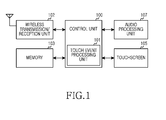
- FIG. 1 illustrates a block diagram of a portable terminal according to an exemplary embodiment of the present disclosure
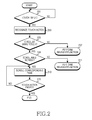
- FIG. 2 illustrates a flow diagram for a scrolling procedure of a portable terminal according to an exemplary embodiment of the present disclosure
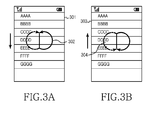
- FIGS. 3A and 3B illustrate schematic diagrams for scrolling methods according to an exemplary embodiment of the present disclosure.
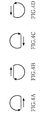
- FIGS. 4A-4D illustrate exemplary diagrams for horizontal scrolling methods according to another exemplary embodiment of the present disclosure.
- FIGURES 1 through 4D discussed below, and the various embodiments used to describe the principles of the present disclosure in this patent document are by way of illustration only and should not be construed in any way to limit the scope of the disclosure. Those skilled in the art will understand that the principles of the present disclosure may be implemented in any suitably arranged electronic device. Preferred embodiments of the present invention will be described herein below with reference to the accompanying drawings. In the following description, detailed descriptions of well-known functions or configurations will be omitted since they would unnecessarily obscure the subject matters of the present invention.
- a portable terminal and a scrolling method thereof will be described below; however, the present disclosure is not limited thereto.
- the present disclosure can be applied to a variety of electronic devices having a touchscreen and requiring a scroll screen.
- FIG. 1 illustrates a block diagram of a portable terminal according to an exemplary embodiment of the present disclosure.
- the portable terminal includes a control unit 100, a wireless transmission/reception unit 102, a memory 103, an audio processing unit 107, and a touchscreen 105.
- the touchscreen 105 is a combination of a touchpad and a display device, such as, for example, a Liquid Crystal Display (LCD) or an Organic Light Emitting Diode (OLED).
- a display device such as, for example, a Liquid Crystal Display (LCD) or an Organic Light Emitting Diode (OLED).
- the touchscreen 105 displays a user interface, such as, for example, menus and keys of the portable terminal, and an execution screen for application programs, and provides the control unit 105 with an event signal corresponding to a user's touch input.
- a user draws a circle in order for a scrolling while a scrollable screen is being displayed, the touchscreen 105 provides the control unit 100 with coordinate values of a corresponding display region.
- the control unit 100 controls an overall operation of the portable terminal.
- the control unit 100 includes a touch event processing unit 101 that receives a touch signal corresponding to a user's circular drag touch on the touchscreen 105, and scrolls a currently displayed scrollable screen.
- the touch event processing unit 101 may detect and analyze a pattern of a circle drawn by the user, and control a scroll speed of the screen that is being currently scrolled. For example, the touch event processing unit 101 may control the scroll speed according to how fast the user draws the circle on the touchscreen 105 and how large the radius of curvature of the circle is.
- the control unit 100 may be configured to perform the functions of the touch event processing unit 101, without separate configurations.
- control unit 100 may determine a scroll direction and a scroll rate of the scroll screen that is being currently displayed, based on coordinate values provided according to a direction in which the user draws the circle on the touchscreen 105.
- the scroll screen may be applied to a scrolling of a large-capacity list such as a phone book, or a function of searching a video that is currently being played back.
- the wireless transmission/reception unit 102 In a receiving (RX) mode, the wireless transmission/reception unit 102 down-converts a Radio Frequency (RF) signal received through an antenna, and despreads and channel-decodes the down-converted RF signal. In a transmitting (TX) mode, the wireless transmission/reception unit 102 channel-encodes, spreads, and up-converts data prior to transmission.
- RX Radio Frequency
- TX transmitting
- the audio processing unit 107 receives a user's voice signal from a microphone, converts the received voice signal into a digital signal, encodes the digital signal in accordance with a voice communication protocol, and transmits the encoded digital signal through the wireless transmission/reception unit 107 to a portable terminal of a called party.
- the audio processing unit 107 decodes a called party's voice signal provided from a portable terminal of the called party through the wireless transmission/reception unit 107, converts the decoded voice signal into an analog signal, and provides the analog signal to a speaker.
- FIG. 2 illustrates a flow diagram for a scrolling procedure of a portable terminal according to an exemplary embodiment of the present disclosure
- FIGS. 3A and 3B illustrate schematic diagrams for scrolling methods according to an exemplary embodiment of the present disclosure.
- the control unit determines whether a touch input is detected in step 201. If the touch input is detected, the control unit recognizes a touch action in step 203 and determines whether the touch input is a circular drag touch in step 205. If the recognized touch action is not a circular drag touch action but a general touch action, the control unit performs a relevant function in step 207.
- control unit determines whether a currently displayed screen is a scrollable screen in step 209. In an embodiment where the current screen is a moving picture playing screen, the control unit may determine whether the current screen is a scene searchable screen.
- the process of detecting the circular drag touch may be a process of detecting a series of circular drag touches after detecting a touch action for a scroll direction. That is, as illustrated in FIG. 3A , the control unit may determine a scroll direction and whether to scroll a screen by detecting a straight-line drag touch with a predetermined length along a scroll direction and then detecting a continuous circular drag touch.
- FIG. 3A a scrollable page 301 is currently displayed, and a scroll action 302 may be performed by executing a straight-line drag touch downwardly by a predetermined length and drawing a circle clockwise or counterclockwise on the touchscreen.
- FIG. 3A illustrates that a straight line is drawn downwardly and a circle is drawn in a direction to surround the straight line, the circle may also be drawn clockwise or counterclockwise outwardly from the end position of the straight-line drag touch, instead of surrounding the straight line.
- FIG. 3B illustrates an upward scrolling method.
- a scroll action 304 is performed by drawing a straight line with a predetermined length upwardly and drawing a circle clockwise or counterclockwise.
- the displayed page 303 is scrolled up according to the clockwise or counterclockwise drawing of the circle.
- the control unit may control the scroll screen according to the length of a circular arc drawn by the user's circular drag touch action.
- the control unit may allow the user to view an entire scroll screen when the user draws one turn of a circle.
- the disclosure is not limited to the above example.
- the control unit may allow the user to view an entire scroll screen when the user draws two or more turns of a circle.
- the scroll action may not be a perfect circle.
- the control unit may detect the scroll action resembling any circular motion including, for example, an oval or rectangle shaped motion.
- the scroll speed may be controlled according to the circle drawing speed of the user's circular drag and touch action or the radius of curvature of the circle.
- a relevant function not a scroll function, may be performed or a touch action may be ended, even though the circular drag touch is detected.
- step 213 the control unit scrolls a corresponding page.
- the control unit may control a scroll speed according to a shape of the circle drawn by the user's circular drag and touch action and a circle drawing speed.
- step 215 the control unit determines whether the touch action has ended. If the control unit determines that the touch action has not ended, the process returns to step 213. If, however, the control unit determines that the touch action has ended the process ends.
- FIGS. 4A-4D illustrate exemplary diagrams for horizontal scrolling methods according to another exemplary embodiment of the present disclosure.
- the horizontal scrolling method may be used for searching a particular scene while a moving picture is being played back. If a horizontal straight-line touch is done on a screen where a moving picture is currently being played back, and then, a circular dragging is done clockwise or counterclockwise, a specific scene may be searched according to a shape and a size of a circle drawn by the circular dragging.
- the illustrative embodiments of FIGS. 4A and 4B may be applied to a forward search, and the illustrative embodiments of FIGS. 4C and 4D may be applied to a reverse search.
- the scrolling method and apparatus can conveniently display a variety of scroll screens from start to end through a user's one-time touch action, contributing to a convenient manipulation of the portable terminal.
Landscapes
- Engineering & Computer Science (AREA)
- General Engineering & Computer Science (AREA)
- Theoretical Computer Science (AREA)
- Human Computer Interaction (AREA)
- Physics & Mathematics (AREA)
- General Physics & Mathematics (AREA)
- User Interface Of Digital Computer (AREA)
- Position Input By Displaying (AREA)
- Computer Networks & Wireless Communication (AREA)
- Signal Processing (AREA)
Applications Claiming Priority (1)
| Application Number | Priority Date | Filing Date | Title |
|---|---|---|---|
| KR1020100137692A KR101662726B1 (ko) | 2010-12-29 | 2010-12-29 | 전자 기기의 스크롤 방법 및 장치 |
Publications (2)
| Publication Number | Publication Date |
|---|---|
| EP2472380A2 true EP2472380A2 (de) | 2012-07-04 |
| EP2472380A3 EP2472380A3 (de) | 2015-11-18 |
Family
ID=45418408
Family Applications (1)
| Application Number | Title | Priority Date | Filing Date |
|---|---|---|---|
| EP11193366.9A Withdrawn EP2472380A3 (de) | 2010-12-29 | 2011-12-13 | Bilddurchlaufverfahren und -vorrichtung für elektronische Vorrichtungen |
Country Status (5)
| Country | Link |
|---|---|
| US (1) | US8799828B2 (de) |
| EP (1) | EP2472380A3 (de) |
| JP (1) | JP2012141978A (de) |
| KR (1) | KR101662726B1 (de) |
| CN (1) | CN102566932A (de) |
Cited By (1)
| Publication number | Priority date | Publication date | Assignee | Title |
|---|---|---|---|---|
| US11221754B2 (en) | 2014-03-06 | 2022-01-11 | Unify Gmbh & Co. Kg | Method for controlling a display device at the edge of an information element to be displayed |
Families Citing this family (28)
| Publication number | Priority date | Publication date | Assignee | Title |
|---|---|---|---|---|
| CN104011700B (zh) * | 2012-02-14 | 2016-10-26 | 英派尔科技开发有限公司 | 基于云的游戏系统中的负载平衡 |
| US9798456B2 (en) * | 2012-08-30 | 2017-10-24 | Panasonic Intellectual Property Corporation Of America | Information input device and information display method |
| KR101355825B1 (ko) * | 2012-11-12 | 2014-01-28 | 에프에이리눅스 주식회사 | 터치를 통해 특수기능수행이 가능한 디스플레이부의 터치 제어 장치 및 방법 |
| CN102981729B (zh) * | 2012-11-14 | 2016-01-20 | 中兴通讯股份有限公司 | 触摸屏滚屏控制系统及方法 |
| CN103870022A (zh) * | 2012-12-17 | 2014-06-18 | 联想(北京)有限公司 | 一种信息处理方法及电子设备 |
| CN103019611A (zh) * | 2012-12-31 | 2013-04-03 | 传聚互动(北京)科技有限公司 | 屏幕触控方法和装置 |
| CN103135929A (zh) * | 2013-01-31 | 2013-06-05 | 北京小米科技有限责任公司 | 控制应用界面移动的方法、装置和终端设备 |
| CN103970448B (zh) * | 2013-02-04 | 2018-05-22 | 腾讯科技(深圳)有限公司 | 界面分区域滚屏控制方法及系统 |
| JP6142564B2 (ja) * | 2013-02-18 | 2017-06-07 | コニカミノルタ株式会社 | 情報表示装置および表示制御プログラム |
| CN105026976B (zh) | 2013-03-29 | 2017-05-03 | 富士胶片株式会社 | 图像处理装置、摄像装置及图像处理方法 |
| US9594493B2 (en) | 2013-05-29 | 2017-03-14 | Microsoft Technology Licensing, Llc | Graphical user interface with dial control for a parameter |
| JP2015011636A (ja) | 2013-07-01 | 2015-01-19 | 富士通株式会社 | 端末装置、画面切替方法及び画面切替プログラム |
| US9176657B2 (en) * | 2013-09-14 | 2015-11-03 | Changwat TUMWATTANA | Gesture-based selection and manipulation method |
| US9891812B2 (en) * | 2013-09-14 | 2018-02-13 | Changwat TUMWATTANA | Gesture-based selection and manipulation method |
| US10289301B2 (en) * | 2013-09-14 | 2019-05-14 | Changwat TUMWATTANA | Gesture-based selection and manipulation method |
| US10025684B2 (en) | 2014-09-24 | 2018-07-17 | Microsoft Technology Licensing, Llc | Lending target device resources to host device computing environment |
| US10448111B2 (en) | 2014-09-24 | 2019-10-15 | Microsoft Technology Licensing, Llc | Content projection |
| US9769227B2 (en) | 2014-09-24 | 2017-09-19 | Microsoft Technology Licensing, Llc | Presentation of computing environment on multiple devices |
| US10635296B2 (en) | 2014-09-24 | 2020-04-28 | Microsoft Technology Licensing, Llc | Partitioned application presentation across devices |
| US10585485B1 (en) | 2014-11-10 | 2020-03-10 | Amazon Technologies, Inc. | Controlling content zoom level based on user head movement |
| CN104915063B (zh) * | 2015-06-29 | 2018-09-04 | 努比亚技术有限公司 | 控制智能终端的方法和装置 |
| EP3951579A1 (de) * | 2015-12-15 | 2022-02-09 | Huawei Technologies Co., Ltd. | Verfahren und vorrichtung zur operationsverfolgungsantwort |
| JP6729338B2 (ja) * | 2016-12-13 | 2020-07-22 | ヤマハ株式会社 | 表示装置 |
| TWI636355B (zh) * | 2017-08-01 | 2018-09-21 | 群光電能科技股份有限公司 | 電子印章 |
| CN107678665A (zh) * | 2017-09-13 | 2018-02-09 | 青岛真时科技有限公司 | 一种查找联系人的方法、装置和智能手表 |
| KR102717063B1 (ko) * | 2018-12-24 | 2024-10-15 | 삼성전자주식회사 | 전자 장치 및 전자 장치의 제어 방법 |
| CN111782122B (zh) * | 2020-05-21 | 2021-09-10 | 北京达佳互联信息技术有限公司 | 一种响应用户操作的方法、装置、终端及存储介质 |
| CN113190164A (zh) * | 2021-05-14 | 2021-07-30 | 歌尔股份有限公司 | 一种设备的操作方法、系统及设备 |
Citations (6)
| Publication number | Priority date | Publication date | Assignee | Title |
|---|---|---|---|---|
| JP2002010211A (ja) * | 2000-06-19 | 2002-01-11 | Hitachi Ltd | 動画像の再生制御方式 |
| JP2005115681A (ja) * | 2003-10-08 | 2005-04-28 | National Institute Of Advanced Industrial & Technology | 広範囲な可変量データの制御をおこなう疑似ダイヤル制御方法及び装置ならびにプログラム |
| WO2006020305A2 (en) * | 2004-07-30 | 2006-02-23 | Apple Computer, Inc. | Gestures for touch sensitive input devices |
| US20070291014A1 (en) * | 2006-06-16 | 2007-12-20 | Layton Michael D | Method of scrolling that is activated by touchdown in a predefined location on a touchpad that recognizes gestures for controlling scrolling functions |
| US20100201644A1 (en) * | 2009-02-06 | 2010-08-12 | Alps Electric Co., Ltd | Input processing device |
| JP2010198298A (ja) * | 2009-02-25 | 2010-09-09 | Nec Corp | 情報表示装置 |
Family Cites Families (21)
| Publication number | Priority date | Publication date | Assignee | Title |
|---|---|---|---|---|
| JP2002222034A (ja) * | 2000-11-22 | 2002-08-09 | Shinichi Komatsu | 座標位置入力によるコンピュータの制御方法並びにこの方法によりコンピュータを制御するプログラム及びこのプログラムが記録された記録媒体 |
| JP2002251623A (ja) * | 2000-12-21 | 2002-09-06 | Seiko Instruments Inc | グラフ表示調整システム |
| JP2003316372A (ja) * | 2002-04-19 | 2003-11-07 | Nissan Motor Co Ltd | 車載用音声変換装置 |
| US9395905B2 (en) * | 2006-04-05 | 2016-07-19 | Synaptics Incorporated | Graphical scroll wheel |
| US9304675B2 (en) * | 2006-09-06 | 2016-04-05 | Apple Inc. | Portable electronic device for instant messaging |
| KR20090008976A (ko) * | 2007-07-19 | 2009-01-22 | 삼성전자주식회사 | 네비게이션 단말에서의 지도 스크롤 방법 및 그 네비게이션단말 |
| CN101162420B (zh) * | 2007-11-29 | 2010-12-15 | 天津津科电子系统工程有限公司 | 基于触摸屏的旋转式连续变速浏览与检索方法 |
| KR20090070491A (ko) * | 2007-12-27 | 2009-07-01 | 엔에이치엔(주) | 터치스크린을 이용한 화면 제어 장치 및 방법 |
| US9513704B2 (en) * | 2008-03-12 | 2016-12-06 | Immersion Corporation | Haptically enabled user interface |
| US8723811B2 (en) * | 2008-03-21 | 2014-05-13 | Lg Electronics Inc. | Mobile terminal and screen displaying method thereof |
| US20090249258A1 (en) * | 2008-03-29 | 2009-10-01 | Thomas Zhiwei Tang | Simple Motion Based Input System |
| US8375336B2 (en) * | 2008-05-23 | 2013-02-12 | Microsoft Corporation | Panning content utilizing a drag operation |
| CN101639739A (zh) * | 2008-08-01 | 2010-02-03 | 宏达国际电子股份有限公司 | 可触控式电子装置及其操作方法 |
| US8566741B2 (en) * | 2008-08-29 | 2013-10-22 | Microsoft Corporation | Internal scroll activation and cursor adornment |
| KR20100033716A (ko) | 2008-09-22 | 2010-03-31 | 에스케이 텔레콤주식회사 | 휴대용 단말기를 이용한 미디어 제어 시스템 및 방법 |
| US20100185949A1 (en) * | 2008-12-09 | 2010-07-22 | Denny Jaeger | Method for using gesture objects for computer control |
| KR20100086678A (ko) * | 2009-01-23 | 2010-08-02 | 삼성전자주식회사 | 멀티미디어 아이템 재생 장치 및 방법 |
| JP5524868B2 (ja) * | 2009-02-02 | 2014-06-18 | パナソニック株式会社 | 情報表示装置 |
| KR20100136156A (ko) * | 2009-06-18 | 2010-12-28 | 삼성전자주식회사 | 터치스크린을 구비하는 휴대 단말기의 화면 스크롤 방법 및 장치 |
| US20110298708A1 (en) * | 2010-06-07 | 2011-12-08 | Microsoft Corporation | Virtual Touch Interface |
| JP2012141158A (ja) * | 2010-12-28 | 2012-07-26 | Hioki Ee Corp | 測定装置およびスクロール表示方法 |
-
2010
- 2010-12-29 KR KR1020100137692A patent/KR101662726B1/ko not_active Expired - Fee Related
-
2011
- 2011-12-13 EP EP11193366.9A patent/EP2472380A3/de not_active Withdrawn
- 2011-12-16 US US13/329,049 patent/US8799828B2/en active Active
- 2011-12-26 JP JP2011283024A patent/JP2012141978A/ja active Pending
- 2011-12-29 CN CN2011104605090A patent/CN102566932A/zh active Pending
Patent Citations (6)
| Publication number | Priority date | Publication date | Assignee | Title |
|---|---|---|---|---|
| JP2002010211A (ja) * | 2000-06-19 | 2002-01-11 | Hitachi Ltd | 動画像の再生制御方式 |
| JP2005115681A (ja) * | 2003-10-08 | 2005-04-28 | National Institute Of Advanced Industrial & Technology | 広範囲な可変量データの制御をおこなう疑似ダイヤル制御方法及び装置ならびにプログラム |
| WO2006020305A2 (en) * | 2004-07-30 | 2006-02-23 | Apple Computer, Inc. | Gestures for touch sensitive input devices |
| US20070291014A1 (en) * | 2006-06-16 | 2007-12-20 | Layton Michael D | Method of scrolling that is activated by touchdown in a predefined location on a touchpad that recognizes gestures for controlling scrolling functions |
| US20100201644A1 (en) * | 2009-02-06 | 2010-08-12 | Alps Electric Co., Ltd | Input processing device |
| JP2010198298A (ja) * | 2009-02-25 | 2010-09-09 | Nec Corp | 情報表示装置 |
Cited By (1)
| Publication number | Priority date | Publication date | Assignee | Title |
|---|---|---|---|---|
| US11221754B2 (en) | 2014-03-06 | 2022-01-11 | Unify Gmbh & Co. Kg | Method for controlling a display device at the edge of an information element to be displayed |
Also Published As
| Publication number | Publication date |
|---|---|
| US8799828B2 (en) | 2014-08-05 |
| EP2472380A3 (de) | 2015-11-18 |
| KR20120075826A (ko) | 2012-07-09 |
| US20120173983A1 (en) | 2012-07-05 |
| KR101662726B1 (ko) | 2016-10-14 |
| CN102566932A (zh) | 2012-07-11 |
| JP2012141978A (ja) | 2012-07-26 |
Similar Documents
| Publication | Publication Date | Title |
|---|---|---|
| US8799828B2 (en) | Scrolling method and apparatus for electronic device | |
| US11054988B2 (en) | Graphical user interface display method and electronic device | |
| US9134801B2 (en) | Display method and information processing device | |
| KR101251761B1 (ko) | 어플리케이션 간 데이터 전달 방법 및 이를 이용하는 단말 장치 | |
| CN109375890B (zh) | 一种屏幕显示方法和多屏电子设备 | |
| US9772762B2 (en) | Variable scale scrolling and resizing of displayed images based upon gesture speed | |
| KR101523979B1 (ko) | 휴대 단말기 및 그 휴대 단말기에서 기능 수행 방법 | |
| EP1980937B1 (de) | Objektsuchverfahren und Endgerät mit Objektsuchfunktion | |
| US20180292966A1 (en) | Apparatus and method for providing an interface in a device with touch screen | |
| US20130120271A1 (en) | Data input method and apparatus for mobile terminal having touchscreen | |
| WO2016066092A1 (zh) | 多媒体播放控制方法、装置以及存储介质 | |
| CN103718150B (zh) | 具有基于姿势的任务管理的电子设备 | |
| US20120096393A1 (en) | Method and apparatus for controlling touch screen in mobile terminal responsive to multi-touch inputs | |
| KR100821161B1 (ko) | 터치스크린을 이용한 문자 입력방법 및 장치 | |
| KR20110028834A (ko) | 터치스크린을 구비한 휴대 단말기의 터치 압력을 이용한 사용자 인터페이스 제공 방법 및 장치 | |
| US9569099B2 (en) | Method and apparatus for displaying keypad in terminal having touch screen | |
| US20150234566A1 (en) | Electronic device, storage medium and method for operating electronic device | |
| CN104932809A (zh) | 用于控制显示面板的装置和方法 | |
| US20170115861A1 (en) | Terminal apparatus and display control method | |
| CN109491738A (zh) | 一种终端设备的控制方法及终端设备 | |
| KR20130011905A (ko) | 모바일 기기에서 스크롤바를 통한 문자 입력 방법 및 장치 | |
| WO2011080614A1 (en) | Method and apparatus for managing notifications for a long scrollable canvas | |
| CN111221460A (zh) | 一种内容滚动显示方法及电子设备 | |
| KR101570510B1 (ko) | 터치식 단말기를 이용한 검색결과의 빠른 스캔을 위한 검색결과 표시 방법 및 시스템 | |
| WO2017035740A9 (zh) | 一种选择文本的方法 |
Legal Events
| Date | Code | Title | Description |
|---|---|---|---|
| AK | Designated contracting states |
Kind code of ref document: A2 Designated state(s): AL AT BE BG CH CY CZ DE DK EE ES FI FR GB GR HR HU IE IS IT LI LT LU LV MC MK MT NL NO PL PT RO RS SE SI SK SM TR |
|
| AX | Request for extension of the european patent |
Extension state: BA ME |
|
| PUAI | Public reference made under article 153(3) epc to a published international application that has entered the european phase |
Free format text: ORIGINAL CODE: 0009012 |
|
| RAP1 | Party data changed (applicant data changed or rights of an application transferred) |
Owner name: SAMSUNG ELECTRONICS CO., LTD. |
|
| PUAL | Search report despatched |
Free format text: ORIGINAL CODE: 0009013 |
|
| AK | Designated contracting states |
Kind code of ref document: A3 Designated state(s): AL AT BE BG CH CY CZ DE DK EE ES FI FR GB GR HR HU IE IS IT LI LT LU LV MC MK MT NL NO PL PT RO RS SE SI SK SM TR |
|
| AX | Request for extension of the european patent |
Extension state: BA ME |
|
| 17P | Request for examination filed |
Effective date: 20160518 |
|
| STAA | Information on the status of an ep patent application or granted ep patent |
Free format text: STATUS: EXAMINATION IS IN PROGRESS |
|
| 17Q | First examination report despatched |
Effective date: 20190621 |
|
| STAA | Information on the status of an ep patent application or granted ep patent |
Free format text: STATUS: THE APPLICATION HAS BEEN WITHDRAWN |
|
| 18W | Application withdrawn |
Effective date: 20191021 |