EP2477103A1 - Verfahren und system zur eingabe von zeichen mit mehrfachtastenberührung - Google Patents
Verfahren und system zur eingabe von zeichen mit mehrfachtastenberührung Download PDFInfo
- Publication number
- EP2477103A1 EP2477103A1 EP10813317A EP10813317A EP2477103A1 EP 2477103 A1 EP2477103 A1 EP 2477103A1 EP 10813317 A EP10813317 A EP 10813317A EP 10813317 A EP10813317 A EP 10813317A EP 2477103 A1 EP2477103 A1 EP 2477103A1
- Authority
- EP
- European Patent Office
- Prior art keywords
- character
- input
- contact
- virtual keyboard
- user
- Prior art date
- Legal status (The legal status is an assumption and is not a legal conclusion. Google has not performed a legal analysis and makes no representation as to the accuracy of the status listed.)
- Withdrawn
Links
Images





Classifications
-
- G—PHYSICS
- G06—COMPUTING OR CALCULATING; COUNTING
- G06F—ELECTRIC DIGITAL DATA PROCESSING
- G06F3/00—Input arrangements for transferring data to be processed into a form capable of being handled by the computer; Output arrangements for transferring data from processing unit to output unit, e.g. interface arrangements
- G06F3/01—Input arrangements or combined input and output arrangements for interaction between user and computer
- G06F3/048—Interaction techniques based on graphical user interfaces [GUI]
- G06F3/0487—Interaction techniques based on graphical user interfaces [GUI] using specific features provided by the input device, e.g. functions controlled by the rotation of a mouse with dual sensing arrangements, or of the nature of the input device, e.g. tap gestures based on pressure sensed by a digitiser
- G06F3/0488—Interaction techniques based on graphical user interfaces [GUI] using specific features provided by the input device, e.g. functions controlled by the rotation of a mouse with dual sensing arrangements, or of the nature of the input device, e.g. tap gestures based on pressure sensed by a digitiser using a touch-screen or digitiser, e.g. input of commands through traced gestures
- G06F3/04886—Interaction techniques based on graphical user interfaces [GUI] using specific features provided by the input device, e.g. functions controlled by the rotation of a mouse with dual sensing arrangements, or of the nature of the input device, e.g. tap gestures based on pressure sensed by a digitiser using a touch-screen or digitiser, e.g. input of commands through traced gestures by partitioning the display area of the touch-screen or the surface of the digitising tablet into independently controllable areas, e.g. virtual keyboards or menus
-
- G—PHYSICS
- G06—COMPUTING OR CALCULATING; COUNTING
- G06F—ELECTRIC DIGITAL DATA PROCESSING
- G06F3/00—Input arrangements for transferring data to be processed into a form capable of being handled by the computer; Output arrangements for transferring data from processing unit to output unit, e.g. interface arrangements
- G06F3/01—Input arrangements or combined input and output arrangements for interaction between user and computer
- G06F3/02—Input arrangements using manually operated switches, e.g. using keyboards or dials
- G06F3/023—Arrangements for converting discrete items of information into a coded form, e.g. arrangements for interpreting keyboard generated codes as alphanumeric codes, operand codes or instruction codes
- G06F3/0233—Character input methods
- G06F3/0235—Character input methods using chord techniques
-
- G—PHYSICS
- G06—COMPUTING OR CALCULATING; COUNTING
- G06F—ELECTRIC DIGITAL DATA PROCESSING
- G06F3/00—Input arrangements for transferring data to be processed into a form capable of being handled by the computer; Output arrangements for transferring data from processing unit to output unit, e.g. interface arrangements
- G06F3/01—Input arrangements or combined input and output arrangements for interaction between user and computer
- G06F3/02—Input arrangements using manually operated switches, e.g. using keyboards or dials
- G06F3/023—Arrangements for converting discrete items of information into a coded form, e.g. arrangements for interpreting keyboard generated codes as alphanumeric codes, operand codes or instruction codes
- G06F3/0233—Character input methods
- G06F3/0237—Character input methods using prediction or retrieval techniques
-
- G—PHYSICS
- G06—COMPUTING OR CALCULATING; COUNTING
- G06F—ELECTRIC DIGITAL DATA PROCESSING
- G06F3/00—Input arrangements for transferring data to be processed into a form capable of being handled by the computer; Output arrangements for transferring data from processing unit to output unit, e.g. interface arrangements
- G06F3/01—Input arrangements or combined input and output arrangements for interaction between user and computer
- G06F3/03—Arrangements for converting the position or the displacement of a member into a coded form
- G06F3/041—Digitisers, e.g. for touch screens or touch pads, characterised by the transducing means
- G06F3/0416—Control or interface arrangements specially adapted for digitisers
-
- G—PHYSICS
- G06—COMPUTING OR CALCULATING; COUNTING
- G06F—ELECTRIC DIGITAL DATA PROCESSING
- G06F2203/00—Indexing scheme relating to G06F3/00 - G06F3/048
- G06F2203/048—Indexing scheme relating to G06F3/048
- G06F2203/04808—Several contacts: gestures triggering a specific function, e.g. scrolling, zooming, right-click, when the user establishes several contacts with the surface simultaneously; e.g. using several fingers or a combination of fingers and pen
Definitions
- the present invention relates to a character input method, and more particularly to a multi-contact character input method; meanwhile, the present invention further relates to a multi-contact character input system.
- Both the 9-key keyboard and the qwerty keyboard may be presented in the following two manners.
- One is a pressing hard keyboard, such as a qwerty keyboard on BlackBerry 8830 of RIM Company.
- the other one is a virtual soft keyboard on a touch screen, such as a qwerty keyboard on iPhone or other cell phones with touch screens.
- Some cell phones have both a hard keyboard and a virtual soft keyboard on a touch screen, such as P1i cell phone of Sony Ericsson.
- the hard keyboard may also have the touch sensing function, for example, the A668 cell phone of Motorola adopts a touch sensing keyboard, thereby implementing a function through which a user can directly write in a keyboard area through fingers.
- both the touch screen and the touch sensing keyboard can be classified into the following two kinds.
- One is conventional single-point touch sensing, that is, states such as contacting, moving and leaving of only one touch point can be sensed in the touch sensing area.
- the other one is multi-point touch sensing represented by iPhone, that is, states such as contacting, moving and leaving of one or more touch points can be sensed in the touch sensing area.
- the touch sensing keyboard, the 9-key keyboard or the qwerty keyboard, on the handheld electronic device has a common defect, that is, the keys are too small and it is inconvenient to click.
- each key on the virtual qwerty keyboard on the touch screen is small due to the limitation of the touch screen space, and if the user presses the keys through fingers not through a special stylus pen during inputting, the user should be very careful to avoid mistakes.
- Swipe Gestures for Touch Screen Keyboard discloses a method for implementing frequently used functional keys through swipes.
- the method implements the frequently used functional keys or character keys such as shift (that is, an uppercase/lowercase switch during input of English characters), space, backspace (that is, deleting a previously input character), and line feed through swipes in four directions of up, down, left, and right on the virtual keyboard displayed on the touch screen.
- a defect of the method lies in that, when the user makes swipes in four directions of up, down, left, and right during the process of clicking the keyboard for inputting the characters, a process of mode switch is implied, that is, it is required to first switch from a click input mode to a swipe input mode and then switch back to the click input mode after the swipes, which brings inconvenience to the user.
- the technical problem to be solved by the present invention is to provide a multi-contact character input method, which may provide input convenience for a user without requiring the user to change a click input mode.
- the present invention further provides a multi-contact character input system, which may provide input convenience for the user without requiring the user to change the click input mode.
- the present invention adopts the following technical solutions.
- the multi-contact operation is set to involve two contacts: a first contact and a second contact, wherein a position of the first contact is any position on a multi-contact screen or any position, except each key, on a virtual keyboard; and the second contact is a key on the virtual keyboard.
- pressing the first contact is equivalent to pressing "Shift" or "Ctrl" on the virtual keyboard.
- the multi-contact operation is set to involve at least two contacts, and a position of each contact is any position on the multi-contact screen or any position, except each key, on the virtual keyboard.
- the input character is a set character.
- Step A the multi-point touch screen is divided into several areas, or the area, except each key, on the virtual keyboard is divided into several areas.
- a position of each contact in the plurality of contacts is distributed in each area.
- one area may not have any contact, or have one contact, or have multiple contacts at the same time.
- the multi-point touch screen is divided into a left area and a right area, and it is set that: if the left area of the virtual keyboard on the touch screen is clicked through two or more fingers at the same time, a set character is designated to be input, and if the right area of the virtual keyboard on the touch screen is clicked through two or more fingers at the same time, a set character is designated to be input; or the left area and the right area are clicked through a set number of fingers respectively to input a set character; or the multi-point touch screen is divided into an upper area and a lower area, and it is set that: if the upper area of the virtual keyboard on the touch screen is clicked through two or more fingers at the same time, a set character is designated to be input, and if the lower area of the virtual keyboard on the touch screen is clicked through two or more fingers at the same time, a set character is designated to be input; or the upper area and the lower area are clicked through a set number of fingers respectively to input a set characters.
- the user clicks the virtual keyboard on the touch screen through at least two fingers, and a position clicked through each finger is recorded as a standard input position of the specific character.
- a control program of the virtual keyboard calculates, through a processor of the device, distance parameters between positions clicked by the user through two fingers at this time and the recorded standard input positions of the specific character pre-designated by the user, and a specific character closest to a set value is selected as a character to be input by the user.
- the multi-contact character input method according to the present invention fully utilizes the advantages of the multi-point touch sensing, and implements input of frequently used functional keys or character keys through a multi-point touch combination of a special manner, which provides input convenience for the user without requiring the user to change a click input mode.
- the present invention provides a convenient input method capable of being applied to a multi-point touch screen or a multi-point touch sensing keyboard.
- the method uses a specific multi-point touch combination to implement input of frequently used functional keys or character keys, and provides input convenience for a user without requiring the user to change a click input mode.
- the method may conveniently implement input of uppercase letters.
- Step A it is set that the multi-contact operation involves two contacts: a first contact and a second contact, in which a position of the first contact is any position on a multi-contact screen or any position, except each key, on a virtual keyboard; and the second contact is a key on the virtual keyboard.
- pressing the first contact is equivalent to pressing "Shift" or "Ctrl" on the virtual keyboard.
- the above method is "contacting any position on a virtual keyboard displayed on the touch screen through one finger".
- the above method is "contacting a position except the keys on a virtual keyboard displayed on the touch screen through one finger". No input operation is performed after leaving since the above method is "the user contacting any position on the virtual keyboard displayed on the touch screen through one finger, in which the finger does not leave the touch screen or move on the touch screen, and clicking an English character key on the virtual keyboard through the other finger", that is, the English character key clicked through the other finger is input at this time, and no input operation is performed when the former finger leaves the touch screen.
- the method includes a process of implementing a "shift" functional key, which includes the following steps.
- Step 110 a virtual keyboard is displayed on a multi-point touch screen and key-press inputting is performed.
- Step 120 the user judges whether the "shift" functional key is required to perform an uppercase/lowercase switch; if yes, Step 130 is performed; otherwise, Step 170 is performed.
- Step 130 the user presses any position on the virtual keyboard through one finger.
- Step 140 the user clicks for inputting a character through another finger.
- Step 150 the user judges whether the "shift" functional key is still required to perform the uppercase/lowercase switch; if yes, Step 140 is performed; otherwise, Step 160 is performed.
- Step 160 the finger pressing the virtual keyboard is released.
- Step 170 the user judges whether it is required to further input a character through the virtual keyboard on the multi-point touch screen; if yes, Step 110 is performed; otherwise, the operation is ended.
- the present invention may implement input of a small number of specific characters or commands.
- Step A it is set that the multi-contact operation involves at least two contacts, and a position of each contact is any position on the multi-contact screen or any position, except each key, on the virtual keyboard.
- the input character or the operation command is a set character or a set operation command.
- control commands may also be input through similar methods, such as rolling, rotating and scaling of the screen.
- the clicking manner may be sliding of the fingers in different directions, and the manners are differentiated through identifying the sliding directions of the fingers on the screen, through which different characters or commands are input respectively. For example, when two fingers rotate clockwise at the same time during the clicking, the corresponding command at this time is rotating the screen clockwise.
- the method includes a process of presetting a specific character, which includes the following steps.
- Step 410 a user interface for presetting is entered.
- Step 420 the user clicks any position on the virtual keyboard of the touch screen through two fingers at the same time to implement input of a specific character, and designates the specific character as space, backspace or line feed through presetting.
- Step 430 a character corresponding to any position clicked through two fingers at the same time on the virtual keyboard is selected.
- Step 440 the performed setting is saved, and the operation is ended.
- the method includes a process of implementing input of a specific character, which includes the following steps.
- Step 510 a virtual keyboard is displayed on a multi-point touch screen and key-press inputting is performed.
- Step 520 the user judges whether it is required to input the designated character; if yes, Step 530 is performed; otherwise, Step 550 is performed.
- Step 530 any position on the virtual keyboard is clicked through two fingers at the same time to implement the input of the designated character.
- Step 540 the user judges whether it is required to further input the designated character; if yes, Step 530 is performed; otherwise, Step 550 is performed.
- Step 550 the user judges whether it is required to further input the character through the virtual keyboard on the multi-point touch screen; if yes, Step 510 is performed; otherwise, the operation is ended.
- the present invention may implement input of a large number of specific characters or commands.
- Step A the multi-point touch screen is divided into several areas, or the area, except each key, on the virtual keyboard is divided into several areas.
- a position of each contact in the plurality of contacts is distributed in each area.
- one area may not have the contact, or have one contact, or have multiple contacts at the same time.
- the multi-point touch screen is divided into a left area and a right area, and it is set that: if the left area of the virtual keyboard on the touch screen is clicked through two or more fingers at the same time, a set character or operation command is designated to be input, and if the right area of the virtual keyboard on the touch screen is clicked through two or more fingers at the same time, a set character or operation command is designated to be input; or the left area and the right area are clicked through a set number of fingers respectively, and a set character is input.
- the multi-point touch screen is divided into an upper area and a lower area, and it is set that: if the upper area of the virtual keyboard on the touch screen is clicked through two or more fingers at the same time, a set character or operation command is designated to be input, and if the lower area of the virtual keyboard on the touch screen is clicked through two or more fingers at the same time, a set character or operation command is designated to be input; or the upper area and the lower area are clicked through a set number of fingers respectively, a set character is input.
- the multi-point touch screen may be also divided into four portions of upper left, lower left, upper right and lower right to set a corresponding relation between the touch attribute and the specific character.
- a control program of the virtual keyboard calculates, through a processor of the device, distance parameters between positions clicked by the user through two fingers at this time and the recorded standard input positions of the specific character pre-designated by the user, and a specific character closest to a set value is selected as a character to be input by the user.
- the method includes a process of presetting a designated character, which includes the following steps.
- Step 710 a user interface for presetting is entered.
- Step 720 a manner is selected, in which a specific position on the virtual keyboard of the touch screen is clicked through two fingers at the same time to implement the input of a specific character.
- Step 730 the virtual keyboard is divided into a left half portion and a right half portion.
- Step 740 it is chosen that the keyboard area is divided into left and right portions.
- Step 750 a character is selected, which corresponds to that the left area of the keyboard is clicked through two fingers at the same time.
- Step 760 a character is selected, which corresponds to that the right area of the keyboard is clicked through two fingers at the same time.
- Step 770 the performed setting is saved and the operation is ended.
- the method includes a process of implementing input of a designated character, which includes the following steps.
- Step 810 a virtual keyboard is displayed on a multi-point touch screen and key-press inputting is performed.
- Step 820 the user judges whether it is required to input a designated character; if yes, Step 830 is performed; otherwise, Step 880 is performed.
- Step 830 the virtual keyboard is clicked through two fingers at the same time, and positions x1 and x2 clicked through the two fingers in x direction are recorded.
- Step 840 the system judges whether the user clicks the left part or the right part of the virtual keyboard through two fingers at the same time; if the user clicks the left part, Step 850 is performed, and if the user clicks the right part, Step 860 is performed.
- Step 850 a character corresponding to the left part of the virtual keyboard is input, which is a backspace functional key, and Step 870 is performed.
- Step 860 a character corresponding to the right part of the virtual keyboard is input, which is a space key, and Step 870 is performed.
- Step 870 the user judges whether it is required to further input the designated character, if yes, Step 830 is performed; otherwise, Step 880 is performed.
- Step 880 the user judges whether it is required to further input the character through the virtual keyboard on the multi-point touch screen, if yes, Step 810 is performed; otherwise, the operation is ended.
- the present invention may implement input of a large number of specific characters or commands through setting a touch position arbitrarily by the user.
- the user clicks the virtual keyboard on the touch screen through at least two (or more) fingers at the same time, and a position clicked through each finger at this time is recorded as a standard input position of the specific character.
- a control program of the virtual keyboard calculates parameters of distances between positions clicked by the user through two fingers at this time and the recorded standard input positions of the specific character pre-designated by the user through a processor of the device, and a specific character closest to a set value is selected as a character to be input by the user.
- the distance parameters may be a distance corresponding each point, or a square of the distance, or other parameters related to the distance.
- clicked positions of two fingers are (x1, y1) and (x2, y2), and n specific characters are set, standard clicked positions corresponding to an i th specific character are (x1i, y1i) and (x2i, y2i).
- a point corresponding to (x1i, y1i) is selected, the touch point (x1, y1) closest to the point (x1i, y1i) is selected as the corresponding touch point thereof, and then a point corresponding to the point (x2i, y2i) is (x2, y2).
- the method includes a process of presetting a designated character, which includes the following steps.
- Step 1101 a user interface for presetting is entered.
- Step 1102 a manner is selected, in which a specific position on the virtual keyboard of the touch screen is clicked through two fingers at the same time to implement the input of a specific character.
- Step 1103 a manner is selected, in which the area of the virtual keyboard on the touch screen is not rigidly divided.
- Step 1104 a specific character required to be designated is selected.
- Step 1105 the area of the virtual keyboard is displayed.
- Step 1106 the user clicks the virtual keyboard on the touch screen through two fingers at the same time, and positions clicked through the two fingers at this time are recorded as standard input positions of the specific character.
- Step 1107 the user judges whether it is required to further designate a specific character; if yes, Step 1104 is performed; otherwise, Step 1108 is performed.
- Step 1108 the performed setting is saved and the operation is ended.
- the method includes a process of implementing input of a designated character, which includes the following steps.
- Step 1201 a virtual keyboard is displayed on a multi-point touch screen and key-press inputting is performed.
- Step 1202 the user judges whether it is required to input a designated character; if yes, Step 830 is performed; otherwise, Step 880 is performed.
- Step 1203 the user clicks the virtual keyboard through two fingers at the same time, and the positions (x1, y1) and (x2, y2) clicked through the two fingers are recorded.
- Step 1204 the system calculates a character the user wants to input according to the positions clicked by the user through two fingers on the virtual keyboard and the standard positions of the specific character stored in the presetting step.
- n specific characters are stored in the presetting step, and the standard clicked positions corresponding to the i th specific character are (x1i, y1i) and (x2i, y2i).
- Step 1205 the character obtained through calculation which the user wants to input is input.
- Step 1206 the user judges whether it is required to further input the designated character; if yes, Step 1203 is performed; otherwise, Step 1207 is performed.
- Step 1207 the user judges whether it is required to further input a character through the virtual keyboard on the multi-point touch screen; if yes, Step 1201 is performed; otherwise, the operation is ended.
- the multi-contact character input method of the present invention fully utilizes the advantages of the multi-point touch sensing, and uses a multi-point touch combination of a specific manner to implement the input of frequently used functional keys or character keys, and provides input convenience for the user without requiring the user to change a click input mode.
- the clicking manner may be sliding of the fingers in different directions, and the manners are differentiated through identifying the sliding directions of the fingers on the screen, through which different characters or commands are input respectively. Meanwhile, the characters or the control commands, such as rolling, rotating and scaling of the screen, are input.
- the present invention provides the following two methods for the user to conveniently input frequently used functional keys or characters keys of "shift" (that is, an uppercase/lowercase switch during input of English characters), space, and backspace (that is, deleting the previously input character) and line feed through clicking on a virtual keyboard of a touch screen or a touch sensing keyboard.
- shift that is, an uppercase/lowercase switch during input of English characters
- space that is, an uppercase/lowercase switch during input of English characters
- backspace that is, deleting the previously input character
- input through the virtual keyboard on the multi-point touch screen is taken as an example, which is also applicable to other virtual keyboards or actual keyboards having a multi-point touch sensing apparatus.
- Fingers mentioned in the following description may also be a stylus pen or other tools for operating the touch screen.
- a user contacts any position on the virtual keyboard displayed on the touch screen through one finger, and the finger does not leave the touch screen or move on the touch screen.
- an English character key on the virtual keyboard is clicked through another finger, an English character after the uppercase/lowercase switch is input. That is to say, though the user is not required to actually press the "shift” key, it is equivalent to pressing the "shift” key, and the character input is implemented through pressing other keys. In this way, the "shift” key is conveniently clicked and used.
- the user clicks the virtual keyboard on the touch screen through two fingers at the same time to implement input of a specific character.
- the method has the following two implementation manners.
- the user clicks any position on the virtual keyboard of the touch screen through two fingers at the same time to implement input of a specific character, in which the user may designate the specific character as space, backspace (that is, deleting a previously input character) or line feed through presetting.
- the specific character pre-designated by the user is conveniently clicked and input.
- the user clicks specific positions on the virtual keyboard of the touch screen through two fingers at the same time to implement input of a specific character, in which the user may designate the specific character corresponding to the specific positions on the virtual keyboard as space, backspace (that is, deleting a previously input character) or line feed through presetting.
- the user may designate the specific character corresponding to the specific positions on the virtual keyboard of the touch screen through two manners.
- the area of the virtual keyboard on the touch screen is rigidly divided, and then the user designates the input character corresponding that a specific area on the touch screen is clicked through two fingers at the same time.
- the virtual keyboard is divided into a left half portion and a right half portion.
- the user may preset that if the left half portion of the virtual keyboard on the touch screen is clicked through two fingers at the same time, backspace (that is, deleting a previously input character) is designated to be input; if the right half portion of the virtual keyboard on the touch screen is clicked through two fingers at the same time, space is designated to be input.
- backspace that is, deleting a previously input character
- space is designated to be input.
- Other dividing or designating involving an upper half portion and a lower half portion may also be performed, thereby facilitating the input of the specific character.
- the area of the virtual keyboard on the touch screen is not rigidly divided, and when the user designates a specific character, the user clicks the virtual keyboard on the touch screen through two fingers at the same time, and positions clicked through the two fingers at this time are recorded as standard input positions of the specific character.
- a control program of the virtual keyboard calculates, through a Central Processing Unit (CPU) and a memory of the device, distances between positions clicked by the user through the two fingers at this time and the recorded standard input positions of the specific character pre-designated by the user, and a specific character closest to the clicked position is selected as a character to be input by the user.
- CPU Central Processing Unit
- the clicking the display screen through two fingers refers to performing an clicking operation on the display screen through both fingers, and a time difference between the two fingers contacting the display screen or leaving the display screen does not exceed a certain preset threshold, for example, 10 milliseconds (ms).
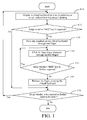
- Fig. 1 a flow chart of a method for implementing the "shift" functional key is shown in Fig. 1 , which includes the following steps.
- Step 110 a virtual keyboard is displayed on a multi-point touch screen and key-press inputting is performed.
- Step 120 the user judges whether the "shift" functional key is required to perform an uppercase/lowercase switch; if yes, Step 130 is performed; otherwise, Step 170 is performed.
- Step 130 the user presses any position on the virtual keyboard through one finger.
- Step 140 the user clicks for inputting a character through another finger.
- Step 150 the user judges whether the "shift" functional key is still required to perform the uppercase/lowercase switch; if yes, Step 140 is performed; otherwise, Step 160 is performed.
- Step 160 the finger pressing the virtual keyboard is released.
- Step 170 the user judges whether it is continuously required to further input a character through the virtual keyboard on the multi-point touch screen; if yes, Step 110 is performed; otherwise, the operation is ended.
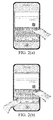
- Fig. 2 illustrates an example of implementing the "shift” functional key by pressing the virtual keyboard on the touch screen through a left hand finger.
- Fig. 2(a) illustrates that when the user clicks a letter "i" on the keyboard through one finger alone, a lowercase “i” is input; and
- Fig. 2(b) illustrates that when the user first presses a certain position on the virtual keyboard of the touch screen through a left hand finger and then clicks the letter "i" on the keyboard through a right hand finger, an uppercase “I” is input.
- Fig. 3 illustrates an example of implementing the "shift” functional key by pressing the virtual keyboard on the multi-point touch screen through a right hand finger.
- Fig. 3(a) illustrates that when the user clicks a letter "e” on the keyboard through one finger alone, a lowercase “e” is input; and
- Fig. 3(b) illustrates that when the user first presses a certain position on the virtual keyboard of the multi-point touch screen through a right hand finger and then clicks the letter "e” on the keyboard through a left hand finger, an uppercase “E” is input.
- a flow chart of the first implementation manner is shown in Fig. 4 and Fig. 5 , which includes the following steps.
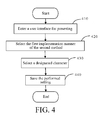
- Fig. 4 illustrates a process of designating a specific character through presetting by a user, which includes the following steps.
- Step 410 a user interface for presetting is entered.
- Step 420 the first implementation manner of the second method of Embodiment 2 is selected.
- Step 430 a character corresponding to any position clicked through two fingers at the same time on the virtual keyboard is selected, which is a space character herein by assumption.
- Step 440 the performed setting is saved and the operation is ended.
- Fig. 5 illustrates a process of a user implementing input of a designated character, which includes the following steps.
- Step 510 a virtual keyboard is displayed on a multi-point touch screen and key-press inputting is performed.
- Step 520 the user judges whether it is required to input the designated character; if yes, Step 530 is performed; otherwise, Step 550 is performed.
- Step 530 any position on the virtual keyboard is clicked through two fingers at the same time to implement the input of the designated character.
- Step 540 the user judges whether it is required to further input the designated character; if yes, Step 530 is performed; otherwise, Step 550 is performed.
- Step 550 the user judges whether it is required to further input the character through the virtual keyboard on the multi-point touch screen; if yes, Step 510 is performed; otherwise, the operation is ended.
- Fig. 6 illustrates an example of implementing input of a space character by clicking any position on the virtual keyboard through two fingers at the same time.
- a flow chart of the first designating manner is shown in Fig. 7 and Fig. 8 , which includes the following steps. It is assumed herein that, the user chooses to divide the area of the virtual keyboard on the touch screen into left and right portions, and the implementation steps are the same for other division manners of the keyboard area.
- Fig. 7 illustrates a process of designating a specific character through presetting by a user, which includes the following steps.
- Step 710 a user interface for presetting is entered.
- Step 720 the second implementation manner of the second method of Embodiment 2 is selected for using.
- Step 730 the first designating manner is selected for using.
- Step 740 it is chosen that the keyboard area is divided into left and right portions.
- Step 750 a character corresponding to the left part of the keyboard area is selected, which is a backspace functional key herein by assumption.
- Step 760 a character corresponding to the right part of the keyboard area is selected, which is a space key herein by assumption.
- Step 770 the performed setting is saved and the operation is ended.
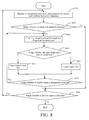
- Fig. 8 illustrates a process of the user implementing input of a designated character, which includes the following steps.
- Step 810 a virtual keyboard is displayed on a multi-point touch screen and key-press inputting is performed.
- Step 820 the user judges whether it is required to input the designated character; if yes, Step 830 is performed; otherwise, Step 880 is performed.
- Step 830 the virtual keyboard is clicked through two fingers at the same time, and positions x1 and x2 clicked through the two fingers in x direction are recorded.
- Step 840 the system judges whether the user clicks the left part or the right part of the virtual keyboard through two fingers at the same time; if the user clicks the left part, Step 850 is performed, and if the user clicks the right part, Step 860 is performed.
- Step 850 a character corresponding to the left part of the virtual keyboard is input, which is a backspace functional key, and Step 870 is performed.
- Step 860 a character corresponding to the right part of the virtual keyboard is input, which is a space key, and Step 870 is performed.
- Step 870 the user judges whether it is required to further input the designated character, if yes, Step 830 is performed; otherwise, Step 880 is performed.
- Step 880 the user judges whether it is required to further input the character through the virtual keyboard on the multi-point touch screen, if yes, Step 810 is performed; otherwise, the operation is ended.
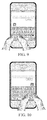
- Fig. 9 illustrates an example of implementing input of a backspace functional key by clicking a left part of the virtual keyboard through two fingers at the same time.
- Fig. 10 illustrates an example of implementing input of a space character by clicking a right part of the virtual keyboard through two fingers at the same time.
- a flow chart of the second designating manner is shown in Fig. 11 and Fig. 12 , which includes the following steps. It is assumed herein that, the user chooses to divide the area of the virtual keyboard on the touch screen into left and right portions, and the implementation steps are to the same for other division manners of the keyboard area.
- Fig. 11 illustrates a process of designating a specific character through presetting by a user, which includes the following steps.
- Step 1101 a user interface for presetting is entered.
- Step 1102 the second implementation manner of the second method of Embodiment 2 is selected for using.
- Step 1103 the second designating manner is selected for using.
- Step 1104 a specific character required to be designated is selected.
- Step 1105 the area of the virtual keyboard is displayed.
- Step 1106 the user clicks the virtual keyboard on the touch screen through two fingers at the same time, and positions clicked through the two fingers at this time are recorded as standard input positions of the specific character.
- Step 1107 the user judges whether it is required to further designate a specific character; if yes, Step 1104 is performed; otherwise, Step 1108 is performed.
- Step 1108 the performed setting is saved and the operation is ended.
- Fig. 12 illustrates a process of the user implementing input of a designated character, which includes the following steps.
- Step 1201 a virtual keyboard is displayed on a multi-point touch screen and key-press inputting is performed.
- Step 1202 the user judges whether it is required to input the designated character; if yes, Step 830 is performed; otherwise, Step 880 is performed.
- Step 1203 the user clicks the virtual keyboard through two fingers at the same time, and the positions (x1, y1) and (x2, y2) clicked through the two fingers are recorded.
- Step 1204 the system calculates a character the user wants to input according to the positions clicked by the user through two fingers on the virtual keyboard and the standard positions of the specific character stored in the presetting described in Fig. 11 .
- n specific characters are stored in the presetting described in Fig. 11 , and the standard clicked positions corresponding to the i th specific character are (x1i, y1i) and (x2i, y2i).
- Step 1205 the character obtained through calculation which the user wants to input is input.
- Step 1206 the user judges whether it is required to further input the designated character; if yes, Step 1203 is performed; otherwise, Step 1207 is performed.
- Step 1207 the user judges whether it is required to further input a character through the virtual keyboard on the multi-point touch screen; if yes, Step 1201 is performed; otherwise, the operation is ended.
- the present invention provides a multi-contact character input method, which includes the following steps:
- the present invention also provides a multi-contact character input system, which includes:
- the multi-contact character input method and system of the present invention fully utilize the advantages of the multi-point touch sensing, and use a multi-point touch combination of a specific manner to implement the input of frequently used functional keys or character keys, and provide input convenience for the user without requiring the user to change a click input mode.
- a general operation and storage apparatus which includes a CPU with a certain frequency, a memory for operation, and a storage space for storing system software, application software and various data.
- a multi-point touch sensing apparatus such as a touch screen or a touch sensing keyboard, and states such as contacting, moving and leaving of one or more touch points may be sensed in a touch sensing area of the touch screen or the touch sensing keyboard.
- a keyboard for a user to input English letters is required, such as a 9-key keyboard or a qwerty virtual keyboard displayed on the touch screen.
- the present invention may be applied in iPhone of Apple Company, in which a display of the cell phone is a 3.5-inch multi-point touch screen with 480*320 pixels, and the cell phone has a 620 MHz ARM CPU and 8G memory capacity.
Landscapes
- Engineering & Computer Science (AREA)
- General Engineering & Computer Science (AREA)
- Theoretical Computer Science (AREA)
- Human Computer Interaction (AREA)
- Physics & Mathematics (AREA)
- General Physics & Mathematics (AREA)
- Input From Keyboards Or The Like (AREA)
- User Interface Of Digital Computer (AREA)
- Position Input By Displaying (AREA)
Applications Claiming Priority (2)
| Application Number | Priority Date | Filing Date | Title |
|---|---|---|---|
| CN2009101952523A CN101655771B (zh) | 2009-09-07 | 2009-09-07 | 多触点字符输入方法及系统 |
| PCT/CN2010/076184 WO2011026395A1 (zh) | 2009-09-07 | 2010-08-20 | 多触点字符输入方法及系统 |
Publications (2)
| Publication Number | Publication Date |
|---|---|
| EP2477103A1 true EP2477103A1 (de) | 2012-07-18 |
| EP2477103A4 EP2477103A4 (de) | 2016-03-16 |
Family
ID=41710071
Family Applications (1)
| Application Number | Title | Priority Date | Filing Date |
|---|---|---|---|
| EP10813317.4A Withdrawn EP2477103A4 (de) | 2009-09-07 | 2010-08-20 | Verfahren und system zur eingabe von zeichen mit mehrfachtastenberührung |
Country Status (6)
| Country | Link |
|---|---|
| US (1) | US8743058B2 (de) |
| EP (1) | EP2477103A4 (de) |
| JP (1) | JP2013504103A (de) |
| KR (1) | KR101366723B1 (de) |
| CN (1) | CN101655771B (de) |
| WO (1) | WO2011026395A1 (de) |
Cited By (3)
| Publication number | Priority date | Publication date | Assignee | Title |
|---|---|---|---|---|
| EP2876571A1 (de) * | 2013-11-26 | 2015-05-27 | Thomson Licensing | Verfahren zur Authentifizierung eines Benutzers durch Verwendung eines Zugriffscodes, zugehöriges Endgerät |
| US12100257B2 (en) | 2018-11-26 | 2024-09-24 | Capital One Services, Llc | Systems and methods for visual verification |
| US12293600B2 (en) | 2019-06-07 | 2025-05-06 | Capital One Services, Llc | Automatic image capture system based on a determination and verification of a physical object size in a captured image |
Families Citing this family (40)
| Publication number | Priority date | Publication date | Assignee | Title |
|---|---|---|---|---|
| CN101655771B (zh) | 2009-09-07 | 2011-07-20 | 上海合合信息科技发展有限公司 | 多触点字符输入方法及系统 |
| CN101794182B (zh) * | 2010-03-01 | 2012-07-18 | 北京天朋益源科技有限公司 | 一种用于触摸式输入的方法和设备 |
| WO2011113187A1 (zh) * | 2010-03-15 | 2011-09-22 | Ye Dongqing | 具有可触控空格键的键盘 |
| KR20120045218A (ko) * | 2010-10-29 | 2012-05-09 | 삼성전자주식회사 | 멀티 터치를 이용한 문자 입력 방법 및 장치 |
| KR20120058312A (ko) * | 2010-11-29 | 2012-06-07 | 삼성전자주식회사 | 터치스크린을 구비한 휴대용 단말기의 입력 방법 및 장치 |
| CN102486712A (zh) * | 2010-12-01 | 2012-06-06 | 腾讯科技(深圳)有限公司 | 一种输入方法和装置 |
| US20140173717A1 (en) * | 2011-03-21 | 2014-06-19 | Assa Abloy Ab | System and method of secure data entry |
| CN102693066B (zh) * | 2011-03-25 | 2015-05-27 | 国基电子(上海)有限公司 | 触控式电子装置及其虚拟键盘操作方法 |
| CN102156578B (zh) * | 2011-03-30 | 2013-01-09 | 汉王科技股份有限公司 | 触摸设备的手写输入方法及装置和电子设备 |
| CN102117150A (zh) * | 2011-03-30 | 2011-07-06 | 汉王科技股份有限公司 | 字符后处理方法及系统 |
| JP5880916B2 (ja) * | 2011-06-03 | 2016-03-09 | ソニー株式会社 | 情報処理装置、情報処理方法、およびプログラム |
| CN102968265B (zh) * | 2011-09-01 | 2015-12-16 | 晨星软件研发(深圳)有限公司 | 将触控点转换为输入文字的方法及触控装置 |
| CN102314318A (zh) * | 2011-09-13 | 2012-01-11 | 深圳市同洲电子股份有限公司 | 应用于触摸屏终端的字符输入方法、装置及触摸屏终端 |
| US9176666B2 (en) * | 2011-12-23 | 2015-11-03 | Symbol Technologies, Llc | Method and device for a multi-touch based correction of a handwriting sentence system |
| TW201327277A (zh) * | 2011-12-28 | 2013-07-01 | Chunghwa Telecom Co Ltd | 一種適用於觸控面板之點字輸入方法 |
| CN102662479A (zh) * | 2012-03-15 | 2012-09-12 | 北京播思软件技术有限公司 | 一种支持多点触控的并击输入法及装置 |
| CN103577077A (zh) * | 2012-07-20 | 2014-02-12 | 晨星软件研发(深圳)有限公司 | 符号输入装置、符号输入方法及相关的电脑程序产品 |
| CN102841752B (zh) * | 2012-08-21 | 2015-10-07 | 刘炳林 | 一种人机交互设备的字符输入方法和装置 |
| JP6077285B2 (ja) * | 2012-11-30 | 2017-02-08 | 富士通テン株式会社 | 文字入力装置、文字入力方法及びプログラム |
| CN103914240A (zh) * | 2012-12-31 | 2014-07-09 | 联想(北京)有限公司 | 一种显示虚拟键盘的方法、装置以及电子设备 |
| CN107704137B (zh) * | 2013-02-07 | 2025-02-07 | 北京三星通信技术研究有限公司 | 多点触控的方法及其设备 |
| WO2014127493A1 (en) * | 2013-02-22 | 2014-08-28 | Yahoo! Inc. | Finger expressions for touch screens |
| CN104007865B (zh) * | 2013-02-27 | 2017-04-19 | 联想(北京)有限公司 | 识别方法和电子设备 |
| US9760278B2 (en) | 2013-03-01 | 2017-09-12 | Altaba INC. | Finger expressions for touch screens |
| CN103246836A (zh) * | 2013-04-03 | 2013-08-14 | 李健 | 触摸屏手指滑动身份识别解锁方法 |
| CN104298457A (zh) * | 2013-07-18 | 2015-01-21 | 广州三星通信技术研究有限公司 | 字符输入方法和字符输入装置 |
| CN103488420A (zh) * | 2013-09-02 | 2014-01-01 | 宇龙计算机通信科技(深圳)有限公司 | 虚拟键盘调整的方法和装置 |
| CN104915020A (zh) * | 2014-03-13 | 2015-09-16 | 杨文贵 | 九宫区位传讯装置及方法 |
| CN104076986B (zh) * | 2014-07-25 | 2015-12-09 | 上海逗屋网络科技有限公司 | 一种用于多点触摸终端的触摸控制方法与设备 |
| WO2016053239A1 (en) * | 2014-09-29 | 2016-04-07 | Hewlett-Packard Development Company, L.P. | Virtual keyboard |
| CN104598786B (zh) * | 2015-01-20 | 2017-12-15 | 广东欧珀移动通信有限公司 | 一种密码输入方法及装置 |
| CN104765517A (zh) * | 2015-04-03 | 2015-07-08 | 北京智膜科技有限公司 | 一种智能贴膜及基于智能贴膜的快速启动方法及装置 |
| US10007421B2 (en) * | 2015-08-03 | 2018-06-26 | Lenovo (Singapore) Pte. Ltd. | Natural handwriting detection on a touch surface |
| US20170052631A1 (en) * | 2015-08-20 | 2017-02-23 | Futurewei Technologies, Inc. | System and Method for Double Knuckle Touch Screen Control |
| US10346038B2 (en) * | 2015-11-19 | 2019-07-09 | International Business Machines Corporation | Braille data entry using continuous contact virtual keyboard |
| US10761569B2 (en) * | 2018-02-14 | 2020-09-01 | Microsoft Technology Licensing Llc | Layout for a touch input surface |
| CN110319955B (zh) * | 2018-03-29 | 2021-06-18 | 泰科电子(上海)有限公司 | 压电薄膜检测装置和压电薄膜传感器 |
| CN110324496B (zh) * | 2019-07-08 | 2021-02-26 | 珠海格力电器股份有限公司 | 在任意界面快捷标记的方法、存储介质以及终端设备 |
| CN120595956A (zh) * | 2021-09-17 | 2025-09-05 | 联想(北京)有限公司 | 一种电子设备操纵方法以及电子设备 |
| KR20230175067A (ko) * | 2022-06-22 | 2023-12-29 | 삼성전자주식회사 | 외부 객체의 접촉에 따른 지정된 기능을 실행하는 전자 장치 및 방법 |
Family Cites Families (31)
| Publication number | Priority date | Publication date | Assignee | Title |
|---|---|---|---|---|
| JP3292752B2 (ja) * | 1992-10-21 | 2002-06-17 | シャープ株式会社 | ジェスチャー処理装置およびジェスチャー処理方法 |
| US6107997A (en) | 1996-06-27 | 2000-08-22 | Ure; Michael J. | Touch-sensitive keyboard/mouse and computing device using the same |
| US6037882A (en) * | 1997-09-30 | 2000-03-14 | Levy; David H. | Method and apparatus for inputting data to an electronic system |
| US7834855B2 (en) * | 2004-08-25 | 2010-11-16 | Apple Inc. | Wide touchpad on a portable computer |
| KR100595926B1 (ko) * | 1998-01-26 | 2006-07-05 | 웨인 웨스터만 | 수동 입력 통합 방법 및 장치 |
| US8479122B2 (en) * | 2004-07-30 | 2013-07-02 | Apple Inc. | Gestures for touch sensitive input devices |
| US9292111B2 (en) * | 1998-01-26 | 2016-03-22 | Apple Inc. | Gesturing with a multipoint sensing device |
| US20070177804A1 (en) * | 2006-01-30 | 2007-08-02 | Apple Computer, Inc. | Multi-touch gesture dictionary |
| JP4094794B2 (ja) * | 1999-09-10 | 2008-06-04 | 株式会社リコー | 座標検出装置、情報記憶媒体および座標検出方法 |
| JP3905670B2 (ja) * | 1999-09-10 | 2007-04-18 | 株式会社リコー | 座標入力検出装置、情報記憶媒体及び座標入力検出方法 |
| US6570557B1 (en) * | 2001-02-10 | 2003-05-27 | Finger Works, Inc. | Multi-touch system and method for emulating modifier keys via fingertip chords |
| JP4518955B2 (ja) * | 2002-11-29 | 2010-08-04 | コーニンクレッカ フィリップス エレクトロニクス エヌ ヴィ | 接触エリアの移動させられた表現を用いたユーザインタフェース |
| US7158123B2 (en) * | 2003-01-31 | 2007-01-02 | Xerox Corporation | Secondary touch contextual sub-menu navigation for touch screen interface |
| US20040186729A1 (en) * | 2003-03-11 | 2004-09-23 | Samsung Electronics Co., Ltd. | Apparatus for and method of inputting Korean vowels |
| JP4295280B2 (ja) | 2003-08-29 | 2009-07-15 | ノキア コーポレイション | タッチベースユーザ入力装置で2点ユーザ入力を認識する方法および装置 |
| KR100537280B1 (ko) * | 2003-10-29 | 2005-12-16 | 삼성전자주식회사 | 휴대용 단말기에서 터치스크린을 이용한 문자 입력 장치및 방법 |
| KR101043337B1 (ko) * | 2004-01-20 | 2011-06-22 | 삼성전자주식회사 | 드래그 패턴을 이용한 한글 입력 방법 및 그 장치 |
| US20050162402A1 (en) * | 2004-01-27 | 2005-07-28 | Watanachote Susornpol J. | Methods of interacting with a computer using a finger(s) touch sensing input device with visual feedback |
| US8381135B2 (en) * | 2004-07-30 | 2013-02-19 | Apple Inc. | Proximity detector in handheld device |
| JP4662859B2 (ja) * | 2005-02-09 | 2011-03-30 | 偉丈 石丸 | シフトキーレス入力方式、文字コード入力装置及びプログラム |
| US7694231B2 (en) * | 2006-01-05 | 2010-04-06 | Apple Inc. | Keyboards for portable electronic devices |
| JP2007102369A (ja) * | 2005-09-30 | 2007-04-19 | Toshiba Corp | ジェスチャ認識装置およびジェスチャ認識方法 |
| JP2007272708A (ja) * | 2006-03-31 | 2007-10-18 | Nec Corp | 携帯装置、入力支援方法及び入力支援プログラム |
| US8279180B2 (en) * | 2006-05-02 | 2012-10-02 | Apple Inc. | Multipoint touch surface controller |
| US8059101B2 (en) | 2007-06-22 | 2011-11-15 | Apple Inc. | Swipe gestures for touch screen keyboards |
| WO2009039870A1 (en) * | 2007-09-24 | 2009-04-02 | Nokia Corporation | Method and device for character input |
| CN101414232B (zh) | 2007-10-19 | 2012-05-30 | 鸿富锦精密工业(深圳)有限公司 | 计算机系统 |
| KR101478550B1 (ko) * | 2008-01-09 | 2015-01-02 | 엘지전자 주식회사 | 한글 입력을 위한 휴대 단말기 |
| US8619048B2 (en) * | 2008-08-08 | 2013-12-31 | Moonsun Io Ltd. | Method and device of stroke based user input |
| CN101458591A (zh) | 2008-12-09 | 2009-06-17 | 三星电子(中国)研发中心 | 一种具有多点触摸屏硬件结构的手机输入系统 |
| CN101655771B (zh) | 2009-09-07 | 2011-07-20 | 上海合合信息科技发展有限公司 | 多触点字符输入方法及系统 |
-
2009
- 2009-09-07 CN CN2009101952523A patent/CN101655771B/zh active Active
-
2010
- 2010-08-20 JP JP2012527191A patent/JP2013504103A/ja active Pending
- 2010-08-20 KR KR1020127006013A patent/KR101366723B1/ko active Active
- 2010-08-20 WO PCT/CN2010/076184 patent/WO2011026395A1/zh not_active Ceased
- 2010-08-20 EP EP10813317.4A patent/EP2477103A4/de not_active Withdrawn
- 2010-08-20 US US13/394,248 patent/US8743058B2/en active Active
Cited By (3)
| Publication number | Priority date | Publication date | Assignee | Title |
|---|---|---|---|---|
| EP2876571A1 (de) * | 2013-11-26 | 2015-05-27 | Thomson Licensing | Verfahren zur Authentifizierung eines Benutzers durch Verwendung eines Zugriffscodes, zugehöriges Endgerät |
| US12100257B2 (en) | 2018-11-26 | 2024-09-24 | Capital One Services, Llc | Systems and methods for visual verification |
| US12293600B2 (en) | 2019-06-07 | 2025-05-06 | Capital One Services, Llc | Automatic image capture system based on a determination and verification of a physical object size in a captured image |
Also Published As
| Publication number | Publication date |
|---|---|
| JP2013504103A (ja) | 2013-02-04 |
| KR101366723B1 (ko) | 2014-02-24 |
| KR20120104163A (ko) | 2012-09-20 |
| EP2477103A4 (de) | 2016-03-16 |
| CN101655771B (zh) | 2011-07-20 |
| US20120162083A1 (en) | 2012-06-28 |
| CN101655771A (zh) | 2010-02-24 |
| US8743058B2 (en) | 2014-06-03 |
| WO2011026395A1 (zh) | 2011-03-10 |
Similar Documents
| Publication | Publication Date | Title |
|---|---|---|
| US8743058B2 (en) | Multi-contact character input method and system | |
| US10444989B2 (en) | Information processing apparatus, and input control method and program of information processing apparatus | |
| KR100539904B1 (ko) | 터치 스크린을 구비한 단말기에 사용되는 포인팅 디바이스및 그 사용 방법 | |
| JP6115867B2 (ja) | 1つ以上の多方向ボタンを介して電子機器と相互作用できるようにする方法およびコンピューティングデバイス | |
| US6958749B1 (en) | Apparatus and method for manipulating a touch-sensitive display panel | |
| US9035883B2 (en) | Systems and methods for modifying virtual keyboards on a user interface | |
| CN103645851B (zh) | 在具有触摸屏的电子设备上输入内容的方法和系统 | |
| CN103353828B (zh) | 一种在触摸屏上切换书写与擦除功能的方法及装置 | |
| US20100020033A1 (en) | System, method and computer program product for a virtual keyboard | |
| US8456433B2 (en) | Signal processing apparatus, signal processing method and selection method of user interface icon for multi-touch panel | |
| US20140123049A1 (en) | Keyboard with gesture-redundant keys removed | |
| CN102902471B (zh) | 一种输入界面的切换方法以及装置 | |
| JP2006524955A (ja) | タッチスクリーン及び縮小型キーボードのための曖昧でないテキスト入力方法 | |
| JP2006164238A (ja) | タッチパッド入力情報の処理方法及びタッチパッド入力情報の処理装置 | |
| EP2472381A2 (de) | Verfahren und Vorrichtung zur Bereitstellung einer Maus-Rechtsklickfunktion in einem Berührungsbildschirmendgerät | |
| WO2017112580A1 (en) | Adapting a virtual keyboard in the presence of static contact events | |
| US20150062015A1 (en) | Information processor, control method and program | |
| WO2008133619A2 (en) | System and method for preview and selection of words | |
| US20150062047A1 (en) | Information processor, control method and program | |
| US20150103010A1 (en) | Keyboard with Integrated Pointing Functionality | |
| JP6139647B1 (ja) | 情報処理装置、入力判定方法、及びプログラム | |
| HK1172710A (en) | Method and system for inputting multi-touch characters | |
| KR100656779B1 (ko) | 터치패드를 이용한 문자 입력 장치 및 그 입력 방법 | |
| CN102789358A (zh) | 图像输出显示方法、装置以及一种显示设备 | |
| KR20100113794A (ko) | 멀티터치 스크린을 위한 사용자 인터페이스 장치 및 방법과, 이를 위한 기록매체 |
Legal Events
| Date | Code | Title | Description |
|---|---|---|---|
| PUAI | Public reference made under article 153(3) epc to a published international application that has entered the european phase |
Free format text: ORIGINAL CODE: 0009012 |
|
| 17P | Request for examination filed |
Effective date: 20120313 |
|
| AK | Designated contracting states |
Kind code of ref document: A1 Designated state(s): AL AT BE BG CH CY CZ DE DK EE ES FI FR GB GR HR HU IE IS IT LI LT LU LV MC MK MT NL NO PL PT RO SE SI SK SM TR |
|
| DAX | Request for extension of the european patent (deleted) | ||
| RA4 | Supplementary search report drawn up and despatched (corrected) |
Effective date: 20160216 |
|
| RIC1 | Information provided on ipc code assigned before grant |
Ipc: G06F 3/0488 20130101AFI20160208BHEP Ipc: G06F 3/041 20060101ALI20160208BHEP |
|
| STAA | Information on the status of an ep patent application or granted ep patent |
Free format text: STATUS: EXAMINATION IS IN PROGRESS |
|
| 17Q | First examination report despatched |
Effective date: 20170321 |
|
| RIN1 | Information on inventor provided before grant (corrected) |
Inventor name: GUO, FENGJUN Inventor name: LONG, TENG Inventor name: ZHU, LIN Inventor name: DING, KAI Inventor name: ZHANG, BIN Inventor name: CHEN, QINGSHAN |
|
| STAA | Information on the status of an ep patent application or granted ep patent |
Free format text: STATUS: THE APPLICATION HAS BEEN WITHDRAWN |
|
| 18W | Application withdrawn |
Effective date: 20201106 |
|
| REG | Reference to a national code |
Ref country code: HK Ref legal event code: WD Ref document number: 1172710 Country of ref document: HK |