EP2487555B1 - Procédé de fonctionnement de terminal basé sur plusieurs entrées et terminal portable le supportant - Google Patents
Procédé de fonctionnement de terminal basé sur plusieurs entrées et terminal portable le supportant Download PDFInfo
- Publication number
- EP2487555B1 EP2487555B1 EP12152155.3A EP12152155A EP2487555B1 EP 2487555 B1 EP2487555 B1 EP 2487555B1 EP 12152155 A EP12152155 A EP 12152155A EP 2487555 B1 EP2487555 B1 EP 2487555B1
- Authority
- EP
- European Patent Office
- Prior art keywords
- touch
- sensor
- portable terminal
- event
- screen
- Prior art date
- Legal status (The legal status is an assumption and is not a legal conclusion. Google has not performed a legal analysis and makes no representation as to the accuracy of the status listed.)
- Active
Links
Images






Classifications
-
- G—PHYSICS
- G06—COMPUTING OR CALCULATING; COUNTING
- G06F—ELECTRIC DIGITAL DATA PROCESSING
- G06F3/00—Input arrangements for transferring data to be processed into a form capable of being handled by the computer; Output arrangements for transferring data from processing unit to output unit, e.g. interface arrangements
- G06F3/01—Input arrangements or combined input and output arrangements for interaction between user and computer
- G06F3/03—Arrangements for converting the position or the displacement of a member into a coded form
- G06F3/041—Digitisers, e.g. for touch screens or touch pads, characterised by the transducing means
- G06F3/0416—Control or interface arrangements specially adapted for digitisers
- G06F3/04166—Details of scanning methods, e.g. sampling time, grouping of sub areas or time sharing with display driving
-
- G—PHYSICS
- G06—COMPUTING OR CALCULATING; COUNTING
- G06F—ELECTRIC DIGITAL DATA PROCESSING
- G06F1/00—Details not covered by groups G06F3/00 - G06F13/00 and G06F21/00
- G06F1/16—Constructional details or arrangements
- G06F1/1613—Constructional details or arrangements for portable computers
- G06F1/1626—Constructional details or arrangements for portable computers with a single-body enclosure integrating a flat display, e.g. Personal Digital Assistants [PDAs]
-
- G—PHYSICS
- G06—COMPUTING OR CALCULATING; COUNTING
- G06F—ELECTRIC DIGITAL DATA PROCESSING
- G06F3/00—Input arrangements for transferring data to be processed into a form capable of being handled by the computer; Output arrangements for transferring data from processing unit to output unit, e.g. interface arrangements
- G06F3/01—Input arrangements or combined input and output arrangements for interaction between user and computer
- G06F3/017—Gesture based interaction, e.g. based on a set of recognized hand gestures
-
- G—PHYSICS
- G06—COMPUTING OR CALCULATING; COUNTING
- G06F—ELECTRIC DIGITAL DATA PROCESSING
- G06F3/00—Input arrangements for transferring data to be processed into a form capable of being handled by the computer; Output arrangements for transferring data from processing unit to output unit, e.g. interface arrangements
- G06F3/01—Input arrangements or combined input and output arrangements for interaction between user and computer
- G06F3/03—Arrangements for converting the position or the displacement of a member into a coded form
- G06F3/041—Digitisers, e.g. for touch screens or touch pads, characterised by the transducing means
- G06F3/0412—Digitisers structurally integrated in a display
-
- G—PHYSICS
- G06—COMPUTING OR CALCULATING; COUNTING
- G06F—ELECTRIC DIGITAL DATA PROCESSING
- G06F3/00—Input arrangements for transferring data to be processed into a form capable of being handled by the computer; Output arrangements for transferring data from processing unit to output unit, e.g. interface arrangements
- G06F3/01—Input arrangements or combined input and output arrangements for interaction between user and computer
- G06F3/03—Arrangements for converting the position or the displacement of a member into a coded form
- G06F3/041—Digitisers, e.g. for touch screens or touch pads, characterised by the transducing means
- G06F3/0416—Control or interface arrangements specially adapted for digitisers
-
- G—PHYSICS
- G06—COMPUTING OR CALCULATING; COUNTING
- G06F—ELECTRIC DIGITAL DATA PROCESSING
- G06F3/00—Input arrangements for transferring data to be processed into a form capable of being handled by the computer; Output arrangements for transferring data from processing unit to output unit, e.g. interface arrangements
- G06F3/01—Input arrangements or combined input and output arrangements for interaction between user and computer
- G06F3/048—Interaction techniques based on graphical user interfaces [GUI]
- G06F3/0481—Interaction techniques based on graphical user interfaces [GUI] based on specific properties of the displayed interaction object or a metaphor-based environment, e.g. interaction with desktop elements like windows or icons, or assisted by a cursor's changing behaviour or appearance
- G06F3/04817—Interaction techniques based on graphical user interfaces [GUI] based on specific properties of the displayed interaction object or a metaphor-based environment, e.g. interaction with desktop elements like windows or icons, or assisted by a cursor's changing behaviour or appearance using icons
-
- G—PHYSICS
- G06—COMPUTING OR CALCULATING; COUNTING
- G06F—ELECTRIC DIGITAL DATA PROCESSING
- G06F3/00—Input arrangements for transferring data to be processed into a form capable of being handled by the computer; Output arrangements for transferring data from processing unit to output unit, e.g. interface arrangements
- G06F3/01—Input arrangements or combined input and output arrangements for interaction between user and computer
- G06F3/048—Interaction techniques based on graphical user interfaces [GUI]
- G06F3/0481—Interaction techniques based on graphical user interfaces [GUI] based on specific properties of the displayed interaction object or a metaphor-based environment, e.g. interaction with desktop elements like windows or icons, or assisted by a cursor's changing behaviour or appearance
- G06F3/0482—Interaction with lists of selectable items, e.g. menus
-
- G—PHYSICS
- G06—COMPUTING OR CALCULATING; COUNTING
- G06F—ELECTRIC DIGITAL DATA PROCESSING
- G06F3/00—Input arrangements for transferring data to be processed into a form capable of being handled by the computer; Output arrangements for transferring data from processing unit to output unit, e.g. interface arrangements
- G06F3/01—Input arrangements or combined input and output arrangements for interaction between user and computer
- G06F3/048—Interaction techniques based on graphical user interfaces [GUI]
- G06F3/0484—Interaction techniques based on graphical user interfaces [GUI] for the control of specific functions or operations, e.g. selecting or manipulating an object, an image or a displayed text element, setting a parameter value or selecting a range
- G06F3/0485—Scrolling or panning
-
- G—PHYSICS
- G06—COMPUTING OR CALCULATING; COUNTING
- G06F—ELECTRIC DIGITAL DATA PROCESSING
- G06F3/00—Input arrangements for transferring data to be processed into a form capable of being handled by the computer; Output arrangements for transferring data from processing unit to output unit, e.g. interface arrangements
- G06F3/01—Input arrangements or combined input and output arrangements for interaction between user and computer
- G06F3/048—Interaction techniques based on graphical user interfaces [GUI]
- G06F3/0484—Interaction techniques based on graphical user interfaces [GUI] for the control of specific functions or operations, e.g. selecting or manipulating an object, an image or a displayed text element, setting a parameter value or selecting a range
- G06F3/0486—Drag-and-drop
-
- G—PHYSICS
- G06—COMPUTING OR CALCULATING; COUNTING
- G06F—ELECTRIC DIGITAL DATA PROCESSING
- G06F3/00—Input arrangements for transferring data to be processed into a form capable of being handled by the computer; Output arrangements for transferring data from processing unit to output unit, e.g. interface arrangements
- G06F3/01—Input arrangements or combined input and output arrangements for interaction between user and computer
- G06F3/048—Interaction techniques based on graphical user interfaces [GUI]
- G06F3/0487—Interaction techniques based on graphical user interfaces [GUI] using specific features provided by the input device, e.g. functions controlled by the rotation of a mouse with dual sensing arrangements, or of the nature of the input device, e.g. tap gestures based on pressure sensed by a digitiser
- G06F3/0488—Interaction techniques based on graphical user interfaces [GUI] using specific features provided by the input device, e.g. functions controlled by the rotation of a mouse with dual sensing arrangements, or of the nature of the input device, e.g. tap gestures based on pressure sensed by a digitiser using a touch-screen or digitiser, e.g. input of commands through traced gestures
- G06F3/04883—Interaction techniques based on graphical user interfaces [GUI] using specific features provided by the input device, e.g. functions controlled by the rotation of a mouse with dual sensing arrangements, or of the nature of the input device, e.g. tap gestures based on pressure sensed by a digitiser using a touch-screen or digitiser, e.g. input of commands through traced gestures for inputting data by handwriting, e.g. gesture or text
-
- H—ELECTRICITY
- H04—ELECTRIC COMMUNICATION TECHNIQUE
- H04B—TRANSMISSION
- H04B1/00—Details of transmission systems, not covered by a single one of groups H04B3/00 - H04B13/00; Details of transmission systems not characterised by the medium used for transmission
- H04B1/38—Transceivers, i.e. devices in which transmitter and receiver form a structural unit and in which at least one part is used for functions of transmitting and receiving
- H04B1/40—Circuits
- H04B1/401—Circuits for selecting or indicating operating mode
-
- G—PHYSICS
- G06—COMPUTING OR CALCULATING; COUNTING
- G06F—ELECTRIC DIGITAL DATA PROCESSING
- G06F2200/00—Indexing scheme relating to G06F1/04 - G06F1/32
- G06F2200/16—Indexing scheme relating to G06F1/16 - G06F1/18
- G06F2200/163—Indexing scheme relating to constructional details of the computer
- G06F2200/1637—Sensing arrangement for detection of housing movement or orientation, e.g. for controlling scrolling or cursor movement on the display of an handheld computer
-
- G—PHYSICS
- G06—COMPUTING OR CALCULATING; COUNTING
- G06F—ELECTRIC DIGITAL DATA PROCESSING
- G06F2203/00—Indexing scheme relating to G06F3/00 - G06F3/048
- G06F2203/041—Indexing scheme relating to G06F3/041 - G06F3/045
- G06F2203/04104—Multi-touch detection in digitiser, i.e. details about the simultaneous detection of a plurality of touching locations, e.g. multiple fingers or pen and finger
Definitions
- the present invention relates to the field of portable terminals and more particularly, controlling a user function according to corresponding multiple inputs.
- Portable terminals have been used in a wide variety of fields, principally because of their flexibility and mobility.
- a mobile communication terminal enabling a voice call with mobility is a very popular portable terminal that a significant number of people have used.
- the mobile communication terminal may have various other functions other than a function for transmitting and receiving call information between speakers.
- a conventional portable terminal may have an MP3 function corresponding to a file playback function and an image collection function corresponding to a digital camera capable of collecting images.
- the conventional portable terminal supports a function capable of performing mobile games or arcade games.
- a touch screen type portable terminal that incorporates a touch event in a manner similar to a key pad currently operates as an input signal generator.
- a user may control an operation of the portable terminal.
- the input signal generation type needs a minute touch or click operation. That is, in the conventional input signal generation type, when the user cannot exactly push a certain key provided at a key pad or cannot exactly touch a touch region output on a touch screen in a certain situation, the user cannot rightly create a desired input signal. With the recent supply of a full touch screen type portable terminal, a separate key pad region does not tend to be provided. According to the trend, various input key maps are output on a full touch screen to generate an input signal. Because a display unit is used as both an input means and an output means, there are considerable limitations in generation of the input signal. Accordingly, there is a need for development of technology supporting generation of various input signals.
- US2010134312 A1 discloses a portable device with a touch sensitive screen and a function controller executing a user function based on a combination of a touch input point and a motion of the device.
- the present invention has been made in view of the above problems, and provides an operating method of a terminal based on multiple inputs that may collectively operate a touch event signal and a sensor signal generated from a portable terminal to support various input signal generation types and easily control and operate a user function of the portable terminal based thereon.
- the portable terminal 100 of the present invention determines the number of points touched on the screen according to the touch-down event, and collectively recognizes a sensor signal of a motion sensor 170 generated in a maintained state of the touch-down event to generate a corresponding command and to control performing a function. Accordingly, the portable terminal 100 may perform a certain user function with integrally collected multi-input signals based on respective distinguished commands. Accordingly, the portable terminal 100 may generate a unique command in various operational situations of a user function that allows a user to easily control the operation through the portable terminal 100.
- functions and roles of respective structural elements of the portable terminal 100 for operation based on multiple inputs according to the present invention will be described in detail.
- the communication (RF) unit 110 supports transmission and reception of a voice signal associated with a call function and of data associated with data communication under the control of the controller 160.
- the communication unit 110 may include a transmitter (not shown) up-converting a frequency of a transmitted signal and amplifying the signal, a receiver (not shown) low-noise-amplifying a received signal and down-converting the signal.
- the communication (RF) unit 110 of the present invention may be activated or inactivated according to multi-input signals collected by a touch panel 143 and a motion sensor 170.
- the input unit 120 creates various input signals associated with controlling the portable terminal 100.
- the input unit 120 includes a plurality of input keys and function keys for receiving input of numeral or character information and for setting various functions.
- the function keys may include an arrow key, a side key, and a hot key set to perform a certain function.
- the input unit 120 may be configured by only a side key, a function for inputting numerals or characters may be configured by a key map, which is output and configured on the touch screen 140.
- the input unit 120 may generate an input signal for performing a control operation to activate or inactivate a multiple input mode according to the number of touch points of a touch-down event, and a type and a form of a sensor signal under the control of the user according to an embodiment of the present invention.
- the input unit 120 may transfer the generated input signal to the controller 160.
- the input unit may be an optional feature of the device shown in FIG. 1 .
- the audio processor 130 includes a speaker SPK for playing audio data transmitted and received during a call, and a microphone MIC for collecting a user's voice or other audio signals during the call.
- the audio processor 130 may output a guide message indicating a "multiple-input" mode according to a motion sensor 170 and a touch panel 143. (e.g., "entering multi-input mode,” “exit multi-input mode”).
- the audio processor 130 may output a guide sound or an effect sound corresponding to performing a certain command created according to multiple inputs in the "multiple-input” mode.
- the guide sound or the effect sound according to the multiple inputs of the audio processor 130 may be omitted under the control of the user.
- the touch screen 140 outputs a screen activated according to a function of the portable terminal.
- the touch screen 140 is activated under the control of the controller 160 and supports a function for collecting a touch event.
- the touch screen 140 may include a display panel 141 and a touch panel 143.
- the display panel 141 may output a booting screen, an idle screen, a menu screen, and a call screen.
- a flat panel display technology based on a thin film transistor such as an OLED (Organic Light Emitting Diode) or a Liquid Crystal Display (LCD) is applicable to the display panel 141.
- the LCD When the LCD is applicable to the display panel 141, it may include an LCD controller, a memory for storing data, and an LCD display element.
- the display panel 141 of the present invention may output various screens or change a form of a previously output screen according to an operation of a user function performed based on commands ("multiple-input") created according to multiple inputs. The change in the screen output on the display panel will be described in detail through the following embodiments.
- the touch panel 143 is provided at an upper portion or a lower portion of the display panel 141, and creates a touch event according to a touch .
- the touch panel 143 may be configured by using different types of technology.
- the touch panel 143 may be a resistive overlay type, a capacitive overlay type, or a combination thereof.
- the touch panel 143 creates touch-down events with respect to at least one touched point and provides location information and touch state information of the created touched points to the controller 160.
- the touch panel 143 may be operated separately from the motion sensor 170. Accordingingly, while the motion sensor 170 is generating a certain type of a sensor signal, the touch panel 143 may create a touch event according to a user touch (e.g.,a touch-down event).
- the touch panel 143 may scan for a touched state during successive time periods to detect variations in the touched state, thereby detecting variations in the number of release time points of the touch-down event or generated points of a touch-down.
- the touch event collected from the touch panel 143 may be transferred to the controller 160.
- the memory 150 stores an application program necessary for a function operation, an operations program for operating the touch panel 143, and an operations program for operating respective sensor modules of the motion sensor 170 according to an embodiment of the present invention.
- the memory 150 includes a buffer 151 temporarily storing a touch event created from the touch panel 143 and a sensor signal input from the motion sensor 170.
- the memory 150 may buffer at least one of the touch event and the sensor signal using the buffer 151.
- the memory 150 may include a program area(not shown) and a data area (not shown).
- the program area stores an operation system (OS) for booting the portable terminal 100, an application program for operating a sensor included in a motion input device, and an application program associated with other functions of the portable terminal 100.
- OS operation system
- the program area may include application programs for a sound playback function, and/or an image or moving image playback function.
- the program area of the present invention may store a multiple input support program.
- the "multiple-input" support program may include a routine for operating respective sensors included in the motion sensor 170, a routine for operating the touch panel 143, a routine for creating a ("multiple-input") command distinguished according to the collected touch event and sensor signal, and a control routine for controlling activation of a user function corresponding to the created command and an operation of a previously activated user function.
- the "multiple-input" support program may be loaded into the controller 160 according to selection of a multiple inputs mode of the portable terminal 100.
- the data area stores data created according to the use of the portable terminal 100.
- the data area may store user data associated with the operation of various functions provided from the portable terminal 100. For example, data may be collected and stored in the data area for such operations as moving images, phone-book data, audio data, and corresponding contents, and information corresponding to the user data.
- the data area of the present invention may store a command table to create commands ("multiple-input") corresponding to multiple inputs.
- the command table may distinguish commands according to the number of touched points of a touch-down event and a type of sensor signal.
- the command table may further include distinct commands according to the number of touched points, a type of sensor signal, and a type of a currently activated application program. If a "multiple-input" support program is loaded into the controller 160, the command table may be referred by a corresponding "multiple-input" support program.
- the motion sensor 170 includes various sensors.
- the motion sensor 170 may include at least one of a movement sensor, a velocity sensor, an acceleration sensor, a gyro sensor, a pressure sensor, and a vibration sensor.
- the various sensors operate based on supplied power under the control of the controller 160, and generate a corresponding sensor signal according to the movement of the portable terminal 100 or pressure applied to the portable terminal 100.
- the motion sensor 170 may transfer the sensor signal created by the corresponding sensor to the controller 160.
- the motion senor 170 of the present invention may include additional sensors such as a geomagnetic sensor, an optical sensor, and a photo sensor.
- the controller 160 control a power supply to the portable terminal 100, activation of respective devices, and flow of signals transmitted and received between the respective devices.
- the controller 160 of the present invention may control the power supplied to the motion sensor 170 and the touch panel 143 according to a request for selection of a "multiple-input" mode, and perform a control operation to generate a "multiple-input” command based on the number of touched points of a touch event collected by the touch panel 143 and a sensor signal generated by the motion sensor 170.
- the controller 160 operates a user function of the portable terminal 100 according to the generated "multiple-input" command.
- the controller 160 of the present invention may include a configuration as illustrated in FIG. 2 .
- FIG. 2 is a block diagram illustrating a controller 160 of a portable terminal 100 according to an exemplary embodiment of the present invention in detail.
- the controller 160 of the present invention may include a touch event collecting unit 161, a sensor signal collecting unit 163, a command generator 165, and a function control unit 167.
- the touch event collecting unit 161 collects touch events occurring on the touch panel.
- the touch event collecting unit 161 may collect information about the number of touched points of a touch-down event occurring on the touch panel 143, and transfer the collected information to the command generator 165.
- the touch event collecting unit 161 may further collect location information of a touched region of the touch-down event occurring on the touch panel 143, and transfer information about the number of touched points to the command generator 165 together with the location information.
- the sensor signal collecting unit 163 collects various sensor signals generated from the motion sensor 170 according to an operating state of the portable terminal 100. To do this, the sensor signal collecting unit 163 may monitor various sensors included in the sensor 170 to check which sensor signal is generated. Accordingly, the sensor signal collecting unit 163 may transfer information about a type of a sensor having generating a signal and a sensor signal provided from a corresponding sensor to the command generator 165. For example, when an acceleration sensor, among sensors included in the motion sensor 170, is disposed at an inner side of a case of the portable terminal 100, the sensor signal collecting unit 163 may detect a signal generated due to "shaking" or "snap" of the portable terminal 100.
- the sensor signal collecting unit 163 may distinguish a shaking action from a snap action through a variation in a frequency generated due to the movement of the portable terminal 100.
- the sensor signal collection unit 163 may recognize it as "shaking.”
- the sensor signal collection unit 163 may recognize it as "snap" action.
- the sensor signal collecting unit 163 may detect a sensor signal corresponding to a tilt of the portable terminal, for example, by a variation in a direction using a gyro sensor included in the motion sensor 170.
- the sensor signal collecting unit 163 may monitor a vibration sensor of the motion sensor 170 to detect a signal corresponding to vibration occurring in a case due to shaking of the portable terminal 100 or an external shock applied to the portable terminal.
- the sensor signal collecting unit 163 may detect a sensor signal generated due to an external pressure applied to a case of the portable terminal 100 using a pressure sensor of the motion sensor 170.
- the sensor signal collecting unit 163 may transfer sensor signals collected from at least one sensor among the foregoing sensors to the command generator 165.
- the command generator 165 generates commands corresponding to signals collected by the touch event collecting unit 161 and the sensor signal collecting unit 163, and transfers the generated commands to the function control unit 167. If touch-down events are collected from the touch event collecting unit 161, according to setting a "multiple-input" mode, the command generator 165 may control the buffer 151 to temporarily store the collected touch-down events. The command generator 165 may check whether a sensor signal is provided from the sensor signal collecting unit 163 while the touch-down event is maintained. If the sensor signal is received while the touch-down event is being maintained, the command generator 165 may generate a "multiple-input" command corresponding to the number of touched points of the touch-down event and a type and a form of the corresponding sensor signal.
- the command generator 165 may generate a "multiple-input" command corresponding to multiple inputs corresponding to a touch-down event and a sensor signal.
- the command generator 165 may refer to the command table stored in the memory 150, and may perform a control operation to generate and transfer a preset command corresponding to the "multiple-input" command found in the corresponding command table.
- the command generator 165 may create respective "multiple-input” commands according to the number of touched points of a touch-down event, a type and a form of a sensor signal, and a type of a currently activated user function.
- the command generator 165 when the "multiple-input" mode is not set, and even though a touch-down event and a sensor signal are substantially simultaneously received, the command generator 165 generates and transfers individual commands corresponding to the received signals to the controller 167, so that the controller 167may operate respective user functions according to the individual commands.
- the function controller 167 may control an operation of a user function corresponding to a command provided from the command generator 165.
- the function controller 167 may control the command generator 165 to activate a corresponding user function or operate a previously activated user function according to distinctly generated "multiple-input" commands according to various environments of the portable terminal 100.
- An embodiment of a user function activated or operated by the function controller 167 will be described with reference to following drawings in detail.
- the portable terminal 100 may generate respectively distinct "multiple-input" commands based on the number of touched points of a touch-down event, and a type and a form of a sensor signal according to whether a "multiple-input" mode is set, and control activation of a user function(s) or an operation of an activated user function(s) based on the generated commands to operate the user function complicatedly or simply.
- the "multiple-input" support function may easily operate the portable terminal where the user moves to a frequently used screen or it is applied to restoration to the certain user function.
- FIG. 3 is a flowchart illustrating an operating method of a terminal based on multiple inputs according to an exemplary embodiment of the present invention.
- a controller 160 of the portable terminal 100 divides the supplied power to initialize respective structural elements.
- the controller 160 may perform a control operation to activate a certain user function.
- the user function may be an idle screen output function, a menu screen output function, or a web access function set according to schedule information.
- the user function may become a user function activated corresponding to a signal input from an input unit 120 according to the control of the user. Accordingly, the controller 160 may control a display panel 141 to output a screen according to performing the set function (301).
- the controller 160 may determine whether a touch-down event occurs (303). To do this, the controller 160 may control the touch panel 143 to be activated and scan the touch panel 143 during predetermined time periods or intervals to check whether a touch-down event has occurred. When a separate touch-down event has not occurred, the controller 160 may return to step 301 and repeat the foregoing procedures at subsequent time periods. When an input signal for terminating the portable terminal 100 is generated, the controller 160 may perform a control operation to terminate the operation of the portable terminal 100.
- the controller 160 may determine whether a sensor signal is generated (305). When a separate sensor signal is not generated at step 305, the controller 160 may control performing a function according to a touch event (307). That is, the controller 160 may generate an individual command according to the touch event, and applies the generated command to a currently activated user function or activates a corresponding user function.
- the controller 160 may perform a control operation to generate a command according to the number of touched points and a type of the sensor signal (311), and may perform a control operation to perform a function according to the generated command (313).In this case, the controller 160 may perform a control operation to operate on a currently activated user function according to a "multiple-input" command based on corresponding multiple inputs or to activate a new user function.
- the operation of the user function will be described in following embodiments in detail.
- the controller 160 may check whether a touch release event occurs (315) (i.e., a removal of the touch down event from the touch panel). When a separate touch release event is not detected, the controller 160 may return to step 303 and repeat the foregoing procedures.
- the controller 160 determines whether an input signal for terminating the portable terminal 100 is generated (317). When the input signal for terminating the portable terminal 100 is not detected, the process may return to step 301 and repeat the foregoing procedures.
- the controller 160 may generate separate commands according to a touch event and according to the sensor signal without performing step 309 and perform a corresponding function.
- the foregoing embodiment has illustrated a portable terminal supporting a "multiple-input" mode and an operating method of a terminal according to an embodiment of the present invention.
- various embodiments with respect to an operating method of a terminal based on a multiple inputs mode will be described.
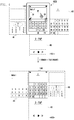
- FIG. 4 is a view illustrating an example of a screen interface for operating a terminal based on multiple inputs according to a first embodiment of the present invention.
- Each of screen regions 41, 43, and 45 may be a virtual arrangement screen region other than a real screen region.
- a portable terminal 100 user may create an input signal for activating a message or memo creating function using an input unit 120 through control of a terminal.
- the portable terminal 100 may provide a calculator function 41, a file playback function 45, and a calendar function 43 in a previously activated state according to a user request that supports a multi-tasking function.
- the portable terminal 100 may control a display panel 141 to output a screen corresponding to a calendar function on the display panel 141 as illustrated in a screen 43 of a screen 401 according to a request for activating the calendar function.
- the user may operate the input unit 102 or the touch panel 143 to generate an input signal for activating a message or memo creating function.
- the portable terminal 100 may control the display panel 141 to output a screen corresponding to a corresponding message or memo function.
- the portable terminal 100 may control a screen 43 corresponding to a previously activated calendar function to be performed by background processing based on a multi-tasking function.
- the controller 160 may control activation of a touch panel for inputting characters.
- the user may create a touch-down event having one touched point 1P at a known region of the display panel 141; e.g., at one side of a region in which an input character is output.
- the portable terminal 100 may change a type of a selection user function according to multiple inputs to be later provided.
- a sensor 170 of the portable terminal 100 may collect a sensor signal corresponding to the tilt operation.
- the portable terminal 100 may control the display panel 141 to output a screen 43 corresponding to a calendar function as illustrated in a screen 403.
- a screen 41 corresponding to a calculator function may be output on the display panel 141.
- a screen 45 corresponding to a file playback function may be output on the display panel 141.
- the portable terminal 100 may perform a control operation to output icons 51, 53, and 55 capable of identifying other user functions to be selected at one side of the display panel 141 according to a tilt direction in order to support a "multiple-input" mode.
- the other user functions may become user functions that are previously activated by a multi-tasking function but have not yet been selected. Accordingly, the number and forms of the icons 51, 53, and 55 may be changed according to the number and types of the other user functions being performed by the multi-tasking function.
- a touch event having one touched point 1P when a file playback function is not performed, although a touch event having one touched point 1P occurs, the icon 55 may not be output on the display panel 141.
- four user functions in addition to the user function being currently output on the display panel 141, may be activated by a multi-tasking function, a screen may be switched to a corresponding user function by an upward lift or tilt .
- a touch-down event having one touched point 1P is output, an icon corresponding to an upward tilt direction may be output on the display panel 141.
- icons indicating a multi-tasking based user function may be output at a predetermined region of a display panel 141 in a generation direction of a sensor signal.
- the screen corresponding to a message or memo creating function may be virtually arranged in a region of a screen 41, and a screen of a calculator function may be virtually arranged at a region of the screen 43. Accordingly, the user may perform a touch-down event and left tilt opposed to a previously performed right tilt for a restoring function to a previous screen.
- FIG. 5 is a view illustrating an example of a screen interface for operating a terminal based on multiple inputs according to a second embodiment of the present invention.
- a portable terminal 100 of the present invention may output a screen on which at least one of a certain menu icon or a widget icon is output on the display panel 141 as illustrated in a screen 501 on the display panel 141 according to the control of the user. Further, the portable terminal 100 may support switching to another menu page or widget page according to the control of the user, in particular, to generation of a left or right sweep event on the touch panel 143.
- the portable terminal 100 of the present invention may control the movement of a screen to a first menu page of a plurality of menu pages as illustrated in a screen 503.
- the movement of the screen to the first menu page may be performed regardless of the number of current menu pages. That is, if a touch-down event of a first touched point 1P1 and a shaking sensor signal are collected in a state in which menu pages 2- 9 are output on the display panel 141, the controller 160 of the portable terminal 100 may control the display panel 141 to output the first menu page.
- the portable terminal 100 may control the screen movement to a last page (i.e., the ninth menu page) of the plurality of menu pages in as illustrated in screen 505.
- the screen movement to the last menu page may be performed regardless of the number of menu pages if the second touch and shaking sensor signal is generated in a state in which menu pages 1-8 are displayed.
- the first touched point 1P1 and the second touched point 1P2 may become an optional point on the display panel 141.
- the controller 160 may allot or assign a left region and a right region of a center line of the display panel 141 to a region generating a first touch and a region generating a second touch so that the user easily recognizes the region and the corresponding input.
- the portable terminal 100 of the present invention may control a screen movement to a first or a last page to be performed in a certain user function, for example in a page view function according to a multiple input signal.
- FIG. 6 is a view illustrating an example of a screen interface for operating a terminal based on multiple inputs according to a third embodiment of the present invention.
- the Multiple Input mode can be setting according to a user setting or default mode, or activating a specific program
- a portable terminal 100 of the present invention may output an e-book screen according to the control of the user.
- the user may perform a control operation to generate an input signal for selecting e-book contents.
- the controller 160 of the portable terminal 100 may activate corresponding e-book contents and control the display panel 141 to output a certain page corresponding to activation of the e-book contents on the display panel 141.
- the controller 160 may perform a control operation to output various auxiliary icons 31, 33, 35, and 37 supporting a page skip function on a specific region of the display panel 141 as shown. For example, the controller 160 performs a control operation to output an icon 31 for selecting a previous page, an icon 33 for selecting a next page, an icon 35 for supporting next skip two pages, an icon 37 for supporting a skip previous two pages at a left center, a right center, an upper center, and a lower center of the display panel, respectively.
- the user may generate a touch-down event having one touched point 1P at a certain region of the display panel 141 and then tilt the portable terminal 100 for page skip operation by referring to the icons 31, 33, 35, and 37 output on the display panel 141. That is, the controller 160 may perform a page skip control operation of e-book contents according to a touch-down event corresponding to one touched point 1P and a tilt direction. For example, if the user controls the portable terminal 100 to generate a touch-down event and a lower direction tilt sensor signal, the controller 160 may control the display panel 141 to output a page corresponding to 2 previous pages from the current page on the display panel 141. In the case, there are no previous pages, the controller 160 may perform a control operation to temporarily output a message indicating that a current page is either the first or second page as two previous pages do not exist.
- FIG. 7 is a view illustrating an example of a screen interface for operating a terminal based on multiple inputs according to a fourth embodiment of the present invention.
- a portable terminal 100 of the present invention may control a display panel 141 to output a menu screen as illustrated in a screen 701 according to the control of the user or previous setting after initialization.
- the portable terminal 100 may control the display panel 141 to output a screen corresponding to activation of an MP3 function as illustrated in a screen 703.
- the portable terminal 100 may perform a control operation to play certain contents selected according to detection of an input signal or preset contents and output a corresponding audio signal through an audio processor 130.
- the user may create an input signal for activating a user function for a message or memo creating function according to an operation of a multi-tacking function. Accordingly, the portable terminal 100 may control the display panel 141 to output a user interface for the message or memo creating function as illustrated in screen 705.
- the user wants to restore to an initial user function screen, namely, a screen 701 corresponding to a main page, the user may perform a control operation to generate a shaking sensor signal together with a first touch corresponding to a touch-down event having one touched point 1P on a certain region. Accordingly, the portable terminal 100 may perform restoration from a screen 705 to a screen 701 as shown.
- the controller 160 of the portable terminal 100 may maintain an MP3 function, a message creating function, or a memo creating function as a multi-tasking function.
- the multiple inputs operation of the present invention may support a home screen function switched to a desired page of a certain user function through generation of a certain "multiple-input" signal.
- a corresponding user function in a page switching to the home screen function may be controlled according to a user's setting.
- the portable terminal 100 when the portable terminal 100 generates a shaking sensor signal together with a touch event having one touched point 1P, the terminal supports rapid switching to an "idle screen", a "menu screen", or a "lock screen” designated as a home screen, and the home screen designation screen may be controlled according to the user's setting as illustrated above.
- FIG. 8 is a view illustrating an example of a screen interface for operating a terminal based on multiple inputs according to a fifth embodiment of the present invention.
- a portable terminal 100 of the present invention may maintain a "lock state" as illustrated in a screen 801 according to the control of the user or preset schedule information.
- the portable terminal 100 may perform a control operation to output icons indicating a guide message guiding alarm of at least one of a missed call or an unread message on the display panel 141 in the lock state as illustrated in a screen 801. The user may check the missed call or the unread message by checking the display panel 141.
- a missed call icon when a missed call icon is output, the user creates a first touch corresponding to a touch-down event having a first touched point 1P1 and a certain sensor signal, for example, a sensor signal corresponding to a shaking the portable terminal 100 may control the display panel 141 to output a screen interface capable of checking the missed call as illustrated in a screen 803. Accordingingly, the user may check a missed call list through a screen 803.
- the user may perform a control operation to generate a "multiple-input" command, for example, a touch-down event in a certain region among regions of a display panel 141 in the screen 803 and a certain sensor signal, for example, a shaking sensor signal, for switching to a lock state like the state 801.
- the controller 160 of the portable terminal 100 may control switching from a screen 803 to a screen 801.
- the controller 160 outputs the screen 801 and may perform a control operation to remove a corresponding missed call from the screen 801 through the process of checking the missed call. In this case, only a "Unread Message" icon region may be output on the screen 801.
- the controller 160 may control the display panel 141 outputting a unread message list as illustrated in a screen 805.
- the user may generate a touch-down event and a shaking sensor signal as illustrated in a description of the screen 803 for restoration to the screen 801.
- the controller 160 of the portable terminal 100 may perform a control operation to remove the unread message from the screen 801 through the process of checking the unread message.
- the controller 160 may perform a control operation not to perform a separate operation change.
- the portable terminal 100 may perform a control operation to release a set "lock state".
- the portable terminal 100 may perform a control operation to output at least one of a missed call list or an unread message list on the display panel together with a release of the lock state. That is, the portable terminal 100 may perform a control operation to perform a certain user function together with a release of a touch lock according to generation of a touch-down event having one or two touched points and a preset certain sensor signal of the touch screen 140 as well as a touch-down event and certain shaking of the portable terminal. Further, when a touch-down event having one or two touched points and a certain sensor signal are generated in a released state of the touch lock, the portable terminal 100 of the present invention may control to the terminal back a touch lock state.
- a portable terminal 100 of the present invention may control the display panel 141 to output a certain image file according to the control of the user as illustrated in a screen 901. To do this, the user may perform a control operation to generate an input signal to activate a photograph file search function or a gallery function.
- the user may control the portable terminal 100 to generate the second touch corresponding to a touch-down event having two touched points 2P1 and 2P2 on the touch panel 143 and a sensor signal corresponding to tilt in a predetermined direction, for example, upward direction in a state that a certain image file is output on the display panel 141.
- the controller 160 may perform a control operation to zoom-out and output an image displayed on the display panel 141 as illustrated in a screen 903. Further, when the foregoing second touch and a sensor signal corresponding to tilt in a downward direction are generated, the controller 160 may perform a control operation to zoom-in and output the image displayed on the display panel 141.
- the upward direction may be a direction tilting an upper edge of the portable terminal 100 in an outside direction based on a body (away from the user)of the user substantially gripping the portable terminal 100.
- the downward direction may be a direction tilting an upper edge of the portable terminal 100 in an inside direction based on a body of the user (toward the user) substantially gripping the portable terminal 100.
- a type of a sensor signal is an upper or lower tilt direction.
- the present invention is not limited thereto.
- a switching function from a screen 901 to a screen 903 may perform a control operation to perform a second touch corresponding to a touch-down event having two touched pointes 2P1 and 2P2, and a zoom-out function in the case of a direction in which the portable terminal 100 is spaced apart from the user and a zoom-in function in the case of a direction in which the portable terminal 100 gets close to the user .
- the controller 160 may perform a control operation to output an enlarged image.
- the controller 160 may perform a control operation to output a reduced image.
- zoom-in and zoom-out functions based on multiple inputs of the present invention are equally applicable to not only image enlargement and reduction functions but also extension and reduction functions with respect to a subject when taking a picture.
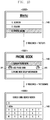
- FIG. 10 is a view illustrating an example of a screen interface for operating a terminal based on multiple inputs according to a seventh embodiment of the present invention.
- a portable terminal 100 of the present invention may output a phone book menu on a display panel 141 as illustrated in a screen 1001 according to the control of the user. To do this, the user may select an item for selecting the phone book menu among menu items.
- the user may control the portable terminal 100 to generate a certain sensor signal, for example, a tilt sensor signal corresponding to tilt in an upward direction, while generating a second touch corresponding to a touch-down event having two touched points 2P1 and 2P2 in a predetermined region of the display panel 141 while the phone book menu is output of the display panel 141.
- the controller 160 may perform a control operation to output a menu screen corresponding to an upper item of a corresponding phone book menu as illustrated in a screen 1003.Further, the user may control the portable terminal 100 to generate a certain sensor signal, for example, a tilt sensor signal corresponding to a tilt in a downward direction while generating a second touch corresponding to a touch-down event having two touched points 2P1 and 2P2 at a predetermined region of the display panel 141.
- the controller 160 may control the display panel 141 to output a "search using search words" screen corresponding to a certain item selected from a corresponding phone book menu, for example, a detailed item of an item "search phone book” as illustrated in a screen 1005.
- the operating method of a terminal based on "multiple-input" commands may rapidly perform movement of an upper or lower category according to a type and a form of sensor signal when a certain sensor signal is generated while maintaining a touch-down event having two touched points 2P1 and 2P2.
- FIG. 11 is a view illustrating an example of a screen interface for operating a terminal based on multiple inputs according to an eighth embodiment of the present invention.
- a portable terminal 100 of the present invention may control the display panel 141 to output an image file according to the control of the user.
- the user may control generation of an input signal for playing a certain image stored in the memory 150, for example, a photograph file or a moving image file.
- the portable terminal 100 performs a control operation to play a file selected by the user and output a corresponding photograph image or moving image on the display panel 141 as illustrated in a screen 1101.
- the user may generate a second touch corresponding to a touch-down event having two touched points 2P1 and 2P2 on the touch panel 141, and generate a certain sensor signal, for example, tilt the portable terminal 100 upward or downward.
- the portable terminal 100 may perform a control operation to capture or extend a predetermined region SP of the display panel 141 based on two touched points 2P1 and 2P2 as illustrated in a screen 1103.
- the predetermined region SP based on the two touched points 2P1 and 2P2 may become a region in a closed curve formed by connecting virtual left and right axes to each other based on the two touched points 2P1 and 2P2.
- the sensor signal is a signal corresponding to a tilt operation of the portable in a predetermined direction.
- the present invention is not limited thereto. That is, the user may shake the portable terminal 100 together with the second touch to generate a shaking sensor signal.
- the shaking operation may include shaking back and forth as well as shaking left and right.
- FIG. 12 is a view illustrating an example of a screen interface for operating a terminal based on multiple inputs according to a ninth embodiment of the present invention.
- a portable terminal 100 of the present invention may control the display unit 141 to output an idle screen or a certain image as illustrated in a screen 1201 according to the control of the user or preset schedule information.
- the user may perform an operation for generating a "multiple-input" signal to activate a certain user function on the display panel 141 on which the idle screen or the certain image is output.
- the user may generate a second touch corresponding to a touch-down event having two touched points 2P1 and 2P2 at a certain region of the display panel 141 as shown, and tilt the portable terminal 100 to a predetermined direction in a maintained state of the touch-down event.
- the controller 160 may perform a control operation to resize the image or the idle screen output on a screen 1201 to a predetermined size and arrange it at a side of a screen, for example, a center thereof, and to output certain menu icons on a portion of the display panel 141 created according to the adjustment of the size of the image or the idle screen.
- certain menu icons may be output on the unoccupied area of the display panel 141 in a direction, namely, an upward direction in which the tilt sensor signal is collected.
- the size of an additional region in which menu icons are arranged on the display panel 141 may be changed according the size of the sensor signal, namely, a tilt angle.
- the additional region output on the display panel 141 in which certain menu icons are arranged may be large.
- the additional region output on the display panel 141 in which certain menu icons are arranged may be small.
- the number of menu icons output on a corresponding additional region may be changed according to the size of the arranged additional region. That is, when the arranged additional region is large more menu icons may be arranged on the additional region. When the arranged additional region is small, less menu icons may be arranged on the additional region.
- the user may select one from the menu icons output on the display panel 141 to operate a certain user function.
- the screen 1203 may be substituted by a screen corresponding to the selected user function.
- an output direction of a certain menu icon is an upper blank of the display unit.
- the menu icon(s) may be output on the display unit in a tilt direction or a direct opposed thereto.
- the user may release a touch-down event to select a certain icon among the menu icons output on the display unit. Accordingly, although a touch in at least a partial point of the touch-down event is released in a state of a screen 1203, the portable terminal 100 may maintain a corresponding screen state.
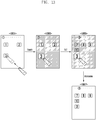
- FIG. 13 is a view illustrating an example of a screen interface for operating a terminal based on multiple inputs according to a tenth embodiment of the present invention.
- a portable terminal 100 of the present invention may perform a control operation to output an idle screen on a display panel 141 according to the control of the user or preset schedule information, or output a preset menu screen on the display panel 141 as illustrated in a screen 1301.
- the portable terminal 100 may output a menu screen corresponding to a first page among menu pages composed of a plurality of pages.
- the first page of a screen is configured by a screen on which a plurality of menu items, for example, three menus are arranged.
- a user of the portable terminal 100 wants to be able to move a certain menu item, for example, a "3" menu item to another menu page. Accordingly, the user may create a touch-down event on a touch screen 140 on which a corresponding item, namely, a "3" menu item is output. In particular, the user may create a touch event of a long touch form having a touch-down state for longer than a predetermined time on a region in which the "3" menu item is output..
- the portable terminal 100 may perform a control operation to divide a selected "3" menu item as illustrated in a screen 1303 into a previously arranged menu page and a layer phase.
- the portable terminal 100 changes illumination and saturation of a menu page in which a "1," and "2" menu item are arranged and increases the size of the selected "3" menu item so that the "3" menu item visibly expresses that the layer phase is separated from a menu page.
- the user may continuously maintain a touch-down event.
- the user may perform a control operation to tilt the portable terminal 100 in a predetermined direction, for example, in a left direction in a maintained state of the touch-down event, so as to search a menu page for moving the "3" menu item.
- the portable terminal 100 may perform a control operation to perform a page skip of a menu page.
- the portable terminal 100 may output screen variation according to the page skip on the display panel.
- the "3" menu item maintains a continuously output state in a location in which the touch-down event is maintained.
- the third page of a menu may be output on a touch screen as illustrated in a screen 1305.
- a user of the portable terminal 100 may perform a drag operation to a space in which a "3" menu item will be arranged while maintaining a touch-down state to move the "3" menu item.
- the drag operation may not be performed.
- the user of the portable terminal 100 may perform a control operation to generate a touch release event so as to apply the "3" menu item to a third page of a menu.
- the "3" menu item may be arranged at a predetermined location of the third page of a menu as illustrated in a screen 1307.
- the portable terminal 100 may control the size of the "3" menu item to be similar to that of other menu items.
- the portable terminal 100 may change illumination and saturation of a menu page in screens on which a "3" menu item are output for movement, namely, screens 1303 and 1305 to display that the "3" menu item is being separated from the layer phase.
- a menu item, namely, the "3" menu item is controlled to belong to a moved menu item the portable terminal 100 may display indicating that the "3" menu item is arranged on the same layer together with other menu items.
- the portable terminal 100 of the present invention may easily move a menu item to another page through a touch down event and tilt operation.
- the "3" menu item in a screen 1303 may be moved to another region of the same menu page according to generation of a drag event by the user.
- a menu page was described by way of example in the foregoing embodiment, the menu item may become a widget item or an item for operating a certain user function.
- a configuration output on an unoccupied area of a display unit based on multiple inputs are menu icons.
- the present invention is not limited thereto. That is, items output on the unoccupied area of the display unit based on multiple inputs may become user function items according to a multi-tacking function currently performed by the portable terminal. Accordingly, icons output on the unoccupied area of the display unit may be icons corresponding to user function items according to the multi-tacking function. As a result, the number and a type of icon output on a blank of the display unit may be changed according to a type and a form of a performed user function.
- an operation of a terminal based on multiple inputs changes a primary screen, that is, controls the size of an image being output on a display panel 141 when generating a touch-down event having two touched points 2P1 and 2P2 and perform an icon output function being an additional function based on continuous multiple inputs of the touch-down event and the sensor signal.
- an operating method of a portable terminal based on multiple inputs and a portable terminal supporting the same may generate distinct commands according to the number of touched points of a touch-down event and a type and a form of a sensor signal, and operate respective user functions according the generated distinct commands.
- the present invention may generate distinct "multiple-input" commands according to a type of a currently activated user function even in the case of the same touch-down event and sensor signal to rapidly and conveniently generate an input signal.
- the foregoing mobile terminal 100 may further include various additional modules according to provision forms. That is, when the mobile terminal 100 is a communication terminal, it may include constructions that are not mentioned such as a camera module for photographing still images/moving images of a subject, an interface exchanging data in a wired communication scheme or a wireless communication scheme of the mobile terminal 100, an Internet communication module communicating with an Internet to perform an Internet function, and a digital broadcasting module receiving and broadcasting digital broadcastings. Since the structural elements can be variously changed according to convergence trend of digital devices, all elements need not be listed to express the operations of the invention claims. However, the portable terminal 100 may include structural elements equivalent to the foregoing structural elements. Further, the terminal 100 of the present invention may be substituted by specific constructions in the foregoing arrangements according to the provided form or another structure. This can be easily understood to those skilled in the present art.
- the computer, the processor, microprocessor controller or the programmable hardware include memory components, e.g., RAM, ROM, Flash, etc. that may store or receive software or computer code that when accessed and executed by the computer, processor or hardware implement the processing methods described herein.
- memory components e.g., RAM, ROM, Flash, etc.
- the execution of the code transforms the general purpose computer into a special purpose computer for executing the processing shown herein.
Landscapes
- Engineering & Computer Science (AREA)
- Theoretical Computer Science (AREA)
- General Engineering & Computer Science (AREA)
- Human Computer Interaction (AREA)
- Physics & Mathematics (AREA)
- General Physics & Mathematics (AREA)
- Computer Hardware Design (AREA)
- Computer Networks & Wireless Communication (AREA)
- Signal Processing (AREA)
- User Interface Of Digital Computer (AREA)
- Telephone Function (AREA)
- Position Input By Displaying (AREA)
Claims (16)
- Terminal portable (100) pour supporter une opération basée sur de multiples entrées, le terminal comprenant :un panneau tactile (143) générant un événement tactile en réponse à une détermination d'un contact sur le panneau tactile, ledit événement tactile comprenant des informations associées avec au moins un certain nombre de points de contact (1P1, 1P2) associés avec le contact et des emplacements correspondants du ou de chaque point de contact ;un capteur de mouvement (170) générant un signal de capteur suivant la détermination d'un mouvement ;un dispositif de commande (160) comprenant :
un processeur en communication avec une mémoire, la mémoire comprenant un code, qui, lorsque le processeur y accède, détermine l'exécution par le processeur de :la réception de l'événement tactile ;la réception du signal de capteur ;la détermination de la réception du signal de capteur pendant le maintien de l'événement tactile ;la génération d'une commande basée sur la combinaison d'au moins l'événement tactile et l'événement de capteur lors de la réception du signal d'entrée du capteur pendant le maintien de l'événement tactile, la commande étant tributaire de l'emplacement d'au moins un point tactile et du nombre de points tactiles ; etl'exécution d'une fonction utilisateur associée avec la commande ; etun dispositif d'affichage (141) produisant un résultat de l'utilisation de la commande. - Terminal portable selon la revendication 1, la commande étant basée en outre sur une fonction utilisateur actuellement active.
- Terminal portable selon la revendication 1, le capteur de mouvement (170) étant au moins un des suivants : un capteur de vitesse, un capteur de mouvement, un capteur d'accélération, un capteur gyroscopique, un capteur de pression, un capteur de vibration, un capteur géomagnétique, un capteur optique, et un photo-capteur.
- Terminal portable selon la revendication 1, comprenant en outre la détermination de l'exécution, par le processeur, de fonctions utilisateur respectives associées avec au moins un de l'événement tactile reçu et du signal de capteur reçu, le signal de capteur étant reçu après la cessation du maintien du signal tactile.
- Terminal portable selon la revendication 1, l'événement tactile étant maintenu jusqu'à la détection d'un événement de relâchement du toucher,
le panneau tactile (143) comprenant au moins un emplacement dans lequel est détecté un événement tactile,
un nombre de l'au moins un emplacement sur le panneau tactile correspondant à des événements tactiles étant tributaire d'une fonction utilisateur connexe. - Terminal portable selon la revendication 5, les emplacements sur le panneau tactile étant préfixés en fonction de la fonction utilisateur connexe.
- Terminal portable selon une quelconque des revendications précédentes, l'événement tactile étant maintenu jusqu'à la détection d'un relâchement du toucher.
- Terminal portable selon une quelconque des revendications 1 à 6, la commande étant basée en outre sur une fonction utilisateur en cours d'activation.
- Terminal portable selon une quelconque des revendications 1 à 6, comprenant en outre :
un dispositif d'affichage (141) pour la présentation de résultats de l'utilisation de la commande en fonction de la commande générée. - Terminal portable selon une quelconque des revendications précédentes,
le terminal étant adapté en outre pour afficher un écran à l'état verrouillé, lorsqu'il se trouve à l'état verrouillé, et des icônes de sortie indiquant au moins un d'un appel manqué ou d'un message non lu sur des régions respectives de l'écran à l'état verrouillé en réponse à un appel ou un message, demandant une connexion d'appel, reçu à l'état verrouillé, et l'utilisateur ne répondant pas à l'appel ou au message reçu, le panneau tactile étant adapté pour générer ledit événement tactile en réponse à une détermination d'un contact sur le panneau tactile lorsque le terminal se trouve à l'état verrouillé, ledit dispositif de commande étant adapté pour exécuter ladite fonction utilisateur en réponse à la réception de l'événement tactile et de l'événement de capteur lorsque le terminal se trouve à l'état verrouillé, et la fonction utilisateur exécutée en réponse à la réception de l'événement tactile et de l'événement de capteur lorsque le terminal se trouve à l'état verrouillé étant tributaire de l'emplacement du point tactile sur l'écran à l'état verrouillé relativement auxdites régions. - Méthode utilisable dans une unité de commande, la méthode causant la réception, par l'unité de commande, en provenance d'un panneau tactile, d'un événement tactile, l'événement tactile comprenant des informations concernant un certain nombre de points de contact associés avec un contact sur le panneau tactile et un emplacement correspondant du ou de chaque point de contact ;
la réception, en provenance d'une unité de capteur, d'un signal de capteur, le signal de capteur comprenant des informations concernant un type et une forme d'un capteur générant le signal de capteur ;
la détermination si le signal de capteur est reçu pendant le maintien de l'événement tactile ; et
la génération d'une commande sur la base de la combinaison d'au moins l'événement tactile et de l'événement de capteur lors de la réception du signal d'entrée du capteur pendant le maintien de l'événement tactile, la commande étant tributaire de l'emplacement d'au moins un point de contact et du nombre de points de contact,
l'exécution d'une fonction utilisateur associée avec la commande ; et
la commande à un dispositif d'affichage de la production d'un résultat de l'utilisation de la commande. - Méthode selon la revendication 11, la commande étant basée en outre sur une fonction utilisateur actuellement active.
- Méthode selon la revendication 11, le capteur de mouvement étant au moins un des suivants : un capteur de vitesse, un capteur de mouvement, un capteur d'accélération, un capteur gyroscopique, un capteur de pression, un capteur de vibration, un capteur géomagnétique, un capteur optique, et un photo-capteur.
- Méthode selon la revendication 11, comprenant en outre :
l'exécution de fonctions utilisateur respectives associées avec au moins un de l'événement tactile reçu et du signal de capteur reçu, le signal de capteur étant reçu après la cessation du maintien du signal tactile. - Méthode selon la revendication 11, l'événement tactile étant maintenu jusqu'à la détection d'un événement de relâchement du toucher, le panneau tactile comprenant au moins un emplacement dans lequel est détecté un événement tactile,
un nombre de l'au moins un emplacement sur le panneau tactile correspondant à des événements tactiles étant tributaire d'une fonction utilisateur connexe,
les emplacements sur l'écran tactile étant préfixés selon la fonction utilisateur connexe. - Méthode selon une quelconque des revendications 11 à 15, l'événement tactile et le signal de capteur étant reçus alors que l'unité de commande se trouve à l'état verrouillé.
Priority Applications (1)
| Application Number | Priority Date | Filing Date | Title |
|---|---|---|---|
| EP15193018.7A EP3007054A1 (fr) | 2011-02-09 | 2012-01-23 | Procédé de fonctionnement de terminal basé sur plusieurs entrées et terminal portable le supportant |
Applications Claiming Priority (1)
| Application Number | Priority Date | Filing Date | Title |
|---|---|---|---|
| KR1020110011352A KR101691478B1 (ko) | 2011-02-09 | 2011-02-09 | 통합 입력에 따른 단말기 운용 방법 및 이를 지원하는 휴대 단말기 |
Related Child Applications (2)
| Application Number | Title | Priority Date | Filing Date |
|---|---|---|---|
| EP15193018.7A Division EP3007054A1 (fr) | 2011-02-09 | 2012-01-23 | Procédé de fonctionnement de terminal basé sur plusieurs entrées et terminal portable le supportant |
| EP15193018.7A Division-Into EP3007054A1 (fr) | 2011-02-09 | 2012-01-23 | Procédé de fonctionnement de terminal basé sur plusieurs entrées et terminal portable le supportant |
Publications (3)
| Publication Number | Publication Date |
|---|---|
| EP2487555A2 EP2487555A2 (fr) | 2012-08-15 |
| EP2487555A3 EP2487555A3 (fr) | 2013-06-19 |
| EP2487555B1 true EP2487555B1 (fr) | 2019-06-26 |
Family
ID=45607585
Family Applications (2)
| Application Number | Title | Priority Date | Filing Date |
|---|---|---|---|
| EP12152155.3A Active EP2487555B1 (fr) | 2011-02-09 | 2012-01-23 | Procédé de fonctionnement de terminal basé sur plusieurs entrées et terminal portable le supportant |
| EP15193018.7A Ceased EP3007054A1 (fr) | 2011-02-09 | 2012-01-23 | Procédé de fonctionnement de terminal basé sur plusieurs entrées et terminal portable le supportant |
Family Applications After (1)
| Application Number | Title | Priority Date | Filing Date |
|---|---|---|---|
| EP15193018.7A Ceased EP3007054A1 (fr) | 2011-02-09 | 2012-01-23 | Procédé de fonctionnement de terminal basé sur plusieurs entrées et terminal portable le supportant |
Country Status (14)
| Country | Link |
|---|---|
| US (2) | US9001056B2 (fr) |
| EP (2) | EP2487555B1 (fr) |
| JP (1) | JP6012636B2 (fr) |
| KR (1) | KR101691478B1 (fr) |
| CN (2) | CN105700628A (fr) |
| AP (1) | AP3893A (fr) |
| AU (1) | AU2011358860B2 (fr) |
| BR (1) | BR112013020430A2 (fr) |
| CA (1) | CA2825326C (fr) |
| DE (1) | DE202012013286U1 (fr) |
| MX (1) | MX2013008064A (fr) |
| MY (1) | MY164081A (fr) |
| RU (1) | RU2604990C2 (fr) |
| WO (1) | WO2012108620A2 (fr) |
Families Citing this family (29)
| Publication number | Priority date | Publication date | Assignee | Title |
|---|---|---|---|---|
| JP5830997B2 (ja) * | 2011-07-19 | 2015-12-09 | ソニー株式会社 | 情報処理装置、情報処理方法、およびプログラム |
| WO2013032187A1 (fr) * | 2011-09-01 | 2013-03-07 | Samsung Electronics Co., Ltd. | Terminal mobile pour effectuer un déverrouillage d'écran sur la base d'un mouvement et procédé associé |
| US20130093719A1 (en) | 2011-10-17 | 2013-04-18 | Sony Mobile Communications Japan, Inc. | Information processing apparatus |
| KR101819513B1 (ko) * | 2012-01-20 | 2018-01-17 | 엘지전자 주식회사 | 이동단말기 및 그 제어방법 |
| JP2014068262A (ja) * | 2012-09-26 | 2014-04-17 | Kyocera Corp | 携帯端末、制御方法及び制御プログラム |
| KR20140067755A (ko) * | 2012-11-27 | 2014-06-05 | 삼성전자주식회사 | 전자 기기 및 그의 페이지 이동 표시 방법 |
| WO2014101116A1 (fr) * | 2012-12-28 | 2014-07-03 | Nokia Corporation | Réponse à des gestes d'entrée d'un utilisateur |
| KR102146244B1 (ko) * | 2013-02-22 | 2020-08-21 | 삼성전자주식회사 | 휴대 단말에 대한 동작 관련 입력에 따라 복수개의 객체들의 표시를 제어하는 방법 및 이를 위한 휴대 단말 |
| US9189084B2 (en) * | 2013-03-11 | 2015-11-17 | Barnes & Noble College Booksellers, Llc | Stylus-based user data storage and access |
| JP5666641B2 (ja) * | 2013-03-13 | 2015-02-12 | パナソニック インテレクチュアル プロパティ コーポレーション オブアメリカPanasonic Intellectual Property Corporation of America | 情報端末 |
| US9760262B2 (en) * | 2013-03-15 | 2017-09-12 | Microsoft Technology Licensing, Llc | Gestures involving direct interaction with a data visualization |
| CN104063142B (zh) * | 2013-03-21 | 2017-08-29 | 联想(北京)有限公司 | 信息处理方法、装置和电子设备 |
| KR102135947B1 (ko) | 2013-08-26 | 2020-07-21 | 삼성전자주식회사 | 윈도우 영역 조정 방법 및 그에 따른 전자 장치 |
| US20150077381A1 (en) * | 2013-09-19 | 2015-03-19 | Qualcomm Incorporated | Method and apparatus for controlling display of region in mobile device |
| CN104598146B (zh) * | 2013-10-31 | 2019-12-24 | 深圳富泰宏精密工业有限公司 | 页面切换系统、触控装置及页面切换方法 |
| CN104866210B (zh) * | 2014-02-20 | 2019-10-29 | 联想(北京)有限公司 | 一种触摸屏操控方法、装置及电子设备 |
| EP3013032B1 (fr) * | 2014-05-29 | 2020-05-06 | Huawei Technologies Co., Ltd. | Procédé et appareil d'acquisition d'image |
| CN104021331A (zh) * | 2014-06-18 | 2014-09-03 | 北京金和软件股份有限公司 | 一种用于具有人脸识别功能的电子设备的信息处理方法 |
| US9851822B2 (en) * | 2014-06-29 | 2017-12-26 | TradAir Ltd. | Methods and systems for secure touch screen input |
| CN107077286A (zh) * | 2014-11-21 | 2017-08-18 | 京瓷办公信息系统株式会社 | 操作装置和操作方法 |
| KR102318610B1 (ko) * | 2015-01-30 | 2021-10-28 | 삼성전자주식회사 | 모바일 디바이스 및 모바일 디바이스의 디스플레이 방법 |
| CN105117159B (zh) * | 2015-08-27 | 2017-11-24 | 广东欧珀移动通信有限公司 | 一种字符处理方法及终端 |
| CN105824405A (zh) * | 2015-11-26 | 2016-08-03 | 维沃移动通信有限公司 | 一种移动终端的信息显示方法及装置 |
| CN108710456B (zh) * | 2018-04-04 | 2020-07-24 | Oppo广东移动通信有限公司 | 应用程序图标处理方法、装置以及移动终端 |
| CN111966278B (zh) * | 2020-08-28 | 2022-03-25 | 网易(杭州)网络有限公司 | 终端设备的提示方法、终端设备以及存储介质 |
| US11829593B2 (en) | 2021-04-30 | 2023-11-28 | Bytemix Corp. | Method for providing contents by using widget in mobile electronic device and system thereof |
| KR102374829B1 (ko) * | 2021-08-23 | 2022-03-16 | 주식회사 바이츠믹스 | 휴대용 전자 기기에서 피드의 좌우 스와이프를 지원하기 위한 방법 및 그 시스템 |
| KR102554030B1 (ko) * | 2021-07-26 | 2023-07-11 | 주식회사 플렉슬 | 하나의 화면 상에 전자 문서를 구성하는 페이지를 두 개의 페이지씩 동시에 표시할 수 있는 전자 장치 및 그 동작 방법 |
| CN114995675B (zh) * | 2021-09-30 | 2023-04-28 | 北京荣耀终端有限公司 | 触控跳点故障的检测方法、电子设备和可读存储介质 |
Family Cites Families (42)
| Publication number | Priority date | Publication date | Assignee | Title |
|---|---|---|---|---|
| JPH10301750A (ja) * | 1997-04-28 | 1998-11-13 | Matsushita Commun Ind Co Ltd | 携帯情報処理装置 |
| US8479122B2 (en) * | 2004-07-30 | 2013-07-02 | Apple Inc. | Gestures for touch sensitive input devices |
| JP2001147770A (ja) * | 1999-11-19 | 2001-05-29 | Nec Corp | 無線通信を利用した店舗向け情報処理システム及び携帯情報端末 |
| JP3955969B2 (ja) * | 2001-12-28 | 2007-08-08 | 株式会社ケンウッド | 移動体電話機 |
| JP2004287871A (ja) * | 2003-03-24 | 2004-10-14 | Hitachi Ltd | 携帯端末 |
| KR100661174B1 (ko) | 2005-09-23 | 2006-12-26 | 삼성전자주식회사 | 절전을 위한 클럭의 자동 온/오프가 가능한 모듈장치 및 그클럭 자동 온/오프방법 |
| CN100583013C (zh) * | 2005-09-23 | 2010-01-20 | 鸿富锦精密工业(深圳)有限公司 | 用户操作控制装置及其方法 |
| US7509588B2 (en) | 2005-12-30 | 2009-03-24 | Apple Inc. | Portable electronic device with interface reconfiguration mode |
| US8683362B2 (en) * | 2008-05-23 | 2014-03-25 | Qualcomm Incorporated | Card metaphor for activities in a computing device |
| US8564544B2 (en) * | 2006-09-06 | 2013-10-22 | Apple Inc. | Touch screen device, method, and graphical user interface for customizing display of content category icons |
| US8462109B2 (en) * | 2007-01-05 | 2013-06-11 | Invensense, Inc. | Controlling and accessing content using motion processing on mobile devices |
| JP5441921B2 (ja) | 2008-01-14 | 2014-03-12 | アップル インコーポレイテッド | 単一の無線の音声通話連続性(sr−vcc) |
| US8423076B2 (en) * | 2008-02-01 | 2013-04-16 | Lg Electronics Inc. | User interface for a mobile device |
| US8681093B2 (en) * | 2008-02-11 | 2014-03-25 | Apple Inc. | Motion compensation for screens |
| KR20090093766A (ko) | 2008-02-28 | 2009-09-02 | 황재엽 | 모바일 가상 기타의 지판 표시 장치 및 방법 |
| US20090270098A1 (en) | 2008-04-29 | 2009-10-29 | Gallagher Michael D | Method and Apparatus for User Equipment Registration in a Voice over Long Term Evolution via Generic Access |
| JP5537044B2 (ja) | 2008-05-30 | 2014-07-02 | キヤノン株式会社 | 画像表示装置及びその制御方法、コンピュータプログラム |
| KR101606834B1 (ko) | 2008-07-10 | 2016-03-29 | 삼성전자주식회사 | 움직임과 사용자의 조작을 이용하는 입력장치 및 이에적용되는 입력방법 |
| JPWO2010008078A1 (ja) * | 2008-07-17 | 2012-01-05 | 株式会社キャメロット | 情報端末 |
| US8300020B2 (en) | 2008-08-15 | 2012-10-30 | Apple Inc. | Hybrid inertial and touch sensing input device |
| KR101505198B1 (ko) * | 2008-08-18 | 2015-03-23 | 엘지전자 주식회사 | 휴대 단말기 및 그 구동 방법 |
| US8191011B2 (en) * | 2008-09-18 | 2012-05-29 | Microsoft Corporation | Motion activated content control for media system |
| KR101569427B1 (ko) | 2008-10-02 | 2015-11-16 | 삼성전자주식회사 | 휴대 단말기의 터치 입력 장치 및 그의 운영 방법 |
| KR20100058250A (ko) | 2008-11-24 | 2010-06-03 | 한데이비드 | 모바일 디바이스의 사용자 인터페이스 |
| KR101530546B1 (ko) * | 2008-11-28 | 2015-06-23 | 삼성전자주식회사 | 휴대 단말기의 입력 장치 및 방법 |
| US8558803B2 (en) | 2008-11-28 | 2013-10-15 | Samsung Electronics Co., Ltd. | Input device for portable terminal and method thereof |
| US20100162178A1 (en) | 2008-12-18 | 2010-06-24 | Nokia Corporation | Apparatus, method, computer program and user interface for enabling user input |
| KR101521932B1 (ko) | 2009-01-19 | 2015-05-20 | 엘지전자 주식회사 | 단말기 및 그 제어 방법 |
| JP2010211323A (ja) * | 2009-03-06 | 2010-09-24 | Sharp Corp | 入力システム、携帯端末、入出力装置、入力システム制御プログラム、コンピュータ読み取り可能な記録媒体、および、入力システムの制御方法 |
| JP5480517B2 (ja) * | 2009-03-26 | 2014-04-23 | 京セラ株式会社 | 電子機器 |
| WO2010110459A1 (fr) | 2009-03-26 | 2010-09-30 | 京セラ株式会社 | Équipement électronique, procédé de traitement d'informations et procédé d'affichage d'informations |
| US8601389B2 (en) * | 2009-04-30 | 2013-12-03 | Apple Inc. | Scrollable menus and toolbars |
| KR101613838B1 (ko) * | 2009-05-19 | 2016-05-02 | 삼성전자주식회사 | 휴대 단말기의 홈 스크린 지원 방법 및 이를 지원하는 휴대 단말기 |
| KR101646922B1 (ko) * | 2009-05-19 | 2016-08-23 | 삼성전자 주식회사 | 휴대 단말기의 통신 관련 기능 운용 방법 및 이를 지원하는 휴대 단말기 |
| US8593415B2 (en) * | 2009-06-19 | 2013-11-26 | Lg Electronics Inc. | Method for processing touch signal in mobile terminal and mobile terminal using the same |
| KR101612549B1 (ko) * | 2009-07-02 | 2016-04-14 | 엘지전자 주식회사 | 복수의 가상 스크린을 갖는 이동 단말기 및 그 제어 방법 |
| US20110130170A1 (en) | 2009-07-21 | 2011-06-02 | Lg Electronics Inc. | Mobile terminal and method of controlling the operation of the mobile terminal |
| KR20110008940A (ko) | 2009-07-21 | 2011-01-27 | 엘지전자 주식회사 | 휴대 단말기 및 그 동작방법 |
| KR101064245B1 (ko) | 2009-07-28 | 2011-09-14 | 이학도 | 참전복의 가공방법 |
| EP2496013B1 (fr) | 2009-10-28 | 2016-06-22 | Alcatel Lucent | Procédé et dispositif de transfert d'appel vidéo d'un domaine à commutation de paquets à un domaine à commutation de circuits |
| RU95142U1 (ru) * | 2010-02-05 | 2010-06-10 | ФГОУ ВПО Российский государственный университет имени Иммануила Канта (РГУ им. И. Канта) | Мультисенсорное дисплейное устройство |
| US8994646B2 (en) * | 2010-12-17 | 2015-03-31 | Microsoft Corporation | Detecting gestures involving intentional movement of a computing device |
-
2011
- 2011-02-09 KR KR1020110011352A patent/KR101691478B1/ko active Active
- 2011-12-09 US US13/315,435 patent/US9001056B2/en active Active
- 2011-12-20 MY MYPI2013002619A patent/MY164081A/en unknown
- 2011-12-20 RU RU2013137248/08A patent/RU2604990C2/ru active
- 2011-12-20 JP JP2013553339A patent/JP6012636B2/ja active Active
- 2011-12-20 AU AU2011358860A patent/AU2011358860B2/en active Active
- 2011-12-20 CA CA2825326A patent/CA2825326C/fr not_active Expired - Fee Related
- 2011-12-20 MX MX2013008064A patent/MX2013008064A/es active IP Right Grant
- 2011-12-20 WO PCT/KR2011/009850 patent/WO2012108620A2/fr not_active Ceased
- 2011-12-20 AP AP2013007080A patent/AP3893A/en active
- 2011-12-20 BR BR112013020430A patent/BR112013020430A2/pt not_active Application Discontinuation
-
2012
- 2012-01-23 DE DE202012013286.5U patent/DE202012013286U1/de not_active Expired - Lifetime
- 2012-01-23 EP EP12152155.3A patent/EP2487555B1/fr active Active
- 2012-01-23 EP EP15193018.7A patent/EP3007054A1/fr not_active Ceased
- 2012-02-09 CN CN201610023796.1A patent/CN105700628A/zh active Pending
- 2012-02-09 CN CN201210029078.7A patent/CN102693003B/zh active Active
-
2015
- 2015-03-25 US US14/667,802 patent/US10013098B2/en active Active
Non-Patent Citations (1)
| Title |
|---|
| None * |
Also Published As
| Publication number | Publication date |
|---|---|
| AU2011358860B2 (en) | 2016-12-22 |
| AU2011358860A1 (en) | 2013-07-11 |
| BR112013020430A2 (pt) | 2017-01-24 |
| RU2604990C2 (ru) | 2016-12-20 |
| EP2487555A2 (fr) | 2012-08-15 |
| MY164081A (en) | 2017-11-30 |
| EP3007054A1 (fr) | 2016-04-13 |
| JP6012636B2 (ja) | 2016-10-25 |
| KR101691478B1 (ko) | 2016-12-30 |
| CA2825326A1 (fr) | 2012-08-16 |
| CN105700628A (zh) | 2016-06-22 |
| KR20120091537A (ko) | 2012-08-20 |
| EP2487555A3 (fr) | 2013-06-19 |
| AP2013007080A0 (en) | 2013-08-31 |
| US10013098B2 (en) | 2018-07-03 |
| US20120200513A1 (en) | 2012-08-09 |
| CN102693003A (zh) | 2012-09-26 |
| DE202012013286U1 (de) | 2015-12-18 |
| CN102693003B (zh) | 2017-11-28 |
| CA2825326C (fr) | 2019-03-12 |
| WO2012108620A2 (fr) | 2012-08-16 |
| WO2012108620A3 (fr) | 2012-10-04 |
| MX2013008064A (es) | 2013-08-09 |
| US9001056B2 (en) | 2015-04-07 |
| RU2013137248A (ru) | 2015-02-20 |
| US20150199067A1 (en) | 2015-07-16 |
| AP3893A (en) | 2016-11-11 |
| JP2014508352A (ja) | 2014-04-03 |
Similar Documents
| Publication | Publication Date | Title |
|---|---|---|
| EP2487555B1 (fr) | Procédé de fonctionnement de terminal basé sur plusieurs entrées et terminal portable le supportant | |
| US12511023B2 (en) | Operating method for multiple windows and electronic device supporting the same | |
| EP4217842B1 (fr) | Gestion de capture de contenu d'écran | |
| CN105739813B (zh) | 用户终端设备及其控制方法 | |
| AU2014288039B2 (en) | Remote operation of applications using received data | |
| US8558803B2 (en) | Input device for portable terminal and method thereof | |
| US20110115817A1 (en) | Method and apparatus for operating a display unit of a mobile device | |
| US20150169216A1 (en) | Method of controlling screen of portable electronic device | |
| KR101864773B1 (ko) | 휴대 단말기의 표시부 운용 방법 및 장치 |
Legal Events
| Date | Code | Title | Description |
|---|---|---|---|
| PUAI | Public reference made under article 153(3) epc to a published international application that has entered the european phase |
Free format text: ORIGINAL CODE: 0009012 |
|
| AK | Designated contracting states |
Kind code of ref document: A2 Designated state(s): AL AT BE BG CH CY CZ DE DK EE ES FI FR GB GR HR HU IE IS IT LI LT LU LV MC MK MT NL NO PL PT RO RS SE SI SK SM TR |
|
| AX | Request for extension of the european patent |
Extension state: BA ME |
|
| RAP1 | Party data changed (applicant data changed or rights of an application transferred) |
Owner name: SAMSUNG ELECTRONICS CO., LTD. |
|
| PUAL | Search report despatched |
Free format text: ORIGINAL CODE: 0009013 |
|
| AK | Designated contracting states |
Kind code of ref document: A3 Designated state(s): AL AT BE BG CH CY CZ DE DK EE ES FI FR GB GR HR HU IE IS IT LI LT LU LV MC MK MT NL NO PL PT RO RS SE SI SK SM TR |
|
| AX | Request for extension of the european patent |
Extension state: BA ME |
|
| RIC1 | Information provided on ipc code assigned before grant |
Ipc: G06F 3/048 20130101ALI20130516BHEP Ipc: G06F 1/16 20060101AFI20130516BHEP |
|
| 17P | Request for examination filed |
Effective date: 20131218 |
|
| STAA | Information on the status of an ep patent application or granted ep patent |
Free format text: STATUS: EXAMINATION IS IN PROGRESS |
|
| 17Q | First examination report despatched |
Effective date: 20170914 |
|
| REG | Reference to a national code |
Ref country code: DE Ref legal event code: R079 Ref document number: 602012061339 Country of ref document: DE Free format text: PREVIOUS MAIN CLASS: G06F0001160000 Ipc: G06F0003048800 |
|
| RIC1 | Information provided on ipc code assigned before grant |
Ipc: G06F 1/16 20060101ALI20181219BHEP Ipc: G06F 3/0488 20130101AFI20181219BHEP |
|
| GRAP | Despatch of communication of intention to grant a patent |
Free format text: ORIGINAL CODE: EPIDOSNIGR1 |
|
| STAA | Information on the status of an ep patent application or granted ep patent |
Free format text: STATUS: GRANT OF PATENT IS INTENDED |
|
| INTG | Intention to grant announced |
Effective date: 20190128 |
|
| GRAS | Grant fee paid |
Free format text: ORIGINAL CODE: EPIDOSNIGR3 |
|
| GRAA | (expected) grant |
Free format text: ORIGINAL CODE: 0009210 |
|
| STAA | Information on the status of an ep patent application or granted ep patent |
Free format text: STATUS: THE PATENT HAS BEEN GRANTED |
|
| AK | Designated contracting states |
Kind code of ref document: B1 Designated state(s): AL AT BE BG CH CY CZ DE DK EE ES FI FR GB GR HR HU IE IS IT LI LT LU LV MC MK MT NL NO PL PT RO RS SE SI SK SM TR |
|
| REG | Reference to a national code |
Ref country code: GB Ref legal event code: FG4D |
|
| REG | Reference to a national code |
Ref country code: CH Ref legal event code: EP |
|
| REG | Reference to a national code |
Ref country code: AT Ref legal event code: REF Ref document number: 1149072 Country of ref document: AT Kind code of ref document: T Effective date: 20190715 |
|
| REG | Reference to a national code |
Ref country code: DE Ref legal event code: R096 Ref document number: 602012061339 Country of ref document: DE |
|
| REG | Reference to a national code |
Ref country code: IE Ref legal event code: FG4D |
|
| REG | Reference to a national code |
Ref country code: NL Ref legal event code: FP |
|
| PG25 | Lapsed in a contracting state [announced via postgrant information from national office to epo] |
Ref country code: FI Free format text: LAPSE BECAUSE OF FAILURE TO SUBMIT A TRANSLATION OF THE DESCRIPTION OR TO PAY THE FEE WITHIN THE PRESCRIBED TIME-LIMIT Effective date: 20190626 Ref country code: NO Free format text: LAPSE BECAUSE OF FAILURE TO SUBMIT A TRANSLATION OF THE DESCRIPTION OR TO PAY THE FEE WITHIN THE PRESCRIBED TIME-LIMIT Effective date: 20190926 Ref country code: SE Free format text: LAPSE BECAUSE OF FAILURE TO SUBMIT A TRANSLATION OF THE DESCRIPTION OR TO PAY THE FEE WITHIN THE PRESCRIBED TIME-LIMIT Effective date: 20190626 Ref country code: AL Free format text: LAPSE BECAUSE OF FAILURE TO SUBMIT A TRANSLATION OF THE DESCRIPTION OR TO PAY THE FEE WITHIN THE PRESCRIBED TIME-LIMIT Effective date: 20190626 Ref country code: LT Free format text: LAPSE BECAUSE OF FAILURE TO SUBMIT A TRANSLATION OF THE DESCRIPTION OR TO PAY THE FEE WITHIN THE PRESCRIBED TIME-LIMIT Effective date: 20190626 Ref country code: HR Free format text: LAPSE BECAUSE OF FAILURE TO SUBMIT A TRANSLATION OF THE DESCRIPTION OR TO PAY THE FEE WITHIN THE PRESCRIBED TIME-LIMIT Effective date: 20190626 |
|
| REG | Reference to a national code |
Ref country code: LT Ref legal event code: MG4D |
|
| PG25 | Lapsed in a contracting state [announced via postgrant information from national office to epo] |
Ref country code: GR Free format text: LAPSE BECAUSE OF FAILURE TO SUBMIT A TRANSLATION OF THE DESCRIPTION OR TO PAY THE FEE WITHIN THE PRESCRIBED TIME-LIMIT Effective date: 20190927 Ref country code: BG Free format text: LAPSE BECAUSE OF FAILURE TO SUBMIT A TRANSLATION OF THE DESCRIPTION OR TO PAY THE FEE WITHIN THE PRESCRIBED TIME-LIMIT Effective date: 20190926 Ref country code: LV Free format text: LAPSE BECAUSE OF FAILURE TO SUBMIT A TRANSLATION OF THE DESCRIPTION OR TO PAY THE FEE WITHIN THE PRESCRIBED TIME-LIMIT Effective date: 20190626 Ref country code: RS Free format text: LAPSE BECAUSE OF FAILURE TO SUBMIT A TRANSLATION OF THE DESCRIPTION OR TO PAY THE FEE WITHIN THE PRESCRIBED TIME-LIMIT Effective date: 20190626 |
|
| REG | Reference to a national code |
Ref country code: AT Ref legal event code: MK05 Ref document number: 1149072 Country of ref document: AT Kind code of ref document: T Effective date: 20190626 |
|
| PG25 | Lapsed in a contracting state [announced via postgrant information from national office to epo] |
Ref country code: CZ Free format text: LAPSE BECAUSE OF FAILURE TO SUBMIT A TRANSLATION OF THE DESCRIPTION OR TO PAY THE FEE WITHIN THE PRESCRIBED TIME-LIMIT Effective date: 20190626 Ref country code: RO Free format text: LAPSE BECAUSE OF FAILURE TO SUBMIT A TRANSLATION OF THE DESCRIPTION OR TO PAY THE FEE WITHIN THE PRESCRIBED TIME-LIMIT Effective date: 20190626 Ref country code: AT Free format text: LAPSE BECAUSE OF FAILURE TO SUBMIT A TRANSLATION OF THE DESCRIPTION OR TO PAY THE FEE WITHIN THE PRESCRIBED TIME-LIMIT Effective date: 20190626 Ref country code: EE Free format text: LAPSE BECAUSE OF FAILURE TO SUBMIT A TRANSLATION OF THE DESCRIPTION OR TO PAY THE FEE WITHIN THE PRESCRIBED TIME-LIMIT Effective date: 20190626 Ref country code: PT Free format text: LAPSE BECAUSE OF FAILURE TO SUBMIT A TRANSLATION OF THE DESCRIPTION OR TO PAY THE FEE WITHIN THE PRESCRIBED TIME-LIMIT Effective date: 20191028 Ref country code: SK Free format text: LAPSE BECAUSE OF FAILURE TO SUBMIT A TRANSLATION OF THE DESCRIPTION OR TO PAY THE FEE WITHIN THE PRESCRIBED TIME-LIMIT Effective date: 20190626 |
|
| PG25 | Lapsed in a contracting state [announced via postgrant information from national office to epo] |
Ref country code: IT Free format text: LAPSE BECAUSE OF FAILURE TO SUBMIT A TRANSLATION OF THE DESCRIPTION OR TO PAY THE FEE WITHIN THE PRESCRIBED TIME-LIMIT Effective date: 20190626 Ref country code: SM Free format text: LAPSE BECAUSE OF FAILURE TO SUBMIT A TRANSLATION OF THE DESCRIPTION OR TO PAY THE FEE WITHIN THE PRESCRIBED TIME-LIMIT Effective date: 20190626 Ref country code: IS Free format text: LAPSE BECAUSE OF FAILURE TO SUBMIT A TRANSLATION OF THE DESCRIPTION OR TO PAY THE FEE WITHIN THE PRESCRIBED TIME-LIMIT Effective date: 20191026 Ref country code: ES Free format text: LAPSE BECAUSE OF FAILURE TO SUBMIT A TRANSLATION OF THE DESCRIPTION OR TO PAY THE FEE WITHIN THE PRESCRIBED TIME-LIMIT Effective date: 20190626 |
|
| PG25 | Lapsed in a contracting state [announced via postgrant information from national office to epo] |
Ref country code: TR Free format text: LAPSE BECAUSE OF FAILURE TO SUBMIT A TRANSLATION OF THE DESCRIPTION OR TO PAY THE FEE WITHIN THE PRESCRIBED TIME-LIMIT Effective date: 20190626 |
|
| PG25 | Lapsed in a contracting state [announced via postgrant information from national office to epo] |
Ref country code: DK Free format text: LAPSE BECAUSE OF FAILURE TO SUBMIT A TRANSLATION OF THE DESCRIPTION OR TO PAY THE FEE WITHIN THE PRESCRIBED TIME-LIMIT Effective date: 20190626 Ref country code: PL Free format text: LAPSE BECAUSE OF FAILURE TO SUBMIT A TRANSLATION OF THE DESCRIPTION OR TO PAY THE FEE WITHIN THE PRESCRIBED TIME-LIMIT Effective date: 20190626 |
|
| PG25 | Lapsed in a contracting state [announced via postgrant information from national office to epo] |
Ref country code: IS Free format text: LAPSE BECAUSE OF FAILURE TO SUBMIT A TRANSLATION OF THE DESCRIPTION OR TO PAY THE FEE WITHIN THE PRESCRIBED TIME-LIMIT Effective date: 20200224 |
|
| REG | Reference to a national code |
Ref country code: DE Ref legal event code: R097 Ref document number: 602012061339 Country of ref document: DE |
|
| PLBE | No opposition filed within time limit |
Free format text: ORIGINAL CODE: 0009261 |
|
| STAA | Information on the status of an ep patent application or granted ep patent |
Free format text: STATUS: NO OPPOSITION FILED WITHIN TIME LIMIT |
|
| PG2D | Information on lapse in contracting state deleted |
Ref country code: IS |
|
| 26N | No opposition filed |
Effective date: 20200603 |
|
| PG25 | Lapsed in a contracting state [announced via postgrant information from national office to epo] |
Ref country code: MC Free format text: LAPSE BECAUSE OF FAILURE TO SUBMIT A TRANSLATION OF THE DESCRIPTION OR TO PAY THE FEE WITHIN THE PRESCRIBED TIME-LIMIT Effective date: 20190626 Ref country code: SI Free format text: LAPSE BECAUSE OF FAILURE TO SUBMIT A TRANSLATION OF THE DESCRIPTION OR TO PAY THE FEE WITHIN THE PRESCRIBED TIME-LIMIT Effective date: 20190626 |
|
| REG | Reference to a national code |
Ref country code: CH Ref legal event code: PL |
|
| REG | Reference to a national code |
Ref country code: BE Ref legal event code: MM Effective date: 20200131 |
|
| PG25 | Lapsed in a contracting state [announced via postgrant information from national office to epo] |
Ref country code: FR Free format text: LAPSE BECAUSE OF NON-PAYMENT OF DUE FEES Effective date: 20200131 Ref country code: LU Free format text: LAPSE BECAUSE OF NON-PAYMENT OF DUE FEES Effective date: 20200123 |
|
| PG25 | Lapsed in a contracting state [announced via postgrant information from national office to epo] |
Ref country code: CH Free format text: LAPSE BECAUSE OF NON-PAYMENT OF DUE FEES Effective date: 20200131 Ref country code: BE Free format text: LAPSE BECAUSE OF NON-PAYMENT OF DUE FEES Effective date: 20200131 Ref country code: LI Free format text: LAPSE BECAUSE OF NON-PAYMENT OF DUE FEES Effective date: 20200131 |
|
| PG25 | Lapsed in a contracting state [announced via postgrant information from national office to epo] |
Ref country code: IE Free format text: LAPSE BECAUSE OF NON-PAYMENT OF DUE FEES Effective date: 20200123 |
|
| PG25 | Lapsed in a contracting state [announced via postgrant information from national office to epo] |
Ref country code: MT Free format text: LAPSE BECAUSE OF FAILURE TO SUBMIT A TRANSLATION OF THE DESCRIPTION OR TO PAY THE FEE WITHIN THE PRESCRIBED TIME-LIMIT Effective date: 20190626 Ref country code: CY Free format text: LAPSE BECAUSE OF FAILURE TO SUBMIT A TRANSLATION OF THE DESCRIPTION OR TO PAY THE FEE WITHIN THE PRESCRIBED TIME-LIMIT Effective date: 20190626 |
|
| PG25 | Lapsed in a contracting state [announced via postgrant information from national office to epo] |
Ref country code: MK Free format text: LAPSE BECAUSE OF FAILURE TO SUBMIT A TRANSLATION OF THE DESCRIPTION OR TO PAY THE FEE WITHIN THE PRESCRIBED TIME-LIMIT Effective date: 20190626 |
|
| PGFP | Annual fee paid to national office [announced via postgrant information from national office to epo] |
Ref country code: GB Payment date: 20251222 Year of fee payment: 15 |
|
| PGFP | Annual fee paid to national office [announced via postgrant information from national office to epo] |
Ref country code: NL Payment date: 20251223 Year of fee payment: 15 |
|
| PGFP | Annual fee paid to national office [announced via postgrant information from national office to epo] |
Ref country code: DE Payment date: 20251222 Year of fee payment: 15 |