EP2487621A1 - Dispositif électronique et procédé de déverrouillage d'interface utilisateur - Google Patents
Dispositif électronique et procédé de déverrouillage d'interface utilisateur Download PDFInfo
- Publication number
- EP2487621A1 EP2487621A1 EP11184443A EP11184443A EP2487621A1 EP 2487621 A1 EP2487621 A1 EP 2487621A1 EP 11184443 A EP11184443 A EP 11184443A EP 11184443 A EP11184443 A EP 11184443A EP 2487621 A1 EP2487621 A1 EP 2487621A1
- Authority
- EP
- European Patent Office
- Prior art keywords
- contact
- electronic device
- positions
- touch
- unlock image
- Prior art date
- Legal status (The legal status is an assumption and is not a legal conclusion. Google has not performed a legal analysis and makes no representation as to the accuracy of the status listed.)
- Ceased
Links
Images



Classifications
-
- G—PHYSICS
- G06—COMPUTING OR CALCULATING; COUNTING
- G06F—ELECTRIC DIGITAL DATA PROCESSING
- G06F21/00—Security arrangements for protecting computers, components thereof, programs or data against unauthorised activity
- G06F21/30—Authentication, i.e. establishing the identity or authorisation of security principals
- G06F21/31—User authentication
- G06F21/36—User authentication by graphic or iconic representation
-
- G—PHYSICS
- G06—COMPUTING OR CALCULATING; COUNTING
- G06F—ELECTRIC DIGITAL DATA PROCESSING
- G06F3/00—Input arrangements for transferring data to be processed into a form capable of being handled by the computer; Output arrangements for transferring data from processing unit to output unit, e.g. interface arrangements
- G06F3/01—Input arrangements or combined input and output arrangements for interaction between user and computer
- G06F3/048—Interaction techniques based on graphical user interfaces [GUI]
- G06F3/0487—Interaction techniques based on graphical user interfaces [GUI] using specific features provided by the input device, e.g. functions controlled by the rotation of a mouse with dual sensing arrangements, or of the nature of the input device, e.g. tap gestures based on pressure sensed by a digitiser
- G06F3/0488—Interaction techniques based on graphical user interfaces [GUI] using specific features provided by the input device, e.g. functions controlled by the rotation of a mouse with dual sensing arrangements, or of the nature of the input device, e.g. tap gestures based on pressure sensed by a digitiser using a touch-screen or digitiser, e.g. input of commands through traced gestures
- G06F3/04883—Interaction techniques based on graphical user interfaces [GUI] using specific features provided by the input device, e.g. functions controlled by the rotation of a mouse with dual sensing arrangements, or of the nature of the input device, e.g. tap gestures based on pressure sensed by a digitiser using a touch-screen or digitiser, e.g. input of commands through traced gestures for inputting data by handwriting, e.g. gesture or text
Definitions
- the disclosed embodiments generally relate to user interfaces, and more particularly, to unlocking user interfaces on portable electronic devices.
- One of several well-known unlocking procedures such as pressing a predefined set of buttons or entering a code or password, may be used to unlock electronic devices with touch-screens and applications running on such devices. These unlocking procedures, however, are not user-friendly and reduce the ease of the unlocking process and the device itself.
- FIG. 1 is a block view of one embodiment of an electronic device.
- FIG. 2 is one embodiment of a user interface in a locked state.
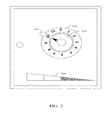
- FIG. 3 is another embodiment of a user interface in a locked state.
- FIG. 4 is a flow chart illustrating one embodiment of a method for unlocking a user interface.
- module refers to logic embodied in hardware or firmware, or to a collection of software instructions written in a programming language, such as, Java, C, or assembly.
- One or more software instructions in the modules may be embedded in firmware, such as in an EPROM.
- the modules described herein may be implemented as either software and/or hardware modules and may be stored in any type of non-transitory computer-readable medium or other storage device.
- non-transitory computer-readable media include CDs, DVDs, BLU-RAY, flash memory, and hard disk drives.
- FIG. 1 is a block diagram illustrating one embodiment of a multifunction electronic device 100, such as a portable electronic device or a tablet computer.
- the electronic device 100 typically includes one or more processors 110, a memory 120, one or more user interfaces 140, one or more network or other communications interfaces 160, one or more audio interfaces 170, and one or more communication buses 190 interconnecting these components.
- the electronic device 100 is only one example of a multifunction device, and that the electronic device 100 may have more or fewer components than shown, may combine two or more components, or may have a different configuration or arrangement of the components.
- the various components shown in FIG. 1 may be implemented in hardware, software, or a combination of both hardware and software, including one or more signal processing and/or application-specific integrated circuits.
- the memory 120 includes high-speed random access memory, and may include non-volatile memory, such as one or more magnetic disk storage devices, optical disk storage devices, flash memory devices, or other non-volatile solid state storage devices.
- the memory 120 may optionally include one or more storage devices remotely located from the processors 110.
- a memory controller may control access to the memory 120 by other components of the electronic device 100, such as the processor 110.
- the one or more processors 110 may run or execute various software programs and/or sets of instructions stored in the memory 120 to perform various functions for the electronic device 100 and to process data.
- the communication buses 190 may include circuitry that interconnects and controls communications between system components.
- the user interface 140 may include a touch-screen display 142 and one or more navigation buttons 144.
- the touch-screen display 142 may be a touch-sensitive display.
- the user interface 140 may also include other input devices such as a keyboard, mouse, and/or other pointing devices.
- the touch-screen display 142 provides an input interface and an output interface between the electronic device 100 and a user.
- the touch-screen display 142 includes a touch-sensitive surface that accepts input from the user based on physical contact and may display visual output to the user.
- the visual output may include graphics, text, icons, video, and any combination thereof. In some embodiments, some or all of the visual output may correspond to, or represent, user-interface objects.
- the touch-screen display 142 detects contact (and any motion or breaking of the contact) on the display 142 and converts the detected contact into an interaction with user-interface objects (e.g., one or more softkeys, icons, web pages or images) that are displayed on the touch-screen display 142. In one embodiment, contact between a touch-screen display 142 and the user may be achieved by the use of a finger of the user.
- the touch-screen display 142 may use liquid crystal display (LCD) technology or a light emitting polymer display (LPD) technology, although other display technologies may be used in other embodiments.
- the touch-screen display 142 may detect contact and any motion, using any of a plurality of touch sensing technologies now known or later to be developed, including but not limited to capacitive, resistive, infrared, surface acoustic wave technologies, and other proximity sensor arrays or elements for determining one or more points of contact with a touch-screen display 142.
- the user may make contact with the touch-screen display 142 using any suitable object or appendage, such as a stylus or a finger.
- the user interface is designed to work primarily with fingertip contact and motions, which are less precise than stylus-based input due to the larger contact surface area of a finger on the touch-screen.
- the electronic device 100 may include a navigation button 144 as an input control device. The user may navigate among and interact with one or more graphical objects displayed on the touch-screen display142 by rotating or clicking the navigation button 144.
- the network communication interface 160 may include wireless and wire communication interfaces.
- the wireless communication interface may use any of a plurality of communications standards, protocols, and technologies, including but not limited to Global System for Mobile Communications (GSM), Enhanced Data GSM Environment (EDGE), wideband code division multiple access (W-CDMA), code division multiple access (CDMA), time division multiple access (TDMA), Bluetooth, Wireless Fidelity (Wi-Fi) (e.g., IEEE 802.11a, IEEE 802.11b, IEEE 802.11g and/or IEEE 802.11n), voice over Internet Protocol (VoIP), Wi-MAX, a protocol for email, instant messaging, and/or Short Message Service (SMS), or any other suitable communication protocol, including communication protocols not yet developed as of the filing date of this document.
- GSM Global System for Mobile Communications
- EDGE Enhanced Data GSM Environment
- W-CDMA wideband code division multiple access
- CDMA code division multiple access
- TDMA time division multiple access
- Bluetooth Bluetooth
- Wi-Fi e.g.,
- the audio interface 170 is provided between a user and the electronic device 100, and may include audio circuitry, a speaker, and a microphone.
- the software components stored in the memory 120 may include an operating system 121, a contact/motion module (or set of instructions) 122, a pressure module (or set of instructions) 123, a user interface control module (or set of instructions) 124, and applications (or set of instructions) 127.
- the operating system 121 e.g., Darwin, RTXC, LINUX, UNIX, OS X, WINDOWS, or an embedded operating system such as VxWorks
- the operating system 121 includes various software components and/or drivers for controlling and managing general system tasks (e.g., memory management, storage device control, or power management, for example) and facilitates communication between various hardware and software components.
- general system tasks e.g., memory management, storage device control, or power management, for example
- the contact/motion module 122 may detect contact with the touch-screen display 142.
- the contact/motion module 122 includes various software components for performing various operations as a result of the detection of contact, such as determining if there is motion of the contact and tracking the motion across the touch-screen display 142, and determining if the contact has been broken (i.e., if the contact has ceased). Determining any motion of the point of contact may include determining its speed (magnitude), velocity (magnitude and direction), and/or an acceleration (a change in magnitude and/or direction). These operations may be applied for single contact (e.g., one finger contact) or to multiple simultaneous contacts (e.g., "multi-touch"/multiple finger contact).
- the pressure module 123 may detect the amount of pressure exerted on the touch-screen display 142 or other touch sensitive devices.
- the pressure module 123 includes various software components for performing various operations arising from the detection of pressure on the touch-screen display 142, and determining the strength and duration of the pressure(s) exerted on the touch-screen display 142.
- the one or more applications 127 may include any applications installed on the electronic device 100.
- the user interface module 124 controls the status of a user interface of the electronic device 100.
- the user interface module 124 may include a locking module (lock module not shown) and an unlocking module (unlock module not shown).
- the lock module detects the satisfaction of any or all of one or more of the conditions applicable to locking the user interface of the electronic device 100, and locking the electronic device 100 accordingly.
- the unlock module detects the satisfaction of any or all of one or more of the conditions applicable to unlocking a user-interface and restoring functionality to the electronic device 100.
- the electronic device 100 When the user-interface is in a locked state, the electronic device 100 is powered on and operational but ignores most user input. That is, the electronic device 100 takes no action in response to most user input and/or the electronic device 100 is prevented from performing a predefined set of operations in response to the user input.
- the predefined set of operations may include navigation between user interfaces and the activation or deactivation of a predefined set of functions.
- the locked state may be used to prevent unintentional or unauthorized use of the electronic device 100.
- the electronic device 100 may respond to a limited set of user inputs, including an input which attempts to unlock the electronic device 100 or an input which attempts to power off the electronic device 100. Even if the electronic device 100 ignores a user input, the electronic device 100 may still provide sensory feedback (such as visual, audio, or vibration feedback) to the user upon detection of the input, to indicate that the attempted input will be ignored.
- the electronic device 100 In its unlocked state when the user-interface is operating normally, the electronic device 100 is in its normal operating state, and able to detect and respond to user input entered through the user interface. In other embodiments the electronic device 100 in the unlocked state may detect and respond to contact which seeks to navigate between user interfaces to enter data and activate or deactivate functions through the touch-screen display 142.
- the electronic device 100 may be set to the locked state upon satisfaction of any or all of one or more lock conditions.
- the lock conditions may include events such as the lapsing of a predefined period of time without activity, the entry into an active call, or the application of working power to the device.
- the lock conditions may also include user intervention, namely the user being able to lock the device by a predefined user input.
- the locked state may be changed through an unlock action.
- the unlock action may include contact with the touch-screen display 142.
- the unlock action is a predefined motion(s) performed on the touch-screen display 142 by the object/appendage making contact with the touch-screen display 142.
- FIG. 2 illustrates the locked state of a user interface.
- the locked state may be switched into the unlocked state using an unlock image 514 which is virtually rotatable, according to some embodiments.
- the unlock image 514 may be surrounded by a background image 513.
- the background image 513 may be a disk or a surrounding image with numbers or figures or some other indications to indicate the position of the unlock image 514 relative to the background image 513.
- the unlock image 514 may also have a rotation center and an arrow pointing to the background image 513.
- the rotation of the unlock image 514 relative to the background image 513 may be achieved through a contact operation on the unlock image 514.
- a substantially rotating motion may be required from the point of contact to an end point on the touch-screen display 142 around the rotational center of the unlock image 514, while maintaining continuous contact with the touch-screen display 142, and a breaking of the contact at the end point.
- the unlock image 514 is rotated synchronously with the rotating motion of the contact.
- the unlock action is performed with respect to the unlock image 514, i.e., the unlock action includes interaction with the unlock image 514.
- the predefined motion may include the application of pressure (press operation(s)) on the unlock image 514 at one or more predefined positions. For example, if a password "5" is predefined, the unlock action may include detecting a press operation on the unlock image 514 and verifying if the unlock image 514 is pointing to the password "5" as a result of the press operation. When a password "8-3"is predefined, the unlock action includes detecting a first press operation on the unlock image 514 and verifying if a first position of the unlocking image 514 is pointing to the password "8" first.
- the predefined motion may also include stop or turnaround operations of the unlock image 514 at one or more predefined positions to satisfy the verification.
- a turnaround operation may include the unlocking image 514 rotated from a clockwise to an anti-clockwise direction.
- the user may predefine the duration of a stop operation, such as 1 second. This way, the user may complete the unlock action through a "one slide" operation.
- the unlock action may include at least two events.
- a first event may include detecting turn around operations of the unlock image 514 in a certain sequence for the password "8-3-9”.
- a second event may include detecting stop operations of the unlock image 514 in a certain sequence for the password "8-3-9.”
- the rotating operation may be carried out in an abbreviated and alternative manner, for example making contact around the unlock image 514 on the touch-screen display 142 to drag the unlock image 514 to point to the point of contact.
- the device If the contact does not correspond to an attempt to perform the unlock action, or if the contact corresponds to a failed or aborted attempt by the user to perform the unlock action (when unauthorized use is being prevented), then the device remains locked. If the contact corresponds to a successful performance of the unlock action, i.e., the user performs the unlock action successfully, then the device is switched to the unlocked state.
- the unlock action may further include the detection and verification of pressure on the unlock image 514.
- a pressure state bar 518 or a pressure state image 528 may be used to indicate a pressure value applied on the unlock image 514.
- a predefined pressure value may be associated with a predefined position of the unlock image 514 as verification of the unlock operation.
- the pressure state bar 518 may have many levels, such as 4 levels. Each level may indicate a range of pressure values.
- a maximum pressure value exerted on the unlock image 514 may be recognized as the significant pressure value of the press operation.
- a computer-implemented method for unlocking a user interface may include the following steps. While the process flow described below includes a number of operations that appear to occur in a specific order, it should be apparent that these processes could include more or fewer operations, which can be executed serially or in parallel (e.g., using parallel processors or other multi-threading environment, for example).
- step S707 determining if the one or more new positions of the unlock image 514 relative to the background image 513 resulting from the one or more contact actions correspond to one or more predefined positions. If the one or more new positions of the unlock image 514 relative to the background image 513 correspond to one or more predefined positions, the method continues to step S708; if the determination is not made, the method continues to step S709.
- block S707 can be determining if the one or more positions of the unlock image 514 relative to the background image 513 and determining if one or more of the pressure values associated with the one or more positions of the unlock image 514 are included in the one or more predefined ranges of pressure values.
- the one or more positions of the unlock image 514 relative to the background image 513 are from the one or more contact actions corresponding to the one or more predefined positions.
Landscapes
- Engineering & Computer Science (AREA)
- Theoretical Computer Science (AREA)
- General Engineering & Computer Science (AREA)
- Computer Security & Cryptography (AREA)
- Physics & Mathematics (AREA)
- General Physics & Mathematics (AREA)
- Computer Hardware Design (AREA)
- Software Systems (AREA)
- Human Computer Interaction (AREA)
- User Interface Of Digital Computer (AREA)
Applications Claiming Priority (1)
| Application Number | Priority Date | Filing Date | Title |
|---|---|---|---|
| TW100103509A TW201232383A (en) | 2011-01-28 | 2011-01-28 | Method for unlocking a locking interface on screen |
Publications (1)
| Publication Number | Publication Date |
|---|---|
| EP2487621A1 true EP2487621A1 (fr) | 2012-08-15 |
Family
ID=44992540
Family Applications (1)
| Application Number | Title | Priority Date | Filing Date |
|---|---|---|---|
| EP11184443A Ceased EP2487621A1 (fr) | 2011-01-28 | 2011-10-07 | Dispositif électronique et procédé de déverrouillage d'interface utilisateur |
Country Status (4)
| Country | Link |
|---|---|
| US (1) | US20120194447A1 (fr) |
| EP (1) | EP2487621A1 (fr) |
| JP (1) | JP2012160177A (fr) |
| TW (1) | TW201232383A (fr) |
Cited By (5)
| Publication number | Priority date | Publication date | Assignee | Title |
|---|---|---|---|---|
| CN104679419A (zh) * | 2013-11-27 | 2015-06-03 | 苏州蜗牛数字科技股份有限公司 | 基于骨架定位的触摸解锁方式 |
| CN105184131A (zh) * | 2015-09-29 | 2015-12-23 | 努比亚技术有限公司 | 一种通过连接wi-fi进行屏幕解锁的装置和方法 |
| US9310929B2 (en) | 2014-06-06 | 2016-04-12 | Lenovo Enterprise Solutions (Singapore) Pte. Ltd. | Unlocking touch screen devices |
| CN105573636A (zh) * | 2014-10-14 | 2016-05-11 | 腾讯科技(北京)有限公司 | 触屏设备的解锁方法和装置 |
| EP3353642A4 (fr) * | 2015-09-24 | 2018-08-29 | Samsung Electronics Co., Ltd. | Procédé de fourniture d'événements correspondant à des attributs tactiles et dispositif électronique associé |
Families Citing this family (22)
| Publication number | Priority date | Publication date | Assignee | Title |
|---|---|---|---|---|
| US20100042954A1 (en) * | 2008-08-12 | 2010-02-18 | Apple Inc. | Motion based input selection |
| KR20130093721A (ko) * | 2011-12-23 | 2013-08-23 | 삼성전자주식회사 | 디스플레이 장치 및 그 잠금 해제 방법 |
| CN103188374A (zh) * | 2011-12-29 | 2013-07-03 | 深圳富泰宏精密工业有限公司 | 手机屏幕解锁方法及系统 |
| CN103197859A (zh) * | 2012-01-09 | 2013-07-10 | 深圳富泰宏精密工业有限公司 | 电子装置屏幕解锁系统及方法 |
| KR20130134508A (ko) * | 2012-05-31 | 2013-12-10 | 삼성전기주식회사 | 터치 스크린을 이용한 잠금 해제 방법 및 그 방법을 이용하는 전자 기기 |
| JP6026186B2 (ja) * | 2012-09-07 | 2016-11-16 | フェリカネットワークス株式会社 | 情報処理装置および情報処理方法、並びにプログラム |
| KR20140047388A (ko) * | 2012-10-12 | 2014-04-22 | 삼성전자주식회사 | 휴대 단말기의 잠금 해제 운용 방법 및 장치 |
| TWI579730B (zh) * | 2013-01-16 | 2017-04-21 | 群邁通訊股份有限公司 | 螢幕解鎖方法及系統 |
| CN103197838B (zh) * | 2013-03-21 | 2015-12-02 | 小米科技有限责任公司 | 解锁方法及装置 |
| US9104309B2 (en) * | 2013-04-25 | 2015-08-11 | Htc Corporation | Pattern swapping method and multi-touch device thereof |
| CN104252307A (zh) * | 2013-06-27 | 2014-12-31 | 中兴通讯股份有限公司 | 一种触摸屏终端及其解锁方法 |
| CN104571900B (zh) * | 2013-10-24 | 2019-06-18 | 深圳富泰宏精密工业有限公司 | 电子设备解锁系统及方法 |
| JP6243828B2 (ja) * | 2013-11-29 | 2017-12-06 | 株式会社 ハイディープHiDeep Inc. | タッチレベルに伴うフィードバック方法、及びこれを行うタッチ入力装置 |
| CN104834441B (zh) * | 2014-02-11 | 2018-07-31 | 联想企业解决方案(新加坡)有限公司 | 一种触摸屏解锁的方法和装置 |
| CN105739847A (zh) * | 2014-12-11 | 2016-07-06 | 富泰华工业(深圳)有限公司 | 智能电子装置、智能电子装置唤醒屏幕的系统与方法 |
| CN105867792A (zh) * | 2015-01-22 | 2016-08-17 | 阿里巴巴集团控股有限公司 | 一种触摸屏解锁、触摸屏锁屏界面更新的方法和装置 |
| TWI607370B (zh) * | 2015-03-27 | 2017-12-01 | 和丞數碼資訊有限公司 | 密碼輸入方法、可攜式電子裝置及非暫態儲存媒體 |
| CN106355057B (zh) * | 2016-08-31 | 2019-05-14 | 瓦戈科技(上海)有限公司 | 动态锁屏解锁方法 |
| CN106873887B (zh) * | 2017-01-03 | 2021-05-25 | 努比亚技术有限公司 | 一种基于手势来控制应用功能的系统及方法 |
| USD825584S1 (en) | 2017-03-29 | 2018-08-14 | Becton, Dickinson And Company | Display screen or portion thereof with transitional graphical user interface |
| US10402556B2 (en) * | 2017-04-04 | 2019-09-03 | Dell Products L.P. | Information handling system display security access through totem interactions |
| US10530770B2 (en) * | 2017-06-28 | 2020-01-07 | International Business Machines Corporation | Pressure-based authentication |
Citations (2)
| Publication number | Priority date | Publication date | Assignee | Title |
|---|---|---|---|---|
| US20090313693A1 (en) * | 2008-06-16 | 2009-12-17 | Rogers Sean Scott | Method and system for graphical passcode security |
| US20100073126A1 (en) * | 2008-09-24 | 2010-03-25 | Panasonic Corporation | Secure system for non-covert user authentication and identification |
Family Cites Families (4)
| Publication number | Priority date | Publication date | Assignee | Title |
|---|---|---|---|---|
| US7657849B2 (en) * | 2005-12-23 | 2010-02-02 | Apple Inc. | Unlocking a device by performing gestures on an unlock image |
| KR100933679B1 (ko) * | 2007-12-28 | 2009-12-23 | 성균관대학교산학협력단 | 휠 인터페이스를 이용한 임베디드 시스템의 그래픽패스워드 입력 장치 및 방법 |
| US8130075B1 (en) * | 2009-01-23 | 2012-03-06 | Intuit Inc. | System and method for touchscreen combination lock |
| US20120169617A1 (en) * | 2011-01-04 | 2012-07-05 | Nokia Corporation | Controlling of user input device |
-
2011
- 2011-01-28 TW TW100103509A patent/TW201232383A/zh unknown
- 2011-08-03 US US13/197,628 patent/US20120194447A1/en not_active Abandoned
- 2011-10-07 EP EP11184443A patent/EP2487621A1/fr not_active Ceased
-
2012
- 2012-01-13 JP JP2012004953A patent/JP2012160177A/ja active Pending
Patent Citations (2)
| Publication number | Priority date | Publication date | Assignee | Title |
|---|---|---|---|---|
| US20090313693A1 (en) * | 2008-06-16 | 2009-12-17 | Rogers Sean Scott | Method and system for graphical passcode security |
| US20100073126A1 (en) * | 2008-09-24 | 2010-03-25 | Panasonic Corporation | Secure system for non-covert user authentication and identification |
Cited By (6)
| Publication number | Priority date | Publication date | Assignee | Title |
|---|---|---|---|---|
| CN104679419A (zh) * | 2013-11-27 | 2015-06-03 | 苏州蜗牛数字科技股份有限公司 | 基于骨架定位的触摸解锁方式 |
| US9310929B2 (en) | 2014-06-06 | 2016-04-12 | Lenovo Enterprise Solutions (Singapore) Pte. Ltd. | Unlocking touch screen devices |
| CN105573636A (zh) * | 2014-10-14 | 2016-05-11 | 腾讯科技(北京)有限公司 | 触屏设备的解锁方法和装置 |
| EP3353642A4 (fr) * | 2015-09-24 | 2018-08-29 | Samsung Electronics Co., Ltd. | Procédé de fourniture d'événements correspondant à des attributs tactiles et dispositif électronique associé |
| CN105184131A (zh) * | 2015-09-29 | 2015-12-23 | 努比亚技术有限公司 | 一种通过连接wi-fi进行屏幕解锁的装置和方法 |
| CN105184131B (zh) * | 2015-09-29 | 2018-02-02 | 努比亚技术有限公司 | 一种通过连接wi‑fi进行屏幕解锁的装置和方法 |
Also Published As
| Publication number | Publication date |
|---|---|
| JP2012160177A (ja) | 2012-08-23 |
| TW201232383A (en) | 2012-08-01 |
| US20120194447A1 (en) | 2012-08-02 |
Similar Documents
| Publication | Publication Date | Title |
|---|---|---|
| EP2487621A1 (fr) | Dispositif électronique et procédé de déverrouillage d'interface utilisateur | |
| US20250350945A1 (en) | Authenticated device used to unlock another device | |
| US11126704B2 (en) | Authenticated device used to unlock another device | |
| US12160399B2 (en) | Operational safety mode | |
| US11556631B2 (en) | User interfaces for managing user account passwords | |
| EP3108342B1 (fr) | Transition depuis l'utilisation d'un dispositif à un autre | |
| US10037216B2 (en) | Intelligent disabling of browser plugins | |
| US12430000B2 (en) | User input interfaces | |
| US20210400032A1 (en) | User interfaces for accessing an account | |
| US10152220B2 (en) | System and method to control a touchscreen user interface | |
| US20160275277A1 (en) | Data protection system based on user input patterns on device | |
| KR20220061037A (ko) | 모바일 키 사용자 인터페이스들 | |
| US8717856B2 (en) | Electronic device and method for providing and disarming alarm clock | |
| EP2487570B1 (fr) | Dispositif électronique et son procédé de commande | |
| AU2024202748B2 (en) | Authenticated device used to unlock another device | |
| EP2490110A2 (fr) | Dispositif électronique et procédé pour fournir une page animée |
Legal Events
| Date | Code | Title | Description |
|---|---|---|---|
| PUAI | Public reference made under article 153(3) epc to a published international application that has entered the european phase |
Free format text: ORIGINAL CODE: 0009012 |
|
| AK | Designated contracting states |
Kind code of ref document: A1 Designated state(s): AL AT BE BG CH CY CZ DE DK EE ES FI FR GB GR HR HU IE IS IT LI LT LU LV MC MK MT NL NO PL PT RO RS SE SI SK SM TR |
|
| AX | Request for extension of the european patent |
Extension state: BA ME |
|
| 17P | Request for examination filed |
Effective date: 20130131 |
|
| 17Q | First examination report despatched |
Effective date: 20130724 |
|
| STAA | Information on the status of an ep patent application or granted ep patent |
Free format text: STATUS: THE APPLICATION HAS BEEN REFUSED |
|
| 18R | Application refused |
Effective date: 20150130 |