EP2490116A1 - Procédé pour la fourniture d'arrière-plan d'écran verrouillé, dispositif électronique et produit de programme informatique l'utilisant - Google Patents
Procédé pour la fourniture d'arrière-plan d'écran verrouillé, dispositif électronique et produit de programme informatique l'utilisant Download PDFInfo
- Publication number
- EP2490116A1 EP2490116A1 EP12155958A EP12155958A EP2490116A1 EP 2490116 A1 EP2490116 A1 EP 2490116A1 EP 12155958 A EP12155958 A EP 12155958A EP 12155958 A EP12155958 A EP 12155958A EP 2490116 A1 EP2490116 A1 EP 2490116A1
- Authority
- EP
- European Patent Office
- Prior art keywords
- background
- electronic device
- display data
- storage device
- screen
- Prior art date
- Legal status (The legal status is an assumption and is not a legal conclusion. Google has not performed a legal analysis and makes no representation as to the accuracy of the status listed.)
- Ceased
Links
Images



Classifications
-
- H—ELECTRICITY
- H04—ELECTRIC COMMUNICATION TECHNIQUE
- H04M—TELEPHONIC COMMUNICATION
- H04M1/00—Substation equipment, e.g. for use by subscribers
- H04M1/72—Mobile telephones; Cordless telephones, i.e. devices for establishing wireless links to base stations without route selection
- H04M1/724—User interfaces specially adapted for cordless or mobile telephones
- H04M1/72403—User interfaces specially adapted for cordless or mobile telephones with means for local support of applications that increase the functionality
- H04M1/72427—User interfaces specially adapted for cordless or mobile telephones with means for local support of applications that increase the functionality for supporting games or graphical animations
-
- G—PHYSICS
- G06—COMPUTING OR CALCULATING; COUNTING
- G06F—ELECTRIC DIGITAL DATA PROCESSING
- G06F3/00—Input arrangements for transferring data to be processed into a form capable of being handled by the computer; Output arrangements for transferring data from processing unit to output unit, e.g. interface arrangements
- G06F3/01—Input arrangements or combined input and output arrangements for interaction between user and computer
- G06F3/048—Interaction techniques based on graphical user interfaces [GUI]
- G06F3/0487—Interaction techniques based on graphical user interfaces [GUI] using specific features provided by the input device, e.g. functions controlled by the rotation of a mouse with dual sensing arrangements, or of the nature of the input device, e.g. tap gestures based on pressure sensed by a digitiser
- G06F3/0488—Interaction techniques based on graphical user interfaces [GUI] using specific features provided by the input device, e.g. functions controlled by the rotation of a mouse with dual sensing arrangements, or of the nature of the input device, e.g. tap gestures based on pressure sensed by a digitiser using a touch-screen or digitiser, e.g. input of commands through traced gestures
-
- H—ELECTRICITY
- H04—ELECTRIC COMMUNICATION TECHNIQUE
- H04M—TELEPHONIC COMMUNICATION
- H04M1/00—Substation equipment, e.g. for use by subscribers
- H04M1/66—Substation equipment, e.g. for use by subscribers with means for preventing unauthorised or fraudulent calling
- H04M1/667—Preventing unauthorised calls from a telephone set
- H04M1/67—Preventing unauthorised calls from a telephone set by electronic means
Definitions
- the invention relates to a method for providing a background, an electronic device and a computer program product using the same. Particularly, the invention relates to a method for providing a screen lock background, an electronic device and a computer program product using the same.
- the mobile device has a screen lock mode to prevent the user from miss-touching the touch screen to activate an unnecessary function.
- the user can manually set the electronic device to a screen lock state, so as to lock an input function of the touch screen.
- the screen lock state is automatically activated to prevent the situation of miss-touching.
- a background presented by the electronic device in the screen lock state is a single picture file, and even the user selects a different picture file according to his preference, it still looks dull to only use the picture as a background frame, and a usage fun is not effectively improved.
- the invention is directed to a method for providing a background of a locked screen, an electronic device and a computer program product using the same, in which when the electronic device enters a screen lock state, a background with different patterns of information type and presenting manner is displayed according to different background setting styles.
- the invention provides a method for providing a background of a locked screen, which is adapted to an electronic device.
- the method for providing the background of the locked screen includes the following steps.
- a selection of a background setting style is received.
- the electronic device enters a screen lock state, one or more display data are obtained from a storage device according to the background setting style.
- a background of the electronic device in the screen lock state is generated by using a template corresponding to the background setting style and the display data, and the display data on the background changes as time changes.
- the invention providers an electronic device including a screen, a memory, one or more processing unit and one or more program.
- the program is stored in the memory, and the processing unit executes one or more instructions of the program, where the instructions includes following steps.
- a selection of a background setting style is provided.
- the electronic device enters a screen lock state, one or more display data are obtained from a storage device according to the background setting style.
- a background displayed on the screen of the electronic device in the screen lock state is generated by using a template corresponding to the background setting style and the display data.
- the display data on the background changes as time changes.
- the invention provides a computer program product, which includes a computer readable storage medium.
- the computer readable storage medium records one or more instructions. After the instructions is loaded to an electronic device, following steps are executed.
- a selection of a background setting style is received.
- the electronic device enters a screen lock state, one or more display data are obtained from a storage device according to the background setting style.
- a background of the electronic device in the screen lock state is generated by using a template corresponding to the background setting style and the display data.
- the display data on the background changes as time changes.
- the relative display data of a specific type are obtained to generate a corresponding special background, and the display data of the background changes as time changes.
- a specific type of display data may be provided to the user through the special background corresponding to the background setting style, so as to match the user's demand.
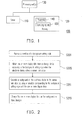
- FIG. 1 is a block diagram of an electronic device according to an embodiment of the invention.
- FIG. 2 is a flowchart illustrating a method for providing a background of a locked screen according to an embodiment of the invention.
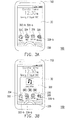
- FIG. 3A is a schematic diagram of a background corresponding to a background setting style of application shortcut according to an embodiment of the invention.
- FIG. 3B is a schematic diagram of a background corresponding to a background setting style of application shortcut according to another embodiment of the invention.
- FIG. 3C is a schematic diagram of a background corresponding to no background setting style is being selected according to an embodiment of the invention.
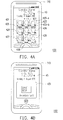
- FIG. 4A is a schematic diagram of a background corresponding to a background setting style of contacts according to an embodiment of the invention.
- FIG. 4B is a schematic diagram of a background corresponding to a background setting style of contacts according to an embodiment of the invention.
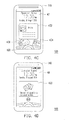
- FIG. 4C is a schematic diagram of a background corresponding to a background setting style of social network service according to an embodiment of the invention.
- FIG. 4D is a schematic diagram of a background corresponding to a background setting style of social network service according to an embodiment of the invention.
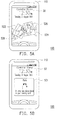
- FIG. 5A is a schematic diagram of a background corresponding to a background setting style of gallery according to an embodiment of the invention.
- FIG. 5B is a schematic diagram of a background corresponding to a background setting style of gallery according to an embodiment of the invention.
- FIG. 5C is a schematic diagram of a background corresponding to a background setting style of gallery according to an embodiment of the invention.
- FIG. 5D is a schematic diagram of a background corresponding to a background setting style of gallery according to an embodiment of the invention.
- FIG. 6A is a schematic diagram of a background corresponding to a background setting style of weather information according to an embodiment of the invention.
- FIG. 6B is a schematic diagram of a background corresponding to a background setting style of weather information according to an embodiment of the invention.
- FIG. 7A is a schematic diagram of a background corresponding to a background setting style of stock information according to an embodiment of the invention.
- FIG. 7B is a schematic diagram of a background corresponding to a background setting style of stock information according to an embodiment of the invention.
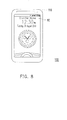
- FIG. 8 is a schematic diagram of a background corresponding to a background setting style of virtual clock according to an embodiment of the invention.
- the invention provides a method for providing a background of a locked screen, an electronic device and a computer program product using the same according to the above point of view.
- embodiments are provided below for descriptions.
- FIG. 1 is a block diagram of an electronic device according to an embodiment of the invention.
- the electronic device 100 of the present embodiment includes a screen 110, a memory 120 and one or more processing units 130, where the one or more processing units 130 are coupled to the screen 110 and the memory 120.
- the electronic device 100 is, for example, a mobile phone, a smart phone, a personal digital assistant (PDA), a laptop computer, a tablet panel computer (PC), a digital camera, an electronic book or a game machine, etc., which is not limited by the invention.
- the screen 110 may be any type of a touch screen, for example, a resistive touch screen, a capacitive touch screen, an optical touch screen, an acoustic wave touch screen, an electromagnetic touch screen, etc., though the invention is not limited thereto.
- the screen 110 having a touch control function can serve as an input/output interface of the electronic device 100. Namely, the screen 110 may be used to receive a touch input from the user, and may be used to display information of the electronic device 100. The information may be operation interfaces of various application programs, widgets, services or functions and generated information contents.
- the screen 110 can also be a liquid crystal display (LCD) that only has the display function, and the user has to perform input through an input device such as a hardware button or a keyboard, etc.
- LCD liquid crystal display
- the memory 120 may be an internal storage unit or an external storage unit.
- the internal storage unit may be a random access memory (RAM), a read-only memory (ROM), a flash memory, or a magnetic disk storage device, etc.
- the external storage unit may be a compact flash (CF) memory card, a secure digital (SD) memory card, a micro SD memory card, or a memory stick (MS), etc., and the external storage unit is connected to the electronic device 100 through a corresponding interface.
- the memory 120 can also be a network storage space, and the electronic device 100 may connect and access the network storage space through a network by using a network device (not shown).
- the memory 120 stores one or more programs 140 and an operating system 150. Moreover, the memory 120 may also store various application programs (not shown) and widgets (not shown) that can be executed on the electronic device 100, and software components (not shown) required in operation.
- the one or more programs 140 include one or more instructions. Further, the one or more processing units 130 execute the instructions included in the one or more programs 140 to implement a method for providing a background of a locked screen of the present embodiment, so as to generate the background displayed on the screen 110 when the electronic device 100 is in the screen lock state.
- Each of the one or more processing units 130 may be a central processing unit (CPU), a programmable microprocessor, a digital signal processor (DSP), a programmable controller, an application specific integrated circuit (ASIC), a programmable logic device (PLD) or other similar devices. In this way, when the electronic device 100 is activated, the one or more processing units 130 can execute the one or more programs 140 stored in the memory 120 and/or other software installed in the electronic device 100.
- FIG. 2 is a flowchart illustrating a method for providing a background of a locked screen according to an embodiment of the invention.
- the electronic device 100 of the present embodiment has the screen lock state and a screen unlock state. It is assumed that the screen 110 serves as an input interface (for example, a touch screen) of the electronic device 100.
- the electronic device 100 When the electronic device 100 is in the screen lock state, the electronic device still continually operates, and when the user touches the screen 110, the electronic device 100 ignores most of touch signals generated by the user input.
- the electronic device 100 can only receive predetermined touch signals including a predetermined touch signal used for switching the screen lock state/the screen unlock state, and a predetermined touch signal used for switching display data on the background displayed on the screen 110.
- the electronic device 100 when the electronic device 100 is in the screen unlock state, the user can normally operate the electronic device 100. Namely, functions and services supported by the electronic device 100 and application programs and widgets installed in the electronic device 100 can all be called and used.
- the electronic device 100 in the screen unlock state can receive a signal input through the screen 110 and generate a corresponding operation result. Signals input through other input devices can also be processed by the electronic device 100 in the screen unlock state.
- a selection of a background setting style is received.
- the electronic device 100 has a plurality of background setting styles for selection, where each of the background setting styles corresponds to a widget, an application program, a function or a service provided by the electronic device 100.
- the background setting styles may include an application shortcut style, a contacts style, a social network service style, a gallery style, weather information style, stock information style or a virtual clock style, etc., though the invention is not limited thereto.
- the electronic device 100 may also have other background setting styles for selection.
- the user may select the background setting style when the electronic device 100 is in the screen unlock state.
- the electronic device 100 may analyse a usage habit of the user to automatically select the background setting style.
- step S205 when the electronic device 100 enters the screen lock state, one or more display data are obtained from a storage device according to the currently selected background setting style.
- the storage device of the present embodiment may be a remote storage device or a local storage device.
- the remote storage device is, for example, an online storage
- the local storage device may be built in or externally connected to the electronic device 100, which is, for example, a built in hard disk, a portable memory device (e.g., a pen drive), or a memory card, etc.
- a type of the display data corresponds to the selected background setting style.
- the display data corresponding to the application shortcut style include a picture file serving as a wallpaper and one or more application programs the shortcut icon will be displayed.
- the display data corresponding to the contacts style or social network service style include contacts information and/or dynamic information shared to a community website by friends.
- the display data corresponding to the gallery style include photos and images.
- the display data corresponding to the weather information style include a current temperature, a weather status, a rain rate, a future/past weather report, etc.
- the display data corresponding to the stock information style includes a stock market content, such as stock price, stock quote, market trend, a stock trend, futures, and a classification option price and Hong Kong Shanghai and Shenzhen stocks, etc.
- the display data corresponding to virtual clock style includes a minute, a second and a date of time.
- the one or more display data are, for example, obtained from a remote storage device corresponding to the background setting styles through a network, or the one or more display data are directly obtained from the local storage device.
- a background of the electronic device 100 in the screen lock state is generated by using a template corresponding to the background setting style and the obtained display data.
- the display data on the background changes as time changes. Namely, when the electronic device 100 is in the screen lock state, the background displayed on the screen 110 is no longer a pure picture file, but presents different types of display data according to the selection of the background setting style, and the various types of display data is presented according to the template corresponding to the background setting style, and a content and/or a presenting manner of the display data changes as time changes.
- the background generated according to the background setting style does not include information such as a signal strength, a remaining power, a name of a telecommunication practitioner, and a time/date, etc. that are constantly displayed on the electronic device 100 regardless whether the electronic device 100 is in the screen lock state or the screen unlock state.
- the user can obtain more diversified information through the background when the electronic device 100 is in the screen lock state.
- Different background setting styles are described in detail below.
- FIG. 3A is a schematic diagram of a background corresponding to a background setting style of application shortcut according to an embodiment of the invention.
- the user selects the application shortcut style as the background setting style.
- the obtained one or more display data include a picture file serving as the wallpaper and shortcut icons of application programs to be displayed (for example, obtained from the local storage device), and the background generated according to the template is shown as a background 30 of FIG. 3A .
- the background 30 includes shortcut icons 322, 324, 326 and 328 corresponding to the application programs of phone call, email, camera and message, etc., though the types of the application programs are not limited thereto.
- the electronic device 100 may provide a plurality of predetermined application programs (for example, phone call, email, camera, message, file browser, web browser, multimedia player, calculator, calendar, and music, etc.), and the user can select at least one predetermined application program when the electronic device 100 is in the screen unlock state.
- predetermined application programs for example, phone call, email, camera, message, file browser, web browser, multimedia player, calculator, calendar, and music, etc.
- the shortcut icon of the selected predetermined application program is then displayed on the background 30 to serve as a shortcut for activating the application program.
- the user can quickly activate an application program by operating a corresponding shortcut icon displayed on the background 30, and the electronic device 100 accordingly leaves the screen lock state.
- the user may drags the shortcut icon 322 corresponding to the phone call application program into the ring 330, so as to launch the phone call application program instantly.
- the user may drags the ring 330 onto the shortcut icon 324 corresponding to the email application program to launch the email application program instantly.
- the user may drags the ring 330 and the shortcut icon 326 corresponding to the camera application program at the same time and makes the ring 330 and the shortcut icon 326 approach each other to immediately launch the camera application program.
- the one or more display data may further include a message that can be accessed or generated by the application program that the shortcut icon thereof should be displayed, and information related to the above message is displayed in form of a mark icon (for example, mark icons 322-b, 324-b and 328-b) together with the shortcut icon.
- a mark icon for example, mark icons 322-b, 324-b and 328-b
- the mark icon 324-b represents the number of unread emails in an inbox. In this way, when the electronic device 100 is in the screen lock state, the user can learn the number of unread emails according to the shortcut icon 324 and the mark icon 324-b displayed in the background 30.
- the four shortcut icons 322, 324, 326 and 328 are illustrated for corresponding to four selected predetermined application programs, the number and types of the predetermined application programs are not limited thereto, and when the electronic device 100 enters the screen lock state, as long as the background displayed on the screen 110 includes a shortcut icon of one or more predetermined application program, it is considered to be within the scope of the invention.
- the obtained one or more display data further include a lockscreen widget corresponding to an application program executed on the electronic device 100.
- the application program corresponding to the lockscreen widget is launched immediately.
- FIG. 3B is a schematic diagram of a background corresponding to a background setting style of application shortcut according to this embodiment of the invention. It is assumed that a music application is executed on the electronic device 100, and once the electronic device 100 enters the screen lock state, besides the shortcut icons 322, 324, 326 and 328, a lockscreen widget 332 corresponding to the music application is also displayed on the background 30. If the user drags lockscreen widget 332 into the ring 330, the corresponding music application is launched and a now playing screen (e.g., the latest view of the user interface of the music application) of the music application is displayed on the screen 110.
- a now playing screen e.g., the latest view of the user interface of the music application
- FIG. 3C is a schematic diagram of a background corresponding to no background setting style is being selected according to an embodiment of the invention.
- a lockscreen widget 332 corresponding to an application e.g., the music application
- the application can be instantly launched in the same or similar way as described above.
- FIG. 4A is a schematic diagram of a background corresponding to a background setting style of contacts according to an embodiment of the invention.
- the corresponding one or more display data include contacts information recorded in the local storage device of the electronic device 100, which may be names and/or profile photos of the contacts, and various contact manners (for example, phone numbers, email boxes, joined community websites, personal webpages, and instant messaging accounts, etc.).
- contacts information recorded in the local storage device of the electronic device 100, which may be names and/or profile photos of the contacts, and various contact manners (for example, phone numbers, email boxes, joined community websites, personal webpages, and instant messaging accounts, etc.).
- contacts of a specific group are selected from all of the contacts, and the corresponding contact information is regarded as the display data to generate a background 40 displayed on the screen 110 when the electronic device 100 is in the screen lock state.
- the template corresponding to the contact displays one or a plurality of contact information belonging to a specific group in the background 40.
- profile photos 421-429 respectively represent 9 contacts belonging to a same specific group, and a tag at a lower left/right corner of each of the profile photos represents a contact manner.
- this contact has two contact manners, where a tag 423-a represents that such contact uses a specific community website, and a tag 423-b represents that such contact has a phone number.
- the template limits the background 40 to simultaneously display 9 contacts, though the number the contacts is not limited thereto, and in other embodiments, along with different templates, an upper limit of the number of the contacts displayed in the generated background may be different.
- the other template only displays 2, 4, or 5 contacts in the background.
- a plurality of pages of the backgrounds may be generated, and the number of the contacts in each page of the background does not exceed the upper limit of the number of the contacts.
- the electronic device 100 receives an operation instruction from the user, the electronic device 100 switches an up/down page of the backgrounds to display different contact information.
- the generated background is shown as a background 45 of FIG. 4B .
- the background 45 includes an error message 431 to notify the user the above situation.
- FIG. 4C is a schematic diagram of a background corresponding to a background setting style of social network service according to an embodiment of the invention.
- a remove storage device for example, a server
- a community website or a network service is logged on through a network according to user identification (ID) information (for example, user account or password) recorded in the electronic device 100, and then the contacts information are obtained from the community website or the service webpage to serve as the display data,
- ID user identification
- the obtained contacts information may be dynamic information (for example, photos, videos, texts, or links) shared to the community website or the service webpage by others.
- ID user identification
- the background 47 includes three sets of contact information 432, 434 and 436, and each contact information includes a representative picture and name of the contact, and a message content shared to the community website.
- the electronic device 100 automatically accesses the remote storage device that provides the community website every a predetermined time, so as to obtain latest contact information to serve as the display data.
- presenting manners such as display positions and sizes of all of the obtained contact information dynamically change as time changes, for example, the contact information 432, 434 and 436 are automatically and alternately enlarged and displayed at the center of the screen 110 clockwise.
- the electronic device 100 can also switch the contact information 432, 434 and 436 according to an operation instruction input by the user.
- the user can still check different contact information by inputting the operation instructions.
- the user can still conveniently and opportunely view dynamic information on the community website through the background 47 displayed on the screen 110.
- the user can drag any one of the contact information 432, 434 and 436 down into the ring 400 and unlock directly to the source Social app.
- the background displayed on the screen 110 of the electronic device 100 is shown as a background 48 of FIG. 4D , which includes an error message 433 to notify the user the above situation.
- FIG. 5A is a schematic diagram of a background corresponding to a background setting style of gallery according to an embodiment of the invention.
- the user selects the gallery style as the background setting style.
- the obtained one or more display data may include photos in a specific photo album.
- the specific photo album may be selected by the user when the electronic device 100 is not in the screen lock state.
- the specific photo album may be a network photo album provided by a remote storage device (for example, a network storage space), and user ID information has to be used to log on the network photo album through a network, so as to obtain the photos stored therein.
- the specific photo album can also be a photo album in a local storage device (for example, a memory card) of the electronic device 100.
- a background 50 of the electronic device 100 is generated according to a template of the gallery style and photos 520, 522, 524 and 526, though the number of the photos are not limited thereto.
- a presenting manner of the photos 520, 522, 524 and 526 serving as the display data change as time changes.
- each of the photos automatically moves towards a specific direction.
- the presenting manner such as a size, a display position or clarity of each of the photos changes as time changes.
- a moving direction of each of the photos also changes as time changes, so that the photos are displayed in form of the slide in different moving directions. It should be noticed that the invention is not limited to the display effect of the slide, and in other embodiments, the obtained photos may have different display effects as time changes.
- the user can also switch the obtained photos during the screen lock state of the electronic device 100 by inputting an operation instruction.
- the background 50 may display different photos, and multiple display effects are presented during a switching process of the photos.
- the background displayed in the screen 110 includes an error message to notify the user a reason why the photos cannot be obtained.
- the error message may include prompt message such as "No photos found, please select another photo album".
- an error message 531 in a background 53 is, for example, prompt message such as "An error was encountered on your memory card" to notify the user a reason of the error occurrence.
- an error message 532 in a background 54 is, for example, prompt message such as "Please insert a memory card”.
- the electronic device 100 has a universal serial bus (USB) interface
- the user can connect the electronic device 100 to other devices through the USB interface for data accessing.
- the electronic device 100 may be used as a flash drive.
- the electronic device 100 is in the screen lock state, if the electronic device 100 is connected to the other device through the USB interface, the photos cannot be obtained from the local storage device of the electronic device 100 for displaying.
- the background is shown as a background 55 of FIG. 5D , in which an error message 533 is, for example, prompt message such as "Your content is inaccessible because your phone is being used as USB storage. Disconnect USB to access your content".
- FIG. 6A is a schematic diagram of a background corresponding to a background setting style of weather information according to an embodiment of the invention.
- the user selects the weather information style as the background setting style.
- the obtained one or more display data may include a current temperature, a weather status, a rain rate, a past weather report, a future weather forecast, etc.
- the electronic device 100 may be connected to a weather report release center through the network to obtain a content of the latest weather information, and displays the obtained display data according to a template of the weather information.
- the electronic device 100 obtains the latest weather information to serve as the display data every a predetermined time, and opportunely displays the display data on a background 60.
- the template displays today's temperature and weather status in the center of the background 60, and displays the weather information of future several days (for example, four days, though the invention is not limited thereto) at a lower part of the background 60 by icons 622, 624, 626 and 628, though the template of the weather information is not limited thereto.
- the user can still directly obtain the dynamic whether information through the background 60 of the electronic device 100 at any time.
- a background 63 displays an error message 631 to notify the user, where the error message 631 is, for example, prompt message such as "No weather data available".
- FIG. 7A is a schematic diagram of a background corresponding to a background setting style of stock information according to an embodiment of the invention.
- the user selects the stock information style as the background setting style.
- the obtained one or more display data may include stock names/codes pre-selected by the user and the corresponding stock prices, etc., and the background generated according to the template is shown as a background 70 of FIG. 7A .
- the electronic device 100 may be connected to a stock release center through the network to obtain a latest stock content, and displays the obtained display data according to a template of the stock information. In an embodiment, as the stock price goes up and down, the corresponding stock name moves towards different directions.
- the electronic device obtains the latest stock information every a predetermined time, and accordingly updates a content of a background 70. In this way, even if the electronic device 100 enters the screen lock state, the user can still directly obtain the dynamic stock information through the screen 110 of the electronic device 100 at any time.
- the generated background is shown as a background 75 of FIG. 7B , and the background 75 displays an error message 731 of "No stocks found".
- FIG. 8 is a schematic diagram of a background corresponding to a background setting style of virtual clock according to an embodiment of the invention.
- the obtained display data may include time, date and appearance setting of the virtual clock.
- the appearance setting of the virtual clock includes various different digital clocks and analog clocks, which may be selected by the user when the electronic device 100 is not in the screen lock state.
- the background generated according to the template is shown as a background 80 of FIG. 8 .
- the template displays the virtual clock at the center of the background 80. It should be noticed that the background 80 may provide a three-dimensional (3D) display effect, and present a vivid 3D virtual clock along with movement of the electronic device 100.
- the invention further provides a computer program product including a computer readable storage medium.
- the computer readable storage medium records a plurality of instructions. After the instructions are loaded into the electronic device for execution, the aforementioned method for providing a background of a locked screen is implemented, and the electronic device implements the functions described in the aforementioned embodiments.
- the computer readable storage medium may be a read-only memory, a random access memory, a magnetic tape, a floppy disk, a hard disk, an optical disk or a transmission medium, etc.
- the computer program product can also be provided through network transmission, which is not limited by the invention.
- the electronic device of the invention can obtain the display data corresponding to the selected background setting style from the remote storage device or the local storage device according to different background setting styles.
- a specific type of display data may be obtained according to a different background setting style to generate a corresponding special background, and the display data of the background changes as time changes.
- the special background corresponding to the background setting style when the electronic device is in the screen lock state, a specific type of display data is provided to the user, so as to match the user's demand.
Landscapes
- Engineering & Computer Science (AREA)
- Human Computer Interaction (AREA)
- General Engineering & Computer Science (AREA)
- Theoretical Computer Science (AREA)
- Computer Networks & Wireless Communication (AREA)
- Signal Processing (AREA)
- Physics & Mathematics (AREA)
- General Physics & Mathematics (AREA)
- User Interface Of Digital Computer (AREA)
Applications Claiming Priority (1)
| Application Number | Priority Date | Filing Date | Title |
|---|---|---|---|
| US201161444087P | 2011-02-17 | 2011-02-17 |
Publications (1)
| Publication Number | Publication Date |
|---|---|
| EP2490116A1 true EP2490116A1 (fr) | 2012-08-22 |
Family
ID=45656052
Family Applications (1)
| Application Number | Title | Priority Date | Filing Date |
|---|---|---|---|
| EP12155958A Ceased EP2490116A1 (fr) | 2011-02-17 | 2012-02-17 | Procédé pour la fourniture d'arrière-plan d'écran verrouillé, dispositif électronique et produit de programme informatique l'utilisant |
Country Status (4)
| Country | Link |
|---|---|
| US (1) | US20130050250A1 (fr) |
| EP (1) | EP2490116A1 (fr) |
| CN (2) | CN102707870B (fr) |
| TW (2) | TWI463368B (fr) |
Cited By (7)
| Publication number | Priority date | Publication date | Assignee | Title |
|---|---|---|---|---|
| CN102880419A (zh) * | 2012-09-17 | 2013-01-16 | 广东欧珀移动通信有限公司 | 一种移动终端设置触摸屏工作模式的方法及系统 |
| WO2014046855A1 (fr) * | 2012-09-20 | 2014-03-27 | Google Inc. | Protection pour des entrées involontaires |
| CN103838462A (zh) * | 2014-02-14 | 2014-06-04 | 广州市久邦数码科技有限公司 | 一种带有拍照功能的锁屏界面实时更新的方法及其系统 |
| WO2014046854A3 (fr) * | 2012-09-20 | 2014-06-26 | Google Inc. | Recouvrement interactif visant à prévenir des entrées involontaires |
| US9027153B2 (en) | 2013-03-15 | 2015-05-05 | Google Technology Holdings LLC | Operating a computer with a touchscreen |
| EP2998857A4 (fr) * | 2013-06-28 | 2016-05-11 | Huawei Tech Co Ltd | Procédé et dispositif de commande pour afficher un fond d'écran |
| CN105975159A (zh) * | 2016-05-17 | 2016-09-28 | 深圳天珑无线科技有限公司 | 一种移动终端及其锁屏界面壁纸设置方法 |
Families Citing this family (43)
| Publication number | Priority date | Publication date | Assignee | Title |
|---|---|---|---|---|
| USD618248S1 (en) | 2008-09-23 | 2010-06-22 | Apple Inc. | Graphical user interface for a display screen or portion thereof |
| US9886567B2 (en) * | 2011-06-24 | 2018-02-06 | Facebook, Inc. | Display dynamic contents on locked screens |
| DE202012100620U1 (de) | 2011-11-22 | 2012-06-13 | Square, Inc. | System zur Bearbeitung von kartenlosen Bezahlungstransaktionen |
| CN103135967B (zh) * | 2011-11-25 | 2017-07-21 | 腾讯科技(深圳)有限公司 | 显示未读消息的方法和系统 |
| KR101977074B1 (ko) * | 2012-06-26 | 2019-05-10 | 엘지전자 주식회사 | 이동 단말기 및 그것의 제어방법 |
| US20140052613A1 (en) | 2012-08-17 | 2014-02-20 | Square, Inc., A Delaware Corporation | Systems and methods for providing gratuities to merchants |
| USD732059S1 (en) * | 2012-08-17 | 2015-06-16 | Square, Inc. | Device display screen with a graphical user interface |
| CN103729116A (zh) * | 2012-10-12 | 2014-04-16 | 纬创资通股份有限公司 | 可锁定屏幕的计算机装置及屏幕锁定方法与储存介质 |
| USD744508S1 (en) * | 2013-01-25 | 2015-12-01 | Htc Corporation | Display screen with a graphical user interface |
| US20140229862A1 (en) * | 2013-02-14 | 2014-08-14 | Luke St. Clair | Launching Friends |
| US9292045B2 (en) * | 2013-02-15 | 2016-03-22 | Apple Inc. | Apparatus and method for automatically activating a camera application based on detecting an intent to capture a photograph or a video |
| US10217103B2 (en) | 2013-05-16 | 2019-02-26 | Avant-Garde Ip Llc | System, method and article of manufacture to facilitate a financial transaction without unlocking a mobile device |
| US9324068B2 (en) | 2013-05-16 | 2016-04-26 | Avant-Garde Ip Llc | System, method and article of manufacture to facilitate a financial transaction without unlocking a mobile device |
| US10019710B2 (en) | 2013-05-16 | 2018-07-10 | Avant-Garde Ip Llc | System, method and article of manufacture to facilitate a financial transaction without unlocking a mobile device |
| EP3000107A4 (fr) * | 2013-05-23 | 2016-12-28 | Flipboard Inc | Agencement dynamique de contenu présenté alors qu'un dispositif client est en état verrouillé |
| USD741874S1 (en) | 2013-06-09 | 2015-10-27 | Apple Inc. | Display screen or portion thereof with animated graphical user interface |
| US10064240B2 (en) | 2013-09-12 | 2018-08-28 | The Boeing Company | Mobile communication device and method of operating thereof |
| CN103500049A (zh) * | 2013-09-13 | 2014-01-08 | 小米科技有限责任公司 | 桌面显示方法、装置及终端 |
| CN103488404B (zh) | 2013-09-22 | 2016-03-02 | 华为技术有限公司 | 一种解除电子设备锁定的方法及其装置 |
| US11803841B1 (en) | 2013-10-29 | 2023-10-31 | Block, Inc. | Discovery and communication using direct radio signal communication |
| CN103744596A (zh) * | 2014-01-20 | 2014-04-23 | 联想(北京)有限公司 | 显示控制方法和电子设备 |
| US12112182B2 (en) * | 2014-03-12 | 2024-10-08 | Huawei Device Co., Ltd. | Screen locking method and mobile terminal |
| US10026083B1 (en) | 2014-05-11 | 2018-07-17 | Square, Inc. | Tab for a venue |
| US9912795B2 (en) | 2014-05-16 | 2018-03-06 | Avant-Garde Ip Llc | Dynamically replaceable lock screen wallpaper |
| CN104216672A (zh) * | 2014-08-20 | 2014-12-17 | 小米科技有限责任公司 | 显示控制方法及装置 |
| USD753711S1 (en) | 2014-09-01 | 2016-04-12 | Apple Inc. | Display screen or portion thereof with graphical user interface |
| CN104503659B (zh) * | 2014-12-15 | 2017-12-08 | 广东威创视讯科技股份有限公司 | 智能终端锁屏显示方法和系统 |
| CN108196770A (zh) * | 2015-03-10 | 2018-06-22 | 吴昊 | 智能手机、智能穿戴设备获取日历事件的方法 |
| US10402037B1 (en) * | 2015-12-29 | 2019-09-03 | Amazon Technologies, Inc. | Optimizations for a lock screen |
| CN106293388B (zh) * | 2016-07-27 | 2021-04-27 | Oppo广东移动通信有限公司 | 一种广告图片播放方法及移动终端 |
| CN106060283A (zh) * | 2016-08-10 | 2016-10-26 | 杭州九爱科技有限公司 | 一种信息显示方法、装置与移动终端 |
| US9959010B1 (en) * | 2016-12-23 | 2018-05-01 | Beijing Kingsoft Internet Security Software Co., Ltd. | Method for displaying information, and terminal equipment |
| USD818037S1 (en) | 2017-01-11 | 2018-05-15 | Apple Inc. | Type font |
| CN107132908B (zh) * | 2017-06-08 | 2020-02-14 | 青岛海信移动通信技术股份有限公司 | 图像更新方法及装置 |
| USD898755S1 (en) | 2018-09-11 | 2020-10-13 | Apple Inc. | Electronic device with graphical user interface |
| USD900925S1 (en) | 2019-02-01 | 2020-11-03 | Apple Inc. | Type font and electronic device with graphical user interface |
| USD902221S1 (en) | 2019-02-01 | 2020-11-17 | Apple Inc. | Electronic device with animated graphical user interface |
| USD900871S1 (en) | 2019-02-04 | 2020-11-03 | Apple Inc. | Electronic device with animated graphical user interface |
| TWI751576B (zh) * | 2020-06-04 | 2022-01-01 | 仁寶電腦工業股份有限公司 | 具有動態背景之圖形使用者介面的提供方法、系統與紀錄媒體 |
| USD983813S1 (en) * | 2020-11-12 | 2023-04-18 | Life Technologies Corporation | Cell counter display screen with graphical user interface |
| USD1002643S1 (en) | 2021-06-04 | 2023-10-24 | Apple Inc. | Display or portion thereof with graphical user interface |
| TWI799090B (zh) * | 2022-01-18 | 2023-04-11 | 華碩電腦股份有限公司 | 具有動態桌布的電子裝置 |
| TWI835505B (zh) * | 2023-01-04 | 2024-03-11 | 華碩電腦股份有限公司 | 產生圖像的方法、電子裝置以及電腦程式產品 |
Citations (5)
| Publication number | Priority date | Publication date | Assignee | Title |
|---|---|---|---|---|
| US20030169306A1 (en) * | 2002-03-07 | 2003-09-11 | Nokia Corporation | Creating a screen saver from downloadable applications on mobile devices |
| US20090006991A1 (en) * | 2007-06-29 | 2009-01-01 | Nokia Corporation | Unlocking a touch screen device |
| EP2060970A1 (fr) * | 2007-11-12 | 2009-05-20 | Research In Motion Limited | Interface d'utilisateur pour dispositif tactile |
| US20100159995A1 (en) * | 2008-12-19 | 2010-06-24 | Verizon Data Services Llc | Interactive locked state mobile communication device |
| US20100257490A1 (en) * | 2009-04-03 | 2010-10-07 | Palm, Inc. | Preventing Unintentional Activation And/Or Input In An Electronic Device |
Family Cites Families (16)
| Publication number | Priority date | Publication date | Assignee | Title |
|---|---|---|---|---|
| JP2002204297A (ja) * | 2000-11-02 | 2002-07-19 | Sharp Corp | 携帯情報機器 |
| US7231609B2 (en) * | 2003-02-03 | 2007-06-12 | Microsoft Corporation | System and method for accessing remote screen content |
| JP4137034B2 (ja) * | 2004-09-16 | 2008-08-20 | 株式会社カシオ日立モバイルコミュニケーションズ | 携帯型情報処理装置、スライド表示起動方法およびスライド表示起動プログラム |
| US8898308B2 (en) * | 2005-03-07 | 2014-11-25 | Microsoft Corporation | Methods, systems, and computer-readable mediums for configuring electronic messaging applications |
| US7500199B2 (en) * | 2005-04-07 | 2009-03-03 | Microsoft Corporation | Generating stylistically relevant placeholder covers for media items |
| KR100630190B1 (ko) * | 2005-07-22 | 2006-10-02 | 삼성전자주식회사 | 이동 통신 단말의 기본화면 설정 방법 |
| US7657849B2 (en) * | 2005-12-23 | 2010-02-02 | Apple Inc. | Unlocking a device by performing gestures on an unlock image |
| US8041291B2 (en) * | 2006-11-03 | 2011-10-18 | Apple Inc. | Delivering content to mobile electronic communications devices |
| US9390396B2 (en) * | 2006-12-04 | 2016-07-12 | Excalibur Ip, Llc | Bootstrapping social networks using augmented peer to peer distributions of social networking services |
| US20100146437A1 (en) * | 2008-12-04 | 2010-06-10 | Microsoft Corporation | Glanceable animated notifications on a locked device |
| US20100211885A1 (en) * | 2009-02-19 | 2010-08-19 | Vistaprint Technologies Limited | Quick design user profiles for improving design time of personalized products |
| US8434153B2 (en) * | 2009-08-24 | 2013-04-30 | Microsoft Corporation | Application display on a locked device |
| KR101608673B1 (ko) * | 2009-10-30 | 2016-04-05 | 삼성전자주식회사 | 터치 락 상태를 가지는 휴대 단말기 및 이의 운용 방법 |
| KR101633824B1 (ko) * | 2009-11-13 | 2016-06-28 | 삼성전자주식회사 | 배경 화면 설정 방법 및 이를 이용한 휴대 단말기 |
| CN101763284A (zh) * | 2010-01-08 | 2010-06-30 | 华为终端有限公司 | 终端及该终端显示效果的切换方法 |
| CN101976171A (zh) * | 2010-10-29 | 2011-02-16 | 东莞宇龙通信科技有限公司 | 一种触摸设备的解锁方法、系统及触摸设备 |
-
2012
- 2012-02-17 US US13/398,857 patent/US20130050250A1/en not_active Abandoned
- 2012-02-17 CN CN201210038127.3A patent/CN102707870B/zh active Active
- 2012-02-17 TW TW101105316A patent/TWI463368B/zh active
- 2012-02-17 CN CN2013100070921A patent/CN103092513A/zh active Pending
- 2012-02-17 TW TW102102703A patent/TWI516996B/zh active
- 2012-02-17 EP EP12155958A patent/EP2490116A1/fr not_active Ceased
Patent Citations (5)
| Publication number | Priority date | Publication date | Assignee | Title |
|---|---|---|---|---|
| US20030169306A1 (en) * | 2002-03-07 | 2003-09-11 | Nokia Corporation | Creating a screen saver from downloadable applications on mobile devices |
| US20090006991A1 (en) * | 2007-06-29 | 2009-01-01 | Nokia Corporation | Unlocking a touch screen device |
| EP2060970A1 (fr) * | 2007-11-12 | 2009-05-20 | Research In Motion Limited | Interface d'utilisateur pour dispositif tactile |
| US20100159995A1 (en) * | 2008-12-19 | 2010-06-24 | Verizon Data Services Llc | Interactive locked state mobile communication device |
| US20100257490A1 (en) * | 2009-04-03 | 2010-10-07 | Palm, Inc. | Preventing Unintentional Activation And/Or Input In An Electronic Device |
Non-Patent Citations (1)
| Title |
|---|
| "Demo of SmartScreen for iPad", 10 May 2010 (2010-05-10), XP054975403, Retrieved from the Internet <URL:http://www.youtube.com/watch?v=W8XJNcGk7uk> [retrieved on 20140513] * |
Cited By (12)
| Publication number | Priority date | Publication date | Assignee | Title |
|---|---|---|---|---|
| CN102880419A (zh) * | 2012-09-17 | 2013-01-16 | 广东欧珀移动通信有限公司 | 一种移动终端设置触摸屏工作模式的方法及系统 |
| WO2014046855A1 (fr) * | 2012-09-20 | 2014-03-27 | Google Inc. | Protection pour des entrées involontaires |
| US8732624B2 (en) | 2012-09-20 | 2014-05-20 | Google Inc. | Protection for unintentional inputs |
| WO2014046854A3 (fr) * | 2012-09-20 | 2014-06-26 | Google Inc. | Recouvrement interactif visant à prévenir des entrées involontaires |
| CN104641340A (zh) * | 2012-09-20 | 2015-05-20 | 谷歌公司 | 用以防止非故意输入的交互式覆盖图 |
| CN104641339A (zh) * | 2012-09-20 | 2015-05-20 | 谷歌公司 | 针对非故意输入的保护 |
| CN104641339B (zh) * | 2012-09-20 | 2016-07-06 | 谷歌公司 | 针对非故意输入的保护 |
| CN106126095A (zh) * | 2012-09-20 | 2016-11-16 | 谷歌公司 | 针对非故意输入的保护 |
| US9027153B2 (en) | 2013-03-15 | 2015-05-05 | Google Technology Holdings LLC | Operating a computer with a touchscreen |
| EP2998857A4 (fr) * | 2013-06-28 | 2016-05-11 | Huawei Tech Co Ltd | Procédé et dispositif de commande pour afficher un fond d'écran |
| CN103838462A (zh) * | 2014-02-14 | 2014-06-04 | 广州市久邦数码科技有限公司 | 一种带有拍照功能的锁屏界面实时更新的方法及其系统 |
| CN105975159A (zh) * | 2016-05-17 | 2016-09-28 | 深圳天珑无线科技有限公司 | 一种移动终端及其锁屏界面壁纸设置方法 |
Also Published As
| Publication number | Publication date |
|---|---|
| CN102707870B (zh) | 2015-07-01 |
| CN102707870A (zh) | 2012-10-03 |
| US20130050250A1 (en) | 2013-02-28 |
| TWI516996B (zh) | 2016-01-11 |
| CN103092513A (zh) | 2013-05-08 |
| TW201333784A (zh) | 2013-08-16 |
| TW201235907A (en) | 2012-09-01 |
| TWI463368B (zh) | 2014-12-01 |
Similar Documents
| Publication | Publication Date | Title |
|---|---|---|
| US20130050250A1 (en) | Method for providing background of locked screen, electronic device and computer program product using the same | |
| EP2570909B1 (fr) | Dispositif électronique, procédé de synchronisation et produit de programme informatique | |
| US11023055B2 (en) | Devices, methods, and graphical user interfaces for an electronic device interacting with a stylus | |
| US11455096B2 (en) | Method for displaying graphical user interface based on gesture and electronic device | |
| US20110175826A1 (en) | Automatically Displaying and Hiding an On-screen Keyboard | |
| ES3024961T3 (en) | Method for display when exiting an application, and terminal | |
| TW200837575A (en) | Method, system, and graphical user interface for providing word recommendations | |
| CN102859483A (zh) | 信息处理终端及其控制方法 | |
| CN103176972B (zh) | 浏览器显示子页面的处理方法及浏览器 | |
| US11620033B2 (en) | Systems and methods for proactively identifying and providing an internet link on an electronic device | |
| CN105745612A (zh) | 用于显示内容的重新调整大小技术 | |
| US20240184441A1 (en) | Systems and Methods for Providing Continuous-Path and Delete Key Gestures at a Touch-Sensitive Keyboard | |
| US10614512B1 (en) | Interactive user interface | |
| EP3291600B1 (fr) | Procédé et dispositif de traitement d'opération | |
| CN108052403A (zh) | 一种任务卡管理方法、终端设备及计算机可读介质 | |
| WO2025092106A9 (fr) | Procédé d'affichage d'interface, dispositif électronique et support de stockage | |
| McGrath et al. | Windows 10 in easy steps-Special Edition: To venture further | |
| Urita et al. | Changes to Ubiquitous Devices Brought by Cloud Computing |
Legal Events
| Date | Code | Title | Description |
|---|---|---|---|
| PUAI | Public reference made under article 153(3) epc to a published international application that has entered the european phase |
Free format text: ORIGINAL CODE: 0009012 |
|
| 17P | Request for examination filed |
Effective date: 20120217 |
|
| AK | Designated contracting states |
Kind code of ref document: A1 Designated state(s): AL AT BE BG CH CY CZ DE DK EE ES FI FR GB GR HR HU IE IS IT LI LT LU LV MC MK MT NL NO PL PT RO RS SE SI SK SM TR |
|
| AX | Request for extension of the european patent |
Extension state: BA ME |
|
| STAA | Information on the status of an ep patent application or granted ep patent |
Free format text: STATUS: THE APPLICATION HAS BEEN REFUSED |
|
| 18R | Application refused |
Effective date: 20141103 |