EP2500795B1 - Procédé pour agrandir les caractères affichés sur un clavier adaptif d'un écran tactile - Google Patents
Procédé pour agrandir les caractères affichés sur un clavier adaptif d'un écran tactile Download PDFInfo
- Publication number
- EP2500795B1 EP2500795B1 EP12159129.1A EP12159129A EP2500795B1 EP 2500795 B1 EP2500795 B1 EP 2500795B1 EP 12159129 A EP12159129 A EP 12159129A EP 2500795 B1 EP2500795 B1 EP 2500795B1
- Authority
- EP
- European Patent Office
- Prior art keywords
- buttons
- remaining
- button
- row
- characters
- Prior art date
- Legal status (The legal status is an assumption and is not a legal conclusion. Google has not performed a legal analysis and makes no representation as to the accuracy of the status listed.)
- Not-in-force
Links
Images

Classifications
-
- G—PHYSICS
- G06—COMPUTING OR CALCULATING; COUNTING
- G06F—ELECTRIC DIGITAL DATA PROCESSING
- G06F3/00—Input arrangements for transferring data to be processed into a form capable of being handled by the computer; Output arrangements for transferring data from processing unit to output unit, e.g. interface arrangements
- G06F3/01—Input arrangements or combined input and output arrangements for interaction between user and computer
- G06F3/02—Input arrangements using manually operated switches, e.g. using keyboards or dials
- G06F3/023—Arrangements for converting discrete items of information into a coded form, e.g. arrangements for interpreting keyboard generated codes as alphanumeric codes, operand codes or instruction codes
- G06F3/0233—Character input methods
- G06F3/0237—Character input methods using prediction or retrieval techniques
-
- G—PHYSICS
- G06—COMPUTING OR CALCULATING; COUNTING
- G06F—ELECTRIC DIGITAL DATA PROCESSING
- G06F3/00—Input arrangements for transferring data to be processed into a form capable of being handled by the computer; Output arrangements for transferring data from processing unit to output unit, e.g. interface arrangements
- G06F3/01—Input arrangements or combined input and output arrangements for interaction between user and computer
- G06F3/048—Interaction techniques based on graphical user interfaces [GUI]
- G06F3/0481—Interaction techniques based on graphical user interfaces [GUI] based on specific properties of the displayed interaction object or a metaphor-based environment, e.g. interaction with desktop elements like windows or icons, or assisted by a cursor's changing behaviour or appearance
- G06F3/04812—Interaction techniques based on cursor appearance or behaviour, e.g. being affected by the presence of displayed objects
-
- G—PHYSICS
- G06—COMPUTING OR CALCULATING; COUNTING
- G06F—ELECTRIC DIGITAL DATA PROCESSING
- G06F3/00—Input arrangements for transferring data to be processed into a form capable of being handled by the computer; Output arrangements for transferring data from processing unit to output unit, e.g. interface arrangements
- G06F3/01—Input arrangements or combined input and output arrangements for interaction between user and computer
- G06F3/048—Interaction techniques based on graphical user interfaces [GUI]
- G06F3/0487—Interaction techniques based on graphical user interfaces [GUI] using specific features provided by the input device, e.g. functions controlled by the rotation of a mouse with dual sensing arrangements, or of the nature of the input device, e.g. tap gestures based on pressure sensed by a digitiser
- G06F3/0488—Interaction techniques based on graphical user interfaces [GUI] using specific features provided by the input device, e.g. functions controlled by the rotation of a mouse with dual sensing arrangements, or of the nature of the input device, e.g. tap gestures based on pressure sensed by a digitiser using a touch-screen or digitiser, e.g. input of commands through traced gestures
- G06F3/04886—Interaction techniques based on graphical user interfaces [GUI] using specific features provided by the input device, e.g. functions controlled by the rotation of a mouse with dual sensing arrangements, or of the nature of the input device, e.g. tap gestures based on pressure sensed by a digitiser using a touch-screen or digitiser, e.g. input of commands through traced gestures by partitioning the display area of the touch-screen or the surface of the digitising tablet into independently controllable areas, e.g. virtual keyboards or menus
-
- G—PHYSICS
- G06—COMPUTING OR CALCULATING; COUNTING
- G06F—ELECTRIC DIGITAL DATA PROCESSING
- G06F2203/00—Indexing scheme relating to G06F3/00 - G06F3/048
- G06F2203/048—Indexing scheme relating to G06F3/048
- G06F2203/04803—Split screen, i.e. subdividing the display area or the window area into separate subareas
-
- G—PHYSICS
- G06—COMPUTING OR CALCULATING; COUNTING
- G06F—ELECTRIC DIGITAL DATA PROCESSING
- G06F2203/00—Indexing scheme relating to G06F3/00 - G06F3/048
- G06F2203/048—Indexing scheme relating to G06F3/048
- G06F2203/04805—Virtual magnifying lens, i.e. window or frame movable on top of displayed information to enlarge it for better reading or selection
Definitions
- the present invention generally relates to displaying symbols represented by alphanumeric labels or graphic icons, and more particularly to the enlargement of alphanumeric characters on an adaptive touch screen having one or more alphanumeric character on each key.
- a touch panel offers intuitive inputting for a computer or other data processing devices. It is especially useful in aircraft cockpit devices where other input devices, such as a keyboard and a mouse, are not readily available.
- Touch screens are increasingly being used in the cockpit instead of cursor control devices (CCDs), hard knobs and switches, and hardware keyboards.
- CCDs cursor control devices
- a virtual keyboard is typically displayed, and the user touches the appropriate keys analogous to pushing keys on a real keyboard.
- many of the known screens particularly suited for low end general aviation applications are relatively small, for example, a key width of about 9 millimeters with 2 millimeters spacing therebetween, and the use of a full keyboard makes each key so small that unacceptable accuracy of the touch may occur, especially during turbulence or with the use of gloves by the aircrew.
- These known touch panels may require the aircrew's attention over an inordinate amount of time, thereby distracting them from performing other flight duties.
- touch screen sensing technologies including capacitive, resistive, infrared, and surface acoustic wave. All of these technologies sense touches on a screen.
- US patent 6,492,979 discloses the use of a combination of capacitive touch screen and force sensors.
- US patent 7,196,694 discloses the use of force sensors at the peripherals of the touch screen to determine the position of a touch.
- US patent publication 2007/0229464 discloses the use of a capacitive force sensor array overlaying a display to form a touch screen.
- the present invention provides a method as defined in claim 1.
- the method may include the features of any one or more of dependent claims 2 to 7.
- the present invention also provides a system as defined in claim 8.
- the system may include the features of dependent claims 9 and/or 10.
- a touch screen and method of enlarging the size of characters on the touch screen is described that increases the likelihood of a user recognizing and selecting the desired touch screen character.
- a keyboard touch screen having a plurality of displayed keys, or buttons, each key containing at least one character.
- "Characters”, as used herein, is defined to include alphanumeric characters, icons, signs, words, terms, phrases, or the like, and combinations thereof. While the embodiments disclosed herein may be applied to any touch screen keyboard in any application or environment, they apply well to key pads used in the aviation industry, which is the basis for the following description of the exemplary embodiments.
- a database contains a character list of possible selections. These character lists may be an identifier for any type of desired selection, but in the preferred embodiments, may be aircraft navigation aids, way points for a route of flight, airports, and the like.
- the one or more characters become a character string or strings, or is/are appended to an existing character string. Characters on the keyboard not existing in the character string or strings are removed and the remaining characters are enlarged, thereby filling some or all of the space previously occupied by the removed characters.
- an embodiment of a system or a component may employ various integrated circuit components, e.g., memory elements, digital signal processing elements, logic elements, look-up tables, or the like, which may carry out a variety of functions under the control of one or more microprocessors or other control devices.
- integrated circuit components e.g., memory elements, digital signal processing elements, logic elements, look-up tables, or the like, which may carry out a variety of functions under the control of one or more microprocessors or other control devices.
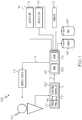
- a flight deck display system 100 includes a user interface 102, a processor 104, one or more terrain databases 106 sometimes referred to as a Terrain Avoidance and Warning System (TAWS), one or more navigation databases 108, various sensors 112, various external data sources 114, and one or more display devices 116.
- the user interface 102 is in operable communication with the processor 104 and is configured to receive input from a user 109 (e.g., a pilot) and, in response to the user input, supply command signals to the processor 104.
- the user interface 102 may be any one, or combination, of various known user interface devices including, but not limited to, one or more buttons, switches, or knobs (not shown).
- the user interface 102 includes a touch panel 107 and a touch panel controller 111.
- the touch panel controller 111 provides drive signals 113 to a touch panel 107, and a sense signal 115 is provided from the touch panel 107 to the touch panel controller 111, which periodically provides a signal 117 of the distribution of pressure to the processor 104.
- the processor 104 interprets the controller signal 117, and provides, for example, a signal 119 to the displays 116. Therefore, the user 109 uses the touch panel 107 to input alphanumeric data as more fully described hereinafter.
- the processor 104 may be any one of numerous known general-purpose microprocessors or an application specific processor that operates in response to program instructions.
- the processor 104 includes on-board RAM (random access memory) 103, and on-board ROM (read only memory) 105.
- the program instructions that control the processor 104 may be stored in either or both the RAM 103 and the ROM 105.
- the operating system software may be stored in the ROM 105, whereas various operating mode software routines and various operational parameters may be stored in the RAM 103.
- the software executing the exemplary embodiment is stored in either the ROM 105 or the RAM 103.
- processor 104 may be implemented using various other circuits, not just a programmable processor. For example, digital logic circuits and analog signal processing circuits could also be used.
- the memory 103, 105 may be realized as RAM memory, flash memory, EPROM memory, EEPROM memory, registers, a hard disk, a removable disk, a CD-ROM, or any other form of storage medium known in the art.
- the memory 103, 105 can be coupled to the processor 104 such that the processor 104 can read information from, and write information to, the memory 103, 105.
- the memory 103, 105 may be integral to the processor 104.
- the processor 104 and the memory 103, 105 may reside in an ASIC.
- a functional or logical module/component of the display devices 116 might be realized using program code that is maintained in the memory 103, 105.
- the memory 103, 105 can be used to store data utilized to support the operation of the display devices 116, as will become apparent from the following description.
- the processor 104 is in operable communication with the terrain databases 106, the navigation databases 108, and the display devices 116, and is coupled to receive various types of inertial data from the various sensors 112, and various other avionics-related data from the external data sources 114, for example, a GPS receiver 122 and an ILS receiver 118.
- the processor 104 is configured, in response to the inertial data and the avionics-related data, to selectively retrieve terrain data from one or more of the terrain databases 106 and navigation data from one or more of the navigation databases 108, and to supply appropriate display commands to the display devices 116.
- the display devices 116 in response to the display commands, selectively render various types of textual, graphic, and/or iconic information. The preferred manner in which the textual, graphic, and/or iconic information are rendered by the display devices 116 will be described in more detail further below.
- the terrain databases 106 include various types of data representative of the terrain over which the aircraft is flying, and the navigation databases 108 include various types of navigation-related data.
- the sensors 112 may be implemented using various types of inertial sensors, systems, and or subsystems, now known or developed in the future, for supplying various types of inertial data, for example, representative of the state of the aircraft including aircraft speed, heading, altitude, and attitude.
- the ILS receiver 118 provides aircraft with horizontal (or localizer) and vertical (or glide slope) guidance just before and during landing and, at certain fixed points, indicates the distance to the reference point of landing on a particular runway.
- the GPS receiver 122 is a multi-channel receiver, with each channel tuned to receive one or more of the GPS broadcast signals transmitted by the constellation of GPS satellites (not illustrated) orbiting the earth.
- the display devices 116 in response to display commands supplied from the processor 104, selectively renders various textual, graphic, and/or iconic information, and thereby supplies visual feedback to the user 109.
- the display devices 116 may be implemented using any one of numerous known display devices suitable for rendering textual, graphic, and/or iconic information in a format viewable by the user 109.
- Non-limiting examples of such display devices include various cathode ray tube (CRT) displays, and various flat panel displays such as various types of LCD (liquid crystal display) and TFT (thin film transistor) displays.
- the display devices 116 may additionally be implemented as a panel mounted display, a HUD (head-up display) projection, or any one of numerous known technologies.
- the display devices 116 may be configured as any one of numerous types of aircraft flight deck displays. For example, it may be configured as a multi-function display, a horizontal situation indicator, or a vertical situation indicator, just to name a few. In the depicted embodiments, however, one of the display devices 116 is configured as a touch screen.
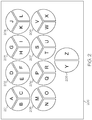
- an alphanumeric touch screen 200 is shown in FIG. 2 and includes displayed nine circular buttons, or keys, 201-209, each containing touch sensitive regions for displaying the characters A-Z as shown.
- the number of circular buttons 201-209 may number from one to a plurality. While the buttons 201-208 contain three touch sensitive regions and button 209 contains two touch sensitive regions, the buttons are not to be limited to such numbers and may contain a plurality of such touch sensitive regions defining characters.
- alphabetic characters are illustrated in the above exemplary embodiment, the characters may be numbers, symbols, icons, signs, words, terms, and phrases, either alone or in combination, etc., in any language.
- the diameter of each button is at least 26 millimeters with an interspacing between adjacent buttons of at least 2 millimeters. While the value of the described embodiments is especially high when implemented in small touch screens, it may also be utilized in larger touch screens.
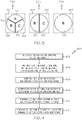
- buttons 201 X includes touch sensitive regions 301, 302, 303, containing the characters "A”, “B”, and “C", respectively.
- the touch sensitive regions 301, 302, 303 are larger than the displayed area 311, 312, 313 containing the characters "A", “B”, and “C”, respectively, to increase the likelihood of a user's touch being sensed.
- a user's touch to a particular portion (one of the touch sensitive areas 301, 302, 303) of button 201 X would select one of the single characters "A', or "B” or “C” corresponding to the particular touched portion.
- button 201 is referred to as button 201 X , 201 Y , and 201 Z to designate steps in the selection method.
- a substring is one or more characters stored in a database in memory 105, representing an object or process, such as aircraft navigation aids, way points for a route of flight, airports, and the like in the described exemplary embodiments.
- a substring is one or more characters stored in a database in memory 105, representing an object or process, such as aircraft navigation aids, way points for a route of flight, airports, and the like in the described exemplary embodiments.
- the touch sensitive portion 301 containing the character "A” were touched, "A” would become a substring, or if an existing substring was "TU”, the appended substring would be “TUA”.
- substrings "UTB” or “TUC” would be created if "B” or "C” were selected.
- the substring containing the selected character is then compared to the database containing a plurality of character strings. If character strings containing "B", and “C” were in a database of valid substrings, for example TUB and TUC, but no strings ending with the character "A” existed, then the touch sensitive region 301 containing the letter "A” is removed and the touch sensitive region 302 containing the character "B” and touch sensitive region 303 containing the character “C” are displayed in an enlarged format as shown on button 201 Y as new touch sensitive regions 304 and 305, respectively. This method may be repeated.
- FIG. 4 is a flow chart that illustrates an exemplary embodiment of a display process 400 suitable for use with a flight deck display system such as the display system 100.
- Process 400 represents one implementation of a method for displaying characters on an onboard display element of a host aircraft.
- the various tasks performed in connection with process 400 may be performed by software, hardware, firmware, or any combination thereof.
- the following description of process 400 may refer to elements mentioned herein in connection with FIG. 3 , 5-9 .
- portions of process 400 may be performed by different elements of the described system, e.g., a processor, a display element, or a data communication component. It should be appreciated that process 400 may include any number of additional or alternative tasks, the tasks shown in FIG.
- process 400 need not be performed in the illustrated order, and process 400 may be incorporated into a more comprehensive procedure or process having additional functionality not described in detail herein. Moreover, one or more of the tasks shown in FIG. 4 could be omitted from an embodiment of the process 400 as long as the intended overall functionality remains intact.
- a flow chart 400 of the steps in the method describing the various exemplary embodiments herein is described in FIG. 4 and includes a used detecting 402 a touch of a button displaying at least one character, and a processor creating 404 at least one character substring, one for each of the one or more selectable characters displayed on the selected button. These at least one character substring are then compared 406 with valid character strings (i.e., the character strings in the database). Selectable characters on the touch screen that do not contain the at least one character substring are identified 408 as invalid and removed 410 from the touch screen. The selectable characters remaining on the touch screen are then displayed 412 in an enlarged format in an area that the previously displayed character occupied.
- the touch sensitive region corresponding to an individual character selected is highlighted to provide visual feedback for selection.
- touch sensitive regions 301, 304 and 306 are highlighted.
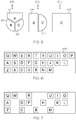
- a second exemplary embodiment shown in FIGS. 6-8 includes a touch screen, or keyboard, 600 having twenty six buttons, or touch sensitive regions for each of the letters of the English alphabet.
- the button "R” for example, the letter “R” becomes a substring, or is appended to a previously stored, existing substring.
- the substring becomes “R” and is compared to a database containing a plurality of valid character strings. If there were no character strings starting with "R” and not containing at least one or more instances of "E", "T”.
- buttons for the letters “E” , “T”, “Y”, “P”, “S”, “G”, “J”, “X”, “V”, and “M” are removed as shown in FIG. 7 .
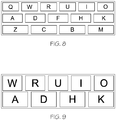
- the remaining buttons for the characters “Q”, “W”, “R”, “U”, “I”, “O”, “A”, “D”, “F”, “H”, “K”, “Z”, “C”, “B”, and “M” are displayed in an enlarged format to substantially fill the area previously occupied by the initial touch screen ( FIG. 6 ). Note when more buttons in one row are removed, the buttons in that row will be displayed wider than the buttons in the rows where no or lesser number of characters are removed.
- buttons for the characters “Q”, “F”, “Z”, “C”, “B”, and “M” are removed as shown in FIG. 9 .
- the remaining buttons for the characters “W”, “R”, “U”, “I”, “O”, “A”, “D”, “H”, and “K” are displayed in an enlarged format to substantially fill the area occupied by the former displayed version of the touch screen ( FIG. 8 ). Note that when all of the buttons are removed from a row, the displayed height of the buttons in the other rows is increased that uses space previously occupied by the removed row.
- a determination of the displayed size of the buttons in the above described embodiment may be made 1002 by use of the following exemplary algorithm ( FIG. 10 ), where
Landscapes
- Engineering & Computer Science (AREA)
- General Engineering & Computer Science (AREA)
- Theoretical Computer Science (AREA)
- Human Computer Interaction (AREA)
- Physics & Mathematics (AREA)
- General Physics & Mathematics (AREA)
- User Interface Of Digital Computer (AREA)
- Input From Keyboards Or The Like (AREA)
- Position Input By Displaying (AREA)
Claims (10)
- Procédé d'agrandissement d'une pluralité de caractères sélectionnables affichés sur une pluralité de boutons sur un clavier d'un écran tactile adaptatif à bord d'un aéronef lors d'une saisie d'une pluralité de caractères souhaités, le procédé comprenant les étapes suivantes :détection d'un toucher d'un bouton affichant au moins un des caractères sélectionnables ;détermination, par un processeur couplé à l'écran tactile, de la taille et de la position des caractères sélectionnables à afficher, notamment au moyen des étapes suivantes :création d'au moins une sous-chaîne de caractères, une pour chacun de l'au moins un des caractères sélectionnables affiché sur le bouton touché ;comparaison de l'au moins une sous-chaîne de caractères à une pluralité de chaînes de caractères valides mémorisées commençant par l'au moins une sous-chaîne de caractères ;identification, comme invalides, de caractères sélectionnables sur l'écran tactile qui ne sont pas contenus dans une liste de chaînes de caractères valides ;suppression des caractères sélectionnables sur l'écran tactile contenus dans la chaîne de caractères invalides ; etaffichage, dans un format agrandi, des boutons restant sur l'écran tactile, X représentant la largeur totale du clavier, Y représentant la largeur de l'espacement entre les boutons, L représentant la largeur de boutons individuels, H représentant la hauteur de boutons individuels et T représentant la hauteur du clavier, et l'étape d'agrandissement comprenant l'étape de détermination de tailles auxquelles le format des boutons restants sont agrandis au moyen des étapes suivantes :(a) si aucun bouton n'est supprimé d'aucune rangée, passer à l'étape (c), sinon passer à l'étape (b) ;(b) si au moins un bouton est supprimé d'une rangée quelconque, poser L = (X - ((nombre de boutons restants - 1)Y))/nombre de boutons restants, et augmenter la largeur des boutons restants dans chaque rangée jusqu'à une nouvelle valeur L pour cette rangée ;(c) si les boutons ne sont pas tous supprimés d'au moins une rangée, passer à l'étape (e) ;(d) si tous les boutons sont supprimés d'au moins une rangée, pour chaque rangée restante, poser H = (T - ((nombre de rangées restantes - 1)Y))/nombre de rangées restantes, et augmenter la hauteur des boutons individuels restants jusqu'à la nouvelle valeur H ; et(e) répéter à partir de l'étape de détection.
- Procédé selon la revendication 1, dans lequel l'étape de création comprend l'étape d'adjonction des caractères sélectionnables à une sous-chaîne existant déjà.
- Procédé selon la revendication 1, dans lequel les boutons comprennent chacun une pluralité unique des caractères sélectionnables, l'étape de suppression comprenant l'étape de suppression d'au moins un caractère sélectionnable d'au moins un bouton ; et l'étape d'agrandissement comprenant l'étape d'agrandissement des caractères sélectionnables restant sur le bouton.
- Procédé selon la revendication 1, dans lequel chaque bouton comprend au moins une région sensible au toucher, chacune des régions sensibles au toucher étant unique à l'un des caractères sélectionnables, le procédé comprenant en outre l'étape suivante :modification des régions sensibles au toucher pendant un certain intervalle de temps pour les caractères sélectionnables contenus dans la chaîne de caractères invalides suite à l'étape d'identification et préalablement à l'étape de suppression.
- Procédé selon la revendication 1, dans lequel le bouton affiche un caractère, dans lequel l'étape de suppression comprend l'étape de suppression du bouton, et dans lequel l'étape d'affichage comprend l'étape d'affichage, dans un format agrandi, d'au moins un de la pluralité de boutons restants.
- Procédé selon la revendication 5, dans lequel l'étape de suppression comprend l'étape de suppression d'un bouton d'une rangée de boutons et l'étape d'agrandissement comprend l'étape d'augmentation de largeurs de boutons restants dans la rangée.
- Procédé selon la revendication 5, dans lequel l'étape de suppression comprend l'étape de suppression d'une rangée de boutons contenant les caractères sélectionnables identifiés d'une pluralité de rangées de boutons, et l'étape d'agrandissement comprend l'étape d'agrandissement de hauteurs de boutons restants.
- Système d'affichage de caractères sur un clavier, comprenant :un écran tactile configuré pour afficher le clavier à bord d'un aéronef ;un processeur configuré pour :afficher une pluralité de boutons dans le clavier lors d'une saisie d'une pluralité de caractères souhaités, chaque bouton contenant au moins une région sensible au toucher, chaque région sensible au toucher affichant au moins un caractère ;détecter la sélection d'une des régions sensibles au toucher ;créer au moins une sous-chaîne de caractères, une pour chacun de l'au moins un des caractères sélectionnables affiché sur la région sensible au toucher ;comparer l'au moins une sous-chaîne de caractères à une pluralité de chaînes de caractères valides mémorisées commençant par l'au moins une sous-chaîne de caractères ;identifier, comme invalides, des caractères sélectionnables sur l'écran tactile qui ne sont pas contenus dans une liste de chaînes de caractères valides ;supprimer les caractères sélectionnables sur l'écran tactile contenus dans les chaînes de caractères invalides ; etafficher, dans un format agrandi, d'autres régions sensibles au toucher restant sur l'écran tactile, X représentant la largeur totale du clavier de l'écran tactile, Y représentant la largeur de l'espacement entre les boutons, L représentant la largeur de boutons individuels, H représentant la hauteur de boutons individuels et T représentant la hauteur de l'écran tactile, et une étape d'agrandissement comprenant l'étape de détermination de tailles auxquelles le format des boutons restants sont agrandis au moyen des étapes suivantes :(a) si aucun bouton n'est supprimé d'aucune rangée, passer à l'étape (c) ;(b) si au moins un bouton est supprimé d'une rangée quelconque, poser L = (X - ((nombre de boutons restants - 1)Y))/nombre de boutons restants, et augmenter la largeur des boutons restants dans chaque rangée jusqu'à une nouvelle valeur L pour cette rangée ;(c) si les boutons ne sont pas tous supprimés d'au moins une rangée, passer à l'étape (e) ;(d) si tous les boutons sont supprimés d'au moins une rangée, pour chaque rangée restante, poser H - (T - ((nombre de rangées restantes - 1)Y))/nombre de rangées restantes, et augmenter la hauteur des boutons individuels restants jusqu'à la nouvelle valeur H ; et (e) répéter à partir de la détection d'une des régions sensibles au toucher.
- Système selon la revendication 8, dans lequel les boutons comprennent chacun une pluralité de régions sensibles au toucher, chacune des régions sensibles au toucher affichant un caractère unique, le processeur étant configuré en outre pour :afficher, dans un format agrandi, les régions sensibles au toucher restantes sur le bouton.
- Système selon la revendication 8, dans lequel chaque bouton affiche l'un de la pluralité de caractères, et le processeur est configuré en outre pour :supprimer des boutons affichant des caractères qui ne sont pas contenus dans les chaînes de caractères ; etafficher, dans un format agrandi, les boutons restants.
Applications Claiming Priority (1)
| Application Number | Priority Date | Filing Date | Title |
|---|---|---|---|
| US13/049,664 US8719724B2 (en) | 2011-03-16 | 2011-03-16 | Method for enlarging characters displayed on an adaptive touch screen key pad |
Publications (3)
| Publication Number | Publication Date |
|---|---|
| EP2500795A2 EP2500795A2 (fr) | 2012-09-19 |
| EP2500795A3 EP2500795A3 (fr) | 2013-11-06 |
| EP2500795B1 true EP2500795B1 (fr) | 2017-12-06 |
Family
ID=45841329
Family Applications (1)
| Application Number | Title | Priority Date | Filing Date |
|---|---|---|---|
| EP12159129.1A Not-in-force EP2500795B1 (fr) | 2011-03-16 | 2012-03-12 | Procédé pour agrandir les caractères affichés sur un clavier adaptif d'un écran tactile |
Country Status (6)
| Country | Link |
|---|---|
| US (1) | US8719724B2 (fr) |
| EP (1) | EP2500795B1 (fr) |
| JP (2) | JP2012194978A (fr) |
| KR (1) | KR101829694B1 (fr) |
| CN (1) | CN102799346A (fr) |
| TW (1) | TWI528263B (fr) |
Families Citing this family (20)
| Publication number | Priority date | Publication date | Assignee | Title |
|---|---|---|---|---|
| US20140139556A1 (en) * | 2012-11-22 | 2014-05-22 | Shanghai Powermo Information Tech. Co. Ltd. | Apparatus and method for displaying software keyboards thereof |
| US20140152574A1 (en) * | 2012-12-02 | 2014-06-05 | Ahmet Akkok | Zig Zag Keyboard |
| US9411510B2 (en) * | 2012-12-07 | 2016-08-09 | Apple Inc. | Techniques for preventing typographical errors on soft keyboards |
| US9842511B2 (en) * | 2012-12-20 | 2017-12-12 | The United States Of America As Represented By The Secretary Of The Army | Method and apparatus for facilitating attention to a task |
| US9747025B2 (en) | 2013-03-04 | 2017-08-29 | International Business Machines Corporation | Modifying key size on a touch screen based on fingertip location |
| US10235042B2 (en) | 2013-03-15 | 2019-03-19 | Forbes Holten Norris, III | Space optimizing micro keyboard method and apparatus |
| US9268485B2 (en) | 2013-04-30 | 2016-02-23 | Microth, Inc. | Lattice keyboards with related devices |
| CN103576879B (zh) * | 2013-09-29 | 2016-03-30 | 罗蒙明 | 一种实现双手拇指操控宽屏虚拟键盘按键的方法 |
| US10156984B2 (en) | 2013-09-29 | 2018-12-18 | Shenzhen Hsmc Technology Co., Ltd. | Method for implementing control of keys of virtual keyboard on wide touch screen with two thumbs |
| US9933858B2 (en) | 2013-09-29 | 2018-04-03 | Shenzhen Hsmc Technology Co., Ltd. | Keyboard operated with two thumbs and key layout method thereof |
| US20150138097A1 (en) * | 2013-11-21 | 2015-05-21 | Honda Motor Co., Ltd. | System and method for entering characters on a radio tuner interface |
| US10572149B2 (en) | 2014-04-08 | 2020-02-25 | Forbes Holten Norris, III | Partial word completion virtual keyboard typing method and apparatus, with reduced key sets, in ergonomic, condensed standard layouts and thumb typing formats |
| CN105068669A (zh) * | 2015-09-09 | 2015-11-18 | 任金瑞 | 电脑键盘按键的放大片 |
| JP6945979B2 (ja) * | 2016-08-30 | 2021-10-06 | 株式会社Fuji | ストッカ |
| US10162459B2 (en) | 2016-10-27 | 2018-12-25 | Motorola Solutions, Inc. | Apparatus and method for expanded touch sensitive actuation of a user interface button |
| US10409413B2 (en) | 2016-10-27 | 2019-09-10 | Motorola Solutions, Inc. | Apparatus and method for expanded touch sensitive actuation of a user interface button |
| US10733551B2 (en) * | 2018-05-01 | 2020-08-04 | Honeywell International Inc. | Systems and methods for providing dynamic voice-prompt dialogue for situational awareness onboard an aircraft |
| US11556621B2 (en) * | 2019-02-25 | 2023-01-17 | International Business Machines Corporation | Encoding a key touch on a device |
| CN116680034B (zh) * | 2023-08-02 | 2023-10-27 | 山东依鲁光电科技有限公司 | 一种led异步显示屏自适应群发实现方法 |
| WO2026071268A1 (fr) * | 2024-09-30 | 2026-04-02 | キーコム株式会社 | Système d'affichage d'image |
Family Cites Families (31)
| Publication number | Priority date | Publication date | Assignee | Title |
|---|---|---|---|---|
| US5963671A (en) | 1991-11-27 | 1999-10-05 | International Business Machines Corporation | Enhancement of soft keyboard operations using trigram prediction |
| US5748512A (en) * | 1995-02-28 | 1998-05-05 | Microsoft Corporation | Adjusting keyboard |
| US6271835B1 (en) | 1998-09-03 | 2001-08-07 | Nortel Networks Limited | Touch-screen input device |
| US7293231B1 (en) | 1999-03-18 | 2007-11-06 | British Columbia Ltd. | Data entry for personal computing devices |
| US6492979B1 (en) | 1999-09-07 | 2002-12-10 | Elo Touchsystems, Inc. | Dual sensor touchscreen utilizing projective-capacitive and force touch sensors |
| US6573844B1 (en) | 2000-01-18 | 2003-06-03 | Microsoft Corporation | Predictive keyboard |
| JP2002207558A (ja) * | 2001-01-11 | 2002-07-26 | Takuo Kitamura | キーボードを備えた電子機器 |
| US6724370B2 (en) | 2001-04-12 | 2004-04-20 | International Business Machines Corporation | Touchscreen user interface |
| US20020149571A1 (en) | 2001-04-13 | 2002-10-17 | Roberts Jerry B. | Method and apparatus for force-based touch input |
| TWI235942B (en) | 2001-10-29 | 2005-07-11 | Oqo Inc | Keyboard with variable-sized key |
| FI116425B (fi) | 2002-01-18 | 2005-11-15 | Nokia Corp | Menetelmä ja laite laajan näppäimistön integroimiseksi pieneen laitteeseen |
| JP2005044220A (ja) * | 2003-07-24 | 2005-02-17 | Denso Corp | 文字入力装置 |
| US7624355B2 (en) * | 2004-05-27 | 2009-11-24 | Baneth Robin C | System and method for controlling a user interface |
| CN101176053A (zh) * | 2005-03-29 | 2008-05-07 | 松下电器产业株式会社 | 输入装置以及具备输入装置的移动终端 |
| US7186041B2 (en) * | 2005-04-08 | 2007-03-06 | Avago Technologies Ecbu Ip (Singapore) Pte. Ltd. | Keyboard layout for mouse or rocker switch text entry |
| US7487147B2 (en) | 2005-07-13 | 2009-02-03 | Sony Computer Entertainment Inc. | Predictive user interface |
| JP2007179168A (ja) * | 2005-12-27 | 2007-07-12 | Sony Corp | 情報処理装置および方法、並びにプログラム |
| JP2007257068A (ja) * | 2006-03-20 | 2007-10-04 | Canon Inc | キーボード表示装置とその制御方法及び入力装置 |
| US7538760B2 (en) | 2006-03-30 | 2009-05-26 | Apple Inc. | Force imaging input device and system |
| US8564544B2 (en) | 2006-09-06 | 2013-10-22 | Apple Inc. | Touch screen device, method, and graphical user interface for customizing display of content category icons |
| US8065624B2 (en) | 2007-06-28 | 2011-11-22 | Panasonic Corporation | Virtual keypad systems and methods |
| US8312373B2 (en) * | 2007-10-18 | 2012-11-13 | Nokia Corporation | Apparatus, method, and computer program product for affecting an arrangement of selectable items |
| US7453441B1 (en) | 2008-03-31 | 2008-11-18 | International Business Machines Corporation | Method and system for intelligent keyboard illumination |
| US20100026650A1 (en) | 2008-07-29 | 2010-02-04 | Samsung Electronics Co., Ltd. | Method and system for emphasizing objects |
| US8335993B1 (en) * | 2008-10-24 | 2012-12-18 | Marvell International Ltd. | Enhanced touch sensitive interface and methods and software for making and using the same |
| US8413066B2 (en) * | 2008-11-06 | 2013-04-02 | Dmytro Lysytskyy | Virtual keyboard with visually enhanced keys |
| JP4886797B2 (ja) * | 2009-01-15 | 2012-02-29 | ヤフー株式会社 | ソフトウェアキーボードの表示方法及び携帯情報端末装置 |
| US20100265181A1 (en) | 2009-04-20 | 2010-10-21 | ShoreCap LLC | System, method and computer readable media for enabling a user to quickly identify and select a key on a touch screen keypad by easing key selection |
| US20100315266A1 (en) | 2009-06-15 | 2010-12-16 | Microsoft Corporation | Predictive interfaces with usability constraints |
| JP5723874B2 (ja) | 2009-06-30 | 2015-05-27 | ノキア コーポレイション | デュアル文字体系テキスト入力およびキーハイライト機能 |
| US20120047454A1 (en) * | 2010-08-18 | 2012-02-23 | Erik Anthony Harte | Dynamic Soft Input |
-
2011
- 2011-03-16 US US13/049,664 patent/US8719724B2/en not_active Expired - Fee Related
-
2012
- 2012-03-12 EP EP12159129.1A patent/EP2500795B1/fr not_active Not-in-force
- 2012-03-14 JP JP2012057208A patent/JP2012194978A/ja active Pending
- 2012-03-15 TW TW101108939A patent/TWI528263B/zh not_active IP Right Cessation
- 2012-03-15 CN CN201210125019XA patent/CN102799346A/zh active Pending
- 2012-03-16 KR KR1020120027212A patent/KR101829694B1/ko not_active Expired - Fee Related
-
2016
- 2016-08-22 JP JP2016161625A patent/JP6242964B2/ja not_active Expired - Fee Related
Non-Patent Citations (1)
| Title |
|---|
| None * |
Also Published As
| Publication number | Publication date |
|---|---|
| EP2500795A2 (fr) | 2012-09-19 |
| EP2500795A3 (fr) | 2013-11-06 |
| TWI528263B (zh) | 2016-04-01 |
| KR20120106647A (ko) | 2012-09-26 |
| TW201243706A (en) | 2012-11-01 |
| JP2012194978A (ja) | 2012-10-11 |
| KR101829694B1 (ko) | 2018-02-19 |
| US8719724B2 (en) | 2014-05-06 |
| JP6242964B2 (ja) | 2017-12-06 |
| US20120240069A1 (en) | 2012-09-20 |
| JP2016212914A (ja) | 2016-12-15 |
| CN102799346A (zh) | 2012-11-28 |
Similar Documents
| Publication | Publication Date | Title |
|---|---|---|
| EP2500795B1 (fr) | Procédé pour agrandir les caractères affichés sur un clavier adaptif d'un écran tactile | |
| US8766936B2 (en) | Touch screen and method for providing stable touches | |
| US8456445B2 (en) | Touch screen and method for adjusting screen objects | |
| US20110187651A1 (en) | Touch screen having adaptive input parameter | |
| US8159464B1 (en) | Enhanced flight display with improved touchscreen interface | |
| CN103870059B (zh) | 用于利用智能模板掩模与触摸屏界面交互的系统和方法 | |
| EP2555105A2 (fr) | Écran tactile répondant à des critères d'entrées adaptatives | |
| US20110128235A1 (en) | Big key touch input device | |
| US20140300555A1 (en) | Avionic touchscreen control systems and program products having "no look" control selection feature | |
| US9916032B2 (en) | System and method of knob operation for touchscreen devices | |
| EP2533016B1 (fr) | Procédés et systèmes permettant d'effectuer des tâches de graphique | |
| EP2818994A1 (fr) | Écran tactile et procédé de réglage de placement d'objet tactile sur celui-ci | |
| CN101989177A (zh) | 用于选择要显示的图像的显示器和方法 | |
| US9989377B2 (en) | Method and system for displaying information | |
| EP3896559A1 (fr) | Systèmes et procédés fournissant des affordances visuelles pour des interfaces homme-machine |
Legal Events
| Date | Code | Title | Description |
|---|---|---|---|
| PUAI | Public reference made under article 153(3) epc to a published international application that has entered the european phase |
Free format text: ORIGINAL CODE: 0009012 |
|
| 17P | Request for examination filed |
Effective date: 20120312 |
|
| AK | Designated contracting states |
Kind code of ref document: A2 Designated state(s): AL AT BE BG CH CY CZ DE DK EE ES FI FR GB GR HR HU IE IS IT LI LT LU LV MC MK MT NL NO PL PT RO RS SE SI SK SM TR |
|
| AX | Request for extension of the european patent |
Extension state: BA ME |
|
| PUAL | Search report despatched |
Free format text: ORIGINAL CODE: 0009013 |
|
| AK | Designated contracting states |
Kind code of ref document: A3 Designated state(s): AL AT BE BG CH CY CZ DE DK EE ES FI FR GB GR HR HU IE IS IT LI LT LU LV MC MK MT NL NO PL PT RO RS SE SI SK SM TR |
|
| AX | Request for extension of the european patent |
Extension state: BA ME |
|
| RIC1 | Information provided on ipc code assigned before grant |
Ipc: G06F 3/023 20060101AFI20131001BHEP Ipc: G06F 3/048 20130101ALI20131001BHEP |
|
| 17Q | First examination report despatched |
Effective date: 20150202 |
|
| RAP1 | Party data changed (applicant data changed or rights of an application transferred) |
Owner name: HONEYWELL INTERNATIONAL INC. |
|
| GRAP | Despatch of communication of intention to grant a patent |
Free format text: ORIGINAL CODE: EPIDOSNIGR1 |
|
| INTG | Intention to grant announced |
Effective date: 20170331 |
|
| GRAS | Grant fee paid |
Free format text: ORIGINAL CODE: EPIDOSNIGR3 |
|
| GRAJ | Information related to disapproval of communication of intention to grant by the applicant or resumption of examination proceedings by the epo deleted |
Free format text: ORIGINAL CODE: EPIDOSDIGR1 |
|
| GRAL | Information related to payment of fee for publishing/printing deleted |
Free format text: ORIGINAL CODE: EPIDOSDIGR3 |
|
| INTC | Intention to grant announced (deleted) | ||
| GRAP | Despatch of communication of intention to grant a patent |
Free format text: ORIGINAL CODE: EPIDOSNIGR1 |
|
| GRAA | (expected) grant |
Free format text: ORIGINAL CODE: 0009210 |
|
| INTG | Intention to grant announced |
Effective date: 20171019 |
|
| AK | Designated contracting states |
Kind code of ref document: B1 Designated state(s): AL AT BE BG CH CY CZ DE DK EE ES FI FR GB GR HR HU IE IS IT LI LT LU LV MC MK MT NL NO PL PT RO RS SE SI SK SM TR |
|
| REG | Reference to a national code |
Ref country code: GB Ref legal event code: FG4D |
|
| REG | Reference to a national code |
Ref country code: AT Ref legal event code: REF Ref document number: 952947 Country of ref document: AT Kind code of ref document: T Effective date: 20171215 Ref country code: CH Ref legal event code: EP |
|
| REG | Reference to a national code |
Ref country code: IE Ref legal event code: FG4D |
|
| REG | Reference to a national code |
Ref country code: DE Ref legal event code: R096 Ref document number: 602012040495 Country of ref document: DE |
|
| REG | Reference to a national code |
Ref country code: FR Ref legal event code: PLFP Year of fee payment: 7 |
|
| REG | Reference to a national code |
Ref country code: NL Ref legal event code: MP Effective date: 20171206 |
|
| REG | Reference to a national code |
Ref country code: LT Ref legal event code: MG4D |
|
| PG25 | Lapsed in a contracting state [announced via postgrant information from national office to epo] |
Ref country code: FI Free format text: LAPSE BECAUSE OF FAILURE TO SUBMIT A TRANSLATION OF THE DESCRIPTION OR TO PAY THE FEE WITHIN THE PRESCRIBED TIME-LIMIT Effective date: 20171206 Ref country code: SE Free format text: LAPSE BECAUSE OF FAILURE TO SUBMIT A TRANSLATION OF THE DESCRIPTION OR TO PAY THE FEE WITHIN THE PRESCRIBED TIME-LIMIT Effective date: 20171206 Ref country code: LT Free format text: LAPSE BECAUSE OF FAILURE TO SUBMIT A TRANSLATION OF THE DESCRIPTION OR TO PAY THE FEE WITHIN THE PRESCRIBED TIME-LIMIT Effective date: 20171206 Ref country code: ES Free format text: LAPSE BECAUSE OF FAILURE TO SUBMIT A TRANSLATION OF THE DESCRIPTION OR TO PAY THE FEE WITHIN THE PRESCRIBED TIME-LIMIT Effective date: 20171206 Ref country code: NO Free format text: LAPSE BECAUSE OF FAILURE TO SUBMIT A TRANSLATION OF THE DESCRIPTION OR TO PAY THE FEE WITHIN THE PRESCRIBED TIME-LIMIT Effective date: 20180306 |
|
| REG | Reference to a national code |
Ref country code: AT Ref legal event code: MK05 Ref document number: 952947 Country of ref document: AT Kind code of ref document: T Effective date: 20171206 |
|
| PG25 | Lapsed in a contracting state [announced via postgrant information from national office to epo] |
Ref country code: GR Free format text: LAPSE BECAUSE OF FAILURE TO SUBMIT A TRANSLATION OF THE DESCRIPTION OR TO PAY THE FEE WITHIN THE PRESCRIBED TIME-LIMIT Effective date: 20180307 Ref country code: BG Free format text: LAPSE BECAUSE OF FAILURE TO SUBMIT A TRANSLATION OF THE DESCRIPTION OR TO PAY THE FEE WITHIN THE PRESCRIBED TIME-LIMIT Effective date: 20180306 Ref country code: HR Free format text: LAPSE BECAUSE OF FAILURE TO SUBMIT A TRANSLATION OF THE DESCRIPTION OR TO PAY THE FEE WITHIN THE PRESCRIBED TIME-LIMIT Effective date: 20171206 Ref country code: LV Free format text: LAPSE BECAUSE OF FAILURE TO SUBMIT A TRANSLATION OF THE DESCRIPTION OR TO PAY THE FEE WITHIN THE PRESCRIBED TIME-LIMIT Effective date: 20171206 Ref country code: RS Free format text: LAPSE BECAUSE OF FAILURE TO SUBMIT A TRANSLATION OF THE DESCRIPTION OR TO PAY THE FEE WITHIN THE PRESCRIBED TIME-LIMIT Effective date: 20171206 |
|
| PG25 | Lapsed in a contracting state [announced via postgrant information from national office to epo] |
Ref country code: NL Free format text: LAPSE BECAUSE OF FAILURE TO SUBMIT A TRANSLATION OF THE DESCRIPTION OR TO PAY THE FEE WITHIN THE PRESCRIBED TIME-LIMIT Effective date: 20171206 |
|
| PG25 | Lapsed in a contracting state [announced via postgrant information from national office to epo] |
Ref country code: EE Free format text: LAPSE BECAUSE OF FAILURE TO SUBMIT A TRANSLATION OF THE DESCRIPTION OR TO PAY THE FEE WITHIN THE PRESCRIBED TIME-LIMIT Effective date: 20171206 Ref country code: CZ Free format text: LAPSE BECAUSE OF FAILURE TO SUBMIT A TRANSLATION OF THE DESCRIPTION OR TO PAY THE FEE WITHIN THE PRESCRIBED TIME-LIMIT Effective date: 20171206 Ref country code: SK Free format text: LAPSE BECAUSE OF FAILURE TO SUBMIT A TRANSLATION OF THE DESCRIPTION OR TO PAY THE FEE WITHIN THE PRESCRIBED TIME-LIMIT Effective date: 20171206 |
|
| PG25 | Lapsed in a contracting state [announced via postgrant information from national office to epo] |
Ref country code: SM Free format text: LAPSE BECAUSE OF FAILURE TO SUBMIT A TRANSLATION OF THE DESCRIPTION OR TO PAY THE FEE WITHIN THE PRESCRIBED TIME-LIMIT Effective date: 20171206 Ref country code: PL Free format text: LAPSE BECAUSE OF FAILURE TO SUBMIT A TRANSLATION OF THE DESCRIPTION OR TO PAY THE FEE WITHIN THE PRESCRIBED TIME-LIMIT Effective date: 20171206 Ref country code: AT Free format text: LAPSE BECAUSE OF FAILURE TO SUBMIT A TRANSLATION OF THE DESCRIPTION OR TO PAY THE FEE WITHIN THE PRESCRIBED TIME-LIMIT Effective date: 20171206 Ref country code: RO Free format text: LAPSE BECAUSE OF FAILURE TO SUBMIT A TRANSLATION OF THE DESCRIPTION OR TO PAY THE FEE WITHIN THE PRESCRIBED TIME-LIMIT Effective date: 20171206 Ref country code: IT Free format text: LAPSE BECAUSE OF FAILURE TO SUBMIT A TRANSLATION OF THE DESCRIPTION OR TO PAY THE FEE WITHIN THE PRESCRIBED TIME-LIMIT Effective date: 20171206 |
|
| REG | Reference to a national code |
Ref country code: DE Ref legal event code: R097 Ref document number: 602012040495 Country of ref document: DE |
|
| PLBE | No opposition filed within time limit |
Free format text: ORIGINAL CODE: 0009261 |
|
| STAA | Information on the status of an ep patent application or granted ep patent |
Free format text: STATUS: NO OPPOSITION FILED WITHIN TIME LIMIT |
|
| REG | Reference to a national code |
Ref country code: CH Ref legal event code: PL |
|
| 26N | No opposition filed |
Effective date: 20180907 |
|
| PG25 | Lapsed in a contracting state [announced via postgrant information from national office to epo] |
Ref country code: SI Free format text: LAPSE BECAUSE OF FAILURE TO SUBMIT A TRANSLATION OF THE DESCRIPTION OR TO PAY THE FEE WITHIN THE PRESCRIBED TIME-LIMIT Effective date: 20171206 Ref country code: DK Free format text: LAPSE BECAUSE OF FAILURE TO SUBMIT A TRANSLATION OF THE DESCRIPTION OR TO PAY THE FEE WITHIN THE PRESCRIBED TIME-LIMIT Effective date: 20171206 Ref country code: MC Free format text: LAPSE BECAUSE OF FAILURE TO SUBMIT A TRANSLATION OF THE DESCRIPTION OR TO PAY THE FEE WITHIN THE PRESCRIBED TIME-LIMIT Effective date: 20171206 |
|
| REG | Reference to a national code |
Ref country code: IE Ref legal event code: MM4A |
|
| PG25 | Lapsed in a contracting state [announced via postgrant information from national office to epo] |
Ref country code: LU Free format text: LAPSE BECAUSE OF NON-PAYMENT OF DUE FEES Effective date: 20180312 |
|
| PG25 | Lapsed in a contracting state [announced via postgrant information from national office to epo] |
Ref country code: IE Free format text: LAPSE BECAUSE OF NON-PAYMENT OF DUE FEES Effective date: 20180312 |
|
| PG25 | Lapsed in a contracting state [announced via postgrant information from national office to epo] |
Ref country code: LI Free format text: LAPSE BECAUSE OF NON-PAYMENT OF DUE FEES Effective date: 20180331 Ref country code: CH Free format text: LAPSE BECAUSE OF NON-PAYMENT OF DUE FEES Effective date: 20180331 |
|
| PGFP | Annual fee paid to national office [announced via postgrant information from national office to epo] |
Ref country code: GB Payment date: 20190327 Year of fee payment: 8 Ref country code: FR Payment date: 20190328 Year of fee payment: 8 |
|
| PGFP | Annual fee paid to national office [announced via postgrant information from national office to epo] |
Ref country code: DE Payment date: 20190411 Year of fee payment: 8 |
|
| PGFP | Annual fee paid to national office [announced via postgrant information from national office to epo] |
Ref country code: BE Payment date: 20190328 Year of fee payment: 8 |
|
| PG25 | Lapsed in a contracting state [announced via postgrant information from national office to epo] |
Ref country code: MT Free format text: LAPSE BECAUSE OF NON-PAYMENT OF DUE FEES Effective date: 20180312 |
|
| PG25 | Lapsed in a contracting state [announced via postgrant information from national office to epo] |
Ref country code: TR Free format text: LAPSE BECAUSE OF FAILURE TO SUBMIT A TRANSLATION OF THE DESCRIPTION OR TO PAY THE FEE WITHIN THE PRESCRIBED TIME-LIMIT Effective date: 20171206 |
|
| PG25 | Lapsed in a contracting state [announced via postgrant information from national office to epo] |
Ref country code: PT Free format text: LAPSE BECAUSE OF FAILURE TO SUBMIT A TRANSLATION OF THE DESCRIPTION OR TO PAY THE FEE WITHIN THE PRESCRIBED TIME-LIMIT Effective date: 20171206 Ref country code: HU Free format text: LAPSE BECAUSE OF FAILURE TO SUBMIT A TRANSLATION OF THE DESCRIPTION OR TO PAY THE FEE WITHIN THE PRESCRIBED TIME-LIMIT; INVALID AB INITIO Effective date: 20120312 |
|
| PG25 | Lapsed in a contracting state [announced via postgrant information from national office to epo] |
Ref country code: MK Free format text: LAPSE BECAUSE OF NON-PAYMENT OF DUE FEES Effective date: 20171206 Ref country code: CY Free format text: LAPSE BECAUSE OF FAILURE TO SUBMIT A TRANSLATION OF THE DESCRIPTION OR TO PAY THE FEE WITHIN THE PRESCRIBED TIME-LIMIT Effective date: 20171206 |
|
| PG25 | Lapsed in a contracting state [announced via postgrant information from national office to epo] |
Ref country code: AL Free format text: LAPSE BECAUSE OF FAILURE TO SUBMIT A TRANSLATION OF THE DESCRIPTION OR TO PAY THE FEE WITHIN THE PRESCRIBED TIME-LIMIT Effective date: 20171206 Ref country code: IS Free format text: LAPSE BECAUSE OF FAILURE TO SUBMIT A TRANSLATION OF THE DESCRIPTION OR TO PAY THE FEE WITHIN THE PRESCRIBED TIME-LIMIT Effective date: 20180406 |
|
| REG | Reference to a national code |
Ref country code: DE Ref legal event code: R119 Ref document number: 602012040495 Country of ref document: DE |
|
| REG | Reference to a national code |
Ref country code: BE Ref legal event code: MM Effective date: 20200331 |
|
| PG25 | Lapsed in a contracting state [announced via postgrant information from national office to epo] |
Ref country code: FR Free format text: LAPSE BECAUSE OF NON-PAYMENT OF DUE FEES Effective date: 20200331 Ref country code: DE Free format text: LAPSE BECAUSE OF NON-PAYMENT OF DUE FEES Effective date: 20201001 |
|
| PG25 | Lapsed in a contracting state [announced via postgrant information from national office to epo] |
Ref country code: BE Free format text: LAPSE BECAUSE OF NON-PAYMENT OF DUE FEES Effective date: 20200331 |
|
| GBPC | Gb: european patent ceased through non-payment of renewal fee |
Effective date: 20200312 |
|
| PG25 | Lapsed in a contracting state [announced via postgrant information from national office to epo] |
Ref country code: GB Free format text: LAPSE BECAUSE OF NON-PAYMENT OF DUE FEES Effective date: 20200312 |
|
| P01 | Opt-out of the competence of the unified patent court (upc) registered |
Effective date: 20230525 |