EP2500808A1 - Elektronische Vorrichtung, Steuerungsverfahren dafür und Computerprogrammprodukt dafür - Google Patents
Elektronische Vorrichtung, Steuerungsverfahren dafür und Computerprogrammprodukt dafür Download PDFInfo
- Publication number
- EP2500808A1 EP2500808A1 EP11167221A EP11167221A EP2500808A1 EP 2500808 A1 EP2500808 A1 EP 2500808A1 EP 11167221 A EP11167221 A EP 11167221A EP 11167221 A EP11167221 A EP 11167221A EP 2500808 A1 EP2500808 A1 EP 2500808A1
- Authority
- EP
- European Patent Office
- Prior art keywords
- software key
- candidate
- key
- touch
- software
- Prior art date
- Legal status (The legal status is an assumption and is not a legal conclusion. Google has not performed a legal analysis and makes no representation as to the accuracy of the status listed.)
- Withdrawn
Links
Images

Classifications
-
- G—PHYSICS
- G06—COMPUTING OR CALCULATING; COUNTING
- G06F—ELECTRIC DIGITAL DATA PROCESSING
- G06F3/00—Input arrangements for transferring data to be processed into a form capable of being handled by the computer; Output arrangements for transferring data from processing unit to output unit, e.g. interface arrangements
- G06F3/01—Input arrangements or combined input and output arrangements for interaction between user and computer
- G06F3/048—Interaction techniques based on graphical user interfaces [GUI]
- G06F3/0487—Interaction techniques based on graphical user interfaces [GUI] using specific features provided by the input device, e.g. functions controlled by the rotation of a mouse with dual sensing arrangements, or of the nature of the input device, e.g. tap gestures based on pressure sensed by a digitiser
- G06F3/0488—Interaction techniques based on graphical user interfaces [GUI] using specific features provided by the input device, e.g. functions controlled by the rotation of a mouse with dual sensing arrangements, or of the nature of the input device, e.g. tap gestures based on pressure sensed by a digitiser using a touch-screen or digitiser, e.g. input of commands through traced gestures
- G06F3/04886—Interaction techniques based on graphical user interfaces [GUI] using specific features provided by the input device, e.g. functions controlled by the rotation of a mouse with dual sensing arrangements, or of the nature of the input device, e.g. tap gestures based on pressure sensed by a digitiser using a touch-screen or digitiser, e.g. input of commands through traced gestures by partitioning the display area of the touch-screen or the surface of the digitising tablet into independently controllable areas, e.g. virtual keyboards or menus
Definitions
- the disclosure relates in general to applications of a software input panel (SIP), and more particularly to an electronic device providing the SIP, a control method and a computer program product thereof.
- SIP software input panel
- Examples are disclosed for an electronic device, a control method and a computer program product, in which the convenience of operating the electronic device can be increased.
- the disclosure provides a control method.
- the control method is for use in an electronic device which includes a touch panel and a display panel.
- the display panel is configured to display a software input panel (SIP), and the SIP includes a number of software keys each corresponding to a touch region on the touch panel.
- the control method includes a number of steps. A touch input for a software key is received. According to the software key, one or more candidate software keys are identified. A touch region corresponding to a candidate software key of the one or more candidate software keys is enlarged. A layout of the SIP is kept substantially unchanged.
- the disclosure further provides an electronic device.
- the electronic device includes a display panel, a touch panel, and a process module.
- the display panel is configured to display an SIP.
- the SIP includes a number of software keys.
- the touch panel is covered on the display panel.
- Each of the software keys corresponds to a touch region on the touch panel.
- the process module is configured to receive a touch input for a software key.
- the process module is further configured to identify, according to the software key, one or more candidate software keys.
- the process module is further configured to enlarge a touch region corresponding to a candidate software key of the one or more candidate software keys.
- the process module is further configured to keep a layout of the SIP substantially unchanged.
- the disclosure further provides a computer program product.
- the computer program product is embodied in a computer readable storage medium having computer program code, that when executed by a processor, causes the processor to perform the aforementioned control method.
- FIG. 1 is a block diagram showing an electronic device according to an example of the disclosure.
- FIG. 2 is a flow chart showing a control method according to an example of the disclosure.
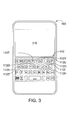
- FIG. 3 is a schematic diagram showing an example of a software input panel (SIP) displayed on the electronic device according to an example of the disclosure, wherein the SIP is in its initial condition.
- SIP software input panel
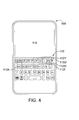
- FIG. 4 is a schematic diagram showing an example of the SIP displayed on the electronic device according to an example of the disclosure, wherein a portion of touch regions are enlarged.
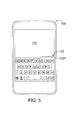
- FIG. 5 is a schematic diagram showing another example of the SIP displayed on the electronic device according to an example of the disclosure, wherein a portion of touch regions are enlarged.
- the electronic device in response to user's operation, can predict which key is likely to be subsequently touched by the user, and change, e.g., enlarge, a touch region corresponding to that key, so that the touch possibility of that key is increased.
- the electronic device can keep a layout of that key substantially unchanged, so as to prevent displayed images or frames from being changed frequently. In this way, erroneous touch input resulted from miniaturized keys can be improved, and the convenience of operating the electronic device can be increased.
- FIG. 1 is a block diagram showing an electronic device according to an example of the disclosure.
- the electronic device 100 includes a display panel 110, a touch panel 120, and a process module 130.
- the display panel 110 is configured to display various kinds of information.
- the touch panel 120 can be one of various kinds of touch panel in terms of its sensing means or mechanism, such as resistive, capacitive, optical, surface acoustic wave (SAW) type touch panels.
- SAW surface acoustic wave
- the touch panel 120 is covered on the display panel 110, such that a display region corresponds to a touch region.
- the process module 130 is configured to perform or execute various kinds of threads or processes.
- the process module 130 is for example implemented by a micro-processor chip, or other processor having the ability to perform arithmetic operations or computations.
- the process module 130 is configured to control the touch panel 120 to receive or detect touch input, and control the display panel 110 to display information accordingly.
- FIG. 2 is a flow chart showing a control method according to an example of the disclosure.
- FIG. 3 is a schematic diagram showing an example of a software input panel (SIP) displayed on the electronic device according to an example of the disclosure, wherein the SIP is in its initial condition.
- FIG. 4 is a schematic diagram showing an example of the SIP displayed on the electronic device according to an example of the disclosure, wherein a portion of touch regions are enlarged. The following description of the control method is made with reference to the accompanying drawings of FIGS. 3 and 4 .
- SIP software input panel
- step S210 the electronic device 100 receives a touch input for a software key.
- the electronic device 100 displays an SIP 112 on its display panel 110.
- the SIP 112 includes a number of software keys, an initial state of which is shown in FIG. 3 .
- Each of the software keys corresponds to a display region on the display panel 110.
- various kinds of pattern are displayed, and one of which is produced or input when the corresponding software key is touched.
- the patterns are for example alphabetical characters, punctuation signs, numerical numbers, labels, or other text symbols.
- the SIP 112 is arrayed according to a typical or standard "QWERTY" arrangement, but this disclosure is not limited thereto.
- Each of the software keys corresponds to a touch region on the touch panel 120.
- touch location of the touch panel 120 can be calibrated properly through physical or software calibration means, so that each software key can have a touch region within a substantially same range as that of a display region.
- every software key of the SIP 112 has a touch region and a display region which are sustainably the same as each other. As such, users are allowed to provide touch input according to the visual feedback of these displayed software keys.
- step S220 the electronic device 100 identifies one or more candidate software keys according to the software key in step S210. For example, when the electronic device 100 receives a touch input for a software key 112Z, the electronic device 100 identifies or predicts, according to the software key 112Z, one or more candidate software keys which are likely to be touched after the software key 112Z.
- the electronic device 100 identifies one or more software keys which are likely to be subsequently touched according to a usage history. For example, as regards a word “zyxel” that is input by a user previously, when receiving a touch input for the software key 112Z to input a character "z", the electronic device 100 searches the usage history for words, phrases or character strings which are input previously and would logically be possible starting from the character "z", such as the word "zyxel” in usage history. As such, the corresponding software key 112Y of the character "y” is then identified as a candidate software key which is likely to be touched after the character "z".
- the electronic device 100 identifies one or more software keys which are likely to be subsequently touched according to a dictionary database. For example, when receiving a touch input for the software key 112Z to input a character "z", the electronic device 100 searches the dictionary database for words, phrases, or character strings which would logically be possible starting from the character of "z", such as the word “zag”. "zoo", "zip”, or "zune” in dictionary database. As such, the corresponding software key 112A, 1120, 1121, or 112U of the character “a”, “o", “i”, and “u” can then be identified as a candidate software key which is likely to be touched after the character "z".
- the electronic device 100 identifies one or more software keys which are likely to be subsequently touched according to a usage history and a dictionary database. For example, when receiving a touch input for the software key 112Z to input a character "z", the electronic device 100 identify the corresponding software key 112Y, 112A, 1120, 1121, and 112U of the character "y", "a", “o", “i”, and "u” as candidate software keys which are likely to be touched after the character "z".
- step S230 the electronic device 100 enlarges a touch region corresponding to a candidate software key of the one or more candidate software keys of step S220.
- the electronic device 100 enlarges the touch regions of the software keys 112Y, 112A, 1120, 1121, and 112U, which are likely to be touched, enlargement results of which are shown in dashed lines.
- enlargement scale of a touch region can be based on a number of rules, examples of which are provided as follows.
- the electronic device 100 can check whether an adjacent software key of a candidate software key belongs to the one or more candidate software keys. The electronic device 100, then, determines how to enlarge the candidate software key according to the checked results.
- the candidate software key 112Y there are a number of adjacent software keys 112T, 112U, 112G, and 112H located at its borders or surrounds. According to the checked results, it can be found that the software key 112T does not belong to a candidate software key. At this time, the electronic device 100 can enlarge the touch region corresponding to the candidate software key 112Y towards the touch region corresponding to its adjacent software key 112T. For example, the electronic device 100 extends the touch region corresponding to the candidate software key 112Y as far inside as the touch region corresponding to its adjacent software key 112T, and reduces the touch region corresponding to the software key 112T accordingly.
- the software keys 112G and 112H are checked in a similar manner to that for the software key 112T. Moreover, according to the checked results, it can be found that the adjacent software key 112U belongs to a candidate software key. At this time, the electronic device 100 can keep the touch region corresponding to the candidate software key 112Y unchanged, or not enlarged towards its adjacent software key 112U. In this way, the touch regions corresponding to the software keys can be avoided being excessively moved away from its initial position on the SIP.
- the electronic device 100 assigns each candidate software key one priority value which is indicative of the touch possibility of that key.
- the electronic device 100 can determine the size of each of touch regions according to their priority values.
- the electronic device 100 compares the priority values of the two candidate software keys with each other, and determines the size of the touch regions of the two candidate software keys according to the compared results.
- the first priority value of the candidate software key 112Y is higher than the second priority value of the candidate software key 112U.
- the electronic device 100 enlarges the touch region corresponding to the candidate software key 112Y towards the touch region corresponding to the candidate software key 112U.
- the priority value of the candidate software key 112U is equal to the priority value of the candidate software key 112l.
- the electronic device 100 keeps the touch regions corresponding to the candidate software keys 112U and 1121 unchanged.
- the enlargement scale of the touch region corresponding to the candidate software key is relative to the number of the candidate software keys.
- FIG. 5 is a schematic diagram showing another example of the SIP displayed on the electronic device according to an example of the disclosure, wherein a portion of touch regions are enlarged.
- the touch region of the candidate software key 112Y has a higher enlargement scale, which is shown in dashed line.
- the enlargement scale of the touch region corresponding to the candidate software key is relative to the number of the occurrence of erroneous touch event.
- erroneous touch events such as an event that a user provides erroneous touch input when unintentionally touching unwanted software keys. If erroneous touch events occur frequently, it means that the user has difficulty in providing correct touch input for his or her wanted information, resulting in reduced operational convenience.
- the enlargement scale of the touch regions is increased for the prevention of erroneous touch events and for the enhancement of operational convenience.
- a portion of software keys have their touch regions changed, while their changes are not excessive since they are under the aforementioned exemplary rules, and are regulated to an proper and appropriate extent.
- each of the touch regions can be remained at its central position, or most of the touch regions can be remained unchanged. In this way, the examples allow users to adapt themselves to using the SIP, provide users with higher touch possibility for their expected keys, and increase user experience.
- the electronic device 100 can keep a layout of the SIP substantially unchanged.
- the electronic device 100 can keep a shape, a size, and a location of the candidate software key substantially unchanged, so as to prevent displayed images or frames from being changed frequently and excessively, and increase operational convenience for users.
- the electronic device 100 can change their background's color or brightness, or character's color, brightness or fonts, so that users can conveniently distinguish or recognize, or distinguish from others, the candidate software keys. In this way, visual feedback of the candidate software keys can be enhanced, and operational convenience for users can be increased.
- the software key 112Y When a subsequent touch input is received while its touch location is outside the corresponding display region of the software key 112Y, the software key 112Y, conventionally, is not determined as being touched or depressed. However, as can be seen from FIG. 4 , when a subsequent touch input is received while its touch location is outside the corresponding display region of the software key 112Y, but inside its corresponding touch region, the software key 112Y is determined as being touched or depressed. Besides, when a subsequent touch input is received while its touch location is inside the corresponding display region of the software key 112T, the software key 112Y, conventionally, is not determined as being touched or depressed. However, as can be seen from FIG.
- the software key 112Y when a subsequent touch input is received while its touch location is inside the corresponding display region of the software key 112T, but still inside the corresponding touch region of the software key 112Y, the software key 112Y is determined as being touched or depressed. It can be acknowledged that, in the example of FIG. 4 , the software key 112Y has a higher touch possibility, which is desired by users.
- the usage history can be established or updated according to users' operation, an example of which is made as follows.
- a word "apple” is the one which usually can be found in a dictionary.
- the electronic device 100 will stores this word "abble" therein and includes it in the usage history for future reference in prediction, so as to increase operational convenience for users.
- the electronic device 100 can make use of stored information in its internal memory or external memory, e.g., contacts' information such as a contact's English name, Chinese name, or identification, which are for example stored in an electronic address book.
- the electronic device 100 can make use of proper nouns, terms, professional glossaries, e.g., company names, or product names, which are for example stored in electronic documents or files, calendar schedules, or messages.
- the electronic device 100 can, via communication networks, search internet for words which are for example enumerated by the list of trending queries.
- the disclosure further discloses examples of a computer program product.
- the computer program product can be embodied in a computer readable storage medium having computer program code, that when executed by a processor, causes the processor to perform the control method described above for use in electronic devices.
- the electronic device in response to user's operation, can predict which key is likely to be subsequently touched by the user, and change, e.g., enlarge, a touch region corresponding to that key.
- the predicted key has increased touch possibility, and users have higher chance to successfully touch or depress that key.
- erroneous touch input resulted from miniaturized keys can be improved, unexpected results can be avoided, and the convenience of operating the electronic device can be increased.
Landscapes
- Engineering & Computer Science (AREA)
- General Engineering & Computer Science (AREA)
- Theoretical Computer Science (AREA)
- Human Computer Interaction (AREA)
- Physics & Mathematics (AREA)
- General Physics & Mathematics (AREA)
- User Interface Of Digital Computer (AREA)
Applications Claiming Priority (1)
| Application Number | Priority Date | Filing Date | Title |
|---|---|---|---|
| TW100108829A TWI442303B (zh) | 2011-03-15 | 2011-03-15 | 電子裝置及其控制方法與電腦程式產品 |
Publications (1)
| Publication Number | Publication Date |
|---|---|
| EP2500808A1 true EP2500808A1 (de) | 2012-09-19 |
Family
ID=44479335
Family Applications (1)
| Application Number | Title | Priority Date | Filing Date |
|---|---|---|---|
| EP11167221A Withdrawn EP2500808A1 (de) | 2011-03-15 | 2011-05-24 | Elektronische Vorrichtung, Steuerungsverfahren dafür und Computerprogrammprodukt dafür |
Country Status (3)
| Country | Link |
|---|---|
| US (1) | US20120236036A1 (de) |
| EP (1) | EP2500808A1 (de) |
| TW (1) | TWI442303B (de) |
Cited By (2)
| Publication number | Priority date | Publication date | Assignee | Title |
|---|---|---|---|---|
| EP4002078A1 (de) * | 2020-11-11 | 2022-05-25 | Honeywell International Inc. | Verfahren und systeme zur auflösung taktiler benutzereingabeauswahlen |
| US11915596B2 (en) | 2020-11-11 | 2024-02-27 | Honeywell International Inc. | Methods and systems for resolving tactile user input selections |
Families Citing this family (6)
| Publication number | Priority date | Publication date | Assignee | Title |
|---|---|---|---|---|
| US9489128B1 (en) * | 2012-04-20 | 2016-11-08 | Amazon Technologies, Inc. | Soft keyboard with size changeable keys for a smart phone |
| US9235324B2 (en) * | 2012-05-04 | 2016-01-12 | Google Inc. | Touch interpretation for displayed elements |
| JP6153710B2 (ja) * | 2012-09-28 | 2017-06-28 | 株式会社Pfu | 帳票入出力装置、帳票入出力方法、および、プログラム |
| TWI478034B (zh) * | 2012-10-17 | 2015-03-21 | Sentelic Technology Co Ltd | 按鍵觸發方法 |
| TWI489337B (zh) * | 2012-11-23 | 2015-06-21 | 義隆電子股份有限公司 | 具虛擬功能鍵之觸控面板的製造方法、干涉判斷方法及觸控裝置 |
| DE102013001058A1 (de) * | 2013-01-22 | 2014-07-24 | GM Global Technology Operations LLC (n. d. Gesetzen des Staates Delaware) | Verfahren und Vorrichtung zum Betreiben eines Touchscreens |
Citations (2)
| Publication number | Priority date | Publication date | Assignee | Title |
|---|---|---|---|---|
| GB2439130A (en) * | 2006-06-15 | 2007-12-19 | Canon Europa Nv | Predictive selection system for virtual or soft keyboards |
| US20100265181A1 (en) * | 2009-04-20 | 2010-10-21 | ShoreCap LLC | System, method and computer readable media for enabling a user to quickly identify and select a key on a touch screen keypad by easing key selection |
Family Cites Families (4)
| Publication number | Priority date | Publication date | Assignee | Title |
|---|---|---|---|---|
| US20040212601A1 (en) * | 2003-04-24 | 2004-10-28 | Anthony Cake | Method and apparatus for improving accuracy of touch screen input devices |
| US8413066B2 (en) * | 2008-11-06 | 2013-04-02 | Dmytro Lysytskyy | Virtual keyboard with visually enhanced keys |
| TWI381295B (zh) * | 2008-11-27 | 2013-01-01 | Htc Corp | 預示輸出字元的方法、電子裝置、儲存媒體,以及電腦程式產品 |
| US20110260977A1 (en) * | 2010-04-23 | 2011-10-27 | Psion Teklogix Inc. | Keyboard and computing device for providing a software input panel |
-
2011
- 2011-03-15 TW TW100108829A patent/TWI442303B/zh active
- 2011-05-24 EP EP11167221A patent/EP2500808A1/de not_active Withdrawn
- 2011-06-01 US US13/150,742 patent/US20120236036A1/en not_active Abandoned
Patent Citations (2)
| Publication number | Priority date | Publication date | Assignee | Title |
|---|---|---|---|---|
| GB2439130A (en) * | 2006-06-15 | 2007-12-19 | Canon Europa Nv | Predictive selection system for virtual or soft keyboards |
| US20100265181A1 (en) * | 2009-04-20 | 2010-10-21 | ShoreCap LLC | System, method and computer readable media for enabling a user to quickly identify and select a key on a touch screen keypad by easing key selection |
Non-Patent Citations (1)
| Title |
|---|
| ASELA GUNAWARDANA ET AL: "Usability guided key-target resizing for soft keyboards", IUI '10 PROCEEDINGS OF THE 15TH INTERNATIONAL CONFERENCE ON INTELLIGENT USER INTERFACES, 1 January 2010 (2010-01-01), pages 111 - 118, XP055005716, ISBN: 978-1-60-558515-4, DOI: http://doi.acm.org/10.1145/1719970.1719986 * |
Cited By (2)
| Publication number | Priority date | Publication date | Assignee | Title |
|---|---|---|---|---|
| EP4002078A1 (de) * | 2020-11-11 | 2022-05-25 | Honeywell International Inc. | Verfahren und systeme zur auflösung taktiler benutzereingabeauswahlen |
| US11915596B2 (en) | 2020-11-11 | 2024-02-27 | Honeywell International Inc. | Methods and systems for resolving tactile user input selections |
Also Published As
| Publication number | Publication date |
|---|---|
| US20120236036A1 (en) | 2012-09-20 |
| TW201237734A (en) | 2012-09-16 |
| TWI442303B (zh) | 2014-06-21 |
Similar Documents
| Publication | Publication Date | Title |
|---|---|---|
| EP2500808A1 (de) | Elektronische Vorrichtung, Steuerungsverfahren dafür und Computerprogrammprodukt dafür | |
| CA2601305C (en) | Human-to-mobile interfaces | |
| US5128672A (en) | Dynamic predictive keyboard | |
| US20140078065A1 (en) | Predictive Keyboard With Suppressed Keys | |
| US20090193334A1 (en) | Predictive text input system and method involving two concurrent ranking means | |
| EP2109046A1 (de) | Prädiktives Texteingabesystem und Verfahren mit zwei gleichrangigen Ordnungskriterien | |
| US8370393B2 (en) | Process and apparatus for selecting an item from a database | |
| US20110074685A1 (en) | Virtual Predictive Keypad | |
| US20120239379A1 (en) | n-Gram-Based Language Prediction | |
| US20080300861A1 (en) | Word formation method and system | |
| CN101256462A (zh) | 基于全混合联想库的手写输入方法和装置 | |
| JP2007133884A5 (de) | ||
| US20140071055A1 (en) | Multi-directional calibration of touch screens | |
| US10380153B2 (en) | Methods, controllers and devices for assembling a word | |
| CN102681752B (zh) | 电子装置及其控制方法 | |
| EP2410405A2 (de) | Verfahren und Vorrichtungen zum statistischen Sortieren von Zeichen für Multitap-Tastaturen | |
| AU2019201023B2 (en) | Methods, Controllers and Devices for Assembling a Word | |
| CN102467338A (zh) | 电子装置及其软件键盘的按键显示方法 | |
| US8466878B2 (en) | Handheld electronic device including automatic preferred selection of a punctuation, and associated method | |
| CA2541580C (en) | Handheld electronic device including toggle of a selected data source, and associated method | |
| US11526215B2 (en) | Reducing keystrokes required for inputting characters of Indic languages | |
| WO2012116497A1 (en) | Inputting chinese characters in pinyin mode | |
| CN108803889A (zh) | 泰米尔语输入方法及相关装置 |
Legal Events
| Date | Code | Title | Description |
|---|---|---|---|
| PUAI | Public reference made under article 153(3) epc to a published international application that has entered the european phase |
Free format text: ORIGINAL CODE: 0009012 |
|
| 17P | Request for examination filed |
Effective date: 20110524 |
|
| AK | Designated contracting states |
Kind code of ref document: A1 Designated state(s): AL AT BE BG CH CY CZ DE DK EE ES FI FR GB GR HR HU IE IS IT LI LT LU LV MC MK MT NL NO PL PT RO RS SE SI SK SM TR |
|
| AX | Request for extension of the european patent |
Extension state: BA ME |
|
| RAP1 | Party data changed (applicant data changed or rights of an application transferred) |
Owner name: HTC CORPORATION |
|
| 17Q | First examination report despatched |
Effective date: 20160104 |
|
| STAA | Information on the status of an ep patent application or granted ep patent |
Free format text: STATUS: THE APPLICATION IS DEEMED TO BE WITHDRAWN |
|
| 18D | Application deemed to be withdrawn |
Effective date: 20160518 |