EP2503455A2 - Verfahren zur Benutzerdefinition einer Schnittstelle und elektronische Vorrichtung damit - Google Patents
Verfahren zur Benutzerdefinition einer Schnittstelle und elektronische Vorrichtung damit Download PDFInfo
- Publication number
- EP2503455A2 EP2503455A2 EP11170633A EP11170633A EP2503455A2 EP 2503455 A2 EP2503455 A2 EP 2503455A2 EP 11170633 A EP11170633 A EP 11170633A EP 11170633 A EP11170633 A EP 11170633A EP 2503455 A2 EP2503455 A2 EP 2503455A2
- Authority
- EP
- European Patent Office
- Prior art keywords
- screen
- thumbnail
- active window
- operating
- electronic device
- Prior art date
- Legal status (The legal status is an assumption and is not a legal conclusion. Google has not performed a legal analysis and makes no representation as to the accuracy of the status listed.)
- Withdrawn
Links
Images




Classifications
-
- G—PHYSICS
- G06—COMPUTING OR CALCULATING; COUNTING
- G06F—ELECTRIC DIGITAL DATA PROCESSING
- G06F9/00—Arrangements for program control, e.g. control units
- G06F9/06—Arrangements for program control, e.g. control units using stored programs, i.e. using an internal store of processing equipment to receive or retain programs
- G06F9/44—Arrangements for executing specific programs
- G06F9/445—Program loading or initiating
-
- G—PHYSICS
- G06—COMPUTING OR CALCULATING; COUNTING
- G06F—ELECTRIC DIGITAL DATA PROCESSING
- G06F3/00—Input arrangements for transferring data to be processed into a form capable of being handled by the computer; Output arrangements for transferring data from processing unit to output unit, e.g. interface arrangements
- G06F3/01—Input arrangements or combined input and output arrangements for interaction between user and computer
- G06F3/048—Interaction techniques based on graphical user interfaces [GUI]
-
- G—PHYSICS
- G06—COMPUTING OR CALCULATING; COUNTING
- G06F—ELECTRIC DIGITAL DATA PROCESSING
- G06F3/00—Input arrangements for transferring data to be processed into a form capable of being handled by the computer; Output arrangements for transferring data from processing unit to output unit, e.g. interface arrangements
- G06F3/14—Digital output to display device ; Cooperation and interconnection of the display device with other functional units
-
- G—PHYSICS
- G06—COMPUTING OR CALCULATING; COUNTING
- G06F—ELECTRIC DIGITAL DATA PROCESSING
- G06F9/00—Arrangements for program control, e.g. control units
- G06F9/06—Arrangements for program control, e.g. control units using stored programs, i.e. using an internal store of processing equipment to receive or retain programs
- G06F9/44—Arrangements for executing specific programs
- G06F9/451—Execution arrangements for user interfaces
-
- Y—GENERAL TAGGING OF NEW TECHNOLOGICAL DEVELOPMENTS; GENERAL TAGGING OF CROSS-SECTIONAL TECHNOLOGIES SPANNING OVER SEVERAL SECTIONS OF THE IPC; TECHNICAL SUBJECTS COVERED BY FORMER USPC CROSS-REFERENCE ART COLLECTIONS [XRACs] AND DIGESTS
- Y02—TECHNOLOGIES OR APPLICATIONS FOR MITIGATION OR ADAPTATION AGAINST CLIMATE CHANGE
- Y02D—CLIMATE CHANGE MITIGATION TECHNOLOGIES IN INFORMATION AND COMMUNICATION TECHNOLOGIES [ICT], I.E. INFORMATION AND COMMUNICATION TECHNOLOGIES AIMING AT THE REDUCTION OF THEIR OWN ENERGY USE
- Y02D10/00—Energy efficient computing, e.g. low power processors, power management or thermal management
Definitions
- the invention generally relates to a user interface, and more particularly, to a method for customizing a user interface and an electronic device thereof.
- a user can only get to know about the function of an application program through the icon and text description of the application program but not the status when last time the application program is used for opening a file or executing a function from the home screen. In other words, the user has to tap the icon and start the application program to see the status of the previous operation.
- a widget can display information without being tapped by a user, when both the icon and widget of an application program exist in a home screen, the user may be confused by these two different information displays.
- a presently executed application program is exited and the home screen is returned, even though the operating screen of the application program is not displayed on the screen, the application program is still executed by the system instead of being really closed.
- the text editor program occupies the memory resource and accordingly the performance of the entire system is reduced.
- the invention is directed to a method for customizing a user interface and an electronic device thereof, wherein a user is allowed to understand the operation progress of an application program from a home screen, and the performance of the electronic device is improved by reducing system resource consumption.
- the invention provides a method for customizing a user interface.
- the method is adapted to an electronic device having a screen.
- whether a first input signal is detected is determined when an active window corresponding to an application program is displayed on the screen. If the first input signal is detected, an operating screen of the active window is captured, and the active window is then closed. A launching mechanism between the operating screen and a thumbnail thereof is established. The thumbnail is added to a home screen of the user interface, and the home screen is displayed on the screen.
- the electronic device further includes a primary memory and an auxiliary memory
- the step of closing the active window includes obtaining an operating information corresponding to the active window from the primary memory, storing the operating information into the auxiliary memory, and releasing the space allocated for the active window in the primary memory in order to close the active window.
- the invention provides an electronic device including a screen, a detection module, and a control module.
- the screen is arranged for displaying an active window corresponding to an application program.
- the detection module is arranged for detecting a first input signal.
- the control module is coupled to the screen and the detection module. When the detection module detects the first input signal, the control module is arranged for capturing an operating screen of the active window, closing the active window, establishing a launching mechanism between the operating screen and a thumbnail thereof, adding the thumbnail to a home screen of a user interface, and displaying the home screen on the screen.
- an operating screen of an active window is captured, and a thumbnail of the operating screen is added to a home screen of an electronic device, so that a user can get to know about the operation progress of the application program when last time the application program is closed from the thumbnail in the home screen.
- the active window is closed right after the operating screen is captured, so that less system resource is consumed.
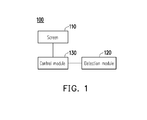
- FIG. 1 is a block diagram of an electronic device according to an embodiment of the invention.
- FIG. 2 is a flowchart of a method for customizing a user interface according to an embodiment of the invention.
- FIG. 3 is a block diagram of an electronic device according to another embodiment of the invention.
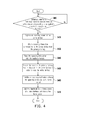
- FIG. 4 is a flowchart of a method for customizing a user interface according to another embodiment of the invention.
- FIG. 5A is a diagram of a home screen according to another embodiment of the invention.
- FIG. 5B is a diagram of an operating screen according to another embodiment of the invention.
- FIG. 5C is a diagram of a home screen according to another embodiment of the invention.
- FIG. 5D is a diagram of a home screen according to another embodiment of the invention.
- FIG. 1 is a block diagram of an electronic device according to an embodiment of the invention.
- the electronic device 100 includes a screen 110, a detection module 120, and a control module 130.
- the electronic device 100 is a mobile electronic device, such as a cell phone, a smart phone, a personal digital assistant (PDA), or a table PC.
- the invention is not limited thereto, and in other embodiments, the electronic device 100 may be any electronic device having a screen and a central processing unit (CPU), such as a desktop computer, a notebook computer, a smart phone, a PDA, or a mainframe.
- CPU central processing unit
- the screen 110 is coupled to the control module 130, and which is a device offering a display function, such as a liquid crystal display (LCD), a capacitive touch screen, a resistive touch screen, or an optical touch screen.
- a display function such as a liquid crystal display (LCD), a capacitive touch screen, a resistive touch screen, or an optical touch screen.
- the detection module 120 is coupled to the control module 130, and which is a device for detecting user input operations.
- the detection module 120 may be an electronic device for detecting signals generated by user input operations.
- the control module 130 generates a user interface of the electronic device 100 according to signals detected by the detection module 120.
- the control module 130 is a functional module implemented with hardware and/or software, wherein the hardware may be one or a combination of a CPU, a chipset, a microprocessor, and other hardware devices with operation functions, and the software may be an operating system (OS) or a driver program.
- OS operating system
- FIG. 2 is a flowchart of a method for customizing a user interface according to an embodiment of the invention. Please refer to both FIG. 1 and FIG. 2 .
- step S210 when an active window corresponding to an application program is displayed on the screen 110, the detection module 120 repeatedly determines whether a first input signal is detected.
- a user can start one or more application programs or open more than one window by using the same application program in the electronic device 100, wherein an active window refers to the window which is presently displayed on top of other windows and can receive user operations.
- the tool bar of the active window has a specific icon, and the detection module 120 detects a first input signal when the user taps the specific icon by using an input tool.
- the first input signal may also be triggered when the user taps a specific software button on the screen 110 or a specific hardware button of the electronic device 100.
- step S220 the control module 130 captures an operating screen of the current active window. Namely, all the operations performed by the user on the active window before the first input signal is triggered are reflected in the operating screen captured by the control module 130.
- the operating screen captured by the control module 130 presents the current edit progress of a text file. Assuming that the user is editing the 10 th line of the text file when the first input signal is triggered, the operating screen captured by the control module 130 displays information indicating that the 10 th line is being edited.
- the application program corresponding to the active window is a multimedia player software
- the operating screen captured by the control module 130 presents the current playing progress of a multimedia file. Assuming that the user is watching an image at 20 minutes of a movie file when the first input signal is triggered, the operating screen captured by the control module 130 shows the content of the movie file at 20 minutes.
- the operating screen captured by the control module 130 presents a conversation image (including the conversation object and the conversation content, etc) of the user by using the instant messaging software. It should be noted that after capturing the operating screen, the control module 130 also generates a thumbnail corresponding to the operating screen.
- the thumbnail may be in the Joint Photographic Experts Group (JPEG) format or the bitmap format.
- JPEG Joint Photographic Experts Group
- the format of the thumbnail is not limited in the invention.
- step S230 the control module 130 closes the active window to release the system resources it occupies.
- step S240 the control module 130 establishes a launching mechanism between the thumbnail and the operating screen.
- step S250 the control module 130 adds the thumbnail into a home screen of the user interface of the electronic device 100 and controls the screen 110 to display the home screen. Through the establishment of the launching mechanism between the thumbnail and the operating screen, the thumbnail displayed in the home screen can start a corresponding application program in response to a user operation.
- the control module 130 closes the current active window and displays a thumbnail in the home screen of the electronic device 100. Because the control module 130 actually closes the current active window instead of running the window at the background, the system resources occupied by the window can be released and accordingly the system performance can be improved. Besides, the control module 130 does not update the thumbnail after displaying the thumbnail in the home screen. Thus, no additional CPU resource is required. In another embodiment of the invention, the control module 130 powers off related devices after closing an active window. Thereby, the power consumption of the electronic device 100 can be reduced.
- the thumbnail generated by the control module 130 is corresponding to the operating screen of the active window when the first input signal is triggered, even when the window is closed, the user can still see the content of the operation previously performed on the window in the home screen and tap the thumbnail in the home screen to re-open the window (the detail operation for opening the window will be explained later on with reference to accompanying drawings).
- the thumbnail displayed in the home screen can offer an effect similar to that of a widget.
- the user can not only see frequently used or recently opened files in the home screen but also understand the context of previously using an application program through the corresponding thumbnail without actually executing the application program.
- the user may feel like the windows are open (however, the windows are actually closed) at the same time when the consumption of system resources is reduced and the performance of the electronic device 100 is improved.
- the method for customizing a user interface illustrated in FIG. 2 can generate two (or more) thumbnails corresponding to the same type of application program in the home screen, wherein these thumbnails are respectively corresponding to different windows.
- a user can edit two files (for example, a first file and a second file) at the same time by using a text editor program.
- the electronic device 100 displays a thumbnail corresponding to the first file in the home screen through the steps in FIG. 2 .
- the electronic device 100 displays a thumbnail corresponding to the second file in the home screen through the steps in FIG. 2 .
- the user can see thumbnails corresponding to two files edited by using the same application program in the home screen and can open different files by tapping at different thumbnails in the home screen.
- FIG. 3 is a block diagram of an electronic device according to another embodiment of the invention.
- the electronic device 300 includes a screen 110, a detection module 120, a control module 330, a primary memory 340, and an auxiliary memory 350.
- the electronic device 300 is similar to the electronic device 100 illustrated in FIG. 1 , and only the differences between the two electronic devices will be explained below.
- the screen 110, the detection module 120, the primary memory 340, and the auxiliary memory 350 are all coupled to the control module 330.
- the primary memory 340 includes a random access memory (RAM), and the auxiliary memory 350 may be a storage device, such as an embedded multi media card (eMMC) or a hard disk.
- eMMC embedded multi media card
- the primary memory 340 is a storage device that can be directly accessed by the CPU of the electronic device 300.
- the primary memory 340 is configured to load different programs and data to be used by the CPU. Namely, operating information related to any program supported by the electronic device 300 is loaded into the primary memory 340 when the program is executed. If different application programs are run or different files are opened by using the same application program at the same time, insufficient memory space in the primary memory 340 may be caused if all related operating information is loaded into the primary memory 340. In this case, part of the information loaded into the primary memory 340 has to be swapped out into the auxiliary memory 350, so as to vacate the space of the primary memory 340 for other application programs. In other words, the performance of the electronic device 300 is affected when there is insufficient space in the primary memory 340.
- control module 330 stores operating information previously stored in the primary memory 340 into the auxiliary memory 350 while it closes an active window. Below, the operation of the electronic device 300 will be described in detail with reference to both FIG. 3 and FIG. 4 .
- step S410 when an active window corresponding to an application program is displayed on the screen 110, the detection module 120 repeatedly determines whether a first input signal is detected (for example, determines whether a user taps a specific icon in the active window).
- step S420 the control module 330 captures an operating screen of the active window.
- the control module 330 obtains operating information corresponding to the active window from the primary memory 340.
- the operating information is all context information of the active window. For example, when the application program is a multimedia player program, the operating information of the corresponding active window includes the file name of the currently played multimedia file and the playing progress thereof. If the application program is a text editor program, the operating information of the corresponding active window includes the file name of the edited file and the edited content. If the application program is an instant messaging software, the operating information of the corresponding active window includes account information such as a contact list and conversation records. If the application program is a browser, the operating information of the corresponding active window includes the browsed web address, the webpage content, and the position in the webpage at where the user is currently browsing.
- step S440 the control module 330 stores the operating information corresponding to the active window into the auxiliary memory 350.
- step S450 the control module 330 releases the space in the primary memory 340 that is allocated for the active window in order to close the active window. It should be noted that the control module 330 actually closes the active window instead of running it at the background.
- control module 330 generates the thumbnail of the captured operating screen during steps S430-S450. However, in other embodiments, the control module 330 may also generate the thumbnail of the operating screen before or after aforementioned steps.
- step S460 the control module 330 establishes a launching mechanism between the thumbnail and the operating screen.
- step S470 the control module 330 adds the thumbnail into the home screen of the user interface of the electronic device 300 and displays the home screen on the screen 110.
- the image displayed on the screen 110 is switched from the file editing window to the home screen, and the home screen displays a thumbnail corresponding to the editing progress. Because the operating information related to file editing is already moved from the primary memory 340 to the auxiliary memory 350 through steps S430-S450 in FIG. 4 , it is ensured that the previous active window is actually closed and not executed in the system anymore when the screen 110 displays the home screen, so that less system source is consumed and the operation efficiency of the electronic device 300 is improved.
- the home screen 502 has three thumbnails generated through the steps in FIG. 4 .
- the first thumbnail 510 is a thumbnail corresponding to a first text file opened by using a text editor program
- the second thumbnail 520 is a thumbnail corresponding to a second text file opened by using the text editor program
- the third thumbnail 530 is a thumbnail corresponding to a first picture file opened by using a picture browsing software.
- the detection module 120 When the screen 110 of the electronic device 300 displays the home screen 502, the detection module 120 repeatedly determines whether a second input signal corresponding to any thumbnail is detected.
- the second input signal may be triggered when a user taps a thumbnail in the home screen 502 by using an input tool.
- the control module 330 executes a launching mechanism between the first thumbnail 510 and the operating screen thereof to load the operating information related to the first thumbnail 510 from the auxiliary memory 350 into the primary memory 340 and presents the operating screen (such as the operating screen 560 illustrated in FIG. 5B ) of the first text file when last time the first text file is closed on the screen 110 according to the operating information through the text editor program.
- the control module 330 updates the old operating information of the first text file in the auxiliary memory 350 by using the new operating information thereof in the primary memory 340 and releases the space for storing the new operating information in the primary memory 340.
- the control module 330 overwrites the old first thumbnail 510 by using a new thumbnail 510' corresponding to the new editing progress in the home screen 502.
- control module 330 keeps the old operating information in the auxiliary memory 350 and stores the new operating information in the primary memory 340 into the auxiliary memory 350. After that, the control module 330 releases the space for storing the new operating information in the primary memory 340. Accordingly, as shown in FIG. 5D , the control module 330 retains the first thumbnail 510 in the home screen 502 and displays a fourth thumbnail 540 to present the new editing progress.
- the control module 330 respectively loads different editing progress from the auxiliary memory 350 and displays different operating screen to allow the user to edit the first text file.
- the detection module 120 repeatedly determines whether a third input signal corresponding to any thumbnail is detected.
- the third input signal drives the control module 330 to detect the thumbnail in the home screen 502.
- the third input signal may be triggered by a corresponding software button or hardware button, wherein the software button may be a delete icon displayed in the thumbnail or an icon displayed anywhere on the screen 110.
- the control module 330 removes the first thumbnail 510 from the home screen 502 and deletes the operating information corresponding to the first thumbnail 510 from the auxiliary memory 350.
- the invention provides a method for customizing a user interface and an electronic device thereof.
- an operating screen of an active application program is captured in response to a user operation, and a thumbnail of the operating screen is displayed in the home screen.
- the application program is executed by resuming the previous status according to the operating information stored in an auxiliary memory through a launching mechanism between the thumbnail and the operating screen.
- the active window is actually closed when the thumbnail is constructed.
- the window won't occupy any resource of a primary memory, so that the system performance is improved.
Landscapes
- Engineering & Computer Science (AREA)
- Theoretical Computer Science (AREA)
- Software Systems (AREA)
- General Engineering & Computer Science (AREA)
- Physics & Mathematics (AREA)
- General Physics & Mathematics (AREA)
- Human Computer Interaction (AREA)
- User Interface Of Digital Computer (AREA)
- Digital Computer Display Output (AREA)
Applications Claiming Priority (1)
| Application Number | Priority Date | Filing Date | Title |
|---|---|---|---|
| TW100110161A TW201239730A (en) | 2011-03-24 | 2011-03-24 | Method for customizing user interface and electronic device thereof |
Publications (2)
| Publication Number | Publication Date |
|---|---|
| EP2503455A2 true EP2503455A2 (de) | 2012-09-26 |
| EP2503455A3 EP2503455A3 (de) | 2013-04-24 |
Family
ID=46582105
Family Applications (1)
| Application Number | Title | Priority Date | Filing Date |
|---|---|---|---|
| EP11170633.9A Withdrawn EP2503455A3 (de) | 2011-03-24 | 2011-06-21 | Verfahren zur Benutzerdefinition einer Schnittstelle und elektronische Vorrichtung damit |
Country Status (5)
| Country | Link |
|---|---|
| US (1) | US20120246592A1 (de) |
| EP (1) | EP2503455A3 (de) |
| JP (1) | JP2012203899A (de) |
| KR (1) | KR20120108891A (de) |
| TW (1) | TW201239730A (de) |
Cited By (1)
| Publication number | Priority date | Publication date | Assignee | Title |
|---|---|---|---|---|
| CN103336651A (zh) * | 2013-06-18 | 2013-10-02 | 深圳市金立通信设备有限公司 | 一种实现多任务功能界面的方法及终端 |
Families Citing this family (14)
| Publication number | Priority date | Publication date | Assignee | Title |
|---|---|---|---|---|
| US9665178B2 (en) * | 2012-08-01 | 2017-05-30 | Blackberry Limited | Selective inbox access in homescreen mode on a mobile electronic device |
| US9747003B2 (en) * | 2012-08-01 | 2017-08-29 | Blackberry Limited | Multiple-stage interface control of a mobile electronic device |
| US20140198054A1 (en) * | 2013-01-15 | 2014-07-17 | Sprint Communications Company L.P. | Screen freezing for a wireless communication device |
| JP6337810B2 (ja) * | 2014-03-14 | 2018-06-06 | オムロン株式会社 | 情報処理装置、情報処理方法、およびプログラム |
| CN106485159B (zh) * | 2015-08-28 | 2020-05-29 | 腾讯科技(深圳)有限公司 | 网络安全存储方法和装置 |
| CN109521926A (zh) * | 2018-11-28 | 2019-03-26 | 青岛海信电器股份有限公司 | 一种应用程序的启动方法及装置 |
| CN109561334A (zh) * | 2018-11-28 | 2019-04-02 | 青岛海信电器股份有限公司 | 一种应用程序的启动方法及智能电视 |
| WO2020108229A1 (zh) * | 2018-11-28 | 2020-06-04 | 青岛海信电器股份有限公司 | 应用程序的启动方法及显示设备 |
| US11016788B2 (en) | 2018-11-28 | 2021-05-25 | Hisense Visual Technology Co., Ltd. | Application launching method and display device |
| CN109922364B (zh) * | 2019-01-16 | 2022-07-08 | 海信视像科技股份有限公司 | 一种显示设备 |
| WO2020147507A1 (zh) * | 2019-01-16 | 2020-07-23 | 青岛海信电器股份有限公司 | 显示设备和显示方法 |
| CN111314442B (zh) * | 2020-01-21 | 2023-07-18 | 维达力实业(深圳)有限公司 | 基于分时控制的终端控制方法、装置、终端和计算机设备 |
| CN113467651A (zh) * | 2020-03-30 | 2021-10-01 | 聚好看科技股份有限公司 | 一种控件对应的内容的显示方法及显示设备 |
| JP7611970B1 (ja) | 2023-08-03 | 2025-01-10 | レノボ・シンガポール・プライベート・リミテッド | 情報処理装置、及び制御方法 |
Family Cites Families (12)
| Publication number | Priority date | Publication date | Assignee | Title |
|---|---|---|---|---|
| JPH07160467A (ja) * | 1993-12-02 | 1995-06-23 | Casio Comput Co Ltd | 表示制御装置 |
| US7240296B1 (en) * | 2000-02-11 | 2007-07-03 | Microsoft Corporation | Unified navigation shell user interface |
| CN100592788C (zh) * | 2000-04-14 | 2010-02-24 | 日本电信电话株式会社 | 与广播信息相关的信息取得方法、系统和装置 |
| US6937275B2 (en) * | 2001-12-20 | 2005-08-30 | Hewlett-Packard Development Company, L.P. | Contact sheet file-generating digital camera |
| US7539795B2 (en) * | 2006-01-30 | 2009-05-26 | Nokia Corporation | Methods and apparatus for implementing dynamic shortcuts both for rapidly accessing web content and application program windows and for establishing context-based user environments |
| US9274807B2 (en) * | 2006-04-20 | 2016-03-01 | Qualcomm Incorporated | Selective hibernation of activities in an electronic device |
| US7886363B2 (en) * | 2006-05-24 | 2011-02-08 | Noam Camiel | System and method for virtual memory and securing memory in programming languages |
| US20080077767A1 (en) * | 2006-09-27 | 2008-03-27 | Khosravi Hormuzd M | Method and apparatus for secure page swapping in virtual memory systems |
| US8510743B2 (en) * | 2007-10-31 | 2013-08-13 | Google Inc. | Terminating computer applications |
| WO2009097591A1 (en) * | 2008-02-01 | 2009-08-06 | Pillar Ventures, Llc | Situationally aware and self-configuring electronic data and communication device |
| US8069362B2 (en) * | 2008-02-26 | 2011-11-29 | Sap Ag | Automated electrical power savings in virtualization environments |
| US8776078B2 (en) * | 2008-05-20 | 2014-07-08 | International Business Machines Corporation | Method for dynamically freeing computer resources |
-
2011
- 2011-03-24 TW TW100110161A patent/TW201239730A/zh unknown
- 2011-06-14 US US13/159,431 patent/US20120246592A1/en not_active Abandoned
- 2011-06-21 EP EP11170633.9A patent/EP2503455A3/de not_active Withdrawn
- 2011-07-11 KR KR1020110068515A patent/KR20120108891A/ko not_active Ceased
- 2011-08-30 JP JP2011187315A patent/JP2012203899A/ja active Pending
Non-Patent Citations (1)
| Title |
|---|
| None |
Cited By (1)
| Publication number | Priority date | Publication date | Assignee | Title |
|---|---|---|---|---|
| CN103336651A (zh) * | 2013-06-18 | 2013-10-02 | 深圳市金立通信设备有限公司 | 一种实现多任务功能界面的方法及终端 |
Also Published As
| Publication number | Publication date |
|---|---|
| US20120246592A1 (en) | 2012-09-27 |
| EP2503455A3 (de) | 2013-04-24 |
| KR20120108891A (ko) | 2012-10-05 |
| JP2012203899A (ja) | 2012-10-22 |
| TW201239730A (en) | 2012-10-01 |
Similar Documents
| Publication | Publication Date | Title |
|---|---|---|
| US20120246592A1 (en) | Method for customizing user interface and electronic device thereof | |
| JP7789113B2 (ja) | 同時にオープンしているソフトウェアアプリケーションを管理するためのジェスチャグラフィカルユーザインタフェース | |
| US12262111B2 (en) | Device, method, and graphical user interface for accessing an application in a locked device | |
| US10867059B2 (en) | Device, method, and graphical user interface for accessing an application in a locked device | |
| US20200241746A1 (en) | Multi-task management method and terminal device | |
| EP2424197B1 (de) | System und Verfahren zur Bereitstellung einer Kontaktlisten-Eingabeschnittstelle | |
| CN104090736B (zh) | 划分屏幕区域的方法和采用该方法的移动终端 | |
| US20100293460A1 (en) | Text selection method and system based on gestures | |
| US20110055741A1 (en) | Method and system for managing widgets in portable terminal | |
| US20120062494A1 (en) | Mobile electronic device, controlling method thereof and non-transitory recording medium thereof | |
| US20110167347A1 (en) | Method and apparatus for setting section of a multimedia file in mobile device | |
| EP3757739B1 (de) | Verfahren zur anzeige beim verlassen einer anwendung und endgerät | |
| KR20120096047A (ko) | 터치 스크린 사용자 인터페이스 상의 커맨드들을 변경하는 방법 | |
| JP2012507089A (ja) | ウィンドウ固有の制御の表面化および管理 | |
| TWI502433B (zh) | 適用於與觸控筆互動的電子裝置及其觸控方法 | |
| KR20140058510A (ko) | 온디맨드 탭 리하이드레이션 기법 | |
| WO2021135578A1 (zh) | 页面处理方法、装置、存储介质及终端设备 | |
| US20200028961A1 (en) | Switching presentations of representations of objects at a user interface | |
| EP4227806B1 (de) | Anwendungs-keep-alive-verfahren und elektronische vorrichtung | |
| CN108595072B (zh) | 分屏显示方法、装置、存储介质及电子设备 | |
| WO2019201140A1 (zh) | 应用显示方法、装置、存储介质及电子设备 | |
| CN108614655A (zh) | 分屏显示方法、装置、存储介质及电子设备 | |
| CN108563416B (zh) | 应用显示方法、装置、存储介质及电子设备 | |
| EP4198721B1 (de) | Verfahren zum starten einer aufgabe und elektronische vorrichtung | |
| US20150363069A1 (en) | Display control |
Legal Events
| Date | Code | Title | Description |
|---|---|---|---|
| PUAI | Public reference made under article 153(3) epc to a published international application that has entered the european phase |
Free format text: ORIGINAL CODE: 0009012 |
|
| 17P | Request for examination filed |
Effective date: 20110622 |
|
| AK | Designated contracting states |
Kind code of ref document: A2 Designated state(s): AL AT BE BG CH CY CZ DE DK EE ES FI FR GB GR HR HU IE IS IT LI LT LU LV MC MK MT NL NO PL PT RO RS SE SI SK SM TR |
|
| AX | Request for extension of the european patent |
Extension state: BA ME |
|
| PUAL | Search report despatched |
Free format text: ORIGINAL CODE: 0009013 |
|
| AK | Designated contracting states |
Kind code of ref document: A3 Designated state(s): AL AT BE BG CH CY CZ DE DK EE ES FI FR GB GR HR HU IE IS IT LI LT LU LV MC MK MT NL NO PL PT RO RS SE SI SK SM TR |
|
| AX | Request for extension of the european patent |
Extension state: BA ME |
|
| RIC1 | Information provided on ipc code assigned before grant |
Ipc: G06F 9/445 20060101ALI20130319BHEP Ipc: G06F 9/44 20060101AFI20130319BHEP |
|
| STAA | Information on the status of an ep patent application or granted ep patent |
Free format text: STATUS: THE APPLICATION IS DEEMED TO BE WITHDRAWN |
|
| 18D | Application deemed to be withdrawn |
Effective date: 20131025 |