EP2568618A2 - Procédé et appareil pour commander l'affichage d'un écran dans un terminal portable - Google Patents
Procédé et appareil pour commander l'affichage d'un écran dans un terminal portable Download PDFInfo
- Publication number
- EP2568618A2 EP2568618A2 EP11777561A EP11777561A EP2568618A2 EP 2568618 A2 EP2568618 A2 EP 2568618A2 EP 11777561 A EP11777561 A EP 11777561A EP 11777561 A EP11777561 A EP 11777561A EP 2568618 A2 EP2568618 A2 EP 2568618A2
- Authority
- EP
- European Patent Office
- Prior art keywords
- screen
- touch
- spiral
- magnify
- portable terminal
- Prior art date
- Legal status (The legal status is an assumption and is not a legal conclusion. Google has not performed a legal analysis and makes no representation as to the accuracy of the status listed.)
- Withdrawn
Links
Images



Classifications
-
- G—PHYSICS
- G06—COMPUTING OR CALCULATING; COUNTING
- G06F—ELECTRIC DIGITAL DATA PROCESSING
- G06F3/00—Input arrangements for transferring data to be processed into a form capable of being handled by the computer; Output arrangements for transferring data from processing unit to output unit, e.g. interface arrangements
- G06F3/01—Input arrangements or combined input and output arrangements for interaction between user and computer
- G06F3/048—Interaction techniques based on graphical user interfaces [GUI]
- G06F3/0487—Interaction techniques based on graphical user interfaces [GUI] using specific features provided by the input device, e.g. functions controlled by the rotation of a mouse with dual sensing arrangements, or of the nature of the input device, e.g. tap gestures based on pressure sensed by a digitiser
- G06F3/0488—Interaction techniques based on graphical user interfaces [GUI] using specific features provided by the input device, e.g. functions controlled by the rotation of a mouse with dual sensing arrangements, or of the nature of the input device, e.g. tap gestures based on pressure sensed by a digitiser using a touch-screen or digitiser, e.g. input of commands through traced gestures
- G06F3/04883—Interaction techniques based on graphical user interfaces [GUI] using specific features provided by the input device, e.g. functions controlled by the rotation of a mouse with dual sensing arrangements, or of the nature of the input device, e.g. tap gestures based on pressure sensed by a digitiser using a touch-screen or digitiser, e.g. input of commands through traced gestures for inputting data by handwriting, e.g. gesture or text
-
- G—PHYSICS
- G06—COMPUTING OR CALCULATING; COUNTING
- G06F—ELECTRIC DIGITAL DATA PROCESSING
- G06F2203/00—Indexing scheme relating to G06F3/00 - G06F3/048
- G06F2203/048—Indexing scheme relating to G06F3/048
- G06F2203/04806—Zoom, i.e. interaction techniques or interactors for controlling the zooming operation
Definitions
- the present invention relates to a method and an apparatus for controlling screen display in a portable terminal. More particularly, the present invention relates to a method and an apparatus for magnifying or reducing a screen and displaying the same depending on a user's touch.
- a portable terminal provides various functions for a user's convenience, and simultaneously, is miniaturized in a light weight. As the portable terminal is miniaturized, it is difficult to provide various input keys, and accordingly, methods for allowing a user to easily input information even in the miniaturized state are studied and provided. As an example, a portable terminal having a touchscreen panel as an input means is provided.
- the portable terminal having the touchscreen as an input means provides a function for controlling display of a screen using the touchscreen, that is, a function for magnifying or reducing the screen.
- the conventional portable terminal provides a screen magnify and reduce method using a multi-touch or a single touch.
- FIG. 1 illustrates a method for magnifying and reducing a screen using a multi-touch in a portable terminal according to the conventional art.
- the method using the multi-touch recognizes two points touched by a user's two fingers and magnifies or reduces a screen and displays the same depending on a distance change of the two touch points. That is, since the multi-touch method performs screen magnification and reduction depending on a distance change of the two fingers that has touched the screen, a user has to repeat a motion of contacting the screen with his fingers to magnify or reduce the screen and then taking his fingers off the screen many times in order to magnify or reduce the screen to a desired level.
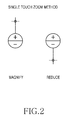
- FIG. 2 illustrates a method for magnifying and reducing a screen using a single touch in a portable terminal according to the conventional art.
- the method using the single touch generates a center point based on a position touched by a user in the portable terminal to show touch directions of magnification and reduction on a screen, and then magnifies or reduces the screen and displays the same depending on a direction of a position touched by the user based on the center point.
- the single touch method since the single touch method generates the center point and magnifies or reduces the screen based on the center point, a time for generating the center point is taken, and in the case where the portable terminal rotates or is put upside down, a touch direction for magnifying or reducing the screen changes in the user's viewpoint, so that confusion may be caused to the user.
- An aspect of the present invention is to address at least the above-mentioned problems and/or disadvantages and to provide at least the advantages described below. Accordingly, an aspect of the present invention is to provide a method and an apparatus for magnifying or reducing a screen and displaying the same depending on a user's touch in a portable terminal.
- Another aspect of the present invention is to provide a method and an apparatus for magnifying or reducing a screen and displaying the same by recognizing a spiral touch in a portable terminal.
- Still another aspect of the present invention is to provide a method and an apparatus for determining to magnify or reduce a screen using an amplitude of a spiral touch in a portable terminal.
- a method for controlling screen display in a portable terminal includes determining whether a screen touch occurs, when the screen touch occurs, determining whether the screen touch corresponds to a spiral touch using coordinates at which the screen is touched, and when the screen touch is the spiral touch, processing to magnify or reduce the screen.
- an apparatus for controlling screen display in a portable terminal includes a touch sensor for detecting whether a screen touch occurs, a controller for, when the screen touch occurs, determining whether the screen touch corresponds to a spiral touch using coordinates at which the screen is touched, and a display unit for, when the screen touch is the spiral touch, processing to magnify or reduce the screen under control of the controller.
- Exemplary embodiments of the present invention provide a method and an apparatus for magnifying or reducing a screen and displaying the same by recognizing a spiral touch in a portable terminal.
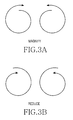
- FIG. 3 illustrates a method for magnifying and reducing a screen using a spiral touch method in a portable terminal according to an exemplary embodiment of the present invention.
- the present invention recognizes a spiral shaped touch (referred to as a 'spiral touch' hereinafter) to magnify or reduce a screen.
- the present invention may magnify or reduce the screen depending on whether the spiral touch is a magnify type or a reduction type. That is, in the case where a spiral touch gets big more and more as illustrated in FIG. 3A , the screen may be magnified. In the where a spiral touch gets small more and more as illustrated in FIG. 3B , the screen may be reduced.
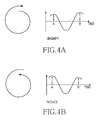
- the portable terminal may measure an amplitude of a spiral touch to determine whether the spiral touch is the magnify type or the reduction type as illustrated in FIG. 4 .
- the portable terminal may compare an amplitude of a point A with an amplitude of a point B after a predetermined time has elapsed on the spiral touch to determine whether the spiral touch is the magnify type or the reduction type. For example, as illustrated in FIG. 4A , in the case where the amplitude of the point A is greater than the amplitude of the point B, the portable terminal may determine that the spiral touch is the magnify type. As illustrated in FIG. 4B , in the case where the amplitude of the point A is less than the amplitude of the point B, the portable terminal may determine that the spiral touch is the reduction type.
- FIG. 5 is a block diagram illustrating a portable terminal according to an exemplary embodiment of the present invention.
- the portable terminal includes an input unit 500, a controller 510, and a display unit 520.
- the controller 510 includes a magnify/reduce processor 512.
- the input unit 500 recognizes input information input from a user to provide the same to the controller 510.
- the input unit 500 includes at least one function key and a touch sensor for sensing a screen touch motion.
- the input unit 500 senses the user's touch motion to provide coordinates corresponding to the touched position to the controller 510. At this point, the input unit 500 provides data representing a start, continuation, and an end of the touch motion to the controller 510.
- the controller 510 controls an overall operation of the portable terminal.
- the controller 510 processes a function for determining whether a motion of spirally touching a screen via the input unit 500 occurs to magnify or reduce the screen displayed on the display unit 520 by including the magnify/reduce processor 512. That is, the magnify/reduce processor 512 determines whether a user's touch motion corresponds to a spiral touch using touch coordinates provided from the input unit 500. When the user's touch motion corresponds to the spiral touch, the magnify/reduce processor 512 measures an amplitude of the spiral touch to determine whether the spiral touch is a magnify type or a reduction type as illustrated in FIG. 4 .
- the magnify/reduce processor 512 processes a function for magnifying the screen displayed on the display unit 520.
- the magnify/reduce processor 512 processes a function for reducing the screen displayed on the display unit 520.
- the magnify/reduce processor 512 may determine a ratio for magnifying or reducing the screen depending on the number of times of occurrences of the spiral touch. For example, in the case where the spiral touch occurs one time, the magnify/reduce processor 512 may magnify or reduce the screen by a predetermined ratio ⁇ . In the case where the spiral touch successively occurs n times, the magnify/reduce processor 512 may magnify or reduce the screen by ⁇ x n.
- the display unit 520 displays state information occurring during an operation of the portable terminal.
- the display unit 520 magnifies or reduces the screen and displays the same under control of the controller 100.
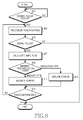
- FIG. 6 is a flowchart illustrating a procedure for magnifying or reducing a screen and displaying the same depending on a spiral touch in a portable terminal according to an exemplary embodiment of the present invention.
- the portable terminal determines whether a screen touch occurs in step 601.
- the portable terminal proceeds to step 603 to recognize the screen touch motion, and then determines whether the touch is a spiral shaped touch in step 605. That is, the portable terminal analyzes coordinates of a position touched by a user via a touch sensor to determine whether the screen touch motion is performed in a spiral circle shape or a spiral polygon shape.
- the portable terminal performs an operation corresponding to the screen touch motion according to the conventional art and ends the algorithm according to the present invention.
- the portable terminal measures an amplitude of the spiral touch in step 607, and proceeds to step 609 to determine whether the spiral touch is a magnify type or a reduction type based on the measured amplitude.
- the portable terminal determines that the spiral touch is the magnify type.
- the portable terminal determines that the spiral touch is the reduction type.
- the portable terminal proceeds to step 611 to process to magnify the screen displayed on the display unit 520.
- the portable terminal proceeds to step 615 to process to reduce the screen displayed on the display unit 520.
- the portable terminal may magnify or reduce the screen by a predetermined ratio. At this point, the predetermined ratio may be changed by a user or a designer.
- the portable terminal determines whether the screen touch motion ends.
- the end of the touch motion denotes sensing a motion of removing the user's fingers or an external device contacting the screen from the screen.
- the portable terminal When the screen touch motion does not end, the portable terminal returns to step 603 to re-perform subsequent steps. When the screen touch motion ends, the portable terminal ends the algorithm according to the present invention.
- FIG. 7 is a view illustrating a method for magnifying or reducing a screen depending on a spiral touch method in a portable terminal according to an exemplary embodiment of the present invention.
- the portable terminal may perform an operation for magnifying the screen by a predetermined ratio two times.
- the portable terminal may perform an operation for reducing the screen by a predetermined ratio two times.
- the portable terminal may reduce the screen by a predetermined ratio and then magnify the screen again.
- the portable terminal may magnify the screen by a predetermined ratio and then reduce the screen again.
- whether to magnify or reduce the screen has been determined depending on whether the spiral touch increases or reduces regardless of a direction of the spiral touch in the above description, whether to magnify or reduce the screen may be determined depending on a direction of the spiral touch. For example, in the case where the spiral touch is performed to the right direction, the screen may be magnified, and in the case where the spiral touch is performed to the left direction, the screen may be reduced. Also, though whether to magnify or reduce the screen has been determined depending on whether the amplitude of the spiral touch increases or reduces in the above description, a degree by which the screen is magnified or reduced may be determined depending on a degree by which the amplitude of the spiral touch changes.
- a magnify ratio of the screen may be determined as A x ⁇ .
- a magnify ratio of the screen may be determined as B x ⁇ .
- a portable terminal recognizes a spiral touch and magnifies or reduces a screen depending on an amplitude of the recognized spiral touch to display the same, so that a user may easily learn a method for magnifying or reducing the screen, and magnify or reduce the screen to a desired level without repeating a motion of contacting the screen with his fingers and removing his fingers from the screen, and a separate stand-by time for magnifying or reducing the screen is not taken.
Landscapes
- Engineering & Computer Science (AREA)
- General Engineering & Computer Science (AREA)
- Theoretical Computer Science (AREA)
- Human Computer Interaction (AREA)
- Physics & Mathematics (AREA)
- General Physics & Mathematics (AREA)
- User Interface Of Digital Computer (AREA)
- Control Of Indicators Other Than Cathode Ray Tubes (AREA)
Applications Claiming Priority (2)
| Application Number | Priority Date | Filing Date | Title |
|---|---|---|---|
| KR1020100041311A KR20110121832A (ko) | 2010-05-03 | 2010-05-03 | 휴대용 단말기에서 화면 디스플레이 제어 방법 및 장치 |
| PCT/KR2011/003319 WO2011139080A2 (fr) | 2010-05-03 | 2011-05-03 | Procédé et appareil pour commander l'affichage d'un écran dans un terminal portable |
Publications (2)
| Publication Number | Publication Date |
|---|---|
| EP2568618A2 true EP2568618A2 (fr) | 2013-03-13 |
| EP2568618A4 EP2568618A4 (fr) | 2016-10-05 |
Family
ID=44904219
Family Applications (1)
| Application Number | Title | Priority Date | Filing Date |
|---|---|---|---|
| EP11777561.9A Withdrawn EP2568618A4 (fr) | 2010-05-03 | 2011-05-03 | Procédé et appareil pour commander l'affichage d'un écran dans un terminal portable |
Country Status (4)
| Country | Link |
|---|---|
| US (1) | US20130038557A1 (fr) |
| EP (1) | EP2568618A4 (fr) |
| KR (1) | KR20110121832A (fr) |
| WO (1) | WO2011139080A2 (fr) |
Families Citing this family (1)
| Publication number | Priority date | Publication date | Assignee | Title |
|---|---|---|---|---|
| KR20180040731A (ko) * | 2012-03-21 | 2018-04-20 | 김시환 | 스마트폰 디스플레이에서 정보 표시 방법 |
Family Cites Families (8)
| Publication number | Priority date | Publication date | Assignee | Title |
|---|---|---|---|---|
| KR101110943B1 (ko) * | 2006-09-28 | 2012-02-20 | 교세라 가부시키가이샤 | 휴대 단말 장치 |
| KR101474416B1 (ko) * | 2007-10-02 | 2014-12-30 | 엘지전자 주식회사 | 이동단말기 및 그 키패드 표시방법 |
| KR101430445B1 (ko) * | 2007-08-20 | 2014-08-14 | 엘지전자 주식회사 | 화면 크기 조절 기능을 갖는 단말기 및 이러한 기능을구현하는 프로그램을 기록한 매체 |
| US8219936B2 (en) * | 2007-08-30 | 2012-07-10 | Lg Electronics Inc. | User interface for a mobile device using a user's gesture in the proximity of an electronic device |
| US8723811B2 (en) * | 2008-03-21 | 2014-05-13 | Lg Electronics Inc. | Mobile terminal and screen displaying method thereof |
| TWI469001B (zh) * | 2008-07-31 | 2015-01-11 | Htc Corp | 可觸控式電子裝置及其操作方法 |
| US20110304584A1 (en) * | 2009-02-23 | 2011-12-15 | Sung Jae Hwang | Touch screen control method and touch screen device using the same |
| US8490013B2 (en) * | 2009-07-30 | 2013-07-16 | Atmel Corporation | Method and apparatus for single touch zoom using spiral rotation |
-
2010
- 2010-05-03 KR KR1020100041311A patent/KR20110121832A/ko not_active Ceased
-
2011
- 2011-05-03 EP EP11777561.9A patent/EP2568618A4/fr not_active Withdrawn
- 2011-05-03 WO PCT/KR2011/003319 patent/WO2011139080A2/fr not_active Ceased
- 2011-05-03 US US13/643,469 patent/US20130038557A1/en not_active Abandoned
Non-Patent Citations (1)
| Title |
|---|
| See references of WO2011139080A2 * |
Also Published As
| Publication number | Publication date |
|---|---|
| KR20110121832A (ko) | 2011-11-09 |
| WO2011139080A2 (fr) | 2011-11-10 |
| EP2568618A4 (fr) | 2016-10-05 |
| US20130038557A1 (en) | 2013-02-14 |
| WO2011139080A3 (fr) | 2012-03-01 |
Similar Documents
| Publication | Publication Date | Title |
|---|---|---|
| US10216407B2 (en) | Display control apparatus, display control method and display control program | |
| JP5158023B2 (ja) | 入力装置、入力方法及びコンピュータプログラム | |
| JP5999830B2 (ja) | 情報処理プログラム、情報処理装置、情報処理システム、および、情報処理方法 | |
| US9323437B2 (en) | Method for displaying scale for enlargement and reduction operation, and device therefor | |
| CN104932809B (zh) | 用于控制显示面板的装置和方法 | |
| JP5654118B2 (ja) | タッチパネル装置及びその表示方法並びに表示用プログラム | |
| US20100177121A1 (en) | Information processing apparatus, information processing method, and program | |
| US20110080430A1 (en) | Information Processing Apparatus, Information Processing Method, and Information Processing Program | |
| US20140192022A1 (en) | Display control device, display control method and program | |
| JP2003099186A (ja) | 機能の実現方法及び装置 | |
| JP2010211500A (ja) | 操作装置 | |
| JP2011227854A (ja) | 情報表示装置 | |
| US9846529B2 (en) | Method for processing information and electronic device | |
| CN101825987A (zh) | 图表显示控制装置及程序 | |
| JP2006268073A5 (fr) | ||
| JP2014041391A (ja) | タッチパネル装置 | |
| JP5654932B2 (ja) | ユーザインタフェース装置、表示装置による操作受付方法及びプログラム | |
| CN101470575B (zh) | 电子装置及其输入方法 | |
| CN103729104B (zh) | 设有电阻膜式触摸面板的电子设备 | |
| EP3605299A1 (fr) | Dispositif de panneau tactile, procédé de commande d'affichage associé et programme | |
| EP3717995B1 (fr) | Procédé pour zoomer sur une image affichée sur un écran tactile d'un terminal mobile | |
| JP6034281B2 (ja) | オブジェクト選択方法、装置及びコンピュータ・プログラム | |
| JP2010258603A (ja) | 通信端末及び表示サイズの調整方法 | |
| EP2568618A2 (fr) | Procédé et appareil pour commander l'affichage d'un écran dans un terminal portable | |
| JP5575027B2 (ja) | 表示一体型座標入力装置及び仮想キーボード機能の起動方法 |
Legal Events
| Date | Code | Title | Description |
|---|---|---|---|
| PUAI | Public reference made under article 153(3) epc to a published international application that has entered the european phase |
Free format text: ORIGINAL CODE: 0009012 |
|
| 17P | Request for examination filed |
Effective date: 20121031 |
|
| AK | Designated contracting states |
Kind code of ref document: A2 Designated state(s): AL AT BE BG CH CY CZ DE DK EE ES FI FR GB GR HR HU IE IS IT LI LT LU LV MC MK MT NL NO PL PT RO RS SE SI SK SM TR |
|
| DAX | Request for extension of the european patent (deleted) | ||
| A4 | Supplementary search report drawn up and despatched |
Effective date: 20160901 |
|
| RIC1 | Information provided on ipc code assigned before grant |
Ipc: G06F 3/0488 20130101AFI20160826BHEP Ipc: H04B 1/40 20060101ALI20160826BHEP |
|
| STAA | Information on the status of an ep patent application or granted ep patent |
Free format text: STATUS: THE APPLICATION HAS BEEN WITHDRAWN |
|
| 18W | Application withdrawn |
Effective date: 20161213 |