EP2579136B1 - Dispositif avec commandes personnalisables - Google Patents
Dispositif avec commandes personnalisables Download PDFInfo
- Publication number
- EP2579136B1 EP2579136B1 EP11183882.7A EP11183882A EP2579136B1 EP 2579136 B1 EP2579136 B1 EP 2579136B1 EP 11183882 A EP11183882 A EP 11183882A EP 2579136 B1 EP2579136 B1 EP 2579136B1
- Authority
- EP
- European Patent Office
- Prior art keywords
- touchscreen
- input
- subset
- processor
- display area
- Prior art date
- Legal status (The legal status is an assumption and is not a legal conclusion. Google has not performed a legal analysis and makes no representation as to the accuracy of the status listed.)
- Active
Links
Images



Classifications
-
- G—PHYSICS
- G06—COMPUTING OR CALCULATING; COUNTING
- G06F—ELECTRIC DIGITAL DATA PROCESSING
- G06F3/00—Input arrangements for transferring data to be processed into a form capable of being handled by the computer; Output arrangements for transferring data from processing unit to output unit, e.g. interface arrangements
- G06F3/01—Input arrangements or combined input and output arrangements for interaction between user and computer
- G06F3/048—Interaction techniques based on graphical user interfaces [GUI]
- G06F3/0487—Interaction techniques based on graphical user interfaces [GUI] using specific features provided by the input device, e.g. functions controlled by the rotation of a mouse with dual sensing arrangements, or of the nature of the input device, e.g. tap gestures based on pressure sensed by a digitiser
- G06F3/0488—Interaction techniques based on graphical user interfaces [GUI] using specific features provided by the input device, e.g. functions controlled by the rotation of a mouse with dual sensing arrangements, or of the nature of the input device, e.g. tap gestures based on pressure sensed by a digitiser using a touch-screen or digitiser, e.g. input of commands through traced gestures
- G06F3/04886—Interaction techniques based on graphical user interfaces [GUI] using specific features provided by the input device, e.g. functions controlled by the rotation of a mouse with dual sensing arrangements, or of the nature of the input device, e.g. tap gestures based on pressure sensed by a digitiser using a touch-screen or digitiser, e.g. input of commands through traced gestures by partitioning the display area of the touch-screen or the surface of the digitising tablet into independently controllable areas, e.g. virtual keyboards or menus
-
- G—PHYSICS
- G06—COMPUTING OR CALCULATING; COUNTING
- G06F—ELECTRIC DIGITAL DATA PROCESSING
- G06F2203/00—Indexing scheme relating to G06F3/00 - G06F3/048
- G06F2203/048—Indexing scheme relating to G06F3/048
- G06F2203/04803—Split screen, i.e. subdividing the display area or the window area into separate subareas
Definitions
- the processor may be operably configured to receive input indicative of populating the subset may be further operably configured to receive data indicative of a selection from a list.
- the set of given input elements may include virtual keyboard keys rendered at the touchscreen.
- the method involves receiving further input indicative of a size and location of a display area.
- the display area is for rendering output from the computer application.
- the display area is smaller than the touchscreen.
- the method may also involve scaling the output such that the output is rendered within the display area.
- Rendering the subset of the input elements on the touchscreen may involve rendering the subset of the input elements outside the display area.
- the list may include input elements of the set of given input elements.
- Receiving the input indicative of populating the subset may involve receiving data from an input device other than the touchscreen.
- the method may further involve downloading the computer application into a memory of the touchscreen device through a network connection.
- the method may also involve executing the computer application on the touchscreen device.
- a touchscreen device in accordance with yet another example for understanding the invention there is provided a touchscreen device.
- the touchscreen device includes a touchscreen and a processor.
- the touchscreen device further includes means for receiving input indicative of populating a subset from a set of given input elements.
- the subset is for providing application input data to a computer application.
- the subset is displayable on the touchscreen.
- the touchscreen device also includes means for rendering the subset on the touchscreen such that the subset is operably configured to receive the application input data.
- a non-transitory computer readable medium encoded with codes.
- the codes are for directing a processor to receive input indicative of populating a subset from a set of given input elements.
- the subset is for providing application input data to a computer application.
- the subset is displayable on the touchscreen.
- the codes are also for directing a processor to render the subset on the touchscreen such that the subset is operably configured to receive the application input data.
- a touchscreen device according to an implementation for providing customizable controls is shown generally at 100 .
- the device 100 includes a touchscreen 102 and a body 104 .
- the touchscreen device 100 also includes a connector 106 for connecting the touchscreen device 100 to another device (not shown).
- the other device may include a computer, an input device, an output device or another touchscreen device 100 .
- touchscreen technologies that are suitable for the touchscreen 102 of the touchscreen device 100 are resistive system touchscreens, capacitive system touchscreens and surface acoustic wave system touchscreens.
- other touchscreen technologies may be used with the touchscreen device 100 .
- alternative means by which input may be received over a screen can be suitably.
- the touchscreen device 100 includes a battery (not shown) to power the device.
- the connector 106 is primarily for supplying power to charge the battery in the touchscreen device 100 when connected to a power source.
- the connector 106 may also be used to connect the touchscreen device 100 to another device for data sharing.
- the touchscreen device 100 may be connected to a personal computer through the connector 106 in order to download programs onto the device. Therefore, the connector 106 may be a standard USBTM connector; however, any other type of connector capable of charging the touchscreen device 100 or providing data sharing capabilities would be suitable.
- the touchscreen device 100 includes a processor 205 , a touchscreen display interface 210 , a non-volatile memory 212 , a volatile memory 214 , and an input / output interface 220 all in communication with the processor 205 .
- the structure in Figure 2 is purely exemplary, and contemplates a touchscreen device 100 that can be used for both wireless voice (e.g. telephony) and wireless data (e.g. email, web browsing, text) communications.
- the touchscreen display interface 210 is in communication with the processor 205 and the touchscreen 102 .
- Processor 205 is configured to communicate with non-volatile memory 212 and volatile memory 214 as needed during operation.
- non-volatile memory 212 include any type of non-transitory computer readable medium, Erasable Electronic Programmable Read Only Memory (“EEPROM”), Flash Memory, and as well as any other type of memory where the contents of the memory are preserved if the memory is powered off.
- Examples of volatile memory include random access memory (“RAM”) as well as any other type of memory where the contents are lost once the memory is powered off.
- the Input / Output interface 220 is in communication with the processor 205 and a network interface device 225 .
- the network interface device 225 connects the touchscreen device 100 to a network for downloading the computer application 230 through the network into the non-volatile memory 212 . Therefore, the network interface device 225 may be in communication with the connector 106 . Alternatively, the network interface device 225 may also be connected to a network wirelessly using technologies such as Wi-FiTM, BluetoothTM, and cellular networks.
- the touchscreen device 100 is shown with a virtual keyboard 310 rendered on the touchscreen 102 .
- the virtual keyboard 310 provides a set of given input elements where each input element is represented by a virtual key 320 .
- Each virtual key 320 is configured to receive input on the touchscreen through any suitable touchscreen mechanisms. The input from the touchscreen is then communicated via the touchscreen display interface 210 to the processor 205 .
- a touchscreen device may allow for the use of a physical keyboard connected to the device through the connector.
- the physical keyboard may be directly connected to the connector, or it may be connected through a docking station.
- another type of touchscreen device may also include a physical keyboard permanently attached to the touchscreen device, for example as in a laptop. In both of these cases, the physical keyboard would provide a set of given input elements to a processor.
- the touchscreen device 100 is shown with a subset of input elements rendered at touchscreen 102 in accordance with another implementation.
- the subset of input elements is a plurality of virtual keys 325 a-e.
- the plurality of virtual keys 325 a-e is similar to the plurality of virtual keys 320 a-e discussed above in connection with Figure 4 and each virtual keys 325 a-e may correspond to each of the virtual keys 320 a-e respectively.
- the plurality of virtual keys 325 a-e is configured to receive data corresponding to application input data requested during execution of the computer application 230 .
- the processor 205 has changed the size and shape of the virtual keys 320 a-e into various sizes and shapes of the virtual keys 325 a-e. For example, once virtual keys 320a-3 are selected and/or populates, further input can be received at touchscreen device 102, the further input indicative that a shape and/or size virtual keys 320a-e are to be changes, resulting in virtual keys 325a-e.
- Any suitable method can be used to indicate that a change in shape and/or size of virtual keys 320a-e are to occur, including but not limited to choosing new shapes and/or sizes from a menu, touchscreen input, input indicative that a shape of a given side of a given virtual key 320a-e is to be changes, and the like.
- virtual keys 325 a and 325 c are rendered as an irregular polygon and circle respectively, for example. Further, virtual keys 325 d and 325 e are rendered in a larger size than corresponding virtual keys 320 d and 320 e and virtual key 325 b is rendered in a smaller size than corresponding virtual keys 320 b.
- shapes are not limited to squares, irregular, polygons and circles, and that any suitable shape and/or change in shape is within the scope of present implementations.
- a given virtual key 320a-3 can undergo any suitable combination of a change in shape and a change in size, which can be performed in any suitable order.
- the method 400 begins at 405 when a request is received at the processor 205 to begin the method.
- This request can be received from the touchscreen 102 through the touchscreen display interface 210 as a result of input at the touchscreen. It will be appreciated that other types of input, such as a short-cut key on the touchscreen device 100 or input from another input device connected to the input/output interface 220 , may generate the request. Alternatively, the request may be generated internally by the computer application 230 while the application is being executed or automatically under predetermined conditions. It will be further appreciated that the origin of the request may be anything as long as the request triggers the processor 205 to begin method 400 .
- the processor 205 receives input indicating a selection and/or a populating of a subset of input elements. For example, after receiving the input, the processor 205 can populate the subset of input elements with the selected input elements. However, in other implementations, the processor 205 populates the subset of input elements when receiving the input.
- the subset of input elements is the plurality of virtual keys 320 a-e displayable on the touchscreen 102 . Furthermore, the plurality of virtual keys 320 a-e selected from the virtual keyboard 310 such that computer application 230 would generally only request application input data from the plurality of virtual keys 320 a-e.
- virtual keys of the virtual keyboard 310 which are not part of the plurality of virtual keys 320 a-e, are generally not requested for input when executing the computer application 230 .
- the plurality of virtual keys is not limited to exactly five virtual keys and that the subset may include more or less virtual keys depending on the requirements of the computer application 230 .
- the plurality of virtual keys 320 a-e may be positioned at a location where the virtual key was "dropped". Furthermore, although this implementation renders the virtual keys in the format of the virtual keyboard 310 , it is contemplated that in other implementations that the virtual keys may be rendered on the touchscreen 102 in a format other than a virtual keyboard where the same drag-and-drop selection method can be used.
- the processor 205 may be directed to receive data indicative of a selection from a list 340 rendered on the touchscreen 102. It is contemplated that in other implementations, a list may be entirely separate from the touchscreen device 100 , such as in a manual. The data indicative of a selection from the list 340 may also be received from any input device capable of providing input to the processor 205 including the touchscreen 102 . In the present implementation, the list 340 is presented on the touchscreen 102 and includes list items 321 a-e, and 322 where list items 321 a-e correspond to virtual keys 320 a-e respectively.
- the list 340 may also include list items corresponding to pre-determined combinations of the virtual keys of the virtual keyboard 310 , such as keys used for the computer application 230 .
- list item 322 corresponds to the combination comprising the plurality of virtual keys 320 a-e. Therefore, when the processor 205 receives data indicative of list item 322 , the processor will render the plurality of virtual keys 320 a-e respectively.
- the selection process is more efficient compared with selecting individual virtual keys. It will be appreciated that in other implementations where the set of given input elements is something other than a virtual keyboard, the list may include the input elements of the set of given input elements and combinations of the input elements of the set of given input elements.
- the processor 205 may further receive input indicative of a selection of a plurality of locations on the touchscreen 102 where the plurality of virtual keys 320 a-e are to be rendered.
- the input indicative of a selection of a plurality of locations on the touchscreen 102 where the plurality of virtual keys 320 a-e are to be rendered can be received through the touchscreen display interface 210 as a result of input at the touchscreen 102 .
- the drag-and-drop selection process described above can indicate the plurality of locations for the plurality of virtual keys 320 a-e by using the "drop" location.
- the processor 205 renders the plurality of virtual keys 320 a-e on the touchscreen 102 .
- the plurality of virtual keys 320 a-e are enabled to receive input at the touchscreen 102 corresponding to the application input data for the computer application 230 executed by the processor 205 .
- the plurality of virtual keys is not limited to exactly five virtual keys and that the subset may include more or less virtual keys depending on the requirements of the computer application 230 .
- the plurality of virtual keys 320 a-e will remain on the touchscreen as long as the computer application 230 is running.
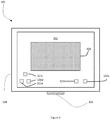
- the touchscreen device 100 includes, a display area 350 is shown.
- the display area 350 is a portion of the touchscreen 102 for rendering output from the computer application 230 . Therefore, it will be appreciated that the remaining area of the touchscreen 102 will not be available for rendering output from the computer application 230 .
- the display area 350 is shown to be smaller than the full size of the touchscreen 102 in the present implementation, it should be appreciated that a display area can be equal to the full size of the touchscreen 102 .
- the plurality of virtual keys 320 a-e may be rendered within the display area 350 such that a virtual key may overlap a small portion of the output from the computer application 230 .
- the blocks generally represent codes read from the non-volatile memory 212 , for directing the processor 205 to manage input received from a user for the purpose of rendering input elements on the touchscreen 102 .
- the actual code to implement each block may be written in any suitable programming language, such as FlashTM, Java, Delphi®, C, and/or C++.
- the method 500 begins at 505 when a request is received at the processor 205 to begin the method.
- This request can be received from the touchscreen 102 through the touchscreen display interface 210 as a result of input at the touchscreen. It will be appreciated that other types of input, such as a short cut key on the touchscreen device 100 or input from another input device connected to the input/output interface 220 , may generate the request. Alternatively, the request may be generated internally by the computer application 230 while the application is being executed or automatically under predetermined conditions. It will be further appreciated that the origin of the request may be suitable origin such that the request triggers the processor 205 to begin method 500 .
- processor 205 receives input indicating a selection and/or populating of a subset of input elements. For example, after receiving the input, the processor 205 can populate the subset of input elements with the selected input elements. However, in other implementations, the processor 205 populates the subset of input elements when receiving the input.
- the subset of input elements is the plurality of virtual keys 320 a-e displayable on the touchscreen 102 . Furthermore, the plurality of virtual keys 320 a-e are selected from the virtual keyboard 310 such that computer application 230 would generally only request application input data from the plurality of virtual keys 320 a-e.
- virtual keys of the virtual keyboard 310 which are not part of the plurality of virtual keys 320 a-e, are generally not requested for input when executing the computer application 230 .
- the plurality of virtual keys is not limited to exactly five virtual keys and that the subset may include more or less virtual keys depending on the requirements of the computer application 230 .
- the input indicating a selection of the plurality of virtual keys 320 a-e in the method 500 may include data of various types.
- one implementation of the input indicating a selection of the plurality of virtual keys 320 a-e may involve code directing the processor 205 to receive data indicative of a drag-and-drop selection process on the touchscreen 102 . This data may result from dragging a virtual key from the virtual keyboard 310 to a location off of the virtual keyboard to indicate the selection of the plurality of virtual keys 320 a-e.
- the plurality of virtual keys 320 a-e will automatically be repositioned as shown in Figure 4 .
- the plurality of virtual keys 320 a-e may be positioned at a location where the virtual key was "dropped". Furthermore, although this implementation renders the virtual keys in the format of the virtual keyboard 310 , it is contemplated that in other implementations that the virtual keys may be rendered on the touchscreen 102 in a format other than a virtual keyboard where the same drag-and-drop selection method can be used.
- the processor 205 can receive data indicative of a selection from a list 340 rendered on the touchscreen 102 . It is contemplated that in other implementations, a list may be entirely separate from the touchscreen device 100 , such as in a manual. The data indicative of a selection from the list 340 may also be received from any input device capable of providing input to the processor 205 including the touchscreen 102 . In the present implementation, the list 340 is presented on the touchscreen 102 and includes list items 321 a-e, and 322 where list items 321 a-e correspond to virtual keys 320 a-e respectively.
- the list 340 may also include list items corresponding to pre-determined combinations of the virtual keys of the virtual keyboard 310 , such as keys used for the computer application 230 .
- list item 322 corresponds to the combination comprising the plurality of virtual keys 320 a-e. Therefore, when the processor 205 receives data indicative of list item 322 , the processor will render the plurality of virtual keys 320 a-e respectively.
- the selection process is more efficient compared with selecting individual virtual keys. It will be appreciated that in other implementations where the set of given input elements is something other than a virtual keyboard, the list may include the input elements of the set of given input elements and combinations of the input elements of the set of given input elements.
- a touchscreen device with a processor for carrying out method 500 where the set of given input elements is not a virtual keyboard it should be noted that the subset of input elements must still be displayable on the touchscreen of the touchscreen device.
- the set of given input elements need not be limited to correspond to keys of a keyboard.
- receiving input indicating a selection of the plurality of virtual keys 320 a-e may involve receiving data from an input device other than the touchscreen 102 .
- input devices other than the touchscreen include an external keyboard, a joystick, a video game controller, or a mouse.
- a virtual key is still generated to represent the input of the input element. For example, if an input element corresponds to moving a joystick up, where the set of given input elements includes all possible input from a joystick, the subset of input elements would include a virtual key displayable on a touchscreen for receiving input corresponding to moving the joystick up.
- the processor 205 may further receive input indicative of a selection of a plurality of locations on the touchscreen 102 where the plurality of virtual keys 320 a-e are to be rendered.
- the input indicative of a selection of a plurality of locations on the touchscreen 102 where the plurality of virtual keys 320 a-e are to be rendered can be received through the touchscreen display interface 210 as a result of input at the touchscreen 102 .
- the drag-and-drop selection process described above can indicate the plurality of locations for the plurality of virtual keys 320 a-e by using the "drop" location.
- the input indicative of a selection of a plurality of locations may be generated internally by the computer application 230 .
- the computer application 230 may have a pre-determined list of locations for the plurality of virtual keys 320 a-e which is automatically applied during method 500 .
- the plurality of virtual keys is not limited to exactly five virtual keys and that the subset may include more or less virtual keys depending on the requirements of the computer application 230 .
- processor 205 receives input indicating a size and location of a display area 350 on the touchscreen 102 .
- the input indicating the size and location of the display area 350 on the touchscreen 102 may include data received from the touchscreen display interface 210 as a result of input at the touchscreen. It will be appreciated that other types of input, such as a short cut key (not shown) on the touchscreen device 100 or input from another input device connected to the input/output interface 220 , may be used to generate the input indicating the size and location of the display area 350 on the touchscreen 102 . Alternatively, the input indicating the size and location of the display area 350 on the touchscreen 102 may be automatically generated internally when executing the computer application 230 .
- the processor 205 may additionally scale the output from the computer application 230 such that the output is completely rendered within the display area 350 .
- the processor 205 may scale the output to fit within the display area 350 when the method is carried out. It will be appreciated that if the processor 205 does not scale the output from the computer application 230 , any output intended to be rendered outside of the display area 350 would simply be truncated.
- the processor 205 renders the plurality of virtual keys 320 a-e on the touchscreen 102 .
- the plurality of virtual keys 320 a-e are enabled to receive input at the touchscreen 102 corresponding to the application input data for the computer application 230 executed by the processor 205 .
- the plurality of virtual keys is not limited to exactly five virtual keys and that the subset may include more or less virtual keys depending on the requirements of the computer application 230 .
- the processor 205 may further render the plurality of virtual keys 320 a-e outside of the display area 350 .
- the plurality of virtual keys 320 a-e will not overlap with any portion of the output rendered from the computer application 230 . Therefore, this will prevent obscuring the output rendered from the computer application 230 since the plurality of virtual keys 320 a-e remain on the touchscreen 102 indefinitely.
- method 400 or method 500 provides a means to receive input efficiently from the touchscreen for the computer application 230 .
- placing the plurality of virtual keys 320 a-e allows for the output from the application to be rendered on the touchscreen 102 with minimal obstruction by the input elements.
Landscapes
- Engineering & Computer Science (AREA)
- General Engineering & Computer Science (AREA)
- Theoretical Computer Science (AREA)
- Human Computer Interaction (AREA)
- Physics & Mathematics (AREA)
- General Physics & Mathematics (AREA)
- User Interface Of Digital Computer (AREA)
- Input From Keyboards Or The Like (AREA)
Claims (12)
- Dispositif d'écran tactile (100) comprenant un processeur (205) et un écran tactile (102), le processeur (205) étant configuré de manière opérationnelle pour:recevoir une entrée indicative d'une sélection d'éléments d'entrée pour un sous-ensemble d'éléments d'entrée à partir d'un ensemble d'éléments d'entrée donnés, le sous-ensemble fournissant des données d'entrée d'application à une application informatique (230), le sous-ensemble pouvant être affiché sur l'écran tactile (102);recevoir une autre entrée indiquant une taille et un emplacement d'une zone d'affichage (350), la zone d'affichage (350) restituant la sortie de l'application informatique (230), dans laquelle la zone d'affichage (350) est plus petite que l'écran tactile (102); etrestituer le sous-ensemble sur l'écran tactile (102) de telle sorte que le sous-ensemble soit configuré de manière opérationnelle pour recevoir les données d'entrée d'application, le sous-ensemble étant resitué en dehors de la zone d'affichage (350) et restant sur l'écran tactile (102) tant que l'application informatique (230) est en cours d'exécution.
- Dispositif d'écran tactile (100) selon la revendication 1, dans lequel le processeur (205) est configuré de manière opérationnelle pour mettre à l'échelle la sortie de telle sorte que la sortie soit complètement restituée dabs la zone d'affichage (350).
- Dispositif d'écran tactile (100) selon la revendication 1 ou 2, dans lequel le processeur (205) est configuré de manière opérationnelle pour recevoir une entrée supplémentaire indiquant une sélection d'un emplacement sur l'écran tactile (102) de telle sorte qu'un élément d'entrée sélectionné du sous-ensemble soit restitué à cet emplacement.
- Dispositif d'écran tactile (100) selon une quelconque des revendications 1 à 3, dans lequel le processeur (205) est configuré de manière opérationnelle pour recevoir des données indiquant une sélection dans une liste.
- Dispositif d'écran tactile (100) selon une quelconque des revendications 1 à 4, dans lequel le processeur (205) est en outre configuré de manière fonctionnelle pour modifier les tailles et les formes des éléments d'entrée (325a-e).
- Procédé comprenant de:recevoir, au niveau d'un dispositif à écran tactile (100) comprenant un processeur (205) et un écran tactile (102), une entrée indiquant une sélection d'éléments d'entrée pour un sous-ensemble d'éléments d'entrée à partir d'un ensemble d'éléments d'entrée donnés, le sous-ensemble fournissant une application des données d'entrée dans une application informatique (230), le sous-ensemble pouvant être affiché sur l'écran tactile (102);recevoir en outre une entrée indiquant une taille et un emplacement d'une zone d'affichage (350), la zone d'affichage (350) restituant la sortie de l'application informatique (230), dans lequel la zone d'affichage (350) est plus petite que l'écran tactile (102); etrestituer le sous-ensemble sur l'écran tactile (102) de telle sorte que le sous-ensemble soit configuré de manière opérationnelle pour recevoir les données d'entrée d'application, le sous-ensemble étant restitué en dehors de la zone d'affichage (350) et restant sur l'écran tactile (102) aussi longtemps que l'application informatique (230) est en cours d'exécution.
- Procédé selon la revendication 6, comprenant en outre la mise à l'échelle de la sortie de telle sorte que la sortie soit restituée dans la zone d'affichage (350).
- Procédé selon la revendication 6 ou 7, comprenant en outre la réception d'une entrée supplémentaire indiquant une sélection d'un emplacement sur l'écran tactile (102) de telle sorte qu'un élément d'entrée sélectionné du sous-ensemble soit restitué à l'emplacement.
- Procédé selon une quelconque des revendications 6 à 8, dans lequel l'entrée indiquant le remplissage du sous-ensemble comprend des données indicatives d'une sélection par glisser-déposer sur l'écran tactile (102) .
- Procédé selon une quelconque des revendications 6 à 9, dans lequel la réception de l'entrée indiquant le remplissage du sous-ensemble comprend la réception de données indicatives d'une sélection dans une liste.
- Procédé selon une quelconque des revendications 6 à 10, dans lequel la réception de l'entrée indicative de remplissage du sous-ensemble comprend la réception de données d'un dispositif d'entrée autre que l'écran tactile (102).
- Procédé selon une quelconque des revendications 6 à 11, comprenant en outre la modification de tailles et de formes des éléments d'entrée (325a-e).
Priority Applications (2)
| Application Number | Priority Date | Filing Date | Title |
|---|---|---|---|
| EP11183882.7A EP2579136B1 (fr) | 2011-10-04 | 2011-10-04 | Dispositif avec commandes personnalisables |
| CA2791591A CA2791591A1 (fr) | 2011-10-04 | 2012-10-02 | Appareil pourvu de commandes personnalisables |
Applications Claiming Priority (1)
| Application Number | Priority Date | Filing Date | Title |
|---|---|---|---|
| EP11183882.7A EP2579136B1 (fr) | 2011-10-04 | 2011-10-04 | Dispositif avec commandes personnalisables |
Publications (2)
| Publication Number | Publication Date |
|---|---|
| EP2579136A1 EP2579136A1 (fr) | 2013-04-10 |
| EP2579136B1 true EP2579136B1 (fr) | 2020-12-02 |
Family
ID=44905456
Family Applications (1)
| Application Number | Title | Priority Date | Filing Date |
|---|---|---|---|
| EP11183882.7A Active EP2579136B1 (fr) | 2011-10-04 | 2011-10-04 | Dispositif avec commandes personnalisables |
Country Status (2)
| Country | Link |
|---|---|
| EP (1) | EP2579136B1 (fr) |
| CA (1) | CA2791591A1 (fr) |
Citations (2)
| Publication number | Priority date | Publication date | Assignee | Title |
|---|---|---|---|---|
| US5936614A (en) * | 1991-04-30 | 1999-08-10 | International Business Machines Corporation | User defined keyboard entry system |
| US20080259039A1 (en) * | 2006-10-26 | 2008-10-23 | Kenneth Kocienda | Method, System, and Graphical User Interface for Selecting a Soft Keyboard |
Family Cites Families (1)
| Publication number | Priority date | Publication date | Assignee | Title |
|---|---|---|---|---|
| FR2933211B1 (fr) * | 2008-06-26 | 2010-11-26 | Airbus France | Dispositif d'interaction avec un systeme d'affichage, notamment pour un systeme d'affichage avionique |
-
2011
- 2011-10-04 EP EP11183882.7A patent/EP2579136B1/fr active Active
-
2012
- 2012-10-02 CA CA2791591A patent/CA2791591A1/fr not_active Abandoned
Patent Citations (2)
| Publication number | Priority date | Publication date | Assignee | Title |
|---|---|---|---|---|
| US5936614A (en) * | 1991-04-30 | 1999-08-10 | International Business Machines Corporation | User defined keyboard entry system |
| US20080259039A1 (en) * | 2006-10-26 | 2008-10-23 | Kenneth Kocienda | Method, System, and Graphical User Interface for Selecting a Soft Keyboard |
Also Published As
| Publication number | Publication date |
|---|---|
| CA2791591A1 (fr) | 2013-04-04 |
| EP2579136A1 (fr) | 2013-04-10 |
Similar Documents
| Publication | Publication Date | Title |
|---|---|---|
| US11815956B2 (en) | Electronic device, storage medium, program, and displaying method | |
| US11429275B2 (en) | Electronic device with gesture-based task management | |
| KR102020345B1 (ko) | 터치스크린을 구비하는 단말에서 홈 화면의 구성 방법 및 장치 | |
| EP2602730B1 (fr) | Présentation d'informations de contexte dans un dispositif informatique | |
| EP2746924B1 (fr) | Procédé d'entrée tactile et terminal mobile | |
| US20190204868A1 (en) | Electronic device and control method therefor | |
| US8816958B2 (en) | System and method of mode-switching for a computing device | |
| JP2009520271A (ja) | スマートソフトキーボード | |
| EP3721327B1 (fr) | Adaptation d'interaction dynamique d'un dispositif d'encrage numérique | |
| US20140035853A1 (en) | Method and apparatus for providing user interaction based on multi touch finger gesture | |
| JP2019510299A (ja) | 情報処理方法および電子デバイス | |
| KR20140028223A (ko) | 주소록 제공 방법 및 장치 | |
| KR20140073258A (ko) | 어플리케이션 정보 제공 방법 및 휴대 단말 | |
| EP3441865B1 (fr) | Dispositif électronique pour la mémorisation de données d'utilisateur et procédé correspondant | |
| US20130082940A1 (en) | Device with customizable controls | |
| EP2706451B1 (fr) | Procédé de traitement de saisie tactile pour dispositif mobile | |
| US20120249545A1 (en) | User interface apparatus for providing representation of 3d theme for cover page and method of operating the same | |
| EP2579136B1 (fr) | Dispositif avec commandes personnalisables | |
| US9170669B2 (en) | Electronic device and method of controlling same | |
| US9310922B2 (en) | Method and apparatus for determining a selection option | |
| KR101985888B1 (ko) | 전자 게시판 제공 방법 및 장치 | |
| CN111966266A (zh) | 一种页面的布局方法及相关设备 | |
| Arora et al. | Mobile operating system | |
| EP2584424A1 (fr) | Système et procédé de commutation de mode pour dispositif informatique |
Legal Events
| Date | Code | Title | Description |
|---|---|---|---|
| PUAI | Public reference made under article 153(3) epc to a published international application that has entered the european phase |
Free format text: ORIGINAL CODE: 0009012 |
|
| 17P | Request for examination filed |
Effective date: 20111004 |
|
| AK | Designated contracting states |
Kind code of ref document: A1 Designated state(s): AL AT BE BG CH CY CZ DE DK EE ES FI FR GB GR HR HU IE IS IT LI LT LU LV MC MK MT NL NO PL PT RO RS SE SI SK SM TR |
|
| AX | Request for extension of the european patent |
Extension state: BA ME |
|
| RAP1 | Party data changed (applicant data changed or rights of an application transferred) |
Owner name: BLACKBERRY LIMITED |
|
| RAP1 | Party data changed (applicant data changed or rights of an application transferred) |
Owner name: BLACKBERRY LIMITED |
|
| STAA | Information on the status of an ep patent application or granted ep patent |
Free format text: STATUS: EXAMINATION IS IN PROGRESS |
|
| 17Q | First examination report despatched |
Effective date: 20170606 |
|
| GRAP | Despatch of communication of intention to grant a patent |
Free format text: ORIGINAL CODE: EPIDOSNIGR1 |
|
| STAA | Information on the status of an ep patent application or granted ep patent |
Free format text: STATUS: GRANT OF PATENT IS INTENDED |
|
| INTG | Intention to grant announced |
Effective date: 20200706 |
|
| GRAS | Grant fee paid |
Free format text: ORIGINAL CODE: EPIDOSNIGR3 |
|
| GRAA | (expected) grant |
Free format text: ORIGINAL CODE: 0009210 |
|
| STAA | Information on the status of an ep patent application or granted ep patent |
Free format text: STATUS: THE PATENT HAS BEEN GRANTED |
|
| AK | Designated contracting states |
Kind code of ref document: B1 Designated state(s): AL AT BE BG CH CY CZ DE DK EE ES FI FR GB GR HR HU IE IS IT LI LT LU LV MC MK MT NL NO PL PT RO RS SE SI SK SM TR |
|
| REG | Reference to a national code |
Ref country code: GB Ref legal event code: FG4D |
|
| REG | Reference to a national code |
Ref country code: AT Ref legal event code: REF Ref document number: 1341658 Country of ref document: AT Kind code of ref document: T Effective date: 20201215 Ref country code: CH Ref legal event code: EP |
|
| REG | Reference to a national code |
Ref country code: DE Ref legal event code: R096 Ref document number: 602011069490 Country of ref document: DE |
|
| REG | Reference to a national code |
Ref country code: IE Ref legal event code: FG4D |
|
| PG25 | Lapsed in a contracting state [announced via postgrant information from national office to epo] |
Ref country code: RS Free format text: LAPSE BECAUSE OF FAILURE TO SUBMIT A TRANSLATION OF THE DESCRIPTION OR TO PAY THE FEE WITHIN THE PRESCRIBED TIME-LIMIT Effective date: 20201202 Ref country code: FI Free format text: LAPSE BECAUSE OF FAILURE TO SUBMIT A TRANSLATION OF THE DESCRIPTION OR TO PAY THE FEE WITHIN THE PRESCRIBED TIME-LIMIT Effective date: 20201202 Ref country code: NO Free format text: LAPSE BECAUSE OF FAILURE TO SUBMIT A TRANSLATION OF THE DESCRIPTION OR TO PAY THE FEE WITHIN THE PRESCRIBED TIME-LIMIT Effective date: 20210302 Ref country code: GR Free format text: LAPSE BECAUSE OF FAILURE TO SUBMIT A TRANSLATION OF THE DESCRIPTION OR TO PAY THE FEE WITHIN THE PRESCRIBED TIME-LIMIT Effective date: 20210303 |
|
| REG | Reference to a national code |
Ref country code: NL Ref legal event code: MP Effective date: 20201202 |
|
| REG | Reference to a national code |
Ref country code: AT Ref legal event code: MK05 Ref document number: 1341658 Country of ref document: AT Kind code of ref document: T Effective date: 20201202 |
|
| PG25 | Lapsed in a contracting state [announced via postgrant information from national office to epo] |
Ref country code: BG Free format text: LAPSE BECAUSE OF FAILURE TO SUBMIT A TRANSLATION OF THE DESCRIPTION OR TO PAY THE FEE WITHIN THE PRESCRIBED TIME-LIMIT Effective date: 20210302 Ref country code: LV Free format text: LAPSE BECAUSE OF FAILURE TO SUBMIT A TRANSLATION OF THE DESCRIPTION OR TO PAY THE FEE WITHIN THE PRESCRIBED TIME-LIMIT Effective date: 20201202 Ref country code: PL Free format text: LAPSE BECAUSE OF FAILURE TO SUBMIT A TRANSLATION OF THE DESCRIPTION OR TO PAY THE FEE WITHIN THE PRESCRIBED TIME-LIMIT Effective date: 20201202 Ref country code: SE Free format text: LAPSE BECAUSE OF FAILURE TO SUBMIT A TRANSLATION OF THE DESCRIPTION OR TO PAY THE FEE WITHIN THE PRESCRIBED TIME-LIMIT Effective date: 20201202 |
|
| PG25 | Lapsed in a contracting state [announced via postgrant information from national office to epo] |
Ref country code: NL Free format text: LAPSE BECAUSE OF FAILURE TO SUBMIT A TRANSLATION OF THE DESCRIPTION OR TO PAY THE FEE WITHIN THE PRESCRIBED TIME-LIMIT Effective date: 20201202 Ref country code: HR Free format text: LAPSE BECAUSE OF FAILURE TO SUBMIT A TRANSLATION OF THE DESCRIPTION OR TO PAY THE FEE WITHIN THE PRESCRIBED TIME-LIMIT Effective date: 20201202 |
|
| REG | Reference to a national code |
Ref country code: LT Ref legal event code: MG9D |
|
| PG25 | Lapsed in a contracting state [announced via postgrant information from national office to epo] |
Ref country code: EE Free format text: LAPSE BECAUSE OF FAILURE TO SUBMIT A TRANSLATION OF THE DESCRIPTION OR TO PAY THE FEE WITHIN THE PRESCRIBED TIME-LIMIT Effective date: 20201202 Ref country code: CZ Free format text: LAPSE BECAUSE OF FAILURE TO SUBMIT A TRANSLATION OF THE DESCRIPTION OR TO PAY THE FEE WITHIN THE PRESCRIBED TIME-LIMIT Effective date: 20201202 Ref country code: SM Free format text: LAPSE BECAUSE OF FAILURE TO SUBMIT A TRANSLATION OF THE DESCRIPTION OR TO PAY THE FEE WITHIN THE PRESCRIBED TIME-LIMIT Effective date: 20201202 Ref country code: LT Free format text: LAPSE BECAUSE OF FAILURE TO SUBMIT A TRANSLATION OF THE DESCRIPTION OR TO PAY THE FEE WITHIN THE PRESCRIBED TIME-LIMIT Effective date: 20201202 Ref country code: RO Free format text: LAPSE BECAUSE OF FAILURE TO SUBMIT A TRANSLATION OF THE DESCRIPTION OR TO PAY THE FEE WITHIN THE PRESCRIBED TIME-LIMIT Effective date: 20201202 Ref country code: PT Free format text: LAPSE BECAUSE OF FAILURE TO SUBMIT A TRANSLATION OF THE DESCRIPTION OR TO PAY THE FEE WITHIN THE PRESCRIBED TIME-LIMIT Effective date: 20210405 Ref country code: SK Free format text: LAPSE BECAUSE OF FAILURE TO SUBMIT A TRANSLATION OF THE DESCRIPTION OR TO PAY THE FEE WITHIN THE PRESCRIBED TIME-LIMIT Effective date: 20201202 |
|
| PG25 | Lapsed in a contracting state [announced via postgrant information from national office to epo] |
Ref country code: AT Free format text: LAPSE BECAUSE OF FAILURE TO SUBMIT A TRANSLATION OF THE DESCRIPTION OR TO PAY THE FEE WITHIN THE PRESCRIBED TIME-LIMIT Effective date: 20201202 |
|
| REG | Reference to a national code |
Ref country code: DE Ref legal event code: R097 Ref document number: 602011069490 Country of ref document: DE |
|
| PG25 | Lapsed in a contracting state [announced via postgrant information from national office to epo] |
Ref country code: IS Free format text: LAPSE BECAUSE OF FAILURE TO SUBMIT A TRANSLATION OF THE DESCRIPTION OR TO PAY THE FEE WITHIN THE PRESCRIBED TIME-LIMIT Effective date: 20210402 |
|
| PLBE | No opposition filed within time limit |
Free format text: ORIGINAL CODE: 0009261 |
|
| STAA | Information on the status of an ep patent application or granted ep patent |
Free format text: STATUS: NO OPPOSITION FILED WITHIN TIME LIMIT |
|
| PG25 | Lapsed in a contracting state [announced via postgrant information from national office to epo] |
Ref country code: IT Free format text: LAPSE BECAUSE OF FAILURE TO SUBMIT A TRANSLATION OF THE DESCRIPTION OR TO PAY THE FEE WITHIN THE PRESCRIBED TIME-LIMIT Effective date: 20201202 Ref country code: AL Free format text: LAPSE BECAUSE OF FAILURE TO SUBMIT A TRANSLATION OF THE DESCRIPTION OR TO PAY THE FEE WITHIN THE PRESCRIBED TIME-LIMIT Effective date: 20201202 |
|
| 26N | No opposition filed |
Effective date: 20210903 |
|
| PG25 | Lapsed in a contracting state [announced via postgrant information from national office to epo] |
Ref country code: SI Free format text: LAPSE BECAUSE OF FAILURE TO SUBMIT A TRANSLATION OF THE DESCRIPTION OR TO PAY THE FEE WITHIN THE PRESCRIBED TIME-LIMIT Effective date: 20201202 Ref country code: ES Free format text: LAPSE BECAUSE OF FAILURE TO SUBMIT A TRANSLATION OF THE DESCRIPTION OR TO PAY THE FEE WITHIN THE PRESCRIBED TIME-LIMIT Effective date: 20201202 Ref country code: DK Free format text: LAPSE BECAUSE OF FAILURE TO SUBMIT A TRANSLATION OF THE DESCRIPTION OR TO PAY THE FEE WITHIN THE PRESCRIBED TIME-LIMIT Effective date: 20201202 |
|
| REG | Reference to a national code |
Ref country code: CH Ref legal event code: PL |
|
| PG25 | Lapsed in a contracting state [announced via postgrant information from national office to epo] |
Ref country code: IS Free format text: LAPSE BECAUSE OF FAILURE TO SUBMIT A TRANSLATION OF THE DESCRIPTION OR TO PAY THE FEE WITHIN THE PRESCRIBED TIME-LIMIT Effective date: 20210402 |
|
| REG | Reference to a national code |
Ref country code: BE Ref legal event code: MM Effective date: 20211031 |
|
| PG25 | Lapsed in a contracting state [announced via postgrant information from national office to epo] |
Ref country code: MC Free format text: LAPSE BECAUSE OF FAILURE TO SUBMIT A TRANSLATION OF THE DESCRIPTION OR TO PAY THE FEE WITHIN THE PRESCRIBED TIME-LIMIT Effective date: 20201202 |
|
| PG25 | Lapsed in a contracting state [announced via postgrant information from national office to epo] |
Ref country code: LU Free format text: LAPSE BECAUSE OF NON-PAYMENT OF DUE FEES Effective date: 20211004 Ref country code: BE Free format text: LAPSE BECAUSE OF NON-PAYMENT OF DUE FEES Effective date: 20211031 |
|
| PG25 | Lapsed in a contracting state [announced via postgrant information from national office to epo] |
Ref country code: LI Free format text: LAPSE BECAUSE OF NON-PAYMENT OF DUE FEES Effective date: 20211031 Ref country code: CH Free format text: LAPSE BECAUSE OF NON-PAYMENT OF DUE FEES Effective date: 20211031 |
|
| PG25 | Lapsed in a contracting state [announced via postgrant information from national office to epo] |
Ref country code: IE Free format text: LAPSE BECAUSE OF NON-PAYMENT OF DUE FEES Effective date: 20211004 |
|
| PG25 | Lapsed in a contracting state [announced via postgrant information from national office to epo] |
Ref country code: HU Free format text: LAPSE BECAUSE OF FAILURE TO SUBMIT A TRANSLATION OF THE DESCRIPTION OR TO PAY THE FEE WITHIN THE PRESCRIBED TIME-LIMIT; INVALID AB INITIO Effective date: 20111004 Ref country code: CY Free format text: LAPSE BECAUSE OF FAILURE TO SUBMIT A TRANSLATION OF THE DESCRIPTION OR TO PAY THE FEE WITHIN THE PRESCRIBED TIME-LIMIT Effective date: 20201202 |
|
| PG25 | Lapsed in a contracting state [announced via postgrant information from national office to epo] |
Ref country code: MK Free format text: LAPSE BECAUSE OF FAILURE TO SUBMIT A TRANSLATION OF THE DESCRIPTION OR TO PAY THE FEE WITHIN THE PRESCRIBED TIME-LIMIT Effective date: 20201202 |
|
| REG | Reference to a national code |
Ref country code: DE Ref legal event code: R082 Ref document number: 602011069490 Country of ref document: DE Ref country code: DE Ref legal event code: R081 Ref document number: 602011069490 Country of ref document: DE Owner name: MALIKIE INNOVATIONS LTD., IE Free format text: FORMER OWNER: BLACKBERRY LIMITED, WATERLOO, ONTARIO, CA |
|
| PG25 | Lapsed in a contracting state [announced via postgrant information from national office to epo] |
Ref country code: TR Free format text: LAPSE BECAUSE OF FAILURE TO SUBMIT A TRANSLATION OF THE DESCRIPTION OR TO PAY THE FEE WITHIN THE PRESCRIBED TIME-LIMIT Effective date: 20201202 |
|
| REG | Reference to a national code |
Ref country code: GB Ref legal event code: 732E Free format text: REGISTERED BETWEEN 20240620 AND 20240627 |
|
| PG25 | Lapsed in a contracting state [announced via postgrant information from national office to epo] |
Ref country code: MT Free format text: LAPSE BECAUSE OF FAILURE TO SUBMIT A TRANSLATION OF THE DESCRIPTION OR TO PAY THE FEE WITHIN THE PRESCRIBED TIME-LIMIT Effective date: 20201202 |
|
| PGFP | Annual fee paid to national office [announced via postgrant information from national office to epo] |
Ref country code: DE Payment date: 20251028 Year of fee payment: 15 |
|
| PGFP | Annual fee paid to national office [announced via postgrant information from national office to epo] |
Ref country code: GB Payment date: 20251023 Year of fee payment: 15 |
|
| PGFP | Annual fee paid to national office [announced via postgrant information from national office to epo] |
Ref country code: FR Payment date: 20251027 Year of fee payment: 15 |