EP2613245A2 - Terminal mobile et son procédé de contrôle - Google Patents
Terminal mobile et son procédé de contrôle Download PDFInfo
- Publication number
- EP2613245A2 EP2613245A2 EP12185568.8A EP12185568A EP2613245A2 EP 2613245 A2 EP2613245 A2 EP 2613245A2 EP 12185568 A EP12185568 A EP 12185568A EP 2613245 A2 EP2613245 A2 EP 2613245A2
- Authority
- EP
- European Patent Office
- Prior art keywords
- touch
- displayed
- mobile terminal
- input action
- touch input
- Prior art date
- Legal status (The legal status is an assumption and is not a legal conclusion. Google has not performed a legal analysis and makes no representation as to the accuracy of the status listed.)
- Withdrawn
Links
Images












Classifications
-
- G—PHYSICS
- G06—COMPUTING OR CALCULATING; COUNTING
- G06F—ELECTRIC DIGITAL DATA PROCESSING
- G06F1/00—Details not covered by groups G06F3/00 - G06F13/00 and G06F21/00
- G06F1/16—Constructional details or arrangements
- G06F1/1613—Constructional details or arrangements for portable computers
- G06F1/1626—Constructional details or arrangements for portable computers with a single-body enclosure integrating a flat display, e.g. Personal Digital Assistants [PDAs]
-
- G—PHYSICS
- G06—COMPUTING OR CALCULATING; COUNTING
- G06F—ELECTRIC DIGITAL DATA PROCESSING
- G06F3/00—Input arrangements for transferring data to be processed into a form capable of being handled by the computer; Output arrangements for transferring data from processing unit to output unit, e.g. interface arrangements
- G06F3/01—Input arrangements or combined input and output arrangements for interaction between user and computer
- G06F3/048—Interaction techniques based on graphical user interfaces [GUI]
- G06F3/0487—Interaction techniques based on graphical user interfaces [GUI] using specific features provided by the input device, e.g. functions controlled by the rotation of a mouse with dual sensing arrangements, or of the nature of the input device, e.g. tap gestures based on pressure sensed by a digitiser
- G06F3/0488—Interaction techniques based on graphical user interfaces [GUI] using specific features provided by the input device, e.g. functions controlled by the rotation of a mouse with dual sensing arrangements, or of the nature of the input device, e.g. tap gestures based on pressure sensed by a digitiser using a touch-screen or digitiser, e.g. input of commands through traced gestures
- G06F3/04883—Interaction techniques based on graphical user interfaces [GUI] using specific features provided by the input device, e.g. functions controlled by the rotation of a mouse with dual sensing arrangements, or of the nature of the input device, e.g. tap gestures based on pressure sensed by a digitiser using a touch-screen or digitiser, e.g. input of commands through traced gestures for inputting data by handwriting, e.g. gesture or text
-
- G—PHYSICS
- G06—COMPUTING OR CALCULATING; COUNTING
- G06F—ELECTRIC DIGITAL DATA PROCESSING
- G06F3/00—Input arrangements for transferring data to be processed into a form capable of being handled by the computer; Output arrangements for transferring data from processing unit to output unit, e.g. interface arrangements
- G06F3/01—Input arrangements or combined input and output arrangements for interaction between user and computer
- G06F3/03—Arrangements for converting the position or the displacement of a member into a coded form
- G06F3/041—Digitisers, e.g. for touch screens or touch pads, characterised by the transducing means
- G06F3/0412—Digitisers structurally integrated in a display
-
- G—PHYSICS
- G06—COMPUTING OR CALCULATING; COUNTING
- G06F—ELECTRIC DIGITAL DATA PROCESSING
- G06F3/00—Input arrangements for transferring data to be processed into a form capable of being handled by the computer; Output arrangements for transferring data from processing unit to output unit, e.g. interface arrangements
- G06F3/01—Input arrangements or combined input and output arrangements for interaction between user and computer
- G06F3/03—Arrangements for converting the position or the displacement of a member into a coded form
- G06F3/041—Digitisers, e.g. for touch screens or touch pads, characterised by the transducing means
- G06F3/0416—Control or interface arrangements specially adapted for digitisers
-
- G—PHYSICS
- G06—COMPUTING OR CALCULATING; COUNTING
- G06F—ELECTRIC DIGITAL DATA PROCESSING
- G06F3/00—Input arrangements for transferring data to be processed into a form capable of being handled by the computer; Output arrangements for transferring data from processing unit to output unit, e.g. interface arrangements
- G06F3/01—Input arrangements or combined input and output arrangements for interaction between user and computer
- G06F3/048—Interaction techniques based on graphical user interfaces [GUI]
- G06F3/0481—Interaction techniques based on graphical user interfaces [GUI] based on specific properties of the displayed interaction object or a metaphor-based environment, e.g. interaction with desktop elements like windows or icons, or assisted by a cursor's changing behaviour or appearance
- G06F3/04812—Interaction techniques based on cursor appearance or behaviour, e.g. being affected by the presence of displayed objects
-
- G—PHYSICS
- G06—COMPUTING OR CALCULATING; COUNTING
- G06F—ELECTRIC DIGITAL DATA PROCESSING
- G06F3/00—Input arrangements for transferring data to be processed into a form capable of being handled by the computer; Output arrangements for transferring data from processing unit to output unit, e.g. interface arrangements
- G06F3/01—Input arrangements or combined input and output arrangements for interaction between user and computer
- G06F3/048—Interaction techniques based on graphical user interfaces [GUI]
- G06F3/0481—Interaction techniques based on graphical user interfaces [GUI] based on specific properties of the displayed interaction object or a metaphor-based environment, e.g. interaction with desktop elements like windows or icons, or assisted by a cursor's changing behaviour or appearance
- G06F3/04817—Interaction techniques based on graphical user interfaces [GUI] based on specific properties of the displayed interaction object or a metaphor-based environment, e.g. interaction with desktop elements like windows or icons, or assisted by a cursor's changing behaviour or appearance using icons
-
- G—PHYSICS
- G06—COMPUTING OR CALCULATING; COUNTING
- G06F—ELECTRIC DIGITAL DATA PROCESSING
- G06F2203/00—Indexing scheme relating to G06F3/00 - G06F3/048
- G06F2203/048—Indexing scheme relating to G06F3/048
- G06F2203/04808—Several contacts: gestures triggering a specific function, e.g. scrolling, zooming, right-click, when the user establishes several contacts with the surface simultaneously; e.g. using several fingers or a combination of fingers and pen
Definitions
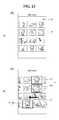
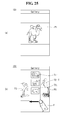
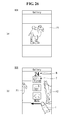
- FIGS. 23 to 27 are views showing another method for displaying different related information of the mobile terminal.
- the location information module 115 may confirm or obtain a location or a position of the mobile terminal 100.
- the location information module 115 may obtain position information by using a global navigation satellite system (GNSS).
- GNSS is a terminology describing a radio navigation satellite system that revolves around the earth and transmits reference signals to predetermined types of radio navigation receivers such that the radio navigation receivers can determine their positions on the earth's surface or near the earth's surface.
- the GNSS may include a global positioning system (GPS) of the United States, Galileo of Europe, a global orbiting navigational satellite system (GLONASS) of Russia, COMPASS of China, and a quasi-zenith satellite system (QZSS) of Japan, for example.
- GPS global positioning system
- Galileo Galileo of Europe
- GLONASS global orbiting navigational satellite system
- QZSS quasi-zenith satellite system
- an action of the pointer approaching the touch screen without actually touching the touch screen may be referred to as a proximity touch and an action of bringing the pointer into contact with the touch screen may be referred to as a contact touch.
- the proximity touch point of the pointer on the touch screen may correspond to a point of the touch screen at which the pointer is perpendicular to the touch screen.
- the alarm 153 may output a signal for indicating generation of an event of the mobile terminal 100. For example, an alarm may be generated when receiving a call signal, receiving a message, inputting a key signal, and/or inputting a touch.
- the alarm 153 may also output signals in forms different from video signals or audio signals, for example, a signal for indicating generation of an event through vibration.
- the video signals and/or the audio signals may also be output through the display 151 or the audio output module 152.
- the interface 170 may serve as a path to external devices connected to the mobile terminal 100.
- the interface 170 may receive data from the external devices or power and transmit the data or power to internal components of the mobile terminal 100 or transmit data of the mobile terminal 100 to the external devices.
- the interface 170 may include a wired/wireless headset port, an external charger port, a wired/wireless data port, a memory card port, a port for connecting a device having a user identification module, an audio I/O port, a video I/O port, and/or an earphone port.
- the interface 170 may also interface with a user identification module that is a chip that stores information for authenticating authority to use the mobile terminal 100.
- the user identification module may be a user identify module (UIM), a subscriber identify module (SIM) and/or a universal subscriber identify module (USIM).
- An identification device (including the user identification module) may also be manufactured in the form of a smart card. Accordingly, the identification device may be connected to the mobile terminal 100 through a port of the interface 170.
- the interface 170 may also be a path through which power from an external cradle is provided to the mobile terminal 100 when the mobile terminal 100 is connected to the external cradle or a path through which various command signals input by the user through the cradle are transmitted to the mobile terminal 100.
- the various command signals or power input from the cradle may be used as signals for confirming whether the mobile terminal 100 is correctly set in the cradle.
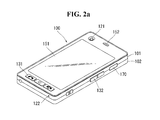
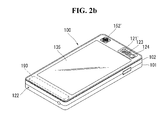
- a flash bulb 123 and a mirror 124 may be additionally provided in proximity to the camera 121'.
- the flash bulb 123 may light an object when the camera 121' takes a picture of the object.
- the mirror 124 may be used for the user to look at his/her face in the mirror when the user wants to self-photograph himself/herself using the camera 121'.
- the controller 180 may recognize the proximity touch as various input signals according to proximity distance and proximity position of the pointer with respect to the touch screen, and the controller 810 may perform various operation controls according to the input signals.
- the controller 180 releases or stops displaying the information related to the displayed contents.
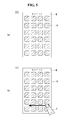
- the related information may be associated with the presence of absence of a touch input. For example, when a touch input is conducted, related information may be displayed, and when the touch input is terminated, the related information may not be displayed.
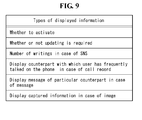
- information related to an icon IC as contents may be displayed while the touch operation is being input.
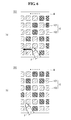
- icons may be differentiated such that an icon IC1 whose display state is changed and a second icon IC2 whose display state is not changed are displayed.
- the first icon IC1 whose state has been changed may reflect a state of an application as contents related to the corresponding icon IC. It means that, for example, an application corresponding to the first icon IC1 is being executed.
- Displayed information may be displaying of captured information in case of an image. For example, when a touch operation is performed with an image gallery displayed, information such as an image capture place, an image capture time, or the like, of a particular image may be displayed. Also, when a touch operation is performed with an image gallery displayed, a different image related to a particular image may be displayed in a highlighting manner.
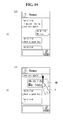
- an icon IC is displayed on the display 151.
- the controller 180 displays a general icon IC.
- the update indicator UI may be displayed only while a touch operation is being performed. Namely, when the touch operation is terminated, the displayed updated indicator UI may disappear. Thus, the display is less cluttered.
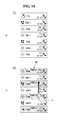
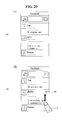
- a list of contact numbers may be displayed on the display 151.
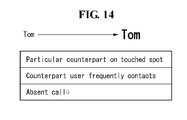
- the controller 180 displays a contact number FA of a particular counterpart in an highlighted manner.
- the contact number FA displayed to be highlighted may be a counterpart with whom the user frequency contacts or a counterpart positioned on a spot from which the user's touch operation has started.
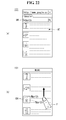
- the user can input a particular search word SW.
- Search results with respect to the particular search word SW are then displayed on the display 151.
- articles AT corresponding to a search word SW of "North" may be displayed on the display 151.
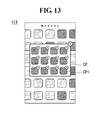
- images P are displayed on the display 151.
- the images P stored in the memory 160 of the mobile terminal 100 may be displayed in a gallery (G) form.
- the controller 180 displays particular images P1 to P3, among the displayed images P, in a highlighted manner.
- the particular images P1 to P3 displayed to be highlighted can be returned to their original display state.
Landscapes
- Engineering & Computer Science (AREA)
- Theoretical Computer Science (AREA)
- General Engineering & Computer Science (AREA)
- Human Computer Interaction (AREA)
- Physics & Mathematics (AREA)
- General Physics & Mathematics (AREA)
- Computer Hardware Design (AREA)
- User Interface Of Digital Computer (AREA)
- Telephone Function (AREA)
Applications Claiming Priority (1)
| Application Number | Priority Date | Filing Date | Title |
|---|---|---|---|
| KR1020120000843A KR101932270B1 (ko) | 2012-01-04 | 2012-01-04 | 이동 단말기 및 그 제어방법 |
Publications (2)
| Publication Number | Publication Date |
|---|---|
| EP2613245A2 true EP2613245A2 (fr) | 2013-07-10 |
| EP2613245A3 EP2613245A3 (fr) | 2016-02-10 |
Family
ID=47290575
Family Applications (1)
| Application Number | Title | Priority Date | Filing Date |
|---|---|---|---|
| EP12185568.8A Withdrawn EP2613245A3 (fr) | 2012-01-04 | 2012-09-21 | Terminal mobile et son procédé de contrôle |
Country Status (3)
| Country | Link |
|---|---|
| US (1) | US20130169556A1 (fr) |
| EP (1) | EP2613245A3 (fr) |
| KR (1) | KR101932270B1 (fr) |
Families Citing this family (9)
| Publication number | Priority date | Publication date | Assignee | Title |
|---|---|---|---|---|
| US20140267130A1 (en) * | 2013-03-13 | 2014-09-18 | Microsoft Corporation | Hover gestures for touch-enabled devices |
| US9544343B2 (en) * | 2013-07-03 | 2017-01-10 | Cisco Technology, Inc. | Content sharing system for small-screen devices |
| CN104423789B (zh) * | 2013-09-09 | 2018-07-06 | 联想(北京)有限公司 | 一种信息处理方法及电子设备 |
| JP2015227919A (ja) * | 2014-05-30 | 2015-12-17 | セイコーエプソン株式会社 | 画像表示装置、画像表示装置を制御する方法、コンピュータープログラム、および、画像表示システム |
| US10451874B2 (en) | 2013-09-25 | 2019-10-22 | Seiko Epson Corporation | Image display device, method of controlling image display device, computer program, and image display system |
| KR102147282B1 (ko) * | 2013-09-30 | 2020-08-24 | 엘지전자 주식회사 | 이동 단말기 |
| US20170004725A1 (en) * | 2013-11-29 | 2017-01-05 | Woo-Jung Kim | Method for implementing intelligent flash cards in mobile device having touch screen, and mobile device having touch screen for implementing intelligent flash cards |
| US11169661B2 (en) | 2017-05-31 | 2021-11-09 | International Business Machines Corporation | Thumbnail generation for digital images |
| KR102939255B1 (ko) * | 2020-09-04 | 2026-03-13 | 삼성전자주식회사 | 프리뷰 드로잉 방법 및 이를 위한 전자 장치 |
Family Cites Families (21)
| Publication number | Priority date | Publication date | Assignee | Title |
|---|---|---|---|---|
| US5564004A (en) * | 1994-04-13 | 1996-10-08 | International Business Machines Corporation | Method and system for facilitating the selection of icons |
| US7685530B2 (en) * | 2005-06-10 | 2010-03-23 | T-Mobile Usa, Inc. | Preferred contact group centric interface |
| US7779370B2 (en) * | 2006-06-30 | 2010-08-17 | Google Inc. | User interface for mobile devices |
| US8564544B2 (en) * | 2006-09-06 | 2013-10-22 | Apple Inc. | Touch screen device, method, and graphical user interface for customizing display of content category icons |
| US20090164923A1 (en) * | 2007-12-21 | 2009-06-25 | Nokia Corporation | Method, apparatus and computer program product for providing an adaptive icon |
| KR101592296B1 (ko) * | 2008-09-03 | 2016-02-05 | 엘지전자 주식회사 | 이동 단말기 및 그의 객체 선택과 실행 방법 |
| KR20100030388A (ko) * | 2008-09-10 | 2010-03-18 | 삼성디지털이미징 주식회사 | 터치 스크린 |
| KR101537598B1 (ko) * | 2008-10-20 | 2015-07-20 | 엘지전자 주식회사 | 영상 프로젝터를 구비한 휴대 단말기 및 그 제어 방법 |
| KR20100050103A (ko) * | 2008-11-05 | 2010-05-13 | 엘지전자 주식회사 | 맵 상에서의 3차원 개체 제어방법과 이를 이용한 이동 단말기 |
| KR101078929B1 (ko) * | 2008-11-06 | 2011-11-01 | 엘지전자 주식회사 | 단말기 및 그 인터넷 이용 방법 |
| KR20110014040A (ko) * | 2009-08-04 | 2011-02-10 | 엘지전자 주식회사 | 이동 단말기 및 그의 아이콘 충돌 제어방법 |
| KR101651128B1 (ko) * | 2009-10-05 | 2016-08-25 | 엘지전자 주식회사 | 이동 단말기 이것의 애플리케이션 실행 제어 방법 |
| US20110252376A1 (en) * | 2010-04-07 | 2011-10-13 | Imran Chaudhri | Device, Method, and Graphical User Interface for Managing Concurrently Open Software Applications |
| EP2378406B1 (fr) * | 2010-04-13 | 2018-08-22 | LG Electronics Inc. | Terminal mobile et procédé de contrôle du fonctionnement du terminal mobile |
| KR101626301B1 (ko) * | 2010-05-28 | 2016-06-01 | 엘지전자 주식회사 | 휴대 단말기 및 그 동작 제어방법 |
| JP2012032872A (ja) * | 2010-07-28 | 2012-02-16 | Funai Electric Co Ltd | 文字入力装置 |
| WO2012068544A2 (fr) * | 2010-11-20 | 2012-05-24 | Kushler Clifford A | Réalisation d'actions sur un dispositif informatique au moyen d'un clavier contextuel |
| JP2012155408A (ja) * | 2011-01-24 | 2012-08-16 | Kyocera Corp | 携帯型電子機器 |
| KR101276846B1 (ko) * | 2011-04-22 | 2013-06-18 | 엘지전자 주식회사 | 미디어 데이터의 스트리밍 제어방법 및 제어장치 |
| US9182897B2 (en) * | 2011-04-22 | 2015-11-10 | Qualcomm Incorporated | Method and apparatus for intuitive wrapping of lists in a user interface |
| KR102074347B1 (ko) * | 2013-03-15 | 2020-03-02 | 엘지전자 주식회사 | 이동 단말기 및 그것의 제어방법 |
-
2012
- 2012-01-04 KR KR1020120000843A patent/KR101932270B1/ko not_active Expired - Fee Related
- 2012-08-22 US US13/591,925 patent/US20130169556A1/en not_active Abandoned
- 2012-09-21 EP EP12185568.8A patent/EP2613245A3/fr not_active Withdrawn
Non-Patent Citations (1)
| Title |
|---|
| None |
Also Published As
| Publication number | Publication date |
|---|---|
| US20130169556A1 (en) | 2013-07-04 |
| KR20130080102A (ko) | 2013-07-12 |
| EP2613245A3 (fr) | 2016-02-10 |
| KR101932270B1 (ko) | 2018-12-24 |
Similar Documents
| Publication | Publication Date | Title |
|---|---|---|
| US8532596B1 (en) | Mobile terminal and control method thereof | |
| EP2261784B1 (fr) | Mobiles Endgerät und Verfahren zum Anzeigen von Informationen in einem mobilen Endgerät | |
| US9360952B2 (en) | Mobile terminal and method to change display screen | |
| US9665268B2 (en) | Mobile terminal and control method thereof | |
| US9594476B2 (en) | Electronic device comprising a touch-screen display and a rear input unit, and method of controlling the same | |
| EP3570155B1 (fr) | Terminal mobile et son procédé de commande | |
| US20130326415A1 (en) | Mobile terminal and control method thereof | |
| US9521244B2 (en) | Mobile terminal displaying application execution icon groups for corresponding predetermined events | |
| EP2613245A2 (fr) | Terminal mobile et son procédé de contrôle | |
| EP2876564A1 (fr) | Terminal mobile et son procédé de commande | |
| US20150094120A1 (en) | Mobile terminal | |
| US9336242B2 (en) | Mobile terminal and displaying method thereof | |
| EP2613248A2 (fr) | Dispositif électronique et son procédé de contrôle | |
| EP2958304A1 (fr) | Terminal mobile et son procédé de commande | |
| US20150156303A1 (en) | Mobile terminal and control method thereof | |
| KR101632993B1 (ko) | 이동 단말기 및 이동 단말기의 제어 방법 |
Legal Events
| Date | Code | Title | Description |
|---|---|---|---|
| PUAI | Public reference made under article 153(3) epc to a published international application that has entered the european phase |
Free format text: ORIGINAL CODE: 0009012 |
|
| 17P | Request for examination filed |
Effective date: 20120921 |
|
| AK | Designated contracting states |
Kind code of ref document: A2 Designated state(s): AL AT BE BG CH CY CZ DE DK EE ES FI FR GB GR HR HU IE IS IT LI LT LU LV MC MK MT NL NO PL PT RO RS SE SI SK SM TR |
|
| AX | Request for extension of the european patent |
Extension state: BA ME |
|
| PUAL | Search report despatched |
Free format text: ORIGINAL CODE: 0009013 |
|
| AK | Designated contracting states |
Kind code of ref document: A3 Designated state(s): AL AT BE BG CH CY CZ DE DK EE ES FI FR GB GR HR HU IE IS IT LI LT LU LV MC MK MT NL NO PL PT RO RS SE SI SK SM TR |
|
| AX | Request for extension of the european patent |
Extension state: BA ME |
|
| RIC1 | Information provided on ipc code assigned before grant |
Ipc: G06F 3/0488 20130101AFI20160104BHEP |
|
| RBV | Designated contracting states (corrected) |
Designated state(s): AL AT BE BG CH CY CZ DE DK EE ES FI FR GB GR HR HU IE IS IT LI LT LU LV MC MK MT NL NO PL PT RO RS SE SI SK SM TR |
|
| STAA | Information on the status of an ep patent application or granted ep patent |
Free format text: STATUS: EXAMINATION IS IN PROGRESS |
|
| 17Q | First examination report despatched |
Effective date: 20190603 |
|
| STAA | Information on the status of an ep patent application or granted ep patent |
Free format text: STATUS: THE APPLICATION IS DEEMED TO BE WITHDRAWN |
|
| 18D | Application deemed to be withdrawn |
Effective date: 20220111 |