EP2620862A2 - Bilddurchlaufsteuerungs-vorrichtung und -verfahren eines Endgerätes - Google Patents
Bilddurchlaufsteuerungs-vorrichtung und -verfahren eines Endgerätes Download PDFInfo
- Publication number
- EP2620862A2 EP2620862A2 EP12198661.6A EP12198661A EP2620862A2 EP 2620862 A2 EP2620862 A2 EP 2620862A2 EP 12198661 A EP12198661 A EP 12198661A EP 2620862 A2 EP2620862 A2 EP 2620862A2
- Authority
- EP
- European Patent Office
- Prior art keywords
- application
- scroll
- action
- recommended
- recommended action
- Prior art date
- Legal status (The legal status is an assumption and is not a legal conclusion. Google has not performed a legal analysis and makes no representation as to the accuracy of the status listed.)
- Withdrawn
Links
Images










Classifications
-
- G—PHYSICS
- G06—COMPUTING OR CALCULATING; COUNTING
- G06F—ELECTRIC DIGITAL DATA PROCESSING
- G06F3/00—Input arrangements for transferring data to be processed into a form capable of being handled by the computer; Output arrangements for transferring data from processing unit to output unit, e.g. interface arrangements
- G06F3/01—Input arrangements or combined input and output arrangements for interaction between user and computer
- G06F3/03—Arrangements for converting the position or the displacement of a member into a coded form
- G06F3/041—Digitisers, e.g. for touch screens or touch pads, characterised by the transducing means
-
- G—PHYSICS
- G06—COMPUTING OR CALCULATING; COUNTING
- G06F—ELECTRIC DIGITAL DATA PROCESSING
- G06F3/00—Input arrangements for transferring data to be processed into a form capable of being handled by the computer; Output arrangements for transferring data from processing unit to output unit, e.g. interface arrangements
- G06F3/01—Input arrangements or combined input and output arrangements for interaction between user and computer
- G06F3/048—Interaction techniques based on graphical user interfaces [GUI]
- G06F3/0484—Interaction techniques based on graphical user interfaces [GUI] for the control of specific functions or operations, e.g. selecting or manipulating an object, an image or a displayed text element, setting a parameter value or selecting a range
-
- G—PHYSICS
- G06—COMPUTING OR CALCULATING; COUNTING
- G06F—ELECTRIC DIGITAL DATA PROCESSING
- G06F3/00—Input arrangements for transferring data to be processed into a form capable of being handled by the computer; Output arrangements for transferring data from processing unit to output unit, e.g. interface arrangements
- G06F3/01—Input arrangements or combined input and output arrangements for interaction between user and computer
- G06F3/048—Interaction techniques based on graphical user interfaces [GUI]
- G06F3/0484—Interaction techniques based on graphical user interfaces [GUI] for the control of specific functions or operations, e.g. selecting or manipulating an object, an image or a displayed text element, setting a parameter value or selecting a range
- G06F3/0485—Scrolling or panning
-
- G—PHYSICS
- G06—COMPUTING OR CALCULATING; COUNTING
- G06F—ELECTRIC DIGITAL DATA PROCESSING
- G06F3/00—Input arrangements for transferring data to be processed into a form capable of being handled by the computer; Output arrangements for transferring data from processing unit to output unit, e.g. interface arrangements
- G06F3/01—Input arrangements or combined input and output arrangements for interaction between user and computer
- G06F3/048—Interaction techniques based on graphical user interfaces [GUI]
- G06F3/0487—Interaction techniques based on graphical user interfaces [GUI] using specific features provided by the input device, e.g. functions controlled by the rotation of a mouse with dual sensing arrangements, or of the nature of the input device, e.g. tap gestures based on pressure sensed by a digitiser
- G06F3/0488—Interaction techniques based on graphical user interfaces [GUI] using specific features provided by the input device, e.g. functions controlled by the rotation of a mouse with dual sensing arrangements, or of the nature of the input device, e.g. tap gestures based on pressure sensed by a digitiser using a touch-screen or digitiser, e.g. input of commands through traced gestures
-
- G—PHYSICS
- G06—COMPUTING OR CALCULATING; COUNTING
- G06F—ELECTRIC DIGITAL DATA PROCESSING
- G06F3/00—Input arrangements for transferring data to be processed into a form capable of being handled by the computer; Output arrangements for transferring data from processing unit to output unit, e.g. interface arrangements
- G06F3/14—Digital output to display device ; Cooperation and interconnection of the display device with other functional units
-
- G—PHYSICS
- G06—COMPUTING OR CALCULATING; COUNTING
- G06F—ELECTRIC DIGITAL DATA PROCESSING
- G06F3/00—Input arrangements for transferring data to be processed into a form capable of being handled by the computer; Output arrangements for transferring data from processing unit to output unit, e.g. interface arrangements
- G06F3/14—Digital output to display device ; Cooperation and interconnection of the display device with other functional units
- G06F3/147—Digital output to display device ; Cooperation and interconnection of the display device with other functional units using display panels
-
- G—PHYSICS
- G06—COMPUTING OR CALCULATING; COUNTING
- G06F—ELECTRIC DIGITAL DATA PROCESSING
- G06F9/00—Arrangements for program control, e.g. control units
- G06F9/06—Arrangements for program control, e.g. control units using stored programs, i.e. using an internal store of processing equipment to receive or retain programs
- G06F9/44—Arrangements for executing specific programs
-
- H—ELECTRICITY
- H04—ELECTRIC COMMUNICATION TECHNIQUE
- H04M—TELEPHONIC COMMUNICATION
- H04M1/00—Substation equipment, e.g. for use by subscribers
- H04M1/72—Mobile telephones; Cordless telephones, i.e. devices for establishing wireless links to base stations without route selection
- H04M1/724—User interfaces specially adapted for cordless or mobile telephones
- H04M1/72403—User interfaces specially adapted for cordless or mobile telephones with means for local support of applications that increase the functionality
Definitions
- the present invention relates to an input control apparatus and a method of a portable terminal equipped with a touchscreen. More particularly, the present invention relates to an apparatus and a method for controlling scroll operation of the portable terminal.
- a touch panel-equipped terminal uses the touch panel as an input device.
- the touch panel as the input device, it is possible to implement various functions in association with a user's diverse touch gestures.
- the scroll action is made for scrolling a screen up and down or left and right with a touch gesture. If the scroll action reaches a scroll boundary, the screen can be scrolled no more.
- an action such as bouncing, accordion expansion, and highlight.
- the scroll method of the related art has a limited means of notifying the user that the scroll boundary has been reached.
- the scroll action is made for the user to navigate specific applications, menus, functions, or the like. Accordingly, when the scroll action reaches the scroll boundary, the user has to take another input action to further navigate other applications, menus, functions, or the like.
- an aspect of the present invention is to provide an apparatus and a method for offering available actions when a scroll action in search of an object reaches a scroll boundary.
- Another aspect of the present invention is to provide a method and an apparatus for offering information available for a user to continue scrolling in search of a target object at a scroll boundary based on the user's state and intention.
- the present invention proposes an apparatus and a method for displaying, if the scroll action is maintained in the state where the scroll action has reached the scroll boundary, the actions recommended for the corresponding application and executing, when one of the recommended actions is selected, the selected action.
- an apparatus in accordance with an aspect of the present invention, includes a touch panel for detecting a touch event, a memory for storing recommended action tables including recommended actions per application, a control unit for, when a scroll action detected on the touch panel reaches a scroll boundary, controlling to display the recommended actions registered with the recommended action table in association with a current application, and a display unit for displaying the applications corresponding to the recommended actions at the scroll boundary of the current application under the control of the control unit.
- a scroll control method of a terminal includes scrolling a screen in response to a scroll action detected on a touch panel, monitoring to detect a scroll boundary of a navigation area which is scrolled in response to the scroll action, and displaying, when the scroll boundary is detected, applications corresponding to recommended actions registered with a recommended action table of a current application in sequence.
- FIG. 1 is a block diagram illustrating a configuration of a terminal for processing a scroll action according to an exemplary embodiment of the present invention
- FIG. 2 is a diagram illustrating screens presenting recommended actions in association with a scroll action in a terminal according to an exemplary embodiment of the present invention
- FIG. 3 is a block diagram illustrating a configuration of a control unit of a terminal, for example, a control unit of FIG. 1 according to an exemplary embodiment of the present invention
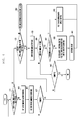
- FIG. 4 is a flowchart illustrating a procedure for registering recommended actions according to an exemplary embodiment of the present invention
- FIG. 5 is a flowchart illustrating a procedure for displaying recommended actions at a scroll boundary of a navigation area according to an exemplary embodiment of the present invention
- FIG. 6 is a flowchart illustrating a procedure of displaying recommended actions subsequent to an end of a navigation area according to an exemplary embodiment of the present invention
- FIG. 7 is a flowchart illustrating a procedure for processing a recommended action of a gallery application according to an exemplary embodiment of the present invention
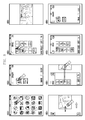
- FIG. 8 is a diagram illustrating operations related to a scroll action for a gallery application in a procedure, for example, operations of FIG. 7 according to an exemplary embodiment of the present invention
- FIG. 9 is a flowchart illustrating a procedure for processing a recommended action of an email application according to an exemplary embodiment of the present invention.
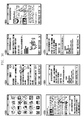
- FIG. 10 is a diagram illustrating operations related to a scroll action for an email application in a procedure, for example, operations of FIG. 9 according to an exemplary embodiment of the present invention
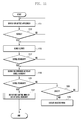
- FIG. 11 is a flowchart illustrating a procedure for processing a setting application recommended action according to an exemplary embodiment of the present invention
- FIG. 12 is a diagram illustrating operations related to a scroll action for a setting application in a procedure, for example, operations of FIG. 11 according to an exemplary embodiment of the present invention
- FIG. 13 is a flowchart illustrating a procedure for processing a messenger application recommended action according to an exemplary embodiment of the present invention
- FIG. 14 is a diagram illustrating operations related to a scroll action for a messenger application in a procedure, for example, operations of FIG. 13 according to an exemplary embodiment of the present invention
- FIG. 15 is a flowchart illustrating a procedure for processing a calendar application recommended action according to an exemplary embodiment of the present invention
- FIG. 16 is a diagram illustrating operations related to a scroll action for a calendar application in a procedure, for example, operations of FIG. 15 according to an exemplary embodiment of the present invention
- FIG. 17 is a flowchart illustrating a procedure for processing a browser application recommended action according to an exemplary embodiment of the present invention.
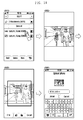
- FIG. 18 is a diagram illustrating operations related to a scroll action for a browser application in a procedure, for example, operations of FIG. 17 according to an exemplary embodiment of the present invention
- FIG. 19 is a flowchart illustrating a procedure for processing a music player application recommended action according to an exemplary embodiment of the present invention.
- FIG. 20 is a diagram illustrating operations related to a scroll action for a music player application in a procedure, for example, operations of FIG. 19 according to an exemplary embodiment of the present invention
- FIG. 21 is a flowchart illustrating a procedure for processing a logs application recommended action according to an exemplary embodiment of the present invention
- FIG. 22 is a diagram illustrating operations related to a scroll action for a logs application in a procedure, for example, operations of FIG. 21 according to an exemplary embodiment of the present invention
- FIG. 23 is a flowchart illustrating a procedure for processing an image viewer application recommended action according to an exemplary embodiment of the present invention.
- FIG. 24 is a diagram illustrating operations related to a scroll action for an image viewer application in a procedure, for example, operations of FIG. 23 according to an exemplary embodiment of the present invention.
- the scroll function is used in search of a specific object. If the scroll action has reached a scroll boundary, this means that the user has failed finding an object or wants to perform another search.
- the terminal may offer options for navigating other navigation areas in order for the user to restart the search in quick and intuitive manner.
- the terminal when the scroll action for navigating objects reaches the scroll boundary, the terminal offers recommended actions subsequent to the previous screen.
- the recommended actions can be of 'back to the previous screen', 'move to next folder', 'move to next menu', 'move to executed application', 'execute recommended application', 'internet issue check', 'check widget information', and the like.
- the recommended actions can be configured diversely according to the application related to the current navigation action.
- the recommended actions can be preset at the manufacturing state of the terminal or set by the user per application.
- the recommended actions can be offered by presenting new actions in sequence or in the form of selectable menu items.
- the terminal recommends the actions available at the scroll boundary of the navigation area. At this time the recommended actions can be presented continuously depending on the configuration.
- FIGs. 1 through 24 discussed below, and the various exemplary embodiments used to describe the principles of the present disclosure in this patent document are by way of illustration only and should not be construed in any way that would limit the scope of the disclosure. Those skilled in the art will understand that the principles of the present disclosure may be implemented in any suitably arranged communications system.
- the terms used to describe various embodiments are exemplary. It should be understood that these are provided to merely aid the understanding of the description, and that their use and definitions in no way limit the scope of the invention. Terms first, second, and the like are used to differentiate between objects having the same terminology and are in no way intended to represent a chronological order, unless where explicitly stated otherwise.
- a set is defined as a non-empty set including at least one element.
- FIG. 1 is a block diagram illustrating a configuration of a terminal for processing a scroll action according to an exemplary embodiment of the present invention.
- FIG.1 is directed to a portable terminal, exemplary embodiments of the present invention can be applied to any type of device that supports a scroll function, operating with a touch panel or a mouse.
- a communication unit 120 is responsible for radio communication with a base station or another terminal.
- the communication unit 120 may include a transmitter for up-converting and amplifying a signal to be transmitted and a receiver for low noise amplifying and down-converting the received signal.
- the communication unit 120 may include a modulator and a demodulator.
- the modulator modulates the transmission signal and sends the modulated signal to the transmitter, and the demodulator demodulates the signal received by the receiver.
- the modulator/demodulator can be of a Long Term Evolution (LTE), Wideband Code Division Multiple Access (WCDMA), Global System for Mobile communications (GSM), WiFi, Wireless Broadband (WiBro), Near Field Communication (NFC), and/or Bluetooth.
- LTE Long Term Evolution
- WCDMA Wideband Code Division Multiple Access
- GSM Global System for Mobile communications
- WiFi Wireless Broadband
- WiBro Wireless Broadband
- NFC Near Field Communication
- the control unit 100 controls overall operations of the portable terminal and, when the scroll action reaches the scroll boundary, offers recommended actions according to an exemplary embodiment of the present invention.
- the memory 110 may include a program memory for storing programs for operating the terminal and a data memory for storing the data generated by the programs. More particularly, the memory 110 may store a recommended action table including the recommended actions and per-application recommended action tables.
- the touch panel 140 is capable of detecting a touch input made by the user, and the display unit 130 may be a Liquid Crystal Display (LCD) or an Organic Light Emitting Diode (OLED) panel for displaying data and images associated with the execution of an application.
- the input unit 140 and the display unit 130 can be integrated into a touchscreen.
- the control unit 100 detects a touch gesture by means of the touch panel 140 to control the operation of the terminal or execute a selected application.
- the term "application” can be used as the term including all functions executable in the portable terminal.
- the term "application” is used so as to include a gallery presentation, an email, a setting, a messenger, such as a Short Message Service (SMS), an image view, a calendar, a browser, music, a video, a log, and the like, as well as a voice call and data communication function of the terminal.
- SMS Short Message Service
- the control unit 100 monitors to detect whether the scroll action reaches a scroll boundary and, if the scroll action is maintained at the scroll boundary, controls presenting of the application information of the preset recommended actions in sequence on the display unit 130 and executing of the application of the recommended action selected by the user.
- FIG. 2 is a diagram illustrating screens presenting recommended actions in association with a scroll action in a terminal according to an exemplary embodiment of the present invention.
- the control unit 100 detects the selection and displays a setting menu screen on the display unit 130, as denoted by reference number 220. If the user performs a scroll action on the touch panel 140 in the state where the setting menu screen is displayed as denoted by reference number 220, the control unit 100 controls the setting menu screen to scroll in a predefined direction (i.e., a downward direction) on the display unit 130.
- a predefined direction i.e., a downward direction
- the control unit 100 detects this and controls the presentation of information of the application (i.e., a menu application as shown in the screen 210) set in the recommended action table of the corresponding application subsequent to the scroll boundary of the previous application (i.e., a setting menu screen) as denoted by reference number 230. For example, if it is detected that the scroll action reaches the scroll boundary, the control unit 100 controls to subsequently display the preset recommendation action (i.e., preset next application information) at the scroll boundary, as denoted by reference numbers 230 and 240. Thereafter, if the scroll action has completed, the control unit 100 controls the display unit 130 to display the application of the recommended action, as denoted by reference number 250, and executes the recommended action, as denoted by reference number 260.
- the preset recommendation action i.e., preset next application information
- FIG. 2 while navigating a screen having multiple objects with the scroll function, if the scroll action reaches the scroll boundary, the terminal subsequently displays the recommended action at the scroll boundary.
- FIG. 2 is directed to the case where the recommended action is the menu displayed at the previous state (i.e., the recommended action may be set to the previous application), various recommended actions can be set to be presented at the scroll boundary.
- the execution of the recommended action can be implemented such that, when the corresponding recommended action is held over a predefined time duration or selected, the recommended action is executed.
- FIG. 3 is a block diagram illustrating a configuration of a control unit of a terminal, for example, a control unit of FIG. 1 according to an exemplary embodiment of the present invention.
- the memory 110 may include a recommended action table and at least one application table.
- the recommended action table can be the table with which the applications for use in the portable terminal are registered, and the application table can be the table with which the recommended actions for use in the corresponding application are registered.
- the recommended action table can be designed as Table 1. In Table 1, # denotes number and this means that a plurality of actions may exist.
- Table 1 Index Type Action Weight 1 Depth Present screen in previous depth (gallery, setting) 2 List Present screen linked to list (email) 3 similar_info_# Present applications and widgets showing similar information (i.e., weather info., stock info., and the like) 4 similar_app_# Present applications and widgets having similar function (i.e., kakaotalk, ticktalk, chat-on, stock, and the like) 5 previous_app Present application executed right before 6 recent_app Present recent execution list 7 Menu Move to menu screen 8 Bookmarks_3 Internet favorite 9 Gamelist Present game list 10 Home Move to home screen 11 widget_# Widget running currently 12 weather Weather information 13 recent log Recent contact 14 My_action_# User-defined action 15 Social Networking Service (SNS) SNS list 16 favorite content Present current status of a contact 17 back button Execute Back button 18 hot topics Present recent topic 19 music Connect music player 20 same publisher_# Another application of corresponding application publisher 21 no-action Alarm no other action
- the above action table can be used by the user for configuring recommended actions of a specific application.
- the control unit 100 displays the recommended action table as Table 1 to register the identification information selected by the user and the weight set by the user as a recommended action of the corresponding application with the application table.
- the application table may be configured with the type and weight information selected by the user from the recommended action table.
- the recommended action register 310 is capable of registering the application to be used as a recommended action the recommended action table according to the user selection and configuring the application of the recommended action to be used in the respective applications per application.
- the recommended action register 310 is capable of registering the corresponding application to be used as the recommended action.
- the information on the application registered with the recommended action table may include an application publisher, an application category, an application type, and an information type in the form of similar_info_#, similar_app_#, same publisher_#, and the like.
- the recommended action register 310 is also capable of registering the recommended action of each application with the corresponding application table.
- the recommended action register 310 is capable of selecting a recommended action of a specific application and registering the priority of the selected recommended action.
- these recommended actions can be registered with the application table along with their respective weights 1.0 and 0.9.
- the recommended action information configured at the recommended action register 310 is registered with the recommended action table or the corresponding application table stored in the memory 110.
- the navigator 320 is responsible for detecting the touch event occurring on the touch panel 140.
- the term "navigation" denotes the behavior of manipulating the screen in search of specific information.
- the user can navigate the menu screen for selecting a specific menu item, navigate an email list for determining the content of a specific email, navigate an Internet browser screen for seeking specific information, navigate a folder screen for selecting a specific file, and the like.
- the scroll executor 330 is responsible for detecting the scroll action in response to the touch event detected by the navigator 320 and the scroll navigation area. When the scroll action reaches the scroll boundary of the current application, the scroll executor 330 generates the application information and the information alarming that the scroll action has reached the scroll boundary. Thereafter, the scroll executor 330 displays the application information of the recommended action at the scroll boundary on the display unit 130 based on the recommended action information.
- the recommended action determiner 340 determines the recommended action in the corresponding application table and configures the recommended action of the application registered by taking notice of the weight of the recommended action to provide the configuration information to the scroll executor 330.
- the recommended action register 310 registers the recommended action configured by the user with the recommended action table and/or corresponding application table. If a certain application is executed in this state, the navigator 320 detects the touch event occurring on the touch panel 140 and sends the touch information to the scroll executor 330. The scroll executor 330 displays the corresponding application information on the screen according to the scroll action. If the scroll action reaches the boundary of the navigation area in association with the application information, the scroll executor 330 notifies the recommended action determiner 340.
- the recommended action determiner 340 selects the recommended action to be presented at the boundary of the navigation area from the corresponding application table (i.e., a table comprising the recommended actions of the application) stored in the memory 110 based on the currently collected information and sends the recommended action to the scroll executor 330.
- the scroll executor 330 displays the received recommended action on the navigation area in the form of a new item.
- the recommended action table (i.e., Table 1) can store all actions executable by the portable terminal. Each action may include type, behavior, weight, and the like.
- the type property indicates the type of the action and can be expressed as a basic type, such as a depth menu, a list menu, an info app, and the like.
- the action property can indicate a behavior of the corresponding recommended action.
- the weight can indicate the weight assigned to the corresponding recommended action.
- the recommended action may be assigned a different weight.
- the depth type of the first level depth, link type of the second depth, and similar_app of the third depth can be assigned the weight of 1.
- each application table can be registered with unique Identification (ID) information of the recommended action table per depth. Accordingly, the depth of each application table can be configured based on the unique ID of each recommendation action.
- ID unique Identification
- the recommended actions of the application can be assigned different weights for the scroll direction (i.e., up, down, left, and right). For example, a certain application is assigned the weight of 1 for the depth type in the right direction, the link type in the left direction, and the similar_app in the up and down directions. For example, it is possible to register the recommendation action table per scroll direction using the unique ID. In addition, it is possible to request the recommended action based on the unique ID.
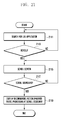
- FIG. 4 is a flowchart illustrating a procedure for registering recommended actions according to an exemplary embodiment of the present invention. This procedure can be executed by the recommended action register 310 of the control unit 100.
- the control unit 100 detects the request at step 411, receives the information on the corresponding application at step 413, and stores the received application information in the recommended action table at step 415.
- Each application can be registered with the recommended action table to use the recommended action scrolling function.
- the stored application information may include the an application publisher, an application category, an application type, an information type, and a menu structure.
- the application information can be registered in the forms of similar_info_#, similar_app_#, same publisher_#, and the like. If the application information is registered with the recommended action table successfully, the recommendation register 310 detects this at step 417 and ends the application registration procedure.
- the control unit 100 can configure the recommended action table per application. If the user request for registering a specific application as a recommended action is received, the control unit 100 detects this at step 431 and displays the recommended action table at step 433. Thereafter, the control unit 100 determines if a recommended action is input at step 435. If it is determined that a recommended action is input, the control unit 100 determines whether the recommended action is selected from the recommended action table at step 437. In contrast, if it is determined that a recommended action is not input at step 435, the control unit 100 determines whether the recommended action should be terminated at step 445.
- the control unit 100 registers the recommended action selected from the recommended action table with the corresponding application table at step 439 and registers the weight configured by the user at step 441. Otherwise, if it is determined that the recommended action is not selected from the recommended action table, the control unit 100 registers the input recommended action with the table of the corresponding application at step 443. For example, if the recommended action not existing in the recommended action table is input, the user is capable of creating a new action and registering the new action with the corresponding application table. Once the recommended action registration procedure has completed, the control unit 100 detects this and ends the corresponding procedure.
- the application table can be created using the recommended action table or the identification information of the recommended action table.
- the former approach is of determining the items of the applications to be configured as recommended actions in the recommended action table and excluding the items that are not determined in registering as recommended action of the corresponding application.
- the latter approach is of configuring the application table using the identification information in the recommended action table.
- the application can be configured with one or more recommended actions.
- the recommended actions can be registered with the corresponding application table along with respective weights.
- the control unit 100 is capable of configuring a plurality of recommended actions of specific application and registering the recommended actions with priorities. For example, the control unit 100 is capable of configuring 'depth type' and 'list type' as recommended actions and registering these recommended action with the corresponding application table along with the respective weights of 1.0 and 0.9. In this case, the control unit 100 is capable of executing the depth type as the recommended action with the highest priority.
- control unit 100 is capable of displaying the configured recommended action in response to the scroll action taken in association with the corresponding application.
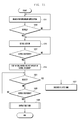
- FIG. 5 is a flowchart illustrating a procedure for displaying recommended actions at a scroll boundary of a navigation area according to an exemplary embodiment of the present invention.
- the procedure depicted in FIG. 5 can be performed by the navigator 320, the scroll executor 330, or the recommended action determiner 340 of the control unit 100.
- the navigator 320 of the control unit 100 performs navigation in response to the touch event occurring on the touch panel 140 at step 511.
- the term "navigation” denotes executing actions triggered by all touch events for manipulating the screen in search of specific information on the corresponding application execution screen.
- the actions include navigating the menu screen for selecting a specific menu item, navigating an email list for determining the content of a specific email, navigating an Internet browser screen for seeking specific information, and navigating a folder screen for selecting a specific file.
- the scroll executor 330 of the control unit 100 receives a touch event detected by the navigator 320 and analyzes the touch event to determine whether the scroll action reaches the scroll boundary of the navigation area.
- the control unit 100 detects this at step 513 and determines whether the current application is the action using a recommended action at step 515. If the current application uses a recommended action (i.e., the corresponding application table), the control unit 100 controls to subsequently display the recommended action registered with the application table at the scroll boundary of the navigation area at step 517. In this case, when the scroll boundary is detected, the scroll executor 330 notifies the recommended action determiner 340 of the detection of the scroll boundary, and the recommended action determiner 340 searches the application table stored in the memory 110 for the recommended action information of the corresponding application and notifies the scroll executor 330 of the found information. The scroll executor 330 displays the notified recommended action subsequent to the navigation area. If the user commands to execute the corresponding recommended action in the state where the recommended action is displayed subsequent to the scroll boundary of the navigation area, the control unit 100 executes the application of the corresponding recommended action at step 517 and ends the procedure of displaying recommended actions.
- a recommended action i.e., the corresponding application table
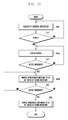
- FIG. 6 is a flowchart illustrating a procedure of displaying a recommended action subsequent to an end of a navigation area according to an exemplary embodiment of the present invention.
- the procedure depicted in FIG. 6 can be step 517 of FIG. 5 .
- the control unit 100 analyzes the recommended actions in the corresponding application table at step 611, selects the recommended actions having the highest priority at step 613, and displays the application of the selected recommended action subsequent to the end of the navigation area at step 615. If it is determined that a request to execute the corresponding application in the state where the recommended action is displayed at step 617, the control unit executes the selected recommended action at step 623. However, if it is determined that no recommended action is selected at step 617, the control unit 100 continues scrolling of the recommended action.
- the control unit 100 detects this at step 619 and determines whether there is the recommended action having the next highest priority at step 621 and, if the recommended action having the next highest priority exists, returns the procedure to step 615 to repeat the above-described operation.
- control unit 100 displays the applications of the recommended actions registered with the corresponding application table continuously and, if a specific recommended action is selected by the user in the state of displaying the recommended actions sequentially, executes the application corresponding to the selected recommended action.
- the portable terminal is capable of offering, when a scroll action reaches a scroll boundary of the navigation area having objects of the current application, the applications of the recommended actions.
- the recommended action can be the application executable subsequent to the current application and configurable by the user in advance.
- a gallery application is provided with a depth navigation structure. Accordingly, when a gallery application is registered in association with a recommended action, it can be registered along with the related information, such as an application publisher (i.e., Samsung), an application category (i.e., an image viewer), an application type (i.e., an app), and an information type (i.e., NULL).
- an application publisher i.e., Samsung
- an application category i.e., an image viewer
- an application type i.e., an app
- an information type i.e., NULL
- the gallery recommended action table can be registered along with same publisher_3 and similar_app_2, and the recommended action of the depth type can be configured with the weight of 1.
- control unit 100 selects the depth type recommended action having the highest weight from the gallery recommended action table to provide the previous depth menu as the recommended action.
- FIG. 7 is a flowchart illustrating a procedure for processing a recommended action of a gallery application according to an exemplary embodiment of the present invention
- FIG. 8 is a diagram illustrating operations related to a scroll action for a gallery application in a procedure, for example, operations of FIG. 7 according to an exemplary embodiment of the present invention.
- the control unit 100 performs gallery search operation at step 711.
- the user selects a gallery menu on the menu screen as denoted by reference number 810 of FIG. 8 , selects one of multiple image folders as denoted by reference number 820, and selects a specific picture as denoted by reference number 830 in the state where the selected image folder containing pictures is opened as denoted by reference number 840.
- the control unit 100 detects the scroll action at step 713 and controls scrolling the picture on the display unit 130 at step 715.
- the control unit 100 detects this at step 717, displays the recommended action registered with the gallery recommended action table at step 719 and ends the procedure of processing recommended actions. For example, when the scroll action reaches the scroll boundary of the picture area, the control unit 100 controls the subsequent displaying of the image folder (including the selected picture) located at the previous depth to the picture as denoted by reference number 860. If the scroll action is maintained, the control unit 100 continues displaying the screens of the previous depths in a stepwise manner as denoted by reference numbers 870 and 880.
- an email application is provided with a list type item navigation structure. Accordingly, when registering an email recommendation action, the email application is registered along with its information, such as an application publisher (i.e., Samsung), an application category (i.e., an email), an application type (i.e., an app), and an information type (i.e., an email).
- the recommended action can be registered with the recommended action table in the form of same publisher_4, similar_app_3, and similar_info_3.
- the email application can be registered in association with the list type recommended application along with the weight of 1.
- the control unit 100 is capable of providing the list type recommended action having the highest weight. In match with the scroll direction, if the object is scrolled in a next list direction, the control unit 100 controls to show the email on the next list. Otherwise, if the object is scrolled in a previous list direction, the control unit 100 shows the email on the previous list.
- FIG. 9 is a flowchart illustrating a procedure for processing a recommended action of an email application according to an exemplary embodiment of the present invention
- FIG. 10 is a diagram illustrating operations related to a scroll action for an email application in a procedure, for example, operations of FIG. 9 according to an exemplary embodiment of the present invention.
- the control unit 100 performs an email search operation at step 911.
- the control unit 100 displays an email list on the screen as denoted by reference number 1020 and, if a specific email is selected from the email list, displays the content of the selected email on the screen as denoted by reference number 1030.
- the control unit 100 detects the scroll action at step 913 and controls the scrolling of the email content on the display unit 130 at step 915.
- the control unit 100 detects this at step 917, analyzes the scroll direction at step 919, and controls the subsequent presentation of the content of the previous (or the next) email item to the content of the current email item according to the scroll direction at step 921. Thereafter, the control unit 100 ends the procedure of processing recommended actions.
- the control unit 100 detects that the scroll action is taken in the previous mail direction (i.e., in the upward or downward direction) so as to scroll on the screen as denoted by reference number 1040 and 1050 of FIG. 10 , and selects the previous email item on the email list at the end of the content of the current email item to display the content of the previous email on the screen, as denoted by reference numbers 1060 and 1070 of FIG. 10 .
- the control unit 100 selects the email items in the scroll direction to display the contents of the selected email items in sequence.
- a setting application is provided with both the depth and list types navigation structure. Accordingly, when registering it in association with a recommended action, the setting application is registered with the information, such as an application publisher (i.e., Samsung), an application category (i.e., a setting), an application type (i.e., an app), and an information type (i.e., NULL).
- the recommended action can be registered with the recommended action table along with the parameters, such as same publisher_6 and similar_app_6.
- the setting application can be registered in association with depth type recommended application having the weight of 1 and as list type recommended application having the weight of 0.9.
- the control unit 100 is capable of providing the depth type recommended action having the highest weight.
- the depth type recommended action can be the previous depth menu. If the depth menu is not of the intended one, the user is capable of maintaining the scroll action such that the control unit 100 controls to display another setting menu arranged next in the list with the list type recommended action having the next highest weight.
- FIG. 11 is a flowchart illustrating a procedure for processing a setting application recommended action according to an exemplary embodiment of the present invention
- FIG. 12 is a diagram illustrating operations related to a scroll action for a setting application in a procedure, for example, operations of FIG. 11 according to an exemplary embodiment of the present invention.
- the control unit 100 performs a setting menu search operation at step 1111.
- the control unit 100 controls to display a list of submenus on the screen as denoted by reference number 1220 and, if a submenu item is selected from the submenu list (i.e., a connection setting submenu), displays the connection menu screen as denoted by reference number 1230.
- the control unit 100 detects this at step 1113 and controls to scroll the connection menu screen on the display unit 130 at step 1115 as denoted by reference number 1240.
- the control unit 100 detects this at step 1117 and displays the recommended action (i.e., a previous depth menu) at the scroll boundary of the navigation area on the screen at step 1119 as denoted by reference number 1250.
- the list of submenu items i.e., a previous depth
- the control unit detects this at step 1123 and displays the previous depth screen at step 1125 as shown in the screen 1260.
- the control unit 100 detects this at step 1121 and displays the recommended action having the next highest priority subsequent to the navigation area at step 1127. Thereafter, the control unit 100 ends the procedure of processing setting application recommended action.
- the setting application can be registered in association with a depth type recommended action having the weight of 1 and as a list type recommended action having the weight of 0.9.
- the control unit 100 controls to display the depth type recommended action having the highest weight as shown in the screen 1250 and, if the scroll action is maintained, controls to display the setting menu arranged next in the list according to the list type having the next highest priority at step 1127.
- a messenger application i.e., an SMS, Instant messenger
- the messenger application is registered with its information, such as an application publisher (i.e., Samsung), an application category (i.e., a messenger), an application type (i.e., an app), and an information type (i.e., social).
- the recommended action can be registered with the recommended action table along with the parameters, such as same_publisher_8, similar_app_8, and similar_info_5.
- the messenger application can be registered in association with similar_app recommended action having the weight of 1 and as an SNS recommended action having the weight of 0.9.
- the control unit 100 is capable of providing a similar chatting program as the recommended action by displaying the similar_app recommendation action having the highest weight.
- the similar application action is not of the intended one, the user is capable of maintaining the scroll action such that the control unit 100 controls to display the SNS application having the next highest priority as the recommended action.
- the contact information corresponding to the contact information provided by the first messenger application can be presented in association with the recommended action.
- the recommended action can provide the user intended information acquired based on the presented information as well as the similar messenger.
- FIG. 13 is a flowchart illustrating a procedure for processing a messenger application recommended action according to an exemplary embodiment of the present invention
- FIG. 14 is a diagram illustrating operations related to a scroll action for a messenger application in a procedure, for example, operations of FIG. 13 according to an exemplary embodiment of the present invention.
- the priority of the similar_app as the recommended action is registered in the order of ngGtalk, chat on, and facebook.
- the control unit 100 performs a messenger search operation at step 1311. If the user takes a scroll action, the control unit 100 detects the scroll action on the screen at step 1313 as denoted by reference number 1410 and controls the scrolling of the image displayed by the display unit 130 at step 1315. If the scroll action reaches the scroll boundary of the navigation area, the control unit 100 detects this at step 1317 and displays the recommended action (i.e., an SNS) having the highest weight at step 1319 as denoted by reference number 1420. If the SNS is selected, the control unit 100 detects the SNS selection at step 1321 and executes the SNS at step 1327 as denoted by reference number 1430.
- the recommended action i.e., an SNS
- the control unit 100 performs steps 1323 and 1325 to display the recommended action having the next highest priority in sequence and ends the procedure of processing a messenger application recommended action. For example, if the scroll action is maintained in the above state, the control unit 100 displays the SNS applications in their priority order.
- a calendar application is the application for organizing schedules and interoperated with other applications and searched frequently.
- the calendar application is registered with the information, such as an application publisher (i.e., Samsung), an application category (i.e., a calendar), an application type (i.e., an app), and an information type (i.e., a schedule).
- the calendar application can be registered with the recommended action table along with the parameters of same publisher_9, similar_app_9, and similar_info_6.
- the calendar application can be registered in association with weather_info recommended action having the weight of 1, search recommended action having the weight of 0.9, and messenger recommended action having the weight of 0.8.
- the control unit 100 is capable of displaying the weather_info recommended action having the highest weight to provide the information in the form of a weather widget. If the user maintains the scroll action, the control unit 100 provides the search recommended action having the next highest priority subsequently and activates the messenger application with the contact information included in the schedule. At this time, the contact information provided to the recommended action can be the one acquired based on the contact information viewed in the first calendar application.
- the recommended action can be configured not only to display the messenger application but also to provide a means for communication with the counterpart user based on the contact information provided by the application.
- FIG. 15 is a flowchart illustrating a procedure for processing a calendar application recommended action according to an exemplary embodiment of the present invention
- FIG. 16 is a diagram illustrating operations related to a scroll action for a calendar application in a procedure, for example, operations of FIG. 15 according to an exemplary embodiment of the present invention.
- the control unit 100 performs the calendar search operation at step 1511. If the user takes a scroll action as denoted by reference number 1610, the control unit 100 detects the scroll action at step 1513 and controls the scrolling of the image displayed by the display unit 130 at step 1515. If the scroll action reaches the scroll boundary, the control unit 100 detects this at step 1517 and displays the recommended action (i.e., a weather widget) having the highest weight at step 1519 as denoted by reference number 1620.
- the recommended action i.e., a weather widget
- control unit 100 detects the scroll boundary of the recommended action at step 1521, displays the messenger applications in their priority order on the screen at step 1523 as denoted by reference number 1630, and ends the procedure of processing a calendar application recommended action.
- the control unit 100 may acquire contact information based on the contact information of the calendar application.
- a browser application is the application for surfing websites and has various functions.
- the browser application can be registered with the recommended action table along with the information, such as an application publisher (i.e., Samsung), an application category (i.e., a browser), an application type (i.e., an app), and an information type (i.e., NULL).
- the browser application recommended action can be registered with the recommended action table along with the parameters of same publisher_10 and similar_app_10.
- the browser application can be registered in association with recent_pages action having the weight of 1 for up/down scroll and history page action having the weight of 0.9.
- the browser application can also be registered in association with previous_page action having the weight of 1.0 for left/right scroll and opened windows action having the weight of 0.9.
- the control unit 100 is capable of taking the recent_pages recommended action having the highest weight to provide recent pages. If the scroll action is maintained in this state, the control unit 100 is capable of taking the history page recommended action having the next priority order. If the scroll action reaches a left/right scroll boundary, the control unit 100 controls the sequence presentation of the previous_page action and opened windows action.
- FIG. 17 is a flowchart illustrating a procedure for processing a browser application recommended action according to an exemplary embodiment of the present invention
- FIG. 18 is a diagram illustrating operations related to a scroll action for a browser application in a procedure, for example, operations of FIG. 17 according to an exemplary embodiment of the present invention.
- the control unit 100 performs a browser search operation at step 1711. If the user takes a scroll action on the screen as denoted by reference number 1810, the control unit 100 detects the scroll action at step 1713 and controls the scrolling of the image displayed by the display unit 130 according to the scroll action at step 1715. If the scroll action reaches a scroll boundary, the control unit 100 detects this at step 1717 and analyzes the scroll direction at step 1719.
- the control unit 100 controls to display the recent_pages recommended action on the screen as denoted by reference number 1820 and, if the scroll action is maintained in this state, the history page recommended action on the screen as denoted by reference number 1830, in their priority order at steps 1721 and 1723. Otherwise, if the scroll direction is a leftward/rightward direction, the control unit 100 controls to display the previous_page recommended action at step 1725 and, if the scroll action is maintained, the opened windows recommended action on the screen in their priority order at step 1727. Thereafter, the control unit 100 ends the procedure of processing a browser application recommended action.
- a music player application is the application operating on the background for replaying music files.
- the music player application can be registered with the recommended action table along with the information, such as an application publisher (i.e., Samsung), an application category (i.e., a music player), an application type (i.e., an app), and an information type (i.e., music).
- the music player application recommended action can be registered with the recommended action table along with the parameters of same publisher_11 and similar_app_11.
- the music player application can be registered in association with music hub action having the weight of 1 and recent app action having the weight of 0.9.
- FIG. 19 is a flowchart illustrating a procedure for processing a music player application recommended action according to an exemplary embodiment of the present invention
- FIG. 20 is a diagram illustrating operations related to a scroll action for a music player application in a procedure, for example, operations of FIG. 19 according to an exemplary embodiment of the present invention.
- the control unit 100 performs a music player application search operation at step 1911. If the user takes a scroll action on the screen as denoted by reference number 2010, the control unit 100 detects the scroll action at step 1913 and controls the scrolling of the image displayed by the display unit 130 according to the scroll action at step 1915. If the scroll action reaches a scroll boundary, the control unit 100 detects this at step 1917 and provides the recently executed application 100 as the recommended action subsequent to the end of the navigation on the screen as denoted by reference number 2020 at step 1919. Thereafter, the control unit 100 ends the procedure of processing a music player application recommended action.
- a logs application is the application for providing the recently used contact information in order for the user to search for the contact quickly.
- the logs application can be registered with the recommended action table along with the information, such as an application publisher (i.e., Samsung), an application category (i.e., a log provider), an application type (i.e., an app), and an information type (i.e., NULL).
- the logs application can be registered in association with favorite friend action having the weight of 1 and phonebook action having the weight of 0.9.
- FIG. 21 is a flowchart illustrating a procedure for processing a logs application recommended action according to an exemplary embodiment of the present invention
- FIG. 22 is a diagram illustrating operations related to a scroll action for a logs application in a procedure, for example, operations of FIG. 21 according to an exemplary embodiment of the present invention.
- the control unit 100 performs a logs application search operation at step 2111. If the user takes a scroll action on the screen as denoted by reference number 2210, the control unit detects the scroll action at step 2113 and controls the scrolling of the image displayed by the display unit 130 according to the scroll action at step 2115. If the scroll action reaches a scroll boundary, the control unit 100 detects this at step 2117 and provides the favorite friend application as the recommended action at the boundary of the navigation area on the screen at step 2119 as denoted by reference number 2220. If the scroll action is maintained in the state where the favorite friend application is displayed as the recommended action, the control unit 100 provides the phonebook application having the next highest priority as the recommended action. Thereafter, the control unit 100 ends the procedure of processing a logs application recommended action.
- An image viewer application is the application for displaying images in response to a request from another application.
- the image viewer application is capable of displaying the image received through an email application or a messenger application.
- the image viewer application can be registered with the recommended action table along with the information, such as an application publisher (i.e., Samsung), an application category (i.e., an image viewer), an application type (i.e., an app), and an information type (i.e., NULL).
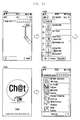
- the image view application can be registered with the recommended action table along with the parameters of same publisher_7 and similar_app_7.
- the image viewer application can be registered in association with previous_app action having the weight of 1, image editor action having the weight of 0.9, and SNS update action having the weight of 0.8. If the scroll action reaches a scroll boundary of the navigation area such that a recommended action is requested, the control unit 100 executes the previous_app recommended action having the highest weight. If the recommended action having the highest priority is not of the intended application, the user may maintain the scroll action such that the image editor and SNS update actions provided as recommended actions in their priority order.
- FIG. 23 is a flowchart illustrating a procedure for processing an image viewer application recommended action according to an exemplary embodiment of the present invention
- FIG. 24 is a diagram illustrating operations related to a scroll action for an image viewer application in a procedure, for example, operations of FIG. 23 according to an exemplary embodiment of the present invention.
- FIG. 24 is directed to the case where the previous_app is of the email application.
- the control unit 100 performs an image viewer search operation at step 2311. If a specific image is selected in the list of the images on the screen as denoted by reference number 2410, the selected image is displayed on the screen as denoted by reference number 2420. In this state, if the user takes a scroll action, the control unit 100 detects the scroll action at step 2313 and controls the scrolling of the image displayed by the display unit 130 on the screen according to the scroll action at step 2315 as denoted by reference number 2430. If the scroll action reaches a scroll boundary of the image, the control unit 100 detects this at step 2317 and displays the recommended action (i.e., an email) at step 2319.
- the recommended action i.e., an email
- the control unit 100 controls to display the image editor screen and the SNS update screen in sequence according to the priorities of the image editor and SNS update actions. Thereafter, the control unit 100 ends the procedure of processing an image viewer application recommended action.
- the exemplary method presents the recommended actions registered in association with the corresponding application in sequence. For example, if the user taking the scroll action fails finding a target object or attempts changing the search range, the terminal provides, when the scroll action for searching for the target object reaches a scroll boundary, the recommended actions preset by the user or the manufacturer in sequence for the user to quickly move to other search areas.
- the above exemplary navigation method can be accomplished by configuring the recommended actions per application as described with reference to FIGs. 7 through 24 .
- the exemplary terminal is advantageous in that, when the scroll action for navigating objects arranged on the screen reaches a scroll boundary, a recommended action preconfigured in association with the corresponding application is provided. For example, when the user scrolling the screen in search of an object fails finding the object or attempts another search, the terminal provides the recommended actions present by the user or the manufacturer from the scroll boundary subsequently such that the user may seamlessly continue scrolling to search for the object in other search areas.
Landscapes
- Engineering & Computer Science (AREA)
- Theoretical Computer Science (AREA)
- General Engineering & Computer Science (AREA)
- Human Computer Interaction (AREA)
- Physics & Mathematics (AREA)
- General Physics & Mathematics (AREA)
- Software Systems (AREA)
- Computer Networks & Wireless Communication (AREA)
- Signal Processing (AREA)
- User Interface Of Digital Computer (AREA)
- Navigation (AREA)
- Controls And Circuits For Display Device (AREA)
Applications Claiming Priority (1)
| Application Number | Priority Date | Filing Date | Title |
|---|---|---|---|
| KR1020120007136A KR20130086409A (ko) | 2012-01-25 | 2012-01-25 | 휴대단말기의 스크롤 제어장치 및 방법 |
Publications (2)
| Publication Number | Publication Date |
|---|---|
| EP2620862A2 true EP2620862A2 (de) | 2013-07-31 |
| EP2620862A3 EP2620862A3 (de) | 2017-07-26 |
Family
ID=47683450
Family Applications (1)
| Application Number | Title | Priority Date | Filing Date |
|---|---|---|---|
| EP12198661.6A Withdrawn EP2620862A3 (de) | 2012-01-25 | 2012-12-20 | Bilddurchlaufsteuerungs-vorrichtung und -verfahren eines Endgerätes |
Country Status (4)
| Country | Link |
|---|---|
| US (1) | US20130187873A1 (de) |
| EP (1) | EP2620862A3 (de) |
| KR (1) | KR20130086409A (de) |
| CN (1) | CN103226435A (de) |
Cited By (1)
| Publication number | Priority date | Publication date | Assignee | Title |
|---|---|---|---|---|
| WO2019182397A1 (en) | 2018-03-22 | 2019-09-26 | Samsung Electronics Co., Ltd. | Electronic device and method of executing function thereof |
Families Citing this family (18)
| Publication number | Priority date | Publication date | Assignee | Title |
|---|---|---|---|---|
| KR101882554B1 (ko) * | 2011-09-12 | 2018-07-26 | 폭스바겐 악티엔 게젤샤프트 | 정보를 표시하고 전자 기기를 조작하기 위한 방법 및 장치 |
| KR102174916B1 (ko) * | 2012-11-30 | 2020-11-05 | 삼성전자주식회사 | 종료 효과를 표시하는 모바일 장치 및 그 제어방법 |
| US9342228B2 (en) | 2013-07-17 | 2016-05-17 | Blackberry Limited | Device and method for filtering messages using sliding touch input |
| US9313316B2 (en) * | 2013-07-17 | 2016-04-12 | Blackberry Limited | Device and method for filtering messages |
| WO2015046636A1 (ko) * | 2013-09-24 | 2015-04-02 | 엘지전자 주식회사 | 이동 단말기 및 이의 제어방법 |
| KR101509355B1 (ko) * | 2013-12-18 | 2015-04-07 | 최진근 | 정보 맵 인터페이스 제공 방법 및 이 방법을 프로그램화하여 수록한 컴퓨터로 읽을 수 있는 기록매체 |
| TWI616803B (zh) * | 2013-12-27 | 2018-03-01 | Acer Incorporated | 螢幕畫面的縮放及操作方法、裝置與電腦程式產品 |
| KR102411890B1 (ko) | 2014-09-02 | 2022-06-23 | 삼성전자주식회사 | 컨텐츠를 처리하는 방법 및 이를 위한 전자 장치 |
| KR102351317B1 (ko) * | 2015-01-07 | 2022-01-14 | 삼성전자 주식회사 | 전자문서 표시 방법 및 전자 장치 |
| KR20160139320A (ko) * | 2015-05-27 | 2016-12-07 | 엘지전자 주식회사 | 변형 가능한 디스플레이 장치 및 그의 동작 방법 |
| US10474353B2 (en) | 2016-05-31 | 2019-11-12 | Snap Inc. | Application control using a gesture based trigger |
| US10609036B1 (en) | 2016-10-10 | 2020-03-31 | Snap Inc. | Social media post subscribe requests for buffer user accounts |
| CN111712789A (zh) * | 2018-01-18 | 2020-09-25 | 三星电子株式会社 | 用于内容的基于上下文的视觉提示管理的方法和系统 |
| US11038915B1 (en) | 2018-07-31 | 2021-06-15 | Splunk Inc. | Dynamic generation of courses of action for incident response in an information technology environment |
| WO2020071566A1 (ko) * | 2018-10-02 | 2020-04-09 | 우수정 | 스위치백 ui 제공 방법 및 장치 |
| CN111354460B (zh) * | 2020-02-28 | 2023-09-19 | 维沃移动通信有限公司 | 信息输出的方法、电子设备及介质 |
| US11132104B1 (en) | 2020-10-05 | 2021-09-28 | Huawei Technologies Co., Ltd. | Managing user interface items in a visual user interface (VUI) |
| KR102720339B1 (ko) * | 2021-10-26 | 2024-10-22 | 네이버웹툰 유한회사 | 콘텐츠 제공 방법 및 시스템 |
Family Cites Families (20)
| Publication number | Priority date | Publication date | Assignee | Title |
|---|---|---|---|---|
| US20050223340A1 (en) * | 2004-03-30 | 2005-10-06 | Mikko Repka | Method of navigating in application views, electronic device, graphical user interface and computer program product |
| KR100703335B1 (ko) * | 2004-04-07 | 2007-04-03 | 삼성전자주식회사 | 휴대단말기의 메뉴 표시 방법 |
| JP4698281B2 (ja) * | 2005-05-09 | 2011-06-08 | ソニー・エリクソン・モバイルコミュニケーションズ株式会社 | 携帯端末、情報推奨方法及びプログラム |
| US7958456B2 (en) * | 2005-12-23 | 2011-06-07 | Apple Inc. | Scrolling list with floating adjacent index symbols |
| US8205157B2 (en) * | 2008-03-04 | 2012-06-19 | Apple Inc. | Methods and graphical user interfaces for conducting searches on a portable multifunction device |
| KR101569427B1 (ko) * | 2008-10-02 | 2015-11-16 | 삼성전자주식회사 | 휴대 단말기의 터치 입력 장치 및 그의 운영 방법 |
| US8619041B2 (en) * | 2008-10-07 | 2013-12-31 | Blackberry Limited | Portable electronic device and method of controlling same |
| KR101554039B1 (ko) * | 2008-10-09 | 2015-09-17 | 옵티스 셀룰러 테크놀로지, 엘엘씨 | 웹페이지 병합 기능을 제공하는 휴대 단말기 및 그 동작방법 |
| US8365091B2 (en) * | 2009-01-06 | 2013-01-29 | Microsoft Corporation | Non-uniform scrolling |
| JP5182178B2 (ja) * | 2009-03-18 | 2013-04-10 | ソニー株式会社 | 情報処理装置及び情報処理方法 |
| US8751956B2 (en) * | 2009-05-27 | 2014-06-10 | Microsoft Corporation | Variable rate scrollbar |
| US8836648B2 (en) * | 2009-05-27 | 2014-09-16 | Microsoft Corporation | Touch pull-in gesture |
| US20110055752A1 (en) * | 2009-06-04 | 2011-03-03 | Rubinstein Jonathan J | Method and Apparatus for Displaying and Auto-Correcting an Over-Scroll State on a Computing Device |
| US8624925B2 (en) * | 2009-10-16 | 2014-01-07 | Qualcomm Incorporated | Content boundary signaling techniques |
| US8448084B2 (en) * | 2010-04-08 | 2013-05-21 | Twitter, Inc. | User interface mechanics |
| EP2378406B1 (de) * | 2010-04-13 | 2018-08-22 | LG Electronics Inc. | Tragbares Endgerät und Verfahren zur Steuerung des Betriebs des tragbaren Endgeräts |
| KR101668240B1 (ko) * | 2010-04-19 | 2016-10-21 | 엘지전자 주식회사 | 휴대 단말기 및 그 동작 제어방법 |
| KR101735606B1 (ko) * | 2010-07-21 | 2017-05-15 | 엘지전자 주식회사 | 휴대 단말기 및 그 동작 제어방법 |
| KR101660746B1 (ko) * | 2010-08-24 | 2016-10-10 | 엘지전자 주식회사 | 이동 단말기 및 이것의 애플리케이션 지시자 설정 방법 |
| US8799778B2 (en) * | 2011-12-13 | 2014-08-05 | Facebook, Inc. | Scrolling velocity modulation in a tactile interface for a social networking system |
-
2012
- 2012-01-25 KR KR1020120007136A patent/KR20130086409A/ko not_active Withdrawn
- 2012-12-18 US US13/718,286 patent/US20130187873A1/en not_active Abandoned
- 2012-12-20 EP EP12198661.6A patent/EP2620862A3/de not_active Withdrawn
-
2013
- 2013-01-24 CN CN2013100274346A patent/CN103226435A/zh active Pending
Non-Patent Citations (1)
| Title |
|---|
| None |
Cited By (2)
| Publication number | Priority date | Publication date | Assignee | Title |
|---|---|---|---|---|
| WO2019182397A1 (en) | 2018-03-22 | 2019-09-26 | Samsung Electronics Co., Ltd. | Electronic device and method of executing function thereof |
| EP3756083A4 (de) * | 2018-03-22 | 2021-04-21 | Samsung Electronics Co., Ltd. | Elektronische vorrichtung und verfahren zur ausführung einer funktion davon |
Also Published As
| Publication number | Publication date |
|---|---|
| CN103226435A (zh) | 2013-07-31 |
| KR20130086409A (ko) | 2013-08-02 |
| US20130187873A1 (en) | 2013-07-25 |
| EP2620862A3 (de) | 2017-07-26 |
Similar Documents
| Publication | Publication Date | Title |
|---|---|---|
| EP2620862A2 (de) | Bilddurchlaufsteuerungs-vorrichtung und -verfahren eines Endgerätes | |
| US11243685B2 (en) | Client terminal user interface for interacting with contacts | |
| KR102332675B1 (ko) | 전자 장치의 컨텐츠 공유 방법 및 장치 | |
| AU2013278136B2 (en) | Information display apparatus and method of user device | |
| US10073589B1 (en) | Contextual card generation and delivery | |
| KR102479491B1 (ko) | 복수의 운영체제가 설치된 디바이스를 제어하는 방법 및 디바이스 | |
| US9329779B2 (en) | Device, method, and storage medium storing program | |
| US8788947B2 (en) | Object transfer method using gesture-based computing device | |
| US9274696B1 (en) | Scroll bar with time details | |
| US9600154B2 (en) | Creation and management of a shortcut to linked content | |
| KR102270953B1 (ko) | 전자 장치에서 화면을 표시하는 방법 및 이를 위한 전자 장치 | |
| US20190079665A1 (en) | Data processing method, apparatus, and smart terminal | |
| CN107071134B (zh) | 移动终端 | |
| US8949858B2 (en) | Augmenting user interface elements with information | |
| EP2405338A1 (de) | Verfahren zur Darstellung einer Mensch-Maschinen-Schnittstelle sowie tragbare Vorrichtung damit und computerlesbares Medium mit dem Verfahren | |
| US20160210041A1 (en) | Method of controlling screen and electronic device for processing the same | |
| KR20160062452A (ko) | 그래픽 사용자 인터페이스를 제공하는 방법 및 전자 장치 | |
| CN105593852B (zh) | 与搜索栏相关联来提供信息 | |
| US20130268396A1 (en) | Method and system for providing personalized application recommendations | |
| KR102280474B1 (ko) | 전자 장치의 운용 방법 및 장치 | |
| US20120221969A1 (en) | Scrollable list navigation using persistent headings | |
| KR20140122662A (ko) | 어플리케이션의 이용 이력 정보를 표시하는 방법, 저장 매체 및 장치 | |
| US20100138781A1 (en) | Phonebook arrangement | |
| US10331327B2 (en) | Message display method, apparatus and terminal | |
| US20170329463A1 (en) | Display control device and program |
Legal Events
| Date | Code | Title | Description |
|---|---|---|---|
| PUAI | Public reference made under article 153(3) epc to a published international application that has entered the european phase |
Free format text: ORIGINAL CODE: 0009012 |
|
| AK | Designated contracting states |
Kind code of ref document: A2 Designated state(s): AL AT BE BG CH CY CZ DE DK EE ES FI FR GB GR HR HU IE IS IT LI LT LU LV MC MK MT NL NO PL PT RO RS SE SI SK SM TR |
|
| AX | Request for extension of the european patent |
Extension state: BA ME |
|
| PUAL | Search report despatched |
Free format text: ORIGINAL CODE: 0009013 |
|
| AK | Designated contracting states |
Kind code of ref document: A3 Designated state(s): AL AT BE BG CH CY CZ DE DK EE ES FI FR GB GR HR HU IE IS IT LI LT LU LV MC MK MT NL NO PL PT RO RS SE SI SK SM TR |
|
| AX | Request for extension of the european patent |
Extension state: BA ME |
|
| RIC1 | Information provided on ipc code assigned before grant |
Ipc: G06F 3/0485 20130101ALI20170622BHEP Ipc: G06F 3/0488 20130101AFI20170622BHEP |
|
| STAA | Information on the status of an ep patent application or granted ep patent |
Free format text: STATUS: THE APPLICATION HAS BEEN WITHDRAWN |
|
| 18W | Application withdrawn |
Effective date: 20180103 |