EP2620871A2 - Verfahren zur Konfiguration eines BIOS in einem Computersystem sowie Computerprogrammprodukt - Google Patents
Verfahren zur Konfiguration eines BIOS in einem Computersystem sowie Computerprogrammprodukt Download PDFInfo
- Publication number
- EP2620871A2 EP2620871A2 EP13151688.2A EP13151688A EP2620871A2 EP 2620871 A2 EP2620871 A2 EP 2620871A2 EP 13151688 A EP13151688 A EP 13151688A EP 2620871 A2 EP2620871 A2 EP 2620871A2
- Authority
- EP
- European Patent Office
- Prior art keywords
- bios
- configuration data
- computer system
- management unit
- configuration
- Prior art date
- Legal status (The legal status is an assumption and is not a legal conclusion. Google has not performed a legal analysis and makes no representation as to the accuracy of the status listed.)
- Withdrawn
Links
Images
Classifications
-
- G—PHYSICS
- G06—COMPUTING OR CALCULATING; COUNTING
- G06F—ELECTRIC DIGITAL DATA PROCESSING
- G06F9/00—Arrangements for program control, e.g. control units
- G06F9/06—Arrangements for program control, e.g. control units using stored programs, i.e. using an internal store of processing equipment to receive or retain programs
- G06F9/44—Arrangements for executing specific programs
-
- G—PHYSICS
- G06—COMPUTING OR CALCULATING; COUNTING
- G06F—ELECTRIC DIGITAL DATA PROCESSING
- G06F9/00—Arrangements for program control, e.g. control units
- G06F9/06—Arrangements for program control, e.g. control units using stored programs, i.e. using an internal store of processing equipment to receive or retain programs
- G06F9/44—Arrangements for executing specific programs
- G06F9/445—Program loading or initiating
- G06F9/44505—Configuring for program initiating, e.g. using registry, configuration files
-
- G—PHYSICS
- G06—COMPUTING OR CALCULATING; COUNTING
- G06F—ELECTRIC DIGITAL DATA PROCESSING
- G06F9/00—Arrangements for program control, e.g. control units
- G06F9/06—Arrangements for program control, e.g. control units using stored programs, i.e. using an internal store of processing equipment to receive or retain programs
- G06F9/44—Arrangements for executing specific programs
- G06F9/4401—Bootstrapping
- G06F9/4403—Processor initialisation
-
- Y—GENERAL TAGGING OF NEW TECHNOLOGICAL DEVELOPMENTS; GENERAL TAGGING OF CROSS-SECTIONAL TECHNOLOGIES SPANNING OVER SEVERAL SECTIONS OF THE IPC; TECHNICAL SUBJECTS COVERED BY FORMER USPC CROSS-REFERENCE ART COLLECTIONS [XRACs] AND DIGESTS
- Y02—TECHNOLOGIES OR APPLICATIONS FOR MITIGATION OR ADAPTATION AGAINST CLIMATE CHANGE
- Y02D—CLIMATE CHANGE MITIGATION TECHNOLOGIES IN INFORMATION AND COMMUNICATION TECHNOLOGIES [ICT], I.E. INFORMATION AND COMMUNICATION TECHNOLOGIES AIMING AT THE REDUCTION OF THEIR OWN ENERGY USE
- Y02D10/00—Energy efficient computing, e.g. low power processors, power management or thermal management
Definitions
- the invention relates to a method for configuring a BIOS in a computer system and to a computer program product that can be executed on a computer system.
- BIOS basic input-output system
- BIOS there are methods of configuring a BIOS by a remote computer system whereby the BIOS can be accessed and the appropriate settings made via a data network from the remote computer system.
- the disadvantage with this method is that a configuration of the BIOS can only be performed by direct access to the BIOS. This is possible either during a startup of the computer system or when the computer system is already booted up. While the computer system is inactive (especially with the processor core turned off), such a BIOS configuration is not possible.
- Such a method has the advantage that the configuration data of the BIOS, that is to say a collection of all necessary information for configuring the BIOS, can be written to a management unit of the computer system each time the computer system is started.
- the BIOS is on its own Configuration data, which reflect, for example, the current configuration state of the BIOS.
- a service employee can access the management unit and easily and quickly check a current system state of the BIOS and a current system state of all hardware components of the computer system, which are controlled via the BIOS. Further, in this way, it is possible to prepare and execute a configuration of the BIOS from the output data.
- BIOS configuration data of the BIOS is accessible in the management unit of the computer system without having to call a user interface of the BIOS itself. In this respect, it is possible to view and edit BIOS configuration data without the computer system booting up or being in an active state.
- the method allows complete configuration data of the BIOS, as accessible via a conventional user interface of the BIOS, to be kept in the management unit. This has the advantage that all settings that can be made via a conventional user interface can also be made via the method described here.
- BIOS basic input-output system
- EFI Extensible Firmware Interface
- UEFI Unified Extensible Firmware Interface
- any other firmware is included which performs the basic control tasks of hardware components in a computer system and / or executes an operating system of the computer system upon startup of the computer system.
- the transfer of the first configuration data from the BIOS to a management unit of the computer system can take place, for example, via a configuration interface of the BIOS, which is implemented as a binary interface or as an application binary interface (ABI) or as a generalized application binary interface (GABI).
- the configuration interface defines how the first configuration data is created in the BIOS and / or transferred to the management unit at the machine level.
- management unit of the computer system is understood here as a controller module for the acquisition, monitoring and processing of system data and system parameters, such as temperature, rotational speed of fans, operating system status or the like, so in particular in error situations of the computer system via an external data network on the Computer system can be accessed.
- BMC Baseboard Management Controller
- IRMC Integrated Remote Management Controller
- computer system is understood in this context to be any computer system.
- the term includes server systems, rack server systems and blade server systems.
- the transfer of the first configuration data from the BIOS to the management unit after completion of a self-test of components of the computer system is described for example by the so-called power-on-self-test (POST).
- POST power-on-self-test
- hardware components in the computer system are addressed via the BIOS and tested for proper functioning.
- information about the type of error can be output for a user.
- a correct statement about the current system state of the computer system can be made.
- the method further comprises the steps of creating second configuration data in the management unit for configuring the management unit and storing the second configuration data in the management unit.
- the method thus not only allows the acquisition of configuration data of the BIOS, but also the capture of configuration data of the management unit, wherein The latter configuration data can also be stored in the management unit and can be read out, for example, by a service employee via an external data network.
- the creation of the second configuration data in relation to the management unit also has the advantage that all settings can be detected which are or can be made in or on the management unit itself.
- a configuration of the management unit can also be done via the BIOS.
- certain functionalities of the management unit for example a connection of the management unit to an external data network
- the method further comprises the step of transferring the configuration data stored in the management unit from the management unit to another computer system via a data network.
- the method further comprises the step of transferring the configuration data stored in the management unit from the management unit to another computer system via a data network.
- both the first configuration data of the BIOS and the second configuration data of the management unit explained above can be transferred to the further computer system.
- the management unit is advantageously equipped with a communication interface.
- the management unit may have an interface for a Local Area Network (LAN).
- LAN Local Area Network
- an external computer system can read out and process the configuration data stored in the management unit.
- a service employee it is conceivable for a service employee to make changes to the configuration data in the context of remote maintenance on the external computer system and / or to carry out an analysis of the transferred configuration data.
- Processing of the configuration data can be carried out in a simple manner by way of example via a text editor program in the external computer system.
- XML Extensible Markup Language
- the XML format has the advantage that hierarchically structured data can be exchanged between computer systems independently of platform and implementation. Editing the configuration data in XML format is thus easily possible in an external computer system, for example in the context of a text editor.
- the third configuration data includes predefined settings that are to be made in the BIOS and / or in the management unit of the computer system.
- the third configuration data can be created, for example, via a text editor in the external computer system by a service employee. In the context of the explained method, these configuration data can be transferred to the computer system via the data network.
- the method has the advantage that the third configuration data are initially stored in the management unit. It is not necessary that the computer system is started when the third configuration data is transferred or is already in an active state.
- the third configuration data can be transferred from the management unit to the BIOS via a configuration interface. The third configuration data can then overwrite previous configuration data in the BIOS and redefine BIOS settings.
- a certain action is necessary to adopt the new settings in the BIOS. This can be, for example, a restart of the computer system (so-called warm / cold reset or power cycling). Before or after this action, the changed settings can be displayed in the form of initial configuration data, as explained above. be passed from the BIOS to the management unit and stored in the management unit.
- an analysis of the third configuration data in the management unit takes place before the transfer of the third configuration data from the management unit to the BIOS.
- “analysis” may mean that the third configuration data is compared with other configuration data stored in the management unit. In this way it can be determined whether the third configuration data contain settings which differ from the settings of the BIOS currently stored in the management unit.
- Such an analysis of the third configuration data could be done, for example, via a so-called parser, which performs a syntax analysis of the data structure.
- an XML parser for analyzing the XML data and for providing the information contained therein (elements, attributes, timestamps, etc.) can be used.
- a transfer of the third configuration data from the management unit to the BIOS advantageously takes place only if the analysis of the third configuration data has shown that the third configuration data for the configuration of the BIOS predetermined are different from the first configuration data.
- the configuration data compulsorily includes predetermined parameters as well as instantaneous settings of the parameters and optionally default settings (so-called "default" settings) of the parameters.
- the configuration data include information about which parameters, options and setting options exist at all in the BIOS, which current settings exist and which settings are predefined by default, for example during a reset or a reinstallation of the BIOS. This allows a meaningful and complete handling and editing of the configuration data.
- the configuration data includes a complete collection of all information required to make changes to the settings in the same way as when making settings via a user interface of the BIOS (directly in the BIOS itself) would be made.
- the configuration data in XML format is available, a wide variety of subgroups, elements and attributes can be defined for each data record.
- the records may include, for example, the title or name of each item, parameter values, information about optional modifications, memory address of the data, dependencies of various parameters, etc. according to an XML syntax.
- the configuration data may include information about the current BIOS version and / or information about the system type of the computer system or individual components of the computer system. This allows external processing programs to better process and evaluate the configuration data for compatibility or system health of the computer system.
- configuration data stored in the management unit is summarized in a profile file.
- the profile file thus describes a parent entity that identifies a complete configuration record and makes it distinguishable from another configuration record.
- a profile file allows the transfer and loading of complete configuration records into the BIOS of the computer system. This means that an update of BIOS settings can be performed automatically via the profile file. It is not necessary to rewrite the individual settings one after the other, but it can easily become obsolete Configuration profile in the BIOS to be replaced by an updated configuration profile.
- profile files offer the advantage that a multiplicity of computer systems, which are addressed via the method explained here for configuring the BIOS, can be updated in a simple and time-saving manner.
- a profile file for a particular type of system may be created and automatically uploaded to all computer systems of that type through the process of configuring the BIOS from an external computer system over a data network. This also facilitates the remote maintenance of a variety of computer systems, such as those available in server systems or entire server farms or data centers.
- the configuration interface of the BIOS is used to create and transfer the first configuration data from the BIOS to the management unit or to transfer the third one Configuration data (which are imported from external) used by the management unit to the BIOS.
- the configuration interface may advantageously have additional functionality of the type described.
- the configuration interface may allow only a command to be transferred to the BIOS to restore predetermined defaults of the parameters. This will simply reset the BIOS.
- the configuration interface can, at a new installation of the BIOS, ie when uploading an updated BIOS version (so-called flashing), at the same time make predetermined settings in the BIOS by means of the explained method for transmitting configuration data into the BIOS.
- BIOS configuration interface
- the configuration data is password protected.
- the configuration data is transferred in encrypted form.
- Password protection or encryption ensures that configuration data can only be transmitted or processed by secure instances in a computer system. Ultimately, this security ultimately serves to ensure that only authorized service personnel can read, transmit and edit configuration data. It is conceivable to transmit encrypted only the password for the access of the configuration data. However, it is also conceivable to encrypt the configuration data.
- the BIOS transmits a signature along with the configuration data in the transfer of configuration data to the management unit, based on which an identification of the BIOS in a respective computer system and / or a time stamp is given. In this way, it is possible to uniquely identify all the configuration data stored in the management unit.
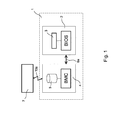
- FIG. 1 12 shows a schematic representation of components of a computer system 1 that can interact with an external computer system 7 and perform a method for configuring a BIOS in the computer system 1.
- the computer system 1 may, for example, be a server system and, in addition to a multiplicity of components (not shown for the sake of simplicity), has a BIOS environment 2 and a management unit 4.
- the BIOS environment 2 is connected to the management unit 4 via a communication interface 6a.
- the communication interface 6a is for communication between the two environments 2 and 4, wherein data can be exchanged.
- the BIOS environment 2 essentially comprises an electronic memory module 3, in whose memory the actual sequence program for executing the BIOS is stored.
- the BIOS can include both the well-known basic input-output system and its successor, the EFI (Extensible Firmware Interface) or UEFI (Unified Extensible Firmware Interface).
- EFI Extensible Firmware Interface
- UEFI Unified Extensible Firmware Interface
- the BIOS in this context includes any type of firmware for the configuration and control of hardware components within the computer system 1.
- the management unit 4 comprises a management controller, which is embodied here by way of example as a baseboard management controller (BMC).
- BMC baseboard management controller
- the BMC may be implemented as a so-called Integrated Remote Management Controller (IRMC).
- IRMC Integrated Remote Management Controller
- the BMC has, for example, a communication interface for connecting the management unit 4 to an external data network 10a.
- Predetermined system states of the computer system 1, for example temperature, state of individual components, operating system status, etc., can be detected and processed via the BMC.
- the management unit 4 has, in addition to the BMC, a data system 5 in which, for example, system status data can be stored, processed and processed.
- the data system 5 can include a memory in which data can be stored.
- the management unit 4 can be connected to a further external computer system 7 via a data network 10a to the outside.
- the data network 10a may include, for example, a local area network (LAN). It is also conceivable that the data network 10a comprises an internet connection to the external computer system 7.
- LAN local area network
- the BIOS of the computer system 1 includes predetermined configuration settings which determine how and in what way the BIOS controls further electronic components in the computer system 1, so that their error-free operation is ensured during the startup of the computer system 1. For example, the BIOS determines in which order the individual components in the computer system 1 to be started. Furthermore, the BIOS addresses and allocates a memory area in which the actual operating system of the computer system 1 is stored and calls this when starting the computer system 1, so that after the start of the computer system 1, the operating system (if loaded) can take over the further control of the computer system 1 ,
- BIOS The configuration of the BIOS can be changed, as explained below.
- BIOS is loaded as a sequence program in the memory 3 and executed.
- a self-test of the computer system 1 which is triggered by the BIOS.
- the functionality of predetermined electronic components such as hard disks, optical readers, cooling devices, memory modules, expansion cards, and so on, is checked.
- an audible and / or visual output may be made to a service person or user of the computer system 1.
- This self-test is commonly referred to as a so-called power-on-self-test (POST).
- POST power-on-self-test
- the BIOS collects all the configuration data relating to the settings which can usually be made via a user interface in the BIOS.
- the configuration data advantageously includes possible parameters, setting options, current assignment of the parameters with predetermined values and settings as well as standard settings of the parameters.
- the configuration data of the BIOS via a configuration interface of the BIOS (so-called Generalized Application Binary Interface, GABI), and via the communication interface 6a to the management unit 4, or passed to the BMC.
- the BMC acquires the configuration data and stores it in the file system 5 of the management unit 4.
- the configuration data remains in the file system 5 even if the computer system 1 is subsequently shut down and turned off.
- the file system 5 of the management unit 4 can finally be accessed with the aid of the data network 10a, so that the stored configuration data of the BIOS can be called up and transferred to the external computer system 7.
- the external computer system 7 can provide applications with which the configuration data can be read, analyzed and edited. For example, it is conceivable that a service person processes the configuration data of the BIOS on the external computer system 7.
- modified configuration data are prepared, which include certain changes in the settings of the BIOS. For example, these changes may affect a particular changed system behavior via the computer system 1.
- the changed configuration data can then be transferred via the data network 10a from the computer system 7 to the management unit 4, the data also being stored in the file system 5 of the management unit 4.
- the BIOS When the computer system 1 is restarted, the BIOS is again loaded from the memory 3 of the BIOS environment 2 and executed. Subsequently, the changed configuration data can be loaded via the BMC of the management unit 4 from the file system 5 and transferred via the communication interface 6a to the BIOS environment 2, so that the changed configuration data are finally integrated into the program structure of the BIOS via a configuration interface of the BIOS. This can be used, for example, to overwrite obsolete settings in the BIOS so that updated settings are available in the BIOS.
- the BIOS for its part transfers the updated configuration data back to the management unit 4, which is stored there in the form of a copy in the file system 5.
- current configuration data of the BIOS are stored in the file system 5 of the management unit 4 at all times, which represent the current state of the BIOS and thus indirectly also the current system state of the computer system 1.
- Such an action may include, for example, restarting the computer system 1.
- the management unit 4 can be operated so energetically independently of other components of the computer system 1 that the file system 5 can be read out, even if the computer system 1 is otherwise inactive.
- a service staff in a simple manner to read at any time current configuration data of the BIOS to edit and prepare new settings, which will be taken on the next restart of the computer system 1 accordingly.
- Configuration data is preferably stored in one or more profile files.
- Profile files have the advantage of allowing complete configuration profiles to be predefinable so that a change in BIOS settings can be made by a complete exchange of profile files. This allows a simplified change of settings in the BIOS.
- profile files allow rapid and simplified modification of a variety of computer systems 1, such as those found in data centers with multiple server systems.
- the configuration data are in XML format, so that a standardized and platform-independent data exchange is possible. Furthermore, the standardized and simple creation of records is possible. A large number of variables, settings and attributes can also be predefined in XML.
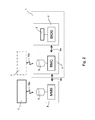
- FIG. 2 shows an alternative schematic representation of a computer system 1 and an external computer system 7, which is for a method for configuring the BIOS in Computer system 1 are arranged according to the manner explained.
- the computer system 1 essentially corresponds to the computer system 1 according to FIG. 1 , however, the computer system 1 describes according to FIG. 2 by way of example a blade server structure, wherein the computer system 1 comprises a blade server with a BIOS environment 2 and a management unit 4 of the type described.
- the computer system 1 can communicate with another blade computer system 8 via a communication interface 6b, wherein the computer system 8 represents a management computer system.
- the computer system 8 may comprise, for example, a so-called management blade server (MMB).
- MMB management blade server
- the management computer system 8 includes a file system 9 in which data is stored.
- the communication interface 6b includes, by way of example, a so-called system management bus (SM-Bus), which serves to communicate the individual blade servers 1 and 8.
- SM-Bus system management bus
- the SM bus can, for example, connect the individual blade servers 1 and 8 via a so-called backplane in the server system.
- the computer system 1 may communicate with another external computer system 7 via a data network 10a, such as FIG. 1 was explained.
- FIG. 2 it is according to the arrangement FIG. 2 also possible to pass configuration data of the BIOS, which are stored in the file system 5 of the management unit 4 of the computer system 1, via the communication interface 6b to the management computer system 8.
- the configuration data can be stored in the file system 9 of the management computer system 8 and finally made available to an external computer system 7 via a data network 10b.
- the data network 10b may be a to the data network 10a comprise a separate network or an identical network or a part of the data network 10a.
- FIG. 2 an extension of the arrangement FIG. 1 in particular for blade server systems.
- Configuration data of a BIOS environment 2 in the computer system 1 is transferred to a higher-level management unit, the management computer system 8, which controls and manages the computer system 1 within the blade server system.
- the configuration data are finally transferred from the management computer system 8 to an external computer system 7 or received by the external computer system 7 and finally imported via the management unit 4 of the computer system 1 into the BIOS environment 2 of the computer system 1.
- An illustrative method of configuring a BIOS in a computer system provides for simplified and convenient setup of a computer system wherein configuration data of a BIOS may be passed to an external computer system for processing. In this way For example, a change in the settings in the BIOS may be made regardless of the current operation of the computer system 1.
- the method allows a comprehensive representation of all configuration data in the BIOS that corresponds to a representation within a user interface of the BIOS. Thus, a variety of terminals can be administered time-saving and comfortable.
Landscapes
- Engineering & Computer Science (AREA)
- Software Systems (AREA)
- Theoretical Computer Science (AREA)
- Physics & Mathematics (AREA)
- General Engineering & Computer Science (AREA)
- General Physics & Mathematics (AREA)
- Computer Security & Cryptography (AREA)
- Stored Programmes (AREA)
Abstract
Description
- Die Erfindung betrifft ein Verfahren zur Konfiguration eines BIOS in einem Computersystem sowie ein Computerprogrammprodukt, welches auf einem Computersystem ausgeführt werden kann.
- Es existieren bereits Verfahren zur Konfiguration eines Basic Input-Output Systems (BIOS) in einem Computersystem, wobei Parameter beziehungsweise Einstellungen im BIOS verändert werden können, um das BIOS und insbesondere die vom BIOS durchgeführten Steuerungsaufgaben in einem Computersystem zu verändern und an den Betrieb des Computersystems anzupassen.
- Insbesondere existieren Verfahren zur Konfiguration eines BIOS durch ein entfernt liegendes Computersystem, wobei über ein Datennetzwerk vom entfernt liegenden Computersystem auf das BIOS zugegriffen und die entsprechenden Einstellungen vorgenommen werden können. Der Nachteil bei diesem Verfahren liegt darin, dass eine Konfiguration des BIOS nur durch direkten Zugriff auf das BIOS durchgeführt werden kann. Dies ist entweder während eines Startvorgangs des Computersystems oder bei bereits hochgefahrenem Computersystem möglich. Während das Computersystem inaktiv ist (insbesondere bei abgeschaltetem Prozessorkern), ist eine derartige Konfiguration des BIOS nicht möglich.
- Andere Lösungen sehen vor, Konfigurationsdaten in einen Speicher einer Managementeinheit des Computersystems einzulesen und dort vorzuhalten, bis das Computersystem gestartet und hochgefahren ist, sodass anschließend die Konfigurationsdaten von der Managementeinheit in das BIOS übernommen werden können.
- Derartige Lösungen haben jedoch den Nachteil, dass eine Konfiguration unter Umständen mühsam durchzuführen ist, wenn nicht bekannt ist, welche Einstellungen und Parameter im BIOS vorzunehmen sind beziehungsweise gegenwärtig vorliegen.
- Es ist Aufgabe der Erfindung, ein verbessertes Verfahren zur Konfiguration eines BIOS in einem Computersystem zu Beschreiben, welches die Konfiguration des BIOS erheblich vereinfacht.
- Die Aufgabe wird durch ein Verfahren der eingangs genannten Art gelöst, umfassend die Schritte:
- Erstellen von ersten Konfigurationsdaten im BIOS zur Konfiguration des BIOS,
- Übergabe der ersten Konfigurationsdaten vom BIOS an eine Managementeinheit des Computersystems,
- Speichern der ersten Konfigurationsdaten in der Managementeinheit, wobei die Schritte bei jedem Start des Computersystems durchgeführt werden.
- Ein derartiges Verfahren hat den Vorteil, dass die Konfigurationsdaten des BIOS, das heißt eine Sammlung aller notwendigen Informationen zur Konfiguration des BIOS, bei jedem Start des Computersystems in eine Managementeinheit des Computersystems geschrieben werden können. Bei jedem Start des Computersystems gibt das BIOS somit von sich aus Konfigurationsdaten aus, welche beispielsweise den aktuellen Konfigurationszustand des BIOS widerspiegeln. Auf diese Weise kann beispielsweise ein Servicemitarbeiter auf die Managementeinheit zugreifen und einfach und schnell einen aktuellen Systemzustand des BIOS sowie einen aktuellen Systemzustand aller Hardwarekomponenten des Computersystems, welche über das BIOS angesteuert werden, überprüfen. Ferner ist auf diese Weise möglich, eine Konfiguration des BIOS anhand der ausgegebenen Daten vorbereiten und durchführen.
- Ein weiterer Vorteil des Verfahrens besteht darin, dass die Konfigurationsdaten des BIOS in der Managementeinheit des Computersystems zugänglich sind, ohne dass eine Benutzerschnittstelle des BIOS selbst aufgerufen werden muss. Insofern ist es möglich, Konfigurationsdaten des BIOS einzusehen und zu bearbeiten, ohne dass das Computersystem hochfahren oder in einem aktiven Zustand sein muss.
- Dennoch ermöglicht das Verfahren, vollständige Konfigurationsdaten des BIOS, wie sie über eine herkömmliche Benutzerschnittstelle des BIOS zugänglich sind, in der Managementeinheit vorzuhalten. Dies hat den Vorteil, dass sämtliche Einstellungen, welche über eine herkömmliche Benutzerschnittstelle vorgenommen werden können, auch über das hier beschriebene Verfahren vorgenommen werden können.
- Der Begriff Basic Input-Output System (BIOS) wird in diesem Kontext verstanden, als jegliches grundlegendes Eingabe-/Ausgabesystem zur Steuerung der Hardwarekomponenten in einem Computersystem beziehungsweise zum Aufruf und Starten eines Betriebssystems des Computersystems während eines Starts des Computersystems. Somit umfasst das hier genannte Basic Input-Output System sowohl das bekannte BIOS als auch dessen Nachfolger, das sogenannte Extensible Firmware Interface (EFI) beziehungsweise Unified Extensible Firmware Interface (UEFI). Daneben ist auch jegliche andere Firmware umfasst, welche die grundlegenden Steuerungsaufgaben von Hardwarekomponenten in einem Computersystem durchführt und/oder beim Start des Computersystems ein Betriebssystem des Computersystems ausführt.
- Die Übergabe der ersten Konfigurationsdaten vom BIOS an eine Managementeinheit des Computersystems kann beispielsweise über eine Konfigurationsschnittstelle des BIOS erfolgen, welche als Binärschnittstelle beziehungsweise als so genanntes Application Binary Interface (ABI) oder als Generalized Application Binary Interface (GABI) ausgeführt ist. Die Konfigurationsschnittstelle definiert, auf welche Weise die ersten Konfigurationsdaten im BIOS erstellt und/oder auf Maschinenebene an die Managementeinheit übergeben werden.
- Der Begriff "Managementeinheit" des Computersystems wird hier als ein Controller-Baustein verstanden zur Erfassung, Überwachung und Verarbeitung von Systemdaten und Systemparametern, zum Beispiel Temperatur, Umdrehungsgeschwindigkeit von Lüftern, Betriebssystemstatus oder ähnliches, sodass insbesondere in Fehlersituationen des Computersystems über ein externes Datennetzwerk auf das Computersystem zugegriffen werden kann. Prominenter Vertreter einer derartige Managementeinheit ist der so genannte Baseboard Management Controller (BMC) beziehungsweise der so genannte Integrated Remote Management Controller (IRMC), ein BMC, welcher insbesondere über eine Kommunikationsschnittstelle zur Anwendung an ein Datennetzwerk (z.B. Local Area Network = LAN) verfügt. Derartige Managementeinheiten kommen insbesondere in Serversystemen zum Einsatz.
- Der Begriff "Computersystem" wird in diesem Kontext verstanden als jegliches Computersystem. Insbesondere umfasst der Begriff Serversysteme, Rack-Server-Systeme sowie Blade-Server-Systeme.
- Vorteilhaft erfolgt die Übergabe der ersten Konfigurationsdaten vom BIOS an die Managementeinheit nach Beenden eines Selbsttests von Komponenten des Computersystems. Ein derartiger Selbsttest ist beispielsweise durch den so genannten Power-on-Self-Test (POST) beschrieben. Während dieses Selbsttests werden Hardware-Komponenten im Computersystem über das BIOS angesprochen und auf korrekte Funktionsweise hin getestet. Im Fehlerfall können Informationen über die Art des Fehlers für einen Benutzer ausgegeben werden. Nach dem Selbsttest kann eine korrekte Aussage über den aktuellen Systemzustand des Computersystems getroffen werden. Somit ist es vorteilhaft, die Übergabe der ersten Konfigurationsdaten vom BIOS an die Managementeinheit nachgeordnet zu diesem Selbsttest durchzuführen, um ein möglichst unverfälschtes und realistisches Bild des gegenwärtigen Systemzustands zu erhalten.
- Bevorzugt umfasst das Verfahren ferner die Schritte eines Erstellens von zweiten Konfigurationsdaten in der Managementeinheit zur Konfiguration der Managementeinheit sowie des Speicherns der zweiten Konfigurationsdaten in der Managementeinheit. Das Verfahren erlaubt somit nicht nur das Erfassen von Konfigurationsdaten des BIOS, sondern auch das Erfassen von Konfigurationsdaten der Managementeinheit, wobei letztere Konfigurationsdaten ebenfalls in der Managementeinheit hinterlegt werden und beispielsweise durch einen Servicemitarbeiter über ein externes Datennetzwerk ausgelesen werden können.
- Das Erstellen der zweiten Konfigurationsdaten in Bezug zur Managementeinheit hat zudem den Vorteil, dass sämtliche Einstellungen erfasst werden können, welche in oder an der Managementeinheit selbst vorzunehmen sind beziehungsweise vorgenommen werden können.
- Eine Konfiguration der Managementeinheit kann jedoch auch über das BIOS erfolgen. Dazu kann es im Rahmen eines Initialisierungsprozesses der Managementeinheit notwendig sein, bestimmte Einstellungen der Managementeinheit über eine Benutzerschnittstelle im BIOS vorzunehmen. Denn um auf bestimmte Funktionalitäten der Managementeinheit (z.B. eine Anbindung der Managementeinheit an ein externes Datennetzwerk) im Rahmen des erläuterten Verfahrens zur Konfiguration des BIOS zugreifen zu können, kann es notwendig sein, diese Einstellungen der Managementeinheit im BIOS über die Benutzerschnittstelle des BIOS vorzunehmen.
- Vorzugsweise umfasst das Verfahren ferner den Schritt einer Übergabe der Konfigurationsdaten, welche in der Managementeinheit gespeichert sind, von der Managementeinheit über ein Datennetzwerk an ein weiteres Computersystem. Dabei können sowohl die ersten Konfigurationsdaten des BIOS als auch die oben erläuterten zweiten Konfigurationsdaten der Managementeinheit an das weitere Computersystem übergeben werden.
- Zur Anbindung der Managementeinheit an ein externes Datennetzwerk ist die Managementeinheit vorteilhaft mit einer Kommunikationsschnittstelle ausgestattet. Beispielsweise kann die Managementeinheit eine Schnittstelle für ein Local Area Network (LAN) aufweisen. Über das Datennetzwerk kann ein externes Computersystem die in der Managementeinheit hinterlegten Konfigurationsdaten auslesen und weiter verarbeiten. Ferner ist es denkbar, dass ein Servicemitarbeiter im Rahmen einer Fernwartung am externen Computersystem Änderungen der Konfigurationsdaten vornimmt und/oder eine Analyse der übergebenen Konfigurationsdaten vornimmt.
- Eine Bearbeitung der Konfigurationsdaten kann auf einfache Weise beispielhaft über ein Texteditor-Programm im externen Computersystem durchgeführt werden.
- Vorteilhaft liegen die Konfigurationsdaten im so genannte XML-Format (XML = Extensible Markup Language) vor. Das XML-Format hat den Vorteil, dass hierarchisch strukturierte Daten plattform- und implementierungsunabhängig zwischen Computersystemen standardisiert ausgetauscht werden können. Eine Bearbeitung der Konfigurationsdaten im XML-Format ist somit in einem externen Computersystem, zum Beispiel im Rahmen eines Texteditors, auf einfache Weise möglich.
- Bevorzugt umfasst das Verfahren ferner folgende Schritte:
- Übergabe von dritten Konfigurationsdaten von einem weiteren Computersystem über ein Datennetzwerk an die Managementeinheit des Computersystems, sowie
- Speichern der dritten Konfigurationsdaten in der Managementeinheit, wobei die dritten Konfigurationsdaten vordefinierte Einstellungen zur Konfiguration des BIOS und/oder der Managementeinheit umfassen.
- Die dritten Konfigurationsdaten umfassen vordefinierte Einstellungen, welche im BIOS und/oder in der Managementeinheit des Computersystems vorzunehmen sind. Die dritten Konfigurationsdaten können beispielsweise über einen Texteditor im externen Computersystem von einem Servicemitarbeiter erstellt werden. Im Rahmen des erläuterten Verfahrens können diese Konfigurationsdaten über das Datennetzwerk an das Computersystem übergeben werden.
- Wie bereits oben erläutert, hat das Verfahren den Vorteil, dass die dritten Konfigurationsdaten zunächst in der Managementeinheit hinterlegt werden. Es ist nicht notwendig, dass das Computersystem bei Übergabe der dritten Konfigurationsdaten gestartet wird oder bereits in einem aktiven Zustand befindlich ist. Wenn das Computersystem gestartet wird und das BIOS des Computersystems geladen und gestartet wird, können die dritten Konfigurationsdaten von der Managementeinheit über eine Konfigurationsschnittstelle an das BIOS übergeben werden. Die dritten Konfigurationsdaten können dann bisherige Konfigurationsdaten im BIOS überschreiben und Einstellungen des BIOS neu festlegen.
- Gegebenenfalls ist anschließend eine bestimmte Aktion notwendig, um die neuen Einstellungen im BIOS zu übernehmen. Dies kann beispielsweise ein Neustart des Computersystems sein (so genannter Warm/Cold Reset oder Power Cycling). Vor oder nach dieser Aktion können die geänderten Einstellungen in Form von ersten Konfigurationsdaten, wie oben erläutert, vom BIOS an die Managementeinheit übergeben und in der Managementeinheit gespeichert werden.
- Vorzugsweise erfolgt vor der Übergabe der dritten Konfigurationsdaten von der Managementeinheit an das BIOS zunächst eine Analyse der dritten Konfigurationsdaten in der Managementeinheit. "Analyse" kann beispielsweise bedeuten, dass die dritten Konfigurationsdaten mit weiteren Konfigurationsdaten verglichen werden, welche in der Managementeinheit hinterlegt sind. Auf diese Weise kann festgestellt werden, ob die dritten Konfigurationsdaten Einstellungen enthalten, welche sich von den gegenwärtig in der Managementeinheit hinterlegten Einstellungen des BIOS unterscheiden. Eine derartige Analyse der dritten Konfigurationsdaten könnte beispielsweise über einen so genannten Parser erfolgen, welcher eine Syntaxanalyse der Datenstruktur vornimmt. Insbesondere bei Vorliegen der Konfigurationsdaten im XML-Format kann ein XML-Parser zur Analyse der XML-Daten und zum Bereitstellen der darin enthaltenen Informationen (Elemente, Attribute, Zeitstempel, etc.) verwendet werden.
- Ferner kann im Rahmen der erläuterten Analyse auch festgestellt werden, ob die dritten Konfigurationsdaten für die Konfiguration des BIOS oder für die Konfiguration der Managementeinheit unmittelbar innerhalb der Managementeinheit bestimmt sind.
- Schließlich erfolgt eine Übergabe der dritten Konfigurationsdaten von der Managementeinheit an das BIOS vorteilhaft nur, falls die Analyse der dritten Konfigurationsdaten ergeben hat, dass die dritten Konfigurationsdaten zur Konfiguration des BIOS vorbestimmt sind und sich von den ersten Konfigurationsdaten unterscheiden.
- Dies hat den Vorteil, dass gegenwärtig aktuelle Konfigurationsdaten in das BIOS übernommen werden, sodass eine Änderung der Einstellungen im BIOS nur vorgenommen wird, wenn eine gültige und konsistente Konfiguration in der Managementeinheit hinterlegt ist. Auf diese Weise können Fehler in der Konfiguration des BIOS reduziert beziehungsweise unterbunden werden. Zudem kann auf diese Weise der Datenstrom zwischen der Managementeinheit und dem BIOS gering gehalten werden, weil nur Konfigurationsdaten in das BIOS übertragen werden, welche konkret für Einstellungen im BIOS vorbestimmt sind. Dadurch wird auch die gesamte Performance des Systems nicht negativ beeinflusst.
- Bevorzugt umfassen die Konfigurationsdaten obligatorisch vorbestimmte Parameter sowie momentane Einstellungen der Parameter und fakultativ Standardeinstellungen (so genannte "default"-Einstellungen) der Parameter. Das heißt, dass die Konfigurationsdaten Informationen darüber umfassen, welche Parameter, Optionen und Einstellmöglichkeiten überhaupt im BIOS vorhanden sind, welche momentanen Einstellungen vorliegen und welche Einstellungen standardmäßig, beispielsweise bei einem Reset oder einer Neuinstallation des BIOS, vordefiniert sind. Dies ermöglicht eine sinnvolle und vollumfängliche Handhabung und Bearbeitung der Konfigurationsdaten.
- Vorteilhaft umfassen die Konfigurationsdaten eine vollständige Sammlung aller Informationen, welcher erforderlich sind, um Änderungen an den Einstellungen in gleicher Weise vornehmen zu können, wie wenn Einstellungen über eine Benutzerschnittstelle des BIOS (unmittelbar im BIOS selbst) vorgenommen würden.
- Bei Vorliegen der Konfigurationsdaten im XML-Format können für jeden Datensatz verschiedenste Untergruppen, Elemente und Attribute festgelegt sein. Die Datensätze können beispielsweise Titel oder Name eines jeden Elements, Parameterwerte, Informationen über optionale Modifikationen, Speicheradresse der Daten, Abhängigkeiten verschiedener Parameter, etc. gemäß einer XML-Syntax umfassen. Zudem können die Konfigurationsdaten eine Information über die aktuelle BIOS-Version und/oder eine Information über den Systemtypus des Computersystems oder einzelner Komponenten des Computersystems umfassen. Dies erlaubt externen Verarbeitungsprogrammen eine verbesserte Verarbeitung und Bewertung der Konfigurationsdaten hinsichtlich einer Kompatibilität beziehungsweise eines Systemzustands des Computersystems.
- Vorzugsweise sind Konfigurationsdaten, welche in der Managementeinheit gespeichert sind, in einer Profildatei zusammengefasst. Die Profildatei beschreibt somit eine übergeordnete Entität, welche einen vollständigen Konfigurationsdatensatz kennzeichnet und diesen von einem anderen Konfigurationsdatensatz unterscheidbar macht.
- Ferner erlaubt die Erstellung einer Profildatei die Übergabe und das Laden von vollständigen Konfigurationsdatensätzen in das BIOS des Computersystems. Das bedeutet, dass eine Aktualisierung von BIOS-Einstellungen automatisiert über die Profildatei durchgeführt werden können. Es müssen nicht die einzelnen Einstellungen nacheinander umgeschrieben werden, sondern es kann auf einfache Weise ein veraltetes Konfigurationsprofil im BIOS durch ein aktualisiertes Konfigurationsprofil ersetzt werden.
- Zudem bieten Profildateien den Vorteil, dass eine Vielzahl von Computersystemen, welche über das hier erläuterte Verfahren zur Konfiguration des BIOS angesprochen werden, auf einfache und zeitsparende Weise aktualisiert werden können. Beispielsweise kann eine Profildatei für einen bestimmten Systemtypus erstellt und über das Verfahren zur Konfiguration des BIOS von einem externen Computersystem über ein Datennetzwerk automatisiert auf sämtliche Computersysteme dieses Systemtypus aufgespielt werden. Dies erleichtert auch die Fernwartung einer Vielzahl von Computersystemen, wie sie beispielsweise in Serversystemen oder ganzen Serverfarmen beziehungsweise Rechenzentren vorliegen.
- Vorzugsweise ist bei dem erläuterten Verfahren über eine Konfigurationsschnittstelle des BIOS zumindest eine der folgenden Einstellungen oder Aktionen definierbar:
- Neuinstallation des BIOS,
- Zurücksetzen aller Einstellungen im BIOS auf vorbestimmte Standardeinstellungen,
- Reihenfolge des Startens von Komponenten des Computersystems sowie
- Leistungsverbrauch von Komponenten des Computersystems.
- Die Konfigurationsschnittstelle des BIOS wird zur Erstellung und Übergabe der ersten Konfigurationsdaten vom BIOS an die Managementeinheit beziehungsweise zur Übergabe der dritten Konfigurationsdaten (welche von extern eingespielt werden) von der Managementeinheit an das BIOS verwendet. Im Unterschied zu Konfigurationsschnittstellen, wie sie in einer herkömmlichen BIOS- oder UEFI-Umgebung implementiert sind, kann die Konfigurationsschnittstelle vorteilhaft zusätzliche Funktionalität der erläuterten Art aufweisen.
- Im Falle eines Zurücksetzens aller Einstellungen im BIOS kann die Konfigurationsschnittstelle beispielsweise ermöglichen, anstelle einer Übertragung einer Vielzahl von Standardeinstellungen der Parameter im Rahmen der Konfigurationsdaten lediglich einen Befehl an das BIOS zu übertragen, vorbestimmte Standardeinstellungen der Parameter wieder herzustellen. Auf diese Weise kann das BIOS einfach zurückgesetzt werden.
- Ferner kann die Konfigurationsschnittstelle ermöglichen, bei einer Neuinstallation des BIOS, das heißt bei einem Aufspielen einer aktualisierten BIOS-Version (sogenanntes Flashen), gleichzeitig mittels des erläuterten Verfahrens zur Übertragung von Konfigurationsdaten in das BIOS vorbestimmte Einstellungen im BIOS vornehmen.
- Es ist auch denkbar, über die Konfigurationsschnittstelle des BIOS verbesserte Einstellungen hinsichtlich einer Boot-Reihenfolge von Komponenten des Computersystems beziehungsweise hinsichtlich eines Leistungsverbrauch einzelner Komponenten des Computersystems vorzusehen.
- Vorzugsweise sind die Konfigurationsdaten passwortgeschützt. Ergänzend oder alternativ dazu werden die Konfigurationsdaten verschlüsselt übergeben.
- Durch einen Passwortschutz beziehungsweise einer Verschlüsselung ist sichergestellt, dass Konfigurationsdaten nur durch gesicherte Instanzen in einem Computersystem übertragen beziehungsweise verarbeitet werden können. Letzten Endes dient diese Sicherheit schließlich dazu, dass nur autorisiertes Servicepersonal Konfigurationsdaten auslesen, übertragen und bearbeiten kann. Es ist denkbar, nur das Passwort für den Zugang der Konfigurationsdaten verschlüsselt zu übertragen. Es ist jedoch auch denkbar, die Konfigurationsdaten zu verschlüsseln.
- Im Rahmen einer Übertragungssicherheit ist es auch denkbar, dass das BIOS bei der Übergabe von Konfigurationsdaten an die Managementeinheit eine Signatur zusammen mit den Konfigurationsdaten übermittelt, anhand welcher eine Identifikation des BIOS in einem jeweiligen Computersystem und/oder ein Zeitstempel vorgegeben ist. Auf diese Weise ist es möglich, sämtliche Konfigurationsdaten, welche in der Managementeinheit abgelegt sind, eindeutig zu identifizieren.
- Ferner wird ein Computerprogrammprodukt beschrieben, welches auf einem Computersystem ausgeführt werden kann und bei Ausführung auf dem Computersystem ein Verfahren der erläuterten Art durchführt.
- Die Erfindung wird nun anhand mehrerer Zeichnungen erläutert.
- Es zeigen:
- Figur 1
- eine schematisierte Darstellung einer Wechselwirkung zwischen Komponenten von Computersystemen zur Durchführung eines Verfahrens zur Konfiguration eines BIOS und
- Figur 2
- eine alternative Darstellung zu
Figur 1 . -
Figur 1 zeigt eine schematisierte Darstellung von Komponenten eines Computersystems 1, welche mit einem externen Computersystem 7 wechselwirken können und ein Verfahren zur Konfiguration eines BIOS im Computersystem 1 durchführen können. - Das Computersystem 1 kann beispielsweise ein Serversystem sein und weist neben einer Vielzahl von Komponenten (der Einfachheit halber nicht dargestellt) eine BIOS-Umgebung 2 sowie eine Managementeinheit 4 auf. Die BIOS-Umgebung 2 ist über eine Kommunikationsschnittstelle 6a mit der Managementeinheit 4 verbunden. Die Kommunikationsschnittstelle 6a dient zur Kommunikation zwischen den beiden Umgebungen 2 und 4, wobei Daten ausgetauscht werden können. Die Kommunikationsschnittstelle 6a ist beispielsweise als KCS-Schnittstelle (KCS = Keyboard Controller Style) oder als VGA-Schnittstelle (VGA = Video Graphics Array) ausgeführt.
- Die BIOS-Umgebung 2 umfasst im Wesentlichen einen elektronischen Speicherbaustein 3, in dessen Speicher das eigentliche Ablaufprogramm zur Ausführung des BIOS abgelegt ist. Das BIOS kann sowohl das wohlbekannte Basic Input-Output System als auch dessen Nachfolger das EFI (= Extensible Firmware Interface) beziehungsweise UEFI (Unified Extensible Firmware Interface) umfassen. Generell umfasst das BIOS in diesem Kontext jegliche Art Firmware zur Konfiguration und Ansteuerung von Hardwarekomponenten innerhalb des Computersystems 1.
- Die Managementeinheit 4 umfasst einen Managementcontroller, welcher hier beispielhaft als Baseboard Management Controller (BMC) ausgeführt ist. In einem speziellen Ausführungsbeispiel kann der BMC als so genannte Integrated Remote Management Controller (IRMC) ausgeführt sein. In diesem Falle weist der BMC zum Beispiel eine Kommunikationsschnittstelle zur Anbindung der Managementeinheit 4 an ein externes Datennetzwerk 10a auf.
- Über den BMC können vorbestimmte Systemzustände des Computersystems 1, beispielsweise Temperatur, Zustand einzelner Komponenten, Betriebssystemzustand, etc. erfasst und verarbeitet werden. Die Managementeinheit 4 weist neben dem BMC ein Datensystem 5 auf, in dem beispielsweise Systemzustandsdaten abgelegt, verarbeitet und aufbereitet werden können. Ferner kann das Datensystem 5 einen Speicher umfassen, in dem Daten abgelegt werden können.
- Wie bereits erläutert, ist die Managementeinheit 4 über ein Datennetzwerk 10a nach außen an ein weiteres externes Computersystem 7 anbindbar. Das Datennetzwerk 10a kann beispielsweise ein lokales Datennetzwerk (Local Area Network = LAN) umfassen. Es ist auch denkbar, dass das Datennetzwerk 10a eine Internetverbindung zum externen Computersystem 7 umfasst.
- Das BIOS des Computersystems 1 umfasst vorbestimmte Konfigurationseinstellungen, welche festlegen, wie und auf welche Weise das BIOS weitere elektronische Komponenten im Computersystem 1 ansteuert, sodass deren fehlerfreier Betrieb während des Hochfahrens des Computersystems 1 gewährleistet ist. Beispielsweise legt das BIOS fest, in welcher Reihenfolge die einzelnen Komponenten im Computersystem 1 gestartet werden. Ferner adressiert und alloziert das BIOS einen Speicherbereich, in dem das eigentliche Betriebssystem des Computersystems 1 abgelegt ist und ruft dieses bei Starten des Computersystems 1 auf, sodass nach dem Start des Computersystems 1 das Betriebssystem (wenn geladen) die weitere Steuerung des Computersystems 1 übernehmen kann.
- Die Konfiguration des BIOS kann verändert werden, wie nachfolgend erläutert wird.
- Bei jedem Start des Computersystems 1 wird das BIOS als Ablaufprogramm im Speicher 3 geladen und ausgeführt. Während dieses Prozesses beziehungsweise im Anschluss daran erfolgt ein Selbsttest des Computersystems 1, welcher durch das BIOS ausgelöst wird. Im Rahmen dieses Selbsttests wird die Funktionsfähigkeit vorbestimmter elektronischer Komponenten, wie Festplatten, optische Leseeinrichtungen, Kühlvorrichtungen, Speicherbausteine, Erweiterungskarten, und so weiter, überprüft. Im Falle eines Fehlers kann eine akustische und/oder visuelle Ausgabe an ein Servicepersonal oder einen Benutzer des Computersystems 1 erfolgen. Dieser Selbsttest wird allgemein auch als so genannter Power-on-Self-Test (POST) bezeichnet.
- Nach Durchlaufen dieses Selbsttests erfasst das BIOS sämtliche Konfigurationsdaten betreffend die Einstellungen, die üblicherweise über eine Benutzerschnittstelle im BIOS vorgenommen werden können. Die Konfigurationsdaten umfassen vorteilhaft mögliche Parameter, Einstelloptionen, gegenwärtige Belegung der Parameter mit vorbestimmten Werten und Einstellungen sowie Standardeinstellungen der Parameter. Anschließend werden die Konfigurationsdaten des BIOS über eine Konfigurationsschnittstelle des BIOS (so genanntes Generalized Application Binary Interface, GABI), und über die Kommunikationsschnittstelle 6a an die Managementeinheit 4, beziehungsweise an den BMC übergeben. Der BMC erfasst die Konfigurationsdaten und speichert diese im Dateisystem 5 der Managementeinheit 4 ab. Die Konfigurationsdaten verbleiben im Dateisystem 5, selbst wenn das Computersystem 1 nachfolgend heruntergefahren und abgeschaltet wird.
- Über das externe Computersystem 7 kann schließlich mit Hilfe des Datennetzwerks 10a auf das Dateisystem 5 der Managementeinheit 4 zugegriffen werden, sodass die abgespeicherten Konfigurationsdaten des BIOS aufgerufen und in das externe Computersystem 7 übertragen werden können.
- Das externe Computersystem 7 kann Anwendungen zur Verfügung stellen, mit denen die Konfigurationsdaten ausgelesen, analysiert und bearbeitet werden können. Es ist beispielsweise denkbar, dass ein Servicepersonal die Konfigurationsdaten des BIOS am externen Computersystem 7 bearbeitet.
- Ferner ist denkbar, dass im externen Computersystem 7 veränderte Konfigurationsdaten vorbereitet werden, welche bestimmte Änderungen in den Einstellungen des BIOS umfassen. Diese Änderungen können beispielsweise ein bestimmtes geändertes Systemverhalten über das Computersystem 1 betreffen. Die geänderten Konfigurationsdaten können dann über das Datennetzwerk 10a vom Computersystem 7 an die Managementeinheit 4 übergeben werden, wobei die Daten ebenfalls im Dateisystem 5 der Managementeinheit 4 abgelegt werden.
- Wird das Computersystem 1 erneut gestartet, so wird wieder das BIOS aus dem Speicher 3 der BIOS-Umgebung 2 geladen und ausgeführt. Anschließend können die geänderten Konfigurationsdaten über den BMC der Managementeinheit 4 aus dem Dateisystem 5 geladen und über die Kommunikationsschnittstelle 6a an die BIOS-Umgebung 2 übergeben werden, sodass die geänderten Konfigurationsdaten schließlich über eine Konfigurationsschnittstelle des BIOS in die Programmstruktur des BIOS eingebunden werden. Dadurch können beispielsweise veraltete Einstellungen im BIOS überschrieben werden, sodass aktualisierte Einstellungen im BIOS vorliegen.
- Es ist denkbar, dass nach Überschreiben der alten Konfigurationsdaten mit den neuen geänderten Konfigurationsdaten das BIOS seinerseits die aktualisierten Konfigurationsdaten wieder an die Managementeinheit 4 übergibt, welche dort in Form einer Kopie im Dateisystem 5 abgelegt werden. Auf diese Weise sind im Dateisystem 5 der Managementeinheit 4 zu jeder Zeit gegenwärtige Konfigurationsdaten des BIOS abgelegt, welche den gegenwärtigen Zustand des BIOS und somit mittelbar auch den gegenwärtigen Systemzustand des Computersystems 1 wiedergeben.
- Nach Verändern der Einstellungen im BIOS ist es denkbar, dass eine bestimmte Aktion durchgeführt wird, um die Einstellungen im BIOS zu übernehmen. Ein derartige Aktion kann beispielsweise ein Neustart des Computersystems 1 umfassen.
- Aufgrund der Übergabe von Konfigurationsdaten aus der BIOS-Umgebung 2 an die Managementeinheit 4 bei jedem Start des Computersystems 1 liegt zu jedem Zeitpunkt eine Information über den Konfigurationszustand des BIOS im Dateisystem 5 der Managementeinheit 4 vor. Vorteilhaft kann die Managementeinheit 4 derart energetisch unabhängig von weiteren Komponenten des Computersystems 1 betrieben werden, dass das Dateisystem 5 ausgelesen werden kann, selbst wenn das Computersystem 1 ansonsten inaktiv ist. Somit ist es für ein Servicepersonal auf einfache Weise möglich, zu jedem Zeitpunkt aktuelle Konfigurationsdaten des BIOS auszulesen, zu bearbeiten und neue Einstellungen vorzubereiten, welche bei dem nächsten Neustart des Computersystems 1 entsprechend übernommen werden.
- Konfigurationsdaten werden bevorzugt in einer oder mehreren Profildateien gespeichert. Profildateien haben den Vorteil, dass vollständige Konfigurationsprofile vordefinierbar sind, sodass eine Änderung in Einstellungen eines BIOS durch einen vollständigen Austausch von Profildateien durchgeführt werden kann. Dies erlaubt eine vereinfachte Änderung von Einstellungen im BIOS. Zudem erlauben Profildateien eine rasche und vereinfachte Änderung einer Vielzahl von Computersystemen 1, wie sie beispielsweise in Rechenzentren mit mehreren Serversystemen vorliegen.
- Bevorzugt liegen die Konfigurationsdaten im XML-Format vor, sodass ein standardisierter und plattformunabhängiger Datenaustausch ermöglicht ist. Ferner ist die standardisierte und einfache Erstellung von Datensätzen möglich. Eine Vielzahl von Variablen, Einstellungen sowie Attributen ist ferner in XML vordefinierbar.
-
Figur 2 zeigt eine alternative schematisierte Darstellung eines Computersystems 1 und eines externen Computersystems 7, welcher für ein Verfahren zur Konfiguration des BIOS im Computersystem 1 gemäß der erläuterten Art eingerichtet sind. Das Computersystem 1 entspricht im Wesentlichen dem Computersystem 1 gemäßFigur 1 . Allerdings beschreibt das Computersystem 1 gemäßFigur 2 beispielhaft eine Blade-Server-Struktur, wobei das Computersystem 1 einen Bladeserver umfasst mit einer BIOS-Umgebung 2 und einer Managementeinheit 4 der erläuterten Art. Das Computersystem 1 kann über eine Kommunikationsschnittstelle 6b mit einem weiteren Blade-Computersystem 8 kommunizieren, wobei das Computersystem 8 ein Management-Computersystem darstellt. Insbesondere kann das Computersystem 8 beispielsweise einen so genannten Management-Blade-Server (MMB) umfassen. Ferner umfasst das Management-Computersystem 8 ein Dateisystem 9, in dem Daten abgelegt sind. - Die Kommunikationsschnittstelle 6b umfasst beispielhaft einen so genannten System Management Bus (SM-Bus), welcher zur Kommunikation der einzelnen Bladeserver 1 und 8 dient. Der SM-Bus kann beispielsweise über eine so genannte Backplane im Serversystem die einzelnen Bladeserver 1 und 8 verbinden. Gemäß
Figur 1 kann das Computersystem 1 mit einem weiteren externen Computersystem 7 über ein Datennetzwerk 10a kommunizieren, wie zuFigur 1 erläutert wurde. - Alternativ oder ergänzend dazu ist es gemäß der Anordnung aus
Figur 2 auch möglich, Konfigurationsdaten des BIOS, welche im Dateisystem 5 der Managementeinheit 4 des Computersystems 1 abgelegt sind, über die Kommunikationsschnittstelle 6b an das Management-Computersystem 8 weiterzugeben. Die Konfigurationsdaten können schließlich im Dateisystem 9 des Management-Computersystems 8 abgelegt werden und schließlich über ein Datennetzwerk 10b einem externen Computersystem 7 zur Verfügung gestellt werden. Das Datennetzwerk 10b kann ein zum Datennetzwerk 10a separates Netzwerk beziehungsweise ein identisches Netzwerk oder einen Teil des Datennetzwerks 10a umfassen. - Somit stellt die Anordnung gemäß
Figur 2 eine Erweiterung der Anordnung ausFigur 1 insbesondere für Blade-Server-Systeme dar. Konfigurationsdaten einer BIOS-Umgebung 2 im Computersystem 1 werden an eine übergeordnete Managementeinheit, das Management-Computersystem 8, übergeben, welches das Computersystem 1 innerhalb des Blade-Server-Systems steuert und verwaltet. Die Konfigurationsdaten werden schließlich vom Management-Computersystem 8 an ein externes Computersystem 7 übergeben beziehungsweise vom externen Computersystem 7 empfangen und schließlich über die Managementeinheit 4 des Computersystems 1 in die BIOS-Umgebung 2 des Computersystems 1 eingespielt. - Zusätzlich zu den obigen Erläuterungen ist es denkbar, dass weitere Konfigurationsdaten ausgetauscht werden, welche eine Konfiguration der Managementeinheit 4, insbesondere des BMC, betreffen. Diese zusätzlichen Konfigurationsdaten erlauben die separate Einstellung und Konfiguration des BMC innerhalb der Managementeinheit 4, losgelöst von einer Konfiguration des BIOS in der BIOS-Umgebung 2. Es ist jedoch auch denkbar, dass eine Konfiguration des BMC der Managementeinheit 4 durch Konfigurationsdaten des BIOS in der BIOS-Umgebung 2 vorgenommen wird.
- Ein erläutertes Verfahren zur Konfiguration eines BIOS in einem Computersystem ermöglicht eine vereinfachte und komfortable Einrichtung eines Computersystems, wobei Konfigurationsdaten eines BIOS an ein externes Computersystem zur Bearbeitung weitergegeben werden können. Auf diese Weise kann eine Änderung der Einstellungen im BIOS vorgenommen werden unabhängig vom aktuellen Betrieb des Computersystems 1. Zudem erlaubt das Verfahren eine umfassende Darstellung sämtlicher Konfigurationsdaten im BIOS, welche einer Darstellung innerhalb einer Benutzerschnittstelle des BIOS entspricht. Somit kann eine Vielzahl von Endgeräten zeitsparend und komfortabel administriert werden.
- Sämtliche dargestellten Infrastrukturen sind lediglich beispielhaft gewählt.
-
- 1
- Computersystem
- 2
- BIOS-Umgebung
- 3
- Speicher in BIOS-Umgebung
- 4
- Managementeinheit
- 5
- Dateisystem in Managementeinheit
- 6a, 6b
- Kommunikationsschnittstelle
- 7
- externes Computersystem
- 8
- Management-Computersystem
- 9
- Dateisystem im Management-Computersystem
- 10a, 10b
- Datennetzwerk
- BIOS
- Basic Input-Output System
- BMC
- Baseboard Management Controller
- MMB
- Management Blade
Claims (12)
- Verfahren zur Konfiguration eines Basic Input-Output Systems (BIOS) in einem Computersystem (1), umfassend die Schritte:- Erstellen von ersten Konfigurationsdaten im BIOS zur Konfiguration des BIOS,- Übergabe der ersten Konfigurationsdaten vom BIOS an eine Managementeinheit (4) des Computersystem (1) sowie- Speichern der ersten Konfigurationsdaten in der Managementeinheit (4),
wobei die Schritte bei jedem Start des Computersystems (1) durchgeführt werden. - Verfahren nach Anspruch 1, wobei die Übergabe der ersten Konfigurationsdaten vom BIOS an die Managementeinheit (4) nach Beenden eines Selbsttests von Komponenten des Computersystems (1) erfolgt.
- Verfahren nach Anspruch 1 oder 2, ferner umfassend die Schritte:- Erstellen von zweiten Konfigurationsdaten in der Managementeinheit (4) zur Konfiguration der Managementeinheit (4) und- Speichern der zweiten Konfigurationsdaten in der Managementeinheit (4).
- Verfahren nach einem der Ansprüche 1 bis 3, ferner umfassend den Schritt:- Übergabe der Konfigurationsdaten, welche in der Managementeinheit (4) gespeichert sind, von der Managementeinheit (4) über ein Datennetzwerk (10a) an ein weiteres Computersystem (7).
- Verfahren nach einem der Ansprüche 1 bis 4, ferner umfassend die Schritte:- Übergabe von dritten Konfigurationsdaten von einem weiteren Computersystem (7) über ein Datennetzwerk (10a) an die Managementeinheit (4) des Computersystems (1), sowie- Speichern der dritten Konfigurationsdaten in der Managementeinheit (4),
wobei die dritten Konfigurationsdaten vordefinierte Einstellungen zur Konfiguration des BIOS und/oder der Managementeinheit (4) umfassen. - Verfahren nach Anspruch 5, ferner umfassend die Schritte:- Analyse der dritten Konfigurationsdaten in der Managementeinheit (4) und- Übergabe der dritten Konfigurationsdaten von der Managementeinheit (4) an das BIOS, falls die Analyse der dritten Konfigurationsdaten ergeben hat, dass die dritten Konfigurationsdaten zur Konfiguration des BIOS vorbestimmt sind und sich von den ersten Konfigurationsdaten unterscheiden.
- Verfahren nach einem der Ansprüche 1 bis 6, wobei die Konfigurationsdaten obligatorisch- vorbestimmte Parameter sowie- momentane Einstellungen der Parameter und fakultativ- Standardeinstellungen der Parameter umfassen.
- Verfahren nach einem der Ansprüche 1 bis 7, wobei die Konfigurationsdaten, welche in der Managementeinheit (4) gespeichert sind, in einer Profildatei zusammengefasst sind.
- Verfahren nach einem der Ansprüche 1 bis 8, wobei über eine Konfigurationsschnittstelle des BIOS zumindest eine der folgenden Einstellungen oder Aktionen definierbar ist:- Neuinstallation des BIOS,- Zurücksetzen aller Einstellungen im BIOS auf vorbestimmte Standardeinstellungen,- Reihenfolge des Startens von Komponenten des Computersystems (1) sowie- Leistungsverbrauch von Komponenten des Computersystems (1).
- Verfahren nach einem der Ansprüche 1 bis 9, wobei die Konfigurationsdaten im XML-Format vorliegen.
- Verfahren nach einem der Ansprüche 1 bis 10, wobei die Konfigurationsdaten passwortgeschützt sind und/oder verschlüsselt übergeben werden.
- Computerprogrammprodukt, welches auf einem Computersystem (1, 7) ausgeführt werden kann und bei Ausführung auf dem Computersystem (1, 7) ein Verfahren gemäß den Ansprüchen 1 bis 11 durchführt.
Applications Claiming Priority (1)
| Application Number | Priority Date | Filing Date | Title |
|---|---|---|---|
| DE102012100738A DE102012100738A1 (de) | 2012-01-30 | 2012-01-30 | Verfahren zur Konfiguration eines BIOS in einem Computersystem sowie Computerprogrammprodukt |
Publications (2)
| Publication Number | Publication Date |
|---|---|
| EP2620871A2 true EP2620871A2 (de) | 2013-07-31 |
| EP2620871A3 EP2620871A3 (de) | 2015-03-11 |
Family
ID=47594551
Family Applications (1)
| Application Number | Title | Priority Date | Filing Date |
|---|---|---|---|
| EP13151688.2A Withdrawn EP2620871A3 (de) | 2012-01-30 | 2013-01-17 | Verfahren zur Konfiguration eines BIOS in einem Computersystem sowie Computerprogrammprodukt |
Country Status (4)
| Country | Link |
|---|---|
| US (1) | US20130198504A1 (de) |
| EP (1) | EP2620871A3 (de) |
| JP (1) | JP2013156993A (de) |
| DE (1) | DE102012100738A1 (de) |
Families Citing this family (24)
| Publication number | Priority date | Publication date | Assignee | Title |
|---|---|---|---|---|
| CN104657243A (zh) * | 2013-11-25 | 2015-05-27 | 英业达科技有限公司 | 服务器与服务器检测方法 |
| CN104679619A (zh) * | 2013-11-28 | 2015-06-03 | 英业达科技有限公司 | 服务器与服务器检测方法 |
| US20150193620A1 (en) * | 2014-01-07 | 2015-07-09 | Dell Products, Lp | System and Method for Managing UEFI Secure Boot Certificates |
| JP6349827B2 (ja) * | 2014-03-24 | 2018-07-04 | 日本電気株式会社 | 情報処理装置、初期化方法、及び、プログラム |
| US9952883B2 (en) * | 2014-08-05 | 2018-04-24 | Tobii Ab | Dynamic determination of hardware |
| JP2016042249A (ja) | 2014-08-15 | 2016-03-31 | 富士通株式会社 | 設定検証方法、設定検証プログラムおよび設定検証装置 |
| JP6428047B2 (ja) * | 2014-08-25 | 2018-11-28 | 日本電気株式会社 | 情報処理システム、管理制御方法および管理制御プログラム |
| JP6404708B2 (ja) * | 2014-12-24 | 2018-10-10 | Necプラットフォームズ株式会社 | 情報処理装置、bios設定情報変更方法、並びにコンピュータ・プログラム |
| US9542201B2 (en) * | 2015-02-25 | 2017-01-10 | Quanta Computer, Inc. | Network bios management |
| US9910679B2 (en) * | 2015-10-15 | 2018-03-06 | Lenovo Enterprise Solutions (Singapore) Pte. Ltd. | Selective loading of components within a node to speed up maintenance actions |
| US10310575B2 (en) * | 2016-08-23 | 2019-06-04 | Dell Products, L.P. | Virtual AC cycling within an information handling system |
| JP6753257B2 (ja) * | 2016-10-04 | 2020-09-09 | 富士通株式会社 | 情報処理装置、情報処理システム、情報処理装置の制御方法および情報処理装置の制御プログラム |
| CN108958823B (zh) * | 2017-05-18 | 2022-10-28 | 佛山市顺德区顺达电脑厂有限公司 | 修改基本输入输出系统设定值的方法 |
| US10289424B2 (en) * | 2017-05-22 | 2019-05-14 | American Megatrends, Inc. | System and method for loading and populating system inventory data in an event driven model |
| FR3078799B1 (fr) | 2018-03-12 | 2021-06-04 | Bull Sas | Gestion de donnees de configuration pour un serveur multimodule |
| TWI685793B (zh) * | 2018-09-20 | 2020-02-21 | 神雲科技股份有限公司 | 同步方法 |
| JP6583942B1 (ja) * | 2018-09-28 | 2019-10-02 | Necプラットフォームズ株式会社 | Bmc、判定方法及びbmcファームウェア |
| CN109710319B (zh) * | 2018-12-06 | 2022-07-19 | 郑州云海信息技术有限公司 | 一种计算机在位硬盘的识别方法及系统 |
| EP4158471A4 (de) | 2020-05-29 | 2024-02-14 | Hewlett-Packard Development Company, L.P. | Bios-konfigurationen über bereitstellungsvorrichtungen |
| CN113867747B (zh) * | 2020-06-30 | 2025-09-30 | 昆达电脑科技(昆山)有限公司 | 服务器 |
| CN114327733B (zh) * | 2021-12-31 | 2024-06-18 | 中科可控信息产业有限公司 | 开机启动交互界面的动态更新方法、装置、设备及介质 |
| US11934838B2 (en) * | 2022-02-09 | 2024-03-19 | Quanta Computer Inc. | Storing EFI variables in a BMC using an API |
| CN115495161B (zh) * | 2022-11-17 | 2023-04-07 | 苏州浪潮智能科技有限公司 | Bios选项修改的生效方法和装置、存储介质 |
| CN115964089B (zh) * | 2022-12-15 | 2026-02-27 | 超聚变数字技术股份有限公司 | 一种启动方法、装置及计算设备 |
Family Cites Families (14)
| Publication number | Priority date | Publication date | Assignee | Title |
|---|---|---|---|---|
| JP2000181687A (ja) * | 1998-12-18 | 2000-06-30 | Fujitsu Ltd | 制御装置,電子機器,環境設定方法およびプログラムを格納したコンピュータ読取可能な記録媒体 |
| US20050144432A1 (en) * | 2003-12-30 | 2005-06-30 | Chih-Wei Wu | Method for updating BIOS setting |
| CN1904862A (zh) * | 2005-07-27 | 2007-01-31 | 鸿富锦精密工业(深圳)有限公司 | 基本输入/输出系统的密码保护系统及方法 |
| US8352722B2 (en) * | 2007-07-11 | 2013-01-08 | Broadcom Corporation | Method and system for a platform level data model and messages for transferring SMBIOS structures and data |
| US8078865B2 (en) * | 2007-11-20 | 2011-12-13 | Dell Products L.P. | Systems and methods for configuring out-of-band bios settings |
| US7987353B2 (en) * | 2008-01-09 | 2011-07-26 | International Business Machines Corporation | Remote BIOS for servers and blades |
| US7904708B2 (en) * | 2008-02-18 | 2011-03-08 | Dell Products L.P. | Remote management of UEFI BIOS settings and configuration |
| CN101609413A (zh) * | 2008-06-18 | 2009-12-23 | 鸿富锦精密工业(深圳)有限公司 | 远程获取系统信息的装置及方法 |
| JP5163408B2 (ja) * | 2008-10-01 | 2013-03-13 | 富士通株式会社 | 情報処理装置 |
| JP5183542B2 (ja) * | 2009-03-24 | 2013-04-17 | 株式会社日立製作所 | 計算機システム及び設定管理方法 |
| US9003001B2 (en) * | 2010-03-15 | 2015-04-07 | Cisco Technology, Inc. | Bios parameter virtualization via BIOS configuration profiles |
| US8412816B2 (en) * | 2010-12-17 | 2013-04-02 | Dell Products L.P. | Native bi-directional communication for hardware management |
| TWI438676B (zh) * | 2011-04-20 | 2014-05-21 | Giga Byte Tech Co Ltd | 基本輸入輸出系統之觸控設定方法、電腦系統及其記錄媒體 |
| US9448810B2 (en) * | 2011-10-21 | 2016-09-20 | Hewlett-Packard Development Company, L.P. | Web-based interface to access a function of a basic input/output system |
-
2012
- 2012-01-30 DE DE102012100738A patent/DE102012100738A1/de not_active Withdrawn
-
2013
- 2013-01-17 EP EP13151688.2A patent/EP2620871A3/de not_active Withdrawn
- 2013-01-29 JP JP2013014407A patent/JP2013156993A/ja active Pending
- 2013-01-30 US US13/753,851 patent/US20130198504A1/en not_active Abandoned
Also Published As
| Publication number | Publication date |
|---|---|
| JP2013156993A (ja) | 2013-08-15 |
| DE102012100738A1 (de) | 2013-08-01 |
| EP2620871A3 (de) | 2015-03-11 |
| US20130198504A1 (en) | 2013-08-01 |
Similar Documents
| Publication | Publication Date | Title |
|---|---|---|
| EP2620871A2 (de) | Verfahren zur Konfiguration eines BIOS in einem Computersystem sowie Computerprogrammprodukt | |
| DE10127722A1 (de) | System zur Entwicklung eines Anwendungssystems und dessen Implementierung | |
| DE112016003949T5 (de) | Webbasierte programmierumgebung für eingebettete geräte | |
| DE102009047025B3 (de) | Echtzeit-Laufzeitsystem und Funktionsmodul für ein solches Laufzeitsystem | |
| DE202015101633U1 (de) | Computersystem und Speichervorrichtung | |
| DE102008013033A1 (de) | Fehlsicherer Computer-Support-Assistent | |
| DE10255111A1 (de) | System und Verfahren zum Laden von Firmware mit hoher Verfügbarkeit | |
| EP2751677B1 (de) | Generieren einer benutzerschnittstelle auf einer anzeige | |
| DE102012001456B4 (de) | Versionskontrolle für medizinische Anästhesiegeräte | |
| WO2018087314A1 (de) | Ablaufsteuerung von programmmodulen | |
| DE202015101904U1 (de) | Computersystem und Speichervorrichtung zum Aktualisieren von Firmwarekomponenten | |
| DE10254410A1 (de) | System und Verfahren für ein Laden einer Hochverfügbarkeits-Firmware | |
| DE102021131252A1 (de) | Die vorliegende Erfindung betrifft eine Steuereinheit für ein Fahrzeug sowie ein Fehlermanagementverfahren dafür | |
| EP1818819A1 (de) | Verfahren zum Organisieren der Software eines Fluidmanagementsystems | |
| DE102010039021B4 (de) | Verfahren zur Rekonfiguration von Softwareparametern in einem Mikrocontroller sowie Mikrocontroller und Steuergerät | |
| EP3572931B1 (de) | Installation und konfiguration von betriebs- und anwendungssoftware aus lokalen repositories | |
| WO2020200877A1 (de) | Generierung und verteilung von konfigurations-datenstrukturen für steuerungssysteme | |
| DE102006062478B4 (de) | Verfahren zum Betreiben eines objektbasierten Konfigurationssystems für Feldgeräte der Automatisierungstechnik | |
| EP2620868A1 (de) | Arbeitsfluss-Management-System für Computernetze | |
| DE10354938B4 (de) | Datenverarbeitungssystem mit automatisierbarer Verwaltung und Verfahren zur automatisierten Verwaltung eines Datenverarbeitungssystems | |
| EP1495381B1 (de) | Messeinrichtung f r die prozesstechnik und betriebsverfahren f r eine messeinrichtung | |
| DE102008023873A1 (de) | Verfahren zum Betrieb eines Antriebssystems | |
| EP3355186A1 (de) | Erzeugung und ausführung von software-modulen | |
| EP2751626B1 (de) | Computerisiertes maschinensteuerungssystem | |
| WO2010034548A1 (de) | Testmodul und verfahren zum testen einer o/r-abbildungs-middleware |
Legal Events
| Date | Code | Title | Description |
|---|---|---|---|
| PUAI | Public reference made under article 153(3) epc to a published international application that has entered the european phase |
Free format text: ORIGINAL CODE: 0009012 |
|
| AK | Designated contracting states |
Kind code of ref document: A2 Designated state(s): AL AT BE BG CH CY CZ DE DK EE ES FI FR GB GR HR HU IE IS IT LI LT LU LV MC MK MT NL NO PL PT RO RS SE SI SK SM TR |
|
| AX | Request for extension of the european patent |
Extension state: BA ME |
|
| PUAL | Search report despatched |
Free format text: ORIGINAL CODE: 0009013 |
|
| AK | Designated contracting states |
Kind code of ref document: A3 Designated state(s): AL AT BE BG CH CY CZ DE DK EE ES FI FR GB GR HR HU IE IS IT LI LT LU LV MC MK MT NL NO PL PT RO RS SE SI SK SM TR |
|
| AX | Request for extension of the european patent |
Extension state: BA ME |
|
| RIC1 | Information provided on ipc code assigned before grant |
Ipc: G06F 9/445 20060101AFI20150205BHEP Ipc: G06F 9/44 20060101ALI20150205BHEP |
|
| 17P | Request for examination filed |
Effective date: 20150807 |
|
| RBV | Designated contracting states (corrected) |
Designated state(s): AL AT BE BG CH CY CZ DE DK EE ES FI FR GB GR HR HU IE IS IT LI LT LU LV MC MK MT NL NO PL PT RO RS SE SI SK SM TR |
|
| STAA | Information on the status of an ep patent application or granted ep patent |
Free format text: STATUS: THE APPLICATION HAS BEEN WITHDRAWN |
|
| 17Q | First examination report despatched |
Effective date: 20161222 |
|
| 18W | Application withdrawn |
Effective date: 20161222 |