EP2627104A2 - System und Verfahren zum Steuern einer Audiofunktion einer Hörgerätvorrichtung - Google Patents
System und Verfahren zum Steuern einer Audiofunktion einer Hörgerätvorrichtung Download PDFInfo
- Publication number
- EP2627104A2 EP2627104A2 EP13154268.0A EP13154268A EP2627104A2 EP 2627104 A2 EP2627104 A2 EP 2627104A2 EP 13154268 A EP13154268 A EP 13154268A EP 2627104 A2 EP2627104 A2 EP 2627104A2
- Authority
- EP
- European Patent Office
- Prior art keywords
- hearing assistance
- assistance device
- audio
- input element
- user input
- Prior art date
- Legal status (The legal status is an assumption and is not a legal conclusion. Google has not performed a legal analysis and makes no representation as to the accuracy of the status listed.)
- Ceased
Links
Images


Classifications
-
- H—ELECTRICITY
- H04—ELECTRIC COMMUNICATION TECHNIQUE
- H04R—LOUDSPEAKERS, MICROPHONES, GRAMOPHONE PICK-UPS OR LIKE ACOUSTIC ELECTROMECHANICAL TRANSDUCERS; ELECTRIC HEARING AIDS; PUBLIC ADDRESS SYSTEMS
- H04R25/00—Electric hearing aids
- H04R25/55—Electric hearing aids using an external connection, either wireless or wired
- H04R25/558—Remote control, e.g. of amplification, frequency
-
- H—ELECTRICITY
- H04—ELECTRIC COMMUNICATION TECHNIQUE
- H04M—TELEPHONIC COMMUNICATION
- H04M1/00—Substation equipment, e.g. for use by subscribers
- H04M1/60—Substation equipment, e.g. for use by subscribers including speech amplifiers
- H04M1/6033—Substation equipment, e.g. for use by subscribers including speech amplifiers for providing handsfree use or a loudspeaker mode in telephone sets
- H04M1/6041—Portable telephones adapted for handsfree use
- H04M1/6058—Portable telephones adapted for handsfree use involving the use of a headset accessory device connected to the portable telephone
- H04M1/6066—Portable telephones adapted for handsfree use involving the use of a headset accessory device connected to the portable telephone including a wireless connection
-
- H—ELECTRICITY
- H04—ELECTRIC COMMUNICATION TECHNIQUE
- H04M—TELEPHONIC COMMUNICATION
- H04M1/00—Substation equipment, e.g. for use by subscribers
- H04M1/72—Mobile telephones; Cordless telephones, i.e. devices for establishing wireless links to base stations without route selection
- H04M1/724—User interfaces specially adapted for cordless or mobile telephones
- H04M1/72403—User interfaces specially adapted for cordless or mobile telephones with means for local support of applications that increase the functionality
- H04M1/72442—User interfaces specially adapted for cordless or mobile telephones with means for local support of applications that increase the functionality for playing music files
-
- H—ELECTRICITY
- H04—ELECTRIC COMMUNICATION TECHNIQUE
- H04M—TELEPHONIC COMMUNICATION
- H04M1/00—Substation equipment, e.g. for use by subscribers
- H04M1/72—Mobile telephones; Cordless telephones, i.e. devices for establishing wireless links to base stations without route selection
- H04M1/724—User interfaces specially adapted for cordless or mobile telephones
- H04M1/72475—User interfaces specially adapted for cordless or mobile telephones specially adapted for disabled users
- H04M1/72478—User interfaces specially adapted for cordless or mobile telephones specially adapted for disabled users for hearing-impaired users
-
- H—ELECTRICITY
- H04—ELECTRIC COMMUNICATION TECHNIQUE
- H04R—LOUDSPEAKERS, MICROPHONES, GRAMOPHONE PICK-UPS OR LIKE ACOUSTIC ELECTROMECHANICAL TRANSDUCERS; ELECTRIC HEARING AIDS; PUBLIC ADDRESS SYSTEMS
- H04R25/00—Electric hearing aids
- H04R25/55—Electric hearing aids using an external connection, either wireless or wired
- H04R25/554—Electric hearing aids using an external connection, either wireless or wired using a wireless connection, e.g. between microphone and amplifier or using Tcoils
Definitions
- the present disclosure relates generally to remotely controlling features of a hearing assistance device.
- Hearing assistance devices include the capability to receive audio from a variety of sources.
- a hearing assistance device may receive audio from a transmitter attached to a TV of a user of the hearing assistance device.
- the user may use a remote control.
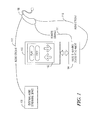
- FIG. 1 illustrates an overview of a system for controlling features of a hearing aid using a mobile device, according to an example embodiment.
- FIG. 2 illustrates a block diagram of a mobile device and audio streaming device attachment, according to an example embodiment.
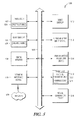
- FIG. 3 is a block diagram of a remote control application, according to an example embodiment.
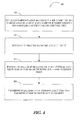
- FIG. 4 is a flowchart illustrating operations of a method of using a remote control application for controlling a hearing assistance device, according to an example embodiment.
- FIG. 5 illustrates a computer system, according to an example embodiment.
- Hearing aids also referred to as hearing assistance devices detect sound using a microphone, modify the sound using a digital signals processor, and output the modified sounds using a speaker of the hearing aid.
- the hearing aid may directly receive an audio stream from an external audio streaming device.
- an audio streaming device connected to a TV.
- the audio signal which is generally emanated from the speakers of the TV, is routed to an audio input of the audio streaming device.
- the audio signal is broadcast from the audio streaming device over a specified radio frequency (RF) (e.g., 900 MHz).
- RF radio frequency
- the hearing aid receives the transmitted audio signal and plays it back using the speaker of the hearing aid.
- an external remote control is used.
- the wearer of the hearing aid may need to keep a separate device around to control playback of the audio.
- a hearing aid user may need an audio streaming device, as discussed with respect to a TV, with the audio outputted from the mobile device into the audio streaming device.
- a hearing aid user may need to have at least two extra devices, the audio streaming device and remote control, to listen to and control playback of music stored on the mobile device.
- FIG. 1 illustrates an overview of an example system for controlling audio features of a hearing aid using a mobile device. Illustrated are mobile device 100, remote control application 102, audio streaming device attachment 104, hearing aid 106, and external audio streaming device 108. Further illustrated are audio streams 110, 112, and remote signal 114.
- audio steaming device attachment 104 and external audio streaming device 108 each have a radio transmitter that transmit audio streams 110, 112, respectively, to a receiver of hearing aid 106.
- Audio streams 110, 112 may be transmitted over a RF (e.g., 900 MHz, Bluetooth frequencies, 802.11x frequencies) that is common to audio streaming devices 104, 108 and the receiver of hearing aid 106.
- external audio streaming device 108 may receive an audio stream through an audio input of the audio streaming device from a TV or other audio outputting device. The received audio is then transmitted over the common RF to hearing aid 106.
- Other communication methods may be used between devices depicted in FIG. 1 such as using portions of the infrared spectrum.
- audio streaming device attachment 104 is coupled to mobile device 100 through a hardware interface.
- mobile device 100 and audio streaming device attachment 104 exchange data enabling audio streaming device attachment 104 to transmit audio stream 110 and remote signals 114 to hearing aid 106.
- a user may enable music playback of a song stored on mobile device 100 and the audio data of the song may be transferred to audio streaming device attachment 104 where it is broadcasted over the RF to hearing aid 106.
- a hearing aid wearer uses the user interface of remote control application 102 to control audio features of hearing aid 106 associated with the playback of audio streams 110, 112.
- the wearer may use a "volume up" input element of the user interface to increase the volume being outputted by hearing aid 106 received from external audio streaming device 108 or mobile device 100.
- a hearing aid wearer may only need to carry a mobile device in order to listen to and control audio playback of music through his or her hearing aid.
- FIG. 2 illustrates a block diagram of mobile device 100 and audio streaming device attachment 104.
- audio streaming device attachment 104 may be referred to as a transmitter attachment.
- Mobile device 100 is shown with processor 202 that controls the overall functions of the mobile device such as running applications and controlling peripherals.
- Processor 202 may be any type of processor including RISC, CISC, VLIW, MISC, OISC, and the like.
- Processor 202 may include a Digital Signal Processor ("DSP").
- DSP Digital Signal Processor
- Processor 202 communicates with RF receiver 204 and RF transmitter 206 to transmit and receive wireless signals such as cellular, Bluetooth, and WiFi signals.
- Processor 202 may use short term memory 208 to store operating instructions and help in the execution of the operating instructions such as the temporary storage of calculations and the like.
- Processor 202 may also use non-transitory storage to read instructions, files, and other data that requires long term, nonvolatile storage.
- Mobile device 100 includes battery 210 or other power source with associated power management processes.
- Power management module 212 distributes power from battery 210 to the other various components such as external audio streaming device 108.
- Power management module 212 may also convert the power from battery 210 to match the needs of the various components.
- Power may also be derived from alternating or direct current supplied from a power network.
- processor 202 communicates and controls other peripherals, such as display 214 with associated touch screen sensor 216.
- Processor 202 causes images to be displayed on display 214 and receives input from touch screen sensor 216 when a user presses on the touch-screen display.
- touch screen sensor 216 may be a multi-touch sensor capable of distinguishing, and processing gestures.
- processor 202 receives input from a keyboard 218 (e.g., physical or virtual) 202.
- Processor 202 may produce audio output and other alerts which are played on the speaker 220 or routed to connected peripherals.
- Speaker 220 may also be used to play voices (in the case of a voice phone call) that have been received from RF receiver 204 and decoded by Processor 202.
- Microphone 222 may be used to transmit a voice for a voice call for subsequent encoding and transmission using RF Transmitter 206.
- Microphone 222 may also be used as an input device for commands using voice processing software.
- Accelerometer 224 provides input on the motion of mobile device 100 to processor 202. Accelerometer 224 may be used as in input device in motion sensitive applications.
- Bluetooth module 226 may be used to communicate with Bluetooth enabled external devices.
- USB port 228 enables external connections to other devices supporting the USB standard and charging capabilities. USB port 228 may include all the functionality to connect to, and establish a connection with an external device over USB
- FIG. 2 further illustrates audio streaming device attachment 104 coupled to mobile device 100 through connector interface 234.
- connector interface 234 provides one or more pins upon which data and power are transferred.
- audio streaming device attachment 104 receives power and data through connector interface 234 from mobile device 100.
- power management module 212 may route power to audio streaming device attachment 104.
- Audio data may be received from mobile device 100, encoded using audio encoder 232, and transmitted using RF transmitter 230.
- remote signals may be received from mobile device 100 through connector interface 234, encoded using remote signal processor, and transmitted using RF transmitter 230.
- mobile device 100 may transit the audio data without the need for audio streaming device attachment.
- mobile device 100 recognizes when a component/peripheral is connected using connector interface 234. For example, upon sensing audio streaming device attachment 104 has been connected, mobile device 100 may launch an application stored on mobile device 100. In an embodiment, mobile device 100 may also begin routing power and data to audio streaming device attachment 104 upon sensing the connection.
- FIG. 3 is a block diagram of remote control application 102.
- remote control application 102 is opened by a user of mobile device 100 or automatically by mobile device 100 when audio streaming device attachment 104 is connected to mobile device 100.
- a user may click (e.g., touch) an icon representing remote control application 102 displayed on a display of mobile device 100.
- Remote control application 102 may initially be received and stored on mobile device 100 using RF receiver 204. In an embodiment, updates to remote control application 102 may be received using RF receiver 204.
- FIG. 3 illustrates remote user interface layouts 302, user preferences 304, remote signals 306, input module 308, and translation module 310.
- User interface layouts 302, user preferences 304, and remote signals 306 may be stored as entries in one or more databases on mobile device 100.
- the databases may be structured in a variety of ways such as using a flat file structure or relational database.
- the databases may be updated during an update to remote control application 102 or by actions of a user of remote control application 102.
- remote user interface layouts 302, and user preferences 304, remote signals 306 are stored as individual files.
- a remote user interface layout includes a layout of a set of user interface input elements to display on a display of the mobile device.
- a remote user interface layout may resemble the look of a remote control layout used to control audio features of a hearing aid device or an audio streaming device.
- a layout is defined using a standardized language (e.g., XML). Layouts may be defined according to: (1) compatibility (2) actions associated with the user elements; (3) graphical representations of the user elements; and (4) locations of the user input elements.
- a layout is also associated with one or more models of hearing aid devices. Thus, certain layouts may not be compatible with all models of hearing aids.
- compatibility may be defined at the user interface element level. In this manner, a universal layout may be used with individual user interface elements shown or hidden based on the compatibility of the user interface element. In an embodiment, compatibility is defined as the match between the action associated with the user input element and an audio feature of the hearing aid device or audio streaming device.
- a user input element is a graphical element that a user interacts with to cause an application to perform an assigned action for the input element.
- Actions that a user interface element are associated with include, but are not limited to, selecting a left or right hearing aid device, volume up, volume down, mute, unmute, play, stop, selecting an audio streaming source, lock, and unlock.
- a button element may operate similarly to a mechanic button such that when a user activates (e.g., clicks) the button, an application program may increase the volume of an audio output.
- a user interface input element is associated with a graphical representation of the action assigned to the user interface element.
- a button element for turning the volume up on a hearing aid device may be associated with an electronic picture file (e.g., JPEG, GIF, PNG, etc.) of an arrow up.
- a layout further includes a location for each user interface input element.
- a location includes an x-coordinate and a y-coordinate.
- the location is an absolute location such that the location of an element does not change regardless of the size of the display.
- the location is a relative location.
- the location may be defined with respect to the top, bottom, left-side, right-side, or center of the display.
- an initial set of remote user interface layouts may be part of the initial remote control application 102 download. Then, as new functionality is made available to various hearing aids or audio streaming devices, the layouts and associated user input element may be updated or entirely new layouts may be included with the updated remote control application download.
- user preferences 304 represent data associated with user preferences of a user. For example, an initial volume preference may be set. Other preferences may include a maximum volume level (e.g., expressed in decibels), a default hearing aid device model, and automatic playback when an audio streaming device is determined to be within range of the user.
- a maximum volume level e.g., expressed in decibels
- remote signals 306 represent the messages to be encoded and transmitted to a hearing aid device.
- remote signals may be stored for each of the actions associated with the user input elements of a remote layout.
- remote signals may be stored for a selection of a left or right hearing aid device, volume up, volume down, mute, unmute, play, stop, and selection an audio streaming source.
- different hearing aid devices may need different signals to achieve the same action, multiple remote signals may be stored for each action.
- input module 308 processes user interactions with the remote control application. This includes interactions with user input elements of a remote layout as well as interactions with user input elements to set user preferences.
- the input module may be configured to receive the selection at least one user input element of a remote layout.
- the input module may determine based on where the user clicks on the display of the mobile device which user input element has been selected.
- a user selection is based on the coordinates of input device (e.g., stylus, cursor, finger of the user) as it makes contact with the display. The coordinates are compared to the coordinates of the user input element to determine the selection.
- the remote control application executes the action associated with the user input element. For example, if the user input element is determined to be a volume up button, the volume up action is executed. This may include executing functions to increase the volume of the hearing aid device of the user. Executing functions may include routing data to other modules of the remote control application such as translation module 310 or other components of a mobile device such as a transmitter attachment.
- translation module 310 is configured to translate the selection of the user input element into a remote signal for controlling an audio feature of the hearing assistance device. This may include, for example, determining the type of the hearing assistance device (e.g., as set by the user or by requesting it from the hearing assistance device). Then, retrieving the remote signal from a database of remote signals based on the type of the hearing assistance device and the action associated with the user input element. The action may be an audio feature (e.g., volume control) of a hearing assistance device.
- translation module 310 is configured to encode the retrieve remote signal remote signal for transmission to the hearing assistance device. The encoded signal may then be routed to a transmitter attachment of a mobile device for transmission.
- FIG. 4 is a flowchart 400 illustrating operations of a method of using a remote control application for controlling a hearing assistance device.
- a user interface layout is displayed on the display of a mobile device.
- the user-interface layout may include at least one user input element associated with controlling a feature (e.g., audio) of a hearing assistance device. These features may include but are not limited to selecting a left or right hearing aid device, volume up, volume down, mute, unmute, play, stop, selecting an audio streaming source, lock, and unlock.
- the displayed layout is retrieved from a database of layouts based on the type of the hearing assistance device of the user. The type of hearing assistance device may be determined according to a user preference inputted by the user.
- a user may independently change the volume of the left or right hearing aid based on the selection of the user interface element corresponding to the selection of the left or right hearing aid.
- Playback control such as muting and stopping playback may be specific to the audio streaming device that is currently being played through the speaker of the hearing assistance device.
- the display may include a user interface element which directs audio playback to start with respect to a transmitter attached to mobile device and include a user element to stop playback with respect to a transmitter attached to TV.
- a selection of at least one user element is received.
- the selection may be received using a touchscreen interface on a mobile device.
- the selection of the user input element into is translated into a remote signal for controlling the feature of the hearing assistance device.
- translating may include determining the type of the hearing assistance device and retrieving the remote signal from a database of remote signals based on the type of the hearing assistance device and the feature of the hearing assistance device associated with the user input element.
- the remote signal is transmitted to the hearing assistance device via a transmitter attachment coupled to the mobile device.
- an audio signal associated with audio data stored on the mobile device is transmitted via the transmitter attachment.
- a user interface element may be selected which directs the mobile device to route audio to the transmitter attachment where it is encoded and transmitted over a RF (e.g., 900 MHz).
- hearing assistance devices including but not limited to, cochlear implant type hearing devices, hearing aids, such as behind-the-ear (BTE), in-the-ear (ITE), in-the-canal (ITC), or completely-in-the-canal (CIC) type hearing aids.
- BTE behind-the-ear
- ITE in-the-ear
- ITC in-the-canal
- CIC completely-in-the-canal
- hearing assistance devices may include devices that reside substantially behind the ear or over the ear.
- Such devices may include hearing aids with receivers associated with the electronics portion of the behind-the-ear device, or hearing aids of the type having receivers in the ear canal of the user, such as receiver-in-the-canal (RIC) or receiver-in-the-ear (RITE) designs.
- RIC receiver-in-the-canal
- RITE receiver-in-the-ear
- Figure 5 shows a diagrammatic representation of a machine in the example form of a computer system 500 within which a set of instructions for causing the machine to perform any one or more of the methods, processes, operations, or methodologies discussed herein may be executed.
- the machine operates as a standalone device or may be connected (e.g., networked) to other machines.
- the machine may operate in the capacity of a server or a client machine in server-client network environment, or as a peer machine in a peer-to-peer (or distributed) network environment.
- the machine may be a Personal Computer (PC), a tablet PC, a Set-Top Box (STB), a Personal Digital Assistant (PDA), a cellular telephone, a Web appliance, a network router, switch or bridge, or any machine capable of executing a set of instructions (sequential or otherwise) that specify actions to be taken by that machine.
- PC Personal Computer
- PDA Personal Digital Assistant
- STB Set-Top Box
- Web appliance a network router, switch or bridge
- machine shall also be taken to include any collection of machines that individually or jointly execute a set (or multiple sets) of instructions to perform any one or more of the methodologies discussed herein.
- Example embodiments can also be practiced in distributed system environments where local and remote computer systems which that are linked (e.g., either by hardwired, wireless, or a combination of hardwired and wireless connections) through a network, both perform tasks.
- program modules may be located in both local and remote memory-storage devices (see below).
- the example computer system 500 includes a processor 502 (e.g., a Central Processing Unit (CPU), a Graphics Processing Unit (GPU) or both), a main memory 501 and a static memory 506, which communicate with each other via a bus 508.
- the computer system 500 may further include a video display unit 510 (e.g., a Liquid Crystal Display (LCD) or a Cathode Ray Tube (CRT)).
- LCD Liquid Crystal Display
- CRT Cathode Ray Tube
- the computer system 500 also includes an alphanumeric input device 512 (e.g., a keyboard), a User Interface (UI) cursor controller 514 (e.g., a mouse), a disk drive unit 516, a signal generation device 518 (e.g., a speaker) and a network interface device 520 (e.g., a transmitter).
- UI User Interface
- the computer system 500 also includes an alphanumeric input device 512 (e.g., a keyboard), a User Interface (UI) cursor controller 514 (e.g., a mouse), a disk drive unit 516, a signal generation device 518 (e.g., a speaker) and a network interface device 520 (e.g., a transmitter).
- UI User Interface
- the disk drive unit 516 includes a machine-readable medium 522 on which is stored one or more sets of instructions 524 and data structures (e.g., software) embodying or used by any one or more of the methodologies or functions illustrated herein.
- the software may also reside, completely or at least partially, within the main memory 501 and/or within the processor 502 during execution thereof by the computer system 500, the main memory 501 and the processor 502 also constituting machine-readable media.
- the instructions 524 may further be transmitted or received over a network 526 via the network interface device 520 using any one of a number of well-known transfer protocols (e.g., HTTP, Session Initiation Protocol (SIP)).
- HTTP HyperText Transfer Protocol
- SIP Session Initiation Protocol
- machine-readable medium should be taken to include a single medium or multiple media (e.g., a centralized or distributed database, and/or associated caches and servers) that store the one or more sets of instructions.
- the term “machine-readable medium” shall also be taken to include any medium that is capable of storing, encoding, or carrying a set of instructions for execution by the machine and that cause the machine to perform any of the one or more of the methodologies illustrated herein.
- the term “machine-readable medium” shall accordingly be taken to include, but not be limited to, solid-state memories, and optical and magnetic medium.
- Method embodiments illustrated herein may be computer-implemented. Some embodiments may include computer-readable media encoded with a computer program (e.g., software), which includes instructions operable to cause an electronic device to perform methods of various embodiments.
- a software implementation (or computer-implemented method) may include microcode, assembly language code, or a higher-level language code, which further may include computer readable instructions for performing various methods.
- the code may form portions of computer program products. Further, the code may be tangibly stored on one or more volatile or nonvolatile computer-readable media during execution or at other times.
- These computer-readable media may include, but are not limited to, hard disks, removable magnetic disks, removable optical disks (e.g., compact disks and digital video disks), magnetic cassettes, memory cards or sticks, Random Access Memories (RAMs), Read Only Memories (ROMs), and the like.
Landscapes
- Engineering & Computer Science (AREA)
- Computer Networks & Wireless Communication (AREA)
- Signal Processing (AREA)
- Health & Medical Sciences (AREA)
- General Health & Medical Sciences (AREA)
- Neurosurgery (AREA)
- Otolaryngology (AREA)
- Physics & Mathematics (AREA)
- Acoustics & Sound (AREA)
- Selective Calling Equipment (AREA)
Applications Claiming Priority (1)
| Application Number | Priority Date | Filing Date | Title |
|---|---|---|---|
| US13/369,054 US8693714B2 (en) | 2012-02-08 | 2012-02-08 | System and method for controlling an audio feature of a hearing assistance device |
Publications (2)
| Publication Number | Publication Date |
|---|---|
| EP2627104A2 true EP2627104A2 (de) | 2013-08-14 |
| EP2627104A3 EP2627104A3 (de) | 2014-12-17 |
Family
ID=47740818
Family Applications (1)
| Application Number | Title | Priority Date | Filing Date |
|---|---|---|---|
| EP13154268.0A Ceased EP2627104A3 (de) | 2012-02-08 | 2013-02-06 | System und Verfahren zum Steuern einer Audiofunktion einer Hörgerätvorrichtung |
Country Status (2)
| Country | Link |
|---|---|
| US (1) | US8693714B2 (de) |
| EP (1) | EP2627104A3 (de) |
Cited By (2)
| Publication number | Priority date | Publication date | Assignee | Title |
|---|---|---|---|---|
| EP3358812A1 (de) * | 2017-02-03 | 2018-08-08 | Widex A/S | Kommunikationskanäle zwischen einer persönlichen kommunikationsvorrichtung und mindestens einer am kopf getragenen vorrichtung |
| EP3123355B1 (de) | 2014-03-24 | 2019-03-20 | Sonova AG | Tragbares endgerät und verfahren zur anzeige auf einem tragbaren endgerät |
Families Citing this family (7)
| Publication number | Priority date | Publication date | Assignee | Title |
|---|---|---|---|---|
| KR101974820B1 (ko) * | 2012-09-10 | 2019-08-23 | 삼성전자주식회사 | 기기 제어 방법 및 이를 수행하는 기기 |
| KR101490336B1 (ko) * | 2013-04-24 | 2015-02-05 | 주식회사 바이오사운드랩 | 사용자 개별 환경 맞춤 방식의 보청기의 피팅 방법 및 이를 위한 저장 매체 |
| US9247356B2 (en) * | 2013-08-02 | 2016-01-26 | Starkey Laboratories, Inc. | Music player watch with hearing aid remote control |
| US9485591B2 (en) * | 2014-12-10 | 2016-11-01 | Starkey Laboratories, Inc. | Managing a hearing assistance device via low energy digital communications |
| US9743219B2 (en) * | 2014-12-29 | 2017-08-22 | Google Inc. | Low-power wireless content communication between devices |
| KR102369589B1 (ko) * | 2015-08-31 | 2022-03-03 | 엘지전자 주식회사 | 이어셋, 이어셋 시스템 및 그 제어방법 |
| US11012791B2 (en) | 2017-01-31 | 2021-05-18 | Widex A/S | Method of operating a hearing aid system and a hearing aid system |
Citations (1)
| Publication number | Priority date | Publication date | Assignee | Title |
|---|---|---|---|---|
| US20040077387A1 (en) * | 2001-03-30 | 2004-04-22 | Alban Sayag | Wireless assembly comprising an ear pad and an intermediate module connected to a mobile telephone |
Family Cites Families (6)
| Publication number | Priority date | Publication date | Assignee | Title |
|---|---|---|---|---|
| US20050100182A1 (en) | 2003-11-12 | 2005-05-12 | Gennum Corporation | Hearing instrument having a wireless base unit |
| ATE404033T1 (de) * | 2005-01-17 | 2008-08-15 | Widex As | Vorrichtung und verfahren zum betrieb eines hörgeräts |
| US20060205349A1 (en) * | 2005-03-08 | 2006-09-14 | Enq Semiconductor, Inc. | Apparatus and method for wireless audio network management |
| JP4516147B2 (ja) * | 2005-03-18 | 2010-08-04 | ヴェーデクス・アクティーセルスカプ | 補聴器用遠隔制御システム |
| ATE514278T1 (de) * | 2007-04-10 | 2011-07-15 | Oticon As | Benutzeroberfläche für ein kommunikationsgerät |
| US8331592B2 (en) * | 2008-08-29 | 2012-12-11 | Zounds Hearing, Inc. | Wireless gateway for hearing aid |
-
2012
- 2012-02-08 US US13/369,054 patent/US8693714B2/en not_active Expired - Fee Related
-
2013
- 2013-02-06 EP EP13154268.0A patent/EP2627104A3/de not_active Ceased
Patent Citations (1)
| Publication number | Priority date | Publication date | Assignee | Title |
|---|---|---|---|---|
| US20040077387A1 (en) * | 2001-03-30 | 2004-04-22 | Alban Sayag | Wireless assembly comprising an ear pad and an intermediate module connected to a mobile telephone |
Non-Patent Citations (1)
| Title |
|---|
| AU - AUDIO VIDEO WORKING GROUP: "BLUETOOTH DOC Date / Year-Month-Day Approved Revision Document No 2008-06-26 V14r00 AVRCP_SPEC Prepared e-mail address AUDIO/VIDEO REMOTE CONTROL PROFILE", 26 June 2008 (2008-06-26), pages 1 - 166, XP055084602, Retrieved from the Internet <URL:https://www.bluetooth.org/en-us/specification/adopted-specifications> [retrieved on 20131021], DOI: AVRCP_SPEC V14r00 * |
Cited By (3)
| Publication number | Priority date | Publication date | Assignee | Title |
|---|---|---|---|---|
| EP3123355B1 (de) | 2014-03-24 | 2019-03-20 | Sonova AG | Tragbares endgerät und verfahren zur anzeige auf einem tragbaren endgerät |
| EP3358812A1 (de) * | 2017-02-03 | 2018-08-08 | Widex A/S | Kommunikationskanäle zwischen einer persönlichen kommunikationsvorrichtung und mindestens einer am kopf getragenen vorrichtung |
| US10674290B2 (en) | 2017-02-03 | 2020-06-02 | Widex A/S | Communication channels between a personal communication device and at least one head-worn device |
Also Published As
| Publication number | Publication date |
|---|---|
| US8693714B2 (en) | 2014-04-08 |
| US20130202137A1 (en) | 2013-08-08 |
| EP2627104A3 (de) | 2014-12-17 |
Similar Documents
| Publication | Publication Date | Title |
|---|---|---|
| US8693714B2 (en) | System and method for controlling an audio feature of a hearing assistance device | |
| CN111757171A (zh) | 一种显示设备及音频播放方法 | |
| CN111208969A (zh) | 一种声音输出设备的选择控制方法及显示设备 | |
| US10965972B2 (en) | Method for contents playback with continuity and electronic device therefor | |
| CN112073865A (zh) | 蓝牙耳机的音量设置方法及装置、电子设备 | |
| CN107770457A (zh) | 一种视频制作方法及移动终端 | |
| CN112165648A (zh) | 一种音频播放的方法、相关装置、设备及存储介质 | |
| CN103945235B (zh) | 一种数字电视控制方法、机顶盒及系统 | |
| US10069769B2 (en) | Electronic device and method for providing user preference program notification in the electronic device | |
| CN112135280A (zh) | 一种蓝牙设备播放控制方法及显示设备 | |
| WO2023125847A1 (zh) | 一种音频处理方法、系统及相关装置 | |
| CN117135557A (zh) | 音频处理方法、装置、电子设备、存储介质和程序产品 | |
| CN113784186B (zh) | 终端设备、服务器和通信控制方法 | |
| CN108831513A (zh) | 录制音频数据的方法、终端、服务器和系统 | |
| CN112073955A (zh) | 显示设备及蓝牙设备扫描方法 | |
| CN114747196B (zh) | 使用多个音频装置来输出多声道音频的终端和方法 | |
| CN112073761A (zh) | 蓝牙功能的实现方法及装置、双硬件系统显示设备 | |
| CN117768926A (zh) | 多设备组网方法、装置、存储介质及电子设备 | |
| CN114501158A (zh) | 显示设备、外接音响设备及外接音响设备音频输出的方法 | |
| EP2843953A1 (de) | System zur visuellen Anzeige und Demonstration von Hörgerätemerkmalen | |
| CN112073768B (zh) | 蓝牙通信方法及显示设备 | |
| CN111399796A (zh) | 语音消息聚合方法、装置、电子设备及存储介质 | |
| CN111726695B (zh) | 显示设备及音频合成方法 | |
| CN116980851A (zh) | 车机间子程序分享方法、装置、电子设备和存储介质 | |
| EP4436187A1 (de) | Vorrichtung mit künstlicher intelligenz zur gemeinsamen nutzung von inhalten zwischen mehreren anzeigevorrichtungen und verfahren zur gemeinsamen nutzung von inhalten |
Legal Events
| Date | Code | Title | Description |
|---|---|---|---|
| PUAI | Public reference made under article 153(3) epc to a published international application that has entered the european phase |
Free format text: ORIGINAL CODE: 0009012 |
|
| 17P | Request for examination filed |
Effective date: 20130206 |
|
| AK | Designated contracting states |
Kind code of ref document: A2 Designated state(s): AL AT BE BG CH CY CZ DE DK EE ES FI FR GB GR HR HU IE IS IT LI LT LU LV MC MK MT NL NO PL PT RO RS SE SI SK SM TR |
|
| AX | Request for extension of the european patent |
Extension state: BA ME |
|
| PUAL | Search report despatched |
Free format text: ORIGINAL CODE: 0009013 |
|
| AK | Designated contracting states |
Kind code of ref document: A3 Designated state(s): AL AT BE BG CH CY CZ DE DK EE ES FI FR GB GR HR HU IE IS IT LI LT LU LV MC MK MT NL NO PL PT RO RS SE SI SK SM TR |
|
| AX | Request for extension of the european patent |
Extension state: BA ME |
|
| RIC1 | Information provided on ipc code assigned before grant |
Ipc: H04R 25/00 20060101AFI20141107BHEP Ipc: H04M 1/60 20060101ALI20141107BHEP |
|
| 17Q | First examination report despatched |
Effective date: 20150930 |
|
| STAA | Information on the status of an ep patent application or granted ep patent |
Free format text: STATUS: THE APPLICATION HAS BEEN REFUSED |
|
| 18R | Application refused |
Effective date: 20170911 |