EP2631776A2 - Commander des vues dans un dispositif d'affichage à écran tactile - Google Patents
Commander des vues dans un dispositif d'affichage à écran tactile Download PDFInfo
- Publication number
- EP2631776A2 EP2631776A2 EP13156257.1A EP13156257A EP2631776A2 EP 2631776 A2 EP2631776 A2 EP 2631776A2 EP 13156257 A EP13156257 A EP 13156257A EP 2631776 A2 EP2631776 A2 EP 2631776A2
- Authority
- EP
- European Patent Office
- Prior art keywords
- display
- touch screen
- display device
- controller
- areas
- Prior art date
- Legal status (The legal status is an assumption and is not a legal conclusion. Google has not performed a legal analysis and makes no representation as to the accuracy of the status listed.)
- Granted
Links
Images




Classifications
-
- G—PHYSICS
- G06—COMPUTING OR CALCULATING; COUNTING
- G06F—ELECTRIC DIGITAL DATA PROCESSING
- G06F3/00—Input arrangements for transferring data to be processed into a form capable of being handled by the computer; Output arrangements for transferring data from processing unit to output unit, e.g. interface arrangements
- G06F3/01—Input arrangements or combined input and output arrangements for interaction between user and computer
- G06F3/048—Interaction techniques based on graphical user interfaces [GUI]
- G06F3/0487—Interaction techniques based on graphical user interfaces [GUI] using specific features provided by the input device, e.g. functions controlled by the rotation of a mouse with dual sensing arrangements, or of the nature of the input device, e.g. tap gestures based on pressure sensed by a digitiser
- G06F3/0488—Interaction techniques based on graphical user interfaces [GUI] using specific features provided by the input device, e.g. functions controlled by the rotation of a mouse with dual sensing arrangements, or of the nature of the input device, e.g. tap gestures based on pressure sensed by a digitiser using a touch-screen or digitiser, e.g. input of commands through traced gestures
-
- G—PHYSICS
- G06—COMPUTING OR CALCULATING; COUNTING
- G06F—ELECTRIC DIGITAL DATA PROCESSING
- G06F2203/00—Indexing scheme relating to G06F3/00 - G06F3/048
- G06F2203/041—Indexing scheme relating to G06F3/041 - G06F3/045
- G06F2203/04104—Multi-touch detection in digitiser, i.e. details about the simultaneous detection of a plurality of touching locations, e.g. multiple fingers or pen and finger
-
- G—PHYSICS
- G06—COMPUTING OR CALCULATING; COUNTING
- G06F—ELECTRIC DIGITAL DATA PROCESSING
- G06F2203/00—Indexing scheme relating to G06F3/00 - G06F3/048
- G06F2203/048—Indexing scheme relating to G06F3/048
- G06F2203/04808—Several contacts: gestures triggering a specific function, e.g. scrolling, zooming, right-click, when the user establishes several contacts with the surface simultaneously; e.g. using several fingers or a combination of fingers and pen
Definitions
- the present disclosure relates to controlling display devices, and more particularly to controlling display devices having touch screens and a plurality of information sources.
- Hand held display devices such as smart phones and tablets are widely used for a variety of purposes. With WiFi, 3G, 4G connections and the like, such devices are increasingly used with applications which allow for wireless connection to information sources, including not only broad sources such as the World Wide Web, but also private networks as well.
- such display devices have been used by security personnel as they move within a building, with the devices wirelessly receiving remote data such as alarms as well as pictures and/or video from security cameras placed around the area being secured. It should be appreciated that viewing security camera video as a guard moves around a building can not only allow the guard to be able to see potential problems no matter where he is in the building, but it can also allow him to look ahead into areas that he is about to enter to be warned of any potential danger or situation so that he can be prepared and not surprised when entering that area.
- menu systems are typically not intuitive, and also can be time consuming and can require the strict attention of the device's user (to make sure the right menu item(s) are found and that they are the one selected [e.g., by touching, as required with typical touch screen displays]), all of which can be a serious problem when, for example, security personnel are under stress and hurried when reacting to a potentially dangerous situation. Further, such menu systems can even occupy area on the display, thereby causing the display areas for camera feeds to be fit into smaller spaces.
- the disclosure herein is directed toward solving one or more of the above problems.
- a display device including a processor for running a program responsive to a numeric input, a display having a touch screen, and a controller for controlling the display to show output from the program.
- the program runs according to one numeric input responsive to two simultaneous taps on the touch screen, runs according to a second numeric input responsive to three simultaneous taps on the touch screen, and runs according to a third numeric input responsive to four simultaneous taps on the touch screen.
- the program generates a display of information from a plurality of sources, with the number of sources displayed corresponding to the numeric input.
- a display device including a processor for running a program generating a display of information from a plurality of sources, a display having a touch screen, and a controller for controlling the display.
- the display is controlled to simultaneously provide a selected number of display areas in the display, each of the display areas for displaying information from the information sources, wherein the controller provides two display areas to the display responsive to two simultaneous taps on the touch screen, the controller provides three display areas to the display responsive to three simultaneous taps on the touch screen, and the controller provides four display areas to the display responsive to four simultaneous taps on the touch screen.
- each of the taps is a digit of a display device user contacting the touch screen.
- the controller controls the touch screen to provide a single display area for one of the information sources responsive to two consecutive single taps on the touch screen, with the single display area being the only display area for any of the information sources in the display.
- Y 3.
- the information sources are security cameras and the information is video from the cameras.
- the controller provides video from selected cameras to the display.
- a display device including a display having a touch screen, and a controller for controlling the display to simultaneously provide a selected number of display areas in the display, with each of the display areas being for displaying information from information sources.
- the controller controls the display to include R display areas when the touch screen is tapped simultaneously R times, and S display areas when the touch screen is tapped simultaneously T times followed by T simultaneous drags on the touch screen, followed by U simultaneous taps on the touch screen, wherein R, S, T and U are integers, R is a selected one of 2, 3 or 4, and S > R.
- T + U > R.
- T+U S.
- T 3 and U > 1.
- the information sources are security cameras and the information is video from the cameras.
- the controller provides video from selected cameras to the display.
- a display device including a display having a touch screen and a controller.
- the controller controls the display to simultaneously provide a selected number of display areas in the display, each of the display areas being for displaying video from a selected one of a plurality of remote security cameras.
- the controller controls the display to include R display areas when the touch screen is tapped simultaneously R times, and S display areas when the touch screen is tapped simultaneously T times followed by T simultaneous drags on the touch screen, followed by U simultaneous taps on the touch screen.
- T 3 and U > 1.
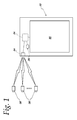
- Figure 1 is a schematic illustration of a display device as described herein, as used in a security environment in which video feeds from multiple security cameras are available for display on the device;
- Figures 2a-2b illustrate operation of a display device as described herein to change the display to show two display areas for two video feeds
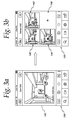
- Figures 3a-3b are similar to Figs. 2a-2b , but show changing the display to show three display areas;
- Figures 4a-4b are similar to Figs. 2a-2b and 3a-3b , but show changing the display to show four display areas;
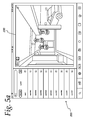
- Figures 5a-5c illustrate operation of another display device as described herein to change the display to show seven display areas.
- the device 20 may include a microcontroller or microprocessor 24 and memory 28.
- the microcontroller 24 may suitably control what is shown on a display 30.
- the device 20 may also include a wireless receiver 34 which may receive, for example, video signals from a plurality of remote cameras 38.
- the details of the display device 20 may vary from that shown in Fig. 1 while still embodying one or more features of the disclosure.
- the microprocessor 24 could be preprogrammed and/or the memory 28 could be integral with the microprocessor 24.
- the information which is shown on the display 30 need not be video signals, nor need it be received wirelessly or even remotely.
- the device and/or method may be particularly advantageously used in security settings where the mobility of wireless communication is desired, and the embodiment particularly described below relates to such an environment.
- the device and method relating to the ability to quickly and easily change the number of display areas shown in a display 30, may be advantageously used in many other applications with many types of data and information, including those in which multiple displays are initiated locally in the microprocessor 24.
- a display device 120 such as described generally in Fig. 1 , with a touch screen display 130 (such as a smart phone, e.g., an iPhone), is in communication with a plurality of security cameras 38 is shown in Figs. 2a to 4b , with the video signal from only one of the cameras 38 being shown in the touch screen display 130 in Fig. 2a .
- the display device could support multi-touch (such as Apple's Magic Track Pad), and could also be used with any touch-responsive platform (including Apple iPads and computers using touch-pads). Further, it could be used with devices using any video editing software (e.g., Adobe Premier pro, iMovie, etc.).
- the user wishes to have a display mode in which the video signal from two cameras instead of just one as in Fig. 2a is shown, he simultaneously taps the touch screen 130 twice (i.e ., taps the screen 130 with two fingers at the same time, as represented by the two circles 136 in Fig. 2a ).
- the microprocessor 24 is caused to change the display 130 to a view in which two different areas 140, 142 are shown (as illustrated in Fig. 2b ) in which, for example, video feeds from two different cameras 38 may be displayed.
- each area 140, 142 may be selected in virtually any manner in accordance with disclosure herein.
- the selection may be preprogrammed (for example, video feeds from two specific, pre-selected cameras may be automatically shown in the two display areas 140, 142), or a rolling progression of feeds from different cameras may be shown, or video feeds from specific cameras focused on an area in which an alarm signal has been received may be shown in the display areas 140, 142.
- the video feeds may be changed in a display mode with the user simply choosing a different video feed for a specific display area through use of an appropriate menu.
- the display 130 has a single display area for the video feed from one camera 38. If the user wishes to display the video signal from three cameras, he may simultaneously tap the touch screen 130 three times (i.e., taps the screen 130 with three fingers at the same time as represented by the three circles 136 in Fig. 3a ). When he does that, the display 130 changes to a view in which three different areas 140, 142, 144 are shown (as illustrated in Fig. 3b ) in which, for example, video feeds from three different cameras 38 may be displayed.
- the display 130 has a single display area for the video feed from one camera 38. If the user wishes to display the video signal from four cameras, he may simultaneously tap the touch screen 130 four times (i.e., taps the screen 130 with four fingers at the same time as represented by the four circles 136 in Fig. 4a ). When he does that, the display 130 changes to a view in which four different areas 140, 142, 144, 146 are shown (as illustrated in Fig. 4b ) in which, for example, video feeds from four different cameras 38 may be displayed.
- the above described operations may be accomplished in any display mode (e.g., tapping the screen of Fig. 2a with four fingers simultaneously could be used to change from a display with two display areas 140, 142 to a display with four display areas 140, 142, 144, 146, or vice versa).
- the display mode may be changed to a single display area (as in Figs. 2a , 3a and 4a ) by another distinct operation.
- a double single tap i.e ., tapping one finger twice in a short period of time
- Such an operation is sufficiently intuitive that it will be easily remembered by any user, even when hurried or under stress, and advantageously will not risk being confused for another command or operation (since single touches are widely used for many operations with the single touch being different depending on precisely where on the touch screen 130 the touch occurs.
- Such operation may be accomplished from any screen (e.g., from display modes with two, three or four display areas 140-146 such as in Figs. 2b , 3b and 4b ).
- display device 120 may be of a relatively small size, wherein four separate display areas 140-146 may be the maximum which would be desired to enable the user to adequately see sufficient detail of what is displayed in each area. It should, however, be appreciated that display devices could operate according to the disclosure herein to allow more than four display areas to be shown simultaneously. Advantageously that may be accomplished, for example, with tablet devices 220 (such as iPads) wherein the display 230 may be sufficiently large to easily accommodate more than four display areas. In accordance with the disclosure herein, switching to views having more than four views may be accomplished by a similar operation as described in connection with switching to two to four display areas but with an initial step or key.
- the tablet device 220 shown in Figs. 5a-5c may be operated as described above so that, for example, tapping the display 230 simultaneously with four fingers would cause the display 230 to show four display areas.
- the user would first simultaneously tap the touch screen display 230 with three fingers (see circles 236 in Fig. 5a ) and then drag those three fingers up on the screen (see arrows 237 in Fig. 5a ).
- the tablet device 220 would recognize that such an operation (with the dragging) does not mean to show three display areas but instead is an initial key to be completed with a following step.
- the user would simultaneously tap the display 230 with a selected number of fingers (see circles 236' in Fig. 5b ) to display the selected number of display areas 240-246 as shown in Fig. 5c .
- the combination of the number of fingers in the two steps can be the number of display areas 240-246 to show on the display 230.
- touching and dragging three fingers followed by tapping four fingers would cause the tablet device 220 to show seven display areas 240-246 as illustrated in Fig. 5c , making the selection of display areas 240-246 as intuitive as when selecting two, three or four screens.
- the display areas would be the same size as illustrated, it would be within the scope of the disclosure herein to provide display areas of different size.
- the display 230 illustrated in Fig. 5c if five display areas were selected (e.g., by tapping and dragging three fingers then tapping two fingers), one of the display areas could be the size of four areas shown in Fig. 5c .
- display devices having touch screen displays can be intuitively and easily controlled by a user to show a selected number of display screens. Still further, such changing can be accomplished without requiring close attention of the user (a user could operate such devices to change the number of display areas without even looking at the screen), such operation being particularly advantageous for persons such as security guards who might be distracted, under stress and/or in a hurry.
Landscapes
- Engineering & Computer Science (AREA)
- General Engineering & Computer Science (AREA)
- Theoretical Computer Science (AREA)
- Human Computer Interaction (AREA)
- Physics & Mathematics (AREA)
- General Physics & Mathematics (AREA)
- User Interface Of Digital Computer (AREA)
- Position Input By Displaying (AREA)
Applications Claiming Priority (1)
| Application Number | Priority Date | Filing Date | Title |
|---|---|---|---|
| US13/403,501 US8830193B2 (en) | 2012-02-23 | 2012-02-23 | Controlling views in display device with touch screen |
Publications (3)
| Publication Number | Publication Date |
|---|---|
| EP2631776A2 true EP2631776A2 (fr) | 2013-08-28 |
| EP2631776A3 EP2631776A3 (fr) | 2013-11-20 |
| EP2631776B1 EP2631776B1 (fr) | 2017-07-12 |
Family
ID=47747480
Family Applications (1)
| Application Number | Title | Priority Date | Filing Date |
|---|---|---|---|
| EP13156257.1A Active EP2631776B1 (fr) | 2012-02-23 | 2013-02-21 | Commander des vues dans un dispositif d'affichage à écran tactile |
Country Status (3)
| Country | Link |
|---|---|
| US (1) | US8830193B2 (fr) |
| EP (1) | EP2631776B1 (fr) |
| ES (1) | ES2636789T3 (fr) |
Families Citing this family (23)
| Publication number | Priority date | Publication date | Assignee | Title |
|---|---|---|---|---|
| DE102012217152A1 (de) * | 2012-09-24 | 2014-03-27 | Robert Bosch Gmbh | Benutzerschnittstellenanordnung sowie Computerprogramm |
| US9881645B2 (en) * | 2013-08-20 | 2018-01-30 | Google Llc | Systems, methods, and media for editing video during playback via gestures |
| USD807376S1 (en) | 2015-06-14 | 2018-01-09 | Google Inc. | Display screen with animated graphical user interface for smart home automation system having a multifunction status |
| USD812076S1 (en) | 2015-06-14 | 2018-03-06 | Google Llc | Display screen with graphical user interface for monitoring remote video camera |
| USD796540S1 (en) | 2015-06-14 | 2017-09-05 | Google Inc. | Display screen with graphical user interface for mobile camera history having event-specific activity notifications |
| USD803241S1 (en) | 2015-06-14 | 2017-11-21 | Google Inc. | Display screen with animated graphical user interface for an alert screen |
| USD809522S1 (en) | 2015-06-14 | 2018-02-06 | Google Inc. | Display screen with animated graphical user interface for an alert screen |
| USD797131S1 (en) | 2015-06-14 | 2017-09-12 | Google Inc. | Display screen with user interface for mode selector icons |
| US9361011B1 (en) * | 2015-06-14 | 2016-06-07 | Google Inc. | Methods and systems for presenting multiple live video feeds in a user interface |
| US10133443B2 (en) | 2015-06-14 | 2018-11-20 | Google Llc | Systems and methods for smart home automation using a multifunction status and entry point icon |
| CN106325659B (zh) * | 2015-06-25 | 2020-06-23 | 北京小米移动软件有限公司 | 终端设备的显示控制方法及装置 |
| US10219026B2 (en) * | 2015-08-26 | 2019-02-26 | Lg Electronics Inc. | Mobile terminal and method for playback of a multi-view video |
| US10263802B2 (en) | 2016-07-12 | 2019-04-16 | Google Llc | Methods and devices for establishing connections with remote cameras |
| USD882583S1 (en) | 2016-07-12 | 2020-04-28 | Google Llc | Display screen with graphical user interface |
| US11238290B2 (en) | 2016-10-26 | 2022-02-01 | Google Llc | Timeline-video relationship processing for alert events |
| USD843398S1 (en) | 2016-10-26 | 2019-03-19 | Google Llc | Display screen with graphical user interface for a timeline-video relationship presentation for alert events |
| US10386999B2 (en) | 2016-10-26 | 2019-08-20 | Google Llc | Timeline-video relationship presentation for alert events |
| US10972685B2 (en) | 2017-05-25 | 2021-04-06 | Google Llc | Video camera assembly having an IR reflector |
| US10352496B2 (en) | 2017-05-25 | 2019-07-16 | Google Llc | Stand assembly for an electronic device providing multiple degrees of freedom and built-in cables |
| US10819921B2 (en) | 2017-05-25 | 2020-10-27 | Google Llc | Camera assembly having a single-piece cover element |
| CN111291220B (zh) * | 2020-01-20 | 2021-07-13 | 北京字节跳动网络技术有限公司 | 标签展示方法、装置、电子设备和计算机可读介质 |
| US10942635B1 (en) * | 2020-02-21 | 2021-03-09 | International Business Machines Corporation | Displaying arranged photos in sequence based on a locus of a moving object in photos |
| CN112689088A (zh) * | 2020-12-21 | 2021-04-20 | 维沃移动通信(杭州)有限公司 | 图像显示方法、装置和电子设备 |
Family Cites Families (7)
| Publication number | Priority date | Publication date | Assignee | Title |
|---|---|---|---|---|
| US9292111B2 (en) | 1998-01-26 | 2016-03-22 | Apple Inc. | Gesturing with a multipoint sensing device |
| US20020097322A1 (en) | 2000-11-29 | 2002-07-25 | Monroe David A. | Multiple video display configurations and remote control of multiple video signals transmitted to a monitoring station over a network |
| US7907125B2 (en) * | 2007-01-05 | 2011-03-15 | Microsoft Corporation | Recognizing multiple input point gestures |
| CN101639740A (zh) | 2008-08-01 | 2010-02-03 | 鸿富锦精密工业(深圳)有限公司 | 基于触摸屏的输入方法和密码保护方法 |
| KR20100033202A (ko) | 2008-09-19 | 2010-03-29 | 삼성전자주식회사 | 디스플레이 장치 및 상기 디스플레이 장치의 제어 방법 |
| US20100205190A1 (en) * | 2009-02-09 | 2010-08-12 | Microsoft Corporation | Surface-based collaborative search |
| US8340654B2 (en) * | 2009-05-26 | 2012-12-25 | Lextech Labs Llc | Apparatus and method for video display and control for portable device |
-
2012
- 2012-02-23 US US13/403,501 patent/US8830193B2/en active Active
-
2013
- 2013-02-21 EP EP13156257.1A patent/EP2631776B1/fr active Active
- 2013-02-21 ES ES13156257.1T patent/ES2636789T3/es active Active
Non-Patent Citations (1)
| Title |
|---|
| None |
Also Published As
| Publication number | Publication date |
|---|---|
| US20130222263A1 (en) | 2013-08-29 |
| ES2636789T3 (es) | 2017-10-09 |
| US8830193B2 (en) | 2014-09-09 |
| EP2631776B1 (fr) | 2017-07-12 |
| EP2631776A3 (fr) | 2013-11-20 |
Similar Documents
| Publication | Publication Date | Title |
|---|---|---|
| US8830193B2 (en) | Controlling views in display device with touch screen | |
| US12165776B2 (en) | Graphical user interfaces including touchpad driving interfaces for telemedicine devices | |
| EP2972735B1 (fr) | Interface utilisateur pour navigation dans une barre d'outils | |
| EP2938088B1 (fr) | Appareil et procédé d'affichage permettant d'effectuer un affichage multivue | |
| WO2013176760A1 (fr) | Interfaces utilisateur graphiques contenant des interfaces de pilotage par pavé tactile destinées à des dispositifs de télémédecine | |
| WO2009013499A2 (fr) | Système comprenant un écran tactile et un ou plusieurs dispositifs d'affichage classiques | |
| US9405403B2 (en) | Control apparatus, operation controlling method and non-transitory computer-readable storage medium | |
| RU2013136410A (ru) | Система дистанционного управления, позволяющая обойтись без визуального контроля устройства управления и обеспечивающая визуальную обратную связь | |
| KR102164422B1 (ko) | 디스플레이 디바이스를 제어하는 방법 및 디바이스 | |
| US9548894B2 (en) | Proximity based cross-screen experience App framework for use between an industrial automation console server and smart mobile devices | |
| CN106201320A (zh) | 用户界面控制方法及系统 | |
| US10768803B2 (en) | User interface system with active and passive display spaces | |
| KR20140074490A (ko) | 디스플레이장치 및 그 컨텐츠 제어방법 | |
| US8731824B1 (en) | Navigation control for a touch screen user interface | |
| US20160139628A1 (en) | User Programable Touch and Motion Controller | |
| CN103902177B (zh) | 一种显示控制方法和电子设备 | |
| JP2016012184A (ja) | 表示装置、及び、表示システム | |
| WO2015082211A1 (fr) | Procédé de fonctionnement d'un dispositif tactile multipoint et dispositif tactile multipoint correspondant | |
| KR20150049661A (ko) | 터치패드 입력 정보 처리 장치 및 방법 | |
| JP2014038646A (ja) | ユーザインタフェース装置及び携帯端末装置 | |
| JP2012208608A (ja) | 電子機器及びその制御方法 |
Legal Events
| Date | Code | Title | Description |
|---|---|---|---|
| PUAI | Public reference made under article 153(3) epc to a published international application that has entered the european phase |
Free format text: ORIGINAL CODE: 0009012 |
|
| 17P | Request for examination filed |
Effective date: 20130221 |
|
| AK | Designated contracting states |
Kind code of ref document: A2 Designated state(s): AL AT BE BG CH CY CZ DE DK EE ES FI FR GB GR HR HU IE IS IT LI LT LU LV MC MK MT NL NO PL PT RO RS SE SI SK SM TR |
|
| AX | Request for extension of the european patent |
Extension state: BA ME |
|
| PUAL | Search report despatched |
Free format text: ORIGINAL CODE: 0009013 |
|
| AK | Designated contracting states |
Kind code of ref document: A3 Designated state(s): AL AT BE BG CH CY CZ DE DK EE ES FI FR GB GR HR HU IE IS IT LI LT LU LV MC MK MT NL NO PL PT RO RS SE SI SK SM TR |
|
| AX | Request for extension of the european patent |
Extension state: BA ME |
|
| RIC1 | Information provided on ipc code assigned before grant |
Ipc: G06F 3/0488 20130101AFI20131014BHEP |
|
| 17Q | First examination report despatched |
Effective date: 20131113 |
|
| RAP1 | Party data changed (applicant data changed or rights of an application transferred) |
Owner name: HONEYWELL INTERNATIONAL INC. |
|
| GRAP | Despatch of communication of intention to grant a patent |
Free format text: ORIGINAL CODE: EPIDOSNIGR1 |
|
| INTG | Intention to grant announced |
Effective date: 20170227 |
|
| GRAS | Grant fee paid |
Free format text: ORIGINAL CODE: EPIDOSNIGR3 |
|
| GRAA | (expected) grant |
Free format text: ORIGINAL CODE: 0009210 |
|
| AK | Designated contracting states |
Kind code of ref document: B1 Designated state(s): AL AT BE BG CH CY CZ DE DK EE ES FI FR GB GR HR HU IE IS IT LI LT LU LV MC MK MT NL NO PL PT RO RS SE SI SK SM TR |
|
| REG | Reference to a national code |
Ref country code: GB Ref legal event code: FG4D |
|
| REG | Reference to a national code |
Ref country code: CH Ref legal event code: EP |
|
| REG | Reference to a national code |
Ref country code: AT Ref legal event code: REF Ref document number: 908948 Country of ref document: AT Kind code of ref document: T Effective date: 20170715 |
|
| REG | Reference to a national code |
Ref country code: IE Ref legal event code: FG4D |
|
| REG | Reference to a national code |
Ref country code: DE Ref legal event code: R096 Ref document number: 602013023279 Country of ref document: DE |
|
| REG | Reference to a national code |
Ref country code: ES Ref legal event code: FG2A Ref document number: 2636789 Country of ref document: ES Kind code of ref document: T3 Effective date: 20171009 |
|
| REG | Reference to a national code |
Ref country code: NL Ref legal event code: MP Effective date: 20170712 |
|
| REG | Reference to a national code |
Ref country code: LT Ref legal event code: MG4D |
|
| REG | Reference to a national code |
Ref country code: AT Ref legal event code: MK05 Ref document number: 908948 Country of ref document: AT Kind code of ref document: T Effective date: 20170712 |
|
| PG25 | Lapsed in a contracting state [announced via postgrant information from national office to epo] |
Ref country code: LT Free format text: LAPSE BECAUSE OF FAILURE TO SUBMIT A TRANSLATION OF THE DESCRIPTION OR TO PAY THE FEE WITHIN THE PRESCRIBED TIME-LIMIT Effective date: 20170712 Ref country code: NO Free format text: LAPSE BECAUSE OF FAILURE TO SUBMIT A TRANSLATION OF THE DESCRIPTION OR TO PAY THE FEE WITHIN THE PRESCRIBED TIME-LIMIT Effective date: 20171012 Ref country code: AT Free format text: LAPSE BECAUSE OF FAILURE TO SUBMIT A TRANSLATION OF THE DESCRIPTION OR TO PAY THE FEE WITHIN THE PRESCRIBED TIME-LIMIT Effective date: 20170712 Ref country code: NL Free format text: LAPSE BECAUSE OF FAILURE TO SUBMIT A TRANSLATION OF THE DESCRIPTION OR TO PAY THE FEE WITHIN THE PRESCRIBED TIME-LIMIT Effective date: 20170712 Ref country code: SE Free format text: LAPSE BECAUSE OF FAILURE TO SUBMIT A TRANSLATION OF THE DESCRIPTION OR TO PAY THE FEE WITHIN THE PRESCRIBED TIME-LIMIT Effective date: 20170712 Ref country code: HR Free format text: LAPSE BECAUSE OF FAILURE TO SUBMIT A TRANSLATION OF THE DESCRIPTION OR TO PAY THE FEE WITHIN THE PRESCRIBED TIME-LIMIT Effective date: 20170712 Ref country code: FI Free format text: LAPSE BECAUSE OF FAILURE TO SUBMIT A TRANSLATION OF THE DESCRIPTION OR TO PAY THE FEE WITHIN THE PRESCRIBED TIME-LIMIT Effective date: 20170712 |
|
| REG | Reference to a national code |
Ref country code: FR Ref legal event code: PLFP Year of fee payment: 6 |
|
| PG25 | Lapsed in a contracting state [announced via postgrant information from national office to epo] |
Ref country code: RS Free format text: LAPSE BECAUSE OF FAILURE TO SUBMIT A TRANSLATION OF THE DESCRIPTION OR TO PAY THE FEE WITHIN THE PRESCRIBED TIME-LIMIT Effective date: 20170712 Ref country code: BG Free format text: LAPSE BECAUSE OF FAILURE TO SUBMIT A TRANSLATION OF THE DESCRIPTION OR TO PAY THE FEE WITHIN THE PRESCRIBED TIME-LIMIT Effective date: 20171012 Ref country code: GR Free format text: LAPSE BECAUSE OF FAILURE TO SUBMIT A TRANSLATION OF THE DESCRIPTION OR TO PAY THE FEE WITHIN THE PRESCRIBED TIME-LIMIT Effective date: 20171013 Ref country code: PL Free format text: LAPSE BECAUSE OF FAILURE TO SUBMIT A TRANSLATION OF THE DESCRIPTION OR TO PAY THE FEE WITHIN THE PRESCRIBED TIME-LIMIT Effective date: 20170712 Ref country code: LV Free format text: LAPSE BECAUSE OF FAILURE TO SUBMIT A TRANSLATION OF THE DESCRIPTION OR TO PAY THE FEE WITHIN THE PRESCRIBED TIME-LIMIT Effective date: 20170712 Ref country code: IS Free format text: LAPSE BECAUSE OF FAILURE TO SUBMIT A TRANSLATION OF THE DESCRIPTION OR TO PAY THE FEE WITHIN THE PRESCRIBED TIME-LIMIT Effective date: 20171112 |
|
| REG | Reference to a national code |
Ref country code: DE Ref legal event code: R097 Ref document number: 602013023279 Country of ref document: DE |
|
| PG25 | Lapsed in a contracting state [announced via postgrant information from national office to epo] |
Ref country code: CZ Free format text: LAPSE BECAUSE OF FAILURE TO SUBMIT A TRANSLATION OF THE DESCRIPTION OR TO PAY THE FEE WITHIN THE PRESCRIBED TIME-LIMIT Effective date: 20170712 Ref country code: RO Free format text: LAPSE BECAUSE OF FAILURE TO SUBMIT A TRANSLATION OF THE DESCRIPTION OR TO PAY THE FEE WITHIN THE PRESCRIBED TIME-LIMIT Effective date: 20170712 Ref country code: DK Free format text: LAPSE BECAUSE OF FAILURE TO SUBMIT A TRANSLATION OF THE DESCRIPTION OR TO PAY THE FEE WITHIN THE PRESCRIBED TIME-LIMIT Effective date: 20170712 |
|
| PLBE | No opposition filed within time limit |
Free format text: ORIGINAL CODE: 0009261 |
|
| STAA | Information on the status of an ep patent application or granted ep patent |
Free format text: STATUS: NO OPPOSITION FILED WITHIN TIME LIMIT |
|
| PG25 | Lapsed in a contracting state [announced via postgrant information from national office to epo] |
Ref country code: SM Free format text: LAPSE BECAUSE OF FAILURE TO SUBMIT A TRANSLATION OF THE DESCRIPTION OR TO PAY THE FEE WITHIN THE PRESCRIBED TIME-LIMIT Effective date: 20170712 Ref country code: SK Free format text: LAPSE BECAUSE OF FAILURE TO SUBMIT A TRANSLATION OF THE DESCRIPTION OR TO PAY THE FEE WITHIN THE PRESCRIBED TIME-LIMIT Effective date: 20170712 Ref country code: EE Free format text: LAPSE BECAUSE OF FAILURE TO SUBMIT A TRANSLATION OF THE DESCRIPTION OR TO PAY THE FEE WITHIN THE PRESCRIBED TIME-LIMIT Effective date: 20170712 |
|
| 26N | No opposition filed |
Effective date: 20180413 |
|
| PG25 | Lapsed in a contracting state [announced via postgrant information from national office to epo] |
Ref country code: SI Free format text: LAPSE BECAUSE OF FAILURE TO SUBMIT A TRANSLATION OF THE DESCRIPTION OR TO PAY THE FEE WITHIN THE PRESCRIBED TIME-LIMIT Effective date: 20170712 |
|
| REG | Reference to a national code |
Ref country code: CH Ref legal event code: PL |
|
| PG25 | Lapsed in a contracting state [announced via postgrant information from national office to epo] |
Ref country code: MC Free format text: LAPSE BECAUSE OF FAILURE TO SUBMIT A TRANSLATION OF THE DESCRIPTION OR TO PAY THE FEE WITHIN THE PRESCRIBED TIME-LIMIT Effective date: 20170712 |
|
| REG | Reference to a national code |
Ref country code: IE Ref legal event code: MM4A |
|
| REG | Reference to a national code |
Ref country code: BE Ref legal event code: MM Effective date: 20180228 |
|
| PG25 | Lapsed in a contracting state [announced via postgrant information from national office to epo] |
Ref country code: LU Free format text: LAPSE BECAUSE OF NON-PAYMENT OF DUE FEES Effective date: 20180221 Ref country code: LI Free format text: LAPSE BECAUSE OF NON-PAYMENT OF DUE FEES Effective date: 20180228 Ref country code: CH Free format text: LAPSE BECAUSE OF NON-PAYMENT OF DUE FEES Effective date: 20180228 |
|
| PG25 | Lapsed in a contracting state [announced via postgrant information from national office to epo] |
Ref country code: IE Free format text: LAPSE BECAUSE OF NON-PAYMENT OF DUE FEES Effective date: 20180221 |
|
| PG25 | Lapsed in a contracting state [announced via postgrant information from national office to epo] |
Ref country code: BE Free format text: LAPSE BECAUSE OF NON-PAYMENT OF DUE FEES Effective date: 20180228 |
|
| PG25 | Lapsed in a contracting state [announced via postgrant information from national office to epo] |
Ref country code: MT Free format text: LAPSE BECAUSE OF NON-PAYMENT OF DUE FEES Effective date: 20180221 |
|
| PG25 | Lapsed in a contracting state [announced via postgrant information from national office to epo] |
Ref country code: TR Free format text: LAPSE BECAUSE OF FAILURE TO SUBMIT A TRANSLATION OF THE DESCRIPTION OR TO PAY THE FEE WITHIN THE PRESCRIBED TIME-LIMIT Effective date: 20170712 |
|
| PGFP | Annual fee paid to national office [announced via postgrant information from national office to epo] |
Ref country code: IT Payment date: 20200224 Year of fee payment: 8 Ref country code: ES Payment date: 20200323 Year of fee payment: 8 |
|
| PG25 | Lapsed in a contracting state [announced via postgrant information from national office to epo] |
Ref country code: HU Free format text: LAPSE BECAUSE OF FAILURE TO SUBMIT A TRANSLATION OF THE DESCRIPTION OR TO PAY THE FEE WITHIN THE PRESCRIBED TIME-LIMIT; INVALID AB INITIO Effective date: 20130221 Ref country code: PT Free format text: LAPSE BECAUSE OF FAILURE TO SUBMIT A TRANSLATION OF THE DESCRIPTION OR TO PAY THE FEE WITHIN THE PRESCRIBED TIME-LIMIT Effective date: 20170712 |
|
| PG25 | Lapsed in a contracting state [announced via postgrant information from national office to epo] |
Ref country code: MK Free format text: LAPSE BECAUSE OF NON-PAYMENT OF DUE FEES Effective date: 20170712 Ref country code: CY Free format text: LAPSE BECAUSE OF FAILURE TO SUBMIT A TRANSLATION OF THE DESCRIPTION OR TO PAY THE FEE WITHIN THE PRESCRIBED TIME-LIMIT Effective date: 20170712 |
|
| PG25 | Lapsed in a contracting state [announced via postgrant information from national office to epo] |
Ref country code: AL Free format text: LAPSE BECAUSE OF FAILURE TO SUBMIT A TRANSLATION OF THE DESCRIPTION OR TO PAY THE FEE WITHIN THE PRESCRIBED TIME-LIMIT Effective date: 20170712 |
|
| PG25 | Lapsed in a contracting state [announced via postgrant information from national office to epo] |
Ref country code: IT Free format text: LAPSE BECAUSE OF NON-PAYMENT OF DUE FEES Effective date: 20210221 |
|
| REG | Reference to a national code |
Ref country code: ES Ref legal event code: FD2A Effective date: 20220517 |
|
| PG25 | Lapsed in a contracting state [announced via postgrant information from national office to epo] |
Ref country code: ES Free format text: LAPSE BECAUSE OF NON-PAYMENT OF DUE FEES Effective date: 20210222 |
|
| P01 | Opt-out of the competence of the unified patent court (upc) registered |
Effective date: 20230523 |
|
| PGFP | Annual fee paid to national office [announced via postgrant information from national office to epo] |
Ref country code: GB Payment date: 20260223 Year of fee payment: 14 |
|
| PGFP | Annual fee paid to national office [announced via postgrant information from national office to epo] |
Ref country code: DE Payment date: 20260220 Year of fee payment: 14 |
|
| PGFP | Annual fee paid to national office [announced via postgrant information from national office to epo] |
Ref country code: FR Payment date: 20260224 Year of fee payment: 14 |