EP2631778A2 - Verfahren und Vorrichtung zur Objektgrößenanpassung auf einem Bildschirm - Google Patents
Verfahren und Vorrichtung zur Objektgrößenanpassung auf einem Bildschirm Download PDFInfo
- Publication number
- EP2631778A2 EP2631778A2 EP13156404.9A EP13156404A EP2631778A2 EP 2631778 A2 EP2631778 A2 EP 2631778A2 EP 13156404 A EP13156404 A EP 13156404A EP 2631778 A2 EP2631778 A2 EP 2631778A2
- Authority
- EP
- European Patent Office
- Prior art keywords
- size
- screen
- axis
- region
- objects
- Prior art date
- Legal status (The legal status is an assumption and is not a legal conclusion. Google has not performed a legal analysis and makes no representation as to the accuracy of the status listed.)
- Ceased
Links
Images



Classifications
-
- G—PHYSICS
- G06—COMPUTING OR CALCULATING; COUNTING
- G06F—ELECTRIC DIGITAL DATA PROCESSING
- G06F3/00—Input arrangements for transferring data to be processed into a form capable of being handled by the computer; Output arrangements for transferring data from processing unit to output unit, e.g. interface arrangements
- G06F3/01—Input arrangements or combined input and output arrangements for interaction between user and computer
- G06F3/048—Interaction techniques based on graphical user interfaces [GUI]
-
- G—PHYSICS
- G06—COMPUTING OR CALCULATING; COUNTING
- G06F—ELECTRIC DIGITAL DATA PROCESSING
- G06F3/00—Input arrangements for transferring data to be processed into a form capable of being handled by the computer; Output arrangements for transferring data from processing unit to output unit, e.g. interface arrangements
- G06F3/01—Input arrangements or combined input and output arrangements for interaction between user and computer
- G06F3/048—Interaction techniques based on graphical user interfaces [GUI]
- G06F3/0484—Interaction techniques based on graphical user interfaces [GUI] for the control of specific functions or operations, e.g. selecting or manipulating an object, an image or a displayed text element, setting a parameter value or selecting a range
- G06F3/04842—Selection of displayed objects or displayed text elements
-
- G—PHYSICS
- G06—COMPUTING OR CALCULATING; COUNTING
- G06F—ELECTRIC DIGITAL DATA PROCESSING
- G06F3/00—Input arrangements for transferring data to be processed into a form capable of being handled by the computer; Output arrangements for transferring data from processing unit to output unit, e.g. interface arrangements
- G06F3/01—Input arrangements or combined input and output arrangements for interaction between user and computer
- G06F3/048—Interaction techniques based on graphical user interfaces [GUI]
- G06F3/0487—Interaction techniques based on graphical user interfaces [GUI] using specific features provided by the input device, e.g. functions controlled by the rotation of a mouse with dual sensing arrangements, or of the nature of the input device, e.g. tap gestures based on pressure sensed by a digitiser
- G06F3/0488—Interaction techniques based on graphical user interfaces [GUI] using specific features provided by the input device, e.g. functions controlled by the rotation of a mouse with dual sensing arrangements, or of the nature of the input device, e.g. tap gestures based on pressure sensed by a digitiser using a touch-screen or digitiser, e.g. input of commands through traced gestures
-
- G—PHYSICS
- G06—COMPUTING OR CALCULATING; COUNTING
- G06F—ELECTRIC DIGITAL DATA PROCESSING
- G06F3/00—Input arrangements for transferring data to be processed into a form capable of being handled by the computer; Output arrangements for transferring data from processing unit to output unit, e.g. interface arrangements
- G06F3/14—Digital output to display device ; Cooperation and interconnection of the display device with other functional units
-
- H—ELECTRICITY
- H04—ELECTRIC COMMUNICATION TECHNIQUE
- H04N—PICTORIAL COMMUNICATION, e.g. TELEVISION
- H04N23/00—Cameras or camera modules comprising electronic image sensors; Control thereof
- H04N23/60—Control of cameras or camera modules
- H04N23/63—Control of cameras or camera modules by using electronic viewfinders
- H04N23/631—Graphical user interfaces [GUI] specially adapted for controlling image capture or setting capture parameters
-
- H—ELECTRICITY
- H04—ELECTRIC COMMUNICATION TECHNIQUE
- H04N—PICTORIAL COMMUNICATION, e.g. TELEVISION
- H04N23/00—Cameras or camera modules comprising electronic image sensors; Control thereof
- H04N23/60—Control of cameras or camera modules
- H04N23/63—Control of cameras or camera modules by using electronic viewfinders
- H04N23/633—Control of cameras or camera modules by using electronic viewfinders for displaying additional information relating to control or operation of the camera
- H04N23/635—Region indicators; Field of view indicators
-
- H—ELECTRICITY
- H04—ELECTRIC COMMUNICATION TECHNIQUE
- H04N—PICTORIAL COMMUNICATION, e.g. TELEVISION
- H04N23/00—Cameras or camera modules comprising electronic image sensors; Control thereof
- H04N23/60—Control of cameras or camera modules
- H04N23/69—Control of means for changing angle of the field of view, e.g. optical zoom objectives or electronic zooming
-
- G—PHYSICS
- G06—COMPUTING OR CALCULATING; COUNTING
- G06F—ELECTRIC DIGITAL DATA PROCESSING
- G06F2203/00—Indexing scheme relating to G06F3/00 - G06F3/048
- G06F2203/048—Indexing scheme relating to G06F3/048
- G06F2203/04806—Zoom, i.e. interaction techniques or interactors for controlling the zooming operation
Definitions
- the present invention relates to a method and an apparatus for adjusting the sizes of objects displayed on a screen.
- display screens are used together with traditional non-display functions.
- a display screen is used together with a traditional photographing function to enable a user to preview an image before photographing the image.
- Most newly developed digital devices such as Portable Multimedia Players (PMPs) are equipped with display screens.
- PMPs Portable Multimedia Players
- a display screen may significantly enhance the convenience and usefulness of a device. Hence, it is expected that display screens will be more frequently used in digital devices.
- Digital devices have different screen sizes. Given screen size limitations, the user of a device may have to adjust the sizes of objects on the screen in accordance with a currently used function. However, in a regular device, in order to enlarge or reduce the size of a selected object or region displayed on the screen, the user may be required to perform a multi-stage or inconvenient input procedure.
- an aim of certain embodiments of the present invention is to provide a method and apparatus wherein, for easy object size adjustment on a screen, a guide indicating an object region is displayed and the user may adjust the size of a selected object using the guide.
- a method for object size adjustment on a screen comprising: recognizing one or more objects appearing on a screen; displaying guides indicating the or each recognized object on the screen; receiving a selection command for at least one recognized object; receiving a size adjustment command; adjusting, upon reception of the size adjustment command, a size of the at least one selected object with respect to a first axis, or a second axis perpendicular to the first axis of the guide, associated with the at least one selected object; and displaying the size-adjusted object.
- a method for object size adjustment on a screen comprising: receiving a selection command for a region on the screen; recognizing the selected region as an object; displaying a guide indicating the selected region as a recognized object on the screen; receiving a selection command for the recognized object; receiving a size adjustment command; adjusting, upon reception of the size adjustment command, a size of the selected object with respect to a first axis, or a second axis perpendicular to the first axis of the guide, associated with the selected object; and displaying the size-adjusted object.
- an apparatus for object size adjustment on a screen comprising: a screen arranged to display original objects and size-adjusted objects; and a control unit arranged to: recognize one or more objects appearing on the screen; display guides indicating the or each recognized object; receive a selection command for at least one recognized object; adjust, upon reception of the size adjustment command, a size of the at least one selected object with respect to a first axis, or a second axis perpendicular to the first axis, of the guide associated with the at least one selected object; and control the screen to display the size-adjusted object.
- an apparatus for object size adjustment on a screen comprising: a screen arranged to display original objects and size-adjusted objects; and a control unit arranged to: receive a selection command for a region on the screen; recognize the selected region as an object; display a guide indicating the recognized object on the screen; receive a selection command for the recognized object; adjust, upon reception of the size adjustment command, a size of the selected object with respect to a first axis, or a second axis perpendicular to the first axis, of the guide associated with the selected object; and control the screen to display the size-adjusted object.
- Another aspect of the invention provides a computer program comprising instructions arranged, when executed, to implement a method and/or apparatus in accordance with any one of the above-described aspects.
- a further aspect provides machine-readable storage storing such a program.
- FIG. 1 is a block diagram of an apparatus for object size adjustment according to an exemplary embodiment of the present invention
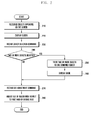
- FIG. 2 is a flowchart of a method for object size adjustment according to an exemplary embodiment of the present invention
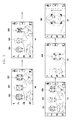
- FIG. 3 is screen representations illustrating enlargement of an object region with respect to the vertical axis of a guide according to an exemplary embodiment of the present invention
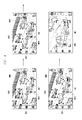
- FIG. 4 is screen representations illustrating enlargement of an object region with respect to the horizontal axis of a guide according to an exemplary embodiment of the present invention
- FIG. 5 shows an illustration for enlargement of an object region if two or more objects are selected according to an exemplary embodiment of the present invention
- FIG. 6 shows another illustration for enlargement of an object region if two or more objects are selected according to an exemplary embodiment of the present invention
- FIG. 7 is a flowchart of a procedure for object region enlargement regarding a selected region as a single object according to an exemplary embodiment of the present invention.
- FIG. 8 shows an illustration for enlargement of an object region according to an exemplary embodiment of the present invention.
- FIG. 9 shows an illustration for object region enlargement regarding a selected region as a single object according to an exemplary embodiment of the present invention.
- an "object” refers to a distinguishable thing or entity on the screen.
- An object may be independent of another object.
- a face and a vehicle may be objects.
- a distinguishable region or area on the screen may also be an object.
- an icon or a frame on a browser screen may be an object.
- a "guide” includes one or more marks indicating an object region.
- a guide may be displayed, for example, in the form of a corner bracket, a solid line, a dotted line, a rectangle, a square, or a circle, so as to demarcate a region or area.
- Size adjustment refers to enlargement or reduction of the size of an object.
- FIG. 1 is a block diagram of an apparatus for object size adjustment according to an exemplary embodiment of the present invention.
- an apparatus 100 for adjusting the sizes of objects on a screen may include a key input unit 110, a touchscreen 120, and a control unit 130.
- the key input unit 110 generates an input signal for controlling the apparatus 100 in response to key manipulation by a user, and sends the input signal to the control unit 130.
- the key input unit 110 may include a keypad including hard or soft numeric and direction keys, and function keys attached to the apparatus 100.
- the key input unit 110 may receive user input to select a particular object or region. If the apparatus 100 can be operated by using only the touchscreen 120, then the key input unit 110 may be excluded.
- the touchscreen 120 includes a touch sensor 121 and a display unit 122.
- the touch sensor 121 detects a touch input by the user and the location of the touch input.
- the touch sensor 121 may be realized, for example, by using a capacitive, resistive, infrared, or pressure sensor. Any sensor capable of detecting contact or pressure may be utilized as the touch sensor 121.
- the touch sensor 121 generates a touch signal corresponding to the user's touch and sends the touch signal to the control unit 130.
- the touch signal includes coordinate data of the touch point. If the user makes a touch-point move gesture, the touch sensor 121 generates a touch signal including coordinate data describing the path of the touch-point move, and forwards the generated touch signal to the control unit 130.
- the touch sensor 121 may detect a type user input (for example, touch, multi-touch, or drag) for selecting an object or region. This is described in more detail later.
- a type user input for example, touch, multi-touch, or drag
- the display unit 122 may be realized using Liquid Crystal Display (LCD) devices, Organic Light Emitting Diodes (OLED), or Active Matrix OLED (AMOLED).
- the display unit 122 may display various information such as menus, input data and function-setting data to the user in a visual format. In particular, the display unit 122 may display original images and size-adjusted images.
- the apparatus 100 for adjusting object sizes is depicted as having a touchscreen capability, the present exemplary embodiment may be applied to an apparatus for adjusting object sizes with or without a touchscreen capability. If the present exemplary embodiment is applied to an apparatus for adjusting object sizes without a touchscreen capability, the function of the touchscreen 120 may be limited to that of the display unit 122.
- the control unit 130 controls overall operations of individual components of the apparatus 100.
- the control unit 130 controls a process of recognizing objects on the screen, displaying guides indicating object regions, receiving a command for object selection, receiving a command for size adjustment, adjusting the size of a selected object region with respect to at least a first axis or a second axis of the corresponding guide (where the first axis is perpendicular to the second axis), and displaying the size-adjusted object region.
- the control unit 130 includes an object recognizer 131 and an object size adjuster 132.
- the object recognizer 131 may recognize one or more objects appearing on the display unit 122.
- an object may be any distinguishable thing or entity on the display unit 122, and an object may be independent of another object.
- a face and a vehicle may be objects.
- a distinguishable region or area on the screen may also be an object.
- an icon or a frame on a browser screen may be an object.
- the object recognizer 131 may recognize an object in various ways.
- the object recognizer 131 may recognize things or faces appearing in images or moving images being displayed on the screen as objects. If the apparatus 100 is attached to or includes a digital camera, the object recognizer 131 may recognize a subject on which the digital camera is focused as an object. If the apparatus 100 is used as a webpage browser, the object recognizer 131 may recognize frames in the webpage as objects. That is, the object recognizer 131 may recognize a distinguishable region or area on the screen as an object. In addition, if a region on the screen is selected by a command from the key input unit 110 or touch sensor 121, the object recognizer 131 may recognize the selected region as an object.
- the object size adjuster 132 may control an operation to display a guide indicating a region of the recognized object.
- a guide includes one or more marks indicating an object region.
- a guide may be displayed, for example, in the form of a corner bracket, a solid line, a dotted line, a rectangle, a square, or a circle, so as to demarcate a region or area.
- a region or area may have a first length in a first axis direction and a second length in a second axis direction, where the first axis is perpendicular to the second axis.
- the object size adjuster 132 may receive an object selection command from the key input unit 110 or the touch sensor 121. If the touch sensor 121 is used, the object size adjuster 132 may receive various touch events such as touch, multi-touch, and drag, as an object selection command.
- the object size adjuster 132 may control an operation to adjust the size of a region of the selected object with respect to the first axis or the second axis of the guide, and display the adjusted object region.
- size adjustment refers to an enlargement or a reduction of the size of an object.
- the first axis and second axis of a guide are parallel with boundary lines of the display unit 122. That is, as the screen of the display unit 122 is typically rectangular, the first axis corresponds to one of the horizontal axis and the vertical axis, and the second axis corresponds to the other axis.
- the object size adjuster 132 may enlarge the size of a region in accordance with the length of the display unit 122 in the direction of the reference axis.
- the object size adjuster 132 may also enlarge the size of a region while maintaining the width-to-height ratio of the corresponding guide.
- the object size adjuster 132 may treat the two or more selected objects as a single combined object and display a guide indicating the region of the combined object.
- the object size adjuster 132 may restore an original size of a size-adjusted region and display the region at the original size.
- control unit 130 the object recognizer 131 and the object size adjuster 132 are treated as separate entities having different functions, they need not necessarily be separate entities.
- control unit 130 may directly perform the functions of the object recognizer 131 and object size adjuster 132.
- FIG. 2 is a flowchart of a method for object size adjustment according to an exemplary embodiment of the present invention.
- the control unit 130 of the object size adjustment apparatus 100 recognizes objects appearing on the screen in step 210.
- Still or moving images may be displayed on the screen.
- an object may be any distinguishable thing or entity on the screen, and may be independent of another object.
- a face and a vehicle may be objects.
- a distinguishable region or area on the screen may also be an object.
- an icon or a frame on a browser screen may be an object.
- the control unit 130 may recognize an object in various ways. For example, the control unit 130 may recognize things or faces appearing in still images or in moving images displayed on the screen as objects. If the apparatus 100 is attached to or includes a digital camera, the control unit 130 may recognize a subject on which the digital camera is focused as an object. If the apparatus 100 is used as a webpage browser, the control unit 130 may recognize frames in the displayed webpage as objects. That is, the object recognizer 131 may recognize a distinguishable region or area on the screen as an object.
- the control unit 130 displays guides for the recognized objects in step 220.
- a guide is one or more marks indicating an object region.
- a guide may be displayed, for example, in the form of a corner bracket, a solid line, a dotted line, a rectangle, a square, or a circle so as to demarcate a specific region or area.
- the control unit 130 receives an object selection command in step 230.
- the control unit 130 determines whether two or more objects are selected in step 240. If no more than a single object is selected, the control unit 130 proceeds to step 270, and if two or more objects are selected, the control unit 130 proceeds to step 250.
- the control unit 130 may receive an object selection command from the key input unit 110 or the touch sensor 121. If the touch sensor 121 is used, the control unit 130 may receive various touch events such as touch, multi-touch, and drag, as an object selection command. This is described in more detail later.
- control unit 130 treats the selected objects as one combined object in step 250, and displays a guide indicating the region of the combined object in step 260.
- the control unit 130 receives a size adjustment command from the key input unit 110 or the touch sensor 121 in step 270, and adjusts the size of the region of the selected object with respect to the first axis or second axis in step 280.
- the first axis and second axis are parallel with boundary lines of the display unit 122. That is, as the screen of the display unit 122 is typically rectangular, the first axis corresponds to one of the horizontal axis and the vertical axis, and the second axis corresponds to the other axis.
- the control unit 130 may enlarge, assuming that the longer axis is the reference axis, the object region in accordance with the length of the display unit 122 in the direction of the reference axis.
- the control unit 130 may also enlarge the object region while maintaining the width-to-height ratio of the corresponding guide.
- control unit 130 may restore the original size of the adjusted object region and display the region at the original size (not shown).
- FIG. 3 comprises screen representations illustrating enlargement of an object region with respect to the vertical axis of a guide according to an exemplary embodiment of the present invention.
- the control unit 130 recognizes faces appearing in the displayed image as objects 301, 302 and 303, and displays guides made of, for example, dotted lines and corner bracket marks. Guides may be displayed in various forms, and may be made of one of dotted lines and corner bracket marks.
- the control unit 130 receives a selection command and a size adjustment command for the rightmost object 303.
- Size adjustment is an enlargement or a reduction of an object.
- two touch inputs occurred on the object 303: the first touch input was a selection command for the object 303, and the second touch input was a size adjustment command.
- the selection command and size adjustment command may also be generated via the key input unit 110 or by other types of touch gestures.
- the first axis of the guide associated with the object 303 is the vertical direction and the second axis is the horizontal direction. Then, as the first axis is longer, it becomes the reference axis.
- the first axis of the guide may be the same as a longer axis of the display, but this is not required.
- the object 303 is enlarged with respect to the first axis (in the vertical direction) in accordance with the screen size and is enlarged along the second axis (in the horizontal direction) according to the guide ratio so that the aspect ratio of the object 303 is maintained.
- control unit 130 may restore the original size of the adjusted region and display the readjusted region at the original size (not shown).
- FIG. 4 is screen representations illustrating enlargement of an object region with respect to the horizontal axis of a guide according to an exemplary embodiment of the present invention.
- the control unit 130 recognizes cars appearing in the displayed image as objects 401, 402, 403, and 404, and displays guides made of, for example, dotted lines and corner bracket marks. Guides may be displayed in various forms, and may be made of one of dotted lines and corner bracket marks.
- the control unit 130 receives a selection command and a size adjustment command for the bottom-middle object 403. Two touch inputs occurred on the object 403: the first touch input was a selection command for the object 403; and the second touch input was a size adjustment command therefor.
- the first axis of the guide associated with the object 403 is the vertical direction and the second axis is the horizontal direction. Then, as the second axis is longer, it becomes the reference axis. Hence, the object 403 is enlarged with respect to the second axis (in the horizontal direction) in accordance with the screen size and is enlarged along the first axis (in the vertical direction) according to the guide ratio.
- the control unit 130 may restore the original size of the adjusted region and display the readjusted region at the original size (not shown).
- FIG. 5 shows an illustration for enlargement of an object region if two or more objects are selected according to an exemplary embodiment of the present invention.
- control unit 130 recognizes faces appearing in the displayed image as objects 501, 502, and 503, and displays guides made of dotted lines and corner bracket marks.
- the control unit 130 receives a selection command for the middle object 502 and the right object 503.
- Two touch inputs occurred to select the two objects: one touch input was a selection command for the object 502, and another touch input was a selection command for the object 503.
- Multiple objects may be selected together in various ways. For example, two or more objects may be selected at once through the key input unit 110 or through a multi-touch gesture. Use of other exemplary touch inputs is described further in connection with FIG. 6 .
- the control unit 130 treats the selected multiple objects as a single combined object as shown in screen representation (c) of FIG. 5 .
- a translucent box 504 in screen representation (c) of FIG. 5 is merely a visual indicator for the description of the combining process, and thus may be displayed but is not required in practice.
- the control unit 130 controls the display unit 122 to display a guide indicating the region of the combined object 505. If a touch input occurs on the combined object 505, the control unit 130 enlarges the combined object 505 as in screen representation (e) of FIG. 5 . Assume that the first axis of the guide associated with the combined object 505 is the vertical direction and the second axis is the horizontal direction. Then, as the second axis is longer, it becomes the reference axis. Hence, the combined object 505 is enlarged with respect to the second axis (the horizontal direction) in accordance with the screen size and is enlarged along the first axis (the vertical direction) according to the guide ratio. In screen representation (d) of FIG. 5 , if an adjustment cancel command such as a touch on the outside of the guide is received, the control unit 130 may restore the original size of the adjusted region and display the readjusted region at the original size (not shown).
- FIG. 6 shows an illustration for enlargement of an object region if two or more objects are selected according to an exemplary embodiment of the present invention.
- control unit 130 recognizes faces appearing in the displayed image as objects 601, 602, and 603, and displays guides made of dotted lines and corner bracket marks.
- the middle object 602 and the right object 603 are simultaneously selected by the user performing a touch input drawing a shape surrounding the middle object 602 and the right object 603, in a manner different from that of FIG. 5 where two objects were selected by consecutive touches.
- the control unit 130 treats the selected multiple objects as a single combined object 604 and controls the display unit 122 to display a guide indicating the region of the combined object 604 as shown in screen representation (c) of FIG. 6 .
- the combined object 604 is according to the objects that were included in the circle, rather than the circle itself. If a touch input occurs on the combined object 604, the control unit 130 enlarges the combined object 604 as in screen representation (d) of FIG. 6 .
- FIG. 5 Unlike the case of FIG. 5 , if a shape is drawn so as to enclose multiple objects as in FIG. 6 , as it is determined that selection is complete, it is possible to directly perform size adjustment without a separate size adjustment command.
- FIGs. 3 to 6 illustrate object enlargement only, it is also possible to perform object reduction in a similar way. The size of objects may thus be adjusted to be larger or smaller.
- FIG. 7 is a flowchart of a procedure for object region enlargement regarding a selected region as a single object according to an exemplary embodiment of the present invention.
- the control unit 130 receives a selection command for a region on the screen through the key input unit 110 or the touch sensor 121 in step 710.
- the control unit 130 recognizes the selected region as an object in step 720.
- the selected region may be a distinguishable region having lengths in first and second axis directions. The size of a region may be adjusted with respect to a first axis or a second axis perpendicular to the first axis.
- an object may be any distinguishable thing or entity on the screen, and may be independent of another object.
- a face and a vehicle may be objects.
- a distinguishable region or area on the screen may also be an object.
- an icon or a frame on a browser screen may be an object.
- the control unit 130 may recognize an object in various ways. For example, the control unit 130 may recognize things or faces appearing in still images or in moving images displayed on the screen as objects. If the apparatus 100 is attached to or includes a digital camera, the control unit 130 may recognize a subject on which the digital camera is focused as an object. If the apparatus 100 is used for a webpage browser, the control unit 130 may recognize frames in the displayed webpage as objects. That is, the object recognizer 131 may recognize a distinguishable region or area on the screen as an object.
- a guide is one or more marks indicating an object region.
- a guide may be displayed, for example, in the form of a corner bracket, a solid line, a dotted line, a rectangle, a square, or a circle, so as to demarcate a specific region or area.
- the control unit 130 receives an object selection command in step 740.
- the control unit 130 determines whether two or more objects are selected in step 750. If no more than a single object is selected, the control unit 130 proceeds to step 780; and if two or more objects are selected, the control unit 130 proceeds to step 760.
- the control unit 130 may receive an object selection command through the key input unit 110 or touch sensor 121. If the touch sensor 121 is used, the control unit 130 may receive various touch events, such as touch, multi-touch, and drag, as an object selection command.
- control unit 130 treats the selected objects as one combined object in step 760, and displays a guide indicating the region of the combined object in step 770.
- the control unit 130 receives a size adjustment command from the key input unit 110 or touch sensor 121 in step 780, and adjusts the size of the region of the selected object with respect to the first axis or second axis in step 790.
- control unit 130 may restore the original size of the adjusted object region and display the region at the original size (not shown).
- FIGs. 8 and 9 An exemplary embodiment is described with reference to FIGs. 8 and 9 , in which web browser screens are used.
- FIG. 8 shows an illustration for enlargement of an object region according to an exemplary embodiment of the present invention.
- the control unit 130 recognizes a specific region as an object without explicit reception of a selection command.
- the control unit 130 recognizes a frame in the displayed webpage as an object 801 and displays a guide made of a solid line.
- a guide may be displayed in various forms.
- the control unit 130 receives a selection command and a size adjustment command for the object 801. Size adjustment may be enlargement or reduction of an object.
- Size adjustment may be enlargement or reduction of an object.
- a single touch input of a size adjustment command for object 801 is also recognized as the selection command.
- the selection command and the size adjustment command may also be generated by the key input unit 110 or by other types of touch gestures.
- the object 801 is enlarged with respect to the second axis (in the horizontal direction) in accordance with the screen size and is enlarged along the first axis (in the vertical direction) according to the guide ratio.
- FIG. 9 shows an illustration for object region enlargement regarding a selected region as a single object according to an exemplary embodiment of the present invention.
- control unit 130 receives a touch input as a selection command for a region in the displayed webpage. Then, the control unit 130 recognizes the selected region as an object.
- the control unit 130 displays a guide made of a solid line for the recognized object 901.
- a guide may be displayed in various forms.
- the control unit 130 receives a selection command and a size adjustment command for the object 901. Size adjustment is enlargement or reduction of an object. Two touch inputs occurred on the object 901. For example, the first touch input was a selection command for the object 901, and the second touch input was a size adjustment command.
- the selection command and size adjustment command may also be generated by the key input unit 110 or by other types of touch gestures.
- a specific region may be recognized as an object without an explicit selection command, and the size of the recognized object may be directly adjusted in response to a size adjustment command.
- the user may adjust the size of a selected object in a more convenient manner without performing a multi-stage or cumbersome input procedure.
- embodiments of the present invention can be realized in the form of hardware, software or a combination of hardware and software. Any such software may be stored in the form of volatile or non-volatile storage, for example a storage device like a ROM, whether erasable or rewritable or not, or in the form of memory, for example RAM, memory chips, device or integrated circuits or on an optically or magnetically readable medium, for example a CD, DVD, magnetic disk or magnetic tape or the like. It will be appreciated that the storage devices and storage media are embodiments of machine-readable storage that are suitable for storing a program or programs comprising instructions that, when executed, implement embodiments of the present invention.
- embodiments provide a program comprising code for implementing apparatus or a method as claimed in any one of the claims of this specification and a machine-readable storage storing such a program. Still further, such programs may be conveyed electronically via any medium, for example a communication signal carried over a wired or wireless connection and embodiments suitably encompass the same.
Landscapes
- Engineering & Computer Science (AREA)
- Theoretical Computer Science (AREA)
- General Engineering & Computer Science (AREA)
- Human Computer Interaction (AREA)
- Physics & Mathematics (AREA)
- General Physics & Mathematics (AREA)
- Multimedia (AREA)
- Signal Processing (AREA)
- User Interface Of Digital Computer (AREA)
- Controls And Circuits For Display Device (AREA)
- Studio Devices (AREA)
- Digital Computer Display Output (AREA)
Applications Claiming Priority (1)
| Application Number | Priority Date | Filing Date | Title |
|---|---|---|---|
| KR1020120019310A KR102084582B1 (ko) | 2012-02-24 | 2012-02-24 | 화면에 표시된 개체의 크기 조정 방법 및 장치 |
Publications (2)
| Publication Number | Publication Date |
|---|---|
| EP2631778A2 true EP2631778A2 (de) | 2013-08-28 |
| EP2631778A3 EP2631778A3 (de) | 2017-02-15 |
Family
ID=48044522
Family Applications (1)
| Application Number | Title | Priority Date | Filing Date |
|---|---|---|---|
| EP13156404.9A Ceased EP2631778A3 (de) | 2012-02-24 | 2013-02-22 | Verfahren und Vorrichtung zur Objektgrößenanpassung auf einem Bildschirm |
Country Status (7)
| Country | Link |
|---|---|
| US (1) | US9323432B2 (de) |
| EP (1) | EP2631778A3 (de) |
| JP (1) | JP6240619B2 (de) |
| KR (1) | KR102084582B1 (de) |
| AU (1) | AU2013222958B2 (de) |
| IN (1) | IN2014KN01767A (de) |
| WO (1) | WO2013125914A1 (de) |
Cited By (4)
| Publication number | Priority date | Publication date | Assignee | Title |
|---|---|---|---|---|
| WO2015153318A1 (en) * | 2014-04-01 | 2015-10-08 | Microsoft Technology Licensing, Llc | Content display with dynamic zoom focus |
| WO2015153315A1 (en) * | 2014-04-01 | 2015-10-08 | Microsoft Technology Licensing, Llc | Content display with contextual zoom focus |
| CN107637089A (zh) * | 2015-05-18 | 2018-01-26 | Lg电子株式会社 | 显示装置及其控制方法 |
| JP2023035676A (ja) * | 2021-09-01 | 2023-03-13 | キヤノン株式会社 | 画像処理装置およびその制御方法、撮像装置 |
Families Citing this family (15)
| Publication number | Priority date | Publication date | Assignee | Title |
|---|---|---|---|---|
| WO2014139127A1 (en) * | 2013-03-14 | 2014-09-18 | Nokia Corporation | Methods, apparatuses, and computer program products for improved picture taking |
| USD740833S1 (en) * | 2013-04-24 | 2015-10-13 | Samsung Electronics Co., Ltd. | Display screen or portion thereof with graphical user interface |
| JP6351971B2 (ja) * | 2013-12-25 | 2018-07-04 | シャープ株式会社 | 情報処理装置、情報処理方法及びプログラム |
| KR20150099297A (ko) * | 2014-02-21 | 2015-08-31 | 삼성전자주식회사 | 전자장치의 화면 표시 방법 |
| US20150363371A1 (en) * | 2014-06-14 | 2015-12-17 | Siemens Product Lifecycle Management Software Inc. | System and method for adaptive user interface scaling |
| KR102223282B1 (ko) * | 2014-08-07 | 2021-03-05 | 엘지전자 주식회사 | 스마트 줄자를 구비한 이동 단말기 및 그의 물체 길이 측정 방법 |
| KR102384520B1 (ko) * | 2015-06-29 | 2022-04-08 | 엘지전자 주식회사 | 디스플레이 디바이스 및 그 제어 방법 |
| JP6833507B2 (ja) | 2016-12-27 | 2021-02-24 | キヤノン株式会社 | 撮像制御装置及びその制御方法 |
| JP6765956B2 (ja) | 2016-12-27 | 2020-10-07 | キヤノン株式会社 | 撮像制御装置及びその制御方法 |
| JP6833505B2 (ja) * | 2016-12-27 | 2021-02-24 | キヤノン株式会社 | 撮像制御装置及びその制御方法 |
| JP6808480B2 (ja) | 2016-12-27 | 2021-01-06 | キヤノン株式会社 | 撮像制御装置及びその制御方法 |
| JP7040043B2 (ja) * | 2018-01-25 | 2022-03-23 | セイコーエプソン株式会社 | 写真処理装置、写真データの生産方法および写真処理プログラム |
| US11650597B2 (en) | 2019-07-09 | 2023-05-16 | Samsung Electronics Co., Ltd. | Electronic apparatus for identifying object through warped image and control method thereof |
| CN114470765B (zh) * | 2022-01-28 | 2025-10-14 | 网易(杭州)网络有限公司 | 物品展示的交互方法、装置、设备及存储介质 |
| US12219238B2 (en) * | 2022-12-29 | 2025-02-04 | Altek Corporation | Auto framing method and related camera apparatus |
Family Cites Families (67)
| Publication number | Priority date | Publication date | Assignee | Title |
|---|---|---|---|---|
| US5539427A (en) * | 1992-02-10 | 1996-07-23 | Compaq Computer Corporation | Graphic indexing system |
| US20020171650A1 (en) * | 1992-10-16 | 2002-11-21 | Mobile Information Systems, Inc. | Apparatus for graphical fleet management |
| JPH07135594A (ja) * | 1993-11-11 | 1995-05-23 | Canon Inc | 撮像制御装置 |
| JP3435585B2 (ja) * | 1994-10-06 | 2003-08-11 | コニカ株式会社 | カメラ |
| US20020071028A1 (en) * | 1997-05-28 | 2002-06-13 | Nikon Corporation | Image display and recording apparatus and a recording medium on which a category control program is recorded |
| US6281874B1 (en) * | 1998-08-27 | 2001-08-28 | International Business Machines Corporation | Method and system for downloading graphic images on the internet |
| US6377285B1 (en) * | 1999-01-29 | 2002-04-23 | Sony Corporation | Zooming space-grid for graphical user interface |
| EP1054321A3 (de) * | 1999-05-21 | 2002-06-19 | Sony Corporation | Informationsverarbeitungsverfahren und -vorrichtung |
| US6937272B1 (en) * | 2000-11-08 | 2005-08-30 | Xerox Corporation | Display device for a camera |
| DE10140874A1 (de) * | 2001-08-21 | 2003-03-20 | Dosch & Amand Gmbh & Co Kg | Graphische Benutzeroberfläche |
| JP4143956B2 (ja) * | 2002-02-14 | 2008-09-03 | 富士フイルム株式会社 | 画像表示装置及び画像管理プログラム |
| JP2004094423A (ja) * | 2002-08-30 | 2004-03-25 | Dainippon Printing Co Ltd | ウィンドウ制御方法およびシステム |
| JP2004193933A (ja) * | 2002-12-11 | 2004-07-08 | Canon Inc | 画像拡大表示方法・装置・メディア・プログラム |
| US20080177994A1 (en) * | 2003-01-12 | 2008-07-24 | Yaron Mayer | System and method for improving the efficiency, comfort, and/or reliability in Operating Systems, such as for example Windows |
| US7882258B1 (en) * | 2003-02-05 | 2011-02-01 | Silver Screen Tele-Reality, Inc. | System, method, and computer readable medium for creating a video clip |
| US8948468B2 (en) * | 2003-06-26 | 2015-02-03 | Fotonation Limited | Modification of viewing parameters for digital images using face detection information |
| JP4746295B2 (ja) * | 2003-08-25 | 2011-08-10 | 富士フイルム株式会社 | デジタルカメラおよび撮影方法 |
| US20050108620A1 (en) * | 2003-11-19 | 2005-05-19 | Microsoft Corporation | Method and system for selecting and manipulating multiple objects |
| JP4489608B2 (ja) | 2004-03-31 | 2010-06-23 | 富士フイルム株式会社 | ディジタル・スチル・カメラ,画像再生装置および顔画像表示装置ならびにそれらの制御方法 |
| US20090040238A1 (en) * | 2004-10-25 | 2009-02-12 | Mitsue Ito | Image display program and storage medium containing same |
| US7715597B2 (en) * | 2004-12-29 | 2010-05-11 | Fotonation Ireland Limited | Method and component for image recognition |
| EP1913557B1 (de) * | 2005-06-23 | 2016-06-01 | Israel Aerospace Industries Ltd. | System und verfahren zum verfolgen beweglicher objekte |
| JP4487872B2 (ja) * | 2005-07-11 | 2010-06-23 | ソニー株式会社 | 画像処理装置および方法、プログラム並びに記録媒体 |
| JP2007041790A (ja) * | 2005-08-02 | 2007-02-15 | Sony Corp | 表示装置及び方法 |
| EP1949670B1 (de) * | 2005-11-02 | 2012-09-12 | Olympus Corporation | Elektronische kamera |
| US7978936B1 (en) * | 2006-01-26 | 2011-07-12 | Adobe Systems Incorporated | Indicating a correspondence between an image and an object |
| US20070216782A1 (en) * | 2006-03-20 | 2007-09-20 | Donald Lee Chernoff | Method of processing and storing files in a digital camera |
| KR100672605B1 (ko) * | 2006-03-30 | 2007-01-24 | 엘지전자 주식회사 | 아이템 선택 방법 및 이를 위한 단말기 |
| JP4724890B2 (ja) * | 2006-04-24 | 2011-07-13 | 富士フイルム株式会社 | 画像再生装置、画像再生方法、画像再生プログラム及び撮像装置 |
| JP4768537B2 (ja) * | 2006-07-18 | 2011-09-07 | 株式会社リコー | コンテンツ閲覧システムおよびプログラム |
| JP2009087224A (ja) * | 2007-10-02 | 2009-04-23 | Canon Inc | 表示装置、および表示方法 |
| JP4351717B2 (ja) * | 2007-10-12 | 2009-10-28 | シャープ株式会社 | 携帯電話機 |
| US20090109243A1 (en) * | 2007-10-25 | 2009-04-30 | Nokia Corporation | Apparatus and method for zooming objects on a display |
| KR101513024B1 (ko) * | 2008-04-22 | 2015-04-17 | 엘지전자 주식회사 | 단말기 및 이것의 이미지 인식 방법 |
| US8711265B2 (en) * | 2008-04-24 | 2014-04-29 | Canon Kabushiki Kaisha | Image processing apparatus, control method for the same, and storage medium |
| JP4974966B2 (ja) * | 2008-05-19 | 2012-07-11 | キヤノン株式会社 | 画像編集装置及びその制御方法及びプログラム |
| US8400477B1 (en) * | 2008-05-20 | 2013-03-19 | Google Inc. | Object resizing |
| US8913176B2 (en) * | 2008-09-05 | 2014-12-16 | Lg Electronics Inc. | Mobile terminal and method of performing multi-focusing and photographing image including plurality of objects using the same |
| US8279241B2 (en) * | 2008-09-09 | 2012-10-02 | Microsoft Corporation | Zooming graphical user interface |
| JP5202211B2 (ja) * | 2008-09-25 | 2013-06-05 | 三洋電機株式会社 | 画像処理装置及び電子機器 |
| US8683390B2 (en) * | 2008-10-01 | 2014-03-25 | Microsoft Corporation | Manipulation of objects on multi-touch user interface |
| KR20100075167A (ko) | 2008-12-24 | 2010-07-02 | 삼성전자주식회사 | 얼굴인식 기능을 이용한 디지털 영상 촬영 장치 및 방법 |
| EP2207342B1 (de) * | 2009-01-07 | 2017-12-06 | LG Electronics Inc. | Mobiles Endgerät und Kamerabildsteuerungsverfahren dafür |
| JP5470861B2 (ja) * | 2009-01-09 | 2014-04-16 | ソニー株式会社 | 表示装置及び表示方法 |
| WO2010086991A1 (ja) * | 2009-01-30 | 2010-08-05 | 富士通株式会社 | 画像表示装置、画像表示方法及びコンピュータプログラム |
| US8532346B2 (en) * | 2009-03-11 | 2013-09-10 | Sony Corporation | Device, method and computer program product |
| US8532414B2 (en) * | 2009-03-17 | 2013-09-10 | Utc Fire & Security Corporation | Region-of-interest video quality enhancement for object recognition |
| KR101024705B1 (ko) | 2009-04-21 | 2011-03-25 | 주식회사 코아로직 | 영상 처리 장치 및 방법 |
| WO2010124376A1 (en) * | 2009-04-27 | 2010-11-04 | Vincent Charles Cheung | Method, system and computer product for distribution of data objects |
| JP5528081B2 (ja) | 2009-12-10 | 2014-06-25 | キヤノン株式会社 | 情報処理装置の制御方法、情報処理装置、及び、プログラム |
| JP5538865B2 (ja) * | 2009-12-21 | 2014-07-02 | キヤノン株式会社 | 撮像装置およびその制御方法 |
| KR101103161B1 (ko) * | 2010-02-03 | 2012-01-04 | 주식회사 팬택 | 터치 스크린 입력을 이용해서 화면을 제어하는 방법 및 장치 |
| JP2011217284A (ja) * | 2010-04-01 | 2011-10-27 | Olympus Imaging Corp | 撮像装置 |
| CN101930338A (zh) | 2010-07-19 | 2010-12-29 | 苏州佳世达电通有限公司 | 触控系统及其控制方法 |
| KR101397712B1 (ko) * | 2010-07-27 | 2014-06-27 | 주식회사 팬택 | 증강 현실 객체 인식 가이드 제공 장치 및 방법 |
| KR101646616B1 (ko) * | 2010-11-30 | 2016-08-12 | 삼성전자주식회사 | 객체 제어 장치 및 방법 |
| JP5612459B2 (ja) * | 2010-12-24 | 2014-10-22 | 京セラ株式会社 | 携帯端末装置 |
| KR101324336B1 (ko) * | 2010-12-28 | 2013-10-31 | 주식회사 팬택 | 증강 현실 제공 단말기 |
| US9058098B2 (en) * | 2011-02-14 | 2015-06-16 | Sony Corporation | Display control device |
| US8780140B2 (en) * | 2011-02-16 | 2014-07-15 | Sony Corporation | Variable display scale control device and variable playing speed control device |
| US9558013B2 (en) * | 2011-04-12 | 2017-01-31 | Citrix Systems, Inc. | Responsive scroller controls in server-hosted applications |
| JP2011211757A (ja) * | 2011-07-25 | 2011-10-20 | Panasonic Corp | 電子ズーム装置、電子ズーム方法、及びプログラム |
| JP5576841B2 (ja) * | 2011-09-09 | 2014-08-20 | Kddi株式会社 | 押圧による画像のズームが可能なユーザインタフェース装置、画像ズーム方法及びプログラム |
| US9025835B2 (en) * | 2011-10-28 | 2015-05-05 | Intellectual Ventures Fund 83 Llc | Image recomposition from face detection and facial features |
| US9489121B2 (en) * | 2011-11-02 | 2016-11-08 | Microsoft Technology Licensing, Llc | Optimal display and zoom of objects and text in a document |
| KR101366861B1 (ko) * | 2012-01-12 | 2014-02-24 | 엘지전자 주식회사 | 이동 단말기 및 이의 제어방법 |
| US9778829B2 (en) * | 2012-02-17 | 2017-10-03 | Lenovo (Singapore) Pte. Ltd. | Magnification based on eye input |
-
2012
- 2012-02-24 KR KR1020120019310A patent/KR102084582B1/ko active Active
-
2013
- 2013-02-22 EP EP13156404.9A patent/EP2631778A3/de not_active Ceased
- 2013-02-22 US US13/774,371 patent/US9323432B2/en active Active
- 2013-02-25 JP JP2014558682A patent/JP6240619B2/ja active Active
- 2013-02-25 WO PCT/KR2013/001468 patent/WO2013125914A1/en not_active Ceased
- 2013-02-25 AU AU2013222958A patent/AU2013222958B2/en active Active
- 2013-02-25 IN IN1767KON2014 patent/IN2014KN01767A/en unknown
Non-Patent Citations (1)
| Title |
|---|
| FOLEY ET AL: "INPUT DEVICES, INTERACTION TECHNIQUES, AND INTERACTION TASKS", COMPUTER GRAPHICS: PRINCIPLES AND PRACTICE, XX, XX, 1 July 1995 (1995-07-01), pages 347 - 389, XP002295561 * |
Cited By (13)
| Publication number | Priority date | Publication date | Assignee | Title |
|---|---|---|---|---|
| CN106255951B (zh) * | 2014-04-01 | 2019-09-10 | 微软技术许可有限责任公司 | 利用动态变焦聚焦的内容显示 |
| WO2015153315A1 (en) * | 2014-04-01 | 2015-10-08 | Microsoft Technology Licensing, Llc | Content display with contextual zoom focus |
| CN106255951A (zh) * | 2014-04-01 | 2016-12-21 | 微软技术许可有限责任公司 | 利用动态变焦聚焦的内容显示 |
| WO2015153318A1 (en) * | 2014-04-01 | 2015-10-08 | Microsoft Technology Licensing, Llc | Content display with dynamic zoom focus |
| US10042529B2 (en) | 2014-04-01 | 2018-08-07 | Microsoft Technology Licensing, Llc | Content display with dynamic zoom focus |
| CN107637089A (zh) * | 2015-05-18 | 2018-01-26 | Lg电子株式会社 | 显示装置及其控制方法 |
| EP3300382A4 (de) * | 2015-05-18 | 2018-10-24 | LG Electronics Inc. | Anzeigevorrichtung und zugehöriges steuerungsverfahren |
| US10986302B2 (en) | 2015-05-18 | 2021-04-20 | Lg Electronics Inc. | Display device and control method therefor |
| US11323651B2 (en) | 2015-05-18 | 2022-05-03 | Lg Electronics Inc. | Display device and control method therefor |
| US11962934B2 (en) | 2015-05-18 | 2024-04-16 | Lg Electronics Inc. | Display device and control method therefor |
| US12425531B2 (en) | 2015-05-18 | 2025-09-23 | Lg Electronics Inc. | Display device and control method therefor |
| JP2023035676A (ja) * | 2021-09-01 | 2023-03-13 | キヤノン株式会社 | 画像処理装置およびその制御方法、撮像装置 |
| US12367605B2 (en) | 2021-09-01 | 2025-07-22 | Canon Kabushiki Kaisha | Image processing apparatus, control method thereof, and image capturing apparatus |
Also Published As
| Publication number | Publication date |
|---|---|
| EP2631778A3 (de) | 2017-02-15 |
| IN2014KN01767A (de) | 2015-10-23 |
| JP2015508210A (ja) | 2015-03-16 |
| WO2013125914A1 (en) | 2013-08-29 |
| AU2013222958B2 (en) | 2017-11-30 |
| US20130227452A1 (en) | 2013-08-29 |
| JP6240619B2 (ja) | 2017-11-29 |
| US9323432B2 (en) | 2016-04-26 |
| KR102084582B1 (ko) | 2020-03-04 |
| KR20130097567A (ko) | 2013-09-03 |
| AU2013222958A1 (en) | 2014-08-28 |
Similar Documents
| Publication | Publication Date | Title |
|---|---|---|
| AU2013222958B2 (en) | Method and apparatus for object size adjustment on a screen | |
| KR102339674B1 (ko) | 디스플레이 장치 및 방법 | |
| US9489121B2 (en) | Optimal display and zoom of objects and text in a document | |
| JP6264293B2 (ja) | 表示制御装置、表示制御方法及びプログラム | |
| EP2703984A2 (de) | Zoomanzeigeverfahren und Vorrichtung | |
| US8913014B2 (en) | Information processing apparatus and method of controlling same | |
| US10379706B2 (en) | Device for and method of changing size of display window on screen | |
| US10656790B2 (en) | Display apparatus and method for displaying a screen in display apparatus | |
| US9230393B1 (en) | Method and system for advancing through a sequence of items using a touch-sensitive component | |
| CN102436343A (zh) | 基于触摸输入来对齐用户界面元素 | |
| CA2767515A1 (en) | Scrolling method of mobile terminal and apparatus for performing the same | |
| KR102205283B1 (ko) | 적어도 하나의 어플리케이션을 실행하는 전자 장치 및 그 제어 방법 | |
| US8762840B1 (en) | Elastic canvas visual effects in user interface | |
| US20130321350A1 (en) | Virtual ruler for stylus input | |
| CN104035678A (zh) | 滚动方法及使用该滚动方法的电子设备 | |
| US20150012856A1 (en) | Electronic device and method for displaying user interface for one handed operation | |
| JP2015170343A (ja) | 画像表示装置および画像表示方法 | |
| US20130239032A1 (en) | Motion based screen control method in a mobile terminal and mobile terminal for the same | |
| US20150012879A1 (en) | Device and method for moving display window on screen | |
| EP2669783A1 (de) | Virtuelles Lineal für Stifteingabe | |
| CN106940615A (zh) | 一种表格处理方法及装置、用户设备 | |
| JP6455466B2 (ja) | 表示操作装置およびプログラム | |
| US20180173362A1 (en) | Display device, display method used in the same, and non-transitory computer readable recording medium | |
| KR102419695B1 (ko) | 스크롤 제어 방법, 장치, 프로그램 및 컴퓨터 판독가능 기록매체 | |
| CN108205405B (zh) | 显示装置、显示装置的显示方法及存储介质 |
Legal Events
| Date | Code | Title | Description |
|---|---|---|---|
| PUAI | Public reference made under article 153(3) epc to a published international application that has entered the european phase |
Free format text: ORIGINAL CODE: 0009012 |
|
| AK | Designated contracting states |
Kind code of ref document: A2 Designated state(s): AL AT BE BG CH CY CZ DE DK EE ES FI FR GB GR HR HU IE IS IT LI LT LU LV MC MK MT NL NO PL PT RO RS SE SI SK SM TR |
|
| AX | Request for extension of the european patent |
Extension state: BA ME |
|
| PUAL | Search report despatched |
Free format text: ORIGINAL CODE: 0009013 |
|
| AK | Designated contracting states |
Kind code of ref document: A3 Designated state(s): AL AT BE BG CH CY CZ DE DK EE ES FI FR GB GR HR HU IE IS IT LI LT LU LV MC MK MT NL NO PL PT RO RS SE SI SK SM TR |
|
| AX | Request for extension of the european patent |
Extension state: BA ME |
|
| RIC1 | Information provided on ipc code assigned before grant |
Ipc: G06F 3/0488 20130101AFI20170112BHEP Ipc: G06K 9/00 20060101ALI20170112BHEP |
|
| STAA | Information on the status of an ep patent application or granted ep patent |
Free format text: STATUS: REQUEST FOR EXAMINATION WAS MADE |
|
| 17P | Request for examination filed |
Effective date: 20170601 |
|
| STAA | Information on the status of an ep patent application or granted ep patent |
Free format text: STATUS: EXAMINATION IS IN PROGRESS |
|
| 17Q | First examination report despatched |
Effective date: 20180601 |
|
| STAA | Information on the status of an ep patent application or granted ep patent |
Free format text: STATUS: THE APPLICATION HAS BEEN REFUSED |
|
| 18R | Application refused |
Effective date: 20190704 |