EP2639695A2 - Vorrichtung und Verfahren für zentralisierte Anwendungsbenachrichtigungen - Google Patents
Vorrichtung und Verfahren für zentralisierte Anwendungsbenachrichtigungen Download PDFInfo
- Publication number
- EP2639695A2 EP2639695A2 EP13158088.8A EP13158088A EP2639695A2 EP 2639695 A2 EP2639695 A2 EP 2639695A2 EP 13158088 A EP13158088 A EP 13158088A EP 2639695 A2 EP2639695 A2 EP 2639695A2
- Authority
- EP
- European Patent Office
- Prior art keywords
- notification
- mobile terminal
- user
- application
- settings
- Prior art date
- Legal status (The legal status is an assumption and is not a legal conclusion. Google has not performed a legal analysis and makes no representation as to the accuracy of the status listed.)
- Withdrawn
Links
Images

Classifications
-
- G—PHYSICS
- G06—COMPUTING OR CALCULATING; COUNTING
- G06F—ELECTRIC DIGITAL DATA PROCESSING
- G06F9/00—Arrangements for program control, e.g. control units
- G06F9/06—Arrangements for program control, e.g. control units using stored programs, i.e. using an internal store of processing equipment to receive or retain programs
- G06F9/46—Multiprogramming arrangements
- G06F9/54—Interprogram communication
- G06F9/542—Event management; Broadcasting; Multicasting; Notifications
-
- G—PHYSICS
- G06—COMPUTING OR CALCULATING; COUNTING
- G06F—ELECTRIC DIGITAL DATA PROCESSING
- G06F3/00—Input arrangements for transferring data to be processed into a form capable of being handled by the computer; Output arrangements for transferring data from processing unit to output unit, e.g. interface arrangements
- G06F3/14—Digital output to display device ; Cooperation and interconnection of the display device with other functional units
-
- G—PHYSICS
- G06—COMPUTING OR CALCULATING; COUNTING
- G06F—ELECTRIC DIGITAL DATA PROCESSING
- G06F3/00—Input arrangements for transferring data to be processed into a form capable of being handled by the computer; Output arrangements for transferring data from processing unit to output unit, e.g. interface arrangements
- G06F3/14—Digital output to display device ; Cooperation and interconnection of the display device with other functional units
- G06F3/147—Digital output to display device ; Cooperation and interconnection of the display device with other functional units using display panels
-
- G—PHYSICS
- G06—COMPUTING OR CALCULATING; COUNTING
- G06F—ELECTRIC DIGITAL DATA PROCESSING
- G06F9/00—Arrangements for program control, e.g. control units
- G06F9/06—Arrangements for program control, e.g. control units using stored programs, i.e. using an internal store of processing equipment to receive or retain programs
- G06F9/44—Arrangements for executing specific programs
-
- G—PHYSICS
- G06—COMPUTING OR CALCULATING; COUNTING
- G06F—ELECTRIC DIGITAL DATA PROCESSING
- G06F9/00—Arrangements for program control, e.g. control units
- G06F9/06—Arrangements for program control, e.g. control units using stored programs, i.e. using an internal store of processing equipment to receive or retain programs
- G06F9/44—Arrangements for executing specific programs
- G06F9/451—Execution arrangements for user interfaces
-
- H—ELECTRICITY
- H04—ELECTRIC COMMUNICATION TECHNIQUE
- H04M—TELEPHONIC COMMUNICATION
- H04M1/00—Substation equipment, e.g. for use by subscribers
- H04M1/72—Mobile telephones; Cordless telephones, i.e. devices for establishing wireless links to base stations without route selection
- H04M1/724—User interfaces specially adapted for cordless or mobile telephones
- H04M1/72403—User interfaces specially adapted for cordless or mobile telephones with means for local support of applications that increase the functionality
Definitions
- the present invention relates to an apparatus and method for application notifications. More particularly, the present invention relates to an apparatus and method for providing centralized application notifications.
- Mobile terminals are developed to provide wireless communication between users. As technology has advanced, mobile terminals now provide many additional features beyond simple telephone conversation. For example, mobile terminals are now able to provide additional functions such as an alarm, a Short Messaging Service (SMS), a Multimedia Message Service (MMS), E-mail, games, remote control of short range communication, an image capturing function using a mounted digital camera, a multimedia function for providing audio and video content, a scheduling function, and many more. With the plurality of features now provided, a mobile terminal has effectively become a necessity of daily life.
- SMS Short Messaging Service
- MMS Multimedia Message Service
- E-mail electronic mail
- games remote control of short range communication
- an image capturing function using a mounted digital camera a multimedia function for providing audio and video content
- a scheduling function a scheduling function
- ⁇ олователи may be used to inform the user of changed conditions or new content.
- an E-mail application may issue a notification when a new E-mail has been received.
- a social networking application may issue a notification when a friend is located nearby.
- These notifications may have various forms depending on the mobile terminal.
- the mobile terminal may use an audible alarm to signal a notification, or flash LEDs provided on the mobile terminal in a particular manner.
- a notification may appear in a status bar, on an idle screen, on a home page, or as part of an application icon. The notification may appear as an icon or as a pop-up window.
- the user typically manages notifications on a per-application basis.
- the user executes the E-mail application, navigates to a setting page, and sets the notifications for the E-mail application. If the user would like to change the settings for a different application, the user must perform a similar process for that application.
- some mobile terminals do allow the user to turn notifications on or off from a centralized user interface, or control the intensity of an alarm or vibration, more fine-tuned control is generally performed through each application. As a result, it is difficult for the user to manage or coordinate the various notification schemes of different applications on the mobile terminal. Accordingly, there is a need for an apparatus and method for providing an improved notification management system.
- an aspect of the present invention is to provide an apparatus and method for centralized management of application notifications.
- a mobile terminal includes a communication unit for receiving notification data from an external device, at least one application, each application having a notification function for notifying a user when corresponding notification data is received, a display unit, a notification management unit for generating a user interface for managing the notifications of the at least one application, and for generating notification settings for each of the at least application settings, according to user input, a storage unit for storing the notification settings generated by the notification management unit, and a controller for controlling the display unit to display the user interface generated by the notification management unit and for controlling the mobile terminal to generate a notification in response to receiving the notification data, the notification generated according to the stored notification settings.
- a method of adjusting notification settings in a mobile terminal according to context includes generating a notification in the mobile terminal according to stored notification settings, in response to receiving notification data from an external device, waiting for a user of the mobile terminal to respond to the notification, when the user responds to the notification or fails to respond after a predetermined period, recording information about the notification and the user's response thereto, and adjusting the stored notification settings according to the recorded information.
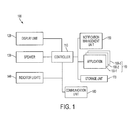
- FIG. 1 is a diagram of a mobile terminal according to an exemplary embodiment of the present invention.
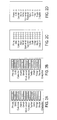
- FIGs. 2A-2D show a user interface for a notification management unit according to an exemplary embodiment of the present invention
- FIG. 3 shows a notification importance setting screen according to exemplary embodiments of the present invention.
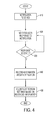
- FIG. 4 is a flowchart of a method for context-sensitive notification management according to an exemplary embodiment of the present invention.
- Exemplary embodiments of the present invention include an apparatus and method for centralized notification management. While the apparatus described herein is referred to as a mobile terminal, exemplary embodiments of the present invention may be applied to any type of portable device, such as a smart phone, laptop, Personal Digital Assistant (PDA), feature phone, portable music player, personal entertainment device, and the like.
- portable device such as a smart phone, laptop, Personal Digital Assistant (PDA), feature phone, portable music player, personal entertainment device, and the like.
- PDA Personal Digital Assistant
- FIG. 1 is a diagram of a mobile terminal according to an exemplary embodiment of the present invention.
- a mobile terminal 100 may include a controller 110, a display unit 120, a speaker 130, indicator lights 140, a notification management unit 150, a plurality of applications 160-1, 160-2, and 160-3 (hereinafter collectively referred to as the applications 160), a storage unit 170, and a communication unit 180.
- the applications 160 may be omitted (such as, for example, the indicator lights 140), or additional components may be included.
- two or more of the above components may be integrated into a single component.
- the units described above may be implemented as hardware components, software components, or a combination thereof.
- the speaker 130 may be understood as referring only to a physical speaker component, or to a combination of the physical speaker component and software drivers for generating a signal to be output by the physical speaker component.
- the application 160-1 may include software code and related data stored in the storage unit 170 that, when executed by the controller 110, cause the mobile terminal 100 to carry out the functions of the application 160-1. It would be understood by a person of ordinary skill in the art that at least some of the units of the mobile terminal 100 would require a hardware component in order to carry out their respective functions.
- the controller 110 controls overall operations of the mobile terminal 100.
- the controller 110 may be a Central Processing Unit (CPU) of the mobile terminal, which executes an Operating System (OS) (not shown) stored in the storage unit 170.
- the controller 110 may also execute instructions of the notification management unit 150 and the applications 160.
- the controller 110 controls operations of the display unit 120 and the speaker 130.
- the applications 160 provide a variety of features to the user.
- the applications 160 may include an E-mail application, a social network application (such as FacebookTM), games, news programs, and the like.
- the applications 160 may be pre-installed by a manufacturer of the mobile terminal 100 or downloaded by the user.
- Some of the applications 160 include a notification function for notifying the user of useful information. The purpose of the notification may vary from application to application.
- An E-mail application may notify the user when new E-mail is received.
- a news application may notify the user when a news article has been posted. Other applications may provide similar notifications to the user.
- the display unit 120 displays a user interface to the user that provides a single screen to manage notification for each of the applications 160.
- the display unit 120 may also display notifications to the user. These notifications may be displayed as an icon in a status bar, idle page, or home page; as a pop-up window, or as a component of an application window.
- the notifications may also be displayed in other formats on the display unit 120.
- the display unit 120 may be provided as a Liquid Crystal Display (LCD).
- the display unit 120 may include a controller for controlling the LCD, a video memory in which image data is stored and an LCD element. If the LCD is provided as a touch screen, the display unit 120 may perform a part or all of the functions of an input unit (not shown).
- Notifications may also be communicated to the user via the indicator lights 140 and the speaker 130.
- the indicator lights 140 may be activated, lighted with different colors, or flash in response to a notification.
- the behavior of the indicator lights 140 may vary according to an importance of type of the notification.
- the speaker may be used to generate an audible notification (such as a ring).
- Additional components not shown in FIG. 1 , may also be employed.
- the mobile terminal may be equipped with a vibration device to vibrate the mobile terminal 100 when a notification is received.
- the indicator lights may be provided as Light Emitting Diodes (LEDs) as show in FIG. 1 , and may be provided separately or integrated with one or more key input units (not shown).
- LEDs Light Emitting Diodes
- the notification management 150 manages notifications for the applications 160 on behalf of the user.
- the notification management unit 150 provides a single point for management of the notifications provided by the applications 160.
- the user may employ a user interface provided by the notification management unit 150 to manage notifications for each of the applications 160 in one place. Examples of this user interface are described below with respect to FIGs. 2A-2D and 3 .
- the notification management unit 150 may also manage notification profiles. Notification profiles are saved notification settings for each of the applications 160, and may be set by the user for particular locations or times. According to another exemplary embodiment of the present invention, a notification profile may be generated according to the user's pattern of behavior with respect to notifications. This process is described below with respect to FIG. 4 .
- the notification management unit 150 may be a stand-alone unit or application as shown in FIG. 1 .
- the notification management unit 150 may be a component of the mobile terminal OS.
- the notification management unit 150 and/or the OS may provide an Application Programming Interface (API) to enable the applications 160 to take advantage of the centralized notification management provided by the notification management unit 150.
- API Application Programming Interface
- the storage unit 170 stores data associated with the mobile terminal 100, the notification management unit 150, the applications 160, and other components of the mobile terminal 100. For example, user notification settings and profiles managed by the notification management unit 150 are stored in the storage unit 170.
- the storage unit 170 may be, for example, a hard drive, flash memory, or the like.
- the communication unit 180 communicates with external devices, including other mobile terminals, base stations, servers, and the like.
- the communication unit 180 may include a receiver that receives notification data from an external device, such as a server associated with a particular application.
- the notification data may include notification messages or data which the corresponding application determines as requiring a notification.
- a social networking server associated with a social networking application may transmit a notification message indicating that a friend has posted an update.
- the controller 110 controls the mobile terminal 100 to generate a notification according to the settings managed by the notification management unit 150.
- an E-mail application may automatically receive new E-mail messages from an E-mail server. When the E-mail application receives the E-mail messages, the E-mail application may generate a notification according to the notification settings.
- FIGs. 2A-2D show a user interface for a notification management unit according to an exemplary embodiment of the present invention.
- each screen provides a mechanism for the user to individually set a particular notification mechanism.
- FIG. 2A provides a user interface to enable the user to control sound settings for notifications. While the sound settings are shown as a bar in FIG. 2A , the particular user interface mechanism may vary, and may be modified according to the capabilities of the mobile terminal 100. For example, a user interface as shown in FIG. 2A may be provided for a mobile terminal having a touch screen, while a user interface having arrows and a focus highlight may be employed for a mobile terminal employing key input units.
- FIGs. 2A-2D provide a single screen for the user to manage corresponding notifications for each application.
- the screen shown in FIG. 2A allows the user to control audio notifications for each application.
- An alarm application may be set to a high sound setting, while other applications may have a low sound setting or have sound disabled for notifications.
- FIGS. 2B-2D show similar screens for managing vibration settings, indicator light settings, and status bar notifications. The screens may vary depending upon the notification schemes available on the mobile terminal 100; a mobile terminal which does not have indicator lights may omit the indicator light screen.
- the user may store the settings in the storage unit 170 as a profile.
- a profile refers to saved notification settings for each of the applications 170.
- the user may create a profile having notification settings appropriate for a particular time or location. For example, when the user is at work, the user may set a work profile in which work-related notifications are given high importance, via a loud alarm sound or vibration, and other notifications are given a lower importance, such as a status bar icon or pop-up, or disabled entirely.
- the user may configure the notification management unit 150 to automatically load a notification profile during a particular time of day or when the mobile terminal 100 is in a particular location. For example, during business hours the notification management unit 150 may activate a work profile, and set the notification settings for each of the applications 160 according to the settings contained in the work profile.
- the notification management unit 150 may provide a profile management screen (not shown). Through the profile management screen, the user may create or edit profiles, set conditions (e.g., time or location) in which a certain profile is to be used, set a previously stored profile, and perform other profile management operations.
- the mobile terminal 100 may have default profiles pre-installed, such as "work” or "home”.
- notification settings that might be useful for work or home settings may be pre-defined. The user may then modify these default profiles as appropriate or create new ones as described above.
- a profile may be loaded according to a time of day or location.
- the mobile terminal may include one or more applications or components that allow the mobile terminal 100 to determine the current time and/or the current location of the mobile terminal 100.
- the mobile terminal 100 may include a clock function and Global Positioning System (GPS) unit (not shown) to determine a time of day and location of the mobile terminal 100.
- GPS Global Positioning System
- the mobile terminal 100 may employ triangulation to determine the current location.
- FIG. 3 shows a notification importance setting screen according to exemplary embodiments of the present invention.
- the notification management unit 150 may also provide a notification importance setting for each of the applications 160.
- the user may set an importance of each application using a screen such as the screen shown in FIG. 3 .
- the importance of an application determines the nature of notifications generated by that application.
- the intensity and type of notification may scale with the importance of the corresponding application.
- the type and intensity of the notification may vary according to the importance of the corresponding application.
- Certain notification mechanisms may be reduced or disabled depending on the importance setting. For example, an alarm may sound at 0% volume at a setting of 0% importance, at 50% volume at a setting of 50% importance, and at full volume at a setting of 100% importance.
- a pop-up window may be displayed at a high importance setting, while an icon may be displayed at a medium importance setting, and nothing displayed at a low importance setting.
- audible notifications may be disabled entirely for that notification, while vibrations may remain enabled. At 25% importance, vibrations may be disabled along with audio, and only a status bar icon or pop-window may be displayed. Finally, at 0% importance, all notifications may be disabled.
- Such a system may reflect the concept that audible notifications may be considered more important than non-audible notifications, and thus may be used only for notifications having a high importance.
- the indicator lights 140 may be activated with different colors, flashes, or disabled entirely based on the importance setting
- the notification importance setting screen shown in FIG. 3 may be combined with the setting screens shown in FIGs. 2A-2D .
- a user interface element (not shown) may be provided to enable a user to move between the notification importance setting screen of FIG. 3 and the setting screens shown in FIGs. 2A-2D .
- a user interface element may be provided to enable a user to manage notification settings for an individual application. This element may activate another screen provided by the notification management unit 150, or may execute the corresponding application to enable the user to manage the notifications within the selected application.
- the settings made by the notification management unit 150 may override the settings of each individual application. For example, when application 160-1 triggers a notification, the notification will be performed according to the settings within the notification management unit 150, not the settings defined in the application 160-1.
- the notification management unit 150 or the OS may provide an API to allow the application 160-1 to change the settings for the application 160-1 within the notification management unit 150. In this case, when the user changes a notification setting for the application 160-1 within the application 160-1, these changes may be reflected within the settings managed by the notification management unit 150.
- an API may be provided to allow the user to access the notification management unit 150 from within the applications 160.
- the controller 110 executes the notification management unit 150 to enable the user to change the notification settings for the application 160-1.
- a user interface element or other option may be provided to allow the user to return to the application 160-1 once the user has made the desired changes to the notification settings.
- the user creates and manages each profile manually.
- the profiles may also be generated by the notification management unit 150 according to the user's behavior with respect to notifications at different times and locations. An exemplary process is described below with respect to FIG. 4 .
- FIG. 4 is a flowchart of a method for context-sensitive notification management according to an exemplary embodiment of the present invention.
- the notification management unit 150 may adjust notification settings according to a current context, such as a current location or time. By monitoring the user's interaction with notifications, the notification management unit 150 learns how notifications should best be presented to the user in a given context.
- FIG. 4 shows an example of this process.
- step 410 the mobile terminal 100 receives notification data and presents the notification to the user according to the notification settings defined for the associated application.
- the notification management unit 150 detects the notification and waits for the user to respond to the notification in step 420.
- step 430 the notification management unit 150 determines whether the user has responded to the notification. If the user has not responded to the notification, the notification management unit 150 continues to wait for a response in step 420.
- the notification management unit 150 may interpret several types of actions as a response. For example, a response may occur when the user accesses the application that generated the notification, or when the user dismisses the notification (e.g., by turning off the alarm or dismissing a pop-up window). In addition, the notification management unit 150 may interpret the user's failure to respond to the notification after a predetermined time as a response in itself.
- the notification management unit 150 records information about the response.
- the information may include a location and time when the notification was generated and a location and time when the user responded to the notification.
- the information may also include how the user responded to the notification, such as whether the user opened the application, dismissed the notification, or did not respond to the notification after a predetermined period of time.
- the notification management unit 150 adjusts the notification settings for the applications based on the recorded information.
- the notification management unit 150 may omit this step if not enough information has been recorded to adjust the notification settings accurately. However, once enough information has been recorded, the notification management unit 150 may use the recorded information to adjust the notification settings in a context-sensitive way. If the user consistently responds to notifications from a particular application quickly, the notification management unit 150 may conclude that the application is important and increase the application's importance setting. On the other hand, if the user rarely responds to a notification within a certain time, the notification management unit 150 may conclude that the application is unimportant and reduce the application's importance setting.
- Adjustments may be made according to any of the information recorded in step 440. For example, if the notification management unit 150 determines that the user responds to E-mail notifications quickly in the morning, but waits for a longer time before responding in the afternoon, the notification management unit 150 may increase the importance of E-mail notifications in the morning and decrease the importance of the E-mail notifications in the afternoon. Similarly, if the notification management unit 150 determines that the user does not respond to social network application notifications while at work, but waits to respond until arriving home, the notification management unit 150 may reduce the importance of social network application notifications while the user is at work.
- the method shown in FIG. 4 is merely one example of how the notification management unit 150 may adjust notification settings in a context-sensitive way. Other similar methods or modifications would also be apparent to a person of ordinary skill. For example, if the notification management unit 150 initially determines that the user has not responded to a notification (because there was no response after a predetermined time), but later determines that the user has responded to the notification, the notification management unit 150 may update the recorded information to reflect the time, location, and length of wait until response.
- the mobile terminal 100 via the notification management unit 150, enables a user to manage notifications for every application in the mobile terminal from a central location. The user therefore does not need to access each application individually, thereby improving the user's experience with the mobile terminal. Additionally, the mobile terminal may also adjust notification settings according to context, thereby enhancing the user's overall experience with notifications and the mobile terminal.
Landscapes
- Engineering & Computer Science (AREA)
- Theoretical Computer Science (AREA)
- Software Systems (AREA)
- Physics & Mathematics (AREA)
- General Engineering & Computer Science (AREA)
- General Physics & Mathematics (AREA)
- Human Computer Interaction (AREA)
- Multimedia (AREA)
- Signal Processing (AREA)
- Computer Networks & Wireless Communication (AREA)
- Telephone Function (AREA)
- User Interface Of Digital Computer (AREA)
- Mobile Radio Communication Systems (AREA)
Applications Claiming Priority (1)
| Application Number | Priority Date | Filing Date | Title |
|---|---|---|---|
| US13/418,572 US20130241918A1 (en) | 2012-03-13 | 2012-03-13 | Apparatus and method for centralized application notifications |
Publications (2)
| Publication Number | Publication Date |
|---|---|
| EP2639695A2 true EP2639695A2 (de) | 2013-09-18 |
| EP2639695A3 EP2639695A3 (de) | 2014-07-16 |
Family
ID=47900657
Family Applications (1)
| Application Number | Title | Priority Date | Filing Date |
|---|---|---|---|
| EP13158088.8A Withdrawn EP2639695A3 (de) | 2012-03-13 | 2013-03-07 | Vorrichtung und Verfahren für zentralisierte Anwendungsbenachrichtigungen |
Country Status (3)
| Country | Link |
|---|---|
| US (1) | US20130241918A1 (de) |
| EP (1) | EP2639695A3 (de) |
| KR (1) | KR20130105235A (de) |
Cited By (3)
| Publication number | Priority date | Publication date | Assignee | Title |
|---|---|---|---|---|
| CN106412340A (zh) * | 2016-11-30 | 2017-02-15 | 北京奇虎科技有限公司 | 移动终端通知信息的处理方法、装置和移动终端 |
| CN111344660A (zh) * | 2017-11-14 | 2020-06-26 | 三星电子株式会社 | 用于操作应用的电子设备 |
| EP3820130A4 (de) * | 2018-08-23 | 2021-08-11 | Huawei Technologies Co., Ltd. | Verfahren und elektronische vorrichtung zur verarbeitung von benachrichtigungsnachrichten |
Families Citing this family (15)
| Publication number | Priority date | Publication date | Assignee | Title |
|---|---|---|---|---|
| US9479387B2 (en) * | 2012-06-22 | 2016-10-25 | Salesforce.Com, Inc. | Methods and systems for priority-based notifications for mobile devices |
| US9628424B2 (en) * | 2012-11-15 | 2017-04-18 | Samsung Electronics Co., Ltd. | Apparatus and method for sharing time-sensitive data between devices with intermittent connectivity |
| US8972760B1 (en) * | 2013-12-20 | 2015-03-03 | Futurewei Technologies, Inc. | Method and apparatus for reducing power consumption in a mobile electronic device using a second launcher |
| US10475358B2 (en) | 2014-11-14 | 2019-11-12 | Rohinni, LLC | Indicium illumination by light-generating sources |
| US10139551B2 (en) | 2014-11-14 | 2018-11-27 | Rohinni, LLC | Electronic device with light-generating sources to illuminate an indicium |
| CN105630853A (zh) * | 2014-12-01 | 2016-06-01 | 宏达国际电子股份有限公司 | 智能通知过滤方法以及手持通讯装置 |
| CN105183132A (zh) * | 2015-08-18 | 2015-12-23 | 小米科技有限责任公司 | 节能模式启动方法和装置 |
| US11551591B2 (en) | 2016-05-31 | 2023-01-10 | Rohinni, LLC | Multi-function light apparatus |
| US20170372370A1 (en) * | 2016-06-24 | 2017-12-28 | International Business Machines Corporation | Modifying a push notification in response to an event |
| CN107925694B (zh) | 2016-08-10 | 2020-02-21 | 华为技术有限公司 | 管理通知消息的方法、终端及计算机可读存储介质 |
| US10686740B2 (en) * | 2016-09-09 | 2020-06-16 | Microsoft Technology Licensing, Llc | Learned user preference- and behavior-based notification filtering |
| KR102580521B1 (ko) | 2018-07-13 | 2023-09-21 | 삼성전자주식회사 | 전자 장치 및 전자 장치의 음량 조절 방법 |
| US10555274B1 (en) * | 2019-05-10 | 2020-02-04 | Honeywell International Inc. | Monitoring an identification and positioning system |
| US11178095B1 (en) * | 2020-09-04 | 2021-11-16 | Verizon Media Inc. | Method and system for the analysis of user content and interactions to define a call to action |
| US11507346B1 (en) * | 2021-10-25 | 2022-11-22 | GM Global Technology Operations LLC | Intelligent text and voice feedback for voice assistant |
Family Cites Families (8)
| Publication number | Priority date | Publication date | Assignee | Title |
|---|---|---|---|---|
| US20020087649A1 (en) * | 2000-03-16 | 2002-07-04 | Horvitz Eric J. | Bounded-deferral policies for reducing the disruptiveness of notifications |
| US6928300B1 (en) * | 2000-11-09 | 2005-08-09 | Palmsource, Inc. | Method and apparatus for automated flexible configuring of notifications and activation |
| US7873646B2 (en) * | 2004-02-25 | 2011-01-18 | Research In Motion Limited | Method for modifying notifications in an electronic device |
| US20060133586A1 (en) * | 2004-12-08 | 2006-06-22 | Ntt Docomo, Inc. | Information notification system and information notification method |
| GB0601919D0 (en) * | 2006-01-31 | 2006-03-15 | Sonaptic Ltd | Themes for a mobile device |
| US20070275767A1 (en) * | 2006-05-25 | 2007-11-29 | Research In Motion Limited | Temporary modification of a user profile in an electronic device |
| US8745201B2 (en) * | 2009-02-27 | 2014-06-03 | Qualcomm Incorporated | Methods and apparatus for processing discovery signals and/or controlling alert generation |
| EP2381349B1 (de) * | 2010-04-23 | 2020-12-02 | BlackBerry Limited | Verfahren und Vorrichtung zur Steuerung einer Anzeige zur Erzeugung von Benachrichtigungen |
-
2012
- 2012-03-13 US US13/418,572 patent/US20130241918A1/en not_active Abandoned
- 2012-07-02 KR KR1020120071957A patent/KR20130105235A/ko not_active Withdrawn
-
2013
- 2013-03-07 EP EP13158088.8A patent/EP2639695A3/de not_active Withdrawn
Non-Patent Citations (1)
| Title |
|---|
| None |
Cited By (4)
| Publication number | Priority date | Publication date | Assignee | Title |
|---|---|---|---|---|
| CN106412340A (zh) * | 2016-11-30 | 2017-02-15 | 北京奇虎科技有限公司 | 移动终端通知信息的处理方法、装置和移动终端 |
| CN111344660A (zh) * | 2017-11-14 | 2020-06-26 | 三星电子株式会社 | 用于操作应用的电子设备 |
| EP3688568A4 (de) * | 2017-11-14 | 2020-12-09 | Samsung Electronics Co., Ltd. | Elektronische vorrichtung zum betreiben von anwendungen |
| EP3820130A4 (de) * | 2018-08-23 | 2021-08-11 | Huawei Technologies Co., Ltd. | Verfahren und elektronische vorrichtung zur verarbeitung von benachrichtigungsnachrichten |
Also Published As
| Publication number | Publication date |
|---|---|
| KR20130105235A (ko) | 2013-09-25 |
| EP2639695A3 (de) | 2014-07-16 |
| US20130241918A1 (en) | 2013-09-19 |
Similar Documents
| Publication | Publication Date | Title |
|---|---|---|
| US20130241918A1 (en) | Apparatus and method for centralized application notifications | |
| EP3017365B1 (de) | Elektronische vorrichtung und verfahren zur aktualisierung und verwaltung von anwendungsstatusinformationen in der elektronischen vorrichtung | |
| US10110699B2 (en) | Method and system to enable mobile users to receive personalized notifications | |
| US8615221B1 (en) | System and method for selection of notification techniques in an electronic device | |
| US8620295B2 (en) | Method and apparatus for modifying notification settings on a mobile electronic device | |
| US20140006769A1 (en) | Device optimization modes | |
| US20130078958A1 (en) | System and method for managing transient notifications using sensors | |
| EP2481256B1 (de) | Benutzerwählbare umgebungen für mobilkommunikationsvorrichtungen | |
| JP2011509541A (ja) | 移動通信装置用スリープモード | |
| KR101361265B1 (ko) | 복수의 알림 모드들을 이용하는 이동 단말의 알림 방법 및 그 방법을 이용한 이동 단말 | |
| USRE49497E1 (en) | Apparatus, method, and system for desynchronizing notifications across multiple devices | |
| US20140222951A1 (en) | Apparatus and method for syncing device notifications | |
| CN107077386A (zh) | 对软件应用进行优先级化以便管理提醒 | |
| CN103634370A (zh) | 用于使移动用户能够接收个性化通知的方法和系统 | |
| CN105630853A (zh) | 智能通知过滤方法以及手持通讯装置 | |
| US20200382367A1 (en) | Systems and methods for configuring a device action based on one or more events | |
| US11681571B2 (en) | Managing device group configurations across workspaces based on context | |
| US9603122B2 (en) | Communicating normative output settings of computing devices of users within a social locale | |
| EP2226992B1 (de) | Verfahren und Vorrichtung zur Modifizierung von Benachrichtigungseinstellungen in einem tragbaren elektronischen Gerät | |
| WO2019227318A1 (zh) | 物理下行控制信道监测配置、监测方法及装置和基站 | |
| GB2567959A (en) | Dynamically changing sound settings of a device | |
| US20150241958A1 (en) | Electronic device and control method thereof | |
| US9602984B2 (en) | Communicating normative output settings of computing devices of users within a social locale | |
| CN113742037A (zh) | 移动终端及其应用控制方法 | |
| US20250141991A1 (en) | Adaptive alarm management in an electronic device |
Legal Events
| Date | Code | Title | Description |
|---|---|---|---|
| PUAI | Public reference made under article 153(3) epc to a published international application that has entered the european phase |
Free format text: ORIGINAL CODE: 0009012 |
|
| AK | Designated contracting states |
Kind code of ref document: A2 Designated state(s): AL AT BE BG CH CY CZ DE DK EE ES FI FR GB GR HR HU IE IS IT LI LT LU LV MC MK MT NL NO PL PT RO RS SE SI SK SM TR |
|
| AX | Request for extension of the european patent |
Extension state: BA ME |
|
| PUAL | Search report despatched |
Free format text: ORIGINAL CODE: 0009013 |
|
| AK | Designated contracting states |
Kind code of ref document: A3 Designated state(s): AL AT BE BG CH CY CZ DE DK EE ES FI FR GB GR HR HU IE IS IT LI LT LU LV MC MK MT NL NO PL PT RO RS SE SI SK SM TR |
|
| AX | Request for extension of the european patent |
Extension state: BA ME |
|
| RIC1 | Information provided on ipc code assigned before grant |
Ipc: G06F 9/54 20060101AFI20140612BHEP Ipc: H04M 1/72 20060101ALN20140612BHEP Ipc: G06F 3/048 20130101ALN20140612BHEP |
|
| 17P | Request for examination filed |
Effective date: 20150116 |
|
| STAA | Information on the status of an ep patent application or granted ep patent |
Free format text: STATUS: THE APPLICATION HAS BEEN WITHDRAWN |
|
| 18W | Application withdrawn |
Effective date: 20161215 |