EP2642373A2 - Procédé et dispositif électronique permettant de modifier la taille de zone permissible tactile d'un écran tactile - Google Patents
Procédé et dispositif électronique permettant de modifier la taille de zone permissible tactile d'un écran tactile Download PDFInfo
- Publication number
- EP2642373A2 EP2642373A2 EP13001253.7A EP13001253A EP2642373A2 EP 2642373 A2 EP2642373 A2 EP 2642373A2 EP 13001253 A EP13001253 A EP 13001253A EP 2642373 A2 EP2642373 A2 EP 2642373A2
- Authority
- EP
- European Patent Office
- Prior art keywords
- touch screen
- region
- shrunk
- coordinate system
- touch
- Prior art date
- Legal status (The legal status is an assumption and is not a legal conclusion. Google has not performed a legal analysis and makes no representation as to the accuracy of the status listed.)
- Granted
Links
Images

Classifications
-
- G—PHYSICS
- G06—COMPUTING OR CALCULATING; COUNTING
- G06F—ELECTRIC DIGITAL DATA PROCESSING
- G06F3/00—Input arrangements for transferring data to be processed into a form capable of being handled by the computer; Output arrangements for transferring data from processing unit to output unit, e.g. interface arrangements
- G06F3/01—Input arrangements or combined input and output arrangements for interaction between user and computer
- G06F3/048—Interaction techniques based on graphical user interfaces [GUI]
- G06F3/0487—Interaction techniques based on graphical user interfaces [GUI] using specific features provided by the input device, e.g. functions controlled by the rotation of a mouse with dual sensing arrangements, or of the nature of the input device, e.g. tap gestures based on pressure sensed by a digitiser
- G06F3/0488—Interaction techniques based on graphical user interfaces [GUI] using specific features provided by the input device, e.g. functions controlled by the rotation of a mouse with dual sensing arrangements, or of the nature of the input device, e.g. tap gestures based on pressure sensed by a digitiser using a touch-screen or digitiser, e.g. input of commands through traced gestures
-
- G—PHYSICS
- G06—COMPUTING OR CALCULATING; COUNTING
- G06F—ELECTRIC DIGITAL DATA PROCESSING
- G06F3/00—Input arrangements for transferring data to be processed into a form capable of being handled by the computer; Output arrangements for transferring data from processing unit to output unit, e.g. interface arrangements
- G06F3/01—Input arrangements or combined input and output arrangements for interaction between user and computer
- G06F3/03—Arrangements for converting the position or the displacement of a member into a coded form
- G06F3/041—Digitisers, e.g. for touch screens or touch pads, characterised by the transducing means
- G06F3/0412—Digitisers structurally integrated in a display
-
- G—PHYSICS
- G06—COMPUTING OR CALCULATING; COUNTING
- G06F—ELECTRIC DIGITAL DATA PROCESSING
- G06F3/00—Input arrangements for transferring data to be processed into a form capable of being handled by the computer; Output arrangements for transferring data from processing unit to output unit, e.g. interface arrangements
- G06F3/01—Input arrangements or combined input and output arrangements for interaction between user and computer
- G06F3/03—Arrangements for converting the position or the displacement of a member into a coded form
- G06F3/041—Digitisers, e.g. for touch screens or touch pads, characterised by the transducing means
- G06F3/0416—Control or interface arrangements specially adapted for digitisers
Definitions
- the present invention relates generally to a method and electronic device according to pre-characterizing clauses of claims 1 and 9.
- a touch screen is an electronic component that can display a frame of image and in the meantime detect the presence and location of a touch made by a living body. Because touch screens facilitate user-machine interaction that is not only convenient but also intuitive, they are widely applied in various kinds of electronic devices.
- a user may find the use of a touch screen less convenient.
- the user of a large-screen smart phone may be unable to reach some portion of the phone's touch screen if the user is holding the phone with only the right/left hand and manipulating the touch screen with only the right/left thumb.
- the user of a large-screen touch TV may find it difficult to reach some portion of the touch screen without taking one or a few steps.
- a touch screen may have some dead points and as a result some interactions involving these dead points will become unavailable.
- the present invention aims at providing a method and electronic device for changing the size of a touch permissible region of a touch screen.
- the claimed method is used for controlling a touch screen.
- the touch screen displays an interactive frame within a touch permissible region.
- the touch screen can be switched from a normal state into a shrunk state.
- the touch permissible region is confined to a sub-region of the touch screen.
- the touch permissible region extends beyond the sub-region.
- the claimed electronic device includes the aforementioned touch screen and uses the aforementioned method to control the touch screen.
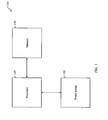
- FIG. 1 shows a simplified block diagram of an electronic device 100 according to an embodiment of the invention.
- the electronic device 100 can be a smart phone, a tablet computer, a computer monitor, a personal digital assistant (PDA), a satellite navigation device, a handhold gaming device, or a television (TV).
- the electronic device 100 of this embodiment includes at least a processor 110, a memory 120, and a touch screen 130.
- the touch screen 130 can be an integrated component or an external component of the electronic device 100.
- the memory 120 stores codes of an operating system (OS) program and some application programs, and some other data.
- the processor 110 executes the OS program and the application programs to control the operations of the electronic device 100.
- the touch screen 130 is an input/output (I/O) interface through which the electronic device 100 displays image frames to the user and receives touch instructions from the user.
- the electronic device 100 can further include some other components, such as other components that interconnect or assist the interactions between the three depicted components, other I/O interfaces that allow the electronic device 100 to communicate with the outside world, and other components of other functions. These other components are omitted from FIG. 1 to avoid distraction.
- the touch screen 130 has a touch permissible region, i.e. a region within which the touch screen 130 displays an interactive frame.
- the interactive frame is a frame of image that can contain one or more touchable portions at which the electronic device 100 is defined to be able to response to a touch operation made by a user of the electronic device 100.
- a touchable portion can be a user-interface object such as an icon, a virtual button, or a virtual knob.
- a touchable portion can be a virtual writing/drawing pad on which the user can write/draw.
- an interactive frame needs not be entirely touchable.
- an interactive frame can have a background image and at least one user-interface object overlaid thereon, wherein the background image can be a wall paper or a blank background.
- the portions of the interactive frame that are not occupied by the user-interface objects can be untouchable portions.
- an interactive frame displayed thereon may include an icon or an unlock image that occupies only a limited portion of the touch screen 130.
- the rest of the interactive frame can be an untouchable portion and be either blank or occupied by a part of a background image.
- the touch screen 130 of this embodiment has a normal state and a shrunk state.
- the shrunk state can be a special state of the touch screen 130, under which the electronic device 100 confines the touch permissible region to a sub-region of the touch screen 130.
- the normal state can be a default state of the touch screen 130, under which the electronic device 100 allows the touch permissible region to extend beyond the sub-region. For example, when the touch screen 130 is in the normal state, the touch permissible region can coincide with a full-region of the touch screen 130.
- the area outside the sub-region can be a blank area or be occupied by a part of a background image. If a background image exists in the area outside of the sub-region, the interactive frame displayed within the sub-region can be overlaid on the background image, like an on screen display (OSD). If a user touches the un-overlaid portion of the background image, the electronic device 100 does not respond to the user's touch. To put it differently, if the interactive frame is originally of the full size of the touch screen 130, i.e.
- the electronic device 100 first shrinks the interactive frame into the size of the sub-region, then overlays the shrunk interactive frame on the background image to create the displayed image frame with a size of the full region of the touch screen 130.
- the displayed image frame is displayed on the touch screen 130 so that the interactive frame, which has been shrunk already, is confined within the sub-region.
- a frame to be displayed is not interactive in nature, e.g. the frame is a read-only image that contains no user-interface objects, no embedded hyperlinks, and no editable areas
- the electronic device 100 can have the touch screen 130 display the frame in the full-region regardless of whether the touch screen 130 is in the normal or the shrunk state.
- a frame can be a video frame or, an image frame provided by a screensaver, a page of a plain electronic book, or a photo image.
- the electronic device 100 can have the touch screen 130 display the non-interactive frame in the full-region if the touch screen 130 is in the normal state and in the sub-region if the touch screen 130 is in the shrunk state.
- the user of the electronic device 100 can set whether the touch screen 130 can be switched between the normal state and the shrunk state. Furthermore, the electronic device 100 can be configured to allow the user to pre-set the orientation, location, and size of the sub-region and the conditions of switching.
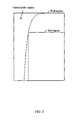
- FIG. 2 shows a schematic diagram of an exemplary setting of the sub-region of the touch screen 130 of FIG. 1 . This example is based on the assumptions that the electronic device 100 is a handhold device, the user is right-handed, and the user sometimes holds the electronic device 100 with the right hand and manipulates the touch screen 130 with only the right thumb. In FIG.2 , the large rectangle represents the full-region of the touch screen 130.
- the user's right thumb When the user is holding the electronic device 100 with the right hand, the user's right thumb is able to reach the region on right side of the touch screen 130 defined by a broken curve, but is unable to reach the region on the left side of the touch screen 130 defined by the broken curve.
- the user's left hand may be unavailable in the meantime, e.g. because it is holding/grabbing another thing such as an umbrella, a handbag, or a handrail.
- the user can pre-set the sub-region so that it's on the lower right corner of the full-region, and to the extent the upper left corner of the sub-region is on the broken curve or on the right side of the broken curve.
- the electronic device 100 may require the user to pre-set the sub-region only once or set the sub-region every time the user wants to switch the touch screen 130 from the normal state to the shrunk state.
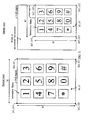
- FIG. 3 shows two schematic diagrams comparing how an interactive frame is displayed on the touch screen 130 of FIG. 1 in the normal and shrunk states.
- the perception of the user may be that an interactive frame has been shrunk from the size of the full-region into the size of the sub-region and placed within the sub-region. If the user is holding the electronic device 100 with the right hand and manipulating the touch screen 130 with only the right thumb, the user can reach all the virtual buttons displayed on the touch screen 130 when it's in the shrunk state. In contrast, if the touch screen 130 is in the normal state, the user's right thumb won't be able to reach the virtual button of number 1. As a result, confining the interactive frame within the sub-region can facilitate the user's one hand manipulation of the touch screen 130.
- a point displayed on coordinates (x, y) when the touch screen 130 is in the normal state will instead be displayed on coordinates (x', y') when the touch screen 130 in the shrunk state.
- the coordinates (x, y) lies within a normal coordinate system defined by four corner points (x1, y1), (x2, y1), (x1, y2), and (x2, y2).
- the normal coordinate system corresponds to the full-region of the touch screen 130; (x2 - x1) and (y2 - y1) are equal to the width W and height H of the full-region, respectively.
- the coordinates (x', y') lies within a shrunk coordinate system defined by four corner points.
- the shrunk coordinate system corresponds to the sub-region of the touch screen 130; (x2' - x1') and (y2'- y1') are equal to the width W' and height H' of the sub-region, respectively.
- the corner points (x2, y2) and (x2', y2') are on the same location of the touch screen 130. In other words, x2 equals to x2', and y2 equals to y2'.
- the electronic device 100 can disable the pixels outside the sub-region, treat the touch screen 130 as if the sub-region constitutes a full-region, and drive the touch screen 130 accordingly. For example, if the size of the touch screen is 4.2 inches and the size of the sub-region is 3.2 inches and the OS program supports both 4.2-inch and 3.2-inch touch screens, in the shrunk state the electronic device 100 can confine an interactive frame within the sub-region by driving the touch screen 130 as if it's a 3.2-inch touch screen.
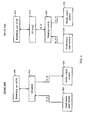
- FIG. 4 shows two schematic diagrams of the OS program of the electronic device 100 when the touch screen 130 is in the normal and shrunk states.
- the OS program has an OS kernel 410 that is responsible for, among other duties, providing core system services and interacting with a touch sensor input module 420, a screen output module 430, and a remaining part 440 of the OS program.
- the touch sensor input module 420 can be a driver that drives the touch screen 130 to detect touches;
- the screen output module 430 can be a driver that drives the touch screen 130 to display frames of images successively.
- the OS kernel 410, the touch sensor input module 420, and the screen output module 430 all uses the normal coordinate system and there may be no need for coordinate transformation.
- the OS kernel 410 can keep using the normal coordinate system but in effect the touch sensor input module 420 and the screen output module 430 use the shrunk coordinate system instead.
- the OS program can further include a mapping module 450 for transforming each point (x, y) on the normal coordinate system into a corresponding point (x', y') on the shrunk coordinate system, and vice versa.
- the mapping module 450 transforms display coordinates from the normal coordinate system to the shrunk coordinate system. For example, when the OS kernel 410 wants a pixel to be displayed on point (x, y) of the normal coordinate system, the mapping module 450 will transform the location into (x', y') on the shrunk coordinate system so that the screen output module 430 can drive the touch screen 130 to display that pixel on point (x', y'). In effect, the mapping module 430 shrinks an interactive frame from the size of the full-region into the size of the sub-region and confines the shrunk interactive frame to the sub-region. Using FIG.
- the mapping module 450 transforms touch sensor coordinates from the shrunk coordinate system to the normal coordinate system. For example, when the touch screen 130 informs the touch sensor input module 420 that a touch has been detected on point (x', y'), the mapping module 450 will transform the location into (x, y) on the normal coordinate system and inform the OS kernel 410 a touch has been detected on point (x, y).
- FIG. 5 shows a flowchart of an exemplary method of controlling the touch screen 130.
- the electronic device 100 first determines whether a set of condition(s) for switching the touch screen 130 from the normal state to the shrunk state is satisfied. If the set of condition(s) is not satisfied, the electronic device 100 enters step 520; otherwise, the electronic device 100 enters step 530.
- the set of condition(s) may include: (1) the user has activated the screen-shrink function (so that the touch screen 130 is allowed to be switched from the normal state to the shrunk state); and (2) the electronic device 100 has detected a trigger event.
- the electronic device 100 is a handhold device, the detection of the trigger event may indicate that the user is holding and manipulating the electronic device 100 with only one hand.
- the trigger event may be that the user unlocks the electronic device 100 with a first gesture.
- the electronic device 100 may allow the user to use either the first or a second unlock gesture to unlock the electronic device 100.
- the first unlock gesture allows the user to unlock the electronic device 100 and switch the touch screen 130 to the shrunk state.
- the second unlock gesture allows the user to unlock the electronic device 100 and maintain the touch screen 130 at the normal state.
- the trigger event may be that the orientation of the electronic device 100 lies within a specific range when the user turns on the electronic device 100 or unlocks electronic device 100.
- the electronic device 100 needs to have an electronic gyroscope, e.g. MEMS gyroscope, or 3D accelerometers in order to determine the orientation.
- the user may need to pre-set the specific range.
- the detected orientation may indicate whether the user is holding the electronic device 100 with only one hand or with both hands.
- the trigger event is that the user specifically instructs the electronic device 100 to switch the touch screen 130 to the shrunk state.
- the electronic device 100 controls the touch screen 130 at the normal state and allows the full-region of the touch screen 130 to serve as the touch permissible region. Specifically, the electronic device 100 maintains the touch screen 130 in the normal state if it's already in the normal state or switches the touch screen 130 to the normal state if it's in the shrunk state. Since the normal state can be a default state of the touch screen 130, when the touch screen 130 is in this state, the electronic device 100 may drive it normally without performing other additional/special operations. For example, when the touch screen 130 is in the normal state, the electronic device 100 may display an interactive frame on the full-region of the touch screen 130 without first shrinking the interactive frame.
- the electronic device 100 controls the touch screen 130 at the shrunk state and confines the touch permissible region to the sub-region. Specifically, the electronic device 100 switches the touch screen 130 to the shrunk state if it's in the normal state or maintains the touch screen 130 in the shrunk state if it's already in the shrunk state. Since the shrunk state can be a special state of the touch screen 130, when the touch screen 130 is in this state, the electronic device 100 may need to perform some additional/special operations. For example, as mentioned above, the electronic device 100 can treat the sub-region as a full-region of the touch screen 130, and drive the touch screen 130 accordingly. As another example, the electronic device 100 can perform coordinate transformation in order to confine a displayed interactive frame within the sub-region.
- the electronic device 100 determines whether another set of condition(s) for switching the touch screen 130 from the shrunk state to the normal state is satisfied. If the set of condition(s) is not satisfied, the electronic device 100 returns to step 530; otherwise, the electronic device 100 enters step 520.
- the set of condition(s) may include the detection of a trigger event.
- the trigger event may be that the electronic device 100 has been locked, whether automatically or manually.
- the trigger event may be that the user unlocks the electronic device 100 using the second one of the aforementioned two unlock gestures.
- the trigger event may be that the orientation of the electronic device 100 does not lie within the aforementioned specific range when the user turns on the electronic device 100 or unlocks the electronic device 100.
- the trigger event is that the user specifically instructs the electronic device 100 to switch the touch screen 130 to the normal state, e.g. by manipulating (such as touching) a screen-expansion image displayed on the touch screen 130 when it's in the shrunk state.
- the electronic device 100 can control the touch screen 130 to additionally display the screen-expansion image whenever the touch screen 130 is in the shrunk state.
- the aforementioned shrunk state can facilitate the user's use the touch screen 130.
- the shrunk state can make the use more convenient if the electronic device 100 is a large-screen smart phone that the user is holding with only the right/left hand and manipulating with only the right/left thumb.
- the shrunk state can make the use more convenient if the electronic device 100 is a large-screen touch TV and the user wants to stand still in using the touch screen 130.
- the shrunk state can make the use more convenient if the touch screen 130 has some dead points and it happens that the user needs to use some of the dead points to interact with the electronic device 100.
- the shrunk state allows a user-interface object of interest to the user to be relocated from a dead point to a normal point of the touch screen 130.
- Any of the aforementioned control methods, or any combination thereof, can be codified into a computer program.
- the computer program can be stored in a computer readable medium, such as the memory 120 shown in FIG. 1 .
- the computer program can cause the electronic device 100 to perform the codified method(s).
Landscapes
- Engineering & Computer Science (AREA)
- General Engineering & Computer Science (AREA)
- Theoretical Computer Science (AREA)
- Human Computer Interaction (AREA)
- Physics & Mathematics (AREA)
- General Physics & Mathematics (AREA)
- User Interface Of Digital Computer (AREA)
- Position Input By Displaying (AREA)
Applications Claiming Priority (1)
| Application Number | Priority Date | Filing Date | Title |
|---|---|---|---|
| US13/424,369 US8866770B2 (en) | 2012-03-19 | 2012-03-19 | Method, device, and computer-readable medium for changing size of touch permissible region of touch screen |
Publications (3)
| Publication Number | Publication Date |
|---|---|
| EP2642373A2 true EP2642373A2 (fr) | 2013-09-25 |
| EP2642373A3 EP2642373A3 (fr) | 2014-01-29 |
| EP2642373B1 EP2642373B1 (fr) | 2018-01-10 |
Family
ID=47900468
Family Applications (1)
| Application Number | Title | Priority Date | Filing Date |
|---|---|---|---|
| EP13001253.7A Active EP2642373B1 (fr) | 2012-03-19 | 2013-03-13 | Procédé et dispositif électronique permettant de modifier la taille de zone permissible tactile d'un écran tactile |
Country Status (4)
| Country | Link |
|---|---|
| US (2) | US8866770B2 (fr) |
| EP (1) | EP2642373B1 (fr) |
| CN (2) | CN103324335B (fr) |
| BR (1) | BR102013006388B1 (fr) |
Cited By (3)
| Publication number | Priority date | Publication date | Assignee | Title |
|---|---|---|---|---|
| EP2806339A1 (fr) * | 2013-05-24 | 2014-11-26 | Samsung Electronics Co., Ltd | Procédé et appareil pour afficher une image sur un dispositif portable |
| EP3255535A4 (fr) * | 2015-03-05 | 2018-03-07 | Huawei Technologies Co., Ltd. | Procédé de traitement pour une interface utilisateur d'un terminal, interface utilisateur et terminal |
| EP4033339A4 (fr) * | 2019-10-23 | 2022-11-30 | Huawei Technologies Co., Ltd. | Procédé d'affichage d'interface utilisateur et dispositif électronique |
Families Citing this family (12)
| Publication number | Priority date | Publication date | Assignee | Title |
|---|---|---|---|---|
| KR101846447B1 (ko) * | 2011-12-08 | 2018-04-06 | 엘지전자 주식회사 | 이동 단말기 및 이동 단말기의 제어 방법 |
| TWI528826B (zh) * | 2012-08-08 | 2016-04-01 | 財團法人工業技術研究院 | 顯示面板、可攜式裝置與應用於其上的控制方法 |
| US20140184503A1 (en) * | 2013-01-02 | 2014-07-03 | Samsung Display Co., Ltd. | Terminal and method for operating the same |
| US8769431B1 (en) * | 2013-02-28 | 2014-07-01 | Roy Varada Prasad | Method of single-handed software operation of large form factor mobile electronic devices |
| US9483171B1 (en) * | 2013-06-11 | 2016-11-01 | Amazon Technologies, Inc. | Low latency touch input rendering |
| JP5759660B2 (ja) * | 2013-06-21 | 2015-08-05 | レノボ・シンガポール・プライベート・リミテッド | タッチ・スクリーンを備える携帯式情報端末および入力方法 |
| KR102009279B1 (ko) * | 2013-09-13 | 2019-08-09 | 엘지전자 주식회사 | 이동 단말기 |
| TWI576759B (zh) * | 2013-09-27 | 2017-04-01 | 和碩聯合科技股份有限公司 | 電子裝置及其畫面解析度調整方法 |
| CN104571777A (zh) * | 2013-10-09 | 2015-04-29 | 宏达国际电子股份有限公司 | 电子装置及其使用者界面操作方法 |
| CN105204744B (zh) * | 2015-09-28 | 2018-10-19 | 北京金山安全软件有限公司 | 一种启动应用程序的方法、装置及电子设备 |
| CN108875333B (zh) * | 2017-09-22 | 2023-05-16 | 北京旷视科技有限公司 | 终端解锁方法、终端和计算机可读存储介质 |
| EP3971480A3 (fr) * | 2020-07-15 | 2022-04-06 | BSH Hausgeräte GmbH | Appareil électroménager, procédé de fabrication et/ou d'utilisation d'un appareil électroménager et dispositif de fabrication d'un appareil électroménager |
Family Cites Families (17)
| Publication number | Priority date | Publication date | Assignee | Title |
|---|---|---|---|---|
| WO2008138093A1 (fr) * | 2007-05-11 | 2008-11-20 | Philippe Stanislas Zaborowski | Dispositif de déplacement sensible à la pression |
| KR100837283B1 (ko) * | 2007-09-10 | 2008-06-11 | (주)익스트라스탠다드 | 터치스크린을 구비한 휴대용 단말기 |
| KR101447752B1 (ko) | 2008-03-25 | 2014-10-06 | 삼성전자주식회사 | 터치스크린에서 화면 분할과 화면 표시장치 및 방법 |
| CN101639741A (zh) * | 2008-08-01 | 2010-02-03 | 鸿富锦精密工业(深圳)有限公司 | 具有触摸屏的电子装置以及触摸屏贴膜 |
| WO2010058538A1 (fr) * | 2008-11-21 | 2010-05-27 | 日本電気株式会社 | Dispositif de retour de force |
| JP5251463B2 (ja) * | 2008-12-03 | 2013-07-31 | ソニー株式会社 | 撮像装置 |
| KR20100065418A (ko) * | 2008-12-08 | 2010-06-17 | 삼성전자주식회사 | 가요성 표시부를 가지는 단말기 및 그의 데이터 표시 방법 |
| KR101565768B1 (ko) | 2008-12-23 | 2015-11-06 | 삼성전자주식회사 | 휴대단말의 잠금 모드 해제 방법 및 장치 |
| KR101624218B1 (ko) | 2009-09-14 | 2016-05-25 | 삼성전자주식회사 | 디지털 촬영 장치 및 그 제어 방법 |
| US9542097B2 (en) | 2010-01-13 | 2017-01-10 | Lenovo (Singapore) Pte. Ltd. | Virtual touchpad for a touch device |
| US20110197156A1 (en) * | 2010-02-09 | 2011-08-11 | Dynavox Systems, Llc | System and method of providing an interactive zoom frame interface |
| CN102870084B (zh) * | 2010-04-30 | 2015-08-19 | 日本电气株式会社 | 信息处理终端和用于该信息处理终端的操作控制方法 |
| KR101361214B1 (ko) | 2010-08-17 | 2014-02-10 | 주식회사 팬택 | 터치스크린의 제어영역을 설정하는 인터페이스 장치 및 방법 |
| CN102221979A (zh) * | 2011-07-27 | 2011-10-19 | 智比特信息技术(镇江)有限公司 | 触摸屏界面显示的控制方法 |
| CN102375689B (zh) * | 2011-09-23 | 2016-03-30 | 上海量明科技发展有限公司 | 触摸屏操作的方法及系统 |
| CN102360249B (zh) * | 2011-09-29 | 2016-09-07 | 上海触乐信息科技有限公司 | 分立式键盘布局系统和设置方法、相应的便携电子设备及控制方法 |
| CN102520860B (zh) * | 2011-12-09 | 2018-01-19 | 中兴通讯股份有限公司 | 一种进行桌面显示控制的方法及移动终端 |
-
2012
- 2012-03-19 US US13/424,369 patent/US8866770B2/en active Active
-
2013
- 2013-03-13 EP EP13001253.7A patent/EP2642373B1/fr active Active
- 2013-03-18 BR BR102013006388-6A patent/BR102013006388B1/pt not_active IP Right Cessation
- 2013-03-19 CN CN201310086617.5A patent/CN103324335B/zh active Active
- 2013-03-19 CN CN201610910132.7A patent/CN107092380B/zh active Active
-
2014
- 2014-09-18 US US14/490,661 patent/US9684403B2/en active Active
Cited By (4)
| Publication number | Priority date | Publication date | Assignee | Title |
|---|---|---|---|---|
| EP2806339A1 (fr) * | 2013-05-24 | 2014-11-26 | Samsung Electronics Co., Ltd | Procédé et appareil pour afficher une image sur un dispositif portable |
| US10691291B2 (en) | 2013-05-24 | 2020-06-23 | Samsung Electronics Co., Ltd. | Method and apparatus for displaying picture on portable device |
| EP3255535A4 (fr) * | 2015-03-05 | 2018-03-07 | Huawei Technologies Co., Ltd. | Procédé de traitement pour une interface utilisateur d'un terminal, interface utilisateur et terminal |
| EP4033339A4 (fr) * | 2019-10-23 | 2022-11-30 | Huawei Technologies Co., Ltd. | Procédé d'affichage d'interface utilisateur et dispositif électronique |
Also Published As
| Publication number | Publication date |
|---|---|
| BR102013006388B1 (pt) | 2020-12-01 |
| BR102013006388A2 (pt) | 2015-06-09 |
| CN107092380A (zh) | 2017-08-25 |
| US9684403B2 (en) | 2017-06-20 |
| CN103324335B (zh) | 2016-12-28 |
| EP2642373B1 (fr) | 2018-01-10 |
| CN103324335A (zh) | 2013-09-25 |
| US20130241842A1 (en) | 2013-09-19 |
| US8866770B2 (en) | 2014-10-21 |
| US20150002402A1 (en) | 2015-01-01 |
| CN107092380B (zh) | 2021-01-15 |
| EP2642373A3 (fr) | 2014-01-29 |
Similar Documents
| Publication | Publication Date | Title |
|---|---|---|
| EP2642373B1 (fr) | Procédé et dispositif électronique permettant de modifier la taille de zone permissible tactile d'un écran tactile | |
| US20220221971A1 (en) | Method of adjusting an ui and user terminal using the same | |
| KR101452038B1 (ko) | 모바일 기기 및 그 화면 제어 방법 | |
| US9582096B2 (en) | Information processing apparatus, information processing method, and program | |
| US10282081B2 (en) | Input and output method in touch screen terminal and apparatus therefor | |
| EP2806339A1 (fr) | Procédé et appareil pour afficher une image sur un dispositif portable | |
| EP2657811A1 (fr) | Dispositif de traitement d'entrée tactile, dispositif de traitement d'informations, et procédé de commande d'entrée tactile | |
| US20140026096A1 (en) | Electronic apparatus, display method, and program | |
| US11435870B2 (en) | Input/output controller and input/output control program | |
| KR20140137996A (ko) | 휴대 단말기에서 화면을 표시하는 방법 및 장치 | |
| KR101861377B1 (ko) | 이동 단말에서 모션 기반의 화면 제어 방법 및 이를 위한 이동 단말 | |
| TW201426500A (zh) | 輸入元件、顯示裝置、顯示系統及其控制方法 | |
| US9019315B2 (en) | Method of controlling display | |
| US20130002714A1 (en) | Display control apparatus and method for controlling display | |
| US20260029897A1 (en) | Interface display method and apparatus, computer device and storage medium | |
| US20130321469A1 (en) | Method of controlling display | |
| CN105892897A (zh) | 一种终端操作方法及设备 | |
| KR101083158B1 (ko) | 터치스크린이 구비된 이동 단말기의 컨텐츠 전환 방법 | |
| JP2008116791A (ja) | 電子書籍装置のページめくり方法 | |
| KR20150106641A (ko) | 디스플레이장치 및 그 제어방법 | |
| JP2015049836A (ja) | 携帯端末 | |
| JP2018005815A (ja) | 入力システム及びその入力装置 | |
| JP2012238176A (ja) | 情報処理装置、情報処理装置の制御方法、及び、プログラム |
Legal Events
| Date | Code | Title | Description |
|---|---|---|---|
| PUAI | Public reference made under article 153(3) epc to a published international application that has entered the european phase |
Free format text: ORIGINAL CODE: 0009012 |
|
| AK | Designated contracting states |
Kind code of ref document: A2 Designated state(s): AL AT BE BG CH CY CZ DE DK EE ES FI FR GB GR HR HU IE IS IT LI LT LU LV MC MK MT NL NO PL PT RO RS SE SI SK SM TR |
|
| AX | Request for extension of the european patent |
Extension state: BA ME |
|
| PUAL | Search report despatched |
Free format text: ORIGINAL CODE: 0009013 |
|
| AK | Designated contracting states |
Kind code of ref document: A3 Designated state(s): AL AT BE BG CH CY CZ DE DK EE ES FI FR GB GR HR HU IE IS IT LI LT LU LV MC MK MT NL NO PL PT RO RS SE SI SK SM TR |
|
| AX | Request for extension of the european patent |
Extension state: BA ME |
|
| RIC1 | Information provided on ipc code assigned before grant |
Ipc: G06F 3/041 20060101AFI20131220BHEP Ipc: G06F 3/0488 20130101ALI20131220BHEP |
|
| 17P | Request for examination filed |
Effective date: 20140729 |
|
| RBV | Designated contracting states (corrected) |
Designated state(s): AL AT BE BG CH CY CZ DE DK EE ES FI FR GB GR HR HU IE IS IT LI LT LU LV MC MK MT NL NO PL PT RO RS SE SI SK SM TR |
|
| 17Q | First examination report despatched |
Effective date: 20160215 |
|
| GRAP | Despatch of communication of intention to grant a patent |
Free format text: ORIGINAL CODE: EPIDOSNIGR1 |
|
| INTG | Intention to grant announced |
Effective date: 20170612 |
|
| GRAJ | Information related to disapproval of communication of intention to grant by the applicant or resumption of examination proceedings by the epo deleted |
Free format text: ORIGINAL CODE: EPIDOSDIGR1 |
|
| INTC | Intention to grant announced (deleted) | ||
| GRAR | Information related to intention to grant a patent recorded |
Free format text: ORIGINAL CODE: EPIDOSNIGR71 |
|
| GRAS | Grant fee paid |
Free format text: ORIGINAL CODE: EPIDOSNIGR3 |
|
| GRAA | (expected) grant |
Free format text: ORIGINAL CODE: 0009210 |
|
| AK | Designated contracting states |
Kind code of ref document: B1 Designated state(s): AL AT BE BG CH CY CZ DE DK EE ES FI FR GB GR HR HU IE IS IT LI LT LU LV MC MK MT NL NO PL PT RO RS SE SI SK SM TR |
|
| INTG | Intention to grant announced |
Effective date: 20171201 |
|
| REG | Reference to a national code |
Ref country code: CH Ref legal event code: EP Ref country code: AT Ref legal event code: REF Ref document number: 963076 Country of ref document: AT Kind code of ref document: T Effective date: 20180115 |
|
| REG | Reference to a national code |
Ref country code: IE Ref legal event code: FG4D |
|
| REG | Reference to a national code |
Ref country code: DE Ref legal event code: R096 Ref document number: 602013031853 Country of ref document: DE |
|
| REG | Reference to a national code |
Ref country code: FR Ref legal event code: PLFP Year of fee payment: 6 |
|
| REG | Reference to a national code |
Ref country code: NL Ref legal event code: MP Effective date: 20180110 |
|
| REG | Reference to a national code |
Ref country code: AT Ref legal event code: MK05 Ref document number: 963076 Country of ref document: AT Kind code of ref document: T Effective date: 20180110 |
|
| PG25 | Lapsed in a contracting state [announced via postgrant information from national office to epo] |
Ref country code: NL Free format text: LAPSE BECAUSE OF FAILURE TO SUBMIT A TRANSLATION OF THE DESCRIPTION OR TO PAY THE FEE WITHIN THE PRESCRIBED TIME-LIMIT Effective date: 20180110 |
|
| PG25 | Lapsed in a contracting state [announced via postgrant information from national office to epo] |
Ref country code: FI Free format text: LAPSE BECAUSE OF FAILURE TO SUBMIT A TRANSLATION OF THE DESCRIPTION OR TO PAY THE FEE WITHIN THE PRESCRIBED TIME-LIMIT Effective date: 20180110 Ref country code: HR Free format text: LAPSE BECAUSE OF FAILURE TO SUBMIT A TRANSLATION OF THE DESCRIPTION OR TO PAY THE FEE WITHIN THE PRESCRIBED TIME-LIMIT Effective date: 20180110 Ref country code: NO Free format text: LAPSE BECAUSE OF FAILURE TO SUBMIT A TRANSLATION OF THE DESCRIPTION OR TO PAY THE FEE WITHIN THE PRESCRIBED TIME-LIMIT Effective date: 20180410 Ref country code: ES Free format text: LAPSE BECAUSE OF FAILURE TO SUBMIT A TRANSLATION OF THE DESCRIPTION OR TO PAY THE FEE WITHIN THE PRESCRIBED TIME-LIMIT Effective date: 20180110 Ref country code: CY Free format text: LAPSE BECAUSE OF FAILURE TO SUBMIT A TRANSLATION OF THE DESCRIPTION OR TO PAY THE FEE WITHIN THE PRESCRIBED TIME-LIMIT Effective date: 20180110 Ref country code: LT Free format text: LAPSE BECAUSE OF FAILURE TO SUBMIT A TRANSLATION OF THE DESCRIPTION OR TO PAY THE FEE WITHIN THE PRESCRIBED TIME-LIMIT Effective date: 20180110 |
|
| PG25 | Lapsed in a contracting state [announced via postgrant information from national office to epo] |
Ref country code: GR Free format text: LAPSE BECAUSE OF FAILURE TO SUBMIT A TRANSLATION OF THE DESCRIPTION OR TO PAY THE FEE WITHIN THE PRESCRIBED TIME-LIMIT Effective date: 20180411 Ref country code: PL Free format text: LAPSE BECAUSE OF FAILURE TO SUBMIT A TRANSLATION OF THE DESCRIPTION OR TO PAY THE FEE WITHIN THE PRESCRIBED TIME-LIMIT Effective date: 20180110 Ref country code: BG Free format text: LAPSE BECAUSE OF FAILURE TO SUBMIT A TRANSLATION OF THE DESCRIPTION OR TO PAY THE FEE WITHIN THE PRESCRIBED TIME-LIMIT Effective date: 20180410 Ref country code: RS Free format text: LAPSE BECAUSE OF FAILURE TO SUBMIT A TRANSLATION OF THE DESCRIPTION OR TO PAY THE FEE WITHIN THE PRESCRIBED TIME-LIMIT Effective date: 20180110 Ref country code: IS Free format text: LAPSE BECAUSE OF FAILURE TO SUBMIT A TRANSLATION OF THE DESCRIPTION OR TO PAY THE FEE WITHIN THE PRESCRIBED TIME-LIMIT Effective date: 20180510 Ref country code: LV Free format text: LAPSE BECAUSE OF FAILURE TO SUBMIT A TRANSLATION OF THE DESCRIPTION OR TO PAY THE FEE WITHIN THE PRESCRIBED TIME-LIMIT Effective date: 20180110 Ref country code: SE Free format text: LAPSE BECAUSE OF FAILURE TO SUBMIT A TRANSLATION OF THE DESCRIPTION OR TO PAY THE FEE WITHIN THE PRESCRIBED TIME-LIMIT Effective date: 20180110 Ref country code: AT Free format text: LAPSE BECAUSE OF FAILURE TO SUBMIT A TRANSLATION OF THE DESCRIPTION OR TO PAY THE FEE WITHIN THE PRESCRIBED TIME-LIMIT Effective date: 20180110 |
|
| REG | Reference to a national code |
Ref country code: DE Ref legal event code: R097 Ref document number: 602013031853 Country of ref document: DE |
|
| PG25 | Lapsed in a contracting state [announced via postgrant information from national office to epo] |
Ref country code: EE Free format text: LAPSE BECAUSE OF FAILURE TO SUBMIT A TRANSLATION OF THE DESCRIPTION OR TO PAY THE FEE WITHIN THE PRESCRIBED TIME-LIMIT Effective date: 20180110 Ref country code: IT Free format text: LAPSE BECAUSE OF FAILURE TO SUBMIT A TRANSLATION OF THE DESCRIPTION OR TO PAY THE FEE WITHIN THE PRESCRIBED TIME-LIMIT Effective date: 20180110 Ref country code: RO Free format text: LAPSE BECAUSE OF FAILURE TO SUBMIT A TRANSLATION OF THE DESCRIPTION OR TO PAY THE FEE WITHIN THE PRESCRIBED TIME-LIMIT Effective date: 20180110 Ref country code: AL Free format text: LAPSE BECAUSE OF FAILURE TO SUBMIT A TRANSLATION OF THE DESCRIPTION OR TO PAY THE FEE WITHIN THE PRESCRIBED TIME-LIMIT Effective date: 20180110 |
|
| REG | Reference to a national code |
Ref country code: CH Ref legal event code: PL |
|
| PLBE | No opposition filed within time limit |
Free format text: ORIGINAL CODE: 0009261 |
|
| STAA | Information on the status of an ep patent application or granted ep patent |
Free format text: STATUS: NO OPPOSITION FILED WITHIN TIME LIMIT |
|
| PG25 | Lapsed in a contracting state [announced via postgrant information from national office to epo] |
Ref country code: CZ Free format text: LAPSE BECAUSE OF FAILURE TO SUBMIT A TRANSLATION OF THE DESCRIPTION OR TO PAY THE FEE WITHIN THE PRESCRIBED TIME-LIMIT Effective date: 20180110 Ref country code: SK Free format text: LAPSE BECAUSE OF FAILURE TO SUBMIT A TRANSLATION OF THE DESCRIPTION OR TO PAY THE FEE WITHIN THE PRESCRIBED TIME-LIMIT Effective date: 20180110 Ref country code: MC Free format text: LAPSE BECAUSE OF FAILURE TO SUBMIT A TRANSLATION OF THE DESCRIPTION OR TO PAY THE FEE WITHIN THE PRESCRIBED TIME-LIMIT Effective date: 20180110 Ref country code: DK Free format text: LAPSE BECAUSE OF FAILURE TO SUBMIT A TRANSLATION OF THE DESCRIPTION OR TO PAY THE FEE WITHIN THE PRESCRIBED TIME-LIMIT Effective date: 20180110 Ref country code: SM Free format text: LAPSE BECAUSE OF FAILURE TO SUBMIT A TRANSLATION OF THE DESCRIPTION OR TO PAY THE FEE WITHIN THE PRESCRIBED TIME-LIMIT Effective date: 20180110 |
|
| REG | Reference to a national code |
Ref country code: BE Ref legal event code: MM Effective date: 20180331 |
|
| 26N | No opposition filed |
Effective date: 20181011 |
|
| REG | Reference to a national code |
Ref country code: IE Ref legal event code: MM4A |
|
| PG25 | Lapsed in a contracting state [announced via postgrant information from national office to epo] |
Ref country code: LU Free format text: LAPSE BECAUSE OF NON-PAYMENT OF DUE FEES Effective date: 20180313 |
|
| PG25 | Lapsed in a contracting state [announced via postgrant information from national office to epo] |
Ref country code: IE Free format text: LAPSE BECAUSE OF NON-PAYMENT OF DUE FEES Effective date: 20180313 |
|
| PG25 | Lapsed in a contracting state [announced via postgrant information from national office to epo] |
Ref country code: SI Free format text: LAPSE BECAUSE OF FAILURE TO SUBMIT A TRANSLATION OF THE DESCRIPTION OR TO PAY THE FEE WITHIN THE PRESCRIBED TIME-LIMIT Effective date: 20180110 Ref country code: BE Free format text: LAPSE BECAUSE OF NON-PAYMENT OF DUE FEES Effective date: 20180331 Ref country code: LI Free format text: LAPSE BECAUSE OF NON-PAYMENT OF DUE FEES Effective date: 20180331 Ref country code: CH Free format text: LAPSE BECAUSE OF NON-PAYMENT OF DUE FEES Effective date: 20180331 |
|
| PG25 | Lapsed in a contracting state [announced via postgrant information from national office to epo] |
Ref country code: MT Free format text: LAPSE BECAUSE OF NON-PAYMENT OF DUE FEES Effective date: 20180313 |
|
| PG25 | Lapsed in a contracting state [announced via postgrant information from national office to epo] |
Ref country code: TR Free format text: LAPSE BECAUSE OF FAILURE TO SUBMIT A TRANSLATION OF THE DESCRIPTION OR TO PAY THE FEE WITHIN THE PRESCRIBED TIME-LIMIT Effective date: 20180110 |
|
| PG25 | Lapsed in a contracting state [announced via postgrant information from national office to epo] |
Ref country code: PT Free format text: LAPSE BECAUSE OF FAILURE TO SUBMIT A TRANSLATION OF THE DESCRIPTION OR TO PAY THE FEE WITHIN THE PRESCRIBED TIME-LIMIT Effective date: 20180110 Ref country code: HU Free format text: LAPSE BECAUSE OF FAILURE TO SUBMIT A TRANSLATION OF THE DESCRIPTION OR TO PAY THE FEE WITHIN THE PRESCRIBED TIME-LIMIT; INVALID AB INITIO Effective date: 20130313 |
|
| PG25 | Lapsed in a contracting state [announced via postgrant information from national office to epo] |
Ref country code: MK Free format text: LAPSE BECAUSE OF NON-PAYMENT OF DUE FEES Effective date: 20180110 |
|
| REG | Reference to a national code |
Ref country code: GB Ref legal event code: 732E Free format text: REGISTERED BETWEEN 20210624 AND 20210630 |
|
| REG | Reference to a national code |
Ref country code: DE Ref legal event code: R081 Ref document number: 602013031853 Country of ref document: DE Owner name: TAIWAN SEMICONDUCTOR MANUFACTURING CO., LTD., TW Free format text: FORMER OWNER: MEDIATEK INC., HSIN-CHU, TW Ref country code: DE Ref legal event code: R081 Ref document number: 602013031853 Country of ref document: DE Owner name: XUESHAN TECHNOLOGIES INC., OTTAWA, CA Free format text: FORMER OWNER: MEDIATEK INC., HSIN-CHU, TW Ref country code: DE Ref legal event code: R082 Ref document number: 602013031853 Country of ref document: DE Representative=s name: RICHARDT PATENTANWAELTE PARTG MBB, DE |
|
| REG | Reference to a national code |
Ref country code: DE Ref legal event code: R081 Ref document number: 602013031853 Country of ref document: DE Owner name: TAIWAN SEMICONDUCTOR MANUFACTURING CO., LTD., TW Free format text: FORMER OWNER: XUESHAN TECHNOLOGIES INC., OTTAWA, ONTARIO, CA Ref country code: DE Ref legal event code: R082 Ref document number: 602013031853 Country of ref document: DE |
|
| REG | Reference to a national code |
Ref country code: GB Ref legal event code: 732E Free format text: REGISTERED BETWEEN 20211216 AND 20211222 |
|
| PGFP | Annual fee paid to national office [announced via postgrant information from national office to epo] |
Ref country code: GB Payment date: 20260327 Year of fee payment: 14 |
|
| PGFP | Annual fee paid to national office [announced via postgrant information from national office to epo] |
Ref country code: DE Payment date: 20260327 Year of fee payment: 14 |
|
| PGFP | Annual fee paid to national office [announced via postgrant information from national office to epo] |
Ref country code: FR Payment date: 20260325 Year of fee payment: 14 |