EP2660700B1 - Procédé, appareil et produit de programme informatique pour faire fonctionner des articles avec plusieurs doigts - Google Patents
Procédé, appareil et produit de programme informatique pour faire fonctionner des articles avec plusieurs doigts Download PDFInfo
- Publication number
- EP2660700B1 EP2660700B1 EP13001409.5A EP13001409A EP2660700B1 EP 2660700 B1 EP2660700 B1 EP 2660700B1 EP 13001409 A EP13001409 A EP 13001409A EP 2660700 B1 EP2660700 B1 EP 2660700B1
- Authority
- EP
- European Patent Office
- Prior art keywords
- item
- items
- touch operation
- touch
- page
- Prior art date
- Legal status (The legal status is an assumption and is not a legal conclusion. Google has not performed a legal analysis and makes no representation as to the accuracy of the status listed.)
- Active
Links
Images



Classifications
-
- G—PHYSICS
- G06—COMPUTING OR CALCULATING; COUNTING
- G06F—ELECTRIC DIGITAL DATA PROCESSING
- G06F3/00—Input arrangements for transferring data to be processed into a form capable of being handled by the computer; Output arrangements for transferring data from processing unit to output unit, e.g. interface arrangements
- G06F3/01—Input arrangements or combined input and output arrangements for interaction between user and computer
- G06F3/048—Interaction techniques based on graphical user interfaces [GUI]
- G06F3/0487—Interaction techniques based on graphical user interfaces [GUI] using specific features provided by the input device, e.g. functions controlled by the rotation of a mouse with dual sensing arrangements, or of the nature of the input device, e.g. tap gestures based on pressure sensed by a digitiser
- G06F3/0488—Interaction techniques based on graphical user interfaces [GUI] using specific features provided by the input device, e.g. functions controlled by the rotation of a mouse with dual sensing arrangements, or of the nature of the input device, e.g. tap gestures based on pressure sensed by a digitiser using a touch-screen or digitiser, e.g. input of commands through traced gestures
- G06F3/04883—Interaction techniques based on graphical user interfaces [GUI] using specific features provided by the input device, e.g. functions controlled by the rotation of a mouse with dual sensing arrangements, or of the nature of the input device, e.g. tap gestures based on pressure sensed by a digitiser using a touch-screen or digitiser, e.g. input of commands through traced gestures for inputting data by handwriting, e.g. gesture or text
-
- G—PHYSICS
- G06—COMPUTING OR CALCULATING; COUNTING
- G06F—ELECTRIC DIGITAL DATA PROCESSING
- G06F3/00—Input arrangements for transferring data to be processed into a form capable of being handled by the computer; Output arrangements for transferring data from processing unit to output unit, e.g. interface arrangements
- G06F3/01—Input arrangements or combined input and output arrangements for interaction between user and computer
- G06F3/048—Interaction techniques based on graphical user interfaces [GUI]
- G06F3/0481—Interaction techniques based on graphical user interfaces [GUI] based on specific properties of the displayed interaction object or a metaphor-based environment, e.g. interaction with desktop elements like windows or icons, or assisted by a cursor's changing behaviour or appearance
- G06F3/04817—Interaction techniques based on graphical user interfaces [GUI] based on specific properties of the displayed interaction object or a metaphor-based environment, e.g. interaction with desktop elements like windows or icons, or assisted by a cursor's changing behaviour or appearance using icons
-
- G—PHYSICS
- G06—COMPUTING OR CALCULATING; COUNTING
- G06F—ELECTRIC DIGITAL DATA PROCESSING
- G06F3/00—Input arrangements for transferring data to be processed into a form capable of being handled by the computer; Output arrangements for transferring data from processing unit to output unit, e.g. interface arrangements
- G06F3/01—Input arrangements or combined input and output arrangements for interaction between user and computer
- G06F3/048—Interaction techniques based on graphical user interfaces [GUI]
- G06F3/0481—Interaction techniques based on graphical user interfaces [GUI] based on specific properties of the displayed interaction object or a metaphor-based environment, e.g. interaction with desktop elements like windows or icons, or assisted by a cursor's changing behaviour or appearance
- G06F3/0483—Interaction with page-structured environments, e.g. book metaphor
-
- G—PHYSICS
- G06—COMPUTING OR CALCULATING; COUNTING
- G06F—ELECTRIC DIGITAL DATA PROCESSING
- G06F3/00—Input arrangements for transferring data to be processed into a form capable of being handled by the computer; Output arrangements for transferring data from processing unit to output unit, e.g. interface arrangements
- G06F3/01—Input arrangements or combined input and output arrangements for interaction between user and computer
- G06F3/048—Interaction techniques based on graphical user interfaces [GUI]
- G06F3/0484—Interaction techniques based on graphical user interfaces [GUI] for the control of specific functions or operations, e.g. selecting or manipulating an object, an image or a displayed text element, setting a parameter value or selecting a range
- G06F3/0486—Drag-and-drop
-
- G—PHYSICS
- G06—COMPUTING OR CALCULATING; COUNTING
- G06F—ELECTRIC DIGITAL DATA PROCESSING
- G06F3/00—Input arrangements for transferring data to be processed into a form capable of being handled by the computer; Output arrangements for transferring data from processing unit to output unit, e.g. interface arrangements
- G06F3/01—Input arrangements or combined input and output arrangements for interaction between user and computer
- G06F3/048—Interaction techniques based on graphical user interfaces [GUI]
- G06F3/0487—Interaction techniques based on graphical user interfaces [GUI] using specific features provided by the input device, e.g. functions controlled by the rotation of a mouse with dual sensing arrangements, or of the nature of the input device, e.g. tap gestures based on pressure sensed by a digitiser
- G06F3/0488—Interaction techniques based on graphical user interfaces [GUI] using specific features provided by the input device, e.g. functions controlled by the rotation of a mouse with dual sensing arrangements, or of the nature of the input device, e.g. tap gestures based on pressure sensed by a digitiser using a touch-screen or digitiser, e.g. input of commands through traced gestures
-
- G—PHYSICS
- G06—COMPUTING OR CALCULATING; COUNTING
- G06F—ELECTRIC DIGITAL DATA PROCESSING
- G06F2203/00—Indexing scheme relating to G06F3/00 - G06F3/048
- G06F2203/041—Indexing scheme relating to G06F3/041 - G06F3/045
- G06F2203/04104—Multi-touch detection in digitiser, i.e. details about the simultaneous detection of a plurality of touching locations, e.g. multiple fingers or pen and finger
-
- G—PHYSICS
- G06—COMPUTING OR CALCULATING; COUNTING
- G06F—ELECTRIC DIGITAL DATA PROCESSING
- G06F2203/00—Indexing scheme relating to G06F3/00 - G06F3/048
- G06F2203/048—Indexing scheme relating to G06F3/048
- G06F2203/04808—Several contacts: gestures triggering a specific function, e.g. scrolling, zooming, right-click, when the user establishes several contacts with the surface simultaneously; e.g. using several fingers or a combination of fingers and pen
Definitions
- the present invention is directed to a touch method and an apparatus thereof and more particularly, to a method and an apparatus for operating items with multiple fingers.
- PDA personal digital assistant
- a PDA phone or a smart phone it not only has various functions of a conventional communication device but also allows a user to write documents, send and receive emails, browse websites, or use instant messaging software through built-in software.
- each data is arranged and displayed on the screen in a form of item, such as an icon or a thumbnail, such that the user may operate each item through finger touch.
- the conventional touch operation is limited to touching of a single item.
- a variation of the touch operation is also limited to a gesture operation with one or more fingers, and one gesture corresponds to a function.
- Such operation manner has advantages of being simple and intuitional, but also comes with disadvantages of lacking variety and being incapable of multiple items. Therefore, it is necessary to provide a more intuitional and convenient method to assist the user in operating a plurality of items on the screen.
- US 2011/271182 A1 discloses an electronic apparatus and a control method thereof.
- the electronic apparatus comprises a touch-controlled panel and a control module
- the control method comprises the steps of: touching and dragging at least one icon shown on the touch-controlled panel to a page-indexing row, the page-indexing row comprising a plurality of number indexes, and each number index representing a page; determining whether the icon is dragged to the site of one of the number index shown in the page-indexing row by the control module; focusing the number index when the icon is dragged to the site of one of the number index; determining whether the icon is touched at the site of the focused number index by the control module; moving the icon to a page represented by the focused number index when the icon is not touched at the site of the focused number index.
- US 2011/0252346 A1 discloses a multifunction device which displays a plurality of selectable user interface objects on the display.
- the device moves a first object in the plurality of selectable user interface objects across the display to a location on the display that is proximate to a second object in the plurality of selectable user interface objects.
- the device creates a folder that contains the first object and the second object.
- the present invention provides a method, an apparatus and a computer program product for operating items with multiple fingers, in which a plurality of items on a screen may be operated with multiple fingers.
- the present invention is directed to a method for operating items with multiple fingers, which is adapted to a portable apparatus having a touch screen, as set forth in claim 1.
- the first touch operation includes a plurality of touch points and the touch points are respectively located on the first items.
- the step of detecting the second touch operation performed on the touch screen and operating the first items according to the detected first touch operation and second touch operation includes detecting the second touch operation swiped on the touch screen, switching from a current page displayed by the touch screen to a result page according a swiping direction of the second touch operation and adding the first items to the result page when the first touch operation is released.
- the step of adding the first items to the result page when the first touch operation is released further includes rearranging items in the result page according to an arrangement rule or placing the first items in a position corresponding to its original position in the result page.
- the step of entering the edit mode of the first items further includes floating the first items on a current page displayed by the touch screen.
- the present invention is also directed to an apparatus for operating items with multiple fingers, as set forth in claim 5.
- the first touch operation includes a plurality of touch points and the touch points are respectively located on the first items.
- the operation module detects the second touch operation swiping on the touch screen by using the detection module, switches from a current page displayed by the touch screen to a result page according a swiping direction of the second touch operation and adds the first items to the result page when the first touch operation is released.
- the operation module further rearranges items in the result page according to an arrangement rule or places the first items in a position corresponding to its original position in the result page after moving the first items to the result page.
- the edit module floats the first items on a current page displayed by the touch screen when entering the edit mode of the first items.
- the present invention is further directed to a computer program product, for being loaded to a portable device to enable the portable device to execute the method for operating items with multiple fingers according to claims 1 to 4.
- the edit mode of the items is entered by multiple fingers continuously touching the items with another finger performing a gesture, such as tapping, swiping or pinching in/out on the screen to perform an operation, such as moving, collecting or page transferring, on the items being edited.
- a gesture such as tapping, swiping or pinching in/out on the screen to perform an operation, such as moving, collecting or page transferring, on the items being edited.
- the present invention improves the method for operating a single item with a finger and provides the user with a method to trigger an edit mode by touching multiple items with multiple fingers so as to perform an edit operation on the multiple items.
- finger operation of the other hand a variety of the operations performed by a user can be increased.
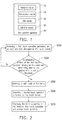
- FIG. 1 is a block diagram illustrating an apparatus for operating items with multiple fingers according to an embodiment of the present invention.
- an item operation apparatus 10 includes a detection module 12, a determination module 14, an edit module 16 and an operation module 18.
- the modules may be, for example, hardware apparatuses composed of logic circuit elements and capable of performing functions of operating items with multiple fingers.
- the modules may also be programs stored in a storage medium of a portable apparatus and capable of being loaded in a processor of the portable apparatus to perform the functions of operating items with multiple fingers, but the present invention is not limited thereto.
- the item operation apparatus 10 may be installed or configured in a portable apparatus (such as a mobile phone, a tablet computer, a notebook computer (NB)) equipped with a touch screen, such that a user of the portable apparatus may operate a plurality of items displayed on the screen with multiple fingers.
- a portable apparatus such as a mobile phone, a tablet computer, a notebook computer (NB)
- NB notebook computer
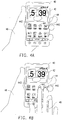
- FIG. 2 is a flowchart illustrating a method for operating items with multiple fingers according to an embodiment of the present invention. Referring to FIG. 2 with FIG. 1 , the method of the present embodiment is adapted to the item operation apparatus 10, and detailed steps of the method of the present embodiment will be described with reference to each element of the item operation apparatus 10 depicted in FIG. 1 .
- the detection module 12 detects a first touch operation performed by a user on at least one item displayed on a touch screen (step S202).
- the first touch operation detected by the detection module 12 includes, for example, a plurality of touch points continuously sensed by the touch screen at the same time or within a short time period. The touch points respectively fall on the items displayed on the touch screen so as to indicate that the user wishes to operate the items simultaneously.
- the determination module 14 accumulates a time of the first touch operation staying on the items and determines whether the staying time is over a predetermined threshold (step S204). In the present embodiment, whether the user is about to tap the items or perform an edit operation on the items is distinguished according to a length of the staying time of the touch operation, and erroneous operations resulted from inadvertent touches of the user may be avoided.
- the flow is returned to the step S202, in which the detection module 12 continues to detect touch operations. Otherwise, if the staying time is over the threshold, it represents that the user intends to perform an edit operation on the items, and the edit module 16 controls the portable apparatus to enter an edit mode of the item (step S206). Therein, the edit module 16, for example, displays all the items touched by the first touch operation on a current page of the touch screen in a manner of floating, jiggling or highlighting, so as to prompt the user that the edit mode of the items is entered.
- the operation module 18 detects a second touch operation performed by the user on the touch screen using the detection module 12 (step S208) and operates the items according to the first touch operation and the second touch operation detected by the detection module 12 (step S210).
- the second touch operation is, for example, a touch operation performed on other items displayed on the touch screen or touch operations of gestures performed on the touch screen, such as a tapping, double tapping, swiping, zoom-in/zoom-out operations and so forth, and the present invention is not limited thereto
- the operation module 18 creates a new folder on a current page and moves or adds all the items touched by the first touch operation to the newly created folder so as to complete the grouping or collecting operation of the items.
- the user may achieve editing a plurality of items simply with multiple fingers so as to increase usage convenience of the apparatus. Further, an interoperation between the second touch operation and the first touch operation is provided by the present invention to increase a variety of the operations on the items.
- the items under the edit operation previously triggered by the first touch operation are departed from their original positions, and floated on the current page.
- the second touch operation is performed on other items or pages on the touch screen
- the items to be edited will not be influenced.
- the items being edited are also moved away from the original page, and the positions of the items being edited are adjusted on the touch screen with the movement of the first touch operation.
- the user releases the first touch operation the items being edited are added or moved to a new page so as to complete the edit operation.
- FIG. 3 is a flowchart illustrating a method for operating items with multiple fingers according to an embodiment of the present invention.
- the method of the present embodiment is adapted to the item operation apparatus 10, and detailed steps of the method of the present embodiment will be described with reference to each element of the item operation apparatus 10 depicted in FIG. 1 .
- the detection module 12 detects a first touch operation performed by the user on at least one first item displayed on the touch screen (step S302). Then, the determination module 14 accumulates a time of the first touch operation staying on the first items and determines whether the staying time is over a predetermined threshold (step S304). If the staying time is not over the threshold, the flow is returned to the step S302, and the detection module 12 continues to detect touch operations. Otherwise, if the staying time is over the threshold, it represents that the user intends to perform an edit operation on the first items. Thus, the edit module 16 controls the portable apparatus to enter an edit mode of the first items (step S306). Detailed implementation of the steps S302 through S306 is identical or similar to the steps S202 through S206 in the above embodiment, and will not be repeatedly described herein.
- the operation module 18 detects a second touch operation performed by the user on a second item displayed on the touch screen so as to open the second item to display a result page (step S308).
- the second item is, for example, a folder, a menu, an icon or a widget. If the second item is an icon of an application, the displayed result page is an operation page of the application. If the second item is a folder, the displayed result page is a content page of the folder.
- the aforementioned types of the result page are merely illustrated as examples, and the present invention is not limited thereto.
- the operation module 18 may also move the first items touched by the first touch operation to the result page, such as the operation page of the application or the content page of the folder, but the present invention is not limited thereto.
- the operation module 18 adds the first items to the result page so as to complete the edit operation of the first items and exit the edit mode (step S312).
- the operation module may, for example, further rearrange items in the result page according to a predetermined arrangement rule.
- the user may simply move or add a plurality of items to other items.
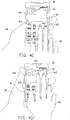
- FIG. 4A through FIG. 4E illustrate an example of a method for operating items with multiple fingers according to an embodiment of the present invention.
- a portable apparatus 40 of the present embodiment is, for example, a smart phone including a touch screen 42, and a page 44 displayed on the touch screen 42 includes icons of a plurality of applications (such as a clock icon 441, a calendar icon 442 and a folder icon 443).
- applications such as a clock icon 441, a calendar icon 442 and a folder icon 443
- the clock icon 441 and the calendar icon 442 are floating on the page 44 so as to prompt the user that the portable apparatus 40 has entered an edit mode of the clock icon 441 and the calendar icon 442.
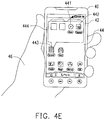
- the user may further touch the folder icon 443 with a finger of the left hand 46 to open a content page 444 of the folder icon 443 (as shown in FIG. 4C ).
- the user may swipe upward with the fingers of the right hand 48 to move the clock icon 441 and the calendar icon 442 into the content page 444 (as shown in FIG. 4D ).
- the user may release the touches from the clock icon 441 and the calendar icon 442 so as to add the clock icon 441 and the calendar icon 442 into the content page 444 (as shown in FIG. 4E ), and the edit operation on the clock icon 441 and the calendar icon 442 is completed.
- FIG. 5 is a flowchart illustrating a method for operating items with multiple fingers according to an embodiment of the present invention.
- the method of the present embodiment is adapted to the item operation apparatus 10, and detailed steps of the method of the present embodiment will be described with reference to each element of the item operation apparatus 10 depicted in FIG. 1 .
- the detection module 12 detects a first touch operation performed by the user on first items displayed on the touch screen (step S502). Then, the determination module 14 accumulates a time of the first touch operation staying on the first items and determines whether the staying time is over a predetermined threshold (step S504). If the staying time is not over the threshold, the flow is returned to the step S502, and the detection module 12 continues to detect touch operations. Otherwise, if the staying time is over the threshold, it represents that the user intends to perform an edit operation on the first items. Thus, the edit module 16 controls the portable apparatus to enter an edit mode of the first items (step S506). Detailed implementation of the steps S502 through S506 is identical or similar to the steps step S202 through S206 in the above embodiment, and will not be repeatedly described herein.
- the operation module 18 detects a second touch operation swiped by the user on the touch screen (step S508) and switches from a current page displayed on the touch screen to a result page according to a swiping direction of the second touch operation (step S510). If the second touch operation is swiped rightward, the displayed result page is, for example, a previous page of the current page. If the swiping direction of second touch operation is leftward, the displayed result page is, for example, a next page of the current page. If the current page is the leftist page of all pages and the swiping direction of second touch operation is rightward, the result page being switched to is, for example, the right most page of all pages.
- the result page being switched to is, for example, the leftist page of all pages.
- the aforementioned page switching manner is merely illustrated as an example, and the present invention is not limited thereto.
- the operation module 18 adds the first items to the result page so as to complete the edit operation of the first item and exit the edit mode (step S512). Moreover, when adding the at least one first item to the result page, the operation module 18 may further rearrange items in the result page according to a predetermined arrangement rule or place the first items in a position corresponding to its original position in the result page, but the present invention is not limited thereto.
- the user may simply move or add a plurality of items into other pages.
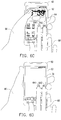
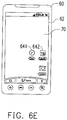
- FIG. 6A through FIG. 6E illustrate an example of a method for operating items with multiple fingers according to an embodiment of the present invention.
- a portable apparatus 60 of the present embodiment is, for example, a smart phone including a touch screen 62, and a page 64 displayed on the touch screen 62 includes icons of a plurality of applications (such as a clock icon 641 and a calendar icon 642).
- a clock icon 641 and a calendar icon 642 displayed on the touch screen 62
- the portable apparatus 60 with the left hand 66 and touches the clock icon 641 and the calendar icon 642 with two fingers of the right hand 68 simultaneously (as shown in FIG.
- the clock icon 641 and the calendar icon 642 are floating on the page 64 so as to prompt the user that the portable apparatus 60 has entered an edit mode of the clock icon 641 and a calendar icon 642. Then, the user may further touch on the touch screen 62 and swipe from the left to the right with fingers of the left hand 66 (as shown in FIG. 6C ) to switch from the page displayed on the touch screen62 to a previous page 70 of the current page 64 (as shown in FIG. 6D ). Finally, the user may release the touches from the clock icon 641 and the calendar icon 642 so as to add the clock icon 641 and the calendar icon 642 to the page 70 (as shown in FIG. 6E ), and finally the edit operation of clock icon 641 and the calendar icon 642 is completed.
- the present invention further provides a computer program product to be loaded into a portable apparatus to execute the aforementioned method for operating items with multiple fingers.
- the computer program product consists of a plurality of code segments (for example, an organization chart establishing program code segment, a form signing program code segment, a setting program code segment, and a deployment program code segment) and after the program code segments are loaded in the portable apparatus and executed, the steps of the method for operating items with multiple fingers are carried out
- the edit mode of the items is triggered by multiple fingers of one hand touching the items, and another operation is performed with fingers of the other hand, so as to open a page for placing the items, switch to another page for moving the items or create a new folder therein for placing the items. Accordingly, a plurality of items displayed on the screen may be operated simultaneously to increase operational variety.
Landscapes
- Engineering & Computer Science (AREA)
- General Engineering & Computer Science (AREA)
- Theoretical Computer Science (AREA)
- Human Computer Interaction (AREA)
- Physics & Mathematics (AREA)
- General Physics & Mathematics (AREA)
- User Interface Of Digital Computer (AREA)
Claims (9)
- Procédé pour actionner des éléments à l'aide de plusieurs doigts, adapté à un appareil portable (40, 60) comportant un écran tactile (42, 62), le procédé comprenant :détecter (S202) une première opération de toucher réalisée sur au moins un premier élément (441, 442, 641, 642) affiché sur l'écran tactile (42, 62) ;accumuler (S204) un temps de maintien de la première opération de toucher sur ledit au moins un premier élément (441, 442, 641, 642) ;déterminer (S204) si le temps de maintien est supérieur à un seuil ;rentrer (S206) dans un mode d'édition dudit au moins un premier élément (441, 442, 641, 642) lorsque le temps de maintien est supérieur au seuil ;détecter (S508) une deuxième opération de toucher donnant un coup sur l'écran tactile (42, 62) pendant que la première opération de toucher reste sur ledit au moins un premier élément (441, 442, 641, 642) et pendant que ledit au moins un premier élément (441, 442, 641, 642) est dans le mode d'édition,commuter (S510) à partir d'une page courante (64) affichée par l'écran tactile (42, 62) vers une page de résultat (70) en fonction d'une direction de frappe de la deuxième opération de toucher pendant que la première opération de toucher reste sur ledit au moins un premier élément (441, 442, 641, 642) ; etajouter (S512) ledit au moins un premier élément (641, 642) à la page de résultat (70) lorsque la première opération de toucher est relâchée.
- Procédé selon la revendication 1, dans lequel la première opération de toucher comprend une pluralité de points de toucher détectés par l'écran tactile (42, 62), et les points de toucher sont respectivement situés sur les premiers éléments (441, 442, 641, 642).
- Procédé selon la revendication 1 ou 2, dans lequel l'étape consistant à ajouter ledit au moins un premier élément (641, 642) à la page de résultat (444) lorsque la première opération de toucher est relâchée comprend en outre :ré-agencer des éléments dans la page de résultat (444) selon une règle d'agencement ou placer chacun des premiers éléments (641, 642) dans une position correspondant à une position d'origine de celui-ci dans la page de résultat (444).
- Procédé selon l'une quelconque des revendications 1 à 3, dans lequel l'étape consistant à rentrer dans le mode d'édition dudit au moins un premier élément (441, 442, 641, 642) comprend en outre :faire flotter ledit au moins un premier élément (441, 442, 641, 642) sur une page courante (44, 64) affichée par l'écran tactile (42, 62).
- Appareil pour actionner des éléments à l'aide de plusieurs doigts, comprenant :un module de détection, détectant une première opération de toucher réalisée sur au moins un premier élément (441, 442, 641, 642) affiché sur un écran tactile (42, 62) ;un module de détermination, accumulant un temps de la première opération de toucher restant sur ledit au moins un premier élément (441, 442, 641, 642), et déterminant si le temps de maintien est supérieur à un seuil ;un module d'édition, rentrant dans le mode d'édition dudit au moins un premier élément (441, 442, 641, 642) lorsque le module de détermination détermine que le temps de maintien est supérieur au seuil ; etun module d'actionnement, détectant une deuxième opération de toucher donnant un coup sur l'écran tactile (42, 62) pendant que la première opération de toucher reste sur ledit au moins un premier élément (441, 442, 641, 642) en utilisant le module de détection, commutant à partir d'une page courante (64) affichée par l'écran tactile (42, 62) vers une page de résultat (70) en fonction d'une direction de frappe de la deuxième opération de toucher pendant que la première opération de toucher reste sur ledit au moins un premier élément (441, 442, 641, 642) et pendant que ledit au moins un premier élément (441, 442, 641, 642) est dans le mode d'édition, et ajoutant ledit au moins un premier élément (641, 642) à la page de résultat (70) lorsque la première opération de toucher est relâchée conformément à la première opération de toucher et à la deuxième opération de toucher détectées par le module de détection.
- Appareil selon la revendication 5, dans lequel la première opération de toucher comprend une pluralité de points de toucher détectés par l'écran tactile (42, 62), et les points de toucher sont respectivement situés sur les premiers éléments (441, 442, 641, 642).
- Appareil selon la revendication 5 ou 6, dans lequel le module d'actionnement réarrange en outre des éléments dans la page de résultat (444) selon une règle d'agencement ou place ledit au moins un premier élément (641, 642) dans une position correspondant à une position d'origine de celui-ci dans la page de résultat (444) après le déplacement dudit au moins un premier élément (641, 642) vers la page de résultat (644).
- Appareil selon l'une quelconque des revendications 5 à 7, dans lequel le module d'édition fait flotter ledit au moins un premier élément (441, 442, 641, 642) sur une page courante (64) affichée par l'écran tactile (42, 62) lorsque qu'on rentre dans le mode d'édition dudit au moins un premier élément (441, 442, 641, 642).
- Produit programme informatique, comprenant des instructions destinées à être chargées dans un dispositif portable pour permettre au dispositif portable d'exécuter le procédé pour actionner des éléments à l'aide de plusieurs doigts selon l'une quelconque des revendications 1 à 4.
Applications Claiming Priority (2)
| Application Number | Priority Date | Filing Date | Title |
|---|---|---|---|
| US201261612931P | 2012-03-19 | 2012-03-19 | |
| US13/831,909 US9285980B2 (en) | 2012-03-19 | 2013-03-15 | Method, apparatus and computer program product for operating items with multiple fingers |
Publications (2)
| Publication Number | Publication Date |
|---|---|
| EP2660700A1 EP2660700A1 (fr) | 2013-11-06 |
| EP2660700B1 true EP2660700B1 (fr) | 2018-02-28 |
Family
ID=49211315
Family Applications (1)
| Application Number | Title | Priority Date | Filing Date |
|---|---|---|---|
| EP13001409.5A Active EP2660700B1 (fr) | 2012-03-19 | 2013-03-19 | Procédé, appareil et produit de programme informatique pour faire fonctionner des articles avec plusieurs doigts |
Country Status (3)
| Country | Link |
|---|---|
| US (2) | US9285980B2 (fr) |
| EP (1) | EP2660700B1 (fr) |
| TW (1) | TWI564784B (fr) |
Families Citing this family (11)
| Publication number | Priority date | Publication date | Assignee | Title |
|---|---|---|---|---|
| US9207859B2 (en) * | 2010-09-14 | 2015-12-08 | Lg Electronics Inc. | Method and mobile terminal for displaying fixed objects independent of shifting background images on a touchscreen |
| DE102012021627A1 (de) * | 2012-11-06 | 2014-05-08 | Volkswagen Aktiengesellschaft | Verfahren zum Anzeigen von Informationen in einem Fahrzeug und Vorrichtung zum Steuern der Anzeige |
| JP5916037B2 (ja) * | 2013-03-22 | 2016-05-11 | 株式会社ソニー・インタラクティブエンタテインメント | 情報処理装置、情報処理方法、プログラム及び情報記憶媒体 |
| US9875017B2 (en) * | 2013-04-26 | 2018-01-23 | Kyocera Corporation | Device, method, and program |
| KR102206053B1 (ko) * | 2013-11-18 | 2021-01-21 | 삼성전자주식회사 | 입력 도구에 따라 입력 모드를 변경하는 전자 장치 및 방법 |
| CN104063101B (zh) | 2014-05-30 | 2016-08-24 | 小米科技有限责任公司 | 触摸屏控制方法和装置 |
| KR102218041B1 (ko) * | 2014-06-17 | 2021-02-19 | 엘지전자 주식회사 | 이동 단말기 |
| TWI602086B (zh) * | 2015-06-30 | 2017-10-11 | 華碩電腦股份有限公司 | 觸控裝置與其操作方法 |
| KR102560598B1 (ko) * | 2016-12-21 | 2023-07-28 | 삼성전자주식회사 | 디스플레이 장치 및 그 제어방법 |
| JP2019120997A (ja) * | 2017-12-28 | 2019-07-22 | コニカミノルタ株式会社 | 情報処理装置、画像形成装置およびプログラム |
| US11372520B2 (en) * | 2020-04-06 | 2022-06-28 | Kyocera Document Solutions Inc. | Display input apparatus and image forming apparatus capable of moving plurality of icons from one page to another on display device and displaying moved icons thereon |
Citations (1)
| Publication number | Priority date | Publication date | Assignee | Title |
|---|---|---|---|---|
| US20110271182A1 (en) * | 2010-04-29 | 2011-11-03 | Acer Incorporated | Eletronic apparatus and control method thereof |
Family Cites Families (14)
| Publication number | Priority date | Publication date | Assignee | Title |
|---|---|---|---|---|
| US7925996B2 (en) * | 2004-11-18 | 2011-04-12 | Microsoft Corporation | Method and system for providing multiple input connecting user interface |
| US7936341B2 (en) | 2007-05-30 | 2011-05-03 | Microsoft Corporation | Recognizing selection regions from multiple simultaneous inputs |
| US9619143B2 (en) | 2008-01-06 | 2017-04-11 | Apple Inc. | Device, method, and graphical user interface for viewing application launch icons |
| US8201109B2 (en) | 2008-03-04 | 2012-06-12 | Apple Inc. | Methods and graphical user interfaces for editing on a portable multifunction device |
| KR101549556B1 (ko) * | 2009-03-06 | 2015-09-03 | 엘지전자 주식회사 | 휴대 단말기 및 그 제어방법 |
| AU2010340370B2 (en) | 2010-01-06 | 2014-06-26 | Apple Inc. | Apparatus and method for conditionally enabling or disabling soft buttons |
| US8473870B2 (en) * | 2010-02-25 | 2013-06-25 | Microsoft Corporation | Multi-screen hold and drag gesture |
| US8386950B2 (en) * | 2010-04-05 | 2013-02-26 | Sony Ericsson Mobile Communications Ab | Methods, systems and computer program products for arranging a plurality of icons on a touch sensitive display |
| CN102033710B (zh) | 2010-04-07 | 2015-03-11 | 苹果公司 | 用于管理文件夹的方法和相关设备 |
| US9170708B2 (en) * | 2010-04-07 | 2015-10-27 | Apple Inc. | Device, method, and graphical user interface for managing folders |
| KR101690595B1 (ko) * | 2010-09-01 | 2016-12-28 | 엘지전자 주식회사 | 이동 단말기 및 이동 단말기의 아이콘 관리 방법 |
| CN102520855A (zh) * | 2011-12-03 | 2012-06-27 | 鸿富锦精密工业(深圳)有限公司 | 具有触摸屏的电子设备及其页面跳转方法 |
| CN102609178A (zh) * | 2011-12-12 | 2012-07-25 | 鸿富锦精密工业(深圳)有限公司 | 具有触摸屏的电子设备及其页面处理方法 |
| CN102760043B (zh) * | 2012-06-19 | 2016-01-27 | 华为终端有限公司 | 一种用户界面的图标管理方法及触控设备 |
-
2013
- 2013-03-15 US US13/831,909 patent/US9285980B2/en active Active
- 2013-03-18 TW TW102109536A patent/TWI564784B/zh active
- 2013-03-19 EP EP13001409.5A patent/EP2660700B1/fr active Active
-
2016
- 2016-01-21 US US15/003,358 patent/US10019154B2/en active Active
Patent Citations (1)
| Publication number | Priority date | Publication date | Assignee | Title |
|---|---|---|---|---|
| US20110271182A1 (en) * | 2010-04-29 | 2011-11-03 | Acer Incorporated | Eletronic apparatus and control method thereof |
Also Published As
| Publication number | Publication date |
|---|---|
| US20130249837A1 (en) | 2013-09-26 |
| TWI564784B (zh) | 2017-01-01 |
| US20160139801A1 (en) | 2016-05-19 |
| US9285980B2 (en) | 2016-03-15 |
| TW201346705A (zh) | 2013-11-16 |
| EP2660700A1 (fr) | 2013-11-06 |
| US10019154B2 (en) | 2018-07-10 |
Similar Documents
| Publication | Publication Date | Title |
|---|---|---|
| EP2660700B1 (fr) | Procédé, appareil et produit de programme informatique pour faire fonctionner des articles avec plusieurs doigts | |
| US11487426B2 (en) | Apparatus and method for cursor control and text selection and editing based on gesture-based touch inputs received in a virtual keyboard display area | |
| KR100798301B1 (ko) | 스크롤 방법 및 이를 이용하는 이동통신 단말기 | |
| CN108509115B (zh) | 页操作方法及其电子装置 | |
| KR102020345B1 (ko) | 터치스크린을 구비하는 단말에서 홈 화면의 구성 방법 및 장치 | |
| EP2112588B1 (fr) | Procédé de commutation d'interface d'utilisateur, dispositif électronique et support d'enregistrement l'utilisant | |
| US9013422B2 (en) | Device, method, and storage medium storing program | |
| AU2008100003A4 (en) | Method, system and graphical user interface for viewing multiple application windows | |
| US11036389B2 (en) | Electronic device with gesture-based task management | |
| US9569090B2 (en) | Method and apparatus for providing graphic user interface in mobile terminal | |
| US9696871B2 (en) | Method and portable terminal for moving icon | |
| US20120278745A1 (en) | Method and apparatus for arranging icon in touch screen terminal | |
| KR20130093043A (ko) | 터치 및 스와이프 내비게이션을 위한 사용자 인터페이스 방법 및 모바일 디바이스 | |
| US9465470B2 (en) | Controlling primary and secondary displays from a single touchscreen | |
| CN105122176A (zh) | 用于管理在电子设备上显示的内容的系统和方法 | |
| CN107203307B (zh) | 一种图标管理方法及移动终端 | |
| US10146401B2 (en) | Electronic device, control method, and control program | |
| CN102855084A (zh) | 基于触摸屏的多选处理方法和用户设备 | |
| KR20130080498A (ko) | 터치스크린을 구비한 단말기에서 키패드 표시 방법 및 장치 | |
| KR20140089224A (ko) | 터치 입력에 기초하여 동작을 실행하는 디바이스 및 동작 실행 방법 | |
| KR20160004590A (ko) | 전자 장치의 화면 표시 방법 및 전자 장치 | |
| CN103324430B (zh) | 多手指的物件操作方法及装置 | |
| US20150046855A1 (en) | Electronic apparatus, control method for electronic apparatus, and program |
Legal Events
| Date | Code | Title | Description |
|---|---|---|---|
| PUAI | Public reference made under article 153(3) epc to a published international application that has entered the european phase |
Free format text: ORIGINAL CODE: 0009012 |
|
| 17P | Request for examination filed |
Effective date: 20130319 |
|
| AK | Designated contracting states |
Kind code of ref document: A1 Designated state(s): AL AT BE BG CH CY CZ DE DK EE ES FI FR GB GR HR HU IE IS IT LI LT LU LV MC MK MT NL NO PL PT RO RS SE SI SK SM TR |
|
| AX | Request for extension of the european patent |
Extension state: BA ME |
|
| RBV | Designated contracting states (corrected) |
Designated state(s): AL AT BE BG CH CY CZ DE DK EE ES FI FR GB GR HR HU IE IS IT LI LT LU LV MC MK MT NL NO PL PT RO RS SE SI SK SM TR |
|
| 17Q | First examination report despatched |
Effective date: 20140218 |
|
| RAP1 | Party data changed (applicant data changed or rights of an application transferred) |
Owner name: HTC CORPORATION |
|
| REG | Reference to a national code |
Ref country code: DE Ref legal event code: R079 Ref document number: 602013033601 Country of ref document: DE Free format text: PREVIOUS MAIN CLASS: G06F0003048800 Ipc: G06F0003048600 |
|
| GRAP | Despatch of communication of intention to grant a patent |
Free format text: ORIGINAL CODE: EPIDOSNIGR1 |
|
| RIC1 | Information provided on ipc code assigned before grant |
Ipc: G06F 3/0483 20130101ALI20170703BHEP Ipc: G06F 3/0486 20130101AFI20170703BHEP Ipc: G06F 3/0488 20130101ALI20170703BHEP Ipc: G06F 3/0481 20130101ALI20170703BHEP |
|
| INTG | Intention to grant announced |
Effective date: 20170724 |
|
| GRAJ | Information related to disapproval of communication of intention to grant by the applicant or resumption of examination proceedings by the epo deleted |
Free format text: ORIGINAL CODE: EPIDOSDIGR1 |
|
| INTC | Intention to grant announced (deleted) | ||
| GRAR | Information related to intention to grant a patent recorded |
Free format text: ORIGINAL CODE: EPIDOSNIGR71 |
|
| GRAS | Grant fee paid |
Free format text: ORIGINAL CODE: EPIDOSNIGR3 |
|
| GRAA | (expected) grant |
Free format text: ORIGINAL CODE: 0009210 |
|
| AK | Designated contracting states |
Kind code of ref document: B1 Designated state(s): AL AT BE BG CH CY CZ DE DK EE ES FI FR GB GR HR HU IE IS IT LI LT LU LV MC MK MT NL NO PL PT RO RS SE SI SK SM TR |
|
| INTG | Intention to grant announced |
Effective date: 20180122 |
|
| REG | Reference to a national code |
Ref country code: GB Ref legal event code: FG4D Ref country code: CH Ref legal event code: EP |
|
| REG | Reference to a national code |
Ref country code: AT Ref legal event code: REF Ref document number: 974845 Country of ref document: AT Kind code of ref document: T Effective date: 20180315 |
|
| REG | Reference to a national code |
Ref country code: IE Ref legal event code: FG4D |
|
| REG | Reference to a national code |
Ref country code: FR Ref legal event code: PLFP Year of fee payment: 6 |
|
| REG | Reference to a national code |
Ref country code: DE Ref legal event code: R096 Ref document number: 602013033601 Country of ref document: DE |
|
| REG | Reference to a national code |
Ref country code: NL Ref legal event code: FP |
|
| REG | Reference to a national code |
Ref country code: LT Ref legal event code: MG4D |
|
| REG | Reference to a national code |
Ref country code: AT Ref legal event code: MK05 Ref document number: 974845 Country of ref document: AT Kind code of ref document: T Effective date: 20180228 |
|
| PG25 | Lapsed in a contracting state [announced via postgrant information from national office to epo] |
Ref country code: ES Free format text: LAPSE BECAUSE OF FAILURE TO SUBMIT A TRANSLATION OF THE DESCRIPTION OR TO PAY THE FEE WITHIN THE PRESCRIBED TIME-LIMIT Effective date: 20180228 Ref country code: LT Free format text: LAPSE BECAUSE OF FAILURE TO SUBMIT A TRANSLATION OF THE DESCRIPTION OR TO PAY THE FEE WITHIN THE PRESCRIBED TIME-LIMIT Effective date: 20180228 Ref country code: HR Free format text: LAPSE BECAUSE OF FAILURE TO SUBMIT A TRANSLATION OF THE DESCRIPTION OR TO PAY THE FEE WITHIN THE PRESCRIBED TIME-LIMIT Effective date: 20180228 Ref country code: NO Free format text: LAPSE BECAUSE OF FAILURE TO SUBMIT A TRANSLATION OF THE DESCRIPTION OR TO PAY THE FEE WITHIN THE PRESCRIBED TIME-LIMIT Effective date: 20180528 Ref country code: FI Free format text: LAPSE BECAUSE OF FAILURE TO SUBMIT A TRANSLATION OF THE DESCRIPTION OR TO PAY THE FEE WITHIN THE PRESCRIBED TIME-LIMIT Effective date: 20180228 Ref country code: CY Free format text: LAPSE BECAUSE OF FAILURE TO SUBMIT A TRANSLATION OF THE DESCRIPTION OR TO PAY THE FEE WITHIN THE PRESCRIBED TIME-LIMIT Effective date: 20180228 |
|
| PG25 | Lapsed in a contracting state [announced via postgrant information from national office to epo] |
Ref country code: SE Free format text: LAPSE BECAUSE OF FAILURE TO SUBMIT A TRANSLATION OF THE DESCRIPTION OR TO PAY THE FEE WITHIN THE PRESCRIBED TIME-LIMIT Effective date: 20180228 Ref country code: LV Free format text: LAPSE BECAUSE OF FAILURE TO SUBMIT A TRANSLATION OF THE DESCRIPTION OR TO PAY THE FEE WITHIN THE PRESCRIBED TIME-LIMIT Effective date: 20180228 Ref country code: BG Free format text: LAPSE BECAUSE OF FAILURE TO SUBMIT A TRANSLATION OF THE DESCRIPTION OR TO PAY THE FEE WITHIN THE PRESCRIBED TIME-LIMIT Effective date: 20180528 Ref country code: GR Free format text: LAPSE BECAUSE OF FAILURE TO SUBMIT A TRANSLATION OF THE DESCRIPTION OR TO PAY THE FEE WITHIN THE PRESCRIBED TIME-LIMIT Effective date: 20180529 Ref country code: RS Free format text: LAPSE BECAUSE OF FAILURE TO SUBMIT A TRANSLATION OF THE DESCRIPTION OR TO PAY THE FEE WITHIN THE PRESCRIBED TIME-LIMIT Effective date: 20180228 Ref country code: AT Free format text: LAPSE BECAUSE OF FAILURE TO SUBMIT A TRANSLATION OF THE DESCRIPTION OR TO PAY THE FEE WITHIN THE PRESCRIBED TIME-LIMIT Effective date: 20180228 |
|
| PG25 | Lapsed in a contracting state [announced via postgrant information from national office to epo] |
Ref country code: IT Free format text: LAPSE BECAUSE OF FAILURE TO SUBMIT A TRANSLATION OF THE DESCRIPTION OR TO PAY THE FEE WITHIN THE PRESCRIBED TIME-LIMIT Effective date: 20180228 Ref country code: AL Free format text: LAPSE BECAUSE OF FAILURE TO SUBMIT A TRANSLATION OF THE DESCRIPTION OR TO PAY THE FEE WITHIN THE PRESCRIBED TIME-LIMIT Effective date: 20180228 Ref country code: PL Free format text: LAPSE BECAUSE OF FAILURE TO SUBMIT A TRANSLATION OF THE DESCRIPTION OR TO PAY THE FEE WITHIN THE PRESCRIBED TIME-LIMIT Effective date: 20180228 Ref country code: EE Free format text: LAPSE BECAUSE OF FAILURE TO SUBMIT A TRANSLATION OF THE DESCRIPTION OR TO PAY THE FEE WITHIN THE PRESCRIBED TIME-LIMIT Effective date: 20180228 Ref country code: RO Free format text: LAPSE BECAUSE OF FAILURE TO SUBMIT A TRANSLATION OF THE DESCRIPTION OR TO PAY THE FEE WITHIN THE PRESCRIBED TIME-LIMIT Effective date: 20180228 |
|
| REG | Reference to a national code |
Ref country code: CH Ref legal event code: PL |
|
| REG | Reference to a national code |
Ref country code: DE Ref legal event code: R097 Ref document number: 602013033601 Country of ref document: DE |
|
| PG25 | Lapsed in a contracting state [announced via postgrant information from national office to epo] |
Ref country code: SM Free format text: LAPSE BECAUSE OF FAILURE TO SUBMIT A TRANSLATION OF THE DESCRIPTION OR TO PAY THE FEE WITHIN THE PRESCRIBED TIME-LIMIT Effective date: 20180228 Ref country code: CZ Free format text: LAPSE BECAUSE OF FAILURE TO SUBMIT A TRANSLATION OF THE DESCRIPTION OR TO PAY THE FEE WITHIN THE PRESCRIBED TIME-LIMIT Effective date: 20180228 Ref country code: MC Free format text: LAPSE BECAUSE OF FAILURE TO SUBMIT A TRANSLATION OF THE DESCRIPTION OR TO PAY THE FEE WITHIN THE PRESCRIBED TIME-LIMIT Effective date: 20180228 Ref country code: DK Free format text: LAPSE BECAUSE OF FAILURE TO SUBMIT A TRANSLATION OF THE DESCRIPTION OR TO PAY THE FEE WITHIN THE PRESCRIBED TIME-LIMIT Effective date: 20180228 Ref country code: SK Free format text: LAPSE BECAUSE OF FAILURE TO SUBMIT A TRANSLATION OF THE DESCRIPTION OR TO PAY THE FEE WITHIN THE PRESCRIBED TIME-LIMIT Effective date: 20180228 |
|
| REG | Reference to a national code |
Ref country code: BE Ref legal event code: MM Effective date: 20180331 |
|
| REG | Reference to a national code |
Ref country code: IE Ref legal event code: MM4A |
|
| PG25 | Lapsed in a contracting state [announced via postgrant information from national office to epo] |
Ref country code: LU Free format text: LAPSE BECAUSE OF NON-PAYMENT OF DUE FEES Effective date: 20180319 |
|
| PLBE | No opposition filed within time limit |
Free format text: ORIGINAL CODE: 0009261 |
|
| STAA | Information on the status of an ep patent application or granted ep patent |
Free format text: STATUS: NO OPPOSITION FILED WITHIN TIME LIMIT |
|
| PG25 | Lapsed in a contracting state [announced via postgrant information from national office to epo] |
Ref country code: IE Free format text: LAPSE BECAUSE OF NON-PAYMENT OF DUE FEES Effective date: 20180319 |
|
| 26N | No opposition filed |
Effective date: 20181129 |
|
| PG25 | Lapsed in a contracting state [announced via postgrant information from national office to epo] |
Ref country code: CH Free format text: LAPSE BECAUSE OF NON-PAYMENT OF DUE FEES Effective date: 20180331 Ref country code: LI Free format text: LAPSE BECAUSE OF NON-PAYMENT OF DUE FEES Effective date: 20180331 Ref country code: SI Free format text: LAPSE BECAUSE OF FAILURE TO SUBMIT A TRANSLATION OF THE DESCRIPTION OR TO PAY THE FEE WITHIN THE PRESCRIBED TIME-LIMIT Effective date: 20180228 Ref country code: BE Free format text: LAPSE BECAUSE OF NON-PAYMENT OF DUE FEES Effective date: 20180331 |
|
| PG25 | Lapsed in a contracting state [announced via postgrant information from national office to epo] |
Ref country code: MT Free format text: LAPSE BECAUSE OF NON-PAYMENT OF DUE FEES Effective date: 20180319 |
|
| PG25 | Lapsed in a contracting state [announced via postgrant information from national office to epo] |
Ref country code: TR Free format text: LAPSE BECAUSE OF FAILURE TO SUBMIT A TRANSLATION OF THE DESCRIPTION OR TO PAY THE FEE WITHIN THE PRESCRIBED TIME-LIMIT Effective date: 20180228 |
|
| PG25 | Lapsed in a contracting state [announced via postgrant information from national office to epo] |
Ref country code: PT Free format text: LAPSE BECAUSE OF FAILURE TO SUBMIT A TRANSLATION OF THE DESCRIPTION OR TO PAY THE FEE WITHIN THE PRESCRIBED TIME-LIMIT Effective date: 20180228 Ref country code: HU Free format text: LAPSE BECAUSE OF FAILURE TO SUBMIT A TRANSLATION OF THE DESCRIPTION OR TO PAY THE FEE WITHIN THE PRESCRIBED TIME-LIMIT; INVALID AB INITIO Effective date: 20130319 |
|
| PG25 | Lapsed in a contracting state [announced via postgrant information from national office to epo] |
Ref country code: MK Free format text: LAPSE BECAUSE OF NON-PAYMENT OF DUE FEES Effective date: 20180228 |
|
| PG25 | Lapsed in a contracting state [announced via postgrant information from national office to epo] |
Ref country code: IS Free format text: LAPSE BECAUSE OF FAILURE TO SUBMIT A TRANSLATION OF THE DESCRIPTION OR TO PAY THE FEE WITHIN THE PRESCRIBED TIME-LIMIT Effective date: 20180628 |
|
| P01 | Opt-out of the competence of the unified patent court (upc) registered |
Effective date: 20230602 |
|
| PGFP | Annual fee paid to national office [announced via postgrant information from national office to epo] |
Ref country code: FR Payment date: 20251231 Year of fee payment: 14 |
|
| PGFP | Annual fee paid to national office [announced via postgrant information from national office to epo] |
Ref country code: NL Payment date: 20260106 Year of fee payment: 14 |
|
| PGFP | Annual fee paid to national office [announced via postgrant information from national office to epo] |
Ref country code: GB Payment date: 20260106 Year of fee payment: 14 |
|
| PGFP | Annual fee paid to national office [announced via postgrant information from national office to epo] |
Ref country code: DE Payment date: 20260102 Year of fee payment: 14 |