EP2667295A2 - Procédés et systèmes pour optimiser le fonctionnement de l'écran tactile dans un affichage d'un aéronef - Google Patents
Procédés et systèmes pour optimiser le fonctionnement de l'écran tactile dans un affichage d'un aéronef Download PDFInfo
- Publication number
- EP2667295A2 EP2667295A2 EP13165866.8A EP13165866A EP2667295A2 EP 2667295 A2 EP2667295 A2 EP 2667295A2 EP 13165866 A EP13165866 A EP 13165866A EP 2667295 A2 EP2667295 A2 EP 2667295A2
- Authority
- EP
- European Patent Office
- Prior art keywords
- turbulence
- touch screen
- user interface
- mode
- user
- Prior art date
- Legal status (The legal status is an assumption and is not a legal conclusion. Google has not performed a legal analysis and makes no representation as to the accuracy of the status listed.)
- Withdrawn
Links
Images

Classifications
-
- G—PHYSICS
- G06—COMPUTING OR CALCULATING; COUNTING
- G06F—ELECTRIC DIGITAL DATA PROCESSING
- G06F3/00—Input arrangements for transferring data to be processed into a form capable of being handled by the computer; Output arrangements for transferring data from processing unit to output unit, e.g. interface arrangements
- G06F3/01—Input arrangements or combined input and output arrangements for interaction between user and computer
- G06F3/048—Interaction techniques based on graphical user interfaces [GUI]
- G06F3/0487—Interaction techniques based on graphical user interfaces [GUI] using specific features provided by the input device, e.g. functions controlled by the rotation of a mouse with dual sensing arrangements, or of the nature of the input device, e.g. tap gestures based on pressure sensed by a digitiser
- G06F3/0488—Interaction techniques based on graphical user interfaces [GUI] using specific features provided by the input device, e.g. functions controlled by the rotation of a mouse with dual sensing arrangements, or of the nature of the input device, e.g. tap gestures based on pressure sensed by a digitiser using a touch-screen or digitiser, e.g. input of commands through traced gestures
Definitions
- the present disclosure generally relates to methods and systems for touch screen operation of a display, and more particularly relates to methods and systems of automatically adapting touch screen operation of a display in an aircraft.
- a touch screen is an electronic visual display that can detect the presence and location of a touch within a display area.
- the touch screen enables one to interact directly with what is displayed, rather than indirectly with an intermediate device such as a pointer controlled by a mouse or touchpad.
- Touch screen control devices include one or more sensors that detect the touch.
- the touch screen control devices can detect the touch based on a variety of sensing technologies including, but not limited to, resistive technologies, capacitive technologies, optical imaging technologies, and acoustic technologies.
- Touch screens are used in various environments. The usability of touch screens in an aircraft environment is weighed against the occurrence of turbulence. Conventional methods of addressing turbulence issues with touch screens include providing a basic design in the user interface with set display sizes and minimum control sizes to ensure operation under all flight conditions. These methods compromise feature richness and introduces control layers and operational complexity.
- a method for controlling touch screen operation of a display device includes: switching an operation of the touch screen to a turbulence mode based on at least one of a detection of turbulence and a user request to enter the turbulence mode.
- the operation of the touch screen is in the turbulence mode, one of the following is performed: modifying a user interface, or processing touch sensor input data to determine a selection based on a turbulence processing method.
- a control system for controlling touch screen operation of a display device.
- the control system comprises a first module that switches an operation of the touch screen to a turbulence mode based on at least one of a detection of turbulence and a user request to enter the turbulence mode.
- a second module at least one of modifies a user interface and processes touch sensor input data to determine a selection based on the turbulence mode.
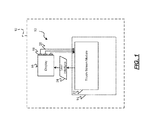
- FIG. 1 is a functional block diagram illustrating a touchscreen system for an aircraft in accordance with exemplary embodiments
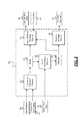
- FIG. 2 is dataflow diagram illustrating a touchscreen module of the touchscreen system in accordance with exemplary embodiments.
- FIG. 3 is a flowchart illustrating a touchscreen display method that may be performed by the touchscreen module in accordance with exemplary embodiments.
- exemplary embodiments of the present disclosure are directed to an electronic touch screen system shown generally at 10 that is associated with an aircraft 12.
- the electronic touch screen system 10 described herein can be implemented in any aircraft 12 having onboard a computing device 14 that is associated with a display device 16, where the computing device 14 includes at least a processor, and one or more data storage devices.
- the computing device 14 and the display device 16 may be located in a cockpit of the aircraft 12 for viewing and interaction by, for example, a pilot of the aircraft 12.
- the computing device 14 and/or the display device 16 may be located in another area of the aircraft 12 and may be operated by any other occupant of the aircraft 12.
- the computing device 14 and/or the display device 16 may also be contained within a single device.
- the display device 16 is a touch screen display that includes one or more sensors 18 that detect when a force is applied to an area of a display screen.
- the sensors 18 generate sensor signals 20 based on the detected force.
- the sensors 18 can include, but are not limited to, resistive sensors, capacitor sensors, acoustic sensors, image sensors, or any other touch sensing devices.
- the sensor signals 20 are received by a touch screen module 22 and processed therein.
- module refers to any hardware, software, firmware, electronic control component, processing logic, and/or processor device, individually or in any combination, including without limitation: application specific integrated circuit (ASIC), an electronic circuit, a processor (shared, dedicated, or group) and memory that executes one or more software or firmware programs, a combinational logic circuit, and/or other suitable components that provide the described functionality.
- ASIC application specific integrated circuit
- processor shared, dedicated, or group
- memory that executes one or more software or firmware programs
- combinational logic circuit and/or other suitable components that provide the described functionality.
- the touch screen module 22 determines a turbulence mode of the aircraft 12 and manages one or more user interfaces 24 based on the turbulence mode. For example, the touch screen module 22 manages the user interfaces 24 by managing the display of the user interface 24, by managing a user's interaction (i.e., selections) with the user interface 24 through the display device 16, and/or by managing an operation of functions associated with the user interface 24 based on the user's interaction.
- a dataflow diagram illustrates various embodiments of the touch screen module 22 of the touch screen system 10.
- touch screen systems 10 may include any number of sub-modules embedded within the touch screen module 22.
- the sub-modules shown in FIG. 2 may be combined and/or further partitioned to similarly detect a turbulence mode and to manage user interfaces 24 ( FIG. 1 ) based thereon.
- Inputs to the touch screen module 22 may be received from the sensors 18 ( FIG. 1 ) or other modules (not shown), determined/modeled by other sub-modules (not shown) within the touch screen module 22, and/or may be some other form of user input that is based on a user interacting with the computing device 14.
- the touch screen module 22 includes a turbulence detection module 26, a touch processing module 28, a function manager module 30, and a user interface manager module 32.
- the turbulence detection module 26 receives as input turbulence parameters 32.
- the turbulence parameters 32 may include sensed or modeled parameters that may indicate an occurrence of turbulence on the aircraft 12 ( FIG. 1 ).
- the turbulence detection module 26 monitors the turbulence parameters 32 to automatically detect the occurrence of turbulence on the aircraft 12 ( FIG. 1 ).
- the turbulence detection module 26 sets a turbulence mode 36 based on the detection of the turbulence. For example, when turbulence is detected, the turbulence detection module 26 sets the turbulence mode 36 to indicate turbulence (e.g., to one or TRUE). In another example, when turbulence is not detected, the turbulence detection module 26 sets the turbulence mode to indicate no turbulence (e.g., to zero or FALSE).
- the turbulence detection module 26 receives as input a user request 34.
- the user request 34 may be initiated by a user interacting with the computing device 14 ( FIG. 1 ) or the display device 16 ( FIG. 1 ) to override the automatic detection of the turbulence and to set the turbulence mode 36 to indicate either turbulence, or no turbulence.
- the touch processing module 28 receives as input the turbulence mode 36 and sensor input data 38. Based on the turbulence mode 36, the touch processing module 28 processes the sensor input data 38 to detect a selection 40 of an item (e.g., a selection box, a dropdown menu, a toggle button, etc) presented on the user interface 24 by the user. For example, when the turbulence mode 36 indicates no turbulence, the touch processing module 28 processes the sensor input data 38 according to conventional processing methods to determine the selection 40. In another example, when the turbulence mode 36 indicates turbulence, the touch processing module 28 processes the sensor input data 38 according to a turbulence touch processing method to determine the selection 40 and to ensure that the determined selection was the selection intended by the user.
- a selection 40 e.g., a selection box, a dropdown menu, a toggle button, etc
- the turbulence touch processing methods prevent errors in the selection process by changing the physical interaction required of the user with the display device 16 ( FIG. 1 ).
- the turbulence touch processing methods may require more deliberate operations by the user in order to make the selection; and the turbulence touch processing methods allow for more forgiveness to inadvertent input dynamics.
- the turbulence touch processing methods may include parameters that are adjusted for turbulence conditions. Such parameters can include, but are not limited to, recognition timers, touch areas, pressures, speeds, direction, and/or signal filters.
- the adjusted timers can include an increased lift-off debounce timer.
- Lift-off is a sensor signal that indicates a lift-off of the user's finger and the user's intent to operate that user interface's operation at the location displayed.
- the button activates the toggle function and displays the new state.
- Increasing the debounce time for lift-off delays the trailing edge to the user interface allowing the user to retouch the location if the lift-off was unintentional.
- a second debounce timer may be used to prevent a double tap by the user.
- the signal filters may include a swipe error recognition filter. Swipe gestures along the display device 16 by the user can be used for certain control actions and may require a certain speed and/or direction to be achieved.
- the swipe error recognition filter may include a low pass differential filter that eliminates noise errors introduced due to turbulence shaking. As can be appreciated, other turbulence touch processing methods and parameters not described are considered to be within the scope of the disclosure.
- the function manager module 30 receives as input the selection 40. Based on the selection 40, the function manager module 30 determines a function to be performed. Based on the function to be performed, one or more commands 42 are generated to initiate execution of the function.
- the function may cause one or more aircraft operations or any other operation to be performed and/or may cause a change in the user interface 24 ( FIG. 1 ) to be displayed.
- the user interface manager module 32 receives as input the turbulence mode 36, the selection 40, and function data 44.
- the function data 44 may be received as a result of the execution of the function, where the function causes changes to the user interface 24 ( FIG. 1 ).
- the user interface manager module 32 manages the display of user interface 24 ( FIG. 1 ) based on the inputs. In various embodiments, the user interface manager module 32 determines the user interface to be displayed based on the selection 40 and/or the function data 44. Based on the turbulence mode 36, the user interface manager module 32 manages the display of the selected user interface by generating user interface data 46 for display by the display device 16 ( FIG. 1 ).
- the user interface manager module 32 when the turbulence mode indicates no turbulence, the user interface manager module 32 generates user interface data 46 for displaying the selected user interface in a conventional or unmodified form.
- the user interface manager module 32 When the turbulence mode 36 indicates turbulence, the user interface manager module 32 generates user interface data 46 that modifies the selected user interface such that the modified user interface has less features and/or increased feature sizes, fonts, or graphics from the unmodified or conventional user interface.
- graphics objects that are selectable in the user interface can be made larger in the modified user interface. Fonts or graphics associated with the selectable graphics objects can be made larger in the modified user interface.
- the graphics objects can be displayed as usual but can be expanded to a larger size when touched to enforce a greater slide off zone in the modified user interface.
- graphic menus or other features can be increased in size, and can wrap. In another example, only those features identified as high-use or operationally required can be made available in the modified user interface. These features may also be context sensitive and based on flight phase or as part of an operational command sequence.
- FIG. 3 a flowchart illustrates a display method that can be performed by the touch screen module 22of FIG. 2 in accordance with the present disclosure.
- the order of operation within the method is not limited to the sequential execution as illustrated in FIG. 3 , but may be performed in one or more varying orders as applicable and in accordance with the present disclosure.
- one or more steps may be added or removed from the method shown in FIG. 3 , without altering the spirit of the method.
- the method can be scheduled to run based on predetermined events, and/or can run continually during operation of the touch screen of the display 16 (as shown).
- the method may begin at 100. It is determined whether a user request 34 is received at 110. If a user request 34 pertaining to the turbulence mode 36 is received at 110, the turbulence mode 36 is set based on the user request 34 at 120. Otherwise, if the user request 34 is not received, the turbulence mode 36 is determined for example, based on the turbulence parameters 32 at 130.
- the turbulence mode 36 is evaluated at 140. If the turbulence mode 36 does not indicate turbulence at 140 either by the automatic detection of no turbulence or by the user request for a selection of a non-turbulence mode, the conventional or unmodified user interface is displayed and managed according to conventional or unmodified methods at 150-190. In particular, the unmodified user interface data is generated based on functions that have been performed or previous selections made by the user, to display the unmodified user interface at 150. The unmodified user interface is displayed until sensor input data 38 indicating a touch by a user is received at 160.
- sensor input data 38 is received at 160, the sensor input data 38 is evaluated based on conventional or unmodified touch processing methods or parameters to determine the selection 40 by the user at 170.
- the function associated with the selection is determined at 180.
- One or more commands 42 are generated to cause the function to be performed at 190. Thereafter, the method continues with determining whether the user request 34 is received at 110.
- the modified user interface is displayed and managed according to modified methods at 200-240.
- the modified user interface data 46 is generated based on functions that have been performed or previous selections made by the user, to display the modified user interface at 200.
- the modified user interface is displayed until sensor input data 38 indicating a touch by a user is received at 210.
- sensor input data 38 is received at 210, the sensor input data 38 is processed based on turbulence touch processing methods or modified parameters to determine the selection 40 by the user at 220.
- the function associated with the selection 40 is determined at 230.
- One or more commands are generated to cause the function to be performed at 240. Thereafter, the method continues with determining whether the user request 34 is received at 110.
- Skilled artisans may implement the described functionality in varying ways for each particular application, but such implementation decisions should not be interpreted as causing a departure from the scope of the present invention.
- an embodiment of a system or a component may employ various integrated circuit components, e.g., memory elements, digital signal processing elements, logic elements, look-up tables, or the like, which may carry out a variety of functions under the control of one or more microprocessors or other control devices.
- integrated circuit components e.g., memory elements, digital signal processing elements, logic elements, look-up tables, or the like, which may carry out a variety of functions under the control of one or more microprocessors or other control devices.
- DSP digital signal processor
- ASIC application specific integrated circuit
- FPGA field programmable gate array
- a general-purpose processor may be a microprocessor, but in the alternative, the processor may be any conventional processor, controller, microcontroller, or state machine.
- a processor may also be implemented as a combination of computing devices, e.g., a combination of a DSP and a microprocessor, a plurality of microprocessors, one or more microprocessors in conjunction with a DSP core, or any other such configuration.
- a software module may reside in RAM memory, flash memory, ROM memory, EPROM memory, EEPROM memory, registers, hard disk, a removable disk, a CD-ROM, or any other form of storage medium known in the art.
- An exemplary storage medium is coupled to the processor such the processor can read information from, and write information to, the storage medium.
- the storage medium may be integral to the processor.
- the processor and the storage medium may reside in an ASIC.
- the ASIC may reside in a user terminal.
- the processor and the storage medium may reside as discrete components in a user terminal.
Landscapes
- Engineering & Computer Science (AREA)
- General Engineering & Computer Science (AREA)
- Theoretical Computer Science (AREA)
- Human Computer Interaction (AREA)
- Physics & Mathematics (AREA)
- General Physics & Mathematics (AREA)
- User Interface Of Digital Computer (AREA)
Applications Claiming Priority (1)
| Application Number | Priority Date | Filing Date | Title |
|---|---|---|---|
| US13/478,455 US20130314328A1 (en) | 2012-05-23 | 2012-05-23 | Methods and systems for enhancing touch screen operation in a display of an aircraft |
Publications (1)
| Publication Number | Publication Date |
|---|---|
| EP2667295A2 true EP2667295A2 (fr) | 2013-11-27 |
Family
ID=48193157
Family Applications (1)
| Application Number | Title | Priority Date | Filing Date |
|---|---|---|---|
| EP13165866.8A Withdrawn EP2667295A2 (fr) | 2012-05-23 | 2013-04-29 | Procédés et systèmes pour optimiser le fonctionnement de l'écran tactile dans un affichage d'un aéronef |
Country Status (2)
| Country | Link |
|---|---|
| US (1) | US20130314328A1 (fr) |
| EP (1) | EP2667295A2 (fr) |
Cited By (3)
| Publication number | Priority date | Publication date | Assignee | Title |
|---|---|---|---|---|
| CN107045404A (zh) * | 2016-02-09 | 2017-08-15 | 波音公司 | 抗湍流触摸系统 |
| GB2551520A (en) * | 2016-06-20 | 2017-12-27 | Ge Aviat Systems Ltd | Correction of vibration-induced error for touch screen display in an aircraft |
| US12562065B2 (en) | 2020-12-15 | 2026-02-24 | The Boeing Company | Assisted turbulence EFB interaction |
Families Citing this family (7)
| Publication number | Priority date | Publication date | Assignee | Title |
|---|---|---|---|---|
| US20140118281A1 (en) * | 2012-10-26 | 2014-05-01 | Cirque Corporation | DETERMINING WHAT INPUT TO ACCEPT BY A TOUCH SENSOR AFTER INTENTIONAL AND ACCIDENTAL LIFT-OFF and SLIDE-OFF WHEN GESTURING OR PERFORMING A FUNCTION |
| US10042456B2 (en) * | 2014-03-11 | 2018-08-07 | Textron Innovations Inc. | User interface for an aircraft |
| US10005562B2 (en) | 2014-03-11 | 2018-06-26 | Textron Innovations Inc. | Standby instrument panel for aircraft |
| US10347140B2 (en) | 2014-03-11 | 2019-07-09 | Textron Innovations Inc. | Flight planning and communication |
| TWI707252B (zh) * | 2018-01-11 | 2020-10-11 | 和碩聯合科技股份有限公司 | 電子裝置及其觸控模式切換方法 |
| US11301087B2 (en) * | 2018-03-14 | 2022-04-12 | Maxell, Ltd. | Personal digital assistant |
| US12026340B1 (en) | 2023-04-20 | 2024-07-02 | Rockwell Collins, Inc. | System including touchscreen display computing device having adjustable sensitivity and method therefor |
-
2012
- 2012-05-23 US US13/478,455 patent/US20130314328A1/en not_active Abandoned
-
2013
- 2013-04-29 EP EP13165866.8A patent/EP2667295A2/fr not_active Withdrawn
Cited By (8)
| Publication number | Priority date | Publication date | Assignee | Title |
|---|---|---|---|---|
| CN107045404A (zh) * | 2016-02-09 | 2017-08-15 | 波音公司 | 抗湍流触摸系统 |
| EP3214535A1 (fr) * | 2016-02-09 | 2017-09-06 | The Boeing Company | Système tactile résistant à la turbulence |
| US10503317B2 (en) | 2016-02-09 | 2019-12-10 | The Boeing Company | Turbulence resistant touch system |
| CN107045404B (zh) * | 2016-02-09 | 2022-01-28 | 波音公司 | 抗湍流触摸系统 |
| GB2551520A (en) * | 2016-06-20 | 2017-12-27 | Ge Aviat Systems Ltd | Correction of vibration-induced error for touch screen display in an aircraft |
| GB2551520B (en) * | 2016-06-20 | 2018-11-21 | Ge Aviat Systems Ltd | Correction of vibration-induced error for touch screen display in an aircraft |
| US10996793B2 (en) | 2016-06-20 | 2021-05-04 | Ge Aviation Systems Limited | Correction of vibration-induced error for touch screen display in an aircraft |
| US12562065B2 (en) | 2020-12-15 | 2026-02-24 | The Boeing Company | Assisted turbulence EFB interaction |
Also Published As
| Publication number | Publication date |
|---|---|
| US20130314328A1 (en) | 2013-11-28 |
Similar Documents
| Publication | Publication Date | Title |
|---|---|---|
| EP2667295A2 (fr) | Procédés et systèmes pour optimiser le fonctionnement de l'écran tactile dans un affichage d'un aéronef | |
| US9052819B2 (en) | Intelligent gesture-based user's instantaneous interaction and task requirements recognition system and method | |
| KR100260866B1 (ko) | 터치스크린포인팅디바이스의분리를위한방법및시스템 | |
| KR100260867B1 (ko) | 터치스크린포인팅디바이스의분리및합체를위한방법및시스템 | |
| US9250788B2 (en) | Gesture handlers of a gesture engine | |
| EP3000013B1 (fr) | Télécommande tactile multipoint interactive | |
| EP3451129B1 (fr) | Système et procédé de fourniture d'opérations couper et coller de presse-papiers dans un système d'écran tactile avionique | |
| US8564560B2 (en) | Method for operating a control system for a vehicle and control system for a vehicle | |
| US20150317054A1 (en) | Method and apparatus for gesture recognition | |
| CN103870059B (zh) | 用于利用智能模板掩模与触摸屏界面交互的系统和方法 | |
| US9933885B2 (en) | Motor vehicle operating device controlling motor vehicle applications | |
| EP2472384A1 (fr) | Modèle d'événement tactile | |
| US20150089364A1 (en) | Initiating a help feature | |
| US20140062893A1 (en) | System and method for reducing the probability of accidental activation of control functions on a touch screen | |
| US20130061122A1 (en) | Multi-cell selection using touch input | |
| EP2998846B1 (fr) | Appareil de traitement des informations, procédé de contrôle d'un appareil de traitement des informations et support de stockage | |
| US10782845B2 (en) | Means of transportation, user interace and method for defining a tile on a display device | |
| US20160162143A1 (en) | Information processing apparatus recognizing instruction by touch input, control method thereof, and storage medium | |
| US20150153926A1 (en) | Activation of an application on a programmable device using gestures on an image | |
| US10725647B2 (en) | Facilitating interaction with a computing device based on force of touch | |
| US10802702B2 (en) | Touch-activated scaling operation in information processing apparatus and information processing method | |
| US9594610B2 (en) | Method and system for processing multimodal input signals | |
| CN108073312A (zh) | 人车交互 | |
| US20250170891A1 (en) | Information processing device and non-transitory, computer-readable recording medium therefor | |
| JP2006085218A (ja) | タッチパネル操作装置 |
Legal Events
| Date | Code | Title | Description |
|---|---|---|---|
| PUAI | Public reference made under article 153(3) epc to a published international application that has entered the european phase |
Free format text: ORIGINAL CODE: 0009012 |
|
| 17P | Request for examination filed |
Effective date: 20130429 |
|
| AK | Designated contracting states |
Kind code of ref document: A2 Designated state(s): AL AT BE BG CH CY CZ DE DK EE ES FI FR GB GR HR HU IE IS IT LI LT LU LV MC MK MT NL NO PL PT RO RS SE SI SK SM TR |
|
| AX | Request for extension of the european patent |
Extension state: BA ME |
|
| STAA | Information on the status of an ep patent application or granted ep patent |
Free format text: STATUS: THE APPLICATION HAS BEEN WITHDRAWN |
|
| 18W | Application withdrawn |
Effective date: 20140620 |