EP2667628A2 - Appareil électronique télécommandable - Google Patents
Appareil électronique télécommandable Download PDFInfo
- Publication number
- EP2667628A2 EP2667628A2 EP13162239.1A EP13162239A EP2667628A2 EP 2667628 A2 EP2667628 A2 EP 2667628A2 EP 13162239 A EP13162239 A EP 13162239A EP 2667628 A2 EP2667628 A2 EP 2667628A2
- Authority
- EP
- European Patent Office
- Prior art keywords
- remote controller
- image
- remote
- operation button
- controller image
- Prior art date
- Legal status (The legal status is an assumption and is not a legal conclusion. Google has not performed a legal analysis and makes no representation as to the accuracy of the status listed.)
- Withdrawn
Links
- 230000007704 transition Effects 0.000 claims description 23
- 230000008859 change Effects 0.000 claims description 12
- 239000003086 colorant Substances 0.000 claims description 5
- 238000012545 processing Methods 0.000 description 29
- 230000015654 memory Effects 0.000 description 10
- 230000006870 function Effects 0.000 description 6
- 238000000034 method Methods 0.000 description 3
- 230000005236 sound signal Effects 0.000 description 3
- 230000004397 blinking Effects 0.000 description 2
- 238000006243 chemical reaction Methods 0.000 description 2
- 230000009467 reduction Effects 0.000 description 2
- 235000006040 Prunus persica var persica Nutrition 0.000 description 1
- 240000006413 Prunus persica var. persica Species 0.000 description 1
- 230000001133 acceleration Effects 0.000 description 1
- 238000013459 approach Methods 0.000 description 1
- 238000013461 design Methods 0.000 description 1
- 238000010586 diagram Methods 0.000 description 1
- 239000004973 liquid crystal related substance Substances 0.000 description 1
- 238000012986 modification Methods 0.000 description 1
- 230000004048 modification Effects 0.000 description 1
- 239000004576 sand Substances 0.000 description 1
- 230000003936 working memory Effects 0.000 description 1
Images



Classifications
-
- H—ELECTRICITY
- H04—ELECTRIC COMMUNICATION TECHNIQUE
- H04N—PICTORIAL COMMUNICATION, e.g. TELEVISION
- H04N21/00—Selective content distribution, e.g. interactive television or video on demand [VOD]
- H04N21/40—Client devices specifically adapted for the reception of or interaction with content, e.g. set-top-box [STB]; Operations thereof
- H04N21/47—End-user applications
-
- H—ELECTRICITY
- H04—ELECTRIC COMMUNICATION TECHNIQUE
- H04Q—SELECTING
- H04Q9/00—Arrangements in telecontrol or telemetry systems for selectively calling a substation from a main station, in which substation desired apparatus is selected for applying a control signal thereto or for obtaining measured values therefrom
-
- H—ELECTRICITY
- H04—ELECTRIC COMMUNICATION TECHNIQUE
- H04N—PICTORIAL COMMUNICATION, e.g. TELEVISION
- H04N21/00—Selective content distribution, e.g. interactive television or video on demand [VOD]
- H04N21/40—Client devices specifically adapted for the reception of or interaction with content, e.g. set-top-box [STB]; Operations thereof
- H04N21/41—Structure of client; Structure of client peripherals
- H04N21/422—Input-only peripherals, i.e. input devices connected to specially adapted client devices, e.g. global positioning system [GPS]
- H04N21/42204—User interfaces specially adapted for controlling a client device through a remote control device; Remote control devices therefor
-
- H—ELECTRICITY
- H04—ELECTRIC COMMUNICATION TECHNIQUE
- H04N—PICTORIAL COMMUNICATION, e.g. TELEVISION
- H04N21/00—Selective content distribution, e.g. interactive television or video on demand [VOD]
- H04N21/40—Client devices specifically adapted for the reception of or interaction with content, e.g. set-top-box [STB]; Operations thereof
- H04N21/41—Structure of client; Structure of client peripherals
- H04N21/422—Input-only peripherals, i.e. input devices connected to specially adapted client devices, e.g. global positioning system [GPS]
- H04N21/42204—User interfaces specially adapted for controlling a client device through a remote control device; Remote control devices therefor
- H04N21/42226—Reprogrammable remote control devices
- H04N21/42227—Reprogrammable remote control devices the keys being reprogrammable, e.g. soft keys
- H04N21/42228—Reprogrammable remote control devices the keys being reprogrammable, e.g. soft keys the reprogrammable keys being displayed on a display screen in order to reduce the number of keys on the remote control device itself
-
- H—ELECTRICITY
- H04—ELECTRIC COMMUNICATION TECHNIQUE
- H04N—PICTORIAL COMMUNICATION, e.g. TELEVISION
- H04N21/00—Selective content distribution, e.g. interactive television or video on demand [VOD]
- H04N21/40—Client devices specifically adapted for the reception of or interaction with content, e.g. set-top-box [STB]; Operations thereof
- H04N21/41—Structure of client; Structure of client peripherals
- H04N21/422—Input-only peripherals, i.e. input devices connected to specially adapted client devices, e.g. global positioning system [GPS]
- H04N21/4227—Providing Remote input by a user located remotely from the client device, e.g. at work
-
- H—ELECTRICITY
- H04—ELECTRIC COMMUNICATION TECHNIQUE
- H04N—PICTORIAL COMMUNICATION, e.g. TELEVISION
- H04N21/00—Selective content distribution, e.g. interactive television or video on demand [VOD]
- H04N21/40—Client devices specifically adapted for the reception of or interaction with content, e.g. set-top-box [STB]; Operations thereof
- H04N21/43—Processing of content or additional data, e.g. demultiplexing additional data from a digital video stream; Elementary client operations, e.g. monitoring of home network or synchronising decoder's clock; Client middleware
- H04N21/431—Generation of visual interfaces for content selection or interaction; Content or additional data rendering
- H04N21/4312—Generation of visual interfaces for content selection or interaction; Content or additional data rendering involving specific graphical features, e.g. screen layout, special fonts or colors, blinking icons, highlights or animations
- H04N21/4316—Generation of visual interfaces for content selection or interaction; Content or additional data rendering involving specific graphical features, e.g. screen layout, special fonts or colors, blinking icons, highlights or animations for displaying supplemental content in a region of the screen, e.g. an advertisement in a separate window
-
- H—ELECTRICITY
- H04—ELECTRIC COMMUNICATION TECHNIQUE
- H04N—PICTORIAL COMMUNICATION, e.g. TELEVISION
- H04N21/00—Selective content distribution, e.g. interactive television or video on demand [VOD]
- H04N21/40—Client devices specifically adapted for the reception of or interaction with content, e.g. set-top-box [STB]; Operations thereof
- H04N21/43—Processing of content or additional data, e.g. demultiplexing additional data from a digital video stream; Elementary client operations, e.g. monitoring of home network or synchronising decoder's clock; Client middleware
- H04N21/44—Processing of video elementary streams, e.g. splicing a video clip retrieved from local storage with an incoming video stream or rendering scenes according to encoded video stream scene graphs
- H04N21/44008—Processing of video elementary streams, e.g. splicing a video clip retrieved from local storage with an incoming video stream or rendering scenes according to encoded video stream scene graphs involving operations for analysing video streams, e.g. detecting features or characteristics in the video stream
Definitions
- the present invention relates to a remote-controllable electronic apparatus, and more particularly, it relates to a remote-controllable electronic apparatus including a remote controller and a display portion displaying a remote controller image.
- Japanese Patent Laying-Open No. 2007-058569 discloses an electronic apparatus such as a television apparatus including a display portion and operated by a remote controller having a plurality of operation buttons.
- This electronic apparatus is configured to display a remote controller image faithfully simulating the entire remote controller including the operation buttons on the display portion and reflect operation content in an operation button image corresponding to a pressed operation button when a user presses (presses down) the operation button of the remote controller at hand.
- the user can perform a prescribed device operation on the electronic apparatus by operating the remote controller at hand while viewing the remote controller image on the display portion.
- the present invention has been proposed in order to solve the aforementioned problem, and an object of the present invention is to improve the operability of a remote controller with respect to a remote-controllable electronic apparatus.
- a remote-controllable electronic apparatus includes a remote controller including a first operation button, a display portion displaying a picture, and a control portion performing control of displaying a remote controller image including a plurality of second operation button images operable with the first operation button on the display portion, is configured to be capable of accepting a device operation through the remote controller via the remote controller image, and is configured such that the first operation button of the remote controller is smaller in number than the second operation button images of the remote controller image.
- the first operation button of the remote controller is preferably constituted by a selection button capable of moving a selection between the plurality of second operation button images in the remote controller image to select the second operation button images individually and a decision button deciding execution of a device operation corresponding to a selected second operation button image of the second operation button images.
- the operation content of the remote controller for performing a prescribed device operation can be limited to only two types of operations of finding an appropriate second operation button image in the remote controller image with the selection button and executing the actual device operation corresponding to the second operation button image selected with the decision button. Consequently, it is not necessary to perform operations other than the two types of operations, and hence the operability of the remote controller can be significantly improved.
- the selection button is preferably a key capable of longitudinally and laterally moving the selection between the second operation button images in the remote controller image
- the remote-controllable electronic apparatus is preferably configured such that the device operation through the remote controller is completed on the basis of pressing down of the decision button with respect to the second operation button image selected by the key.
- the key constituting the selection button is preferably arranged in a cross shape. According to this structure, an operation of moving a selection longitudinally and laterally with the key arranged in a cross shape to find an appropriate second operation button image in the remote controller image can be smoothly performed.
- the "key arranged in a cross shape" according to the present invention includes a key constituted by four separate selection buttons (operation keys) of upward, downward, leftward, and rightward keys and a key constituted by one operation key member having four selection buttons integrally formed and moving a selection longitudinally and laterally by tilting this integrally operation key member in upward, downward, leftward, and rightward directions.
- the control portion is preferably configured to perform control of terminating display of the remote controller image on the display portion on the basis of that the decision button has been pressed down.
- the remote controller image is quickly deleted from the display portion after the user presses down the decision button to execute a prescribed device operation on the electronic apparatus, and hence the user can view the picture comfortably. Furthermore, the remote controller image is deleted, so that the user can easily recognize that the prescribed device operation has been executed.
- control portion is preferably configured to perform control of terminating the display of the remote controller image on the display portion after the device operation corresponding to the selected second operation button image is executed by pressing down the decision button and the display of the remote controller image on the display portion continues for a prescribed time period.
- control portion is preferably configured to perform control of shifting to a state of displaying the remote controller image on the display portion and being capable of accepting the device operation through the remote controller on the basis of that the first operation button of the remote controller has been pressed down.
- the remote controller image can be displayed on the display portion, effectively utilizing the first operation button limited in number when the device operation through the remote controller is started.
- the remote-controllable electronic apparatus is preferably configured to store the most recently selected second operation button image of the second operation button images in the remote controller image
- the control portion is preferably configured to perform control of displaying the remote controller image on the display portion such that a device operation on the most recently selected second operation button image can be preferentially accepted when the remote controller image is displayed on the display portion on the basis of that the first operation button of the remote controller has been pressed down.
- the device operation on the last selected second operation button image can be preferentially accepted, so that the device operation through the remote controller via the remote controller image can be promptly performed.
- the control portion is preferably configured to perform control of adjusting the scale of the remote controller image and displaying the remote controller image on the display portion such that the remote controller image falls within the region of the display portion where the amount of picture motion is relatively small according to the shape of the region.
- the display of the remote controller image in the state where the remote controller image goes beyond the region of the display portion where the amount of picture motion is relatively small into the region where the amount of picture motion is relatively large can be easily suppressed, and hence a device operation can be executed without losing comfortable picture-viewing.
- the aforementioned remote-controllable electronic apparatus is preferably configured to be connectable with an external device
- the control portion is preferably configured to perform control of displaying the remote controller image corresponding to the external device on the display portion when the external device is connected
- the remote-controllable electronic apparatus is preferably configured to be capable of accepting a device operation on the external device via the remote controller image corresponding to the connected external device through the remote controller.
- a device operation on the external device connected to this electronic apparatus can be performed with the remote controller according to the present invention having a simplified structure.
- the remote controller according to the present invention can be commonly employed for a plurality of operation target devices, and hence the convenience of the user can be improved.
- the television apparatus 100 is an example of the "remote-controllable electronic apparatus" in the present invention.
- the input signal switching portion 23 has a function of transmitting an input signal from the tuner portion 21 or the DVD player 200 or the like connected to the external signal input portion 22a to the video processing portion 24 and the audio processing portion 25.
- the video processing portion 24 has a function of performing various types of processing on the video signal transmitted from the input signal switching portion 23. Thus, the video signal is output to the display portion 11 after digital-analog (DA) conversion processing is performed in the video processing portion 24.
- the audio processing portion 25 has a function of performing various types of processing on the audio signal transmitted from the input signal switching portion 23. Thus, the audio signal is output from the speaker portions 12 after DA conversion processing is performed in the audio processing portion 25.
- the on-screen information output from the OSD portion 26 to the display portion 11 on the basis of control of a control portion 27 described later includes image information or the like containing a prescribed design in addition to character information.
- the control portion 27 has a function of controlling the apparatus body 10.
- the memory portion 28 unrewritably stores a control program or the like of the television apparatus 100 executed by the control portion 27.
- the memory portion 28 is provided with a working memory area temporarily storing a control parameter or the like used when the control program is executed.
- the operation signal received by the operation signal receiving portion 29 denotes an electrical signal into which an infrared signal (IR signal) that the user transmits with the remote controller 60 is converted.
- Original image data (reference image data) to display the remote controller image 70 is previously stored in the memory portion 28 (see Fig. 2 ).
- the television apparatus 100 is configured such that the OSD portion 26 (see Fig. 2 ) outputs the remote controller image 70 to the display portion 11 (see Fig. 2 ) on the basis of a command of the control portion 27.
- the operation button images 75 are examples of the "second operation button images" in the present invention.
- all operation button images are not denoted by symbols for convenience of illustration, but operation button images not denoted by symbols are treated the same as the operation button images 75 denoted by symbols.
- the television apparatus 100 includes the remote controller 60 as a physical apparatus for virtually operating the remote controller image 70 displayed on the display portion 11, as shown in Fig. 1 .
- the remote controller 60 is configured such that a cross key 61 including four selection buttons (an upward operation button 61a, a downward operation button 61b, a rightward operation button 61c, and a leftward operation button 61d) capable of moving a selection longitudinally and laterally and a decision button 62 arranged at a substantially central portion of the cross key 61 are arranged on an operation surface 60a.
- the remote controller 60 is provided with a transmitting portion 63 transmitting the operation signal (remote control signal).
- the cross key 61 and the decision button 62 are examples of the "first operation button" in the present invention.
- the cross key 61 is an example of the "key” in the present invention.
- the number of (five in total) the operation buttons of the remote controller 60 is smaller than the number of (thirty-three in total excluding an unavailable button image described later) the operation button images 75 constituting the remote controller image 70, as shown in Fig. 3 . Therefore, as a procedure for operating the remote controller image 70 with the remote controller 60, the user first moves a selection between the operation button images 75 in the remote controller image 70 to select an intended operation button image 75 while arbitrarily pressing down the operation buttons 61a to 61d of the cross key 61. Then, the user presses down the decision button 62 to decide execution of a device operation corresponding to the selected operation button image 75.
- the user changes volume, for example, the user operates the cross key 61 to select an image 72a of a volume up button and presses down the decision button 62 when the image 72a of a volume up button is selected, as shown in Fig. 3 .
- the television apparatus 100 is configured such that the volume output from the speaker portions 12 (see Fig. 1 ) is gradually increased according to the number of times the decision button 62 is pressed down. Thus, one device operation on the television apparatus 100 is completed by operating the cross key 61 and the decision button 62.
- Fig. 3 shows a state where the image 72a of a volume up button is selected to blink (blink in red), as an example of a display mode.
- the television apparatus 100 is configured such that the user presses down the decision button 62 of the remote controller 60 in a state where the image 72a of a volume up button blinks in red to change the image 72a of a volume up button from the state of blinking in red to a state of lighting in blue. While the decision button 62 is continuously pressed down (is repeatedly hit) in the operation of the image 72a of a volume up button, the state of lighting in blue continues. Thus, a state where a device operation corresponding to the currently selected operation button image 75 (the image 72a of a volume up button) is actually performed is reflected to the remote controller image 70 by pressing down the decision button 62.
- the remote controller image 70 is switched to display content intended to perform subsequent device operations through the remote controller 60 on the DVD player 200 (see Fig. 1 ).
- a state where the remote controller image 70 including the operation button images 75 (thirty-three in total) available for only the television apparatus 100 is displayed, as shown in Fig. 3 transitions to a state where the remote controller image 70 including the operation button images 75 (twenty-four in total) available for only the DVD player 200, as shown in Fig. 4 is displayed, following pressing down of the image 74 of an input switch button.
- the operation target device is the DVD player 200
- the number of (five in total) the operation buttons of the remote controller 60 is smaller than the number of (twenty-four in total) the operation button images 75.
- buttons (unavailable buttons) 76 related to the reproduction operation of video content recorded in a DVD of the operation button images 75 are set to be diluted in display color (displayed in dilute gray) and incapable of being selected even if the cross key 61 is moved.
- button images (unavailable buttons) 77 related to channel selection of the operation button images 75 are set to be displayed in dilute gray and incapable of being selected through the cross key 61.
- the television apparatus 100 is configured to display only the operation button images 75 available for device operations corresponding to the operation target device of a plurality of operation button images 75 included in the remote controller image 70 on the display portion 11 according to the operation content of the electronic apparatus (according to whether the operation target device is the television apparatus 100 or the DVD player 200) such that the user can operate only the operation button images 75 with the remote controller 60 (the cross key 61 and the decision button 62).
- the television apparatus 100 is configured to display the remote controller image 70 corresponding to the operation of the DVD player 200 by pressing down the cross key 61 or the decision button 62 once also when the user wishes to perform a device operation on the DVD player 200 in viewing the video content recorded in the DVD.
- the television apparatus 100 is configured to actually perform a device operation corresponding to the operation button image 75 when the user selects a prescribed operation button image 75 and presses down the decision button 62 in a device operation through the remote controller 60 and terminate display of the remote controller image 70 on the display portion 11 after a prescribed time period (fifteen seconds, for example) elapses. Therefore, the television apparatus 100 is configured to delete the remote controller image 70 from the display portion 11 after the completion of one device operation and the elapse of the prescribed time period.
- the television apparatus 100 is configured to store the content (operation content) of the most recently selected operation button image 75 in the memory portion 28 (see Fig. 2 ) in advance of execution of one device operation.
- the television apparatus 100 is configured to be capable of preferentially accepting a new device operation on this operation button image 75 in a state where the cursor of the cross key 61 is arranged (blinks) at the position of the most recently selected operation button image 75 when display of the remote controller image 70 on the display portion 11 is newly started.
- the television apparatus 100 is also configured as described below regarding a method for displaying the remote controller image 70 on the display portion 11.
- the television apparatus 100 is configured to preferentially display the remote controller image 70 on a region S of the display portion 11 where the amount of picture motion is relatively small, as shown in Figs. 1 and 5 , when the user presses down the cross key 61 or the decision button 62 of the remote controller 60 (see Fig. 1 ) in the state where only a picture is displayed on the display portion 11.
- the remote controller image 70 is not displayed on a region V where the amount of picture motion is relatively large.
- control portion 27 determines which part is the region S where the colors of pixels of a picture image (picture data) currently displayed on the display portion 11 change relatively slightly when the remote controller image 70 is displayed.
- the television apparatus 100 is configured to perform control of displaying the remote controller image 70 on the region S where the amount of picture motion is small, specified by the control portion 27.
- a picture image shown in Fig. 1 it is assumed that the amount of picture motion is relatively large in the region V where a wavy sea surface is displayed and the amount of picture motion is relatively small in the region S where a sand peach, a landform including a coastline, and sky are displayed.
- the television apparatus 100 is configured to continue to display the remote controller image 70 on the display portion 11 while causing the remote controller image 70 to follow the shape of the region S (where the amount of picture motion is relatively small) transitioning following transition of a picture also when the picture image changes (transitions) from moment to moment.
- the display orientation of (a state of longitudinally or laterally displaying) the remote controller image 70 is changed such that the remote controller image 70 falls within this region S according to the shape of the aforementioned region S.
- the picture may further transition from the state shown in Fig. 5 to a state shown in Fig. 6 , for example.
- a state shown in Fig. 6 for example.
- the ship appearing from the right edge of the screen in Fig. 5 gradually approaches frontward. Therefore, the range of the region V around the ship is increased, and the longitudinal width of the region S in the position P is further reduced from L2 to L3 (L2 > L3)
- the control portion 27 determines that the remote controller image 70 cannot be displayed with high resolution since the scale (reduction rate) of the remote controller image 70 is too small in a state of longitudinally displaying the remote controller image 70 as shown in Fig.
- the remote controller image 70 is displayed in a state (state of lateral display) where the display orientation thereof is changed by 90 degrees in the position P while the scale (reduction rate) thereof is adjusted, as shown in Fig. 6 .
- the remote controller image 70 is visibly displayed according to the shape (width L3) of the region S in the position P without excessively reducing the size of the remote controller image 70.
- the orientations of the operation button images 75 in the remote controller image 70 are adjusted when the display orientation is changed.
- the operation button images 75 are displayed in a state of being vertically aligned even if the display direction (longitudinal and lateral directions) of the remote controller image 70 is changed.
- the transition of display of the remote controller image 70 from Fig. 1 to Fig. 5 or the transition of display of the remote controller image 70 from Fig. 5 to Fig. 6 is only one example.
- the control portion 27 arbitrarily changes a display method (a size, an orientation, and a display position)) for the remote controller image 70 according to the transition state of the picture.
- the remote controller image 70 may be displayed in a state of being longitudinally arranged at a left corner of the screen in Figs. 1 , 5, and 6 . In this manner, the television apparatus 100 is configured.
- control portion 27 when the user operates the television apparatus 100 through the remote controller 60 according to this embodiment is described with reference to Figs. 1 to 3 and 5 to 7 .
- control operation of the apparatus body 10 in a case where the user performs a device operation through the remote controller 60 when viewing a picture such as a television program displayed on the display portion 11 is described below.
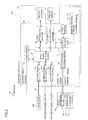
- the control portion 27 determines whether or not the user has pressed down the cross key 61 (see Fig. 2 ) or the decision button 62 (see Fig. 2 ) of the remote controller 60 (see Fig. 2 ), and this processing is repeated until the control portion 27 determines that the user has pressed down the cross key 61 or the decision button 62, as shown in Fig. 7 . In other words, this determination is repeated until the operation signal receiving portion 29 (see Fig. 2 ) receives an operation signal (infrared signal) corresponding to the cross key 61 or the decision button 62 from the remote controller 60 (transmitting portion 63) in the apparatus body 10 (see Fig. 1 ).
- the control portion 27 When determining that the user has pressed down the cross key 61 or the decision button 62 of the remote controller 60 (the control portion 27 determines that the operation signal receiving portion 29 has received the operation signal corresponding to the cross key 61 or the decision button 62 from the transmitting portion 63) at the step S1, the control portion 27 performs control of displaying the remote controller image 70 (see Fig. 1 ) on the display portion 11 (see Fig. 1 ) at a step S2.
- the control portion 27 determines which part is the region S (see Fig. 1 ) of the display portion 11 where the amount of picture motion is relatively small, and OSD display of the remote controller image 70 is performed on the region S where the amount of picture motion is relatively small, specified by the control portion 27.
- the remote controller image 70 is displayed on the region S where the colors of pixels change slightly (the amount of picture motion is small), avoiding the region V where the wavy sea surface is displayed, as shown in Fig. 1 , for example.
- the control portion 27 determines whether or not the user has pressed down the cross key 61 within a prescribed time period (fifteen seconds, for example). In other words, the control portion 27 determines whether or not the operation signal receiving portion 29 has received an operation signal corresponding to the cross key 61 from the remote controller 60 within the prescribed time period.
- the control portion 27 advances to a step S8.
- the control portion 27 performs control of deleting the displayed remote controller image 70 from the display portion 11 and terminates the control processing.
- the control portion 27 When determining that the user has pressed down the cross key 61 within the prescribed time period (the user has performed a remote control operation) (in the case of "Yes" determination) at the step S3, the control portion 27 performs control of changing the display mode of the remote controller image 70 so as to be linked to the operation content of the cross key 61 at a step S4.
- the currently selected operation button image 75 (image 72a of a volume up button) blinks in a color (bright red) different from the display color (gray) of the non-selected operation button images 75 in the remote controller image 70, as shown in Fig. 3 .
- the control portion 27 determines whether or not the user has pressed down the decision button 62 within a prescribed time period (fifteen seconds, for example). In other words, the control portion 27 determines whether or not the operation signal receiving portion 29 has received an operation signal corresponding to the decision button 62 from the remote controller 60 within the prescribed time period.
- the control portion 27 advances to the step S8.
- the control portion 27 performs control of deleting the displayed remote controller image 70 from the display portion 11 and terminates the control processing.
- the aforementioned control at the step S2 is performed in parallel with other control steps in a state where the remote controller image 70 is displayed on the display portion 11.
- the remote controller image 70 is continuously displayed on the display portion 11 while the remote controller image 70 is caused to follow the shape of the region S (where the amount of picture motion is relatively small) transitioning following transition of the picture also when the picture image changes (transitions) from moment to moment in the state where the remote controller image 70 is displayed on the display portion 11.
- the remote controller image 70 may be displayed in the state where the same is longitudinally arranged as shown in Figs. 1 and 5 or in a state where the same is laterally arranged as shown in Fig. 6 .
- the control portion 27 stores the content (operation content) of the operation button image 75 most recently selected to press down the decision button 62 in the memory portion 28. Therefore, when the control operation at the step S2 is performed, the remote controller image 70 reappears such that the stored operation button image 75 is displayed in display color (bright red) different from the display color (gray) of other operation button images 75 in a case where the content (operation content) of the operation button image 75 stored in the memory portion 28 by the previous remote control operation exists.
- the user restarts an operation while pressing down the cross key 61 (any of the operation buttons 61a to 61d), using this operation button image 75 displayed in red as a start point of a remote control operation.
- the remote control operation on the television apparatus 100 in viewing a television program is used to illustrate the aforementioned control flow, but the same control is performed also when the operation target device is switched from the television apparatus 100 to the DVD player 200 through the remote controller 60, for example. However, a control target of the device operation at the step S7 is replaced by one with respect to the DVD player 200.
- the remote controller 60 is constituted by the operation buttons 61a to 61d as the cross key 61 capable of moving a selection between the plurality of operation button images 75 in the remote controller image 70 to select one operation button image 75 and the decision button 62 deciding execution of the device operation corresponding to the selected operation button image 75.
- the television apparatus 100 is configured to accept the device operation through the remote controller 60 with the cross key 61 in which the operation buttons 61a to 61d are arranged in a cross shape and the decision button 62 arranged at the central portion of the cross key 61.
- the operation buttons 61a to 61d are the cross key 61 capable of moving a selection between the plurality of operation button images 75 longitudinally and laterally in the remote controller image 70, and a device operation through the remote controller 60 is completed on the basis of pressing down of the decision button 62 with respect to the operation button image 75 selected with the cross key 61.
- an operation of finding a prescribed operation button image 75 in the remote controller image 70 with the cross key 61 is smoothly performed, and one device operation can be completed on the basis of pressing down of the decision button 62 with respect to the selected operation button image 75.
- one device operation is performed by a simple combination of the operation of the cross key 61 and an operation of pressing down the decision button 62, and hence the easy-to-use remote controller 60 for the user who is not used to a remote control operation can be provided.
- control portion 27 is configured to perform control of terminating display of the remote controller image 70 on the display portion 11 on the basis of that the decision button 62 has been pressed down.
- the remote controller image 70 is quickly deleted from the display portion 11 after the user presses down the decision button 62 to execute a prescribed device operation on the television apparatus 100, and hence the user can view the picture comfortably.
- the remote controller image 70 is deleted, so that the user can easily recognize that the prescribed device operation has been executed.
- the control portion 27 is configured to perform control of shifting to a state of displaying the remote controller image 70 on the display portion 11 and being capable of accepting a device operation through the remote controller 60 on the basis of that the cross key 61 (operation buttons 61a to 61d) or the decision button 62 of the remote controller 60 has been pressed down.
- the remote controller image 70 can be displayed on the display portion 11, effectively utilizing a limited number of the operation buttons of the cross key 61 and the decision button 62 when a device operation through the remote controller 60 is started.
- the user can easily accept that pressing down of the cross key 61 (operation buttons 61a to 61d) or the decision button 62 is a trigger operation for displaying the remote controller image 70 and replicate this later.
- control portion 27 is configured to store the most recently selected operation button image 75 in the remote controller image 70, and the control portion 27 is configured to perform control of displaying the remote controller image 70 on the display portion 11 such that a device operation on the most recently selected operation button image 75 can be preferentially accepted when the remote controller image 70 is displayed on the display portion 11 on the basis of that the cross key 61 (operation buttons 61a to 61d) of the remote controller 60 has been pressed down.
- control portion 27 is configured to perform control of displaying the remote controller image 70 on the region S of the display portion 11 where the amount of picture motion is relatively small, whereby the user can execute a device operation without interrupting picture viewing as much as possible when performing the device operation via the remote controller image 70.
- control portion 27 is configured to perform control of displaying the remote controller image 70 on the region S where the colors of pixels constituting the picture change relatively slightly.
- the remote controller image 70 can be easily displayed on the region S of the display portion 11 where the amount of picture motion is relatively small.
- control portion 27 is configured to perform control of moving the display position of the remote controller image 70 such that the remote controller image 70 is displayed in the region S of the display portion 11 where the amount of picture motion is relatively small, transitioning following the transition of the picture.
- the remote controller image 70 can be constantly displayed in a region where picture viewing is not interrupted as much as possible also when picture content transitions with time, and hence the user can perform a device operation while continuously maintaining comfortable picture-viewing.
- the television apparatus 100 is configured such that a state of accepting a device operation through the remote controller 60 continues also during movement of the display position of the remote controller image 70 into the region S of the display portion 11 where the amount of picture motion is relatively small, transitioning following the transition of the picture.
- a state of accepting a device operation performed by the user continues even if the remote controller image 70 moves to any position in the display portion 11, and hence the content of the device operation through the remote controller 60 is not interrupted by the movement of the remote controller image 70. Therefore, the user can complete an intended device operation regardless of the movement of the display position of the remote controller image 70.
- control portion 27 is configured to perform control of turning the remote controller image 70 around, adjusting the scale of the remote controller image 70, and displaying the remote controller image 70 on the display portion 11 such that the remote controller image 70 falls within the region S of the display portion 11 where the amount of picture motion is relatively small according to the shape of the region S.
- display of the remote controller image 70 in a state where the remote controller image 70 goes beyond the region S of the display portion 11 where the amount of picture motion is relatively small into the region V where the amount of picture motion is relatively large can be easily suppressed, and hence a device operation can be executed without losing comfortable picture-viewing.
- the television apparatus 100 is configured such that the operation button images 75 are displayed in a state where the vertical directions of the operation button images 75 are aligned with the vertical direction of the display portion 11, regardless of the display orientation of the remote controller image 70 turned around according to the shape of the region S of the display portion 11 where the amount of picture motion is relatively small.
- the operation button images 75 are displayed on the display portion 11 in a state where the vertical orientations of the operation button images 75 remain unchanged even if the display orientation of the remote controller image 70 is changed. Therefore, the user can accurately perform a device operation via the remote controller image 70 without causing an erroneous operation due to change in the orientation of the entire remote controller image 70 including the operation button images 75.
- control portion 27 is configured to perform control of turning the remote controller image 70 around and displaying the remote controller image 70 on the display portion 11 in addition to adjusting the scale of the remote controller image 70 such that the remote controller image 70 is displayed in a contracted manner within the viewable scale range when adjusting the scale of the remote controller image 70 and displaying the remote controller image 70 on the display portion 11.
- the remote controller image 70 can be displayed in a contracted manner within the viewable scale range in consideration of not only simple scale change but both scale change and display orientation change. Therefore, extremely small display of the remote controller image 70 including the operation button images 75 due to only scale change is avoided, and hence loss of operability with respect to the remote controller image 70 due to display of the remote controller image 70 in a contracted manner can be avoided.
- control portion 27 is configured to perform control of displaying the operation button images 75 available for device operations of the plurality of operation button images 75 included in the remote controller image 70 on the display portion 11 according to whether the operation target device is the television apparatus 100 or the DVD player 200 such that the user can operate the operation button images 75 with the cross key 61 and the decision button 62.
- the user can operate only the plurality of operation button images 75 available for device operations with the remote controller 60, and hence states where device operations unavailable for the television apparatus 100 or the DVD player 200 are performed can be easily eliminated.
- control portion 27 is configured to perform control of disabling acceptance of operations through the cross key 61 (operation buttons 61a to 61d) on the operation button images 76 or 77 unavailable for device operations of the plurality of operation button images 75 included in the remote controller image 70 according to whether the operation target device is the television apparatus 100 or the DVD player 200.
- operations on the operation button images 76 or 77 unavailable for device operations through the remote controller 60 can be reliably prevented, and hence the states where device operations unavailable for the television apparatus 100 or the DVD player 200 are performed can be reliably eliminated.
- the television apparatus 100 is configured to store the reference image data to display the remote controller image 70 in the memory portion 28, and the remote controller image 70 corresponding to the DVD player 200 has such a display layout of the operation button images 75, etc. that the remote controller image 70 corresponding to the DVD player 200 is displayed on the display portion 11 on the basis of the reference image data stored in the memory portion 28.
- the remote controller image 70 according to the operation content of the DVD player 200 connected to the television apparatus 100 can be configured individually according to the type of the external device such as the DVD player 200, and hence dissimilarly to a case where the remote controller image 70 is configured by arranging a large number of the operation button images 75 common to all external devices and commonly used in all the external devices, the remote controller image 70 including the operation button images 75 can be configured in the display layout according to the external device such as the DVD player 200, so that the operability with respect to the remote controller image 70 can be improved.
- the cross key 61 in the remote controller 60 is constituted by four separate operation buttons of the upward operation button 61a, the downward operation button 61b, the rightward operation button 61c, and the leftward operation button 61d in the aforementioned embodiment
- the present invention is not restricted to this.
- a cross key having operation buttons 61a to 61d integrally formed may alternatively be employed.
- the cross key may be configured to move a selection longitudinally and laterally by tilting the cross key in four directions of upward, downward, leftward, and rightward directions so as to select a prescribed operation button image 75.
- the cross key may be configured to concurrently serve to decide execution of a device operation corresponding to the selected operation button image 75 if the cross key is vertically pressed down.
- the number of the operation buttons can be further reduced, and hence the operability of the remote controller 60 can be further improved.
- DVD player 200 is connected as the "external device" according to the present invention to the body apparatus 10 in the aforementioned embodiment, the present invention is not restricted to this.
- a BD player, a DVD recorder, an HDD recorder, an STB (settop box), an AV amplifier, etc. other than the DVD player 200 may alternatively be connected to the television apparatus 100 individually or in parallel.
- the user can perform device operations on the external devices connected to the television apparatus 100 via remote controller images corresponding to the external devices with the remote controller according to the present invention.
- the present invention is not restricted to this.
- the display mode of the remote controller image 70 may not be changed by following the transition of the picture even if the picture transitions while the user virtually operates the remote controller image 70 through the remote controller 60.
- the display position, size, and orientation of the remote controller image 70 are frequently changed following the transition of the picture, the user focuses too much on the display mode of the remote controller image 70.
- a remote control operation via the remote controller image 70 through the remote controller 60 may become complicated.
- each of a remote controller image having a display layout of the operation button images 75 configured to exclusively operate the television apparatus 100 and a remote controller image having a display layout of the operation button images 75 configured to exclusively operate the DVD player 200 may alternatively be displayed on the display portion 11.
- the remote controller 60 that the user actually holds in his/her hand to operate a button operation is configured such that the number of the operation buttons thereof is smaller than those of these simplified remote controller images.
- control processing performed by the control portion 27 when the user operates the television apparatus 100 through the remote controller 60 is described by using the flowchart described in a flow-driven manner in which processing is performed in order along a processing flow for the convenience of illustration in the aforementioned embodiment, the present invention is not restricted to this.
- the control processing performed by the control portion 27 may alternatively be performed in an event-driven manner in which processing is performed on an event basis.
- the control processing performed by the control portion may be performed in a complete event-driven manner or in a combination of an event-driven manner and a flow-driven manner.
Landscapes
- Engineering & Computer Science (AREA)
- Multimedia (AREA)
- Signal Processing (AREA)
- Human Computer Interaction (AREA)
- Business, Economics & Management (AREA)
- Marketing (AREA)
- Computer Networks & Wireless Communication (AREA)
- Details Of Television Systems (AREA)
- Selective Calling Equipment (AREA)
- Two-Way Televisions, Distribution Of Moving Picture Or The Like (AREA)
Applications Claiming Priority (1)
| Application Number | Priority Date | Filing Date | Title |
|---|---|---|---|
| JP2012116170A JP2013243569A (ja) | 2012-05-22 | 2012-05-22 | リモコン操作可能な電子機器 |
Publications (1)
| Publication Number | Publication Date |
|---|---|
| EP2667628A2 true EP2667628A2 (fr) | 2013-11-27 |
Family
ID=48143065
Family Applications (1)
| Application Number | Title | Priority Date | Filing Date |
|---|---|---|---|
| EP13162239.1A Withdrawn EP2667628A2 (fr) | 2012-05-22 | 2013-04-04 | Appareil électronique télécommandable |
Country Status (4)
| Country | Link |
|---|---|
| US (1) | US20130314598A1 (fr) |
| EP (1) | EP2667628A2 (fr) |
| JP (1) | JP2013243569A (fr) |
| KR (1) | KR20130130645A (fr) |
Cited By (2)
| Publication number | Priority date | Publication date | Assignee | Title |
|---|---|---|---|---|
| CN109155872A (zh) * | 2016-05-31 | 2019-01-04 | 索尼公司 | 信息处理设备、电视接收器、信息处理系统及信息处理程序 |
| EP4319119A3 (fr) * | 2016-03-21 | 2024-04-10 | Roku, Inc. | Commande des réglages d'un dispositif d'affichage à partir d'une interface tactile de dispositif mobile |
Families Citing this family (4)
| Publication number | Priority date | Publication date | Assignee | Title |
|---|---|---|---|---|
| JP6294649B2 (ja) * | 2013-12-10 | 2018-03-14 | 株式会社デンソーテン | コンテンツ出力システム、コンテンツ出力装置、及びコンテンツ出力方法 |
| US20170195735A1 (en) * | 2015-12-31 | 2017-07-06 | Nagravision S.A. | Method and apparatus for peripheral context management |
| US10579732B2 (en) | 2017-06-23 | 2020-03-03 | Sony Corporation | Accessibility menu from remote control |
| US10148901B1 (en) * | 2018-02-09 | 2018-12-04 | Sony Corporation | Accessibility remote control for the blind |
Citations (1)
| Publication number | Priority date | Publication date | Assignee | Title |
|---|---|---|---|---|
| JP2007058569A (ja) | 2005-08-24 | 2007-03-08 | Sharp Corp | 電子装置 |
Family Cites Families (9)
| Publication number | Priority date | Publication date | Assignee | Title |
|---|---|---|---|---|
| JPH09238385A (ja) * | 1996-02-29 | 1997-09-09 | Victor Co Of Japan Ltd | 家電機器のリモートコントロール方法 |
| US6496122B2 (en) * | 1998-06-26 | 2002-12-17 | Sharp Laboratories Of America, Inc. | Image display and remote control system capable of displaying two distinct images |
| US7206029B2 (en) * | 2000-12-15 | 2007-04-17 | Koninklijke Philips Electronics N.V. | Picture-in-picture repositioning and/or resizing based on video content analysis |
| US6697124B2 (en) * | 2001-03-30 | 2004-02-24 | Koninklijke Philips Electronics N.V. | Smart picture-in-picture |
| US8325022B2 (en) * | 2005-09-22 | 2012-12-04 | Intel Corporation | System and method to control a device using a remote control device and a soft remote control |
| US20090070696A1 (en) * | 2007-09-06 | 2009-03-12 | At&T Knowledge Ventures, Lp | System and Method for Programming a Remote Control Device |
| US20090307591A1 (en) * | 2008-06-09 | 2009-12-10 | Pham Duyet D | Virtual remote controller |
| US8350744B2 (en) * | 2008-12-03 | 2013-01-08 | At&T Intellectual Property I, L.P. | Virtual universal remote control |
| US8456575B2 (en) * | 2011-09-21 | 2013-06-04 | Sony Corporation | Onscreen remote control presented by audio video display device such as TV to control source of HDMI content |
-
2012
- 2012-05-22 JP JP2012116170A patent/JP2013243569A/ja active Pending
-
2013
- 2013-04-04 EP EP13162239.1A patent/EP2667628A2/fr not_active Withdrawn
- 2013-04-24 US US13/869,434 patent/US20130314598A1/en not_active Abandoned
- 2013-05-21 KR KR1020130057186A patent/KR20130130645A/ko not_active Withdrawn
Patent Citations (1)
| Publication number | Priority date | Publication date | Assignee | Title |
|---|---|---|---|---|
| JP2007058569A (ja) | 2005-08-24 | 2007-03-08 | Sharp Corp | 電子装置 |
Cited By (4)
| Publication number | Priority date | Publication date | Assignee | Title |
|---|---|---|---|---|
| EP4319119A3 (fr) * | 2016-03-21 | 2024-04-10 | Roku, Inc. | Commande des réglages d'un dispositif d'affichage à partir d'une interface tactile de dispositif mobile |
| CN109155872A (zh) * | 2016-05-31 | 2019-01-04 | 索尼公司 | 信息处理设备、电视接收器、信息处理系统及信息处理程序 |
| EP3468209A4 (fr) * | 2016-05-31 | 2019-04-10 | Sony Corporation | Dispositif de traitement d'informations, récepteur de télévision, système de traitement d'informations et programme de traitement d'informations |
| US10743060B2 (en) | 2016-05-31 | 2020-08-11 | Sony Corporation | Information processing apparatus, television receiver, information processing system, and information processing program |
Also Published As
| Publication number | Publication date |
|---|---|
| JP2013243569A (ja) | 2013-12-05 |
| US20130314598A1 (en) | 2013-11-28 |
| KR20130130645A (ko) | 2013-12-02 |
Similar Documents
| Publication | Publication Date | Title |
|---|---|---|
| KR100461182B1 (ko) | Pip처리시스템 및 그 제어방법 | |
| JP4068119B2 (ja) | 映像表示装置、映像表示方法、映像表示プログラム、および記録媒体 | |
| EP2667628A2 (fr) | Appareil électronique télécommandable | |
| US20070008338A1 (en) | Display system, display apparatus, and method of controlling video source and display apparatus | |
| US9013637B2 (en) | Set-top box receiver soft control system and method | |
| JP2005197991A (ja) | オンスクリーン表示装置 | |
| JP2005316176A (ja) | 電子機器及び表示制御方法 | |
| US8291321B2 (en) | Apparatus and method for sorting video inputs in input select menu of display device | |
| US8872765B2 (en) | Electronic device, portable terminal, computer program product, and device operation control method | |
| KR102588780B1 (ko) | 유기 발광 다이오드 표시 장치 | |
| US8130266B2 (en) | Video signal selecting method and video processing apparatus | |
| TWI493532B (zh) | 顯示控制裝置與顯示控制方法 | |
| KR102518295B1 (ko) | 이동 단말기 | |
| US20090273718A1 (en) | Remote Control System for Remotely Controlling an Electronic Card Connected to a Television Screen or Monitor and Associated Method for Transmitting Control Signals | |
| JP2009153001A (ja) | 情報処理装置 | |
| KR102786059B1 (ko) | 영상표시장치 | |
| EP1720108A2 (fr) | Stockage d'image | |
| US7889278B2 (en) | Display apparatus that displays image and sub image and control method thereof | |
| JP2005122393A (ja) | 出力装置及びその制御方法 | |
| JP2006157684A (ja) | 画面表示設定装置を含むav機器およびオンスクリーン表示画面の表示設定方法 | |
| JP2008033918A (ja) | 映像表示装置、映像表示方法、映像表示プログラム、および記録媒体 | |
| KR102581857B1 (ko) | 디스플레이 장치 및 그의 동작 방법 | |
| KR102901073B1 (ko) | 영상표시장치 | |
| JP2006203391A (ja) | 映像装置、及びそのメニュー操作方法 | |
| JP4540581B2 (ja) | 画像表示装置及び画像記録装置 |
Legal Events
| Date | Code | Title | Description |
|---|---|---|---|
| PUAI | Public reference made under article 153(3) epc to a published international application that has entered the european phase |
Free format text: ORIGINAL CODE: 0009012 |
|
| AK | Designated contracting states |
Kind code of ref document: A2 Designated state(s): AL AT BE BG CH CY CZ DE DK EE ES FI FR GB GR HR HU IE IS IT LI LT LU LV MC MK MT NL NO PL PT RO RS SE SI SK SM TR |
|
| AX | Request for extension of the european patent |
Extension state: BA ME |
|
| STAA | Information on the status of an ep patent application or granted ep patent |
Free format text: STATUS: THE APPLICATION HAS BEEN WITHDRAWN |
|
| 18W | Application withdrawn |
Effective date: 20140312 |