EP2672723B1 - Appareil et procédé de commande à distance permettant de commander des fonctions d'appareils d'affichage - Google Patents
Appareil et procédé de commande à distance permettant de commander des fonctions d'appareils d'affichage Download PDFInfo
- Publication number
- EP2672723B1 EP2672723B1 EP13150177.7A EP13150177A EP2672723B1 EP 2672723 B1 EP2672723 B1 EP 2672723B1 EP 13150177 A EP13150177 A EP 13150177A EP 2672723 B1 EP2672723 B1 EP 2672723B1
- Authority
- EP
- European Patent Office
- Prior art keywords
- function
- key
- display apparatus
- remote control
- manipulation
- Prior art date
- Legal status (The legal status is an assumption and is not a legal conclusion. Google has not performed a legal analysis and makes no representation as to the accuracy of the status listed.)
- Active
Links
Images




Classifications
-
- G—PHYSICS
- G06—COMPUTING OR CALCULATING; COUNTING
- G06F—ELECTRIC DIGITAL DATA PROCESSING
- G06F3/00—Input arrangements for transferring data to be processed into a form capable of being handled by the computer; Output arrangements for transferring data from processing unit to output unit, e.g. interface arrangements
- G06F3/01—Input arrangements or combined input and output arrangements for interaction between user and computer
- G06F3/02—Input arrangements using manually operated switches, e.g. using keyboards or dials
- G06F3/0227—Cooperation and interconnection of the input arrangement with other functional units of a computer
-
- G—PHYSICS
- G06—COMPUTING OR CALCULATING; COUNTING
- G06F—ELECTRIC DIGITAL DATA PROCESSING
- G06F3/00—Input arrangements for transferring data to be processed into a form capable of being handled by the computer; Output arrangements for transferring data from processing unit to output unit, e.g. interface arrangements
- G06F3/01—Input arrangements or combined input and output arrangements for interaction between user and computer
- G06F3/03—Arrangements for converting the position or the displacement of a member into a coded form
- G06F3/033—Pointing devices displaced or positioned by the user, e.g. mice, trackballs, pens or joysticks; Accessories therefor
- G06F3/0338—Pointing devices displaced or positioned by the user, e.g. mice, trackballs, pens or joysticks; Accessories therefor with detection of limited linear or angular displacement of an operating part of the device from a neutral position, e.g. isotonic or isometric joysticks
-
- H—ELECTRICITY
- H04—ELECTRIC COMMUNICATION TECHNIQUE
- H04Q—SELECTING
- H04Q9/00—Arrangements in telecontrol or telemetry systems for selectively calling a substation from a main station, in which substation desired apparatus is selected for applying a control signal thereto or for obtaining measured values therefrom
-
- H—ELECTRICITY
- H04—ELECTRIC COMMUNICATION TECHNIQUE
- H04N—PICTORIAL COMMUNICATION, e.g. TELEVISION
- H04N21/00—Selective content distribution, e.g. interactive television or video on demand [VOD]
- H04N21/40—Client devices specifically adapted for the reception of or interaction with content, e.g. set-top-box [STB]; Operations thereof
- H04N21/41—Structure of client; Structure of client peripherals
- H04N21/422—Input-only peripherals, i.e. input devices connected to specially adapted client devices, e.g. global positioning system [GPS]
- H04N21/42204—User interfaces specially adapted for controlling a client device through a remote control device; Remote control devices therefor
- H04N21/42206—User interfaces specially adapted for controlling a client device through a remote control device; Remote control devices therefor characterized by hardware details
- H04N21/4221—Dedicated function buttons, e.g. for the control of an EPG, subtitles, aspect ratio, picture-in-picture or teletext
-
- H—ELECTRICITY
- H04—ELECTRIC COMMUNICATION TECHNIQUE
- H04N—PICTORIAL COMMUNICATION, e.g. TELEVISION
- H04N21/00—Selective content distribution, e.g. interactive television or video on demand [VOD]
- H04N21/40—Client devices specifically adapted for the reception of or interaction with content, e.g. set-top-box [STB]; Operations thereof
- H04N21/41—Structure of client; Structure of client peripherals
- H04N21/422—Input-only peripherals, i.e. input devices connected to specially adapted client devices, e.g. global positioning system [GPS]
- H04N21/42204—User interfaces specially adapted for controlling a client device through a remote control device; Remote control devices therefor
- H04N21/42206—User interfaces specially adapted for controlling a client device through a remote control device; Remote control devices therefor characterized by hardware details
- H04N21/42222—Additional components integrated in the remote control device, e.g. timer, speaker, sensors for detecting position, direction or movement of the remote control, microphone or battery charging device
-
- H—ELECTRICITY
- H04—ELECTRIC COMMUNICATION TECHNIQUE
- H04N—PICTORIAL COMMUNICATION, e.g. TELEVISION
- H04N21/00—Selective content distribution, e.g. interactive television or video on demand [VOD]
- H04N21/40—Client devices specifically adapted for the reception of or interaction with content, e.g. set-top-box [STB]; Operations thereof
- H04N21/41—Structure of client; Structure of client peripherals
- H04N21/422—Input-only peripherals, i.e. input devices connected to specially adapted client devices, e.g. global positioning system [GPS]
- H04N21/4227—Providing Remote input by a user located remotely from the client device, e.g. at work
-
- H—ELECTRICITY
- H04—ELECTRIC COMMUNICATION TECHNIQUE
- H04N—PICTORIAL COMMUNICATION, e.g. TELEVISION
- H04N21/00—Selective content distribution, e.g. interactive television or video on demand [VOD]
- H04N21/40—Client devices specifically adapted for the reception of or interaction with content, e.g. set-top-box [STB]; Operations thereof
- H04N21/43—Processing of content or additional data, e.g. demultiplexing additional data from a digital video stream; Elementary client operations, e.g. monitoring of home network or synchronising decoder's clock; Client middleware
- H04N21/443—OS processes, e.g. booting an STB, implementing a Java virtual machine in an STB or power management in an STB
- H04N21/4438—Window management, e.g. event handling following interaction with the user interface
Definitions
- Methods and apparatuses consistent with the exemplary embodiments relate to a remote control apparatus and a method for controlling functions of a display apparatus. More particularly, exemplary embodiments relate to a remote control apparatus and a method for controlling the operations of a display apparatus by using a remote control apparatus which includes a minimum number of buttons.
- a remote control for controlling operations of the display device may include a plurality of input buttons for controlling basic operations of the display device, and a plurality of additional buttons for controlling operations relating to the additional service use. That is, a related art remote control includes a plurality of separate buttons arranged according to their respective functions. Based on the buttons, the display device executes different functions.
- the remote control includes as many buttons as the different functions provided by the display device, the main buttons that a user may need are very limited. That is, the related art remote control includes many buttons that are rarely used, or that may not be necessary. Hence, the buttons located on the exterior of the related art remote control are not arranged in a simple manner, and therefore, it is inconvenient for the user to correctly recognize and utilize the buttons.
- One or more exemplary embodiments are provided to solve the above-mentioned and/or other problems and disadvantages and an aspect of the exemplary embodiments simplifies a size, a structure, and the number of buttons of a remote control apparatus by including a jog switch allowing 360-degree direction manipulation and a plurality of buttons for controlling functions of a display apparatus.
- One or more exemplary embodiments also allow a user to more easily use a remote control apparatus using an on screen display (OSD) menu displayed on a display apparatus.
- OSD on screen display
- the buttons include a single key assigned a single function; and at least one multi-key assigned first and second functions.
- the controller controls the display apparatus to operate in one of the first and second functions assigned to the multi-key.
- the first function may be set to the multi-key by priority and the second function is additionally set to the multi-key.
- the controller may restore the function of the multi-key to the first function.
- the first function may include at least one of a mute function, a play function, a three-dimensional (3D) function, and a remote control function
- the second function may include a color key function relating to additional service use provided by the display apparatus.
- the controller may control the multi-key to operate one of the mute function, the play function, the 3D function, and the remote control function, according to an operation mode of the display apparatus.
- the controller may control the display apparatus to perform a different operation according to an operation mode of the display apparatus.
- the jog switch When the display apparatus is in a broadcasting reception mode, the jog switch may operate as a control key for adjusting a broadcasting reception channel or a volume of the display apparatus. When the display apparatus is in a menu display mode, the jog switch may operate as a direction key for navigating the displayed menu. When the display apparatus is in a web browser mode, the jog switch may operate as a cursor key for moving a cursor displayed on a screen.
- the jog switch may operate as an enter key or an exit key according to the push manipulation.
- the controller may determine a movement direction of the jog switch based on two signal levels corresponding to X and Y axis slops generated by the corresponding manipulation, and send the determined direction information to the display apparatus.
- a display apparatus including a display; a communications device for communicating with a remote control apparatus; a storage for storing information for performing a function corresponding to a control signal received from the remote control apparatus; and a controller for, when receiving a control signal for differently setting a function of the display apparatus from the remote control apparatus, controlling to display a menu for setting a plurality of functions corresponding to the control signal on a screen.
- the control signal may be generated by a user command input through a multi-key for receiving a user command relating to the control of functions of the display apparatus and a jog switch allowing directional movement manipulation and push manipulation in the remote control apparatus.
- a method for controlling a function of a display apparatus in a remote control apparatus including receiving a user command relating to the control of functions of the display apparatus, from a user; after the user command is input, generating a control signal for differently setting a function of the display apparatus according to a manipulation state of a jog switch allowing directional movement manipulation and push manipulation; and sending the generated control signal to the display apparatus.
- the inputting operation may receive the user command through buttons comprising a single key assigned a single function and at least one multi-key assigned first and second functions.
- the method may further include after the user command is input through the multi-key, when at least one of the movement manipulation and the push manipulation of the jog switch is conducted within a preset threshold time, setting one of the first and second functions assigned to the multi-key.
- the first function may be set to the multi-key by priority and the second function is additionally set to the multi-key.
- the setting operation may restore the function of the multi-key to the first function.
- the first function may include at least one of a mute function, a play function, a 3D function, and a remote control function
- the second function may include a color key function relating to additional service use provided by the display apparatus.
- a controller for, when receiving a control signal for differently setting a function of the display apparatus from the remote control apparatus, controlling to display a menu for setting a plurality of functions corresponding to the control signal on a screen.
- the control signal may be generated by a user command input through a multi-key for receiving a user command relating to the control of functions of the display apparatus and a jog switch allowing directional movement manipulation and push manipulation in the remote control apparatus.
- the inputting operation receives the user command through buttons comprising a single key assigned a single function and at least one multi-key assigned first and second functions.
- the method further includes after the user command is input through the multi-key, when at least one of the movement manipulation and the push manipulation of the jog switch is conducted within a preset threshold time, setting one of the first and second functions assigned to the multi-key.
- the first function may be set to the multi-key by priority and the second function is additionally set to the multi-key.
- the setting operation may restore the function of the multi-key to the first function.
- the first function may include at least one of a mute function, a play function, a 3D function, and a remote control function
- the second function may include a color key function relating to additional service use provided by the display apparatus.
- the method may further include when a manipulation command is input through the jog switch, setting a manipulation command of the jog switch so that the display apparatus performs a different operation according to an operation mode of the display apparatus; and sending the set manipulation command to the display apparatus.
- the operation for setting the manipulation command may configure the jog switch to operate as a control key for adjusting a broadcasting reception channel or a volume
- FIG. 1 is a diagram of operations between a remote control apparatus and a display apparatus according to an exemplary embodiment.
- the remote control apparatus 100 is a device for controlling functions of the display apparatus 200 and can be, for example, a remote control.
- the display apparatus 200 provides a user with contents or a webpage received over the air, a cable or Internet.
- the remote control apparatus 100 for controlling functions of the display apparatus 200 includes at least one button 110 (see FIG. 3 ) and a jog switch 120.
- the remote control apparatus 100 when the user inputs or manipulates at least one of the at least one buttons 110 and the jog switch 120, the remote control apparatus 100 generates and sends a control signal to the display apparatus 200 using short-range wireless communication such as infra-red (IR) or Bluetooth.
- IR infra-red
- Bluetooth short-range wireless communication
- the display apparatus 200 can perform a function corresponding to the control signal wirelessly received from the remote control apparatus 100.
- the at least one button 110 of the remote control apparatus 100 includes at least one single key 111 with a single function, and at least one multi-key 112, with multiple functions.
- the single key 111 which is assigned a single function, can be a key of high frequency of use (for example, return and smart hub).
- the multi-key 112 may be a key for using a plurality of functions not frequently used, with the single key.
- the multi-keys 112 can be equipped in different colors R, G, Y and B in the remote control apparatus 100 as shown in FIG. 1 . Accordingly, the multi-keys 112 represented in the different colors R, G, Y and B can execute a function relating to an additional service use corresponding to the colors among additional services (for example, a product purchase provided in a home shopping program, and the downloading of a TV game service) provided by the display apparatus 200, and one of a mute function, a play function, a 3D function, and a remote control function.
- additional services for example, a product purchase provided in a home shopping program, and the downloading of a TV game service
- the colors of the multi-keys are depicted as R, G, Y, and B, the colors of the multi-keys are not limited thereto, and any color may be used.
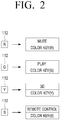
- FIG. 2 is a diagram of available functions of the multi-keys of different colors in the remote control apparatus according to an exemplary embodiment.
- the multi-keys 112 of the different colors R, G, Y and B in the remote control apparatus 100 can perform a plurality of functions. It is preferable that the multi-keys 112 can perform different functions respectively.
- the R multi-key 112 in the red color conducts the mute function for muting the sound output from a speaker of the display apparatus 200 and a function for requesting the additional service corresponding to a color key R of a general remote control.
- the G multi-key 112 in the green color conducts the play function for controlling the play of a video content displayed in the display apparatus 200 and a function for requesting the additional service corresponding to a color key G of the general remote control.
- the Y multi-key 112 in the yellow color conducts the 3D function for requesting to play the 3D video content in the display apparatus 200 and a function for requesting the additional service corresponding to a color key Y of the general remote control.
- the B multi-key 112 in the blue color conducts the remote control function for performing a function relating to the general remote control and a function for requesting the additional service corresponding to a color key B of the general remote control.
- the functions of the R, G. Y, and B multi-keys are indicated to respectively correspond to a mute function, a play function, a 3D function, and a remote control function, the functions are not limited thereto, and additional functions may be assigned to each multi-key.
- the R multi-key 112 can perform the function for purchasing a product provided in the home shopping through the display apparatus 200 and the mute function for muting the sound output from the speaker of the display apparatus 200.
- the user selects and presses the R multi-key 112 among the multi-keys 112 of the different colors R, G, Y and B of the remote control apparatus 100. Accordingly, when a user command relating to the R multi-key 112 is input, the remote control apparatus 100 sends a control signal corresponding to the input user command to the display apparatus 200.
- the display apparatus 200 can purchase the home shopping product currently displayed or mute the sound output from the speaker of the display apparatus 200.
- the jog switch 120 allows the 360-degree direction movement and the push manipulation.
- the manipulation of the jog switch 120 can adjust a channel and a volume displayed in the display apparatus 200, select a menu displayed in the display apparatus 200, or move the displayed cursor. That is, the function of the jog switch 120 is differently set according to whether an operation mode of the display apparatus 200 is a broadcasting reception mode, a menu display mode, or a web browser mode.
- the remote control apparatus 100 can control the functions of the display apparatus 200 with a minimum number of input buttons.
- Various User Interfaces can be provided to the user by differently setting the function of the jog switch 120 according to the operation mode of the display apparatus 200.
- FIG. 3 is a block diagram of the remote control apparatus according to an exemplary embodiment.
- the remote control apparatus 100 includes buttons 110, a jog switch 120, a controller 130, and a communications device 140.
- the buttonst 110 receive the user command relating to the function control of the display apparatus 200.
- the buttons 110 include the single key 111 assigned a single function and the multi-key 112 assigned a plurality of functions, that is, at least first and second functions.
- the single key 111 is assigned a single function and can be the key which is frequently used (for example, return and smart hub).
- the multi-key 112 can be the key for using a plurality of functions which are not frequently used, with the single key.
- the multi-key 112 can be equipped in different colors R, G, Y and B in the remote control apparatus 100 as shown in FIG. 1 .
- the multi-key 112 represented in the different colors R, G, Y and B can execute one (the first function) of the mute function, the play function, the 3D function, and the remote control function, and the function (the second function) relating to the additional service use corresponding to the colors among the additional services (for example, the product purchase provided in the home shopping and the TV game service loading) provided by the display apparatus 200.
- the first function assigned to the multi-key 112 may be a function that is not frequently used among the functions for controlling the operations of the display apparatus 200.
- the second function assigned to the corresponding multi-key 112 can be the color key function relating to the additional service use provided by the display apparatus 200.
- the multi-key 112 has been illustrated in detail by referring to FIGS. 1 and 2 and thus their functional description shall be omitted.
- the jog switch 120 is the switch allowing the directional movement manipulation and the push manipulation.
- the jog switch 120 allows the up, down, left, and right movement like a joystick in addition to the 360-degree movement manipulation, and conducts the push manipulation like a button switch.
- the controller 130 for controlling the operations of the components After the user command is input through the buttons 110, according to the manipulation state of the jog switch 120, the controller 130 for controlling the operations of the components generates and sends a control signal for differently setting functions of the display apparatus 200, to the display apparatus 200.
- the controller 130 controls the display apparatus 200 to perform one of the first and second functions assigned to the multi-key 112.
- the controller 130 can generate a control signal for displaying an OSD menu to guide the first and second functions of the corresponding multi-key 112 to the display apparatus 200.
- the controller 130 can determine the user command relating to the OSD menu display and generate a corresponding control signal.
- the controller 130 can determine the user command relating to the OSD menu display and generate a corresponding control signal.
- the controller 130 sends the generated control signal relating to the OSD menu display to the display apparatus 200.
- the display apparatus 200 receiving the control signal can display an OSD menu guiding the first and second functions assigned to the corresponding multi-key 112 on its screen.
- the OSD menu guiding the first and second functions assigned to the multi-key 112 can be divided into a first region guiding the first function and a second region guiding the second function.
- the controller 130 sends a control signal corresponding to the manipulation to the display apparatus 200.
- the display apparatus 200 can highlight and display the region corresponding to the received control signal among the first and second regions guiding the first and second functions.
- the controller 130 can change the function of the corresponding multi-key 112 to the function corresponding to the highlighted region among the first and second functions.
- the controller 130 can send a control signal relating to the changed function to the display apparatus 200 so that the display apparatus 200 can operate based on the changed function.
- the remote control apparatus 100 can include the plurality of the multi-keys 112 which are represented in the different colors R, G, Y and B and assigned the different functions as shown in FIGS. 1 and 2 .
- the user can press during the preset threshold time, the R multi-key 112 assigned the first function relating to the mute function and the second function for requesting the additional service corresponding to the color key R of the general remote control.
- the user can press the R multi-key 112 and then move or push the jog switch 120 within the preset threshold time.
- the controller 130 determines the user request for changing the function of the R multi-key 112 and sends to the display apparatus 200 a control signal for displaying the OSD menu relating to the R multi-key 112.
- the display apparatus 200 can display the OSD menu guiding the first and second functions assigned to the R multi-key 112 on the screen.
- the display apparatus 200 can highlight and display the region corresponding to the currently set function among the first and second functions assigned to the R multi-key 112.
- the region corresponding to the first function can be highlighted and displayed.
- the controller 130 can change the first function set to the R multi-key 112 to the second function.
- the user can request the second function, that is, the additional service corresponding to the color key R of the general remote control through the R multi-key 112.
- the first function is set to the multi-key 112 by priority and the second function is additionally set to the multi-key 112. Accordingly, when the corresponding multi-key 112 is not input during the preset threshold time while the user sets the multi-key 112 to the second function, the controller 130 can restore the second function of the multi-key 112 to the first function according to a preset condition.
- the controller 130 can control the first function set to the multi-key 112 to operate one of the mute function, the play function, the 3D function, and the remote control function according to the operation mode of the display apparatus 200.
- the controller 130 controls the multi-key 112 to perform the mute function.
- the display apparatus 200 can mute the sound output from the speaker.
- the controller 130 can control the display apparatus 200 to perform the different operation according to its operation mode. That is, the jog switch 120 can perform the different function based on the operation mode of the display apparatus 200 so as to control the display apparatus 200 as shown in FIGS. 4 , 5 and 6 .
- FIG. 4 is a diagram of the jog switch operating as the control key according to an exemplary embodiment.
- the display apparatus 200 can operate in a broadcasting reception mode to display the broadcasting content provided from an external source via a relay terminal such as a tuner or a set-top box, on the screen.
- a relay terminal such as a tuner or a set-top box
- the user can manipulate the jog switch 120 of the remote control apparatus 100.
- the jog switch 120 can serve as the control key for adjusting the broadcasting reception channel or the volume of the display apparatus 200.
- the horizontal movement manipulation can change the broadcasting reception channel of the display apparatus 200.
- the vertical movement manipulation can adjust the volume of the sound output from the speaker of the display apparatus 200.
- the display apparatus 200 when the display apparatus 200 operates in the broadcasting reception mode and the user manipulates the jog switch 120 in one of the up, down, left, and right directions, the display apparatus 200 can change the channel or adjust the volume.
- FIG. 5 is a diagram of the jog switch serving as the direction key according to an exemplary embodiment.
- the display apparatus 200 can operate in the menu display mode and display a menu window such as an OSD menu, on the screen.
- the user can manipulate the jog switch 120 of the remote control apparatus 100.
- the jog switch 120 can serve as the direction key to navigate the OSD menu displayed on the screen of the display apparatus 200.
- the screen of the display apparatus 200 can display the OSD menu relating to Menu, Tools, Source, and Power off as shown in FIG. 5 .
- the display apparatus 200 can highlight the OSD menu located in the direction corresponding to the movement manipulation.
- the display apparatus 200 can display a submenu relating to the highlighted OSD menu on the screen or perform an operation relating to the corresponding OSD menu.
- the jog switch 120 can serve as the direction key for selecting one of a plurality of OSD menus displayed on the screen of the display apparatus 200.
- FIG. 6 is a diagram of the jog switch operating as the cursor key according to an exemplary embodiment.
- the display apparatus 200 can operate in the web browser mode and display the web page provided from an external source over the Internet on its screen.
- the display apparatus 200 can display a cursor for selecting the content of the web page displayed on the screen, on the screen.
- the user can manipulate the jog switch 120 of the remote control apparatus 100.
- the jog switch 120 can serve as the cursor key for moving the cursor displayed on the screen of the display apparatus 200.
- the cursor displayed at a point "a” on the screen of the display apparatus 200 can be moved and displayed at a point "a'” in the direction corresponding to the movement manipulation of the jog switch 120.
- the display apparatus 200 displays a web page relating to the content corresponding to the point "a'" on the screen.
- the jog switch 120 can operate as the cursor key for moving the cursor displayed on the screen of the display apparatus 200.
- the controller 130 can determine the movement direction of the jog switch 120 based on two signal levels corresponding to X and Y axis slopes generated by the corresponding manipulation, and send the determined direction information to the display apparatus 200.
- the controller 130 can detect X and Y axis signal levels according to the corresponding manipulation.
- the X and Y axis signal levels can be detected as 0V ⁇ 3.3V, and the controller 130 can determine the movement direction of the jog switch 120 based on the detected X and Y axis signal levels under a preset condition. For example, when the X and Y axis signal levels are detected as 0V and 1.65V according to the movement manipulation of the jog switch 120, the controller 130 determines that the jog switch 120 is moved to the left.
- the controller 130 can determine that the jog switch 120 is moved to the right. For example, when the X and Y axis signal levels are detected as 1V and 2V according to the movement manipulation of the jog switch 120, the controller 130 determines that the jog switch 120 is moved to the upper left. When the X and Y axis signal levels are detected as 2V and 1V, the controller 130 can determine that the jog switch 120 is moved to the lower right.
- the controller 130 can determine the movement direction of the jog switch 120 based on the two signal levels generated by the movement manipulation of the jog switch 120, and thus determine the movement direction according to the 360-degree movement manipulation of the jog switch 120.
- the structure of the remote control apparatus 100 including the multi-key 112 assigned the plurality of the functions and the jog switch 120 allowing the 360-degree movement manipulation has been illustrated in detail.
- the structure of the display apparatus 200 operating according to the control command of the remote control apparatus 100 is explained in detail.
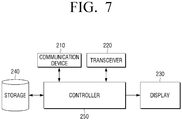
- FIG. 7 is a block diagram of the display apparatus according to an exemplary embodiment
- the display apparatus 200 includes a communications device 210, a transceiver 220, a display 230, a storage 240, and a controller 250.
- the communications device 210 communicates with the remote control apparatus 100, and the transceiver 220 receives the content provided from an external device via the relay device such as a set-top box or the Internet.
- the display 230 displays the OSD menu corresponding to the control command received from the remote control apparatus 100 on the screen, or receives and displays the content provided from the external device through the transceiver 220 on the screen.
- the storage 240 stores information for executing the function corresponding to the control signal received from the remote control apparatus 100.
- the information stored in the storage 240 can include the menu information relating to the function of the display apparatus 200 and the information for performing the function of the display apparatus 200 according to the user command corresponding to at least one input of the buttons 110 including the single key 111 and the multi-key 112 and the jog switch 120 of the remote control apparatus 100.
- the information stored in the storage 240 can include the OSD menu guiding the first and second functions assigned to the multi-key 112.
- the controller 250 controls to display on the screen a menu for setting the plurality of functions corresponding to the received control signal, based on the information stored to the storage 240.
- the control signal received from the remote control apparatus 100 is the signal generated according to the user command which is input through the multi-key 112 for inputting the user command relating to the function control of the display apparatus 200 and the jog switch 120 allowing the multiple direction movement manipulation and the push manipulation in the remote control apparatus 100.
- the controller 250 can conduct the function relating to the received control signal based on the information stored in the storage 240. For example, when receiving the control signal relating to the broadcasting channel change from the remote control apparatus 100, the controller 250 can receive and display the broadcasting content over the broadcasting channel corresponding to the control signal received through the transceiver 220, through the display 230.
- the controller 250 when receiving the control signal related to the function change of the multi-key 112 from the remote control apparatus 100, the controller 250 can display the OSD menu guiding the first and second functions assigned to the corresponding multi-key 112 on the screen through the display 230, based on the information stored in the storage 240. At this time, the controller 250 can highlight the region corresponding to the current function among the first and second functions assigned to the multi-key 112. As such, when the OSD menu guiding the first and second functions assigned to the corresponding multi-key 112 is displayed on the screen and the control signal relating to the manipulation command of the jog switch 120 is received from the remote control apparatus 100, the controller 250 can highlight the region corresponding to the function corresponding to the control signal.
- the controller 250 can perform the operation corresponding to the received control signal according to the operation mode of the display apparatus 200. For example, when the display apparatus 200 is operating in the broadcasting reception mode and the control signal related to the manipulation command of the jog switch 120 is received from the remote control apparatus 100, the controller 250 can adjust the broadcasting reception channel or the volume according to the received control signal.
- the controller 250 can highlight the OSD menu positioned in the direction corresponding to the received control signal.
- the controller 250 can move the cursor displayed on the screen in the direction corresponding to the received control signal.
- the controller 250 of the display apparatus 200 can adaptively change the function relating to the control signal received from the remote control apparatus 100 according to the operation mode of the display apparatus 200, and perform the operation of the display apparatus 200 with the changed function.
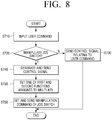
- FIG. 8 is a flowchart of a method for controlling the operation of the display apparatus in the remote control apparatus according to an exemplary embodiment.
- the remote control apparatus receives the user command related to the function control of the display apparatus, from the user through the buttons of the remote control apparatus (operation S710).
- the buttons include the single key assigned the single function and the multi-key assigned the multiple functions, that is, the first and second functions.
- the single key and the multi-key have been described earlier and shall be omitted.
- the remote control apparatus After the user command is input, the remote control apparatus checks whether the user command related to the manipulation of the jog switch allowing the directional movement manipulation and the push manipulation is input (operation S720). When checking that the user command relating to the jog switch manipulation is not input within the preset threshold time, the remote control apparatus sends the control signal related to the user command input through the buttons, to the display apparatus (operation S730).
- the remote control apparatus When checking that the user command related to the jog switch manipulation is input within the preset threshold time, the remote control apparatus generates and sends the control signal to set a different function of the display apparatus, to the display apparatus (operation S740). That is, when the user command relating to the single key is input, the remote control apparatus can send the control signal relating to the input user command to the display apparatus in operation S730. However, when the user command relating to the multi-key is input, the remote control apparatus checks whether the user command relating to the jog switch manipulation is input within the preset threshold time in operation S720.
- the remote control apparatus can generate and send the control signal for controlling the function of the display apparatus with the user command relating to the multi-key, to the display apparatus.
- the remote control apparatus can generate and send the control signal to set a different function of the display apparatus, to the display apparatus.
- the remote control apparatus can determine the command to set a different function of the display apparatus, and generate and send the corresponding control signal to the display apparatus.
- the display apparatus receiving the control signal can display the OSD menu guiding the first and second functions assigned to the corresponding multi-key on the screen.
- the remote control apparatus sets one of the first and second functions assigned to the multi-key (operation S750).
- the remote control apparatus generates and sends the control signal corresponding to the manipulation to the display apparatus.
- the display apparatus highlights and displays the region corresponding to the received control signal among the first and second regions guiding the first and second functions.
- the remote control apparatus can change the function of the corresponding multi-key to the function corresponding to the highlighted region among the first and second functions.
- the remote control apparatus can generate and send the control signal relating to the changed function to the display apparatus so that the display apparatus can operate based on the changed function.
- the first function is set to the multi-key by priority and the second function is additionally set to the multi-key.
- the remote control apparatus can restore the second function of the multi-key to the first function according to the preset condition.
- the remote control apparatus can control the display apparatus to perform the different operation according to the operation mode of the display apparatus.
- the jog switch of the remote control apparatus performs the different operation according to the operation command of the display apparatus is now explained.
- FIG. 9 is a flowchart of a method for setting the function of the jog switch in the remote control apparatus according to an exemplary embodiment.
- the remote control apparatus receives the manipulation command of the user from the jog switch (operation S910).
- the remote control apparatus checks the operational mode of the display apparatus. More specifically, when the manipulation command is input from the jog switch, the remote control apparatus determines whether the display apparatus operates in the broadcasting reception mode (operation S920). When determining that the display apparatus operates in the broadcasting reception mode, the remote control apparatus sets the manipulation command of the jog switch to the manipulation command of the control key for adjusting the broadcasting reception channel or the volume of the display apparatus (operation S930).
- the display apparatus can adjust the broadcasting reception channel or the volume according to the movement manipulation in one of the up, down, left, and right directions of the jog switch.
- the remote control apparatus determines whether the display apparatus operates in the menu display mode (operation S930). When determining that the display apparatus is operating in the menu display mode, the remote control apparatus sets the manipulation command of the jog switch to the manipulation command of the direction key for navigating the menu displayed by the display apparatus (operation S940). When the jog switch operates as the direction key, the display apparatus can highlight the OSD menu displayed at the position corresponding to the movement manipulation in one of the up, down, left, and right directions of the jog switch.
- the remote control apparatus determines that the display apparatus operates in the web browser mode and sets the operation command of the jog switch to the operation command of the cursor key for moving the cursor displayed on the screen of the display apparatus (operation S950).
- the jog switch serves as the cursor key
- the display apparatus can move the cursor displayed on the screen, in the direction corresponding to the movement manipulation in the 360-degree direction of the jog switch.
- the remote control apparatus can simplify the size, the structure, and the number of the buttons of the remote control apparatus by including the jog switch allowing a 360-degree direction manipulation, and the plurality of the buttons for controlling the functions. Also, the display apparatus displays the OSD menu relating to the buttons of the remote control apparatus so that the user can use the remote control apparatus more easily.
Landscapes
- Engineering & Computer Science (AREA)
- Human Computer Interaction (AREA)
- General Engineering & Computer Science (AREA)
- Signal Processing (AREA)
- Multimedia (AREA)
- Theoretical Computer Science (AREA)
- Physics & Mathematics (AREA)
- General Physics & Mathematics (AREA)
- Software Systems (AREA)
- Computer Networks & Wireless Communication (AREA)
- User Interface Of Digital Computer (AREA)
- Details Of Television Systems (AREA)
- Selective Calling Equipment (AREA)
Claims (5)
- Un appareil de commande à distance (100) incluant :une unité de communication (140) configurée pour communiquer avec un appareil d'affichage (200) ;un panneau de touches (110) configuré pour recevoir des commandes d'utilisateur pour contrôler l'appareil d'affichage (200) ;une manette de jeu (120) configurée pour choisir la direction de la manipulation et une commande par pression ; et une unité de commande (130) configurée pour fournir un signal de contrôle, en réponse aux commandes de l'utilisateur par l'intermédiaire du panneau de touches (110), pour contrôler l'appareil d'affichage (200) par une manipulation effectuée avec la manette (120). L'unité de commande se caractérise par :
le panneau de touches (110) incluant :une touche unique (111) attribuée à une fonction unique ; etau moins une touche multifonction (112) attribuée à une première fonction et à une deuxième fonction ; etoù l'appareil est configuré comme suit :après une pression sur la touche multi-fonction (112), lorsqu'une direction par la manette (120) n'est pas donnée dans un délai prédéterminé :l'unité de commande (130) est configurée pour conserver la première fonction de la touche multi-fonction (112) et contrôler l'unité de communication (140) pour envoyer un signal de commande à l'appareil d'affichage (200) et exécuter la première fonction, etlorsqu'une direction est donnée par la manette (120) dans le délai prédéterminé :
l'unité de commande (130) est configurée pour attribuer la deuxième fonction à la touche multi-fonction (112) selon la direction donnée par la manette, et commander l'unité de communication (140) pour envoyer un signal de commande destiné à l'appareil d'affichage (200) pour exécuter la deuxième fonction. - L'appareil de commande à distance (100) de la revendication 1, où la première fonction est attribuée à la touche multi-fonction (112) en priorité et la deuxième fonction est en outre définie sur la touche multi-fonction (112) et lorsque la deuxième fonction est attribuée à la touche multi-fonction (112) et que cette touche multi-fonction (112) reste inactive pendant le délai prédéterminé, l'unité de commande (130) est configurée pour rétablir la première fonction sur la touche multi-fonction (112) .
- L'appareil de commande à distance (100) de la revendication 1 ou 2, où la première fonction est l'une quelconque des fonctions coupure son, jeu, 3D, et télécommande conformes à un mode opérationnel de l'appareil d'affichage (200), et
la deuxième fonction inclut une fonction code de couleur permettant d'utiliser un service supplémentaire fourni par l'appareil d'affichage (200) . - L'appareil de commande à distance (100) de la revendication 3, où lorsque la première fonction est attribuée à la touche multi-fonction (112), et lorsque la touche multi-fonction (112) est actionnée, l'unité de commande (130) est configurée pour contrôler l'unité de communication (140) pour envoyer un signal de commande à l'appareil d'affichage (200) et exécuter l'une quelconque des fonctions coupure son, jeu, 3D et télécommande.
- Une méthode permettant de contrôler une fonction de l'appareil d'affichage (200) avec un appareil de commande à distance (100), incluant : recevoir une commande d'utilisateur pour contrôler l'appareil d'affichage (200) ; en réponse à la commande d'utilisateur reçue, fournissant un signal de commande pour contrôler différemment l'appareil d'affichage (200) selon une manipulation de la manette (120) avec un choix de direction et de pression, se caractérisant par :où la commande d'utilisateur émise par un panneau de touches (110), incluant une touche unique (111) qui contrôle une fonction unique et au minimum une touche multi-fonction (112) qui contrôle une première fonction et une deuxième fonction ; et oùlorsque la touche multi-fonction (112) est actionnée, et lorsque la manette (120) n'est pas actionnée dans un délai prédéterminé :la première fonction de la touche multi-fonction (112) est conservée et déclenche l'envoi d'un signal de commande à l'appareil d'affichage (200) pour exécuter la première fonction, etlorsque la direction est donnée par la manette (120) dans un délai prédéterminé : la deuxième fonction est définie sur la touche multi-fonction (112) selon la commande de direction donnée à la manette pour contrôler l'appareil d'affichage (200) et exécuter la deuxième fonction.
Applications Claiming Priority (1)
| Application Number | Priority Date | Filing Date | Title |
|---|---|---|---|
| KR1020120054281A KR101943441B1 (ko) | 2012-05-22 | 2012-05-22 | 디스플레이 장치의 기능을 제어하는 원격 제어 장치 및 방법 |
Publications (3)
| Publication Number | Publication Date |
|---|---|
| EP2672723A2 EP2672723A2 (fr) | 2013-12-11 |
| EP2672723A3 EP2672723A3 (fr) | 2014-01-22 |
| EP2672723B1 true EP2672723B1 (fr) | 2019-05-01 |
Family
ID=47900486
Family Applications (1)
| Application Number | Title | Priority Date | Filing Date |
|---|---|---|---|
| EP13150177.7A Active EP2672723B1 (fr) | 2012-05-22 | 2013-01-03 | Appareil et procédé de commande à distance permettant de commander des fonctions d'appareils d'affichage |
Country Status (4)
| Country | Link |
|---|---|
| US (1) | US9176593B2 (fr) |
| EP (1) | EP2672723B1 (fr) |
| KR (1) | KR101943441B1 (fr) |
| CN (1) | CN103428549B (fr) |
Families Citing this family (10)
| Publication number | Priority date | Publication date | Assignee | Title |
|---|---|---|---|---|
| USD620456S1 (en) * | 2009-10-13 | 2010-07-27 | Apple Inc. | Remote control |
| CN103634639B (zh) * | 2013-11-29 | 2018-02-23 | 乐视致新电子科技(天津)有限公司 | 一种电视控制方法及电视遥控器 |
| CN105335136B (zh) * | 2014-07-16 | 2019-08-09 | 阿里巴巴集团控股有限公司 | 智能设备的控制方法及装置 |
| KR20160137362A (ko) * | 2015-05-22 | 2016-11-30 | 삼성전자주식회사 | 디스플레이 시스템, 디스플레이 장치, 원격제어장치 및 그의 제어 방법 |
| USD793347S1 (en) * | 2015-09-03 | 2017-08-01 | Interactive Voice, Inc. | Voice controlled automation assistant |
| KR20170085840A (ko) * | 2016-01-15 | 2017-07-25 | 삼성전자주식회사 | 조그셔틀을 구비한 리모컨 및 이를 이용한 전자기기의 메뉴설정 제어방법 |
| CN107396201B (zh) * | 2017-08-28 | 2020-09-25 | 四川长虹电器股份有限公司 | 电视机本机五键操作方法 |
| CN108012174A (zh) * | 2017-12-20 | 2018-05-08 | 深圳创维-Rgb电子有限公司 | 智能终端快捷键自定义方法、智能终端及可读储存介质 |
| US12542136B2 (en) * | 2021-08-25 | 2026-02-03 | Google Llc | Dynamically configuring a warm word button with assistant commands |
| USD1021297S1 (en) * | 2023-12-21 | 2024-04-02 | Shijie ZHU | Dog training remote control |
Citations (2)
| Publication number | Priority date | Publication date | Assignee | Title |
|---|---|---|---|---|
| US7091430B1 (en) * | 2005-05-19 | 2006-08-15 | Smk Corporation | Jog switch |
| WO2009005507A2 (fr) * | 2007-06-28 | 2009-01-08 | Shenzhen Tcl New Technology Ltd | Système et procédé pour le fonctionnement d'un téléviseur avec une télécommande |
Family Cites Families (12)
| Publication number | Priority date | Publication date | Assignee | Title |
|---|---|---|---|---|
| GB2363584B (en) * | 1997-07-17 | 2002-02-20 | Nintendo Co Ltd | Video game system |
| JP2002135676A (ja) * | 2000-10-27 | 2002-05-10 | Canon Inc | テレビジョン信号受信装置、その処理方法及び記録媒体 |
| KR100811339B1 (ko) * | 2001-10-11 | 2008-03-07 | 엘지전자 주식회사 | 그래픽 유저 인터페이스가 구현되는 원격제어 시스템 및방법 |
| KR100606755B1 (ko) | 2003-12-31 | 2006-07-31 | 엘지전자 주식회사 | 화면 제어창 기능을 갖는 영상시스템 및 그 제어방법 |
| KR100814395B1 (ko) * | 2005-08-30 | 2008-03-18 | 삼성전자주식회사 | 조그 키와 사방향 키를 이용한 사용자 인터페이스 제어장치 및 그 방법 |
| CN2912144Y (zh) * | 2006-06-30 | 2007-06-13 | 天津三星电子显示器有限公司 | 电视机摇杆式防尘遥控器 |
| CN200990644Y (zh) * | 2006-12-29 | 2007-12-12 | 康佳集团股份有限公司 | 手柄式电视专用遥控器 |
| JP4479766B2 (ja) * | 2007-09-04 | 2010-06-09 | ソニー株式会社 | 情報処理システム、情報処理装置および方法、プログラム、並びに記録媒体 |
| KR101482115B1 (ko) * | 2008-07-07 | 2015-01-13 | 엘지전자 주식회사 | 자이로센서를 구비한 휴대 단말기 및 그 제어방법 |
| KR101086340B1 (ko) * | 2009-10-16 | 2011-11-23 | 주식회사 삼보컴퓨터 | 리모컨, 이를 포함하는 디스플레이 제어 시스템 및 이의 동작 제어 방법 |
| WO2011048528A2 (fr) * | 2009-10-20 | 2011-04-28 | Koninklijke Philips Electronics N.V. | Procédé et appareil de mise en évidence d'éléments d'affichage fonctionnels |
| US20110164066A1 (en) * | 2010-01-04 | 2011-07-07 | Todd Beals | Electronic reading device |
-
2012
- 2012-05-22 KR KR1020120054281A patent/KR101943441B1/ko not_active Expired - Fee Related
-
2013
- 2013-01-03 EP EP13150177.7A patent/EP2672723B1/fr active Active
- 2013-02-12 US US13/765,096 patent/US9176593B2/en active Active
- 2013-05-22 CN CN201310192462.3A patent/CN103428549B/zh not_active Expired - Fee Related
Patent Citations (2)
| Publication number | Priority date | Publication date | Assignee | Title |
|---|---|---|---|---|
| US7091430B1 (en) * | 2005-05-19 | 2006-08-15 | Smk Corporation | Jog switch |
| WO2009005507A2 (fr) * | 2007-06-28 | 2009-01-08 | Shenzhen Tcl New Technology Ltd | Système et procédé pour le fonctionnement d'un téléviseur avec une télécommande |
Non-Patent Citations (1)
| Title |
|---|
| ANONYMOUS: "[Apple Remote] appleremote with long presses - Remote Controls - Flirc Forums", 12 November 2011 (2011-11-12), XP055284072, Retrieved from the Internet <URL:http://forum.flirc.tv/index.php?/topic/27-apple-remote-appleremote-with-long-presses/> [retrieved on 20160628] * |
Also Published As
| Publication number | Publication date |
|---|---|
| US20130314383A1 (en) | 2013-11-28 |
| KR20130130451A (ko) | 2013-12-02 |
| CN103428549A (zh) | 2013-12-04 |
| KR101943441B1 (ko) | 2019-01-29 |
| US9176593B2 (en) | 2015-11-03 |
| EP2672723A2 (fr) | 2013-12-11 |
| CN103428549B (zh) | 2018-04-06 |
| EP2672723A3 (fr) | 2014-01-22 |
Similar Documents
| Publication | Publication Date | Title |
|---|---|---|
| US9176593B2 (en) | Remote control apparatus and method for controlling functions of display apparatuses | |
| US12149774B2 (en) | Broadcast receiving apparatus and control method thereof | |
| US11841995B2 (en) | Display device and method thereof | |
| US12026314B2 (en) | Haptic feedback remote control systems and methods | |
| EP2801215B1 (fr) | Appareil d'affichage d'image et son procédé d'utilisation | |
| US9513802B2 (en) | Methods for displaying a user interface on a remote control device and a remote control device applying the same | |
| EP3417630B1 (fr) | Dispositif d'affichage et son procédé de fonctionnement | |
| KR20170107753A (ko) | 디스플레이 장치 및 그 동작 방법 | |
| EP3151212B1 (fr) | Dispositif électronique comprenant un écran tactile et son procédé de commande de fonctionnement | |
| KR102690103B1 (ko) | 디스플레이 장치 및 그의 동작 방법 | |
| US12610103B2 (en) | Remote control device and image display device having same | |
| KR101771837B1 (ko) | 미디어 시스템에 있어서 포스 입력을 제공하는 리모콘 및 이의 구동 방법 | |
| EP3247119A1 (fr) | Système multimédia et procédé pour mettre en uvre divers modes aux moyen d'entrée de force | |
| JP4702583B2 (ja) | リモコンシステム | |
| CN103092486B (zh) | 显示设备及其方法 | |
| KR102581857B1 (ko) | 디스플레이 장치 및 그의 동작 방법 | |
| JP7679496B2 (ja) | ディスプレイ装置 | |
| EP4557749A1 (fr) | Dispositif d'affichage et procédé de fonctionnement associé | |
| US20170332129A1 (en) | Image processing terminal and method for controlling an external device using the same | |
| KR101881410B1 (ko) | 이미지 처리 단말 제어 기기 및 이의 동작 방법 | |
| KR20250107855A (ko) | 디스플레이 장치 | |
| KR101853961B1 (ko) | 포스 입력의 식별 서비스 제공 장치 및 방법 | |
| KR20130033182A (ko) | 영상표시장치의 동작 방법 |
Legal Events
| Date | Code | Title | Description |
|---|---|---|---|
| PUAI | Public reference made under article 153(3) epc to a published international application that has entered the european phase |
Free format text: ORIGINAL CODE: 0009012 |
|
| AK | Designated contracting states |
Kind code of ref document: A2 Designated state(s): AL AT BE BG CH CY CZ DE DK EE ES FI FR GB GR HR HU IE IS IT LI LT LU LV MC MK MT NL NO PL PT RO RS SE SI SK SM TR |
|
| AX | Request for extension of the european patent |
Extension state: BA ME |
|
| PUAL | Search report despatched |
Free format text: ORIGINAL CODE: 0009013 |
|
| AK | Designated contracting states |
Kind code of ref document: A3 Designated state(s): AL AT BE BG CH CY CZ DE DK EE ES FI FR GB GR HR HU IE IS IT LI LT LU LV MC MK MT NL NO PL PT RO RS SE SI SK SM TR |
|
| AX | Request for extension of the european patent |
Extension state: BA ME |
|
| RIC1 | Information provided on ipc code assigned before grant |
Ipc: G06F 3/033 20130101ALI20131213BHEP Ipc: H04N 21/443 20110101ALI20131213BHEP Ipc: G06F 3/0338 20130101ALI20131213BHEP Ipc: G06F 3/0354 20130101ALI20131213BHEP Ipc: H04N 21/422 20110101AFI20131213BHEP Ipc: G06F 3/048 20130101ALI20131213BHEP Ipc: H04N 21/41 20110101ALI20131213BHEP |
|
| 17P | Request for examination filed |
Effective date: 20140716 |
|
| RBV | Designated contracting states (corrected) |
Designated state(s): AL AT BE BG CH CY CZ DE DK EE ES FI FR GB GR HR HU IE IS IT LI LT LU LV MC MK MT NL NO PL PT RO RS SE SI SK SM TR |
|
| 17Q | First examination report despatched |
Effective date: 20160708 |
|
| STAA | Information on the status of an ep patent application or granted ep patent |
Free format text: STATUS: EXAMINATION IS IN PROGRESS |
|
| RIC1 | Information provided on ipc code assigned before grant |
Ipc: H04N 21/422 20110101AFI20181012BHEP Ipc: G06F 3/0354 20130101ALI20181012BHEP Ipc: G06F 3/048 20130101ALI20181012BHEP Ipc: H04N 21/443 20110101ALI20181012BHEP Ipc: H04N 5/44 20110101ALI20181012BHEP Ipc: H04N 21/41 20110101ALI20181012BHEP Ipc: G06F 3/0338 20130101ALI20181012BHEP Ipc: G06F 3/033 20130101ALI20181012BHEP |
|
| GRAP | Despatch of communication of intention to grant a patent |
Free format text: ORIGINAL CODE: EPIDOSNIGR1 |
|
| STAA | Information on the status of an ep patent application or granted ep patent |
Free format text: STATUS: GRANT OF PATENT IS INTENDED |
|
| INTG | Intention to grant announced |
Effective date: 20181129 |
|
| GRAS | Grant fee paid |
Free format text: ORIGINAL CODE: EPIDOSNIGR3 |
|
| GRAA | (expected) grant |
Free format text: ORIGINAL CODE: 0009210 |
|
| STAA | Information on the status of an ep patent application or granted ep patent |
Free format text: STATUS: THE PATENT HAS BEEN GRANTED |
|
| AK | Designated contracting states |
Kind code of ref document: B1 Designated state(s): AL AT BE BG CH CY CZ DE DK EE ES FI FR GB GR HR HU IE IS IT LI LT LU LV MC MK MT NL NO PL PT RO RS SE SI SK SM TR |
|
| REG | Reference to a national code |
Ref country code: GB Ref legal event code: FG4D |
|
| REG | Reference to a national code |
Ref country code: CH Ref legal event code: EP Ref country code: AT Ref legal event code: REF Ref document number: 1128519 Country of ref document: AT Kind code of ref document: T Effective date: 20190515 |
|
| REG | Reference to a national code |
Ref country code: DE Ref legal event code: R096 Ref document number: 602013054522 Country of ref document: DE |
|
| REG | Reference to a national code |
Ref country code: IE Ref legal event code: FG4D |
|
| REG | Reference to a national code |
Ref country code: NL Ref legal event code: MP Effective date: 20190501 |
|
| REG | Reference to a national code |
Ref country code: LT Ref legal event code: MG4D |
|
| PG25 | Lapsed in a contracting state [announced via postgrant information from national office to epo] |
Ref country code: FI Free format text: LAPSE BECAUSE OF FAILURE TO SUBMIT A TRANSLATION OF THE DESCRIPTION OR TO PAY THE FEE WITHIN THE PRESCRIBED TIME-LIMIT Effective date: 20190501 Ref country code: AL Free format text: LAPSE BECAUSE OF FAILURE TO SUBMIT A TRANSLATION OF THE DESCRIPTION OR TO PAY THE FEE WITHIN THE PRESCRIBED TIME-LIMIT Effective date: 20190501 Ref country code: NO Free format text: LAPSE BECAUSE OF FAILURE TO SUBMIT A TRANSLATION OF THE DESCRIPTION OR TO PAY THE FEE WITHIN THE PRESCRIBED TIME-LIMIT Effective date: 20190801 Ref country code: PT Free format text: LAPSE BECAUSE OF FAILURE TO SUBMIT A TRANSLATION OF THE DESCRIPTION OR TO PAY THE FEE WITHIN THE PRESCRIBED TIME-LIMIT Effective date: 20190901 Ref country code: SE Free format text: LAPSE BECAUSE OF FAILURE TO SUBMIT A TRANSLATION OF THE DESCRIPTION OR TO PAY THE FEE WITHIN THE PRESCRIBED TIME-LIMIT Effective date: 20190501 Ref country code: HR Free format text: LAPSE BECAUSE OF FAILURE TO SUBMIT A TRANSLATION OF THE DESCRIPTION OR TO PAY THE FEE WITHIN THE PRESCRIBED TIME-LIMIT Effective date: 20190501 Ref country code: LT Free format text: LAPSE BECAUSE OF FAILURE TO SUBMIT A TRANSLATION OF THE DESCRIPTION OR TO PAY THE FEE WITHIN THE PRESCRIBED TIME-LIMIT Effective date: 20190501 Ref country code: ES Free format text: LAPSE BECAUSE OF FAILURE TO SUBMIT A TRANSLATION OF THE DESCRIPTION OR TO PAY THE FEE WITHIN THE PRESCRIBED TIME-LIMIT Effective date: 20190501 Ref country code: NL Free format text: LAPSE BECAUSE OF FAILURE TO SUBMIT A TRANSLATION OF THE DESCRIPTION OR TO PAY THE FEE WITHIN THE PRESCRIBED TIME-LIMIT Effective date: 20190501 |
|
| PG25 | Lapsed in a contracting state [announced via postgrant information from national office to epo] |
Ref country code: LV Free format text: LAPSE BECAUSE OF FAILURE TO SUBMIT A TRANSLATION OF THE DESCRIPTION OR TO PAY THE FEE WITHIN THE PRESCRIBED TIME-LIMIT Effective date: 20190501 Ref country code: RS Free format text: LAPSE BECAUSE OF FAILURE TO SUBMIT A TRANSLATION OF THE DESCRIPTION OR TO PAY THE FEE WITHIN THE PRESCRIBED TIME-LIMIT Effective date: 20190501 Ref country code: BG Free format text: LAPSE BECAUSE OF FAILURE TO SUBMIT A TRANSLATION OF THE DESCRIPTION OR TO PAY THE FEE WITHIN THE PRESCRIBED TIME-LIMIT Effective date: 20190801 Ref country code: GR Free format text: LAPSE BECAUSE OF FAILURE TO SUBMIT A TRANSLATION OF THE DESCRIPTION OR TO PAY THE FEE WITHIN THE PRESCRIBED TIME-LIMIT Effective date: 20190802 |
|
| REG | Reference to a national code |
Ref country code: AT Ref legal event code: MK05 Ref document number: 1128519 Country of ref document: AT Kind code of ref document: T Effective date: 20190501 |
|
| PG25 | Lapsed in a contracting state [announced via postgrant information from national office to epo] |
Ref country code: IS Free format text: LAPSE BECAUSE OF FAILURE TO SUBMIT A TRANSLATION OF THE DESCRIPTION OR TO PAY THE FEE WITHIN THE PRESCRIBED TIME-LIMIT Effective date: 20190901 |
|
| PG25 | Lapsed in a contracting state [announced via postgrant information from national office to epo] |
Ref country code: SK Free format text: LAPSE BECAUSE OF FAILURE TO SUBMIT A TRANSLATION OF THE DESCRIPTION OR TO PAY THE FEE WITHIN THE PRESCRIBED TIME-LIMIT Effective date: 20190501 Ref country code: AT Free format text: LAPSE BECAUSE OF FAILURE TO SUBMIT A TRANSLATION OF THE DESCRIPTION OR TO PAY THE FEE WITHIN THE PRESCRIBED TIME-LIMIT Effective date: 20190501 Ref country code: DK Free format text: LAPSE BECAUSE OF FAILURE TO SUBMIT A TRANSLATION OF THE DESCRIPTION OR TO PAY THE FEE WITHIN THE PRESCRIBED TIME-LIMIT Effective date: 20190501 Ref country code: EE Free format text: LAPSE BECAUSE OF FAILURE TO SUBMIT A TRANSLATION OF THE DESCRIPTION OR TO PAY THE FEE WITHIN THE PRESCRIBED TIME-LIMIT Effective date: 20190501 Ref country code: RO Free format text: LAPSE BECAUSE OF FAILURE TO SUBMIT A TRANSLATION OF THE DESCRIPTION OR TO PAY THE FEE WITHIN THE PRESCRIBED TIME-LIMIT Effective date: 20190501 Ref country code: CZ Free format text: LAPSE BECAUSE OF FAILURE TO SUBMIT A TRANSLATION OF THE DESCRIPTION OR TO PAY THE FEE WITHIN THE PRESCRIBED TIME-LIMIT Effective date: 20190501 |
|
| REG | Reference to a national code |
Ref country code: DE Ref legal event code: R097 Ref document number: 602013054522 Country of ref document: DE |
|
| PG25 | Lapsed in a contracting state [announced via postgrant information from national office to epo] |
Ref country code: IT Free format text: LAPSE BECAUSE OF FAILURE TO SUBMIT A TRANSLATION OF THE DESCRIPTION OR TO PAY THE FEE WITHIN THE PRESCRIBED TIME-LIMIT Effective date: 20190501 Ref country code: SM Free format text: LAPSE BECAUSE OF FAILURE TO SUBMIT A TRANSLATION OF THE DESCRIPTION OR TO PAY THE FEE WITHIN THE PRESCRIBED TIME-LIMIT Effective date: 20190501 |
|
| PLBE | No opposition filed within time limit |
Free format text: ORIGINAL CODE: 0009261 |
|
| STAA | Information on the status of an ep patent application or granted ep patent |
Free format text: STATUS: NO OPPOSITION FILED WITHIN TIME LIMIT |
|
| PG25 | Lapsed in a contracting state [announced via postgrant information from national office to epo] |
Ref country code: TR Free format text: LAPSE BECAUSE OF FAILURE TO SUBMIT A TRANSLATION OF THE DESCRIPTION OR TO PAY THE FEE WITHIN THE PRESCRIBED TIME-LIMIT Effective date: 20190501 |
|
| 26N | No opposition filed |
Effective date: 20200204 |
|
| PG25 | Lapsed in a contracting state [announced via postgrant information from national office to epo] |
Ref country code: PL Free format text: LAPSE BECAUSE OF FAILURE TO SUBMIT A TRANSLATION OF THE DESCRIPTION OR TO PAY THE FEE WITHIN THE PRESCRIBED TIME-LIMIT Effective date: 20190501 |
|
| PG25 | Lapsed in a contracting state [announced via postgrant information from national office to epo] |
Ref country code: SI Free format text: LAPSE BECAUSE OF FAILURE TO SUBMIT A TRANSLATION OF THE DESCRIPTION OR TO PAY THE FEE WITHIN THE PRESCRIBED TIME-LIMIT Effective date: 20190501 |
|
| PG25 | Lapsed in a contracting state [announced via postgrant information from national office to epo] |
Ref country code: MC Free format text: LAPSE BECAUSE OF FAILURE TO SUBMIT A TRANSLATION OF THE DESCRIPTION OR TO PAY THE FEE WITHIN THE PRESCRIBED TIME-LIMIT Effective date: 20190501 |
|
| REG | Reference to a national code |
Ref country code: CH Ref legal event code: PL |
|
| REG | Reference to a national code |
Ref country code: BE Ref legal event code: MM Effective date: 20200131 |
|
| PG25 | Lapsed in a contracting state [announced via postgrant information from national office to epo] |
Ref country code: LU Free format text: LAPSE BECAUSE OF NON-PAYMENT OF DUE FEES Effective date: 20200103 |
|
| PG25 | Lapsed in a contracting state [announced via postgrant information from national office to epo] |
Ref country code: CH Free format text: LAPSE BECAUSE OF NON-PAYMENT OF DUE FEES Effective date: 20200131 Ref country code: BE Free format text: LAPSE BECAUSE OF NON-PAYMENT OF DUE FEES Effective date: 20200131 Ref country code: LI Free format text: LAPSE BECAUSE OF NON-PAYMENT OF DUE FEES Effective date: 20200131 |
|
| PG25 | Lapsed in a contracting state [announced via postgrant information from national office to epo] |
Ref country code: IE Free format text: LAPSE BECAUSE OF NON-PAYMENT OF DUE FEES Effective date: 20200103 |
|
| PGFP | Annual fee paid to national office [announced via postgrant information from national office to epo] |
Ref country code: FR Payment date: 20201223 Year of fee payment: 9 Ref country code: GB Payment date: 20201223 Year of fee payment: 9 |
|
| PGFP | Annual fee paid to national office [announced via postgrant information from national office to epo] |
Ref country code: DE Payment date: 20201221 Year of fee payment: 9 |
|
| PG25 | Lapsed in a contracting state [announced via postgrant information from national office to epo] |
Ref country code: MT Free format text: LAPSE BECAUSE OF FAILURE TO SUBMIT A TRANSLATION OF THE DESCRIPTION OR TO PAY THE FEE WITHIN THE PRESCRIBED TIME-LIMIT Effective date: 20190501 Ref country code: CY Free format text: LAPSE BECAUSE OF FAILURE TO SUBMIT A TRANSLATION OF THE DESCRIPTION OR TO PAY THE FEE WITHIN THE PRESCRIBED TIME-LIMIT Effective date: 20190501 |
|
| PG25 | Lapsed in a contracting state [announced via postgrant information from national office to epo] |
Ref country code: MK Free format text: LAPSE BECAUSE OF FAILURE TO SUBMIT A TRANSLATION OF THE DESCRIPTION OR TO PAY THE FEE WITHIN THE PRESCRIBED TIME-LIMIT Effective date: 20190501 |
|
| REG | Reference to a national code |
Ref country code: DE Ref legal event code: R119 Ref document number: 602013054522 Country of ref document: DE |
|
| GBPC | Gb: european patent ceased through non-payment of renewal fee |
Effective date: 20220103 |
|
| PG25 | Lapsed in a contracting state [announced via postgrant information from national office to epo] |
Ref country code: GB Free format text: LAPSE BECAUSE OF NON-PAYMENT OF DUE FEES Effective date: 20220103 Ref country code: DE Free format text: LAPSE BECAUSE OF NON-PAYMENT OF DUE FEES Effective date: 20220802 |
|
| PG25 | Lapsed in a contracting state [announced via postgrant information from national office to epo] |
Ref country code: FR Free format text: LAPSE BECAUSE OF NON-PAYMENT OF DUE FEES Effective date: 20220131 |