EP2674834B1 - Dispositif portable comprenant un dispositif d'affichage à écran tactile, et son procédé de commande - Google Patents
Dispositif portable comprenant un dispositif d'affichage à écran tactile, et son procédé de commande Download PDFInfo
- Publication number
- EP2674834B1 EP2674834B1 EP12745181.3A EP12745181A EP2674834B1 EP 2674834 B1 EP2674834 B1 EP 2674834B1 EP 12745181 A EP12745181 A EP 12745181A EP 2674834 B1 EP2674834 B1 EP 2674834B1
- Authority
- EP
- European Patent Office
- Prior art keywords
- call
- screen
- touch screen
- touch
- key
- Prior art date
- Legal status (The legal status is an assumption and is not a legal conclusion. Google has not performed a legal analysis and makes no representation as to the accuracy of the status listed.)
- Active
Links
Images
















Classifications
-
- G—PHYSICS
- G06—COMPUTING OR CALCULATING; COUNTING
- G06F—ELECTRIC DIGITAL DATA PROCESSING
- G06F3/00—Input arrangements for transferring data to be processed into a form capable of being handled by the computer; Output arrangements for transferring data from processing unit to output unit, e.g. interface arrangements
- G06F3/01—Input arrangements or combined input and output arrangements for interaction between user and computer
- G06F3/048—Interaction techniques based on graphical user interfaces [GUI]
- G06F3/0487—Interaction techniques based on graphical user interfaces [GUI] using specific features provided by the input device, e.g. functions controlled by the rotation of a mouse with dual sensing arrangements, or of the nature of the input device, e.g. tap gestures based on pressure sensed by a digitiser
- G06F3/0488—Interaction techniques based on graphical user interfaces [GUI] using specific features provided by the input device, e.g. functions controlled by the rotation of a mouse with dual sensing arrangements, or of the nature of the input device, e.g. tap gestures based on pressure sensed by a digitiser using a touch-screen or digitiser, e.g. input of commands through traced gestures
- G06F3/04883—Interaction techniques based on graphical user interfaces [GUI] using specific features provided by the input device, e.g. functions controlled by the rotation of a mouse with dual sensing arrangements, or of the nature of the input device, e.g. tap gestures based on pressure sensed by a digitiser using a touch-screen or digitiser, e.g. input of commands through traced gestures for inputting data by handwriting, e.g. gesture or text
-
- G—PHYSICS
- G06—COMPUTING OR CALCULATING; COUNTING
- G06F—ELECTRIC DIGITAL DATA PROCESSING
- G06F3/00—Input arrangements for transferring data to be processed into a form capable of being handled by the computer; Output arrangements for transferring data from processing unit to output unit, e.g. interface arrangements
- G06F3/14—Digital output to display device ; Cooperation and interconnection of the display device with other functional units
- G06F3/1423—Digital output to display device ; Cooperation and interconnection of the display device with other functional units controlling a plurality of local displays, e.g. CRT and flat panel display
- G06F3/1431—Digital output to display device ; Cooperation and interconnection of the display device with other functional units controlling a plurality of local displays, e.g. CRT and flat panel display using a single graphics controller
-
- G—PHYSICS
- G06—COMPUTING OR CALCULATING; COUNTING
- G06F—ELECTRIC DIGITAL DATA PROCESSING
- G06F1/00—Details not covered by groups G06F3/00 - G06F13/00 and G06F21/00
- G06F1/16—Constructional details or arrangements
- G06F1/1613—Constructional details or arrangements for portable computers
- G06F1/1615—Constructional details or arrangements for portable computers with several enclosures having relative motions, each enclosure supporting at least one I/O or computing function
- G06F1/1616—Constructional details or arrangements for portable computers with several enclosures having relative motions, each enclosure supporting at least one I/O or computing function with folding flat displays, e.g. laptop computers or notebooks having a clamshell configuration, with body parts pivoting to an open position around an axis parallel to the plane they define in closed position
-
- G—PHYSICS
- G06—COMPUTING OR CALCULATING; COUNTING
- G06F—ELECTRIC DIGITAL DATA PROCESSING
- G06F1/00—Details not covered by groups G06F3/00 - G06F13/00 and G06F21/00
- G06F1/16—Constructional details or arrangements
- G06F1/1613—Constructional details or arrangements for portable computers
- G06F1/1633—Constructional details or arrangements of portable computers not specific to the type of enclosures covered by groups G06F1/1615 - G06F1/1626
- G06F1/1637—Details related to the display arrangement, including those related to the mounting of the display in the housing
- G06F1/1641—Details related to the display arrangement, including those related to the mounting of the display in the housing the display being formed by a plurality of foldable display components
-
- G—PHYSICS
- G06—COMPUTING OR CALCULATING; COUNTING
- G06F—ELECTRIC DIGITAL DATA PROCESSING
- G06F1/00—Details not covered by groups G06F3/00 - G06F13/00 and G06F21/00
- G06F1/16—Constructional details or arrangements
- G06F1/1613—Constructional details or arrangements for portable computers
- G06F1/1633—Constructional details or arrangements of portable computers not specific to the type of enclosures covered by groups G06F1/1615 - G06F1/1626
- G06F1/1637—Details related to the display arrangement, including those related to the mounting of the display in the housing
- G06F1/1643—Details related to the display arrangement, including those related to the mounting of the display in the housing the display being associated to a digitizer, e.g. laptops that can be used as penpads
-
- G—PHYSICS
- G06—COMPUTING OR CALCULATING; COUNTING
- G06F—ELECTRIC DIGITAL DATA PROCESSING
- G06F1/00—Details not covered by groups G06F3/00 - G06F13/00 and G06F21/00
- G06F1/16—Constructional details or arrangements
- G06F1/1613—Constructional details or arrangements for portable computers
- G06F1/1633—Constructional details or arrangements of portable computers not specific to the type of enclosures covered by groups G06F1/1615 - G06F1/1626
- G06F1/1637—Details related to the display arrangement, including those related to the mounting of the display in the housing
- G06F1/1647—Details related to the display arrangement, including those related to the mounting of the display in the housing including at least an additional display
-
- G—PHYSICS
- G06—COMPUTING OR CALCULATING; COUNTING
- G06F—ELECTRIC DIGITAL DATA PROCESSING
- G06F1/00—Details not covered by groups G06F3/00 - G06F13/00 and G06F21/00
- G06F1/16—Constructional details or arrangements
- G06F1/1613—Constructional details or arrangements for portable computers
- G06F1/1633—Constructional details or arrangements of portable computers not specific to the type of enclosures covered by groups G06F1/1615 - G06F1/1626
- G06F1/1637—Details related to the display arrangement, including those related to the mounting of the display in the housing
- G06F1/1652—Details related to the display arrangement, including those related to the mounting of the display in the housing the display being flexible, e.g. mimicking a sheet of paper, or rollable
-
- G—PHYSICS
- G06—COMPUTING OR CALCULATING; COUNTING
- G06F—ELECTRIC DIGITAL DATA PROCESSING
- G06F3/00—Input arrangements for transferring data to be processed into a form capable of being handled by the computer; Output arrangements for transferring data from processing unit to output unit, e.g. interface arrangements
- G06F3/01—Input arrangements or combined input and output arrangements for interaction between user and computer
- G06F3/03—Arrangements for converting the position or the displacement of a member into a coded form
- G06F3/041—Digitisers, e.g. for touch screens or touch pads, characterised by the transducing means
-
- G—PHYSICS
- G06—COMPUTING OR CALCULATING; COUNTING
- G06F—ELECTRIC DIGITAL DATA PROCESSING
- G06F3/00—Input arrangements for transferring data to be processed into a form capable of being handled by the computer; Output arrangements for transferring data from processing unit to output unit, e.g. interface arrangements
- G06F3/01—Input arrangements or combined input and output arrangements for interaction between user and computer
- G06F3/03—Arrangements for converting the position or the displacement of a member into a coded form
- G06F3/041—Digitisers, e.g. for touch screens or touch pads, characterised by the transducing means
- G06F3/0412—Digitisers structurally integrated in a display
-
- G—PHYSICS
- G06—COMPUTING OR CALCULATING; COUNTING
- G06F—ELECTRIC DIGITAL DATA PROCESSING
- G06F3/00—Input arrangements for transferring data to be processed into a form capable of being handled by the computer; Output arrangements for transferring data from processing unit to output unit, e.g. interface arrangements
- G06F3/01—Input arrangements or combined input and output arrangements for interaction between user and computer
- G06F3/03—Arrangements for converting the position or the displacement of a member into a coded form
- G06F3/041—Digitisers, e.g. for touch screens or touch pads, characterised by the transducing means
- G06F3/0416—Control or interface arrangements specially adapted for digitisers
-
- G—PHYSICS
- G06—COMPUTING OR CALCULATING; COUNTING
- G06F—ELECTRIC DIGITAL DATA PROCESSING
- G06F3/00—Input arrangements for transferring data to be processed into a form capable of being handled by the computer; Output arrangements for transferring data from processing unit to output unit, e.g. interface arrangements
- G06F3/01—Input arrangements or combined input and output arrangements for interaction between user and computer
- G06F3/048—Interaction techniques based on graphical user interfaces [GUI]
- G06F3/0481—Interaction techniques based on graphical user interfaces [GUI] based on specific properties of the displayed interaction object or a metaphor-based environment, e.g. interaction with desktop elements like windows or icons, or assisted by a cursor's changing behaviour or appearance
-
- G—PHYSICS
- G06—COMPUTING OR CALCULATING; COUNTING
- G06F—ELECTRIC DIGITAL DATA PROCESSING
- G06F3/00—Input arrangements for transferring data to be processed into a form capable of being handled by the computer; Output arrangements for transferring data from processing unit to output unit, e.g. interface arrangements
- G06F3/01—Input arrangements or combined input and output arrangements for interaction between user and computer
- G06F3/048—Interaction techniques based on graphical user interfaces [GUI]
- G06F3/0481—Interaction techniques based on graphical user interfaces [GUI] based on specific properties of the displayed interaction object or a metaphor-based environment, e.g. interaction with desktop elements like windows or icons, or assisted by a cursor's changing behaviour or appearance
- G06F3/04817—Interaction techniques based on graphical user interfaces [GUI] based on specific properties of the displayed interaction object or a metaphor-based environment, e.g. interaction with desktop elements like windows or icons, or assisted by a cursor's changing behaviour or appearance using icons
-
- G—PHYSICS
- G06—COMPUTING OR CALCULATING; COUNTING
- G06F—ELECTRIC DIGITAL DATA PROCESSING
- G06F3/00—Input arrangements for transferring data to be processed into a form capable of being handled by the computer; Output arrangements for transferring data from processing unit to output unit, e.g. interface arrangements
- G06F3/01—Input arrangements or combined input and output arrangements for interaction between user and computer
- G06F3/048—Interaction techniques based on graphical user interfaces [GUI]
- G06F3/0481—Interaction techniques based on graphical user interfaces [GUI] based on specific properties of the displayed interaction object or a metaphor-based environment, e.g. interaction with desktop elements like windows or icons, or assisted by a cursor's changing behaviour or appearance
- G06F3/0482—Interaction with lists of selectable items, e.g. menus
-
- G—PHYSICS
- G06—COMPUTING OR CALCULATING; COUNTING
- G06F—ELECTRIC DIGITAL DATA PROCESSING
- G06F3/00—Input arrangements for transferring data to be processed into a form capable of being handled by the computer; Output arrangements for transferring data from processing unit to output unit, e.g. interface arrangements
- G06F3/01—Input arrangements or combined input and output arrangements for interaction between user and computer
- G06F3/048—Interaction techniques based on graphical user interfaces [GUI]
- G06F3/0481—Interaction techniques based on graphical user interfaces [GUI] based on specific properties of the displayed interaction object or a metaphor-based environment, e.g. interaction with desktop elements like windows or icons, or assisted by a cursor's changing behaviour or appearance
- G06F3/0483—Interaction with page-structured environments, e.g. book metaphor
-
- G—PHYSICS
- G06—COMPUTING OR CALCULATING; COUNTING
- G06F—ELECTRIC DIGITAL DATA PROCESSING
- G06F3/00—Input arrangements for transferring data to be processed into a form capable of being handled by the computer; Output arrangements for transferring data from processing unit to output unit, e.g. interface arrangements
- G06F3/01—Input arrangements or combined input and output arrangements for interaction between user and computer
- G06F3/048—Interaction techniques based on graphical user interfaces [GUI]
- G06F3/0484—Interaction techniques based on graphical user interfaces [GUI] for the control of specific functions or operations, e.g. selecting or manipulating an object, an image or a displayed text element, setting a parameter value or selecting a range
-
- G—PHYSICS
- G06—COMPUTING OR CALCULATING; COUNTING
- G06F—ELECTRIC DIGITAL DATA PROCESSING
- G06F3/00—Input arrangements for transferring data to be processed into a form capable of being handled by the computer; Output arrangements for transferring data from processing unit to output unit, e.g. interface arrangements
- G06F3/01—Input arrangements or combined input and output arrangements for interaction between user and computer
- G06F3/048—Interaction techniques based on graphical user interfaces [GUI]
- G06F3/0484—Interaction techniques based on graphical user interfaces [GUI] for the control of specific functions or operations, e.g. selecting or manipulating an object, an image or a displayed text element, setting a parameter value or selecting a range
- G06F3/04842—Selection of displayed objects or displayed text elements
-
- G—PHYSICS
- G06—COMPUTING OR CALCULATING; COUNTING
- G06F—ELECTRIC DIGITAL DATA PROCESSING
- G06F3/00—Input arrangements for transferring data to be processed into a form capable of being handled by the computer; Output arrangements for transferring data from processing unit to output unit, e.g. interface arrangements
- G06F3/01—Input arrangements or combined input and output arrangements for interaction between user and computer
- G06F3/048—Interaction techniques based on graphical user interfaces [GUI]
- G06F3/0484—Interaction techniques based on graphical user interfaces [GUI] for the control of specific functions or operations, e.g. selecting or manipulating an object, an image or a displayed text element, setting a parameter value or selecting a range
- G06F3/04845—Interaction techniques based on graphical user interfaces [GUI] for the control of specific functions or operations, e.g. selecting or manipulating an object, an image or a displayed text element, setting a parameter value or selecting a range for image manipulation, e.g. dragging, rotation, expansion or change of colour
-
- G—PHYSICS
- G06—COMPUTING OR CALCULATING; COUNTING
- G06F—ELECTRIC DIGITAL DATA PROCESSING
- G06F3/00—Input arrangements for transferring data to be processed into a form capable of being handled by the computer; Output arrangements for transferring data from processing unit to output unit, e.g. interface arrangements
- G06F3/01—Input arrangements or combined input and output arrangements for interaction between user and computer
- G06F3/048—Interaction techniques based on graphical user interfaces [GUI]
- G06F3/0484—Interaction techniques based on graphical user interfaces [GUI] for the control of specific functions or operations, e.g. selecting or manipulating an object, an image or a displayed text element, setting a parameter value or selecting a range
- G06F3/04847—Interaction techniques to control parameter settings, e.g. interaction with sliders or dials
-
- G—PHYSICS
- G06—COMPUTING OR CALCULATING; COUNTING
- G06F—ELECTRIC DIGITAL DATA PROCESSING
- G06F3/00—Input arrangements for transferring data to be processed into a form capable of being handled by the computer; Output arrangements for transferring data from processing unit to output unit, e.g. interface arrangements
- G06F3/01—Input arrangements or combined input and output arrangements for interaction between user and computer
- G06F3/048—Interaction techniques based on graphical user interfaces [GUI]
- G06F3/0484—Interaction techniques based on graphical user interfaces [GUI] for the control of specific functions or operations, e.g. selecting or manipulating an object, an image or a displayed text element, setting a parameter value or selecting a range
- G06F3/0485—Scrolling or panning
-
- G—PHYSICS
- G06—COMPUTING OR CALCULATING; COUNTING
- G06F—ELECTRIC DIGITAL DATA PROCESSING
- G06F3/00—Input arrangements for transferring data to be processed into a form capable of being handled by the computer; Output arrangements for transferring data from processing unit to output unit, e.g. interface arrangements
- G06F3/01—Input arrangements or combined input and output arrangements for interaction between user and computer
- G06F3/048—Interaction techniques based on graphical user interfaces [GUI]
- G06F3/0484—Interaction techniques based on graphical user interfaces [GUI] for the control of specific functions or operations, e.g. selecting or manipulating an object, an image or a displayed text element, setting a parameter value or selecting a range
- G06F3/0486—Drag-and-drop
-
- G—PHYSICS
- G06—COMPUTING OR CALCULATING; COUNTING
- G06F—ELECTRIC DIGITAL DATA PROCESSING
- G06F3/00—Input arrangements for transferring data to be processed into a form capable of being handled by the computer; Output arrangements for transferring data from processing unit to output unit, e.g. interface arrangements
- G06F3/01—Input arrangements or combined input and output arrangements for interaction between user and computer
- G06F3/048—Interaction techniques based on graphical user interfaces [GUI]
- G06F3/0487—Interaction techniques based on graphical user interfaces [GUI] using specific features provided by the input device, e.g. functions controlled by the rotation of a mouse with dual sensing arrangements, or of the nature of the input device, e.g. tap gestures based on pressure sensed by a digitiser
- G06F3/0488—Interaction techniques based on graphical user interfaces [GUI] using specific features provided by the input device, e.g. functions controlled by the rotation of a mouse with dual sensing arrangements, or of the nature of the input device, e.g. tap gestures based on pressure sensed by a digitiser using a touch-screen or digitiser, e.g. input of commands through traced gestures
-
- G—PHYSICS
- G06—COMPUTING OR CALCULATING; COUNTING
- G06F—ELECTRIC DIGITAL DATA PROCESSING
- G06F3/00—Input arrangements for transferring data to be processed into a form capable of being handled by the computer; Output arrangements for transferring data from processing unit to output unit, e.g. interface arrangements
- G06F3/14—Digital output to display device ; Cooperation and interconnection of the display device with other functional units
- G06F3/1423—Digital output to display device ; Cooperation and interconnection of the display device with other functional units controlling a plurality of local displays, e.g. CRT and flat panel display
-
- G—PHYSICS
- G06—COMPUTING OR CALCULATING; COUNTING
- G06F—ELECTRIC DIGITAL DATA PROCESSING
- G06F3/00—Input arrangements for transferring data to be processed into a form capable of being handled by the computer; Output arrangements for transferring data from processing unit to output unit, e.g. interface arrangements
- G06F3/14—Digital output to display device ; Cooperation and interconnection of the display device with other functional units
- G06F3/1423—Digital output to display device ; Cooperation and interconnection of the display device with other functional units controlling a plurality of local displays, e.g. CRT and flat panel display
- G06F3/1438—Digital output to display device ; Cooperation and interconnection of the display device with other functional units controlling a plurality of local displays, e.g. CRT and flat panel display using more than one graphics controller
-
- G—PHYSICS
- G06—COMPUTING OR CALCULATING; COUNTING
- G06F—ELECTRIC DIGITAL DATA PROCESSING
- G06F9/00—Arrangements for program control, e.g. control units
- G06F9/06—Arrangements for program control, e.g. control units using stored programs, i.e. using an internal store of processing equipment to receive or retain programs
- G06F9/44—Arrangements for executing specific programs
- G06F9/451—Execution arrangements for user interfaces
-
- G—PHYSICS
- G09—EDUCATION; CRYPTOGRAPHY; DISPLAY; ADVERTISING; SEALS
- G09G—ARRANGEMENTS OR CIRCUITS FOR CONTROL OF INDICATING DEVICES USING STATIC MEANS TO PRESENT VARIABLE INFORMATION
- G09G5/00—Control arrangements or circuits for visual indicators common to cathode-ray tube indicators and other visual indicators
- G09G5/14—Display of multiple viewports
-
- H—ELECTRICITY
- H04—ELECTRIC COMMUNICATION TECHNIQUE
- H04M—TELEPHONIC COMMUNICATION
- H04M1/00—Substation equipment, e.g. for use by subscribers
- H04M1/02—Constructional features of telephone sets
- H04M1/0202—Portable telephone sets, e.g. cordless phones, mobile phones or bar type handsets
- H04M1/0206—Portable telephones comprising a plurality of mechanically joined movable body parts, e.g. hinged housings
- H04M1/0241—Portable telephones comprising a plurality of mechanically joined movable body parts, e.g. hinged housings using relative motion of the body parts to change the operational status of the telephone set, e.g. switching on/off, answering incoming call
-
- H—ELECTRICITY
- H04—ELECTRIC COMMUNICATION TECHNIQUE
- H04M—TELEPHONIC COMMUNICATION
- H04M1/00—Substation equipment, e.g. for use by subscribers
- H04M1/72—Mobile telephones; Cordless telephones, i.e. devices for establishing wireless links to base stations without route selection
- H04M1/724—User interfaces specially adapted for cordless or mobile telephones
-
- G—PHYSICS
- G06—COMPUTING OR CALCULATING; COUNTING
- G06F—ELECTRIC DIGITAL DATA PROCESSING
- G06F2200/00—Indexing scheme relating to G06F1/04 - G06F1/32
- G06F2200/16—Indexing scheme relating to G06F1/16 - G06F1/18
- G06F2200/163—Indexing scheme relating to constructional details of the computer
- G06F2200/1637—Sensing arrangement for detection of housing movement or orientation, e.g. for controlling scrolling or cursor movement on the display of an handheld computer
-
- G—PHYSICS
- G06—COMPUTING OR CALCULATING; COUNTING
- G06F—ELECTRIC DIGITAL DATA PROCESSING
- G06F2203/00—Indexing scheme relating to G06F3/00 - G06F3/048
- G06F2203/041—Indexing scheme relating to G06F3/041 - G06F3/045
- G06F2203/04102—Flexible digitiser, i.e. constructional details for allowing the whole digitising part of a device to be flexed or rolled like a sheet of paper
-
- G—PHYSICS
- G06—COMPUTING OR CALCULATING; COUNTING
- G06F—ELECTRIC DIGITAL DATA PROCESSING
- G06F2203/00—Indexing scheme relating to G06F3/00 - G06F3/048
- G06F2203/048—Indexing scheme relating to G06F3/048
- G06F2203/04806—Zoom, i.e. interaction techniques or interactors for controlling the zooming operation
-
- G—PHYSICS
- G06—COMPUTING OR CALCULATING; COUNTING
- G06F—ELECTRIC DIGITAL DATA PROCESSING
- G06F3/00—Input arrangements for transferring data to be processed into a form capable of being handled by the computer; Output arrangements for transferring data from processing unit to output unit, e.g. interface arrangements
- G06F3/01—Input arrangements or combined input and output arrangements for interaction between user and computer
- G06F3/048—Interaction techniques based on graphical user interfaces [GUI]
- G06F3/0487—Interaction techniques based on graphical user interfaces [GUI] using specific features provided by the input device, e.g. functions controlled by the rotation of a mouse with dual sensing arrangements, or of the nature of the input device, e.g. tap gestures based on pressure sensed by a digitiser
- G06F3/0488—Interaction techniques based on graphical user interfaces [GUI] using specific features provided by the input device, e.g. functions controlled by the rotation of a mouse with dual sensing arrangements, or of the nature of the input device, e.g. tap gestures based on pressure sensed by a digitiser using a touch-screen or digitiser, e.g. input of commands through traced gestures
- G06F3/04886—Interaction techniques based on graphical user interfaces [GUI] using specific features provided by the input device, e.g. functions controlled by the rotation of a mouse with dual sensing arrangements, or of the nature of the input device, e.g. tap gestures based on pressure sensed by a digitiser using a touch-screen or digitiser, e.g. input of commands through traced gestures by partitioning the display area of the touch-screen or the surface of the digitising tablet into independently controllable areas, e.g. virtual keyboards or menus
-
- G—PHYSICS
- G09—EDUCATION; CRYPTOGRAPHY; DISPLAY; ADVERTISING; SEALS
- G09G—ARRANGEMENTS OR CIRCUITS FOR CONTROL OF INDICATING DEVICES USING STATIC MEANS TO PRESENT VARIABLE INFORMATION
- G09G2380/00—Specific applications
- G09G2380/14—Electronic books and readers
-
- H—ELECTRICITY
- H04—ELECTRIC COMMUNICATION TECHNIQUE
- H04L—TRANSMISSION OF DIGITAL INFORMATION, e.g. TELEGRAPHIC COMMUNICATION
- H04L51/00—User-to-user messaging in packet-switching networks, transmitted according to store-and-forward or real-time protocols, e.g. e-mail
- H04L51/07—User-to-user messaging in packet-switching networks, transmitted according to store-and-forward or real-time protocols, e.g. e-mail characterised by the inclusion of specific contents
- H04L51/10—Multimedia information
-
- H—ELECTRICITY
- H04—ELECTRIC COMMUNICATION TECHNIQUE
- H04M—TELEPHONIC COMMUNICATION
- H04M1/00—Substation equipment, e.g. for use by subscribers
- H04M1/02—Constructional features of telephone sets
- H04M1/0202—Portable telephone sets, e.g. cordless phones, mobile phones or bar type handsets
- H04M1/0206—Portable telephones comprising a plurality of mechanically joined movable body parts, e.g. hinged housings
- H04M1/0208—Portable telephones comprising a plurality of mechanically joined movable body parts, e.g. hinged housings characterized by the relative motions of the body parts
- H04M1/0214—Foldable telephones, i.e. with body parts pivoting to an open position around an axis parallel to the plane they define in closed position
Definitions
- the present invention relates generally to a portable device, and more particularly, to a portable device displaying a plurality of task screens through a touch screen display and executing an application according to a touch gesture of a user detected on the plurality of task screens, and a method of controlling the same.
- An electronic device directly controlled by a user includes at least one display device, and the user controls the electronic device through an input device while viewing an operation of an application executed on the display device of the electronic device.
- a portable electronic device hereinafter, referred to as a portable device manufactured to be carried by the user is developed to include a display device using a user interface in a form of a touch screen due to a limited size thereof in many cases.
- GUI Graphical User Interface
- a Graphical User Interface (GUI) used in a touch screen display should provide an optimized form to allow the user to intuitively recognize an operation of a running application and also allow the user to more easily, quickly, and variously control the portable device and the running application. Accordingly, various user interfaces have been developed according to forms of the applied application or display device.
- the portable device can provide a plurality of task screens displaying one or a plurality of applications.
- the plurality of task screens may be provided through one or more touch screens which are physically or graphically divided. Accordingly, the portable device providing the plurality of task screens requires a graphic user interface for a touch screen which can allow the user to more intuitively and conveniently use the portable device.
- a more advanced portable device can detect a touch gesture, a motion or a pose of the portable device, and a motion or a shape of the user as an input, as well as an input of a hard or soft key. Accordingly, a user interface for allowing the user to more conveniently use the portable device through various inputs is also required.
- US 2011/006971 A1 discloses a multiple display system having at least two mechanical arrangements such that in one of the at least two arrangements one of the multiple displays is stowed, out of the way mechanically and visually, when only a first display is in use; and one of the other of the at least two arrangements wherein the other of the multiple displays is substantially coplanar and adjacent to the one screen when both screens are in use.
- the other display in the one of the other of the at least two arrangements also runs the graphical user interface of an application, permitting the multiple display system to offer at least two programs running simultaneously, each with its own visual user-interface operating on its own display.
- EP 2254313A1 discloses a mobile terminal and a method of executing a call function using the mobile terminal are provided such that the call function is executed in the mobile terminal including a plurality of touch screens, and various graphic user interfaces with respect to the call function are displayed to a user such that the user can conveniently use the call function.
- US 2010/262928A1 discloses a mobile terminal having two touch panel displays, and discloses an interface for placing a voice call.
- Certain embodiments of the present invention provide a portable device including a touch screen display and a control method thereof.
- Certain embodiments of the present invention provide a portable device including a plurality of touch screen displays providing a plurality of task screens by one or a plurality of applications, and a control method thereof.
- Certain embodiments of the present invention provide a portable device which detects a touch gesture of a user from a plurality of connected touch screen displays and displays information in response to the detection, and a control method thereof.
- Certain embodiments of the present invention provide a portable device which provides a plurality of task screens for a plurality of applications or one application to at least one touch screen display, and a control method thereof.
- Certain embodiments of the present invention provide a portable device which displays a task management area listing a shortcut icon of at least one application in a designated position and displays an application selected by a touch gesture of the user in one of a plurality of touch screen displays, and a control method thereof.
- Certain embodiments of the present invention provide a portable device which provides a user interface for a call application through a dual touch screen display, and a control method thereof.
- the portable device in this specification has a display including one or more touch screens and corresponds to a device configured to execute an application or display contents, for example, a tablet Personal Computer (PC), a Portable Multimedia Player (PMP), Personal Digital Assistant (PDA), a smart phone, a mobile phone, or a digital frame.
- PC Personal Computer
- PMP Portable Multimedia Player
- PDA Personal Digital Assistant
- FIG. 1 is a block diagram illustrating a schematic configuration of a portable device according to an embodiment of the present invention.
- the portable device 100 illustrated in FIG. 1 may be connected to an external device (not shown) by using at least one of a cellular communication module 120, a sub communication module 130, and a connector 165.
- the "external device” includes at least one of a different device from the portable device 100, a mobile phone, a smart phone, a tablet Personal Computer (PC), and a computer server.
- PC Personal Computer
- the portable device 100 includes at least one of touch screen displays 190a and 190b and a touch screen controller 195. Also, the portable device 100 includes a controller 110, the cellular communication module 120, the sub communication module 130, a multimedia module 140, a camera module 150, a Global Positioning System (GPS) module 155, an input/output module 160, a sensor module 170, a storage unit 175, and a power supplier 180.
- the sub communication module 130 includes at least one of a wireless LAN module 131 and a near field communication module 132
- the multimedia module 140 includes at least one of a broadcasting communication module 141, an audio reproduction module 142, and a video reproduction module 143.
- the camera module 150 includes at least one of a first camera 151 and a second camera 152
- the input/output module 160 includes at least one of a button set 161, a microphone 162, a speaker 163, a vibration motor 164, the connector 165, and a keypad 166.
- the controller 110 may include a CPU 111, a Read-Only Memory (ROM) 112 for storing a control program for controlling the portable device 100, and a Random Access Memory (RAM) 113 for storing a signal or data input from an outside of the portable device 100 or used as a storage area for an operation performed in the portable device 100.
- the CPU 111 may include at least one of a single core processor, a dual core processor, a triple core, processor and a quad core processor.
- the CPU 111, the ROM 112, and the RAM 113 may be mutually connected through an internal bus.
- the controller 110 may control the cellular communication module 120, the sub communication module 130, the multimedia module 140, the camera module 150, the GPS module 155, the input/output module 160, the sensor module 170, the storage unit 175, the power supplier 180, the touch screens 190a and 190b, and the touch screen controller 195.
- the cellular communication module 120 connects the portable device 100 with the external device (particularly, a base station of a cellular system) through at least one of or a plurality of antennas (not shown) by using a wireless access technology according to a cellular communication protocol under a control of the controller 110.
- the cellular communication module 120 transmits/receives a wireless signal for voice phone communication, video phone communication, a Short Messaging Service (SMS), or a Multimedia Messaging service (MMS) to/from other communicable devices such as a mobile phone, a smart phone, a tablet PC, or another device having a phone number input into the portable device 100.
- SMS Short Messaging Service
- MMS Multimedia Messaging service
- the sub communication module 130 may include at least one of the wireless LAN module 131 and the near field communication module 132.
- the sub communication module 130 may include only the wireless LAN module 131, only the near field communication module 132, or both the wireless LAN module 131 and the near field communication module 132.
- the wireless LAN module 131 may be connected to an Internet in a place where a wireless Access Point (AP) (not shown) is installed, according to a control of the controller 110.
- the wireless LAN module 131 supports a wireless LAN standard (IEEE802.11x) of the Institute of Electrical and Electronics Engineers (IEEE).
- IEEE802.11x the Institute of Electrical and Electronics Engineers
- the near field communication module 132 may wirelessly perform near field communication between the portable device 100 and the external device according to a control of the controller 110.
- Near field communication techniques may include Bluetooth, Infrared Data Association (IrDA) and the like.
- the portable device 100 may include at least one of the cellular communication module 120, the wireless LAN module 131, and the near field communication module 132.
- the portable device 100 may include a combination of the cellular communication module 120, the wireless LAN module 131, and the near field communication module 132 according to a capability of the display device 100.
- the multimedia module 140 may include at least one of the broadcasting communication module 141, the audio reproduction module 142, and the video reproduction module 143.
- the broadcasting communication module 141 may receive a broadcasting signal (for example, a TV broadcasting signal, a radio broadcasting signal, or a data broadcasting signal) and broadcasting additional information (for example, Electric Program Guide (EPS) or Electric Service Guide (ESG)) broadcasted from a broadcasting station through a broadcasting communication antenna (not shown) according to a control of the controller 110.
- the audio reproduction module 142 may reproduce a digital audio file (for example, a file having an extension of mp3, wma, ogg or wav) stored or received according to a control of the controller 110.
- the video reproduction module 143 may reproduce a digital video file (for example, a file having an extension of mpeg, mpg, mp4, avi, mov or mkv) stored or received according to a control of the controller 110.
- the video reproduction module 143 may reproduce the digital audio file.
- the multimedia module 140 may include the audio reproduction module 142 and the video reproduction module 143 except for the broadcasting communication module 141. Further, the audio reproduction module 142 or the video reproduction module 143 of the multimedia module 140 may be included in the controller 110.
- the camera module 150 may include at least one of the first camera 151 and the second camera 152 for photographing a still image or a video according to a control of the controller 110.
- the first camera 151 and the second camera 152 may be arranged in a housing of the portable device 100 or connected to the portable device 100 by using a separate connection means.
- At least one of the first camera 151 or the second camera 152 may include an auxiliary light source (for example, a flash (not shown)) for providing an amount of light required for the photographing.
- the first camera 151 may be disposed in a front surface of the portable device 100
- the second camera 152 may be disposed in a rear surface of the portable device 100.
- first camera 151 and the second camera 152 may be disposed to be adjacent to each other (for example, an interval between the first camera 151 and the second camera 152 is larger than 1 cm or smaller than 8 cm), and thus a three-dimensional still image or a three-dimensional video may be photographed.
- the camera module 150 can detect a motion or a shape of the user through at least one of the first camera 151 and the second camera 152 and transmit the detected motion or shape to the controller 110 as an input for executing or controlling the application.
- the motion of the user refers to a motion of a hand of the user detected through the first camera or the second camera
- the shape of the user refers to a shape of a face of the user detected through the first camera or the second camera.
- the portable device 100 can detect a motion of the user by using another means such as a infrared ray detector and execute or control the application in response to the motion.
- the GPS module 155 may receive a radio wave from a plurality of GPS satellites (not shown) in Earth orbit and calculate a position of the portable device 100 by using Time of Arrival from the GPS satellites (not shown) to the portable device 100 and GPS parameters.
- the input/output module 160 may include at least one of at least one physical button 161, the microphone 162, the speaker 163, the vibration motor 164, the connector 165, and the keypad 166.
- the at least one physical button 161 may be formed in a front surface, a side surface, or a rear surface of the housing of the portable device 100 in a push type or touch type, and may include at least one of a power/lock button, a volume control button, a menu button, a home button, a back button, and a search button.
- the microphone 162 receives a voice or sound according to a control of the controller 110 and generates an electrical signal.
- the speaker 163 may output sounds corresponding to various signals (for example, a wireless signal, a broadcasting signal, a digital audio file, a digital video file, photographing a picture or the like) of the cellular communication module 120, the sub communication module 130, the multimedia module 140, or the camera module 150 to an outside of the display device 100 according to a control of the controller 110.
- the speaker 163 may output sounds (for example, a button control sound or a ring back tone corresponding to phone communication) corresponding to functions performed by the portable device 100.
- One or more speakers 163 may be formed in a proper position or positions of the housing of the portable device 100.
- the speaker 163 includes an internal speaker module disposed in a position suitable for approaching ears of the user during phone communication and an external speaker module having a higher output suitable for being used during a reproduction of an audio/video file or watching of broadcasting and disposed in a proper position of the housing of the portable device 100.
- the vibration motor 164 may convert an electrical signal to a mechanical vibration according to a control of the controller 110. For example, when the portable device 100 in a vibration mode receives voice phone communication from another device (not shown), the vibration motor 164 operates. One or more vibration motors 164 may be formed within the housing of the portable device 100. The vibration motor 164 may operate in response to a touch gesture of the user detected on the touch screens 190a and 190b and continuous touch motions detected on the touch screens 190a and 190b.
- the connector 165 may be used as an interface for connecting the portable device 100 with an external device or a power source.
- the connector 165 may transmit data stored in the storage unit 175 of the portable device 100 to the external device through a wired cable connected to the connector 165 or receive the data from the external device according to a control of the controller 110.
- Power may be input or a battery (not shown) may be charged from the power source through the wired cable connected to the connector 165.
- the keypad 166 may receive a key input from the user to control the portable device 100.
- the keypad 166 includes a physical keypad formed in the portable device 100 and/or a virtual keypad displayed on the touch screens 190a and 190b.
- the physical keypad formed in the portable device 100 may be omitted according to a capability or a structure of the portable device 100.
- the sensor module 170 includes at least one sensor for detecting a state of the portable device 100.
- the sensor module 170 may include a proximity sensor for detecting whether the user is close to the portable device 100, an illumination sensor for detecting an amount of light adjacent to the portable device 100, and a motion sensor for detecting an operation of the portable device 100 (for example, a rotation of the portable device 100, an absolute/relative movement of at least one panel included in the portable device 100, or an acceleration or vibration applied to the portable device 100).
- Each sensor of the sensor module 170 may detect the state, generate a signal corresponding to the detection, and transmit the generated signal to the controller 110.
- the sensor of the sensor module 170 may be added or omitted according to a capability of the portable device 100.
- the storage unit 175 may store signals, information, or data input/output in accordance with operations of the cellular communication module 120, the sub communication module 130, the multimedia module 140, the camera module 150, the GPS module 155, the input/output module 160, the sensor module 170, and the touch screens 190a and 190b according to a control of the controller 110.
- the storage unit 175 may store a control program for controlling the portable device 100 or the controller 110 and applications.
- the term “storage unit” includes a memory card (for example, an SD card or a memory stick) removable from/mounted to the storage unit 175, the ROM 112, the RAM 113, or the portable device 100. Further, the storage unit may include a nonvolatile memory, a volatile memory, a Hard Disk Drive (HDD), or a Solid State Drive (SSD).
- HDD Hard Disk Drive
- SSD Solid State Drive
- the power supplier 180 may supply power to one battery or a plurality of batteries disposed within the housing of the portable device 100 according to a control of the controller 110.
- the one battery or the plurality of batteries supply power to the controller 110 of the portable device 100 and each component module. Further, the power supplier 180 may supply power input from an external power source through the wired cable connected to the connector 165 to the portable device 100.
- the touch screens 190a and 190b are display devices of displaying various applications (for example, phone communication, data transmission, broadcasting, camera and the like) which can be executed by the controller 110 and providing a user interface configured to adapt the various applications, and may receive at least one touch gesture through a user's body (for example, fingers including a thumb) or a detectable input means (for example, a stylus pen).
- the user interface may include a predetermined touch area, a soft key, and a soft menu.
- the touch screens 190a and 19b may transmit an electrical signal corresponding to the at least one touch gesture input through the user interface to the touch screen controller 195.
- touch screens 190a and 190b may detect continuous touch motions and transmit electrical signals corresponding to continuous or discontinuous touch motions to the touch screen controller 195.
- the touch screens 190a and 190b may be implemented in, for example, a resistive type, a capacitive type, an infrared type, or an acoustic wave type.
- the touch screen controller 195 converts the electrical signal received from the touch screens 190a and 190b to a digital signal (for example, X and Y coordinates) and transmits the digital signal to the controller 110.
- the controller 110 may control the touch screens 190a and 190b by using the digital signal received from the touch screen controller 195.
- the controller 110 may allow a soft key displayed on the touch screens 190a and 190b to be selected or an application corresponding to the soft key to be executed in response to the touch gesture.
- the touch screen controller 195 may be included in the controller 110.
- the touch gesture according to the specification is not limited to a direct contact between the touch screens 190a and 190b and a user's body or a touchable input means and may include a non-contact (for example, a case where a detectable interval between the touch screens 190a and 190b and the user's body or the touchable input means is 1 cm or shorter).
- the detectable interval of the touch screens 190a and 190b may be changed according to a capability or a structure of the portable device 100.
- the touch gesture may include all types of user gestures which can be detected by the portable device through a direct contact or a close approach to the touch screen.
- the touch gesture corresponds to a user's action of selecting one position or a plurality of continuous positions on the touch screen by using a finger of a right hand or left hand (particular, an index finger), a thumb, or an object (for example, a stylus pen) which can be detected by the touch screen, and may include actions such as a touch, a contact, a release of the touch, a tap, a contact and rotate, a pinch, a spread, a touch drag and the like.
- the touch drag corresponds to a gesture of moving a finger or a thumb in a predetermined direction in a state where the finger, the thumb, or a stylus pen contacts the touch screen, and may include, for example, gestures such as a touch and drag, a flick, a swipe, a slide, a sweep and the like.
- a contact state with the touch screen may include a state where the finger, the thumb, or the stylus pen directly contacts the touch screen or closely approaches the touch screen without a direct contact.
- the portable device 100 is a device for executing an application, a widget, and a function which is stored in the storage unit and can be executed by the controller 110 through the touch screen.
- the touch screen provides application, widgets, functions, and graphic objects (that is, soft key or short-cut icon) corresponding to a group thereof, and the portable device executes a corresponding application, widget, or function in response to the detection of the touch gesture of the user on each graphic object.
- the widget refers to a mini application which is downloaded and used by the user or can be generated by the user, and includes, for example, a weather widget, a stock widget, a calculator widget, an alarm clock widget, a dictionary widget and the like.
- a short-cut icon for executing the widget may provide simple advance information through a corresponding widget application.
- an icon of the weather widget simply provides a current temperature and a weather symbol and a widget application executed through a touch of the icon provides much more information such as weather in each period/area.
- the application in this specification includes a widget based application and a non-widget based application.
- the touch screen is implemented by one panel (or tablet) and displays one or a plurality of task screens corresponding to one or a plurality of applications under a control of the controller.
- the touch screen display is implemented by two panels which are physically separated and mutually connected with each other by a predetermined connector, and the panels may be folded in or folded out by a predetermined angle with respect to the connector.
- the connector may be a hinge, a flexible connector, or a part of a flexible touch screen.
- the touch screen display may be implemented by a flexible touch screen which can be folded or bent at least one or more times. The touch screen display displays one or a plurality of task screens related to one or a plurality of applications under a control of the controller.
- FIG. 2 is a perspective view of the portable device according to an embodiment of the present invention.
- FIG. 2 shows a configuration in a case where the portable device includes a display device including two touch screens which are connected by a hinge.
- the portable device 100 includes a first panel 2 and a second panel 4, and the first panel 2 and the second panel 4 are connected by a hinge 6 to be relatively movable.
- One surface of the first panel 2 has a first touch screen 12, and at least one physical button 5 may be disposed in a lower end of the first touch screen 12.
- One surface of the second panel 4 has a second touch screen 14 disposed in parallel with the first touch screen 12, and at least one physical button 5' may be disposed in a lower end of the second touch screen 14.
- the physical buttons 5 and 5' include at least one of a push button and a touch button.
- the first touch screen 12 arranged on the first panel 2 having a speaker 20 and a microphone 22 operates as a main screen
- the second touch screen 14 arranged on the second panel 4 operates as a sub screen
- the first panel 2 includes a front camera 24, and the second panel 4 includes a rear camera 26.
- the front camera 24 is disposed in the same surface as that of the second screen 14, in a state where the first panel 2 and the second panel 4 are unfolded, the front camera 24 may work as a front camera, and in a state where the first panel 2 and the second panel 4 are folded, the front camera 24 may work as a rear camera.
- the portable device 100 can be any device such as a mobile phone, a notebook, a tablet PC, a PMP or the like.
- the case can be applied to a device in which the touch screen display is provided to only one of the two panels.
- the function buttons 5 and 5' in lower ends of the touch screens may be omitted.
- the hinge 6 may be replaced with another component as long as the first panel 2 and the second panel 4 can be folded through a relative movement.
- the portable device includes a display device having a first touch screen and a second touch screen which are physically or graphically separated, and supports various screen modes as shown in FIG. 3 by using the two touch screens.
- FIG. 3 (including FIGs. 3A to 3D ) is a diagram illustrating screen modes according to a relative angle between the first panel 2 and the second panel 4 of the portable device 100.
- the relative angle ⁇ is a rotation angle at which the second panel 4 rotates with respect to the first panel 2 in a predetermined direction (for example, counterclockwise).
- FIG. 3A is a perspective view of the folded portable device 100, which shows a state where the first panel 2 and the second panel 4 contact each other while each of the touch screens 12 and 14 of the first panel 2 and the second panel 4 faces outward, that is, a state where the portable device 100 is completely folded outward.
- the state corresponds to a dual screen.
- the relative angle ⁇ is 0 degrees.
- the portable device recognizes a dual screen mode.
- the dual screen mode is useful when the portable device is in a locked state in which the portable device is not used and useful in a call application.
- the touch screen 12 in a front surface may display a task screen of at least one application and the touch screen 14 in a rear surface may be turned off in the dual screen mode. Some applications can turn on the touch screen 14 in the rear surface by using an option menu.
- FIG. 3B shows a state where the first panel 2 and the second panel 4 are parallel in which the relative angle ⁇ is 180 degrees or close to 180 degrees within a predetermined range, that is, an unfolded state.
- the state corresponds to a double screen.
- the double screen mode may provide various view modes of displaying two task screens for two applications in the two touch screens 12 and 14, respectively, displaying two task screens for one application in the two touch screens 12 and 14, or widely displaying one task screen for one application in the two touch screens 12 and 14.
- the corresponding touch screen may display a home screen.
- FIG. 3C shows a state where the relative angle e of the second panel 4 with respect to the first panel 2 exceeds 180 degrees, that is, a state where the two touch screens 12 and 14 are slightly folded inward. That state corresponds to an in-folded screen.
- the portable device recognizes an in-folded screen mode.
- the in-folded screen mode corresponds to the state where the two touch screens 12 and 14 are slightly folded inward and is useful when the portable device is used as a similar form to that of a notebook or an electric book.
- the in-folded screen mode may be used similarly to the double screen mode.
- FIG. 3D shows a state where the relative angle ⁇ of the second panel 4 with respect to the first panel 2 is smaller than 180 degrees, that is, a state where the two touch screens 12 and 14 are nearly completely folded outward in opposite directions.
- the state corresponds to an out-folded screen.
- the portable device recognizes an out-folded screen mode.
- the out-folded screen mode has a structure in which the two touch screens 12 and 14 are folded outward and is useful when the portable device is charged because the portable device can stand on the floor in a triangle shape, when the portable device is used as a digital clock or frame, and when personal broadcasting, a movie, a video or the like is watched for a long time.
- the out-folded screen mode may be applied to an application requiring cooperation or interaction between two or more users, for example, a video conference, a collaborative game or the like. Some applications may display a task screen in only the touch screen 12 of the front surface in the dual screen mode and turn off the touch screen 14 of the rear surface. Some applications may turn on the touch screen 14 of the rear surface by using an option menu.
- FIG. 4 is a perspective view of the portable device according to another embodiment of the present invention.
- the portable device 100 includes a display having two flexible touch screens 12 and 14.
- the two touch screens 12 and 14 may be mutually connected by a flexible connector 18 and freely folded or bent by a flexible connector 20.
- FIG. 5 is a perspective view of the portable device according to another embodiment of the present invention.
- FIGs. 5A, 5B, and 5C illustrate a configuration in which the display device of the portable device 100 is unfolded, a configuration in which the display device is partially closed, and a configuration in which the display device is closed, respectively.
- the portable device 100 may have a bi-folded configuration, a tri-folded configuration or more, or partially folded configuration.
- the display device of the portable device 100 may be implemented by two or more foldable touch screens 12, 14, and 16 which are divided by one or more foldable boundaries 12a and 12b.
- the portable device When the portable device is turned on and completely booted, the portable device provides a home screen through the touch screen. Further, the portable device provides the home screen when there is no application which is being executed or by an input of an external home button.
- the home screen can be designated basically by a manufacturer and edited by the user and guides the portable device to easily move to various executable applications, widgets, and functions.
- the portable device includes a home screen function which provides two pages designated as the home screen through a touch screen display device including a first touch screen and a second touch screen arranged on at least one foldable panel and navigates pages in response to a touch gesture of the user on the home screen.
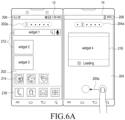
- FIG. 6 (including FIGs. 6A to 6G ) illustrates a user interface of the home screen according to an embodiment of the present invention.
- the first touch screen 12 displays a first page 202 of the home screen and the second touch screen 14 displays a second page 204 of the home screen.
- the first and second touch screens 12 and 14 may be physically or graphically separated.
- the first page 202 of the home screen includes a first group including at least one widget area 212 designated as the home screen and/or at least one shortcut icon 214 and the second page 204 includes a second group including at least one widget area 218 designated as the home screen and/or at least one short icon.
- the first page 202 and the second page 204 can display the widget areas 212 and 218 and/or the shortcut icon 214 in a common background image or respective background images designated as a background screen. As a selectable embodiment, one background image may be displayed over the first and second touch screens 12 and 14.
- Each shortcut icon corresponds to each application or each application group, and the corresponding application is executed or shortcut icons included in the corresponding application group are displayed through a detection of a user's touch.
- Each widget area or each shortcut icon may be basically provided when the portable device is manufactured or may be formed by the user.
- the first touch screen 12 can further display a counter 202a indicating a page of the home screen, frequently used applications, for example, a call application, a contact information application, a message application, a dock area 216 including short icons of an application menu providing application lists, and a status bar 206 providing signal intensity indicator(s) for wireless communication such as cellular or WiFi communication, a Bluetooth connection mode, a received message, a battery status indicator, and a current time together with the first page 202.
- the second touch screen 14 can further display a page counter 204a and a status bar 208.
- the status bar on the second touch screen 14 can provide information different from that of the first touch screen 12.
- the status bars 206 and 208 may be displayed together with the home screen or the application or may be omitted.
- the status bars 206 and 208 are maintained within the first and second touch screens 12 and 14 regardless of switching of pages. In the following description, description of whether the status bars 206 and 208 are displayed will be omitted.
- the home screen may further provide additional pages including one or more widget areas and/or one or more icons within a predetermined maximum number of pages, and the pages are switched by a pre-designated touch gesture.
- the portable device detects a pre-designated touch gesture 200a to switch a page of the home screen in at least one of the first touch screen 12 and the second touch screen 14 and proceeds to FIG. 6B .
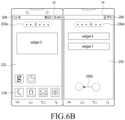
- the first and second touch screens 12 and 14 display the following two pages designated as the home screen, that is, third and fourth pages 232 and 234 and page counters 232a and 234a in response to the detection of the touch gesture 200a.
- the third and fourth pages 232 and 234 may include a widget area and/or an icon different from those of the first and second pages 202 and 204.
- the third and fourth pages 232 and 234 are displayed in the second touch screen 14 together with the page counters 232a and 234a while sliding in a direction from the second touch screen 14 to the first touch screen 12, and the third page 232 and the page counter 232a may be displayed over both the first and second touch screens 12 and 14 during the sliding.
- the dock area 216 providing lists of frequently used applications may be fixedly displayed in a designated position within the first touch screen 12 regardless of the page switching (that is, independently).
- the touch gesture 200a includes a touch drag in a direction from one position of the second touch screen 14 to the first touch screen 12 (or opposite direction).
- the touch gesture 200a includes a touch drag in a direction from one position of the second touch screen 14 to one position of the first touch screen 12 (or opposite direction).
- the touch gesture 200a includes a touch drag of passing though a hinge or connector between the first and second touch screens 12 and 14.
- it is preferable that the touch drag 200a for switching the page of the home screen moves by a predetermined distance or more.
- the touch gesture 200a includes a flick on the first or second screen 12 or 14 in a direction from the second touch screen 14 to the first touch screen 12.
- the first and second touch screens 12 and 14 display the following two pages, that is, fifth and sixth pages 242 and 244 and page counters 242a and 244a, respectively, in response to the touch gesture 200b. Similar to FIG. 6 , the fifth and six pages 242 and 244 may be displayed while sliding in a direction from the second touch screen 14 to the first touch screen 12 according to the touch gesture 200b, and the dock area 216 is fixed on a designated position within the first touch screen 12 regardless of the touch gesture 200b.
- the portable device 100 displays the previous pages, that is, the third pate 232 and the fourth page 234 in the first and second touch screens in response to the touch drag.
- the third and fourth pages 232 and 234 may be displayed while sliding through the hinge in a direction from the touch screen 12 to the second touch screen 14 according to the touch drag.
- pages of the home screen may be displayed over both the first and second touch screens 12 and 14 when sliding through the hinge or connector as illustrated in FIG. 6C .
- the portable device switches the home screen in the unit of one page or two pages by two touch gestures which are differently defined.
- the touch gesture 200a is defined as a touch drag of moving on the home screen by a predetermined distance or more, and the portable device switches the first and second pages 202 and 204 of the first and second touch screens 12 and 14 to the third and fourth pages 232 and 234, that is, in the unit of two pages in response to the detection of the touch drag 200a.
- the home screen may be switched in the unit of one page by a touch gesture of moving by a short distance. That is, in FIG.
- a pre-designated touch gesture for example, a flick in a direction from the second touch screen 14 to the first touch screen 12 is detected from one of the first touch screen 12 and the second touch screen 14 to shortly switch the home screen
- the portable device proceeds to FIG. 6D .
- the portable device in response to the flick detected from one of the first and second touch screens 12 and 14 displaying the first and second pages 202 and 204, the portable device displays the second page 204 in the first touch screen 12 and displays the third page 232 in the second touch screen 14.
- the second and third pages 204 and 232 are displayed while sliding in a direction from the second touch screen 14 to the first touch screen 12 according to a flick and, and the second page 202 may be displayed over both the first and second touch screens 12 and 14.
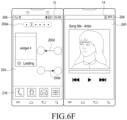
- FIGs. 6E to 6G illustrate a scenario of switching the page of the home screen while an application different from the home screen is displayed in the first and second touch screens 12 and 14.
- the first touch screen 12 displays the first page 202, the page counter 202a, and the dock area 216 of the home screen
- the second touch screen 14 displays another application 240.
- the application 240 is a music play application.
- the portable device proceeds to FIG. 6F .
- the touch gesture 200c is generated within the first touch screen 12 and corresponds to a flick or a touch drag which moves in a direction from the second touch screen 14 to the first touch screen 12.
- the portable device replaces the first page 202 and the page counter 202a of the first touch screen 12 with the second page 204 and the page counter 204a of the second page 204 and then displays the replaced second page 204 and page counter 204a in response to the detection of the touch gesture 200c.
- the dock area 216 of the first touch screen 12 and the application 240 of the second touch screen 14 are maintained in spite of the touch gesture 200c.
- the second page 204 may be displayed while sliding in a direction from the second touch screen 14 to the first touch screen 12 according to a motion direction and a speed of the touch gesture 200c.
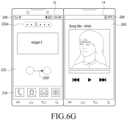
- the portable device When a touch gesture 200e in a direction of the second touch screen 14 is detected from the first touch screen 12 displaying the second page 204, the portable device returns to FIG. 6E to display the first page 202 corresponding to a previous page in the first touch screen 12 and maintain the dock area 216 of the first touch screen 12 and the application 240 of the second touch screen 14.
- a touch gesture 200d in a direction from the second touch screen 14 to the first touch screen 12 is detected from the first touch screen 12 displaying the second page 204
- the portable device moves to FIG. 6G to display a next page.
- the portable device replaces the second page 204 and the page counter 204a of the first touch screen 12 with the third page 232 and the page counter 232a of the home screen and displays the replaced third page 232 and page counter 232a in response to the detection of the touch gesture 200d.
- the dock area 216 of the first touch screen 12 and the application 240 of the second touch screen 14 are maintained in spite of the touch gesture 200d.
- the portable device returns to FIG. 6F to display the second page 204.
- the portable device provides a more convenient user interface for a call application through the display device including the first touch screen and the second touch screen arranged on at least one foldable panel.
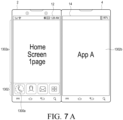
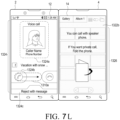
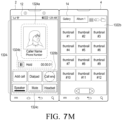
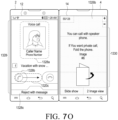
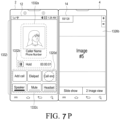
- FIG. 7 (including FIGs. 7A to 7P ) illustrates a user interface of a call application according to an embodiment of the present invention.
- FIGs. 7A to 7E illustrate a scenario for processing an outgoing call in the call application according to an embodiment of the present invention.
- the first touch screen 12 displays a first page 1302a of the home screen and a dock area 1302 including icons of frequently used applications
- the second touch screen 14 displays an A application 1302b.
- a predetermined touch gesture 1300a for example, a tap gesture is detected from an icon of the call application among icons of the application menu which provides the call application, a contact information application, a message application, and application lists included in the dock area 1302
- the portable device executes the call application and proceeds to FIG. 7B .
- the dock area 1302 displayed together with the home screen is illustrated herein, the following description can be similarly applied to a case where the dock area 1302 is displayed together with another application or the call application starts through a control of another menu of the portable device.
- the portable device starts the call application in response to the detection of a touch gesture 1300a and replaces the first page 1302a of the home screen and the dock area 1302 with an outgoing call screen 1304 provided by the call application and displays the replaced outgoing call screen 1304 in the first touch screen 12.
- the outgoing call screen 1304 includes at least one of a number display area 1304a, a keypad area 1304b, a call key 1304c, a video call key 1304d, a message sending key 1304e, and a function key area 1304f.
- the function key area 1304f includes at least one of soft keys of functions which can be provided by the call application, for example, a keypad selection key for selecting whether to display the keypad area 1304b or selecting a type of keypad area 1304b, a log key for showing a call record, and a contact information key for calling contact numbers.
- a keypad selection key for selecting whether to display the keypad area 1304b or selecting a type of keypad area 1304b
- a log key for showing a call record
- a contact information key for calling contact numbers.
- the first touch screen 12 displays the input phone number in the number display area 1304a, and further displays a picture image and a name of the contact information corresponding to the phone number when they exist.
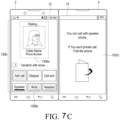
- the portable device proceeds to FIG. 7C .
- the portable device replaces the outgoing call screen 1304 with a dialing screen 1306 and displays the replaced dialing screen 1306 in the first touch screen 12 in response to the detection of the tap gesture 1300b.
- the dialing screen 1306 includes a call participant identification area 1306a and a function key area 1306b.
- the call participant identification area 1306a includes at least one of a name, a picture image, and a phone number of a counterpart call participant corresponding to the input phone number.
- the function key area 1306b includes at least one of soft keys of mid-call functions, for example, a phone number addition key, a dial pad call key, a call end key, a speaker key, a mute key, and a headset connection key.
- the phone number addition key, the mute key, and the headset connection key which cannot be used during the dialing may be deactivated.
- the speaker key performs switching between a public call mode and a private call mode.
- the public call mode refers to a state of relatively increasing volume of the speaker and sensitivity of the microphone to allow a remote call (or a state of turning on an external speaker), that is, a speaker phone mode
- the private call mode refers to a state of relatively decreasing volume of the speaker and sensitivity of the microphone to allow a call performed by the user having the portable device close to user's ear and mouth (or a state of turning off an external speaker).
- the second touch screen 14 When a call connection starts in a state where the first and second panels 2 and 4 including the first and second touch screens 12 and 14 are unfolded, the second touch screen 14 continuously displays the previously displayed A application 1302b, is turned off, or displays a guide message screen 1302c of advising the user to fold the portable device for the call.
- the call application connects the call in the public call mode in the state where the first and second panels 2 and 4 are unfolded. Further, when the first and second panels 2 and 4 of the portable device are folded-out such that the first touch screen 12 faces a front side during the dialing, the second touch screen 14 may be turned off.
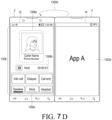
- the portable device proceeds to FIG. 7D .
- the portable device displays a mid-call screen 1308 in the first touch screen 12 in response to the detection of the call connection.
- the mid-call screen 1308 includes a call participant identification area 1308a, a call duration time 1308b, and a function key area 1308c.
- the call participant identification area 1308a includes at least one of a picture image, a call participant name, and a phone number.
- the function key area 1308c includes at least one of a phone number addition key, a dial pad call key, a call end key, a speaker mode switching key, a mute key, and a headset connection key.
- the second touch screen 14 can remove the guide message screen 1302 and display the previously displayed information, that is, the A application 1302b.
- the second touch screen 14 continuously maintains the guide message screen 1302c during the call in the unfolded state.
- the portable device When it is detected that the first and second panels 2 and 4 included in the portable device are folded-out 1300b during the call in the public call mode, the portable device proceeds to FIG. 7E .
- the portable device turns off the second touch screen 14 and switches the public call mode to a deactivated state, that is, the private call mode in response to the folded-out 1300b of the first and second panels 2 and 4.
- the portable device displays again the previously displayed information, that is, the A application 1302b in the second touch screen 14 and activates the public call mode as illustrated in FIG. 7D .
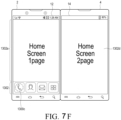
- FIGs. 7F to 7J illustrate another scenario for processing an outgoing call in the call application according to an embodiment of the present invention.
- the first touch screen 12 displays the first page 1302a of the home screen and the dock area 1302, and the second touch screen 14 displays a second page 1302d.
- a predetermined touch gesture 1300c for example, a tap gesture is detected from an icon of the call application included in the dock area 1302, the portable device executes the call application and proceeds to FIG. 7G .
- the dock area 1302 displayed together with the home screen is illustrated herein, the following description can be similarly applied to a case where the dock area 1302 is displayed with another application or the call application starts through a control of another menu of the portable device.
- the portable device starts the call application in response to the detection of the touch gesture 1300c and displays an outgoing call screen provided by the call application 1304, that is, a number display area 1304a, the keypad area 1304b, the call key 1304c, the video call key 1304d, the message sending key 1304e, and the function key area 1304f in the first touch screen 12.
- the key area 1304f includes at least one of a keypad selection key for selecting whether to display the keypad area 1304b or selecting a type of keypad area 1304b, a log key for showing a call record, and a contact information key for loading contact numbers.
- the dock area 1302 may be moved to and then displayed in a lower part of the second page 1302d of the second touch screen 14.
- the first touch screen 12 displays the input phone number in the number display area 1304a, and further displays a picture image and a name of the contact information corresponding to the phone number when they exist.
- the portable device proceeds to FIG. 7H .
- the portable device displays the dialing screen 1306 in the first touch screen 12 in response to the detection of the tap gesture 1300d.
- the dialing screen 1306 includes the call participant identification area 1306a and the function key area 1306b.
- the call participant identification area 1306a includes at least one of a picture image, a call participant name, and a phone number.
- the function key area 1306b includes at least one of a phone number addition key, a dial pad call key, a call end key, a speaker key, a mute key, and a headset connection key.
- the phone number addition key, the mute key, and the headset connection key which cannot be used during the dialing may be deactivated.
- the second touch screen 14 When a call connection starts in a state where the first and second panels 2 and 4 including the first and second touch screens 12 and 14 are unfolded, the second touch screen 14 continuously displays the previously displayed A application 1302b, is turned off, or displays a guide message screen 1302c of advising the user to fold the portable device for the call. At this time, the guide message screen 1302c may be displayed to be overwritten with the second page 1302d of the home screen and the dock area 1302e which are previously displayed.
- the call application connects the call in the public call mode in the state where the first and second panels 2 and 4 are unfolded. Further, when the portable device is folded-out, the second touch screen 14 may be turned off.
- the portable device proceeds to FIG. 7I .
- the portable device displays the mid-call screen 1308 in the first touch screen 12 in response to the detection of the call connection.
- the mid-call screen 1308 includes the call participant identification area 1308a, the call duration time 1308b, and the function key area 1308c.
- the second touch screen can replace the guide message screen 1302c with the previously displayed information, that is, the second page 1302d of the home screen and display the replaced second page 1302d.
- the second touch screen 14 continuously maintains the guide message screen 1302c during the call in the unfolded state.
- the portable device When it is detected that the first and second panels 2 and 4 included in the portable device are folded-out 1300e during the call in the public call mode, the portable device turns off the second touch screen 14 and switches the public call mode to the private call mode as illustrated in FIG. 7J .
- the portable device When the call is performed in the folded-out state and then ends, for example, when a tap gesture 1300f is detected from the call end key, the portable device replaces the mid-call screen 1308 of the second touch screen 12 with the previous information, that is, the second page 1302d of the home screen and the dock area 1302e and displays the replaced second page 1302d and the dock area 1302e.
- FIGs. 7K to 7M illustrate a scenario for processing an incoming call in the call application according to an embodiment of the present invention.
- the first touch screen 12 displays a first application 1322a and the second touch screen 14 displays a second application 1322b.
- the first and second applications 1322a and 1322b may be any of the home screen, the application menu, a basic application, and an application installed by the user.
- the first application 1322a is a message application such as a Short Messaging Service (SMS), an e-mail, or an Instant Messaging Service (IMS)
- the second application 704 is a photo gallery application.
- the first and second touch screens 12 and 14 can display two task screens of one application in a main-sub mode or commonly display one task screen of one application in a full mode.
- the portable device starts the call application in response to the generation of the incoming call, and replaces the first application 1322a with an incoming call screen 1324 provided by the call application and displays the replaced incoming call screen 1324 in the first touch screen 12.
- the incoming call screen 1324 includes at least one of a call participant identification area 1324a, an incoming key area 1324b, and a rejection message key 1324c.
- the call participant identification area 1324a includes at least one of a picture image, a call participant name, and a phone number.
- the incoming key area 1324b may include an incoming key and a rejection key.
- the rejection key is used to reject the incoming call without sending a message.
- the rejection message key 1324c is used to automatically send a rejection message by the message application.
- the second touch screen 14 is deactivated while the incoming call screen 1324 is displayed in the first touch screen 12 and a guide message screen 1326 of advising the user to fold the portable device for the call is displayed.
- a predetermined touch gesture 1310a for example, a tap gesture on the incoming key or a touch drag (slide) starting at the incoming key and moving in a predetermined direction is detected
- the portable device proceeds to FIG. 7M .
- the portable device connects a call with a counterpart call participant, and replaces the incoming call screen 1324 with the mid-call screen 1324 and displays the replaced mid-call screen 1324 in the first touch screen 12 in response to the detection of the touch gesture 1310a.
- the mid-call screen 1324 includes the call participant identification area 1324a, the call duration time 1324b, and the function key area 1324c.
- the call participant identification area 1324a includes at least one of a picture image, a counterpart call participant name, and a phone number.
- the function key area 1324c includes at least one of a phone number addition key, a dial pad call key, a call end key, a speaker mode switching key, a mute key, and a headset connection key.
- the call application starts a call connection in the public call mode and the second touch screen 14 is activated again.
- the portable device When the call ends in the mid-call screen 1324, for example, when a tap gesture 1320b is detected from the call end key within the function key area 1324c, the portable device returns to FIG. 7K to replace the mid-call screen 1324 of the first touch screen 12 with the previous information, that is, the first application 1322a and display the replaced first application 1322a.
- FIGs. 7N to 7P illustrate another scenario for responding to an incoming call in the call application according to an embodiment of the present invention.
- the first and second touch screens 12 and 14 display first and second task screens 1326a and 1326b of the first application.
- the first application may be any of the home screen, the application menu, the basic application, and the application installed by the user.
- the first application is a photo gallery application providing two task screens having different depths
- the first task screen 1326a of the first touch screen 12 includes one page of a plurality of thumbnail images
- the second task screen 1326b of the second touch screen 14 displays a picture image of one thumbnail image selected from the thumbnail images with a larger size, that is, a full size.
- the portable device When an incoming call is generated while the first and second touch screens 12 and 14 displays the task screens 1326a and 1326b of the first application, the portable device proceeds to FIG. 7O .
- the portable device starts the call application in response to the generation of the incoming call, and replaces the first task screen 1326a of the first application with an incoming call screen 1328 provided by the call application and displays the replaced incoming call screen 1328 in the first touch screen 12.
- the incoming call screen 1328 includes a call participant identification area 1328a, an incoming key area 1328b, and a rejection message key 1328c.
- the call participant identification area 1328a includes at least one of a picture image, a call participant name, and a phone number.
- the incoming key area 1328b may include an incoming key and a rejection key.
- the rejection message key 1328c is used to automatically send a rejection message by the message application.
- the second touch screen 14 is deactivated while the incoming call screen 1328 is displayed in the first touch screen 12, and a guide message screen 1330 of advising the user to fold the portable device for the call is displayed.
- a predetermined touch gesture 1320c on the incoming key within the incoming key area 1328b for example, a tap gesture or a touch drag (slide) starting at the incoming key and moving in a predetermined direction is detected, the portable device proceeds to FIG. 7P .
- the portable device connects a call with a counterpart call participant, and replaces the incoming call screen 1328 with the mid-call screen 1332 and displays the replaced mid-call screen 1332 in the first touch screen 12 in response to the detection of the touch gesture 1320c.
- the mid-call screen 1332 includes a call participant identification area 1332a, a call duration time 1332b, and a function key area 1332c.
- the call participant identification area 1332a includes at least one of a picture image, a counterpart call participant name, and a phone number.
- the function key area 1332c includes at least one of a phone number addition key, a dial pad call key, a call end key, a speaker mode switching key, a mute key, and a headset connection key.
- the call application starts a call connection in the public call mode and the second touch screen 14 is activated again.
- the portable device When the call ends in the mid-call screen 1332, for example, when a tap gesture 1320d is detected from the call end key within the function key area 1332c, the portable device returns to FIG. 7N to replace the mid-call screen 1324 of the first touch screen 12 with the previous information, that is, the first task screen 1326a of the first application and display the replaced first task screen 1326a.
- FIG. 8 (including FIGS. 8A to FIG. 8R ) illustrates a user interface of the call application according to another embodiment of the present invention.
- FIGs. 8A to 8C illustrate another scenario for responding to an incoming call of the call application according to an embodiment of the present invention.
- the first touch screen 12 displays a text input area (that is, typing area) 1402a of the first application, and the second touch screen 14 displays additional information 1402d of the first application.
- the first application is an application requiring a typing input and illustrated as a message application herein.
- the first touch screen 12 further displays a message display area 1402b displaying a message input through the text input area 1402a and a virtual keypad area 1402c together with the text input area 1402a.
- the second touch screen 14 sequentially displays, for example, messages exchanged with the same counterpart as the additional information 1402d of the message application.
- the portable device When an incoming call is generated while the first touch screen 12 displays the text input area 1402a, the portable device proceeds to FIG. 8B .
- the portable device starts the call application in response to the generation of the incoming call, and replaces the text input area 1402a other information 1402b and 1402c with an incoming call screen 1404 provided by the call application and displays the replaced incoming call screen 1404 in the first touch screen 12.
- the incoming call screen 1404 includes a call participant identification area 1404a, an incoming key area 1404b, and a rejection message key 1404c.
- the call participant identification area 1404a includes at least one of a picture image, a call participant name, and a phone number.
- the incoming key area 1404b may include an incoming key and a rejection key.
- the rejection message key 1404c is used to automatically send the rejection message by the message application.
- the second touch screen 14 is deactivated while the incoming call screen 1404 is displayed in the first touch screen 12, and a guide message screen 1406 of advising the user to fold the portable device for the call is displayed to be overwritten with the previous information 1402d.
- a predetermined touch gesture 1400a on the incoming key within the incoming key area 1404b for example, a tap gesture, or a touch drag (slide) starting at the incoming key and moving in a predetermined direction is detected
- the portable device proceeds to FIG. 8C .
- the portable device connects a call with a counterpart call participant in response to the detection of the touch gesture 1400a, and replaces the incoming call screen 1404 with the mid-call screen 1404 and displays the replaced mid-call screen 1406 in the first touch screen 12.
- the mid-call screen 1406 includes a call participant identification area 1406a, a call duration time 1406b, and a function key area 1406c.
- the call participant identification area 1406a includes at least one of a picture image, a counterpart call participant name, and a phone number.
- the function key area 1406c includes at least one of a phone number addition key, a dial pad call key, a call end key, a speaker mode switching key, a mute key, and a headset connection key.
- the portable device moves the text input area 1402a and other information 1402b and 1402c previously displayed in the first touch screen 12 to the second touch screen 12 and displays the input area 1402a and other information 1402b and 1402c in the second touch screen 14 while displaying the mid-call screen 1406 in the first touch screen 12.
- the text input area 1402a includes a text input into the first touch screen 12 before the incoming call and displays the text in the second touch screen 14.
- the portable device in the state where the first and second panels 2 and 4 including the first and second touch screens 12 and 14 are unfolded, the portable device starts the call connection in the public call mode through the mid-call screen 1406 of the first touch screen 12 and provide support such that the user can continuously input messages through the text input area 1402a of the second touch screen 14.
- the portable device When a tap gesture 1400b is detected from the call end key of the function key area 1406c, the portable device returns to FIG. 8A to replace the mid-call screen 1406 of the first touch screen 12 with the previous information, that is, the text input area 1402a, the message display area 1402b, and the virtual keypad area 1402c and display the replaced text input area 1402a, the message display area 1402b, and the virtual keypad area 1402c and displays the information 1402d before the incoming call in the second touch screen 14.
- the previous information that is, the text input area 1402a, the message display area 1402b, and the virtual keypad area 1402c and display the replaced text input area 1402a, the message display area 1402b, and the virtual keypad area 1402c and displays the information 1402d before the incoming call in the second touch screen 14.
- FIGs. 8D to 8H illustrate another scenario for responding to an incoming call in the call application according to an embodiment of the present invention.
- the first and second touch screens 12 and 14 display first and second task screens 1410a and 1410b of the first application.
- the first application may be any of the home screen, the application menu, the basic application, and the application installed by the user.
- the first application is a photo gallery application providing two task screens having different depths
- the first task screen 1410a of the first touch screen 12 includes one page of a plurality of thumbnail images
- the second task screen 1410b of the second touch screen 14 displays a picture image of one thumbnail image selected from the thumbnail images with a larger size, that is, a full size.
- the portable device When an incoming call is generated while the first and second touch screens 12 and 14 display the task screens 1410a and 1410b of the first application, the portable device proceeds to FIG. 8E .
- the portable device starts the call application in response to the generation of the incoming call, and replaces the first task screen 1410a of the first application with an incoming call screen 1412 provided by the call application and displays the replaced incoming call screen 1412 in the first touch screen 12.
- the incoming call screen 1412 includes a call participant identification area 1412a, an incoming key area 1412b, and a rejection message key 1412c.
- the call participant identification area 1412a includes at least one of a picture image, a call participant name, and a phone number.
- the incoming key area 1412b may include an incoming key and a rejection key.
- the rejection message key 1412c is used to automatically send a rejection message by the message application.
- the second touch screen 14 is deactivated while the incoming call screen 1412 is displayed in the first touch screen 12, and a guide message screen 1414 of advising the user to fold the portable device for the call is displayed.
- a predetermined touch gesture 1400c on the incoming key within the incoming key area 1412b for example, a tap gesture or a touch drag (slide) starting at the incoming key and moving in a predetermined direction is detected, the portable device proceeds to FIG. 8F .
- the portable device connects a call with a counterpart call participant, and replaces the incoming call screen 1412 with the mid-call screen 1416 and displays the replaced mid-call screen 1416 in the first touch screen 12 in response to the detection of the touch gesture 1400c.
- the mid-call screen 1416 includes a call participant identification area 1416a, a call duration time 1416b, and a function key area 1416c.
- the call participant identification area 1416a includes at least one of a picture image, a counterpart call participant name, and a phone number.
- the function key area 1416c includes at least one of a phone number addition key, a dial pad call key, a call end key, a speaker mode switching key, a mute key, and a headset connection key.
- the call application starts a call connection in the public call mode and the second touch screen 14 is activated again as illustrated in FIG. 8F .
- the portable device displays a first page 1418a of the home screen in the second touch screen 14 in response to the selected home button 1400d.
- the first touch screen 12 still displays the mid-call screen 1416, and accordingly a dock area 1418b is displayed in the lower part of the second touch screen 14 together with the first page 1418a.
- the portable device When a tap gesture 1400e is detected from the call end key of the function key area 1416c, the portable device proceeds to FIG. 8H to replace the mid-call screen 1406 of the first touch screen 12 with the information before the incoming call, that is, the task screen 1410b of the first application and display the replaced task screen 1410b and maintains the first page 1418a of the home screen and the dock area 1418b of the second touch screen 14.
- the first touch screen 12 displays a predetermined one of the task screens 1410a and 1410b of the first application, for example, the task screen 1418b having a final depth.
- FIGs. 8I to 8J illustrate a scenario for rejecting an incoming call in the call application according to an embodiment of the present invention.
- the portable device displays the incoming call screen 1404 provided by the call application in response to the generation of the incoming call.
- the incoming call screen 1404 includes the call participant identification area 1404a, the incoming key area 1404b, and the rejection message key 1404c.
- the call participant identification area 1404a includes at least one of a picture image, a call participant name, and a phone number.
- the incoming key area 1404b may include an incoming key and a rejection key.
- the rejection message key 1404c is used to automatically send the rejection message by the message application.
- the second touch screen 14 is deactivated while the incoming call screen 1404 is displayed in the first touch screen 12, and the guide message screen 1406 of advising the user to fold the portable device for the call is displayed.
- the portable device When a predetermined touch gesture 1400f on the rejection message key 1404c within the incoming call screen 1404, for example, a tap gesture or a touch drag (slide) starting at the rejection message key 1404c and moving in a predetermined direction is detected, the portable device proceeds to FIG. 8J .
- the portable device displays a rejection message screen 1420 in the first touch screen 12 and a text input area 1422a for inputting a rejection message and a virtual keypad 1422b in the second touch screen 14 in response to the detection of the touch gesture 1400f.
- the rejection message screen 1420 includes a plurality of pre-designated commonly used phrases as the rejection messages for rejecting the incoming call and sending keys.
- the portable device when a tap gesture is detected from the sending key of one of the commonly used phrases, the portable device automatically sends the corresponding selected commonly used phrase, for example, a short message including one of "I'll call later", “I'm in meeting”, “I'm in class now”, “In a cinema”, and "While driving" to a counterpart call participant of the incoming call.
- the portable device When a message for the rejection, for example, "I'm busy" is input through the virtual keypad 1422b and a tap gesture 1422c is detected from the sending key included in the text input area 1422a, the portable device automatically sends a short message including the input message of "I'm busy" to a counterpart call participant of the incoming call by the message application.
- a message for the rejection for example, "I'm busy”
- a tap gesture 1422c is detected from the sending key included in the text input area 1422a
- the portable device when the message is sent through the rejection message screen 1420 or the text input area 1422a and the virtual keypad 1422b, the portable device replaces the incoming call screen 1404 and the guide message screen 1406 of the first and second touch screens 12 and 14 with the information displayed before the incoming call and displays the replaced information.
- FIGs. 8K to 8N illustrate another scenario for responding to a second incoming call in the call application according to an embodiment of the present invention.
- the portable device displays the mid-call screen 1406 provided by the call application in the first touch screen 12, performs a call with a first counterpart call participant, for example, "AAA", and displays the first application 1410b in the second touch screen 14.
- the first application 1410b refers to another application, not the call application.
- the portable device replaces the mid-call screen 1406 of the first touch screen 12 with an incoming call screen 1426 of the second counterpart call participant and displays the incoming call screen 1426 while maintaining the call with the first counterpart call participant.
- the incoming call screen 1426 includes a call participant identification area 1426a of the second counterpart call participant "BBB", an incoming key area 1426b, and a rejection message key 1426c.
- the second touch screen 14 can continuously display the first application 1410b while the incoming call screen 1426 with the second counterpart call participant is displayed in the first touch screen 12.
- the second touch screen 14 may be turned off.
- a predetermined touch gesture 1400g on the incoming key within the incoming key area 1426b for example, a tap gesture or a touch drag (slide) starting at the incoming key and moving in a predetermined direction is detected, the portable device proceeds to FIG. 8M .
- the portable device displays a multi incoming selection menu 1428 in the incoming call screen 1426 of the first touch screen 12 in a form of a popup window in response to the detection of the touch gesture 1400g.
- the multi incoming selection menu 1428 includes a waiting key 1428a for having the call with the first counterpart call participant wait and an end key 1428b for ending the call.
- the portable device ends the call with the first counterpart call participant and displays the mid-call screen with the second counterpart call participant.
- a tap gesture 1400h is detected from the waiting key 1428a
- the portable device has the call with the first counterpart call participant wait and proceeds to FIG. 8N .
- the waiting call is not connected with the microphone and the speaker.
- the portable device connects the call with the second counterpart call participant by the call application, and replaces the incoming call screen 1426 of the first touch screen 12 with a multi mid-call screen 1430 and displays the replaced multi mid-call screen 1430.
- the multi mid-call screen 1430 includes call participant identification areas 1430a of a plurality of counterpart call participants who perform the call such as "AAA" and "BBB", a call swap key 1430b, a merge key 1430c, and a function key area 1430d.
- Each of the call participant identification areas 1430a includes at least one of a small picture image, a counterpart call participant name, and a phone number, and the call participant identification area which is in a call connection state may be displayed with a shadow or highlighted.
- the function key area 1430c includes at least one of a phone number addition key, a dial pad call key, a call end key, a speaker mode switching key, a mute key, and a headset connection key.
- the call swap key 1430b is used to swap a current call participant.
- the portable device When a tap gesture is detected from the call swap key 1430b in a state where the call is connected with the second counterpart call participant "BBB”, the portable device has the call with the second counterpart call participant "BBB” wait and connects the call with the first counterpart call participant "AAA”.
- the merge key 1430c is used to simultaneously connect calls with all the waiting counterpart call participants.
- the portable device connects all the calls with both the first and second counterpart call participants "AAA" and "BBB”. The user can talk to both the first and second counterpart call participants through the portable device.
- the second touch screen 14 can continuously display the first application 1410b while the multi mid-call screen 1430 is displayed in the first touch screen 12 in the state where the first and second panels 2 and 4 including the first and second touch screens 12 and 14 are unfolded.
- FIGs. 8O to 8R illustrate another scenario for responding to an incoming call by a motion of the portable device in the call application according to an embodiment of the present invention.
- the first touch screen 12 displays a first application 1432 in a state where the first and second panels 2 and 4 are completely folded such that the first and second touch screens 12 and 14 face outward.
- the first application 1432 is a photo gallery application which displays one page of thumbnail images.
- the second touch screen 14 may be turned off.
- the portable device starts the call application in response to the generation of the incoming call, and replaces the first application 1432 with an incoming call screen 1434 provided by the call application and displays the replaced incoming call screen 1434 in the first touch screen 12.
- the incoming call screen 1434 includes a call participant identification area 1434a, an incoming key area 1434b, and a rejection message key 1434c.
- the call participant identification area 1434a includes at least one of a picture image, a call participant name, and a phone number.
- the incoming key area 1434b may include an incoming key and a rejection key.
- the rejection message key 1434c is used to automatically send a rejection message by the message application.
- the portable device When the portable device detects overturning 1400i of making the second panel 4 including the second touch screen 14 side up while displaying the incoming call screen 1434 in the first touch screen 12 of the first panel 2 in the state where the first and second panels 2 and 4 are completely folded, the portable device proceeds to FIG. 8Q .
- the portable device turns off the first touch screen 12 and displays a rejection message screen 1436 in the second touch screen 14 in response to the detection of the overturning 1400i. Further, when the portable device is not in a vibration mode, the portable device turns off a ringtone.
- the rejection message screen 1436 includes a plurality of predetermined commonly used phrases for rejecting the incoming call and sending keys for the commonly used phrases and a new rejection message create key for additionally selecting an input of a new rejection message.
- the portable device when the sending key of one of the commonly used phrases is selected, the portable device automatically sends the corresponding selected commonly used phrase, for example, one of "I'll call later", “I'm in meeting”, “I'm in class now”, “In a cinema”, and "While driving" to a counterpart call participant of the incoming call by the message application. Further, when a tap gesture is detected from the new rejection message create key, the portable device displays an input window of the rejection message in the second touch screen 14.
- the portable device displays the rejection message screen 1436 in the first touch screen 12 and displays a text input area 1438a and a virtual keypad 1438b for sending the rejection message in the second touch screen 14 in response to the detection of the unfolding 1400j.
- a message for the rejection for example, "I'm busy” is input through the virtual keypad 1438b and a tap gesture is detected from the sending key included in the text input area 1438a
- the portable device automatically sends a short message including the input message of "I'm busy" to a counterpart call participant of the incoming call by the message application.
Landscapes
- Engineering & Computer Science (AREA)
- Theoretical Computer Science (AREA)
- General Engineering & Computer Science (AREA)
- Physics & Mathematics (AREA)
- General Physics & Mathematics (AREA)
- Human Computer Interaction (AREA)
- Computer Hardware Design (AREA)
- Signal Processing (AREA)
- Computer Graphics (AREA)
- Computer Networks & Wireless Communication (AREA)
- Software Systems (AREA)
- Mathematical Physics (AREA)
- User Interface Of Digital Computer (AREA)
- Telephone Function (AREA)
- Controls And Circuits For Display Device (AREA)
- Position Input By Displaying (AREA)
- Nitrogen Condensed Heterocyclic Rings (AREA)
- Plural Heterocyclic Compounds (AREA)
Claims (16)
- Procédé de commande d'un dispositif portable (100) comprenant un premier écran tactile (12) et un second écran tactile (14) agencés sur au moins un panneau pliable, le procédé comprenant :l'affichage de premières informations comprenant au moins une icône d'application comprenant une première icône d'application associée à une exécution d'une application d'appel sur le premier écran tactile et l'affichage de secondes informations sur le second écran tactile dans un état où un premier panneau (2) comprenant le premier écran tactile et un second panneau (4) comprenant le second écran tactile sont dépliés ;la détection d'un geste tactile (1300a) sur la première icône d'application ;l'affichage d'un écran d'appel sortant (1304) fourni par l'application d'appel en remplacement des premières informations en réponse à la détection du geste de toucher, l'écran d'appel sortant comprenant au moins l'une d'une zone d'affichage de numéro (1304a), une zone de clavier (1304b), une touche d'appel (1304c), une touche d'appel vidéo (1304d), et une touche d'envoi de message (1304e), et commandant au second écran tactile de maintenir un affichage des secondes informations tandis que l'écran d'appel sortant est affiché sur le premier écran tactile ;l'affichage d'un numéro de contact qui est entré via la zone du clavier et la détection d'un geste de tapotement (1300b) sur la touche d'appel pour lancer une fonction de numérotation pour le numéro de contact ;l'affichage d'un écran de numérotation (1306) sur le premier écran tactile en remplacement de l'écran d'appel sortant en réponse à une détection du geste de tapotement, et l'affichage d'un écran de message de guidage (1302c) conseillant de replier le dispositif portable pour un appel privé avec un utilisateur du numéro de contact sur le second écran tactile tout en affichant l'écran de numérotation sur le premier écran tactile ;la connexion de l'appel en mode haut-parleur si l'appel est connecté avec le participant à l'appel homologue dans un état où le premier panneau comprenant le premier écran tactile et le second panneau comprenant le second écran tactile sont dépliés ; eten réponse à la détection que le dispositif portable est déplié, la permutation vers un mode d'appel privé dans lequel un volume d'un haut-parleur et une sensibilité d'un microphone sont relativement diminués pour permettre la réalisation d'un appel avec le dispositif portable près de l'oreille et de la bouche d'un utilisateur du dispositif portable.
- Procédé de la revendication 1, dans lequel, lorsque l'appel est connecté avec un participant à l'appel homologue, le procédé comprend en outre :l'affichage d'un écran d'appel en cours (1308) sur le premier écran tactile en remplacement de l'écran de numérotation ; etl'affichage des secondes informations sur le second écran tactile en remplacement de l'écran de message de guidage ;dans lequel l'écran d'appel en cours comprend une zone d'identification de participant à l'appel (1308a) indiquant le participant à l'appel homologue, une durée d'appel (1308b) et une zone de touche de fonction fournissant des fonctions d'appel en cours (1308c).
- Procédé de la revendication 1, comprenant en outre :
l'affichage d'une zone d'accueil (1302) comprenant une icône de l'application d'appel sur au moins l'un des premier et second écrans tactiles. - Procédé de la revendication 1, comprenant en outre :la détection que les premier et second panneaux sont dépliés de telle sorte que le premier écran tactile fasse face à un côté avant tandis que l'appel est connecté avec le participant à l'appel homologue ; etla commande du second écran tactile pour éteindre et désactiver le mode haut-parleur en réponse à la détection du dépliage.
- Procédé de la revendication 1, comprenant en outre :l'affichage d'une zone d'accueil (1302) comprenant des icônes de raccourci d'applications fréquemment utilisées sur le second écran tactile conjointement aux secondes informations tandis que l'un de l'écran d'appel sortant et d'un écran en cours d'appel est affiché sur le premier écran tactile,dans lequel les secondes informations affichées sur le second écran tactile comprennent une première page désignée comme un écran de démarrage.
- Procédé de la revendication 5, comprenant en outre :la détection que les premier et second panneaux sont dépliés de telle sorte que le premier écran tactile fasse face à un côté avant tandis que l'écran d'appel en cours est affiché sur le premier écran tactile et que la première page de l'écran de démarrage et la zone d'accueil sont affichées sur le second écran tactile;la commande au second écran tactile de s'éteindre et la commande au premier écran tactile de maintenir un affichage de l'écran d'appel en cours en réponse à la détection du dépliage ; etl'affichage de la première page et de la zone d'accueil sur le premier écran tactile en remplacement de l'écran d'appel en cours lorsque l'appel avec le participant à l'appel homologue se termine.
- Procédé de la revendication 1, le procédé comprenant en outre :la détection d'un premier appel entrant tandis que les premières informations sont affichées sur le premier écran tactile et que les secondes informations sont affichées sur le second écran tactile dans un état où le premier panneau comprenant le premier écran tactile et le second panneau comprenant le second écran tactile sont dépliés ;l'affichage d'un premier appel entrant (1404) lié à un premier appel entrant fourni par l'application d'appel sur le premier écran tactile en remplacement des premières informations en réponse au premier appel entrant, dans lequel le premier écran d'appel entrant comprend au moins l'une d'une zone d'identification de participant à l'appel (1404a) indiquant un participant à l'appel homologue, d'une touche entrante et d'une touche de message de rejet (1404c) ;la désactivation des secondes informations du second écran tactile et l'affichage d'un écran de message de guidage (1402e) conseillant de plier le dispositif portable pour un appel tout en affichant le premier écran d'appel entrant ;la détection d'un troisième geste de toucher (1400a) sur une touche entrante dans le premier écran d'appel entrant ;l'affichage d'un écran d'appel en cours (1406) sur le premier écran tactile en remplacement du premier écran d'appel entrant en réponse au troisième geste de toucher, et la suppression de l'écran de message de guidage du second écran tactile dans lequel l'écran d'appel en cours comprend une zone d'identification de participant à l'appel (1406a) indiquant le participant à l'appel homologue, une durée d'appel (1406b) et une zone de touche de fonction (1406c) fournissant des fonctions d'appel en cours ; etl'affichage des premières informations sur le premier écran tactile en remplacement de l'écran d'appel en cours lorsque l'appel par le premier appel entrant se termine.
- Procédé de la revendication 7, comprenant en outre l'affichage des premières informations sur le premier écran tactile en remplacement de l'écran d'appel en cours lorsque l'appel par le premier appel entrant se termine.
- Procédé de la revendication 7, comprenant en outre la connexion de l'appel en mode haut-parleur si le troisième geste de toucher est détecté dans un état où les premier et second panneaux sont dépliés.
- Procédé de la revendication 7, comprenant en outre l'affichage des premières informations sur le second écran tactile en réponse au troisième geste de toucher lorsque les premières informations comprennent une zone d'entrée de texte d'une première application.
- Procédé de la revendication 7, comprenant en outre :la détection d'une entrée (1400d) d'un bouton de démarrage correspondant à l'un des boutons physiques agencés sur le second panneau tandis que l'écran d'appel en cours est affiché sur le premier écran tactile et que les secondes informations sont affichées sur le second écran tactile ; etl'affichage d'une première page (1418a) comprenant au moins une zone de widget désignée comme un écran de démarrage et/ou au moins une icône associée à une application ou à un groupe d'applications et une zone d'accueil (1418b) comprenant des icônes d'applications fréquemment utilisées sur le second écran tactile en remplacement des secondes informations en réponse à l'entrée du bouton de démarrage.
- Procédé de la revendication 7, comprenant en outre :la détection d'un quatrième geste de toucher (1400f) à partir d'une touche de message de rejet (1404c) du premier écran d'appel entrant tandis que le premier écran d'appel entrant est affiché sur le premier écran tactile et que l'écran de message de guidage est affiché sur le second écran tactile ;l'affichage d'un écran de message de rejet (1420) sur le premier écran tactile en remplacement du premier écran d'appel entrant en réponse à une détection du quatrième geste de toucher, et l'affichage d'une zone d'entrée de texte (1422a) pour entrer un message de rejet et un clavier virtuel (1422b) sur le second écran tactile en remplacement de l'écran de message de guidage, dans lequel l'écran de message de rejet comprend une pluralité de messages de rejet préenregistrés et des touches d'envoi pour les messages de rejet ;l'envoi d'un message de rejet pré-stocké correspondant à un participant à l'appel homologue du premier appel entrant lorsqu'un geste de tapotement est détecté à partir de l'une des touches d'envoi ;lorsqu'un message de rejet est entré via le clavier virtuel et qu'un geste de tapotement (1422c) est détecté à partir de la touche d'envoi comprise dans la zone d'entrée de texte, l'envoi du message de rejet entré au participant à l'appel homologue du premier appel entrant ; etl'affichage des première et seconde informations sur les premier et second écrans tactiles après l'envoi du message de rejet pré-stocké ou du message de rejet entré.
- Procédé de la revendication 7, comprenant en outre :la détection d'un second appel entrant tandis que l'écran d'appel en cours est affiché sur le premier écran tactile et que les secondes informations sont affichées sur le second écran tactile ;l'affichage d'un second écran d'appel entrant (1426) lié au second appel entrant sur le premier écran tactile en remplacement de l'écran d'appel en cours en réponse à une détection du second appel entrant, dans lequel le second écran d'appel entrant comprend au moins l'une parmi une zone d'identification de participant à l'appel (1426a) indiquant un participant à l'appel homologue lié au second appel entrant, une touche entrante et une touche de message de rejet (1426c) ;la détection d'un quatrième geste tactile (1400g) à partir de la touche entrante dans le second écran d'appel entrant ;l'affichage d'un menu de sélection multi-entrants (1428) sur le second écran d'appel entrant du premier écran tactile en réponse à une détection du quatrième geste de toucher, dans lequel le menu de sélection multi-entrants comprend une touche d'attente (1428a) pour l'appel du premier appel entrant et une touche de fin (1428b),la mise en attente du premier appel entrant et la connexion du second appel entrant lorsqu'un geste de tapotement (1400h) est détecté à partir de la touche d'attente, et l'affichage d'un écran multi-appels (1430) sur le premier écran tactile en remplacement du second écran d'appel entrant, dans lequel l'écran multi-appels comprend des zones d'identification de participant à l'appel (1430a) pour les participants à l'appel des premier et deuxième appels entrants, une touche de permutation d'appel (1430b), une touche de fusion (1430c), et une zone de touches de fonction (1430d) fournissant des fonctions d'appel en cours ; etla commande au second écran tactile de maintenir un affichage des secondes informations tandis que l'un du second écran d'appel entrant et de l'écran multi-appels en cours est affiché sur le premier écran tactile.
- Procédé de la revendication 7, comprenant en outre :l'affichage des premières informations sur le premier écran tactile et la détection d'un second appel entrant tandis que le second écran tactile est éteint dans un état dans lequel un premier panneau comprenant le premier écran tactile et un second panneau comprenant le second écran tactile sont pliés de sorte que le premier l'écran tactile fasse face à un côté avant ;l'affichage d'un second écran d'appel entrant (1434) lié au second appel entrant fourni par l'application d'appel sur le premier écran tactile en remplacement des premières informations en réponse à une détection du second appel entrant, dans lequel le second écran d'appel entrant comprend au moins l'une d'une zone d'identification de participant à l'appel (1434a) indiquant un participant à l'appel homologue lié au second appel entrant, d'une touche entrante et d'une touche de message de rejet (1434c) ;la détection que les premier et second panneaux pliés sont renversés (1400i) de telle sorte que le second écran tactile fasse face au côté avant ; etla commande au premier écran tactile de s'éteindre et d'afficher un écran de message de rejet (1436) sur le second écran tactile en réponse à la détection du renversement (1400i), dans lequel l'écran de message de rejet comprend une pluralité de messages de rejet pré-stockés et des touches d'envoi pour les messages de rejet.
- Procédé de la revendication 14, comprenant en outre :la détection que les premier et second écrans tactiles sont dépliés (1400j) tandis que l'écran de message de rejet est affiché sur le second écran tactile ;l'affichage de l'écran de message de rejet sur le premier écran tactile, et l'affichage d'une zone d'entrée de texte (1438a) pour entrer un message de rejet et un clavier virtuel (1438b) sur le second écran tactile en remplacement de l'écran de message de rejet en réponse à une détection du dépliage (1400j), dans lequel l'écran de message de rejet comprend une pluralité de messages de rejet pré-stockés et de touches d'envoi pour les messages de rejet ;l'envoi d'un message de rejet pré-stocké correspondant à un participant à l'appel homologue du second appel entrant lorsqu'un geste de tapotement est détecté à partir de l'une des touches d'envoi ; etlorsqu'un message de rejet est entré via le clavier virtuel et qu'un geste de tapotement est détecté à partir d'une touche d'envoi comprise dans la zone d'entrée de texte, l'envoi du message de rejet entré au participant à l'appel homologue du second appel entrant.
- Dispositif portable (100), comprenant :un premier écran tactile (12) et un second écran tactile (14) disposés sur au moins un panneau pliable ;au moins un processeur (111) qui fournit une interface utilisateur via les premier et second écrans tactiles ; etune mémoire stockant un programme qui, lorsqu'il est exécuté par le processeur, met en oeuvre le procédé de l'une des revendications 1 à 15.
Priority Applications (9)
| Application Number | Priority Date | Filing Date | Title |
|---|---|---|---|
| EP20173932.3A EP3734409A1 (fr) | 2011-02-10 | 2012-02-07 | Dispositif portable comprenant un affichage à écran tactile et son procédé de commande |
| EP20173889.5A EP3716006A1 (fr) | 2011-02-10 | 2012-02-07 | Dispositif portable comprenant un affichage à écran tactile et son procédé de commande |
| EP23203667.3A EP4343525A3 (fr) | 2011-02-10 | 2012-02-07 | Dispositif portable comprenant un affichage à écran tactile et son procédé de commande |
| EP20173893.7A EP3734404A1 (fr) | 2011-02-10 | 2012-02-07 | Dispositif portable comprenant un affichage à écran tactile et son procédé de commande |
| EP20173896.0A EP3734405B1 (fr) | 2011-02-10 | 2012-02-07 | Dispositif portable comprenant un affichage à écran tactile et son procédé de commande |
| EP20173907.5A EP3734406A1 (fr) | 2011-02-10 | 2012-02-07 | Dispositif portable comprenant un affichage à écran tactile et son procédé de commande |
| EP19192184.0A EP3640763A1 (fr) | 2011-02-10 | 2012-02-07 | Dispositif portable comprenant un affichage à écran tactile et son procédé de commande |
| EP20173916.6A EP3734407A1 (fr) | 2011-02-10 | 2012-02-07 | Dispositif portable comprenant un affichage à écran tactile et son procédé de commande |
| EP20173924.0A EP3734408A1 (fr) | 2011-02-10 | 2012-02-07 | Dispositif portable comprenant un affichage à écran tactile et son procédé de commande |
Applications Claiming Priority (2)
| Application Number | Priority Date | Filing Date | Title |
|---|---|---|---|
| US201161441491P | 2011-02-10 | 2011-02-10 | |
| PCT/KR2012/000888 WO2012108668A2 (fr) | 2011-02-10 | 2012-02-07 | Dispositif portable comprenant un dispositif d'affichage à écran tactile, et son procédé de commande |
Related Child Applications (17)
| Application Number | Title | Priority Date | Filing Date |
|---|---|---|---|
| EP20173916.6A Division-Into EP3734407A1 (fr) | 2011-02-10 | 2012-02-07 | Dispositif portable comprenant un affichage à écran tactile et son procédé de commande |
| EP20173916.6A Division EP3734407A1 (fr) | 2011-02-10 | 2012-02-07 | Dispositif portable comprenant un affichage à écran tactile et son procédé de commande |
| EP20173896.0A Division EP3734405B1 (fr) | 2011-02-10 | 2012-02-07 | Dispositif portable comprenant un affichage à écran tactile et son procédé de commande |
| EP20173896.0A Division-Into EP3734405B1 (fr) | 2011-02-10 | 2012-02-07 | Dispositif portable comprenant un affichage à écran tactile et son procédé de commande |
| EP20173924.0A Division-Into EP3734408A1 (fr) | 2011-02-10 | 2012-02-07 | Dispositif portable comprenant un affichage à écran tactile et son procédé de commande |
| EP20173924.0A Division EP3734408A1 (fr) | 2011-02-10 | 2012-02-07 | Dispositif portable comprenant un affichage à écran tactile et son procédé de commande |
| EP20173907.5A Division EP3734406A1 (fr) | 2011-02-10 | 2012-02-07 | Dispositif portable comprenant un affichage à écran tactile et son procédé de commande |
| EP20173907.5A Division-Into EP3734406A1 (fr) | 2011-02-10 | 2012-02-07 | Dispositif portable comprenant un affichage à écran tactile et son procédé de commande |
| EP19192184.0A Division EP3640763A1 (fr) | 2011-02-10 | 2012-02-07 | Dispositif portable comprenant un affichage à écran tactile et son procédé de commande |
| EP19192184.0A Division-Into EP3640763A1 (fr) | 2011-02-10 | 2012-02-07 | Dispositif portable comprenant un affichage à écran tactile et son procédé de commande |
| EP23203667.3A Division EP4343525A3 (fr) | 2011-02-10 | 2012-02-07 | Dispositif portable comprenant un affichage à écran tactile et son procédé de commande |
| EP20173889.5A Division-Into EP3716006A1 (fr) | 2011-02-10 | 2012-02-07 | Dispositif portable comprenant un affichage à écran tactile et son procédé de commande |
| EP20173889.5A Division EP3716006A1 (fr) | 2011-02-10 | 2012-02-07 | Dispositif portable comprenant un affichage à écran tactile et son procédé de commande |
| EP20173932.3A Division-Into EP3734409A1 (fr) | 2011-02-10 | 2012-02-07 | Dispositif portable comprenant un affichage à écran tactile et son procédé de commande |
| EP20173932.3A Division EP3734409A1 (fr) | 2011-02-10 | 2012-02-07 | Dispositif portable comprenant un affichage à écran tactile et son procédé de commande |
| EP20173893.7A Division EP3734404A1 (fr) | 2011-02-10 | 2012-02-07 | Dispositif portable comprenant un affichage à écran tactile et son procédé de commande |
| EP20173893.7A Division-Into EP3734404A1 (fr) | 2011-02-10 | 2012-02-07 | Dispositif portable comprenant un affichage à écran tactile et son procédé de commande |
Publications (4)
| Publication Number | Publication Date |
|---|---|
| EP2674834A2 EP2674834A2 (fr) | 2013-12-18 |
| EP2674834A4 EP2674834A4 (fr) | 2016-09-28 |
| EP2674834C0 EP2674834C0 (fr) | 2023-08-09 |
| EP2674834B1 true EP2674834B1 (fr) | 2023-08-09 |
Family
ID=46639043
Family Applications (10)
| Application Number | Title | Priority Date | Filing Date |
|---|---|---|---|
| EP20173893.7A Withdrawn EP3734404A1 (fr) | 2011-02-10 | 2012-02-07 | Dispositif portable comprenant un affichage à écran tactile et son procédé de commande |
| EP19192184.0A Pending EP3640763A1 (fr) | 2011-02-10 | 2012-02-07 | Dispositif portable comprenant un affichage à écran tactile et son procédé de commande |
| EP20173896.0A Active EP3734405B1 (fr) | 2011-02-10 | 2012-02-07 | Dispositif portable comprenant un affichage à écran tactile et son procédé de commande |
| EP20173889.5A Pending EP3716006A1 (fr) | 2011-02-10 | 2012-02-07 | Dispositif portable comprenant un affichage à écran tactile et son procédé de commande |
| EP20173907.5A Withdrawn EP3734406A1 (fr) | 2011-02-10 | 2012-02-07 | Dispositif portable comprenant un affichage à écran tactile et son procédé de commande |
| EP23203667.3A Pending EP4343525A3 (fr) | 2011-02-10 | 2012-02-07 | Dispositif portable comprenant un affichage à écran tactile et son procédé de commande |
| EP12745181.3A Active EP2674834B1 (fr) | 2011-02-10 | 2012-02-07 | Dispositif portable comprenant un dispositif d'affichage à écran tactile, et son procédé de commande |
| EP20173932.3A Withdrawn EP3734409A1 (fr) | 2011-02-10 | 2012-02-07 | Dispositif portable comprenant un affichage à écran tactile et son procédé de commande |
| EP20173924.0A Pending EP3734408A1 (fr) | 2011-02-10 | 2012-02-07 | Dispositif portable comprenant un affichage à écran tactile et son procédé de commande |
| EP20173916.6A Withdrawn EP3734407A1 (fr) | 2011-02-10 | 2012-02-07 | Dispositif portable comprenant un affichage à écran tactile et son procédé de commande |
Family Applications Before (6)
| Application Number | Title | Priority Date | Filing Date |
|---|---|---|---|
| EP20173893.7A Withdrawn EP3734404A1 (fr) | 2011-02-10 | 2012-02-07 | Dispositif portable comprenant un affichage à écran tactile et son procédé de commande |
| EP19192184.0A Pending EP3640763A1 (fr) | 2011-02-10 | 2012-02-07 | Dispositif portable comprenant un affichage à écran tactile et son procédé de commande |
| EP20173896.0A Active EP3734405B1 (fr) | 2011-02-10 | 2012-02-07 | Dispositif portable comprenant un affichage à écran tactile et son procédé de commande |
| EP20173889.5A Pending EP3716006A1 (fr) | 2011-02-10 | 2012-02-07 | Dispositif portable comprenant un affichage à écran tactile et son procédé de commande |
| EP20173907.5A Withdrawn EP3734406A1 (fr) | 2011-02-10 | 2012-02-07 | Dispositif portable comprenant un affichage à écran tactile et son procédé de commande |
| EP23203667.3A Pending EP4343525A3 (fr) | 2011-02-10 | 2012-02-07 | Dispositif portable comprenant un affichage à écran tactile et son procédé de commande |
Family Applications After (3)
| Application Number | Title | Priority Date | Filing Date |
|---|---|---|---|
| EP20173932.3A Withdrawn EP3734409A1 (fr) | 2011-02-10 | 2012-02-07 | Dispositif portable comprenant un affichage à écran tactile et son procédé de commande |
| EP20173924.0A Pending EP3734408A1 (fr) | 2011-02-10 | 2012-02-07 | Dispositif portable comprenant un affichage à écran tactile et son procédé de commande |
| EP20173916.6A Withdrawn EP3734407A1 (fr) | 2011-02-10 | 2012-02-07 | Dispositif portable comprenant un affichage à écran tactile et son procédé de commande |
Country Status (7)
| Country | Link |
|---|---|
| US (12) | US9489078B2 (fr) |
| EP (10) | EP3734404A1 (fr) |
| JP (1) | JP2014511524A (fr) |
| KR (8) | KR101991862B1 (fr) |
| CN (5) | CN105843574B (fr) |
| AU (2) | AU2012215303B2 (fr) |
| WO (1) | WO2012108668A2 (fr) |
Families Citing this family (1160)
| Publication number | Priority date | Publication date | Assignee | Title |
|---|---|---|---|---|
| USD353539S (en) * | 1990-07-20 | 1994-12-20 | Norden Pac Development Ab | Combined tube and cap |
| US20130076592A1 (en) * | 2011-09-27 | 2013-03-28 | Paul E. Reeves | Unified desktop docking behavior for visible-to-visible extension |
| US8984440B2 (en) * | 2010-10-01 | 2015-03-17 | Z124 | Managing expose views in dual display communication devices |
| US7948448B2 (en) | 2004-04-01 | 2011-05-24 | Polyvision Corporation | Portable presentation system and methods for use therewith |
| US7509588B2 (en) | 2005-12-30 | 2009-03-24 | Apple Inc. | Portable electronic device with interface reconfiguration mode |
| US8564544B2 (en) | 2006-09-06 | 2013-10-22 | Apple Inc. | Touch screen device, method, and graphical user interface for customizing display of content category icons |
| US10313505B2 (en) | 2006-09-06 | 2019-06-04 | Apple Inc. | Portable multifunction device, method, and graphical user interface for configuring and displaying widgets |
| US9318108B2 (en) | 2010-01-18 | 2016-04-19 | Apple Inc. | Intelligent automated assistant |
| US8519964B2 (en) | 2007-01-07 | 2013-08-27 | Apple Inc. | Portable multifunction device, method, and graphical user interface supporting user navigations of graphical objects on a touch screen display |
| US8977255B2 (en) | 2007-04-03 | 2015-03-10 | Apple Inc. | Method and system for operating a multi-function portable electronic device using voice-activation |
| US8619038B2 (en) | 2007-09-04 | 2013-12-31 | Apple Inc. | Editing interface |
| US8327272B2 (en) | 2008-01-06 | 2012-12-04 | Apple Inc. | Portable multifunction device, method, and graphical user interface for viewing and managing electronic calendars |
| US8555201B2 (en) * | 2008-06-05 | 2013-10-08 | Qualcomm Incorporated | Wireless communication device having deterministic control of foreground access of the user interface |
| USD618248S1 (en) | 2008-09-23 | 2010-06-22 | Apple Inc. | Graphical user interface for a display screen or portion thereof |
| US8676904B2 (en) | 2008-10-02 | 2014-03-18 | Apple Inc. | Electronic devices with voice command and contextual data processing capabilities |
| US9952664B2 (en) | 2014-01-21 | 2018-04-24 | Osterhout Group, Inc. | Eye imaging in head worn computing |
| US9229233B2 (en) | 2014-02-11 | 2016-01-05 | Osterhout Group, Inc. | Micro Doppler presentations in head worn computing |
| US9965681B2 (en) | 2008-12-16 | 2018-05-08 | Osterhout Group, Inc. | Eye imaging in head worn computing |
| US9298007B2 (en) | 2014-01-21 | 2016-03-29 | Osterhout Group, Inc. | Eye imaging in head worn computing |
| KR101544364B1 (ko) * | 2009-01-23 | 2015-08-17 | 삼성전자주식회사 | 듀얼 터치 스크린을 구비한 휴대 단말기 및 그 컨텐츠 제어방법 |
| US20100245268A1 (en) * | 2009-03-30 | 2010-09-30 | Stg Interactive S.A. | User-friendly process for interacting with informational content on touchscreen devices |
| EP3907593B1 (fr) * | 2010-01-19 | 2025-03-26 | LG Electronics, Inc. | Terminal mobile et son procédé de commande |
| US10788976B2 (en) | 2010-04-07 | 2020-09-29 | Apple Inc. | Device, method, and graphical user interface for managing folders with multiple pages |
| US9264659B2 (en) | 2010-04-07 | 2016-02-16 | Apple Inc. | Video conference network management for a mobile device |
| US8881060B2 (en) | 2010-04-07 | 2014-11-04 | Apple Inc. | Device, method, and graphical user interface for managing folders |
| US8661369B2 (en) * | 2010-06-17 | 2014-02-25 | Lg Electronics Inc. | Mobile terminal and method of controlling the same |
| US20120084736A1 (en) * | 2010-10-01 | 2012-04-05 | Flextronics Id, Llc | Gesture controlled screen repositioning for one or more displays |
| KR20120062037A (ko) * | 2010-10-25 | 2012-06-14 | 삼성전자주식회사 | 전자책 단말기에서 페이지를 전환하는 방법 |
| US9477311B2 (en) | 2011-01-06 | 2016-10-25 | Blackberry Limited | Electronic device and method of displaying information in response to a gesture |
| US9423878B2 (en) * | 2011-01-06 | 2016-08-23 | Blackberry Limited | Electronic device and method of displaying information in response to a gesture |
| US9465440B2 (en) | 2011-01-06 | 2016-10-11 | Blackberry Limited | Electronic device and method of displaying information in response to a gesture |
| US9471145B2 (en) | 2011-01-06 | 2016-10-18 | Blackberry Limited | Electronic device and method of displaying information in response to a gesture |
| US9766718B2 (en) | 2011-02-28 | 2017-09-19 | Blackberry Limited | Electronic device and method of displaying information in response to input |
| US9015641B2 (en) | 2011-01-06 | 2015-04-21 | Blackberry Limited | Electronic device and method of providing visual notification of a received communication |
| US9489078B2 (en) | 2011-02-10 | 2016-11-08 | Samsung Electronics Co., Ltd. | Portable device comprising a touch-screen display, and method for controlling same |
| KR101842906B1 (ko) | 2011-02-10 | 2018-05-15 | 삼성전자주식회사 | 복수의 터치스크린을 가지는 장치 및 복수의 터치스크린을 가지는 장치의 화면 변경방법 |
| JP5467064B2 (ja) * | 2011-02-18 | 2014-04-09 | 京セラ株式会社 | 携帯端末装置 |
| US9213421B2 (en) * | 2011-02-28 | 2015-12-15 | Blackberry Limited | Electronic device and method of displaying information in response to detecting a gesture |
| JP2012203644A (ja) * | 2011-03-25 | 2012-10-22 | Kyocera Corp | 電子機器 |
| JP5858641B2 (ja) * | 2011-05-10 | 2016-02-10 | キヤノン株式会社 | 情報処理装置、情報処理装置と外部装置とを含むシステム、システムの制御方法、及びプログラム |
| US9104307B2 (en) | 2011-05-27 | 2015-08-11 | Microsoft Technology Licensing, Llc | Multi-application environment |
| EP2530577A3 (fr) * | 2011-05-30 | 2017-08-02 | Samsung Electronics Co., Ltd. | Appareil et procédé d'affichage |
| US10057736B2 (en) | 2011-06-03 | 2018-08-21 | Apple Inc. | Active transport based notifications |
| KR101861318B1 (ko) * | 2011-06-09 | 2018-05-28 | 삼성전자주식회사 | 터치 스크린을 구비한 기기의 인터페이스 제공 장치 및 방법 |
| US9792017B1 (en) | 2011-07-12 | 2017-10-17 | Domo, Inc. | Automatic creation of drill paths |
| US9202297B1 (en) * | 2011-07-12 | 2015-12-01 | Domo, Inc. | Dynamic expansion of data visualizations |
| US9152404B2 (en) | 2011-07-13 | 2015-10-06 | Z124 | Remote device filter |
| US20130268559A1 (en) | 2011-07-13 | 2013-10-10 | Z124 | Virtual file system remote search |
| US9417754B2 (en) | 2011-08-05 | 2016-08-16 | P4tents1, LLC | User interface system, method, and computer program product |
| US10280493B2 (en) * | 2011-08-12 | 2019-05-07 | Cornerstone Intellectual Property, Llc | Foldable display structures |
| US20130268703A1 (en) | 2011-09-27 | 2013-10-10 | Z124 | Rules based hierarchical data virtualization |
| CN103154862A (zh) * | 2011-08-31 | 2013-06-12 | 观致汽车有限公司 | 车辆交互系统 |
| US20130057587A1 (en) | 2011-09-01 | 2013-03-07 | Microsoft Corporation | Arranging tiles |
| DE102011112620B3 (de) * | 2011-09-08 | 2013-02-21 | Eads Deutschland Gmbh | Abgewinkeltes Display zur dreidimensionalen Darstellung eines Szenarios |
| US20130076653A1 (en) * | 2011-09-27 | 2013-03-28 | Mohammed Selim | Displaying of charging status on dual screen device |
| JP6091829B2 (ja) * | 2011-09-28 | 2017-03-08 | 京セラ株式会社 | 装置、方法、及びプログラム |
| KR101339420B1 (ko) * | 2011-10-05 | 2013-12-10 | 한국과학기술원 | 베젤 영역을 이용한 전자책 컨텐츠 제어방법 및 장치 |
| US8818339B2 (en) * | 2011-10-10 | 2014-08-26 | Blackberry Limited | Capturing and processing multi-media information using mobile communication devices |
| JP5907692B2 (ja) * | 2011-10-27 | 2016-04-26 | 京セラ株式会社 | 携帯端末装置、プログラムおよび表示制御方法 |
| US20130145252A1 (en) * | 2011-12-02 | 2013-06-06 | Opera Software Asa | Page based navigation and presentation of web content |
| US10776103B2 (en) | 2011-12-19 | 2020-09-15 | Majen Tech, LLC | System, method, and computer program product for coordination among multiple devices |
| US9069457B2 (en) * | 2012-01-03 | 2015-06-30 | Sony Corporation | Portable terminal |
| KR101515629B1 (ko) | 2012-01-07 | 2015-04-27 | 삼성전자주식회사 | 플렉서블 표시부를 갖는 휴대단말의 이벤트 제공 방법 및 장치 |
| TWI626591B (zh) * | 2012-03-01 | 2018-06-11 | 群邁通訊股份有限公司 | 應用程式切換系統及方法 |
| US9310888B2 (en) * | 2012-03-16 | 2016-04-12 | Microsoft Technology Licensing, Llc | Multimodal layout and rendering |
| US9860365B2 (en) * | 2012-03-23 | 2018-01-02 | Fujitsu Limited | Providing setting adjustments to a communication device |
| US9503683B2 (en) * | 2012-03-27 | 2016-11-22 | Google Inc. | Providing users access to applications during video communications |
| KR102014791B1 (ko) * | 2012-03-27 | 2019-10-21 | 엘지전자 주식회사 | 플렉서블 디스플레이 스크린의 확장된 길이에 기초한 어플리케이션 실행 최적화 방법 |
| KR101690261B1 (ko) * | 2012-04-02 | 2016-12-27 | 삼성전자주식회사 | 디지털 영상 처리장치 및 그 제어방법 |
| GB2501145A (en) * | 2012-04-12 | 2013-10-16 | Supercell Oy | Rendering and modifying objects on a graphical user interface |
| US20130271355A1 (en) | 2012-04-13 | 2013-10-17 | Nokia Corporation | Multi-segment wearable accessory |
| USD782508S1 (en) * | 2012-04-24 | 2017-03-28 | Google Inc. | Display screen with animated graphical user interface |
| USD791152S1 (en) | 2012-04-24 | 2017-07-04 | Google Inc. | Display screen with graphical user interface |
| USD790566S1 (en) * | 2012-04-24 | 2017-06-27 | Google Inc. | Display panel with animated graphical user interface |
| US9696884B2 (en) * | 2012-04-25 | 2017-07-04 | Nokia Technologies Oy | Method and apparatus for generating personalized media streams |
| US10389779B2 (en) | 2012-04-27 | 2019-08-20 | Arris Enterprises Llc | Information processing |
| US10198444B2 (en) * | 2012-04-27 | 2019-02-05 | Arris Enterprises Llc | Display of presentation elements |
| AU2013259630B2 (en) | 2012-05-09 | 2016-07-07 | Apple Inc. | Device, method, and graphical user interface for transitioning between display states in response to gesture |
| WO2013169851A2 (fr) | 2012-05-09 | 2013-11-14 | Yknots Industries Llc | Dispositif, procédé et interface d'utilisateur graphique pour faciliter l'interaction de l'utilisateur avec des commandes dans une interface d'utilisateur |
| WO2013169842A2 (fr) | 2012-05-09 | 2013-11-14 | Yknots Industries Llc | Dispositif, procédé, et interface utilisateur graphique permettant de sélectionner un objet parmi un groupe d'objets |
| WO2013169877A2 (fr) | 2012-05-09 | 2013-11-14 | Yknots Industries Llc | Dispositif, méthode et interface utilisateur graphique de sélection d'objets d'interface utilisateur |
| WO2013169865A2 (fr) | 2012-05-09 | 2013-11-14 | Yknots Industries Llc | Dispositif, procédé et interface d'utilisateur graphique pour déplacer un objet d'interface d'utilisateur en fonction d'une intensité d'une entrée d'appui |
| CN104471521B (zh) | 2012-05-09 | 2018-10-23 | 苹果公司 | 用于针对改变用户界面对象的激活状态来提供反馈的设备、方法和图形用户界面 |
| WO2013169849A2 (fr) | 2012-05-09 | 2013-11-14 | Industries Llc Yknots | Dispositif, procédé et interface utilisateur graphique permettant d'afficher des objets d'interface utilisateur correspondant à une application |
| EP3264252B1 (fr) | 2012-05-09 | 2019-11-27 | Apple Inc. | Dispositif, procédé et interface utilisateur graphique pour exécuter une opération en fonction d'un mode d'opération sélectionné |
| WO2013169843A1 (fr) | 2012-05-09 | 2013-11-14 | Yknots Industries Llc | Dispositif, procédé et interface graphique utilisateur pour manipuler des objets graphiques encadrés |
| WO2013169845A1 (fr) | 2012-05-09 | 2013-11-14 | Yknots Industries Llc | Dispositif, procédé et interface graphique utilisateur pour faire défiler des régions imbriquées |
| DE112013002387T5 (de) | 2012-05-09 | 2015-02-12 | Apple Inc. | Vorrichtung, Verfahren und grafische Benutzeroberfläche für die Bereitstellung taktiler Rückkopplung für Operationen in einer Benutzerschnittstelle |
| JP6273263B2 (ja) | 2012-05-09 | 2018-01-31 | アップル インコーポレイテッド | ユーザ接触に応答して追加情報を表示するための、デバイス、方法、及びグラフィカルユーザインタフェース |
| KR101515623B1 (ko) * | 2012-05-14 | 2015-04-28 | 삼성전자주식회사 | 벤디드 디스플레이를 갖는 휴대단말의 기능 운용 방법 및 장치 |
| CN103425403B (zh) * | 2012-05-14 | 2017-02-15 | 华为技术有限公司 | 一种屏幕间显示内容的穿越方法、装置及系统 |
| US10417037B2 (en) | 2012-05-15 | 2019-09-17 | Apple Inc. | Systems and methods for integrating third party services with a digital assistant |
| KR101917689B1 (ko) * | 2012-05-22 | 2018-11-13 | 엘지전자 주식회사 | 이동 단말기 및 그것의 제어 방법 |
| JP5377709B2 (ja) * | 2012-05-23 | 2013-12-25 | 株式会社スクウェア・エニックス | 情報処理装置,情報処理方法,及びゲーム装置 |
| KR101978205B1 (ko) * | 2012-06-07 | 2019-05-14 | 엘지전자 주식회사 | 이동 단말기 및 그 제어 방법, 이를 위한 기록 매체 |
| JP6004756B2 (ja) * | 2012-06-07 | 2016-10-12 | キヤノン株式会社 | 表示制御装置及びその制御方法 |
| US9429997B2 (en) * | 2012-06-12 | 2016-08-30 | Apple Inc. | Electronic device with wrapped display |
| GB2518788A (en) * | 2012-06-14 | 2015-04-01 | Zone V Ltd | Mobile computing device for blind or low-vision users |
| US9268457B2 (en) * | 2012-07-13 | 2016-02-23 | Google Inc. | Touch-based fluid window management |
| US9087030B2 (en) * | 2012-07-16 | 2015-07-21 | International Business Machines Corporation | Handling excessive input characters in a field |
| US9123030B2 (en) | 2012-07-30 | 2015-09-01 | Sap Se | Indication of off-screen calendar objects |
| US9483086B2 (en) | 2012-07-30 | 2016-11-01 | Sap Se | Business object detail display |
| US9658672B2 (en) | 2012-07-30 | 2017-05-23 | Sap Se | Business object representations and detail boxes display |
| US9747003B2 (en) * | 2012-08-01 | 2017-08-29 | Blackberry Limited | Multiple-stage interface control of a mobile electronic device |
| US9665178B2 (en) | 2012-08-01 | 2017-05-30 | Blackberry Limited | Selective inbox access in homescreen mode on a mobile electronic device |
| US20140036639A1 (en) * | 2012-08-02 | 2014-02-06 | Cozi Group Inc. | Family calendar |
| CN102819416B (zh) * | 2012-08-13 | 2016-12-21 | 华为终端有限公司 | 一种实现组件内容显示的方法和装置 |
| KR102043810B1 (ko) * | 2012-08-20 | 2019-11-12 | 삼성전자주식회사 | 플렉서블 디스플레이 장치 및 그 제어 방법 |
| KR101379574B1 (ko) * | 2012-08-30 | 2014-03-31 | 주식회사 팬택 | 애플리케이션의 상태를 표시하는 단말기 및 방법 |
| US10553002B2 (en) | 2012-08-31 | 2020-02-04 | Apple, Inc. | Information display using electronic diffusers |
| US9081466B2 (en) | 2012-09-10 | 2015-07-14 | Sap Se | Dynamic chart control that triggers dynamic contextual actions |
| KR101935039B1 (ko) * | 2012-09-11 | 2019-01-03 | 엘지전자 주식회사 | 이동 단말기 및 이동 단말기의 제어 방법 |
| JP6198377B2 (ja) * | 2012-09-14 | 2017-09-20 | キヤノン株式会社 | 表示制御装置、表示制御方法、及びプログラム |
| KR102096581B1 (ko) * | 2012-09-14 | 2020-05-29 | 삼성전자주식회사 | 표시 정보를 편집하기 위한 방법 및 그 전자 장치 |
| KR102099646B1 (ko) * | 2012-09-25 | 2020-04-13 | 삼성전자 주식회사 | 휴대단말의 분할화면 전환 장치 및 방법 |
| US9363133B2 (en) | 2012-09-28 | 2016-06-07 | Avaya Inc. | Distributed application of enterprise policies to Web Real-Time Communications (WebRTC) interactive sessions, and related methods, systems, and computer-readable media |
| US10164929B2 (en) | 2012-09-28 | 2018-12-25 | Avaya Inc. | Intelligent notification of requests for real-time online interaction via real-time communications and/or markup protocols, and related methods, systems, and computer-readable media |
| KR102163740B1 (ko) * | 2012-10-05 | 2020-10-12 | 삼성전자주식회사 | 플렉서블 디스플레이 장치 및 플렉서블 디스플레이 장치의 제어 방법 |
| JP5858896B2 (ja) * | 2012-10-05 | 2016-02-10 | 京セラ株式会社 | 電子機器、制御方法及び制御プログラム |
| US20140101582A1 (en) * | 2012-10-05 | 2014-04-10 | Htc Corporation | Mobile communications device, non-transitory computer-readable medium and method of configuring home screen of mobile communications device |
| KR102083937B1 (ko) * | 2012-10-10 | 2020-03-04 | 삼성전자주식회사 | 멀티 디스플레이 장치 및 그 툴 제공 방법 |
| KR20140046327A (ko) * | 2012-10-10 | 2014-04-18 | 삼성전자주식회사 | 멀티 디스플레이 장치, 입력 펜, 멀티 디스플레이 장치의 제어 방법 및 멀티 디스플레이 시스템 |
| KR102083918B1 (ko) * | 2012-10-10 | 2020-03-04 | 삼성전자주식회사 | 멀티 디스플레이 장치 및 그 제어 방법 |
| USD714244S1 (en) * | 2012-10-16 | 2014-09-30 | Lg Electronics Inc. | Cellular phone |
| US9250781B2 (en) | 2012-10-17 | 2016-02-02 | Sap Se | Method and device for navigating time and timescale using movements |
| US8972883B2 (en) * | 2012-10-19 | 2015-03-03 | Sap Se | Method and device for display time and timescale reset |
| US10359294B2 (en) * | 2012-10-29 | 2019-07-23 | Google Llc | Interactive digital map on a portable device |
| CN103793163A (zh) * | 2012-10-30 | 2014-05-14 | 联想(北京)有限公司 | 一种信息处理的方法及电子设备 |
| EP2916211B1 (fr) * | 2012-11-02 | 2018-10-03 | Sony Corporation | Dispositif de commande d'affichage et procédé de commande d'affichage et programme |
| DE102012021627A1 (de) * | 2012-11-06 | 2014-05-08 | Volkswagen Aktiengesellschaft | Verfahren zum Anzeigen von Informationen in einem Fahrzeug und Vorrichtung zum Steuern der Anzeige |
| USD719542S1 (en) * | 2012-11-09 | 2014-12-16 | Samsung Display Co., Ltd. | Mobile phone |
| KR101434752B1 (ko) * | 2012-11-13 | 2014-09-01 | 박원일 | 사용자 계획 표시 제어 장치 및 방법 |
| KR101460179B1 (ko) | 2012-11-28 | 2014-11-10 | 에스케이씨앤씨 주식회사 | 임시 결제카드 설정 방법 및 이를 적용한 모바일 기기 |
| KR101328202B1 (ko) * | 2012-12-03 | 2013-11-20 | 김정수 | 제스처 입력을 통한 기능 수행 명령실행 방법 및 장치 |
| EP4213001B1 (fr) * | 2012-12-06 | 2025-07-30 | Samsung Electronics Co., Ltd. | Dispositif d'affichage et son procédé de commande |
| EP3617843B1 (fr) * | 2012-12-10 | 2025-03-19 | Samsung Electronics Co., Ltd. | Dispositif mobile, son procédé de commande et procédé d'affichage ui |
| CN103902039B (zh) * | 2012-12-28 | 2017-06-27 | 联想(北京)有限公司 | 一种信息处理方法及电子设备 |
| GB2509323B (en) | 2012-12-28 | 2015-01-07 | Glide Talk Ltd | Reduced latency server-mediated audio-video communication |
| CN107831991B (zh) | 2012-12-29 | 2020-11-27 | 苹果公司 | 用于确定是滚动还是选择内容的设备、方法和图形用户界面 |
| EP2912542B1 (fr) | 2012-12-29 | 2022-07-13 | Apple Inc. | Dispositif et procédé pour eviter la génération d'un signal de sortie tactile pour un geste à contacts multiples |
| WO2014105279A1 (fr) | 2012-12-29 | 2014-07-03 | Yknots Industries Llc | Dispositif, procédé et interface utilisateur graphique pour une commutation entre des interfaces utilisateur |
| HK1215094A1 (zh) | 2012-12-29 | 2016-08-12 | Apple Inc. | 用於根據具有模擬三維特徵的控制圖標的外觀變化來移動光標的設備、方法和圖形用戶界面 |
| JP6138274B2 (ja) | 2012-12-29 | 2017-05-31 | アップル インコーポレイテッド | ユーザインタフェース階層をナビゲートするためのデバイス、方法、及びグラフィカルユーザインタフェース |
| KR20140089871A (ko) | 2013-01-07 | 2014-07-16 | 삼성전자주식회사 | 대화형 서버, 그 제어 방법 및 대화형 시스템 |
| USD716750S1 (en) * | 2013-01-11 | 2014-11-04 | Nec Casio Mobile Communications, Ltd. | Portable information terminal |
| KR101822463B1 (ko) * | 2013-01-21 | 2018-01-26 | 삼성전자주식회사 | 복수 개의 아이콘들을 화면상에 배치하는 장치 및 이의 운용 방법 |
| CN106027910B (zh) * | 2013-01-22 | 2019-08-16 | 华为终端有限公司 | 预览画面呈现方法、装置及终端 |
| US9933846B2 (en) * | 2013-01-28 | 2018-04-03 | Samsung Electronics Co., Ltd. | Electronic system with display mode mechanism and method of operation thereof |
| CN103970456A (zh) * | 2013-01-28 | 2014-08-06 | 财付通支付科技有限公司 | 一种智能终端的交互方法和装置 |
| KR102134882B1 (ko) * | 2013-01-28 | 2020-07-16 | 삼성전자주식회사 | 컨텐츠 재생을 제어하기 위한 방법 및 장치 |
| US20140215401A1 (en) * | 2013-01-29 | 2014-07-31 | Lg Electronics Inc. | Mobile terminal and control method thereof |
| KR102051093B1 (ko) * | 2013-02-01 | 2019-12-02 | 엘지전자 주식회사 | 이동 단말기 및 그것의 제어 방법 |
| CN105051665B (zh) * | 2013-02-07 | 2019-09-13 | 迪泽莫股份公司 | 用于在显示装置上组织和显示信息的系统 |
| EP2954514B1 (fr) | 2013-02-07 | 2021-03-31 | Apple Inc. | Déclencheur vocale pour un assistant numérique |
| US20220121972A9 (en) * | 2013-02-25 | 2022-04-21 | Margot Stubbs | Control system |
| KR102113509B1 (ko) * | 2013-02-28 | 2020-05-22 | 삼성전자주식회사 | 가상 키패드 제어 방법 및 그 전자 장치 |
| US9946451B2 (en) * | 2013-03-12 | 2018-04-17 | Lg Electronics Inc. | Terminal and method of operating the same |
| US9164609B2 (en) * | 2013-03-13 | 2015-10-20 | Amazon Technologies, Inc. | Managing sensory information of a user device |
| EP2972663A4 (fr) * | 2013-03-13 | 2016-10-19 | Google Technology Holdings LLC | Systèmes et procédés de gestion de contenu affiché sur dispositifs électroniques |
| US9294458B2 (en) | 2013-03-14 | 2016-03-22 | Avaya Inc. | Managing identity provider (IdP) identifiers for web real-time communications (WebRTC) interactive flows, and related methods, systems, and computer-readable media |
| KR102241291B1 (ko) * | 2013-03-14 | 2021-04-16 | 삼성전자주식회사 | 전자 장치 및 그 동작 방법 |
| US9298361B2 (en) * | 2013-03-15 | 2016-03-29 | Apple Inc. | Analyzing applications for different access modes |
| KR102081932B1 (ko) * | 2013-03-21 | 2020-04-14 | 엘지전자 주식회사 | 디스플레이 장치 및 그 제어 방법 |
| DE102013002891A1 (de) | 2013-03-22 | 2014-09-25 | Volkswagen Aktiengesellschaft | Informationswiedergabesystem für ein Fahrzeug und Verfahren zum Bereitstellen von Informationen für den Benutzer eines Fahrzeugs |
| US10229258B2 (en) | 2013-03-27 | 2019-03-12 | Samsung Electronics Co., Ltd. | Method and device for providing security content |
| KR102164454B1 (ko) * | 2013-03-27 | 2020-10-13 | 삼성전자주식회사 | 개인 페이지 제공 방법 및 이를 위한 디바이스 |
| WO2014157886A1 (fr) | 2013-03-27 | 2014-10-02 | Samsung Electronics Co., Ltd. | Procédé et dispositif permettant d'exécuter une application |
| KR102114608B1 (ko) * | 2013-04-02 | 2020-06-05 | 엘지전자 주식회사 | 멀티 스크린 디바이스 및 그 제어 방법 |
| US9461882B1 (en) * | 2013-04-02 | 2016-10-04 | Western Digital Technologies, Inc. | Gesture-based network configuration |
| CN104102422B (zh) * | 2013-04-03 | 2018-05-01 | 阿里巴巴集团控股有限公司 | 页面返回操作的方法及装置 |
| WO2014171606A1 (fr) * | 2013-04-19 | 2014-10-23 | Lg Electronics Inc. | Dispositif de commande de terminal mobile et procédé de commande du terminal mobile |
| US9383840B2 (en) | 2013-04-22 | 2016-07-05 | Samsung Display Co., Ltd. | Method and apparatus to reduce display lag using image overlay |
| US9524030B2 (en) * | 2013-04-26 | 2016-12-20 | Immersion Corporation | Haptic feedback for interactions with foldable-bendable displays |
| KR102203885B1 (ko) * | 2013-04-26 | 2021-01-15 | 삼성전자주식회사 | 사용자 단말 장치 및 그 제어 방법 |
| KR102196312B1 (ko) * | 2013-04-29 | 2020-12-29 | 엘지전자 주식회사 | 멀티 스크린 디바이스 및 그 제어 방법 |
| US20160062508A1 (en) * | 2013-04-30 | 2016-03-03 | Multitouch Oy | Dynamic Drawers |
| KR20140132632A (ko) * | 2013-05-08 | 2014-11-18 | 삼성전자주식회사 | 휴대 장치 및 휴대 장치의 오브젝트 표시 방법 |
| JP6185656B2 (ja) * | 2013-05-09 | 2017-08-23 | アマゾン テクノロジーズ インコーポレイテッド | モバイルデバイスインターフェース |
| KR101502821B1 (ko) * | 2013-05-13 | 2015-03-18 | 주식회사 엑스엘게임즈 | 사용자 인터페이스 원격제어 장치 및 방법 |
| US9240158B2 (en) | 2013-05-28 | 2016-01-19 | Nokia Technologies Oy | Method and apparatus for program utilization of display area |
| US9471198B2 (en) * | 2013-05-29 | 2016-10-18 | Sap Se | Flip-through presentation of a list |
| TWI597652B (zh) * | 2013-05-31 | 2017-09-01 | Insyde Software Corp | Method and apparatus for quickly launching a windowed application in a mobile operating system |
| KR20140141046A (ko) * | 2013-05-31 | 2014-12-10 | 삼성전자주식회사 | 디스플레이 장치 및 그 제어 방법 |
| KR102069322B1 (ko) * | 2013-06-05 | 2020-02-11 | 삼성전자주식회사 | 프로그램 실행 방법 및 그 전자 장치 |
| US20140365968A1 (en) * | 2013-06-07 | 2014-12-11 | Apple Inc. | Graphical User Interface Elements |
| KR102220799B1 (ko) * | 2013-06-07 | 2021-03-02 | 삼성전자주식회사 | 사용자 인터페이스 제어 방법 및 장치 |
| US9870115B2 (en) | 2013-06-07 | 2018-01-16 | Apple Inc. | User interfaces for multiple displays |
| US10628103B2 (en) | 2013-06-07 | 2020-04-21 | Semiconductor Energy Laboratory Co., Ltd. | Information processor and program |
| US10205624B2 (en) | 2013-06-07 | 2019-02-12 | Avaya Inc. | Bandwidth-efficient archiving of real-time interactive flows, and related methods, systems, and computer-readable media |
| USD741874S1 (en) | 2013-06-09 | 2015-10-27 | Apple Inc. | Display screen or portion thereof with animated graphical user interface |
| HK1220268A1 (zh) | 2013-06-09 | 2017-04-28 | 苹果公司 | 用於實現跨數字助理的兩個或更多個實例的會話持續性的設備、方法、和圖形用戶界面 |
| USD741353S1 (en) * | 2013-06-10 | 2015-10-20 | Apple Inc. | Display screen or portion thereof with animated graphical user interface |
| US9910519B2 (en) | 2013-06-21 | 2018-03-06 | Nokia Technologies Oy | Method and apparatus for operation designation |
| KR20150000278A (ko) * | 2013-06-24 | 2015-01-02 | 삼성전자주식회사 | 디스플레이 장치 및 제어 방법 |
| US9525718B2 (en) | 2013-06-30 | 2016-12-20 | Avaya Inc. | Back-to-back virtual web real-time communications (WebRTC) agents, and related methods, systems, and computer-readable media |
| CN103399684A (zh) * | 2013-07-03 | 2013-11-20 | 惠州Tcl移动通信有限公司 | 一种大小可变的显示屏幕、移动终端及其实现方法 |
| KR20150008995A (ko) * | 2013-07-04 | 2015-01-26 | 삼성디스플레이 주식회사 | 플렉서블 디스플레이 장치를 포함하는 휴대 단말기 |
| JP2015014995A (ja) * | 2013-07-08 | 2015-01-22 | 桑原 雅人 | 表示装置、表示方法、プログラム及び表示システム |
| KR20150007910A (ko) | 2013-07-11 | 2015-01-21 | 삼성전자주식회사 | 사용자 인터렉션을 제공하는 사용자 단말 장치 및 그 방법 |
| CN108615744A (zh) | 2013-07-12 | 2018-10-02 | 株式会社半导体能源研究所 | 发光装置 |
| TWI667644B (zh) | 2013-07-19 | 2019-08-01 | 日商半導體能源研究所股份有限公司 | 資料處理裝置 |
| KR102179056B1 (ko) * | 2013-07-19 | 2020-11-16 | 엘지전자 주식회사 | 이동 단말기 및 그것의 제어방법 |
| KR102077675B1 (ko) * | 2013-07-26 | 2020-02-14 | 엘지전자 주식회사 | 이동 단말기 및 그것의 제어방법 |
| US10015308B2 (en) | 2013-07-26 | 2018-07-03 | Lg Electronics Inc. | Mobile terminal and method of controlling the same |
| US9614890B2 (en) | 2013-07-31 | 2017-04-04 | Avaya Inc. | Acquiring and correlating web real-time communications (WEBRTC) interactive flow characteristics, and related methods, systems, and computer-readable media |
| CN113851093B (zh) | 2013-08-02 | 2023-10-10 | 株式会社半导体能源研究所 | 显示装置 |
| KR20150019165A (ko) * | 2013-08-12 | 2015-02-25 | 엘지전자 주식회사 | 이동 단말기 및 이의 제어방법 |
| KR102210999B1 (ko) * | 2013-08-22 | 2021-02-03 | 삼성전자주식회사 | 디스플레이 장치의 애플리케이션 실행 방법 및 그 디스플레이 장치 |
| US9804760B2 (en) * | 2013-08-22 | 2017-10-31 | Apple Inc. | Scrollable in-line camera for capturing and sharing content |
| US9531808B2 (en) | 2013-08-22 | 2016-12-27 | Avaya Inc. | Providing data resource services within enterprise systems for resource level sharing among multiple applications, and related methods, systems, and computer-readable media |
| KR102197912B1 (ko) * | 2013-08-23 | 2021-01-04 | 삼성전자주식회사 | 제스처 인식에 따른 기능 실행 방법, 장치 및 기록매체 |
| US11726631B2 (en) * | 2013-08-24 | 2023-08-15 | Tara Chand Singhal | Apparatus and method for a simplified menu screen in handheld mobile wireless devices |
| KR102293445B1 (ko) * | 2013-08-26 | 2021-08-26 | 에스케이플래닛 주식회사 | 홈 어플리케이션 서비스를 위한 장치 |
| KR102153366B1 (ko) * | 2013-08-30 | 2020-10-15 | 삼성전자 주식회사 | 전자 기기의 화면 전환 방법 및 장치 |
| KR102179813B1 (ko) * | 2013-09-03 | 2020-11-17 | 엘지전자 주식회사 | 디스플레이 디바이스 및 제어 방법 |
| JP6081326B2 (ja) * | 2013-09-09 | 2017-02-15 | アルパイン株式会社 | 電子書籍装置、電子書籍のページ送り方法およびページ送り用プログラム |
| US9774776B2 (en) | 2013-09-12 | 2017-09-26 | Hitachi Maxell, Ltd. | Video recording device and camera function control program |
| KR101390025B1 (ko) * | 2013-09-13 | 2014-04-29 | 정한욱 | 멀티태스킹 제어가 가능한 스마트기기 및 그 제어방법 |
| KR102117048B1 (ko) * | 2013-09-17 | 2020-05-29 | 삼성전자주식회사 | 복수의 애플리케이션 실행 방법 및 이를 위한 디바이스 |
| US10225212B2 (en) | 2013-09-26 | 2019-03-05 | Avaya Inc. | Providing network management based on monitoring quality of service (QOS) characteristics of web real-time communications (WEBRTC) interactive flows, and related methods, systems, and computer-readable media |
| KR102097496B1 (ko) * | 2013-10-07 | 2020-04-06 | 엘지전자 주식회사 | 폴더블 이동 단말기 및 그 제어 방법 |
| JP6355312B2 (ja) * | 2013-10-09 | 2018-07-11 | キヤノン株式会社 | 情報処理装置、情報処理装置の制御方法、およびコンピュータプログラム |
| US9588591B2 (en) * | 2013-10-10 | 2017-03-07 | Google Technology Holdings, LLC | Primary device that interfaces with a secondary device based on gesture commands |
| US9535578B2 (en) * | 2013-10-18 | 2017-01-03 | Apple Inc. | Automatic configuration of displays for slide presentation |
| USD733744S1 (en) * | 2013-10-21 | 2015-07-07 | Apple Inc. | Display screen or portion thereof with graphical user interface |
| KR101514750B1 (ko) * | 2013-10-25 | 2015-04-23 | 모지도코화이어코리아 유한회사 | 모바일 지갑 관련 사용자 인터페이스 제공방법 및 이를 적용한 모바일 단말기 |
| US10162592B2 (en) | 2013-10-28 | 2018-12-25 | Nokia Technologies Oy | Determining a representation of an image and causing display of the representation by a bead apparatus |
| EP3528085A1 (fr) | 2013-10-28 | 2019-08-21 | Nokia Technologies Oy | Provoquer le rendu d'un segment d'article de contenu sur un appareil de type en chaîne |
| EP3063613B1 (fr) | 2013-10-28 | 2019-03-27 | Nokia Technologies Oy | Association entre un élément de contenu affiché sur appareil d'affichage de type en chaîne et une étiquette |
| JP6393325B2 (ja) | 2013-10-30 | 2018-09-19 | アップル インコーポレイテッドApple Inc. | 関連するユーザインターフェースオブジェクトの表示 |
| US10263952B2 (en) | 2013-10-31 | 2019-04-16 | Avaya Inc. | Providing origin insight for web applications via session traversal utilities for network address translation (STUN) messages, and related methods, systems, and computer-readable media |
| US20150121250A1 (en) * | 2013-10-31 | 2015-04-30 | Avaya Inc. | PROVIDING INTELLIGENT MANAGEMENT FOR WEB REAL-TIME COMMUNICATIONS (WebRTC) INTERACTIVE FLOWS, AND RELATED METHODS, SYSTEMS, AND COMPUTER-READABLE MEDIA |
| US9769214B2 (en) | 2013-11-05 | 2017-09-19 | Avaya Inc. | Providing reliable session initiation protocol (SIP) signaling for web real-time communications (WEBRTC) interactive flows, and related methods, systems, and computer-readable media |
| KR101434903B1 (ko) | 2013-11-15 | 2014-09-04 | 주식회사 데이투라이프 | 캘린더 내 일정 입력을 위한 사용자 계획 표시 제어 장치 및 방법 |
| CN103645845B (zh) * | 2013-11-22 | 2016-10-05 | 华为终端有限公司 | 一种敲击控制方法及终端 |
| US10353567B2 (en) * | 2013-11-28 | 2019-07-16 | Kyocera Corporation | Electronic device |
| US9698999B2 (en) * | 2013-12-02 | 2017-07-04 | Amazon Technologies, Inc. | Natural language control of secondary device |
| WO2015095297A1 (fr) * | 2013-12-18 | 2015-06-25 | Zedo, Inc. | Format d'annonce de « nouvelles de dernière minute » et système associé |
| WO2015089767A1 (fr) * | 2013-12-18 | 2015-06-25 | 宇龙计算机通信科技(深圳)有限公司 | Procédé de commande d'affichage d'icône d'application et terminal |
| WO2015093665A1 (fr) * | 2013-12-19 | 2015-06-25 | 전자부품연구원 | Dispositif électronique et procédé de commande de dispositif électronique |
| USD786888S1 (en) * | 2013-12-20 | 2017-05-16 | Sanford, L.P. | Display screen or portion thereof with animated graphical user interface |
| KR102396034B1 (ko) * | 2013-12-24 | 2022-05-10 | 엘지전자 주식회사 | 디지털 디바이스 및 그 제어 방법 |
| CN105849687B (zh) * | 2013-12-26 | 2019-06-11 | 宇龙计算机通信科技(深圳)有限公司 | 终端操控方法和终端 |
| KR20150077075A (ko) * | 2013-12-27 | 2015-07-07 | 엘지전자 주식회사 | 전자 기기 및 전자 기기의 제어 방법 |
| US10129243B2 (en) | 2013-12-27 | 2018-11-13 | Avaya Inc. | Controlling access to traversal using relays around network address translation (TURN) servers using trusted single-use credentials |
| WO2015102293A1 (fr) * | 2013-12-30 | 2015-07-09 | 삼성전자 주식회사 | Dispositif de terminal utilisateur permettant une interaction utilisateur et son procédé |
| US9227141B2 (en) * | 2013-12-31 | 2016-01-05 | Microsoft Technology Licensing, Llc | Touch screen game controller |
| USD757091S1 (en) * | 2013-12-31 | 2016-05-24 | Beijing Qihoo Technology Co. Ltd | Display screen with animated graphical user interface |
| USD766259S1 (en) * | 2013-12-31 | 2016-09-13 | Beijing Qihoo Technology Co. Ltd. | Display screen with a graphical user interface |
| US10503357B2 (en) * | 2014-04-03 | 2019-12-10 | Oath Inc. | Systems and methods for delivering task-oriented content using a desktop widget |
| CN103744586B (zh) * | 2014-01-07 | 2018-03-16 | 惠州Tcl移动通信有限公司 | 移动终端及其菜单项设置方法、装置 |
| KR102214437B1 (ko) * | 2014-01-10 | 2021-02-10 | 삼성전자주식회사 | 컴퓨팅 디바이스에서 컨텐츠 복사 실행 방법, 컨텐츠 붙여넣기 실행 방법 및 컴퓨팅 디바이스 |
| WO2015103789A1 (fr) * | 2014-01-13 | 2015-07-16 | 华为终端有限公司 | Procédé de commande et dispositif électronique |
| JP6054892B2 (ja) * | 2014-01-14 | 2016-12-27 | レノボ・シンガポール・プライベート・リミテッド | 複数のディスプレイに対するアプリケーション画像の表示方法、電子機器およびコンピュータ・プログラム |
| US9299194B2 (en) | 2014-02-14 | 2016-03-29 | Osterhout Group, Inc. | Secure sharing in head worn computing |
| US10649220B2 (en) | 2014-06-09 | 2020-05-12 | Mentor Acquisition One, Llc | Content presentation in head worn computing |
| US10684687B2 (en) | 2014-12-03 | 2020-06-16 | Mentor Acquisition One, Llc | See-through computer display systems |
| US9829707B2 (en) | 2014-08-12 | 2017-11-28 | Osterhout Group, Inc. | Measuring content brightness in head worn computing |
| US10191279B2 (en) | 2014-03-17 | 2019-01-29 | Osterhout Group, Inc. | Eye imaging in head worn computing |
| US9594246B2 (en) | 2014-01-21 | 2017-03-14 | Osterhout Group, Inc. | See-through computer display systems |
| US9841599B2 (en) | 2014-06-05 | 2017-12-12 | Osterhout Group, Inc. | Optical configurations for head-worn see-through displays |
| US11103122B2 (en) | 2014-07-15 | 2021-08-31 | Mentor Acquisition One, Llc | Content presentation in head worn computing |
| US10254856B2 (en) | 2014-01-17 | 2019-04-09 | Osterhout Group, Inc. | External user interface for head worn computing |
| US9575321B2 (en) | 2014-06-09 | 2017-02-21 | Osterhout Group, Inc. | Content presentation in head worn computing |
| US9746686B2 (en) | 2014-05-19 | 2017-08-29 | Osterhout Group, Inc. | Content position calibration in head worn computing |
| US20160019715A1 (en) | 2014-07-15 | 2016-01-21 | Osterhout Group, Inc. | Content presentation in head worn computing |
| US9939934B2 (en) | 2014-01-17 | 2018-04-10 | Osterhout Group, Inc. | External user interface for head worn computing |
| US9766463B2 (en) | 2014-01-21 | 2017-09-19 | Osterhout Group, Inc. | See-through computer display systems |
| US20150205135A1 (en) | 2014-01-21 | 2015-07-23 | Osterhout Group, Inc. | See-through computer display systems |
| US12093453B2 (en) | 2014-01-21 | 2024-09-17 | Mentor Acquisition One, Llc | Eye glint imaging in see-through computer display systems |
| US9523856B2 (en) | 2014-01-21 | 2016-12-20 | Osterhout Group, Inc. | See-through computer display systems |
| US12105281B2 (en) | 2014-01-21 | 2024-10-01 | Mentor Acquisition One, Llc | See-through computer display systems |
| US9811152B2 (en) | 2014-01-21 | 2017-11-07 | Osterhout Group, Inc. | Eye imaging in head worn computing |
| US9615742B2 (en) | 2014-01-21 | 2017-04-11 | Osterhout Group, Inc. | Eye imaging in head worn computing |
| US11669163B2 (en) | 2014-01-21 | 2023-06-06 | Mentor Acquisition One, Llc | Eye glint imaging in see-through computer display systems |
| US9494800B2 (en) | 2014-01-21 | 2016-11-15 | Osterhout Group, Inc. | See-through computer display systems |
| US9753288B2 (en) | 2014-01-21 | 2017-09-05 | Osterhout Group, Inc. | See-through computer display systems |
| US11487110B2 (en) | 2014-01-21 | 2022-11-01 | Mentor Acquisition One, Llc | Eye imaging in head worn computing |
| US9811159B2 (en) | 2014-01-21 | 2017-11-07 | Osterhout Group, Inc. | Eye imaging in head worn computing |
| US9836122B2 (en) | 2014-01-21 | 2017-12-05 | Osterhout Group, Inc. | Eye glint imaging in see-through computer display systems |
| US11892644B2 (en) | 2014-01-21 | 2024-02-06 | Mentor Acquisition One, Llc | See-through computer display systems |
| US11737666B2 (en) | 2014-01-21 | 2023-08-29 | Mentor Acquisition One, Llc | Eye imaging in head worn computing |
| CN106233241B (zh) * | 2014-01-23 | 2020-03-31 | 苹果公司 | 虚拟计算机键盘 |
| US11914419B2 (en) | 2014-01-23 | 2024-02-27 | Apple Inc. | Systems and methods for prompting a log-in to an electronic device based on biometric information received from a user |
| USD769888S1 (en) * | 2014-01-24 | 2016-10-25 | Tencent Technology (Shenzhen) Company Limited | Display screen portion with graphical user interface |
| USD768642S1 (en) * | 2014-01-24 | 2016-10-11 | Tencent Technology (Shenzhen) Company Limited | Display screen portion with animated graphical user interface |
| USD773484S1 (en) * | 2014-01-24 | 2016-12-06 | Tencent Technology (Shenzhen) Company Limited | Display screen with graphical user interface |
| US9711994B2 (en) * | 2014-01-31 | 2017-07-18 | Semiconductor Energy Laboratory Co., Ltd. | Electronic device and its operation system |
| KR102377785B1 (ko) | 2014-02-10 | 2022-03-23 | 삼성전자주식회사 | 사용자 단말 장치 및 이의 디스플레이 방법 |
| EP3979048A1 (fr) | 2014-02-10 | 2022-04-06 | Samsung Electronics Co., Ltd. | Dispositif de terminal d'utilisateur et son procédé d'affichage |
| WO2015119485A1 (fr) | 2014-02-10 | 2015-08-13 | Samsung Electronics Co., Ltd. | Dispositif de terminal utilisateur et son procédé d'affichage |
| KR102331956B1 (ko) * | 2014-02-10 | 2021-11-29 | 삼성전자주식회사 | 사용자 단말 장치 및 이의 디스플레이 방법 |
| USD760770S1 (en) * | 2014-02-10 | 2016-07-05 | Tencent Technology (Shenzhen) Company Limited | Portion of a display screen with animated graphical user interface |
| USD760771S1 (en) * | 2014-02-10 | 2016-07-05 | Tencent Technology (Shenzhen) Company Limited | Portion of a display screen with graphical user interface |
| KR102119843B1 (ko) | 2014-02-10 | 2020-06-05 | 삼성전자주식회사 | 사용자 단말 장치 및 이의 디스플레이 방법 |
| US10303324B2 (en) * | 2014-02-10 | 2019-05-28 | Samsung Electronics Co., Ltd. | Electronic device configured to display three dimensional (3D) virtual space and method of controlling the electronic device |
| KR102039172B1 (ko) * | 2014-02-10 | 2019-10-31 | 삼성전자주식회사 | 사용자 단말 장치 및 이의 디스플레이 방법 |
| EP3105666B1 (fr) | 2014-02-10 | 2020-04-22 | Samsung Electronics Co., Ltd. | Terminal utilisateur et procédé d'affichage associé |
| US9401540B2 (en) | 2014-02-11 | 2016-07-26 | Osterhout Group, Inc. | Spatial location presentation in head worn computing |
| US10747416B2 (en) | 2014-02-13 | 2020-08-18 | Samsung Electronics Co., Ltd. | User terminal device and method for displaying thereof |
| US10866714B2 (en) * | 2014-02-13 | 2020-12-15 | Samsung Electronics Co., Ltd. | User terminal device and method for displaying thereof |
| US10712918B2 (en) | 2014-02-13 | 2020-07-14 | Samsung Electronics Co., Ltd. | User terminal device and displaying method thereof |
| CN104850390A (zh) * | 2014-02-19 | 2015-08-19 | 候万春 | 一种两面耦合移动终端或多面耦合应用的实现方法 |
| JP6415061B2 (ja) * | 2014-02-19 | 2018-10-31 | キヤノン株式会社 | 表示制御装置、制御方法及びプログラム |
| CN104866070A (zh) * | 2014-02-20 | 2015-08-26 | 联想(北京)有限公司 | 信息处理的方法及电子设备 |
| KR20150099297A (ko) * | 2014-02-21 | 2015-08-31 | 삼성전자주식회사 | 전자장치의 화면 표시 방법 |
| KR102255274B1 (ko) * | 2014-02-21 | 2021-05-24 | 삼성전자주식회사 | 사용자 인터페이스를 제공하는 방법 및 이를 수행하기 위한 플렉시블 디바이스 |
| US20150248199A1 (en) * | 2014-02-28 | 2015-09-03 | Apple Inc. | Split view calendar |
| US9547422B2 (en) * | 2014-03-07 | 2017-01-17 | Blackberry Limited | System and method for capturing notes on electronic devices |
| US9888207B2 (en) | 2014-03-17 | 2018-02-06 | Microsoft Technology Licensing, Llc | Automatic camera selection |
| US10284813B2 (en) * | 2014-03-17 | 2019-05-07 | Microsoft Technology Licensing, Llc | Automatic camera selection |
| US20150264307A1 (en) * | 2014-03-17 | 2015-09-17 | Microsoft Corporation | Stop Recording and Send Using a Single Action |
| US9749585B2 (en) | 2014-03-17 | 2017-08-29 | Microsoft Technology Licensing, Llc | Highlighting unread messages |
| US10178346B2 (en) * | 2014-03-17 | 2019-01-08 | Microsoft Technology Licensing, Llc | Highlighting unread messages |
| US20150268825A1 (en) * | 2014-03-18 | 2015-09-24 | Here Global B.V. | Rendering of a media item |
| US9560185B2 (en) * | 2014-03-19 | 2017-01-31 | Microsoft Technology Licensing, Llc | Hybrid telecommunications network connection indicator |
| JP6245610B2 (ja) * | 2014-03-28 | 2017-12-13 | シーシーエス株式会社 | 照明制御電源 |
| US20160187651A1 (en) | 2014-03-28 | 2016-06-30 | Osterhout Group, Inc. | Safety for a vehicle operator with an hmd |
| USD755825S1 (en) * | 2014-03-31 | 2016-05-10 | Samsung Electronics Co., Ltd. | Display screen or portion thereof with graphical user interface |
| US10437447B1 (en) * | 2014-03-31 | 2019-10-08 | Amazon Technologies, Inc. | Magnet based physical model user interface control |
| USD755826S1 (en) * | 2014-03-31 | 2016-05-10 | Samsung Electronics Co., Ltd. | Display screen or portion thereof with graphical user interface |
| USD754706S1 (en) * | 2014-03-31 | 2016-04-26 | Samsung Electronics Co., Ltd. | Display screen or portion thereof with graphical user interface |
| USD755824S1 (en) * | 2014-03-31 | 2016-05-10 | Samsung Electronics Co., Ltd. | Display screen or portion thereof with graphical user interface |
| WO2015151619A1 (fr) * | 2014-04-03 | 2015-10-08 | クラリオン株式会社 | Dispositif d'information monté dans un véhicule |
| US9749363B2 (en) | 2014-04-17 | 2017-08-29 | Avaya Inc. | Application of enterprise policies to web real-time communications (WebRTC) interactive sessions using an enterprise session initiation protocol (SIP) engine, and related methods, systems, and computer-readable media |
| KR102187645B1 (ko) * | 2014-04-17 | 2020-12-07 | 엘지이노텍 주식회사 | 터치 디바이스 |
| US10581927B2 (en) | 2014-04-17 | 2020-03-03 | Avaya Inc. | Providing web real-time communications (WebRTC) media services via WebRTC-enabled media servers, and related methods, systems, and computer-readable media |
| KR20150122976A (ko) * | 2014-04-24 | 2015-11-03 | 엘지전자 주식회사 | 디스플레이 디바이스 및 그 제어 방법 |
| KR20160148567A (ko) * | 2014-04-24 | 2016-12-26 | 손동현 | 입력 보조 장치 및 이를 이용한 입력을 처리하는 전자 기기를 포함하는 전자 기기 세트 장치 |
| US9651787B2 (en) | 2014-04-25 | 2017-05-16 | Osterhout Group, Inc. | Speaker assembly for headworn computer |
| US10853589B2 (en) | 2014-04-25 | 2020-12-01 | Mentor Acquisition One, Llc | Language translation with head-worn computing |
| KR102311221B1 (ko) * | 2014-04-28 | 2021-10-13 | 삼성전자주식회사 | 오브젝트 운용 방법 및 이를 지원하는 전자 장치 |
| KR101632008B1 (ko) * | 2014-04-30 | 2016-07-01 | 엘지전자 주식회사 | 이동단말기 및 그 제어방법 |
| KR20150126193A (ko) * | 2014-05-02 | 2015-11-11 | 삼성전자주식회사 | 복수의 디스플레이를 이용한 컨텐츠 출력 방법 및 그 장치 |
| CN104010053A (zh) * | 2014-05-04 | 2014-08-27 | 赵跃 | 保护膜或保护玻璃与手机通讯连接的方法 |
| US9501163B2 (en) * | 2014-05-06 | 2016-11-22 | Symbol Technologies, Llc | Apparatus and method for activating a trigger mechanism |
| DE102014208502A1 (de) * | 2014-05-07 | 2015-11-12 | Volkswagen Aktiengesellschaft | Anwenderschnittstelle und Verfahren zum Wechseln zwischen Bildschirmansichten einer Anwenderschnittstelle |
| KR20150128303A (ko) | 2014-05-09 | 2015-11-18 | 삼성전자주식회사 | 복수의 디스플레이들을 제어하는 방법 및 장치 |
| KR102262721B1 (ko) * | 2014-05-12 | 2021-06-09 | 엘지전자 주식회사 | 폴더블 디스플레이 디바이스 및 그 제어 방법 |
| USD777743S1 (en) * | 2014-05-12 | 2017-01-31 | Fujitsu Limited | Display screen with a graphical user interface |
| KR20150132918A (ko) * | 2014-05-19 | 2015-11-27 | 엘지전자 주식회사 | 디스플레이 디바이스 및 그의 제어 방법 |
| KR20150135038A (ko) * | 2014-05-23 | 2015-12-02 | 삼성전자주식회사 | 폴더블 전자 장치 및 그 제어 방법 |
| WO2015178714A1 (fr) | 2014-05-23 | 2015-11-26 | Samsung Electronics Co., Ltd. | Dispositif pliable et procédé pour le commander |
| JP1528138S (fr) * | 2014-05-30 | 2017-12-25 | ||
| US9715875B2 (en) | 2014-05-30 | 2017-07-25 | Apple Inc. | Reducing the need for manual start/end-pointing and trigger phrases |
| US10170123B2 (en) | 2014-05-30 | 2019-01-01 | Apple Inc. | Intelligent assistant for home automation |
| US11256294B2 (en) | 2014-05-30 | 2022-02-22 | Apple Inc. | Continuity of applications across devices |
| US10156967B2 (en) | 2014-05-31 | 2018-12-18 | Apple Inc. | Device, method, and graphical user interface for tabbed and private browsing |
| USD771112S1 (en) * | 2014-06-01 | 2016-11-08 | Apple Inc. | Display screen or portion thereof with graphical user interface |
| WO2015188011A1 (fr) * | 2014-06-04 | 2015-12-10 | Quantum Interface, Llc. | Environnement dynamique pour l'affichage et l'interaction entre objets et attributs |
| US10663740B2 (en) | 2014-06-09 | 2020-05-26 | Mentor Acquisition One, Llc | Content presentation in head worn computing |
| USD767526S1 (en) * | 2014-06-09 | 2016-09-27 | Lg Electronics Inc. | Cellular phone |
| US9785340B2 (en) | 2014-06-12 | 2017-10-10 | Apple Inc. | Systems and methods for efficiently navigating between applications with linked content on an electronic device with a touch-sensitive display |
| EP3108354A2 (fr) * | 2014-06-12 | 2016-12-28 | Apple Inc. | Systèmes et procédés pour le fonctionnement multitâche sur un dispositif électronique doté d'un écran tactile |
| US9648062B2 (en) * | 2014-06-12 | 2017-05-09 | Apple Inc. | Systems and methods for multitasking on an electronic device with a touch-sensitive display |
| GB2529295B (en) * | 2014-06-13 | 2018-02-28 | Harman Int Ind | Media system controllers |
| KR102218041B1 (ko) * | 2014-06-17 | 2021-02-19 | 엘지전자 주식회사 | 이동 단말기 |
| KR101631966B1 (ko) * | 2014-06-19 | 2016-06-20 | 엘지전자 주식회사 | 이동 단말기 및 이의 제어방법 |
| KR102225943B1 (ko) * | 2014-06-19 | 2021-03-10 | 엘지전자 주식회사 | 이동단말기 및 그 제어방법 |
| EP4068067A1 (fr) | 2014-06-24 | 2022-10-05 | Apple Inc. | Interface utilisateur de lecture immédiate de musique |
| US9912705B2 (en) | 2014-06-24 | 2018-03-06 | Avaya Inc. | Enhancing media characteristics during web real-time communications (WebRTC) interactive sessions by using session initiation protocol (SIP) endpoints, and related methods, systems, and computer-readable media |
| AU2015280056B2 (en) | 2014-06-24 | 2018-04-26 | Apple Inc. | Application menu for video system |
| KR20160001602A (ko) * | 2014-06-26 | 2016-01-06 | 삼성전자주식회사 | 폴더블 전자 장치의 인터페이싱 방법 및 그 폴더블 전자 장치 |
| US9851822B2 (en) * | 2014-06-29 | 2017-12-26 | TradAir Ltd. | Methods and systems for secure touch screen input |
| US9338493B2 (en) | 2014-06-30 | 2016-05-10 | Apple Inc. | Intelligent automated assistant for TV user interactions |
| KR102185564B1 (ko) | 2014-07-09 | 2020-12-02 | 엘지전자 주식회사 | 이동 단말기 및 그것의 제어방법 |
| USD766291S1 (en) * | 2014-07-10 | 2016-09-13 | Beijing Qihoo Technology Co. Ltd | Display screen with animated graphical user interface |
| WO2016007875A1 (fr) | 2014-07-10 | 2016-01-14 | Nike, Inc. | Système de communication, de notification et de planification intégré destiné à une équipe d'athlétisme |
| KR102176365B1 (ko) | 2014-07-14 | 2020-11-09 | 엘지전자 주식회사 | 이동 단말기 및 그것의 제어방법 |
| US10121335B2 (en) | 2014-07-18 | 2018-11-06 | Google Technology Holdings LLC | Wearable haptic device for the visually impaired |
| US9965036B2 (en) * | 2014-07-18 | 2018-05-08 | Google Technology Holdings LLC | Haptic guides for a touch-sensitive display |
| USD754195S1 (en) * | 2014-07-29 | 2016-04-19 | Krush Technologies, Llc | Display screen or portion thereof with icon |
| USD751115S1 (en) * | 2014-07-29 | 2016-03-08 | Krush Technologies, Llc | Display screen or portion thereof with icon |
| USD755838S1 (en) * | 2014-07-30 | 2016-05-10 | Krush Technologies, Llc | Display screen or portion thereof with icon |
| US10592080B2 (en) * | 2014-07-31 | 2020-03-17 | Microsoft Technology Licensing, Llc | Assisted presentation of application windows |
| KR101600276B1 (ko) * | 2014-07-31 | 2016-03-07 | 디케이 유아이엘 주식회사 | 웨어러블 스마트 밴드 |
| US10678412B2 (en) | 2014-07-31 | 2020-06-09 | Microsoft Technology Licensing, Llc | Dynamic joint dividers for application windows |
| KR102156824B1 (ko) * | 2014-07-31 | 2020-09-16 | 삼성전자 주식회사 | 통화 요청 시 콘텐츠를 표시하는 방법 및 이를 제공하는 전자 장치 |
| US10254942B2 (en) | 2014-07-31 | 2019-04-09 | Microsoft Technology Licensing, Llc | Adaptive sizing and positioning of application windows |
| USD772225S1 (en) * | 2014-08-07 | 2016-11-22 | Samsung Electronics Co., Ltd. | Electronic device |
| EP2986012A1 (fr) * | 2014-08-14 | 2016-02-17 | mFabrik Holding Oy | Contrôle du contenu sur un dispositif d'affichage |
| CN105353829B (zh) * | 2014-08-18 | 2019-06-25 | 联想(北京)有限公司 | 一种电子设备 |
| KR102270953B1 (ko) * | 2014-08-22 | 2021-07-01 | 삼성전자주식회사 | 전자 장치에서 화면을 표시하는 방법 및 이를 위한 전자 장치 |
| US20160063450A1 (en) * | 2014-08-28 | 2016-03-03 | Google Inc. | Systems and Methods for Task Countdowns for Specified Tasks |
| USD753711S1 (en) | 2014-09-01 | 2016-04-12 | Apple Inc. | Display screen or portion thereof with graphical user interface |
| KR102264220B1 (ko) * | 2014-09-02 | 2021-06-14 | 삼성전자주식회사 | 전자 장치 및 전자 장치의 디스플레이 방법 |
| EP3190479A4 (fr) * | 2014-09-03 | 2018-03-07 | LG Electronics Inc. | Appareil d'affichage et procédé pour le commander |
| US10021235B2 (en) * | 2014-09-12 | 2018-07-10 | Han Uk JEONG | Method for controlling electronic device |
| KR102206047B1 (ko) | 2014-09-15 | 2021-01-21 | 삼성디스플레이 주식회사 | 단말 및 디스플레이 지연 감소 방법 및 장치 |
| CN106716330A (zh) * | 2014-09-16 | 2017-05-24 | 日本电气株式会社 | 多屏显示位置交换方法、信息处理装置以及信息处理装置的控制方法和控制程序 |
| KR20160033507A (ko) * | 2014-09-18 | 2016-03-28 | 엘지전자 주식회사 | 이동 단말기 및 그 제어 방법 |
| JP6191567B2 (ja) * | 2014-09-19 | 2017-09-06 | コニカミノルタ株式会社 | 操作画面表示装置、画像形成装置および表示プログラム |
| KR102287099B1 (ko) | 2014-09-22 | 2021-08-06 | 엘지전자 주식회사 | 접힘 또는 펼침 동작에 의해 저장된 이미지를 표시하는 폴더블 디스플레이 디바이스 및 제어 방법 |
| KR20160034685A (ko) * | 2014-09-22 | 2016-03-30 | 삼성전자주식회사 | 전자장치에서 객체 입력 방법 및 장치 |
| CN105511746A (zh) * | 2014-09-24 | 2016-04-20 | 深圳富泰宏精密工业有限公司 | 导航栏优化系统及方法 |
| KR101794872B1 (ko) | 2014-09-28 | 2017-11-09 | 주식회사 가난한동지들 | 초과 펼쳐짐이 가능한 플렉시블 표시장치 |
| WO2016052778A1 (fr) * | 2014-10-01 | 2016-04-07 | 엘지전자 주식회사 | Dispositif portatif et son procédé de commande |
| KR102243657B1 (ko) | 2014-10-06 | 2021-04-23 | 엘지전자 주식회사 | 포터블 디바이스 및 그 제어 방법 |
| KR101663375B1 (ko) * | 2014-10-07 | 2016-10-06 | 엘지전자 주식회사 | 웨어러블 장치, 이동 단말기 및 시스템 |
| EP3007029B1 (fr) | 2014-10-07 | 2017-12-27 | LG Electronics Inc. | Terminal mobile et dispositif pouvant être porté |
| CN106796769B (zh) * | 2014-10-08 | 2019-08-20 | 株式会社半导体能源研究所 | 显示装置 |
| USD797769S1 (en) * | 2014-10-14 | 2017-09-19 | Tencent Technology (Shenzhen) Company Limited | Display screen or portion thereof with graphical user interface |
| USD788159S1 (en) | 2014-10-14 | 2017-05-30 | Tencent Technology (Shenzhen) Company Limited | Display screen or portion thereof with graphical user interface |
| WO2016060291A1 (fr) * | 2014-10-15 | 2016-04-21 | 엘지전자 주식회사 | Dispositif portatif et procédé de commande associé |
| WO2016064157A1 (fr) * | 2014-10-21 | 2016-04-28 | 삼성전자 주식회사 | Dispositif d'affichage et procédé de commande d'un dispositif d'affichage |
| CN104317498A (zh) * | 2014-10-21 | 2015-01-28 | 天津三星通信技术研究有限公司 | 便携式终端及其操作方法 |
| KR102927888B1 (ko) | 2014-10-28 | 2026-02-19 | 가부시키가이샤 한도오따이 에네루기 켄큐쇼 | 발광 장치 |
| CN104391626B (zh) * | 2014-10-29 | 2020-10-09 | 小米科技有限责任公司 | 设备列表动态显示的方法及装置 |
| US10055094B2 (en) | 2014-10-29 | 2018-08-21 | Xiaomi Inc. | Method and apparatus for dynamically displaying device list |
| US20170336899A1 (en) * | 2014-10-30 | 2017-11-23 | Timothy Jing Yin Szeto | Electronic device with touch sensitive, pressure sensitive and displayable sides |
| CN104333619B (zh) * | 2014-10-30 | 2018-01-26 | 合肥京东方光电科技有限公司 | 一种便携式显示装置 |
| USD799511S1 (en) * | 2014-10-31 | 2017-10-10 | Guangzhou Ucweb Computer Technology Co., Ltd. | Display screen or portion thereof with transitional graphical user interface |
| KR101655771B1 (ko) * | 2014-11-04 | 2016-09-08 | 한다시스템 주식회사 | 위젯을 이용한 사용자 인터페이스 커스터마이징 방법 및 장치 |
| KR102342555B1 (ko) * | 2014-11-10 | 2021-12-23 | 엘지전자 주식회사 | 이동 단말기 및 그것의 제어방법 |
| KR102328823B1 (ko) * | 2014-11-12 | 2021-11-19 | 삼성전자 주식회사 | 화면 내 빈 영역 활용 방법 및 장치 |
| EP3223113B1 (fr) * | 2014-11-17 | 2020-03-11 | LG Electronics Inc. | Dispositif d'affichage pliable |
| KR102311331B1 (ko) * | 2014-11-20 | 2021-10-13 | 에스케이플래닛 주식회사 | 데이터저장장치 및 그 동작 방법 |
| KR20160091780A (ko) * | 2015-01-26 | 2016-08-03 | 엘지전자 주식회사 | 이동단말기 및 그 제어방법 |
| USD794650S1 (en) * | 2014-11-28 | 2017-08-15 | Samsung Electronics Co., Ltd. | Display screen or portion thereof with a graphical user interface |
| USD770475S1 (en) * | 2014-11-28 | 2016-11-01 | Samsung Electronics Co., Ltd. | Display screen or portion thereof with an animated graphical user interface |
| US9684172B2 (en) | 2014-12-03 | 2017-06-20 | Osterhout Group, Inc. | Head worn computer display systems |
| KR20160066873A (ko) * | 2014-12-03 | 2016-06-13 | 삼성전자주식회사 | 디스플레이 제어방법 및 그 전자 장치 |
| US9516115B2 (en) | 2014-12-05 | 2016-12-06 | Software 263 Technology (Beijing) Co., Ltd. | Softphone user interface system and method |
| US10254863B2 (en) * | 2014-12-19 | 2019-04-09 | Lg Electronics Inc. | Mobile terminal |
| CN105791469B (zh) * | 2014-12-19 | 2019-01-18 | 宏达国际电子股份有限公司 | 移动通信装置及其控制方法 |
| EP3237249B1 (fr) * | 2014-12-22 | 2020-04-22 | Volkswagen Aktiengesellschaft | Moyen de déplacement, interface utilisateur et procédé d'affichage à recouvrement d'un contenu d'affichage sur deux dispositifs d'affichage |
| WO2016108439A1 (fr) | 2014-12-29 | 2016-07-07 | Samsung Electronics Co., Ltd. | Dispositif pliable et son procédé de commande |
| US10423249B2 (en) * | 2014-12-29 | 2019-09-24 | Lenovo (Beijing) Co., Ltd. | Information processing method and electronic device |
| KR102308645B1 (ko) | 2014-12-29 | 2021-10-05 | 삼성전자주식회사 | 사용자 단말 장치 및 그의 제어 방법 |
| WO2016108297A1 (fr) * | 2014-12-29 | 2016-07-07 | 엘지전자 주식회사 | Dispositif d'affichage courbé pour commander la vitesse de défilement d'informations d'événement affichées sur une sous-région selon sa posture, et son procédé de commande |
| USD751552S1 (en) | 2014-12-31 | 2016-03-15 | Osterhout Group, Inc. | Computer glasses |
| WO2016111561A1 (fr) * | 2015-01-07 | 2016-07-14 | Samsung Electronics Co., Ltd. | Dispositif d'affichage et son procédé de fonctionnement |
| USD760738S1 (en) * | 2015-01-15 | 2016-07-05 | SkyBell Technologies, Inc. | Display screen or a portion thereof with a graphical user interface |
| CN104767962B (zh) * | 2015-01-16 | 2019-02-15 | 京东方科技集团股份有限公司 | 多用途会议终端和多用途会议系统 |
| CN105867754B (zh) * | 2015-01-22 | 2019-11-26 | 阿里巴巴集团控股有限公司 | 应用界面处理方法及装置 |
| KR102317803B1 (ko) * | 2015-01-23 | 2021-10-27 | 삼성전자주식회사 | 복수의 디스플레이를 제어하는 전자 장치 및 제어 방법 |
| CN107209655B (zh) | 2015-02-02 | 2020-08-11 | 苹果公司 | 建立两个设备之间的关系和连接 |
| USD765696S1 (en) * | 2015-02-11 | 2016-09-06 | Nike, Inc. | Display screen with graphical user interface |
| USD763274S1 (en) * | 2015-02-11 | 2016-08-09 | Nike, Inc. | Display screen with transitional graphical user interface |
| USD765697S1 (en) * | 2015-02-11 | 2016-09-06 | Nike, Inc. | Display screen with animated graphical user interface |
| USD768677S1 (en) * | 2015-02-11 | 2016-10-11 | Nike, Inc. | Display screen with graphical user interface |
| USD768676S1 (en) * | 2015-02-11 | 2016-10-11 | Nike, Inc. | Display screen with animated graphical user interface |
| US20160239985A1 (en) | 2015-02-17 | 2016-08-18 | Osterhout Group, Inc. | See-through computer display systems |
| WO2016138085A1 (fr) * | 2015-02-25 | 2016-09-01 | Immersion Corporation | Systèmes et procédés pour une interaction d'un utilisateur avec un dispositif d'affichage incurvé |
| KR102460459B1 (ko) * | 2015-02-27 | 2022-10-28 | 삼성전자주식회사 | 전자 장치를 이용한 카드 서비스 방법 및 장치 |
| KR102355935B1 (ko) * | 2015-02-27 | 2022-01-27 | 삼성전자주식회사 | 회전 입력에 기반한 어플리케이션을 활성화하는 방법 및 이를 수행하는 전자 장치 |
| KR101596848B1 (ko) | 2015-03-02 | 2016-02-23 | 엘지전자 주식회사 | 디스플레이 패널 및 이동 단말기 |
| US9886953B2 (en) | 2015-03-08 | 2018-02-06 | Apple Inc. | Virtual assistant activation |
| US10095396B2 (en) | 2015-03-08 | 2018-10-09 | Apple Inc. | Devices, methods, and graphical user interfaces for interacting with a control object while dragging another object |
| US9645732B2 (en) | 2015-03-08 | 2017-05-09 | Apple Inc. | Devices, methods, and graphical user interfaces for displaying and using menus |
| US10048757B2 (en) | 2015-03-08 | 2018-08-14 | Apple Inc. | Devices and methods for controlling media presentation |
| US9990107B2 (en) | 2015-03-08 | 2018-06-05 | Apple Inc. | Devices, methods, and graphical user interfaces for displaying and using menus |
| US9632664B2 (en) | 2015-03-08 | 2017-04-25 | Apple Inc. | Devices, methods, and graphical user interfaces for manipulating user interface objects with visual and/or haptic feedback |
| USD810041S1 (en) * | 2015-03-09 | 2018-02-13 | Lg Electronics Inc. | Mobile phone |
| US9639184B2 (en) | 2015-03-19 | 2017-05-02 | Apple Inc. | Touch input cursor manipulation |
| US20160274685A1 (en) * | 2015-03-19 | 2016-09-22 | Adobe Systems Incorporated | Companion input device |
| CN108509206B (zh) * | 2015-03-23 | 2021-11-16 | 联想(北京)有限公司 | 一种信息处理方法及电子设备 |
| WO2016154893A1 (fr) * | 2015-03-31 | 2016-10-06 | 华为技术有限公司 | Procédé et dispositif de traitement d'un nouveau message associé à une application |
| US20170045981A1 (en) | 2015-08-10 | 2017-02-16 | Apple Inc. | Devices and Methods for Processing Touch Inputs Based on Their Intensities |
| US10067653B2 (en) | 2015-04-01 | 2018-09-04 | Apple Inc. | Devices and methods for processing touch inputs based on their intensities |
| KR102406091B1 (ko) * | 2015-04-01 | 2022-06-10 | 삼성전자주식회사 | 전자 장치 |
| CN108353126B (zh) * | 2015-04-23 | 2019-08-23 | 苹果公司 | 处理相机的内容的方法、电子设备和计算机可读存储介质 |
| US11676518B2 (en) * | 2015-04-29 | 2023-06-13 | Intel Corporation | Imaging for foldable displays |
| USD767613S1 (en) * | 2015-05-01 | 2016-09-27 | Microsoft Corporation | Display screen with animated graphical user interface |
| USD768170S1 (en) * | 2015-05-01 | 2016-10-04 | Microsoft Corporation | Display screen with graphical user interface |
| USD768171S1 (en) * | 2015-05-01 | 2016-10-04 | Microsoft Corporation | Display screen with graphical user interface |
| USD769298S1 (en) * | 2015-05-01 | 2016-10-18 | Microsoft Corporation | Display screen with transitional graphical user interface |
| US11209972B2 (en) * | 2015-09-02 | 2021-12-28 | D&M Holdings, Inc. | Combined tablet screen drag-and-drop interface |
| US10460227B2 (en) | 2015-05-15 | 2019-10-29 | Apple Inc. | Virtual assistant in a communication session |
| CN104967773A (zh) * | 2015-06-03 | 2015-10-07 | 上海华豚科技有限公司 | 具有前置摄像头拍摄功能的电子设备 |
| CN104881265A (zh) * | 2015-06-03 | 2015-09-02 | 上海华豚科技有限公司 | 可实现图像记录的双屏幕设备 |
| USD760746S1 (en) | 2015-06-04 | 2016-07-05 | Apple Inc. | Display screen or portion thereof with animated graphical user interface |
| JP6314914B2 (ja) * | 2015-06-04 | 2018-04-25 | 京セラドキュメントソリューションズ株式会社 | 画像形成装置、画像形成装置の操作画面制御方法 |
| US9830048B2 (en) | 2015-06-07 | 2017-11-28 | Apple Inc. | Devices and methods for processing touch inputs with instructions in a web page |
| US10200598B2 (en) | 2015-06-07 | 2019-02-05 | Apple Inc. | Devices and methods for capturing and interacting with enhanced digital images |
| AU2016231472B1 (en) * | 2015-06-07 | 2016-11-10 | Apple Inc. | Devices and methods for navigating between user interfaces |
| US10346030B2 (en) | 2015-06-07 | 2019-07-09 | Apple Inc. | Devices and methods for navigating between user interfaces |
| US9891811B2 (en) | 2015-06-07 | 2018-02-13 | Apple Inc. | Devices and methods for navigating between user interfaces |
| US9860451B2 (en) | 2015-06-07 | 2018-01-02 | Apple Inc. | Devices and methods for capturing and interacting with enhanced digital images |
| US9658704B2 (en) * | 2015-06-10 | 2017-05-23 | Apple Inc. | Devices and methods for manipulating user interfaces with a stylus |
| US20160364121A1 (en) * | 2015-06-10 | 2016-12-15 | Mediatek Inc. | Method and associated circuit for arranging window on screen |
| KR20160149603A (ko) * | 2015-06-18 | 2016-12-28 | 삼성전자주식회사 | 전자 장치 및 전자 장치에서의 노티피케이션 처리 방법 |
| USD788809S1 (en) * | 2015-06-22 | 2017-06-06 | Gamblit Gaming, Llc | Display screen for a graphical user interface |
| US20160378137A1 (en) * | 2015-06-26 | 2016-12-29 | Intel Corporation | Electronic device with combinable image input devices |
| JP6696737B2 (ja) * | 2015-06-26 | 2020-05-20 | シャープ株式会社 | コンテンツ表示装置及びプログラム |
| USD789925S1 (en) * | 2015-06-26 | 2017-06-20 | Intel Corporation | Electronic device with foldable display panels |
| CN106325372A (zh) * | 2015-06-30 | 2017-01-11 | 联想(北京)有限公司 | 电子设备和模式切换方法 |
| CN106325374B (zh) * | 2015-06-30 | 2024-06-18 | 联想(北京)有限公司 | 电子设备和显示处理方法 |
| CN106325728B (zh) * | 2015-06-30 | 2024-05-28 | 联想(北京)有限公司 | 电子设备及其控制方法 |
| CN108027705A (zh) * | 2015-07-13 | 2018-05-11 | 肖泉 | 用于按钮/键和“手指书写”混合型输入的装置和方法以及基于手的低外廓/可变几何形状控制器 |
| WO2017015093A1 (fr) * | 2015-07-17 | 2017-01-26 | Osterhout Group, Inc. | Interface utilisateur externe pour système informatique porté sur la tête |
| US10430073B2 (en) | 2015-07-17 | 2019-10-01 | Crown Equipment Corporation | Processing device having a graphical user interface for industrial vehicle |
| US11003246B2 (en) | 2015-07-22 | 2021-05-11 | Mentor Acquisition One, Llc | External user interface for head worn computing |
| USRE50542E1 (en) * | 2015-07-21 | 2025-08-19 | Lg Electronics Inc. | Mobile terminal having two cameras and method for storing images taken by two cameras |
| US9749543B2 (en) * | 2015-07-21 | 2017-08-29 | Lg Electronics Inc. | Mobile terminal having two cameras and method for storing images taken by two cameras |
| CN105094551A (zh) * | 2015-07-24 | 2015-11-25 | 联想(北京)有限公司 | 一种信息处理方法及电子设备 |
| KR101695697B1 (ko) * | 2015-07-29 | 2017-01-12 | 엘지전자 주식회사 | 이동 단말기 및 이의 제어방법 |
| CN105049564A (zh) * | 2015-07-30 | 2015-11-11 | 上海华豚科技有限公司 | 一种双屏的电源独立管理的手机 |
| CN105072336A (zh) * | 2015-07-31 | 2015-11-18 | 小米科技有限责任公司 | 调节拍摄功能的控制方法、装置和设备 |
| US10248308B2 (en) | 2015-08-10 | 2019-04-02 | Apple Inc. | Devices, methods, and graphical user interfaces for manipulating user interfaces with physical gestures |
| US10235035B2 (en) | 2015-08-10 | 2019-03-19 | Apple Inc. | Devices, methods, and graphical user interfaces for content navigation and manipulation |
| US10416800B2 (en) | 2015-08-10 | 2019-09-17 | Apple Inc. | Devices, methods, and graphical user interfaces for adjusting user interface objects |
| US9880735B2 (en) | 2015-08-10 | 2018-01-30 | Apple Inc. | Devices, methods, and graphical user interfaces for manipulating user interface objects with visual and/or haptic feedback |
| USD814458S1 (en) * | 2015-08-18 | 2018-04-03 | Samsung Electronics Co., Ltd. | Portable electronic device with cover |
| KR101615651B1 (ko) * | 2015-08-20 | 2016-04-26 | (주)세미센스 | 스마트 단말기의 입력 장치 및 방법 |
| USD785659S1 (en) * | 2015-08-28 | 2017-05-02 | S-Printing Solution Co., Ltd. | Display screen or portion thereof with graphical user interface |
| KR20170028193A (ko) * | 2015-09-03 | 2017-03-13 | 삼성전자주식회사 | 히든 디스플레이를 갖는 전자 장치 및 정보 표시 방법 |
| KR102479495B1 (ko) * | 2015-09-07 | 2022-12-21 | 엘지전자 주식회사 | 이동단말기 및 그의 동작 방법 |
| US10747498B2 (en) | 2015-09-08 | 2020-08-18 | Apple Inc. | Zero latency digital assistant |
| US10331312B2 (en) | 2015-09-08 | 2019-06-25 | Apple Inc. | Intelligent automated assistant in a media environment |
| US10120531B2 (en) | 2015-09-08 | 2018-11-06 | Apple Inc. | User interfaces for navigating and playing content |
| US10671428B2 (en) | 2015-09-08 | 2020-06-02 | Apple Inc. | Distributed personal assistant |
| KR102398503B1 (ko) * | 2015-09-09 | 2022-05-17 | 삼성전자주식회사 | 입력의 압력을 감지하는 전자 장치 및 그 동작 방법 |
| KR102537922B1 (ko) * | 2015-09-11 | 2023-05-30 | 삼성전자 주식회사 | 디스플레이 사이의 각도를 측정하는 방법 및 이를 사용하는 전자 장치 |
| JP2017058972A (ja) | 2015-09-16 | 2017-03-23 | レノボ・シンガポール・プライベート・リミテッド | 情報処理装置、その表示方法、及びコンピュータが実行可能なプログラム |
| US10739960B2 (en) * | 2015-09-22 | 2020-08-11 | Samsung Electronics Co., Ltd. | Performing application-specific searches using touchscreen-enabled computing devices |
| CN105242869A (zh) * | 2015-09-23 | 2016-01-13 | 宇龙计算机通信科技(深圳)有限公司 | 一种用户终端的双屏交互方法及用户终端 |
| WO2017052590A1 (fr) | 2015-09-25 | 2017-03-30 | Intel Corporation | Charnière de dispositif électronique |
| US11587559B2 (en) | 2015-09-30 | 2023-02-21 | Apple Inc. | Intelligent device identification |
| KR102560664B1 (ko) * | 2015-09-30 | 2023-07-27 | 엘지전자 주식회사 | 이동 단말기 및 그 제어 방법 |
| KR20170046969A (ko) * | 2015-10-22 | 2017-05-04 | 엘지전자 주식회사 | 모바일 디바이스 및 그 제어 방법 |
| JP6657771B2 (ja) * | 2015-10-23 | 2020-03-04 | 富士通株式会社 | 選択肢情報の提示システム、方法、及びプログラム |
| USD814435S1 (en) | 2015-10-26 | 2018-04-03 | Lenovo (Beijing) Co., Ltd. | Flexible electronic device |
| EP3369034B1 (fr) | 2015-10-26 | 2023-07-05 | RealD Spark, LLC | Système de confidentialité intelligent, appareil et procédé associés |
| USD814455S1 (en) * | 2015-10-26 | 2018-04-03 | Lenovo (Beijing) Co., Ltd. | Flexible electronic device |
| US10222941B2 (en) * | 2015-10-27 | 2019-03-05 | Cnh Industrial America Llc | Bottom bar display area for an agricultural system |
| CN105183364A (zh) * | 2015-10-30 | 2015-12-23 | 小米科技有限责任公司 | 应用程序切换方法、装置及设备 |
| KR20170051950A (ko) * | 2015-11-03 | 2017-05-12 | 삼성전자주식회사 | 전자 장치, 전자 장치의 디스플레이 제어 방법 |
| KR102451405B1 (ko) * | 2015-11-03 | 2022-10-07 | 삼성전자주식회사 | 복수의 디스플레이들을 갖는 전자 장치 및 그 동작 방법 |
| USD828321S1 (en) * | 2015-11-04 | 2018-09-11 | Lenovo (Beijing) Co., Ltd. | Flexible smart mobile phone |
| KR20170053513A (ko) * | 2015-11-06 | 2017-05-16 | 삼성전자주식회사 | 복수의 디스플레이들을 포함하는 전자 장치 및 그 동작 방법 |
| US10691473B2 (en) | 2015-11-06 | 2020-06-23 | Apple Inc. | Intelligent automated assistant in a messaging environment |
| KR102501528B1 (ko) * | 2015-11-06 | 2023-02-22 | 삼성전자주식회사 | 복수의 디스플레이들을 포함하는 전자 장치 및 그 동작 방법 |
| US9653075B1 (en) * | 2015-11-06 | 2017-05-16 | Google Inc. | Voice commands across devices |
| USD781340S1 (en) * | 2015-11-12 | 2017-03-14 | Gamblit Gaming, Llc | Display screen with graphical user interface |
| KR102164704B1 (ko) | 2015-11-13 | 2020-10-12 | 삼성전자주식회사 | 금속 프레임 안테나를 구비한 전자 장치 |
| KR102500060B1 (ko) * | 2015-11-18 | 2023-02-16 | 삼성전자주식회사 | 전자 장치 및 이의 제어 방법 |
| KR102387115B1 (ko) | 2015-11-18 | 2022-04-18 | 삼성전자주식회사 | 전자 장치 및 이의 제어 방법 |
| KR102421600B1 (ko) * | 2015-11-20 | 2022-07-18 | 삼성디스플레이 주식회사 | 터치 센싱 유닛, 표시 장치 및 터치 센싱 유닛의 제조 방법 |
| US10761714B2 (en) * | 2015-11-23 | 2020-09-01 | Google Llc | Recognizing gestures and updating display by coordinator |
| KR102488461B1 (ko) * | 2015-11-24 | 2023-01-13 | 엘지전자 주식회사 | 플렉서블 디스플레이 장치 및 그의 동작 방법 |
| USD833431S1 (en) * | 2015-12-23 | 2018-11-13 | Samsung Electronics Co., Ltd. | Electronic device |
| KR102553886B1 (ko) * | 2015-12-24 | 2023-07-11 | 삼성전자주식회사 | 전자 장치 및 전자 장치의 이미지 제어 방법 |
| US11188127B2 (en) * | 2015-12-26 | 2021-11-30 | Intel Corporation | Bendable and foldable display screen to provide continuous display |
| KR20170077670A (ko) * | 2015-12-28 | 2017-07-06 | 삼성전자주식회사 | 컨텐츠를 제어하기 위한 방법 및 그 전자 장치 |
| US10324618B1 (en) * | 2016-01-05 | 2019-06-18 | Quirklogic, Inc. | System and method for formatting and manipulating digital ink |
| US10129335B2 (en) | 2016-01-05 | 2018-11-13 | Quirklogic, Inc. | Method and system for dynamic group creation in a collaboration framework |
| US10067731B2 (en) | 2016-01-05 | 2018-09-04 | Quirklogic, Inc. | Method and system for representing a shared digital virtual “absolute” canvas |
| US10755029B1 (en) | 2016-01-05 | 2020-08-25 | Quirklogic, Inc. | Evaluating and formatting handwritten input in a cell of a virtual canvas |
| WO2017120676A1 (fr) * | 2016-01-14 | 2017-07-20 | Nanoport Technology Inc. | Dispositifs électroniques modulaires pouvant coopérer de façon pivotante et procédés d'utilisation |
| US11335302B2 (en) * | 2016-01-15 | 2022-05-17 | Google Llc | Adaptable user interface with dual screen device |
| USD847835S1 (en) * | 2016-01-22 | 2019-05-07 | Samsung Electronics Co., Ltd. | Display screen or portion thereof with graphical user interface |
| KR102480462B1 (ko) * | 2016-02-05 | 2022-12-23 | 삼성전자주식회사 | 복수의 디스플레이들을 포함하는 전자 장치 및 그 동작 방법 |
| KR102538955B1 (ko) * | 2016-03-02 | 2023-06-01 | 삼성전자 주식회사 | 전자 장치와 전자 장치의 영상 디스플레이 및 전송 방법 |
| KR102511247B1 (ko) * | 2016-03-14 | 2023-03-20 | 삼성전자 주식회사 | 다면 디스플레이 장치와 그의 운영 방법 |
| KR102526860B1 (ko) * | 2016-03-18 | 2023-05-02 | 삼성전자주식회사 | 전자 장치 및 전자 장치 제어 방법 |
| KR102518499B1 (ko) * | 2016-04-22 | 2023-04-05 | 삼성전자주식회사 | 안테나 및 이를 포함하는 전자 장치 |
| KR102567144B1 (ko) * | 2016-04-26 | 2023-08-17 | 삼성전자주식회사 | 객체를 표시하는 전자 장치 및 방법 |
| WO2017200950A1 (fr) | 2016-05-19 | 2017-11-23 | Reald Spark, Llc | Rétroéclairages directionnels d'imagerie à grand angle |
| USD877163S1 (en) * | 2016-05-27 | 2020-03-03 | Walmart Apollo, Llc | Display screen portion with graphical user interface |
| USD820850S1 (en) * | 2016-05-27 | 2018-06-19 | Walmart Apollo, Llc | Display screen portion with graphical user interface |
| USD809557S1 (en) | 2016-06-03 | 2018-02-06 | Samsung Electronics Co., Ltd. | Display screen or portion thereof with transitional graphical user interface |
| KR102524190B1 (ko) * | 2016-06-08 | 2023-04-21 | 삼성전자 주식회사 | 복수의 터치스크린을 가지는 휴대 장치 및 복수의 터치스크린을 가지는 휴대 장치의 제어방법 |
| US12223282B2 (en) | 2016-06-09 | 2025-02-11 | Apple Inc. | Intelligent automated assistant in a home environment |
| US10637986B2 (en) | 2016-06-10 | 2020-04-28 | Apple Inc. | Displaying and updating a set of application views |
| US12175065B2 (en) | 2016-06-10 | 2024-12-24 | Apple Inc. | Context-specific user interfaces for relocating one or more complications in a watch or clock interface |
| US10586535B2 (en) | 2016-06-10 | 2020-03-10 | Apple Inc. | Intelligent digital assistant in a multi-tasking environment |
| US12197817B2 (en) | 2016-06-11 | 2025-01-14 | Apple Inc. | Intelligent device arbitration and control |
| DK201670540A1 (en) | 2016-06-11 | 2018-01-08 | Apple Inc | Application integration with a digital assistant |
| DK201670595A1 (en) | 2016-06-11 | 2018-01-22 | Apple Inc | Configuring context-specific user interfaces |
| US11816325B2 (en) * | 2016-06-12 | 2023-11-14 | Apple Inc. | Application shortcuts for carplay |
| USD825613S1 (en) * | 2016-06-29 | 2018-08-14 | Samsung Electronics Co., Ltd. | Display screen or portion thereof with transitional graphical user interface |
| JP6813967B2 (ja) * | 2016-06-30 | 2021-01-13 | 株式会社ジャパンディスプレイ | 入力機能付き表示装置 |
| USD816710S1 (en) * | 2016-07-20 | 2018-05-01 | Multilearning Group, Inc. | Mobile device display screen with transitional graphical user interface |
| US10253994B2 (en) * | 2016-07-22 | 2019-04-09 | Ademco Inc. | HVAC controller with ventilation review mode |
| WO2018018442A1 (fr) * | 2016-07-27 | 2018-02-01 | 深圳市柔宇科技有限公司 | Procédé et dispositif de commande d'interface d'affichage pour la prévention de dysfonctionnement, et terminal |
| AU2017100879B4 (en) * | 2016-07-29 | 2017-09-28 | Apple Inc. | Systems, devices, and methods for dynamically providing user interface controls at touch-sensitive secondary display |
| USD823329S1 (en) | 2016-07-29 | 2018-07-17 | Samsung Electronics Co., Ltd. | Display screen or portion thereof with transitional graphical user interface |
| CN106250082B (zh) * | 2016-07-29 | 2019-06-28 | 珠海市魅族科技有限公司 | 一种终端控制方法及终端 |
| KR102733071B1 (ko) | 2016-08-01 | 2024-11-21 | 삼성전자주식회사 | 터치 인식 방법 및 이를 수행하는 전자 장치 |
| WO2018026155A1 (fr) * | 2016-08-01 | 2018-02-08 | Samsung Electronics Co., Ltd. | Procédé et dispositif électronique de reconnaissance du toucher |
| KR102649254B1 (ko) * | 2016-08-03 | 2024-03-20 | 삼성전자주식회사 | 디스플레이 제어 방법, 저장 매체 및 전자 장치 |
| JP2018031884A (ja) * | 2016-08-24 | 2018-03-01 | レノボ・シンガポール・プライベート・リミテッド | 情報処理装置、画面表示方法、及びプログラム |
| US10528079B2 (en) * | 2016-08-26 | 2020-01-07 | Semiconductor Energy Laboratory Co., Ltd. | Data processing device, display method, input/output method, server system, and computer program |
| USD804503S1 (en) * | 2016-08-30 | 2017-12-05 | Sorenson Ip Holdings, Llc | Display screen or a portion thereof with animated graphical user interface |
| USD801378S1 (en) * | 2016-09-13 | 2017-10-31 | Uipco, Llc | Display panel or portion thereof with transitional graphical user interface |
| USD819044S1 (en) * | 2016-09-20 | 2018-05-29 | Google Llc | Display screen with graphical user interface for an assistive agent |
| USD835153S1 (en) | 2016-09-20 | 2018-12-04 | Google Llc | Display screen with a graphical user interface for a messaging application |
| USD819045S1 (en) * | 2016-09-20 | 2018-05-29 | Google Llc | Display screen with graphical user interface for a messaging application |
| US10860788B2 (en) | 2016-09-23 | 2020-12-08 | Apple Inc. | Device, method, and graphical user interface for annotating text |
| CN106157819A (zh) * | 2016-09-26 | 2016-11-23 | 京东方科技集团股份有限公司 | 一种显示装置 |
| US10735570B2 (en) | 2016-09-28 | 2020-08-04 | Lg Electronics Inc. | Mobile terminal |
| USD855636S1 (en) * | 2016-09-29 | 2019-08-06 | Beijing Sogou Technology Development Co., Ltd. | Mobile phone with graphical user interface |
| JP6598753B2 (ja) * | 2016-10-07 | 2019-10-30 | 任天堂株式会社 | ゲームシステム |
| JP1581148S (fr) * | 2016-10-11 | 2018-01-09 | ||
| JP1586458S (fr) * | 2016-10-11 | 2017-12-18 | ||
| US9946308B1 (en) | 2016-10-17 | 2018-04-17 | Lenovo (Singapore) Pte. Ltd | Electronic apparatus with integrated stand |
| WO2018081112A1 (fr) * | 2016-10-25 | 2018-05-03 | Apple Inc. | Systèmes et procédés permettant à des utilisateurs malvoyants d'interagir avec un écran secondaire tactile |
| US10248224B2 (en) * | 2016-10-25 | 2019-04-02 | Microsoft Technology Licensing, Llc | Input based on interactions with a physical hinge |
| US10812713B2 (en) | 2016-10-25 | 2020-10-20 | Hewlett-Packard Development Company, L.P. | Selecting camera modes for electronic devices having multiple display panels |
| JP2018073210A (ja) * | 2016-10-31 | 2018-05-10 | 富士通株式会社 | 電子機器、表示装置および操作制御プログラム |
| US10838584B2 (en) * | 2016-10-31 | 2020-11-17 | Microsoft Technology Licensing, Llc | Template based calendar events with graphic enrichment |
| CN108073225A (zh) * | 2016-11-15 | 2018-05-25 | 中兴通讯股份有限公司 | 双屏终端、屏幕显示方法及装置 |
| CN106657460A (zh) * | 2016-11-17 | 2017-05-10 | 上海斐讯数据通信技术有限公司 | 一种采用后置摄像头自拍的方法和装置 |
| EP3324582A1 (fr) * | 2016-11-18 | 2018-05-23 | LG Electronics Inc. | Terminal mobile et son procédé de commande |
| JP6347286B2 (ja) * | 2016-11-21 | 2018-06-27 | 株式会社コナミデジタルエンタテインメント | ゲーム制御装置、ゲームシステム、及びプログラム |
| US10866709B2 (en) * | 2016-11-22 | 2020-12-15 | Visa International Service Association | System architecture design having visual organization of business function blocks |
| JP2018084908A (ja) * | 2016-11-22 | 2018-05-31 | 富士ゼロックス株式会社 | 端末装置およびプログラム |
| MX2019005883A (es) | 2016-11-22 | 2019-08-12 | Crown Equip Corp | Dispositivo de interfaz de usuario para vehiculo industrial. |
| USD825941S1 (en) * | 2016-11-22 | 2018-08-21 | Visa International Service Association | Display stand for visual organization of business function blocks |
| USD846575S1 (en) * | 2016-12-02 | 2019-04-23 | Lyft, Inc. | Display screen or portion thereof with graphical user interface |
| USD858534S1 (en) * | 2016-12-02 | 2019-09-03 | Lyft, Inc. | Display screen or portion thereof with animated graphical user interface |
| US10264213B1 (en) | 2016-12-15 | 2019-04-16 | Steelcase Inc. | Content amplification system and method |
| EP3557852A4 (fr) * | 2016-12-16 | 2020-07-29 | LG Electronics Inc. -1- | Terminal mobile |
| CN108064371A (zh) * | 2016-12-27 | 2018-05-22 | 深圳市柔宇科技有限公司 | 一种柔性显示屏的控制方法及装置 |
| WO2018123230A1 (fr) * | 2016-12-27 | 2018-07-05 | パナソニックIpマネジメント株式会社 | Dispositif électronique, terminal tablette, procédé de commande d'entrée et programme |
| CN106775256A (zh) * | 2016-12-30 | 2017-05-31 | 宇龙计算机通信科技(深圳)有限公司 | 图标跨屏滑动方法及装置 |
| USD864959S1 (en) | 2017-01-04 | 2019-10-29 | Mentor Acquisition One, Llc | Computer glasses |
| US11204787B2 (en) | 2017-01-09 | 2021-12-21 | Apple Inc. | Application integration with a digital assistant |
| USD818037S1 (en) | 2017-01-11 | 2018-05-15 | Apple Inc. | Type font |
| US10296176B2 (en) * | 2017-01-30 | 2019-05-21 | Microsoft Technology Licensing, Llc | Navigational aid for a hinged device via semantic abstraction |
| JP6723938B2 (ja) * | 2017-01-31 | 2020-07-15 | キヤノン株式会社 | 情報処理装置、表示制御方法、及びプログラム |
| USD841613S1 (en) * | 2017-02-09 | 2019-02-26 | Chiu Chuen Vincent Wong | Double-sided smart phone |
| DE102017001614A1 (de) * | 2017-02-18 | 2018-08-23 | Man Truck & Bus Ag | Bediensystem, Verfahren zum Bedienen eines Bediensystems und ein Fahrzeug mit einem Bediensystem |
| USD875116S1 (en) * | 2017-02-22 | 2020-02-11 | Samsung Electronics Co., Ltd. | Display screen or portion thereof with graphical user interface |
| USD859400S1 (en) * | 2017-03-06 | 2019-09-10 | Progress Technologies, Inc. | Electronic book reader |
| USD840394S1 (en) * | 2017-03-14 | 2019-02-12 | Samsung Electronics Co., Ltd. | Electronic device |
| USD841646S1 (en) * | 2017-03-14 | 2019-02-26 | Samsung Electronics Co., Ltd. | Electronic device |
| USD837247S1 (en) * | 2017-03-24 | 2019-01-01 | Samsung Electronics Co., Ltd. | Display screen or portion thereof with transitional graphical user interface |
| CN108664080A (zh) * | 2017-03-31 | 2018-10-16 | 华硕电脑股份有限公司 | 控制方法、电子装置及非瞬时电脑可读取记录介质 |
| US11170737B2 (en) * | 2017-04-20 | 2021-11-09 | Huawei Technologies Co., Ltd. | Display control method and apparatus |
| US10129302B1 (en) | 2017-04-24 | 2018-11-13 | International Business Machines Corporation | Audiovisual norms from shared communities |
| CN107045421B (zh) * | 2017-04-27 | 2021-06-18 | 宇龙计算机通信科技(深圳)有限公司 | 屏幕切换方法及移动终端 |
| USD845336S1 (en) | 2017-05-03 | 2019-04-09 | Google Llc | Display screen or portion thereof with graphical user interface |
| US11327358B2 (en) | 2017-05-08 | 2022-05-10 | Reald Spark, Llc | Optical stack for directional display |
| US10126575B1 (en) | 2017-05-08 | 2018-11-13 | Reald Spark, Llc | Optical stack for privacy display |
| EP3622347A4 (fr) | 2017-05-08 | 2020-12-23 | RealD Spark, LLC | Empilement optique pour imagerie de rétroéclairages directionnels |
| DK180048B1 (en) | 2017-05-11 | 2020-02-04 | Apple Inc. | MAINTAINING THE DATA PROTECTION OF PERSONAL INFORMATION |
| DK179496B1 (en) | 2017-05-12 | 2019-01-15 | Apple Inc. | USER-SPECIFIC Acoustic Models |
| DK201770429A1 (en) | 2017-05-12 | 2018-12-14 | Apple Inc. | LOW-LATENCY INTELLIGENT AUTOMATED ASSISTANT |
| US10567630B2 (en) * | 2017-05-12 | 2020-02-18 | Microsoft Technology Licensing, Llc | Image capture using a hinged device with multiple cameras |
| US10788934B2 (en) | 2017-05-14 | 2020-09-29 | Microsoft Technology Licensing, Llc | Input adjustment |
| US10353438B2 (en) * | 2017-05-15 | 2019-07-16 | Microsoft Technology Licensing, Llc | Volume adjustment on hinged multi-screen device |
| US10481856B2 (en) * | 2017-05-15 | 2019-11-19 | Microsoft Technology Licensing, Llc | Volume adjustment on hinged multi-screen device |
| DK201770411A1 (en) | 2017-05-15 | 2018-12-20 | Apple Inc. | Multi-modal interfaces |
| DK180117B1 (en) * | 2017-05-15 | 2020-05-15 | Apple Inc. | SYSTEMS AND METHODS FOR INTERACTING WITH MULTIPLE APPLICATIONS THAT ARE SIMULTANEOUSLY DISPLAYED ON AN ELECTRONIC DEVICE WITH A TOUCHSENSITIVE DISPLAY |
| US12242707B2 (en) * | 2017-05-15 | 2025-03-04 | Apple Inc. | Displaying and moving application views on a display of an electronic device |
| DK179549B1 (en) | 2017-05-16 | 2019-02-12 | Apple Inc. | FAR-FIELD EXTENSION FOR DIGITAL ASSISTANT SERVICES |
| US10303715B2 (en) | 2017-05-16 | 2019-05-28 | Apple Inc. | Intelligent automated assistant for media exploration |
| TWI652614B (zh) * | 2017-05-16 | 2019-03-01 | 緯創資通股份有限公司 | 攜帶式電子裝置及其操作方法 |
| CN110651242B (zh) * | 2017-05-16 | 2023-07-11 | 苹果公司 | 用于触摸输入处理的设备、方法和图形用户界面 |
| USD878386S1 (en) * | 2017-05-22 | 2020-03-17 | Subsplash Ip, Llc | Display screen or portion thereof with transitional graphical user interface |
| USD878402S1 (en) * | 2017-05-22 | 2020-03-17 | Subsplash Ip, Llc | Display screen or portion thereof with transitional graphical user interface |
| CN108933858A (zh) * | 2017-05-24 | 2018-12-04 | 北京小米移动软件有限公司 | 图像示出方法及装置、电子设备、计算机可读存储介质 |
| CN106973170B (zh) * | 2017-06-02 | 2020-06-30 | 青岛海信移动通信技术股份有限公司 | 移动终端及其听筒控制方法 |
| EP3593236B1 (fr) | 2017-06-02 | 2024-10-23 | Apple Inc. | Dispositif, procédé et interface utilisateur graphique d'annotation de contenu |
| KR20180134668A (ko) | 2017-06-09 | 2018-12-19 | 엘지전자 주식회사 | 이동 단말기 및 그 제어방법 |
| USD831689S1 (en) * | 2017-06-11 | 2018-10-23 | Facebook, Inc. | Display panel of a programmed computer system with a graphical user interface |
| EP3646161A1 (fr) * | 2017-06-30 | 2020-05-06 | Google LLC | Procédés, systèmes et supports pour opérations d'appel vocal |
| US10430924B2 (en) * | 2017-06-30 | 2019-10-01 | Quirklogic, Inc. | Resizable, open editable thumbnails in a computing device |
| CN107368150A (zh) * | 2017-06-30 | 2017-11-21 | 维沃移动通信有限公司 | 一种拍照方法及移动终端 |
| WO2019005233A1 (fr) | 2017-06-30 | 2019-01-03 | Google Llc | Procédés, systèmes et supports permettant de connecter un dispositif iot à un appel |
| CN109302508A (zh) * | 2017-07-25 | 2019-02-01 | 中兴通讯股份有限公司 | 一种确定双屏相对位置的方法、显示控制的方法及终端 |
| CN109413230A (zh) * | 2017-08-17 | 2019-03-01 | 富泰华工业(深圳)有限公司 | 双屏电子装置 |
| US11301124B2 (en) * | 2017-08-18 | 2022-04-12 | Microsoft Technology Licensing, Llc | User interface modification using preview panel |
| CN109413358A (zh) * | 2017-08-18 | 2019-03-01 | 中兴通讯股份有限公司 | 终端视频通话显示控制方法、装置、终端及存储介质 |
| US11237699B2 (en) | 2017-08-18 | 2022-02-01 | Microsoft Technology Licensing, Llc | Proximal menu generation |
| US10230826B1 (en) | 2017-08-22 | 2019-03-12 | Futurewei Technologies, Inc. | Foldable mobile device |
| CN109426420A (zh) * | 2017-08-24 | 2019-03-05 | 西安中兴新软件有限责任公司 | 一种双屏终端图片发送方法和装置 |
| USD872761S1 (en) * | 2017-08-25 | 2020-01-14 | Lg Electronics Inc. | Display screen with animated graphical user interface |
| CN107562473B (zh) * | 2017-08-25 | 2021-04-06 | 维沃移动通信有限公司 | 一种应用程序显示方法及移动终端 |
| KR102170496B1 (ko) * | 2017-08-26 | 2020-10-28 | 주식회사 가난한동지들 | 초과 펼쳐짐이 가능한 플렉시블 표시장치 |
| WO2019041120A1 (fr) * | 2017-08-29 | 2019-03-07 | 深圳传音通讯有限公司 | Procédé de déclenchement de commande et dispositif terminal |
| CN109471575A (zh) * | 2017-09-07 | 2019-03-15 | 中兴通讯股份有限公司 | 双屏移动终端的操作方法、装置及双屏移动终端 |
| USD873284S1 (en) | 2017-09-09 | 2020-01-21 | Apple Inc. | Electronic device with graphical user interface |
| USD843442S1 (en) | 2017-09-10 | 2019-03-19 | Apple Inc. | Type font |
| USD895639S1 (en) | 2017-09-10 | 2020-09-08 | Apple Inc. | Electronic device with graphical user interface |
| USD987669S1 (en) * | 2017-09-11 | 2023-05-30 | Apple Inc. | Electronic device with graphical user interface |
| TWI878209B (zh) | 2017-09-15 | 2025-04-01 | 美商瑞爾D斯帕克有限責任公司 | 顯示裝置及應用於顯示裝置的視角控制光學元件 |
| JP6418299B1 (ja) * | 2017-09-15 | 2018-11-07 | 株式会社セガゲームス | 情報処理装置及びプログラム |
| CN107704167B (zh) * | 2017-09-15 | 2019-08-13 | 珠海格力电器股份有限公司 | 一种数据分享方法、装置及电子设备 |
| CN107589893A (zh) * | 2017-09-21 | 2018-01-16 | 上海联影医疗科技有限公司 | 一种数据加载方法、装置及终端 |
| CN107734148A (zh) * | 2017-09-22 | 2018-02-23 | 宇龙计算机通信科技(深圳)有限公司 | 应用显示方法、装置、终端及计算机可读存储介质 |
| USD900146S1 (en) * | 2017-09-27 | 2020-10-27 | Toyota Research Institute, Inc. | Mobile display screen or portion thereof with a graphical user interface |
| US10948648B2 (en) | 2017-09-29 | 2021-03-16 | Reald Spark, Llc | Backlights having stacked waveguide and optical components with different coefficients of friction |
| US11079995B1 (en) | 2017-09-30 | 2021-08-03 | Apple Inc. | User interfaces for devices with multiple displays |
| JP6567621B2 (ja) * | 2017-10-04 | 2019-08-28 | 株式会社Nttドコモ | 表示装置 |
| JP6567622B2 (ja) * | 2017-10-04 | 2019-08-28 | 株式会社Nttドコモ | 表示装置 |
| USD893475S1 (en) * | 2017-10-11 | 2020-08-18 | Samsung Display Co., Ltd. | Display device |
| USD942506S1 (en) * | 2017-10-17 | 2022-02-01 | Adobe Inc. | Display screen or portion thereof with icon |
| CN107566579B (zh) * | 2017-10-19 | 2020-01-24 | Oppo广东移动通信有限公司 | 拍摄方法、装置、终端及存储介质 |
| CN107800878A (zh) * | 2017-10-19 | 2018-03-13 | 广东欧珀移动通信有限公司 | 图片显示方法及装置 |
| CN107623793B (zh) * | 2017-10-19 | 2020-08-18 | Oppo广东移动通信有限公司 | 图像拍摄处理的方法和装置 |
| CN107678661A (zh) * | 2017-10-19 | 2018-02-09 | 广东欧珀移动通信有限公司 | 显示数据内容的方法和装置 |
| CN107728809A (zh) * | 2017-10-19 | 2018-02-23 | 广东欧珀移动通信有限公司 | 一种应用界面显示方法、装置及存储介质 |
| CN107656685A (zh) * | 2017-10-19 | 2018-02-02 | 广东欧珀移动通信有限公司 | 控制虚拟目标运动的方法和终端 |
| USD936671S1 (en) * | 2017-10-23 | 2021-11-23 | Samsung Electronics Co., Ltd. | Display screen or portion thereof with graphical user interface |
| CN107844228B (zh) * | 2017-10-24 | 2021-03-16 | Oppo广东移动通信有限公司 | 消息显示方法、装置及终端 |
| USD882606S1 (en) * | 2017-10-31 | 2020-04-28 | Beijing Jingdong Shangke Information Technology Co, Ltd. | Display screen or portion thereof with animated graphical user interface |
| US11115647B2 (en) | 2017-11-06 | 2021-09-07 | Reald Spark, Llc | Privacy display apparatus |
| CN107765775B (zh) * | 2017-11-07 | 2019-12-31 | Oppo广东移动通信有限公司 | 终端的控制方法、装置和存储介质 |
| CN107770513A (zh) * | 2017-11-07 | 2018-03-06 | 广东欧珀移动通信有限公司 | 图像采集方法及装置、终端 |
| CN109710206B (zh) * | 2017-11-07 | 2022-04-15 | Oppo广东移动通信有限公司 | 显示信息的方法、装置、终端及存储介质 |
| CN107770312A (zh) * | 2017-11-07 | 2018-03-06 | 广东欧珀移动通信有限公司 | 信息显示方法、装置及终端 |
| USD891427S1 (en) * | 2017-11-13 | 2020-07-28 | Samsung Display Co., Ltd. | Display device |
| USD857731S1 (en) * | 2017-11-15 | 2019-08-27 | Samsung Electronics Co., Ltd. | Display screen or portion thereof with transitional graphical user interface |
| USD857732S1 (en) * | 2017-11-15 | 2019-08-27 | Samsung Electronics Co., Ltd. | Display screen or portion thereof with transitional graphical user interface |
| USD862504S1 (en) * | 2017-11-15 | 2019-10-08 | Samsung Electronics Co., Ltd. | Display screen or portion thereof with transitional graphical user interface |
| KR102502796B1 (ko) * | 2017-11-22 | 2023-02-24 | 삼성디스플레이 주식회사 | 표시 장치 |
| CN107861670A (zh) * | 2017-11-30 | 2018-03-30 | 努比亚技术有限公司 | 双屏终端的交互显示方法、双屏终端和计算机存储介质 |
| CN107885439B (zh) * | 2017-12-01 | 2020-06-26 | 维沃移动通信有限公司 | 一种便签分割方法及移动终端 |
| CN108021309A (zh) * | 2017-12-01 | 2018-05-11 | 珠海市魅族科技有限公司 | 屏幕设置方法及屏幕设置装置 |
| CN109922202A (zh) * | 2017-12-11 | 2019-06-21 | 北京小米移动软件有限公司 | 屏幕控制方法及装置、可读存储介质、电子设备 |
| JP6962171B2 (ja) * | 2017-12-13 | 2021-11-05 | 京セラドキュメントソリューションズ株式会社 | 情報処理装置 |
| KR102462096B1 (ko) * | 2017-12-13 | 2022-11-03 | 삼성디스플레이 주식회사 | 전자 장치 및 이의 구동 방법 |
| CN110020313A (zh) * | 2017-12-13 | 2019-07-16 | 北京小米移动软件有限公司 | 显示任务管理界面的方法及装置 |
| CN108319873B (zh) * | 2017-12-19 | 2021-06-25 | 努比亚技术有限公司 | 柔性屏终端安全认证控制方法、终端及计算机存储介质 |
| CN108205419A (zh) * | 2017-12-21 | 2018-06-26 | 中兴通讯股份有限公司 | 双屏控制方法、装置、移动终端及计算机可读存储介质 |
| CN111433721A (zh) * | 2017-12-27 | 2020-07-17 | 深圳市柔宇科技有限公司 | 终端设备及其图形用户界面以及图形用户界面的控制方法 |
| CN108196922B (zh) * | 2017-12-27 | 2020-09-01 | 努比亚技术有限公司 | 一种打开应用的方法、终端及计算机可读存储介质 |
| CN108196749A (zh) * | 2017-12-29 | 2018-06-22 | 努比亚技术有限公司 | 一种双面屏内容处理方法、设备及计算机可读存储介质 |
| CN110007843A (zh) * | 2018-01-04 | 2019-07-12 | 中兴通讯股份有限公司 | 触控显示的方法、终端及计算机可读存储介质 |
| CN108334163A (zh) | 2018-01-05 | 2018-07-27 | 联想(北京)有限公司 | 一种双屏电子设备及其显示控制方法 |
| USD908716S1 (en) * | 2018-01-05 | 2021-01-26 | Samsung Electronics Co., Ltd. | Display screen or portion thereof with graphical user interface |
| USD958164S1 (en) * | 2018-01-08 | 2022-07-19 | Samsung Electronics Co., Ltd. | Display screen or portion thereof with transitional graphical user interface |
| US20190220846A1 (en) * | 2018-01-16 | 2019-07-18 | Ali Asad PIRZADA | Digital wallet |
| USD844637S1 (en) * | 2018-01-17 | 2019-04-02 | Apple Inc. | Electronic device with animated graphical user interface |
| TWI827580B (zh) | 2018-01-25 | 2024-01-01 | 美商瑞爾D斯帕克有限責任公司 | 用於防窺顯示裝置之反射式光學堆疊物 |
| EP3743766B1 (fr) | 2018-01-25 | 2026-02-11 | RealD Spark, LLC | Écran tactile pour affichage de confidentialité |
| USD860990S1 (en) * | 2018-01-30 | 2019-09-24 | Zte Corporation | Mobile terminal |
| JP7033941B2 (ja) * | 2018-02-01 | 2022-03-11 | 株式会社ワコム | センサシステム |
| USD916768S1 (en) * | 2018-02-16 | 2021-04-20 | Early Warning Services, Llc | Display screen portion with graphical user interface for splitting data |
| USD916769S1 (en) * | 2018-02-16 | 2021-04-20 | Early Warning Services, Llc | Display screen portion with graphical user interface for activity data |
| USD916770S1 (en) * | 2018-02-16 | 2021-04-20 | Early Warning Services, Llc | Display screen portion with graphical user interface for receiving data |
| KR102413936B1 (ko) * | 2018-02-21 | 2022-06-28 | 삼성전자주식회사 | 스위치를 갖는 디스플레이를 포함하는 전자장치 |
| EP3531259B8 (fr) * | 2018-02-23 | 2021-11-24 | Rohde & Schwarz GmbH & Co. KG | Dispositif de mesure et son procédé de commande |
| CN108418916A (zh) * | 2018-02-28 | 2018-08-17 | 努比亚技术有限公司 | 基于双面屏的图像拍摄方法、移动终端及可读存储介质 |
| CN108255379B (zh) * | 2018-02-28 | 2020-01-17 | 中兴通讯股份有限公司 | 一种信息处理方法、双屏终端及服务器 |
| USD874479S1 (en) | 2018-03-06 | 2020-02-04 | Google Llc | Display screen or a portion thereof with an animated graphical interface |
| USD845971S1 (en) * | 2018-03-06 | 2019-04-16 | Google Llc | Display screen or a portion thereof with an animated graphical interface |
| USD889477S1 (en) | 2018-03-06 | 2020-07-07 | Google Llc | Display screen or a portion thereof with an animated graphical interface |
| US11256412B2 (en) | 2018-03-09 | 2022-02-22 | Dixell S.R.L. | Interactive touch display assembly including a display stack with a multi-layer capacitive keyboard overlaid on a 7-segment display |
| CN108459815B (zh) * | 2018-03-16 | 2020-06-02 | 维沃移动通信有限公司 | 一种显示控制方法及移动终端 |
| CN110300195B (zh) * | 2018-03-21 | 2024-11-19 | 广州鹏达知识产权服务有限公司 | 摄像模组及全面屏移动终端 |
| EP3769516B1 (fr) | 2018-03-22 | 2025-06-25 | RealD Spark, LLC | Guide d'onde optique pour rétro-éclairage directionnel |
| US10818288B2 (en) | 2018-03-26 | 2020-10-27 | Apple Inc. | Natural assistant interaction |
| KR102513752B1 (ko) * | 2018-04-11 | 2023-03-24 | 삼성전자 주식회사 | 전자 장치 및 전자 장치의 제어 방법 |
| CN108536411A (zh) * | 2018-04-12 | 2018-09-14 | 维沃移动通信有限公司 | 一种移动终端控制方法及移动终端 |
| USD870754S1 (en) * | 2018-04-18 | 2019-12-24 | Tianjin Bytedance Technology Co., Ltd. | Display screen or portion thereof with an animated graphical user interface |
| US10320962B1 (en) * | 2018-04-20 | 2019-06-11 | Zte Corporation | Dual screen smartphone and portable devices with a full display screen |
| KR102277928B1 (ko) * | 2018-04-25 | 2021-07-16 | 삼성전자주식회사 | 플렉서블 디스플레이 및 이를 구비하는 전자 장치 |
| CN108600453B (zh) * | 2018-04-27 | 2021-02-05 | Oppo广东移动通信有限公司 | 电子设备 |
| USD905701S1 (en) * | 2018-05-07 | 2020-12-22 | Google Llc | Display screen with computer graphical user interface |
| USD858555S1 (en) | 2018-05-07 | 2019-09-03 | Google Llc | Display screen or portion thereof with an animated graphical interface |
| USD870747S1 (en) * | 2018-05-07 | 2019-12-24 | Google Llc | Display screen or portion thereof with transitional graphical user interface |
| USD894951S1 (en) | 2018-05-07 | 2020-09-01 | Google Llc | Display screen or portion thereof with an animated graphical interface |
| USD859450S1 (en) | 2018-05-07 | 2019-09-10 | Google Llc | Display screen or portion thereof with an animated graphical interface |
| US10928918B2 (en) | 2018-05-07 | 2021-02-23 | Apple Inc. | Raise to speak |
| USD894952S1 (en) | 2018-05-07 | 2020-09-01 | Google Llc | Display screen or portion thereof with an animated graphical interface |
| USD876460S1 (en) * | 2018-05-07 | 2020-02-25 | Google Llc | Display screen or portion thereof with transitional graphical user interface |
| US11145294B2 (en) | 2018-05-07 | 2021-10-12 | Apple Inc. | Intelligent automated assistant for delivering content from user experiences |
| USD870746S1 (en) * | 2018-05-07 | 2019-12-24 | Google Llc | Display screen or portion thereof with graphical user interface |
| US12112015B2 (en) | 2018-05-07 | 2024-10-08 | Apple Inc. | Devices, methods, and graphical user interfaces for navigating between user interfaces, displaying a dock, and displaying system user interface elements |
| USD870745S1 (en) * | 2018-05-07 | 2019-12-24 | Google Llc | Display screen or portion thereof with graphical user interface |
| AU2019100488B4 (en) * | 2018-05-07 | 2019-08-22 | Apple Inc. | Devices, methods, and graphical user interfaces for navigating between user interfaces, displaying a dock, and displaying system user interface elements |
| USD858556S1 (en) | 2018-05-07 | 2019-09-03 | Google Llc | Display screen or portion thereof with an animated graphical interface |
| DK180116B1 (en) | 2018-05-07 | 2020-05-13 | Apple Inc. | DEVICES, METHODS, AND GRAPHICAL USER INTERFACES FOR NAVIGATING BETWEEN USER INTERFACES AND DISPLAYING A DOCK |
| US11797150B2 (en) | 2018-05-07 | 2023-10-24 | Apple Inc. | Devices, methods, and graphical user interfaces for navigating between user interfaces, displaying a dock, and displaying system user interface elements |
| CN108628515B (zh) * | 2018-05-08 | 2020-06-16 | 维沃移动通信有限公司 | 一种多媒体内容的操作方法和移动终端 |
| US10635134B2 (en) * | 2018-05-11 | 2020-04-28 | Apple Inc. | Systems and methods for customizing display modes for a touch-sensitive secondary display |
| USD891426S1 (en) * | 2018-05-11 | 2020-07-28 | Fuvi Cognitive Network Corp. | Mobile device for visual and cognitive communication assistance |
| USD877162S1 (en) * | 2018-05-18 | 2020-03-03 | Adp, Llc | Display screen with an animated graphical user interface |
| TWI707253B (zh) * | 2018-05-24 | 2020-10-11 | 仁寶電腦工業股份有限公司 | 具第二螢幕之電子裝置及其控制方法 |
| CN108762640A (zh) * | 2018-05-28 | 2018-11-06 | 维沃移动通信有限公司 | 一种弹幕信息的显示方法和终端 |
| US12340034B2 (en) | 2018-06-01 | 2025-06-24 | Apple Inc. | Devices, methods, and graphical user interfaces for an electronic device interacting with a stylus |
| DK180639B1 (en) | 2018-06-01 | 2021-11-04 | Apple Inc | DISABILITY OF ATTENTION-ATTENTIVE VIRTUAL ASSISTANT |
| DK201870355A1 (en) | 2018-06-01 | 2019-12-16 | Apple Inc. | VIRTUAL ASSISTANT OPERATION IN MULTI-DEVICE ENVIRONMENTS |
| US11966578B2 (en) | 2018-06-03 | 2024-04-23 | Apple Inc. | Devices and methods for integrating video with user interface navigation |
| CN110597472A (zh) * | 2018-06-12 | 2019-12-20 | 广州视源电子科技股份有限公司 | 白板内容显示方法、装置、白板设备和服务器 |
| CN108897486B (zh) * | 2018-06-28 | 2021-04-13 | 维沃移动通信有限公司 | 一种显示方法及终端设备 |
| US10955715B2 (en) | 2018-06-29 | 2021-03-23 | Reald Spark, Llc | Optical stack for privacy display |
| CN109144351A (zh) * | 2018-07-05 | 2019-01-04 | Oppo(重庆)智能科技有限公司 | 终端设备及其控制方法、控制组件和可读存储介质 |
| KR102485127B1 (ko) | 2018-07-06 | 2023-01-05 | 삼성전자주식회사 | 카메라의 방향에 따라 프리뷰 이미지의 위치를 변경하기 위한 전자 장치 및 방법 |
| CN109032486B (zh) * | 2018-07-10 | 2021-01-22 | 维沃移动通信有限公司 | 一种显示控制方法及终端设备 |
| US11422765B2 (en) | 2018-07-10 | 2022-08-23 | Apple Inc. | Cross device interactions |
| KR102570827B1 (ko) * | 2018-07-17 | 2023-08-25 | 삼성전자주식회사 | 디스플레이 상에서 복수의 어플리케이션의 실행 화면을 표시하는 전자 장치 및 상기 전자 장치의 구동 방법 |
| WO2020018552A1 (fr) | 2018-07-18 | 2020-01-23 | Reald Spark, Llc | Empilement optique pour affichage directionnel commutable |
| CN108933866A (zh) * | 2018-07-20 | 2018-12-04 | 重庆宝力优特科技有限公司 | 一种基于通话场景的双屏切换方法及双屏手机 |
| CN110750196A (zh) * | 2018-07-23 | 2020-02-04 | 中兴通讯股份有限公司 | 循环滑屏方法、移动终端及计算机可读存储介质 |
| US11212439B2 (en) * | 2018-07-24 | 2021-12-28 | Ricoh Company, Ltd. | Communication terminal, display method, and non-transitory computer-readable medium for displaying images and controller |
| CN109194816A (zh) * | 2018-07-25 | 2019-01-11 | 努比亚技术有限公司 | 屏幕内容处理方法、移动终端及计算机可读存储介质 |
| CN109164953A (zh) * | 2018-07-27 | 2019-01-08 | 努比亚技术有限公司 | 一种文档编辑方法、终端及计算机可读存储介质 |
| CN109002245B (zh) * | 2018-07-27 | 2020-06-19 | 维沃移动通信有限公司 | 一种应用界面的操作方法及移动终端 |
| TWI719338B (zh) * | 2018-08-17 | 2021-02-21 | 群邁通訊股份有限公司 | 電子裝置及其控制方法 |
| USD870140S1 (en) | 2018-08-17 | 2019-12-17 | Beijing Microlive Vision Technology Co., Ltd. | Display screen or portion thereof with an animated graphical user interface |
| CN110858116A (zh) * | 2018-08-24 | 2020-03-03 | 深圳市布谷鸟科技有限公司 | 一种基于手势移动的屏幕交换的控制方法及终端 |
| CN109308147B (zh) * | 2018-08-28 | 2020-11-17 | 南昌努比亚技术有限公司 | 应用图标显示方法、装置及计算机可读存储介质 |
| USD904421S1 (en) * | 2018-08-28 | 2020-12-08 | Intuit, Inc. | Display screen or portion thereof with transitional graphical user interface |
| EP3618184B1 (fr) * | 2018-08-29 | 2025-12-24 | Guangdong Oppo Mobile Telecommunications Corp., Ltd. | Dispositif électronique avec mécanisme d'antenne |
| USD904423S1 (en) * | 2018-08-30 | 2020-12-08 | Intuit, Inc. | Display screen or portion thereof with transitional graphical user interface |
| CN109522064B (zh) * | 2018-08-31 | 2021-12-14 | 努比亚技术有限公司 | 具有双屏幕的便携式电子设备的交互方法及交互装置 |
| USD898755S1 (en) | 2018-09-11 | 2020-10-13 | Apple Inc. | Electronic device with graphical user interface |
| CN109302630A (zh) * | 2018-09-13 | 2019-02-01 | Oppo广东移动通信有限公司 | 弹幕生成方法及相关装置 |
| CN109375890B (zh) * | 2018-09-17 | 2022-12-09 | 维沃移动通信有限公司 | 一种屏幕显示方法和多屏电子设备 |
| CN109474737A (zh) * | 2018-09-19 | 2019-03-15 | 维沃移动通信有限公司 | 一种备忘方法及终端设备 |
| CN109218648B (zh) * | 2018-09-21 | 2021-01-22 | 维沃移动通信有限公司 | 一种显示控制方法及终端设备 |
| US11462215B2 (en) | 2018-09-28 | 2022-10-04 | Apple Inc. | Multi-modal inputs for voice commands |
| US11321857B2 (en) | 2018-09-28 | 2022-05-03 | Apple Inc. | Displaying and editing images with depth information |
| CN109407937B (zh) * | 2018-09-29 | 2021-04-13 | Oppo(重庆)智能科技有限公司 | 显示控制方法及相关产品 |
| CN109246284B (zh) * | 2018-09-30 | 2023-07-21 | 联想(北京)有限公司 | 人脸解锁方法及电子设备 |
| US11106103B2 (en) | 2018-10-03 | 2021-08-31 | Reald Spark, Llc | Privacy display apparatus controlled in response to environment of apparatus |
| EP3641324A1 (fr) * | 2018-10-18 | 2020-04-22 | Sony Corporation | Interface utilisateur pour un appel vidéo avec partage de contenu |
| CN109343759B (zh) * | 2018-10-25 | 2021-01-08 | 维沃移动通信有限公司 | 一种息屏显示的控制方法及终端 |
| TWI705361B (zh) * | 2018-10-29 | 2020-09-21 | 華碩電腦股份有限公司 | 控制方法、電子裝置及非暫態電腦可讀記錄媒體裝置 |
| CN111104079A (zh) * | 2018-10-29 | 2020-05-05 | 华硕电脑股份有限公司 | 控制方法、电子装置及非暂态电脑可读记录媒体装置 |
| CN111131553A (zh) * | 2018-10-31 | 2020-05-08 | 青岛海信移动通信技术股份有限公司 | 双屏移动终端及其来电、去电处理方法 |
| CN109499065A (zh) * | 2018-10-31 | 2019-03-22 | 成都知道创宇信息技术有限公司 | 一种网络游戏中动态副本生成方法 |
| WO2020097156A1 (fr) | 2018-11-07 | 2020-05-14 | Reald Spark, Llc | Appareil d'affichage directionnel |
| CN109432775B (zh) * | 2018-11-09 | 2022-05-17 | 网易(杭州)网络有限公司 | 一种游戏地图的分屏显示方法和装置 |
| KR102526949B1 (ko) * | 2018-11-14 | 2023-04-28 | 엘지디스플레이 주식회사 | 폴더블 표시장치 및 이의 구동방법 |
| CN109513208B (zh) * | 2018-11-15 | 2021-04-09 | 深圳市腾讯信息技术有限公司 | 对象的显示方法、装置、存储介质及电子装置 |
| CN109257271B (zh) * | 2018-11-15 | 2021-02-09 | 国网黑龙江省电力有限公司信息通信公司 | 一种在通信终端中进行即时通信的装置及方法 |
| CN109582264B (zh) * | 2018-11-19 | 2022-02-01 | 维沃移动通信有限公司 | 一种图像显示方法及移动终端 |
| CN109542310A (zh) * | 2018-11-26 | 2019-03-29 | 努比亚技术有限公司 | 一种触控交互方法、终端及计算机可读存储介质 |
| JP2020086111A (ja) * | 2018-11-26 | 2020-06-04 | セイコーエプソン株式会社 | 表示方法、および表示装置 |
| CN114706503B (zh) | 2018-11-26 | 2024-12-24 | 华为技术有限公司 | 一种应用显示方法及电子设备 |
| CN111262971B (zh) * | 2018-11-30 | 2021-05-04 | 北京小米移动软件有限公司 | 可折叠设备及折叠角度确定方法 |
| CN109582207B (zh) * | 2018-11-30 | 2020-12-29 | 北京小米移动软件有限公司 | 多任务管理界面的显示方法、装置、终端和存储介质 |
| US11294463B2 (en) | 2018-12-03 | 2022-04-05 | Microsoft Technology Licensing, Llc | Augmenting the functionality of user input devices using a digital glove |
| US11314409B2 (en) * | 2018-12-03 | 2022-04-26 | Microsoft Technology Licensing, Llc | Modeless augmentations to a virtual trackpad on a multiple screen computing device |
| KR102650857B1 (ko) * | 2018-12-17 | 2024-03-26 | 삼성전자 주식회사 | 폴더블 전자 장치 및 폴더블 전자 장치에서 터치 입력을 감지하는 방법 |
| CN109600659B (zh) * | 2018-12-17 | 2021-08-31 | 北京小米移动软件有限公司 | 播放视频时的操作方法、装置、设备及存储介质 |
| CN109683761B (zh) * | 2018-12-17 | 2021-07-23 | 北京小米移动软件有限公司 | 内容收藏方法、装置及存储介质 |
| CN109656439B (zh) * | 2018-12-17 | 2025-05-23 | 北京小米移动软件有限公司 | 快捷操作面板的显示方法、装置及存储介质 |
| KR102637006B1 (ko) * | 2018-12-19 | 2024-02-16 | 삼성디스플레이 주식회사 | 플렉서블 표시 장치 |
| CN109814795A (zh) * | 2018-12-26 | 2019-05-28 | 维沃移动通信有限公司 | 一种显示方法及终端设备 |
| CN109857292B (zh) * | 2018-12-27 | 2021-05-11 | 维沃移动通信有限公司 | 一种对象显示方法及终端设备 |
| CN109710130B (zh) * | 2018-12-27 | 2020-11-17 | 维沃移动通信有限公司 | 一种显示方法和终端 |
| CN111381906B (zh) * | 2018-12-27 | 2023-10-03 | 北京小米移动软件有限公司 | 应用内信息的显示方法、装置、终端及存储介质 |
| KR102722047B1 (ko) | 2018-12-28 | 2024-10-29 | 삼성디스플레이 주식회사 | 차량용 표시 장치 |
| CN109753118B (zh) * | 2018-12-29 | 2021-03-19 | 维沃移动通信有限公司 | 一种终端控制方法及终端 |
| WO2020146091A1 (fr) | 2019-01-07 | 2020-07-16 | Reald Spark, Llc | Empilement optique d'affichage de confidentialité |
| US11055361B2 (en) * | 2019-01-07 | 2021-07-06 | Microsoft Technology Licensing, Llc | Extensible framework for executable annotations in electronic content |
| CN109766053B (zh) | 2019-01-15 | 2020-12-22 | Oppo广东移动通信有限公司 | 用户界面显示方法、装置、终端及存储介质 |
| CN111435277B (zh) * | 2019-01-15 | 2022-04-19 | Oppo广东移动通信有限公司 | 显示内容的方法、装置、终端及存储介质 |
| CN109782976B (zh) * | 2019-01-15 | 2020-12-22 | Oppo广东移动通信有限公司 | 文件处理方法、装置、终端及存储介质 |
| KR102739759B1 (ko) * | 2019-01-16 | 2024-12-09 | 삼성전자주식회사 | 감겨질 수 있는 플렉서블 디스플레이에서 표시되는 화면을 제어하기 위한 전자 장치 및 방법 |
| USD914720S1 (en) * | 2019-01-17 | 2021-03-30 | Beijing Baidu Netcom Science And Technology Co., Ltd. | Mobile phone or portion thereof with graphical user interface |
| US11586408B2 (en) | 2019-01-29 | 2023-02-21 | Dell Products L.P. | System and method for aligning hinged screens |
| CN109857297B (zh) * | 2019-01-31 | 2020-08-25 | 维沃移动通信有限公司 | 信息处理方法及终端设备 |
| USD902221S1 (en) | 2019-02-01 | 2020-11-17 | Apple Inc. | Electronic device with animated graphical user interface |
| USD900925S1 (en) | 2019-02-01 | 2020-11-03 | Apple Inc. | Type font and electronic device with graphical user interface |
| CN109981839B9 (zh) * | 2019-02-02 | 2021-08-31 | 华为技术有限公司 | 一种具有柔性屏幕的电子设备的显示方法及电子设备 |
| USD900871S1 (en) | 2019-02-04 | 2020-11-03 | Apple Inc. | Electronic device with animated graphical user interface |
| USD921020S1 (en) * | 2019-02-06 | 2021-06-01 | Loop Now Technologies Inc. | Display screen with graphical user interface |
| EP3924776B1 (fr) | 2019-02-12 | 2024-07-10 | RealD Spark, LLC | Dispositif d'affichage avec diffuseur pour afficheur de confidentialité |
| USD916878S1 (en) * | 2019-02-18 | 2021-04-20 | Samsung Electronics Co., Ltd. | Foldable mobile phone with transitional graphical user interface |
| USD903697S1 (en) * | 2019-02-18 | 2020-12-01 | Samsung Electronics Co., Ltd. | Display screen or portion thereof with transitional graphical user interface |
| US11870922B2 (en) | 2019-02-19 | 2024-01-09 | Lg Electronics Inc. | Mobile terminal and electronic device having mobile terminal |
| CN109806589B (zh) * | 2019-02-19 | 2022-10-28 | Oppo广东移动通信有限公司 | 虚拟对象控制方法及装置、电子设备以及存储介质 |
| KR102904532B1 (ko) * | 2019-02-19 | 2025-12-29 | 삼성전자주식회사 | 사용자 인터페이스를 제어하는 폴더블 전자 장치 및 그의 동작 방법 |
| JP7146951B2 (ja) | 2019-02-19 | 2022-10-04 | エルジー エレクトロニクス インコーポレイティド | 移動端末機および移動端末機を備える電子機器 |
| KR102676303B1 (ko) | 2019-02-19 | 2024-06-18 | 삼성전자 주식회사 | 의도되지 않은 사용자 입력의 수신을 방지하는 전자 장치 및 전자 장치의 동작 방법 |
| KR102690272B1 (ko) * | 2019-02-19 | 2024-08-01 | 삼성전자 주식회사 | 듀얼 디스플레이를 포함하는 전자 장치 |
| CN109727540B (zh) * | 2019-02-28 | 2021-02-26 | 武汉天马微电子有限公司 | 可折叠显示装置 |
| CN109976629A (zh) * | 2019-02-28 | 2019-07-05 | 维沃移动通信有限公司 | 图像显示方法、终端和移动终端 |
| CN109947315B (zh) * | 2019-03-04 | 2024-05-14 | Oppo广东移动通信有限公司 | 分屏显示方法、装置、电子设备及计算机可读存储介质 |
| KR102808926B1 (ko) * | 2019-03-13 | 2025-05-16 | 삼성디스플레이 주식회사 | 플렉시블 표시 장치와 그를 포함한 증강 현실 제공 장치 |
| CN109976633B (zh) * | 2019-03-15 | 2021-10-22 | Oppo广东移动通信有限公司 | 界面交互方法及装置、电子设备以及存储介质 |
| CN110069456A (zh) * | 2019-03-15 | 2019-07-30 | 维沃移动通信有限公司 | 文件管理方法、装置、移动终端及存储介质 |
| US11348573B2 (en) | 2019-03-18 | 2022-05-31 | Apple Inc. | Multimodality in digital assistant systems |
| JP2020160654A (ja) * | 2019-03-26 | 2020-10-01 | セイコーエプソン株式会社 | 表示装置の制御方法及び表示装置 |
| CN110007835B (zh) * | 2019-03-27 | 2022-02-15 | 维沃移动通信有限公司 | 一种对象管理方法及移动终端 |
| CN111752464A (zh) * | 2019-03-29 | 2020-10-09 | 北京小米移动软件有限公司 | 手势操作的响应方法、装置及存储介质 |
| CN110134186B (zh) * | 2019-03-29 | 2022-06-17 | 努比亚技术有限公司 | 一种折叠边缘显示方法、设备及计算机可读存储介质 |
| CN109960483B (zh) * | 2019-04-01 | 2020-10-30 | 联想(北京)有限公司 | 一种控制方法及电子设备 |
| CN110058828B (zh) * | 2019-04-01 | 2022-06-21 | Oppo广东移动通信有限公司 | 应用程序显示方法、装置、电子设备及存储介质 |
| EP3908912A4 (fr) | 2019-04-02 | 2022-08-24 | Hewlett-Packard Development Company, L.P. | Mode de confidentialité de surfaces d'affichage |
| US11398168B2 (en) | 2019-04-03 | 2022-07-26 | Samsung Electronics Co., Ltd. | Mobile device with a foldable display and method of providing user interfaces on the foldable display |
| KR102859175B1 (ko) * | 2019-04-09 | 2025-09-15 | 삼성전자 주식회사 | 전자 장치 및 폴더블 디스플레이를 제어 및 운영하는 방법 |
| DK180317B1 (en) | 2019-04-15 | 2020-11-09 | Apple Inc | Systems, methods, and user interfaces for interacting with multiple application windows |
| CN110032318A (zh) * | 2019-04-15 | 2019-07-19 | 珠海格力电器股份有限公司 | 基于折叠屏移动终端的显示方法、系统及折叠屏移动终端 |
| FR3095059B1 (fr) * | 2019-04-15 | 2021-05-07 | Thales Sa | Dispositif d'affichage, systeme d'affichage comprenant un tel dispositif, procede d'affichage et programme d'ordinateur associes |
| KR102839990B1 (ko) * | 2019-04-17 | 2025-07-29 | 삼성전자 주식회사 | 화면의 빠른 전환을 수행하는 전자 장치 및 전자 장치의 동작 방법 |
| KR102809530B1 (ko) * | 2019-04-18 | 2025-05-22 | 삼성전자주식회사 | 분할 화면을 제공하기 위한 전자 장치, 방법, 및 컴퓨터 판독가능 매체 |
| USD912697S1 (en) | 2019-04-22 | 2021-03-09 | Facebook, Inc. | Display screen with a graphical user interface |
| USD914049S1 (en) | 2019-04-22 | 2021-03-23 | Facebook, Inc. | Display screen with an animated graphical user interface |
| USD930695S1 (en) | 2019-04-22 | 2021-09-14 | Facebook, Inc. | Display screen with a graphical user interface |
| USD913314S1 (en) | 2019-04-22 | 2021-03-16 | Facebook, Inc. | Display screen with an animated graphical user interface |
| USD913313S1 (en) | 2019-04-22 | 2021-03-16 | Facebook, Inc. | Display screen with an animated graphical user interface |
| USD914051S1 (en) | 2019-04-22 | 2021-03-23 | Facebook, Inc. | Display screen with an animated graphical user interface |
| CN110138933A (zh) * | 2019-04-22 | 2019-08-16 | 珠海格力电器股份有限公司 | 基于折叠屏的拍照面板布局控制方法、系统及智能终端 |
| USD912693S1 (en) | 2019-04-22 | 2021-03-09 | Facebook, Inc. | Display screen with a graphical user interface |
| USD914058S1 (en) | 2019-04-22 | 2021-03-23 | Facebook, Inc. | Display screen with a graphical user interface |
| CN110244884B (zh) * | 2019-04-24 | 2021-07-02 | 维沃移动通信有限公司 | 一种桌面图标管理方法及终端设备 |
| CN110147192A (zh) * | 2019-04-25 | 2019-08-20 | Oppo广东移动通信有限公司 | 界面操作方法、装置、电子设备及存储介质 |
| CN110996034A (zh) * | 2019-04-25 | 2020-04-10 | 华为技术有限公司 | 一种应用控制方法及电子装置 |
| CN111857453B (zh) * | 2019-04-30 | 2023-03-14 | 上海掌门科技有限公司 | 功能界面展示方法、计算机设备及存储介质 |
| CN111866265A (zh) * | 2019-04-30 | 2020-10-30 | Oppo广东移动通信有限公司 | 电子设备的通话控制方法、装置和电子设备 |
| US11675476B2 (en) | 2019-05-05 | 2023-06-13 | Apple Inc. | User interfaces for widgets |
| US10852915B1 (en) | 2019-05-06 | 2020-12-01 | Apple Inc. | User interfaces for sharing content with other electronic devices |
| USD921001S1 (en) | 2019-05-06 | 2021-06-01 | Google Llc | Display screen or portion thereof with an animated graphical user interface |
| US11863700B2 (en) | 2019-05-06 | 2024-01-02 | Apple Inc. | Providing user interfaces based on use contexts and managing playback of media |
| USD921647S1 (en) | 2019-05-06 | 2021-06-08 | Google Llc | Display screen or portion thereof with an animated graphical user interface |
| USD921000S1 (en) | 2019-05-06 | 2021-06-01 | Google Llc | Display screen or portion thereof with an animated graphical user interface |
| CN110196702A (zh) * | 2019-05-06 | 2019-09-03 | 珠海格力电器股份有限公司 | 一种文件内容查看方法、装置、终端及存储介质 |
| DK201970509A1 (en) | 2019-05-06 | 2021-01-15 | Apple Inc | Spoken notifications |
| USD921002S1 (en) | 2019-05-06 | 2021-06-01 | Google Llc | Display screen with animated graphical interface |
| US11307752B2 (en) | 2019-05-06 | 2022-04-19 | Apple Inc. | User configurable task triggers |
| TWI728361B (zh) * | 2019-05-15 | 2021-05-21 | 和碩聯合科技股份有限公司 | 用於一電子裝置的快速資料瀏覽方法 |
| CN113330726A (zh) * | 2019-05-15 | 2021-08-31 | 深圳市柔宇科技股份有限公司 | 工作模式的控制方法、电子设备及可读存储介质 |
| KR102259126B1 (ko) * | 2019-05-19 | 2021-06-01 | 주식회사 엔씨소프트 | 커스터마이징 이미지 생성 장치 및 방법 |
| US10817142B1 (en) | 2019-05-20 | 2020-10-27 | Facebook, Inc. | Macro-navigation within a digital story framework |
| US11140099B2 (en) | 2019-05-21 | 2021-10-05 | Apple Inc. | Providing message response suggestions |
| CN114679537B (zh) | 2019-05-22 | 2023-04-28 | 华为技术有限公司 | 一种拍摄方法及终端 |
| CN111988451A (zh) * | 2019-05-23 | 2020-11-24 | Oppo广东移动通信有限公司 | 电子设备的通话控制方法、装置和电子设备 |
| US10606318B1 (en) * | 2019-05-23 | 2020-03-31 | Google Llc | Hinge mechanism and mode detector for foldable display device |
| CN110064197B (zh) * | 2019-05-24 | 2023-06-27 | 网易(杭州)网络有限公司 | 游戏控制方法、装置、设备和存储介质 |
| USD910068S1 (en) * | 2019-05-28 | 2021-02-09 | Apple Inc. | Display screen or portion thereof with graphical user interface |
| US10757054B1 (en) | 2019-05-29 | 2020-08-25 | Facebook, Inc. | Systems and methods for digital privacy controls |
| US11388132B1 (en) | 2019-05-29 | 2022-07-12 | Meta Platforms, Inc. | Automated social media replies |
| US11227599B2 (en) | 2019-06-01 | 2022-01-18 | Apple Inc. | Methods and user interfaces for voice-based control of electronic devices |
| USD914705S1 (en) | 2019-06-05 | 2021-03-30 | Facebook, Inc. | Display screen with an animated graphical user interface |
| USD924255S1 (en) | 2019-06-05 | 2021-07-06 | Facebook, Inc. | Display screen with a graphical user interface |
| USD914739S1 (en) * | 2019-06-05 | 2021-03-30 | Facebook, Inc. | Display screen with an animated graphical user interface |
| CN110180172B (zh) * | 2019-06-05 | 2022-07-12 | 网易(杭州)网络有限公司 | 游戏中的地图切换方法及装置、电子设备、存储介质 |
| USD912700S1 (en) | 2019-06-05 | 2021-03-09 | Facebook, Inc. | Display screen with an animated graphical user interface |
| USD916915S1 (en) | 2019-06-06 | 2021-04-20 | Facebook, Inc. | Display screen with a graphical user interface |
| USD918264S1 (en) | 2019-06-06 | 2021-05-04 | Facebook, Inc. | Display screen with a graphical user interface |
| USD914757S1 (en) | 2019-06-06 | 2021-03-30 | Facebook, Inc. | Display screen with an animated graphical user interface |
| USD917533S1 (en) | 2019-06-06 | 2021-04-27 | Facebook, Inc. | Display screen with a graphical user interface |
| KR102925015B1 (ko) | 2019-06-07 | 2026-02-10 | 삼성전자주식회사 | 폴더블 전자 장치 및 상기 폴더블 전자 장치에서 정보를 표시하는 방법 |
| USD967152S1 (en) * | 2019-06-10 | 2022-10-18 | Adp, Inc. | Display screen with an animated graphical user interface |
| KR102681664B1 (ko) * | 2019-06-12 | 2024-07-05 | 엘지디스플레이 주식회사 | 폴더블 디스플레이와 그 구동 방법 |
| CN110221730B (zh) * | 2019-06-17 | 2022-06-07 | 京东方科技集团股份有限公司 | 触控面板及触控显示装置 |
| KR102734402B1 (ko) | 2019-06-21 | 2024-11-26 | 삼성디스플레이 주식회사 | 폴더블 표시 장치와 그의 음향 제공 방법 |
| CN110312073B (zh) | 2019-06-25 | 2021-03-16 | 维沃移动通信有限公司 | 一种拍摄参数的调节方法及移动终端 |
| DE102019117325A1 (de) | 2019-06-27 | 2020-12-31 | Rheinmetall Electronics Gmbh | Militärisches Fahrzeug mit HMI-Gerät für eine Einsatzkraft |
| JP7238642B2 (ja) * | 2019-06-28 | 2023-03-14 | セイコーエプソン株式会社 | 表示装置および表示制御プログラム |
| JP7363129B2 (ja) | 2019-06-28 | 2023-10-18 | 京セラドキュメントソリューションズ株式会社 | 電子機器及び画像形成装置 |
| TWI912252B (zh) | 2019-07-02 | 2026-01-21 | 美商瑞爾D斯帕克有限責任公司 | 定向顯示設備 |
| JP1654588S (fr) * | 2019-07-05 | 2020-03-09 | ||
| JP1654648S (fr) * | 2019-07-05 | 2020-03-09 | ||
| US11307747B2 (en) * | 2019-07-11 | 2022-04-19 | Snap Inc. | Edge gesture interface with smart interactions |
| CN110430319B (zh) * | 2019-07-17 | 2021-03-30 | 咪咕动漫有限公司 | 一种处理方法、终端及计算机可读存储介质 |
| CN112333333A (zh) * | 2019-07-17 | 2021-02-05 | 华为技术有限公司 | 一种基于折叠屏的交互方法及设备 |
| CN110377206A (zh) * | 2019-07-17 | 2019-10-25 | 北京字节跳动网络技术有限公司 | 终端操作方法、装置、终端及存储介质 |
| KR102771303B1 (ko) * | 2019-07-19 | 2025-02-24 | 삼성전자 주식회사 | 폴더블 전자 장치 및 상기 폴더블 전자 장치에서 복수의 카메라들을 이용한 사진 촬영 방법 |
| CN110413167B (zh) * | 2019-07-19 | 2021-07-13 | 珠海格力电器股份有限公司 | 一种终端设备的截屏方法及终端设备 |
| US11429336B2 (en) * | 2019-07-23 | 2022-08-30 | Hewlett-Packard Development Company, L.P. | Computing devices with display mode control units |
| CN110381213B (zh) * | 2019-07-24 | 2021-09-21 | 北京小米移动软件有限公司 | 屏幕显示方法、装置、移动终端和存储介质 |
| CN110489047B (zh) * | 2019-07-25 | 2021-03-02 | 维沃移动通信有限公司 | 一种显示控制方法及柔性终端 |
| CN114816620A (zh) * | 2019-07-29 | 2022-07-29 | 华为技术有限公司 | 一种显示方法及电子设备 |
| CN110381282B (zh) * | 2019-07-30 | 2021-06-29 | 华为技术有限公司 | 一种应用于电子设备的视频通话的显示方法及相关装置 |
| KR102570009B1 (ko) * | 2019-07-31 | 2023-08-23 | 삼성전자주식회사 | Ar 객체 생성 방법 및 전자 장치 |
| JP7613798B2 (ja) | 2019-08-02 | 2025-01-15 | リアルディー スパーク エルエルシー | プライバシーディスプレイ用光学スタック |
| KR102195216B1 (ko) * | 2019-08-06 | 2020-12-24 | 주식회사 토비스 | 하나의 카메라를 이용하여 듀얼 촬영모드를 지원하는 스마트 폰 및 그 제어 방법 |
| KR102685608B1 (ko) * | 2019-08-07 | 2024-07-17 | 삼성전자주식회사 | 카메라 프리뷰 이미지를 제공하기 위한 전자 장치 및 그의 동작 방법 |
| CN110536007B (zh) * | 2019-08-16 | 2021-07-13 | 维沃移动通信有限公司 | 一种界面显示方法、终端及计算机可读存储介质 |
| USD962978S1 (en) * | 2019-08-20 | 2022-09-06 | Beijing Xiaomi Mobile Software Co., Ltd. | Cell phone with graphical user interface |
| US10976837B2 (en) * | 2019-08-20 | 2021-04-13 | Sigmasense, Llc. | User input passive device for use with an interactive display device |
| CN110515524B (zh) | 2019-08-30 | 2021-02-02 | Oppo广东移动通信有限公司 | 输入信息的方法、装置、终端及存储介质 |
| CN112445386A (zh) * | 2019-08-31 | 2021-03-05 | 华为技术有限公司 | 一种应用图标的显示方法及电子设备 |
| CN110737493A (zh) * | 2019-09-02 | 2020-01-31 | 华为技术有限公司 | 一种主题切换方法及主题切换装置 |
| CN112445399A (zh) * | 2019-09-04 | 2021-03-05 | 珠海金山办公软件有限公司 | 一种终端显示调节方法、装置和终端 |
| CN110806829B (zh) | 2019-09-05 | 2021-05-11 | 华为技术有限公司 | 一种具有折叠屏的设备的显示方法及折叠屏设备 |
| CN112492100B (zh) * | 2019-09-11 | 2022-01-07 | 珠海格力电器股份有限公司 | 一种控制通信的方法、装置、折叠屏设备及存储介质 |
| WO2021049685A1 (fr) * | 2019-09-11 | 2021-03-18 | 엘지전자 주식회사 | Terminal mobile permettant de paramétrer un écran d'accueil et procédé de commande associé |
| IT201900016142A1 (it) * | 2019-09-12 | 2021-03-12 | St Microelectronics Srl | Sistema e metodo di rilevamento di passi a doppia convalida |
| CN112506386B (zh) * | 2019-09-16 | 2023-08-01 | 华为技术有限公司 | 一种折叠屏显示方法及电子设备 |
| CN110531864B (zh) * | 2019-09-18 | 2026-02-10 | 华为技术有限公司 | 一种手势交互方法、装置及终端设备 |
| USD937847S1 (en) | 2019-09-19 | 2021-12-07 | Google Llc | Display screen or portion thereof with transitional graphical user interface |
| KR102675268B1 (ko) * | 2019-09-24 | 2024-06-17 | 삼성전자주식회사 | 폴더블 전자 장치 및 이를 이용한 멀티 윈도우 운용 방법 |
| CN110830645B (zh) * | 2019-09-24 | 2021-05-18 | 华为技术有限公司 | 一种操作方法和电子设备及计算机存储介质 |
| CN110825301A (zh) * | 2019-09-25 | 2020-02-21 | 华为技术有限公司 | 一种界面切换方法及电子设备 |
| US11971744B2 (en) | 2019-09-27 | 2024-04-30 | Hewlett-Packard Development Company, L.P. | Display devices of computing devices |
| CN110688009B (zh) * | 2019-09-27 | 2023-08-22 | 网易(杭州)网络有限公司 | 一种折叠屏终端的应用程序访问方法及装置 |
| CN112671976B (zh) * | 2019-09-30 | 2023-01-13 | 华为技术有限公司 | 电子设备的控制方法、装置及电子设备、存储介质 |
| US11561587B2 (en) | 2019-10-01 | 2023-01-24 | Microsoft Technology Licensing, Llc | Camera and flashlight operation in hinged device |
| US11127321B2 (en) * | 2019-10-01 | 2021-09-21 | Microsoft Technology Licensing, Llc | User interface transitions and optimizations for foldable computing devices |
| US20210096715A1 (en) * | 2019-10-01 | 2021-04-01 | Microsoft Technology Licensing, Llc | Drag and drop operations on a touch screen display |
| US11201962B2 (en) * | 2019-10-01 | 2021-12-14 | Microsoft Technology Licensing, Llc | Calling on a multi-display device |
| US11416130B2 (en) | 2019-10-01 | 2022-08-16 | Microsoft Technology Licensing, Llc | Moving applications on multi-screen computing device |
| EP4438945B1 (fr) | 2019-10-02 | 2025-09-03 | RealD Spark, LLC | Appareil d'affichage de confidentialité |
| USD918938S1 (en) * | 2019-10-04 | 2021-05-11 | Google Llc | Display screen with animated graphical user interface |
| KR102675255B1 (ko) * | 2019-10-07 | 2024-06-14 | 삼성전자 주식회사 | 전자 장치에서 카메라의 조명을 제공하는 방법 및 장치 |
| WO2021070982A1 (fr) * | 2019-10-08 | 2021-04-15 | 엘지전자 주식회사 | Dispositif électronique de partage de contenu et procédé de commande correspondant |
| CN112652278B (zh) * | 2019-10-09 | 2022-08-30 | 群创光电股份有限公司 | 电子装置及其驱动方法 |
| KR102685312B1 (ko) * | 2019-10-16 | 2024-07-17 | 삼성전자주식회사 | 플렉서블 디스플레이를 포함하는 전자 장치 |
| KR102883316B1 (ko) * | 2019-10-16 | 2025-11-10 | 삼성디스플레이 주식회사 | 터치 센서 및 이를 구비한 표시 장치 |
| US11553044B2 (en) * | 2019-10-17 | 2023-01-10 | Google Llc | Systems, devices, and methods for remote access smartphone services |
| US11526887B2 (en) * | 2019-10-23 | 2022-12-13 | Optum, Inc. | Transaction authentication using multiple biometric inputs |
| WO2021080041A1 (fr) * | 2019-10-24 | 2021-04-29 | 엘지전자 주식회사 | Dispositif électronique comprenant un module de haut-parleur |
| CN113010076A (zh) * | 2019-10-30 | 2021-06-22 | 华为技术有限公司 | 一种显示要素的显示方法和电子设备 |
| CN110865752A (zh) * | 2019-10-31 | 2020-03-06 | 维沃移动通信有限公司 | 一种照片查看方法及电子设备 |
| CN110851098B (zh) * | 2019-10-31 | 2024-01-12 | 维沃移动通信有限公司 | 一种视频窗口显示方法及电子设备 |
| CN112788381B (zh) * | 2019-11-04 | 2023-01-17 | 海信视像科技股份有限公司 | 显示设备及显示方法 |
| WO2021090978A1 (fr) * | 2019-11-06 | 2021-05-14 | 엘지전자 주식회사 | Dispositif électronique permettant d'afficher une interface de clavier et procédé de commande associé |
| USD920351S1 (en) * | 2019-11-12 | 2021-05-25 | Salesforce.Com, Inc. | Display screen or portion thereof with graphical user interface |
| WO2021097066A1 (fr) | 2019-11-13 | 2021-05-20 | Reald Spark, Llc | Dispositif d'affichage hors axe |
| CN110828977A (zh) * | 2019-11-27 | 2020-02-21 | 联想(北京)有限公司 | 电子设备 |
| CN112860359A (zh) * | 2019-11-28 | 2021-05-28 | 华为技术有限公司 | 一种折叠屏的显示方法及相关装置 |
| CN112988028B (zh) * | 2019-12-02 | 2022-09-13 | 青岛海信移动通信技术股份有限公司 | 文档翻页方法及折叠屏终端 |
| US11796828B2 (en) | 2019-12-10 | 2023-10-24 | Reald Spark, Llc | Control of reflections of a display device |
| CN110944075A (zh) * | 2019-12-11 | 2020-03-31 | 上海传英信息技术有限公司 | 带旋转屏的全面屏、控制方法、移动终端及可读存储介质 |
| CN112987957B (zh) * | 2019-12-17 | 2025-09-05 | 群创光电股份有限公司 | 电子装置 |
| EP4078254B1 (fr) | 2019-12-18 | 2024-09-25 | RealD Spark, LLC | Commande de lumière ambiante pour un dispositif d'affichage de confidentialité |
| CN111107196A (zh) * | 2019-12-19 | 2020-05-05 | 武汉华星光电半导体显示技术有限公司 | 移动终端装置 |
| US11079867B2 (en) * | 2019-12-19 | 2021-08-03 | Intel Corporation | Methods and apparatus to facilitate user interactions with foldable displays |
| CN113050851B (zh) * | 2019-12-27 | 2023-03-24 | 华为技术有限公司 | 控制屏幕显示的方法和电子设备 |
| USD931328S1 (en) * | 2020-01-05 | 2021-09-21 | Apple Inc. | Display screen or portion thereof with animated icon |
| KR102705524B1 (ko) * | 2020-01-08 | 2024-09-11 | 삼성전자주식회사 | 카메라 프리뷰를 제공하는 전자 장치 및 그 방법 |
| US20210218568A1 (en) * | 2020-01-15 | 2021-07-15 | Jose Alfredo Hernandez | Method and System for Protecting Passwords Offline |
| CN111311489B (zh) * | 2020-01-17 | 2023-07-04 | 维沃移动通信有限公司 | 一种图像裁剪方法及电子设备 |
| CN111314548A (zh) * | 2020-01-19 | 2020-06-19 | 惠州Tcl移动通信有限公司 | 一种双屏显示方法、装置、存储介质及终端 |
| CN114237530A (zh) | 2020-01-21 | 2022-03-25 | 华为技术有限公司 | 一种折叠屏的显示方法及相关装置 |
| USD983225S1 (en) | 2020-01-27 | 2023-04-11 | Google Llc | Display screen or portion thereof with transitional graphical user interface |
| USD978185S1 (en) * | 2020-01-27 | 2023-02-14 | Google Llc | Display screen or portion thereof with transitional graphical user interface |
| USD978184S1 (en) * | 2020-01-27 | 2023-02-14 | Google Llc | Display screen or portion thereof with transitional graphical user interface |
| USD999221S1 (en) * | 2020-01-27 | 2023-09-19 | Google Llc | Display screen or portion thereof with transitional graphical user interface |
| CN111338519B (zh) * | 2020-02-04 | 2022-05-06 | 华为技术有限公司 | 一种显示方法及电子设备 |
| USD937320S1 (en) * | 2020-02-05 | 2021-11-30 | Slack Technologies, Llc | Display screen or portion thereof with multi-state graphical user interface |
| CN113259549A (zh) * | 2020-02-13 | 2021-08-13 | 宏碁股份有限公司 | 配置鱼眼镜头相机的方法和使用所述方法的电子装置 |
| JP7038153B2 (ja) | 2020-02-13 | 2022-03-17 | 任天堂株式会社 | 情報処理システム、情報処理装置、情報処理プログラム、および情報処理方法 |
| USD947225S1 (en) * | 2020-03-09 | 2022-03-29 | Smartnomad | Display screen or portion thereof with animated graphical user interface |
| KR102720871B1 (ko) * | 2020-03-09 | 2024-10-24 | 엘지전자 주식회사 | 이동 단말기, 이동 단말기를 구비한 전자 장치, 그리고 전자 장치의 제어 방법 |
| KR102908885B1 (ko) * | 2020-03-19 | 2026-01-07 | 삼성전자 주식회사 | 멀티 윈도우를 표시하기 위한 폴더블 전자 장치 및 그의 동작 방법 |
| WO2021201315A1 (fr) * | 2020-03-31 | 2021-10-07 | 엘지전자 주식회사 | Terminal mobile permettant d'afficher une image et son procédé de commande |
| USD941843S1 (en) * | 2020-03-31 | 2022-01-25 | Beijing Dajia Internet Information Technology Co., Ltd. | Display screen or portion thereof with graphical user interface |
| CN113542497A (zh) * | 2020-03-31 | 2021-10-22 | 北京字节跳动网络技术有限公司 | 可折叠终端的控制方法、装置、终端和存储介质 |
| CN114115629B (zh) | 2020-08-26 | 2025-01-10 | 华为技术有限公司 | 一种界面显示方法及设备 |
| CN112083867A (zh) * | 2020-07-29 | 2020-12-15 | 华为技术有限公司 | 一种跨设备的对象拖拽方法及设备 |
| CN111610912B (zh) * | 2020-04-24 | 2023-10-10 | 北京小米移动软件有限公司 | 应用显示方法、应用显示装置及存储介质 |
| CN111556183B (zh) * | 2020-04-27 | 2021-09-07 | 苏州跃盟信息科技有限公司 | 信息处理方法和装置、存储介质及处理器 |
| EP4145815A4 (fr) * | 2020-04-27 | 2024-02-14 | LG Electronics, Inc. | Terminal mobile pour afficher des contenus et son procédé de commande |
| EP4143631A4 (fr) | 2020-04-30 | 2024-05-29 | RealD Spark, LLC | Appareil d'affichage directionnel |
| US11353752B2 (en) | 2020-04-30 | 2022-06-07 | Reald Spark, Llc | Directional display apparatus |
| CN115768642A (zh) | 2020-04-30 | 2023-03-07 | 瑞尔D斯帕克有限责任公司 | 定向显示设备 |
| US11402973B2 (en) | 2020-05-08 | 2022-08-02 | Sony Interactive Entertainment Inc. | Single representation of a group of applications on a user interface |
| US11524228B2 (en) | 2020-05-08 | 2022-12-13 | Sony Interactive Entertainment Inc. | Sorting computer applications or computer files and indicating a sort attribute in a user interface |
| US11797154B2 (en) * | 2020-05-08 | 2023-10-24 | Sony Interactive Entertainment Inc. | Inserting a graphical element cluster in a tiled library user interface |
| US11061543B1 (en) | 2020-05-11 | 2021-07-13 | Apple Inc. | Providing relevant data items based on context |
| US12301635B2 (en) | 2020-05-11 | 2025-05-13 | Apple Inc. | Digital assistant hardware abstraction |
| US11481035B2 (en) * | 2020-05-15 | 2022-10-25 | Huawei Technologies Co., Ltd. | Method and system for processing gestures detected on a display screen of a foldable device |
| US12045437B2 (en) * | 2020-05-22 | 2024-07-23 | Apple Inc. | Digital assistant user interfaces and response modes |
| KR102934017B1 (ko) | 2020-05-27 | 2026-03-06 | 삼성디스플레이 주식회사 | 입력감지유닛, 입력감지유닛의 제조방법 및 입력감지유닛을 포함하는 표시장치 |
| CN113741853A (zh) * | 2020-05-27 | 2021-12-03 | Oppo广东移动通信有限公司 | 设备控制方法、装置、存储介质及电子设备 |
| CN111530073B (zh) * | 2020-05-27 | 2023-07-14 | 网易(杭州)网络有限公司 | 游戏地图的显示控制方法、存储介质、电子设备 |
| CN111666025A (zh) * | 2020-05-29 | 2020-09-15 | 维沃移动通信(杭州)有限公司 | 图像选择方法、装置和电子设备 |
| WO2021241840A1 (fr) * | 2020-05-29 | 2021-12-02 | 삼성전자 주식회사 | Dispositif électronique de commande basée sur un geste et son procédé de fonctionnement |
| US11546458B2 (en) * | 2020-06-10 | 2023-01-03 | Micron Technology, Inc. | Organizing applications for mobile devices |
| WO2021251775A1 (fr) | 2020-06-10 | 2021-12-16 | 삼성전자 주식회사 | Dispositif électronique pouvant effectuer des opérations de pliage et de coulissement |
| WO2021251774A1 (fr) | 2020-06-10 | 2021-12-16 | 삼성전자 주식회사 | Dispositif électronique pouvant effectuer des opérations de pliage et de coulissement |
| US11934221B2 (en) * | 2020-06-26 | 2024-03-19 | Intel Corporation | Electronic devices having multiple modes of operation |
| KR102868563B1 (ko) | 2020-06-26 | 2025-10-10 | 삼성전자 주식회사 | 디스플레이의 폴딩 상태에 따른 이용 방법 및 이를 이용한 전자 장치 |
| US11281419B2 (en) * | 2020-06-29 | 2022-03-22 | Microsoft Technology Licensing, Llc | Instruction color book painting for dual-screen devices |
| CN111766981B (zh) * | 2020-06-29 | 2024-08-20 | 北京集创北方科技股份有限公司 | 识别方法及装置、电子设备、存储介质 |
| WO2022002389A1 (fr) * | 2020-07-01 | 2022-01-06 | Telefonaktiebolaget Lm Ericsson (Publ) | Dispositif utilisateur pour afficher un objet d'interface utilisateur et son procédé |
| WO2022014740A1 (fr) * | 2020-07-15 | 2022-01-20 | 엘지전자 주식회사 | Terminal mobile et procédé de commande associé |
| US11490204B2 (en) | 2020-07-20 | 2022-11-01 | Apple Inc. | Multi-device audio adjustment coordination |
| US11438683B2 (en) | 2020-07-21 | 2022-09-06 | Apple Inc. | User identification using headphones |
| CN117971104A (zh) | 2020-07-29 | 2024-05-03 | 华为技术有限公司 | 一种跨设备的对象拖拽方法及设备 |
| TWI898003B (zh) | 2020-07-29 | 2025-09-21 | 美商瑞爾D斯帕克有限責任公司 | 光瞳照明裝置 |
| EP4189285A4 (fr) | 2020-07-29 | 2024-07-24 | RealD Spark, LLC | Rétroéclairage pour affichage directionnel commutable |
| KR102925911B1 (ko) * | 2020-08-04 | 2026-02-11 | 삼성전자 주식회사 | 화면 회전을 제어하기 위한 폴더블 전자 장치 및 그의 동작 방법 |
| KR102837646B1 (ko) | 2020-08-13 | 2025-07-23 | 엘지전자 주식회사 | 이미지 표시 장치 및 그 제어 방법 |
| USD971932S1 (en) * | 2020-08-25 | 2022-12-06 | Hiho, Inc. | Display screen or portion thereof having a graphical user interface |
| CN112054950B (zh) * | 2020-08-29 | 2022-05-13 | 腾讯科技(深圳)有限公司 | 资源传输方法、装置、终端及介质 |
| KR102278840B1 (ko) * | 2020-08-31 | 2021-07-16 | 정민우 | 폴더블 디스플레이 기기를 접는 방법 |
| US11554323B2 (en) * | 2020-09-11 | 2023-01-17 | Riot Games, Inc. | System and method for precise positioning with touchscreen gestures |
| KR102877671B1 (ko) * | 2020-09-14 | 2025-10-29 | 삼성디스플레이 주식회사 | 표시 장치 |
| CN114327314B (zh) * | 2020-09-29 | 2024-04-12 | 华为技术有限公司 | 显示控制方法、终端及存储介质 |
| USD988354S1 (en) * | 2020-09-29 | 2023-06-06 | Yokogawa Electric Corporation | Display screen or portion thereof with transitional graphical user interface |
| USD962279S1 (en) * | 2020-10-14 | 2022-08-30 | Kwai Games Pte, Ltd. | Display screen or portion thereof with graphical user interface |
| KR102254597B1 (ko) * | 2020-10-15 | 2021-05-21 | 삼성전자 주식회사 | 플렉서블 디스플레이를 포함하는 전자 장치 및 전자 장치의 화면 운영 방법 |
| JP2022070081A (ja) * | 2020-10-26 | 2022-05-12 | レノボ・シンガポール・プライベート・リミテッド | 情報処理装置、及び制御方法 |
| USD1003307S1 (en) * | 2020-10-30 | 2023-10-31 | Embecta Corp. | Display screen or portion thereof with a graphical user interface for an integrated disease management system |
| KR102877716B1 (ko) * | 2020-11-06 | 2025-10-28 | 삼성전자주식회사 | 플렉스 모드로 동작하는 전자 장치 및 방법 |
| US20220197342A1 (en) * | 2020-11-08 | 2022-06-23 | Lepton Computing Llc | Map Navigation Interface Through a Foldable Mobile Device |
| KR102933605B1 (ko) | 2020-11-11 | 2026-03-05 | 삼성전자주식회사 | 플렉서블 디스플레이를 포함하는 전자 장치와 이의 동작 방법 |
| KR102937923B1 (ko) | 2020-11-24 | 2026-03-11 | 삼성전자주식회사 | 전자 장치 및 이의 제어 방법 |
| US12090390B2 (en) * | 2020-11-30 | 2024-09-17 | Lepton Computing Llc | Gaming motion control interface using foldable device mechanics |
| US20220179528A1 (en) * | 2020-12-04 | 2022-06-09 | Plantronics, Inc. | Aggregator widget |
| CN112615615B (zh) * | 2020-12-08 | 2023-12-26 | 安徽鸿程光电有限公司 | 触控定位方法、装置、设备及介质 |
| CN112492108B (zh) * | 2020-12-16 | 2022-06-17 | 维沃移动通信(杭州)有限公司 | 通话处理方法、装置及电子设备 |
| US12393386B2 (en) | 2020-12-23 | 2025-08-19 | Raymarine Uk Limited | Dynamic marine display systems and methods |
| CN112711301A (zh) * | 2020-12-30 | 2021-04-27 | 维沃移动通信有限公司 | 折叠电子设备 |
| US11360732B1 (en) * | 2020-12-31 | 2022-06-14 | Samsung Electronics Co., Ltd. | Method and apparatus for displaying multiple devices on shared screen |
| US11294474B1 (en) * | 2021-02-05 | 2022-04-05 | Lenovo (Singapore) Pte. Ltd. | Controlling video data content using computer vision |
| KR102791495B1 (ko) * | 2021-02-23 | 2025-04-08 | 삼성전자주식회사 | 전자 장치 및 그 제어 방법 |
| CN116964552A (zh) * | 2021-03-10 | 2023-10-27 | 邦吉有限公司 | 虚拟按钮充电 |
| US20240173616A1 (en) * | 2021-03-10 | 2024-05-30 | Bungie, Inc. | Controller state management for client-server networking |
| CN113031894B (zh) * | 2021-03-22 | 2024-05-24 | 维沃移动通信有限公司 | 折叠屏显示方法、装置、电子设备和存储介质 |
| USD978179S1 (en) * | 2021-03-31 | 2023-02-14 | 453I | Display screen or portion thereof with a graphical user interface for a digital card |
| CN115202773B (zh) * | 2021-04-12 | 2026-04-03 | Oppo广东移动通信有限公司 | 应用界面的显示方法、装置、终端及存储介质 |
| TWI800204B (zh) * | 2021-04-15 | 2023-04-21 | 瑞鼎科技股份有限公司 | 雙螢幕裝置及雙螢幕畫面對齊方法 |
| USD1027995S1 (en) * | 2021-04-23 | 2024-05-21 | Joiint Inc. | Display screen with a transitional graphical user interface |
| USD1029024S1 (en) * | 2021-04-23 | 2024-05-28 | Joiint Inc. | Display screen with a transitional graphical user interface |
| USD1073732S1 (en) * | 2021-04-25 | 2025-05-06 | Beijing Bytedance Network Technology Co., Ltd. | Display screen or portion thereof with a graphical user interface |
| CN117176856A (zh) * | 2021-04-30 | 2023-12-05 | 荣耀终端有限公司 | 多窗口显示的终端设备和方法 |
| US11449188B1 (en) | 2021-05-15 | 2022-09-20 | Apple Inc. | Shared-content session user interfaces |
| US11907605B2 (en) | 2021-05-15 | 2024-02-20 | Apple Inc. | Shared-content session user interfaces |
| US12449961B2 (en) | 2021-05-18 | 2025-10-21 | Apple Inc. | Adaptive video conference user interfaces |
| USD970524S1 (en) * | 2021-05-21 | 2022-11-22 | Airbnb, Inc. | Display screen with graphical user interface |
| CN113362749B (zh) * | 2021-05-25 | 2023-02-03 | 维沃移动通信有限公司 | 一种显示方法和装置 |
| US12169595B2 (en) * | 2021-05-26 | 2024-12-17 | Huawei Technologies Co., Ltd. | Methods, devices, and computer-readable storage media for performing a function based on user input |
| USD1002643S1 (en) | 2021-06-04 | 2023-10-24 | Apple Inc. | Display or portion thereof with graphical user interface |
| US12579209B2 (en) | 2021-06-06 | 2026-03-17 | Apple Inc. | Devices, methods, and graphical user interfaces for interacting with a web-browser |
| USD1051913S1 (en) * | 2021-06-07 | 2024-11-19 | Honor Device Co., Ltd. | Display screen or portion thereof with transitional graphical user interface |
| KR102884546B1 (ko) | 2021-06-09 | 2025-11-11 | 삼성전자주식회사 | 플렉서블 디스플레이를 통해 배경 이미지를 표시하는 방법 및 그 전자 장치 |
| KR20230009222A (ko) * | 2021-07-08 | 2023-01-17 | 삼성전자주식회사 | 복수의 터치스크린 디스플레이를 포함하는 전자 장치 및 화면 분할 방법 |
| USD1051928S1 (en) | 2021-07-08 | 2024-11-19 | Express Scripts Strategic Development, Inc. | Display screen with icons |
| CN115617117A (zh) * | 2021-07-16 | 2023-01-17 | 华为技术有限公司 | 一种电子设备的按键控制方法及电子设备 |
| EP4321985A4 (fr) * | 2021-07-30 | 2024-11-06 | Samsung Electronics Co., Ltd. | Appareil électronique ayant un afficheur extensible, et procédé d'affichage d'écran pour celui-ci |
| US20250095245A1 (en) * | 2021-07-30 | 2025-03-20 | Hewlett-Packard Development Company, L.P. | Near-Field Communication Overlay |
| EP4328730A4 (fr) * | 2021-08-02 | 2024-10-16 | Samsung Electronics Co., Ltd. | Dispositif électronique pour afficher une interface utilisateur, et son procédé de fonctionnement |
| CN113325988B (zh) * | 2021-08-04 | 2021-11-16 | 荣耀终端有限公司 | 多任务管理方法和终端设备 |
| KR20230021423A (ko) * | 2021-08-05 | 2023-02-14 | 삼성전자주식회사 | 가변 디스플레이 면적을 갖는 전자 장치 및 동작 방법 |
| JP2024531076A (ja) | 2021-08-05 | 2024-08-29 | サムスン エレクトロニクス カンパニー リミテッド | 可変ディスプレイ面積を有する電子装置及び動作方法 |
| JP7333364B2 (ja) | 2021-09-09 | 2023-08-24 | レノボ・シンガポール・プライベート・リミテッド | 情報処理装置、及び制御方法 |
| FR3127058B1 (fr) * | 2021-09-16 | 2024-04-26 | Psa Automobiles Sa | Procédé et dispositif de contrôle d’un système d’infodivertissement embarqué dans un véhicule |
| US11892717B2 (en) | 2021-09-30 | 2024-02-06 | Reald Spark, Llc | Marks for privacy display |
| US12592129B2 (en) | 2021-10-05 | 2026-03-31 | Aristocrat Technologies, Inc. | Electronic gaming machine with symbols streaming adjacent an active reel matrix with reel expansion and symbol absorption processes |
| USD1109158S1 (en) * | 2021-10-05 | 2026-01-13 | Aristocrat Technologies, Inc. | Display screen or portion thereof with graphical user interface |
| USD1103195S1 (en) * | 2021-11-05 | 2025-11-25 | Syng, Inc. | Display screen with transitional graphical user interface |
| KR102719958B1 (ko) * | 2021-11-15 | 2024-10-18 | 동서대학교 산학협력단 | 블루투스 통신기반 수험생용 일정관리시스템 |
| USD1090562S1 (en) * | 2021-11-19 | 2025-08-26 | Samsung Electronics Co., Ltd. | Display screen or portion thereof with transitional graphical user interface |
| USD1039552S1 (en) * | 2022-01-27 | 2024-08-20 | Samsung Electronics Co., Ltd. | Display screen or portion thereof with transitional graphical user interface |
| US11977286B2 (en) | 2022-02-09 | 2024-05-07 | Reald Spark, Llc | Observer-tracked privacy display |
| TW202332973A (zh) | 2022-02-09 | 2023-08-16 | 美商瑞爾D斯帕克有限責任公司 | 具均勻減低偏軸亮度之顯示裝置 |
| EP4227794A1 (fr) * | 2022-02-14 | 2023-08-16 | Nokia Technologies Oy | Dispositif d'utilisateur |
| CN114579233B (zh) * | 2022-02-18 | 2026-03-20 | 维沃移动通信有限公司 | 桌面变形器显示方法、装置、电子设备及存储介质 |
| KR102627239B1 (ko) * | 2022-03-11 | 2024-01-23 | (주)디에이치시스 | 라이브 동영상 스트리밍 시스템 |
| USD1091567S1 (en) * | 2022-03-30 | 2025-09-02 | Nasdaq Technology Ab | Display screen or portion thereof with animated graphical user interface |
| WO2023196440A1 (fr) | 2022-04-07 | 2023-10-12 | Reald Spark, Llc | Appareil d'affichage directionnel |
| CN117008852A (zh) * | 2022-04-28 | 2023-11-07 | 华为技术有限公司 | 具有柔性屏幕的电子设备的显示方法和电子设备 |
| WO2023220165A1 (fr) | 2022-05-10 | 2023-11-16 | Apple Inc. | Interactions entre un dispositif d'entrée et un dispositif électronique |
| US12461638B2 (en) | 2022-06-04 | 2025-11-04 | Apple Inc. | Customized user interfaces |
| US12405631B2 (en) | 2022-06-05 | 2025-09-02 | Apple Inc. | Displaying application views |
| CN118511148A (zh) * | 2022-06-20 | 2024-08-16 | 聚好看科技股份有限公司 | 显示设备及显示设备的控制方法 |
| CN115097979A (zh) * | 2022-06-28 | 2022-09-23 | 维沃移动通信有限公司 | 图标管理方法和图标管理装置 |
| CN115113790A (zh) * | 2022-07-15 | 2022-09-27 | 北京字跳网络技术有限公司 | 一种交互方法、装置、电子设备和存储介质 |
| US12257900B2 (en) | 2022-08-14 | 2025-03-25 | Apple Inc. | Cruise control user interfaces |
| USD1040824S1 (en) * | 2022-08-19 | 2024-09-03 | Zoom Video Communications, Inc. | Display screen or portion thereof with animated graphical user interface |
| CN117762358A (zh) | 2022-09-16 | 2024-03-26 | 北京小米移动软件有限公司 | 一种显示控制方法、装置及存储介质 |
| US12379770B2 (en) | 2022-09-22 | 2025-08-05 | Apple Inc. | Integrated sensor framework for multi-device communication and interoperability |
| US12578837B2 (en) | 2022-09-23 | 2026-03-17 | Apple Inc. | User interfaces for managing sharing of content in three-dimensional environments |
| WO2024073315A1 (fr) * | 2022-09-29 | 2024-04-04 | Baker Hughes Holdings Llc | Sélection précise de nombres dans un équipement opérationnel à une main |
| FR3140689B1 (fr) * | 2022-10-11 | 2024-11-29 | Psa Automobiles Sa | Procédé et dispositif de contrôle d’un système d’affichage à plusieurs écrans embarqué dans un véhicule |
| CN116055444A (zh) * | 2022-10-26 | 2023-05-02 | 维沃移动通信有限公司 | 对象分享方法、装置 |
| KR20240068880A (ko) | 2022-11-09 | 2024-05-20 | 삼성디스플레이 주식회사 | 표시 장치 |
| CN115834938B (zh) * | 2022-12-06 | 2024-09-20 | 深圳创维-Rgb电子有限公司 | 快捷键配置方法、装置、设备及介质 |
| EP4705827A1 (fr) | 2023-04-25 | 2026-03-11 | RealD Spark, LLC | Affichage de confidentialité commutable |
| US20240373121A1 (en) | 2023-05-05 | 2024-11-07 | Apple Inc. | User interfaces for controlling media capture settings |
| USD1084022S1 (en) | 2023-05-31 | 2025-07-15 | Apple Inc. | Display screen or portion thereof with graphical user interface |
| US12073076B1 (en) * | 2023-06-27 | 2024-08-27 | Capital One Services, Llc | Gestural navigation of a graphical user interface |
| WO2025030030A2 (fr) | 2023-08-03 | 2025-02-06 | Reald Spark, Llc | Affichages de confidentialité |
| WO2025030338A1 (fr) * | 2023-08-07 | 2025-02-13 | Motorola Mobility Llc | Dispositif électronique extensible/pliable qui atténue une entrée tactile par inadvertance pendant un mouvement d'un affichage |
| KR20250033440A (ko) | 2023-08-29 | 2025-03-10 | 삼성디스플레이 주식회사 | 터치 감지 모듈 및 이를 포함하는 표시 장치 |
| CN121013028A (zh) * | 2024-05-15 | 2025-11-25 | 荣耀终端股份有限公司 | 音频播放方法、可折叠设备、可读介质及程序产品 |
Citations (3)
| Publication number | Priority date | Publication date | Assignee | Title |
|---|---|---|---|---|
| US20030008689A1 (en) * | 2001-07-03 | 2003-01-09 | Yoshihide Uda | Wireless portable terminal device, method of amplifying received voices and program for the same |
| US20050164745A1 (en) * | 2003-07-31 | 2005-07-28 | Vodafone K.K. | Mobile communication terminal |
| US20080168379A1 (en) * | 2007-01-07 | 2008-07-10 | Scott Forstall | Portable Electronic Device Supporting Application Switching |
Family Cites Families (86)
| Publication number | Priority date | Publication date | Assignee | Title |
|---|---|---|---|---|
| JPH0926769A (ja) | 1995-07-10 | 1997-01-28 | Hitachi Ltd | 画像表示装置 |
| EP1008927A4 (fr) | 1996-03-15 | 2007-04-18 | Hitachi Ltd | Afficheur et son procede d'exploitation |
| JP3606498B2 (ja) * | 1996-04-26 | 2005-01-05 | 三菱電機株式会社 | 携帯情報端末装置 |
| US6464195B1 (en) * | 1997-12-04 | 2002-10-15 | Raymond Hildebrandt | Ergonomic mounting for computer screen displays |
| US6822635B2 (en) | 2000-01-19 | 2004-11-23 | Immersion Corporation | Haptic interface for laptop computers and other portable devices |
| US6392877B1 (en) * | 2000-06-05 | 2002-05-21 | Richard J. Iredale | Laptop computer display mounting |
| US6941160B2 (en) * | 2000-11-30 | 2005-09-06 | Sanyo Electric Co., Ltd. | Dual display portable telephone device and allocation means for display process thereof |
| JP2003280622A (ja) | 2002-03-25 | 2003-10-02 | Matsushita Electric Ind Co Ltd | 電子表示装置とその表示方法 |
| US6982682B1 (en) * | 2002-07-29 | 2006-01-03 | Silicon Graphics, Inc. | System and method for managing graphics applications |
| US8984440B2 (en) * | 2010-10-01 | 2015-03-17 | Z124 | Managing expose views in dual display communication devices |
| KR100667981B1 (ko) * | 2003-06-04 | 2007-01-15 | 엘지전자 주식회사 | 듀얼 디스플레이타입 휴대용 컴퓨터 |
| US7127776B2 (en) | 2003-06-04 | 2006-10-31 | Lg Electronics Inc. | Dual display type portable computer and control method for the same |
| JP2005115536A (ja) | 2003-10-06 | 2005-04-28 | Hitachi Medical Corp | 携帯情報端末 |
| KR100577394B1 (ko) * | 2003-10-20 | 2006-05-10 | 삼성전자주식회사 | 다국어 입력 지원이 가능한 듀얼 디스플레이 노트북 장치및 이를 이용한 사용자 인터페이스 방법 |
| TWM263698U (en) * | 2004-10-04 | 2005-05-01 | Hith Tech Comp Corp | Portable electronic apparatus with dual operations |
| JP4445826B2 (ja) | 2004-10-06 | 2010-04-07 | 任天堂株式会社 | ゲーム装置およびゲームプログラム |
| US7460893B2 (en) | 2005-05-17 | 2008-12-02 | Nokia Corporation | Display changing in a portable electronic device |
| KR100640808B1 (ko) * | 2005-08-12 | 2006-11-02 | 엘지전자 주식회사 | 촬상 이미지의 듀얼 디스플레이 기능을 갖는 이동통신단말기 및 그 방법 |
| JP2008025050A (ja) | 2006-07-20 | 2008-02-07 | Bridgestone Corp | ゴムクロ−ラ用スチ−ルコ−ド |
| JP5030564B2 (ja) * | 2006-12-01 | 2012-09-19 | シャープ株式会社 | 携帯電話機およびその制御方法 |
| KR100827115B1 (ko) | 2006-12-04 | 2008-05-02 | 삼성전자주식회사 | 미리보기 기능을 구현하기 위한 방법 및 이를 위한 단말기 |
| KR100831721B1 (ko) | 2006-12-29 | 2008-05-22 | 엘지전자 주식회사 | 휴대단말기의 디스플레이 장치 및 방법 |
| JP2009124449A (ja) * | 2007-11-14 | 2009-06-04 | Ntt Docomo Inc | 移動体端末装置及びその操作方法 |
| US8245155B2 (en) | 2007-11-29 | 2012-08-14 | Sony Corporation | Computer implemented display, graphical user interface, design and method including scrolling features |
| CN101241427A (zh) * | 2008-02-18 | 2008-08-13 | 倚天资讯股份有限公司 | 可携式电子装置及其运作方法 |
| CN101515226B (zh) * | 2008-02-19 | 2011-07-27 | 联想(北京)有限公司 | 双系统显示方法、具有辅屏的笔记本电脑和辅助显示装置 |
| KR101012300B1 (ko) | 2008-03-07 | 2011-02-08 | 삼성전자주식회사 | 터치스크린을 구비한 휴대 단말기의 사용자 인터페이스장치 및 그 방법 |
| KR101447752B1 (ko) | 2008-03-25 | 2014-10-06 | 삼성전자주식회사 | 터치스크린에서 화면 분할과 화면 표시장치 및 방법 |
| US8259080B2 (en) * | 2008-03-31 | 2012-09-04 | Dell Products, Lp | Information handling system display device and methods thereof |
| EP2309369B1 (fr) * | 2008-07-25 | 2016-09-28 | NEC Corporation | Dispositif de traitement d'informations, programme de traitement d'informations, et procédé de commande d'affichage |
| KR101408338B1 (ko) * | 2008-09-04 | 2014-06-17 | 삼성테크윈 주식회사 | 영상 듀얼 출력을 가지는 실물화상 시스템 |
| US9009984B2 (en) | 2008-09-08 | 2015-04-21 | Qualcomm Incorporated | Multi-panel electronic device |
| US8860632B2 (en) | 2008-09-08 | 2014-10-14 | Qualcomm Incorporated | Multi-panel device with configurable interface |
| US8947320B2 (en) * | 2008-09-08 | 2015-02-03 | Qualcomm Incorporated | Method for indicating location and direction of a graphical user interface element |
| US8860765B2 (en) * | 2008-09-08 | 2014-10-14 | Qualcomm Incorporated | Mobile device with an inclinometer |
| US8863038B2 (en) | 2008-09-08 | 2014-10-14 | Qualcomm Incorporated | Multi-panel electronic device |
| US8803816B2 (en) * | 2008-09-08 | 2014-08-12 | Qualcomm Incorporated | Multi-fold mobile device with configurable interface |
| KR101548958B1 (ko) * | 2008-09-18 | 2015-09-01 | 삼성전자주식회사 | 휴대단말기의 터치스크린 동작 제어 방법 및 장치 |
| KR101521219B1 (ko) * | 2008-11-10 | 2015-05-18 | 엘지전자 주식회사 | 플렉서블 디스플레이를 이용하는 휴대 단말기 및 그 제어방법 |
| JP2010134039A (ja) | 2008-12-02 | 2010-06-17 | Sony Corp | 情報処理装置及び情報処理方法 |
| TWI390490B (zh) | 2008-12-03 | 2013-03-21 | Au Optronics Corp | 發光二極體背光模組及其驅動電路與方法 |
| KR101540663B1 (ko) * | 2008-12-16 | 2015-07-31 | 엘지전자 주식회사 | 투명디스플레이를 구비한 이동단말기 및 그의 방송제어 방법 |
| JP2010157060A (ja) * | 2008-12-26 | 2010-07-15 | Sony Corp | 表示装置 |
| KR101569776B1 (ko) | 2009-01-09 | 2015-11-19 | 삼성전자주식회사 | 접히는 표시부를 가지는 휴대 단말기 및 이의 운용 방법 |
| JP2010176332A (ja) | 2009-01-28 | 2010-08-12 | Sony Corp | 情報処理装置、情報処理方法およびプログラム |
| KR101537612B1 (ko) * | 2009-03-18 | 2015-07-17 | 엘지전자 주식회사 | 이동 단말기 및 이것의 배경 화면 디스플레이 제어 방법 |
| KR101510484B1 (ko) | 2009-03-31 | 2015-04-08 | 엘지전자 주식회사 | 이동 단말기 및 이동 단말기의 제어 방법 |
| EP2416232B1 (fr) | 2009-03-31 | 2019-05-08 | Nec Corporation | Dispositif terminal mobile, programme de commande et procédé de commande de multiples écrans d'affichage |
| EP2237140B1 (fr) | 2009-03-31 | 2018-12-26 | Lg Electronics Inc. | Terminal mobile et son procédé de contrôle |
| JP4904375B2 (ja) | 2009-03-31 | 2012-03-28 | 京セラ株式会社 | ユーザインタフェース装置及び携帯端末装置 |
| US8370762B2 (en) * | 2009-04-10 | 2013-02-05 | Cellco Partnership | Mobile functional icon use in operational area in touch panel devices |
| JP5606686B2 (ja) * | 2009-04-14 | 2014-10-15 | ソニー株式会社 | 情報処理装置、情報処理方法及びプログラム |
| JP5229083B2 (ja) | 2009-04-14 | 2013-07-03 | ソニー株式会社 | 情報処理装置、情報処理方法及びプログラム |
| JP5177071B2 (ja) | 2009-04-30 | 2013-04-03 | ソニー株式会社 | 送信装置および方法、受信装置および方法、並びに送受信システム |
| KR20100124438A (ko) * | 2009-05-19 | 2010-11-29 | 삼성전자주식회사 | 휴대 단말기의 페이지 제공 방법 및 이를 지원하는 휴대 단말기 |
| KR101574117B1 (ko) * | 2009-05-22 | 2015-12-11 | 엘지전자 주식회사 | 이동 단말기 및 이를 이용한 콜 기능 수행 방법 |
| US8417297B2 (en) * | 2009-05-22 | 2013-04-09 | Lg Electronics Inc. | Mobile terminal and method of providing graphic user interface using the same |
| KR101587211B1 (ko) * | 2009-05-25 | 2016-01-20 | 엘지전자 주식회사 | 이동 단말기 및 이동 단말기의 제어 방법 |
| KR101560718B1 (ko) * | 2009-05-29 | 2015-10-15 | 엘지전자 주식회사 | 이동 단말기 및 이동 단말기에서의 정보 표시 방법 |
| JP5158023B2 (ja) | 2009-06-09 | 2013-03-06 | 富士通株式会社 | 入力装置、入力方法及びコンピュータプログラム |
| US8264823B2 (en) | 2009-06-25 | 2012-09-11 | Lg Electronics Inc. | Foldable mobile terminal |
| US8928551B2 (en) * | 2009-07-07 | 2015-01-06 | Village Green Technologies, LLC | Multiple displays for a portable electronic device and a method of use |
| JP2011022842A (ja) | 2009-07-16 | 2011-02-03 | Sony Corp | 表示装置、表示方法及びプログラム |
| EP2461237B1 (fr) | 2009-07-30 | 2020-06-24 | Sharp Kabushiki Kaisha | Dispositif d'affichage portable, procédé de commande de ce dispositif, programme pour ce dispositif, et support de mémorisation pour ce dispositif |
| CN101697556B (zh) | 2009-10-22 | 2012-08-08 | 福州瑞芯微电子有限公司 | 双主屏幕手持设备 |
| CN101789993B (zh) * | 2009-12-29 | 2013-06-12 | 宇龙计算机通信科技(深圳)有限公司 | 一种定制信息的提示方法、系统及移动终端 |
| CN102984383B (zh) * | 2010-02-05 | 2015-07-29 | 华为终端有限公司 | 一种预览的方法、装置和手机 |
| CN102207783A (zh) | 2010-03-31 | 2011-10-05 | 鸿富锦精密工业(深圳)有限公司 | 可自定义触摸动作的电子装置及方法 |
| CN101883179A (zh) * | 2010-05-07 | 2010-11-10 | 深圳桑菲消费通信有限公司 | 一种在手机上实现功能桌面视窗任意定位的系统和方法 |
| US20110291964A1 (en) | 2010-06-01 | 2011-12-01 | Kno, Inc. | Apparatus and Method for Gesture Control of a Dual Panel Electronic Device |
| US8560027B2 (en) | 2010-06-30 | 2013-10-15 | Skeyedex Inc. | Multi-screen personal communication device |
| US20120084736A1 (en) | 2010-10-01 | 2012-04-05 | Flextronics Id, Llc | Gesture controlled screen repositioning for one or more displays |
| US20120290946A1 (en) | 2010-11-17 | 2012-11-15 | Imerj LLC | Multi-screen email client |
| US9489078B2 (en) * | 2011-02-10 | 2016-11-08 | Samsung Electronics Co., Ltd. | Portable device comprising a touch-screen display, and method for controlling same |
| KR101842906B1 (ko) | 2011-02-10 | 2018-05-15 | 삼성전자주식회사 | 복수의 터치스크린을 가지는 장치 및 복수의 터치스크린을 가지는 장치의 화면 변경방법 |
| JP5831929B2 (ja) * | 2011-08-29 | 2015-12-09 | 日本電気株式会社 | 表示装置、制御方法、及びプログラム |
| US20130076653A1 (en) * | 2011-09-27 | 2013-03-28 | Mohammed Selim | Displaying of charging status on dual screen device |
| JPWO2014010458A1 (ja) * | 2012-07-10 | 2016-06-23 | ソニー株式会社 | 操作処理装置および操作処理方法、並びにプログラム |
| KR102060155B1 (ko) * | 2013-01-11 | 2019-12-27 | 삼성전자주식회사 | 양면 디스플레이를 사용하는 전자장치의 멀티태스킹 제어 방법 및 장치 |
| KR102245363B1 (ko) * | 2014-04-21 | 2021-04-28 | 엘지전자 주식회사 | 디스플레이 장치 및 제어 방법 |
| KR102161694B1 (ko) * | 2014-10-20 | 2020-10-05 | 삼성전자주식회사 | 디스플레이 장치 및 그 디스플레이 방법 |
| JP5966059B1 (ja) * | 2015-06-19 | 2016-08-10 | レノボ・シンガポール・プライベート・リミテッド | 携帯型情報処理装置、その画面切り替え方法、及びコンピュータが実行可能なプログラム |
| KR102518477B1 (ko) * | 2016-05-03 | 2023-04-06 | 삼성전자주식회사 | 화면 출력 방법 및 이를 수행하는 전자 장치 |
| KR102570777B1 (ko) * | 2016-08-25 | 2023-08-25 | 삼성전자 주식회사 | 복수의 터치 디스플레이들을 포함하는 전자 장치 및 이의 상태 전환 방법 |
| KR102487389B1 (ko) * | 2018-01-30 | 2023-01-11 | 삼성전자주식회사 | 제스쳐를 이용하여 화면을 제어하기 위한 폴더블 전자 장치 및 방법 |
| PL4102344T3 (pl) * | 2019-02-19 | 2025-06-09 | Samsung Electronics Co., Ltd. | Urządzenia elektroniczne i sposób sterowania jego wyświetlaczem |
-
2012
- 2012-02-07 US US13/984,805 patent/US9489078B2/en active Active
- 2012-02-07 EP EP20173893.7A patent/EP3734404A1/fr not_active Withdrawn
- 2012-02-07 CN CN201610169069.6A patent/CN105843574B/zh active Active
- 2012-02-07 EP EP19192184.0A patent/EP3640763A1/fr active Pending
- 2012-02-07 KR KR1020120012453A patent/KR101991862B1/ko not_active Expired - Fee Related
- 2012-02-07 KR KR1020120012449A patent/KR102014273B1/ko not_active Expired - Fee Related
- 2012-02-07 CN CN2012800177922A patent/CN103477304A/zh active Pending
- 2012-02-07 CN CN201610602742.0A patent/CN106293580B/zh active Active
- 2012-02-07 AU AU2012215303A patent/AU2012215303B2/en active Active
- 2012-02-07 EP EP20173896.0A patent/EP3734405B1/fr active Active
- 2012-02-07 EP EP20173889.5A patent/EP3716006A1/fr active Pending
- 2012-02-07 EP EP20173907.5A patent/EP3734406A1/fr not_active Withdrawn
- 2012-02-07 KR KR1020120012426A patent/KR101889838B1/ko not_active Expired - Fee Related
- 2012-02-07 JP JP2013553351A patent/JP2014511524A/ja active Pending
- 2012-02-07 KR KR1020120012437A patent/KR101943427B1/ko active Active
- 2012-02-07 CN CN201610169057.3A patent/CN105867531B/zh active Active
- 2012-02-07 WO PCT/KR2012/000888 patent/WO2012108668A2/fr not_active Ceased
- 2012-02-07 CN CN201310641455.7A patent/CN103593009A/zh active Pending
- 2012-02-07 EP EP23203667.3A patent/EP4343525A3/fr active Pending
- 2012-02-07 EP EP12745181.3A patent/EP2674834B1/fr active Active
- 2012-02-07 EP EP20173932.3A patent/EP3734409A1/fr not_active Withdrawn
- 2012-02-07 EP EP20173924.0A patent/EP3734408A1/fr active Pending
- 2012-02-07 EP EP20173916.6A patent/EP3734407A1/fr not_active Withdrawn
-
2015
- 2015-07-02 US US14/790,560 patent/US9489080B2/en active Active
- 2015-07-02 US US14/790,496 patent/US9489079B2/en active Active
-
2016
- 2016-11-07 US US15/344,665 patent/US10459625B2/en active Active
- 2016-12-15 AU AU2016273937A patent/AU2016273937B2/en active Active
-
2019
- 2019-05-16 US US16/414,476 patent/US10534531B2/en active Active
- 2019-06-17 KR KR1020190071540A patent/KR20190071663A/ko not_active Ceased
-
2020
- 2020-01-13 US US16/741,377 patent/US10642485B1/en active Active
- 2020-03-30 US US16/834,705 patent/US10852942B2/en active Active
- 2020-04-23 US US16/856,964 patent/US10845989B2/en active Active
- 2020-11-30 US US17/107,353 patent/US11237723B2/en active Active
-
2021
- 2021-01-19 KR KR1020210007204A patent/KR102356269B1/ko active Active
- 2021-01-29 US US17/162,936 patent/US11093132B2/en active Active
-
2022
- 2022-01-19 US US17/579,276 patent/US11640238B2/en active Active
- 2022-01-21 KR KR1020220008867A patent/KR102541622B1/ko active Active
-
2023
- 2023-04-28 US US18/308,859 patent/US12131017B2/en active Active
- 2023-06-02 KR KR1020230071919A patent/KR102871047B1/ko active Active
Patent Citations (3)
| Publication number | Priority date | Publication date | Assignee | Title |
|---|---|---|---|---|
| US20030008689A1 (en) * | 2001-07-03 | 2003-01-09 | Yoshihide Uda | Wireless portable terminal device, method of amplifying received voices and program for the same |
| US20050164745A1 (en) * | 2003-07-31 | 2005-07-28 | Vodafone K.K. | Mobile communication terminal |
| US20080168379A1 (en) * | 2007-01-07 | 2008-07-10 | Scott Forstall | Portable Electronic Device Supporting Application Switching |
Also Published As
Similar Documents
| Publication | Publication Date | Title |
|---|---|---|
| EP2674834B1 (fr) | Dispositif portable comprenant un dispositif d'affichage à écran tactile, et son procédé de commande | |
| US11132025B2 (en) | Apparatus including multiple touch screens and method of changing screens therein | |
| EP2658227B1 (fr) | Echange d'images d'un contenu manuscrit par un écran tactile | |
| KR101888457B1 (ko) | 복수 개의 어플리케이션을 실행하는 터치스크린을 가지는 장치 및 그 제어 방법 | |
| KR102187027B1 (ko) | 이동단말기 및 그 제어방법 | |
| KR102052424B1 (ko) | 단말에서 애플리케이션 실행 윈도우 표시 방법 및 이를 위한 단말 | |
| KR101868352B1 (ko) | 이동 단말기 및 그것의 제어 방법 | |
| CN111666013B (zh) | 电子设备及其控制方法 | |
| CN103076967B (zh) | 用于响应手势改变焦点的方法和双屏幕通信设备 | |
| EP2817700B1 (fr) | Appareil et procédés associés | |
| US20140033119A1 (en) | Display device and control method thereof | |
| TWI470481B (zh) | 行動終端機及該行動終端機的控制方法 | |
| KR20110044424A (ko) | 이동 단말기 및 그 제어방법 | |
| KR20100043476A (ko) | 영상 프로젝터를 구비한 휴대 단말기 및 그 제어 방법 | |
| KR20100085397A (ko) | 전자 종이를 가진 이동 통신 단말기 및 이에 적용된 제어방법 | |
| KR20100042005A (ko) | 이동 단말기 및 이것의 디스플레이 제어 방법 | |
| US9794396B2 (en) | Portable terminal and method for controlling multilateral conversation | |
| KR20140073379A (ko) | 디스플레이 장치 및 그 제어 방법 | |
| KR20220046594A (ko) | 이동 단말기 및 그 이동 단말기의 제어 방법 | |
| CN104714809A (zh) | 一种信息处理的方法及电子设备 | |
| KR20100099587A (ko) | 이동 단말기 및 그 제어 방법 | |
| KR20160031299A (ko) | 이동 단말기 및 그것의 제어방법 | |
| KR20100032091A (ko) | 단말기 및 이를 이용한 드로잉 패턴 전송 방법 | |
| KR101984925B1 (ko) | 이동 단말기 및 그 동작 방법 | |
| KR101549250B1 (ko) | 이동단말기 및 그 제어 방법 |
Legal Events
| Date | Code | Title | Description |
|---|---|---|---|
| PUAI | Public reference made under article 153(3) epc to a published international application that has entered the european phase |
Free format text: ORIGINAL CODE: 0009012 |
|
| 17P | Request for examination filed |
Effective date: 20130910 |
|
| AK | Designated contracting states |
Kind code of ref document: A2 Designated state(s): AL AT BE BG CH CY CZ DE DK EE ES FI FR GB GR HR HU IE IS IT LI LT LU LV MC MK MT NL NO PL PT RO RS SE SI SK SM TR |
|
| DAX | Request for extension of the european patent (deleted) | ||
| A4 | Supplementary search report drawn up and despatched |
Effective date: 20160825 |
|
| RIC1 | Information provided on ipc code assigned before grant |
Ipc: G06F 3/0484 20130101ALI20160819BHEP Ipc: G06F 3/0488 20130101ALI20160819BHEP Ipc: H04M 1/02 20060101ALI20160819BHEP Ipc: G06F 1/16 20060101AFI20160819BHEP |
|
| STAA | Information on the status of an ep patent application or granted ep patent |
Free format text: STATUS: EXAMINATION IS IN PROGRESS |
|
| 17Q | First examination report despatched |
Effective date: 20190313 |
|
| REG | Reference to a national code |
Ref country code: DE Free format text: PREVIOUS MAIN CLASS: G06F0003010000 Ipc: G06F0001160000 Ref country code: DE Ref legal event code: R079 Ref document number: 602012079942 Country of ref document: DE Free format text: PREVIOUS MAIN CLASS: G06F0003010000 Ipc: G06F0001160000 |
|
| RIC1 | Information provided on ipc code assigned before grant |
Ipc: H04M 1/724 20210101ALI20221123BHEP Ipc: H04M 1/02 20060101ALI20221123BHEP Ipc: G06F 3/0484 20130101ALI20221123BHEP Ipc: G06F 3/0488 20130101ALI20221123BHEP Ipc: G06F 1/16 20060101AFI20221123BHEP |
|
| GRAP | Despatch of communication of intention to grant a patent |
Free format text: ORIGINAL CODE: EPIDOSNIGR1 |
|
| STAA | Information on the status of an ep patent application or granted ep patent |
Free format text: STATUS: GRANT OF PATENT IS INTENDED |
|
| INTG | Intention to grant announced |
Effective date: 20230316 |
|
| GRAS | Grant fee paid |
Free format text: ORIGINAL CODE: EPIDOSNIGR3 |
|
| GRAA | (expected) grant |
Free format text: ORIGINAL CODE: 0009210 |
|
| STAA | Information on the status of an ep patent application or granted ep patent |
Free format text: STATUS: THE PATENT HAS BEEN GRANTED |
|
| AK | Designated contracting states |
Kind code of ref document: B1 Designated state(s): AL AT BE BG CH CY CZ DE DK EE ES FI FR GB GR HR HU IE IS IT LI LT LU LV MC MK MT NL NO PL PT RO RS SE SI SK SM TR |
|
| REG | Reference to a national code |
Ref country code: GB Ref legal event code: FG4D |
|
| REG | Reference to a national code |
Ref country code: CH Ref legal event code: EP |
|
| REG | Reference to a national code |
Ref country code: IE Ref legal event code: FG4D |
|
| REG | Reference to a national code |
Ref country code: DE Ref legal event code: R096 Ref document number: 602012079942 Country of ref document: DE |
|
| U01 | Request for unitary effect filed |
Effective date: 20230816 |
|
| U07 | Unitary effect registered |
Designated state(s): AT BE BG DE DK EE FI FR IT LT LU LV MT NL PT SE SI Effective date: 20230904 |
|
| PG25 | Lapsed in a contracting state [announced via postgrant information from national office to epo] |
Ref country code: GR Free format text: LAPSE BECAUSE OF FAILURE TO SUBMIT A TRANSLATION OF THE DESCRIPTION OR TO PAY THE FEE WITHIN THE PRESCRIBED TIME-LIMIT Effective date: 20231110 |
|
| PG25 | Lapsed in a contracting state [announced via postgrant information from national office to epo] |
Ref country code: IS Free format text: LAPSE BECAUSE OF FAILURE TO SUBMIT A TRANSLATION OF THE DESCRIPTION OR TO PAY THE FEE WITHIN THE PRESCRIBED TIME-LIMIT Effective date: 20231209 |
|
| PG25 | Lapsed in a contracting state [announced via postgrant information from national office to epo] |
Ref country code: RS Free format text: LAPSE BECAUSE OF FAILURE TO SUBMIT A TRANSLATION OF THE DESCRIPTION OR TO PAY THE FEE WITHIN THE PRESCRIBED TIME-LIMIT Effective date: 20230809 Ref country code: NO Free format text: LAPSE BECAUSE OF FAILURE TO SUBMIT A TRANSLATION OF THE DESCRIPTION OR TO PAY THE FEE WITHIN THE PRESCRIBED TIME-LIMIT Effective date: 20231109 Ref country code: IS Free format text: LAPSE BECAUSE OF FAILURE TO SUBMIT A TRANSLATION OF THE DESCRIPTION OR TO PAY THE FEE WITHIN THE PRESCRIBED TIME-LIMIT Effective date: 20231209 Ref country code: HR Free format text: LAPSE BECAUSE OF FAILURE TO SUBMIT A TRANSLATION OF THE DESCRIPTION OR TO PAY THE FEE WITHIN THE PRESCRIBED TIME-LIMIT Effective date: 20230809 Ref country code: GR Free format text: LAPSE BECAUSE OF FAILURE TO SUBMIT A TRANSLATION OF THE DESCRIPTION OR TO PAY THE FEE WITHIN THE PRESCRIBED TIME-LIMIT Effective date: 20231110 |
|
| U20 | Renewal fee for the european patent with unitary effect paid |
Year of fee payment: 13 Effective date: 20240125 |
|
| PG25 | Lapsed in a contracting state [announced via postgrant information from national office to epo] |
Ref country code: PL Free format text: LAPSE BECAUSE OF FAILURE TO SUBMIT A TRANSLATION OF THE DESCRIPTION OR TO PAY THE FEE WITHIN THE PRESCRIBED TIME-LIMIT Effective date: 20230809 |
|
| PG25 | Lapsed in a contracting state [announced via postgrant information from national office to epo] |
Ref country code: ES Free format text: LAPSE BECAUSE OF FAILURE TO SUBMIT A TRANSLATION OF THE DESCRIPTION OR TO PAY THE FEE WITHIN THE PRESCRIBED TIME-LIMIT Effective date: 20230809 |
|
| PG25 | Lapsed in a contracting state [announced via postgrant information from national office to epo] |
Ref country code: SM Free format text: LAPSE BECAUSE OF FAILURE TO SUBMIT A TRANSLATION OF THE DESCRIPTION OR TO PAY THE FEE WITHIN THE PRESCRIBED TIME-LIMIT Effective date: 20230809 Ref country code: RO Free format text: LAPSE BECAUSE OF FAILURE TO SUBMIT A TRANSLATION OF THE DESCRIPTION OR TO PAY THE FEE WITHIN THE PRESCRIBED TIME-LIMIT Effective date: 20230809 Ref country code: ES Free format text: LAPSE BECAUSE OF FAILURE TO SUBMIT A TRANSLATION OF THE DESCRIPTION OR TO PAY THE FEE WITHIN THE PRESCRIBED TIME-LIMIT Effective date: 20230809 Ref country code: CZ Free format text: LAPSE BECAUSE OF FAILURE TO SUBMIT A TRANSLATION OF THE DESCRIPTION OR TO PAY THE FEE WITHIN THE PRESCRIBED TIME-LIMIT Effective date: 20230809 Ref country code: SK Free format text: LAPSE BECAUSE OF FAILURE TO SUBMIT A TRANSLATION OF THE DESCRIPTION OR TO PAY THE FEE WITHIN THE PRESCRIBED TIME-LIMIT Effective date: 20230809 |
|
| REG | Reference to a national code |
Ref country code: DE Ref legal event code: R097 Ref document number: 602012079942 Country of ref document: DE |
|
| PLBE | No opposition filed within time limit |
Free format text: ORIGINAL CODE: 0009261 |
|
| STAA | Information on the status of an ep patent application or granted ep patent |
Free format text: STATUS: NO OPPOSITION FILED WITHIN TIME LIMIT |
|
| 26N | No opposition filed |
Effective date: 20240513 |
|
| PG25 | Lapsed in a contracting state [announced via postgrant information from national office to epo] |
Ref country code: MC Free format text: LAPSE BECAUSE OF FAILURE TO SUBMIT A TRANSLATION OF THE DESCRIPTION OR TO PAY THE FEE WITHIN THE PRESCRIBED TIME-LIMIT Effective date: 20230809 |
|
| REG | Reference to a national code |
Ref country code: CH Ref legal event code: PL |
|
| PG25 | Lapsed in a contracting state [announced via postgrant information from national office to epo] |
Ref country code: CH Free format text: LAPSE BECAUSE OF NON-PAYMENT OF DUE FEES Effective date: 20240229 |
|
| PG25 | Lapsed in a contracting state [announced via postgrant information from national office to epo] |
Ref country code: CH Free format text: LAPSE BECAUSE OF NON-PAYMENT OF DUE FEES Effective date: 20240229 |
|
| PG25 | Lapsed in a contracting state [announced via postgrant information from national office to epo] |
Ref country code: IE Free format text: LAPSE BECAUSE OF NON-PAYMENT OF DUE FEES Effective date: 20240207 |
|
| PG25 | Lapsed in a contracting state [announced via postgrant information from national office to epo] |
Ref country code: IE Free format text: LAPSE BECAUSE OF NON-PAYMENT OF DUE FEES Effective date: 20240207 |
|
| U20 | Renewal fee for the european patent with unitary effect paid |
Year of fee payment: 14 Effective date: 20250221 |
|
| PG25 | Lapsed in a contracting state [announced via postgrant information from national office to epo] |
Ref country code: CY Free format text: LAPSE BECAUSE OF FAILURE TO SUBMIT A TRANSLATION OF THE DESCRIPTION OR TO PAY THE FEE WITHIN THE PRESCRIBED TIME-LIMIT; INVALID AB INITIO Effective date: 20120207 |
|
| PG25 | Lapsed in a contracting state [announced via postgrant information from national office to epo] |
Ref country code: HU Free format text: LAPSE BECAUSE OF FAILURE TO SUBMIT A TRANSLATION OF THE DESCRIPTION OR TO PAY THE FEE WITHIN THE PRESCRIBED TIME-LIMIT; INVALID AB INITIO Effective date: 20120207 |
|
| PG25 | Lapsed in a contracting state [announced via postgrant information from national office to epo] |
Ref country code: TR Free format text: LAPSE BECAUSE OF FAILURE TO SUBMIT A TRANSLATION OF THE DESCRIPTION OR TO PAY THE FEE WITHIN THE PRESCRIBED TIME-LIMIT Effective date: 20230809 |
|
| U20 | Renewal fee for the european patent with unitary effect paid |
Year of fee payment: 15 Effective date: 20260223 |
|
| PGFP | Annual fee paid to national office [announced via postgrant information from national office to epo] |
Ref country code: GB Payment date: 20260122 Year of fee payment: 15 |