EP2682853B1 - Mobile Vorrichtung und Betriebsverfahrenssteuerung, die für Tippen und Ziehen verfügbar ist - Google Patents
Mobile Vorrichtung und Betriebsverfahrenssteuerung, die für Tippen und Ziehen verfügbar ist Download PDFInfo
- Publication number
- EP2682853B1 EP2682853B1 EP13004519.8A EP13004519A EP2682853B1 EP 2682853 B1 EP2682853 B1 EP 2682853B1 EP 13004519 A EP13004519 A EP 13004519A EP 2682853 B1 EP2682853 B1 EP 2682853B1
- Authority
- EP
- European Patent Office
- Prior art keywords
- zone
- function
- touch
- menu
- menu icon
- Prior art date
- Legal status (The legal status is an assumption and is not a legal conclusion. Google has not performed a legal analysis and makes no representation as to the accuracy of the status listed.)
- Not-in-force
Links
Images





Classifications
-
- G—PHYSICS
- G06—COMPUTING OR CALCULATING; COUNTING
- G06F—ELECTRIC DIGITAL DATA PROCESSING
- G06F3/00—Input arrangements for transferring data to be processed into a form capable of being handled by the computer; Output arrangements for transferring data from processing unit to output unit, e.g. interface arrangements
- G06F3/01—Input arrangements or combined input and output arrangements for interaction between user and computer
- G06F3/048—Interaction techniques based on graphical user interfaces [GUI]
- G06F3/0484—Interaction techniques based on graphical user interfaces [GUI] for the control of specific functions or operations, e.g. selecting or manipulating an object, an image or a displayed text element, setting a parameter value or selecting a range
- G06F3/0486—Drag-and-drop
-
- G—PHYSICS
- G06—COMPUTING OR CALCULATING; COUNTING
- G06F—ELECTRIC DIGITAL DATA PROCESSING
- G06F3/00—Input arrangements for transferring data to be processed into a form capable of being handled by the computer; Output arrangements for transferring data from processing unit to output unit, e.g. interface arrangements
- G06F3/01—Input arrangements or combined input and output arrangements for interaction between user and computer
- G06F3/03—Arrangements for converting the position or the displacement of a member into a coded form
- G06F3/041—Digitisers, e.g. for touch screens or touch pads, characterised by the transducing means
-
- G—PHYSICS
- G06—COMPUTING OR CALCULATING; COUNTING
- G06F—ELECTRIC DIGITAL DATA PROCESSING
- G06F3/00—Input arrangements for transferring data to be processed into a form capable of being handled by the computer; Output arrangements for transferring data from processing unit to output unit, e.g. interface arrangements
- G06F3/01—Input arrangements or combined input and output arrangements for interaction between user and computer
- G06F3/048—Interaction techniques based on graphical user interfaces [GUI]
- G06F3/0481—Interaction techniques based on graphical user interfaces [GUI] based on specific properties of the displayed interaction object or a metaphor-based environment, e.g. interaction with desktop elements like windows or icons, or assisted by a cursor's changing behaviour or appearance
- G06F3/04817—Interaction techniques based on graphical user interfaces [GUI] based on specific properties of the displayed interaction object or a metaphor-based environment, e.g. interaction with desktop elements like windows or icons, or assisted by a cursor's changing behaviour or appearance using icons
-
- G—PHYSICS
- G06—COMPUTING OR CALCULATING; COUNTING
- G06F—ELECTRIC DIGITAL DATA PROCESSING
- G06F3/00—Input arrangements for transferring data to be processed into a form capable of being handled by the computer; Output arrangements for transferring data from processing unit to output unit, e.g. interface arrangements
- G06F3/01—Input arrangements or combined input and output arrangements for interaction between user and computer
- G06F3/048—Interaction techniques based on graphical user interfaces [GUI]
- G06F3/0481—Interaction techniques based on graphical user interfaces [GUI] based on specific properties of the displayed interaction object or a metaphor-based environment, e.g. interaction with desktop elements like windows or icons, or assisted by a cursor's changing behaviour or appearance
- G06F3/0482—Interaction with lists of selectable items, e.g. menus
-
- G—PHYSICS
- G06—COMPUTING OR CALCULATING; COUNTING
- G06F—ELECTRIC DIGITAL DATA PROCESSING
- G06F3/00—Input arrangements for transferring data to be processed into a form capable of being handled by the computer; Output arrangements for transferring data from processing unit to output unit, e.g. interface arrangements
- G06F3/01—Input arrangements or combined input and output arrangements for interaction between user and computer
- G06F3/048—Interaction techniques based on graphical user interfaces [GUI]
- G06F3/0487—Interaction techniques based on graphical user interfaces [GUI] using specific features provided by the input device, e.g. functions controlled by the rotation of a mouse with dual sensing arrangements, or of the nature of the input device, e.g. tap gestures based on pressure sensed by a digitiser
- G06F3/0488—Interaction techniques based on graphical user interfaces [GUI] using specific features provided by the input device, e.g. functions controlled by the rotation of a mouse with dual sensing arrangements, or of the nature of the input device, e.g. tap gestures based on pressure sensed by a digitiser using a touch-screen or digitiser, e.g. input of commands through traced gestures
-
- G—PHYSICS
- G06—COMPUTING OR CALCULATING; COUNTING
- G06F—ELECTRIC DIGITAL DATA PROCESSING
- G06F3/00—Input arrangements for transferring data to be processed into a form capable of being handled by the computer; Output arrangements for transferring data from processing unit to output unit, e.g. interface arrangements
- G06F3/01—Input arrangements or combined input and output arrangements for interaction between user and computer
- G06F3/048—Interaction techniques based on graphical user interfaces [GUI]
- G06F3/0487—Interaction techniques based on graphical user interfaces [GUI] using specific features provided by the input device, e.g. functions controlled by the rotation of a mouse with dual sensing arrangements, or of the nature of the input device, e.g. tap gestures based on pressure sensed by a digitiser
- G06F3/0488—Interaction techniques based on graphical user interfaces [GUI] using specific features provided by the input device, e.g. functions controlled by the rotation of a mouse with dual sensing arrangements, or of the nature of the input device, e.g. tap gestures based on pressure sensed by a digitiser using a touch-screen or digitiser, e.g. input of commands through traced gestures
- G06F3/04886—Interaction techniques based on graphical user interfaces [GUI] using specific features provided by the input device, e.g. functions controlled by the rotation of a mouse with dual sensing arrangements, or of the nature of the input device, e.g. tap gestures based on pressure sensed by a digitiser using a touch-screen or digitiser, e.g. input of commands through traced gestures by partitioning the display area of the touch-screen or the surface of the digitising tablet into independently controllable areas, e.g. virtual keyboards or menus
-
- G—PHYSICS
- G06—COMPUTING OR CALCULATING; COUNTING
- G06F—ELECTRIC DIGITAL DATA PROCESSING
- G06F2203/00—Indexing scheme relating to G06F3/00 - G06F3/048
- G06F2203/048—Indexing scheme relating to G06F3/048
- G06F2203/04808—Several contacts: gestures triggering a specific function, e.g. scrolling, zooming, right-click, when the user establishes several contacts with the surface simultaneously; e.g. using several fingers or a combination of fingers and pen
Definitions
- the present invention relates to a mobile device that can be controlled using a touch and drag operation and an operating method of the mobile device, and more particularly, to a mobile device that can be controlled using a touch and drag operation and an operating method of the mobile device, in which a function corresponding to a menu icon can be executed in an execution zone when a user selects the menu icon and drags the menu icon into the execution zone.
- PCs personal computers
- PDAs personal digital assistants
- PMPs portable media players
- PMPs which are portable devices capable of reproducing a variety of multimedia files (e.g., video, music, and photo files) ranging from MP3 music files to still image/moving image content, can be equipped with various additional functions and can be designed based on an embedded system comprising a central processing unit (CPU), memories, auxiliary memories, and peripheral devices.
- CPU central processing unit
- keyboard-equipped electronic dictionaries that can be converted into portable MP3 players (can perform the functions of portable MP3 players and Operating System (OS)-based PDAs that are capable of reproducing various multimedia files and provide a dictionary function have been commercialized.
- OS Operating System
- a plurality of switches respectively corresponding to the multiple tasks must be manipulated independently and frequently.
- a PMP is equipped with a touch screen or a touch sensor, a user may mistakenly turn on a switch that executes a function, thereby causing the PMP to malfunction.
- US 2003/076362 A1 is directed at making it possible to drop easily an object in a window as a destination of drop by an operator even if the window as the destination of drop is concealed on the desktop before start of the drag.
- an application J serving as the destination of drop of a window H on a desktop is not started, the application J that is recognized as the destination of drag is started at a point of time when an icon of the object of the window H is dragged, and then a window J is displayed on the foremost side of the desktop. Accordingly, if the icon of the object is dragged into the window J, the drag-and-drop operation can be completed. If a plurality of applications are present as the destination of drop, the window of the application is displayed or started and then displayed on the foremost side of the desktop in compliance with a table, in which the objects and the applications are correlated mutually, and is activated.
- the windows of the applications which are correlated with the object are activated sequentially at a predetermined time interval according to the priority after a predetermined time has lapsed, and then this operation is circulated.
- the CPU can grasp the application of the window as the origin of drag, its operating state (operation mode), the type of the dragged object, etc.
- a previously prepared table is looked up to assign the corresponding application to the object.
- corresponding applications are assigned in response to the operation mode of the application and the type of the object.
- the window displayed on the foremost side can be altered according to the operation mode of the application as the origin of drag and the type of the dragged icon (type of the object).
- aspects of the present invention provide a mobile device that can be controlled using a touch and drag operation and an operating method thereof in which a function corresponding to a menu icon can be executed in an execution zone when a user selects the menu icon and drags the menu icon into the execution zone.
- aspects of the present invention also provide a mobile device that can be controlled using a touch and drag operation and an operating method thereof in which a plurality of functions can be executed when a plurality of icons are selected are selected and then respective corresponding touch positions are shifted
- a mobile device that can be controlled using a touch and drag operation.
- the mobile device includes a sensing module which senses movement of an object from a first zone to a second zone, a function execution module which executes a function according to the sensed movement, and a display module which displays information regarding the function.
- an operating method of a mobile device that can be controlled using a touch and drag operation.
- the operating method includes sensing movement of an object from a first zone to a second zone, executing a function according to the sensed movement, and displaying information regarding the function.
- These computer program instructions may also be stored in a computer usable or computer-readable memory that can direct a computer or other programmable data processing apparatus to function in a particular manner, such that the instructions stored in the computer usable or computer-readable memory produce an article of manufacture including instruction means that implement the function specified in the flowchart block or blocks.
- the computer program instructions may also be loaded onto a computer or other programmable data processing apparatus to cause a series of operational steps to be performed on the computer or other programmable apparatus to produce a computer implemented process such that the instructions that execute on the computer or other programmable apparatus provide steps for implementing the functions specified in the flowchart block or blocks.
- each block of the flowchart illustrations may represent a module, segment, or portion of code, which comprises one or more executable instructions for implementing the specified logical function(s). It should also be noted that in some alternative implementations, the functions noted in the blocks may occur out of the order. For example, two blocks shown in succession may in fact be executed substantially concurrently or the blocks may sometimes be executed in the reverse order, depending upon the functionality involved.
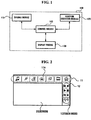
- FIG. 1 is a block diagram of a mobile device 100 that can be controlled using a touch and drag operation according to an exemplary embodiment of the present invention.
- the mobile device 100 includes a sensing module 110 which senses the movement of an object from a first zone to a second zone, a function execution module 120 which executes a function according to the movement of the object, a display module 130 which displays information regarding the function executed by the function execution module 120, and a control module 140 which controls the sensing module 110, the function execution module 120, and the display module 130.
- 'module' means, but is not limited to, a software or hardware component, such as a Field Programmable Gate Array (FPGA) or Application Specific Integrated Circuit (ASIC), which performs certain tasks.
- a module may advantageously be configured to reside on the addressable storage medium and configured to execute on one or more processors.
- a module may include, by way of example, components, such as software components, object-oriented software components, class components and task components, processes, functions, attributes, procedures, subroutines, segments of program code, drivers, firmware, microcode, circuitry, data, databases, data structures, tables, arrays, and variables.
- components such as software components, object-oriented software components, class components and task components, processes, functions, attributes, procedures, subroutines, segments of program code, drivers, firmware, microcode, circuitry, data, databases, data structures, tables, arrays, and variables.
- the functionality provided for in the components and modules may be combined into fewer components and modules or further separated into additional components and modules.
- the mobile device 100 may be a personal digital assistant (PDA), a portable media player (PMP), a play station portable (PSP), and an MP3 player, and a mobile phone that provides a touch and drag function.
- PDA personal digital assistant
- PMP portable media player
- PSP play station portable
- MP3 player MP3 player
- the sensing module 110 senses the movement of an object from a first zone to a second zone.
- the first zone may include a place where the movement of the object begins, and the second zone may include a place where the movement of the object ends.
- the object may be a finger of a user or a stylus pen that can be used on a touch screen instead of a finger of the user.
- the sensing module 110 senses the beginning and ending of the movement of a finger of the user or a stylus pen on a touch screen.
- the first zone may be a place where a plurality of menu icons that can be manipulated by the user are displayed, and may be a place where the movement of one of the menu icons selected by the user by a drag operation begins.
- the second zone may include a place where information regarding a function corresponding to a menu icon selected from the first zone by the user is displayed, and may include a place where the movement of the selected menu icon by a drag operation ends.
- the execution of a function corresponding to a menu icon may be interpreted as implying both the initiation and termination of a function corresponding to a menu icon.
- the first zone may not necessarily display a plurality of menu icons that can be manipulated by the user are displayed, and the second zone may not necessarily display information regarding a function corresponding to one of the menu icons selected by the user.
- the first zone can be distinguished from the second zone in terms of where the movement of a finger (hereinafter referred to as the touching finger) of the user that touches the display module 130 begins and ends.
- the user may drag a predetermined menu icon back into a place where the predetermined menu icon is previously located along with other menu icons, i.e., the first zone, from a place where information regarding the current function is displayed, i.e., the second zone.
- the movement of the touching finger begins in the second zone and ends in the first zone.
- first zone a place where a plurality of menu icons that can be manipulated by the user are displayed will hereinafter be referred to as the first zone, and a place where information regarding a function corresponding to one of the menu icons selected by the user is displayed will hereinafter be referred to as the second zone.
- the sensing module 110 determines whether the touching finger touches the selected menu icon 11. For this, the sensing module 110 may receive a signal generated by one or more touch sensors.
- the sensing module 110 determines the position (hereinafter referred to as the touch position) of the touching finger and whether the touch position has been shifted.
- the touch position is shifted when the user selects one of the menu icons 11 displayed in the first zone and then drags the selected menu icon 11 into the second zone.
- the sensing module 110 may determine whether the user has selected more than one menu icon 11 by determining one of the duration (hereinafter referred to as the touch duration) for and the speed (hereinafter referred to as the touch speed) at which the touching finger touches the first zone and the distance (hereinafter referred to as the touch distance) by which the touching finger travels after touching the first zone.
- the function execution module 120 may simultaneously execute a plurality of functions respectively corresponding to the selected menu icons 11.
- the sensing module 110 determines that the touching finger is currently placed on one of the menu icons 11, the sensing module 110 provides the function execution module 120 with information regarding a menu icon 110 corresponding to the touch position determined by the sensing module 110. Thereafter, if the sensing module 110 determines that the touch position has been shifted from the first zone to the second zone, the sensing module 110 executes a function corresponding to the menu icon 110 corresponding to the touch position determined by the sensing module 110.
- the sensing module 110 determines a touch position, and provides the function execution module 120 with information regarding a menu icon 11 corresponding to the touch position. Thereafter, if the touch position is determined to have been shifted from the first zone to the second zone, the function execution module 120 executes a function corresponding to the menu icon 11 corresponding to the determined touch position.
- Information regarding a menu icon 11 is a description of the menu icon 11. Information regarding a menu icon 11 may be useful when the menu icon 11 is not sufficient to indicate a function corresponding to the menu icon 11 or when the menu icon 11 is hidden from view by the touching finger.
- the function execution module 120 may control a function currently being executed according to information provided by the sensing module 110 regarding the touch duration, the touch speed, and the touch distance.
- the display module 130 displays information regarding a function that is executed in connection with one of the menu icons 11 selected by the user.
- the display module 130 may include at least one of the first zone and the second zone.
- the selected menu icon 11 is a menu icon 'Moving Picture'
- a moving picture may be displayed on a screen as information regarding a function corresponding to the selected menu icon 11.
- the selected menu icon 11 is a menu icon 'Photo'
- an image may be displayed on the screen as the information regarding the function corresponding to the selected menu icon 11.
- an icon displaying a music play state e.g., an icon indicating whether a music file is currently being played, whether the playback of the music file is temporarily stopped, whether the music file is put on fast forward
- text data indicating a list of music files to be played may be included in the information regarding the function corresponding to the selected menu icon 11.
- the control module 140 controls the operations of the sensing module 110, the function execution module 120, and the display module 130.
- the control module 140 is provided with the result of determination performed by the sensing module 110, determines whether to execute a predetermined command , and gives instructions to the function execution module 120 to execute the predetermined command, and gives instructions to the display module 130 to change the screen.
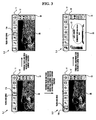
- FIGS. 2 through 4 are diagrams for illustrating a display module included in a mobile device that can be controlled using a touch and drag operation.
- the mobile device (the display module 130) includes a first zone 10 which is inversed L-shaped and displays a plurality of menu icons 11 and a plurality of sub-menu icons 12 that can be manipulated by a user, and a second zone 20 which displays information regarding a function that is executed in connection with one of the menu icons 11 or the sub-menu icons 12 selected by the user.
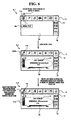
- the user selects a predetermined menu icon 11 from among the menu icons 11 that are displayed in the first zone 10, and drags the selected menu icon 11 downward (i.e., in a direction from the first zone 10 to the second zone 20).
- FIG. 3 _1 when the user selects a photo icon 11a in the first zone 10 and drags the photo icon 11a downward, an image is displayed in the second zone 20.
- the user may control an image currently being displayed in the second zone 20 or view an image previous or subsequent to the image currently being displayed in the second zone 20 by manipulating the sub-menu icons 12
- the user may select the photo icon 11 a and then drag the photo icon 11 upward (i.e., in a direction from the second zone 20 to the first zone 10).
- the user may select a menu icon 11 other than a menu icon 11 corresponding to the current function so that the current function can be readily replaced with a function corresponding to the selected menu icon 11.
- the user may select a music icon 11b and drag the music icon 11b toward the second zone 20. Then, information 21 regarding a function (i.e., a music play function) that is executed in connection with the music icon 11 a is displayed in the second zone 20, as illustrated in FIG. 3 _4.
- the user may control the music play function using the sub-menu icons 12. For example, the user may temporarily stop the playback of a current music file or play a music file subsequent to the current music file using the sub-menu icons 12.
- the user may simultaneously execute a plurality of functions respectively corresponding to a plurality of menu icons 11.
- a plurality of pieces of information respectively corresponding to the menu icons 11 may be displayed in the second zone 20.
- information regarding each function may be displayed occupying 1/n of the area of the second zone 20.
- the user may adjust the proportion of the area occupied by the information regarding each function to the area of the second zone 20 using a function of the mobile device 100 such as configuration.
- the mobile device 100 when a music player and a photo viewer are executed at the same time, the mobile device 100 can be set such that information regarding a function of the photo viewer can occupy 2/3 of the area of the second zone 20 when being displayed in the second zone 20.
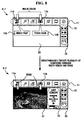
- FIGS. 5 through 8 are diagrams for illustrating a display module included in a mobile device that can be controlled using a touch and drag operation. The operation of each module of the mobile device will hereinafter be described in detail with reference to FIG. 1 .
- the mobile device (the display module 130) includes a first zone 10 which is an inversed L-shaped and displays a plurality of menu icons 11 that can be manipulated by a user, and a second zone 20 which displays information regarding a function that is executed in connection with a menu icon 11 when a touch position is shifted to a predetermined area when the menu icon 11 is selected).
- a shift in the touch position indicates the movement of the touching finger from the first zone 10 to the second zone 20.
- the first zone 10 includes a plurality of touch sensors.
- the touch sensors determine whether the user touches and selects any of the menu icons 11.
- the touch sensors may determine the direction of a touch and drag operation performed by the user and determine whether the user selects more than one menu icon 11.
- the touch sensors may be force sensors or capacitive sensors (e.g., ESSD's SS01, Quantum's QTouch, and ALPS' GlideSensor).
- the second zone 20, i.e., a display module 130, may be realized as a touch screen and recognize a touch and drag operation performed by the user.
- the touch screen may be a four-wire or five-wire resistive touch screen, a Near Field Imaging (NFI) capacitive touch screen, or a surface wave sensory touch screen using infrared rays (IR) and ultrasound waves.
- NFI Near Field Imaging
- IR infrared rays
- the sensing module 110 determines the location of one of the menu icons 11 selected by the user with the aid of one or more touch sensors included in the first zone 10. If the user drags the selected menu icon 11 into the second zone 20, the touch sensors or a touch screen may determine the direction (hereinafter referred to as the drag direction) in which the selected menu icon 11 is dragged and the position (hereinafter referred to as the drag position) to which the selected menu icon 11 is dragged.
- the drag direction hereinafter referred to as the drag direction
- the drag position hereinafter referred to as the drag position
- the sensing module 110 provides the function execution module 120 with information regarding a menu icon 11 corresponding to the touch position (information regarding the selected menu icon 11). Then, the function execution module 120 executes a function corresponding to the selected menu icon 11.
- the user may control the music play function using a plurality of sub-menu icons 12 displayed in the first zone 10. For example, the user may temporarily stop the playback of a current music file or play a music file subsequent to the current music file.
- the user may terminate a function currently being executed, i.e., the music play function, by selecting a piece of information 21a from the information 21 regarding the music play function, and dragging the selected piece of information 21 a into the first zone 10.
- a function currently being executed i.e., the music play function
- the user may select a menu icon 11 corresponding to the predetermined function and drag the selected menu icon 11 into the second zone 20 so that the current function can be readily replaced with the predetermined function.
- the user may select a photo icon 11b and drag the photo icon 11b into the second zone 20. Then, information indicating that a photo view function is currently being executed, i.e., an image 21, is displayed in the second zone 20.
- the user may control the image 21 using a plurality of sub-menu icons 12 displayed in the first zone 10. For example, the user may enlarge or reduce the image 21 or view an image subsequent to the image 21 using the sub-menu icons 12.
- the function execution module 120 may be provided with information regarding each of the selected menu icons 11 by the sensing module 110, and control the display module 130 to display the information in the second zone 20.
- the function execution module 120 may simultaneously execute a plurality of functions respectively corresponding to the selected menu icons 11, and the display module 130 may simultaneously display a plurality of pieces of information respectively corresponding to the functions in the second zone 20.
- the display module 130 may display information regarding each of the n functions in the second zone 20 so that information regarding each of the n functions can occupy 1/n of the area of the second zone 20.
- the user may adjust the area occupied by information regarding each function when the information is displayed in the second zone 20.
- the user may select one of a plurality of pieces of information respectively corresponding to a plurality of functions and scroll the selected piece of information, thereby increasing or reducing the area occupied by the selected piece of information when the selected piece of information is displayed in the second zone 20.
- the user may select one of a plurality of pieces of information respectively corresponding to the functions and drag the selected piece of information into the first zone 10.
- FIG. 9 is a diagram for explaining the determination of whether a touch and drag operation has been performed in a mobile device that can be controlled using a touch and drag operation (the mobile device 100 illustrated in FIG. 1 , according to an exemplary embodiment of the present invention).
- a first zone 10 includes a plurality of touch sensors(901a, 901b).
- the touch sensors(901a, 901b) are being sequentially touched, for example, in the order of A1 and A2, by the user.
- the touch sensors(901a, 901b) are arrayed so that two touch sensors 901a (A1) and 901b (A2) can be allocated to each column.
- the touch sensors 15 may be arrayed so that more than two touch sensors (e.g., touch sensors 902 (A1 through A4)) can be allocated to each column.
- the sensing module 110 senses that a touch position of a touching finger of the user is currently located in the second zone 20 (i.e., a touch screen).
- the sensing module 110 determines whether the touch position has been shifted based on the order in which the touch sensors 15 are being touched by the user (e.g., the order of A1 and A2) and the current location of the touch position.
- the sensing module 110 can determine whether the user wishes to execute or terminate a function corresponding to one of the menu icons 11 displayed in the first zone 10 according to whether the touch position has been shifted.
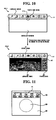
- FIG. 10 is a diagram for illustrating a display module included in a mobile device that can be controlled using a touch and drag operation.
- the mobile device includes multiple sensor nodes (not shown), a first zone 10 which displays a plurality of menu icons 11 that can be manipulated by a user, a second zone 20 which displays information regarding a function that is executed in connection with one of the menu icons 11 selected by the user, and a third zone 30 which displays a plurality of sub-menu icons 12 that are used to control the information displayed in the second zone 20.
- the second zone 20, the third zone 230, and the display module 130 may be integrated into one body, and the touch module 130 may be realized as a touch screen.
- the display module 130 may not be initially divided into the second zone and the third zone 30.
- the third zone 30 is formed in the second zone 20 so that the third zone 30 can be distinguished from the second zone 20.
- the third zone 30 displays a plurality of sub-menu icons 12 of a menu icon 11 selected from the first zone 10 by the user.
- the sub-menu icons 12 control information displayed in the second zone 20 regarding a function that is executed in connection with the selected menu icon 11.
- the display module 130 illustrated in FIG. 10 is different from the display module 130 illustrated in FIGS. 5 through 8 by including the third zone 30 in that the display module 130 illustrated in FIG. 10 includes the third zone 30 and thus displays a plurality of sub-menu icons 12 in the third zone when the user selects one of the menu icons 11 displayed in the first zone and shifts a touch position by dragging the selected menu icon 11 into the second zone 20, whereas the display module 130 illustrated in FIGS. 5 through 8 displays a plurality of sub-menu icons 12 in the first zone 10 from the beginning.
- FIGS. 10 _1 and 10_2 An operating method of the display module 130 illustrated in FIGS. 10 _1 and 10_2 when the user selects more than one menu icon 11 from the first zone 10 and thus more than one function is executed at the same time, when the user wishes to perform a function other than a current function during the execution of the current function, or when the user terminates the current function is the same as described above with reference to FIGS. 5 through 8 .
- FIGS. 11 through 13 are diagrams for illustrating a display module included in a mobile device that can be controlled using a touch and drag operation according to another exemplary embodiment of the present invention (another example of the display module 130 illustrated in FIG. 1 ).
- the mobile device includes a first zone 10 which displays a plurality of menu icons 11 that can be manipulated by a user, a second zone 20 which displays information regarding a function that is executed in connection with one of the menu icons 11 selected by the user, and a third zone 30 which displays a plurality of sub-menu icons 12 that are used to control the information displayed in the second zone 20.
- the first zone 10, the second zone 20, the third zone 30, and the display module 130 are integrated into one body, and the display module 130 is realized as a touch screen.
- Information regarding each of the menu icons 11 displayed in the first zone may be displayed along with the corresponding menu icon 11.
- information regarding each of the menu icons 11 may be displayed in the second zone 20 when the corresponding menu icon 11 is selected by the user, as described above with reference to FIG. 8 .
- a plurality of sub-menu icons 12 that control the information displayed in the second zone 20 are displayed in the third zone 30.
- the user can control the information displayed in the second zone 20 using the sub-menu icons 12 displayed in the third zone 30.
- information regarding a function that is executed in connection with one of the menu icons 11 selected by the user is displayed in the second zone 20, and a plurality of sub-menu icons 12 that are used to control the information displayed in the second zone 20 are displayed in the third zone 30.
- the display module 130 displays a second zone boundary 21.
- the first zone 10, the second zone 20 and the third zone 30 are automatically defined and are clearly distinguished from each other. Accordingly, it is possible to provide the user with information indicating where to begin and end dragging the photo icon 11a.
- the user shifts a touch position to the inside the second zone boundary 21, i.e., shifts the touch position to the second zone 20, by dragging the photo icon 11a.
- the display module 130 feeds back the photo icon 11a to the user, thereby enabling the user to easily determine which of the menu icons 11 is currently being selected and providing the user with intuition so that the user can easily move the menu icon 11 currently being selected, i.e., the photo icon 11a, to the inside of the second zone boundary 21.
- the display module 130 makes the second zone boundary 21 disappear and displays an image in the second zone 20 as information regarding a function that is executed in connection with the photo icon 11a.
- the image displayed in the second zone 20 may be stored in a storage module of the mobile device 100 or may be received from an external device.
- the display module 130 displays a plurality of sub-menu icons 12 that control the image displayed in the second zone 20 in the third zone 30.
- the user may select one of the sub-menu icons 12 and drag the selected sub-menu icon 12 into the second zone 20, thereby performing various operations such as enlarging or reducing a current image, opening up an image file folder, and viewing an image previous or subsequent to the current image.
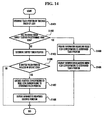
- FIG. 14 is a flowchart illustrating an operating method of a mobile device that can be controlled using a touch and drag operation.
- the operating method illustrated in FIG. 14 involves executing a function corresponding to a menu icon 11 selected and dragged by a user.
- the operating method illustrated in FIG. 14 will hereinafter be described in detail with reference to FIG. 1 .
- the sensing module 110 determines a touch position of a touching finger of a user when a predetermined menu icon 10 displayed in the first zone 10 is selected (S1401).
- the sensing module 110 determines whether the touching finger has simply touched the predetermined menu icon 11 or has touched and dragged the predetermined menu icon 11, i.e., determines whether the touching finger has simply touched the predetermined menu icon 11 or not.
- the sensing module 110 senses that a plurality of touch sensors 15 included in the first zone 10 have been sequentially touched, for example, in ascending order, by the touching finger and that the touching finger is currently located in a predetermined function execution zone, i.e., the second zone 20. Then, the sensing module 110 recognizes that the user has performed a drag operation.
- the sensing module 110 requests the function execution module 120 to display information regarding the predetermined menu icon 11 in the second zone 20.
- the function execution module 120 controls the display module 130 to display the information regarding the predetermined menu icon 11 (e.g., information indicating that the predetermined menu icon 11 is related to a music player) in the second zone 20.
- the predetermined menu icon 11 e.g., information indicating that the predetermined menu icon 11 is related to a music player
- the sensing module 110 determines the shifted touch position based on a touch sensing signal transmitted thereto, and determines whether the shifted touch position is included in the second zone 20.
- operation S1407 if it is determined in operation S1406 that the shifted touch position is included in the second zone 20, the function execution module 120 executes a function corresponding to the predetermined menu icon 11.
- the display module 130 displays information regarding the function corresponding to the predetermined menu icon 11 in the second zone 20.
- the sensing module 110 senses a shift in the touch position and determines that the predetermined menu icon 11 has been dragged by the user. Then, the function execution module 120 readily executes a function corresponding to the predetermined menu icon 11 without providing information regarding the predetermined menu icon 11.
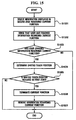
- FIG. 15 is a flowchart illustrating a method of terminating a function currently being executed by a mobile device. For convenience, the method illustrated in FIG. 15 will hereinafter be described in detail with reference to FIG. 1 .
- a user selects information displayed in a function execution zone (i.e., the second zone 20) regarding a current function from a function execution zone, in order to terminate the current function.
- the sensing module 110 senses that the user has touched and selected the information regarding the current function.
- the sensing module 110 determines whether the user has dragged the information regarding the current function into the first zone 10. In operation S1504, if it is determined in operation S1502 that the user has dragged the information regarding the current function into the first zone, the sensing module 110 senses that a plurality of touch sensors 15 included in the first zone 10 have been sequentially touched, for example, in descending order, by the user and determines that a touch position has been shifted.
- the sensing module 110 determines whether the shifted touch position is included in the first zone 10. If it is determined in operation S1505 that the shifted touch position is included in the first zone 10, the sensing module 110 determines that the user has requested termination of the current function.
- the function execution module 120 terminates the current function.
- the display module 130 removes the information regarding the current function from the second zone 20.
- the user can execute a function by selecting a menu icon corresponding to the function and dragging the selected menu icon into a predetermined function execution zone. Therefore, the user can intuitively use any desired functions using a simple convenient method.
- FIG. 16 is a flowchart illustrating an operating method of a mobile device that can be controlled using a touch and drag operation, according to another exemplary embodiment of the present invention. For convenience, the operating method illustrated in FIG. 16 will hereinafter be described in detail with reference to FIGS. 1 and 11 through 13.
- a mobile device to which the operating method illustrated in FIG. 16 is applied includes a first zone 10, a second zone 20, a third zone 30, and a display module 130 which are all integrated into one body.
- the display module 130 is realized as a touch screen.
- the first zone 10 displays one or more menu icons 11 together with information regarding each of the menu icons 11.
- the sensing module 110 determines a touch position of a touching finger of a user when a predetermined menu icon 11 displayed in the first zone 10 is selected.
- the display module 130 displays a second zone boundary 21 so that the second zone 20 and the third zone 30 can be defined.
- the sensing module 110 determines whether the touching finger has simply touched the predetermined menu icon 11 or has touched and dragged the predetermined menu icon 11, i.e., determines whether the touching finger has simply touched the predetermined menu icon 11 or not.
- operation S1604 if it is determined in operation S1603 that the touching finger has not simply touched the predetermined menu icon 11 but has touched and then dragged the predetermined menu icon 11, the display module 130 feeds back the predetermined menu icon 11 to the user in real time.
- the sensing module 110 senses that the touch position has been shifted and determines the shifted touch position based on a touch sensing signal transmitted thereto. In operation S1606, the sensing module 110 determines whether the shifted touch position is included in the second zone 20.
- operation S1607 if it is determined in operation S1606 that the shifted touch position is included in the second zone 20, the function execution module 120 executes a function corresponding to the predetermined menu icon 11, and removes the second zone boundary 21.
- the display module 130 displays in the third zone 30 a plurality of sub-menu icons 12 that can control information regarding the function corresponding to the predetermined menu icon 11.
- the user may control the information regarding the function corresponding to the predetermined menu icon 11 using the sub-menu icons 12 displayed in the third zone 30.
- the user may terminate a current function by selecting information regarding the current function from the second zone 20 and dragging the selected information into the first zone 10, and this is the same as described above with reference to FIG. 15 .
- the present invention has the following advantages.
- a function corresponding to the selected menu icon is executed.
- the user can properly and precisely execute any desired functions using a simple method.
- a function corresponding to a menu icon cannot be executed by simply touching the menu icon.
- a function corresponding to a menu icon cannot be executed by simply touching the menu icon.
- Example 1 A mobile device that can be controlled using a touch and drag operation, the mobile device comprising:
- Example 2 The mobile device of example 1, wherein the first zone comprises a point where the movement of the object begins.
- Example 3 The mobile device of example 1, wherein the second zone comprises a point where the movement of the object ends.
- Example 4 The mobile device of example 1, wherein the function corresponds to a menu icon selected from the first zone.
- Example 5 The mobile device of example 4, wherein the display module comprises a third zone which displays one or more sub-menu icons of the menu icon, the sub-menu icons controlling the function.
- Example 6 The mobile device of example 1, wherein the second zone and the display module are integrated into one body.
- Example 7 The mobile device of example 1, wherein the first zone comprises multiple sensor nodes.
- Example 8 The mobile device of example 7, wherein the first zone is formed around the display module along a boundary of the mobile device.
- Example 9 The mobile device of example 5, wherein the first zone, the second zone, the third zone, and the display module are integrated into one body.
- Example 10 The mobile device of example 1, wherein the display module intermittently displays a boundary of the second zone according to whether the menu icon is selected.
- Example 11 The mobile device of example 1, wherein, if the sensing module senses movement of the object in connection with a plurality of menu icons, the function execution module executes a plurality of functions respectively corresponding to the menu icons.
- Example 12 The mobile device of example 11, wherein the sensing module additionally senses one of touch duration, touch distance, and touch speed of the object.
- Example 13 The mobile device of example 12, wherein the function execution module changes the function according to one of the sensed touch duration, touch distance and touch speed.
- Example 14 An operating method of a mobile device that can be controlled using a touch and drag operation, the operating method comprising:
- Example 15 The operating method of example 14, wherein the first zone comprises a point where the movement of the object begins.
- Example 16 The operating method of example 14, wherein the second zone comprises a point where the movement of the object ends.
- Example 17 The operating method of example 14, wherein the function corresponds to a menu icon selected from the first zone.
- Example 18 The operating method of example 17, wherein the displaying comprises displaying one or more sub-menu icons of the menu icon in a third zone, the sub-menu icons controlling the function.
- Example 19 The operating method of example 18, wherein the displaying also comprises intermittently displaying a boundary of the second zone according to whether the menu icon is selected.
- Example 20 The operating method of example 14, wherein the executing comprises, if the sensing module senses movement of the object in connection with a plurality of menu icons, executing a plurality of functions respectively corresponding to the menu icons.
- Example 21 The operating method of example 20, wherein the sensing comprises additionally sensing one of touch duration, touch distance, and touch speed of the object.
- Example 22 The operating method of example 21, wherein the executing further comprises changing the function according to one of the sensed touch duration, touch distance and touch speed.
Landscapes
- Engineering & Computer Science (AREA)
- General Engineering & Computer Science (AREA)
- Theoretical Computer Science (AREA)
- Human Computer Interaction (AREA)
- Physics & Mathematics (AREA)
- General Physics & Mathematics (AREA)
- User Interface Of Digital Computer (AREA)
- Telephone Function (AREA)
Claims (9)
- Verfahren zum Betreiben eines mobilen Geräts, das unter Verwendung einer Berührungsund Ziehbetätigung gesteuert werden kann, wobei das mobile Gerät einen Berührungsbildschirm aufweist, wobei das Verfahren umfasst:Anzeigen, durch das Gerät, eines oder mehrerer Menüsymbole (11) in einer ersten Zone (10) auf dem Berührungsbildschirm,Erfassen, durch das Gerät, einer Berührungsauswahl eines Menüsymbols (11a) aus dem einen oder den mehreren Menüsymbolen (11), die in der ersten Zone (10) auf dem Berührungsbildschirm angezeigt werden,sichtbares Vorsehen, durch das Gerät, einer Grenze (21) einer zweiten Zone (20) auf dem Berührungsbildschirm in Reaktion auf die erfasste Berührungsauswahl, wobei die Grenze der zweiten Zone sichtbar ist, nachdem die Berührungsauswahl erfasst wurde,Entfernen der sichtbar vorgesehenen Grenze der zweiten Zone, wenn das Menüsymbol von der ersten Zone zu der zweiten Zone gezogen wird, undAusführen einer Funktion gemäß dem Ziehen des Menüsymbols von der ersten Zone zu der zweiten Zone, und Anzeigen von Informationen in Bezug auf die Funktion.
- Verfahren nach Anspruch 1, wobei die erste Zone (10) einen Punkt umfasst, an dem das Berühren und Ziehen des Menüsymbols beginnt.
- Verfahren nach einem der vorstehenden Ansprüche, wobei die zweite Zone (20) einen Punkt umfasst, an dem das Berühren und Ziehen des Menüsymbols endet.
- Verfahren nach Anspruch 1, wobei die Funktion dem aus der ersten Zone (10) ausgewählten Menüsymbol (11a) entspricht.
- Verfahren nach Anspruch 1, wobei, sobald die Grenze der zweiten Zone sichtbar vorgesehen ist, die erste Zone (10), die zweite Zone (20) und eine dritte Zone (30) automatisch definiert und voneinander unterschieden werden.
- Mobiles Gerät, das unter Verwendung einer Berührungs- und Ziehbetätigung gesteuert werden kann, wobei das mobile Gerät einen Berührungsbildschirm aufweist und umfasst:ein Anzeigemodul (130) zum Anzeigen eines oder mehrerer Menüsymbole (11) in einer ersten Zone (10) auf dem Berührungsbildschirm,ein Erfassungsmodul (110) zum Erfassen einer Berührungsauswahl eines Menüsymbols (11a) aus dem einen oder den mehreren Menüsymbolen (11), die in der ersten Zone (10) auf dem Berührungsbildschirm angezeigt werden, undein Funktionsausführungsmodul (120),wobei das Anzeigemodul (130) sichtbar eine Grenze einer zweiten Zone (20) auf dem Berührungsbildschirm in Reaktion auf die erfasste Berührungsauswahl vorsieht, wobei die Grenze der zweiten Zone (20) sichtbar ist, nachdem die Berührungsauswahl erfasst wurde, und die sichtbar vorgesehene Grenze der zweiten Zone entfernt, wenn das Menüsymbol von der ersten Zone zu der zweiten Zone gezogen wird, undwobei das Funktionsausführungsmodul eine Funktion gemäß dem Ziehen des Menüsymbols von der ersten Zone zu der zweiten Zone ausführt und wobei das Anzeigemodul Informationen in Bezug auf die Funktion anzeigt.
- Mobilgerät nach Anspruch 6, das weiterhin umfasst:ein Steuermodul (140) zum Steuern des Anzeigemoduls (130), des Funktionsausführungsmoduls (120) und des Erfassungsmoduls, wobei das Steuermodul (140) Befehle zu dem Anzeigemodul (130) gibt, um den Bildschirminhalt in Reaktion auf die erfasste Berührungsauswahl zu ändern.
- Mobilgerät nach Anspruch 6 oder 7, wobei das Anzeigemodul (130) weiterhin sichtbar eine dritte Zone (30) auf dem Berührungsbildschirm in Reaktion auf die erfasste Berührungsauswahl vorsieht.
- Ein oder mehrere Computerprogrammprodukte mit Computerprogrammbefehlen, die bei einer Ausführung das Verfahren gemäß einem der Ansprüche 1 bis 5 durchführen.
Applications Claiming Priority (3)
| Application Number | Priority Date | Filing Date | Title |
|---|---|---|---|
| KR20050122566 | 2005-12-13 | ||
| KR1020060117814A KR100801089B1 (ko) | 2005-12-13 | 2006-11-27 | 터치 및 드래그를 이용하여 제어 가능한 모바일 장치 및 그조작 방법 |
| EP06823983.9A EP1969450B1 (de) | 2005-12-13 | 2006-12-07 | Mobiles gerät und für die verwendung von touch und drag verfügbare betriebsverfahrenssteuerung |
Related Parent Applications (3)
| Application Number | Title | Priority Date | Filing Date |
|---|---|---|---|
| EP06823983.9 Division | 2006-12-07 | ||
| EP06823983.9A Division EP1969450B1 (de) | 2005-12-13 | 2006-12-07 | Mobiles gerät und für die verwendung von touch und drag verfügbare betriebsverfahrenssteuerung |
| EP06823983.9A Division-Into EP1969450B1 (de) | 2005-12-13 | 2006-12-07 | Mobiles gerät und für die verwendung von touch und drag verfügbare betriebsverfahrenssteuerung |
Publications (3)
| Publication Number | Publication Date |
|---|---|
| EP2682853A2 EP2682853A2 (de) | 2014-01-08 |
| EP2682853A3 EP2682853A3 (de) | 2014-01-22 |
| EP2682853B1 true EP2682853B1 (de) | 2016-07-13 |
Family
ID=38363122
Family Applications (3)
| Application Number | Title | Priority Date | Filing Date |
|---|---|---|---|
| EP18169861.4A Active EP3385824B1 (de) | 2005-12-13 | 2006-12-07 | Mobile vorrichtung und bedienungsverfahrenssteuerung, die zur verwendung von berühren und ziehen verfügbar ist |
| EP06823983.9A Not-in-force EP1969450B1 (de) | 2005-12-13 | 2006-12-07 | Mobiles gerät und für die verwendung von touch und drag verfügbare betriebsverfahrenssteuerung |
| EP13004519.8A Not-in-force EP2682853B1 (de) | 2005-12-13 | 2006-12-07 | Mobile Vorrichtung und Betriebsverfahrenssteuerung, die für Tippen und Ziehen verfügbar ist |
Family Applications Before (2)
| Application Number | Title | Priority Date | Filing Date |
|---|---|---|---|
| EP18169861.4A Active EP3385824B1 (de) | 2005-12-13 | 2006-12-07 | Mobile vorrichtung und bedienungsverfahrenssteuerung, die zur verwendung von berühren und ziehen verfügbar ist |
| EP06823983.9A Not-in-force EP1969450B1 (de) | 2005-12-13 | 2006-12-07 | Mobiles gerät und für die verwendung von touch und drag verfügbare betriebsverfahrenssteuerung |
Country Status (5)
| Country | Link |
|---|---|
| EP (3) | EP3385824B1 (de) |
| KR (1) | KR100801089B1 (de) |
| CN (2) | CN101326482B (de) |
| GB (1) | GB2449000B (de) |
| WO (1) | WO2007069835A1 (de) |
Cited By (2)
| Publication number | Priority date | Publication date | Assignee | Title |
|---|---|---|---|---|
| US11262889B2 (en) | 2008-05-23 | 2022-03-01 | Qualcomm Incorporated | Navigating among activities in a computing device |
| US11379098B2 (en) | 2008-05-23 | 2022-07-05 | Qualcomm Incorporated | Application management in a computing device |
Families Citing this family (77)
| Publication number | Priority date | Publication date | Assignee | Title |
|---|---|---|---|---|
| US7509588B2 (en) | 2005-12-30 | 2009-03-24 | Apple Inc. | Portable electronic device with interface reconfiguration mode |
| US8564544B2 (en) | 2006-09-06 | 2013-10-22 | Apple Inc. | Touch screen device, method, and graphical user interface for customizing display of content category icons |
| US7940250B2 (en) | 2006-09-06 | 2011-05-10 | Apple Inc. | Web-clip widgets on a portable multifunction device |
| US10313505B2 (en) | 2006-09-06 | 2019-06-04 | Apple Inc. | Portable multifunction device, method, and graphical user interface for configuring and displaying widgets |
| US8519964B2 (en) | 2007-01-07 | 2013-08-27 | Apple Inc. | Portable multifunction device, method, and graphical user interface supporting user navigations of graphical objects on a touch screen display |
| US8788954B2 (en) | 2007-01-07 | 2014-07-22 | Apple Inc. | Web-clip widgets on a portable multifunction device |
| KR101524572B1 (ko) * | 2007-02-15 | 2015-06-01 | 삼성전자주식회사 | 터치스크린을 구비한 휴대 단말기의 인터페이스 제공 방법 |
| KR101420418B1 (ko) * | 2007-03-30 | 2014-07-25 | 엘지전자 주식회사 | 터치스크린을 구비한 이동통신단말기의 제어방법 및 그이동통신단말기 |
| US9933937B2 (en) | 2007-06-20 | 2018-04-03 | Apple Inc. | Portable multifunction device, method, and graphical user interface for playing online videos |
| US9772751B2 (en) | 2007-06-29 | 2017-09-26 | Apple Inc. | Using gestures to slide between user interfaces |
| KR101414607B1 (ko) * | 2007-08-29 | 2014-07-03 | 엘지전자 주식회사 | 휴대 단말기, 그 조작 방법 및 이를 위한 기록 매체 |
| AU2022224726B2 (en) * | 2007-09-04 | 2024-03-14 | Apple Inc. | Portable multifunction device with interface reconfiguration mode |
| US8619038B2 (en) | 2007-09-04 | 2013-12-31 | Apple Inc. | Editing interface |
| US11126321B2 (en) | 2007-09-04 | 2021-09-21 | Apple Inc. | Application menu user interface |
| US9619143B2 (en) | 2008-01-06 | 2017-04-11 | Apple Inc. | Device, method, and graphical user interface for viewing application launch icons |
| KR20090029138A (ko) * | 2007-09-17 | 2009-03-20 | 삼성전자주식회사 | 동작에 의한 사용자 명령 입력 방법 및 이를 적용한멀티미디어 기기 |
| US20090079699A1 (en) * | 2007-09-24 | 2009-03-26 | Motorola, Inc. | Method and device for associating objects |
| KR101414614B1 (ko) * | 2007-10-02 | 2014-07-03 | 엘지전자 주식회사 | 정보 입출력 기능을 갖는 단말기 및 이를 이용한 방법 |
| KR101386473B1 (ko) * | 2007-10-04 | 2014-04-18 | 엘지전자 주식회사 | 휴대 단말기 및 그 메뉴 표시 방법 |
| KR101513609B1 (ko) | 2007-10-04 | 2015-04-20 | 엘지전자 주식회사 | 휴대단말기의 음악 재생장치 및 방법 |
| KR101387511B1 (ko) * | 2007-10-04 | 2014-04-21 | 엘지전자 주식회사 | 이동 단말기 및 이것의 방송 출력 제어 방법 |
| US9083814B2 (en) | 2007-10-04 | 2015-07-14 | Lg Electronics Inc. | Bouncing animation of a lock mode screen in a mobile communication terminal |
| TWI394073B (zh) * | 2007-12-31 | 2013-04-21 | Htc Corp | 電子裝置及其開啟應用程式方法與功能圖像顯示方法 |
| WO2009086599A1 (en) * | 2008-01-07 | 2009-07-16 | Avega Systems Pty Ltd | A user interface for managing the operation of networked media playback devices |
| US8396907B2 (en) * | 2008-02-13 | 2013-03-12 | Sung Guk Park | Data processing system and method of grouping computer files |
| KR101012300B1 (ko) * | 2008-03-07 | 2011-02-08 | 삼성전자주식회사 | 터치스크린을 구비한 휴대 단말기의 사용자 인터페이스장치 및 그 방법 |
| TWI361377B (en) * | 2008-04-24 | 2012-04-01 | Htc Corp | Method for switching user interface, electronic device and recording medium using the same |
| US8947320B2 (en) | 2008-09-08 | 2015-02-03 | Qualcomm Incorporated | Method for indicating location and direction of a graphical user interface element |
| US8836611B2 (en) | 2008-09-08 | 2014-09-16 | Qualcomm Incorporated | Multi-panel device with configurable interface |
| US8860765B2 (en) | 2008-09-08 | 2014-10-14 | Qualcomm Incorporated | Mobile device with an inclinometer |
| US8863038B2 (en) * | 2008-09-08 | 2014-10-14 | Qualcomm Incorporated | Multi-panel electronic device |
| US8803816B2 (en) | 2008-09-08 | 2014-08-12 | Qualcomm Incorporated | Multi-fold mobile device with configurable interface |
| US8860632B2 (en) | 2008-09-08 | 2014-10-14 | Qualcomm Incorporated | Multi-panel device with configurable interface |
| US9009984B2 (en) | 2008-09-08 | 2015-04-21 | Qualcomm Incorporated | Multi-panel electronic device |
| US8933874B2 (en) | 2008-09-08 | 2015-01-13 | Patrik N. Lundqvist | Multi-panel electronic device |
| CN102340601B (zh) * | 2008-10-24 | 2013-09-25 | 珠海市魅族科技有限公司 | 手机 |
| US8584031B2 (en) | 2008-11-19 | 2013-11-12 | Apple Inc. | Portable touch screen device, method, and graphical user interface for using emoji characters |
| US8453057B2 (en) * | 2008-12-22 | 2013-05-28 | Verizon Patent And Licensing Inc. | Stage interaction for mobile device |
| EP2211279A3 (de) * | 2009-01-14 | 2014-10-01 | Samsung Electronics Co., Ltd. | Vorrichtung und Verfahren zum Abspielen eines Multimediaartikels |
| KR101537612B1 (ko) * | 2009-03-18 | 2015-07-17 | 엘지전자 주식회사 | 이동 단말기 및 이것의 배경 화면 디스플레이 제어 방법 |
| US8686951B2 (en) | 2009-03-18 | 2014-04-01 | HJ Laboratories, LLC | Providing an elevated and texturized display in an electronic device |
| TW201035829A (en) * | 2009-03-31 | 2010-10-01 | Compal Electronics Inc | Electronic device and method of operating screen |
| KR101618152B1 (ko) * | 2009-09-11 | 2016-05-04 | 주식회사 엘지유플러스 | 터치스크린을 구비한 모바일 단말 및 그의 웹 페이지 드래그 방법 |
| US8736561B2 (en) | 2010-01-06 | 2014-05-27 | Apple Inc. | Device, method, and graphical user interface with content display modes and display rotation heuristics |
| JP2011145386A (ja) * | 2010-01-13 | 2011-07-28 | Fuji Xerox Co Ltd | 表示制御装置、表示装置及びプログラム |
| US20110199342A1 (en) | 2010-02-16 | 2011-08-18 | Harry Vartanian | Apparatus and method for providing elevated, indented or texturized sensations to an object near a display device or input detection using ultrasound |
| US10788976B2 (en) | 2010-04-07 | 2020-09-29 | Apple Inc. | Device, method, and graphical user interface for managing folders with multiple pages |
| US8881060B2 (en) | 2010-04-07 | 2014-11-04 | Apple Inc. | Device, method, and graphical user interface for managing folders |
| CN102314283A (zh) * | 2010-07-01 | 2012-01-11 | 康准电子科技(昆山)有限公司 | 电子书及其工作方法 |
| US8572508B2 (en) * | 2010-11-22 | 2013-10-29 | Acer Incorporated | Application displaying method for touch-controlled device and touch-controlled device thereof |
| CN102479027A (zh) * | 2010-11-24 | 2012-05-30 | 中兴通讯股份有限公司 | 一种触摸屏应用图标的控制方法及装置 |
| US10318146B2 (en) * | 2011-09-12 | 2019-06-11 | Microsoft Technology Licensing, Llc | Control area for a touch screen |
| CN102541445A (zh) | 2011-12-08 | 2012-07-04 | 华为技术有限公司 | 交互方法及交互设备 |
| CN102855068B (zh) * | 2012-08-16 | 2018-07-17 | 优视科技有限公司 | 界面操作控制方法、装置及电子设备 |
| CN102880413B (zh) * | 2012-08-28 | 2016-06-08 | 东莞宇龙通信科技有限公司 | 用于具有触控屏的移动终端控制显示的方法和移动终端 |
| KR101412815B1 (ko) * | 2012-09-24 | 2014-06-27 | 기언관 | 응답메시지 전송 기능을 가진 휴대용단말기 |
| US10976922B2 (en) | 2013-02-17 | 2021-04-13 | Benjamin Firooz Ghassabian | Data entry systems |
| DE102013002891A1 (de) * | 2013-03-22 | 2014-09-25 | Volkswagen Aktiengesellschaft | Informationswiedergabesystem für ein Fahrzeug und Verfahren zum Bereitstellen von Informationen für den Benutzer eines Fahrzeugs |
| JP6393325B2 (ja) | 2013-10-30 | 2018-09-19 | アップル インコーポレイテッドApple Inc. | 関連するユーザインターフェースオブジェクトの表示 |
| KR102192155B1 (ko) * | 2013-11-12 | 2020-12-16 | 삼성전자주식회사 | 어플리케이션 정보를 제공하는 방법 및 장치 |
| CN103927144B (zh) * | 2014-04-17 | 2019-03-15 | 努比亚技术有限公司 | 触屏操作的方法及装置 |
| TW201601005A (zh) * | 2014-06-18 | 2016-01-01 | 拓連科技股份有限公司 | 於電子裝置上啟始工作執行之方法及系統,及相關電腦程式產品 |
| CN105426051B (zh) * | 2015-11-27 | 2019-02-12 | 珠海市魅族通讯设备有限公司 | 一种应用控制方法及应用该方法的终端 |
| CN107209622A (zh) * | 2015-12-17 | 2017-09-26 | 深圳市柔宇科技有限公司 | 电子装置及文件显示方法 |
| US10353558B2 (en) * | 2016-01-13 | 2019-07-16 | Electrolux Home Products, Inc. | Drag-and-set user interface for appliances |
| CN105739885A (zh) * | 2016-01-22 | 2016-07-06 | 庞迪 | 一种基于触摸次数的图标迁移实现方法及实现系统 |
| CN105718146A (zh) * | 2016-01-22 | 2016-06-29 | 庞迪 | 一种基于音量键的图标迁移实现方法及实现系统 |
| US12175065B2 (en) | 2016-06-10 | 2024-12-24 | Apple Inc. | Context-specific user interfaces for relocating one or more complications in a watch or clock interface |
| DK201670595A1 (en) | 2016-06-11 | 2018-01-22 | Apple Inc | Configuring context-specific user interfaces |
| US11816325B2 (en) | 2016-06-12 | 2023-11-14 | Apple Inc. | Application shortcuts for carplay |
| CN106681635B (zh) * | 2016-12-16 | 2020-09-29 | Oppo广东移动通信有限公司 | 一种分屏防误触方法、装置及移动终端 |
| JP6374590B1 (ja) * | 2017-11-07 | 2018-08-15 | 京セラ株式会社 | 電子機器、プログラムおよび制御方法 |
| CN108008891A (zh) * | 2017-11-30 | 2018-05-08 | 珠海市魅族科技有限公司 | 一种导航栏的控制方法及装置、终端、可读存储介质 |
| CN109144649B (zh) * | 2018-08-22 | 2020-12-29 | Oppo广东移动通信有限公司 | 图标的显示方法、装置、终端及存储介质 |
| US11675476B2 (en) | 2019-05-05 | 2023-06-13 | Apple Inc. | User interfaces for widgets |
| CN111367450A (zh) * | 2020-02-28 | 2020-07-03 | 维沃移动通信有限公司 | 应用程序控制方法、电子设备及介质 |
| KR20230022740A (ko) | 2021-08-09 | 2023-02-16 | 삼성전자주식회사 | 전자 장치 및 객체의 움직임 동작을 개선하는 방법 |
Citations (3)
| Publication number | Priority date | Publication date | Assignee | Title |
|---|---|---|---|---|
| GB2329813A (en) * | 1997-09-26 | 1999-03-31 | Ericsson Ge Mobile Inc | Touch screen GUI |
| US6590568B1 (en) * | 2000-11-20 | 2003-07-08 | Nokia Corporation | Touch screen drag and drop input technique |
| WO2005041020A1 (en) * | 2003-10-24 | 2005-05-06 | Nokia Corporation | Method for shifting a shortcut in an electronic device, a display unit of the device, and an electronic device |
Family Cites Families (16)
| Publication number | Priority date | Publication date | Assignee | Title |
|---|---|---|---|---|
| US5867688A (en) | 1994-02-14 | 1999-02-02 | Reliable Transaction Processing, Inc. | Data acquisition and retrieval system with wireless handheld user interface |
| US5760773A (en) * | 1995-01-06 | 1998-06-02 | Microsoft Corporation | Methods and apparatus for interacting with data objects using action handles |
| US5715413A (en) * | 1996-06-25 | 1998-02-03 | International Business Machines Corporation | Dragging and dropping with an instantiation object |
| WO1998048554A1 (en) * | 1997-04-23 | 1998-10-29 | Northern Telecom Limited | Calling line identification with drag and drop capability |
| US6791467B1 (en) | 2000-03-23 | 2004-09-14 | Flextronics Semiconductor, Inc. | Adaptive remote controller |
| BR0102488A (pt) * | 2001-06-22 | 2003-04-15 | Fundacao Ct S De Referencia Em | Sistema e dispositivo aplicado por meio de tela de terminal destinado à aplicação interativa e multicanal de interface gráfica de usuário com configuração remota para acesso a rede de computadores |
| US20030013483A1 (en) * | 2001-07-06 | 2003-01-16 | Ausems Michiel R. | User interface for handheld communication device |
| JP4102045B2 (ja) * | 2001-09-28 | 2008-06-18 | 富士フイルム株式会社 | デスクトップ上の隠蔽ウインドウの表示制御方法および表示制御処理装置 |
| CN1606729A (zh) * | 2002-01-11 | 2005-04-13 | 朴喆愚 | 用于计算机系统的输入设备 |
| US20030163542A1 (en) * | 2002-02-28 | 2003-08-28 | Koninklijke Philips Electronics N.V. | Remote control signals updated and stored via network |
| JP4115198B2 (ja) * | 2002-08-02 | 2008-07-09 | 株式会社日立製作所 | タッチパネルを備えた表示装置 |
| JP2004118917A (ja) * | 2002-09-25 | 2004-04-15 | Clarion Co Ltd | 電子機器及びナビゲーション装置 |
| US7132973B2 (en) * | 2003-06-20 | 2006-11-07 | Lucent Technologies Inc. | Universal soft remote control |
| EP1683126A1 (de) * | 2003-11-04 | 2006-07-26 | Koninklijke Philips Electronics N.V. | Universelle fernbedienungseinrichtung mit berührungsschirm |
| KR100539904B1 (ko) * | 2004-02-27 | 2005-12-28 | 삼성전자주식회사 | 터치 스크린을 구비한 단말기에 사용되는 포인팅 디바이스및 그 사용 방법 |
| KR20060133389A (ko) * | 2005-06-20 | 2006-12-26 | 엘지전자 주식회사 | 이동 단말기의 데이터 처리 장치 및 그 방법 |
-
2006
- 2006-11-27 KR KR1020060117814A patent/KR100801089B1/ko not_active Expired - Fee Related
- 2006-12-07 CN CN200680046683.8A patent/CN101326482B/zh not_active Expired - Fee Related
- 2006-12-07 EP EP18169861.4A patent/EP3385824B1/de active Active
- 2006-12-07 WO PCT/KR2006/005276 patent/WO2007069835A1/en not_active Ceased
- 2006-12-07 EP EP06823983.9A patent/EP1969450B1/de not_active Not-in-force
- 2006-12-07 CN CN201310728511.0A patent/CN103744579B/zh not_active Expired - Fee Related
- 2006-12-07 EP EP13004519.8A patent/EP2682853B1/de not_active Not-in-force
- 2006-12-07 GB GB0810183A patent/GB2449000B/en not_active Expired - Fee Related
Patent Citations (3)
| Publication number | Priority date | Publication date | Assignee | Title |
|---|---|---|---|---|
| GB2329813A (en) * | 1997-09-26 | 1999-03-31 | Ericsson Ge Mobile Inc | Touch screen GUI |
| US6590568B1 (en) * | 2000-11-20 | 2003-07-08 | Nokia Corporation | Touch screen drag and drop input technique |
| WO2005041020A1 (en) * | 2003-10-24 | 2005-05-06 | Nokia Corporation | Method for shifting a shortcut in an electronic device, a display unit of the device, and an electronic device |
Non-Patent Citations (1)
| Title |
|---|
| ANONYMOUS: "E-TEN P700 Specification Operating system Windows Mobile TM 2003 software for Pocket PC Phone Edition Processor Intel PXA255 400 MHz Processor", 1 January 2003 (2003-01-01), XP055228996, Retrieved from the Internet <URL:http://web.archive.org/web/20050428105249/http://www.etencorp.com/products/download/P700_spec_1114.pdf> [retrieved on 20151117] * |
Cited By (4)
| Publication number | Priority date | Publication date | Assignee | Title |
|---|---|---|---|---|
| US11262889B2 (en) | 2008-05-23 | 2022-03-01 | Qualcomm Incorporated | Navigating among activities in a computing device |
| US11379098B2 (en) | 2008-05-23 | 2022-07-05 | Qualcomm Incorporated | Application management in a computing device |
| US11650715B2 (en) | 2008-05-23 | 2023-05-16 | Qualcomm Incorporated | Navigating among activities in a computing device |
| US11880551B2 (en) | 2008-05-23 | 2024-01-23 | Qualcomm Incorporated | Navigating among activities in a computing device |
Also Published As
| Publication number | Publication date |
|---|---|
| EP1969450A4 (de) | 2012-08-01 |
| CN101326482A (zh) | 2008-12-17 |
| CN103744579B (zh) | 2019-05-10 |
| EP3385824B1 (de) | 2022-04-20 |
| EP1969450A1 (de) | 2008-09-17 |
| KR100801089B1 (ko) | 2008-02-05 |
| EP2682853A3 (de) | 2014-01-22 |
| GB0810183D0 (en) | 2008-07-09 |
| EP1969450B1 (de) | 2018-05-30 |
| GB2449000B (en) | 2011-06-01 |
| EP2682853A2 (de) | 2014-01-08 |
| CN103744579A (zh) | 2014-04-23 |
| KR20070062911A (ko) | 2007-06-18 |
| WO2007069835A1 (en) | 2007-06-21 |
| EP3385824A1 (de) | 2018-10-10 |
| CN101326482B (zh) | 2014-09-24 |
| GB2449000A (en) | 2008-11-05 |
Similar Documents
| Publication | Publication Date | Title |
|---|---|---|
| EP2682853B1 (de) | Mobile Vorrichtung und Betriebsverfahrenssteuerung, die für Tippen und Ziehen verfügbar ist | |
| US9632688B2 (en) | Enhanced user interface to transfer media content | |
| JP6328947B2 (ja) | マルチタスキング運用のための画面表示方法及びこれをサポートする端末機 | |
| US9639186B2 (en) | Multi-touch interface gestures for keyboard and/or mouse inputs | |
| JP5750875B2 (ja) | 情報処理装置、情報処理方法及びプログラム | |
| CN102855081B (zh) | 在设备中提供使用手势的web浏览器界面的装置和方法 | |
| JP5414764B2 (ja) | 入力制御装置、入力制御方法、及び入力制御プログラム | |
| US20130100051A1 (en) | Input control device, input control method, and input control program for controlling display target upon receiving input on display screen of display device | |
| EP2919109A1 (de) | Verfahren und elektronische vorrichtung zur bereitstellung einer benutzerschnittstelle | |
| US20110283212A1 (en) | User Interface | |
| US20100281410A1 (en) | Configuring an Adaptive Input Device with Selected Graphical Images | |
| US20100134432A1 (en) | Method and apparatus to provide user interface | |
| KR20070113025A (ko) | 터치스크린 장치 및 이의 작동방법 | |
| KR20130052749A (ko) | 터치 기반 사용자 인터페이스 장치 및 방법 | |
| JP5470350B2 (ja) | 入力制御装置、入力制御方法、及び入力制御プログラム | |
| WO2016183912A1 (zh) | 菜单布局方法及装置 | |
| KR101154137B1 (ko) | 터치 패드 상에서 한손 제스처를 이용한 사용자 인터페이스 | |
| CN104641317A (zh) | 用于控制显示设备的方法和设备 | |
| US20150143295A1 (en) | Method, apparatus, and computer-readable recording medium for displaying and executing functions of portable device | |
| JP6668883B2 (ja) | プログラムおよび情報表示装置 | |
| JP2024507663A (ja) | コンピュータ、ソフトウェアモジュールアレンジメント、回路アレンジメント、ユーザ装置、および、複数のアプリケーションを同時に制御する改良されたユーザインターフェースのための方法 | |
| KR101136327B1 (ko) | 휴대 단말기의 터치 및 커서 제어방법 및 이를 적용한 휴대 단말기 | |
| KR101352506B1 (ko) | 단말 장치에서의 아이템 표시 방법 및 그 방법에 따른 단말 장치 | |
| JP2019125024A (ja) | 電子機器、情報処理方法、プログラム及び記憶媒体 |
Legal Events
| Date | Code | Title | Description |
|---|---|---|---|
| PUAL | Search report despatched |
Free format text: ORIGINAL CODE: 0009013 |
|
| PUAI | Public reference made under article 153(3) epc to a published international application that has entered the european phase |
Free format text: ORIGINAL CODE: 0009012 |
|
| 17P | Request for examination filed |
Effective date: 20130916 |
|
| AC | Divisional application: reference to earlier application |
Ref document number: 1969450 Country of ref document: EP Kind code of ref document: P |
|
| AK | Designated contracting states |
Kind code of ref document: A2 Designated state(s): AT BE BG CH CY CZ DE DK EE ES FI FR GB GR HU IE IS IT LI LT LU LV MC NL PL PT RO SE SI SK TR |
|
| AK | Designated contracting states |
Kind code of ref document: A3 Designated state(s): AT BE BG CH CY CZ DE DK EE ES FI FR GB GR HU IE IS IT LI LT LU LV MC NL PL PT RO SE SI SK TR |
|
| RIC1 | Information provided on ipc code assigned before grant |
Ipc: G06F 3/0488 20130101ALI20131216BHEP Ipc: G06F 3/0486 20130101AFI20131216BHEP |
|
| 17Q | First examination report despatched |
Effective date: 20140818 |
|
| GRAP | Despatch of communication of intention to grant a patent |
Free format text: ORIGINAL CODE: EPIDOSNIGR1 |
|
| INTG | Intention to grant announced |
Effective date: 20160121 |
|
| GRAS | Grant fee paid |
Free format text: ORIGINAL CODE: EPIDOSNIGR3 |
|
| GRAA | (expected) grant |
Free format text: ORIGINAL CODE: 0009210 |
|
| AC | Divisional application: reference to earlier application |
Ref document number: 1969450 Country of ref document: EP Kind code of ref document: P |
|
| AK | Designated contracting states |
Kind code of ref document: B1 Designated state(s): AT BE BG CH CY CZ DE DK EE ES FI FR GB GR HU IE IS IT LI LT LU LV MC NL PL PT RO SE SI SK TR |
|
| REG | Reference to a national code |
Ref country code: GB Ref legal event code: FG4D |
|
| REG | Reference to a national code |
Ref country code: AT Ref legal event code: REF Ref document number: 812800 Country of ref document: AT Kind code of ref document: T Effective date: 20160715 Ref country code: CH Ref legal event code: EP |
|
| REG | Reference to a national code |
Ref country code: IE Ref legal event code: FG4D |
|
| REG | Reference to a national code |
Ref country code: DE Ref legal event code: R096 Ref document number: 602006049635 Country of ref document: DE |
|
| REG | Reference to a national code |
Ref country code: NL Ref legal event code: FP |
|
| REG | Reference to a national code |
Ref country code: LT Ref legal event code: MG4D |
|
| REG | Reference to a national code |
Ref country code: AT Ref legal event code: MK05 Ref document number: 812800 Country of ref document: AT Kind code of ref document: T Effective date: 20160713 |
|
| PG25 | Lapsed in a contracting state [announced via postgrant information from national office to epo] |
Ref country code: LT Free format text: LAPSE BECAUSE OF FAILURE TO SUBMIT A TRANSLATION OF THE DESCRIPTION OR TO PAY THE FEE WITHIN THE PRESCRIBED TIME-LIMIT Effective date: 20160713 Ref country code: IS Free format text: LAPSE BECAUSE OF FAILURE TO SUBMIT A TRANSLATION OF THE DESCRIPTION OR TO PAY THE FEE WITHIN THE PRESCRIBED TIME-LIMIT Effective date: 20161113 Ref country code: FI Free format text: LAPSE BECAUSE OF FAILURE TO SUBMIT A TRANSLATION OF THE DESCRIPTION OR TO PAY THE FEE WITHIN THE PRESCRIBED TIME-LIMIT Effective date: 20160713 Ref country code: IT Free format text: LAPSE BECAUSE OF FAILURE TO SUBMIT A TRANSLATION OF THE DESCRIPTION OR TO PAY THE FEE WITHIN THE PRESCRIBED TIME-LIMIT Effective date: 20160713 |
|
| PG25 | Lapsed in a contracting state [announced via postgrant information from national office to epo] |
Ref country code: PT Free format text: LAPSE BECAUSE OF FAILURE TO SUBMIT A TRANSLATION OF THE DESCRIPTION OR TO PAY THE FEE WITHIN THE PRESCRIBED TIME-LIMIT Effective date: 20161114 Ref country code: LV Free format text: LAPSE BECAUSE OF FAILURE TO SUBMIT A TRANSLATION OF THE DESCRIPTION OR TO PAY THE FEE WITHIN THE PRESCRIBED TIME-LIMIT Effective date: 20160713 Ref country code: AT Free format text: LAPSE BECAUSE OF FAILURE TO SUBMIT A TRANSLATION OF THE DESCRIPTION OR TO PAY THE FEE WITHIN THE PRESCRIBED TIME-LIMIT Effective date: 20160713 Ref country code: GR Free format text: LAPSE BECAUSE OF FAILURE TO SUBMIT A TRANSLATION OF THE DESCRIPTION OR TO PAY THE FEE WITHIN THE PRESCRIBED TIME-LIMIT Effective date: 20161014 Ref country code: SE Free format text: LAPSE BECAUSE OF FAILURE TO SUBMIT A TRANSLATION OF THE DESCRIPTION OR TO PAY THE FEE WITHIN THE PRESCRIBED TIME-LIMIT Effective date: 20160713 Ref country code: PL Free format text: LAPSE BECAUSE OF FAILURE TO SUBMIT A TRANSLATION OF THE DESCRIPTION OR TO PAY THE FEE WITHIN THE PRESCRIBED TIME-LIMIT Effective date: 20160713 Ref country code: ES Free format text: LAPSE BECAUSE OF FAILURE TO SUBMIT A TRANSLATION OF THE DESCRIPTION OR TO PAY THE FEE WITHIN THE PRESCRIBED TIME-LIMIT Effective date: 20160713 Ref country code: BE Free format text: LAPSE BECAUSE OF FAILURE TO SUBMIT A TRANSLATION OF THE DESCRIPTION OR TO PAY THE FEE WITHIN THE PRESCRIBED TIME-LIMIT Effective date: 20160713 |
|
| REG | Reference to a national code |
Ref country code: DE Ref legal event code: R097 Ref document number: 602006049635 Country of ref document: DE |
|
| PG25 | Lapsed in a contracting state [announced via postgrant information from national office to epo] |
Ref country code: EE Free format text: LAPSE BECAUSE OF FAILURE TO SUBMIT A TRANSLATION OF THE DESCRIPTION OR TO PAY THE FEE WITHIN THE PRESCRIBED TIME-LIMIT Effective date: 20160713 Ref country code: RO Free format text: LAPSE BECAUSE OF FAILURE TO SUBMIT A TRANSLATION OF THE DESCRIPTION OR TO PAY THE FEE WITHIN THE PRESCRIBED TIME-LIMIT Effective date: 20160713 |
|
| PLBE | No opposition filed within time limit |
Free format text: ORIGINAL CODE: 0009261 |
|
| STAA | Information on the status of an ep patent application or granted ep patent |
Free format text: STATUS: NO OPPOSITION FILED WITHIN TIME LIMIT |
|
| PG25 | Lapsed in a contracting state [announced via postgrant information from national office to epo] |
Ref country code: DK Free format text: LAPSE BECAUSE OF FAILURE TO SUBMIT A TRANSLATION OF THE DESCRIPTION OR TO PAY THE FEE WITHIN THE PRESCRIBED TIME-LIMIT Effective date: 20160713 Ref country code: SK Free format text: LAPSE BECAUSE OF FAILURE TO SUBMIT A TRANSLATION OF THE DESCRIPTION OR TO PAY THE FEE WITHIN THE PRESCRIBED TIME-LIMIT Effective date: 20160713 Ref country code: BG Free format text: LAPSE BECAUSE OF FAILURE TO SUBMIT A TRANSLATION OF THE DESCRIPTION OR TO PAY THE FEE WITHIN THE PRESCRIBED TIME-LIMIT Effective date: 20161013 Ref country code: CZ Free format text: LAPSE BECAUSE OF FAILURE TO SUBMIT A TRANSLATION OF THE DESCRIPTION OR TO PAY THE FEE WITHIN THE PRESCRIBED TIME-LIMIT Effective date: 20160713 |
|
| 26N | No opposition filed |
Effective date: 20170418 |
|
| REG | Reference to a national code |
Ref country code: CH Ref legal event code: PL |
|
| PG25 | Lapsed in a contracting state [announced via postgrant information from national office to epo] |
Ref country code: SI Free format text: LAPSE BECAUSE OF FAILURE TO SUBMIT A TRANSLATION OF THE DESCRIPTION OR TO PAY THE FEE WITHIN THE PRESCRIBED TIME-LIMIT Effective date: 20160713 |
|
| PG25 | Lapsed in a contracting state [announced via postgrant information from national office to epo] |
Ref country code: MC Free format text: LAPSE BECAUSE OF FAILURE TO SUBMIT A TRANSLATION OF THE DESCRIPTION OR TO PAY THE FEE WITHIN THE PRESCRIBED TIME-LIMIT Effective date: 20160713 |
|
| REG | Reference to a national code |
Ref country code: FR Ref legal event code: ST Effective date: 20170831 |
|
| REG | Reference to a national code |
Ref country code: IE Ref legal event code: MM4A |
|
| PG25 | Lapsed in a contracting state [announced via postgrant information from national office to epo] |
Ref country code: FR Free format text: LAPSE BECAUSE OF NON-PAYMENT OF DUE FEES Effective date: 20170102 Ref country code: CH Free format text: LAPSE BECAUSE OF NON-PAYMENT OF DUE FEES Effective date: 20161231 Ref country code: LU Free format text: LAPSE BECAUSE OF NON-PAYMENT OF DUE FEES Effective date: 20161207 Ref country code: LI Free format text: LAPSE BECAUSE OF NON-PAYMENT OF DUE FEES Effective date: 20161231 |
|
| PG25 | Lapsed in a contracting state [announced via postgrant information from national office to epo] |
Ref country code: IE Free format text: LAPSE BECAUSE OF NON-PAYMENT OF DUE FEES Effective date: 20161207 |
|
| PG25 | Lapsed in a contracting state [announced via postgrant information from national office to epo] |
Ref country code: HU Free format text: LAPSE BECAUSE OF FAILURE TO SUBMIT A TRANSLATION OF THE DESCRIPTION OR TO PAY THE FEE WITHIN THE PRESCRIBED TIME-LIMIT; INVALID AB INITIO Effective date: 20061207 Ref country code: CY Free format text: LAPSE BECAUSE OF FAILURE TO SUBMIT A TRANSLATION OF THE DESCRIPTION OR TO PAY THE FEE WITHIN THE PRESCRIBED TIME-LIMIT Effective date: 20160713 |
|
| PG25 | Lapsed in a contracting state [announced via postgrant information from national office to epo] |
Ref country code: TR Free format text: LAPSE BECAUSE OF FAILURE TO SUBMIT A TRANSLATION OF THE DESCRIPTION OR TO PAY THE FEE WITHIN THE PRESCRIBED TIME-LIMIT Effective date: 20160713 |
|
| PGFP | Annual fee paid to national office [announced via postgrant information from national office to epo] |
Ref country code: GB Payment date: 20211122 Year of fee payment: 16 Ref country code: NL Payment date: 20211123 Year of fee payment: 16 Ref country code: DE Payment date: 20211122 Year of fee payment: 16 |
|
| REG | Reference to a national code |
Ref country code: DE Ref legal event code: R119 Ref document number: 602006049635 Country of ref document: DE |
|
| REG | Reference to a national code |
Ref country code: NL Ref legal event code: MM Effective date: 20230101 |
|
| GBPC | Gb: european patent ceased through non-payment of renewal fee |
Effective date: 20221207 |
|
| PG25 | Lapsed in a contracting state [announced via postgrant information from national office to epo] |
Ref country code: NL Free format text: LAPSE BECAUSE OF NON-PAYMENT OF DUE FEES Effective date: 20230101 |
|
| PG25 | Lapsed in a contracting state [announced via postgrant information from national office to epo] |
Ref country code: GB Free format text: LAPSE BECAUSE OF NON-PAYMENT OF DUE FEES Effective date: 20221207 Ref country code: DE Free format text: LAPSE BECAUSE OF NON-PAYMENT OF DUE FEES Effective date: 20230701 |