EP2684115B1 - Procédé et appareil pour assurer l'accès rapide à des fonctions de média à partir d'un écran verrouillé - Google Patents
Procédé et appareil pour assurer l'accès rapide à des fonctions de média à partir d'un écran verrouillé Download PDFInfo
- Publication number
- EP2684115B1 EP2684115B1 EP12755136.4A EP12755136A EP2684115B1 EP 2684115 B1 EP2684115 B1 EP 2684115B1 EP 12755136 A EP12755136 A EP 12755136A EP 2684115 B1 EP2684115 B1 EP 2684115B1
- Authority
- EP
- European Patent Office
- Prior art keywords
- application
- activation input
- user terminal
- input
- indication
- Prior art date
- Legal status (The legal status is an assumption and is not a legal conclusion. Google has not performed a legal analysis and makes no representation as to the accuracy of the status listed.)
- Active
Links
Images



Classifications
-
- G—PHYSICS
- G06—COMPUTING OR CALCULATING; COUNTING
- G06F—ELECTRIC DIGITAL DATA PROCESSING
- G06F3/00—Input arrangements for transferring data to be processed into a form capable of being handled by the computer; Output arrangements for transferring data from processing unit to output unit, e.g. interface arrangements
- G06F3/01—Input arrangements or combined input and output arrangements for interaction between user and computer
- G06F3/048—Interaction techniques based on graphical user interfaces [GUI]
-
- G—PHYSICS
- G06—COMPUTING OR CALCULATING; COUNTING
- G06F—ELECTRIC DIGITAL DATA PROCESSING
- G06F3/00—Input arrangements for transferring data to be processed into a form capable of being handled by the computer; Output arrangements for transferring data from processing unit to output unit, e.g. interface arrangements
- G06F3/01—Input arrangements or combined input and output arrangements for interaction between user and computer
- G06F3/048—Interaction techniques based on graphical user interfaces [GUI]
- G06F3/0487—Interaction techniques based on graphical user interfaces [GUI] using specific features provided by the input device, e.g. functions controlled by the rotation of a mouse with dual sensing arrangements, or of the nature of the input device, e.g. tap gestures based on pressure sensed by a digitiser
- G06F3/0488—Interaction techniques based on graphical user interfaces [GUI] using specific features provided by the input device, e.g. functions controlled by the rotation of a mouse with dual sensing arrangements, or of the nature of the input device, e.g. tap gestures based on pressure sensed by a digitiser using a touch-screen or digitiser, e.g. input of commands through traced gestures
-
- H—ELECTRICITY
- H04—ELECTRIC COMMUNICATION TECHNIQUE
- H04M—TELEPHONIC COMMUNICATION
- H04M1/00—Substation equipment, e.g. for use by subscribers
- H04M1/72—Mobile telephones; Cordless telephones, i.e. devices for establishing wireless links to base stations without route selection
- H04M1/724—User interfaces specially adapted for cordless or mobile telephones
- H04M1/72403—User interfaces specially adapted for cordless or mobile telephones with means for local support of applications that increase the functionality
- H04M1/72427—User interfaces specially adapted for cordless or mobile telephones with means for local support of applications that increase the functionality for supporting games or graphical animations
-
- H—ELECTRICITY
- H04—ELECTRIC COMMUNICATION TECHNIQUE
- H04M—TELEPHONIC COMMUNICATION
- H04M1/00—Substation equipment, e.g. for use by subscribers
- H04M1/66—Substation equipment, e.g. for use by subscribers with means for preventing unauthorised or fraudulent calling
- H04M1/667—Preventing unauthorised calls from a telephone set
- H04M1/67—Preventing unauthorised calls from a telephone set by electronic means
Definitions
- Some example embodiments of the present invention relate generally to user interface technology and, more particularly, relate to a method and apparatus for providing a multi-stage device transition mechanism that is initiated based on a touch gesture.
- the services may be in the form of a particular media or communication application desired by the user, such as a music player, a game player, an electronic book, short messages, email, content sharing, web browsing, etc.
- the services may also be in the form of interactive applications in which the user may respond to a network device in order to perform a task or achieve a goal.
- the services may be provided from a network server or other network device, or even from the mobile terminal such as, for example, a mobile telephone, a mobile television, a mobile gaming system, electronic book or reading device, etc.
- a device such as a mobile terminal for the provision of an application or service.
- a user's experience during certain applications such as, for example, web browsing or navigating through content may be enhanced by using a touch screen display as the user interface.
- touch screen display for entry of user interface commands over other alternatives.
- many devices including some mobile terminals, now employ touch screen displays.
- touch screen devices are now relatively well known in the art, with numerous different technologies being employed for sensing a particular point at which an object may contact the touch screen display.
- EP 2144148 relates to a method of controlling a mobile terminal comprising a touch screen and controller.
- the controller locks the touch screen if no user input is detected for a predetermined time. While the touch screen is locked, an application execution icon may be displayed. If the controller determines that the user has requested the application execution icon be executed, the controller executes an application corresponding to the selected application execution icon.
- US 6501380 provides a mechanism for disabling or altering the normal operation of a protected device if a code, such as an access code or a personal identification number, is not entered by a user after being requested by the protected device or by a central device.
- the protected device may periodically and/or randomly, with some probability, request entry of the code to continue normal operation.
- a compact disc player may lock after ten compact discs are played, unless the correct access code is entered into a user interface device.
- EP1109382 describes a mobile terminal comprising a control of at least one function, such as the keyboard lock and/or switching between different modes of operation of the terminal. According to an example, the terminal switches between different modes depending on whether two detecting means both determine that the mobile station is or is not in direct contact with the skin of the user.
- EP 2161645 describes a portable terminal which may carry out a method comprising recognizing a motion of the portable terminal to check an input of a touch screen or a designated key button; interpreting a user instruction from a motion pattern while there is an input of the touch screen or the designated key button; and executing the user instruction.
- US 2004/001105 describes a system and method on a computing device.
- a two-dimensional menu (grid) of commands is provided on a display. Pressing and holding a menu button causes display of the command menu, with the center, default item initially selected.
- a directional control button may be used to change the selection. When the menu invoke button is released, the currently selected item is invoked.
- a method, apparatus and computer program product are provided to enable the provision of quick access to media functions from a locked screen.
- the device may be transitioned from a locked state directly into an application having a media function (e.g., a camera application that is able to take a picture, a video application that can capture video, an audio application that can capture audio, a media player that can render media, etc.) for the purposes of utilizing the media function (e.g., creating, using or rendering media) and then reverting to the locked state after the media function is completed.
- a media function e.g., a camera application that is able to take a picture, a video application that can capture video, an audio application that can capture audio, a media player that can render media, etc.
- Some embodiments of the invention may provide a method, apparatus and computer program product for improving user experience relating to devices having touch screen interfaces.
- mobile terminal users may enjoy improved capabilities with respect to accessing functions of their devices without a cumbersome unlocking procedure and application launching procedure to slow that access down.
- circuitry refers to (a) hardware-only circuit implementations (e.g., implementations in analog circuitry and/or digital circuitry); (b) combinations of circuits and computer program product(s) comprising software and/or firmware instructions stored on one or more computer readable memories that work together to cause an apparatus to perform one or more functions described herein; and (c) circuits, such as, for example, a microprocessor(s) or a portion of a microprocessor(s), that require software or firmware for operation even if the software or firmware is not physically present.
- This definition of 'circuitry' applies to all uses of this term herein, including in any claims.
- the term 'circuitry' also includes an implementation comprising one or more processors and/or portion(s) thereof and accompanying software and/or firmware.
- the term 'circuitry' as used herein also includes, for example, a baseband integrated circuit or applications processor integrated circuit for a mobile phone or a similar integrated circuit in a server, a cellular network device, other network device, and/or other computing device.
- touch screen interface is often attractive to users due to the generally intuitive nature of the interface.
- Various activities such as selecting an object, dragging an object, drawing a symbol, turning a page, zooming in or out, and/or the like, are often performed using simple gestures that seem to naturally coincide with the resulting activity.
- touch screen devices have been becoming increasingly popular.
- Many electronic devices also have multiple different stages or user interface states that may be defined for the devices in order to conserve energy or control access to various different applications or content items.
- many devices may have an unlocked state in which the user may directly interact with items presented on the device (e.g., on the home screen or via device menus).
- the unlocked state may represent a state from which various activities may be undertaken, functions may be initiated and/or applications may be launched.
- the activities, functions and/or applications may also operate or run in the unlocked state.
- In a locked state direct interaction with most functions and/or applications may not be allowed until the device transitions first into the unlocked state.
- the locked state may provide a locked screen (e.g., presenting either a blank screen or a predetermined wallpaper or other display screen corresponding to a locked user interface).
- the locked screen may hide content or access mechanisms for accessing content or applications and generally prevent interaction therewith.
- the locked screen may obstruct the view of the home screen or content associated with an application-specific display screen that was being displayed prior to the device being placed in the locked state.
- the locked screen may also prevent unintentional activations or interactions with the user interface. For example, many users may put their devices in a pocket, purse or bag, when not in use.
- Many devices provide specific user inputs that may be used to shift the device directly from the locked state to the unlocked state. These specific user inputs may be defined by specific interactions with the touch screen display itself (e.g., a particular swipe configuration, gesture or code entry). In other cases, the specific user inputs may be provided via one or more keys used to shift device state or enter codes, etc. Furthermore, some embodiments may employ a combination of key and gesture interactions. While these interactions that are used to transition from a locked state to an unlocked state to facilitate access to device functionality may be reliable in terms of their ability to unlock the device and avoid unintended interactions, they may be cumbersome and/or time consuming. Thus, in some cases, convenience or time being of the essence may dictate that a more direct approach to accessing certain device functionalities may be preferable.
- Some example embodiments of the present invention may provide a mechanism by which to transition directly from the locked state to having access to a particular media function, without having to launch an application associated with the particular media function in the unlocked state.
- a user may be able to directly transition from a locked state to having the ability to take a picture, capture video/audio, render content, or perform other media related functions.
- the user instead of unlocking the device and then requiring the user to use the unlocked state to locate and open an application or define a function from the unlocked screen or home screen, the user may be enabled to directly access the function from the locked screen.
- some example embodiments may define one or more activation inputs (e.g., a specific gesture or touch input, combination of gestures or touch inputs, key, combination of keys, or combination of one or more keys with one or more gestures or touch inputs) that are directly associated with corresponding one or more media functions such that during the execution of a specific one of the activation inputs, the corresponding one of the defined media functions for that activation input may be executed directly from the locked state. However, after execution of the activation input is secured or stopped, the device may immediately revert to the locked state.
- the activation input of some examples not only defines a certain function to be performed directly from the locked screen when executed, but the activation input also defines the duration of the period of time for which the device is not in the locked state.
- the activation input may have specific activation characteristics that, when met, trigger recognition of the activation input and therefore also trigger the execution of the function associated with the activation input.
- the activation characteristics may define one or more stimuli corresponding to activation of one or more keys and/or one or more touch gestures along with time criteria or pattern criteria (e.g., order or combination of inputs) associated with the respective stimuli.
- the time criteria or pattern criteria may help to prevent inadvertent, unintentional or brief contact with an object or objects that approximate the stimuli from triggering execution of the function due to being mistakenly recognized as an instance of the activation input.
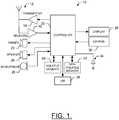
- FIG. 1 illustrates a block diagram of a mobile terminal 10 that would benefit from embodiments of the present invention. It should be understood, however, that the mobile terminal 10 as illustrated and hereinafter described is merely illustrative of one type of device that may benefit from embodiments of the present invention and, therefore, should not be taken to limit the scope of embodiments of the present invention.
- mobile terminals such as portable digital assistants (PDAs), mobile telephones, pagers, mobile televisions, gaming devices, laptop computers, cameras, tablet computers, touch surfaces, wearable devices, video recorders, audio/video players, radios, electronic books, positioning devices (e.g., global positioning system (GPS) devices), or any combination of the aforementioned, and other types of voice and text communications systems, may readily employ embodiments of the present invention, other devices including fixed (non-mobile) electronic devices may also employ some example embodiments.
- PDAs portable digital assistants
- mobile telephones mobile telephones
- pagers mobile televisions
- gaming devices laptop computers, cameras, tablet computers, touch surfaces
- wearable devices video recorders
- audio/video players radios
- electronic books positioning devices
- positioning devices e.g., global positioning system (GPS) devices
- GPS global positioning system
- the mobile terminal 10 may include an antenna 12 (or multiple antennas) in operable communication with a transmitter 14 and a receiver 16.
- the mobile terminal 10 may further include an apparatus, such as a controller 20 or other processing device (e.g., processor 70 of FIG. 2 ), which controls the provision of signals to and the receipt of signals from the transmitter 14 and receiver 16, respectively.
- the signals may include signaling information in accordance with the air interface standard of the applicable cellular system, and also user speech, received data and/or user generated data.
- the mobile terminal 10 is capable of operating with one or more air interface standards, communication protocols, modulation types, and access types.
- the mobile terminal 10 is capable of operating in accordance with any of a number of first, second, third and/or fourth-generation communication protocols or the like.
- the mobile terminal 10 may be capable of operating in accordance with second-generation (2G) wireless communication protocols IS-136 (time division multiple access (TDMA)), GSM (global system for mobile communication), and IS-95 (code division multiple access (CDMA)), or with third-generation (3G) wireless communication protocols, such as Universal Mobile Telecommunications System (UMTS), CDMA2000, wideband CDMA (WCDMA) and time division-synchronous CDMA (TD-SCDMA), with 3.9G wireless communication protocol such as evolved UMTS Terrestrial Radio Access Network (E-UTRAN), with fourth-generation (4G) wireless communication protocols (e.g., Long Term Evolution (LTE) or LTE-Advanced (LTE-A) or the like.
- 2G wireless communication protocols IS-136 (time division multiple access (TDMA)
- GSM global system for mobile communication
- IS-95 code division multiple access
- third-generation (3G) wireless communication protocols such as Universal Mobile Telecommunications System (UMTS), CDMA2000, wideband CDMA (WCDMA) and time division-synchronous
- the controller 20 may include circuitry desirable for implementing audio and logic functions of the mobile terminal 10.
- the controller 20 may be comprised of a digital signal processor device, a microprocessor device, and various analog to digital converters, digital to analog converters, and other support circuits. Control and signal processing functions of the mobile terminal 10 are allocated between these devices according to their respective capabilities.
- the controller 20 thus may also include the functionality to convolutionally encode and interleave message and data prior to modulation and transmission.
- the controller 20 may additionally include an internal voice coder, and may include an internal data modem.
- the controller 20 may include functionality to operate one or more software programs, which may be stored in memory.
- the controller 20 may be capable of operating a connectivity program, such as a conventional Web browser. The connectivity program may then allow the mobile terminal 10 to transmit and receive Web content, such as location-based content and/or other web page content, according to a Wireless Application Protocol (WAP), Hypertext Transfer Protocol (HTTP) and/or the like, for example.
- WAP Wireless Application Protocol
- HTTP
- the mobile terminal 10 may also comprise a user interface including an output device such as a conventional earphone or speaker 24, a ringer 22, a microphone 26, a display 28, and a user input interface, all of which are coupled to the controller 20.
- the user input interface which allows the mobile terminal 10 to receive data, may include any of a number of devices allowing the mobile terminal 10 to receive data, such as a keypad 30, a touch display (display 28 providing an example of such a touch display) or other input device.
- the keypad 30 may include the conventional numeric (0-9) and related keys (#, *), and other hard and soft keys used for operating the mobile terminal 10.
- the keypad 30 may include a conventional QWERTY keypad arrangement.
- the keypad 30 may also include various soft keys with associated functions.
- the mobile terminal 10 may include an interface device such as a joystick or other user input interface. Some embodiments employing a touch display may omit the keypad 30 and any or all of the speaker 24, ringer 22, and microphone 26 entirely.
- the mobile terminal 10 further includes a battery 34, such as a vibrating battery pack, for powering various circuits that are required to operate the mobile terminal 10, as well as optionally providing mechanical vibration as a detectable output.
- the mobile terminal 10 may further include a user identity module (UIM) 38.
- the UIM 38 is typically a memory device having a processor built in.
- the UIM 38 may include, for example, a subscriber identity module (SIM), a universal integrated circuit card (UICC), a universal subscriber identity module (USIM), a removable user identity module (R-UIM), etc.
- SIM subscriber identity module
- UICC universal integrated circuit card
- USIM universal subscriber identity module
- R-UIM removable user identity module
- the UIM 38 typically stores information elements related to a mobile subscriber.
- the mobile terminal 10 may be equipped with memory.
- the mobile terminal 10 may include volatile memory 40, such as volatile Random Access Memory (RAM) including a cache area for the temporary storage of data.
- RAM volatile Random Access Memory
- the mobile terminal 10 may also include other non-volatile memory 42, which may be embedded and/or may be removable.
- the memories may store any of a number of pieces of information, and data, used by the mobile terminal 10 to implement
- the mobile terminal 10 may also include a camera or other media capturing element (not shown) in order to capture images or video of objects, people and places proximate to the user of the mobile terminal 10.
- the mobile terminal 10 (or even some other fixed terminal) may also practice example embodiments in connection with images or video content (among other types of content) that are produced or generated elsewhere, but are available for consumption at the mobile terminal 10 (or fixed terminal).
- FIG. 2 An example embodiment of the invention will now be described with reference to FIG. 2 , in which certain elements of an apparatus 50 for providing quick access to media functions from a locked screen are displayed.
- the apparatus 50 of FIG. 2 may be employed, for example, in conjunction with the mobile terminal 10 of FIG. 1 .
- the apparatus 50 of FIG. 2 may also be employed in connection with a variety of other devices, both mobile and fixed, and therefore, embodiments of the present invention should not be limited to application on devices such as the mobile terminal 10 of FIG. 1 .
- the apparatus 50 may be employed on a personal computer or other user terminal.
- the apparatus 50 may be on a fixed device such as server or other service platform and the content may be presented (e.g., via a server/client relationship) on a remote device such as a user terminal (e.g., the mobile terminal 10) based on processing that occurs at the fixed device.
- a fixed device such as server or other service platform
- the content may be presented (e.g., via a server/client relationship) on a remote device such as a user terminal (e.g., the mobile terminal 10) based on processing that occurs at the fixed device.
- FIG. 2 illustrates one example of a configuration of an apparatus for providing quick access to media functions from a locked screen
- numerous other configurations may also be used to implement embodiments of the present invention.
- devices or elements are shown as being in communication with each other, hereinafter such devices or elements should be considered to be capable of being embodied within a same device or element and thus, devices or elements shown in communication should be understood to alternatively be portions of the same device or element.
- the apparatus 50 for providing quick access to media functions from a locked screen may include or otherwise be in communication with a processor 70, a user interface 72, a communication interface 74 and a memory device 76.
- the processor 70 (and/or co-processors or any other processing circuitry assisting or otherwise associated with the processor 70) may be in communication with the memory device 76 via a bus for passing information among components of the apparatus 50.
- the memory device 76 may include, for example, one or more volatile and/or non-volatile memories.
- the memory device 76 may be an electronic storage device (e.g., a computer readable storage medium) comprising gates configured to store data (e.g., bits) that may be retrievable by a machine (e.g., a computing device like the processor 70).
- the memory device 76 may be configured to store information, data, applications, instructions or the like for enabling the apparatus to carry out various functions in accordance with an example embodiment of the present invention.
- the memory device 76 could be configured to buffer input data for processing by the processor 70. Additionally or alternatively, the memory device 76 could be configured to store instructions for execution by the processor 70.
- the apparatus 50 may, in some embodiments, be a mobile terminal (e.g., mobile terminal 10) or a fixed communication device or computing device configured to employ an example embodiment of the present invention. However, in some embodiments, the apparatus 50 may be embodied as a chip or chip set. In other words, the apparatus 50 may comprise one or more physical packages (e.g., chips) including materials, components and/or wires on a structural assembly (e.g., a baseboard). The structural assembly may provide physical strength, conservation of size, and/or limitation of electrical interaction for component circuitry included thereon.
- the apparatus 50 may therefore, in some cases, be configured to implement an embodiment of the present invention on a single chip or as a single "system on a chip.”
- a chip or chipset may constitute means for performing one or more operations for providing the functionalities described herein.
- the processor 70 may be embodied in a number of different ways.
- the processor 70 may be embodied as one or more of various hardware processing means such as a coprocessor, a microprocessor, a controller, a digital signal processor (DSP), a processing element with or without an accompanying DSP, or various other processing circuitry including integrated circuits such as, for example, an ASIC (application specific integrated circuit), an FPGA (field programmable gate array), a microcontroller unit (MCU), a hardware accelerator, a special-purpose computer chip, or the like.
- the processor 70 may include one or more processing cores configured to perform independently.
- a multi-core processor may enable multiprocessing within a single physical package.
- the processor 70 may include one or more processors configured in tandem via the bus to enable independent execution of instructions, pipelining and/or multithreading.
- the processor 70 may be configured to execute instructions stored in the memory device 76 or otherwise accessible to the processor 70. Alternatively or additionally, the processor 70 may be configured to execute hard coded functionality. As such, whether configured by hardware or software methods, or by a combination thereof, the processor 70 may represent an entity (e.g., physically embodied in circuitry) capable of performing operations according to an embodiment of the present invention while configured accordingly. Thus, for example, when the processor 70 is embodied as an ASIC, FPGA or the like, the processor 70 may be specifically configured hardware for conducting the operations described herein. Alternatively, as another example, when the processor 70 is embodied as an executor of software instructions, the instructions may specifically configure the processor 70 to perform the algorithms and/or operations described herein when the instructions are executed.
- the processor 70 may be a processor of a specific device (e.g., a mobile terminal or network device) adapted for employing an embodiment of the present invention by further configuration of the processor 70 by instructions for performing the algorithms and/or operations described herein.
- the processor 70 may include, among other things, a clock, an arithmetic logic unit (ALU) and logic gates configured to support operation of the processor 70.
- ALU arithmetic logic unit
- the communication interface 74 may be any means such as a device or circuitry embodied in either hardware or a combination of hardware and software that is configured to receive and/or transmit data from/to a network and/or any other device or module in communication with the apparatus 50.
- the communication interface 74 may include, for example, an antenna (or multiple antennas) and supporting hardware and/or software for enabling communications with a wireless communication network.
- the communication interface 74 may alternatively or also support wired communication.
- the communication interface 74 may include a communication modem and/or other hardware/software for supporting communication via cable, digital subscriber line (DSL), universal serial bus (USB) or other mechanisms.
- the user interface 72 may be in communication with the processor 70 to receive an indication of a user input at the user interface 72 and/or to provide an audible, visual, mechanical or other output to the user.
- the user interface 72 may include, for example, a keyboard, a mouse, a joystick, a display, a touch screen(s), touch areas, soft keys, a microphone, a speaker, or other input/output mechanisms.
- the processor 70 may comprise user interface circuitry configured to control at least some functions of one or more elements of the user interface, such as, for example, a speaker, ringer, microphone, display, and/or the like.
- the processor 70 and/or user interface circuitry comprising the processor 70 may be configured to control one or more functions of one or more elements of the user interface through computer program instructions (e.g., software and/or firmware) stored on a memory accessible to the processor 70 (e.g., memory device 76, and/or the like).
- computer program instructions e.g., software and/or firmware
- a memory accessible to the processor 70 e.g., memory device 76, and/or the like.
- the apparatus 50 may include or otherwise be in communication with a touch screen display 68 (e.g., the display 28).
- the touch screen display 68 may be a two dimensional (2D) or three dimensional (3D) display.
- the touch screen display 68 may be embodied as any known touch screen display.
- the touch screen display 68 could be configured to enable touch recognition by any suitable technique, such as resistive, capacitive, infrared, strain gauge, surface wave, optical imaging, dispersive signal technology, acoustic pulse recognition, etc. techniques.
- the user interface 72 may be in communication with the touch screen display 68 to receive indications of user inputs at the touch screen display 68 and to modify a response to such indications based on corresponding user actions that may be inferred or otherwise determined responsive to the indications.
- the apparatus 50 may include a touch screen interface 80.
- the touch screen interface 80 may, in some instances, be a portion of the user interface 72.
- the touch screen interface 80 may be embodied as the processor 70 or may be a separate entity controlled by the processor 70.
- the processor 70 may be said to cause, direct or control the execution or occurrence of the various functions attributed to the touch screen interface 80 (and any components of the touch screen interface 80) as described herein.
- the touch screen interface 80 may be any means such as a device or circuitry operating in accordance with software or otherwise embodied in hardware or a combination of hardware and software (e.g., processor 70 operating under software control, the processor 70 embodied as an ASIC or FPGA specifically configured to perform the operations described herein, or a combination thereof) thereby configuring the device or circuitry to perform the corresponding functions of the touch screen interface 80 as described herein.
- a device or circuitry e.g., the processor 70 in one example
- executing the software forms the structure associated with such means.
- the touch screen interface 80 may be configured to receive an indication of an input in the form of a touch event at the touch screen display 68.
- the touch screen interface 80 may be in communication with the touch screen display 68 to receive indications of user inputs at the touch screen display 68 and to modify a response to such indications based on corresponding user actions that may be inferred or otherwise determined responsive to the indications.
- the touch screen interface 80 may be configured to determine a classification of the touch event and provide a corresponding function based on the touch event in some situations.
- the touch screen interface 80 may include a detector 82, a display manager 84, an input classifier 86 and a locked state function access manager 88.
- Each of the detector 82, the display manager 84, the input classifier 86 and the locked state function access manager 88 may be any device or means embodied in either hardware or a combination of hardware and software configured to perform the corresponding functions associated with the detector 82, the display manager 84, the input classifier 86 and the locked state function access manager 88, respectively, as described herein.
- each of the detector 82, the display manager 84, the input classifier 86 and the locked state function access manager 88 may be controlled by or otherwise embodied as the processor 70.
- the detector 82 may be in communication with the touch screen display 68 to receive indications of user inputs in order to recognize and/or determine a touch event based on each input received at the detector 82.
- the detector 82 may also be in communication with one or more hard keys associated with the user interface 72 that may be used for providing activation inputs as described herein.
- a touch event may be defined as a detection of an object, such as a stylus, finger, pen, pencil or any other pointing device, coming near or into contact with a portion of the touch screen display in a manner sufficient to register as a touch.
- a touch event could be a detection of pressure on the screen of the touch screen display 68 above a particular pressure threshold over a given area or the detection of a change in the electrostatic field of the touch screen display 68 at a particular location.
- some touch events may not actually require physical contact with the touch screen display 68.
- the touch screen display 68 may be configured to detect one or more objects (e.g., a finger or fingers) hovering over the touch screen display 68. Gestures associated with the object or objects may also be detected in some cases, even without physical contact with the touch screen display 68.
- the detector 82 may be further configured to pass along the data corresponding to the touch event (e.g., location of touch, length of touch, number of objects touching, touch pressure, speed of movement, direction of movement, length of delay, frequency of touch, etc.) to the input classifier 86 for input classification.
- the detection of key presses e.g., with respect to hard keys
- the characteristics e.g., length of time a key is pressed or touch is maintained, shape of a gesture, etc.
- the input classifier 86 may be configured to recognize and/or determine a corresponding classification of a touch event or key press.
- the input classifier 86 may be configured to perform gesture and/or button press classification to classify the touch event or button press as any of a number of possible gestures or button presses based on the respective characteristics of each event.
- Some examples of recognizable gestures may include a touch, multi-touch, stroke, character, symbol, shape, swipe, pinch event (e.g., a pinch in or pinch out), a tickle gesture and/or the like.
- the time duration of the event may be a characteristic that is used by the input classifier 86 to determine whether the event or stimulus (e.g., touch and/or key press) qualifies as an activation input.
- a touch may be defined as a touch event that impacts a single area (without or with minimal movement on the surface of the touch screen display 68 and for any length of time) and then is removed.
- a multi-touch may be defined as multiple touch events sensed at the same time (or nearly the same time).
- a stroke event may be defined as a touch event followed immediately by motion of the object initiating the touch event while the object remains in contact with the touch screen display 68. In other words, the stroke event may be defined by motion following a touch event thereby forming a continuous, moving touch event defining a moving series of instantaneous touch positions (e.g., as a drag operation or as a flick operation).
- Multiple strokes and/or touches may be used to define a particular shape or sequence of shapes to define a character.
- a pinch event may be classified as either a pinch out or a pinch in (hereinafter referred to simply as a pinch).
- a pinch may be defined as a multi-touch, where the touch events causing the multi-touch are spaced apart. After initial occurrence of the multi-touch event involving at least two objects, one or more of the objects may move substantially toward each other to simulate a pinch.
- a pinch out may be defined as a multi-touch, where the touch events causing the multi-touch are relatively close together, followed by movement of the objects initiating the multi-touch substantially away from each other. In some cases, the objects on a pinch out may be so close together initially that they may be interpreted as a single touch, rather than a multi-touch, which then is modified by movement of two objects away from each other.
- Touch events may be performed as a single continuous gesture in some cases or may be made up of a series of successive smaller events.
- the input classifier 86 may be configured to communicate detection information regarding the recognition, detection and/or classification of a touch event and/or key press to the display manager 84.
- the display manager 84 may be configured to provide control over modifications made to that which is displayed on the touch screen display 68 based on the detection information received from the detector 82 and input classifications provided by the input classifier 86 in accordance with the responses prescribed for each respective gesture classification and implementation characteristic determined by the input classifier 86.
- the display manager 84 may configure the display (e.g., with respect to the content displayed and/or the user interface effects presented relative to the content displayed) according to the input classification and implementation characteristic classification determined for a given input event (e.g., touch and/or key press) that may be detected at the display or in association with the apparatus 50.
- a given input event e.g., touch and/or key press
- the display manager 84 may be configured to interface with the locked state function access manager 88 in response to a determination (e.g., by the input classifier 86) that an activation input has occurred.
- the activation input may be a predetermined input (e.g., a touch input, key input or combination thereof) that, when detected, may initiate direct execution of a media function (e.g., a function associated with a media-related application such as a media player or media generation device) from the locked state without transitioning through the unlocked state.
- a media function e.g., a function associated with a media-related application such as a media player or media generation device
- the activation input may be, for example, a specific touch input (or gesture) or combination of touch inputs (or gestures), a key input or combination of key inputs, or a combination key inputs and touch inputs that are directly associated with a corresponding media function.
- the locked state function access manager 88 may provide access to a specific function or functions that are associated with a corresponding activation input.
- the locked state function access manager 88 may include a mapping or other correlation between a stimulus defined by one or more key presses or touch inputs having predefined characteristics and a corresponding media-related function. Several such mappings may associate different stimuli and respective different functions.
- a hard key associated with camera functionality may be pressed for a threshold amount of time to directly launch the camera application and enable the user to focus the camera on a desired object.
- the actual picture may be taken when the hard key is released and the device may then revert to the locked state responsive to release of the hard key (e.g., either immediately or after a predetermined period of time).
- the picture may be taken responsive to the pressing of another key (hard or soft) or responsive to a touch gesture or selection of an icon displayed on the touch screen and having functionality associated with taking a picture.
- a touch input maintained at a specific location on the display for the threshold period of time e.g., on a specific icon displayed on the locked screen or on a location that remains active (always or periodically) even on the locked screen
- certain icons may be visible with a reduced or limited number of colors to keep power consumption low. These icons may be interacted with to launch a corresponding application directly from the locked screen operating in the low power mode.
- a picture may be taken responsive to release of the touch input or responsive to another input inserted in connection with the touch input.
- non-touching gestures may also be used as an activation input in situations where the device can detect hovering or the like and a particular non-touching gesture activity has been defined as an activation input.
- multiple key or touch inputs may be used to initiate the activation input that opens the camera application (e.g., holding two hard keys or initiating two touch events) and still one or more other inputs may take the picture prior to reverting to the locked state after the picture is taken.
- the key or touch inputs may be provided in a particular pattern to be recognized as an activation input. For example, two or three consecutive presses, a long-press followed by a short-press, pressing and holding two different keys, pressing one or more keys in a pattern or sequence and/or the like may all act as activation inputs with regard to particular functions or applications.
- the activation input may be a single event or multiple events having characteristics that qualify for recognition as an activation input.
- similar activation activities may be undertaken for other media related functions such as rendering music or videos, or capturing of video or audio and/or the like.
- a hard key, a touch input or combinations of hard key and touch inputs may be used to provide an activation input with respect to a location related application.
- an activation input may be provided to directly launch an application to indicate current location or to report or share current location with another person or entity.
- a mapping application may be launched to check a location of the device.
- device security may be enhanced by requiring the entry of a security code in order to exit the locked screen.
- An example embodiment enabling direct access to media functions without requiring entry of the security code would clearly speed up the action of performing the media function.
- example embodiments may enable quick access to media functions that permits their capture where other devices that require entry of the security code may miss the action before they are ready to perform the media function.
- Some users may, however, worry about abuse of the ability to perform media functions without entering a security code. For example, some users may worry that too many pictures may be taken without proper authentication being performed. In order to address this potential concern, some embodiments may provide for a limit to the number of media functions that can be performed without entry of the security code or some other formal authentication process being undertaken.
- a threshold number of media functions may be performed using direct access via activation inputs. After the threshold number of media functions is reached, the security code may be required to be entered prior to allowing the user to continue to perform media functions.
- the threshold number may be user defined or factory set and may be user activated or deactivated. In some embodiments, any authorized entry where a formal authentication process is performed (even if it is not related to the use of activation inputs) may reset a counter that counts toward the threshold number.
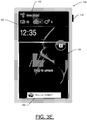
- FIG. 3 which includes FIGS. 3A to 3E , shows some examples of locked screen transitions to access to media functions according to example embodiments using an activation input.
- FIG. 3 illustrates a mobile device 100 having a touch screen display 102.
- the mobile device 100 of FIG. 3 also has a hard key 110, although the hard key 110 may be absent in some embodiments.
- the touch screen display 102 may initially be asleep (and therefore perhaps blank or black).
- a press of the hard key 110 or other input such as a shake or touch event to the touch screen display 102 may wake the mobile device 100 so that a locked screen (e.g., locked screen 120) is displayed.
- the locked screen 120 may be displayed initially.
- all or a portion of the touch screen display 102 may be active and may be enabled to receive touch inputs even in the locked state.
- the locked screen 120 may initially be displayed and the locked screen 120 may include some basic information 122 (e.g., user name, time, number of messages, etc.). However, this basic information 122 may not be available for interaction by the user in the locked state.
- the locked screen 120 may be modified as shown in FIG. 3B to include one or more icons (e.g., icons 130, 140, 150) with which the user can interact using touch events.
- the activation input may be provided, for example, by pressing and holding the hard key 110 (alone or in combination with another hard key or in combination with interaction with the touch screen display 102) for at least a predetermined length of time.
- the icons may be presented. While still holding the hard key 110, the user may select one of the icons (e.g., icon 130 for audio recording, icon 140 for picture taking, or icon 150 for media playback) to initiate a corresponding media function. Responsive to pressing, holding or releasing the icon and/or the hard key 110 (depending on the configuration of the device), media may be captured or rendered accordingly. When the hard key 110 is released, the mobile device 100 may revert to the locked screen 120 view shown in FIG. 3A .
- the icons e.g., icon 130 for audio recording, icon 140 for picture taking, or icon 150 for media playback
- the locked screen 120 may normally present the icons (130, 140 and 150) as shown in FIG. 3B .
- contact with the icon alone e.g., for a predetermined length of time or in connection with a pattern of inputs, or in connection with pressing another key (e.g., the hard key 110) may initiate the activation input to enable access to the corresponding media function directly from the locked screen 120 (and therefore from the locked state) without going through an unlocked state (or unlocked screen).
- the icons may be displayed, but may be inactive until activated by the activation input. However, in other cases, the icons may be provided in a small portion of the touch screen display 102 that remains active and/or receptive to touch input.
- pressing and holding the hard key 110 may itself cause a particular media function to be executed during the holding of the hard key 110 or responsive to release of the hard key 110, other example embodiments may not use a hard key at all.
- FIG. 3C illustrates an example of a situation where the touch screen display 102 has been transitioned to display of a camera view finder responsive to usage of the icon 140 in connection with provision of an activation input.
- the selection of icon 140 is shown by the outline of a touch event 155.
- Release of the icon 140 or release of the hard key 110 may initiate actual capture of an image.
- the holding of at least one key e.g., the hard key 110
- the media function application in this case the camera application
- selection of the hard key in combination with the icon 140 may initiate the activation input specifically for taking pictures and the release of the icon 140 may cause the image in the view finder to be captured.
- the hard key 110 is pressed, further images may be captured using the icon 140.
- an indication 160 may be provided regarding already taken images (or other media that has been captured) while the activation input is maintained as shown in FIG. 3D .
- the availability of images captured using the activation input may also be displayed on the locked screen 120 as shown in FIG. 3E . These images may be retrieved (e.g., via selection of the indication 160) and viewed while the activation input is maintained as shown in FIG. 3D , but may also be available normally in the user's gallery that may be accessible via unlock of the device.
- media captured via usage of the activation input may be stored in the same manner and/or locations as normally captured media.
- the user may be enabled to define the activation inputs and corresponding functionalities to be instituted for each activation input.
- the user may also be enabled to select characteristics (e.g., the threshold time or specific gestures or input combinations) of the activation inputs.
- the user may be enabled to modify one or more of the activation inputs, their characteristics and/or the corresponding functionalities based on an existing list of potential activation inputs, characteristics and functionalities.
- users may select to activate or deactivate predefined (or factory set) activation inputs, characteristics and corresponding functionalities.
- some example embodiments may provide for enabling users to quickly access certain media functions from the locked screen without transition between a locked state and the unlocked state.
- example embodiments may provide for an apparatus (e.g., the processor 70 or a chip set including the processor 70) for performing media functions such as capturing audio, video or images, or playback of media relatively quickly and without complications associated with unlocking the device.
- FIG. 4 is a flowchart of a method and program product according to an example embodiment of the invention. It will be understood that each block of the flowchart, and combinations of blocks in the flowchart, may be implemented by various means, such as hardware, firmware, processor, circuitry and/or other device associated with execution of software including one or more computer program instructions. For example, one or more of the procedures described above may be embodied by computer program instructions. In this regard, the computer program instructions which embody the procedures described above may be stored by a memory device of a user terminal (either mobile or fixed) and executed by a processor in the user terminal.
- any such computer program instructions may be loaded onto a computer or other programmable apparatus (e.g., hardware) to produce a machine, such that the instructions which execute on the computer or other programmable apparatus create means for implementing the functions specified in the flowchart block(s).
- These computer program instructions may also be stored in a non-transitory computer-readable memory that may direct a computer or other programmable apparatus to function in a particular manner, such that the instructions stored in the computer-readable memory produce an article of manufacture which implements the functions specified in the flowchart block(s).
- the computer program instructions may also be loaded onto a computer or other programmable apparatus to cause a series of operations to be performed on the computer or other programmable apparatus to produce a computer-implemented process such that the instructions which execute on the computer or other programmable apparatus implement the functions specified in the flowchart block(s).
- blocks of the flowchart support combinations of means for performing the specified functions and combinations of operations for performing the specified functions. It will also be understood that one or more blocks of the flowchart, and combinations of blocks in the flowchart, can be implemented by special purpose hardware-based computer systems which perform the specified functions, or combinations of special purpose hardware and computer instructions.
- a method may include receiving an indication of entry of an activation input at a user terminal while the user terminal is displaying a locked screen at operation 200 and causing a launch of an application associated with performance of a function (e.g., a media function or function associated with another application such as a mapping application or location related application) from the locked screen and without completion of an unlock procedure in response to the activation input at operation 210.
- the method may further include enabling the function to be performed while the activation input is provided at operation 220, and causing the user terminal to revert to the locked screen in response to removal of the activation input at operation 230.
- receiving the indication of the activation input may include receiving the indication of selection of a hard key or touch input associated with the activation input for a predetermined length of time. In some cases, receiving the indication of the activation input may include receiving the indication of selection of a hard key or touch input associated with the activation input in a predetermined pattern.
- receiving the indication of the activation input may include receiving the indication of a combination of selection of a hard key and touch input associated with the activation input.
- causing the launch of the application includes counting a number of application launches performed using the activation input since a last authentication procedure associated with device unlock, launching the application responsive to the number of application launches being less than a predetermined number, and requiring completion of an authentication procedure prior to launching the application in response to the number of application launches being greater than the predetermined number.
- enabling the function to be performed may further include performing the function responsive to removal of the activation input.
- receiving the indication of entry of the activation input may include receiving the indication of entry of a user defined activation input that is associated with a corresponding user selected function.
- causing the launch of the application associated with performance of the media function may include causing the launch of a media capturing function or a media playback function.
- an apparatus for performing the method of FIG. 4 above may comprise a processor (e.g., the processor 70) configured to perform some or each of the operations (200-230) described above.
- the processor 70 may, for example, be configured to perform the operations (200-230) by performing hardware implemented logical functions, executing stored instructions, or executing algorithms for performing each of the operations.
- the apparatus may comprise means for performing each of the operations described above.
- examples of means for performing operations 200-230 may comprise, for example, the touch screen interface 80 (or respective different components thereof).
- the processor 70 may be configured to control or even be embodied as the touch screen interface 80, the processor 70 and/or a device or circuitry for executing instructions or executing an algorithm for processing information as described above may also form example means for performing operations 200-230.
- An example of an apparatus may include at least one processor and at least one memory including computer program code.
- the at least one memory and the computer program code may be configured to, with the at least one processor, cause the apparatus to perform the operations 200-230 (with or without the modifications and amplifications described above in any combination).
- An example of a computer program product may include at least one computer-readable storage medium having computer-executable program code portions stored therein.
- the computer-executable program code portions may include program code instructions for performing operation 200-230 (with or without the modifications and amplifications described above in any combination).
- the operations (200-230) described above, along with any of the modifications may be implemented in a method that involves facilitating access to at least one interface to allow access to at least one service via at least one network.
- the at least one service may be said to perform at least operations 200 to 230.
Landscapes
- Engineering & Computer Science (AREA)
- General Engineering & Computer Science (AREA)
- Theoretical Computer Science (AREA)
- Human Computer Interaction (AREA)
- Physics & Mathematics (AREA)
- General Physics & Mathematics (AREA)
- Computer Networks & Wireless Communication (AREA)
- Signal Processing (AREA)
- User Interface Of Digital Computer (AREA)
- Telephone Function (AREA)
Claims (13)
- Procédé comprenant :la réception (200) d'une indication d'entrée d'une saisie d'activation au niveau d'un terminal utilisateur (10) tandis que le terminal utilisateur (10) affiche un écran verrouillé (120), laquelle saisie d'activation comprend l'application d'une saisie tactile sur un composant d'interface utilisateur du terminal utilisateur (10) ;le lancement (210) d'une application à partir de l'écran verrouillé (120) sans déverrouiller le terminal utilisateur (10) en réponse à la saisie d'activation, laquelle application est associée à l'exécution d'une fonction ;l'autorisation (220) d'exécution de la fonction tandis que la saisie tactile est maintenue ; etle retour (230) du terminal utilisateur (10) à l'écran verrouillé (120) en réponse au retrait de la saisie tactile ; etdans lequel le lancement de l'application à partir de l'écran verrouillé (120) comprend :a) le comptage d'un nombre de lancements d'application effectués à partir de l'écran verrouillé (120) à l'aide de la saisie d'activation depuis une dernière exécution d'une procédure d'authentification associée au déverrouillage du terminal utilisateur (10),b) le lancement de l'application si le nombre de lancements d'application est inférieur à un nombre prédéterminé, etc) la demande d'exécution de la procédure d'authentification avant le lancement de l'application si le nombre de lancements d'application est supérieur au nombre prédéterminé.
- Procédé selon la revendication 1, dans lequel la réception de l'indication d'entrée d'une saisie d'activation comprend la réception de l'indication de sélection d'une touche physique (110) ou de la saisie tactile associée à la saisie d'activation pendant une durée prédéterminée.
- Procédé selon la revendication 1 ou 2, dans lequel la réception de l'indication d'entrée d'une saisie d'activation comprend la réception de l'indication de sélection d'une touche physique ou de la saisie tactile associée à la saisie d'activation selon un motif prédéterminé.
- Procédé selon l'une quelconque des revendications 1 à 3, dans lequel la réception de l'indication d'entrée d'une saisie d'activation comprend la réception de l'indication d'une combinaison de sélection d'une touche physique et de la saisie tactile associée à la saisie d'activation.
- Procédé selon l'une quelconque des revendications 1 à 4, dans lequel l'autorisation d'exécution de la fonction comprend en outre l'exécution de la fonction en réponse au retrait de la saisie tactile.
- Procédé selon l'une quelconque des revendications 1 à 5, dans lequel le retour du terminal utilisateur à l'écran verrouillé en réponse au retrait de la saisie tactile comprend le retour immédiat du terminal utilisateur à l'écran verrouillé en réponse au retrait de la saisie tactile ou le retour à l'écran verrouillé après un laps de temps prédéterminé après le retrait de la saisie tactile.
- Procédé selon l'une quelconque des revendications 1 à 6, comprenant en outre la mise en correspondance d'une pluralité d'indications d'entrée d'une saisie d'activation avec des fonctions respectives exécutées par une ou plusieurs applications, dans lequel la réception d'une indication d'entrée d'une saisie d'activation comprend la réception de l'une respective de la pluralité d'indications, et dans lequel le lancement d'une application comprend le lancement d'une application associée à l'exécution de la fonction respective mise en correspondance avec l'indication qui a été reçue.
- Appareil (50) actionné conjointement avec un terminal utilisateur (10), l'appareil comprenant au moins un processeur (70) et au moins une mémoire (76) incluant un code programme informatique, l'au moins un processeur (70) étant configuré pour, lorsqu'il exécute le code programme informatique, au moins :recevoir (200) une indication d'entrée d'une saisie d'activation au niveau du terminal utilisateur (10) tandis que le terminal utilisateur (10) affiche un écran verrouillé (120), laquelle saisie d'activation comprend l'application d'une saisie tactile sur un composant d'interface utilisateur du terminal utilisateur (10) ;lancer (210) une application à partir de l'écran verrouillé (120) sans déverrouiller le terminal utilisateur (10) en réponse à la saisie d'activation, laquelle application est associée à l'exécution d'une fonction ;autoriser (220) l'exécution de la fonction tandis que la saisie tactile est maintenue ; etfaire revenir (230) le terminal utilisateur (10) à l'écran verrouillé (120) en réponse au retrait de la saisie tactile ; etdans lequel le lancement de l'application à partir de l'écran verrouillé (120) comprend :a) le comptage d'un nombre de lancements d'application effectués à partir de l'écran verrouillé (120) à l'aide de la saisie d'activation depuis une dernière exécution d'une procédure d'authentification associée au déverrouillage du terminal utilisateur (10),b) le lancement de l'application si le nombre de lancements d'application est inférieur à un nombre prédéterminé, etc) la demande d'exécution de la procédure d'authentification avant le lancement de l'application si le nombre de lancements d'application est supérieur au nombre prédéterminé.
- Appareil selon la revendication 8, dans lequel l'au moins un processeur est en outre configuré pour, lorsqu'il exécute le code programme informatique, recevoir l'indication d'entrée d'une saisie d'activation en recevant l'indication de sélection d'une touche physique ou de la saisie tactile associée à la saisie d'activation pendant une durée prédéterminée ou selon un motif prédéterminé.
- Appareil selon l'une quelconque des revendications 8 ou 9, dans lequel l'au moins un processeur est en outre configuré pour, lorsqu'il exécute le code programme informatique, recevoir l'indication d'entrée d'une saisie d'activation en recevant l'indication d'une combinaison de sélection d'une touche physique (110) et de la saisie tactile associée à la saisie d'activation.
- Appareil selon l'une quelconque des revendications 8 à 10, dans lequel l'au moins un processeur est en outre configuré pour, lorsqu'il exécute le code programme informatique, mettre en correspondance une pluralité d'indications d'entrée d'une saisie d'activation avec des fonctions respectives exécutées par une ou plusieurs applications, recevoir l'indication d'entrée d'une saisie d'activation en recevant l'une respective de la pluralité d'indications, et lancer une application en lançant une application associée à l'exécution de la fonction respective mise en correspondance avec l'indication qui a été reçue.
- Produit de programme informatique comprenant au moins un support de stockage lisible par ordinateur non transitoire (76) dans lequel sont stockées des instructions de code programme exécutables par ordinateur, les instructions de code programme exécutables par ordinateur comprenant des instructions de code programme qui, lorsqu'elles sont exécutées sur un ordinateur qui est actionné conjointement avec un terminal utilisateur (10), amène l'ordinateur à exécuter les étapes de :réception (200) d'une indication d'entrée d'une saisie d'activation au niveau d'un terminal utilisateur (10) tandis que le terminal utilisateur (10) affiche un écran verrouillé (120), laquelle saisie d'activation comprend l'application d'une saisie tactile sur un composant d'interface utilisateur du terminal utilisateur (10) ;lancement (210) d'une application à partir de l'écran verrouillé (120) sans déverrouiller le terminal utilisateur (10) en réponse à la saisie d'activation, laquelle application est associée à l'exécution d'une fonction ;autorisation (220) d'exécution de la fonction tandis que la saisie tactile est maintenue ; etretour (230) du terminal utilisateur (10) à l'écran verrouillé (120) en réponse au retrait de la saisie tactile ; etdans lequel le lancement de l'application à partir de l'écran verrouillé (120) comprend :a) le comptage d'un nombre de lancements d'application effectués à partir de l'écran verrouillé (120) à l'aide de la saisie d'activation depuis une dernière exécution d'une procédure d'authentification associée au déverrouillage du terminal utilisateur (10),b) le lancement de l'application si le nombre de lancements d'application est inférieur à un nombre prédéterminé, etc) la demande d'exécution de la procédure d'authentification avant le lancement de l'application si le nombre de lancements d'application est supérieur au nombre prédéterminé.
- Produit de programme informatique selon la revendication 12, comprenant en outre des instructions de code programme amenant l'ordinateur à mettre en correspondance une pluralité d'indications d'entrée d'une saisie d'activation avec des fonctions respectives exécutées par une ou plusieurs applications, exécuter l'étape de réception d'une indication d'entrée d'une saisie d'activation en recevant l'une respective de la pluralité d'indications, et exécuter l'étape de lancement d'une application en lançant une application associée à l'exécution de la fonction respective mise en correspondance avec l'indication qui a été reçue.
Applications Claiming Priority (2)
| Application Number | Priority Date | Filing Date | Title |
|---|---|---|---|
| US13/043,067 US9104288B2 (en) | 2011-03-08 | 2011-03-08 | Method and apparatus for providing quick access to media functions from a locked screen |
| PCT/IB2012/050982 WO2012120416A1 (fr) | 2011-03-08 | 2012-03-01 | Procédé et appareil pour assurer l'accès rapide à des fonctions de média à partir d'un écran verrouillé |
Publications (3)
| Publication Number | Publication Date |
|---|---|
| EP2684115A1 EP2684115A1 (fr) | 2014-01-15 |
| EP2684115A4 EP2684115A4 (fr) | 2014-08-20 |
| EP2684115B1 true EP2684115B1 (fr) | 2018-10-17 |
Family
ID=46797204
Family Applications (1)
| Application Number | Title | Priority Date | Filing Date |
|---|---|---|---|
| EP12755136.4A Active EP2684115B1 (fr) | 2011-03-08 | 2012-03-01 | Procédé et appareil pour assurer l'accès rapide à des fonctions de média à partir d'un écran verrouillé |
Country Status (5)
| Country | Link |
|---|---|
| US (1) | US9104288B2 (fr) |
| EP (1) | EP2684115B1 (fr) |
| CN (1) | CN103649892B (fr) |
| TW (1) | TWI573074B (fr) |
| WO (1) | WO2012120416A1 (fr) |
Families Citing this family (137)
| Publication number | Priority date | Publication date | Assignee | Title |
|---|---|---|---|---|
| US8225231B2 (en) | 2005-08-30 | 2012-07-17 | Microsoft Corporation | Aggregation of PC settings |
| US9954996B2 (en) | 2007-06-28 | 2018-04-24 | Apple Inc. | Portable electronic device with conversation management for incoming instant messages |
| US20100107100A1 (en) | 2008-10-23 | 2010-04-29 | Schneekloth Jason S | Mobile Device Style Abstraction |
| US8411046B2 (en) | 2008-10-23 | 2013-04-02 | Microsoft Corporation | Column organization of content |
| US8238876B2 (en) | 2009-03-30 | 2012-08-07 | Microsoft Corporation | Notifications |
| US8175653B2 (en) | 2009-03-30 | 2012-05-08 | Microsoft Corporation | Chromeless user interface |
| KR100911032B1 (ko) | 2009-04-01 | 2009-08-05 | (주)애니쿼터스 | Nfc 칩 모듈과 외부 rf 리더기를 통한 휴대폰 단말기의 벨소리·카메라·통신기능을 제어하는 장치 및 방법 |
| US8836648B2 (en) | 2009-05-27 | 2014-09-16 | Microsoft Corporation | Touch pull-in gesture |
| US9542091B2 (en) | 2010-06-04 | 2017-01-10 | Apple Inc. | Device, method, and graphical user interface for navigating through a user interface using a dynamic object selection indicator |
| US20120159383A1 (en) | 2010-12-20 | 2012-06-21 | Microsoft Corporation | Customization of an immersive environment |
| US20120159395A1 (en) | 2010-12-20 | 2012-06-21 | Microsoft Corporation | Application-launching interface for multiple modes |
| US8689123B2 (en) | 2010-12-23 | 2014-04-01 | Microsoft Corporation | Application reporting in an application-selectable user interface |
| US8612874B2 (en) | 2010-12-23 | 2013-12-17 | Microsoft Corporation | Presenting an application change through a tile |
| US9423951B2 (en) | 2010-12-31 | 2016-08-23 | Microsoft Technology Licensing, Llc | Content-based snap point |
| US9383917B2 (en) | 2011-03-28 | 2016-07-05 | Microsoft Technology Licensing, Llc | Predictive tiling |
| US9158445B2 (en) | 2011-05-27 | 2015-10-13 | Microsoft Technology Licensing, Llc | Managing an immersive interface in a multi-application immersive environment |
| US9658766B2 (en) | 2011-05-27 | 2017-05-23 | Microsoft Technology Licensing, Llc | Edge gesture |
| US20120304132A1 (en) | 2011-05-27 | 2012-11-29 | Chaitanya Dev Sareen | Switching back to a previously-interacted-with application |
| US8893033B2 (en) | 2011-05-27 | 2014-11-18 | Microsoft Corporation | Application notifications |
| US9104307B2 (en) | 2011-05-27 | 2015-08-11 | Microsoft Technology Licensing, Llc | Multi-application environment |
| US10078755B2 (en) * | 2011-05-27 | 2018-09-18 | Apple Inc. | Private and public applications |
| US9104440B2 (en) | 2011-05-27 | 2015-08-11 | Microsoft Technology Licensing, Llc | Multi-application environment |
| KR101863926B1 (ko) * | 2011-07-19 | 2018-06-01 | 엘지전자 주식회사 | 이동 단말기 및 그 제어방법 |
| US8687023B2 (en) | 2011-08-02 | 2014-04-01 | Microsoft Corporation | Cross-slide gesture to select and rearrange |
| US20130055169A1 (en) * | 2011-08-25 | 2013-02-28 | Samsung Electronics Co. Ltd. | Apparatus and method for unlocking a touch screen device |
| US20130057587A1 (en) | 2011-09-01 | 2013-03-07 | Microsoft Corporation | Arranging tiles |
| US10353566B2 (en) | 2011-09-09 | 2019-07-16 | Microsoft Technology Licensing, Llc | Semantic zoom animations |
| US9557909B2 (en) | 2011-09-09 | 2017-01-31 | Microsoft Technology Licensing, Llc | Semantic zoom linguistic helpers |
| US8922575B2 (en) | 2011-09-09 | 2014-12-30 | Microsoft Corporation | Tile cache |
| US9146670B2 (en) | 2011-09-10 | 2015-09-29 | Microsoft Technology Licensing, Llc | Progressively indicating new content in an application-selectable user interface |
| US8933952B2 (en) | 2011-09-10 | 2015-01-13 | Microsoft Corporation | Pre-rendering new content for an application-selectable user interface |
| US9244802B2 (en) | 2011-09-10 | 2016-01-26 | Microsoft Technology Licensing, Llc | Resource user interface |
| CN105487636B (zh) * | 2011-09-15 | 2018-09-28 | 宏达国际电子股份有限公司 | 手持电子装置及其操作方法 |
| KR101160681B1 (ko) | 2011-10-19 | 2012-06-28 | 배경덕 | 이동 통신 단말기의 활성화 시에 특정 동작이 수행되도록 하기 위한 방법, 이동 통신 단말기 및 컴퓨터 판독 가능 기록 매체 |
| US9223472B2 (en) | 2011-12-22 | 2015-12-29 | Microsoft Technology Licensing, Llc | Closing applications |
| US9128605B2 (en) | 2012-02-16 | 2015-09-08 | Microsoft Technology Licensing, Llc | Thumbnail-image selection of applications |
| KR101296869B1 (ko) * | 2012-02-23 | 2013-08-14 | 주식회사 팬택 | 터치 기반으로 동작되는 휴대 단말 및 그 동작 방법 |
| US8902182B2 (en) | 2012-02-24 | 2014-12-02 | Blackberry Limited | Electronic device and method of controlling a display |
| KR20130110774A (ko) * | 2012-03-30 | 2013-10-10 | 삼성전자주식회사 | 휴대단말기에서 응급 처치 가이드를 설정하고 제공하는 방법 및 장치 |
| KR101483776B1 (ko) | 2012-05-07 | 2015-01-26 | 이문상 | 락 스크린의 제공 방법 및 그 제공 방법이 구현된 단말 장치 |
| US9448813B2 (en) * | 2012-05-24 | 2016-09-20 | Microsoft Technology Licensing, Llc | Entry points to image-related applications in a mobile device |
| CN103513861A (zh) * | 2012-06-29 | 2014-01-15 | 联想(北京)有限公司 | 一种信息处理的方法及一种电子设备 |
| US20140007019A1 (en) * | 2012-06-29 | 2014-01-02 | Nokia Corporation | Method and apparatus for related user inputs |
| CN102929525B (zh) * | 2012-09-24 | 2016-03-30 | 惠州Tcl移动通信有限公司 | 屏幕解锁单元及其屏幕解锁方法以及移动通讯设备 |
| US10272848B2 (en) * | 2012-09-28 | 2019-04-30 | Digital Ally, Inc. | Mobile video and imaging system |
| US8918151B2 (en) * | 2012-10-04 | 2014-12-23 | Htc Corporation | Portable terminal and method thereof |
| CN102929550B (zh) * | 2012-10-24 | 2016-05-11 | 惠州Tcl移动通信有限公司 | 一种基于移动终端的拍照删除方法及移动终端 |
| CN103019542A (zh) * | 2012-11-28 | 2013-04-03 | 广东欧珀移动通信有限公司 | 一种锁屏界面快速拍照的方法 |
| CN103076977B (zh) * | 2013-01-08 | 2016-03-23 | 广东欧珀移动通信有限公司 | 一种在待机状态下触发信息传输的方法及系统 |
| CN103076978A (zh) * | 2013-01-10 | 2013-05-01 | 深圳市夏瑞电子有限公司 | 触摸屏移动设备对远端设备的控制方法及装置、移动设备 |
| KR102080742B1 (ko) * | 2013-01-22 | 2020-02-24 | 엘지전자 주식회사 | 이동 단말기 및 그것의 제어방법 |
| CN103116464B (zh) * | 2013-01-31 | 2016-03-02 | 广东欧珀移动通信有限公司 | 一种触摸屏设备及其快速进入拍照模式的方法 |
| KR101761190B1 (ko) * | 2013-02-22 | 2017-07-25 | 삼성전자 주식회사 | 휴대 단말기의 사용자 인터페이스 제공 방법 및 장치 |
| USD706299S1 (en) * | 2013-02-23 | 2014-06-03 | Samsung Electronics Co., Ltd. | Display screen or portion thereof with icon |
| USD703235S1 (en) * | 2013-02-23 | 2014-04-22 | Samsung Electronics Co., Ltd. | Display screen or portion thereof with graphical user interface |
| KR102056128B1 (ko) * | 2013-02-28 | 2019-12-17 | 삼성전자 주식회사 | 위젯을 이용한 사진 촬영 방법 및 휴대 장치 |
| US9450952B2 (en) | 2013-05-29 | 2016-09-20 | Microsoft Technology Licensing, Llc | Live tiles without application-code execution |
| JP5397720B1 (ja) * | 2013-04-26 | 2014-01-22 | 株式会社Kpiソリューションズ | プログラム、情報処理端末、及び情報処理方法 |
| US10217103B2 (en) | 2013-05-16 | 2019-02-26 | Avant-Garde Ip Llc | System, method and article of manufacture to facilitate a financial transaction without unlocking a mobile device |
| US10019710B2 (en) | 2013-05-16 | 2018-07-10 | Avant-Garde Ip Llc | System, method and article of manufacture to facilitate a financial transaction without unlocking a mobile device |
| US9324068B2 (en) | 2013-05-16 | 2016-04-26 | Avant-Garde Ip Llc | System, method and article of manufacture to facilitate a financial transaction without unlocking a mobile device |
| CN103279300B (zh) * | 2013-05-24 | 2016-12-28 | 京东方科技集团股份有限公司 | 一种触摸屏终端的解锁方法、装置以及触摸屏终端 |
| US20150026572A1 (en) * | 2013-07-19 | 2015-01-22 | Microsoft Corporation | Gesture-based control of electronic devices |
| US20150081502A1 (en) * | 2013-09-19 | 2015-03-19 | Trading Technologies International, Inc. | Methods and apparatus to implement two-step trade action execution |
| CN103513869A (zh) * | 2013-09-22 | 2014-01-15 | 东莞宇龙通信科技有限公司 | 终端锁屏界面、Widget小部件的显示方法及装置 |
| US9727915B2 (en) | 2013-09-26 | 2017-08-08 | Trading Technologies International, Inc. | Methods and apparatus to implement spin-gesture based trade action parameter selection |
| CN110602807B (zh) * | 2013-09-26 | 2022-09-20 | 弗思特费斯有限公司 | 控制通信终端主界面的方法、通信终端及计算机可读存储介质 |
| TWI647607B (zh) * | 2013-10-11 | 2019-01-11 | 半導體能源研究所股份有限公司 | 可攜式資料處理裝置及驅動該可攜式資料處理裝置的方法 |
| US9544649B2 (en) * | 2013-12-03 | 2017-01-10 | Aniya's Production Company | Device and method for capturing video |
| US9613202B2 (en) * | 2013-12-10 | 2017-04-04 | Dell Products, Lp | System and method for motion gesture access to an application and limited resources of an information handling system |
| EP3461112B1 (fr) * | 2013-12-25 | 2023-05-31 | Huawei Device Co., Ltd. | Terminal mobile et procédé de début de prise de vues sur terminal mobile |
| US11435895B2 (en) | 2013-12-28 | 2022-09-06 | Trading Technologies International, Inc. | Methods and apparatus to enable a trading device to accept a user input |
| CN108650451B (zh) * | 2014-02-27 | 2021-12-10 | 华为终端(深圳)有限公司 | 一种拍照方法及移动终端 |
| EP3126969A4 (fr) | 2014-04-04 | 2017-04-12 | Microsoft Technology Licensing, LLC | Représentation d'application extensible |
| KR102107275B1 (ko) | 2014-04-10 | 2020-05-06 | 마이크로소프트 테크놀로지 라이센싱, 엘엘씨 | 컴퓨팅 디바이스에 대한 접이식 쉘 커버 |
| EP3129847A4 (fr) | 2014-04-10 | 2017-04-19 | Microsoft Technology Licensing, LLC | Couvercle coulissant pour dispositif informatique |
| EP3135065B1 (fr) * | 2014-04-24 | 2019-11-13 | Sony Corporation | Réglage de puissance de transmission adaptative pour une détection de téléphone dans la main à l'aide d'un dispositif pouvant être porté |
| US9912795B2 (en) | 2014-05-16 | 2018-03-06 | Avant-Garde Ip Llc | Dynamically replaceable lock screen wallpaper |
| KR101629553B1 (ko) * | 2014-05-29 | 2016-06-14 | 주식회사 듀얼어퍼처인터네셔널 | 이동 단말기에서 디스플레이 화면 제어 장치 및 그 방법 |
| US9898162B2 (en) | 2014-05-30 | 2018-02-20 | Apple Inc. | Swiping functions for messaging applications |
| US20150350141A1 (en) * | 2014-05-31 | 2015-12-03 | Apple Inc. | Message user interfaces for capture and transmittal of media and location content |
| US9971500B2 (en) * | 2014-06-01 | 2018-05-15 | Apple Inc. | Displaying options, assigning notification, ignoring messages, and simultaneous user interface displays in a messaging application |
| JP6360367B2 (ja) * | 2014-06-26 | 2018-07-18 | 京セラ株式会社 | 携帯電子機器、携帯電子機器の制御方法およびプログラム |
| US10592080B2 (en) | 2014-07-31 | 2020-03-17 | Microsoft Technology Licensing, Llc | Assisted presentation of application windows |
| US10254942B2 (en) | 2014-07-31 | 2019-04-09 | Microsoft Technology Licensing, Llc | Adaptive sizing and positioning of application windows |
| US10678412B2 (en) | 2014-07-31 | 2020-06-09 | Microsoft Technology Licensing, Llc | Dynamic joint dividers for application windows |
| KR102016160B1 (ko) | 2014-09-02 | 2019-08-29 | 애플 인크. | 경고를 관리하기 위한 축소된 크기의 인터페이스 |
| US10642365B2 (en) | 2014-09-09 | 2020-05-05 | Microsoft Technology Licensing, Llc | Parametric inertia and APIs |
| KR20160030682A (ko) * | 2014-09-11 | 2016-03-21 | 삼성전자주식회사 | 전자 장치의 기능 실행 방법 및 이를 사용하는 전자 장치 |
| CN104317393B (zh) * | 2014-09-25 | 2018-05-08 | 小米科技有限责任公司 | 信息显示方法及装置、电子设备 |
| CN104318185B (zh) * | 2014-09-26 | 2018-09-14 | 厦门美图移动科技有限公司 | 一种应用控制方法、设备及移动终端 |
| CN105528097A (zh) * | 2014-09-28 | 2016-04-27 | 联想(北京)有限公司 | 一种信息处理方法及电子设备 |
| US10691398B2 (en) * | 2014-09-30 | 2020-06-23 | Accenture Global Services Limited | Connected classroom |
| WO2016065568A1 (fr) | 2014-10-30 | 2016-05-06 | Microsoft Technology Licensing, Llc | Dispositif d'entrée à configurations multiples |
| US10726593B2 (en) * | 2015-09-22 | 2020-07-28 | Fyusion, Inc. | Artificially rendering images using viewpoint interpolation and extrapolation |
| CN104598150B (zh) * | 2014-12-24 | 2018-10-12 | 联想(北京)有限公司 | 一种建立连接、发送、接收方法及电子设备 |
| CN104598024B (zh) * | 2014-12-26 | 2018-04-13 | 美新半导体(无锡)有限公司 | 一种手势识别算法在智能设备中的应用 |
| CN104657641A (zh) * | 2015-02-10 | 2015-05-27 | 苏州天平先进数字科技有限公司 | 具有导航入口功能的锁屏系统及其解锁方法 |
| US9374521B1 (en) * | 2015-02-27 | 2016-06-21 | Google Inc. | Systems and methods for capturing images from a lock screen |
| US9886953B2 (en) | 2015-03-08 | 2018-02-06 | Apple Inc. | Virtual assistant activation |
| CN105100603B (zh) * | 2015-05-29 | 2018-11-16 | 努比亚技术有限公司 | 一种智能终端内嵌的触发拍照装置及其方法 |
| US10003938B2 (en) | 2015-08-14 | 2018-06-19 | Apple Inc. | Easy location sharing |
| CN105208268A (zh) * | 2015-08-25 | 2015-12-30 | 广东欧珀移动通信有限公司 | 应用于移动终端的拍照方法和拍照装置 |
| CN105487747A (zh) * | 2015-11-20 | 2016-04-13 | 北京金山安全软件有限公司 | 一种信息展示方法、装置及电子设备 |
| CN105446781A (zh) * | 2015-12-13 | 2016-03-30 | 上海斐讯数据通信技术有限公司 | 一种终端和控制app应用的方法 |
| CN106951754B (zh) * | 2016-01-06 | 2018-08-31 | 阿里巴巴集团控股有限公司 | 一种信息图像显示方法及装置 |
| CN107037964B (zh) * | 2016-02-04 | 2020-09-08 | 南京中兴新软件有限责任公司 | 一种操作触控方法和终端 |
| CN106055231B (zh) * | 2016-05-25 | 2019-11-26 | 南京中兴软件有限责任公司 | 终端的操作方法及装置 |
| US10620812B2 (en) | 2016-06-10 | 2020-04-14 | Apple Inc. | Device, method, and graphical user interface for managing electronic communications |
| USD798333S1 (en) * | 2016-06-12 | 2017-09-26 | Apple Inc. | Display screen or portion thereof with animated graphical user interface |
| US11182853B2 (en) | 2016-06-27 | 2021-11-23 | Trading Technologies International, Inc. | User action for continued participation in markets |
| DE112016007363T5 (de) * | 2016-10-20 | 2019-07-11 | Symbol Technologies, Llc | Mobiles Gerät mit Kantenaktivierung |
| USD796545S1 (en) * | 2016-11-18 | 2017-09-05 | Google Inc. | Display screen with graphical user interface |
| USD810760S1 (en) | 2016-12-22 | 2018-02-20 | Palantir Technologies, Inc. | Display screen or portion thereof with transitional graphical user interface |
| USD808991S1 (en) * | 2016-12-22 | 2018-01-30 | Palantir Technologies, Inc. | Display screen or portion thereof with graphical user interface |
| USD810101S1 (en) | 2016-12-22 | 2018-02-13 | Palantir Technologies, Inc. | Display screen or portion thereof with graphical user interface |
| CN106959856B (zh) * | 2017-03-28 | 2020-03-24 | 联想(北京)有限公司 | 一种屏幕锁定模式的切换方法和装置 |
| CN107205088B (zh) * | 2017-05-26 | 2020-07-31 | Oppo广东移动通信有限公司 | 拍照控制方法及相关产品 |
| USD841677S1 (en) * | 2017-06-04 | 2019-02-26 | Apple Inc. | Display screen or portion thereof with graphical user interface |
| USD857032S1 (en) | 2017-09-10 | 2019-08-20 | Apple Inc. | Electronic device with graphical user interface |
| CN109710341A (zh) * | 2017-10-23 | 2019-05-03 | Tcl集团股份有限公司 | 锁屏控制方法、锁屏控制装置及智能终端 |
| CN108376335B (zh) * | 2018-01-05 | 2023-07-07 | 创新先进技术有限公司 | 一种支付方法、装置及设备 |
| RU2680255C1 (ru) * | 2018-03-22 | 2019-02-19 | Хуавей Дивайс (Дунгуань) Ко., Лтд. | Мобильный терминал и способ запуска съемки на мобильном терминале |
| USD880495S1 (en) | 2018-06-03 | 2020-04-07 | Apple Inc. | Electronic device with graphical user interface |
| CN109085919B (zh) * | 2018-07-16 | 2020-03-03 | 百度在线网络技术(北京)有限公司 | 用于控制智能硬件的方法和装置 |
| US11487409B2 (en) * | 2018-07-18 | 2022-11-01 | Sony Corporation | Appearance configuration of information processing terminal |
| TWI719338B (zh) * | 2018-08-17 | 2021-02-21 | 群邁通訊股份有限公司 | 電子裝置及其控制方法 |
| US11418713B2 (en) * | 2020-04-02 | 2022-08-16 | Qualcomm Incorporated | Input based launch sequences for a camera application |
| US11079913B1 (en) | 2020-05-11 | 2021-08-03 | Apple Inc. | User interface for status indicators |
| US12216520B2 (en) * | 2020-06-16 | 2025-02-04 | Apple Inc. | Direct access to wake state device functionality from a low power state |
| US12406041B2 (en) | 2020-09-07 | 2025-09-02 | Qualcomm Incorporated | System and method for capturing notes on a mobile device |
| CN113824886A (zh) * | 2021-10-29 | 2021-12-21 | 维沃移动通信有限公司 | 一种拍摄方法、拍摄装置、电子设备和可读存储介质 |
| CN114245017B (zh) * | 2021-12-21 | 2024-09-27 | 维沃移动通信有限公司 | 一种拍摄方法、装置及电子设备 |
| US12578200B2 (en) | 2022-09-06 | 2026-03-17 | Apple Inc. | Navigational user interfaces |
| CN118259972A (zh) * | 2022-12-27 | 2024-06-28 | 瑞昱半导体股份有限公司 | 唤醒机制控制方法、电子系统以及非暂态计算机可读取存储介质 |
| TWI854913B (zh) * | 2023-12-04 | 2024-09-01 | 歐締科技股份有限公司 | 在智慧型手機處於鎖定螢幕狀態下呼叫應用程式之無線控制器與其方法 |
| CN121187469A (zh) * | 2024-06-20 | 2025-12-23 | 华为技术有限公司 | 一种锁屏状态下的应用启动方法、电子设备及存储介质 |
Family Cites Families (29)
| Publication number | Priority date | Publication date | Assignee | Title |
|---|---|---|---|---|
| US2004100A (en) | 1934-05-25 | 1935-06-11 | Carter Loran Everett | Brush and stubble cutter |
| GB2357400A (en) | 1999-12-17 | 2001-06-20 | Nokia Mobile Phones Ltd | Controlling a terminal of a communication system |
| US6501380B1 (en) | 2000-11-10 | 2002-12-31 | Lucent Technologies Inc. | Probabilistic theft deterrence |
| US20030112266A1 (en) * | 2001-12-17 | 2003-06-19 | Chang Chee Ann | Voice memo reminder system, and associated methodology |
| US7546548B2 (en) | 2002-06-28 | 2009-06-09 | Microsoft Corporation | Method and system for presenting menu commands for selection |
| US7827232B2 (en) * | 2003-05-05 | 2010-11-02 | Microsoft Corporation | Record button on a computer system |
| US7421656B2 (en) * | 2004-01-05 | 2008-09-02 | Microsoft Corporation | Systems and methods for interacting with a user interface of a media player |
| TWI283524B (en) * | 2004-04-09 | 2007-07-01 | Lite On Technology Corp | Method to control and manage an authentication mechanism using an active identification device |
| US7593782B2 (en) * | 2005-01-07 | 2009-09-22 | Apple Inc. | Highly portable media device |
| US9252977B2 (en) * | 2005-11-03 | 2016-02-02 | B.S.D. Crown Ltd | Method and system for an uncompromising connection from a computing device having information storage like email server to a wireless mobile device |
| US20070143851A1 (en) * | 2005-12-21 | 2007-06-21 | Fiberlink | Method and systems for controlling access to computing resources based on known security vulnerabilities |
| EP2008193B1 (fr) | 2006-04-05 | 2012-11-28 | Canyon IP Holdings LLC | Systèmes de reconnaissance vocale hébergés pour dispositifs radio |
| US8127254B2 (en) | 2007-06-29 | 2012-02-28 | Nokia Corporation | Unlocking a touch screen device |
| WO2009072852A2 (fr) | 2007-12-06 | 2009-06-11 | Seung Hwan Kim | Ensemble clavier |
| KR101517967B1 (ko) | 2008-07-07 | 2015-05-06 | 엘지전자 주식회사 | 휴대 단말기 및 그 제어방법 |
| KR101505198B1 (ko) | 2008-08-18 | 2015-03-23 | 엘지전자 주식회사 | 휴대 단말기 및 그 구동 방법 |
| KR101324191B1 (ko) * | 2008-09-26 | 2013-11-06 | 삼성전자주식회사 | 화상형성장치 및 화상형성장치의 입력방법 |
| US20100146437A1 (en) | 2008-12-04 | 2010-06-10 | Microsoft Corporation | Glanceable animated notifications on a locked device |
| US8331992B2 (en) | 2008-12-19 | 2012-12-11 | Verizon Patent And Licensing Inc. | Interactive locked state mobile communication device |
| WO2010071996A1 (fr) * | 2008-12-23 | 2010-07-01 | Gary Mark Symons | Interface de montage multimédia numérique |
| JP5108747B2 (ja) * | 2008-12-26 | 2012-12-26 | 富士フイルム株式会社 | 情報表示装置、方法およびプログラム |
| US8539382B2 (en) * | 2009-04-03 | 2013-09-17 | Palm, Inc. | Preventing unintentional activation and/or input in an electronic device |
| KR101537706B1 (ko) * | 2009-04-16 | 2015-07-20 | 엘지전자 주식회사 | 이동 단말기 및 그 제어 방법 |
| TWI402741B (zh) * | 2009-05-27 | 2013-07-21 | Htc Corp | 解除螢幕鎖定的方法、行動電子裝置及電腦程式產品 |
| US8434153B2 (en) | 2009-08-24 | 2013-04-30 | Microsoft Corporation | Application display on a locked device |
| US20110163972A1 (en) * | 2010-01-06 | 2011-07-07 | Freddy Allen Anzures | Device, Method, and Graphical User Interface for Interacting with a Digital Photo Frame |
| US8811948B2 (en) * | 2010-07-09 | 2014-08-19 | Microsoft Corporation | Above-lock camera access |
| TWI441072B (zh) * | 2010-09-21 | 2014-06-11 | Altek Corp | 觸控螢幕解鎖方法及其具有攝像功能之電子裝置 |
| US9646352B2 (en) * | 2010-12-10 | 2017-05-09 | Quib, Inc. | Parallel echo version of media content for comment creation and delivery |
-
2011
- 2011-03-08 US US13/043,067 patent/US9104288B2/en active Active
-
2012
- 2012-03-01 CN CN201280020713.3A patent/CN103649892B/zh active Active
- 2012-03-01 EP EP12755136.4A patent/EP2684115B1/fr active Active
- 2012-03-01 WO PCT/IB2012/050982 patent/WO2012120416A1/fr not_active Ceased
- 2012-03-07 TW TW101107689A patent/TWI573074B/zh active
Non-Patent Citations (1)
| Title |
|---|
| None * |
Also Published As
| Publication number | Publication date |
|---|---|
| TW201239764A (en) | 2012-10-01 |
| EP2684115A1 (fr) | 2014-01-15 |
| US20120233571A1 (en) | 2012-09-13 |
| US9104288B2 (en) | 2015-08-11 |
| WO2012120416A1 (fr) | 2012-09-13 |
| EP2684115A4 (fr) | 2014-08-20 |
| TWI573074B (zh) | 2017-03-01 |
| CN103649892B (zh) | 2017-07-21 |
| CN103649892A (zh) | 2014-03-19 |
Similar Documents
| Publication | Publication Date | Title |
|---|---|---|
| EP2684115B1 (fr) | Procédé et appareil pour assurer l'accès rapide à des fonctions de média à partir d'un écran verrouillé | |
| EP2710455B1 (fr) | Procédé et appareil assurant un accès rapide à une fonctionnalité d'un dispositif | |
| EP2666079B1 (fr) | Procédé et appareil pour fournir un mécanisme de transition de dispositif à étages multiples déclenché sur la base d'un geste tactile | |
| EP2812796B1 (fr) | Appareil et procédé pour permettre une interaction d'utilisateur à distance | |
| US11709588B2 (en) | Method and apparatus for providing a notification mechanism | |
| EP2817704B1 (fr) | Appareil et procédé destinés à déterminer la position d'une entrée utilisateur | |
| KR102080183B1 (ko) | 전자 장치 및 전자 장치에서 잠금 해제 방법 | |
| US20120218177A1 (en) | Method and apparatus for providing different user interface effects for different motion gestures and motion properties | |
| WO2014029906A1 (fr) | Appareil et procédé d'établissement d'interaction avec un contenu à l'intérieur d'un cadre numérique | |
| CA2884202A1 (fr) | Activation d'un dispositif electronique a l'aide d'un clavier capacitif | |
| US20130044061A1 (en) | Method and apparatus for providing a no-tap zone for touch screen displays | |
| EP3528103B1 (fr) | Procédé de verrouillage d'écran, terminal et dispositif de verrouillage d'écran |
Legal Events
| Date | Code | Title | Description |
|---|---|---|---|
| PUAI | Public reference made under article 153(3) epc to a published international application that has entered the european phase |
Free format text: ORIGINAL CODE: 0009012 |
|
| 17P | Request for examination filed |
Effective date: 20130912 |
|
| AK | Designated contracting states |
Kind code of ref document: A1 Designated state(s): AL AT BE BG CH CY CZ DE DK EE ES FI FR GB GR HR HU IE IS IT LI LT LU LV MC MK MT NL NO PL PT RO RS SE SI SK SM TR |
|
| DAX | Request for extension of the european patent (deleted) | ||
| RAP1 | Party data changed (applicant data changed or rights of an application transferred) |
Owner name: NOKIA CORPORATION |
|
| A4 | Supplementary search report drawn up and despatched |
Effective date: 20140722 |
|
| RIC1 | Information provided on ipc code assigned before grant |
Ipc: H04M 1/67 20060101ALI20140716BHEP Ipc: G06F 3/048 20130101AFI20140716BHEP Ipc: G06F 3/0488 20130101ALI20140716BHEP |
|
| RAP1 | Party data changed (applicant data changed or rights of an application transferred) |
Owner name: NOKIA TECHNOLOGIES OY |
|
| STAA | Information on the status of an ep patent application or granted ep patent |
Free format text: STATUS: EXAMINATION IS IN PROGRESS |
|
| 17Q | First examination report despatched |
Effective date: 20170808 |
|
| REG | Reference to a national code |
Ref country code: DE Ref legal event code: R079 Ref document number: 602012052336 Country of ref document: DE Free format text: PREVIOUS MAIN CLASS: G06F0003048000 Ipc: G06F0003048800 |
|
| GRAP | Despatch of communication of intention to grant a patent |
Free format text: ORIGINAL CODE: EPIDOSNIGR1 |
|
| STAA | Information on the status of an ep patent application or granted ep patent |
Free format text: STATUS: GRANT OF PATENT IS INTENDED |
|
| RIC1 | Information provided on ipc code assigned before grant |
Ipc: H04M 1/725 20060101ALI20180420BHEP Ipc: H04M 1/67 20060101ALI20180420BHEP Ipc: G06F 3/0488 20130101AFI20180420BHEP |
|
| INTG | Intention to grant announced |
Effective date: 20180514 |
|
| GRAS | Grant fee paid |
Free format text: ORIGINAL CODE: EPIDOSNIGR3 |
|
| GRAA | (expected) grant |
Free format text: ORIGINAL CODE: 0009210 |
|
| STAA | Information on the status of an ep patent application or granted ep patent |
Free format text: STATUS: THE PATENT HAS BEEN GRANTED |
|
| AK | Designated contracting states |
Kind code of ref document: B1 Designated state(s): AL AT BE BG CH CY CZ DE DK EE ES FI FR GB GR HR HU IE IS IT LI LT LU LV MC MK MT NL NO PL PT RO RS SE SI SK SM TR |
|
| REG | Reference to a national code |
Ref country code: GB Ref legal event code: FG4D |
|
| REG | Reference to a national code |
Ref country code: CH Ref legal event code: EP |
|
| REG | Reference to a national code |
Ref country code: IE Ref legal event code: FG4D |
|
| REG | Reference to a national code |
Ref country code: DE Ref legal event code: R096 Ref document number: 602012052336 Country of ref document: DE Ref country code: AT Ref legal event code: REF Ref document number: 1054780 Country of ref document: AT Kind code of ref document: T Effective date: 20181115 |
|
| REG | Reference to a national code |
Ref country code: NL Ref legal event code: MP Effective date: 20181017 |
|
| REG | Reference to a national code |
Ref country code: LT Ref legal event code: MG4D |
|
| REG | Reference to a national code |
Ref country code: AT Ref legal event code: MK05 Ref document number: 1054780 Country of ref document: AT Kind code of ref document: T Effective date: 20181017 |
|
| PG25 | Lapsed in a contracting state [announced via postgrant information from national office to epo] |
Ref country code: NL Free format text: LAPSE BECAUSE OF FAILURE TO SUBMIT A TRANSLATION OF THE DESCRIPTION OR TO PAY THE FEE WITHIN THE PRESCRIBED TIME-LIMIT Effective date: 20181017 |
|
| PG25 | Lapsed in a contracting state [announced via postgrant information from national office to epo] |
Ref country code: LT Free format text: LAPSE BECAUSE OF FAILURE TO SUBMIT A TRANSLATION OF THE DESCRIPTION OR TO PAY THE FEE WITHIN THE PRESCRIBED TIME-LIMIT Effective date: 20181017 Ref country code: PL Free format text: LAPSE BECAUSE OF FAILURE TO SUBMIT A TRANSLATION OF THE DESCRIPTION OR TO PAY THE FEE WITHIN THE PRESCRIBED TIME-LIMIT Effective date: 20181017 Ref country code: HR Free format text: LAPSE BECAUSE OF FAILURE TO SUBMIT A TRANSLATION OF THE DESCRIPTION OR TO PAY THE FEE WITHIN THE PRESCRIBED TIME-LIMIT Effective date: 20181017 Ref country code: IS Free format text: LAPSE BECAUSE OF FAILURE TO SUBMIT A TRANSLATION OF THE DESCRIPTION OR TO PAY THE FEE WITHIN THE PRESCRIBED TIME-LIMIT Effective date: 20190217 Ref country code: LV Free format text: LAPSE BECAUSE OF FAILURE TO SUBMIT A TRANSLATION OF THE DESCRIPTION OR TO PAY THE FEE WITHIN THE PRESCRIBED TIME-LIMIT Effective date: 20181017 Ref country code: NO Free format text: LAPSE BECAUSE OF FAILURE TO SUBMIT A TRANSLATION OF THE DESCRIPTION OR TO PAY THE FEE WITHIN THE PRESCRIBED TIME-LIMIT Effective date: 20190117 Ref country code: ES Free format text: LAPSE BECAUSE OF FAILURE TO SUBMIT A TRANSLATION OF THE DESCRIPTION OR TO PAY THE FEE WITHIN THE PRESCRIBED TIME-LIMIT Effective date: 20181017 Ref country code: BG Free format text: LAPSE BECAUSE OF FAILURE TO SUBMIT A TRANSLATION OF THE DESCRIPTION OR TO PAY THE FEE WITHIN THE PRESCRIBED TIME-LIMIT Effective date: 20190117 Ref country code: FI Free format text: LAPSE BECAUSE OF FAILURE TO SUBMIT A TRANSLATION OF THE DESCRIPTION OR TO PAY THE FEE WITHIN THE PRESCRIBED TIME-LIMIT Effective date: 20181017 Ref country code: AT Free format text: LAPSE BECAUSE OF FAILURE TO SUBMIT A TRANSLATION OF THE DESCRIPTION OR TO PAY THE FEE WITHIN THE PRESCRIBED TIME-LIMIT Effective date: 20181017 |
|
| PG25 | Lapsed in a contracting state [announced via postgrant information from national office to epo] |
Ref country code: GR Free format text: LAPSE BECAUSE OF FAILURE TO SUBMIT A TRANSLATION OF THE DESCRIPTION OR TO PAY THE FEE WITHIN THE PRESCRIBED TIME-LIMIT Effective date: 20190118 Ref country code: RS Free format text: LAPSE BECAUSE OF FAILURE TO SUBMIT A TRANSLATION OF THE DESCRIPTION OR TO PAY THE FEE WITHIN THE PRESCRIBED TIME-LIMIT Effective date: 20181017 Ref country code: AL Free format text: LAPSE BECAUSE OF FAILURE TO SUBMIT A TRANSLATION OF THE DESCRIPTION OR TO PAY THE FEE WITHIN THE PRESCRIBED TIME-LIMIT Effective date: 20181017 Ref country code: SE Free format text: LAPSE BECAUSE OF FAILURE TO SUBMIT A TRANSLATION OF THE DESCRIPTION OR TO PAY THE FEE WITHIN THE PRESCRIBED TIME-LIMIT Effective date: 20181017 Ref country code: PT Free format text: LAPSE BECAUSE OF FAILURE TO SUBMIT A TRANSLATION OF THE DESCRIPTION OR TO PAY THE FEE WITHIN THE PRESCRIBED TIME-LIMIT Effective date: 20190217 |
|
| REG | Reference to a national code |
Ref country code: DE Ref legal event code: R097 Ref document number: 602012052336 Country of ref document: DE |
|
| PG25 | Lapsed in a contracting state [announced via postgrant information from national office to epo] |
Ref country code: IT Free format text: LAPSE BECAUSE OF FAILURE TO SUBMIT A TRANSLATION OF THE DESCRIPTION OR TO PAY THE FEE WITHIN THE PRESCRIBED TIME-LIMIT Effective date: 20181017 Ref country code: DK Free format text: LAPSE BECAUSE OF FAILURE TO SUBMIT A TRANSLATION OF THE DESCRIPTION OR TO PAY THE FEE WITHIN THE PRESCRIBED TIME-LIMIT Effective date: 20181017 Ref country code: CZ Free format text: LAPSE BECAUSE OF FAILURE TO SUBMIT A TRANSLATION OF THE DESCRIPTION OR TO PAY THE FEE WITHIN THE PRESCRIBED TIME-LIMIT Effective date: 20181017 |
|
| PLBE | No opposition filed within time limit |
Free format text: ORIGINAL CODE: 0009261 |
|
| STAA | Information on the status of an ep patent application or granted ep patent |
Free format text: STATUS: NO OPPOSITION FILED WITHIN TIME LIMIT |
|
| PG25 | Lapsed in a contracting state [announced via postgrant information from national office to epo] |
Ref country code: SK Free format text: LAPSE BECAUSE OF FAILURE TO SUBMIT A TRANSLATION OF THE DESCRIPTION OR TO PAY THE FEE WITHIN THE PRESCRIBED TIME-LIMIT Effective date: 20181017 Ref country code: RO Free format text: LAPSE BECAUSE OF FAILURE TO SUBMIT A TRANSLATION OF THE DESCRIPTION OR TO PAY THE FEE WITHIN THE PRESCRIBED TIME-LIMIT Effective date: 20181017 Ref country code: EE Free format text: LAPSE BECAUSE OF FAILURE TO SUBMIT A TRANSLATION OF THE DESCRIPTION OR TO PAY THE FEE WITHIN THE PRESCRIBED TIME-LIMIT Effective date: 20181017 Ref country code: SM Free format text: LAPSE BECAUSE OF FAILURE TO SUBMIT A TRANSLATION OF THE DESCRIPTION OR TO PAY THE FEE WITHIN THE PRESCRIBED TIME-LIMIT Effective date: 20181017 |
|
| RAP2 | Party data changed (patent owner data changed or rights of a patent transferred) |
Owner name: NOKIA TECHNOLOGIES OY |
|
| 26N | No opposition filed |
Effective date: 20190718 |
|
| PG25 | Lapsed in a contracting state [announced via postgrant information from national office to epo] |
Ref country code: SI Free format text: LAPSE BECAUSE OF FAILURE TO SUBMIT A TRANSLATION OF THE DESCRIPTION OR TO PAY THE FEE WITHIN THE PRESCRIBED TIME-LIMIT Effective date: 20181017 Ref country code: MC Free format text: LAPSE BECAUSE OF FAILURE TO SUBMIT A TRANSLATION OF THE DESCRIPTION OR TO PAY THE FEE WITHIN THE PRESCRIBED TIME-LIMIT Effective date: 20181017 |
|
| REG | Reference to a national code |
Ref country code: CH Ref legal event code: PL |
|
| PG25 | Lapsed in a contracting state [announced via postgrant information from national office to epo] |
Ref country code: LU Free format text: LAPSE BECAUSE OF NON-PAYMENT OF DUE FEES Effective date: 20190301 |
|
| REG | Reference to a national code |
Ref country code: BE Ref legal event code: MM Effective date: 20190331 |
|
| PG25 | Lapsed in a contracting state [announced via postgrant information from national office to epo] |
Ref country code: IE Free format text: LAPSE BECAUSE OF NON-PAYMENT OF DUE FEES Effective date: 20190301 Ref country code: CH Free format text: LAPSE BECAUSE OF NON-PAYMENT OF DUE FEES Effective date: 20190331 Ref country code: LI Free format text: LAPSE BECAUSE OF NON-PAYMENT OF DUE FEES Effective date: 20190331 |
|
| PG25 | Lapsed in a contracting state [announced via postgrant information from national office to epo] |
Ref country code: BE Free format text: LAPSE BECAUSE OF NON-PAYMENT OF DUE FEES Effective date: 20190331 Ref country code: FR Free format text: LAPSE BECAUSE OF NON-PAYMENT OF DUE FEES Effective date: 20190331 |
|
| PG25 | Lapsed in a contracting state [announced via postgrant information from national office to epo] |
Ref country code: TR Free format text: LAPSE BECAUSE OF FAILURE TO SUBMIT A TRANSLATION OF THE DESCRIPTION OR TO PAY THE FEE WITHIN THE PRESCRIBED TIME-LIMIT Effective date: 20181017 |
|
| PG25 | Lapsed in a contracting state [announced via postgrant information from national office to epo] |
Ref country code: MT Free format text: LAPSE BECAUSE OF NON-PAYMENT OF DUE FEES Effective date: 20190301 |
|
| PG25 | Lapsed in a contracting state [announced via postgrant information from national office to epo] |
Ref country code: CY Free format text: LAPSE BECAUSE OF FAILURE TO SUBMIT A TRANSLATION OF THE DESCRIPTION OR TO PAY THE FEE WITHIN THE PRESCRIBED TIME-LIMIT Effective date: 20181017 |
|
| PG25 | Lapsed in a contracting state [announced via postgrant information from national office to epo] |
Ref country code: HU Free format text: LAPSE BECAUSE OF FAILURE TO SUBMIT A TRANSLATION OF THE DESCRIPTION OR TO PAY THE FEE WITHIN THE PRESCRIBED TIME-LIMIT; INVALID AB INITIO Effective date: 20120301 |
|
| PG25 | Lapsed in a contracting state [announced via postgrant information from national office to epo] |
Ref country code: MK Free format text: LAPSE BECAUSE OF FAILURE TO SUBMIT A TRANSLATION OF THE DESCRIPTION OR TO PAY THE FEE WITHIN THE PRESCRIBED TIME-LIMIT Effective date: 20181017 |
|
| PGFP | Annual fee paid to national office [announced via postgrant information from national office to epo] |
Ref country code: GB Payment date: 20260202 Year of fee payment: 15 |
|
| PGFP | Annual fee paid to national office [announced via postgrant information from national office to epo] |
Ref country code: DE Payment date: 20260204 Year of fee payment: 15 |