EP2693382A2 - Calendriers de zoom échelonnable - Google Patents
Calendriers de zoom échelonnable Download PDFInfo
- Publication number
- EP2693382A2 EP2693382A2 EP20130178606 EP13178606A EP2693382A2 EP 2693382 A2 EP2693382 A2 EP 2693382A2 EP 20130178606 EP20130178606 EP 20130178606 EP 13178606 A EP13178606 A EP 13178606A EP 2693382 A2 EP2693382 A2 EP 2693382A2
- Authority
- EP
- European Patent Office
- Prior art keywords
- point
- touch screen
- data
- timeline
- calendar
- Prior art date
- Legal status (The legal status is an assumption and is not a legal conclusion. Google has not performed a legal analysis and makes no representation as to the accuracy of the status listed.)
- Ceased
Links
Images




Classifications
-
- G—PHYSICS
- G06—COMPUTING OR CALCULATING; COUNTING
- G06Q—INFORMATION AND COMMUNICATION TECHNOLOGY [ICT] SPECIALLY ADAPTED FOR ADMINISTRATIVE, COMMERCIAL, FINANCIAL, MANAGERIAL OR SUPERVISORY PURPOSES; SYSTEMS OR METHODS SPECIALLY ADAPTED FOR ADMINISTRATIVE, COMMERCIAL, FINANCIAL, MANAGERIAL OR SUPERVISORY PURPOSES, NOT OTHERWISE PROVIDED FOR
- G06Q10/00—Administration; Management
- G06Q10/10—Office automation; Time management
- G06Q10/109—Time management, e.g. calendars, reminders, meetings or time accounting
-
- G—PHYSICS
- G06—COMPUTING OR CALCULATING; COUNTING
- G06F—ELECTRIC DIGITAL DATA PROCESSING
- G06F3/00—Input arrangements for transferring data to be processed into a form capable of being handled by the computer; Output arrangements for transferring data from processing unit to output unit, e.g. interface arrangements
- G06F3/01—Input arrangements or combined input and output arrangements for interaction between user and computer
- G06F3/048—Interaction techniques based on graphical user interfaces [GUI]
- G06F3/0481—Interaction techniques based on graphical user interfaces [GUI] based on specific properties of the displayed interaction object or a metaphor-based environment, e.g. interaction with desktop elements like windows or icons, or assisted by a cursor's changing behaviour or appearance
- G06F3/0483—Interaction with page-structured environments, e.g. book metaphor
-
- G—PHYSICS
- G06—COMPUTING OR CALCULATING; COUNTING
- G06F—ELECTRIC DIGITAL DATA PROCESSING
- G06F3/00—Input arrangements for transferring data to be processed into a form capable of being handled by the computer; Output arrangements for transferring data from processing unit to output unit, e.g. interface arrangements
- G06F3/01—Input arrangements or combined input and output arrangements for interaction between user and computer
- G06F3/048—Interaction techniques based on graphical user interfaces [GUI]
- G06F3/0487—Interaction techniques based on graphical user interfaces [GUI] using specific features provided by the input device, e.g. functions controlled by the rotation of a mouse with dual sensing arrangements, or of the nature of the input device, e.g. tap gestures based on pressure sensed by a digitiser
- G06F3/0488—Interaction techniques based on graphical user interfaces [GUI] using specific features provided by the input device, e.g. functions controlled by the rotation of a mouse with dual sensing arrangements, or of the nature of the input device, e.g. tap gestures based on pressure sensed by a digitiser using a touch-screen or digitiser, e.g. input of commands through traced gestures
- G06F3/04883—Interaction techniques based on graphical user interfaces [GUI] using specific features provided by the input device, e.g. functions controlled by the rotation of a mouse with dual sensing arrangements, or of the nature of the input device, e.g. tap gestures based on pressure sensed by a digitiser using a touch-screen or digitiser, e.g. input of commands through traced gestures for inputting data by handwriting, e.g. gesture or text
-
- G—PHYSICS
- G06—COMPUTING OR CALCULATING; COUNTING
- G06F—ELECTRIC DIGITAL DATA PROCESSING
- G06F2203/00—Indexing scheme relating to G06F3/00 - G06F3/048
- G06F2203/048—Indexing scheme relating to G06F3/048
- G06F2203/04806—Zoom, i.e. interaction techniques or interactors for controlling the zooming operation
-
- G—PHYSICS
- G06—COMPUTING OR CALCULATING; COUNTING
- G06F—ELECTRIC DIGITAL DATA PROCESSING
- G06F2203/00—Indexing scheme relating to G06F3/00 - G06F3/048
- G06F2203/048—Indexing scheme relating to G06F3/048
- G06F2203/04808—Several contacts: gestures triggering a specific function, e.g. scrolling, zooming, right-click, when the user establishes several contacts with the surface simultaneously; e.g. using several fingers or a combination of fingers and pen
Definitions
- calendar applications such as Gantt charts
- Such information is easier to view and comprehend when viewed on the larger screen sizes that are typically found on desktop monitors and laptops.
- the much smaller screens on phones and tablets make it difficult for a user to quickly find, navigate, and comprehend the dense information that may be included in some calendar applications on these smaller screens.
- the present disclosure proposes a method for modifying data stored in a touch screen device and representative of a calendar.
- the method comprises detecting, within a calendar region displayed on a touch screen of the touch screen device by a calendar application executing on the touch screen device, a first point touched by a first user finger on a touch screen and a second point touched by a second user finger on the touch screen, detecting a first dragging operation on the touch screen by the first and second user fingers relative to the first and second points, detecting a third point touched by the first user finger on the touch screen at a conclusion of the first dragging operation and a fourth point touched by the second user finger on the touch screen at a conclusion of the first dragging operation, storing, in the touch screen device, first touch point data indicative of a location of the first point on the touch screen, second touch point data indicative of a location of the second point on the touch screen, third touch point data indicative of a location of the third point on the touch screen and fourth touch point data indicative of a location of the fourth point on the touch screen, calculating, using the first, second, third and fourth touch point data, a first distance between
- a timescale of the first revised timeline may differ from the timescale of the first timeline.
- the timescales may be selected from the group of minutes, quarter hours, half hours, hours, days, weeks, months, quarter years, half years, years, decades and centuries
- the method allows a user to swiftly navigate a significantly larger amount of (calendar) data than can be usefully presented on the screen of a touch screen device at a single time, yet without necessitating an external input device such as a keyboard.
- FIG. 1 shows an exemplary process
- FIG. 2 shows an exemplary view of a device having a touch screen displaying a calendar application.
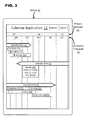
- FIG. 3 shows an exemplary zoomed in view of a calendar application.
- FIG. 4 shows exemplary additional information that may displayed when a user zooms into a single calendar entry.
- FIG. 5 shows an exemplary architecture
- a user viewing calendar content in a linear timeline may dynamically zoom into and out of the timeline according to a change of a distance separating two user selected points on the screen as at least one of the user selected points is moved by the user.
- a timescale that is displayed as part of the timeline may also be updated. For example, if a user zooms into a particular year of timeline showing several years worth of data in the timeline, the timescale may be updated to show fiscal quarters or calendar months instead of years.
- the entries that are shown in the timeline may also be updated so that they correspond to the selected zoomed in time period.
- a user using a touch screen device may use at least two of their fingers to select and/or move the two points on the touch screen.
- additional detailed information may be displayed for calendar entries when a user zooms into the timeline whereas aggregated, consolidated, or more general information may be displayed when the user zooms out of the timeline.
- the degree of zooming may depend on the separation distance between the two user selected points as the user moves one of the points. As the separation distance changes, the calendar may be further zoomed into making it possible to zoom from displaying several years, to displaying only a few months, to only a few days, and so on by either spreading the two points further apart or moving them closer together. The reverse zoom may also be applied if the points are moved in the opposite direction by either moving them closer together or spreading them apart.
- FIG. 1 shows an exemplary process.
- a touched first point and second point within a calendar application displaying a timeline across a first dimension on a touch screen device may be identified.
- a user may touch the first and second points on a surface of the touch screen using a finger, a mouse, a touchpad, or other electronic device.
- At least one of the touched points may be dragged. Responsive to a dragging of at least one of the touched points, in box 2, a change in a distance between the first point and the second point may be calculated.
- an identification as to whether the dragging corresponds to a zooming in or a zooming out may be made based on the calculated distance change.
- the calculated change in distance may be scaled using a scaling factor that varies for different units of time in the calendar application. For example, different scaling factors may be used if the time in the calendar application is months instead of years or days. Thus, if a user zooms out of a timeline displaying days, the scaling factor may cause a jump to months or quarters depending on the calculated distance between the points. However, the user zooms out of a timeline displaying quarters, the scaling factor may cause a different jump to years or decades instead.
- the scaled calculated change in distance may be divided by the width of the displayed timeline and by an adjustment factor to calculate a date change amount.
- the scaled change in distance may be divided by the width of the timeline using the coordinates of the timeline displayed on the screen. Dividing by the timeline width may calculate a ratio of the distance that the fingers were moved in relation to the width of the displayed timeline.
- the resulting number may then be divided by an adjustment factor, such as two, in order to equally or unequally adjust each side of the timeline (start and end dates). If the adjustment factor of two is used, then the start and end dates of the timeline may be adjusted equally. If other adjustment factors are used, the start and end dates may be adjusted unequally with different proportions.
- an adjustment factor such as two
- the adjustment factor may be influenced by a midpoint date that is representative of a date midway between the position of the user's fingers on the display. As the start and/or end dates are adjusted, the midpoint date and/or the area of calendar where the zoom started may be kept in focus and/or visible to the user. The distances between (i) the start date and the midpoint date, and (ii) the end date and the midpoint date may be used to calculate the magnitude of the adjustment factor.
- a start date and an end date of the displayed timeline may be adjusted by the calculated date change amount according to whether the dragging is identified as corresponding to the zooming in or the zooming out.
- the calculated date change amount may be added to the start date of the timeline and subtracted from the end date of the timeline.
- zooming out the calculated date change amount may be subtracted from the start date of the timeline and added to the end date of the timeline.
- the calculated changes to the distance between the first point and the second point as the user drags at least one of the points may be cached. Zooming into or out of the timeline and/or readjustment of the start and/or end dates of the timeline may occur only after the cached calculated change to the distance exceeds a threshold value in the positive or the negative direction.
- FIG. 2 shows an exemplary view of a device 10 having a touch screen displaying a calendar application 12.
- the touch screen device 10 may include a touch screen interface 11 that enables the use of the display screen as a touch sensitive surface.
- the calendar application 12 may show a horizontal timeline with a primary timescale 13 and a secondary timescale 14.
- the calendar application 12 may include a zoomable area 18 which may encompass the whole timeline or parts of the timeline where the user may use their fingers 17 or other objects to zoom in or out of the timeline.
- the calendar application 12 may also display calendar entries 21 to 24 that fall within the time periods displayed in the timeline.
- a user may zoom in or out of the timeline by initially selecting first 15 and second 16 points on the timeline with their fingers or another object. The user may then drag one or more of their fingers to change the distance between the first point 15 and the second point 16. The change in the distance separating the two points may determine whether to zoom in or out of the timeline and by what amount
- the finger dragging may be associated with zooming in when the calculated distance between the two touched points increases.
- the dragging may also be associated with zooming out when the calculated distance change between the touched points decreases.
- the distance between the two points may be calculated from a projection of the finger positions on the touch screen onto a horizontal axis or other axis parallel with the timeline.
- the finger dragging may be associated with zooming in when the calculated distance change between the touched points decreases.
- the dragging may also be associated with zooming out when the calculated distance change between the touched points increases.
- a direction of the dragging of the at least one point may be identified. Different actions may be taken depending on the direction that the at least one point is being dragged. For example, if the at least one point is dragged in a vertical direction, then a width of at least one calendar entry displayed in the timeline may be changed. However, if the at least one point is dragged in a horizontal direction, then the start date and the end date of the displayed timeline may be adjusted and the timescale shown in the timeline may be changed. In other situations, the reverse may occur or a different action may be taken if the at least one point is dragged at angle that is neither horizontal nor vertical.
- the dragging may cause both the width of at least one calendar entry to be increased and the start date and end date of the displayed timeline to be adjusted accordingly.
- a cosine angle or other angle may be used to calculate the separation of the two points at an angled direction.
- the vertical zoom can be used to increase the width of the entities displayed on the calendar. Different directional zooms, such as the vertical zoom, may be also be blocked or otherwise disabled in different instances depending on the application and any particular business requirements.
- the time period at the center of the timeline may remain stationary while the dates around the center change.
- the middle of November 2012 appears as located in the center of the timeline.
- zooming in and out may be dynamic based on the position of the first point 15 and/or the second point 16. For example, if the first point 15 is selected in the middle of August 2012 on the screen and the second point 16 is selected in the middle of September 2012 then a zooming in may result in a zooming in on the period between the middle of August 2012 and the middle of September 2012 in the timeline.
- a midpoint date displayed in the timeline that is associated with the first 15 and second 16 touched points may be identified.
- the timeline may then be zoomed around the identified midpoint date when zooming into or out of the timeline.
- the timeline may have a fixed earliest start date and/or a fixed latest end date. If an attempt is made to zoom out beyond these dates, the timeline may be readjusted so that it does not exceed these fixed dates.
- a minimum time period may also be specified to prevent the timeline from displaying a finer granularity time period than the minimum time period in order to prevent a user from attempting to zoom in too much.
- the calendar entries and/or other content associated with the timeline may also be reassessed for display in the timeline.
- the entries may be resized according to the zoom level and/or a different number of entries may be displayed to make the entries more readable and/or selectable by an end user.
- FIG. 3 shows an exemplary zoomed in view of calendar application 12.
- the zoomed in view may be generated in response to the user dragging at least one of the points in the FIG. 2 to zoom into the timeline.
- the view in FIG. 2 shows the timeline from the end of June 2012 to the beginning of April 2013, whereas the zoomed in view in FIG. 3 shows the timeline from the end of August 2012 to the beginning on February 2013.
- a timescale shown in the timeline displayed across a first dimension may be changed based on the adjusted start and end dates of the timeline. For example, in FIG. 2 the primary timescale 13 displayed years, whereas the primary timescale 31 in FIG. 3 displayed quarters instead of years.
- the timescale shown in the timeline may be a multidimensional timescale including a primary timescale 13 and 31 and a secondary timescale 14 and 32.
- the secondary timescale 14 and 32 may have a unit of time that is a subset of the primary timescale 13 and 31.
- the primary timescale 31 may be fiscal quarters and the secondary timescale 32 may be months.
- the primary timescale may change from fiscal quarters 31 to years 13, as shown when zooming out of FIG. 3 to return to the view of FIG. 2 .
- the secondary timescale may be changed between different time units, such as from months to quarters. In other instances, the secondary timescale may continue to show the same time unit, such as months 14 and 32, though the space allocated for time unit may be changed, such as the space allocated for each month on the screen being reduced when zooming out from FIG. 3 to FIG. 2 and the space being increased when zooming in from FIG. 2 to FIG. 3 .
- the information about one or more of the calendar entries displayed on the screen may also change. For example, in response to a user zooming into the timeline, additional information associated with each calendar entry may be displayed on the screen. This additional information may be displayed for those calendar entries that are within the adjusted start date and the adjusted end date of the timeline from the zooming in.
- the additional information that is displayed may include any information about the activities, tasks, or events associated with a respective calendar entry.
- the displayed additional information may include one or more sub-activity completion status bars 211 to 213.
- These status bars 211 to 213 may list one or more activities associated with a calendar entry 21 and show a status of the activity, for example, with a check mark or cross, so that a user can quickly identify a status of each activity.
- further information about each activity may be displayed, such as sub-activities status bars for each sub-activity associated with an activity.
- the sub-activity status bars may be positioned in the calendar application 12 so that they are aligned with a start, end or other date associated with the activity.
- the displayed additional information may include statistical information 221 about a respective calendar entry.
- the statistical information 221 may, but need not, be limited to data included between the adjusted start date and the adjusted end date of the timeline as shown in the zoomed in timeline.
- the statistical information 221 may include a function, such as a sum, variance, or other function, that is applied to data associated with the calendar entry in order to generate the displayed statistical information 221. As the user further zooms into the calendar application 12, further details about the activity and/or the statistical information 221 may be displayed.
- the displayed additional information may include one or more sub-activity progress bars 231 to 234.
- These progress bars 231 to 234 may be aligned in the calendar application with a start date and an end date of an activity associated with a respective calendar entry 23.
- a progress bar (shown in hatching) may show an overall completion amount of each activity.
- Progress bars of contingent activities 231 and 232 may be aligned on a same row. As the user further zooms into the calendar application 12, further details about the activity and/or the completion status of the progress bars 231 to 234 may be displayed.
- Information displayed on screen may also be consolidated if the user zooms out of the calendar application 12. For example, in response to a user zooming out of the timeline, calendar entry information displayed on screen may be consolidated to display less information on the screen.
- FIG. 4 shows exemplary additional information that may be displayed when a user zooms into a single calendar entry.
- a user may zoom into a single calendar entry by selecting a first 41 and a second 42 point contained within a single calendar entry, in this example calendar entry 23, and then moving 44 one or more of the points to zoom into the calendar entry.
- additional information including sub-activities associated with the single calendar entry on the screen corresponding to a zoomed in time period may be displayed 43 when zooming into the single calendar entry.
- the displayed additional information 43 may include a separate timeline displaying one or more sub-activity progress bars 231 to 234 associated with the calendar entry. These progress bars 231 to 234 may be aligned in the calendar application with a start date and an end date of an activity associated with a respective calendar entry 23. A progress bar (shown in hatching) may show an overall completion amount of each activity. Progress bars of contingent activities 231 and 232 may be aligned on a same row. As the user further zooms into the calendar entry or one of the progress bars, further details about the activity and/or the completion status of the progress bars 231 to 234 may be displayed.
- the additional calendar entry information 43 displayed on the screen may be consolidated to display less information on the screen about the single calendar entry when zooming out of the single calendar entry.
- FIG. 5 shows an exemplary architecture.
- a device 10 may include a touch screen interface 11, processing device 52, memory 53, and communications interface 54.
- the touch screen interface 11 may include a display, which may be a touch screen, capable of displaying data to a user of the device 10.
- the touch screen interface 11 may include a position calculating module 57 coupled to a zoom module 58 and a timescale module 59, each of which may be coupled to a sensor of the touch sensitive screen 56.
- the sensor of the touch sensitive display screen 56 may be a capacitive touch detection sensor, configured to detect and track movement on the surface and/or in the vicinity of the display.
- the sensor may be coupled to a signal processing circuit that is configured to identify, locate, and/or track object movement based on the data obtained from sensor.
- Memory 53 may include a computer readable medium storing application modules, which may include instructions associated with the module 57 to 59.
- the position calculation module 57 may include functionality for identifying a touched first point and second point within a calendar application displaying a timeline across a first dimension on the touch screen device 10.
- the position calculation module 57 may also include functionality for calculating a change in a distance between the first point and the second point in response to a dragging of at least one of the touched points, scaling the calculated change in distance with a scaling factor that varies for different units of time in the calendar application, and dividing the scaled calculated change in distance by the width of the displayed timeline and by an adjustment factor to calculate a date change amount.
- the zoom module 58 may include functionality for identifying whether the dragging corresponds to a zooming in or a zooming out based on the calculated distance change.
- the zoom module 58 may also include functionality for adjusting a start date and an end date of the displayed timeline by the calculated date change amount according to whether the dragging is identified as corresponding to the zooming in or the zooming out.
- the timescale module 59 may include functionality for changing a timescale shown in the timeline displayed across the first dimension based on the adjusting of the start date and the end date.
- the device 10 may contain a processing device 52, memory 53 storing loaded data or a loaded data structure 55, and a communications device 54, all of which may be interconnected via a system bus.
- the device 10 may have an architecture with modular hardware and/or software systems that include additional and/or different systems communicating through one or more networks via communications device 84.
- Communications device 54 may enable connectivity between the processing devices 52 in the device 10 and other systems by encoding data to be sent from the processing device 52 to another system over a network and decoding data received from another system over the network for the processing device 52.
- memory 53 may contain different components for retrieving, presenting, changing, and saving data and may include computer readable media.
- Memory 53 may include a variety of memory devices, for example, Dynamic Random Access Memory (DRAM), Static RAM (SRAM), flash memory, cache memory, and other memory devices. Additionally, for example, memory 53 and processing device(s) 52 may be distributed across several different computers that collectively comprise a system. Memory 53 may be capable of storing each user selected value from the displayed second list each time the second list is displayed.
- a cache in memory 53 may store calculated changes to the distance between the first point and the second point during the dragging of at least one of the points.
- the zoom module 58 may then adjust the start date and the end date of the calendar application only after a stored calculated change in the cache exceeds a threshold value.
- Processing device 52 may perform computation and control functions of a system and comprises a suitable central processing unit (CPU).
- Processing device 52 may include a single integrated circuit, such as a microprocessing device, or may include any suitable number of integrated circuit devices and/or circuit boards working in cooperation to accomplish the functions of a processing device.
- Processing device 52 may execute computer programs, such as object-oriented computer programs, within memory 53.
- Processing device 52 may be capable of filtering data according to each stored user selected value associated with each respective selected first list characteristic.
- processing device 52 is shown as separate from the modules 57 to 59 and the touch screen interface 11, in some instances the processing device 52 and the touch screen interface 11 and/or one or more of the modules 57 to 59 may be functionally integrated to perform their respective functions.
Landscapes
- Engineering & Computer Science (AREA)
- Theoretical Computer Science (AREA)
- General Engineering & Computer Science (AREA)
- Business, Economics & Management (AREA)
- Physics & Mathematics (AREA)
- Human Resources & Organizations (AREA)
- General Physics & Mathematics (AREA)
- Human Computer Interaction (AREA)
- Entrepreneurship & Innovation (AREA)
- Strategic Management (AREA)
- Operations Research (AREA)
- Tourism & Hospitality (AREA)
- General Business, Economics & Management (AREA)
- Quality & Reliability (AREA)
- Marketing (AREA)
- Economics (AREA)
- Data Mining & Analysis (AREA)
- User Interface Of Digital Computer (AREA)
Applications Claiming Priority (1)
| Application Number | Priority Date | Filing Date | Title |
|---|---|---|---|
| US13/562,116 US20140028729A1 (en) | 2012-07-30 | 2012-07-30 | Scalable zoom calendars |
Publications (2)
| Publication Number | Publication Date |
|---|---|
| EP2693382A2 true EP2693382A2 (fr) | 2014-02-05 |
| EP2693382A3 EP2693382A3 (fr) | 2014-02-26 |
Family
ID=48874961
Family Applications (1)
| Application Number | Title | Priority Date | Filing Date |
|---|---|---|---|
| EP20130178606 Ceased EP2693382A3 (fr) | 2012-07-30 | 2013-07-30 | Calendriers de zoom échelonnable |
Country Status (3)
| Country | Link |
|---|---|
| US (1) | US20140028729A1 (fr) |
| EP (1) | EP2693382A3 (fr) |
| CN (1) | CN103577100B (fr) |
Cited By (20)
| Publication number | Priority date | Publication date | Assignee | Title |
|---|---|---|---|---|
| WO2015200890A3 (fr) * | 2014-06-27 | 2016-03-10 | Apple Inc. | Interface utilisateur de taille réduite |
| US9978043B2 (en) | 2014-05-30 | 2018-05-22 | Apple Inc. | Automatic event scheduling |
| US10097496B2 (en) | 2014-09-02 | 2018-10-09 | Apple Inc. | Electronic mail user interface |
| US10235014B2 (en) | 2014-09-02 | 2019-03-19 | Apple Inc. | Music user interface |
| US10272294B2 (en) | 2016-06-11 | 2019-04-30 | Apple Inc. | Activity and workout updates |
| US10409483B2 (en) | 2015-03-07 | 2019-09-10 | Apple Inc. | Activity based thresholds for providing haptic feedback |
| US10496259B2 (en) | 2014-08-02 | 2019-12-03 | Apple Inc. | Context-specific user interfaces |
| US10649622B2 (en) | 2014-09-02 | 2020-05-12 | Apple Inc. | Electronic message user interface |
| US10771606B2 (en) | 2014-09-02 | 2020-09-08 | Apple Inc. | Phone user interface |
| US11216119B2 (en) | 2016-06-12 | 2022-01-04 | Apple Inc. | Displaying a predetermined view of an application |
| US11402968B2 (en) | 2014-09-02 | 2022-08-02 | Apple Inc. | Reduced size user in interface |
| US11435830B2 (en) | 2018-09-11 | 2022-09-06 | Apple Inc. | Content-based tactile outputs |
| US11474626B2 (en) | 2014-09-02 | 2022-10-18 | Apple Inc. | Button functionality |
| US11604571B2 (en) | 2014-07-21 | 2023-03-14 | Apple Inc. | Remote user interface |
| US11656751B2 (en) | 2013-09-03 | 2023-05-23 | Apple Inc. | User interface for manipulating user interface objects with magnetic properties |
| US11829576B2 (en) | 2013-09-03 | 2023-11-28 | Apple Inc. | User interface object manipulations in a user interface |
| US11893212B2 (en) | 2021-06-06 | 2024-02-06 | Apple Inc. | User interfaces for managing application widgets |
| US12050766B2 (en) | 2013-09-03 | 2024-07-30 | Apple Inc. | Crown input for a wearable electronic device |
| US12287962B2 (en) | 2013-09-03 | 2025-04-29 | Apple Inc. | User interface for manipulating user interface objects |
| US12602154B2 (en) | 2024-01-18 | 2026-04-14 | Apple Inc. | User interfaces integrating hardware buttons |
Families Citing this family (20)
| Publication number | Priority date | Publication date | Assignee | Title |
|---|---|---|---|---|
| US9122375B2 (en) * | 2012-08-02 | 2015-09-01 | Blackberry Limited | Method for displaying content items on an electronic device |
| US9525603B2 (en) * | 2012-12-19 | 2016-12-20 | Teledyne Lecroy, Inc. | Field selection graphical user interface |
| JP6171422B2 (ja) * | 2013-03-11 | 2017-08-02 | 株式会社リコー | 画像処理システム、制御方法及び制御プログラム |
| US20150143282A1 (en) * | 2013-11-15 | 2015-05-21 | Motorola Solutions, Inc | Method and apparatus for diagonal scrolling in a user interface |
| US20150355780A1 (en) * | 2014-06-06 | 2015-12-10 | Htc Corporation | Methods and systems for intuitively refocusing images |
| CN104077034B (zh) * | 2014-07-03 | 2017-05-17 | 成都众联基智科技有限公司 | 指向区域可变尺度缩放方法及装置 |
| CN105335040B (zh) * | 2014-08-04 | 2018-08-31 | 阿里巴巴集团控股有限公司 | 日期切换方法、装置及移动终端 |
| CN106708482A (zh) * | 2015-07-30 | 2017-05-24 | 北京奇虎科技有限公司 | 一种日期信息的显示方法和装置 |
| CN105138238B (zh) * | 2015-08-12 | 2021-06-01 | 博锐尚格科技股份有限公司 | 一种用于显示时间的方法和装置 |
| CN106126054A (zh) * | 2016-06-13 | 2016-11-16 | 孙腾 | 一种终端设备上时间轴调整方法及系统 |
| US20200117330A1 (en) * | 2018-10-12 | 2020-04-16 | Catalin Lefter | System and method for providing a dynamic calendar |
| US10884801B2 (en) | 2019-02-26 | 2021-01-05 | Sap Se | Server resource orchestration based on application priority |
| US11042402B2 (en) | 2019-02-26 | 2021-06-22 | Sap Se | Intelligent server task balancing based on server capacity |
| US11126466B2 (en) | 2019-02-26 | 2021-09-21 | Sap Se | Server resource balancing using a fixed-sharing strategy |
| US10884800B2 (en) | 2019-02-26 | 2021-01-05 | Sap Se | Server resource balancing using a suspend-resume strategy |
| US11307898B2 (en) | 2019-02-26 | 2022-04-19 | Sap Se | Server resource balancing using a dynamic-sharing strategy |
| CN110032326A (zh) * | 2019-03-29 | 2019-07-19 | 网易(杭州)网络有限公司 | 移动终端显示画面的控制方法、装置、设备和存储介质 |
| US10768952B1 (en) | 2019-08-12 | 2020-09-08 | Capital One Services, Llc | Systems and methods for generating interfaces based on user proficiency |
| CN113849104B (zh) * | 2020-06-28 | 2024-11-15 | 华为技术有限公司 | 图形控制方法、装置、终端设备及可读存储介质 |
| CN114879871A (zh) * | 2022-05-10 | 2022-08-09 | 统信软件技术有限公司 | 一种日历显示方法、装置、计算设备和存储介质 |
Citations (4)
| Publication number | Priority date | Publication date | Assignee | Title |
|---|---|---|---|---|
| WO2009121227A1 (fr) * | 2008-04-03 | 2009-10-08 | Dong Li | Procédé et appareil pour exploiter un dispositif portatif à contact tactile de multiples objets doté d’un dispositif d'affichage sensible au toucher |
| US20110167382A1 (en) * | 2010-01-06 | 2011-07-07 | Van Os Marcel | Device, Method, and Graphical User Interface for Manipulating Selectable User Interface Objects |
| US20120052921A1 (en) * | 2010-08-30 | 2012-03-01 | Samsung Electronics Co., Ltd. | Mobile terminal and multi-touch based method for controlling list data output for the same |
| US20120159402A1 (en) * | 2010-12-17 | 2012-06-21 | Nokia Corporation | Method and apparatus for providing different user interface effects for different implementation characteristics of a touch event |
Family Cites Families (9)
| Publication number | Priority date | Publication date | Assignee | Title |
|---|---|---|---|---|
| US20090254370A1 (en) * | 2006-07-28 | 2009-10-08 | Wise Solutions Inc. | Project information display device, project information display program, and electronic medical record information display device |
| CN101517610A (zh) * | 2006-07-28 | 2009-08-26 | 株式会社智慧解决法案 | 项目信息显示装置、项目信息显示方法、项目信息显示程序以及电子病历信息显示装置 |
| US7721229B2 (en) * | 2006-11-14 | 2010-05-18 | Microsoft Corporation | Displaying overlaid calendars |
| US20090152349A1 (en) * | 2007-12-17 | 2009-06-18 | Bonev Robert | Family organizer communications network system |
| US8327272B2 (en) * | 2008-01-06 | 2012-12-04 | Apple Inc. | Portable multifunction device, method, and graphical user interface for viewing and managing electronic calendars |
| KR20100044341A (ko) * | 2008-10-22 | 2010-04-30 | 엘지전자 주식회사 | 이동 단말기 및 이를 이용한 스케쥴러 제공 방법 |
| US20110298830A1 (en) * | 2010-06-07 | 2011-12-08 | Palm, Inc. | Single Point Input Variable Zoom |
| US8791963B2 (en) * | 2010-10-29 | 2014-07-29 | Nokia Corporation | Responding to the receipt of zoom commands |
| US20120304121A1 (en) * | 2011-05-25 | 2012-11-29 | Componentart Holdings Inc. | Method, processing device, and article of manufacture for providing instructions for displaying time-dependent information and for allowing user selection of time ranges |
-
2012
- 2012-07-30 US US13/562,116 patent/US20140028729A1/en not_active Abandoned
-
2013
- 2013-07-30 EP EP20130178606 patent/EP2693382A3/fr not_active Ceased
- 2013-07-30 CN CN201310325774.7A patent/CN103577100B/zh active Active
Patent Citations (4)
| Publication number | Priority date | Publication date | Assignee | Title |
|---|---|---|---|---|
| WO2009121227A1 (fr) * | 2008-04-03 | 2009-10-08 | Dong Li | Procédé et appareil pour exploiter un dispositif portatif à contact tactile de multiples objets doté d’un dispositif d'affichage sensible au toucher |
| US20110167382A1 (en) * | 2010-01-06 | 2011-07-07 | Van Os Marcel | Device, Method, and Graphical User Interface for Manipulating Selectable User Interface Objects |
| US20120052921A1 (en) * | 2010-08-30 | 2012-03-01 | Samsung Electronics Co., Ltd. | Mobile terminal and multi-touch based method for controlling list data output for the same |
| US20120159402A1 (en) * | 2010-12-17 | 2012-06-21 | Nokia Corporation | Method and apparatus for providing different user interface effects for different implementation characteristics of a touch event |
Cited By (50)
| Publication number | Priority date | Publication date | Assignee | Title |
|---|---|---|---|---|
| US12287962B2 (en) | 2013-09-03 | 2025-04-29 | Apple Inc. | User interface for manipulating user interface objects |
| US11656751B2 (en) | 2013-09-03 | 2023-05-23 | Apple Inc. | User interface for manipulating user interface objects with magnetic properties |
| US12481420B2 (en) | 2013-09-03 | 2025-11-25 | Apple Inc. | User interface for manipulating user interface objects with magnetic properties |
| US11829576B2 (en) | 2013-09-03 | 2023-11-28 | Apple Inc. | User interface object manipulations in a user interface |
| US12050766B2 (en) | 2013-09-03 | 2024-07-30 | Apple Inc. | Crown input for a wearable electronic device |
| US9978043B2 (en) | 2014-05-30 | 2018-05-22 | Apple Inc. | Automatic event scheduling |
| US11200542B2 (en) | 2014-05-30 | 2021-12-14 | Apple Inc. | Intelligent appointment suggestions |
| US11068855B2 (en) | 2014-05-30 | 2021-07-20 | Apple Inc. | Automatic event scheduling |
| US12361388B2 (en) | 2014-06-27 | 2025-07-15 | Apple Inc. | Reduced size user interface |
| US10872318B2 (en) | 2014-06-27 | 2020-12-22 | Apple Inc. | Reduced size user interface |
| US12299642B2 (en) | 2014-06-27 | 2025-05-13 | Apple Inc. | Reduced size user interface |
| WO2015200890A3 (fr) * | 2014-06-27 | 2016-03-10 | Apple Inc. | Interface utilisateur de taille réduite |
| US11250385B2 (en) | 2014-06-27 | 2022-02-15 | Apple Inc. | Reduced size user interface |
| US11720861B2 (en) | 2014-06-27 | 2023-08-08 | Apple Inc. | Reduced size user interface |
| US12093515B2 (en) | 2014-07-21 | 2024-09-17 | Apple Inc. | Remote user interface |
| US11604571B2 (en) | 2014-07-21 | 2023-03-14 | Apple Inc. | Remote user interface |
| US12554382B2 (en) | 2014-07-21 | 2026-02-17 | Apple Inc. | Remote user interface |
| US10496259B2 (en) | 2014-08-02 | 2019-12-03 | Apple Inc. | Context-specific user interfaces |
| US12430013B2 (en) | 2014-08-02 | 2025-09-30 | Apple Inc. | Context-specific user interfaces |
| US11740776B2 (en) | 2014-08-02 | 2023-08-29 | Apple Inc. | Context-specific user interfaces |
| US11157143B2 (en) | 2014-09-02 | 2021-10-26 | Apple Inc. | Music user interface |
| US12333124B2 (en) | 2014-09-02 | 2025-06-17 | Apple Inc. | Music user interface |
| US11644911B2 (en) | 2014-09-02 | 2023-05-09 | Apple Inc. | Button functionality |
| US10097496B2 (en) | 2014-09-02 | 2018-10-09 | Apple Inc. | Electronic mail user interface |
| US10235014B2 (en) | 2014-09-02 | 2019-03-19 | Apple Inc. | Music user interface |
| US11700326B2 (en) | 2014-09-02 | 2023-07-11 | Apple Inc. | Phone user interface |
| US11402968B2 (en) | 2014-09-02 | 2022-08-02 | Apple Inc. | Reduced size user in interface |
| US10771606B2 (en) | 2014-09-02 | 2020-09-08 | Apple Inc. | Phone user interface |
| US11743221B2 (en) | 2014-09-02 | 2023-08-29 | Apple Inc. | Electronic message user interface |
| US12118181B2 (en) | 2014-09-02 | 2024-10-15 | Apple Inc. | Reduced size user interface |
| US10536414B2 (en) | 2014-09-02 | 2020-01-14 | Apple Inc. | Electronic message user interface |
| US10649622B2 (en) | 2014-09-02 | 2020-05-12 | Apple Inc. | Electronic message user interface |
| US12197659B2 (en) | 2014-09-02 | 2025-01-14 | Apple Inc. | Button functionality |
| US11941191B2 (en) | 2014-09-02 | 2024-03-26 | Apple Inc. | Button functionality |
| US12001650B2 (en) | 2014-09-02 | 2024-06-04 | Apple Inc. | Music user interface |
| US11474626B2 (en) | 2014-09-02 | 2022-10-18 | Apple Inc. | Button functionality |
| US10409483B2 (en) | 2015-03-07 | 2019-09-10 | Apple Inc. | Activity based thresholds for providing haptic feedback |
| US11148007B2 (en) | 2016-06-11 | 2021-10-19 | Apple Inc. | Activity and workout updates |
| US12274918B2 (en) | 2016-06-11 | 2025-04-15 | Apple Inc. | Activity and workout updates |
| US11918857B2 (en) | 2016-06-11 | 2024-03-05 | Apple Inc. | Activity and workout updates |
| US11161010B2 (en) | 2016-06-11 | 2021-11-02 | Apple Inc. | Activity and workout updates |
| US10272294B2 (en) | 2016-06-11 | 2019-04-30 | Apple Inc. | Activity and workout updates |
| US11660503B2 (en) | 2016-06-11 | 2023-05-30 | Apple Inc. | Activity and workout updates |
| US11216119B2 (en) | 2016-06-12 | 2022-01-04 | Apple Inc. | Displaying a predetermined view of an application |
| US11921926B2 (en) | 2018-09-11 | 2024-03-05 | Apple Inc. | Content-based tactile outputs |
| US12277275B2 (en) | 2018-09-11 | 2025-04-15 | Apple Inc. | Content-based tactile outputs |
| US11435830B2 (en) | 2018-09-11 | 2022-09-06 | Apple Inc. | Content-based tactile outputs |
| US12287957B2 (en) | 2021-06-06 | 2025-04-29 | Apple Inc. | User interfaces for managing application widgets |
| US11893212B2 (en) | 2021-06-06 | 2024-02-06 | Apple Inc. | User interfaces for managing application widgets |
| US12602154B2 (en) | 2024-01-18 | 2026-04-14 | Apple Inc. | User interfaces integrating hardware buttons |
Also Published As
| Publication number | Publication date |
|---|---|
| CN103577100B (zh) | 2018-09-28 |
| CN103577100A (zh) | 2014-02-12 |
| EP2693382A3 (fr) | 2014-02-26 |
| US20140028729A1 (en) | 2014-01-30 |
Similar Documents
| Publication | Publication Date | Title |
|---|---|---|
| EP2693382A2 (fr) | Calendriers de zoom échelonnable | |
| US9250781B2 (en) | Method and device for navigating time and timescale using movements | |
| US8972883B2 (en) | Method and device for display time and timescale reset | |
| US9123030B2 (en) | Indication of off-screen calendar objects | |
| US6812926B1 (en) | Displaying data containing outlying data items | |
| CN107015751B (zh) | 文档中的对象和文本的最佳显示和缩放 | |
| US10409366B2 (en) | Method and apparatus for controlling display of digital content using eye movement | |
| CN105373522B (zh) | 基于手势的图表上的数据筛选 | |
| US9158430B2 (en) | Target element zoom | |
| US8892997B2 (en) | Overflow stack user interface | |
| US20160170617A1 (en) | Automatic active region zooming | |
| Jones et al. | An evaluation of integrated zooming and scrolling on small screens | |
| US20190050141A1 (en) | User interface for editing a value in place | |
| US9513792B2 (en) | Input gesture chart scaling | |
| US10275911B2 (en) | Dynamically adjusted scale labels for displayed chart | |
| US20220121277A1 (en) | Contextual zooming | |
| US20120297335A1 (en) | Document glancing and navigation | |
| US20140063073A1 (en) | Electronic device and method for controlling movement of images on screen | |
| CN103713844A (zh) | 缩放屏幕画面的方法及电子装置 | |
| US20160378292A1 (en) | Crop frame adjusting method, image processing device, and non-transitory computer readable storage medium | |
| WO2018223724A1 (fr) | Système et procédé de zoom de carte basés sur une distribution de ressources, mémoire et appareil de commande | |
| DE112010005930T5 (de) | Ein erstes Bild und ein zweites Bild auf einer Anzeige | |
| EP2876540A1 (fr) | Dispositif de traitement d'informations | |
| WO2011057428A1 (fr) | Alignement d'éléments d'interface utilisateur | |
| CN118567540B (zh) | 表格数据处理方法及装置 |
Legal Events
| Date | Code | Title | Description |
|---|---|---|---|
| PUAL | Search report despatched |
Free format text: ORIGINAL CODE: 0009013 |
|
| AK | Designated contracting states |
Kind code of ref document: A2 Designated state(s): AL AT BE BG CH CY CZ DE DK EE ES FI FR GB GR HR HU IE IS IT LI LT LU LV MC MK MT NL NO PL PT RO RS SE SI SK SM TR |
|
| AX | Request for extension of the european patent |
Extension state: BA ME |
|
| PUAI | Public reference made under article 153(3) epc to a published international application that has entered the european phase |
Free format text: ORIGINAL CODE: 0009012 |
|
| RIN1 | Information on inventor provided before grant (corrected) |
Inventor name: GHORAYEB, ROY Inventor name: LAVOIE, VINCENT Inventor name: MARAT, ROLAN Inventor name: EL-JAYOUSI, MOHANNAD Inventor name: GAUTHIER, ALAIN Inventor name: LIANG, XUEBO |
|
| AK | Designated contracting states |
Kind code of ref document: A3 Designated state(s): AL AT BE BG CH CY CZ DE DK EE ES FI FR GB GR HR HU IE IS IT LI LT LU LV MC MK MT NL NO PL PT RO RS SE SI SK SM TR |
|
| AX | Request for extension of the european patent |
Extension state: BA ME |
|
| RIC1 | Information provided on ipc code assigned before grant |
Ipc: G06F 3/0488 20130101ALI20140117BHEP Ipc: G06Q 10/10 20120101AFI20140117BHEP |
|
| 17P | Request for examination filed |
Effective date: 20140807 |
|
| RBV | Designated contracting states (corrected) |
Designated state(s): AL AT BE BG CH CY CZ DE DK EE ES FI FR GB GR HR HU IE IS IT LI LT LU LV MC MK MT NL NO PL PT RO RS SE SI SK SM TR |
|
| 17Q | First examination report despatched |
Effective date: 20140903 |
|
| RAP1 | Party data changed (applicant data changed or rights of an application transferred) |
Owner name: SAP SE |
|
| STAA | Information on the status of an ep patent application or granted ep patent |
Free format text: STATUS: THE APPLICATION HAS BEEN REFUSED |
|
| 18R | Application refused |
Effective date: 20170328 |