EP2696278A2 - Terminal mobile et son procédé de contrôle - Google Patents
Terminal mobile et son procédé de contrôle Download PDFInfo
- Publication number
- EP2696278A2 EP2696278A2 EP13002587.7A EP13002587A EP2696278A2 EP 2696278 A2 EP2696278 A2 EP 2696278A2 EP 13002587 A EP13002587 A EP 13002587A EP 2696278 A2 EP2696278 A2 EP 2696278A2
- Authority
- EP
- European Patent Office
- Prior art keywords
- image
- mobile terminal
- objective
- control unit
- objectives
- Prior art date
- Legal status (The legal status is an assumption and is not a legal conclusion. Google has not performed a legal analysis and makes no representation as to the accuracy of the status listed.)
- Withdrawn
Links
Images







Classifications
-
- G—PHYSICS
- G06—COMPUTING OR CALCULATING; COUNTING
- G06F—ELECTRIC DIGITAL DATA PROCESSING
- G06F1/00—Details not covered by groups G06F3/00 - G06F13/00 and G06F21/00
- G06F1/16—Constructional details or arrangements
- G06F1/1613—Constructional details or arrangements for portable computers
- G06F1/1626—Constructional details or arrangements for portable computers with a single-body enclosure integrating a flat display, e.g. Personal Digital Assistants [PDAs]
-
- G—PHYSICS
- G06—COMPUTING OR CALCULATING; COUNTING
- G06F—ELECTRIC DIGITAL DATA PROCESSING
- G06F3/00—Input arrangements for transferring data to be processed into a form capable of being handled by the computer; Output arrangements for transferring data from processing unit to output unit, e.g. interface arrangements
- G06F3/01—Input arrangements or combined input and output arrangements for interaction between user and computer
- G06F3/048—Interaction techniques based on graphical user interfaces [GUI]
- G06F3/0484—Interaction techniques based on graphical user interfaces [GUI] for the control of specific functions or operations, e.g. selecting or manipulating an object, an image or a displayed text element, setting a parameter value or selecting a range
-
- G—PHYSICS
- G09—EDUCATION; CRYPTOGRAPHY; DISPLAY; ADVERTISING; SEALS
- G09G—ARRANGEMENTS OR CIRCUITS FOR CONTROL OF INDICATING DEVICES USING STATIC MEANS TO PRESENT VARIABLE INFORMATION
- G09G5/00—Control arrangements or circuits for visual indicators common to cathode-ray tube indicators and other visual indicators
- G09G5/14—Display of multiple viewports
-
- G—PHYSICS
- G06—COMPUTING OR CALCULATING; COUNTING
- G06F—ELECTRIC DIGITAL DATA PROCESSING
- G06F3/00—Input arrangements for transferring data to be processed into a form capable of being handled by the computer; Output arrangements for transferring data from processing unit to output unit, e.g. interface arrangements
- G06F3/14—Digital output to display device ; Cooperation and interconnection of the display device with other functional units
- G06F3/147—Digital output to display device ; Cooperation and interconnection of the display device with other functional units using display panels
-
- H—ELECTRICITY
- H04—ELECTRIC COMMUNICATION TECHNIQUE
- H04B—TRANSMISSION
- H04B1/00—Details of transmission systems, not covered by a single one of groups H04B3/00 - H04B13/00; Details of transmission systems not characterised by the medium used for transmission
- H04B1/38—Transceivers, i.e. devices in which transmitter and receiver form a structural unit and in which at least one part is used for functions of transmitting and receiving
- H04B1/40—Circuits
- H04B1/401—Circuits for selecting or indicating operating mode
-
- H—ELECTRICITY
- H04—ELECTRIC COMMUNICATION TECHNIQUE
- H04N—PICTORIAL COMMUNICATION, e.g. TELEVISION
- H04N13/00—Stereoscopic video systems; Multi-view video systems; Details thereof
- H04N13/10—Processing, recording or transmission of stereoscopic or multi-view image signals
- H04N13/106—Processing image signals
- H04N13/111—Transformation of image signals corresponding to virtual viewpoints, e.g. spatial image interpolation
- H04N13/117—Transformation of image signals corresponding to virtual viewpoints, e.g. spatial image interpolation the virtual viewpoint locations being selected by the viewers or determined by viewer tracking
-
- G—PHYSICS
- G09—EDUCATION; CRYPTOGRAPHY; DISPLAY; ADVERTISING; SEALS
- G09G—ARRANGEMENTS OR CIRCUITS FOR CONTROL OF INDICATING DEVICES USING STATIC MEANS TO PRESENT VARIABLE INFORMATION
- G09G2340/00—Aspects of display data processing
- G09G2340/12—Overlay of images, i.e. displayed pixel being the result of switching between the corresponding input pixels
- G09G2340/125—Overlay of images, i.e. displayed pixel being the result of switching between the corresponding input pixels wherein one of the images is motion video
-
- G—PHYSICS
- G09—EDUCATION; CRYPTOGRAPHY; DISPLAY; ADVERTISING; SEALS
- G09G—ARRANGEMENTS OR CIRCUITS FOR CONTROL OF INDICATING DEVICES USING STATIC MEANS TO PRESENT VARIABLE INFORMATION
- G09G2354/00—Aspects of interface with display user
-
- G—PHYSICS
- G09—EDUCATION; CRYPTOGRAPHY; DISPLAY; ADVERTISING; SEALS
- G09G—ARRANGEMENTS OR CIRCUITS FOR CONTROL OF INDICATING DEVICES USING STATIC MEANS TO PRESENT VARIABLE INFORMATION
- G09G2370/00—Aspects of data communication
- G09G2370/16—Use of wireless transmission of display information
-
- G—PHYSICS
- G09—EDUCATION; CRYPTOGRAPHY; DISPLAY; ADVERTISING; SEALS
- G09G—ARRANGEMENTS OR CIRCUITS FOR CONTROL OF INDICATING DEVICES USING STATIC MEANS TO PRESENT VARIABLE INFORMATION
- G09G2370/00—Aspects of data communication
- G09G2370/22—Detection of presence or absence of input display information or of connection or disconnection of a corresponding information source
Definitions
- the present disclosure relates to a mobile terminal capable of outputting moving pictures and a control method therefor.
- Terminals can be configured to perform various functions.
- the various function there are a data and voice communication function, a function of photographing photographs or moving pictures, a voice storage function, a function of reproducing music files, a function of displaying images or videos, etc.
- Some mobile terminals include an additional function capable of executing games, and some terminals are implemented as multimedia devices.
- recent mobile terminals enable a user to watch video or television programs by receiving broadcast or multicast signals.
- the efforts include not only change and improvement of structural components constituting the mobile terminal but also improvement of software or hardware.
- a user can feel inconvenience in watching a specific interesting object a specific interesting object, due to a plurality of objects (substances, figures, objectives or subjects) included in the image.
- an aspect of the detailed description is to provide a mobile terminal and a control method therefor, which can effectively provide information on a specific objective in which a user is interested in.
- a mobile terminal includes a display unit configured to reproduce a first image corresponding to moving picture data; a user input unit configured to receive at least one of objectives included in the first image, which is selected by a user; and a control unit configured to extract image data related to the selected objective from the moving picture data, and perform a function related to the extracted image data.
- control unit may control the display unit to reproduce a second image corresponding to the extracted image data.
- the second image corresponding to the extracted image data when the second image corresponding to the extracted image data is reproduced, other objectives, except the selected objective, included in the first image, may be stopped, or may not be displayed on the display unit.
- control unit may store the extracted image data in a memory, based on a control command generated automatically or selected by the user.
- control unit may sequentially output images respectively corresponding to image data corresponding to the plurality of objectives, based on a predetermined reference.
- control unit may output image data respectively corresponding to the plurality of objectives, based on an order in which the plurality of objectives are selected, and other objectives may be stopped when an image corresponding to any one of the plurality of objectives is reproduced.
- control unit may change visual attribute information of the selected objective so that the selected objective in the first image is distinguished from one or more other objectives except the selected objective in the first image.
- control unit may control the display unit to display the selected objective as a three-dimensional stereoscopic image.
- control unit may output the selected objective as a three-dimensional stereoscopic image by changing the three-dimensional depth value of the selected objective or by changing visual attribute information of the selected objective and a region adjacent to the selected objective.
- control unit may search for at least one function to be performed related to the selected objected, and output, on the display unit, one or more graphic images respectively corresponding to the searched functions so as to receive any one of the searched functions, which is selected by the user.
- control unit may output an execution screen of the function corresponding to the selected graphic image, and output image data corresponding to the selected objective in one region on the display unit.
- control unit may extract image data corresponding to a time range selected by the user or a reference time range from the moving picture data.
- control unit may previously receive a frame in a predetermined range, related to selected objective, in the moving picture data so as to track the selected objective.
- the selection of at least one objective from the first image may be performed through a user's touch input while the first image is being reproduced or in the state in which the reproduction of the first image is stopped.
- control unit may identify an objective output at a point corresponding to a touch trace according to the touch input in the first image, and select the identified objective.
- a control method for a mobile terminal includes outputting an image input through a camera on a display unit; receiving at least one of a plurality of objectives included in the image, which is selected by a user, and monitoring the selected objective; and obtaining moving picture data corresponding to monitoring formation on the selected objective.
- alarm information using at least one of visual, auditory and haptic methods may be output.
- the selected objective may be visually distinguished from one or more other objectives included in the image.
- a terminal may be implemented in various types.
- the terminal in the present description includes a mobile terminal such as a portable phone, a smart phone, a notebook computer, a digital broadcasting terminal, Personal Digital Assistants (PDA), Portable Multimedia Player (PMP), a navigation system, and a fixed terminal such as a digital TV and a desktop computer.
- PDA Personal Digital Assistants
- PMP Portable Multimedia Player
- a navigation system and a fixed terminal such as a digital TV and a desktop computer.
- the terminal of the present invention is a mobile terminal.
- the present invention may be also applicable to the fixed terminal, except for specific configurations for mobility.
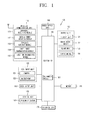
- FIG. 1 is a block diagram of a mobile terminal 100 according to an embodiment of the present invention.
- the mobile terminal 100 includes a wireless communication unit 110, an A/V (AudioNideo) input unit 120, a user input unit 130, a sensing unit 140, an output unit 150, a memory 160, an interface unit 170, a controller 180, and a power supply unit 190.
- FIG. 1 shows the mobile terminal 100 having various components, but it is understood that implementing all of the illustrated components is not a requirement. The mobile terminal 100 may be implemented by greater or fewer components.
- the wireless communication unit 110 typically includes one or more components allowing radio communication between the mobile terminal 100 and a wireless communication system or a network in which the mobile terminal is located.
- the wireless communication unit may include at least one of a broadcast receiving module 111, a mobile communication module 112, a wireless Internet module 113, a short-range communication module 114, and a location information module 115.
- the broadcast receiving module 111 receives broadcast signals and/or broadcast associated information from an external broadcast management server (or other network entity) via a broadcast channel.
- the broadcast channel may include a satellite channel and/or a terrestrial channel.
- the broadcast management server may be a server that generates and transmits a broadcast signal and/or broadcast associated information or a server that receives a previously generated broadcast signal and/or broadcast associated information and transmits the same to a terminal.
- the broadcast signal may include a TV broadcast signal, a radio broadcast signal, a data broadcast signal, and the like. Also, the broadcast signal may further include a broadcast signal combined with a TV or radio broadcast signal.
- the broadcast associated information may refer to information associated with a broadcast channel, a broadcast program or a broadcast service provider.
- the broadcast associated information may also be provided via a mobile communication network and, in this case, the broadcast associated information may be received by the mobile communication module 112.
- the broadcast signal may exist in various forms. For example, it may exist in the form of an electronic program guide (EPG) of digital multimedia broadcasting (DMB), electronic service guide (ESG) of digital video broadcast-handheld (DVB-H), and the like.
- EPG electronic program guide
- DMB digital multimedia broadcasting
- ESG electronic service guide
- DVB-H digital video broadcast-handheld
- the broadcast receiving module 111 may be configured to receive signals broadcast by using various types of broadcast systems.
- the broadcast receiving module 111 may receive a digital broadcast by using a digital broadcast system such as multimedia broadcasting-terrestrial (DMB-T), digital multimedia broadcasting-satellite (DMB-S), digital video broadcast-handheld (DVB-H), the data broadcasting system known as media forward link only (MediaFLO ® ), integrated services digital broadcast-terrestrial (ISDB-T), etc.
- the broadcast receiving module 111 may be configured to be suitable for every broadcast system that provides a broadcast signal as well as the above-mentioned digital broadcast systems.
- Broadcast signals and/or broadcast-associated information received via the broadcast receiving module 111 may be stored in the memory 160.
- the mobile communication module 112 transmits and/or receives radio signals to and/or from at least one of a base station, an external terminal and a server.
- radio signals may include a voice call signal, a video call signal or various types of data according to text and/or multimedia message transmission and/or reception.
- the mobile communication module 112 is configured to implement a video call mode and a voice call mode.
- the video call mode indicates a call performed while a user views another party
- the voice call mode indicates a call performed while a user does not view another party.
- the mobile communication module 112 is configured to transceive at least one of voice data and image data.
- the wireless Internet module 113 supports wireless Internet access for the mobile communication terminal. This module may be internally or externally coupled to the mobile terminal 100.
- a wireless local area network (WLAN), Wi-Fi, wireless broadband (WiBro), world interoperability for microwave access (WiMAX), high speed downlink packet access (HSDPA), and the like may be used.
- the short-range communication module 114 is a module for supporting short range communications.
- Some examples of short-range communication technology include Bluetooth TM , Radio Frequency IDentification (RFID), Infrared Data Association (IrDA), Ultra-WideBand (UWB), ZigBee TM , and the like.
- the location information module 115 is a module for acquiring a location (or position) of the mobile communication terminal.
- the location information module 115 may include a GPS (Global Positioning System) module.
- the AN input unit 120 is configured to receive an audio or video signal.
- the A/V input unit 120 may include a camera 121 and a microphone 122.
- the camera 121 processes image data of still pictures or video acquired by an image capture device in a video capturing mode or an image capturing mode.
- the processed image frames may be displayed on a display unit 151.
- the image frames processed by the camera 121 may be stored in the memory 160 or transmitted via the wireless communication unit 110. Two or more cameras 121 may be provided according to the configuration of the mobile communication terminal.
- the microphone 122 may receive sounds (audible data) via a microphone in a phone call mode, a recording mode, a voice recognition mode, and the like, and can process such sounds into audio data.
- the processed audio (voice) data may be converted for output into a format transmittable to a mobile communication base station via the mobile communication module 112 in case of the phone call mode.
- the microphone 122 may implement various types of noise canceling (or suppression) algorithms to cancel (or suppress) noise or interference generated in the course of receiving and transmitting audio signals.
- the user input unit 130 may generate key input data from commands entered by a user to control various operations of the mobile communication terminal.
- the user input unit 130 allows the user to enter various types of information, and may include a keypad, a dome switch, a touch pad (e.g., a touch sensitive member that detects changes in resistance, pressure, capacitance, etc. due to being contacted) a jog wheel, a jog switch, and the like.
- the sensing unit 140 detects a current status (or state) of the mobile terminal 100 such as an opened or closed state of the mobile terminal 100, a location of the mobile terminal 100, the presence or absence of a user's touch (contact) with the mobile terminal 100 (e.g., touch inputs), the orientation of the mobile terminal 100, an acceleration or deceleration movement and direction of the mobile terminal 100, etc., and generates commands or signals for controlling the operation of the mobile terminal 100.
- a current status (or state) of the mobile terminal 100 such as an opened or closed state of the mobile terminal 100, a location of the mobile terminal 100, the presence or absence of a user's touch (contact) with the mobile terminal 100 (e.g., touch inputs), the orientation of the mobile terminal 100, an acceleration or deceleration movement and direction of the mobile terminal 100, etc.
- a current status (or state) of the mobile terminal 100 such as an opened or closed state of the mobile terminal 100, a location of the mobile terminal 100, the presence or absence of a user's touch
- the output unit 150 is configured to provide outputs in a visual, audible, and/or tactile manner (e.g., audio signal, video signal, alarm signal, vibration signal, etc.).
- the output unit 150 may include the display unit 151, an audio output module 152, an alarm unit 153, a haptic module 154, and the like.
- the display unit 151 may display information processed in the mobile terminal 100. For example, when the mobile terminal 100 is in a phone call mode, the display unit 151 may display a User Interface (UI) or a Graphic User Interface (GUI) associated with a call.
- UI User Interface
- GUI Graphic User Interface
- the display unit 151 may function as both an input device and an output device.
- the display unit 151 may include at least one of a Liquid Crystal Display (LCD), a Thin Film Transistor-LCD (TFT-LCD), an Organic Light Emitting Diode (OLED) display, a flexible display, a three-dimensional (3D) display, and an e-ink display.
- LCD Liquid Crystal Display
- TFT-LCD Thin Film Transistor-LCD
- OLED Organic Light Emitting Diode
- flexible display a three-dimensional (3D) display
- 3D three-dimensional
- e-ink display e-ink display
- Some of these displays may be configured to be transparent so that outside may be seen therethrough, which may be referred to as a transparent display.
- a representative example of this transparent display may include a transparent organic light emitting diode (TOLED), etc.
- the rear surface of the display unit 151 may be transmissive. Under such configuration, a user can see an object located at rear side of the body through the display unit 151 of the body.
- the display unit 151 may be implemented in two or more in number according to a configured aspect of the mobile terminal 100. For instance, a plurality of displays may be arranged on one surface integrally or separately, or may be arranged on different surfaces.
- the display unit 151 and a touch sensitive sensor have a layered structure therebetween, the structure may be referred to as a touch screen.
- the display unit 151 may be used as an input device rather than an output device.
- the touch sensor may be implemented as a touch film, a touch sheet, a touch pad, and the like.
- the touch sensor may be configured to convert changes of a pressure applied to a specific part of the display unit 151, or a capacitance occurring from a specific part of the display unit 151, into electric input signals. Also, the touch sensor may be configured to sense not only a touched position and a touched area, but also a touch pressure.
- touch controller When touch inputs are sensed by the touch sensors, corresponding signals are transmitted to a touch controller (not shown).
- the touch controller processes the received signals, and then transmits corresponding data to the controller 180. Accordingly, the controller 180 may sense which region of the display unit 151 has been touched.
- a proximity sensor may be arranged at an inner region of the mobile terminal covered by the touch screen, or near the touch screen.
- the proximity sensor indicates a sensor to sense presence or absence of an object approaching to a surface to be sensed, or an object disposed near a surface to be sensed, by using an electromagnetic field or infrared rays without a mechanical contact.
- the proximity sensor has a longer lifespan and a more enhanced utility than a contact sensor.
- the proximity sensor may include a transmissive type photoelectric sensor, a direct reflective type photoelectric sensor, a mirror reflective type photoelectric sensor, a high-frequency oscillation proximity sensor, a capacitance type proximity sensor, a magnetic type proximity sensor, an infrared rays proximity sensor, and so on.
- a capacitance type proximity sensor When the touch screen is implemented as a capacitance type, proximity of a pointer to the touch screen is sensed by changes of an electromagnetic field.
- the touch screen may be categorized into a proximity sensor.
- recognition of the pointer positioned to be close to the touch screen without being contacted will be called a 'proximity touch'
- recognition of actual contacting of the pointer on the touch screen will be called a 'contact touch'.
- the pointer when the pointer is in the state of the proximity touch, it means that the pointer is positioned to correspond vertically to the touch screen.
- the proximity sensor detects a proximity touch and a proximity touch pattern (e.g., a proximity touch distance, a proximity touch speed, a proximity touch time, a proximity touch position, a proximity touch movement state, or the like), and information corresponding to the detected proximity touch operation and the proximity touch pattern can be outputted to the touch screen.
- a proximity touch and a proximity touch pattern e.g., a proximity touch distance, a proximity touch speed, a proximity touch time, a proximity touch position, a proximity touch movement state, or the like
- the audio output module 152 may output audio data received from the wireless communication unit 110 or stored in the memory 160 in a call signal reception mode, a call mode, a record mode, a voice recognition mode, a broadcast reception mode, and the like. Also, the audio output module 152 may provide audible outputs related to a particular function (e.g., a call signal reception sound, a message reception sound, etc.) performed in the mobile terminal 100.
- the audio output module 152 may include a receiver, a speaker, a buzzer, etc.
- the alarm unit 153 outputs a signal for informing about an occurrence of an event of the mobile terminal 100.
- Events generated in the mobile terminal may include call signal reception, message reception, key signal inputs, touch inputs, and the like.
- the alarm unit 153 may output not only video or audio signals, but also other types of signals such as signals notifying occurrence of events in a vibration manner.
- the video signal or audio signal may be outputted through the display unit 151 or the audio output module 152. Accordingly, the display unit 151 or the audio output module 152 may be categorized as part of the alarm unit 153.
- the haptic module 154 generates various tactile effects the user may feel.
- a typical example of the tactile effects generated by the haptic module 154 is vibration.
- the strength and pattern of the haptic module 154 can be controlled. For example, different vibrations may be combined to be outputted or sequentially outputted.
- the haptic module 154 may generate various other tactile effects such as an effect by stimulation such as a pin arrangement vertically moving with respect to a contact skin, a spray force or suction force of air through a jet orifice or a suction opening, a contact on the skin, a contact of an electrode, electrostatic force, etc., an effect by reproducing the sense of cold and warmth using an element that can absorb or generate heat.
- an effect by stimulation such as a pin arrangement vertically moving with respect to a contact skin, a spray force or suction force of air through a jet orifice or a suction opening, a contact on the skin, a contact of an electrode, electrostatic force, etc.
- the haptic module 154 may be implemented to allow the user to feel a tactile effect through a muscle sensation such as fingers or arm of the user, as well as transferring the tactile effect through a direct contact. Two or more haptic modules 154 may be provided according to the configuration of the mobile terminal 100.
- the memory 160 may store software programs used for the processing and controlling operations performed by the controller 180, or may temporarily store data (e.g., a map data, phonebook, messages, still images, video, etc.) that are inputted or outputted. Also, the memory 160 may store data relating to various patterns of vibrations and audio output upon the touch input on the touch screen.
- the memory 160 may be implemented using any type of suitable storage medium including a flash memory type, a hard disk type, a multimedia card micro type, a memory card type (e.g., SD or DX memory), Random Access Memory (RAM), Static Random Access Memory (SRAM), Read-Only Memory (ROM), Electrically Erasable Programmable Read-only Memory (EEPROM), Programmable Read-only Memory (PROM), magnetic memory, magnetic disk, optical disk, and the like.
- the mobile terminal 100 may operate a web storage which performs the storage function of the memory 160 on the Internet.
- the interface unit 170 may generally be implemented to interface the mobile terminal with external devices.
- the interface unit 170 may allow a data reception from an external device, a power delivery to each component in the mobile terminal 100, or a data transmission from the mobile terminal 100 to an external device.
- the interface unit 170 may include, for example, wired/wireless headset ports, external charger ports, wired/wireless data ports, memory card ports, ports for coupling devices having an identification module, audio Input/Output (I/O) ports, video I/O ports, earphone ports, and the like.
- I/O audio Input/Output
- the identification module may be configured as a chip for storing various information required to authenticate an authority to use the mobile terminal 100, which may include a User Identity Module (UIM), a Subscriber Identity Module (SIM), a Universal Subscriber Identity Module (USIM), and the like.
- the device having the identification module (hereinafter, referred to as 'identification device') may be implemented in a type of smart card. Hence, the identification device can be coupled to the mobile terminal 100 via a port.
- the interface unit 170 may serve as a path for power to be supplied from an external cradle to the mobile terminal 100 when the mobile terminal 100 is connected to the external cradle or as a path for transferring various command signals inputted from the cradle by a user to the mobile terminal 100.
- Such various command signals or power inputted from the cradle may operate as signals for recognizing that the mobile terminal 100 has accurately been mounted to the cradle.
- the controller 180 typically controls the overall operations of the mobile terminal 100. For example, the controller 180 performs the control and processing associated with telephony calls, data communications, video calls, and the like.
- the controller 180 may include a multimedia module 181 which provides multimedia playback.
- the multimedia module 181 may be configured as part of the controller 180 or as a separate component.
- the controller 180 can perform a pattern recognition processing so as to recognize writing or drawing input on the touch screen as text or image.
- the controlled 180 can execute a locked state for limiting a user's input of control commands with respect to applications. And, the controller 180 can control a locked screen displayed in the locked state, based on a touch input sensed by the display unit (hereinafter, will be referred to as 'touch screen' 151) in the locked state.
- 'touch screen' 151 a touch input sensed by the display unit
- the power supply unit 190 receives external power or internal power and supplies appropriate power required for operating respective elements and components under the control of the controller 180.
- the embodiments described herein may be implemented by using at least one of application specific integrated circuits (ASICs), digital signal processors (DSPs), digital signal processing devices (DSPDs), programmable logic devices (PLDs), field programmable gate arrays (FPGAs), processors, controllers, micro-controllers, microprocessors, electronic units designed to perform the functions described herein. In some cases, such embodiments may be implemented by the controller 180 itself.
- ASICs application specific integrated circuits
- DSPs digital signal processors
- DSPDs digital signal processing devices
- PLDs programmable logic devices
- FPGAs field programmable gate arrays
- processors controllers, micro-controllers, microprocessors, electronic units designed to perform the functions described herein.
- controller 180 itself.
- each software module may perform one or more functions or operations described herein.
- Software codes can be implemented by a software application written in any suitable programming language.
- the software codes may be stored in the memory 160 and executed by the controller 180.
- FIG. 2A is a front perspective view of the mobile terminal according to an embodiment of the present invention
- FIG. 2B is a rear perspective view of the mobile terminal of FIG. 2A according to an embodiment of the present invention
- the mobile terminal 100 is a bar type mobile terminal.
- the present disclosure is not limited to this, but may be applied to a slide type in which two or more bodies are coupled to each other so as to perform a relative motion, a folder type, or a swing type, a swivel type and the like.
- a body of the mobile terminal 100 has a front surface, side surfaces and a rear surface.
- the body has two ends in a lengthwise direction.
- a case (casing, housing, cover, etc.) forming an outer appearance of the body may include a front case 101 and a rear case 102.
- a space formed by the front case 101 and the rear case 102 may accommodate various components therein.
- At least one intermediate case may further be disposed between the front case 101 and the rear case 102.
- Such cases may be formed by injection-molded synthetic resin, or may be formed using a metallic material such as stainless steel (STS) or titanium (Ti).
- STS stainless steel
- Ti titanium
- At the front case 101 may be disposed a display unit 151, an audio output unit 152, a camera 121, user input units 130/131 and 132, a microphone 122, an interface unit 170, etc.
- the display unit 151 occupies most parts of a main surface of the front case 101.
- the audio output unit 152 and the camera 121 are arranged at a region adjacent to one end of the stereoscopic display unit 151, and the user input unit 131 and the microphone 122 are arranged at a region adjacent to another end of the display unit 151.
- the user input unit 131, the interface unit 170, etc. may be arranged on side surfaces of the front case 101 and the rear case 102.
- the microphone 122 is arranged on another end of the body.
- the user input unit 130 is manipulated to receive a command for controlling the operation of the mobile terminal 100, and may include a plurality of manipulation units 131 and 132.
- the manipulation units 131 and 132 may be referred to as manipulating portions, and may include any type of ones that can be manipulated in a user's tactile manner.
- Commands inputted through the first or second user input units 131 and 132 may be variously set.
- the first manipulation 131 is configured to input commands such as START, END, SCROLL or the like
- the second manipulation unit 132 is configured to input commands for controlling a level of sound outputted from the audio output unit 152, or commands for converting the current mode of the display unit 151 to a touch recognition mode.
- an audio output unit 152' may be additionally disposed at the rear case 102.
- the audio output unit 152' may implement a stereo function together with the audio output unit 152 (refer to FIG. 2A ), and may be used for calling in a speaker phone mode.
- a power supply unit 190 for supplying power to the mobile terminal 100 is mounted to the body.
- the power supply unit 190 may be mounted in the body, or may be detachably mounted to the body.
- a touch pad 135 for sensing touch may be additionally mounted to the rear case 102.
- the touch pad 135 may be formed to be light-transmissive.
- the display unit 151 is configured to output visual information from two surfaces thereof, the visual information can be recognized through the touch pad 135.
- the information output from the two surfaces can be controlled by the touch pad 135.
- a display may be additionally mounted to the touch pad 135, so that a touch screen can be disposed at the rear case 102.
- a camera 121' may be additionally provided on the rear case 102.
- the camera 121' faces a direction which is opposite to a direction faced by the camera 121 (refer to FIG. 2A ), and may have different pixels from those of the camera 121.
- the camera 121 may operate with relatively lower pixels (lower resolution). Thus, the camera 121 may be useful when a user can capture his face and send it to another party during a video call or the like.
- the camera 121' may operate with a relatively higher pixels (higher resolution) such that it can be useful for a user to obtain higher quality pictures for later use.
- the cameras 121 and 121' may be installed at the body so as to rotate or pop-up.
- a flash 123 and a mirror 124 may be additionally disposed adjacent to the camera 121'.
- the flash 123 operates in conjunction with the camera 121' when taking a picture using the camera 121'.
- the mirror 124 can cooperate with the camera 121' to allow a user to photograph himself in a self-portrait mode.
- An audio output unit 252' may be additionally arranged on a rear surface of the body.
- the audio output unit 252' (refer to FIG. 2A ) may cooperate with the audio output unit 252 (refer to FIG. 2A ) so as to implement a stereo function.
- the audio output unit may be configured to operate as a speakerphone.
- a power supply unit 190 for supplying power to the mobile terminal 100 is mounted to the body.
- the power supply unit 190 may be mounted in the body, or may be detachably mounted to the body.
- the touch pad 135 operates in association with the display unit 151 of the front case 101.
- the touch pad 135 may be disposed on the rear surface of the display unit 151 in parallel.
- the touch pad 135 may have a size equal to or smaller than that of the display unit 151.
- the control unit 180 of the mobile terminal may reproduce an image corresponding to moving picture data on the display unit 151, and extract image data for a specific objective included in the image.
- a user can separately watch an image for the specific objective, or can perform various functions using the image.
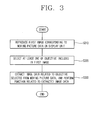
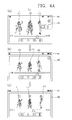
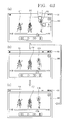
- a method for extracting image data for a specific objective in moving picture data will be described as an example with reference to FIGS. 3 , 4A and 4B .
- the control unit 180 reproduces, on the display unit 151, a first image corresponding to moving picture data selected by a user (S310).
- a control-based GUI e.g., a progress bar
- the control-based GUI may be output together with the first image corresponding to the moving picture data, or may be output according to a situation (e.g., a user's selection or control of the control unit 180).
- the moving picture data may be a file having extensions such as avi, wmv, mpg, divx, mp3, mov, flv, mp4 and wave, and various reproducible extensions.
- the moving picture data may be stored in the memory unit 160, may be downloaded through the wireless communication unit 110, or may be downloaded in real time.
- the image output on a reproduction region may include both a moving picture and a still image, and the moving picture is output during 'reproduction'.
- control unit 180 receives at least one of objectives included in the first image, selected by the user, in the state where the first image is reproduced (S320) (See FIG. 3 ).
- the 'objective 210' included in the first image may be an object or character displayed in the image (or first image) reproduced through the moving picture data. That is, the objective may be one component such as a person, animal or plant, which is included in the image, except a background of the image.
- the objective included in the first image may be selected through a touch input on the display unit 151.
- the touch input for selecting an objective in the image output on the display unit 151 may have a predetermined touch input.
- the touch input for selecting an objective may be various types of touch inputs such as a long-touch input, a multi-tap touch input, a drag touch input and a flick touch input for a specific objective.
- the touch input for selecting an objective may be a touch input having an arbitrary trace surrounding at least one portion of the objective. If a touch input having a trace is sensed, the control unit 180 may entirely select an objective 213a displayed in the region to which the touch input is applied as shown in FIG. 4B (b) , and may select only a region corresponding to the trace in an objective 213b displayed in the region to which the touch input is applied as shown in FIG. 4B (c) . In this case, the user may receive only image data corresponding to a desired portion.
- control unit 180 extracts image data related to the selected objective 213 from the moving picture data, and performs a function related to the extracted image data (S330) (See FIG. 3 ).
- the 'function related to the extracted image data' means that a second image corresponding to the extracted image data is reproduced, or that a specific function is performed using the extracted image data, such as transmission of the extracted image data to an external terminal.
- control unit 180 may perform a specific function using image data corresponding to the selected objective 213.
- control unit 180 may stop the reproduction of objectives 211 and 212 which are not selected from the objectives 211, 212 and 213 included in the image, and control the display unit 151 so that an image corresponding to the selected objective 213, i.e., only the extracted image is reproduced.
- control unit 180 may control the display unit 151 so that the second image corresponding to the extracted image data is reproduced, corresponding to the selection of the objective 213.
- control unit 180 can provide an image for the objective 213 in which the user is interested.
- the control unit 180 may automatically store the extracted image data in the memory 160, or may store the extracted image data, based on a control command generated under the user's selection.
- control unit 180 may receive at least one of objectives included in a still image even in the state in which the still image is corresponding to the moving picture data is output on the reproduction region in the mobile terminal according to the exemplary embodiment.
- the mobile terminal if at least one of the objectives included in the image corresponding to the moving picture data is selected, image data for the selected objective is extracted, and the extracted image data is produced, thereby providing an image for an objective that the user intends to watch in priority.
- FIG. 5 is a conceptual view illustrating a method for selecting a reproduction section of a selected object in the mobile terminal according to the exemplary embodiment.
- control unit 180 extracts image data related to the selected objective 213.
- the extracted image data related to the selected objective 213 may be image data of a portion to be reproduced from now on, image data of a portion which has been already reproduced, or image data including both the portions, based on the time when the objective 213 is selected. That is, the control unit 180 may determine a section in which the image data is to be extracted, according to a user's selection or information set basically.
- the control unit 180 may request the external server so that image data corresponding to the selected objective 213 can be transmitted earlier than that corresponding to other objectives. That is, in a case where the moving picture data is an image downloaded from the external server to be streaming-reproduced, the control unit 180 may previously receive a frame related to the selected objective in a predetermined range, transmitted from the external server, so that the selected objective can be tracked.
- the control unit 180 may control the wireless communication unit 110 so that the entire moving picture data, instead of only the image data corresponding to the selected objective 213, can be downloaded at a speed faster than that for downloading existing moving picture data.
- a popup window 320 may be output on the display unit 151 so that the reproduction section of the second image corresponding to the selected objective 213 can be selected.
- the user may arbitrarily select, through the popup window 320, a section in which the user intends to again watch the second image corresponding to the selected objective 213.
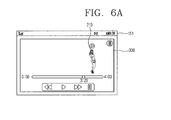
- FIGS. 6A to 6D are conceptual views illustrating a method for reproducing a selected object in the mobile terminal according to the exemplary embodiment.
- the second image corresponding to the selected objective may be reproduced.
- the user can separately receive an image for the selected objective.
- the control unit 180 may stop reproduction of other objectives except the selected objective (See FIG. 4A ), or may not display the other objectives on the display unit 151 as shown in FIG. 6 .
- the control unit 180 may display, on the display unit 151, only the objective 213 selected in the state in which the other objectives are not displayed, and may reproduce, on the display unit 151, only the objective 213 selected in the state in which the other objectives are not displayed together with a background image.
- control unit 180 may change visual attribute information of the selected objective 213 so that the objective 213 selected from the first image corresponding to the moving picture data is distinguished from one or more other objectives 211 and 212 except the objective 213 selected from the first image.
- control unit 180 may simultaneously display, on the display unit 180, the selected objective 213 and the one or more other objectives 211 and 212 except the selected objective 213.
- the selected objective 213 may be highlight-displayed.
- the method for highlighting the selected objective 213 may be performed in various manners including enlargement or reduction of the selected objective 213, change in color of the selected objective 213, display of flickering of the selected objective 213, change in transparency of the selected objective 213, etc.
- the one or more other objectives 211 and 212 except the selected objective 213 may be reproduced or stopped according to a user's selection or setting of the control unit 180.
- control unit 180 may control the display unit 151 so that the selected objective 213 is displayed as a three-dimensional stereoscopic image.
- the display unit 151 for outputting a three-dimensional stereoscopic image may be configured as a stereoscopic display unit for displaying a stereoscopic image.
- the stereoscopic image represents a three-dimensional stereoscopic image
- the three-dimensional stereoscopic image is an image that allows a user to feel the depth and reality of an object positioned on a monitor or screen, identically to those of a real space.
- the three-dimensional stereoscopic image is an image with which the user may feel a gradual depth and reality of a portion where an object is positioned on a monitor or screen in the same way as a real space.
- the three-dimensional stereoscopic image is implemented by using a binocular disparity.
- the binocular disparity refers to a parallax obtained by the positions of a user's two eyes away by about 65 millimeters from each other. When two eyes see mutually different 2D images, and the images then are transferred to the brain through a retina and merged, the user can feel the depth and reality of a three-dimensional stereoscopic image.
- the term "depth value” refers to an index that represents a difference in distance between objectives included in a three-dimensional stereoscopic image. More specifically, in a case where an objective displayed on the display unit 151 is seen in a two-dimensional shape by the user, the depth value of the objective may be defined as "0.” However, the depth value of an objective seen in a three-dimensional shape protruded to the outside of the mobile terminal 100, based on the screen of the display unit 151, may be defined as a negative number. On the other hand, the depth value of an objective seen in a three-dimensional shape recessed to the inside of the mobile terminal 100, based on the screen of the display unit 151, may be defined as a positive number.
- the absolute value of the depth value of the objective increases.
- the depth value of the objective increases.
- control unit 180 controls the display unit 151 so that the selected objective 213 has a depth value except zero, thereby distinguishing the selected objective from the other objectives 211 and 213.
- the control unit 180 changes visual attribute information of the selected objective 213 and a region adjacent to the selected objective 213, in the state in which the depth value of the selected objective 213 is maintained as zero, so as to obtain a visual effect that the selected objective 213 is seen as a three-dimensional stereoscopic image.
- the control unit 180 changes at least one of brightness and contrast of the selected objective 213 and the region adjacent to the selected objective 213, so that the selected objective 213 can be displayed as a three-dimensional stereoscopic image.
- a selected objective is displayed to be distinguished from other objectives, thereby providing a visual effect for the selected objective so that the user can concentrate on the selected objective.
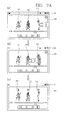
- FIGS. 7A to 7C are conceptual views illustrating a method for selecting a plurality of objectives in the mobile terminal according to the exemplary embodiment.
- control unit 180 may control the user to select a plurality of objectives 212 and 213 through a touch input from the one or more other objectives 211, 212 and 213 included in the image corresponding to the moving picture data.
- the touch input for selecting the plurality of objectives 212 and 213 may be various types of touch inputs as described above, and the plurality of objectives 212 and 213 may be simultaneously selected through a multi-tap touch input. After any one objective 213 of the plurality of objectives 212 and 213 is first selected, the other objective 212 may be then selected. In this case, the control unit 180, as shown in FIG. 7A (b) , may perform highlighting on the first selected objective 213 so as to inform the user that the first selected objective 213 exists.
- the control unit 180 may simultaneously reproduce images respectively corresponding to image data corresponding to the plurality of objectives 212 and 213.
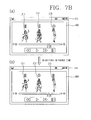
- the control unit 180 as shown in FIG. 7B (a) and (b) , may sequentially output the images respectively corresponding to the image data corresponding to the plurality of objectives 212 and 213, based on a predetermined reference.
- the predetermined reference may be an order in which the plurality of objectives 212 and 213 are selected or a production order separately set by the user.
- control unit 180 may first output an image corresponding to image data corresponding to any one objective 213 of the plurality of objectives 212 and 213, based on the order in which the plurality of objectives 212 and 213 are selected. In this case, the control unit 180 may stop the other objectives when the image corresponding to any one of the plurality of objectives 212 and 213. Meanwhile, the images respectively corresponding to the image data corresponding to the plurality of objectives 212 and 213 may be sequentially reproduced by a predetermined time.
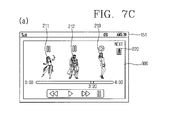
- the control unit 180 may provide information on an objective to be reproduced next to the currently reproduced objective 213.
- the control unit 180 may provide a thumbnail image for the next objective to be output, or may provided a preview image for the next objective to be output.
- the control unit 180 can control the user to simultaneously watch reproduction images for the plurality of objectives 212 and 213.
- images for the plurality of objectives in an image corresponding to reproduced or stopped moving picture data can be provided sequentially or at different times.
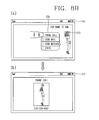
- FIGS. 8A and 8B are conceptual views illustrating a method for performing a function related to a selected objective in the mobile terminal according to the exemplary embodiment.
- the control unit 180 may provide an image corresponding to image data for the selected objective 213. Further, the control unit 180 may provide another function capable of using the image data for the selected objective 213. That is, if an objective in the image is selected by the user, the control unit 180 may search for at least one function which can be performed related to the selected objective 213 (See FIG. 8A (a) ).
- the at least one function may be a function, such as e-mail transmission, message transmission, call transmission, storage or upload to the external server, using image data extracted related to the selected objective, or a function using contact address information corresponding to the selected objective 213.
- control unit 180 may output, on the display unit 151, one or more graphic images 230 (or icons) respectively corresponding to the searched functions so as to receive at least one of the searched functions, selected by the user.
- the control unit 180 may output, on the display unit 151, an execution screen 310 of the function corresponding to the selected graphic image (e.g., a graphic image corresponding to "message transmission" as shown in FIG. 8A (a) ).
- the control unit 180 may reproduce image data for the selected objective 213 in one region 320 on the display unit 151.
- control unit 180 may automatically attach the image data for the selected objective.
- control unit 180 may search for contact address information a person corresponding to the selected objective 213, using a face recognition algorithm.
- the control unit 180 may provide functions capable of using the searched contact address information. For example, if a function "phone call" is selected from the graphic images 230 respectively corresponding to the functions capable of using the searched contact address information as shown FIG. 8B (a) , the control unit 180 may perform the function "phone call" by setting the searched contact address information as a recipient. In this case, as shown in FIG. 8B (b) , the image corresponding to the selected objective 213 may be reproduced on a transmission screen.
- an image for a selected objective is reproduced, and various functions capable of using the image corresponding to the selected objective are also provided, so that the user can reduce inconvenience in selecting a function related to the selected objective in a separate menu.
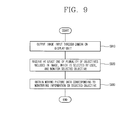
- FIG. 9 is a flowchart illustrating a control method for a mobile terminal according to another exemplary embodiment.
- FIGS. 10 and 11 are conceptual views illustrating the control method described in FIG. 9 .
- FIG. 12 is a conceptual view illustrating a control method based on the movement of a selected objective in the mobile terminal according to the exemplary embodiment.
- the control unit 180 in a case where a camera function is performed, the control unit 180 outputs an image input through the camera on the display unit 151 (S910). If at least one of a plurality of objectives included in the image is selected by a user, the control unit 180 monitors the selected objective (S920). The control unit 180 may control a focus about the selected objective so as to monitor the selected objective. The control unit 180 may separately provide an image for the selected objective in one region on the display unit 151. The control unit 180 may control the magnification of a lens about the selected objective. Although a user's control command is not applied, the control unit 180 may store the image for the selected objective at a predetermined interval.
- the control unit 180 obtains moving picture data corresponding to monitoring information on the selected objective (S930).
- the section of the obtained moving picture data may be changed, based on a user's selection or information set basically.
- the control unit 180 obtains the moving picture data corresponding to the objective selected by the user, so as to provide the user with information on the objective in which the user is interested.
- the control unit 180 monitors the specific objective 210.
- the control unit 180 as shown in FIGS. 10 (b) and (c) , continuously maintains a focus on the specific objective 210, thereby monitoring the specific objective 210.
- control unit 180 may visually distinguish the selected objective 210 from one or more other objectives included in the image.
- the method for visually distinguishing the selected objective 210 from the one or more other objectives included in the image is identical to that described with reference to FIGS. 6A to 6D , and therefore, its detailed description will be omitted.
- the control unit 180 may output alarm information for informing the user that the selected objective 210 has been out of the view of the camera, using at least one of a visual method (e.g., a popup window), an auditory method (e.g., a voice) and a haptic method (e.g., a vibration).
- a visual method e.g., a popup window
- an auditory method e.g., a voice
- a haptic method e.g., a vibration
- the control unit 180 controls the lens of the camera, so that the selected objective 210 can be continuously monitored. In this case, the control unit 180 may not output the alarm information.
- the embodiments applied to the objective selected from the image for the moving picture data can be identically applied to the objective selected from the image input through the camera.
- a specific objective selected by the user can be monitored in an image input through the camera.
- the user can receive information on the specific objective, regardless of the presence of photographing the image input through the camera.
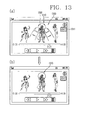
- FIG. 13 is a conceptual view showing a method for editing an image in a mobile terminal according to an embodiment of the present invention.
- FIG. 13 is a conceptual view showing a method for editing an image in a mobile terminal according to an embodiment of the present invention.
- an edition function with respect to an image corresponding to moving image data. For instance, while a moving image corresponding to moving image data is being played, or in a state where a still image has been output to the display 151 as the playing of the moving image is stopped, the controller 180 may activate an edition mode for editing an image corresponding to the moving image data, based on an applied control command.
- the controller 180 may stop the playing of the moving image, and output a till image to the display 151.
- the still image may be an image output to the display 151 at a time point when the control command has been applied.
- a control command for activating an edition mode may be applied, based on a touch input with respect to a function icon 1311 for activating an edition mode.
- the edition mode indicates a mode for extracting at least part of an image corresponding to moving image data.
- at least part of a still image may be selected, in a state where the still image has been output to the display 151.
- At least part of a still image may be selected, based on a touch input with respect to the display 151. For instance, a user may select part 1310 of a still image by touching the display 151.
- the controller 180 may display the selected at least part 1320( FIG. 13B ) in a recognizable manner by a user.
- the controller 180 may change the position of the at least part 1320, or the selected scope based on a user's selection.
- the controller 180 may output various shapes (e.g., triangle, quadrangle, pentagon, circle, etc.) for specifying at least part of an output image 1300. Accordingly, a user may select the image 1300 output to the display, using at least one of the various shapes. For instance, a user may select a desired shape among the various shapes, and then locate the selected shape to part to be selected from an image, thereby selecting at least part of the image in correspondence to the selected shape.
- various shapes e.g., triangle, quadrangle, pentagon, circle, etc.
- the controller 180 may select an object output to the image. That is, if at least part of the image 1300 to which an object 1330 has been output is selected, the controller 180 may determine that at least the object 1330 has been selected.
- a touch input for selecting an object may include various types of touch inputs, such as a long touch input, a multi tap touch input, a drag touch input and a flick touch input with respect to a specific object.
- the touch input for selecting an object may be a touch input having any orbit which encloses at least part of the object 1330. Once such touch input having an orbit is sensed, the controller 180 may wholly select the object 1330 displayed on a region to which the touch input has been applied.
- the controller 180 may extract image data with respect to the selected at least part, and may perform a function associated with the extracted image data.
- the function associated with the extracted image data means performing a specific function using an extracted image, e.g., storing an extracted image corresponding to extracted image data in the memory 160, or copying the extracted image, or transmitting to an external terminal.
- the controller 180 may automatically perform a copy function with respect to the extracted image, even though a control command is not applied from a user. That is, the controller 180 may temporarily store the extracted image in the memory 160. Accordingly, a user may immediately utilize the extracted image, on other application rather than an application corresponding to a moving image playing function, e.g., a memo function application. That is, if a control command corresponding to a 'paste' function is applied on other application, the controller 180 may output the extracted image on an execution screen (or graphic user interface: GUI) corresponding to said other application, so that the extracted image can be utilized on said other application.
- GUI graphic user interface
- the controller 180 may pop-up the extracted image on part of the display 151.
- the extracted image may be continuously output to the display 151, even if the moving image function application is ended.
- the controller 180 may terminate the pop-up of the extracted image based on a user's selection. If other application is executed in a state where the extracted image has popped-up, the controller 180 may control the extracted image to be utilized on said other application, based on a user's selection.
- an edition function with respect to an image corresponding to moving image data is provided. This can allow more various functions to be provided.
- image data for an objective selected by the user is extracted from moving picture data, and the extracted image data is provided to the user, so that the user can separately receive information on the selected objective.
- the aforementioned method can be embodied as computer readable codes on a computer-readable recording medium.
- the computer readable recording medium include a ROM, RAM, CD-ROM, magnetic tapes, floppy disks, optical data storage devices, and carrier waves (such as data transmission through the Internet).
Landscapes
- Engineering & Computer Science (AREA)
- Theoretical Computer Science (AREA)
- General Engineering & Computer Science (AREA)
- Physics & Mathematics (AREA)
- General Physics & Mathematics (AREA)
- Human Computer Interaction (AREA)
- Computer Hardware Design (AREA)
- Signal Processing (AREA)
- Computer Networks & Wireless Communication (AREA)
- Multimedia (AREA)
- Telephone Function (AREA)
- User Interface Of Digital Computer (AREA)
Applications Claiming Priority (1)
| Application Number | Priority Date | Filing Date | Title |
|---|---|---|---|
| KR1020120087454A KR101917695B1 (ko) | 2012-08-09 | 2012-08-09 | 이동 단말기 및 그것의 제어방법 |
Publications (2)
| Publication Number | Publication Date |
|---|---|
| EP2696278A2 true EP2696278A2 (fr) | 2014-02-12 |
| EP2696278A3 EP2696278A3 (fr) | 2015-04-15 |
Family
ID=48628228
Family Applications (1)
| Application Number | Title | Priority Date | Filing Date |
|---|---|---|---|
| EP13002587.7A Withdrawn EP2696278A3 (fr) | 2012-08-09 | 2013-05-16 | Terminal mobile et son procédé de contrôle |
Country Status (4)
| Country | Link |
|---|---|
| US (1) | US20140047340A1 (fr) |
| EP (1) | EP2696278A3 (fr) |
| KR (1) | KR101917695B1 (fr) |
| CN (1) | CN103581425B (fr) |
Families Citing this family (9)
| Publication number | Priority date | Publication date | Assignee | Title |
|---|---|---|---|---|
| USD769271S1 (en) * | 2013-04-05 | 2016-10-18 | Thales Avionics, Inc. | Display screen or portion thereof with graphical user interface |
| USD757762S1 (en) * | 2013-04-05 | 2016-05-31 | Thales Avionics, Inc. | Display screen or portion thereof with graphical user interface |
| USD752077S1 (en) * | 2013-10-03 | 2016-03-22 | Thales Avionics, Inc. | Display screen or portion thereof with graphical user interface |
| TWI566576B (zh) * | 2014-06-03 | 2017-01-11 | 宏碁股份有限公司 | 立體影像合成方法及裝置 |
| KR102146858B1 (ko) | 2014-06-03 | 2020-08-21 | 삼성전자주식회사 | 촬영 장치 및 촬영 장치의 비디오 생성방법 |
| DK180470B1 (en) | 2017-08-31 | 2021-05-06 | Apple Inc | Systems, procedures, and graphical user interfaces for interacting with augmented and virtual reality environments |
| DK201870349A1 (en) * | 2018-01-24 | 2019-10-23 | Apple Inc. | Devices, Methods, and Graphical User Interfaces for System-Wide Behavior for 3D Models |
| KR102558363B1 (ko) * | 2018-08-08 | 2023-07-21 | 삼성전자주식회사 | 동적 이미지를 처리하는 방법 및 그 전자 장치 |
| WO2023092375A1 (fr) * | 2021-11-25 | 2023-06-01 | Citrix Systems, Inc. | Dispositif informatique à arrière-plan en direct et procédé associé |
Family Cites Families (10)
| Publication number | Priority date | Publication date | Assignee | Title |
|---|---|---|---|---|
| US4400075A (en) * | 1980-09-10 | 1983-08-23 | Asahi Kogaku Kogyo Kabushiki Kaisha | Automatic focus camera with interchangeable lens |
| JP2000357234A (ja) * | 1999-06-16 | 2000-12-26 | Canon Inc | 画像処理装置およびその方法 |
| US7206029B2 (en) * | 2000-12-15 | 2007-04-17 | Koninklijke Philips Electronics N.V. | Picture-in-picture repositioning and/or resizing based on video content analysis |
| JP2004312495A (ja) * | 2003-04-09 | 2004-11-04 | Fuji Photo Film Co Ltd | 画像処理プログラム及び画像処理装置 |
| US20060087556A1 (en) * | 2004-10-21 | 2006-04-27 | Kazunari Era | Stereoscopic image display device |
| JP4541316B2 (ja) * | 2006-04-06 | 2010-09-08 | 三菱電機株式会社 | 映像監視検索システム |
| JP2008250654A (ja) * | 2007-03-30 | 2008-10-16 | Alpine Electronics Inc | ビデオプレイヤ及びビデオ再生制御方法 |
| KR101009881B1 (ko) * | 2008-07-30 | 2011-01-19 | 삼성전자주식회사 | 재생되는 영상의 타겟 영역을 확대 디스플레이하기 위한장치 및 방법 |
| KR101529923B1 (ko) * | 2008-12-02 | 2015-06-18 | 엘지전자 주식회사 | 영상표시장치 및 영상표시장치의 영상검색방법 |
| US8788434B2 (en) * | 2010-10-28 | 2014-07-22 | Google Inc. | Search with joint image-audio queries |
-
2012
- 2012-08-09 KR KR1020120087454A patent/KR101917695B1/ko not_active Expired - Fee Related
-
2013
- 2013-05-10 US US13/892,211 patent/US20140047340A1/en not_active Abandoned
- 2013-05-16 EP EP13002587.7A patent/EP2696278A3/fr not_active Withdrawn
- 2013-06-27 CN CN201310261914.9A patent/CN103581425B/zh not_active Expired - Fee Related
Non-Patent Citations (1)
| Title |
|---|
| None |
Also Published As
| Publication number | Publication date |
|---|---|
| US20140047340A1 (en) | 2014-02-13 |
| CN103581425B (zh) | 2017-12-05 |
| CN103581425A (zh) | 2014-02-12 |
| KR20140020577A (ko) | 2014-02-19 |
| EP2696278A3 (fr) | 2015-04-15 |
| KR101917695B1 (ko) | 2018-11-13 |
Similar Documents
| Publication | Publication Date | Title |
|---|---|---|
| US10015308B2 (en) | Mobile terminal and method of controlling the same | |
| EP2696278A2 (fr) | Terminal mobile et son procédé de contrôle | |
| US9354788B2 (en) | Mobile terminal and control method thereof | |
| US10241743B2 (en) | Mobile terminal for matching displayed text with recorded external audio and method of controlling the mobile terminal | |
| KR102145190B1 (ko) | 이동 단말기 및 이의 제어 방법 | |
| US9729781B2 (en) | Mobile terminal and controlling method thereof | |
| EP2887641B1 (fr) | Terminal mobile et procédé de contrôle du terminal mobile | |
| US20110138336A1 (en) | Method for displaying broadcasting data and mobile terminal thereof | |
| US20140063313A1 (en) | Mobile device and control method for the same | |
| US20180107360A1 (en) | Mobile terminal and method for controlling the same | |
| KR102131828B1 (ko) | 휴대 단말기 및 그 제어 방법 | |
| KR20140033896A (ko) | 이동 단말기 및 이동 단말기의 제어 방법 | |
| KR20150042574A (ko) | 이동 단말기 및 그 제어방법 | |
| US9501139B2 (en) | Mobile terminal and control method for the mobile terminal | |
| KR20130063310A (ko) | 이동 단말기 및 이의 제어방법 | |
| KR101882277B1 (ko) | 이동 단말기 및 그 제어방법 | |
| KR20150055448A (ko) | 이동 단말기 및 그것의 제어방법 | |
| KR20100120982A (ko) | 이동 단말기 및 그 제어 방법 | |
| KR20120122314A (ko) | 이동단말기 및 이의 제어방법 | |
| KR20150068823A (ko) | 이동 단말기 | |
| KR20140133130A (ko) | 이동 단말기 및 그것의 제어방법 | |
| KR102040613B1 (ko) | 휴대 단말기 및 그 제어 방법 | |
| KR20150047387A (ko) | 단말기 및 그 제어 방법 | |
| KR20140140752A (ko) | 단말기 및 그 제어 방법 |
Legal Events
| Date | Code | Title | Description |
|---|---|---|---|
| AK | Designated contracting states |
Kind code of ref document: A2 Designated state(s): AL AT BE BG CH CY CZ DE DK EE ES FI FR GB GR HR HU IE IS IT LI LT LU LV MC MK MT NL NO PL PT RO RS SE SI SK SM TR |
|
| AX | Request for extension of the european patent |
Extension state: BA ME |
|
| PUAI | Public reference made under article 153(3) epc to a published international application that has entered the european phase |
Free format text: ORIGINAL CODE: 0009012 |
|
| PUAL | Search report despatched |
Free format text: ORIGINAL CODE: 0009013 |
|
| AK | Designated contracting states |
Kind code of ref document: A3 Designated state(s): AL AT BE BG CH CY CZ DE DK EE ES FI FR GB GR HR HU IE IS IT LI LT LU LV MC MK MT NL NO PL PT RO RS SE SI SK SM TR |
|
| AX | Request for extension of the european patent |
Extension state: BA ME |
|
| RIC1 | Information provided on ipc code assigned before grant |
Ipc: G09G 5/14 20060101ALI20150309BHEP Ipc: G06F 3/147 20060101AFI20150309BHEP |
|
| 17P | Request for examination filed |
Effective date: 20150717 |
|
| RBV | Designated contracting states (corrected) |
Designated state(s): AL AT BE BG CH CY CZ DE DK EE ES FI FR GB GR HR HU IE IS IT LI LT LU LV MC MK MT NL NO PL PT RO RS SE SI SK SM TR |
|
| STAA | Information on the status of an ep patent application or granted ep patent |
Free format text: STATUS: EXAMINATION IS IN PROGRESS |
|
| 17Q | First examination report despatched |
Effective date: 20180629 |
|
| STAA | Information on the status of an ep patent application or granted ep patent |
Free format text: STATUS: THE APPLICATION IS DEEMED TO BE WITHDRAWN |
|
| 18D | Application deemed to be withdrawn |
Effective date: 20201201 |