EP2696328A2 - Procédé et système d'affichage d'interface utilisateur graphique - Google Patents
Procédé et système d'affichage d'interface utilisateur graphique Download PDFInfo
- Publication number
- EP2696328A2 EP2696328A2 EP13179729.2A EP13179729A EP2696328A2 EP 2696328 A2 EP2696328 A2 EP 2696328A2 EP 13179729 A EP13179729 A EP 13179729A EP 2696328 A2 EP2696328 A2 EP 2696328A2
- Authority
- EP
- European Patent Office
- Prior art keywords
- gui
- image
- chroma key
- state
- input
- Prior art date
- Legal status (The legal status is an assumption and is not a legal conclusion. Google has not performed a legal analysis and makes no representation as to the accuracy of the status listed.)
- Ceased
Links
Images







Classifications
-
- G—PHYSICS
- G06—COMPUTING OR CALCULATING; COUNTING
- G06F—ELECTRIC DIGITAL DATA PROCESSING
- G06F3/00—Input arrangements for transferring data to be processed into a form capable of being handled by the computer; Output arrangements for transferring data from processing unit to output unit, e.g. interface arrangements
- G06F3/01—Input arrangements or combined input and output arrangements for interaction between user and computer
- G06F3/048—Interaction techniques based on graphical user interfaces [GUI]
- G06F3/0481—Interaction techniques based on graphical user interfaces [GUI] based on specific properties of the displayed interaction object or a metaphor-based environment, e.g. interaction with desktop elements like windows or icons, or assisted by a cursor's changing behaviour or appearance
- G06F3/04817—Interaction techniques based on graphical user interfaces [GUI] based on specific properties of the displayed interaction object or a metaphor-based environment, e.g. interaction with desktop elements like windows or icons, or assisted by a cursor's changing behaviour or appearance using icons
-
- G—PHYSICS
- G06—COMPUTING OR CALCULATING; COUNTING
- G06F—ELECTRIC DIGITAL DATA PROCESSING
- G06F3/00—Input arrangements for transferring data to be processed into a form capable of being handled by the computer; Output arrangements for transferring data from processing unit to output unit, e.g. interface arrangements
- G06F3/01—Input arrangements or combined input and output arrangements for interaction between user and computer
- G06F3/048—Interaction techniques based on graphical user interfaces [GUI]
-
- G—PHYSICS
- G06—COMPUTING OR CALCULATING; COUNTING
- G06F—ELECTRIC DIGITAL DATA PROCESSING
- G06F3/00—Input arrangements for transferring data to be processed into a form capable of being handled by the computer; Output arrangements for transferring data from processing unit to output unit, e.g. interface arrangements
- G06F3/01—Input arrangements or combined input and output arrangements for interaction between user and computer
- G06F3/048—Interaction techniques based on graphical user interfaces [GUI]
- G06F3/0487—Interaction techniques based on graphical user interfaces [GUI] using specific features provided by the input device, e.g. functions controlled by the rotation of a mouse with dual sensing arrangements, or of the nature of the input device, e.g. tap gestures based on pressure sensed by a digitiser
- G06F3/0488—Interaction techniques based on graphical user interfaces [GUI] using specific features provided by the input device, e.g. functions controlled by the rotation of a mouse with dual sensing arrangements, or of the nature of the input device, e.g. tap gestures based on pressure sensed by a digitiser using a touch-screen or digitiser, e.g. input of commands through traced gestures
- G06F3/04886—Interaction techniques based on graphical user interfaces [GUI] using specific features provided by the input device, e.g. functions controlled by the rotation of a mouse with dual sensing arrangements, or of the nature of the input device, e.g. tap gestures based on pressure sensed by a digitiser using a touch-screen or digitiser, e.g. input of commands through traced gestures by partitioning the display area of the touch-screen or the surface of the digitising tablet into independently controllable areas, e.g. virtual keyboards or menus
-
- G—PHYSICS
- G06—COMPUTING OR CALCULATING; COUNTING
- G06F—ELECTRIC DIGITAL DATA PROCESSING
- G06F3/00—Input arrangements for transferring data to be processed into a form capable of being handled by the computer; Output arrangements for transferring data from processing unit to output unit, e.g. interface arrangements
- G06F3/14—Digital output to display device ; Cooperation and interconnection of the display device with other functional units
-
- G—PHYSICS
- G06—COMPUTING OR CALCULATING; COUNTING
- G06T—IMAGE DATA PROCESSING OR GENERATION, IN GENERAL
- G06T11/00—Two-dimensional [2D] image generation
- G06T11/10—Texturing; Colouring; Generation of textures or colours
-
- G—PHYSICS
- G09—EDUCATION; CRYPTOGRAPHY; DISPLAY; ADVERTISING; SEALS
- G09G—ARRANGEMENTS OR CIRCUITS FOR CONTROL OF INDICATING DEVICES USING STATIC MEANS TO PRESENT VARIABLE INFORMATION
- G09G5/00—Control arrangements or circuits for visual indicators common to cathode-ray tube indicators and other visual indicators
-
- G—PHYSICS
- G09—EDUCATION; CRYPTOGRAPHY; DISPLAY; ADVERTISING; SEALS
- G09G—ARRANGEMENTS OR CIRCUITS FOR CONTROL OF INDICATING DEVICES USING STATIC MEANS TO PRESENT VARIABLE INFORMATION
- G09G5/00—Control arrangements or circuits for visual indicators common to cathode-ray tube indicators and other visual indicators
- G09G5/02—Control arrangements or circuits for visual indicators common to cathode-ray tube indicators and other visual indicators characterised by the way in which colour is displayed
- G09G5/024—Control arrangements or circuits for visual indicators common to cathode-ray tube indicators and other visual indicators characterised by the way in which colour is displayed using colour registers, e.g. to control background, foreground, surface filling
Definitions
- This invention relates to a system and method that displays graphic user interface (GUI) in a variety of states by combining image effect to enhance user experience.
- GUI graphic user interface
- GUIs include various types of menus and images, e.g., windows, scroll bars, icons, control buttons, etc., compared to the traditional DOS command interfaces.
- GUIs e.g., a normal state, a clicked state, a selected state, an enabled state, and a disenabled state
- conventional electronic devices store images corresponding to the states of respective GUIs in a memory for display the respective state of a GUI during operation.
- GUI display methods are disadvantageous in that the limited memory capacity is unnecessarily wasted with GUI images, thus reducing the memory capacity and deteriorates the performance of the electronic devices.
- Conventional GUI display methods also require too many image sources which in turn makes it difficult to operate and manage GUIs.
- GUI graphic user interface
- the invention further provides a GUI display system and method for providing texture or cubic effects by applying effect images corresponding to GUI states to chroma key images.
- a graphic user interface (GUI) display method includes: loading a chroma key image of a certain shape for a GUI; applying a color code corresponding to the GUI to the chroma key image; creating a GUI image by combining an effect image corresponding to the GUI with the chroma key image to which the color code is applied; and displaying the GUI image.
- GUI graphic user interface
- a graphic user interface (GUI) display system includes: a display unit for displaying one or more GUIs; and a controller for: loading a chroma key image of a certain shape for the GUI; applying a color code corresponding to the GUI to the chroma key image; creating a GUI image by combining an effect image corresponding to the GUI with the chroma key image to which the color code is applied; and controlling the display unit to display the GUI image.
- GUI graphic user interface
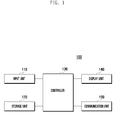
- FIG. 1 illustrates a schematic block diagram of a GUI display system according to an embodiment of the invention.
- the GUI display system 100 includes an input unit 110, a storage unit 120, a controller 130, and a display unit 140.
- the input unit 110 creates control signals according to the user's inputs.
- the input unit 110 may be implemented with a keypad, a dome switch, a jog wheel, a jog switch, etc.
- the input unit 110 may include a touch sensor, a pressure sensor, a proximity sensor, an electromagnetic sensor, etc.
- the input unit 110 may also be implemented with various types of pads, e.g., a touch pad (of resistive/capacitive type), Electro Magnetic Resonance (EMR) pad, Electro Magnetic Interface (EMI) pad, etc.
- EMR Electro Magnetic Resonance
- EMI Electro Magnetic Interface
- the input unit 110 senses, via sensors, user's inputs using a variety of objects, such as the user's body (e.g., hand), a physical tool (e.g., a stylus pen), etc. Further, the input unit 110 may be configured with a number of pads that are multi-layered. Alternatively, the input unit 110 and the display unit 140 may be configured in a layered structure, i.e., a touch screen.
- objects such as the user's body (e.g., hand), a physical tool (e.g., a stylus pen), etc.
- the input unit 110 may be configured with a number of pads that are multi-layered.
- the input unit 110 and the display unit 140 may be configured in a layered structure, i.e., a touch screen.
- the input unit 110 senses a user's input applied to one or more GUIs. Examples of the user's input are a press gesture, a drag gesture, a flick gesture, etc. In addition, the input unit 110 can also sense multi-points input by a number of input tools or touches.
- the storage unit 120 stores commands or programs related to the GUI display system 100.
- the controller 130 executes the commands and the commands stored in the storage unit 120.
- the storage unit 120 may be implemented with a flash memory type, a hard disk type, a multimedia card micro type, a card type of memory (e.g., SD, XD, etc.), a Random Access Memory (RAM), a Static Random Access Memory (SRAM), a Read-Only Memory (ROM), Electrically Erase Programmable Read-Only Memory (EEPROM), a Programmable Read-Only Memory (PROM), a magnetic memory, a magnetic disk, an optical disk, etc.
- a flash memory type e.g., SD, XD, etc.
- RAM Random Access Memory
- SRAM Static Random Access Memory
- ROM Read-Only Memory
- EEPROM Electrically Erase Programmable Read-Only Memory
- PROM Programmable Read-Only Memory
- the storage unit 120 stores one or more GUIs and/or images to create GUIs.
- the storage unit 120 also stores effect images, color codes, chroma key images corresponding to GUIs, etc.
- the storage unit 120 also stores information regarding GUIs corresponding to user's inputs, or the operations, functions, and states of the GUI display system 100.
- the storage unit 120 may temporarily or permanently store GUIs created by the controller 130.
- the controller 130 controls the entire operation of the GUI display system 100.
- the controller 130 controls the components to display GUIs on the GUI display system 100.
- the controller 130 performs the control operations to display GUIs corresponding to user's inputs, or the operations, functions, and states of the GUI display system 100.
- the controller 130 loads a chroma key image of a certain shape or form for GUI, and applies a color code corresponding to the GUI to the chroma key image. That is, the controller 130 applies a color code to a chroma key image, where the color code refers to a code according to one of an RGB value, a hex code, and a color value of a palette provided by a mobile device, corresponding to a state, type, etc., of a GUI.
- the controller 130 combines an effect image corresponding to a GUI with a chroma key image.
- the effect image may be an effect corresponding to a state of the GUI, including at least one of a normal state, a clicked state, a selected state, an enabled state, and a disenabled state.
- the effect image may correspond to at least one of a texture effect or a cubic effect according to shadow.
- the controller 130 controls the display unit 140 to display a GUI image that is created on a chroma key image by applying a color code thereto.
- the controller 130 can control the display unit 140 to display GUIs, by successively altering the color code or effect image according to time, use frequency, preference, importance, etc. or according to a user's input. A detailed operation of the controller 130 will be provided later referring to the accompanying drawings.
- the display unit 140 displays information processed in the GUI display system 100.
- the display unit 140 displays user interface (UI) or graphic user interface (GUI) related to the control operations of the GUI display system 100.
- UI user interface
- GUI graphic user interface
- the display unit 140 may be implemented with a flat display panel, such as a Liquid Crystal Display (LCD), a Thin Film Transistor-liquid crystal display (TFT LCD), Organic Light Emitting Diodes (OLEDs), a flexible display, a three- dimensional (3D) display, or the like.
- a flat display panel such as a Liquid Crystal Display (LCD), a Thin Film Transistor-liquid crystal display (TFT LCD), Organic Light Emitting Diodes (OLEDs), a flexible display, a three- dimensional (3D) display, or the like.
- the display unit 140 may be configured with the touch sensors to serve as a touch screen. That is, the display unit 140 may be implemented with a display panel combined with touch sensors, e.g., a TSP panel. Here, the display unit 140 of a touch screen also serves as an input device.
- the display unit 140 can display one or more GUIs.
- the display unit 140 can also display GUI images created under the control of the controller 130.
- the display unit 140 can also display GUI images by successively altering the colors under the control of the controller 130.
- the GUI display system 100 may further include a communication unit 150.
- the communication unit 150 performs data communication with external systems, in a wired mode or a wireless mode such as RF communication or short-range communication, for example.
- RF communication may be Wireless LAN (WLAN), Wi-Fi, Wireless broadband (Wibro), World Interoperability for Microwave Access (Wimax), High Speed Downlink Packet Access (HSDPA), etc.
- Short-range RF communication may be Bluetooth, Radio Frequency Identification (RFID0, Infrared Data Association (IrDA), Ultra Wideband (UWB), Zigbee, etc.
- Wired short range communication may be Universal Serial Bus (USB), IEEE 1394, Thunderbolt TM of Intel, etc.
- the communication unit 150 may include one or more communication modules for Bluetooth, Zigbee, UWB, Wireless USB, Near Field Communication (NFC), Wireless LAN, etc.
- the communication unit 150 receives a chroma key image for GUI, an effect image, a previously created GUI image, etc. from the external systems.
- the communication unit 150 may receive a color code according to an RGB value and a hex code from the external system or a palette including values for one or more colors.
- GUI display system 100 shown in FIG. 1 may further include other components or omit some parts of them according to the necessary functions desired in the system.
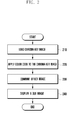
- FIG. 2 illustrates a flow chart that describes a method for displaying a GUI according to an embodiment of the invention.
- the GUI display system 100 loads a chroma key image (210).
- the chroma key image has a certain shape for a GUI. Examples of a GUI are a dial image, a keyboard, an icon, a control button, a scroll bar or an indicator bar.
- Chroma keying refers to a technique that combines two images so that a first image is superimposed on a second image based on color hues, where the second image serves as a chroma key image, i.e., a background image.
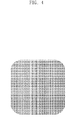
- Chroma key images may have in general colors complementary to those of images to be combined (superimposed), and alternatively patterns, e.g., a check pattern as shown in FIG. 3 .
- the chroma key image serves as a background layer to create GUI images, and is removed after GUI images are created.
- the GUI display system 100 loads a chroma key image layer of a certain shape in order to create a GUI image. It is preferable that a chroma key image is shaped to correspond to the shape of GUI image. For example, if a GUI image is shaped as a curved rectangle, the chroma key image may be designed in the same shape as the GUI image as shown in FIG. 3 .
- the chroma key image is stored in the GUI display system 100.
- the GUI display system 100 may download chroma key images from other devices or servers, in data communication, via the applications, software programs, services, etc.
- the GUI display system 100 After loading a chroma key image at step 210, the GUI display system 100 applies a color code corresponding to the GUI to the chroma key image (220).
- the color code may be RGB values, a hex code, or a code corresponding to one of the colors of a palette provided by the GUI display system 100.
- the color code may be a code made up of RGB values, e.g., (17, 133, 194), (228, 73, 0), etc.
- the color code may be a hex code, e.g., #415227, #5fa8dc, #383838, etc.
- the GUI display system 100 may apply a color code corresponding to a GUI to a chroma key image. If a GUI needs to be created in black, the GUI display system 100 applies RGB values (0, 0, 0) or a hex code (#000000) to the chroma key image.
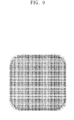
- FIG. 4 illustrates a chroma key image to which a color code is applied according to an embodiment of the invention. That is, the GUI display system 100 applies a color code corresponding to the GUI to the chroma key image, thereby creating the chroma key image colored to correspond to the GUI.
- the GUI display system 100 may successively alter color codes and apply them to the chroma key image.
- the GUI display system 100 may successively alter color codes according to time interval, event, or user's inputs, and apply them to the chroma key image.
- the GUI display system 100 displays GUI images based on the chroma key images to which the successively altered color codes are applied, so that the user can view the GUIs with a variety of visual effects according to colors during operation.
- the GUI display system 100 may provide a GUI with a visual effect, fading from a first color to a second color.
- the GUI display system 100 may seamlessly, successively change from a color code corresponding to the first color to one that corresponds to the second color, in an interval that is imperceptible to the human eye.
- the GUI display system 100 may successively alter color codes corresponding to a first or second color by turns, thereby providing a GUI in a flickering effect.
- the GUI display system 100 After applying a color code to the chroma key image at step 220, the GUI display system 100 combines an effect image corresponding to the GUI with the color code applied chroma key image (230).
- the effect image may corresponds to a state of the GUI, including at least one of a normal state, a pressed state, a selected state, a highlighted state, an active state, and an inactive state.
- the effect image may correspond to at least one of a texture effect or a cubic effect according to shadow.
- the image with an effect may be shaped to correspond to the shape of GUI.
- the effect image is created to represent a normal state of a GUI, and is implemented as a protruded cubic effect in such a way that shadow gradually becomes darker from the edge of the image in the outside direction.
- the normal state refers to a state where the user can control the GUI display system 100 via GUIs.
- the effect image is created to represent a pressed or selected state of a GUI, and is implemented as a depressed cubic effect shown in such a way that the shadow gradually becomes brighter from the edge of the image towards the center direction.
- the pressed or selected state refers to a state where the user presses or selects a GUI.
- the effect image is created to represent a state where a GUI is selected, highlighted, or activated, and is implemented in such a way that the edge of the image is highlighted.
- the selected state or highlighted state refers to a state where a GUI is selected via a user's input.
- the activated state refers to a state where a service, a program or an application corresponding to a GUI is executed via the selection of the GUI, etc.
- the effect image is created to represent a state where a GUI is inactivated, and is implemented in such a way that the entire area of the GUI image is thinly shaded.
- the inactivated state refers to a state where a GUI cannot be selected via a user's input, or a state where a service, program or application corresponding to a GUI cannot be executed.
- the areas without textures or shades in the images of effects as shown in FIGS. 5 to 8 may be transparent so that a color corresponding to a color code of a chroma key image can be shown when the areas are combined with the chroma key image. That is, like the chroma key image, the areas are removed when the GUI image is created.
- the images with effects are stored in the GUI display system 100.
- the GUI display system 100 may download the images from other devices or servers, in data communication, via the applications, software programs, services, etc.
- the GUI display system 100 combines an effect image with a chroma key image in such a way that the effect image layer is placed on the chroma key image layer, thereby creating the GUI image.
- the GUI display system 100 can create a GUI image where an effect image corresponding to a normal state, representing a shadow of a protrudent cubic effect, is combined on a chroma key image to which a black color code is applied.
- the GUI display system 100 can create a GUI image by combining layers of a few effect images according to the states of GUI and the color codes with a layer containing a small amount of the chroma key image, it can prevent the drawbacks associated with wasting the storage space as in the prior art.
- the GUI display system 100 alters effect images and/or color codes applied to a chroma key image in order to represent GUIs according to the states, without loading new GUI images each time as in the prior art when it needs to alter the states of GUIs, thus it can enhance the speed of implementing GUIs.
- the GUI display system 100 When the GUI display system 100 provides visual effects according to colors to a GUI, it can alter corresponding color codes in the created GUI image and display it, without loading all of the GUI images corresponding to the respective colors, thereby efficiently providing a variety of visual effects to the GUI.
- the GUI display system 100 can provide visual effects where the colors of a GUI image corresponding to a normal state are varied according to time elapsing or a user's inputs.
- the GUI display system 100 can successively alter color codes and apply them to a chroma key image configuring a GUI image.
- the GUI display system 100 can create a GUI image, based on a chroma key image to which successively altered color codes are applied, and display it.
- the GUI display system 100 can provide a GUI with a variety of visual effects according to colors, by altering the color codes.
- the GUI display system 100 provides a GUI with visual effects where a first color fades to a second color.
- the GUI display system 100 seamlessly, successively change from a color code that corresponds to the first color to one that corresponds to the second color, in an interval that is imperceptible to the human eye.
- the embodiment may be modified in such a way that the GUI display system 100 first combines an effect image with a chroma key image and then applies color codes to the combined, created image.
- the GUI display system 100 may apply a color code to the chroma key image.
- the GUI display system 100 displays the created GUI image (240).
- the GUI display system 100 can successively alter color codes for the displayed GUI image, and apply them to the chroma key image configuring the GUI image.
- the GUI display system 100 can also display a GUI image based on successively altered color codes, thereby providing it with a variety of visual effects.
- FIG. 11 illustrates a flow chart that describes a method for displaying a GUI corresponding to an input, according to an embodiment of the invention.
- the GUI display system 100 determines whether a user's input applies to a GUI, i.e., a GUI image created and displayed according to the invention (310). Examples of the user's input are a touch input, a proximity input, a hovering input, a press input, etc.
- the user's input serves to alter the states of a GUI. For example, as shown in FIG. 12 , a normal state of a GUI is altered to a pressed state according to a user's input.
- the user's input also alters the state of a GUI and simultaneously executes an application, a software program, or a corresponding service, corresponding to the GUI.
- the GUI display system 100 When the GUI display system 100 ascertains that a user's input applies to a GUI at step 310, it loads the corresponding chroma key image (320).
- the GUI display system 100 determines a GUI corresponding to the user's input. Since the GUI display system 100 stores information regarding GUIs corresponding to various types of inputs respectively, if it detects a user's input to a GUI, it can search for information regarding the GUI according to the detected input. If the GUI display system 100 searches for the GUI information, it can determine the GUI corresponding to the detected input, based on the searched GUI information. In addition, the GUI display system 100 can load a chroma key image for the determined GUI.
- the chroma key may be shaped to correspond to the shape of GUI image. For example, if a GUI image is shaped as a curved rectangle, the chroma key image may be designed in the same shape as the GUI image as shown in FIG. 3 .
- the chroma key image is stored in the GUI display system 100.
- the GUI display system 100 may download chroma key images from other devices or servers, in data communication, via the applications, software programs, services, etc.
- the GUI display system 100 may not perform a process for loading a chroma key image. In that case, the GUI display system 100 may modify a GUI image, based on the same chroma key image as the GUI image that has been displayed.
- the GUI display system 100 After loading a chroma key image at step 320, the GUI display system 100 determines a color code and/or an effect image according to an input (330). For example, if the GUI display system 100 detects an input for altering a normal state of a GUI to a pressed state, it determines an effect image to display an image corresponding to the pressed state. In addition, if the GUI display system 100 detects an input termination for returning a pressed state of a GUI to a normal state, it may alter a color code that corresponds to a first color of the GUI to one that corresponds to a second color.
- the GUI display system 100 After determining a color code and/or an effect image according to an input at step 330, the GUI display system 100 applies the determined color code to a chroma key image (340).
- the color code may be RGB values, a hex code, or a code corresponding to one of the colors of a palette provided by the GUI display system 100.
- the color code may be a code made up of RGB values, e.g., (17, 133, 194), (228, 73, 0), etc.
- the color code may be a hex code, e.g., #415227, #5fa8dc, #383838, etc.
- the GUI display system 100 may apply the determined color code to a chroma key image. If a determined color code corresponds to a black color, the GUI display system 100 applies RGB values (0, 0, 0) or a hex code (#000000) to the chroma key image.
- GUI display system 100 may apply the determined color code to a chroma key image configuring the displayed GUI.
- the GUI display system 100 After applying the color code to the image at step 340, the GUI display system 100 combines the determined effect image with the chroma key image to which the color code is applied (350).
- the effect image may corresponds to a state of the GUI, including at least one of a normal state, a pressed state, a selected state, a highlighted state, an active state, and an inactive state.
- the effect image may correspond to at least one of a texture effect or a cubic effect according to shadow.
- the image with an effect may be shaped corresponding to the shape of GUI.
- the GUI display system 100 combines an effect image with a chroma key image in such a way that the effect image layer is placed on the chroma key image layer, thereby creating the GUI image.
- the GUI display system 100 detects an input for a GUI that has been displayed, it alters the effect image configuring the displayed GUI, via the determined effect image. For example, referring to FIG. 12 , if the GUI display system 100 detects a user's input to a GUI in a normal state that has been displayed, it alters the effect image corresponding to the normal state to that of a pressed state.
- the GUI display system 100 After combining the determined effect image with the chroma key image at step 350, the GUI display system 100 displays the GUI image created according to the input (360).
- the GUI display system 100 varies the effect image according to the state or the color of the GUI image and displays it, thereby providing the GUI with a variety of effects according to the user's input. For example, as shown in FIG. 12 , if the GUI display system 100 detects a user's input pressing the displayed GUI image, it alters the effect image corresponding to the normal state of the GUI to an effect image corresponding to the pressed state. Alternatively, the GUI display system 100 varies the color code of the GUI image, thereby providing a GUI with a visual effect corresponding to the user's input.
- the GUI display system 100 may alter a color code that corresponds to a first color of the displayed GUI to one that corresponds to a second color, thereby providing a GUI with a color fading effect.
- the GUI display system 100 may seamlessly, successively change from a color code that corresponds to the first color to one that corresponds to the second color, in an interval that is imperceptible to the human eye.
- the GUI display system and method according to the invention applies color codes to a chroma key image and combines a few effect images with the chroma key image, thereby providing GUIs with a variety of colors and effects to enhance user experience.
- GUI display system and method according to the invention uses a relatively small amount of image resources to provide a set of GUIs, thereby requiring a relatively small amount of memory, enhancing the speed of implementing GUI, and providing a GUI with a variety of effects.
- the above-described methods according to the present invention can be implemented in hardware, firmware or as software or computer code that can be stored in a recording medium such as a CD ROM, an RAM, a floppy disk, a hard disk, or a magneto-optical disk or computer code downloaded over a network originally stored on a remote recording medium or a non-transitory machine readable medium and to be stored on a local recording medium, so that the methods described herein can be rendered in such software that is stored on the recording medium using a general purpose computer, or a special processor or in programmable or dedicated hardware, such as an ASIC or FPGA.
- a recording medium such as a CD ROM, an RAM, a floppy disk, a hard disk, or a magneto-optical disk or computer code downloaded over a network originally stored on a remote recording medium or a non-transitory machine readable medium and to be stored on a local recording medium, so that the methods described herein can be rendered in such software that is stored on the recording medium using a
- the computer, the processor, microprocessor controller or the programmable hardware include memory components, e.g., RAM, ROM, Flash, etc. that may store or receive software or computer code that when accessed and executed by the computer, processor or hardware implement the processing methods described herein.
- memory components e.g., RAM, ROM, Flash, etc.
- the execution of the code transforms the general purpose computer into a special purpose computer for executing the processing shown herein.
Landscapes
- Engineering & Computer Science (AREA)
- Theoretical Computer Science (AREA)
- General Engineering & Computer Science (AREA)
- Physics & Mathematics (AREA)
- General Physics & Mathematics (AREA)
- Human Computer Interaction (AREA)
- Computer Hardware Design (AREA)
- User Interface Of Digital Computer (AREA)
- Controls And Circuits For Display Device (AREA)
- Digital Computer Display Output (AREA)
Applications Claiming Priority (1)
| Application Number | Priority Date | Filing Date | Title |
|---|---|---|---|
| KR1020120087704A KR101968950B1 (ko) | 2012-08-10 | 2012-08-10 | Gui 표시 방법 및 그 장치 |
Publications (2)
| Publication Number | Publication Date |
|---|---|
| EP2696328A2 true EP2696328A2 (fr) | 2014-02-12 |
| EP2696328A3 EP2696328A3 (fr) | 2017-08-23 |
Family
ID=48951342
Family Applications (1)
| Application Number | Title | Priority Date | Filing Date |
|---|---|---|---|
| EP13179729.2A Ceased EP2696328A3 (fr) | 2012-08-10 | 2013-08-08 | Procédé et système d'affichage d'interface utilisateur graphique |
Country Status (4)
| Country | Link |
|---|---|
| US (1) | US9727200B2 (fr) |
| EP (1) | EP2696328A3 (fr) |
| KR (1) | KR101968950B1 (fr) |
| WO (1) | WO2014025131A1 (fr) |
Cited By (1)
| Publication number | Priority date | Publication date | Assignee | Title |
|---|---|---|---|---|
| WO2018194732A1 (fr) * | 2017-04-18 | 2018-10-25 | Google Llc | Procédés, systèmes et supports destinés à l'extraction de palette de couleurs pour des éléments de contenu vidéo |
Families Citing this family (24)
| Publication number | Priority date | Publication date | Assignee | Title |
|---|---|---|---|---|
| USD628205S1 (en) | 2007-06-23 | 2010-11-30 | Apple Inc. | Graphical user interface for a display screen or portion thereof |
| USD724614S1 (en) * | 2013-03-29 | 2015-03-17 | Qmotion Incorporated | Portion of a display screen with a graphical user interface |
| USD752638S1 (en) * | 2013-06-09 | 2016-03-29 | Apple Inc. | Display screen or portion thereof with animated icon |
| USD726219S1 (en) | 2013-06-09 | 2015-04-07 | Apple Inc. | Display screen or portion thereof with animated graphical user interface |
| US20170083217A1 (en) * | 2014-09-08 | 2017-03-23 | Hewlett Packard Enterprise Development Lp | User interface components load time visualization |
| USD795923S1 (en) * | 2015-06-18 | 2017-08-29 | Samsung Electronics Co., Ltd | Display screen or portion thereof with animated graphical user interface |
| USD842741S1 (en) * | 2015-09-03 | 2019-03-12 | Tomtom International B.V. | Display panel of a digital watch showing time and date |
| KR102076041B1 (ko) * | 2016-10-20 | 2020-02-11 | 렛츠컴바인 주식회사 | 비선형 구조에 대한 버튼 처리 방법 및 시스템 |
| USD873284S1 (en) | 2017-09-09 | 2020-01-21 | Apple Inc. | Electronic device with graphical user interface |
| USD987669S1 (en) | 2017-09-11 | 2023-05-30 | Apple Inc. | Electronic device with graphical user interface |
| USD900830S1 (en) | 2018-09-10 | 2020-11-03 | Apple Inc. | Electronic device with graphical user interface |
| USD962244S1 (en) | 2018-10-28 | 2022-08-30 | Apple Inc. | Electronic device with graphical user interface |
| USD937858S1 (en) | 2019-05-31 | 2021-12-07 | Apple Inc. | Display screen or portion thereof with graphical user interface |
| USD963663S1 (en) * | 2019-11-21 | 2022-09-13 | Monday.com Ltd. | Display screen or portion thereof with animated graphical user interface |
| KR102283494B1 (ko) * | 2019-12-23 | 2021-07-29 | 스노우 주식회사 | 이미지에 왜곡 효과를 적용하기 위한 전자 장치 및 그의 동작 방법 |
| USD937295S1 (en) | 2020-02-03 | 2021-11-30 | Apple Inc. | Display screen or portion thereof with graphical user interface |
| USD956092S1 (en) | 2020-03-30 | 2022-06-28 | Monday.com Ltd. | Display screen or portion thereof with animated graphical user interface |
| USD949185S1 (en) | 2020-06-21 | 2022-04-19 | Apple Inc. | Display screen or portion thereof with graphical user interface |
| USD952661S1 (en) | 2020-10-12 | 2022-05-24 | Apple Inc. | Display screen or portion thereof with animated graphical user interface |
| USD1025092S1 (en) * | 2021-08-12 | 2024-04-30 | Lg Display Co., Ltd. | Display panel with graphical user interface |
| USD1025091S1 (en) * | 2021-08-12 | 2024-04-30 | Lg Display Co., Ltd. | Display panel with graphical user interface |
| USD1030782S1 (en) * | 2021-11-11 | 2024-06-11 | Qualcomm Incorporated | Display system or portion thereof with graphical user interface |
| US11922542B2 (en) | 2022-01-18 | 2024-03-05 | Microsoft Technology Licensing, Llc | Masking and compositing visual effects in user interfaces |
| USD1088006S1 (en) | 2023-12-20 | 2025-08-12 | Apple Inc. | Display screen or portion thereof with graphical user interface |
Family Cites Families (12)
| Publication number | Priority date | Publication date | Assignee | Title |
|---|---|---|---|---|
| JP3297410B2 (ja) | 1999-09-09 | 2002-07-02 | 株式会社ナムコ | 画像生成システム及び情報記憶媒体 |
| JP3754943B2 (ja) * | 2002-08-19 | 2006-03-15 | キヤノン株式会社 | 画像処理方法、装置、記憶媒体及びプログラム |
| EP1463052A1 (fr) * | 2003-03-25 | 2004-09-29 | Deutsche Thomson-Brandt Gmbh | Méthode de présentation des boutons animés |
| US7873916B1 (en) * | 2004-06-22 | 2011-01-18 | Apple Inc. | Color labeling in a graphical user interface |
| KR100843074B1 (ko) * | 2006-03-14 | 2008-07-02 | 삼성전자주식회사 | 복수개의 크로마키 색을 이용한 영상 출력 장치 및 방법 |
| US8004529B2 (en) * | 2007-10-01 | 2011-08-23 | Apple Inc. | Processing an animation file to provide an animated icon |
| US9313160B1 (en) * | 2007-10-30 | 2016-04-12 | Google, Inc. | Systems and methods for a card-based user interface for reading thread-based communications on mobile devices |
| KR101448308B1 (ko) * | 2008-02-04 | 2014-10-08 | 삼성전자주식회사 | 썸네일 이미지 생성 방법 및 장치 |
| US10073708B2 (en) * | 2008-03-14 | 2018-09-11 | S-Printing Solution Co., Ltd | System and method of providing visual indicators to manage peripheral devices |
| CA2680666A1 (fr) * | 2008-10-08 | 2010-04-08 | Research In Motion Limited | Dispositif electronique a ecran tactile conscient |
| KR20100111563A (ko) * | 2009-04-07 | 2010-10-15 | 삼성전자주식회사 | 휴대 단말기의 gui 구성 방법 |
| US20110170008A1 (en) * | 2010-01-13 | 2011-07-14 | Koch Terry W | Chroma-key image animation tool |
-
2012
- 2012-08-10 KR KR1020120087704A patent/KR101968950B1/ko not_active Expired - Fee Related
-
2013
- 2013-06-04 WO PCT/KR2013/004895 patent/WO2014025131A1/fr not_active Ceased
- 2013-06-13 US US13/916,900 patent/US9727200B2/en not_active Expired - Fee Related
- 2013-08-08 EP EP13179729.2A patent/EP2696328A3/fr not_active Ceased
Non-Patent Citations (1)
| Title |
|---|
| None |
Cited By (5)
| Publication number | Priority date | Publication date | Assignee | Title |
|---|---|---|---|---|
| WO2018194732A1 (fr) * | 2017-04-18 | 2018-10-25 | Google Llc | Procédés, systèmes et supports destinés à l'extraction de palette de couleurs pour des éléments de contenu vidéo |
| CN108737851A (zh) * | 2017-04-18 | 2018-11-02 | 谷歌有限责任公司 | 用于针对视频内容项的调色板提取的方法、系统和介质 |
| US10534973B2 (en) | 2017-04-18 | 2020-01-14 | Google Llc | Methods, systems, and media for color palette extraction for video content items |
| CN108737851B (zh) * | 2017-04-18 | 2021-04-06 | 谷歌有限责任公司 | 用于针对视频内容项的调色板提取的方法、系统和介质 |
| EP4030766A1 (fr) * | 2017-04-18 | 2022-07-20 | Google LLC | Procédés, systèmes et média pour l'extraction des palettes de couleur de contenu vidéo |
Also Published As
| Publication number | Publication date |
|---|---|
| WO2014025131A1 (fr) | 2014-02-13 |
| KR101968950B1 (ko) | 2019-04-15 |
| EP2696328A3 (fr) | 2017-08-23 |
| US9727200B2 (en) | 2017-08-08 |
| US20140047362A1 (en) | 2014-02-13 |
| KR20140021346A (ko) | 2014-02-20 |
Similar Documents
| Publication | Publication Date | Title |
|---|---|---|
| US9727200B2 (en) | Method and system for displaying graphic user interface | |
| CN112527431B (zh) | 一种微件处理方法以及相关装置 | |
| US10579205B2 (en) | Edge-based hooking gestures for invoking user interfaces | |
| KR102020345B1 (ko) | 터치스크린을 구비하는 단말에서 홈 화면의 구성 방법 및 장치 | |
| US10168864B2 (en) | Gesture menu | |
| EP1979804B1 (fr) | Méthodes et systèmes permettant d'utiliser des gestes dans des dispositifs de détection | |
| EP3293623B1 (fr) | Dispositif électronique et procédé de commande de dispositif électronique | |
| EP2717149A2 (fr) | Terminal mobile et son procédé de commande | |
| US20140253462A1 (en) | Sync system for storing/restoring stylus customizations | |
| US20140218289A1 (en) | Electronic device with control interface and methods therefor | |
| EP3683666B1 (fr) | Procédé et dispositif terminal d'affichage à bouton à action flottante | |
| EP2799984A2 (fr) | Dispositif électronique et son procédé d'agencement d'icône | |
| US20150378546A1 (en) | Multi-function slide control | |
| CN106775420A (zh) | 一种应用切换的方法、装置和图形用户界面 | |
| CN103955333A (zh) | 一种设备和方法 | |
| KR20140026723A (ko) | 휴대 장치의 가이드 제공 방법 및 그 휴대 장치 | |
| EP2998850B1 (fr) | Dispositif de manipulation d'entrée tactile et procédé associé | |
| US20170255357A1 (en) | Display control device | |
| US20160004406A1 (en) | Electronic device and method of displaying a screen in the electronic device | |
| US10474344B2 (en) | Method, apparatus and recording medium for a scrolling screen | |
| KR20140030378A (ko) | 휴대 장치의 입력 처리 방법 및 그 휴대 장치 | |
| CN103870193A (zh) | 信息处理方法及电子设备 | |
| CN108052254B (zh) | 一种信息处理方法及电子设备 | |
| CN106293351A (zh) | 菜单布局方法及装置 | |
| US20130159934A1 (en) | Changing idle screens |
Legal Events
| Date | Code | Title | Description |
|---|---|---|---|
| AK | Designated contracting states |
Kind code of ref document: A2 Designated state(s): AL AT BE BG CH CY CZ DE DK EE ES FI FR GB GR HR HU IE IS IT LI LT LU LV MC MK MT NL NO PL PT RO RS SE SI SK SM TR |
|
| AX | Request for extension of the european patent |
Extension state: BA ME |
|
| PUAI | Public reference made under article 153(3) epc to a published international application that has entered the european phase |
Free format text: ORIGINAL CODE: 0009012 |
|
| PUAL | Search report despatched |
Free format text: ORIGINAL CODE: 0009013 |
|
| AK | Designated contracting states |
Kind code of ref document: A3 Designated state(s): AL AT BE BG CH CY CZ DE DK EE ES FI FR GB GR HR HU IE IS IT LI LT LU LV MC MK MT NL NO PL PT RO RS SE SI SK SM TR |
|
| AX | Request for extension of the european patent |
Extension state: BA ME |
|
| RIC1 | Information provided on ipc code assigned before grant |
Ipc: G06T 11/00 20060101AFI20170714BHEP |
|
| 17P | Request for examination filed |
Effective date: 20171121 |
|
| RBV | Designated contracting states (corrected) |
Designated state(s): AL AT BE BG CH CY CZ DE DK EE ES FI FR GB GR HR HU IE IS IT LI LT LU LV MC MK MT NL NO PL PT RO RS SE SI SK SM TR |
|
| 17Q | First examination report despatched |
Effective date: 20190604 |
|
| STAA | Information on the status of an ep patent application or granted ep patent |
Free format text: STATUS: THE APPLICATION HAS BEEN REFUSED |
|
| 18R | Application refused |
Effective date: 20200304 |